memory-graph 0.3.61__tar.gz → 0.3.62__tar.gz
This diff represents the content of publicly available package versions that have been released to one of the supported registries. The information contained in this diff is provided for informational purposes only and reflects changes between package versions as they appear in their respective public registries.
- {memory_graph-0.3.61/memory_graph.egg-info → memory_graph-0.3.62}/PKG-INFO +41 -54
- {memory_graph-0.3.61 → memory_graph-0.3.62}/README.md +40 -53
- memory_graph-0.3.62/images/selection_sort.gif +0 -0
- memory_graph-0.3.62/images/sliding_puzzle.png +0 -0
- {memory_graph-0.3.61 → memory_graph-0.3.62}/memory_graph/__init__.py +1 -1
- {memory_graph-0.3.61 → memory_graph-0.3.62}/memory_graph/utils.py +2 -0
- {memory_graph-0.3.61 → memory_graph-0.3.62/memory_graph.egg-info}/PKG-INFO +41 -54
- {memory_graph-0.3.61 → memory_graph-0.3.62}/memory_graph.egg-info/SOURCES.txt +2 -0
- {memory_graph-0.3.61 → memory_graph-0.3.62}/pyproject.toml +1 -1
- {memory_graph-0.3.61 → memory_graph-0.3.62}/LICENSE.txt +0 -0
- {memory_graph-0.3.61 → memory_graph-0.3.62}/MANIFEST.in +0 -0
- {memory_graph-0.3.61 → memory_graph-0.3.62}/images/add_one.png +0 -0
- {memory_graph-0.3.61 → memory_graph-0.3.62}/images/add_one.py +0 -0
- {memory_graph-0.3.61 → memory_graph-0.3.62}/images/avltree.py +0 -0
- {memory_graph-0.3.61 → memory_graph-0.3.62}/images/avltree_dir.png +0 -0
- {memory_graph-0.3.61 → memory_graph-0.3.62}/images/avltree_fail.png +0 -0
- {memory_graph-0.3.61 → memory_graph-0.3.62}/images/avltree_key_value.png +0 -0
- {memory_graph-0.3.61 → memory_graph-0.3.62}/images/avltree_leaf.png +0 -0
- {memory_graph-0.3.61 → memory_graph-0.3.62}/images/avltree_linear.png +0 -0
- {memory_graph-0.3.61 → memory_graph-0.3.62}/images/avltree_table.png +0 -0
- {memory_graph-0.3.61 → memory_graph-0.3.62}/images/bin_search.png +0 -0
- {memory_graph-0.3.61 → memory_graph-0.3.62}/images/bin_search.py +0 -0
- {memory_graph-0.3.61 → memory_graph-0.3.62}/images/bin_search_linear.png +0 -0
- {memory_graph-0.3.61 → memory_graph-0.3.62}/images/bin_tree.gif +0 -0
- {memory_graph-0.3.61 → memory_graph-0.3.62}/images/bin_tree.png +0 -0
- {memory_graph-0.3.61 → memory_graph-0.3.62}/images/bin_tree.py +0 -0
- {memory_graph-0.3.61 → memory_graph-0.3.62}/images/binary.gif +0 -0
- {memory_graph-0.3.61 → memory_graph-0.3.62}/images/binary.py +0 -0
- {memory_graph-0.3.61 → memory_graph-0.3.62}/images/bitwise_operators.png +0 -0
- {memory_graph-0.3.61 → memory_graph-0.3.62}/images/bitwise_operators.py +0 -0
- {memory_graph-0.3.61 → memory_graph-0.3.62}/images/colab_example.png +0 -0
- {memory_graph-0.3.61 → memory_graph-0.3.62}/images/copy_immutable.png +0 -0
- {memory_graph-0.3.61 → memory_graph-0.3.62}/images/copy_immutable.py +0 -0
- {memory_graph-0.3.61 → memory_graph-0.3.62}/images/copy_method.png +0 -0
- {memory_graph-0.3.61 → memory_graph-0.3.62}/images/copy_method.py +0 -0
- {memory_graph-0.3.61 → memory_graph-0.3.62}/images/copy_mix.png +0 -0
- {memory_graph-0.3.61 → memory_graph-0.3.62}/images/copy_mix.py +0 -0
- {memory_graph-0.3.61 → memory_graph-0.3.62}/images/copy_mutable.png +0 -0
- {memory_graph-0.3.61 → memory_graph-0.3.62}/images/copy_mutable.py +0 -0
- {memory_graph-0.3.61 → memory_graph-0.3.62}/images/create_gif.sh +0 -0
- {memory_graph-0.3.61 → memory_graph-0.3.62}/images/create_images.sh +0 -0
- {memory_graph-0.3.61 → memory_graph-0.3.62}/images/debug_vscode.png +0 -0
- {memory_graph-0.3.61 → memory_graph-0.3.62}/images/debugging.gif +0 -0
- {memory_graph-0.3.61 → memory_graph-0.3.62}/images/debugging.py +0 -0
- {memory_graph-0.3.61 → memory_graph-0.3.62}/images/embedded1.png +0 -0
- {memory_graph-0.3.61 → memory_graph-0.3.62}/images/embedded2.png +0 -0
- {memory_graph-0.3.61 → memory_graph-0.3.62}/images/extension_numpy.png +0 -0
- {memory_graph-0.3.61 → memory_graph-0.3.62}/images/extension_numpy.py +0 -0
- {memory_graph-0.3.61 → memory_graph-0.3.62}/images/extension_pandas.png +0 -0
- {memory_graph-0.3.61 → memory_graph-0.3.62}/images/extension_pandas.py +0 -0
- {memory_graph-0.3.61 → memory_graph-0.3.62}/images/extension_torch.png +0 -0
- {memory_graph-0.3.61 → memory_graph-0.3.62}/images/extension_torch.py +0 -0
- {memory_graph-0.3.61 → memory_graph-0.3.62}/images/factorial.gif +0 -0
- {memory_graph-0.3.61 → memory_graph-0.3.62}/images/factorial.py +0 -0
- {memory_graph-0.3.61 → memory_graph-0.3.62}/images/hash_set.gif +0 -0
- {memory_graph-0.3.61 → memory_graph-0.3.62}/images/hash_set.png +0 -0
- {memory_graph-0.3.61 → memory_graph-0.3.62}/images/hash_set.py +0 -0
- {memory_graph-0.3.61 → memory_graph-0.3.62}/images/hidden_edges.png +0 -0
- {memory_graph-0.3.61 → memory_graph-0.3.62}/images/hidden_edges.py +0 -0
- {memory_graph-0.3.61 → memory_graph-0.3.62}/images/immutable.py +0 -0
- {memory_graph-0.3.61 → memory_graph-0.3.62}/images/immutable1.png +0 -0
- {memory_graph-0.3.61 → memory_graph-0.3.62}/images/immutable2.png +0 -0
- {memory_graph-0.3.61 → memory_graph-0.3.62}/images/introspect_depth.png +0 -0
- {memory_graph-0.3.61 → memory_graph-0.3.62}/images/introspect_depth.py +0 -0
- {memory_graph-0.3.61 → memory_graph-0.3.62}/images/ipython.png +0 -0
- {memory_graph-0.3.61 → memory_graph-0.3.62}/images/jupyter_example.png +0 -0
- {memory_graph-0.3.61 → memory_graph-0.3.62}/images/linked_list.gif +0 -0
- {memory_graph-0.3.61 → memory_graph-0.3.62}/images/linked_list.png +0 -0
- {memory_graph-0.3.61 → memory_graph-0.3.62}/images/linked_list.py +0 -0
- {memory_graph-0.3.61 → memory_graph-0.3.62}/images/many_types.png +0 -0
- {memory_graph-0.3.61 → memory_graph-0.3.62}/images/many_types.py +0 -0
- {memory_graph-0.3.61 → memory_graph-0.3.62}/images/marimo_example.png +0 -0
- {memory_graph-0.3.61 → memory_graph-0.3.62}/images/memory_graph_web_debugger.png +0 -0
- {memory_graph-0.3.61 → memory_graph-0.3.62}/images/mutable.py +0 -0
- {memory_graph-0.3.61 → memory_graph-0.3.62}/images/mutable1.png +0 -0
- {memory_graph-0.3.61 → memory_graph-0.3.62}/images/mutable2.png +0 -0
- {memory_graph-0.3.61 → memory_graph-0.3.62}/images/name_rebinding.py +0 -0
- {memory_graph-0.3.61 → memory_graph-0.3.62}/images/not_node_types.py +0 -0
- {memory_graph-0.3.61 → memory_graph-0.3.62}/images/power_set.gif +0 -0
- {memory_graph-0.3.61 → memory_graph-0.3.62}/images/power_set.py +0 -0
- {memory_graph-0.3.61 → memory_graph-0.3.62}/images/rebinding1.png +0 -0
- {memory_graph-0.3.61 → memory_graph-0.3.62}/images/rebinding2.png +0 -0
- {memory_graph-0.3.61 → memory_graph-0.3.62}/images/uva.png +0 -0
- {memory_graph-0.3.61 → memory_graph-0.3.62}/images/vscode_copying.gif +0 -0
- {memory_graph-0.3.61 → memory_graph-0.3.62}/images/wrap_int.png +0 -0
- {memory_graph-0.3.61 → memory_graph-0.3.62}/images/wrap_int.py +0 -0
- {memory_graph-0.3.61 → memory_graph-0.3.62}/memory_graph/call_stack.py +0 -0
- {memory_graph-0.3.61 → memory_graph-0.3.62}/memory_graph/config.py +0 -0
- {memory_graph-0.3.61 → memory_graph-0.3.62}/memory_graph/config_default.py +0 -0
- {memory_graph-0.3.61 → memory_graph-0.3.62}/memory_graph/config_helpers.py +0 -0
- {memory_graph-0.3.61 → memory_graph-0.3.62}/memory_graph/extension_numpy.py +0 -0
- {memory_graph-0.3.61 → memory_graph-0.3.62}/memory_graph/extension_pandas.py +0 -0
- {memory_graph-0.3.61 → memory_graph-0.3.62}/memory_graph/extension_torch.py +0 -0
- {memory_graph-0.3.61 → memory_graph-0.3.62}/memory_graph/html_table.py +0 -0
- {memory_graph-0.3.61 → memory_graph-0.3.62}/memory_graph/list_view.py +0 -0
- {memory_graph-0.3.61 → memory_graph-0.3.62}/memory_graph/memory_to_nodes.py +0 -0
- {memory_graph-0.3.61 → memory_graph-0.3.62}/memory_graph/node_base.py +0 -0
- {memory_graph-0.3.61 → memory_graph-0.3.62}/memory_graph/node_key_value.py +0 -0
- {memory_graph-0.3.61 → memory_graph-0.3.62}/memory_graph/node_leaf.py +0 -0
- {memory_graph-0.3.61 → memory_graph-0.3.62}/memory_graph/node_linear.py +0 -0
- {memory_graph-0.3.61 → memory_graph-0.3.62}/memory_graph/node_table.py +0 -0
- {memory_graph-0.3.61 → memory_graph-0.3.62}/memory_graph/sequence.py +0 -0
- {memory_graph-0.3.61 → memory_graph-0.3.62}/memory_graph/slicer.py +0 -0
- {memory_graph-0.3.61 → memory_graph-0.3.62}/memory_graph/slices.py +0 -0
- {memory_graph-0.3.61 → memory_graph-0.3.62}/memory_graph/slices_iterator.py +0 -0
- {memory_graph-0.3.61 → memory_graph-0.3.62}/memory_graph/slices_table_iterator.py +0 -0
- {memory_graph-0.3.61 → memory_graph-0.3.62}/memory_graph/test.py +0 -0
- {memory_graph-0.3.61 → memory_graph-0.3.62}/memory_graph/test_max_graph_depth.py +0 -0
- {memory_graph-0.3.61 → memory_graph-0.3.62}/memory_graph/test_memory_graph.py +0 -0
- {memory_graph-0.3.61 → memory_graph-0.3.62}/memory_graph/test_memory_to_nodes.py +0 -0
- {memory_graph-0.3.61 → memory_graph-0.3.62}/memory_graph/test_sequence.py +0 -0
- {memory_graph-0.3.61 → memory_graph-0.3.62}/memory_graph/test_slicer.py +0 -0
- {memory_graph-0.3.61 → memory_graph-0.3.62}/memory_graph/test_slices.py +0 -0
- {memory_graph-0.3.61 → memory_graph-0.3.62}/memory_graph/test_slices_iterator.py +0 -0
- {memory_graph-0.3.61 → memory_graph-0.3.62}/memory_graph.egg-info/dependency_links.txt +0 -0
- {memory_graph-0.3.61 → memory_graph-0.3.62}/memory_graph.egg-info/requires.txt +0 -0
- {memory_graph-0.3.61 → memory_graph-0.3.62}/memory_graph.egg-info/top_level.txt +0 -0
- {memory_graph-0.3.61 → memory_graph-0.3.62}/setup.cfg +0 -0
- {memory_graph-0.3.61 → memory_graph-0.3.62}/setup.py +0 -0
|
@@ -1,6 +1,6 @@
|
|
|
1
1
|
Metadata-Version: 2.4
|
|
2
2
|
Name: memory_graph
|
|
3
|
-
Version: 0.3.
|
|
3
|
+
Version: 0.3.62
|
|
4
4
|
Summary: Teaching tool and debugging aid in context of references, mutable data types, and shallow and deep copy.
|
|
5
5
|
Author-email: Bas Terwijn <bterwijn@gmail.com>
|
|
6
6
|
License-Expression: BSD-2-Clause
|
|
@@ -121,6 +121,12 @@ A better way to understand what values are shared is to draw a graph using [memo
|
|
|
121
121
|
|
|
122
122
|
[Data Structure Examples](#data-structure-examples)
|
|
123
123
|
|
|
124
|
+
[Sorting Algorithms](#sorting-algorithms)
|
|
125
|
+
|
|
126
|
+
[Bitwise Operators](#bitwise-operators)
|
|
127
|
+
|
|
128
|
+
[Sliding Puzzle Solver](#sliding-puzzle-solver)
|
|
129
|
+
|
|
124
130
|
[Configuration](#configuration)
|
|
125
131
|
|
|
126
132
|
[Introspection](#introspection)
|
|
@@ -218,7 +224,7 @@ a = [ [1, 2], ['x', 'y'] ] # a nested list (a list containing lists)
|
|
|
218
224
|
|
|
219
225
|
# three different ways to make a "copy" of 'a':
|
|
220
226
|
c1 = a
|
|
221
|
-
c2 = copy.copy(a) # equivalent to: a.copy() a[:] list(a)
|
|
227
|
+
c2 = copy.copy(a) # for list equivalent to: a.copy() a[:] list(a)
|
|
222
228
|
c3 = copy.deepcopy(a)
|
|
223
229
|
|
|
224
230
|
mg.show(locals())
|
|
@@ -261,7 +267,7 @@ mg.show(locals())
|
|
|
261
267
|
Or see it in the [Memory Grah Web Debugger](https://memory-graph.com/#codeurl=https://raw.githubusercontent.com/bterwijn/memory_graph/refs/heads/main/src/custom_copy.py&breakpoints=15&continues=1&play).
|
|
262
268
|
|
|
263
269
|
## Name Rebinding ##
|
|
264
|
-
When `a` and `b` share a mutable value, then changing the value of `b` changes the value of `a` and vice versa. However, reassigning `b` does not change `a`. When you reassign `b`, you only **rebind** the name `b` to another value without affecting any other
|
|
270
|
+
When `a` and `b` share a mutable value, then changing the value of `b` changes the value of `a` and vice versa. However, reassigning `b` does not change `a`. When you reassign `b`, you only **rebind** the name `b` to another value without affecting any other variable.
|
|
265
271
|
|
|
266
272
|
```python
|
|
267
273
|
import memory_graph as mg
|
|
@@ -316,7 +322,7 @@ mg.show(locals())
|
|
|
316
322
|

|
|
317
323
|
|
|
318
324
|
# Call Stack #
|
|
319
|
-
The `mg.stack()` function retrieves the entire call stack, including the local variables for each function on the stack. This enables us to understand function calls, variable scope, and the **complete program state** through call stack visualization. By examining the graph, we can
|
|
325
|
+
The `mg.stack()` function retrieves the entire call stack, including the local variables for each function on the stack. This enables us to understand function calls, variable scope, and the **complete program state** through call stack visualization. By examining the graph, we can see whether local variables from different function calls share data. For instance, consider the function `add_one()` which adds the value `1` to each of its parameters `a`, `b`, and `c`.
|
|
320
326
|
|
|
321
327
|
```python
|
|
322
328
|
import memory_graph as mg
|
|
@@ -342,7 +348,7 @@ In the printed output we see that only `a` is changed as a result of the functio
|
|
|
342
348
|
```
|
|
343
349
|
a:[4, 3, 2, 1] b:(4, 3, 2) c:[4, 3, 2]
|
|
344
350
|
```
|
|
345
|
-
This is because `b` is of immutable type 'tuple' so its value gets copied automatically when it is changed. And because the function is called with a copy of `c`, its original value is not changed by the function. The value of variable `a` is the only value of mutable type that is shared between the root stack frame **'0: \<module>'** and the **'1: add_one'** stack frame of the function so only that variable is affected as a result of the function
|
|
351
|
+
This is because `b` is of immutable type 'tuple' so its value gets copied automatically when it is changed. And because the function is called with a copy of `c`, its original value is not changed by the function. The value of variable `a` is the only value of mutable type that is shared between the root stack frame **'0: \<module>'** and the **'1: add_one'** stack frame of the function call so only that variable is affected as a result of calling the function. The other changes remain confined to the local variables of the ```add_one()``` function.
|
|
346
352
|
|
|
347
353
|
## Function Call That Changes 'int' Value ##
|
|
348
354
|
Even though `int` is an immutable type, so an `int` value can not be changed by directly passing it to a function, we can still change it by wrapping it in a mutable container.
|
|
@@ -371,7 +377,7 @@ The effect of calling `add_one()` is that `b[0]` increases by 1, while `a` is un
|
|
|
371
377
|
|
|
372
378
|
## Exercises ##
|
|
373
379
|
|
|
374
|
-
Now is a good time to practice with
|
|
380
|
+
Now is a good time to practice with Python Data Model concepts. Here are [some exercises](https://github.com/bterwijn/memory_graph_videos/blob/main/exercises/exercises.md) on references, mutability, copies, and function calls.
|
|
375
381
|
|
|
376
382
|
## Block ##
|
|
377
383
|
It is often helpful to temporarily block program execution to inspect the graph. For this we can use the `mg.block()` function:
|
|
@@ -669,6 +675,35 @@ Here we show values being inserted in a HashSet in PyCharm. When inserting the l
|
|
|
669
675
|
|
|
670
676
|
Or see it in the [Memory Grah Web Debugger](https://memory-graph.com/#codeurl=https://raw.githubusercontent.com/bterwijn/memory_graph/refs/heads/main/src/hash_set.py&breakpoints=32&continues=1×tep=0.5&play).
|
|
671
677
|
|
|
678
|
+
|
|
679
|
+
# Sorting Algorithms #
|
|
680
|
+
|
|
681
|
+
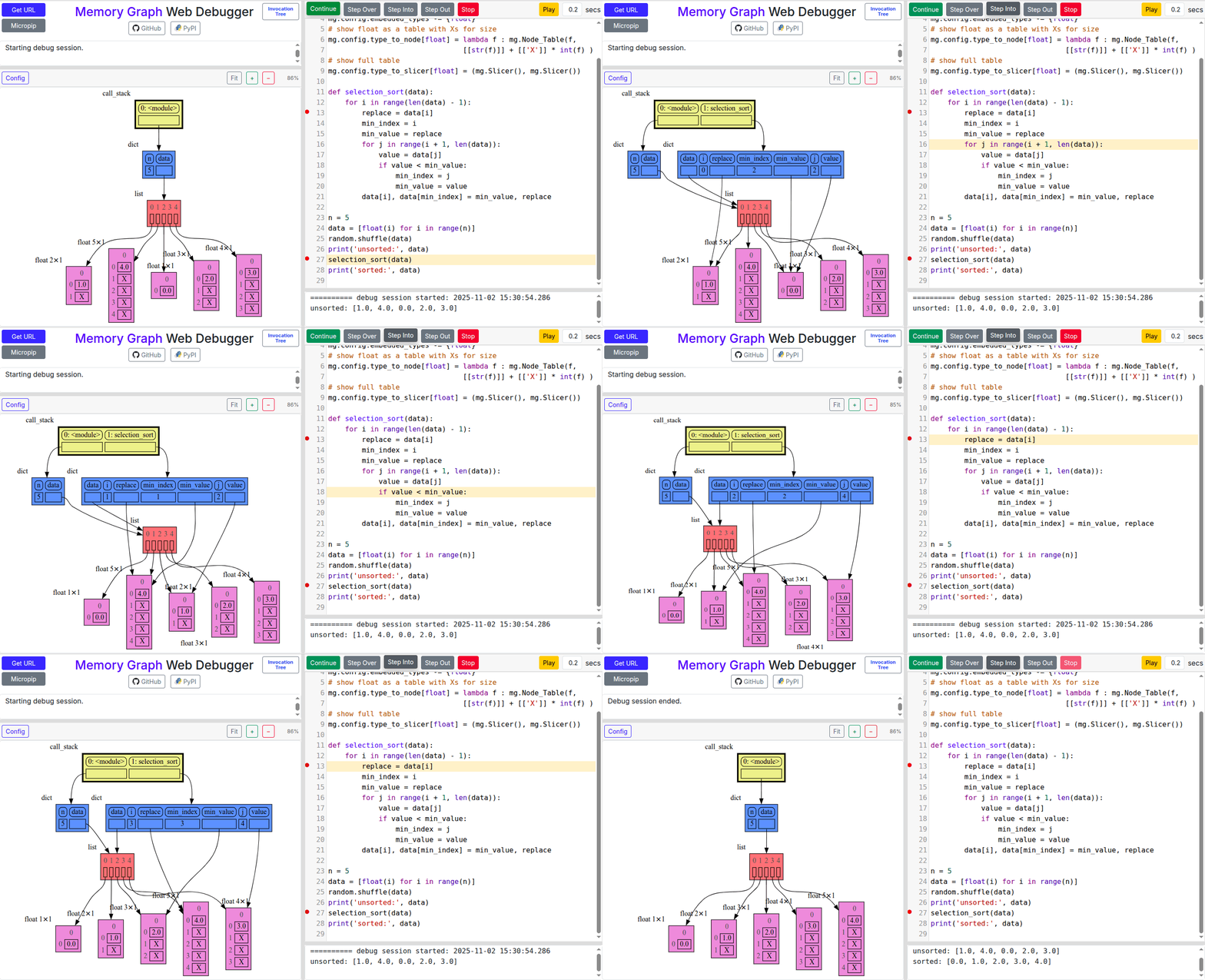
Visualization of different sorting algorithms in Memory Graph Web Debugger.
|
|
682
|
+
|
|
683
|
+
|
|
684
|
+
- [selection sort](https://memory-graph.com/#codeurl=https://raw.githubusercontent.com/bterwijn/memory_graph/refs/heads/main/src/selection_sort.py&breakpoints=13,27&continues=1×tep=0.2&play)
|
|
685
|
+
- [insertion sort](https://memory-graph.com/#codeurl=https://raw.githubusercontent.com/bterwijn/memory_graph/refs/heads/main/src/insertion_sort.py&breakpoints=13,29&continues=1×tep=0.2&play)
|
|
686
|
+
- [bubble sort](https://memory-graph.com/#codeurl=https://raw.githubusercontent.com/bterwijn/memory_graph/refs/heads/main/src/bubble_sort.py&breakpoints=29,38&continues=1×tep=0.2&play)
|
|
687
|
+
- [cocktail shaker sort](https://memory-graph.com/#codeurl=https://raw.githubusercontent.com/bterwijn/memory_graph/refs/heads/main/src/cocktail_sort.py&breakpoints=16,45&continues=1×tep=0.2&play)
|
|
688
|
+
|
|
689
|
+
|
|
690
|
+
# Bitwise Operators #
|
|
691
|
+
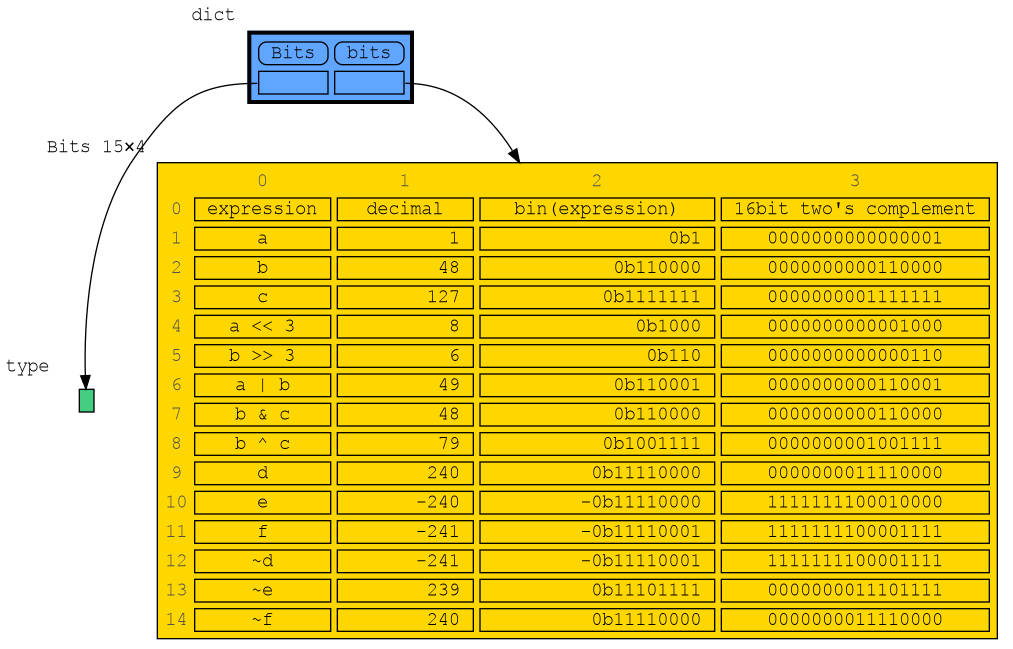
In this configuration example we show the decimal, binary and [two's complement representation](https://www.cs.cornell.edu/~tomf/notes/cps104/twoscomp.html) representation of `int` values of dictionary subclass `Bits` to show the result of [bitwise operators](https://docs.python.org/3/library/stdtypes.html?utm_source=chatgpt.com#bitwise-operations-on-integer-types). The `~` (inverse) operator can be a bit confusing if not shown with two's complement representation.
|
|
692
|
+
|
|
693
|
+
- [bitwise operators](https://memory-graph.com/#codeurl=https://raw.githubusercontent.com/bterwijn/memory_graph/refs/heads/main/src/bitwise_operators.py&breakpoints=22&continues=1&play)
|
|
694
|
+
|
|
695
|
+
|
|
696
|
+
|
|
697
|
+
|
|
698
|
+
# Sliding Puzzle Solver #
|
|
699
|
+
|
|
700
|
+
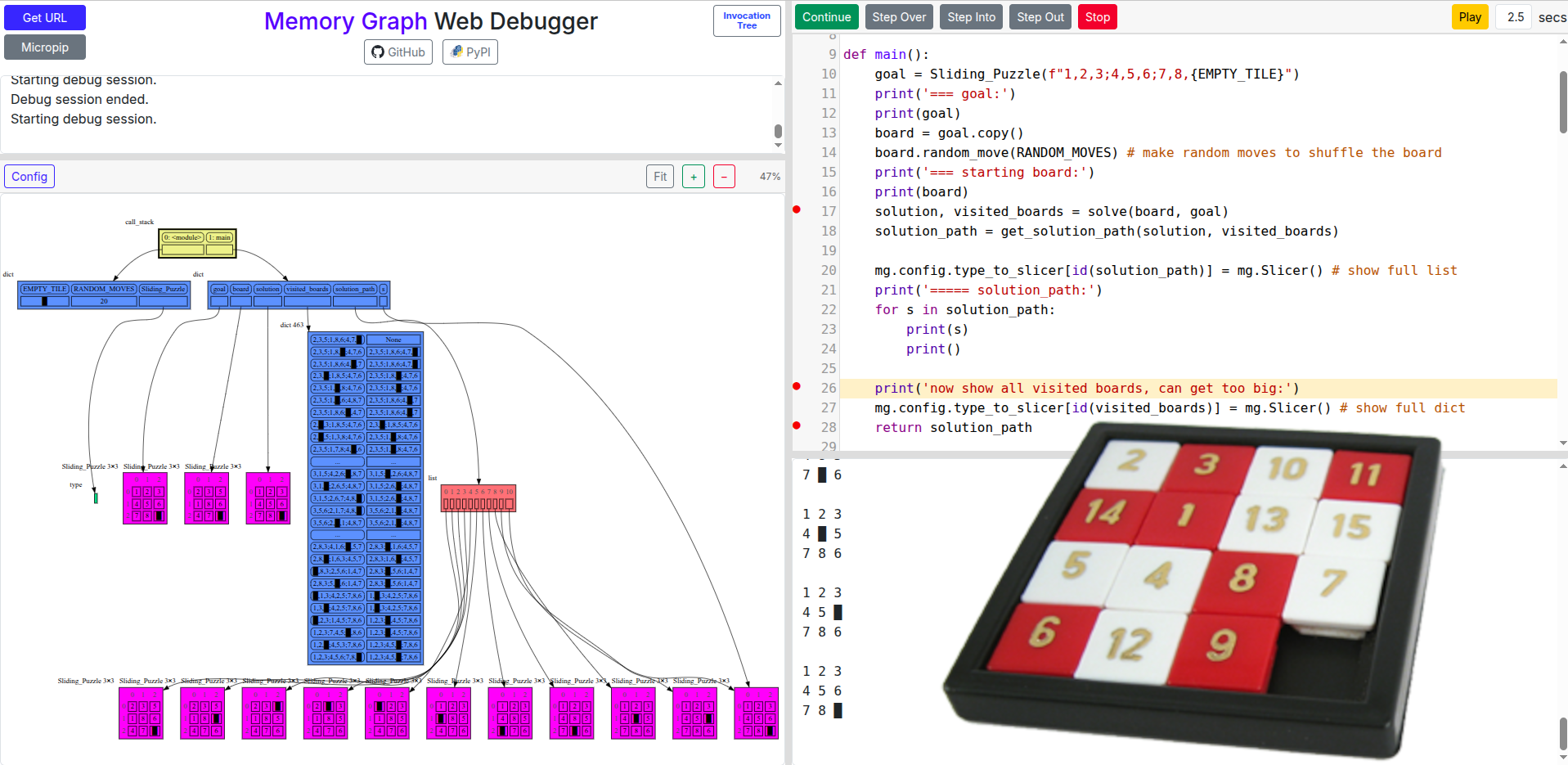
A sliding puzzle solver as a challenging example showing how memory_graph deals with large amounts of data. Click "Continue" to step through the breadth-first search generations until a solution path is found:
|
|
701
|
+
|
|
702
|
+
- [sliding puzzle solver](https://memory-graph.com/#codeurl=https://raw.githubusercontent.com/bterwijn/memory_graph/refs/heads/main/src/sliding_puzzle.py&breakpoints=17,27,29,40&continues=1)
|
|
703
|
+
|
|
704
|
+
|
|
705
|
+
|
|
706
|
+
|
|
672
707
|
# Configuration #
|
|
673
708
|
Different aspects of memory_graph can be configured. The default configuration can be reset by calling 'mg.config_default.reset()'. The Memory Graph Web Debugger gives examples of the [most important configurations](https://memory-graph.com/#codeurl=https://raw.githubusercontent.com/bterwijn/memory_graph/refs/heads/main/src/config.py&play).
|
|
674
709
|
|
|
@@ -940,54 +975,6 @@ mg.config.type_to_node[List_View] = lambda data: mg.Node_Linear(data,
|
|
|
940
975
|
```
|
|
941
976
|

|
|
942
977
|
|
|
943
|
-
## Bitwise Operators ##
|
|
944
|
-
In this configuration example we show the decimal, binary and [two's complement representation](https://www.cs.cornell.edu/~tomf/notes/cps104/twoscomp.html) representation of `int` values of dictionary subclass `Bits` to show the result of [bitwise operators](https://docs.python.org/3/library/stdtypes.html?utm_source=chatgpt.com#bitwise-operations-on-integer-types). The `~` (inverse) operator can be a bit confusing if not shown with two's complement representation.
|
|
945
|
-
|
|
946
|
-
```python
|
|
947
|
-
import memory_graph as mg
|
|
948
|
-
|
|
949
|
-
class Bits(dict):
|
|
950
|
-
""" Dictionary subclass that we will configure to show binary representations. """
|
|
951
|
-
|
|
952
|
-
def twos_complement(x: int, bits: int) -> str:
|
|
953
|
-
"""Return the two's complement bit string of x in `bits` bits."""
|
|
954
|
-
mask = (1 << bits) - 1
|
|
955
|
-
return format(x & mask, f"0{bits}b")
|
|
956
|
-
|
|
957
|
-
# configure memory_graph to show binary representations of values of type Bits
|
|
958
|
-
mg.config.type_to_node[Bits] = lambda x : mg.Node_Table(x,
|
|
959
|
-
[ ["expression", "decimal", "bin(expression)", "16bit two's complement"] ] +
|
|
960
|
-
[ [k, f'{v:>10}', f'{bin(v):>19}', twos_complement(v,16)] for k, v in x.items()] )
|
|
961
|
-
mg.config.type_to_slicer[Bits] = (mg.Slicer(), mg.Slicer()) # no slicing
|
|
962
|
-
mg.config.type_to_color[Bits] = 'gold'
|
|
963
|
-
mg.config.fontname = 'Courier' # monospace font
|
|
964
|
-
|
|
965
|
-
bits = Bits()
|
|
966
|
-
|
|
967
|
-
# now add some some variables and expressions
|
|
968
|
-
bits['a'] = 1
|
|
969
|
-
bits['b'] = 48
|
|
970
|
-
bits['c'] = 127
|
|
971
|
-
bits['a << 3'] = bits['a'] << 3 # bit shift left by 3
|
|
972
|
-
bits['b >> 3'] = bits['b'] >> 3 # bit shift right by 3
|
|
973
|
-
bits['a | b'] = bits['a'] | bits['b'] # bitwise or
|
|
974
|
-
bits['b & c'] = bits['b'] & bits['c'] # bitwise and
|
|
975
|
-
bits['b ^ c'] = bits['b'] ^ bits['c'] # bitwise exclusive or
|
|
976
|
-
|
|
977
|
-
# negative numbers, inverse, and two's complement
|
|
978
|
-
bits['d'] = 240
|
|
979
|
-
bits['e'] = -240
|
|
980
|
-
bits['f'] = -241 # -(d+1)
|
|
981
|
-
bits['~d'] = ~ bits['d'] # inverse -(x+1)
|
|
982
|
-
bits['~e'] = ~ bits['e'] # inverse -(x+1)
|
|
983
|
-
bits['~f'] = ~ bits['f'] # inverse -(x+1)
|
|
984
|
-
|
|
985
|
-
mg.s()
|
|
986
|
-
```
|
|
987
|
-

|
|
988
|
-
|
|
989
|
-
Or see it in the [Memory Grah Web Debugger](https://memory-graph.com/#codeurl=https://raw.githubusercontent.com/bterwijn/memory_graph/refs/heads/main/src/bitwise_operators.py&breakpoints=22&continues=1&play)
|
|
990
|
-
|
|
991
978
|
# Graph Depth #
|
|
992
979
|
To limit the size of the graph the maximum depth of the graph is set by `mg.config.max_graph_depth`. Additionally for each type a depth can be set to further limit the graph, as is done for type `B` in the example below. Scissors indicate where the graph is cut short. Alternatively the `id()` of a data elements can be used to limit the graph for that specific element, as is done for the value referenced by variable `c`.
|
|
993
980
|
|
|
@@ -101,6 +101,12 @@ A better way to understand what values are shared is to draw a graph using [memo
|
|
|
101
101
|
|
|
102
102
|
[Data Structure Examples](#data-structure-examples)
|
|
103
103
|
|
|
104
|
+
[Sorting Algorithms](#sorting-algorithms)
|
|
105
|
+
|
|
106
|
+
[Bitwise Operators](#bitwise-operators)
|
|
107
|
+
|
|
108
|
+
[Sliding Puzzle Solver](#sliding-puzzle-solver)
|
|
109
|
+
|
|
104
110
|
[Configuration](#configuration)
|
|
105
111
|
|
|
106
112
|
[Introspection](#introspection)
|
|
@@ -198,7 +204,7 @@ a = [ [1, 2], ['x', 'y'] ] # a nested list (a list containing lists)
|
|
|
198
204
|
|
|
199
205
|
# three different ways to make a "copy" of 'a':
|
|
200
206
|
c1 = a
|
|
201
|
-
c2 = copy.copy(a) # equivalent to: a.copy() a[:] list(a)
|
|
207
|
+
c2 = copy.copy(a) # for list equivalent to: a.copy() a[:] list(a)
|
|
202
208
|
c3 = copy.deepcopy(a)
|
|
203
209
|
|
|
204
210
|
mg.show(locals())
|
|
@@ -241,7 +247,7 @@ mg.show(locals())
|
|
|
241
247
|
Or see it in the [Memory Grah Web Debugger](https://memory-graph.com/#codeurl=https://raw.githubusercontent.com/bterwijn/memory_graph/refs/heads/main/src/custom_copy.py&breakpoints=15&continues=1&play).
|
|
242
248
|
|
|
243
249
|
## Name Rebinding ##
|
|
244
|
-
When `a` and `b` share a mutable value, then changing the value of `b` changes the value of `a` and vice versa. However, reassigning `b` does not change `a`. When you reassign `b`, you only **rebind** the name `b` to another value without affecting any other
|
|
250
|
+
When `a` and `b` share a mutable value, then changing the value of `b` changes the value of `a` and vice versa. However, reassigning `b` does not change `a`. When you reassign `b`, you only **rebind** the name `b` to another value without affecting any other variable.
|
|
245
251
|
|
|
246
252
|
```python
|
|
247
253
|
import memory_graph as mg
|
|
@@ -296,7 +302,7 @@ mg.show(locals())
|
|
|
296
302
|

|
|
297
303
|
|
|
298
304
|
# Call Stack #
|
|
299
|
-
The `mg.stack()` function retrieves the entire call stack, including the local variables for each function on the stack. This enables us to understand function calls, variable scope, and the **complete program state** through call stack visualization. By examining the graph, we can
|
|
305
|
+
The `mg.stack()` function retrieves the entire call stack, including the local variables for each function on the stack. This enables us to understand function calls, variable scope, and the **complete program state** through call stack visualization. By examining the graph, we can see whether local variables from different function calls share data. For instance, consider the function `add_one()` which adds the value `1` to each of its parameters `a`, `b`, and `c`.
|
|
300
306
|
|
|
301
307
|
```python
|
|
302
308
|
import memory_graph as mg
|
|
@@ -322,7 +328,7 @@ In the printed output we see that only `a` is changed as a result of the functio
|
|
|
322
328
|
```
|
|
323
329
|
a:[4, 3, 2, 1] b:(4, 3, 2) c:[4, 3, 2]
|
|
324
330
|
```
|
|
325
|
-
This is because `b` is of immutable type 'tuple' so its value gets copied automatically when it is changed. And because the function is called with a copy of `c`, its original value is not changed by the function. The value of variable `a` is the only value of mutable type that is shared between the root stack frame **'0: \<module>'** and the **'1: add_one'** stack frame of the function so only that variable is affected as a result of the function
|
|
331
|
+
This is because `b` is of immutable type 'tuple' so its value gets copied automatically when it is changed. And because the function is called with a copy of `c`, its original value is not changed by the function. The value of variable `a` is the only value of mutable type that is shared between the root stack frame **'0: \<module>'** and the **'1: add_one'** stack frame of the function call so only that variable is affected as a result of calling the function. The other changes remain confined to the local variables of the ```add_one()``` function.
|
|
326
332
|
|
|
327
333
|
## Function Call That Changes 'int' Value ##
|
|
328
334
|
Even though `int` is an immutable type, so an `int` value can not be changed by directly passing it to a function, we can still change it by wrapping it in a mutable container.
|
|
@@ -351,7 +357,7 @@ The effect of calling `add_one()` is that `b[0]` increases by 1, while `a` is un
|
|
|
351
357
|
|
|
352
358
|
## Exercises ##
|
|
353
359
|
|
|
354
|
-
Now is a good time to practice with
|
|
360
|
+
Now is a good time to practice with Python Data Model concepts. Here are [some exercises](https://github.com/bterwijn/memory_graph_videos/blob/main/exercises/exercises.md) on references, mutability, copies, and function calls.
|
|
355
361
|
|
|
356
362
|
## Block ##
|
|
357
363
|
It is often helpful to temporarily block program execution to inspect the graph. For this we can use the `mg.block()` function:
|
|
@@ -649,6 +655,35 @@ Here we show values being inserted in a HashSet in PyCharm. When inserting the l
|
|
|
649
655
|
|
|
650
656
|
Or see it in the [Memory Grah Web Debugger](https://memory-graph.com/#codeurl=https://raw.githubusercontent.com/bterwijn/memory_graph/refs/heads/main/src/hash_set.py&breakpoints=32&continues=1×tep=0.5&play).
|
|
651
657
|
|
|
658
|
+
|
|
659
|
+
# Sorting Algorithms #
|
|
660
|
+
|
|
661
|
+
Visualization of different sorting algorithms in Memory Graph Web Debugger.
|
|
662
|
+

|
|
663
|
+
|
|
664
|
+
- [selection sort](https://memory-graph.com/#codeurl=https://raw.githubusercontent.com/bterwijn/memory_graph/refs/heads/main/src/selection_sort.py&breakpoints=13,27&continues=1×tep=0.2&play)
|
|
665
|
+
- [insertion sort](https://memory-graph.com/#codeurl=https://raw.githubusercontent.com/bterwijn/memory_graph/refs/heads/main/src/insertion_sort.py&breakpoints=13,29&continues=1×tep=0.2&play)
|
|
666
|
+
- [bubble sort](https://memory-graph.com/#codeurl=https://raw.githubusercontent.com/bterwijn/memory_graph/refs/heads/main/src/bubble_sort.py&breakpoints=29,38&continues=1×tep=0.2&play)
|
|
667
|
+
- [cocktail shaker sort](https://memory-graph.com/#codeurl=https://raw.githubusercontent.com/bterwijn/memory_graph/refs/heads/main/src/cocktail_sort.py&breakpoints=16,45&continues=1×tep=0.2&play)
|
|
668
|
+
|
|
669
|
+
|
|
670
|
+
# Bitwise Operators #
|
|
671
|
+
In this configuration example we show the decimal, binary and [two's complement representation](https://www.cs.cornell.edu/~tomf/notes/cps104/twoscomp.html) representation of `int` values of dictionary subclass `Bits` to show the result of [bitwise operators](https://docs.python.org/3/library/stdtypes.html?utm_source=chatgpt.com#bitwise-operations-on-integer-types). The `~` (inverse) operator can be a bit confusing if not shown with two's complement representation.
|
|
672
|
+
|
|
673
|
+
- [bitwise operators](https://memory-graph.com/#codeurl=https://raw.githubusercontent.com/bterwijn/memory_graph/refs/heads/main/src/bitwise_operators.py&breakpoints=22&continues=1&play)
|
|
674
|
+
|
|
675
|
+

|
|
676
|
+
|
|
677
|
+
|
|
678
|
+
# Sliding Puzzle Solver #
|
|
679
|
+
|
|
680
|
+
A sliding puzzle solver as a challenging example showing how memory_graph deals with large amounts of data. Click "Continue" to step through the breadth-first search generations until a solution path is found:
|
|
681
|
+
|
|
682
|
+
- [sliding puzzle solver](https://memory-graph.com/#codeurl=https://raw.githubusercontent.com/bterwijn/memory_graph/refs/heads/main/src/sliding_puzzle.py&breakpoints=17,27,29,40&continues=1)
|
|
683
|
+
|
|
684
|
+

|
|
685
|
+
|
|
686
|
+
|
|
652
687
|
# Configuration #
|
|
653
688
|
Different aspects of memory_graph can be configured. The default configuration can be reset by calling 'mg.config_default.reset()'. The Memory Graph Web Debugger gives examples of the [most important configurations](https://memory-graph.com/#codeurl=https://raw.githubusercontent.com/bterwijn/memory_graph/refs/heads/main/src/config.py&play).
|
|
654
689
|
|
|
@@ -920,54 +955,6 @@ mg.config.type_to_node[List_View] = lambda data: mg.Node_Linear(data,
|
|
|
920
955
|
```
|
|
921
956
|

|
|
922
957
|
|
|
923
|
-
## Bitwise Operators ##
|
|
924
|
-
In this configuration example we show the decimal, binary and [two's complement representation](https://www.cs.cornell.edu/~tomf/notes/cps104/twoscomp.html) representation of `int` values of dictionary subclass `Bits` to show the result of [bitwise operators](https://docs.python.org/3/library/stdtypes.html?utm_source=chatgpt.com#bitwise-operations-on-integer-types). The `~` (inverse) operator can be a bit confusing if not shown with two's complement representation.
|
|
925
|
-
|
|
926
|
-
```python
|
|
927
|
-
import memory_graph as mg
|
|
928
|
-
|
|
929
|
-
class Bits(dict):
|
|
930
|
-
""" Dictionary subclass that we will configure to show binary representations. """
|
|
931
|
-
|
|
932
|
-
def twos_complement(x: int, bits: int) -> str:
|
|
933
|
-
"""Return the two's complement bit string of x in `bits` bits."""
|
|
934
|
-
mask = (1 << bits) - 1
|
|
935
|
-
return format(x & mask, f"0{bits}b")
|
|
936
|
-
|
|
937
|
-
# configure memory_graph to show binary representations of values of type Bits
|
|
938
|
-
mg.config.type_to_node[Bits] = lambda x : mg.Node_Table(x,
|
|
939
|
-
[ ["expression", "decimal", "bin(expression)", "16bit two's complement"] ] +
|
|
940
|
-
[ [k, f'{v:>10}', f'{bin(v):>19}', twos_complement(v,16)] for k, v in x.items()] )
|
|
941
|
-
mg.config.type_to_slicer[Bits] = (mg.Slicer(), mg.Slicer()) # no slicing
|
|
942
|
-
mg.config.type_to_color[Bits] = 'gold'
|
|
943
|
-
mg.config.fontname = 'Courier' # monospace font
|
|
944
|
-
|
|
945
|
-
bits = Bits()
|
|
946
|
-
|
|
947
|
-
# now add some some variables and expressions
|
|
948
|
-
bits['a'] = 1
|
|
949
|
-
bits['b'] = 48
|
|
950
|
-
bits['c'] = 127
|
|
951
|
-
bits['a << 3'] = bits['a'] << 3 # bit shift left by 3
|
|
952
|
-
bits['b >> 3'] = bits['b'] >> 3 # bit shift right by 3
|
|
953
|
-
bits['a | b'] = bits['a'] | bits['b'] # bitwise or
|
|
954
|
-
bits['b & c'] = bits['b'] & bits['c'] # bitwise and
|
|
955
|
-
bits['b ^ c'] = bits['b'] ^ bits['c'] # bitwise exclusive or
|
|
956
|
-
|
|
957
|
-
# negative numbers, inverse, and two's complement
|
|
958
|
-
bits['d'] = 240
|
|
959
|
-
bits['e'] = -240
|
|
960
|
-
bits['f'] = -241 # -(d+1)
|
|
961
|
-
bits['~d'] = ~ bits['d'] # inverse -(x+1)
|
|
962
|
-
bits['~e'] = ~ bits['e'] # inverse -(x+1)
|
|
963
|
-
bits['~f'] = ~ bits['f'] # inverse -(x+1)
|
|
964
|
-
|
|
965
|
-
mg.s()
|
|
966
|
-
```
|
|
967
|
-

|
|
968
|
-
|
|
969
|
-
Or see it in the [Memory Grah Web Debugger](https://memory-graph.com/#codeurl=https://raw.githubusercontent.com/bterwijn/memory_graph/refs/heads/main/src/bitwise_operators.py&breakpoints=22&continues=1&play)
|
|
970
|
-
|
|
971
958
|
# Graph Depth #
|
|
972
959
|
To limit the size of the graph the maximum depth of the graph is set by `mg.config.max_graph_depth`. Additionally for each type a depth can be set to further limit the graph, as is done for type `B` in the example below. Scissors indicate where the graph is cut short. Alternatively the `id()` of a data elements can be used to limit the graph for that specific element, as is done for the value referenced by variable `c`.
|
|
973
960
|
|
|
Binary file
|
|
Binary file
|
|
@@ -1,6 +1,6 @@
|
|
|
1
1
|
Metadata-Version: 2.4
|
|
2
2
|
Name: memory_graph
|
|
3
|
-
Version: 0.3.
|
|
3
|
+
Version: 0.3.62
|
|
4
4
|
Summary: Teaching tool and debugging aid in context of references, mutable data types, and shallow and deep copy.
|
|
5
5
|
Author-email: Bas Terwijn <bterwijn@gmail.com>
|
|
6
6
|
License-Expression: BSD-2-Clause
|
|
@@ -121,6 +121,12 @@ A better way to understand what values are shared is to draw a graph using [memo
|
|
|
121
121
|
|
|
122
122
|
[Data Structure Examples](#data-structure-examples)
|
|
123
123
|
|
|
124
|
+
[Sorting Algorithms](#sorting-algorithms)
|
|
125
|
+
|
|
126
|
+
[Bitwise Operators](#bitwise-operators)
|
|
127
|
+
|
|
128
|
+
[Sliding Puzzle Solver](#sliding-puzzle-solver)
|
|
129
|
+
|
|
124
130
|
[Configuration](#configuration)
|
|
125
131
|
|
|
126
132
|
[Introspection](#introspection)
|
|
@@ -218,7 +224,7 @@ a = [ [1, 2], ['x', 'y'] ] # a nested list (a list containing lists)
|
|
|
218
224
|
|
|
219
225
|
# three different ways to make a "copy" of 'a':
|
|
220
226
|
c1 = a
|
|
221
|
-
c2 = copy.copy(a) # equivalent to: a.copy() a[:] list(a)
|
|
227
|
+
c2 = copy.copy(a) # for list equivalent to: a.copy() a[:] list(a)
|
|
222
228
|
c3 = copy.deepcopy(a)
|
|
223
229
|
|
|
224
230
|
mg.show(locals())
|
|
@@ -261,7 +267,7 @@ mg.show(locals())
|
|
|
261
267
|
Or see it in the [Memory Grah Web Debugger](https://memory-graph.com/#codeurl=https://raw.githubusercontent.com/bterwijn/memory_graph/refs/heads/main/src/custom_copy.py&breakpoints=15&continues=1&play).
|
|
262
268
|
|
|
263
269
|
## Name Rebinding ##
|
|
264
|
-
When `a` and `b` share a mutable value, then changing the value of `b` changes the value of `a` and vice versa. However, reassigning `b` does not change `a`. When you reassign `b`, you only **rebind** the name `b` to another value without affecting any other
|
|
270
|
+
When `a` and `b` share a mutable value, then changing the value of `b` changes the value of `a` and vice versa. However, reassigning `b` does not change `a`. When you reassign `b`, you only **rebind** the name `b` to another value without affecting any other variable.
|
|
265
271
|
|
|
266
272
|
```python
|
|
267
273
|
import memory_graph as mg
|
|
@@ -316,7 +322,7 @@ mg.show(locals())
|
|
|
316
322
|

|
|
317
323
|
|
|
318
324
|
# Call Stack #
|
|
319
|
-
The `mg.stack()` function retrieves the entire call stack, including the local variables for each function on the stack. This enables us to understand function calls, variable scope, and the **complete program state** through call stack visualization. By examining the graph, we can
|
|
325
|
+
The `mg.stack()` function retrieves the entire call stack, including the local variables for each function on the stack. This enables us to understand function calls, variable scope, and the **complete program state** through call stack visualization. By examining the graph, we can see whether local variables from different function calls share data. For instance, consider the function `add_one()` which adds the value `1` to each of its parameters `a`, `b`, and `c`.
|
|
320
326
|
|
|
321
327
|
```python
|
|
322
328
|
import memory_graph as mg
|
|
@@ -342,7 +348,7 @@ In the printed output we see that only `a` is changed as a result of the functio
|
|
|
342
348
|
```
|
|
343
349
|
a:[4, 3, 2, 1] b:(4, 3, 2) c:[4, 3, 2]
|
|
344
350
|
```
|
|
345
|
-
This is because `b` is of immutable type 'tuple' so its value gets copied automatically when it is changed. And because the function is called with a copy of `c`, its original value is not changed by the function. The value of variable `a` is the only value of mutable type that is shared between the root stack frame **'0: \<module>'** and the **'1: add_one'** stack frame of the function so only that variable is affected as a result of the function
|
|
351
|
+
This is because `b` is of immutable type 'tuple' so its value gets copied automatically when it is changed. And because the function is called with a copy of `c`, its original value is not changed by the function. The value of variable `a` is the only value of mutable type that is shared between the root stack frame **'0: \<module>'** and the **'1: add_one'** stack frame of the function call so only that variable is affected as a result of calling the function. The other changes remain confined to the local variables of the ```add_one()``` function.
|
|
346
352
|
|
|
347
353
|
## Function Call That Changes 'int' Value ##
|
|
348
354
|
Even though `int` is an immutable type, so an `int` value can not be changed by directly passing it to a function, we can still change it by wrapping it in a mutable container.
|
|
@@ -371,7 +377,7 @@ The effect of calling `add_one()` is that `b[0]` increases by 1, while `a` is un
|
|
|
371
377
|
|
|
372
378
|
## Exercises ##
|
|
373
379
|
|
|
374
|
-
Now is a good time to practice with
|
|
380
|
+
Now is a good time to practice with Python Data Model concepts. Here are [some exercises](https://github.com/bterwijn/memory_graph_videos/blob/main/exercises/exercises.md) on references, mutability, copies, and function calls.
|
|
375
381
|
|
|
376
382
|
## Block ##
|
|
377
383
|
It is often helpful to temporarily block program execution to inspect the graph. For this we can use the `mg.block()` function:
|
|
@@ -669,6 +675,35 @@ Here we show values being inserted in a HashSet in PyCharm. When inserting the l
|
|
|
669
675
|
|
|
670
676
|
Or see it in the [Memory Grah Web Debugger](https://memory-graph.com/#codeurl=https://raw.githubusercontent.com/bterwijn/memory_graph/refs/heads/main/src/hash_set.py&breakpoints=32&continues=1×tep=0.5&play).
|
|
671
677
|
|
|
678
|
+
|
|
679
|
+
# Sorting Algorithms #
|
|
680
|
+
|
|
681
|
+
Visualization of different sorting algorithms in Memory Graph Web Debugger.
|
|
682
|
+

|
|
683
|
+
|
|
684
|
+
- [selection sort](https://memory-graph.com/#codeurl=https://raw.githubusercontent.com/bterwijn/memory_graph/refs/heads/main/src/selection_sort.py&breakpoints=13,27&continues=1×tep=0.2&play)
|
|
685
|
+
- [insertion sort](https://memory-graph.com/#codeurl=https://raw.githubusercontent.com/bterwijn/memory_graph/refs/heads/main/src/insertion_sort.py&breakpoints=13,29&continues=1×tep=0.2&play)
|
|
686
|
+
- [bubble sort](https://memory-graph.com/#codeurl=https://raw.githubusercontent.com/bterwijn/memory_graph/refs/heads/main/src/bubble_sort.py&breakpoints=29,38&continues=1×tep=0.2&play)
|
|
687
|
+
- [cocktail shaker sort](https://memory-graph.com/#codeurl=https://raw.githubusercontent.com/bterwijn/memory_graph/refs/heads/main/src/cocktail_sort.py&breakpoints=16,45&continues=1×tep=0.2&play)
|
|
688
|
+
|
|
689
|
+
|
|
690
|
+
# Bitwise Operators #
|
|
691
|
+
In this configuration example we show the decimal, binary and [two's complement representation](https://www.cs.cornell.edu/~tomf/notes/cps104/twoscomp.html) representation of `int` values of dictionary subclass `Bits` to show the result of [bitwise operators](https://docs.python.org/3/library/stdtypes.html?utm_source=chatgpt.com#bitwise-operations-on-integer-types). The `~` (inverse) operator can be a bit confusing if not shown with two's complement representation.
|
|
692
|
+
|
|
693
|
+
- [bitwise operators](https://memory-graph.com/#codeurl=https://raw.githubusercontent.com/bterwijn/memory_graph/refs/heads/main/src/bitwise_operators.py&breakpoints=22&continues=1&play)
|
|
694
|
+
|
|
695
|
+

|
|
696
|
+
|
|
697
|
+
|
|
698
|
+
# Sliding Puzzle Solver #
|
|
699
|
+
|
|
700
|
+
A sliding puzzle solver as a challenging example showing how memory_graph deals with large amounts of data. Click "Continue" to step through the breadth-first search generations until a solution path is found:
|
|
701
|
+
|
|
702
|
+
- [sliding puzzle solver](https://memory-graph.com/#codeurl=https://raw.githubusercontent.com/bterwijn/memory_graph/refs/heads/main/src/sliding_puzzle.py&breakpoints=17,27,29,40&continues=1)
|
|
703
|
+
|
|
704
|
+

|
|
705
|
+
|
|
706
|
+
|
|
672
707
|
# Configuration #
|
|
673
708
|
Different aspects of memory_graph can be configured. The default configuration can be reset by calling 'mg.config_default.reset()'. The Memory Graph Web Debugger gives examples of the [most important configurations](https://memory-graph.com/#codeurl=https://raw.githubusercontent.com/bterwijn/memory_graph/refs/heads/main/src/config.py&play).
|
|
674
709
|
|
|
@@ -940,54 +975,6 @@ mg.config.type_to_node[List_View] = lambda data: mg.Node_Linear(data,
|
|
|
940
975
|
```
|
|
941
976
|

|
|
942
977
|
|
|
943
|
-
## Bitwise Operators ##
|
|
944
|
-
In this configuration example we show the decimal, binary and [two's complement representation](https://www.cs.cornell.edu/~tomf/notes/cps104/twoscomp.html) representation of `int` values of dictionary subclass `Bits` to show the result of [bitwise operators](https://docs.python.org/3/library/stdtypes.html?utm_source=chatgpt.com#bitwise-operations-on-integer-types). The `~` (inverse) operator can be a bit confusing if not shown with two's complement representation.
|
|
945
|
-
|
|
946
|
-
```python
|
|
947
|
-
import memory_graph as mg
|
|
948
|
-
|
|
949
|
-
class Bits(dict):
|
|
950
|
-
""" Dictionary subclass that we will configure to show binary representations. """
|
|
951
|
-
|
|
952
|
-
def twos_complement(x: int, bits: int) -> str:
|
|
953
|
-
"""Return the two's complement bit string of x in `bits` bits."""
|
|
954
|
-
mask = (1 << bits) - 1
|
|
955
|
-
return format(x & mask, f"0{bits}b")
|
|
956
|
-
|
|
957
|
-
# configure memory_graph to show binary representations of values of type Bits
|
|
958
|
-
mg.config.type_to_node[Bits] = lambda x : mg.Node_Table(x,
|
|
959
|
-
[ ["expression", "decimal", "bin(expression)", "16bit two's complement"] ] +
|
|
960
|
-
[ [k, f'{v:>10}', f'{bin(v):>19}', twos_complement(v,16)] for k, v in x.items()] )
|
|
961
|
-
mg.config.type_to_slicer[Bits] = (mg.Slicer(), mg.Slicer()) # no slicing
|
|
962
|
-
mg.config.type_to_color[Bits] = 'gold'
|
|
963
|
-
mg.config.fontname = 'Courier' # monospace font
|
|
964
|
-
|
|
965
|
-
bits = Bits()
|
|
966
|
-
|
|
967
|
-
# now add some some variables and expressions
|
|
968
|
-
bits['a'] = 1
|
|
969
|
-
bits['b'] = 48
|
|
970
|
-
bits['c'] = 127
|
|
971
|
-
bits['a << 3'] = bits['a'] << 3 # bit shift left by 3
|
|
972
|
-
bits['b >> 3'] = bits['b'] >> 3 # bit shift right by 3
|
|
973
|
-
bits['a | b'] = bits['a'] | bits['b'] # bitwise or
|
|
974
|
-
bits['b & c'] = bits['b'] & bits['c'] # bitwise and
|
|
975
|
-
bits['b ^ c'] = bits['b'] ^ bits['c'] # bitwise exclusive or
|
|
976
|
-
|
|
977
|
-
# negative numbers, inverse, and two's complement
|
|
978
|
-
bits['d'] = 240
|
|
979
|
-
bits['e'] = -240
|
|
980
|
-
bits['f'] = -241 # -(d+1)
|
|
981
|
-
bits['~d'] = ~ bits['d'] # inverse -(x+1)
|
|
982
|
-
bits['~e'] = ~ bits['e'] # inverse -(x+1)
|
|
983
|
-
bits['~f'] = ~ bits['f'] # inverse -(x+1)
|
|
984
|
-
|
|
985
|
-
mg.s()
|
|
986
|
-
```
|
|
987
|
-

|
|
988
|
-
|
|
989
|
-
Or see it in the [Memory Grah Web Debugger](https://memory-graph.com/#codeurl=https://raw.githubusercontent.com/bterwijn/memory_graph/refs/heads/main/src/bitwise_operators.py&breakpoints=22&continues=1&play)
|
|
990
|
-
|
|
991
978
|
# Graph Depth #
|
|
992
979
|
To limit the size of the graph the maximum depth of the graph is set by `mg.config.max_graph_depth`. Additionally for each type a depth can be set to further limit the graph, as is done for type `B` in the example below. Scissors indicate where the graph is cut short. Alternatively the `id()` of a data elements can be used to limit the graph for that specific element, as is done for the value referenced by variable `c`.
|
|
993
980
|
|
|
@@ -4,7 +4,7 @@ build-backend = "setuptools.build_meta"
|
|
|
4
4
|
|
|
5
5
|
[project]
|
|
6
6
|
name = "memory_graph"
|
|
7
|
-
version = "0.3.
|
|
7
|
+
version = "0.3.62"
|
|
8
8
|
description = "Teaching tool and debugging aid in context of references, mutable data types, and shallow and deep copy."
|
|
9
9
|
authors = [
|
|
10
10
|
{name = "Bas Terwijn", email = "bterwijn@gmail.com"}
|
|
File without changes
|
|
File without changes
|
|
File without changes
|
|
File without changes
|
|
File without changes
|
|
File without changes
|
|
File without changes
|
|
File without changes
|
|
File without changes
|
|
File without changes
|
|
File without changes
|
|
File without changes
|
|
File without changes
|
|
File without changes
|
|
File without changes
|
|
File without changes
|
|
File without changes
|
|
File without changes
|
|
File without changes
|
|
File without changes
|
|
File without changes
|
|
File without changes
|
|
File without changes
|
|
File without changes
|
|
File without changes
|
|
File without changes
|
|
File without changes
|
|
File without changes
|
|
File without changes
|
|
File without changes
|
|
File without changes
|
|
File without changes
|
|
File without changes
|
|
File without changes
|
|
File without changes
|
|
File without changes
|
|
File without changes
|
|
File without changes
|
|
File without changes
|
|
File without changes
|
|
File without changes
|
|
File without changes
|
|
File without changes
|
|
File without changes
|
|
File without changes
|
|
File without changes
|
|
File without changes
|
|
File without changes
|
|
File without changes
|
|
File without changes
|
|
File without changes
|
|
File without changes
|
|
File without changes
|
|
File without changes
|
|
File without changes
|
|
File without changes
|
|
File without changes
|
|
File without changes
|
|
File without changes
|
|
File without changes
|
|
File without changes
|
|
File without changes
|
|
File without changes
|
|
File without changes
|
|
File without changes
|
|
File without changes
|
|
File without changes
|
|
File without changes
|
|
File without changes
|
|
File without changes
|
|
File without changes
|
|
File without changes
|
|
File without changes
|
|
File without changes
|
|
File without changes
|
|
File without changes
|
|
File without changes
|
|
File without changes
|
|
File without changes
|
|
File without changes
|
|
File without changes
|
|
File without changes
|
|
File without changes
|
|
File without changes
|
|
File without changes
|
|
File without changes
|
|
File without changes
|
|
File without changes
|
|
File without changes
|
|
File without changes
|
|
File without changes
|
|
File without changes
|
|
File without changes
|
|
File without changes
|
|
File without changes
|
|
File without changes
|
|
File without changes
|
|
File without changes
|
|
File without changes
|
|
File without changes
|
|
File without changes
|
|
File without changes
|
|
File without changes
|
|
File without changes
|
|
File without changes
|
|
File without changes
|
|
File without changes
|
|
File without changes
|
|
File without changes
|
|
File without changes
|