memory-graph 0.3.59__tar.gz → 0.3.60__tar.gz
This diff represents the content of publicly available package versions that have been released to one of the supported registries. The information contained in this diff is provided for informational purposes only and reflects changes between package versions as they appear in their respective public registries.
- {memory_graph-0.3.59/memory_graph.egg-info → memory_graph-0.3.60}/PKG-INFO +71 -12
- {memory_graph-0.3.59 → memory_graph-0.3.60}/README.md +70 -11
- memory_graph-0.3.60/images/bitwise_operators.png +0 -0
- memory_graph-0.3.60/images/bitwise_operators.py +39 -0
- {memory_graph-0.3.59 → memory_graph-0.3.60}/images/create_images.sh +1 -0
- memory_graph-0.3.60/images/embedded2.png +0 -0
- {memory_graph-0.3.59 → memory_graph-0.3.60}/memory_graph/__init__.py +1 -1
- {memory_graph-0.3.59 → memory_graph-0.3.60}/memory_graph/config_default.py +1 -1
- {memory_graph-0.3.59 → memory_graph-0.3.60}/memory_graph/sequence.py +7 -2
- {memory_graph-0.3.59 → memory_graph-0.3.60}/memory_graph/slices_table_iterator.py +1 -0
- {memory_graph-0.3.59 → memory_graph-0.3.60/memory_graph.egg-info}/PKG-INFO +71 -12
- {memory_graph-0.3.59 → memory_graph-0.3.60}/memory_graph.egg-info/SOURCES.txt +2 -0
- {memory_graph-0.3.59 → memory_graph-0.3.60}/pyproject.toml +1 -1
- memory_graph-0.3.59/images/embedded2.png +0 -0
- {memory_graph-0.3.59 → memory_graph-0.3.60}/LICENSE.txt +0 -0
- {memory_graph-0.3.59 → memory_graph-0.3.60}/MANIFEST.in +0 -0
- {memory_graph-0.3.59 → memory_graph-0.3.60}/images/add_one.png +0 -0
- {memory_graph-0.3.59 → memory_graph-0.3.60}/images/add_one.py +0 -0
- {memory_graph-0.3.59 → memory_graph-0.3.60}/images/avltree.py +0 -0
- {memory_graph-0.3.59 → memory_graph-0.3.60}/images/avltree_dir.png +0 -0
- {memory_graph-0.3.59 → memory_graph-0.3.60}/images/avltree_fail.png +0 -0
- {memory_graph-0.3.59 → memory_graph-0.3.60}/images/avltree_key_value.png +0 -0
- {memory_graph-0.3.59 → memory_graph-0.3.60}/images/avltree_leaf.png +0 -0
- {memory_graph-0.3.59 → memory_graph-0.3.60}/images/avltree_linear.png +0 -0
- {memory_graph-0.3.59 → memory_graph-0.3.60}/images/avltree_table.png +0 -0
- {memory_graph-0.3.59 → memory_graph-0.3.60}/images/bin_search.png +0 -0
- {memory_graph-0.3.59 → memory_graph-0.3.60}/images/bin_search.py +0 -0
- {memory_graph-0.3.59 → memory_graph-0.3.60}/images/bin_search_linear.png +0 -0
- {memory_graph-0.3.59 → memory_graph-0.3.60}/images/bin_tree.gif +0 -0
- {memory_graph-0.3.59 → memory_graph-0.3.60}/images/bin_tree.png +0 -0
- {memory_graph-0.3.59 → memory_graph-0.3.60}/images/bin_tree.py +0 -0
- {memory_graph-0.3.59 → memory_graph-0.3.60}/images/binary.gif +0 -0
- {memory_graph-0.3.59 → memory_graph-0.3.60}/images/binary.py +0 -0
- {memory_graph-0.3.59 → memory_graph-0.3.60}/images/colab_example.png +0 -0
- {memory_graph-0.3.59 → memory_graph-0.3.60}/images/copy_immutable.png +0 -0
- {memory_graph-0.3.59 → memory_graph-0.3.60}/images/copy_immutable.py +0 -0
- {memory_graph-0.3.59 → memory_graph-0.3.60}/images/copy_method.png +0 -0
- {memory_graph-0.3.59 → memory_graph-0.3.60}/images/copy_method.py +0 -0
- {memory_graph-0.3.59 → memory_graph-0.3.60}/images/copy_mix.png +0 -0
- {memory_graph-0.3.59 → memory_graph-0.3.60}/images/copy_mix.py +0 -0
- {memory_graph-0.3.59 → memory_graph-0.3.60}/images/copy_mutable.png +0 -0
- {memory_graph-0.3.59 → memory_graph-0.3.60}/images/copy_mutable.py +0 -0
- {memory_graph-0.3.59 → memory_graph-0.3.60}/images/create_gif.sh +0 -0
- {memory_graph-0.3.59 → memory_graph-0.3.60}/images/debug_vscode.png +0 -0
- {memory_graph-0.3.59 → memory_graph-0.3.60}/images/debugging.gif +0 -0
- {memory_graph-0.3.59 → memory_graph-0.3.60}/images/debugging.py +0 -0
- {memory_graph-0.3.59 → memory_graph-0.3.60}/images/embedded1.png +0 -0
- {memory_graph-0.3.59 → memory_graph-0.3.60}/images/extension_numpy.png +0 -0
- {memory_graph-0.3.59 → memory_graph-0.3.60}/images/extension_numpy.py +0 -0
- {memory_graph-0.3.59 → memory_graph-0.3.60}/images/extension_pandas.png +0 -0
- {memory_graph-0.3.59 → memory_graph-0.3.60}/images/extension_pandas.py +0 -0
- {memory_graph-0.3.59 → memory_graph-0.3.60}/images/extension_torch.png +0 -0
- {memory_graph-0.3.59 → memory_graph-0.3.60}/images/extension_torch.py +0 -0
- {memory_graph-0.3.59 → memory_graph-0.3.60}/images/factorial.gif +0 -0
- {memory_graph-0.3.59 → memory_graph-0.3.60}/images/factorial.py +0 -0
- {memory_graph-0.3.59 → memory_graph-0.3.60}/images/hash_set.gif +0 -0
- {memory_graph-0.3.59 → memory_graph-0.3.60}/images/hash_set.png +0 -0
- {memory_graph-0.3.59 → memory_graph-0.3.60}/images/hash_set.py +0 -0
- {memory_graph-0.3.59 → memory_graph-0.3.60}/images/hidden_edges.png +0 -0
- {memory_graph-0.3.59 → memory_graph-0.3.60}/images/hidden_edges.py +0 -0
- {memory_graph-0.3.59 → memory_graph-0.3.60}/images/immutable.py +0 -0
- {memory_graph-0.3.59 → memory_graph-0.3.60}/images/immutable1.png +0 -0
- {memory_graph-0.3.59 → memory_graph-0.3.60}/images/immutable2.png +0 -0
- {memory_graph-0.3.59 → memory_graph-0.3.60}/images/introspect_depth.png +0 -0
- {memory_graph-0.3.59 → memory_graph-0.3.60}/images/introspect_depth.py +0 -0
- {memory_graph-0.3.59 → memory_graph-0.3.60}/images/ipython.png +0 -0
- {memory_graph-0.3.59 → memory_graph-0.3.60}/images/jupyter_example.png +0 -0
- {memory_graph-0.3.59 → memory_graph-0.3.60}/images/linked_list.gif +0 -0
- {memory_graph-0.3.59 → memory_graph-0.3.60}/images/linked_list.png +0 -0
- {memory_graph-0.3.59 → memory_graph-0.3.60}/images/linked_list.py +0 -0
- {memory_graph-0.3.59 → memory_graph-0.3.60}/images/many_types.png +0 -0
- {memory_graph-0.3.59 → memory_graph-0.3.60}/images/many_types.py +0 -0
- {memory_graph-0.3.59 → memory_graph-0.3.60}/images/marimo_example.png +0 -0
- {memory_graph-0.3.59 → memory_graph-0.3.60}/images/memory_graph_web_debugger.png +0 -0
- {memory_graph-0.3.59 → memory_graph-0.3.60}/images/mutable.py +0 -0
- {memory_graph-0.3.59 → memory_graph-0.3.60}/images/mutable1.png +0 -0
- {memory_graph-0.3.59 → memory_graph-0.3.60}/images/mutable2.png +0 -0
- {memory_graph-0.3.59 → memory_graph-0.3.60}/images/name_rebinding.py +0 -0
- {memory_graph-0.3.59 → memory_graph-0.3.60}/images/not_node_types.py +0 -0
- {memory_graph-0.3.59 → memory_graph-0.3.60}/images/power_set.gif +0 -0
- {memory_graph-0.3.59 → memory_graph-0.3.60}/images/power_set.py +0 -0
- {memory_graph-0.3.59 → memory_graph-0.3.60}/images/rebinding1.png +0 -0
- {memory_graph-0.3.59 → memory_graph-0.3.60}/images/rebinding2.png +0 -0
- {memory_graph-0.3.59 → memory_graph-0.3.60}/images/uva.png +0 -0
- {memory_graph-0.3.59 → memory_graph-0.3.60}/images/vscode_copying.gif +0 -0
- {memory_graph-0.3.59 → memory_graph-0.3.60}/images/wrap_int.png +0 -0
- {memory_graph-0.3.59 → memory_graph-0.3.60}/images/wrap_int.py +0 -0
- {memory_graph-0.3.59 → memory_graph-0.3.60}/memory_graph/call_stack.py +0 -0
- {memory_graph-0.3.59 → memory_graph-0.3.60}/memory_graph/config.py +0 -0
- {memory_graph-0.3.59 → memory_graph-0.3.60}/memory_graph/config_helpers.py +0 -0
- {memory_graph-0.3.59 → memory_graph-0.3.60}/memory_graph/extension_numpy.py +0 -0
- {memory_graph-0.3.59 → memory_graph-0.3.60}/memory_graph/extension_pandas.py +0 -0
- {memory_graph-0.3.59 → memory_graph-0.3.60}/memory_graph/extension_torch.py +0 -0
- {memory_graph-0.3.59 → memory_graph-0.3.60}/memory_graph/html_table.py +0 -0
- {memory_graph-0.3.59 → memory_graph-0.3.60}/memory_graph/list_view.py +0 -0
- {memory_graph-0.3.59 → memory_graph-0.3.60}/memory_graph/memory_to_nodes.py +0 -0
- {memory_graph-0.3.59 → memory_graph-0.3.60}/memory_graph/node_base.py +0 -0
- {memory_graph-0.3.59 → memory_graph-0.3.60}/memory_graph/node_key_value.py +0 -0
- {memory_graph-0.3.59 → memory_graph-0.3.60}/memory_graph/node_leaf.py +0 -0
- {memory_graph-0.3.59 → memory_graph-0.3.60}/memory_graph/node_linear.py +0 -0
- {memory_graph-0.3.59 → memory_graph-0.3.60}/memory_graph/node_table.py +0 -0
- {memory_graph-0.3.59 → memory_graph-0.3.60}/memory_graph/slicer.py +0 -0
- {memory_graph-0.3.59 → memory_graph-0.3.60}/memory_graph/slices.py +0 -0
- {memory_graph-0.3.59 → memory_graph-0.3.60}/memory_graph/slices_iterator.py +0 -0
- {memory_graph-0.3.59 → memory_graph-0.3.60}/memory_graph/test.py +0 -0
- {memory_graph-0.3.59 → memory_graph-0.3.60}/memory_graph/test_max_graph_depth.py +0 -0
- {memory_graph-0.3.59 → memory_graph-0.3.60}/memory_graph/test_memory_graph.py +0 -0
- {memory_graph-0.3.59 → memory_graph-0.3.60}/memory_graph/test_memory_to_nodes.py +0 -0
- {memory_graph-0.3.59 → memory_graph-0.3.60}/memory_graph/test_sequence.py +0 -0
- {memory_graph-0.3.59 → memory_graph-0.3.60}/memory_graph/test_slicer.py +0 -0
- {memory_graph-0.3.59 → memory_graph-0.3.60}/memory_graph/test_slices.py +0 -0
- {memory_graph-0.3.59 → memory_graph-0.3.60}/memory_graph/test_slices_iterator.py +0 -0
- {memory_graph-0.3.59 → memory_graph-0.3.60}/memory_graph/utils.py +0 -0
- {memory_graph-0.3.59 → memory_graph-0.3.60}/memory_graph.egg-info/dependency_links.txt +0 -0
- {memory_graph-0.3.59 → memory_graph-0.3.60}/memory_graph.egg-info/requires.txt +0 -0
- {memory_graph-0.3.59 → memory_graph-0.3.60}/memory_graph.egg-info/top_level.txt +0 -0
- {memory_graph-0.3.59 → memory_graph-0.3.60}/setup.cfg +0 -0
- {memory_graph-0.3.59 → memory_graph-0.3.60}/setup.py +0 -0
|
@@ -1,6 +1,6 @@
|
|
|
1
1
|
Metadata-Version: 2.4
|
|
2
2
|
Name: memory_graph
|
|
3
|
-
Version: 0.3.
|
|
3
|
+
Version: 0.3.60
|
|
4
4
|
Summary: Teaching tool and debugging aid in context of references, mutable data types, and shallow and deep copy.
|
|
5
5
|
Author-email: Bas Terwijn <bterwijn@gmail.com>
|
|
6
6
|
License-Expression: BSD-2-Clause
|
|
@@ -151,6 +151,8 @@ Bas Terwijn
|
|
|
151
151
|
## Inspiration ##
|
|
152
152
|
Inspired by [Python Tutor](https://pythontutor.com/).
|
|
153
153
|
|
|
154
|
+
Running memory_graph locally is a key design choice to support Python Tutor’s [unsupported features](https://github.com/pythontutor-dev/pythontutor/blob/master/unsupported-features.md#unsupported-features).
|
|
155
|
+
|
|
154
156
|
## Social Media #
|
|
155
157
|
* [LinkedIn](https://www.linkedin.com/groups/13244150/)
|
|
156
158
|
* [Reddit](https://www.reddit.com/r/Python_memory_graph/)
|
|
@@ -169,7 +171,7 @@ Learn the right **mental model** to think about Python data. The [Python Data Mo
|
|
|
169
171
|
|
|
170
172
|
|
|
171
173
|
## Immutable Type ##
|
|
172
|
-
In the code below variable `a` and `b` both reference the same tuple value (4, 3, 2). A tuple is an immutable type and therefore when we change variable `b` its value **cannot** be mutated in place, and thus an automatic copy is made and `a` and `b` each reference their own value afterwards.
|
|
174
|
+
In the code below variable `a` and `b` both reference the same tuple value (4, 3, 2). A tuple is an **immutable** type and therefore when we change variable `b` its value **cannot** be mutated in place, and thus an automatic copy is made and `a` and `b` each reference their own value afterwards.
|
|
173
175
|
|
|
174
176
|
```python
|
|
175
177
|
import memory_graph as mg
|
|
@@ -187,7 +189,7 @@ mg.render(locals(), 'immutable2.png')
|
|
|
187
189
|
|
|
188
190
|
|
|
189
191
|
## Mutable Type ##
|
|
190
|
-
With mutable types the result is different. In the code below variable `a` and `b` both reference the same `list` value [4, 3, 2]. A `list` is a mutable type and therefore when we change variable `b` its value **can** be mutated in place and thus `a` and `b` both reference the same new value afterwards. Thus changing `b` also changes `a` and vice versa. Sometimes we want this but other times we don't and then we will have to make a copy ourselfs so that `a` and `b` are independent.
|
|
192
|
+
With mutable types the result is different. In the code below variable `a` and `b` both reference the same `list` value [4, 3, 2]. A `list` is a **mutable** type and therefore when we change variable `b` its value **can** be mutated in place and thus `a` and `b` both reference the same new value afterwards. Thus changing `b` also changes `a` and vice versa. Sometimes we want this but other times we don't and then we will have to make a copy ourselfs so that `a` and `b` are independent.
|
|
191
193
|
|
|
192
194
|
```python
|
|
193
195
|
import memory_graph as mg
|
|
@@ -228,6 +230,7 @@ mg.show(locals())
|
|
|
228
230
|
|
|
229
231
|

|
|
230
232
|
|
|
233
|
+
Or see it in the [Memory Grah Web Debugger](https://memory-graph.com/#codeurl=https://raw.githubusercontent.com/bterwijn/memory_graph/refs/heads/main/src/copies.py&play).
|
|
231
234
|
|
|
232
235
|
## Custom Copy ##
|
|
233
236
|
We can write our own custom copy function or method in case the three standard "copy" options don't do what we want. For example, in the code below the `custom_copy()` method of My_Class copies the `digits` but shares the `letters` between two objects.
|
|
@@ -258,7 +261,7 @@ mg.show(locals())
|
|
|
258
261
|
Or see it in the [Memory Grah Web Debugger](https://memory-graph.com/#codeurl=https://raw.githubusercontent.com/bterwijn/memory_graph/refs/heads/main/src/custom_copy.py&breakpoints=15&continues=1&play).
|
|
259
262
|
|
|
260
263
|
## Name Rebinding ##
|
|
261
|
-
When `a` and `b` share a mutable value, then changing the value of `b` changes the value of `a` and vice versa. However, reassigning `b` does not change `a`. When you reassign `b`, you only rebind the name `b` to another value without
|
|
264
|
+
When `a` and `b` share a mutable value, then changing the value of `b` changes the value of `a` and vice versa. However, reassigning `b` does not change `a`. When you reassign `b`, you only **rebind** the name `b` to another value without affecting any other variables.
|
|
262
265
|
|
|
263
266
|
```python
|
|
264
267
|
import memory_graph as mg
|
|
@@ -268,13 +271,15 @@ b = a
|
|
|
268
271
|
mg.render(locals(), 'rebinding1.png')
|
|
269
272
|
|
|
270
273
|
b += [1] # changes the value of 'b' and 'a'
|
|
271
|
-
b = [100, 200] # rebinds 'b' to another value, 'a' is
|
|
274
|
+
b = [100, 200] # rebinds 'b' to another value, 'a' is unaffected
|
|
272
275
|
mg.render(locals(), 'rebinding2.png')
|
|
273
276
|
```
|
|
274
277
|
| 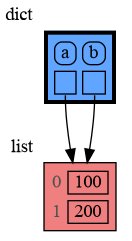 | 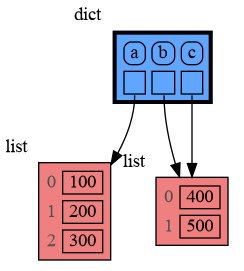 |
|
|
275
278
|
|:-----------------------------------------------------------:|:-------------------------------------------------------------:|
|
|
276
279
|
| rebinding1.png | rebinding2.png |
|
|
277
280
|
|
|
281
|
+
Or see it in the [Memory Grah Web Debugger](https://memory-graph.com/#codeurl=https://raw.githubusercontent.com/bterwijn/memory_graph/refs/heads/main/src/rebind.py&play).
|
|
282
|
+
|
|
278
283
|
## Copying Values of Immutable Type ##
|
|
279
284
|
Because a value of immutable type will be copied automatically when it is changed, there is no need to copy it beforehand. Therefore, a shallow or deep copy of a value of immutable type will result in just an assignment to save on the time needed to make the copy and the space (=memory) needed to store the values.
|
|
280
285
|
|
|
@@ -333,7 +338,7 @@ print(f"a:{a} b:{b} c:{c}")
|
|
|
333
338
|
|
|
334
339
|
Or see it in the [Memory Grah Web Debugger](https://memory-graph.com/#codeurl=https://raw.githubusercontent.com/bterwijn/memory_graph/refs/heads/main/src/function_call.py&play).
|
|
335
340
|
|
|
336
|
-
In the printed output only `a` is changed as a result of the function call:
|
|
341
|
+
In the printed output we see that only `a` is changed as a result of the function call:
|
|
337
342
|
```
|
|
338
343
|
a:[4, 3, 2, 1] b:(4, 3, 2) c:[4, 3, 2]
|
|
339
344
|
```
|
|
@@ -347,7 +352,7 @@ import memory_graph as mg
|
|
|
347
352
|
|
|
348
353
|
def add_one(a, b):
|
|
349
354
|
a += 1 # change remains confined to 'a' in the add_one function
|
|
350
|
-
b[0] += 1 # change also
|
|
355
|
+
b[0] += 1 # change also affects 'b' outside of the add_one function
|
|
351
356
|
mg.show(mg.stack())
|
|
352
357
|
|
|
353
358
|
a = 10
|
|
@@ -360,11 +365,13 @@ print(f"a:{a} b:{b[0]}")
|
|
|
360
365
|
```
|
|
361
366
|
a:10 b:11
|
|
362
367
|
```
|
|
363
|
-
|
|
368
|
+
Or see it in the [Memory Grah Web Debugger](https://memory-graph.com/#codeurl=https://raw.githubusercontent.com/bterwijn/memory_graph/refs/heads/main/src/wrap.py&breakpoints=5&continues=1&play)
|
|
369
|
+
|
|
370
|
+
The effect of calling `add_one()` is that `b[0]` increases by 1, while `a` is unaffected.
|
|
364
371
|
|
|
365
372
|
## Exercises ##
|
|
366
373
|
|
|
367
|
-
Now is a good time to practice the Python Data Model. Here are [some exercises](https://github.com/bterwijn/memory_graph_videos/blob/main/exercises/exercises.md) on references, mutability, copies, and function calls.
|
|
374
|
+
Now is a good time to practice with the Python Data Model. Here are [some exercises](https://github.com/bterwijn/memory_graph_videos/blob/main/exercises/exercises.md) on references, mutability, copies, and function calls.
|
|
368
375
|
|
|
369
376
|
## Block ##
|
|
370
377
|
It is often helpful to temporarily block program execution to inspect the graph. For this we can use the `mg.block()` function:
|
|
@@ -457,16 +464,21 @@ print( power_set(['a', 'b', 'c']) )
|
|
|
457
464
|
|
|
458
465
|
Or see it in the [Memory Grah Web Debugger](https://memory-graph.com/#codeurl=https://raw.githubusercontent.com/bterwijn/memory_graph/refs/heads/main/src/power_set.py×tep=1.0&play).
|
|
459
466
|
|
|
467
|
+
## Invocation Tree ##
|
|
468
|
+
The memory_graph package visualizes data at the currect time, but to better understand recursion it can also be helpful to visualize different function calls over time. This is what the [invocation_tree](https://github.com/bterwijn/invocation_tree?tab=readme-ov-file#installation) package does.
|
|
469
|
+
|
|
470
|
+
See the power_set example in the [Invocation Tree Web Debugger](https://www.invocation-tree.com/#codeurl=https://raw.githubusercontent.com/bterwijn/memory_graph/refs/heads/main/src/power_set.py×tep=1.0&play).
|
|
471
|
+
|
|
460
472
|
# Debugging #
|
|
461
473
|
|
|
462
474
|
For the best debugging experience with memory_graph set for example expression:
|
|
463
475
|
```
|
|
464
476
|
mg.render(locals(), "my_graph.pdf")
|
|
465
477
|
```
|
|
466
|
-
as a
|
|
478
|
+
as a **watch** in a debugger tool such as the integrated debugger in Visual Studio Code. Then open the "my_graph.pdf" output file to continuously see all the local variables while debugging. This avoids having to add any memory_graph `show()` or `render()` calls to your code.
|
|
467
479
|
|
|
468
480
|
## Call Stack in Watch Context ##
|
|
469
|
-
The ```mg.stack()``` doesn't work well in
|
|
481
|
+
The ```mg.stack()``` doesn't work well in **watch** context in most debuggers because debuggers introduce additional stack frames that cause problems. Use these alternative functions for various debuggers to filter out these problematic stack frames:
|
|
470
482
|
|
|
471
483
|
| debugger | function to get the call stack in 'watch' context |
|
|
472
484
|
|:---|:---|
|
|
@@ -480,7 +492,7 @@ The ```mg.stack()``` doesn't work well in *watch* context in most debuggers beca
|
|
|
480
492
|
See the [Quick Intro (3:49)](https://www.youtube.com/watch?v=23_bHcr7hqo) video for the setup.
|
|
481
493
|
|
|
482
494
|
## Other Debuggers ##
|
|
483
|
-
For other debuggers, invoke this function within the
|
|
495
|
+
For other debuggers, invoke this function within the **watch** context. Then, in the "call_stack.txt" file, identify the slice of functions you wish to include as stack frames in the call stack.
|
|
484
496
|
```
|
|
485
497
|
mg.save_call_stack("call_stack.txt")
|
|
486
498
|
```
|
|
@@ -928,6 +940,53 @@ mg.config.type_to_node[List_View] = lambda data: mg.Node_Linear(data,
|
|
|
928
940
|
```
|
|
929
941
|

|
|
930
942
|
|
|
943
|
+
## Bitwise Operators ##
|
|
944
|
+
In this configuration example we show the decimal, binary and [two's complement representation](https://www.cs.cornell.edu/~tomf/notes/cps104/twoscomp.html) representation of `int` values of dictionary subclass `Bits` to show the result of [bitwise operators](https://docs.python.org/3/library/stdtypes.html?utm_source=chatgpt.com#bitwise-operations-on-integer-types). The `~` (inverse) operator can be a bit confusing if not shown with two's complement representation.
|
|
945
|
+
|
|
946
|
+
```python
|
|
947
|
+
import memory_graph as mg
|
|
948
|
+
|
|
949
|
+
class Bits(dict):
|
|
950
|
+
""" Dictionary subclass that we will configure to show binary representations. """
|
|
951
|
+
|
|
952
|
+
def twos_complement(x: int, bits: int) -> str:
|
|
953
|
+
"""Return the two's complement bit string of x in `bits` bits."""
|
|
954
|
+
mask = (1 << bits) - 1
|
|
955
|
+
return format(x & mask, f"0{bits}b")
|
|
956
|
+
|
|
957
|
+
# configure memory_graph to show binary representations of values of type Bits
|
|
958
|
+
mg.config.type_to_node[Bits] = lambda x : mg.Node_Table(x,
|
|
959
|
+
[ ["expression", "decimal", "bin(expression)", "16bit two's complement"] ] +
|
|
960
|
+
[ [k, f'{v:>10}', f'{bin(v):>19}', twos_complement(v,16)] for k, v in x.items()] )
|
|
961
|
+
mg.config.type_to_slicer[Bits] = (mg.Slicer(), mg.Slicer()) # no slicing
|
|
962
|
+
mg.config.type_to_color[Bits] = 'gold'
|
|
963
|
+
mg.config.fontname = 'Courier' # monospace font
|
|
964
|
+
|
|
965
|
+
bits = Bits()
|
|
966
|
+
|
|
967
|
+
# now add some some variables and expressions
|
|
968
|
+
bits['a'] = 1
|
|
969
|
+
bits['b'] = 48
|
|
970
|
+
bits['c'] = 127
|
|
971
|
+
bits['a << 3'] = bits['a'] << 3 # bit shift left by 3
|
|
972
|
+
bits['b >> 3'] = bits['b'] >> 3 # bit shift right by 3
|
|
973
|
+
bits['a | b'] = bits['a'] | bits['b'] # bitwise or
|
|
974
|
+
bits['b & c'] = bits['b'] & bits['c'] # bitwise and
|
|
975
|
+
bits['b ^ c'] = bits['b'] ^ bits['c'] # bitwise exclusive or
|
|
976
|
+
|
|
977
|
+
# negative numbers, inverse, and two's complement
|
|
978
|
+
bits['d'] = 240
|
|
979
|
+
bits['e'] = -240
|
|
980
|
+
bits['f'] = -241 # -(d+1)
|
|
981
|
+
bits['~d'] = ~ bits['d'] # inverse -(x+1)
|
|
982
|
+
bits['~e'] = ~ bits['e'] # inverse -(x+1)
|
|
983
|
+
bits['~f'] = ~ bits['f'] # inverse -(x+1)
|
|
984
|
+
|
|
985
|
+
mg.s()
|
|
986
|
+
```
|
|
987
|
+
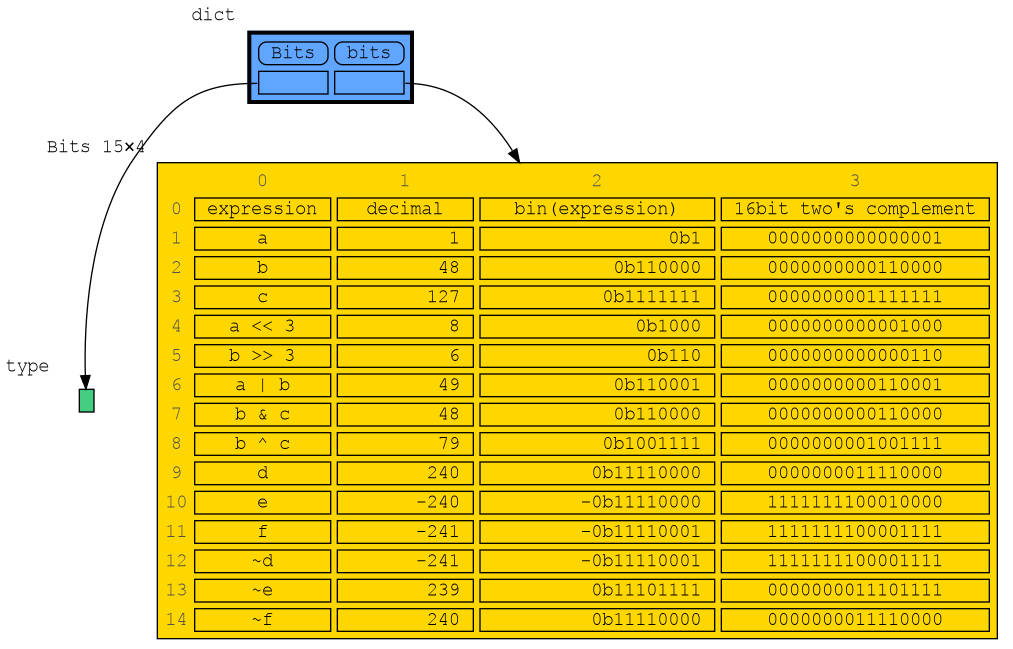
|
|
988
|
+
|
|
989
|
+
Or see it in the [Memory Grah Web Debugger](https://memory-graph.com/#codeurl=https://raw.githubusercontent.com/bterwijn/memory_graph/refs/heads/main/src/bitwise_operators.py&breakpoints=22&continues=1&play)
|
|
931
990
|
|
|
932
991
|
# Graph Depth #
|
|
933
992
|
To limit the size of the graph the maximum depth of the graph is set by `mg.config.max_graph_depth`. Additionally for each type a depth can be set to further limit the graph, as is done for type `B` in the example below. Scissors indicate where the graph is cut short. Alternatively the `id()` of a data elements can be used to limit the graph for that specific element, as is done for the value referenced by variable `c`.
|
|
@@ -131,6 +131,8 @@ Bas Terwijn
|
|
|
131
131
|
## Inspiration ##
|
|
132
132
|
Inspired by [Python Tutor](https://pythontutor.com/).
|
|
133
133
|
|
|
134
|
+
Running memory_graph locally is a key design choice to support Python Tutor’s [unsupported features](https://github.com/pythontutor-dev/pythontutor/blob/master/unsupported-features.md#unsupported-features).
|
|
135
|
+
|
|
134
136
|
## Social Media #
|
|
135
137
|
* [LinkedIn](https://www.linkedin.com/groups/13244150/)
|
|
136
138
|
* [Reddit](https://www.reddit.com/r/Python_memory_graph/)
|
|
@@ -149,7 +151,7 @@ Learn the right **mental model** to think about Python data. The [Python Data Mo
|
|
|
149
151
|
|
|
150
152
|
|
|
151
153
|
## Immutable Type ##
|
|
152
|
-
In the code below variable `a` and `b` both reference the same tuple value (4, 3, 2). A tuple is an immutable type and therefore when we change variable `b` its value **cannot** be mutated in place, and thus an automatic copy is made and `a` and `b` each reference their own value afterwards.
|
|
154
|
+
In the code below variable `a` and `b` both reference the same tuple value (4, 3, 2). A tuple is an **immutable** type and therefore when we change variable `b` its value **cannot** be mutated in place, and thus an automatic copy is made and `a` and `b` each reference their own value afterwards.
|
|
153
155
|
|
|
154
156
|
```python
|
|
155
157
|
import memory_graph as mg
|
|
@@ -167,7 +169,7 @@ mg.render(locals(), 'immutable2.png')
|
|
|
167
169
|
|
|
168
170
|
|
|
169
171
|
## Mutable Type ##
|
|
170
|
-
With mutable types the result is different. In the code below variable `a` and `b` both reference the same `list` value [4, 3, 2]. A `list` is a mutable type and therefore when we change variable `b` its value **can** be mutated in place and thus `a` and `b` both reference the same new value afterwards. Thus changing `b` also changes `a` and vice versa. Sometimes we want this but other times we don't and then we will have to make a copy ourselfs so that `a` and `b` are independent.
|
|
172
|
+
With mutable types the result is different. In the code below variable `a` and `b` both reference the same `list` value [4, 3, 2]. A `list` is a **mutable** type and therefore when we change variable `b` its value **can** be mutated in place and thus `a` and `b` both reference the same new value afterwards. Thus changing `b` also changes `a` and vice versa. Sometimes we want this but other times we don't and then we will have to make a copy ourselfs so that `a` and `b` are independent.
|
|
171
173
|
|
|
172
174
|
```python
|
|
173
175
|
import memory_graph as mg
|
|
@@ -208,6 +210,7 @@ mg.show(locals())
|
|
|
208
210
|
|
|
209
211
|

|
|
210
212
|
|
|
213
|
+
Or see it in the [Memory Grah Web Debugger](https://memory-graph.com/#codeurl=https://raw.githubusercontent.com/bterwijn/memory_graph/refs/heads/main/src/copies.py&play).
|
|
211
214
|
|
|
212
215
|
## Custom Copy ##
|
|
213
216
|
We can write our own custom copy function or method in case the three standard "copy" options don't do what we want. For example, in the code below the `custom_copy()` method of My_Class copies the `digits` but shares the `letters` between two objects.
|
|
@@ -238,7 +241,7 @@ mg.show(locals())
|
|
|
238
241
|
Or see it in the [Memory Grah Web Debugger](https://memory-graph.com/#codeurl=https://raw.githubusercontent.com/bterwijn/memory_graph/refs/heads/main/src/custom_copy.py&breakpoints=15&continues=1&play).
|
|
239
242
|
|
|
240
243
|
## Name Rebinding ##
|
|
241
|
-
When `a` and `b` share a mutable value, then changing the value of `b` changes the value of `a` and vice versa. However, reassigning `b` does not change `a`. When you reassign `b`, you only rebind the name `b` to another value without
|
|
244
|
+
When `a` and `b` share a mutable value, then changing the value of `b` changes the value of `a` and vice versa. However, reassigning `b` does not change `a`. When you reassign `b`, you only **rebind** the name `b` to another value without affecting any other variables.
|
|
242
245
|
|
|
243
246
|
```python
|
|
244
247
|
import memory_graph as mg
|
|
@@ -248,13 +251,15 @@ b = a
|
|
|
248
251
|
mg.render(locals(), 'rebinding1.png')
|
|
249
252
|
|
|
250
253
|
b += [1] # changes the value of 'b' and 'a'
|
|
251
|
-
b = [100, 200] # rebinds 'b' to another value, 'a' is
|
|
254
|
+
b = [100, 200] # rebinds 'b' to another value, 'a' is unaffected
|
|
252
255
|
mg.render(locals(), 'rebinding2.png')
|
|
253
256
|
```
|
|
254
257
|
|  |  |
|
|
255
258
|
|:-----------------------------------------------------------:|:-------------------------------------------------------------:|
|
|
256
259
|
| rebinding1.png | rebinding2.png |
|
|
257
260
|
|
|
261
|
+
Or see it in the [Memory Grah Web Debugger](https://memory-graph.com/#codeurl=https://raw.githubusercontent.com/bterwijn/memory_graph/refs/heads/main/src/rebind.py&play).
|
|
262
|
+
|
|
258
263
|
## Copying Values of Immutable Type ##
|
|
259
264
|
Because a value of immutable type will be copied automatically when it is changed, there is no need to copy it beforehand. Therefore, a shallow or deep copy of a value of immutable type will result in just an assignment to save on the time needed to make the copy and the space (=memory) needed to store the values.
|
|
260
265
|
|
|
@@ -313,7 +318,7 @@ print(f"a:{a} b:{b} c:{c}")
|
|
|
313
318
|
|
|
314
319
|
Or see it in the [Memory Grah Web Debugger](https://memory-graph.com/#codeurl=https://raw.githubusercontent.com/bterwijn/memory_graph/refs/heads/main/src/function_call.py&play).
|
|
315
320
|
|
|
316
|
-
In the printed output only `a` is changed as a result of the function call:
|
|
321
|
+
In the printed output we see that only `a` is changed as a result of the function call:
|
|
317
322
|
```
|
|
318
323
|
a:[4, 3, 2, 1] b:(4, 3, 2) c:[4, 3, 2]
|
|
319
324
|
```
|
|
@@ -327,7 +332,7 @@ import memory_graph as mg
|
|
|
327
332
|
|
|
328
333
|
def add_one(a, b):
|
|
329
334
|
a += 1 # change remains confined to 'a' in the add_one function
|
|
330
|
-
b[0] += 1 # change also
|
|
335
|
+
b[0] += 1 # change also affects 'b' outside of the add_one function
|
|
331
336
|
mg.show(mg.stack())
|
|
332
337
|
|
|
333
338
|
a = 10
|
|
@@ -340,11 +345,13 @@ print(f"a:{a} b:{b[0]}")
|
|
|
340
345
|
```
|
|
341
346
|
a:10 b:11
|
|
342
347
|
```
|
|
343
|
-
|
|
348
|
+
Or see it in the [Memory Grah Web Debugger](https://memory-graph.com/#codeurl=https://raw.githubusercontent.com/bterwijn/memory_graph/refs/heads/main/src/wrap.py&breakpoints=5&continues=1&play)
|
|
349
|
+
|
|
350
|
+
The effect of calling `add_one()` is that `b[0]` increases by 1, while `a` is unaffected.
|
|
344
351
|
|
|
345
352
|
## Exercises ##
|
|
346
353
|
|
|
347
|
-
Now is a good time to practice the Python Data Model. Here are [some exercises](https://github.com/bterwijn/memory_graph_videos/blob/main/exercises/exercises.md) on references, mutability, copies, and function calls.
|
|
354
|
+
Now is a good time to practice with the Python Data Model. Here are [some exercises](https://github.com/bterwijn/memory_graph_videos/blob/main/exercises/exercises.md) on references, mutability, copies, and function calls.
|
|
348
355
|
|
|
349
356
|
## Block ##
|
|
350
357
|
It is often helpful to temporarily block program execution to inspect the graph. For this we can use the `mg.block()` function:
|
|
@@ -437,16 +444,21 @@ print( power_set(['a', 'b', 'c']) )
|
|
|
437
444
|
|
|
438
445
|
Or see it in the [Memory Grah Web Debugger](https://memory-graph.com/#codeurl=https://raw.githubusercontent.com/bterwijn/memory_graph/refs/heads/main/src/power_set.py×tep=1.0&play).
|
|
439
446
|
|
|
447
|
+
## Invocation Tree ##
|
|
448
|
+
The memory_graph package visualizes data at the currect time, but to better understand recursion it can also be helpful to visualize different function calls over time. This is what the [invocation_tree](https://github.com/bterwijn/invocation_tree?tab=readme-ov-file#installation) package does.
|
|
449
|
+
|
|
450
|
+
See the power_set example in the [Invocation Tree Web Debugger](https://www.invocation-tree.com/#codeurl=https://raw.githubusercontent.com/bterwijn/memory_graph/refs/heads/main/src/power_set.py×tep=1.0&play).
|
|
451
|
+
|
|
440
452
|
# Debugging #
|
|
441
453
|
|
|
442
454
|
For the best debugging experience with memory_graph set for example expression:
|
|
443
455
|
```
|
|
444
456
|
mg.render(locals(), "my_graph.pdf")
|
|
445
457
|
```
|
|
446
|
-
as a
|
|
458
|
+
as a **watch** in a debugger tool such as the integrated debugger in Visual Studio Code. Then open the "my_graph.pdf" output file to continuously see all the local variables while debugging. This avoids having to add any memory_graph `show()` or `render()` calls to your code.
|
|
447
459
|
|
|
448
460
|
## Call Stack in Watch Context ##
|
|
449
|
-
The ```mg.stack()``` doesn't work well in
|
|
461
|
+
The ```mg.stack()``` doesn't work well in **watch** context in most debuggers because debuggers introduce additional stack frames that cause problems. Use these alternative functions for various debuggers to filter out these problematic stack frames:
|
|
450
462
|
|
|
451
463
|
| debugger | function to get the call stack in 'watch' context |
|
|
452
464
|
|:---|:---|
|
|
@@ -460,7 +472,7 @@ The ```mg.stack()``` doesn't work well in *watch* context in most debuggers beca
|
|
|
460
472
|
See the [Quick Intro (3:49)](https://www.youtube.com/watch?v=23_bHcr7hqo) video for the setup.
|
|
461
473
|
|
|
462
474
|
## Other Debuggers ##
|
|
463
|
-
For other debuggers, invoke this function within the
|
|
475
|
+
For other debuggers, invoke this function within the **watch** context. Then, in the "call_stack.txt" file, identify the slice of functions you wish to include as stack frames in the call stack.
|
|
464
476
|
```
|
|
465
477
|
mg.save_call_stack("call_stack.txt")
|
|
466
478
|
```
|
|
@@ -908,6 +920,53 @@ mg.config.type_to_node[List_View] = lambda data: mg.Node_Linear(data,
|
|
|
908
920
|
```
|
|
909
921
|

|
|
910
922
|
|
|
923
|
+
## Bitwise Operators ##
|
|
924
|
+
In this configuration example we show the decimal, binary and [two's complement representation](https://www.cs.cornell.edu/~tomf/notes/cps104/twoscomp.html) representation of `int` values of dictionary subclass `Bits` to show the result of [bitwise operators](https://docs.python.org/3/library/stdtypes.html?utm_source=chatgpt.com#bitwise-operations-on-integer-types). The `~` (inverse) operator can be a bit confusing if not shown with two's complement representation.
|
|
925
|
+
|
|
926
|
+
```python
|
|
927
|
+
import memory_graph as mg
|
|
928
|
+
|
|
929
|
+
class Bits(dict):
|
|
930
|
+
""" Dictionary subclass that we will configure to show binary representations. """
|
|
931
|
+
|
|
932
|
+
def twos_complement(x: int, bits: int) -> str:
|
|
933
|
+
"""Return the two's complement bit string of x in `bits` bits."""
|
|
934
|
+
mask = (1 << bits) - 1
|
|
935
|
+
return format(x & mask, f"0{bits}b")
|
|
936
|
+
|
|
937
|
+
# configure memory_graph to show binary representations of values of type Bits
|
|
938
|
+
mg.config.type_to_node[Bits] = lambda x : mg.Node_Table(x,
|
|
939
|
+
[ ["expression", "decimal", "bin(expression)", "16bit two's complement"] ] +
|
|
940
|
+
[ [k, f'{v:>10}', f'{bin(v):>19}', twos_complement(v,16)] for k, v in x.items()] )
|
|
941
|
+
mg.config.type_to_slicer[Bits] = (mg.Slicer(), mg.Slicer()) # no slicing
|
|
942
|
+
mg.config.type_to_color[Bits] = 'gold'
|
|
943
|
+
mg.config.fontname = 'Courier' # monospace font
|
|
944
|
+
|
|
945
|
+
bits = Bits()
|
|
946
|
+
|
|
947
|
+
# now add some some variables and expressions
|
|
948
|
+
bits['a'] = 1
|
|
949
|
+
bits['b'] = 48
|
|
950
|
+
bits['c'] = 127
|
|
951
|
+
bits['a << 3'] = bits['a'] << 3 # bit shift left by 3
|
|
952
|
+
bits['b >> 3'] = bits['b'] >> 3 # bit shift right by 3
|
|
953
|
+
bits['a | b'] = bits['a'] | bits['b'] # bitwise or
|
|
954
|
+
bits['b & c'] = bits['b'] & bits['c'] # bitwise and
|
|
955
|
+
bits['b ^ c'] = bits['b'] ^ bits['c'] # bitwise exclusive or
|
|
956
|
+
|
|
957
|
+
# negative numbers, inverse, and two's complement
|
|
958
|
+
bits['d'] = 240
|
|
959
|
+
bits['e'] = -240
|
|
960
|
+
bits['f'] = -241 # -(d+1)
|
|
961
|
+
bits['~d'] = ~ bits['d'] # inverse -(x+1)
|
|
962
|
+
bits['~e'] = ~ bits['e'] # inverse -(x+1)
|
|
963
|
+
bits['~f'] = ~ bits['f'] # inverse -(x+1)
|
|
964
|
+
|
|
965
|
+
mg.s()
|
|
966
|
+
```
|
|
967
|
+

|
|
968
|
+
|
|
969
|
+
Or see it in the [Memory Grah Web Debugger](https://memory-graph.com/#codeurl=https://raw.githubusercontent.com/bterwijn/memory_graph/refs/heads/main/src/bitwise_operators.py&breakpoints=22&continues=1&play)
|
|
911
970
|
|
|
912
971
|
# Graph Depth #
|
|
913
972
|
To limit the size of the graph the maximum depth of the graph is set by `mg.config.max_graph_depth`. Additionally for each type a depth can be set to further limit the graph, as is done for type `B` in the example below. Scissors indicate where the graph is cut short. Alternatively the `id()` of a data elements can be used to limit the graph for that specific element, as is done for the value referenced by variable `c`.
|
|
Binary file
|
|
@@ -0,0 +1,39 @@
|
|
|
1
|
+
import memory_graph as mg
|
|
2
|
+
|
|
3
|
+
class Bits(dict):
|
|
4
|
+
""" Dictionary subclass that we will configure to show binary representations. """
|
|
5
|
+
|
|
6
|
+
def twos_complement(x: int, bits: int) -> str:
|
|
7
|
+
"""Return the two's complement bit string of x in `bits` bits."""
|
|
8
|
+
mask = (1 << bits) - 1
|
|
9
|
+
return format(x & mask, f"0{bits}b")
|
|
10
|
+
|
|
11
|
+
# configure memory_graph to show binary representations of values of type Bits
|
|
12
|
+
mg.config.type_to_node[Bits] = lambda x : mg.Node_Table(x,
|
|
13
|
+
[ ["expression", "decimal", "bin(expression)", "16bit two's complement"] ] +
|
|
14
|
+
[ [k, f'{v:>10}', f'{bin(v):>19}', twos_complement(v,16)] for k, v in x.items()] )
|
|
15
|
+
mg.config.type_to_slicer[Bits] = (mg.Slicer(), mg.Slicer()) # no slicing
|
|
16
|
+
mg.config.type_to_color[Bits] = 'gold'
|
|
17
|
+
mg.config.fontname = 'Courier' # monospace font
|
|
18
|
+
|
|
19
|
+
bits = Bits()
|
|
20
|
+
|
|
21
|
+
# now add some some variables and expressions
|
|
22
|
+
bits['a'] = 1
|
|
23
|
+
bits['b'] = 48
|
|
24
|
+
bits['c'] = 127
|
|
25
|
+
bits['a << 3'] = bits['a'] << 3 # bit shift left by 3
|
|
26
|
+
bits['b >> 3'] = bits['b'] >> 3 # bit shift right by 3
|
|
27
|
+
bits['a | b'] = bits['a'] | bits['b'] # bitwise or
|
|
28
|
+
bits['b & c'] = bits['b'] & bits['c'] # bitwise and
|
|
29
|
+
bits['b ^ c'] = bits['b'] ^ bits['c'] # bitwise exclusive or
|
|
30
|
+
|
|
31
|
+
# negative numbers, inverse, and two's complement
|
|
32
|
+
bits['d'] = 240
|
|
33
|
+
bits['e'] = -240
|
|
34
|
+
bits['f'] = -241 # -(d+1)
|
|
35
|
+
bits['~d'] = ~ bits['d'] # inverse -(x+1)
|
|
36
|
+
bits['~e'] = ~ bits['e'] # inverse -(x+1)
|
|
37
|
+
bits['~f'] = ~ bits['f'] # inverse -(x+1)
|
|
38
|
+
|
|
39
|
+
mg.render(locals(), 'bitwise_operators.png')
|
|
Binary file
|
|
@@ -92,8 +92,13 @@ class Sequence2D(Sequence):
|
|
|
92
92
|
slicer0, slicer1 = slicer0
|
|
93
93
|
else:
|
|
94
94
|
slicer1 = slicer0
|
|
95
|
-
|
|
96
|
-
|
|
95
|
+
s0, s1 = 0, 0
|
|
96
|
+
lens1 = len(self.data[0])
|
|
97
|
+
if lens1 > 0: # has any data
|
|
98
|
+
s1 = lens1
|
|
99
|
+
s0 = len(self.data)
|
|
100
|
+
slices0 = slicer0.get_slices( s0 )
|
|
101
|
+
slices1 = slicer1.get_slices( s1 )
|
|
97
102
|
return Slices2D(slices0, slices1)
|
|
98
103
|
|
|
99
104
|
def indices_all(self):
|
|
@@ -60,6 +60,7 @@ class Slices_Table_Iterator2D(Slices_Table_Iterator):
|
|
|
60
60
|
yield (-3, -3)
|
|
61
61
|
for row_i in range(row_slice[0], row_slice[1]):
|
|
62
62
|
first_col_slice = True
|
|
63
|
+
col_i = 0
|
|
63
64
|
for col_slice in col_slices:
|
|
64
65
|
if first_col_slice:
|
|
65
66
|
if len(col_slices) > 0 and col_slice[0] > 0:
|
|
@@ -1,6 +1,6 @@
|
|
|
1
1
|
Metadata-Version: 2.4
|
|
2
2
|
Name: memory_graph
|
|
3
|
-
Version: 0.3.
|
|
3
|
+
Version: 0.3.60
|
|
4
4
|
Summary: Teaching tool and debugging aid in context of references, mutable data types, and shallow and deep copy.
|
|
5
5
|
Author-email: Bas Terwijn <bterwijn@gmail.com>
|
|
6
6
|
License-Expression: BSD-2-Clause
|
|
@@ -151,6 +151,8 @@ Bas Terwijn
|
|
|
151
151
|
## Inspiration ##
|
|
152
152
|
Inspired by [Python Tutor](https://pythontutor.com/).
|
|
153
153
|
|
|
154
|
+
Running memory_graph locally is a key design choice to support Python Tutor’s [unsupported features](https://github.com/pythontutor-dev/pythontutor/blob/master/unsupported-features.md#unsupported-features).
|
|
155
|
+
|
|
154
156
|
## Social Media #
|
|
155
157
|
* [LinkedIn](https://www.linkedin.com/groups/13244150/)
|
|
156
158
|
* [Reddit](https://www.reddit.com/r/Python_memory_graph/)
|
|
@@ -169,7 +171,7 @@ Learn the right **mental model** to think about Python data. The [Python Data Mo
|
|
|
169
171
|
|
|
170
172
|
|
|
171
173
|
## Immutable Type ##
|
|
172
|
-
In the code below variable `a` and `b` both reference the same tuple value (4, 3, 2). A tuple is an immutable type and therefore when we change variable `b` its value **cannot** be mutated in place, and thus an automatic copy is made and `a` and `b` each reference their own value afterwards.
|
|
174
|
+
In the code below variable `a` and `b` both reference the same tuple value (4, 3, 2). A tuple is an **immutable** type and therefore when we change variable `b` its value **cannot** be mutated in place, and thus an automatic copy is made and `a` and `b` each reference their own value afterwards.
|
|
173
175
|
|
|
174
176
|
```python
|
|
175
177
|
import memory_graph as mg
|
|
@@ -187,7 +189,7 @@ mg.render(locals(), 'immutable2.png')
|
|
|
187
189
|
|
|
188
190
|
|
|
189
191
|
## Mutable Type ##
|
|
190
|
-
With mutable types the result is different. In the code below variable `a` and `b` both reference the same `list` value [4, 3, 2]. A `list` is a mutable type and therefore when we change variable `b` its value **can** be mutated in place and thus `a` and `b` both reference the same new value afterwards. Thus changing `b` also changes `a` and vice versa. Sometimes we want this but other times we don't and then we will have to make a copy ourselfs so that `a` and `b` are independent.
|
|
192
|
+
With mutable types the result is different. In the code below variable `a` and `b` both reference the same `list` value [4, 3, 2]. A `list` is a **mutable** type and therefore when we change variable `b` its value **can** be mutated in place and thus `a` and `b` both reference the same new value afterwards. Thus changing `b` also changes `a` and vice versa. Sometimes we want this but other times we don't and then we will have to make a copy ourselfs so that `a` and `b` are independent.
|
|
191
193
|
|
|
192
194
|
```python
|
|
193
195
|
import memory_graph as mg
|
|
@@ -228,6 +230,7 @@ mg.show(locals())
|
|
|
228
230
|
|
|
229
231
|

|
|
230
232
|
|
|
233
|
+
Or see it in the [Memory Grah Web Debugger](https://memory-graph.com/#codeurl=https://raw.githubusercontent.com/bterwijn/memory_graph/refs/heads/main/src/copies.py&play).
|
|
231
234
|
|
|
232
235
|
## Custom Copy ##
|
|
233
236
|
We can write our own custom copy function or method in case the three standard "copy" options don't do what we want. For example, in the code below the `custom_copy()` method of My_Class copies the `digits` but shares the `letters` between two objects.
|
|
@@ -258,7 +261,7 @@ mg.show(locals())
|
|
|
258
261
|
Or see it in the [Memory Grah Web Debugger](https://memory-graph.com/#codeurl=https://raw.githubusercontent.com/bterwijn/memory_graph/refs/heads/main/src/custom_copy.py&breakpoints=15&continues=1&play).
|
|
259
262
|
|
|
260
263
|
## Name Rebinding ##
|
|
261
|
-
When `a` and `b` share a mutable value, then changing the value of `b` changes the value of `a` and vice versa. However, reassigning `b` does not change `a`. When you reassign `b`, you only rebind the name `b` to another value without
|
|
264
|
+
When `a` and `b` share a mutable value, then changing the value of `b` changes the value of `a` and vice versa. However, reassigning `b` does not change `a`. When you reassign `b`, you only **rebind** the name `b` to another value without affecting any other variables.
|
|
262
265
|
|
|
263
266
|
```python
|
|
264
267
|
import memory_graph as mg
|
|
@@ -268,13 +271,15 @@ b = a
|
|
|
268
271
|
mg.render(locals(), 'rebinding1.png')
|
|
269
272
|
|
|
270
273
|
b += [1] # changes the value of 'b' and 'a'
|
|
271
|
-
b = [100, 200] # rebinds 'b' to another value, 'a' is
|
|
274
|
+
b = [100, 200] # rebinds 'b' to another value, 'a' is unaffected
|
|
272
275
|
mg.render(locals(), 'rebinding2.png')
|
|
273
276
|
```
|
|
274
277
|
|  |  |
|
|
275
278
|
|:-----------------------------------------------------------:|:-------------------------------------------------------------:|
|
|
276
279
|
| rebinding1.png | rebinding2.png |
|
|
277
280
|
|
|
281
|
+
Or see it in the [Memory Grah Web Debugger](https://memory-graph.com/#codeurl=https://raw.githubusercontent.com/bterwijn/memory_graph/refs/heads/main/src/rebind.py&play).
|
|
282
|
+
|
|
278
283
|
## Copying Values of Immutable Type ##
|
|
279
284
|
Because a value of immutable type will be copied automatically when it is changed, there is no need to copy it beforehand. Therefore, a shallow or deep copy of a value of immutable type will result in just an assignment to save on the time needed to make the copy and the space (=memory) needed to store the values.
|
|
280
285
|
|
|
@@ -333,7 +338,7 @@ print(f"a:{a} b:{b} c:{c}")
|
|
|
333
338
|
|
|
334
339
|
Or see it in the [Memory Grah Web Debugger](https://memory-graph.com/#codeurl=https://raw.githubusercontent.com/bterwijn/memory_graph/refs/heads/main/src/function_call.py&play).
|
|
335
340
|
|
|
336
|
-
In the printed output only `a` is changed as a result of the function call:
|
|
341
|
+
In the printed output we see that only `a` is changed as a result of the function call:
|
|
337
342
|
```
|
|
338
343
|
a:[4, 3, 2, 1] b:(4, 3, 2) c:[4, 3, 2]
|
|
339
344
|
```
|
|
@@ -347,7 +352,7 @@ import memory_graph as mg
|
|
|
347
352
|
|
|
348
353
|
def add_one(a, b):
|
|
349
354
|
a += 1 # change remains confined to 'a' in the add_one function
|
|
350
|
-
b[0] += 1 # change also
|
|
355
|
+
b[0] += 1 # change also affects 'b' outside of the add_one function
|
|
351
356
|
mg.show(mg.stack())
|
|
352
357
|
|
|
353
358
|
a = 10
|
|
@@ -360,11 +365,13 @@ print(f"a:{a} b:{b[0]}")
|
|
|
360
365
|
```
|
|
361
366
|
a:10 b:11
|
|
362
367
|
```
|
|
363
|
-
|
|
368
|
+
Or see it in the [Memory Grah Web Debugger](https://memory-graph.com/#codeurl=https://raw.githubusercontent.com/bterwijn/memory_graph/refs/heads/main/src/wrap.py&breakpoints=5&continues=1&play)
|
|
369
|
+
|
|
370
|
+
The effect of calling `add_one()` is that `b[0]` increases by 1, while `a` is unaffected.
|
|
364
371
|
|
|
365
372
|
## Exercises ##
|
|
366
373
|
|
|
367
|
-
Now is a good time to practice the Python Data Model. Here are [some exercises](https://github.com/bterwijn/memory_graph_videos/blob/main/exercises/exercises.md) on references, mutability, copies, and function calls.
|
|
374
|
+
Now is a good time to practice with the Python Data Model. Here are [some exercises](https://github.com/bterwijn/memory_graph_videos/blob/main/exercises/exercises.md) on references, mutability, copies, and function calls.
|
|
368
375
|
|
|
369
376
|
## Block ##
|
|
370
377
|
It is often helpful to temporarily block program execution to inspect the graph. For this we can use the `mg.block()` function:
|
|
@@ -457,16 +464,21 @@ print( power_set(['a', 'b', 'c']) )
|
|
|
457
464
|
|
|
458
465
|
Or see it in the [Memory Grah Web Debugger](https://memory-graph.com/#codeurl=https://raw.githubusercontent.com/bterwijn/memory_graph/refs/heads/main/src/power_set.py×tep=1.0&play).
|
|
459
466
|
|
|
467
|
+
## Invocation Tree ##
|
|
468
|
+
The memory_graph package visualizes data at the currect time, but to better understand recursion it can also be helpful to visualize different function calls over time. This is what the [invocation_tree](https://github.com/bterwijn/invocation_tree?tab=readme-ov-file#installation) package does.
|
|
469
|
+
|
|
470
|
+
See the power_set example in the [Invocation Tree Web Debugger](https://www.invocation-tree.com/#codeurl=https://raw.githubusercontent.com/bterwijn/memory_graph/refs/heads/main/src/power_set.py×tep=1.0&play).
|
|
471
|
+
|
|
460
472
|
# Debugging #
|
|
461
473
|
|
|
462
474
|
For the best debugging experience with memory_graph set for example expression:
|
|
463
475
|
```
|
|
464
476
|
mg.render(locals(), "my_graph.pdf")
|
|
465
477
|
```
|
|
466
|
-
as a
|
|
478
|
+
as a **watch** in a debugger tool such as the integrated debugger in Visual Studio Code. Then open the "my_graph.pdf" output file to continuously see all the local variables while debugging. This avoids having to add any memory_graph `show()` or `render()` calls to your code.
|
|
467
479
|
|
|
468
480
|
## Call Stack in Watch Context ##
|
|
469
|
-
The ```mg.stack()``` doesn't work well in
|
|
481
|
+
The ```mg.stack()``` doesn't work well in **watch** context in most debuggers because debuggers introduce additional stack frames that cause problems. Use these alternative functions for various debuggers to filter out these problematic stack frames:
|
|
470
482
|
|
|
471
483
|
| debugger | function to get the call stack in 'watch' context |
|
|
472
484
|
|:---|:---|
|
|
@@ -480,7 +492,7 @@ The ```mg.stack()``` doesn't work well in *watch* context in most debuggers beca
|
|
|
480
492
|
See the [Quick Intro (3:49)](https://www.youtube.com/watch?v=23_bHcr7hqo) video for the setup.
|
|
481
493
|
|
|
482
494
|
## Other Debuggers ##
|
|
483
|
-
For other debuggers, invoke this function within the
|
|
495
|
+
For other debuggers, invoke this function within the **watch** context. Then, in the "call_stack.txt" file, identify the slice of functions you wish to include as stack frames in the call stack.
|
|
484
496
|
```
|
|
485
497
|
mg.save_call_stack("call_stack.txt")
|
|
486
498
|
```
|
|
@@ -928,6 +940,53 @@ mg.config.type_to_node[List_View] = lambda data: mg.Node_Linear(data,
|
|
|
928
940
|
```
|
|
929
941
|

|
|
930
942
|
|
|
943
|
+
## Bitwise Operators ##
|
|
944
|
+
In this configuration example we show the decimal, binary and [two's complement representation](https://www.cs.cornell.edu/~tomf/notes/cps104/twoscomp.html) representation of `int` values of dictionary subclass `Bits` to show the result of [bitwise operators](https://docs.python.org/3/library/stdtypes.html?utm_source=chatgpt.com#bitwise-operations-on-integer-types). The `~` (inverse) operator can be a bit confusing if not shown with two's complement representation.
|
|
945
|
+
|
|
946
|
+
```python
|
|
947
|
+
import memory_graph as mg
|
|
948
|
+
|
|
949
|
+
class Bits(dict):
|
|
950
|
+
""" Dictionary subclass that we will configure to show binary representations. """
|
|
951
|
+
|
|
952
|
+
def twos_complement(x: int, bits: int) -> str:
|
|
953
|
+
"""Return the two's complement bit string of x in `bits` bits."""
|
|
954
|
+
mask = (1 << bits) - 1
|
|
955
|
+
return format(x & mask, f"0{bits}b")
|
|
956
|
+
|
|
957
|
+
# configure memory_graph to show binary representations of values of type Bits
|
|
958
|
+
mg.config.type_to_node[Bits] = lambda x : mg.Node_Table(x,
|
|
959
|
+
[ ["expression", "decimal", "bin(expression)", "16bit two's complement"] ] +
|
|
960
|
+
[ [k, f'{v:>10}', f'{bin(v):>19}', twos_complement(v,16)] for k, v in x.items()] )
|
|
961
|
+
mg.config.type_to_slicer[Bits] = (mg.Slicer(), mg.Slicer()) # no slicing
|
|
962
|
+
mg.config.type_to_color[Bits] = 'gold'
|
|
963
|
+
mg.config.fontname = 'Courier' # monospace font
|
|
964
|
+
|
|
965
|
+
bits = Bits()
|
|
966
|
+
|
|
967
|
+
# now add some some variables and expressions
|
|
968
|
+
bits['a'] = 1
|
|
969
|
+
bits['b'] = 48
|
|
970
|
+
bits['c'] = 127
|
|
971
|
+
bits['a << 3'] = bits['a'] << 3 # bit shift left by 3
|
|
972
|
+
bits['b >> 3'] = bits['b'] >> 3 # bit shift right by 3
|
|
973
|
+
bits['a | b'] = bits['a'] | bits['b'] # bitwise or
|
|
974
|
+
bits['b & c'] = bits['b'] & bits['c'] # bitwise and
|
|
975
|
+
bits['b ^ c'] = bits['b'] ^ bits['c'] # bitwise exclusive or
|
|
976
|
+
|
|
977
|
+
# negative numbers, inverse, and two's complement
|
|
978
|
+
bits['d'] = 240
|
|
979
|
+
bits['e'] = -240
|
|
980
|
+
bits['f'] = -241 # -(d+1)
|
|
981
|
+
bits['~d'] = ~ bits['d'] # inverse -(x+1)
|
|
982
|
+
bits['~e'] = ~ bits['e'] # inverse -(x+1)
|
|
983
|
+
bits['~f'] = ~ bits['f'] # inverse -(x+1)
|
|
984
|
+
|
|
985
|
+
mg.s()
|
|
986
|
+
```
|
|
987
|
+

|
|
988
|
+
|
|
989
|
+
Or see it in the [Memory Grah Web Debugger](https://memory-graph.com/#codeurl=https://raw.githubusercontent.com/bterwijn/memory_graph/refs/heads/main/src/bitwise_operators.py&breakpoints=22&continues=1&play)
|
|
931
990
|
|
|
932
991
|
# Graph Depth #
|
|
933
992
|
To limit the size of the graph the maximum depth of the graph is set by `mg.config.max_graph_depth`. Additionally for each type a depth can be set to further limit the graph, as is done for type `B` in the example below. Scissors indicate where the graph is cut short. Alternatively the `id()` of a data elements can be used to limit the graph for that specific element, as is done for the value referenced by variable `c`.
|
|
@@ -4,7 +4,7 @@ build-backend = "setuptools.build_meta"
|
|
|
4
4
|
|
|
5
5
|
[project]
|
|
6
6
|
name = "memory_graph"
|
|
7
|
-
version = "0.3.
|
|
7
|
+
version = "0.3.60"
|
|
8
8
|
description = "Teaching tool and debugging aid in context of references, mutable data types, and shallow and deep copy."
|
|
9
9
|
authors = [
|
|
10
10
|
{name = "Bas Terwijn", email = "bterwijn@gmail.com"}
|
|
Binary file
|
|
File without changes
|
|
File without changes
|
|
File without changes
|
|
File without changes
|
|
File without changes
|
|
File without changes
|
|
File without changes
|
|
File without changes
|
|
File without changes
|
|
File without changes
|
|
File without changes
|
|
File without changes
|
|
File without changes
|
|
File without changes
|
|
File without changes
|
|
File without changes
|
|
File without changes
|
|
File without changes
|
|
File without changes
|
|
File without changes
|
|
File without changes
|
|
File without changes
|
|
File without changes
|
|
File without changes
|
|
File without changes
|
|
File without changes
|
|
File without changes
|
|
File without changes
|
|
File without changes
|
|
File without changes
|
|
File without changes
|
|
File without changes
|
|
File without changes
|
|
File without changes
|
|
File without changes
|
|
File without changes
|
|
File without changes
|
|
File without changes
|
|
File without changes
|
|
File without changes
|
|
File without changes
|
|
File without changes
|
|
File without changes
|
|
File without changes
|
|
File without changes
|
|
File without changes
|
|
File without changes
|
|
File without changes
|
|
File without changes
|
|
File without changes
|
|
File without changes
|
|
File without changes
|
|
File without changes
|
|
File without changes
|
|
File without changes
|
|
File without changes
|
|
File without changes
|
|
File without changes
|
|
File without changes
|
|
File without changes
|
|
File without changes
|
|
File without changes
|
|
File without changes
|
|
File without changes
|
|
File without changes
|
|
File without changes
|
|
File without changes
|
|
File without changes
|
|
File without changes
|
|
File without changes
|
|
File without changes
|
|
File without changes
|
|
File without changes
|
|
File without changes
|
|
File without changes
|
|
File without changes
|
|
File without changes
|
|
File without changes
|
|
File without changes
|
|
File without changes
|
|
File without changes
|
|
File without changes
|
|
File without changes
|
|
File without changes
|
|
File without changes
|
|
File without changes
|
|
File without changes
|
|
File without changes
|
|
File without changes
|
|
File without changes
|
|
File without changes
|
|
File without changes
|
|
File without changes
|
|
File without changes
|
|
File without changes
|
|
File without changes
|
|
File without changes
|
|
File without changes
|
|
File without changes
|
|
File without changes
|
|
File without changes
|
|
File without changes
|
|
File without changes
|
|
File without changes
|