memory-graph 0.3.52__tar.gz → 0.3.54__tar.gz
This diff represents the content of publicly available package versions that have been released to one of the supported registries. The information contained in this diff is provided for informational purposes only and reflects changes between package versions as they appear in their respective public registries.
- {memory_graph-0.3.52/memory_graph.egg-info → memory_graph-0.3.54}/PKG-INFO +44 -29
- {memory_graph-0.3.52 → memory_graph-0.3.54}/README.md +43 -28
- {memory_graph-0.3.52 → memory_graph-0.3.54}/images/avltree.py +16 -17
- {memory_graph-0.3.52 → memory_graph-0.3.54}/images/binary.py +1 -1
- {memory_graph-0.3.52 → memory_graph-0.3.54}/images/copy_mutable.py +1 -1
- {memory_graph-0.3.52 → memory_graph-0.3.54}/memory_graph/__init__.py +10 -2
- {memory_graph-0.3.52 → memory_graph-0.3.54}/memory_graph/config.py +1 -0
- {memory_graph-0.3.52 → memory_graph-0.3.54}/memory_graph/config_default.py +6 -4
- {memory_graph-0.3.52 → memory_graph-0.3.54}/memory_graph/config_helpers.py +8 -1
- {memory_graph-0.3.52 → memory_graph-0.3.54}/memory_graph/slicer.py +1 -1
- {memory_graph-0.3.52 → memory_graph-0.3.54/memory_graph.egg-info}/PKG-INFO +44 -29
- {memory_graph-0.3.52 → memory_graph-0.3.54}/memory_graph.egg-info/SOURCES.txt +0 -6
- {memory_graph-0.3.52 → memory_graph-0.3.54}/pyproject.toml +1 -1
- memory_graph-0.3.52/images/copies.png +0 -0
- memory_graph-0.3.52/images/copies_immutable.png +0 -0
- memory_graph-0.3.52/images/copies_mix.png +0 -0
- memory_graph-0.3.52/images/depth.png +0 -0
- memory_graph-0.3.52/images/hidden_edges2.png +0 -0
- memory_graph-0.3.52/images/memory_graph.gv.pdf +0 -0
- {memory_graph-0.3.52 → memory_graph-0.3.54}/LICENSE.txt +0 -0
- {memory_graph-0.3.52 → memory_graph-0.3.54}/MANIFEST.in +0 -0
- {memory_graph-0.3.52 → memory_graph-0.3.54}/images/add_one.png +0 -0
- {memory_graph-0.3.52 → memory_graph-0.3.54}/images/add_one.py +0 -0
- {memory_graph-0.3.52 → memory_graph-0.3.54}/images/avltree_dir.png +0 -0
- {memory_graph-0.3.52 → memory_graph-0.3.54}/images/avltree_fail.png +0 -0
- {memory_graph-0.3.52 → memory_graph-0.3.54}/images/avltree_key_value.png +0 -0
- {memory_graph-0.3.52 → memory_graph-0.3.54}/images/avltree_leaf.png +0 -0
- {memory_graph-0.3.52 → memory_graph-0.3.54}/images/avltree_linear.png +0 -0
- {memory_graph-0.3.52 → memory_graph-0.3.54}/images/avltree_table.png +0 -0
- {memory_graph-0.3.52 → memory_graph-0.3.54}/images/bin_search.png +0 -0
- {memory_graph-0.3.52 → memory_graph-0.3.54}/images/bin_search.py +0 -0
- {memory_graph-0.3.52 → memory_graph-0.3.54}/images/bin_search_linear.png +0 -0
- {memory_graph-0.3.52 → memory_graph-0.3.54}/images/bin_tree.gif +0 -0
- {memory_graph-0.3.52 → memory_graph-0.3.54}/images/bin_tree.png +0 -0
- {memory_graph-0.3.52 → memory_graph-0.3.54}/images/bin_tree.py +0 -0
- {memory_graph-0.3.52 → memory_graph-0.3.54}/images/binary.gif +0 -0
- {memory_graph-0.3.52 → memory_graph-0.3.54}/images/colab_example.png +0 -0
- {memory_graph-0.3.52 → memory_graph-0.3.54}/images/copy_immutable.png +0 -0
- {memory_graph-0.3.52 → memory_graph-0.3.54}/images/copy_immutable.py +0 -0
- {memory_graph-0.3.52 → memory_graph-0.3.54}/images/copy_method.png +0 -0
- {memory_graph-0.3.52 → memory_graph-0.3.54}/images/copy_method.py +0 -0
- {memory_graph-0.3.52 → memory_graph-0.3.54}/images/copy_mix.png +0 -0
- {memory_graph-0.3.52 → memory_graph-0.3.54}/images/copy_mix.py +0 -0
- {memory_graph-0.3.52 → memory_graph-0.3.54}/images/copy_mutable.png +0 -0
- {memory_graph-0.3.52 → memory_graph-0.3.54}/images/create_gif.sh +0 -0
- {memory_graph-0.3.52 → memory_graph-0.3.54}/images/create_images.sh +0 -0
- {memory_graph-0.3.52 → memory_graph-0.3.54}/images/debug_vscode.png +0 -0
- {memory_graph-0.3.52 → memory_graph-0.3.54}/images/debugging.gif +0 -0
- {memory_graph-0.3.52 → memory_graph-0.3.54}/images/debugging.py +0 -0
- {memory_graph-0.3.52 → memory_graph-0.3.54}/images/embedded1.png +0 -0
- {memory_graph-0.3.52 → memory_graph-0.3.54}/images/embedded2.png +0 -0
- {memory_graph-0.3.52 → memory_graph-0.3.54}/images/extension_numpy.png +0 -0
- {memory_graph-0.3.52 → memory_graph-0.3.54}/images/extension_numpy.py +0 -0
- {memory_graph-0.3.52 → memory_graph-0.3.54}/images/extension_pandas.png +0 -0
- {memory_graph-0.3.52 → memory_graph-0.3.54}/images/extension_pandas.py +0 -0
- {memory_graph-0.3.52 → memory_graph-0.3.54}/images/extension_torch.png +0 -0
- {memory_graph-0.3.52 → memory_graph-0.3.54}/images/extension_torch.py +0 -0
- {memory_graph-0.3.52 → memory_graph-0.3.54}/images/factorial.gif +0 -0
- {memory_graph-0.3.52 → memory_graph-0.3.54}/images/factorial.py +0 -0
- {memory_graph-0.3.52 → memory_graph-0.3.54}/images/hash_set.gif +0 -0
- {memory_graph-0.3.52 → memory_graph-0.3.54}/images/hash_set.png +0 -0
- {memory_graph-0.3.52 → memory_graph-0.3.54}/images/hash_set.py +0 -0
- {memory_graph-0.3.52 → memory_graph-0.3.54}/images/hidden_edges.png +0 -0
- {memory_graph-0.3.52 → memory_graph-0.3.54}/images/hidden_edges.py +0 -0
- {memory_graph-0.3.52 → memory_graph-0.3.54}/images/immutable.py +0 -0
- {memory_graph-0.3.52 → memory_graph-0.3.54}/images/immutable1.png +0 -0
- {memory_graph-0.3.52 → memory_graph-0.3.54}/images/immutable2.png +0 -0
- {memory_graph-0.3.52 → memory_graph-0.3.54}/images/introspect_depth.png +0 -0
- {memory_graph-0.3.52 → memory_graph-0.3.54}/images/introspect_depth.py +0 -0
- {memory_graph-0.3.52 → memory_graph-0.3.54}/images/ipython.png +0 -0
- {memory_graph-0.3.52 → memory_graph-0.3.54}/images/jupyter_example.png +0 -0
- {memory_graph-0.3.52 → memory_graph-0.3.54}/images/linked_list.gif +0 -0
- {memory_graph-0.3.52 → memory_graph-0.3.54}/images/linked_list.png +0 -0
- {memory_graph-0.3.52 → memory_graph-0.3.54}/images/linked_list.py +0 -0
- {memory_graph-0.3.52 → memory_graph-0.3.54}/images/many_types.png +0 -0
- {memory_graph-0.3.52 → memory_graph-0.3.54}/images/many_types.py +0 -0
- {memory_graph-0.3.52 → memory_graph-0.3.54}/images/marimo_example.png +0 -0
- {memory_graph-0.3.52 → memory_graph-0.3.54}/images/memory_graph_web_debugger.png +0 -0
- {memory_graph-0.3.52 → memory_graph-0.3.54}/images/mutable.py +0 -0
- {memory_graph-0.3.52 → memory_graph-0.3.54}/images/mutable1.png +0 -0
- {memory_graph-0.3.52 → memory_graph-0.3.54}/images/mutable2.png +0 -0
- {memory_graph-0.3.52 → memory_graph-0.3.54}/images/name_rebinding.py +0 -0
- {memory_graph-0.3.52 → memory_graph-0.3.54}/images/not_node_types.py +0 -0
- {memory_graph-0.3.52 → memory_graph-0.3.54}/images/power_set.gif +0 -0
- {memory_graph-0.3.52 → memory_graph-0.3.54}/images/power_set.py +0 -0
- {memory_graph-0.3.52 → memory_graph-0.3.54}/images/rebinding1.png +0 -0
- {memory_graph-0.3.52 → memory_graph-0.3.54}/images/rebinding2.png +0 -0
- {memory_graph-0.3.52 → memory_graph-0.3.54}/images/uva.png +0 -0
- {memory_graph-0.3.52 → memory_graph-0.3.54}/images/vscode_copying.gif +0 -0
- {memory_graph-0.3.52 → memory_graph-0.3.54}/memory_graph/call_stack.py +0 -0
- {memory_graph-0.3.52 → memory_graph-0.3.54}/memory_graph/extension_numpy.py +0 -0
- {memory_graph-0.3.52 → memory_graph-0.3.54}/memory_graph/extension_pandas.py +0 -0
- {memory_graph-0.3.52 → memory_graph-0.3.54}/memory_graph/extension_torch.py +0 -0
- {memory_graph-0.3.52 → memory_graph-0.3.54}/memory_graph/html_table.py +0 -0
- {memory_graph-0.3.52 → memory_graph-0.3.54}/memory_graph/list_view.py +0 -0
- {memory_graph-0.3.52 → memory_graph-0.3.54}/memory_graph/memory_to_nodes.py +0 -0
- {memory_graph-0.3.52 → memory_graph-0.3.54}/memory_graph/node_base.py +0 -0
- {memory_graph-0.3.52 → memory_graph-0.3.54}/memory_graph/node_key_value.py +0 -0
- {memory_graph-0.3.52 → memory_graph-0.3.54}/memory_graph/node_leaf.py +0 -0
- {memory_graph-0.3.52 → memory_graph-0.3.54}/memory_graph/node_linear.py +0 -0
- {memory_graph-0.3.52 → memory_graph-0.3.54}/memory_graph/node_table.py +0 -0
- {memory_graph-0.3.52 → memory_graph-0.3.54}/memory_graph/sequence.py +0 -0
- {memory_graph-0.3.52 → memory_graph-0.3.54}/memory_graph/slices.py +0 -0
- {memory_graph-0.3.52 → memory_graph-0.3.54}/memory_graph/slices_iterator.py +0 -0
- {memory_graph-0.3.52 → memory_graph-0.3.54}/memory_graph/slices_table_iterator.py +0 -0
- {memory_graph-0.3.52 → memory_graph-0.3.54}/memory_graph/test.py +0 -0
- {memory_graph-0.3.52 → memory_graph-0.3.54}/memory_graph/test_max_graph_depth.py +0 -0
- {memory_graph-0.3.52 → memory_graph-0.3.54}/memory_graph/test_memory_graph.py +0 -0
- {memory_graph-0.3.52 → memory_graph-0.3.54}/memory_graph/test_memory_to_nodes.py +0 -0
- {memory_graph-0.3.52 → memory_graph-0.3.54}/memory_graph/test_sequence.py +0 -0
- {memory_graph-0.3.52 → memory_graph-0.3.54}/memory_graph/test_slicer.py +0 -0
- {memory_graph-0.3.52 → memory_graph-0.3.54}/memory_graph/test_slices.py +0 -0
- {memory_graph-0.3.52 → memory_graph-0.3.54}/memory_graph/test_slices_iterator.py +0 -0
- {memory_graph-0.3.52 → memory_graph-0.3.54}/memory_graph/utils.py +0 -0
- {memory_graph-0.3.52 → memory_graph-0.3.54}/memory_graph.egg-info/dependency_links.txt +0 -0
- {memory_graph-0.3.52 → memory_graph-0.3.54}/memory_graph.egg-info/requires.txt +0 -0
- {memory_graph-0.3.52 → memory_graph-0.3.54}/memory_graph.egg-info/top_level.txt +0 -0
- {memory_graph-0.3.52 → memory_graph-0.3.54}/setup.cfg +0 -0
- {memory_graph-0.3.52 → memory_graph-0.3.54}/setup.py +0 -0
|
@@ -1,6 +1,6 @@
|
|
|
1
1
|
Metadata-Version: 2.4
|
|
2
2
|
Name: memory_graph
|
|
3
|
-
Version: 0.3.
|
|
3
|
+
Version: 0.3.54
|
|
4
4
|
Summary: Teaching tool and debugging aid in context of references, mutable data types, and shallow and deep copy.
|
|
5
5
|
Author-email: Bas Terwijn <bterwijn@gmail.com>
|
|
6
6
|
License: BSD 2-Clause License
|
|
@@ -52,7 +52,7 @@ Additionally [Graphviz](https://graphviz.org/download/) needs to be installed.
|
|
|
52
52
|
|
|
53
53
|
# Highlights #
|
|
54
54
|
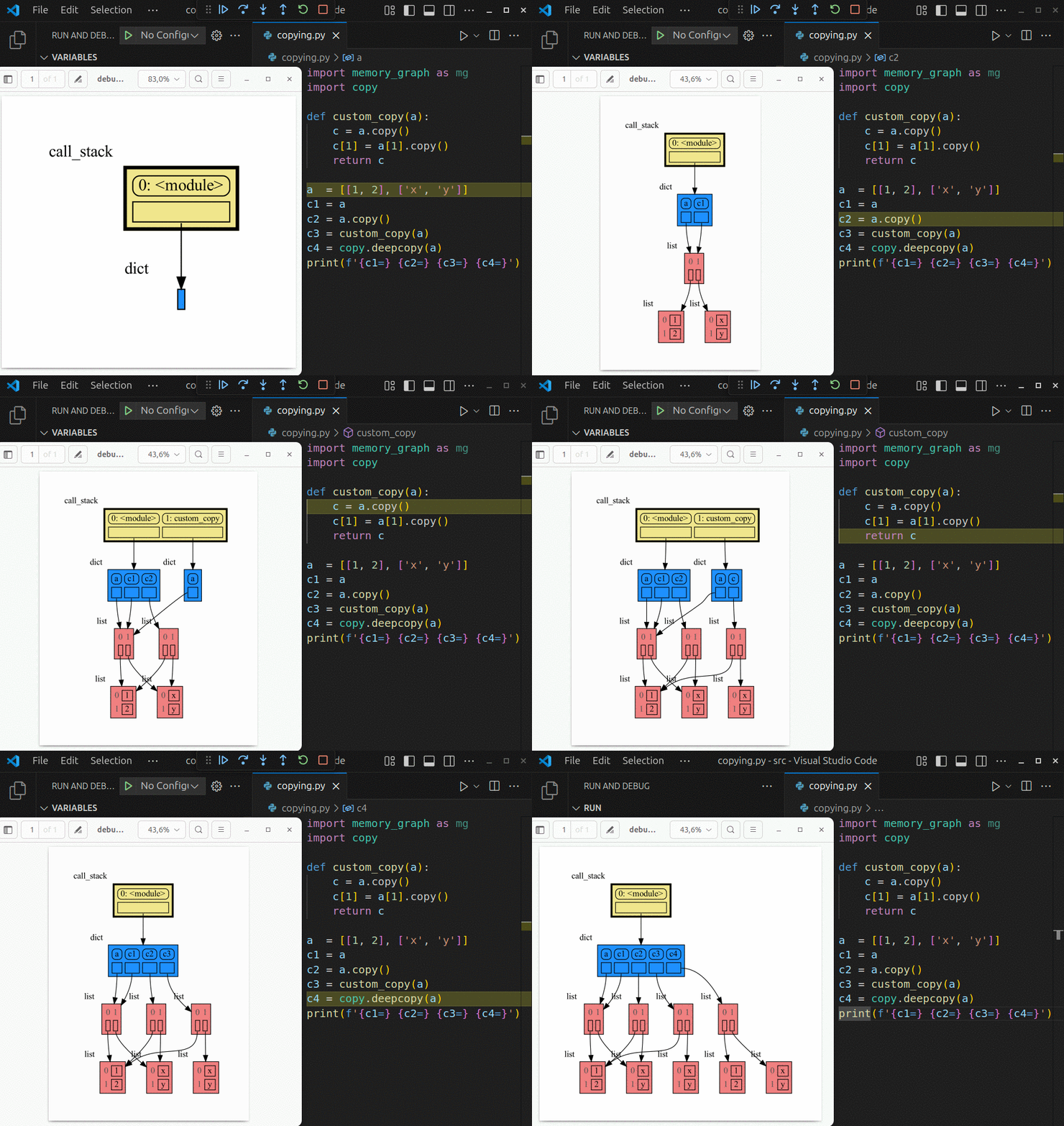
|
|
55
|
-
Run a live demo in the 👉 [**Memory Graph Web Debugger**](https://memory-graph.com/#play) 👈 now, no installation required!
|
|
55
|
+
Run a live demo in the 👉 [**Memory Graph Web Debugger**](https://memory-graph.com/#breakpoints=8&continues=1×tep=1.0&play) 👈 now, no installation required!
|
|
56
56
|
|
|
57
57
|
- learn the right **mental model** to think about Python data (references, mutability, shallow vs deep copy)
|
|
58
58
|
- **visualize the structure of your data** to easily understand and debug any data structure
|
|
@@ -164,8 +164,6 @@ A better way to understand what values are shared is to draw a graph using [memo
|
|
|
164
164
|
|
|
165
165
|
[Troubleshooting](#troubleshooting)
|
|
166
166
|
|
|
167
|
-
[Social Media](#social-media)
|
|
168
|
-
|
|
169
167
|
[Other Packages](#other-packages)
|
|
170
168
|
|
|
171
169
|
## Author ##
|
|
@@ -174,6 +172,10 @@ Bas Terwijn
|
|
|
174
172
|
## Inspiration ##
|
|
175
173
|
Inspired by [Python Tutor](https://pythontutor.com/).
|
|
176
174
|
|
|
175
|
+
## Social Media #
|
|
176
|
+
* LinkedIn: https://www.linkedin.com/groups/13244150/
|
|
177
|
+
* Reddit: https://www.reddit.com/r/Python_memory_graph/
|
|
178
|
+
|
|
177
179
|
## Supported by ##
|
|
178
180
|
<img src="https://raw.githubusercontent.com/bterwijn/memory_graph/main/images/uva.png" alt="University of Amsterdam" width="600">
|
|
179
181
|
|
|
@@ -274,6 +276,8 @@ mg.show(locals())
|
|
|
274
276
|
```
|
|
275
277
|
|
|
276
278
|
|
|
279
|
+
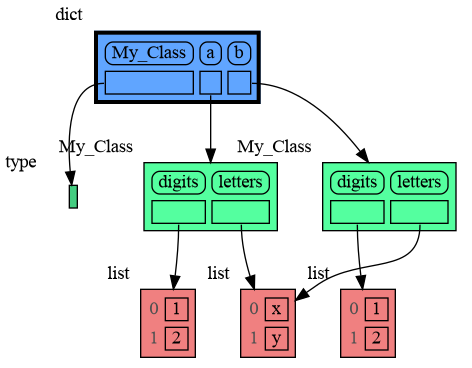
Or see it in the [Memory Grah Web Debugger](https://memory-graph.com/#codeurl=https://raw.githubusercontent.com/bterwijn/memory_graph/refs/heads/main/src/custom_copy.py&breakpoints=15&continues=1&play).
|
|
280
|
+
|
|
277
281
|
## Name Rebinding ##
|
|
278
282
|
When `a` and `b` share a mutable value, then changing the value of `b` changes the value of `a` and vice versa. However, reassigning `b` does not change `a`. When you reassign `b`, you only rebind the name `b` to another value without effecting any other variables.
|
|
279
283
|
|
|
@@ -348,6 +352,8 @@ print(f"a:{a} b:{b} c:{c}")
|
|
|
348
352
|
```
|
|
349
353
|
|
|
350
354
|
|
|
355
|
+
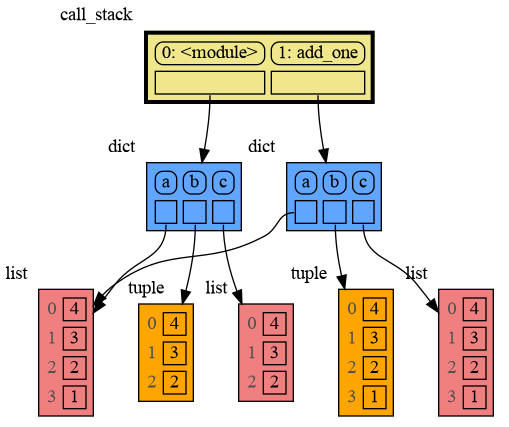
Or see it in the [Memory Grah Web Debugger](https://memory-graph.com/#codeurl=https://raw.githubusercontent.com/bterwijn/memory_graph/refs/heads/main/src/function_call.py&play).
|
|
356
|
+
|
|
351
357
|
In the printed output only `a` is changed as a result of the function call:
|
|
352
358
|
```
|
|
353
359
|
a:[4, 3, 2, 1] b:(4, 3, 2) c:[4, 3, 2]
|
|
@@ -355,6 +361,8 @@ a:[4, 3, 2, 1] b:(4, 3, 2) c:[4, 3, 2]
|
|
|
355
361
|
|
|
356
362
|
This is because `b` is of immutable type 'tuple' so its value gets copied automatically when it is changed. And because the function is called with a copy of `c`, its original value is not changed by the function. The value of variable `a` is the only value of mutable type that is shared between the root stack frame **'0: \<module>'** and the **'1: add_one'** stack frame of the function so only that variable is affected as a result of the function call. The other changes remain confined to the local variables of the ```add_one()``` function.
|
|
357
363
|
|
|
364
|
+
Now is a good time to practice the Python Data Model. Here are [some exercises](https://github.com/bterwijn/memory_graph_videos/blob/main/exercises/exercises.md) on references, mutability, copies, and function calls.
|
|
365
|
+
|
|
358
366
|
## Block ##
|
|
359
367
|
It is often helpful to temporarily block program execution to inspect the graph. For this we can use the `mg.block()` function:
|
|
360
368
|
|
|
@@ -384,16 +392,17 @@ def factorial(n):
|
|
|
384
392
|
|
|
385
393
|
print( factorial(4) )
|
|
386
394
|
```
|
|
387
|
-
|
|
388
395
|
|
|
389
396
|
|
|
390
397
|
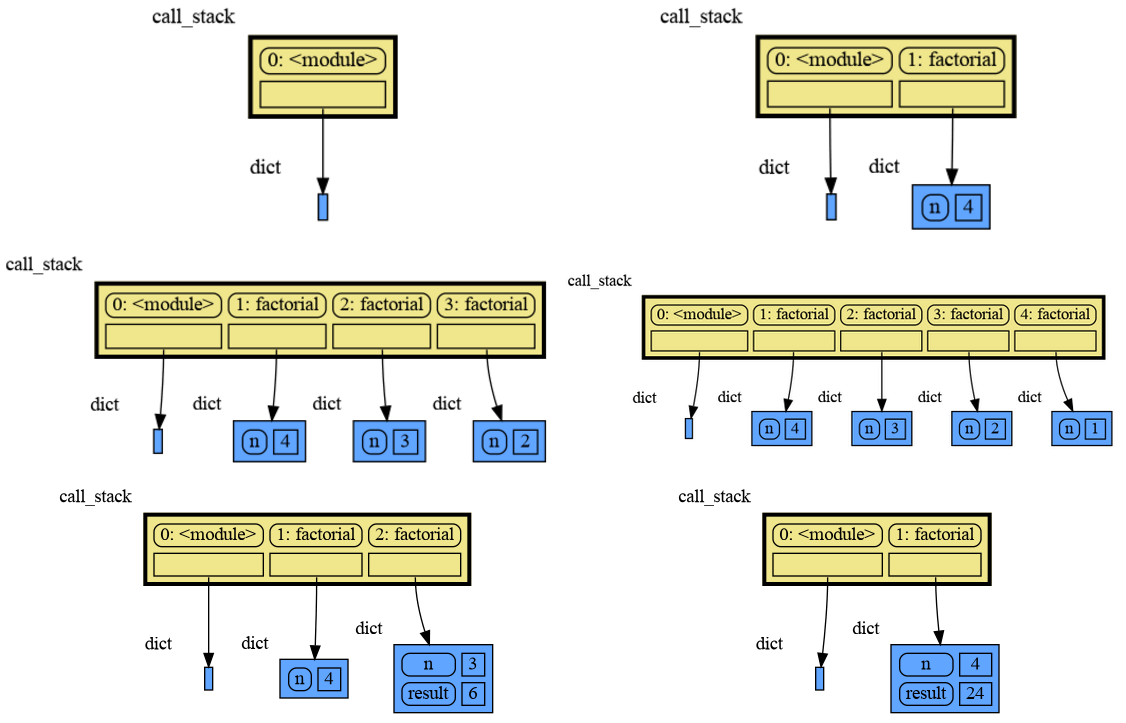
and the result is: 1 x 2 x 3 x 4 = 24
|
|
391
398
|
|
|
392
|
-
|
|
399
|
+
Or see it in the [Memory Grah Web Debugger](https://memory-graph.com/#codeurl=https://raw.githubusercontent.com/bterwijn/memory_graph/refs/heads/main/src/factorial.py×tep=1.0&play).
|
|
400
|
+
|
|
401
|
+
## Binary Convert ##
|
|
393
402
|
A more interesting recursive example is function `binary()` that converts a decimal integer to binary representation.
|
|
394
403
|
```python
|
|
395
404
|
import memory_graph as mg
|
|
396
|
-
mg.config.
|
|
405
|
+
mg.config.type_to_horizontal[list] = True # horizontal lists
|
|
397
406
|
|
|
398
407
|
def binary(value: int) -> list[int]:
|
|
399
408
|
mg.block(mg.show(), mg.stack())
|
|
@@ -411,6 +420,8 @@ print( binary(100) )
|
|
|
411
420
|
1100100
|
|
412
421
|
```
|
|
413
422
|
|
|
423
|
+
Or see it in the [Memory Grah Web Debugger](https://memory-graph.com/#codeurl=https://raw.githubusercontent.com/bterwijn/memory_graph/refs/heads/main/src/binary_convert.py×tep=1.0&play).
|
|
424
|
+
|
|
414
425
|
## Power Set ##
|
|
415
426
|
A more complex recursive example is function `power_set()` where lists are shared by different function calls. A power set is the set of all subsets of a collection of values.
|
|
416
427
|
|
|
@@ -553,6 +564,8 @@ for i in range(n):
|
|
|
553
564
|
Here we show values being added to a Linked List in Cursor AI. When adding the last value '5' we "Step Into" the code to show more of the details.
|
|
554
565
|

|
|
555
566
|
|
|
567
|
+
Or see it in the [Memory Grah Web Debugger](https://memory-graph.com/#codeurl=https://raw.githubusercontent.com/bterwijn/memory_graph/refs/heads/main/src/linked_list.py×tep=0.2&play).
|
|
568
|
+
|
|
556
569
|
## Binary Tree ##
|
|
557
570
|
```python
|
|
558
571
|
import memory_graph as mg
|
|
@@ -593,6 +606,7 @@ for i in range(n):
|
|
|
593
606
|
Here we show values being inserted in a Binary Tree in Visual Studio Code. When inserting the last value '29' we "Step Into" the code to show the recursive implementation.
|
|
594
607
|

|
|
595
608
|
|
|
609
|
+
Or see it in the [Memory Grah Web Debugger](https://memory-graph.com/#codeurl=https://raw.githubusercontent.com/bterwijn/memory_graph/refs/heads/main/src/bin_tree.py×tep=0.2&play).
|
|
596
610
|
|
|
597
611
|
## Hash Set ##
|
|
598
612
|
```python
|
|
@@ -636,8 +650,10 @@ for i in range(n):
|
|
|
636
650
|
Here we show values being inserted in a HashSet in PyCharm. When inserting the last value '44' we "Step Into" the code to show more of the details.
|
|
637
651
|

|
|
638
652
|
|
|
653
|
+
Or see it in the [Memory Grah Web Debugger](https://memory-graph.com/#codeurl=https://raw.githubusercontent.com/bterwijn/memory_graph/refs/heads/main/src/hash_set.py&breakpoints=32&continues=1×tep=0.5&play).
|
|
654
|
+
|
|
639
655
|
# Configuration #
|
|
640
|
-
Different aspects of memory_graph can be configured. The default configuration can be reset by calling 'mg.config_default.reset()'.
|
|
656
|
+
Different aspects of memory_graph can be configured. The default configuration can be reset by calling 'mg.config_default.reset()'. The Memory Graph Web Debugger gives examples of the [most important configurations](https://memory-graph.com/#codeurl=https://raw.githubusercontent.com/bterwijn/memory_graph/refs/heads/main/src/config.py&play).
|
|
641
657
|
|
|
642
658
|
- ***mg.config.reopen_viewer*** : bool
|
|
643
659
|
- If True the viewer is reopened each time show() is called, this might change window focus, default True.
|
|
@@ -672,8 +688,8 @@ Different aspects of memory_graph can be configured. The default configuration c
|
|
|
672
688
|
- ***mg.config.type_to_color*** : dict[type, color]
|
|
673
689
|
- Maps a type to the [graphviz color](https://graphviz.org/doc/info/colors.html) it gets in the graph.
|
|
674
690
|
|
|
675
|
-
- ***mg.config.
|
|
676
|
-
- Maps a type to its orientation. Use 'True' for
|
|
691
|
+
- ***mg.config.type_to_horizontal*** : dict[type, bool]
|
|
692
|
+
- Maps a type to its orientation for Node_Linear and Node_Key_Value. Use 'True' for horizontal and 'False' for vertical. If not specified these nodes vertical unless they have references to children.
|
|
677
693
|
|
|
678
694
|
- ***mg.config.type_to_slicer*** : dict[type, int]
|
|
679
695
|
- Maps a type to a Slicer. A slicer determines how many elements of a data type are shown in the graph to prevent the graph from getting too big. 'Slicer()' does no slicing, 'Slicer(1,2,3)' shows just 1 element at the beginning, 2 in the middle, and 3 at the end.
|
|
@@ -730,7 +746,6 @@ mg.show(locals())
|
|
|
730
746
|
```
|
|
731
747
|
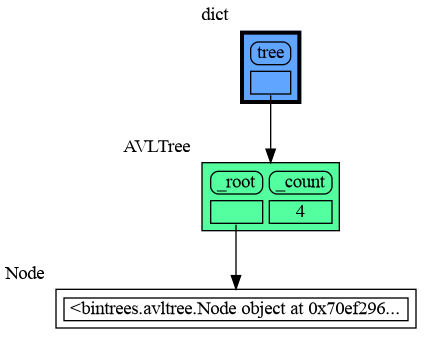
|
|
732
748
|
|
|
733
|
-
|
|
734
749
|
## All attributes using dir() ##
|
|
735
750
|
A useful start is to give it some color, show the list of all its attributes using `dir()`, and setting an empty Slicer to see the attribute list in full.
|
|
736
751
|
|
|
@@ -746,13 +761,13 @@ tree.insert(20, "twenty")
|
|
|
746
761
|
tree.insert(15, "fifteen")
|
|
747
762
|
|
|
748
763
|
mg.config.type_to_color[bintrees.avltree.Node] = "sandybrown"
|
|
749
|
-
mg.config.type_to_node[bintrees.avltree.Node] = lambda data: mg.
|
|
764
|
+
mg.config.type_to_node[bintrees.avltree.Node] = lambda data: mg.Node_Linear(data,
|
|
750
765
|
dir(data))
|
|
751
|
-
mg.config.type_to_slicer[bintrees.avltree.Node] = mg.
|
|
766
|
+
mg.config.type_to_slicer[bintrees.avltree.Node] = mg.Slicer()
|
|
752
767
|
|
|
753
768
|
mg.show(locals())
|
|
754
769
|
```
|
|
755
|
-
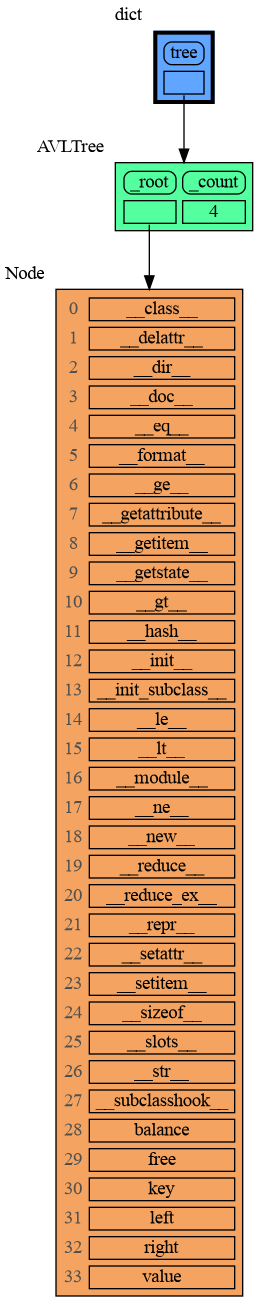
|
|
756
771
|
|
|
757
772
|
Next figure out what the attributes are you want to graph and choose a Node type, there are four options:
|
|
758
773
|
|
|
@@ -770,12 +785,12 @@ tree.insert(20, "twenty")
|
|
|
770
785
|
tree.insert(15, "fifteen")
|
|
771
786
|
|
|
772
787
|
mg.config.type_to_color[bintrees.avltree.Node] = "sandybrown"
|
|
773
|
-
mg.config.type_to_node[bintrees.avltree.Node] = lambda data: mg.
|
|
788
|
+
mg.config.type_to_node[bintrees.avltree.Node] = lambda data: mg.Node_Leaf(data,
|
|
774
789
|
f"key:{data.key} value:{data.value}")
|
|
775
790
|
|
|
776
791
|
mg.show(locals())
|
|
777
792
|
```
|
|
778
|
-
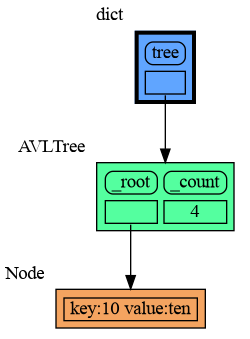
|
|
779
794
|
|
|
780
795
|
## 2) Node_Linear ##
|
|
781
796
|
Node_Linear shows multiple values in a line like a list.
|
|
@@ -791,7 +806,7 @@ tree.insert(20, "twenty")
|
|
|
791
806
|
tree.insert(15, "fifteen")
|
|
792
807
|
|
|
793
808
|
mg.config.type_to_color[bintrees.avltree.Node] = "sandybrown"
|
|
794
|
-
mg.config.type_to_node[bintrees.avltree.Node] = lambda data: mg.
|
|
809
|
+
mg.config.type_to_node[bintrees.avltree.Node] = lambda data: mg.Node_Linear(data,
|
|
795
810
|
['left:', data.left,
|
|
796
811
|
'key:', data.key,
|
|
797
812
|
'value:', data.value,
|
|
@@ -799,7 +814,7 @@ mg.config.type_to_node[bintrees.avltree.Node] = lambda data: mg.node_linear.Node
|
|
|
799
814
|
|
|
800
815
|
mg.show(locals())
|
|
801
816
|
```
|
|
802
|
-
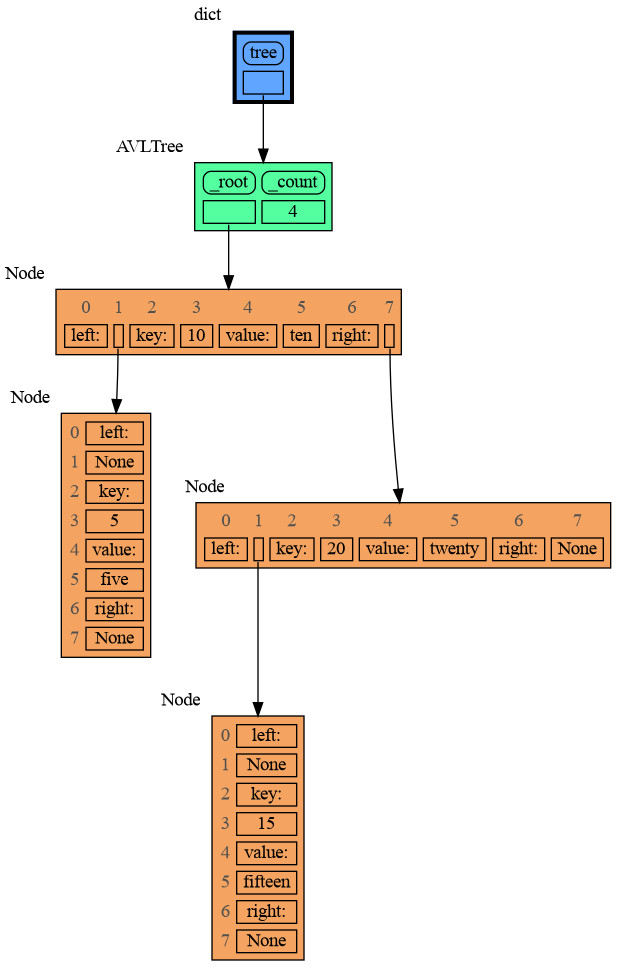
|
|
803
818
|
|
|
804
819
|
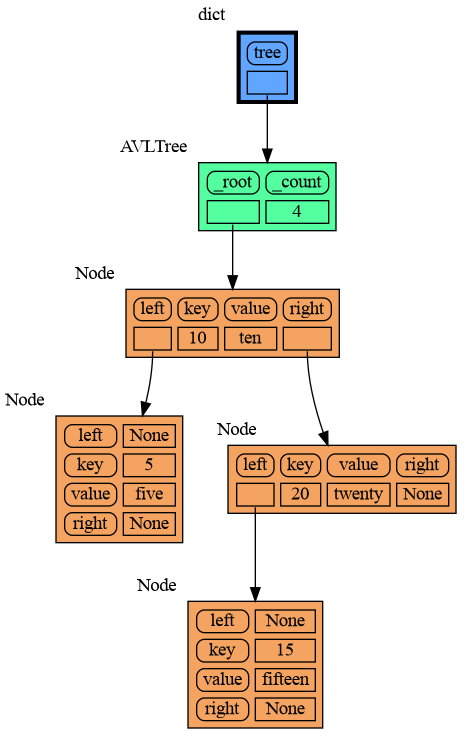
## 3) Node_Key_Value ##
|
|
805
820
|
Node_Key_Value shows key-value pairs like a dictionary. Note the required `items()` call at the end.
|
|
@@ -815,7 +830,7 @@ tree.insert(20, "twenty")
|
|
|
815
830
|
tree.insert(15, "fifteen")
|
|
816
831
|
|
|
817
832
|
mg.config.type_to_color[bintrees.avltree.Node] = "sandybrown"
|
|
818
|
-
mg.config.type_to_node[bintrees.avltree.Node] = lambda data: mg.
|
|
833
|
+
mg.config.type_to_node[bintrees.avltree.Node] = lambda data: mg.Node_Key_Value(data,
|
|
819
834
|
{'left': data.left,
|
|
820
835
|
'key': data.key,
|
|
821
836
|
'value': data.value,
|
|
@@ -823,7 +838,7 @@ mg.config.type_to_node[bintrees.avltree.Node] = lambda data: mg.node_key_value.N
|
|
|
823
838
|
|
|
824
839
|
mg.show(locals())
|
|
825
840
|
```
|
|
826
|
-
|
|
827
842
|
|
|
828
843
|
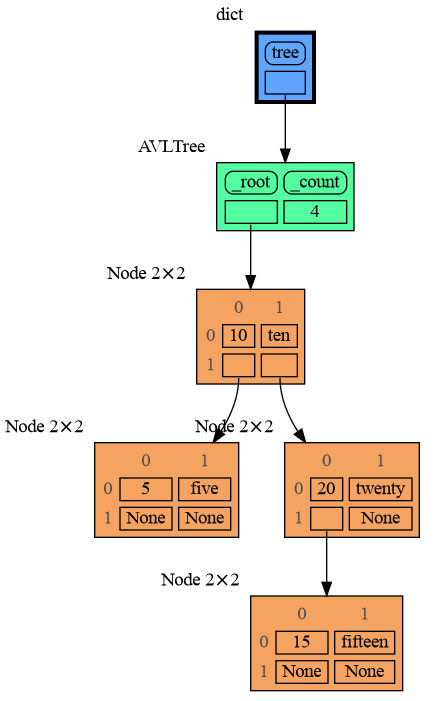
## 4) Node_Table ##
|
|
829
844
|
Node_Table shows all the values as a table.
|
|
@@ -839,13 +854,13 @@ tree.insert(20, "twenty")
|
|
|
839
854
|
tree.insert(15, "fifteen")
|
|
840
855
|
|
|
841
856
|
mg.config.type_to_color[bintrees.avltree.Node] = "sandybrown"
|
|
842
|
-
mg.config.type_to_node[bintrees.avltree.Node] = lambda data: mg.
|
|
857
|
+
mg.config.type_to_node[bintrees.avltree.Node] = lambda data: mg.Node_Table(data,
|
|
843
858
|
[[data.key, data.value],
|
|
844
859
|
[data.left, data.right]] )
|
|
845
860
|
|
|
846
861
|
mg.show(locals())
|
|
847
862
|
```
|
|
848
|
-
|
|
849
864
|
|
|
850
865
|
## Binary Search ##
|
|
851
866
|
For binary search we can use a List_View class to represent a particular sublist without making a list copy.
|
|
@@ -894,7 +909,7 @@ Arguably the visualization is then more clear when we show a List_View object as
|
|
|
894
909
|
|
|
895
910
|
```python
|
|
896
911
|
mg.config.type_to_color[List_View] = 'hotpink'
|
|
897
|
-
mg.config.type_to_node[List_View] = lambda data: mg.
|
|
912
|
+
mg.config.type_to_node[List_View] = lambda data: mg.Node_Linear(data,
|
|
898
913
|
data.lst[data.begin:data.end])
|
|
899
914
|
```
|
|
900
915
|

|
|
@@ -950,7 +965,7 @@ mg.config.type_to_depth[B] = 3
|
|
|
950
965
|
mg.config.type_to_depth[id(c)] = 2
|
|
951
966
|
mg.show(locals())
|
|
952
967
|
```
|
|
953
|
-
|
|
954
969
|
|
|
955
970
|
## Hidden Edges ##
|
|
956
971
|
|
|
@@ -966,7 +981,7 @@ for i in range(20):
|
|
|
966
981
|
|
|
967
982
|
mg.show(locals())
|
|
968
983
|
```
|
|
969
|
-
|
|
970
985
|
|
|
971
986
|
# Extensions #
|
|
972
987
|
Different extensions are available for types from other Python packages.
|
|
@@ -989,6 +1004,8 @@ mg.show(locals())
|
|
|
989
1004
|
```
|
|
990
1005
|
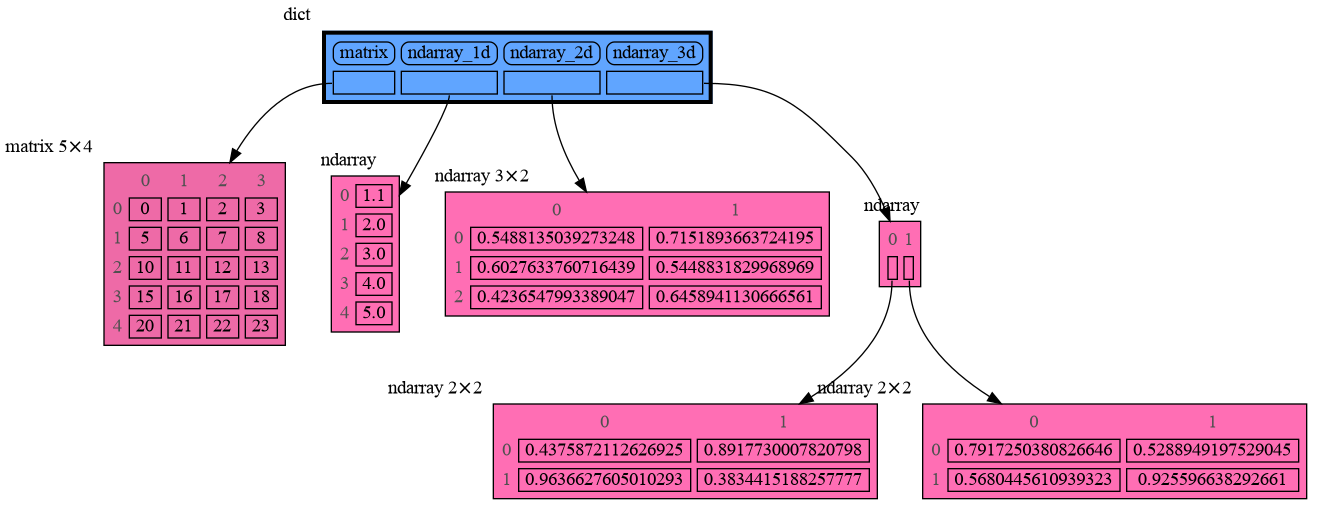
|
|
991
1006
|
|
|
1007
|
+
Or see it in the [Memory Grah Web Debugger](https://memory-graph.com/#micropip=numpy&codeurl=https://raw.githubusercontent.com/bterwijn/memory_graph/refs/heads/main/src/mg_numpy.py&continues=1).
|
|
1008
|
+
|
|
992
1009
|
## Pandas ##
|
|
993
1010
|
Pandas types `Series` and `DataFrame` can be graphed with "memory_graph.extension_pandas":
|
|
994
1011
|
|
|
@@ -1008,6 +1025,8 @@ mg.show(locals())
|
|
|
1008
1025
|
```
|
|
1009
1026
|

|
|
1010
1027
|
|
|
1028
|
+
Or see it in the [Memory Grah Web Debugger](https://memory-graph.com/#micropip=pandas&codeurl=https://raw.githubusercontent.com/bterwijn/memory_graph/refs/heads/main/src/mg_pandas.py&continues=1).
|
|
1029
|
+
|
|
1011
1030
|
## PyTorch ##
|
|
1012
1031
|
Torch type `tensor` can be graphed with "memory_graph.extension_torch":
|
|
1013
1032
|
|
|
@@ -1086,9 +1105,5 @@ $ bash create_gif.sh animated
|
|
|
1086
1105
|
|
|
1087
1106
|
- When graph edges overlap it can be hard to distinguish them. Using an interactive graphviz viewer, such as [xdot](https://github.com/jrfonseca/xdot.py), on a '*.gv' DOT output file will help.
|
|
1088
1107
|
|
|
1089
|
-
# Social Media #
|
|
1090
|
-
* LinkedIn: https://www.linkedin.com/groups/13244150/
|
|
1091
|
-
* Reddit: https://www.reddit.com/r/Python_memory_graph/
|
|
1092
|
-
|
|
1093
1108
|
# Other Packages #
|
|
1094
1109
|
The [memory_graph](https://pypi.org/project/memory-graph/) package visualizes your data. If instead you want to visualize function calls, check out the [invocation_tree](https://pypi.org/project/invocation-tree/) package.
|
|
@@ -7,7 +7,7 @@ Additionally [Graphviz](https://graphviz.org/download/) needs to be installed.
|
|
|
7
7
|
|
|
8
8
|
# Highlights #
|
|
9
9
|

|
|
10
|
-
Run a live demo in the 👉 [**Memory Graph Web Debugger**](https://memory-graph.com/#play) 👈 now, no installation required!
|
|
10
|
+
Run a live demo in the 👉 [**Memory Graph Web Debugger**](https://memory-graph.com/#breakpoints=8&continues=1×tep=1.0&play) 👈 now, no installation required!
|
|
11
11
|
|
|
12
12
|
- learn the right **mental model** to think about Python data (references, mutability, shallow vs deep copy)
|
|
13
13
|
- **visualize the structure of your data** to easily understand and debug any data structure
|
|
@@ -119,8 +119,6 @@ A better way to understand what values are shared is to draw a graph using [memo
|
|
|
119
119
|
|
|
120
120
|
[Troubleshooting](#troubleshooting)
|
|
121
121
|
|
|
122
|
-
[Social Media](#social-media)
|
|
123
|
-
|
|
124
122
|
[Other Packages](#other-packages)
|
|
125
123
|
|
|
126
124
|
## Author ##
|
|
@@ -129,6 +127,10 @@ Bas Terwijn
|
|
|
129
127
|
## Inspiration ##
|
|
130
128
|
Inspired by [Python Tutor](https://pythontutor.com/).
|
|
131
129
|
|
|
130
|
+
## Social Media #
|
|
131
|
+
* LinkedIn: https://www.linkedin.com/groups/13244150/
|
|
132
|
+
* Reddit: https://www.reddit.com/r/Python_memory_graph/
|
|
133
|
+
|
|
132
134
|
## Supported by ##
|
|
133
135
|
<img src="https://raw.githubusercontent.com/bterwijn/memory_graph/main/images/uva.png" alt="University of Amsterdam" width="600">
|
|
134
136
|
|
|
@@ -229,6 +231,8 @@ mg.show(locals())
|
|
|
229
231
|
```
|
|
230
232
|

|
|
231
233
|
|
|
234
|
+
Or see it in the [Memory Grah Web Debugger](https://memory-graph.com/#codeurl=https://raw.githubusercontent.com/bterwijn/memory_graph/refs/heads/main/src/custom_copy.py&breakpoints=15&continues=1&play).
|
|
235
|
+
|
|
232
236
|
## Name Rebinding ##
|
|
233
237
|
When `a` and `b` share a mutable value, then changing the value of `b` changes the value of `a` and vice versa. However, reassigning `b` does not change `a`. When you reassign `b`, you only rebind the name `b` to another value without effecting any other variables.
|
|
234
238
|
|
|
@@ -303,6 +307,8 @@ print(f"a:{a} b:{b} c:{c}")
|
|
|
303
307
|
```
|
|
304
308
|

|
|
305
309
|
|
|
310
|
+
Or see it in the [Memory Grah Web Debugger](https://memory-graph.com/#codeurl=https://raw.githubusercontent.com/bterwijn/memory_graph/refs/heads/main/src/function_call.py&play).
|
|
311
|
+
|
|
306
312
|
In the printed output only `a` is changed as a result of the function call:
|
|
307
313
|
```
|
|
308
314
|
a:[4, 3, 2, 1] b:(4, 3, 2) c:[4, 3, 2]
|
|
@@ -310,6 +316,8 @@ a:[4, 3, 2, 1] b:(4, 3, 2) c:[4, 3, 2]
|
|
|
310
316
|
|
|
311
317
|
This is because `b` is of immutable type 'tuple' so its value gets copied automatically when it is changed. And because the function is called with a copy of `c`, its original value is not changed by the function. The value of variable `a` is the only value of mutable type that is shared between the root stack frame **'0: \<module>'** and the **'1: add_one'** stack frame of the function so only that variable is affected as a result of the function call. The other changes remain confined to the local variables of the ```add_one()``` function.
|
|
312
318
|
|
|
319
|
+
Now is a good time to practice the Python Data Model. Here are [some exercises](https://github.com/bterwijn/memory_graph_videos/blob/main/exercises/exercises.md) on references, mutability, copies, and function calls.
|
|
320
|
+
|
|
313
321
|
## Block ##
|
|
314
322
|
It is often helpful to temporarily block program execution to inspect the graph. For this we can use the `mg.block()` function:
|
|
315
323
|
|
|
@@ -339,16 +347,17 @@ def factorial(n):
|
|
|
339
347
|
|
|
340
348
|
print( factorial(4) )
|
|
341
349
|
```
|
|
342
|
-
|
|
343
350
|

|
|
344
351
|
|
|
345
352
|
and the result is: 1 x 2 x 3 x 4 = 24
|
|
346
353
|
|
|
347
|
-
|
|
354
|
+
Or see it in the [Memory Grah Web Debugger](https://memory-graph.com/#codeurl=https://raw.githubusercontent.com/bterwijn/memory_graph/refs/heads/main/src/factorial.py×tep=1.0&play).
|
|
355
|
+
|
|
356
|
+
## Binary Convert ##
|
|
348
357
|
A more interesting recursive example is function `binary()` that converts a decimal integer to binary representation.
|
|
349
358
|
```python
|
|
350
359
|
import memory_graph as mg
|
|
351
|
-
mg.config.
|
|
360
|
+
mg.config.type_to_horizontal[list] = True # horizontal lists
|
|
352
361
|
|
|
353
362
|
def binary(value: int) -> list[int]:
|
|
354
363
|
mg.block(mg.show(), mg.stack())
|
|
@@ -366,6 +375,8 @@ print( binary(100) )
|
|
|
366
375
|
1100100
|
|
367
376
|
```
|
|
368
377
|
|
|
378
|
+
Or see it in the [Memory Grah Web Debugger](https://memory-graph.com/#codeurl=https://raw.githubusercontent.com/bterwijn/memory_graph/refs/heads/main/src/binary_convert.py×tep=1.0&play).
|
|
379
|
+
|
|
369
380
|
## Power Set ##
|
|
370
381
|
A more complex recursive example is function `power_set()` where lists are shared by different function calls. A power set is the set of all subsets of a collection of values.
|
|
371
382
|
|
|
@@ -508,6 +519,8 @@ for i in range(n):
|
|
|
508
519
|
Here we show values being added to a Linked List in Cursor AI. When adding the last value '5' we "Step Into" the code to show more of the details.
|
|
509
520
|

|
|
510
521
|
|
|
522
|
+
Or see it in the [Memory Grah Web Debugger](https://memory-graph.com/#codeurl=https://raw.githubusercontent.com/bterwijn/memory_graph/refs/heads/main/src/linked_list.py×tep=0.2&play).
|
|
523
|
+
|
|
511
524
|
## Binary Tree ##
|
|
512
525
|
```python
|
|
513
526
|
import memory_graph as mg
|
|
@@ -548,6 +561,7 @@ for i in range(n):
|
|
|
548
561
|
Here we show values being inserted in a Binary Tree in Visual Studio Code. When inserting the last value '29' we "Step Into" the code to show the recursive implementation.
|
|
549
562
|

|
|
550
563
|
|
|
564
|
+
Or see it in the [Memory Grah Web Debugger](https://memory-graph.com/#codeurl=https://raw.githubusercontent.com/bterwijn/memory_graph/refs/heads/main/src/bin_tree.py×tep=0.2&play).
|
|
551
565
|
|
|
552
566
|
## Hash Set ##
|
|
553
567
|
```python
|
|
@@ -591,8 +605,10 @@ for i in range(n):
|
|
|
591
605
|
Here we show values being inserted in a HashSet in PyCharm. When inserting the last value '44' we "Step Into" the code to show more of the details.
|
|
592
606
|

|
|
593
607
|
|
|
608
|
+
Or see it in the [Memory Grah Web Debugger](https://memory-graph.com/#codeurl=https://raw.githubusercontent.com/bterwijn/memory_graph/refs/heads/main/src/hash_set.py&breakpoints=32&continues=1×tep=0.5&play).
|
|
609
|
+
|
|
594
610
|
# Configuration #
|
|
595
|
-
Different aspects of memory_graph can be configured. The default configuration can be reset by calling 'mg.config_default.reset()'.
|
|
611
|
+
Different aspects of memory_graph can be configured. The default configuration can be reset by calling 'mg.config_default.reset()'. The Memory Graph Web Debugger gives examples of the [most important configurations](https://memory-graph.com/#codeurl=https://raw.githubusercontent.com/bterwijn/memory_graph/refs/heads/main/src/config.py&play).
|
|
596
612
|
|
|
597
613
|
- ***mg.config.reopen_viewer*** : bool
|
|
598
614
|
- If True the viewer is reopened each time show() is called, this might change window focus, default True.
|
|
@@ -627,8 +643,8 @@ Different aspects of memory_graph can be configured. The default configuration c
|
|
|
627
643
|
- ***mg.config.type_to_color*** : dict[type, color]
|
|
628
644
|
- Maps a type to the [graphviz color](https://graphviz.org/doc/info/colors.html) it gets in the graph.
|
|
629
645
|
|
|
630
|
-
- ***mg.config.
|
|
631
|
-
- Maps a type to its orientation. Use 'True' for
|
|
646
|
+
- ***mg.config.type_to_horizontal*** : dict[type, bool]
|
|
647
|
+
- Maps a type to its orientation for Node_Linear and Node_Key_Value. Use 'True' for horizontal and 'False' for vertical. If not specified these nodes vertical unless they have references to children.
|
|
632
648
|
|
|
633
649
|
- ***mg.config.type_to_slicer*** : dict[type, int]
|
|
634
650
|
- Maps a type to a Slicer. A slicer determines how many elements of a data type are shown in the graph to prevent the graph from getting too big. 'Slicer()' does no slicing, 'Slicer(1,2,3)' shows just 1 element at the beginning, 2 in the middle, and 3 at the end.
|
|
@@ -685,7 +701,6 @@ mg.show(locals())
|
|
|
685
701
|
```
|
|
686
702
|

|
|
687
703
|
|
|
688
|
-
|
|
689
704
|
## All attributes using dir() ##
|
|
690
705
|
A useful start is to give it some color, show the list of all its attributes using `dir()`, and setting an empty Slicer to see the attribute list in full.
|
|
691
706
|
|
|
@@ -701,13 +716,13 @@ tree.insert(20, "twenty")
|
|
|
701
716
|
tree.insert(15, "fifteen")
|
|
702
717
|
|
|
703
718
|
mg.config.type_to_color[bintrees.avltree.Node] = "sandybrown"
|
|
704
|
-
mg.config.type_to_node[bintrees.avltree.Node] = lambda data: mg.
|
|
719
|
+
mg.config.type_to_node[bintrees.avltree.Node] = lambda data: mg.Node_Linear(data,
|
|
705
720
|
dir(data))
|
|
706
|
-
mg.config.type_to_slicer[bintrees.avltree.Node] = mg.
|
|
721
|
+
mg.config.type_to_slicer[bintrees.avltree.Node] = mg.Slicer()
|
|
707
722
|
|
|
708
723
|
mg.show(locals())
|
|
709
724
|
```
|
|
710
|
-

|
|
711
726
|
|
|
712
727
|
Next figure out what the attributes are you want to graph and choose a Node type, there are four options:
|
|
713
728
|
|
|
@@ -725,12 +740,12 @@ tree.insert(20, "twenty")
|
|
|
725
740
|
tree.insert(15, "fifteen")
|
|
726
741
|
|
|
727
742
|
mg.config.type_to_color[bintrees.avltree.Node] = "sandybrown"
|
|
728
|
-
mg.config.type_to_node[bintrees.avltree.Node] = lambda data: mg.
|
|
743
|
+
mg.config.type_to_node[bintrees.avltree.Node] = lambda data: mg.Node_Leaf(data,
|
|
729
744
|
f"key:{data.key} value:{data.value}")
|
|
730
745
|
|
|
731
746
|
mg.show(locals())
|
|
732
747
|
```
|
|
733
|
-

|
|
734
749
|
|
|
735
750
|
## 2) Node_Linear ##
|
|
736
751
|
Node_Linear shows multiple values in a line like a list.
|
|
@@ -746,7 +761,7 @@ tree.insert(20, "twenty")
|
|
|
746
761
|
tree.insert(15, "fifteen")
|
|
747
762
|
|
|
748
763
|
mg.config.type_to_color[bintrees.avltree.Node] = "sandybrown"
|
|
749
|
-
mg.config.type_to_node[bintrees.avltree.Node] = lambda data: mg.
|
|
764
|
+
mg.config.type_to_node[bintrees.avltree.Node] = lambda data: mg.Node_Linear(data,
|
|
750
765
|
['left:', data.left,
|
|
751
766
|
'key:', data.key,
|
|
752
767
|
'value:', data.value,
|
|
@@ -754,7 +769,7 @@ mg.config.type_to_node[bintrees.avltree.Node] = lambda data: mg.node_linear.Node
|
|
|
754
769
|
|
|
755
770
|
mg.show(locals())
|
|
756
771
|
```
|
|
757
|
-

|
|
758
773
|
|
|
759
774
|
## 3) Node_Key_Value ##
|
|
760
775
|
Node_Key_Value shows key-value pairs like a dictionary. Note the required `items()` call at the end.
|
|
@@ -770,7 +785,7 @@ tree.insert(20, "twenty")
|
|
|
770
785
|
tree.insert(15, "fifteen")
|
|
771
786
|
|
|
772
787
|
mg.config.type_to_color[bintrees.avltree.Node] = "sandybrown"
|
|
773
|
-
mg.config.type_to_node[bintrees.avltree.Node] = lambda data: mg.
|
|
788
|
+
mg.config.type_to_node[bintrees.avltree.Node] = lambda data: mg.Node_Key_Value(data,
|
|
774
789
|
{'left': data.left,
|
|
775
790
|
'key': data.key,
|
|
776
791
|
'value': data.value,
|
|
@@ -778,7 +793,7 @@ mg.config.type_to_node[bintrees.avltree.Node] = lambda data: mg.node_key_value.N
|
|
|
778
793
|
|
|
779
794
|
mg.show(locals())
|
|
780
795
|
```
|
|
781
|
-

|
|
782
797
|
|
|
783
798
|
## 4) Node_Table ##
|
|
784
799
|
Node_Table shows all the values as a table.
|
|
@@ -794,13 +809,13 @@ tree.insert(20, "twenty")
|
|
|
794
809
|
tree.insert(15, "fifteen")
|
|
795
810
|
|
|
796
811
|
mg.config.type_to_color[bintrees.avltree.Node] = "sandybrown"
|
|
797
|
-
mg.config.type_to_node[bintrees.avltree.Node] = lambda data: mg.
|
|
812
|
+
mg.config.type_to_node[bintrees.avltree.Node] = lambda data: mg.Node_Table(data,
|
|
798
813
|
[[data.key, data.value],
|
|
799
814
|
[data.left, data.right]] )
|
|
800
815
|
|
|
801
816
|
mg.show(locals())
|
|
802
817
|
```
|
|
803
|
-

|
|
804
819
|
|
|
805
820
|
## Binary Search ##
|
|
806
821
|
For binary search we can use a List_View class to represent a particular sublist without making a list copy.
|
|
@@ -849,7 +864,7 @@ Arguably the visualization is then more clear when we show a List_View object as
|
|
|
849
864
|
|
|
850
865
|
```python
|
|
851
866
|
mg.config.type_to_color[List_View] = 'hotpink'
|
|
852
|
-
mg.config.type_to_node[List_View] = lambda data: mg.
|
|
867
|
+
mg.config.type_to_node[List_View] = lambda data: mg.Node_Linear(data,
|
|
853
868
|
data.lst[data.begin:data.end])
|
|
854
869
|
```
|
|
855
870
|

|
|
@@ -905,7 +920,7 @@ mg.config.type_to_depth[B] = 3
|
|
|
905
920
|
mg.config.type_to_depth[id(c)] = 2
|
|
906
921
|
mg.show(locals())
|
|
907
922
|
```
|
|
908
|
-

|
|
909
924
|
|
|
910
925
|
## Hidden Edges ##
|
|
911
926
|
|
|
@@ -921,7 +936,7 @@ for i in range(20):
|
|
|
921
936
|
|
|
922
937
|
mg.show(locals())
|
|
923
938
|
```
|
|
924
|
-

|
|
925
940
|
|
|
926
941
|
# Extensions #
|
|
927
942
|
Different extensions are available for types from other Python packages.
|
|
@@ -944,6 +959,8 @@ mg.show(locals())
|
|
|
944
959
|
```
|
|
945
960
|

|
|
946
961
|
|
|
962
|
+
Or see it in the [Memory Grah Web Debugger](https://memory-graph.com/#micropip=numpy&codeurl=https://raw.githubusercontent.com/bterwijn/memory_graph/refs/heads/main/src/mg_numpy.py&continues=1).
|
|
963
|
+
|
|
947
964
|
## Pandas ##
|
|
948
965
|
Pandas types `Series` and `DataFrame` can be graphed with "memory_graph.extension_pandas":
|
|
949
966
|
|
|
@@ -963,6 +980,8 @@ mg.show(locals())
|
|
|
963
980
|
```
|
|
964
981
|

|
|
965
982
|
|
|
983
|
+
Or see it in the [Memory Grah Web Debugger](https://memory-graph.com/#micropip=pandas&codeurl=https://raw.githubusercontent.com/bterwijn/memory_graph/refs/heads/main/src/mg_pandas.py&continues=1).
|
|
984
|
+
|
|
966
985
|
## PyTorch ##
|
|
967
986
|
Torch type `tensor` can be graphed with "memory_graph.extension_torch":
|
|
968
987
|
|
|
@@ -1041,9 +1060,5 @@ $ bash create_gif.sh animated
|
|
|
1041
1060
|
|
|
1042
1061
|
- When graph edges overlap it can be hard to distinguish them. Using an interactive graphviz viewer, such as [xdot](https://github.com/jrfonseca/xdot.py), on a '*.gv' DOT output file will help.
|
|
1043
1062
|
|
|
1044
|
-
# Social Media #
|
|
1045
|
-
* LinkedIn: https://www.linkedin.com/groups/13244150/
|
|
1046
|
-
* Reddit: https://www.reddit.com/r/Python_memory_graph/
|
|
1047
|
-
|
|
1048
1063
|
# Other Packages #
|
|
1049
1064
|
The [memory_graph](https://pypi.org/project/memory-graph/) package visualizes your data. If instead you want to visualize function calls, check out the [invocation_tree](https://pypi.org/project/invocation-tree/) package.
|
|
@@ -15,29 +15,28 @@ tree.insert(15, "fifteen")
|
|
|
15
15
|
# mg.render(locals(), 'avltree_fail.png') # id keeps changing
|
|
16
16
|
|
|
17
17
|
mg.config.type_to_color[bintrees.avltree.Node] = "sandybrown"
|
|
18
|
-
mg.config.type_to_node[bintrees.avltree.Node] = lambda data: mg.
|
|
19
|
-
mg.config.type_to_slicer[bintrees.avltree.Node] = mg.
|
|
18
|
+
mg.config.type_to_node[bintrees.avltree.Node] = lambda data: mg.Node_Linear(data, dir(data))
|
|
19
|
+
mg.config.type_to_slicer[bintrees.avltree.Node] = mg.Slicer()
|
|
20
20
|
# mg.render(locals(), 'avltree_dir.png') # stuff changes
|
|
21
21
|
|
|
22
|
-
mg.config.type_to_node[bintrees.avltree.Node] = lambda data: mg.
|
|
22
|
+
mg.config.type_to_node[bintrees.avltree.Node] = lambda data: mg.Node_Leaf(data, f"key:{data.key} value:{data.value}")
|
|
23
23
|
mg.render(locals(), 'avltree_leaf.png')
|
|
24
24
|
|
|
25
|
-
mg.config.type_to_node[bintrees.avltree.Node] = lambda data: mg.
|
|
26
|
-
|
|
27
|
-
|
|
28
|
-
|
|
29
|
-
|
|
25
|
+
mg.config.type_to_node[bintrees.avltree.Node] = lambda data: mg.Node_Linear(data,
|
|
26
|
+
['left:', data.left,
|
|
27
|
+
'key:', data.key,
|
|
28
|
+
'value:', data.value,
|
|
29
|
+
'right:', data.right])
|
|
30
30
|
mg.render(locals(), 'avltree_linear.png')
|
|
31
31
|
|
|
32
|
-
mg.config.type_to_node[bintrees.avltree.Node] = lambda data: mg.
|
|
33
|
-
|
|
34
|
-
|
|
35
|
-
|
|
36
|
-
|
|
32
|
+
mg.config.type_to_node[bintrees.avltree.Node] = lambda data: mg.Node_Key_Value(data,
|
|
33
|
+
{'left': data.left,
|
|
34
|
+
'key': data.key,
|
|
35
|
+
'value': data.value,
|
|
36
|
+
'right': data.right}.items())
|
|
37
37
|
mg.render(locals(), 'avltree_key_value.png')
|
|
38
38
|
|
|
39
|
-
mg.config.type_to_node[bintrees.avltree.Node] = lambda data: mg.
|
|
40
|
-
|
|
41
|
-
|
|
42
|
-
)
|
|
39
|
+
mg.config.type_to_node[bintrees.avltree.Node] = lambda data: mg.Node_Table(data,
|
|
40
|
+
[[data.key, data.value],
|
|
41
|
+
[data.left, data.right]])
|
|
43
42
|
mg.render(locals(), 'avltree_table.png')
|
|
@@ -2,6 +2,9 @@
|
|
|
2
2
|
# Copyright (c) 2023, Bas Terwijn.
|
|
3
3
|
# SPDX-License-Identifier: BSD-2-Clause
|
|
4
4
|
|
|
5
|
+
__version__ = "0.3.54"
|
|
6
|
+
__author__ = 'Bas Terwijn'
|
|
7
|
+
|
|
5
8
|
import memory_graph.memory_to_nodes as memory_to_nodes
|
|
6
9
|
import memory_graph.config as config
|
|
7
10
|
import memory_graph.config_default
|
|
@@ -21,8 +24,13 @@ import builtins
|
|
|
21
24
|
if not hasattr(builtins, "mg"):
|
|
22
25
|
builtins.mg = mg
|
|
23
26
|
|
|
24
|
-
|
|
25
|
-
|
|
27
|
+
# re-exports for shorter names
|
|
28
|
+
from .slicer import Slicer
|
|
29
|
+
from .node_leaf import Node_Leaf
|
|
30
|
+
from .node_linear import Node_Linear
|
|
31
|
+
from .node_key_value import Node_Key_Value
|
|
32
|
+
from .node_table import Node_Table
|
|
33
|
+
|
|
26
34
|
|
|
27
35
|
last_show_filename = None
|
|
28
36
|
render_filename_count = 0
|