memory-graph 0.3.38__tar.gz → 0.3.40__tar.gz
This diff represents the content of publicly available package versions that have been released to one of the supported registries. The information contained in this diff is provided for informational purposes only and reflects changes between package versions as they appear in their respective public registries.
- {memory_graph-0.3.38/memory_graph.egg-info → memory_graph-0.3.40}/PKG-INFO +69 -65
- {memory_graph-0.3.38 → memory_graph-0.3.40}/README.md +68 -64
- {memory_graph-0.3.38 → memory_graph-0.3.40}/images/add_one.gv +18 -18
- {memory_graph-0.3.38 → memory_graph-0.3.40}/images/avltree_key_value.gv +12 -12
- {memory_graph-0.3.38 → memory_graph-0.3.40}/images/avltree_leaf.gv +5 -5
- {memory_graph-0.3.38 → memory_graph-0.3.40}/images/avltree_linear.gv +12 -12
- {memory_graph-0.3.38 → memory_graph-0.3.40}/images/avltree_table.gv +12 -12
- {memory_graph-0.3.38 → memory_graph-0.3.40}/images/bin_search.gv +34 -34
- memory_graph-0.3.38/images/bin_search_linear.py → memory_graph-0.3.40/images/bin_search.py +4 -4
- {memory_graph-0.3.38 → memory_graph-0.3.40}/images/bin_search_linear.gv +29 -29
- {memory_graph-0.3.38 → memory_graph-0.3.40}/images/bin_tree.gv +35 -35
- {memory_graph-0.3.38 → memory_graph-0.3.40}/images/copies.gv +20 -20
- {memory_graph-0.3.38 → memory_graph-0.3.40}/images/copy_method.gv +16 -16
- {memory_graph-0.3.38 → memory_graph-0.3.40}/images/create_images.sh +0 -1
- memory_graph-0.3.40/images/debugging.gif +0 -0
- {memory_graph-0.3.38 → memory_graph-0.3.40}/images/debugging.py +2 -8
- memory_graph-0.3.40/images/debugging0.gv +29 -0
- memory_graph-0.3.40/images/debugging0.png +0 -0
- memory_graph-0.3.40/images/debugging1.gv +38 -0
- memory_graph-0.3.40/images/debugging1.png +0 -0
- memory_graph-0.3.40/images/debugging2.gv +47 -0
- memory_graph-0.3.40/images/debugging2.png +0 -0
- memory_graph-0.3.40/images/debugging3.gv +57 -0
- memory_graph-0.3.40/images/debugging3.png +0 -0
- memory_graph-0.3.40/images/debugging4.gv +68 -0
- memory_graph-0.3.40/images/debugging4.png +0 -0
- memory_graph-0.3.40/images/debugging5.gv +68 -0
- memory_graph-0.3.40/images/debugging5.png +0 -0
- {memory_graph-0.3.38 → memory_graph-0.3.40}/images/extension_numpy.gv +8 -8
- {memory_graph-0.3.38 → memory_graph-0.3.40}/images/extension_pandas.gv +8 -8
- {memory_graph-0.3.38 → memory_graph-0.3.40}/images/factorial0.gv +3 -3
- {memory_graph-0.3.38 → memory_graph-0.3.40}/images/factorial0.png +0 -0
- {memory_graph-0.3.38 → memory_graph-0.3.40}/images/factorial1.gv +6 -6
- {memory_graph-0.3.38 → memory_graph-0.3.40}/images/factorial1.png +0 -0
- {memory_graph-0.3.38 → memory_graph-0.3.40}/images/factorial2.gv +8 -8
- {memory_graph-0.3.38 → memory_graph-0.3.40}/images/factorial2.png +0 -0
- {memory_graph-0.3.38 → memory_graph-0.3.40}/images/factorial3.gv +10 -10
- {memory_graph-0.3.38 → memory_graph-0.3.40}/images/factorial3.png +0 -0
- {memory_graph-0.3.38 → memory_graph-0.3.40}/images/factorial4.gv +10 -10
- {memory_graph-0.3.38 → memory_graph-0.3.40}/images/factorial4.png +0 -0
- {memory_graph-0.3.38 → memory_graph-0.3.40}/images/factorial5.gv +8 -8
- {memory_graph-0.3.38 → memory_graph-0.3.40}/images/factorial5.png +0 -0
- {memory_graph-0.3.38 → memory_graph-0.3.40}/images/factorial6.gv +6 -6
- {memory_graph-0.3.38 → memory_graph-0.3.40}/images/factorial6.png +0 -0
- {memory_graph-0.3.38 → memory_graph-0.3.40}/images/hash_set.gv +29 -29
- {memory_graph-0.3.38 → memory_graph-0.3.40}/images/highlight.gv +16 -16
- {memory_graph-0.3.38 → memory_graph-0.3.40}/images/immutable1.gv +4 -4
- {memory_graph-0.3.38 → memory_graph-0.3.40}/images/immutable2.gv +6 -6
- {memory_graph-0.3.38 → memory_graph-0.3.40}/images/introspect_depth.gv +56 -56
- {memory_graph-0.3.38 → memory_graph-0.3.40}/images/linked_list.gv +20 -20
- {memory_graph-0.3.38 → memory_graph-0.3.40}/images/many_types.gv +12 -12
- {memory_graph-0.3.38 → memory_graph-0.3.40}/images/mutable1.gv +4 -4
- {memory_graph-0.3.38 → memory_graph-0.3.40}/images/mutable2.gv +4 -4
- {memory_graph-0.3.38 → memory_graph-0.3.40}/images/not_node_types1.gv +6 -6
- {memory_graph-0.3.38 → memory_graph-0.3.40}/images/not_node_types2.gv +16 -16
- {memory_graph-0.3.38 → memory_graph-0.3.40}/images/power_set0.gv +11 -11
- {memory_graph-0.3.38 → memory_graph-0.3.40}/images/power_set0.png +0 -0
- {memory_graph-0.3.38 → memory_graph-0.3.40}/images/power_set1.gv +17 -17
- {memory_graph-0.3.38 → memory_graph-0.3.40}/images/power_set1.png +0 -0
- {memory_graph-0.3.38 → memory_graph-0.3.40}/images/power_set10.gv +36 -36
- {memory_graph-0.3.38 → memory_graph-0.3.40}/images/power_set10.png +0 -0
- {memory_graph-0.3.38 → memory_graph-0.3.40}/images/power_set11.gv +31 -31
- {memory_graph-0.3.38 → memory_graph-0.3.40}/images/power_set11.png +0 -0
- {memory_graph-0.3.38 → memory_graph-0.3.40}/images/power_set12.gv +31 -31
- {memory_graph-0.3.38 → memory_graph-0.3.40}/images/power_set12.png +0 -0
- {memory_graph-0.3.38 → memory_graph-0.3.40}/images/power_set13.gv +36 -36
- {memory_graph-0.3.38 → memory_graph-0.3.40}/images/power_set13.png +0 -0
- {memory_graph-0.3.38 → memory_graph-0.3.40}/images/power_set14.gv +41 -41
- {memory_graph-0.3.38 → memory_graph-0.3.40}/images/power_set14.png +0 -0
- {memory_graph-0.3.38 → memory_graph-0.3.40}/images/power_set15.gv +43 -43
- {memory_graph-0.3.38 → memory_graph-0.3.40}/images/power_set15.png +0 -0
- {memory_graph-0.3.38 → memory_graph-0.3.40}/images/power_set16.gv +40 -40
- {memory_graph-0.3.38 → memory_graph-0.3.40}/images/power_set16.png +0 -0
- {memory_graph-0.3.38 → memory_graph-0.3.40}/images/power_set17.gv +40 -40
- {memory_graph-0.3.38 → memory_graph-0.3.40}/images/power_set17.png +0 -0
- {memory_graph-0.3.38 → memory_graph-0.3.40}/images/power_set18.gv +45 -45
- {memory_graph-0.3.38 → memory_graph-0.3.40}/images/power_set18.png +0 -0
- {memory_graph-0.3.38 → memory_graph-0.3.40}/images/power_set19.gv +47 -47
- {memory_graph-0.3.38 → memory_graph-0.3.40}/images/power_set19.png +0 -0
- {memory_graph-0.3.38 → memory_graph-0.3.40}/images/power_set2.gv +22 -22
- {memory_graph-0.3.38 → memory_graph-0.3.40}/images/power_set2.png +0 -0
- {memory_graph-0.3.38 → memory_graph-0.3.40}/images/power_set20.gv +44 -44
- {memory_graph-0.3.38 → memory_graph-0.3.40}/images/power_set20.png +0 -0
- {memory_graph-0.3.38 → memory_graph-0.3.40}/images/power_set21.gv +39 -39
- {memory_graph-0.3.38 → memory_graph-0.3.40}/images/power_set21.png +0 -0
- {memory_graph-0.3.38 → memory_graph-0.3.40}/images/power_set22.gv +34 -34
- {memory_graph-0.3.38 → memory_graph-0.3.40}/images/power_set22.png +0 -0
- {memory_graph-0.3.38 → memory_graph-0.3.40}/images/power_set23.gv +28 -28
- {memory_graph-0.3.38 → memory_graph-0.3.40}/images/power_set23.png +0 -0
- {memory_graph-0.3.38 → memory_graph-0.3.40}/images/power_set3.gv +27 -27
- {memory_graph-0.3.38 → memory_graph-0.3.40}/images/power_set3.png +0 -0
- {memory_graph-0.3.38 → memory_graph-0.3.40}/images/power_set4.gv +32 -32
- {memory_graph-0.3.38 → memory_graph-0.3.40}/images/power_set4.png +0 -0
- {memory_graph-0.3.38 → memory_graph-0.3.40}/images/power_set5.gv +34 -34
- {memory_graph-0.3.38 → memory_graph-0.3.40}/images/power_set5.png +0 -0
- {memory_graph-0.3.38 → memory_graph-0.3.40}/images/power_set6.gv +32 -32
- {memory_graph-0.3.38 → memory_graph-0.3.40}/images/power_set6.png +0 -0
- {memory_graph-0.3.38 → memory_graph-0.3.40}/images/power_set7.gv +32 -32
- {memory_graph-0.3.38 → memory_graph-0.3.40}/images/power_set7.png +0 -0
- {memory_graph-0.3.38 → memory_graph-0.3.40}/images/power_set8.gv +37 -37
- {memory_graph-0.3.38 → memory_graph-0.3.40}/images/power_set8.png +0 -0
- {memory_graph-0.3.38 → memory_graph-0.3.40}/images/power_set9.gv +39 -39
- {memory_graph-0.3.38 → memory_graph-0.3.40}/images/power_set9.png +0 -0
- {memory_graph-0.3.38 → memory_graph-0.3.40}/images/rebinding1.gv +4 -4
- {memory_graph-0.3.38 → memory_graph-0.3.40}/images/rebinding2.gv +6 -6
- {memory_graph-0.3.38 → memory_graph-0.3.40}/memory_graph/__init__.py +3 -3
- {memory_graph-0.3.38 → memory_graph-0.3.40}/memory_graph/config.py +1 -0
- {memory_graph-0.3.38 → memory_graph-0.3.40}/memory_graph/config_default.py +3 -0
- {memory_graph-0.3.38 → memory_graph-0.3.40/memory_graph.egg-info}/PKG-INFO +69 -65
- {memory_graph-0.3.38 → memory_graph-0.3.40}/memory_graph.egg-info/SOURCES.txt +12 -8
- {memory_graph-0.3.38 → memory_graph-0.3.40}/pyproject.toml +1 -1
- memory_graph-0.3.38/images/bin_search.py +0 -40
- memory_graph-0.3.38/images/bin_search2.png +0 -0
- memory_graph-0.3.38/images/debugging.gif +0 -0
- memory_graph-0.3.38/images/debugging01.png +0 -0
- memory_graph-0.3.38/images/debugging02.png +0 -0
- memory_graph-0.3.38/images/debugging03.png +0 -0
- memory_graph-0.3.38/images/debugging04.png +0 -0
- memory_graph-0.3.38/images/debugging05.png +0 -0
- memory_graph-0.3.38/images/debugging06.png +0 -0
- {memory_graph-0.3.38 → memory_graph-0.3.40}/LICENSE.txt +0 -0
- {memory_graph-0.3.38 → memory_graph-0.3.40}/MANIFEST.in +0 -0
- {memory_graph-0.3.38 → memory_graph-0.3.40}/images/-0 +0 -0
- {memory_graph-0.3.38 → memory_graph-0.3.40}/images/.gif +0 -0
- {memory_graph-0.3.38 → memory_graph-0.3.40}/images/.idea/.gitignore +0 -0
- {memory_graph-0.3.38 → memory_graph-0.3.40}/images/.idea/images.iml +0 -0
- {memory_graph-0.3.38 → memory_graph-0.3.40}/images/.idea/inspectionProfiles/profiles_settings.xml +0 -0
- {memory_graph-0.3.38 → memory_graph-0.3.40}/images/.idea/misc.xml +0 -0
- {memory_graph-0.3.38 → memory_graph-0.3.40}/images/.idea/modules.xml +0 -0
- {memory_graph-0.3.38 → memory_graph-0.3.40}/images/.idea/vcs.xml +0 -0
- {memory_graph-0.3.38 → memory_graph-0.3.40}/images/.idea/workspace.xml +0 -0
- {memory_graph-0.3.38 → memory_graph-0.3.40}/images/add_one.png +0 -0
- {memory_graph-0.3.38 → memory_graph-0.3.40}/images/add_one.py +0 -0
- {memory_graph-0.3.38 → memory_graph-0.3.40}/images/avltree.py +0 -0
- {memory_graph-0.3.38 → memory_graph-0.3.40}/images/avltree.py~ +0 -0
- {memory_graph-0.3.38 → memory_graph-0.3.40}/images/avltree_dir.gv +0 -0
- {memory_graph-0.3.38 → memory_graph-0.3.40}/images/avltree_dir.png +0 -0
- {memory_graph-0.3.38 → memory_graph-0.3.40}/images/avltree_fail.gv +0 -0
- {memory_graph-0.3.38 → memory_graph-0.3.40}/images/avltree_fail.png +0 -0
- {memory_graph-0.3.38 → memory_graph-0.3.40}/images/avltree_key_value.png +0 -0
- {memory_graph-0.3.38 → memory_graph-0.3.40}/images/avltree_leaf.png +0 -0
- {memory_graph-0.3.38 → memory_graph-0.3.40}/images/avltree_linear.png +0 -0
- {memory_graph-0.3.38 → memory_graph-0.3.40}/images/avltree_table.png +0 -0
- {memory_graph-0.3.38 → memory_graph-0.3.40}/images/bin_search.png +0 -0
- {memory_graph-0.3.38 → memory_graph-0.3.40}/images/bin_search.py~ +0 -0
- {memory_graph-0.3.38 → memory_graph-0.3.40}/images/bin_search_linear.png +0 -0
- {memory_graph-0.3.38 → memory_graph-0.3.40}/images/bin_search_linear.py~ +0 -0
- {memory_graph-0.3.38 → memory_graph-0.3.40}/images/bin_tree.gif +0 -0
- {memory_graph-0.3.38 → memory_graph-0.3.40}/images/bin_tree.png +0 -0
- {memory_graph-0.3.38 → memory_graph-0.3.40}/images/bin_tree.py +0 -0
- {memory_graph-0.3.38 → memory_graph-0.3.40}/images/bin_tree2.py +0 -0
- {memory_graph-0.3.38 → memory_graph-0.3.40}/images/bin_tree2.py~ +0 -0
- {memory_graph-0.3.38 → memory_graph-0.3.40}/images/call_stack.txt +0 -0
- {memory_graph-0.3.38 → memory_graph-0.3.40}/images/colab_example.png +0 -0
- {memory_graph-0.3.38 → memory_graph-0.3.40}/images/copies.png +0 -0
- {memory_graph-0.3.38 → memory_graph-0.3.40}/images/copies.py +0 -0
- {memory_graph-0.3.38 → memory_graph-0.3.40}/images/copy_method.png +0 -0
- {memory_graph-0.3.38 → memory_graph-0.3.40}/images/copy_method.py +0 -0
- {memory_graph-0.3.38 → memory_graph-0.3.40}/images/create_gif.sh +0 -0
- {memory_graph-0.3.38 → memory_graph-0.3.40}/images/debug.gv +0 -0
- {memory_graph-0.3.38 → memory_graph-0.3.40}/images/debug.pdf +0 -0
- {memory_graph-0.3.38 → memory_graph-0.3.40}/images/debug_vscode.png +0 -0
- {memory_graph-0.3.38 → memory_graph-0.3.40}/images/debugging01.gv +0 -0
- {memory_graph-0.3.38 → memory_graph-0.3.40}/images/debugging02.gv +0 -0
- {memory_graph-0.3.38 → memory_graph-0.3.40}/images/debugging03.gv +0 -0
- {memory_graph-0.3.38 → memory_graph-0.3.40}/images/debugging04.gv +0 -0
- {memory_graph-0.3.38 → memory_graph-0.3.40}/images/debugging05.gv +0 -0
- {memory_graph-0.3.38 → memory_graph-0.3.40}/images/debugging06.gv +0 -0
- {memory_graph-0.3.38 → memory_graph-0.3.40}/images/depth.gv +0 -0
- {memory_graph-0.3.38 → memory_graph-0.3.40}/images/depth.png +0 -0
- {memory_graph-0.3.38 → memory_graph-0.3.40}/images/extension_numpy.png +0 -0
- {memory_graph-0.3.38 → memory_graph-0.3.40}/images/extension_numpy.py +0 -0
- {memory_graph-0.3.38 → memory_graph-0.3.40}/images/extension_pandas.png +0 -0
- {memory_graph-0.3.38 → memory_graph-0.3.40}/images/extension_pandas.py +0 -0
- {memory_graph-0.3.38 → memory_graph-0.3.40}/images/factorial.gif +0 -0
- {memory_graph-0.3.38 → memory_graph-0.3.40}/images/factorial.py +0 -0
- {memory_graph-0.3.38 → memory_graph-0.3.40}/images/factorial01.gv +0 -0
- {memory_graph-0.3.38 → memory_graph-0.3.40}/images/factorial02.gv +0 -0
- {memory_graph-0.3.38 → memory_graph-0.3.40}/images/factorial03.gv +0 -0
- {memory_graph-0.3.38 → memory_graph-0.3.40}/images/factorial04.gv +0 -0
- {memory_graph-0.3.38 → memory_graph-0.3.40}/images/factorial05.gv +0 -0
- {memory_graph-0.3.38 → memory_graph-0.3.40}/images/factorial06.gv +0 -0
- {memory_graph-0.3.38 → memory_graph-0.3.40}/images/factorial07.gv +0 -0
- {memory_graph-0.3.38 → memory_graph-0.3.40}/images/hash_set.gif +0 -0
- {memory_graph-0.3.38 → memory_graph-0.3.40}/images/hash_set.png +0 -0
- {memory_graph-0.3.38 → memory_graph-0.3.40}/images/hash_set.py +0 -0
- {memory_graph-0.3.38 → memory_graph-0.3.40}/images/hidden_edges.gv +0 -0
- {memory_graph-0.3.38 → memory_graph-0.3.40}/images/hidden_edges.png +0 -0
- {memory_graph-0.3.38 → memory_graph-0.3.40}/images/hidden_edges.py +0 -0
- {memory_graph-0.3.38 → memory_graph-0.3.40}/images/hidden_edges.py~ +0 -0
- {memory_graph-0.3.38 → memory_graph-0.3.40}/images/highlight.png +0 -0
- {memory_graph-0.3.38 → memory_graph-0.3.40}/images/highlight.py +0 -0
- {memory_graph-0.3.38 → memory_graph-0.3.40}/images/immutable.py +0 -0
- {memory_graph-0.3.38 → memory_graph-0.3.40}/images/immutable1.png +0 -0
- {memory_graph-0.3.38 → memory_graph-0.3.40}/images/immutable2.png +0 -0
- {memory_graph-0.3.38 → memory_graph-0.3.40}/images/introspect_depth.png +0 -0
- {memory_graph-0.3.38 → memory_graph-0.3.40}/images/introspect_depth.py +0 -0
- {memory_graph-0.3.38 → memory_graph-0.3.40}/images/introspect_depth.py~ +0 -0
- {memory_graph-0.3.38 → memory_graph-0.3.40}/images/ipython.png +0 -0
- {memory_graph-0.3.38 → memory_graph-0.3.40}/images/jupyter_example.png +0 -0
- {memory_graph-0.3.38 → memory_graph-0.3.40}/images/linked_list.gif +0 -0
- {memory_graph-0.3.38 → memory_graph-0.3.40}/images/linked_list.png +0 -0
- {memory_graph-0.3.38 → memory_graph-0.3.40}/images/linked_list.py +0 -0
- {memory_graph-0.3.38 → memory_graph-0.3.40}/images/log.txt +0 -0
- {memory_graph-0.3.38 → memory_graph-0.3.40}/images/many_types.png +0 -0
- {memory_graph-0.3.38 → memory_graph-0.3.40}/images/many_types.py +0 -0
- {memory_graph-0.3.38 → memory_graph-0.3.40}/images/memory_graph.gv +0 -0
- {memory_graph-0.3.38 → memory_graph-0.3.40}/images/memory_graph.gv.pdf +0 -0
- {memory_graph-0.3.38 → memory_graph-0.3.40}/images/memory_graph.pdf +0 -0
- {memory_graph-0.3.38 → memory_graph-0.3.40}/images/mutable.py +0 -0
- {memory_graph-0.3.38 → memory_graph-0.3.40}/images/mutable1.png +0 -0
- {memory_graph-0.3.38 → memory_graph-0.3.40}/images/mutable2.png +0 -0
- {memory_graph-0.3.38 → memory_graph-0.3.40}/images/my_graph.gv +0 -0
- {memory_graph-0.3.38 → memory_graph-0.3.40}/images/my_graph.pdf +0 -0
- {memory_graph-0.3.38 → memory_graph-0.3.40}/images/name_rebinding.py +0 -0
- {memory_graph-0.3.38 → memory_graph-0.3.40}/images/not_node_types.py +0 -0
- {memory_graph-0.3.38 → memory_graph-0.3.40}/images/not_node_types.py~ +0 -0
- {memory_graph-0.3.38 → memory_graph-0.3.40}/images/not_node_types1.png +0 -0
- {memory_graph-0.3.38 → memory_graph-0.3.40}/images/not_node_types2.png +0 -0
- {memory_graph-0.3.38 → memory_graph-0.3.40}/images/power_set.gif +0 -0
- {memory_graph-0.3.38 → memory_graph-0.3.40}/images/power_set.py +0 -0
- {memory_graph-0.3.38 → memory_graph-0.3.40}/images/power_set19.png~ +0 -0
- {memory_graph-0.3.38 → memory_graph-0.3.40}/images/power_set8.png~ +0 -0
- {memory_graph-0.3.38 → memory_graph-0.3.40}/images/pyodide.png +0 -0
- {memory_graph-0.3.38 → memory_graph-0.3.40}/images/rebinding1.png +0 -0
- {memory_graph-0.3.38 → memory_graph-0.3.40}/images/rebinding2.png +0 -0
- {memory_graph-0.3.38 → memory_graph-0.3.40}/images/stack.txt +0 -0
- {memory_graph-0.3.38 → memory_graph-0.3.40}/images/test.py +0 -0
- {memory_graph-0.3.38 → memory_graph-0.3.40}/images/test.py~ +0 -0
- {memory_graph-0.3.38 → memory_graph-0.3.40}/images/uva.png +0 -0
- {memory_graph-0.3.38 → memory_graph-0.3.40}/images/vsc.py +0 -0
- {memory_graph-0.3.38 → memory_graph-0.3.40}/images/vscode_copying.gif +0 -0
- {memory_graph-0.3.38 → memory_graph-0.3.40}/memory_graph/call_stack.py +0 -0
- {memory_graph-0.3.38 → memory_graph-0.3.40}/memory_graph/config_helpers.py +0 -0
- {memory_graph-0.3.38 → memory_graph-0.3.40}/memory_graph/extension_numpy.py +0 -0
- {memory_graph-0.3.38 → memory_graph-0.3.40}/memory_graph/extension_pandas.py +0 -0
- {memory_graph-0.3.38 → memory_graph-0.3.40}/memory_graph/html_table.py +0 -0
- {memory_graph-0.3.38 → memory_graph-0.3.40}/memory_graph/list_view.py +0 -0
- {memory_graph-0.3.38 → memory_graph-0.3.40}/memory_graph/memory_to_nodes.py +0 -0
- {memory_graph-0.3.38 → memory_graph-0.3.40}/memory_graph/node_base.py +0 -0
- {memory_graph-0.3.38 → memory_graph-0.3.40}/memory_graph/node_key_value.py +0 -0
- {memory_graph-0.3.38 → memory_graph-0.3.40}/memory_graph/node_leaf.py +0 -0
- {memory_graph-0.3.38 → memory_graph-0.3.40}/memory_graph/node_linear.py +0 -0
- {memory_graph-0.3.38 → memory_graph-0.3.40}/memory_graph/node_table.py +0 -0
- {memory_graph-0.3.38 → memory_graph-0.3.40}/memory_graph/sequence.py +0 -0
- {memory_graph-0.3.38 → memory_graph-0.3.40}/memory_graph/slicer.py +0 -0
- {memory_graph-0.3.38 → memory_graph-0.3.40}/memory_graph/slices.py +0 -0
- {memory_graph-0.3.38 → memory_graph-0.3.40}/memory_graph/slices_iterator.py +0 -0
- {memory_graph-0.3.38 → memory_graph-0.3.40}/memory_graph/slices_table_iterator.py +0 -0
- {memory_graph-0.3.38 → memory_graph-0.3.40}/memory_graph/test.py +0 -0
- {memory_graph-0.3.38 → memory_graph-0.3.40}/memory_graph/test_max_graph_depth.py +0 -0
- {memory_graph-0.3.38 → memory_graph-0.3.40}/memory_graph/test_memory_graph.py +0 -0
- {memory_graph-0.3.38 → memory_graph-0.3.40}/memory_graph/test_memory_to_nodes.py +0 -0
- {memory_graph-0.3.38 → memory_graph-0.3.40}/memory_graph/test_sequence.py +0 -0
- {memory_graph-0.3.38 → memory_graph-0.3.40}/memory_graph/test_slicer.py +0 -0
- {memory_graph-0.3.38 → memory_graph-0.3.40}/memory_graph/test_slices.py +0 -0
- {memory_graph-0.3.38 → memory_graph-0.3.40}/memory_graph/test_slices_iterator.py +0 -0
- {memory_graph-0.3.38 → memory_graph-0.3.40}/memory_graph/utils.py +0 -0
- {memory_graph-0.3.38 → memory_graph-0.3.40}/memory_graph.egg-info/dependency_links.txt +0 -0
- {memory_graph-0.3.38 → memory_graph-0.3.40}/memory_graph.egg-info/requires.txt +0 -0
- {memory_graph-0.3.38 → memory_graph-0.3.40}/memory_graph.egg-info/top_level.txt +0 -0
- {memory_graph-0.3.38 → memory_graph-0.3.40}/setup.cfg +0 -0
- {memory_graph-0.3.38 → memory_graph-0.3.40}/setup.py +0 -0
|
@@ -1,6 +1,6 @@
|
|
|
1
1
|
Metadata-Version: 2.4
|
|
2
2
|
Name: memory_graph
|
|
3
|
-
Version: 0.3.
|
|
3
|
+
Version: 0.3.40
|
|
4
4
|
Summary: Teaching tool and debugging aid in context of references, mutable data types, and shallow and deep copy.
|
|
5
5
|
Author-email: Bas Terwijn <bterwijn@gmail.com>
|
|
6
6
|
License-Expression: BSD-2-Clause
|
|
@@ -25,8 +25,11 @@ pip install --upgrade memory_graph
|
|
|
25
25
|
```
|
|
26
26
|
Additionally [Graphviz](https://graphviz.org/download/) needs to be installed.
|
|
27
27
|
|
|
28
|
-
#
|
|
28
|
+
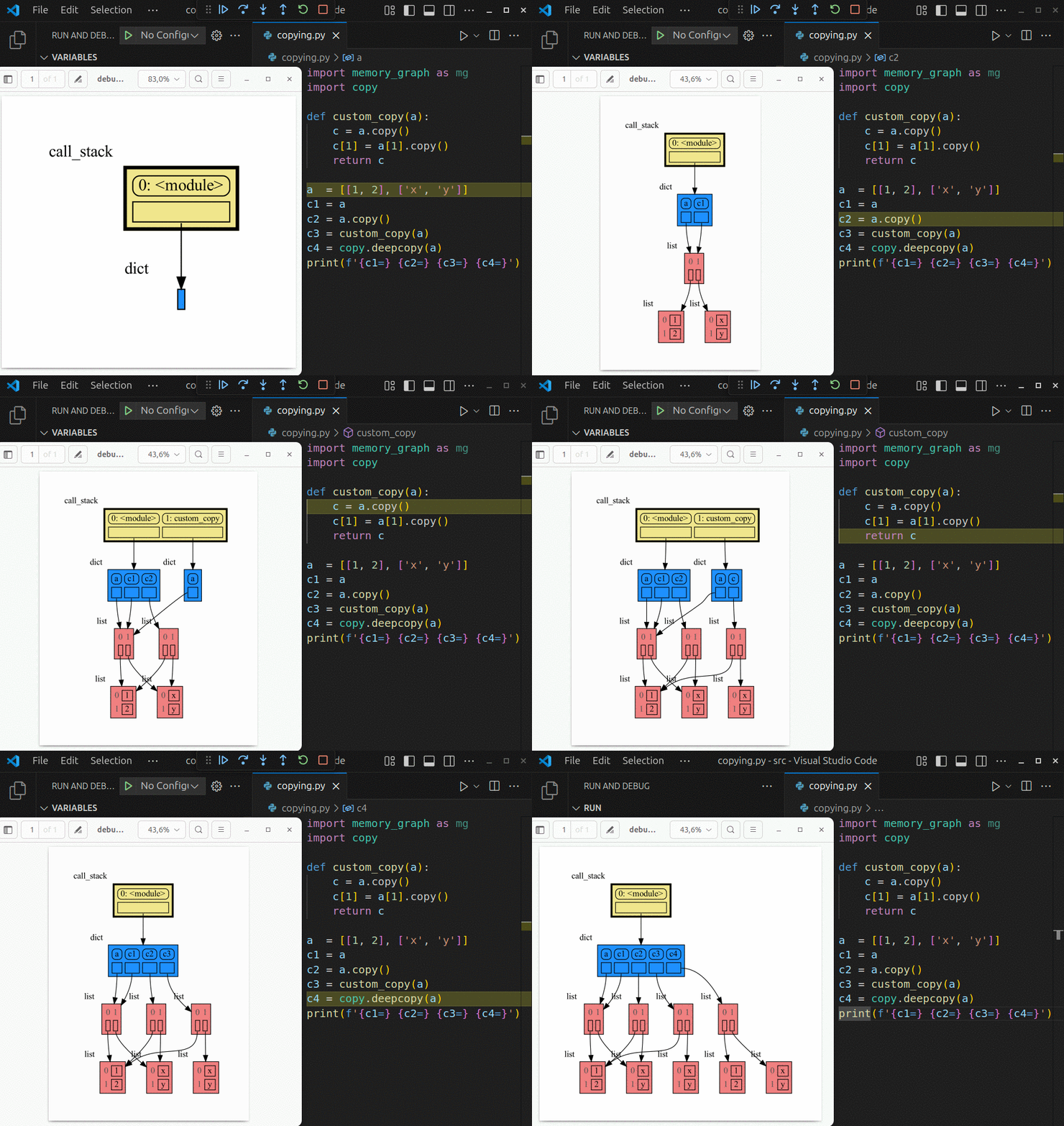
# Highlights #
|
|
29
29
|
|
|
30
|
+
- learn the right **mental model** to think about Python data (references, mutability, shallow vs deep copy)
|
|
31
|
+
- **visualize the structure of your data** to easily understand and debug any data structure
|
|
32
|
+
- understand function calls, variable scope, and the **complete program state** through call stack visualization
|
|
30
33
|
|
|
31
34
|
# Videos #
|
|
32
35
|
| [](https://www.youtube.com/watch?v=23_bHcr7hqo) | [](https://www.youtube.com/watch?v=pvIJgHCaXhU) |
|
|
@@ -61,7 +64,7 @@ mg.render(data) # renders to default: 'memory_graph.pdf'
|
|
|
61
64
|
```
|
|
62
65
|
|
|
63
66
|
# Sharing Values #
|
|
64
|
-
In Python, assigning
|
|
67
|
+
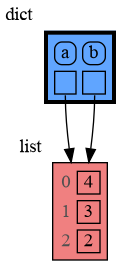
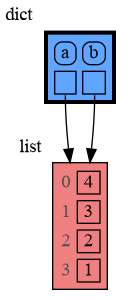
In Python, assigning a list from variable `a` to variable `b` causes both variables to reference the same list value and thus share it. Consequently, any change applied through one variable will impact the other. This behavior can lead to elusive bugs if a programmer incorrectly assumes that list `a` and `b` are independent.
|
|
65
68
|
|
|
66
69
|
<table><tr><td>
|
|
67
70
|
|
|
@@ -100,7 +103,7 @@ b: 4, 3, 2, 1
|
|
|
100
103
|
ids: 126432214913216 126432214913216
|
|
101
104
|
identical?: True
|
|
102
105
|
```
|
|
103
|
-
A better way to understand what data is shared is to draw a graph
|
|
106
|
+
A better way to understand what data is shared is to draw a graph using [memory_graph](https://pypi.org/project/memory-graph/).
|
|
104
107
|
|
|
105
108
|
# Chapters #
|
|
106
109
|
|
|
@@ -108,20 +111,18 @@ A better way to understand what data is shared is to draw a graph of the data us
|
|
|
108
111
|
|
|
109
112
|
[Call Stack](#call-stack)
|
|
110
113
|
|
|
111
|
-
[Global Import Trick](#global-import-trick)
|
|
112
|
-
|
|
113
114
|
[Debugging](#debugging)
|
|
114
115
|
|
|
115
116
|
[Data Structure Examples](#data-structure-examples)
|
|
116
117
|
|
|
117
118
|
[Configuration](#configuration)
|
|
118
119
|
|
|
119
|
-
[Extensions](#extensions)
|
|
120
|
-
|
|
121
120
|
[Introspection](#introspection)
|
|
122
121
|
|
|
123
122
|
[Graph Depth](#graph-depth)
|
|
124
123
|
|
|
124
|
+
[Extensions](#extensions)
|
|
125
|
+
|
|
125
126
|
[Jupyter Notebook](#jupyter-notebook)
|
|
126
127
|
|
|
127
128
|
[ipython](#ipython)
|
|
@@ -148,7 +149,7 @@ ___
|
|
|
148
149
|
___
|
|
149
150
|
|
|
150
151
|
# Python Data Model #
|
|
151
|
-
The [Python Data Model](https://docs.python.org/3/reference/datamodel.html) makes a distiction between immutable and mutable types:
|
|
152
|
+
Learn the right **mental model** to think about Python data. The [Python Data Model](https://docs.python.org/3/reference/datamodel.html) makes a distiction between immutable and mutable types:
|
|
152
153
|
|
|
153
154
|
* **immutable**: bool, int, float, complex, str, tuple, bytes, frozenset
|
|
154
155
|
* **mutable**: list, set, dict, classes, ... (most other types)
|
|
@@ -182,7 +183,7 @@ a = [4, 3, 2]
|
|
|
182
183
|
b = a
|
|
183
184
|
mg.render(locals(), 'mutable1.png')
|
|
184
185
|
|
|
185
|
-
b += [1]
|
|
186
|
+
b += [1] # equivalent to: b.append(1)
|
|
186
187
|
mg.render(locals(), 'mutable2.png')
|
|
187
188
|
```
|
|
188
189
|
|  |  |
|
|
@@ -198,11 +199,11 @@ Python offers three different "copy" options that we will demonstrate using a ne
|
|
|
198
199
|
import memory_graph as mg
|
|
199
200
|
import copy
|
|
200
201
|
|
|
201
|
-
a = [ [1, 2], ['x', 'y'] ]
|
|
202
|
+
a = [ [1, 2], ['x', 'y'] ] # a nested list (a list containing lists)
|
|
202
203
|
|
|
203
204
|
# three different ways to make a "copy" of 'a':
|
|
204
205
|
c1 = a
|
|
205
|
-
c2 = copy.copy(a)
|
|
206
|
+
c2 = copy.copy(a) # equivalent to: a.copy() a[:] list(a)
|
|
206
207
|
c3 = copy.deepcopy(a)
|
|
207
208
|
|
|
208
209
|
mg.show(locals())
|
|
@@ -260,7 +261,7 @@ mg.render(locals(), 'rebinding2.png')
|
|
|
260
261
|
| rebinding1.png | rebinding2.png |
|
|
261
262
|
|
|
262
263
|
# Call Stack #
|
|
263
|
-
The `mg.stack()` function retrieves the entire call stack, including the local variables for each function on the stack. This enables us to
|
|
264
|
+
The `mg.stack()` function retrieves the entire call stack, including the local variables for each function on the stack. This enables us to understand function calls, variable scope, and the **complete program state** through call stack visualization. By examining the graph, we can determine whether any local variables from different functions share data. For instance, consider the function `add_one()` which adds the value `1` to each of its parameters `a`, `b`, and `c`.
|
|
264
265
|
|
|
265
266
|
```python
|
|
266
267
|
import memory_graph as mg
|
|
@@ -333,9 +334,9 @@ def get_subsets(subsets, data, i, subset):
|
|
|
333
334
|
subsets.append(subset.copy())
|
|
334
335
|
return
|
|
335
336
|
subset.append(data[i])
|
|
336
|
-
get_subsets(subsets, data, i+1, subset)
|
|
337
|
+
get_subsets(subsets, data, i+1, subset) # do include data[i]
|
|
337
338
|
subset.pop()
|
|
338
|
-
get_subsets(subsets, data, i+1, subset)
|
|
339
|
+
get_subsets(subsets, data, i+1, subset) # don't include data[i]
|
|
339
340
|
mg.block(mg.show, mg.stack())
|
|
340
341
|
|
|
341
342
|
def power_set(data):
|
|
@@ -423,13 +424,13 @@ and pressing <Enter> a number of times, results in:
|
|
|
423
424
|
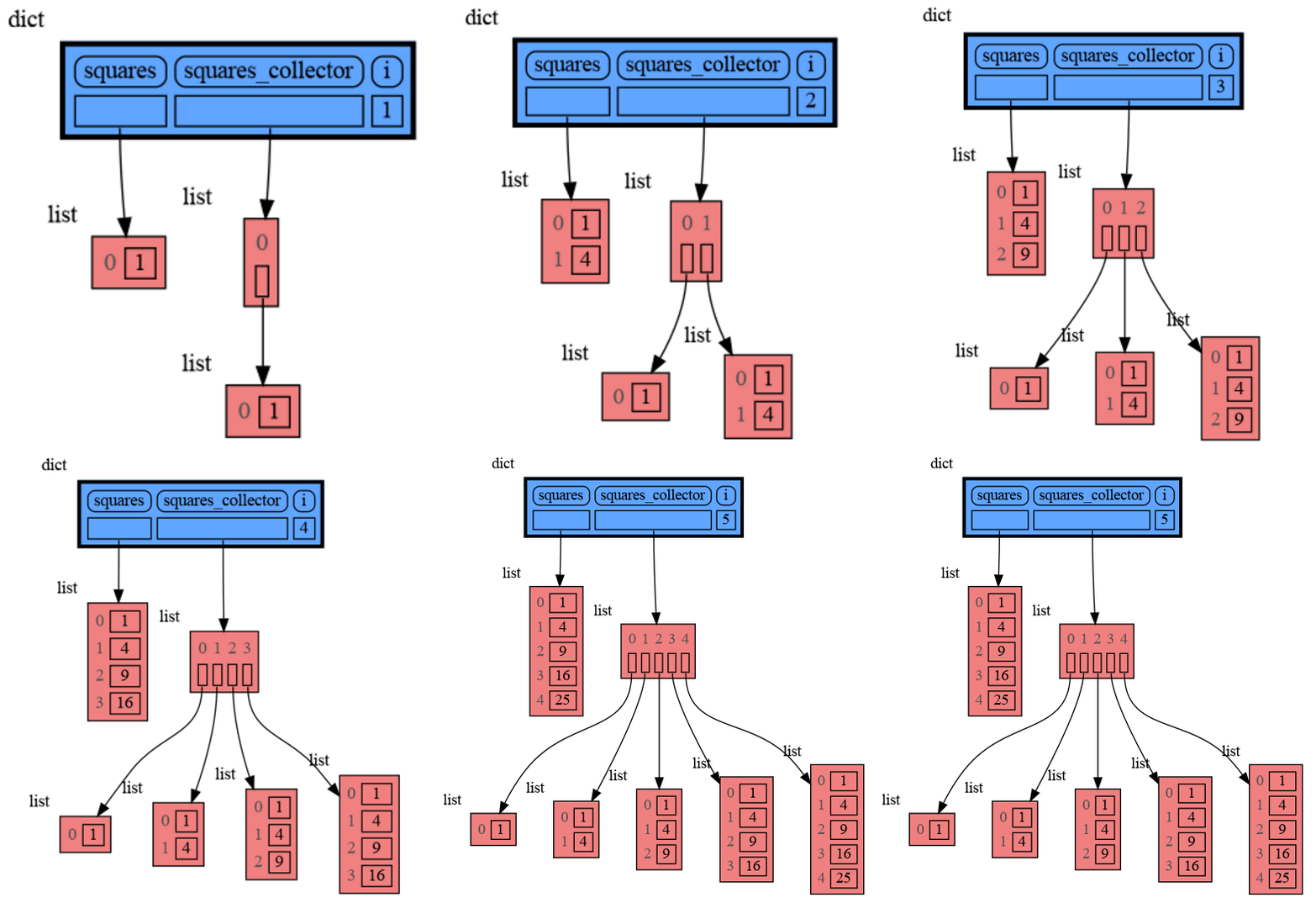
|
|
424
425
|
|
|
425
426
|
# Data Structure Examples #
|
|
426
|
-
Package memory_graph can
|
|
427
|
+
Package memory_graph can **visualize the structure of your data** to easily understand and debug data structures, some examples:
|
|
427
428
|
|
|
428
429
|
## Circular Doubly Linked List ##
|
|
429
430
|
```python
|
|
430
431
|
import memory_graph as mg
|
|
431
432
|
import random
|
|
432
|
-
random.seed(0)
|
|
433
|
+
random.seed(0) # use same random numbers each run
|
|
433
434
|
|
|
434
435
|
class Linked_List:
|
|
435
436
|
""" Circular doubly linked list """
|
|
@@ -455,7 +456,7 @@ n = 100
|
|
|
455
456
|
for i in range(n):
|
|
456
457
|
value = random.randrange(n)
|
|
457
458
|
linked_list.add_back(value)
|
|
458
|
-
mg.block(mg.show, locals())
|
|
459
|
+
mg.block(mg.show, locals()) # <--- draw locals
|
|
459
460
|
```
|
|
460
461
|
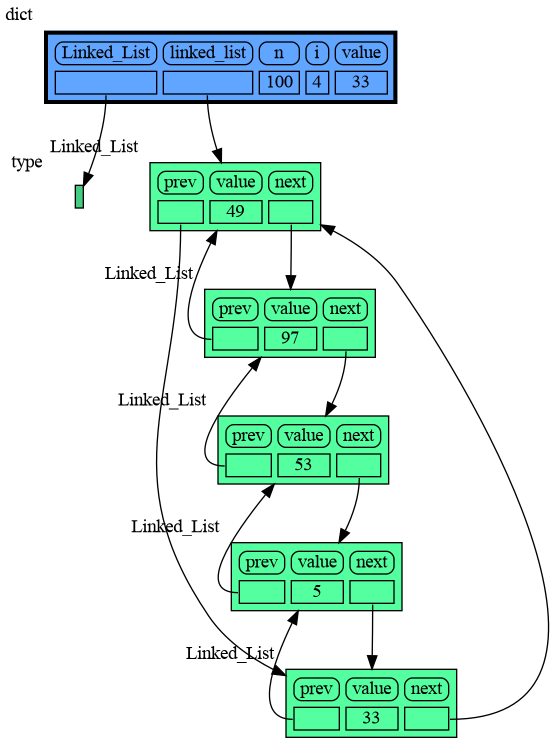
|
|
461
462
|
|
|
@@ -489,7 +490,7 @@ class BinTree:
|
|
|
489
490
|
self.larger = BinTree(value)
|
|
490
491
|
else:
|
|
491
492
|
self.larger.add(value)
|
|
492
|
-
mg.block(mg.show, mg.stack())
|
|
493
|
+
mg.block(mg.show, mg.stack()) # <--- draw stack
|
|
493
494
|
|
|
494
495
|
tree = BinTree()
|
|
495
496
|
n = 100
|
|
@@ -508,7 +509,7 @@ Here we show values being inserted in a Binary Tree in Visual Studio Code. When
|
|
|
508
509
|
```python
|
|
509
510
|
import memory_graph as mg
|
|
510
511
|
import random
|
|
511
|
-
random.seed(0)
|
|
512
|
+
random.seed(0) # use same random numbers each run
|
|
512
513
|
|
|
513
514
|
class HashSet:
|
|
514
515
|
|
|
@@ -521,7 +522,7 @@ class HashSet:
|
|
|
521
522
|
self.buckets[index] = []
|
|
522
523
|
bucket = self.buckets[index]
|
|
523
524
|
bucket.append(value)
|
|
524
|
-
mg.block(mg.show, locals())
|
|
525
|
+
mg.block(mg.show, locals()) # <--- draw locals
|
|
525
526
|
|
|
526
527
|
def contains(self, value):
|
|
527
528
|
index = hash(value) % len(self.buckets)
|
|
@@ -549,6 +550,9 @@ Here we show values being inserted in a HashSet in PyCharm. When inserting the l
|
|
|
549
550
|
# Configuration #
|
|
550
551
|
Different aspects of memory_graph can be configured. The default configuration can be reset by calling 'mg.config_default.reset()'.
|
|
551
552
|
|
|
553
|
+
- ***mg.config.reopen_viewer*** : bool
|
|
554
|
+
- If True the viewer is reopened each time show() is called, this might change window focus, default True.
|
|
555
|
+
|
|
552
556
|
- ***mg.config.render_filename*** : str
|
|
553
557
|
- The default filename to render to, default 'memory_graph.pdf'.
|
|
554
558
|
|
|
@@ -603,7 +607,7 @@ a = [100, 200, 300]
|
|
|
603
607
|
b = a.copy()
|
|
604
608
|
mg.render(locals(), 'not_node_types1.png')
|
|
605
609
|
|
|
606
|
-
mg.config.not_node_types.remove(int)
|
|
610
|
+
mg.config.not_node_types.remove(int) # now show separate nodes for int values
|
|
607
611
|
|
|
608
612
|
mg.render(locals(), 'not_node_types2.png')
|
|
609
613
|
```
|
|
@@ -624,51 +628,13 @@ data = [ list(range(20)) for i in range(1,5)]
|
|
|
624
628
|
highlight = data[2]
|
|
625
629
|
|
|
626
630
|
mg.show( locals(),
|
|
627
|
-
colors = {id(highlight): "red" },
|
|
628
|
-
vertical_orientations = {id(highlight): False },
|
|
629
|
-
slicers = {id(highlight): Slicer()}
|
|
631
|
+
colors = {id(highlight): "red" }, # set color to red
|
|
632
|
+
vertical_orientations = {id(highlight): False }, # set horizontal orientation
|
|
633
|
+
slicers = {id(highlight): Slicer()} # set no slicing
|
|
630
634
|
)
|
|
631
635
|
```
|
|
632
636
|
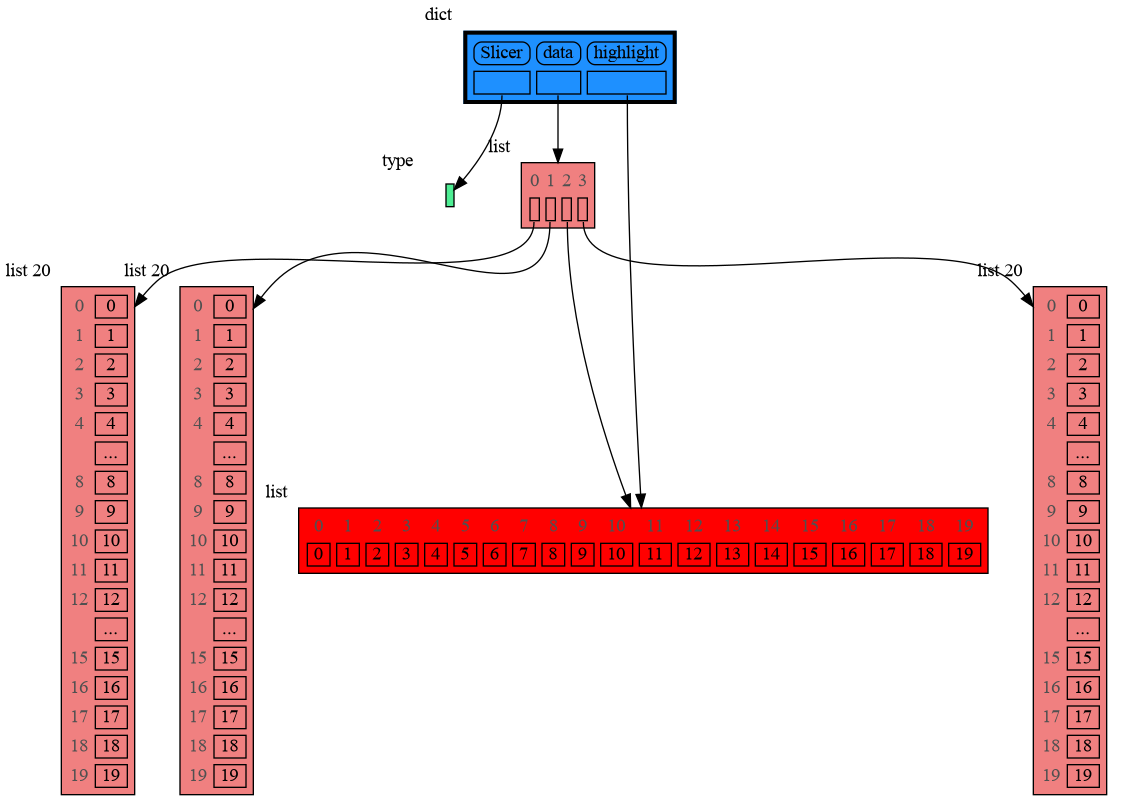
|
|
633
637
|
|
|
634
|
-
# Extensions #
|
|
635
|
-
Different extensions are available for types from other Python packages.
|
|
636
|
-
|
|
637
|
-
## Numpy ##
|
|
638
|
-
Numpy types `array` and `matrix` and `ndarray` can be graphed with "memory_graph.extension_numpy":
|
|
639
|
-
|
|
640
|
-
```python
|
|
641
|
-
import memory_graph as mg
|
|
642
|
-
import numpy as np
|
|
643
|
-
import memory_graph.extension_numpy
|
|
644
|
-
np.random.seed(0) # use same random numbers each run
|
|
645
|
-
|
|
646
|
-
array = np.array([1.1, 2, 3, 4, 5])
|
|
647
|
-
matrix = np.matrix([[i*20+j for j in range(20)] for i in range(20)])
|
|
648
|
-
ndarray = np.random.rand(20,20)
|
|
649
|
-
mg.show(locals())
|
|
650
|
-
```
|
|
651
|
-
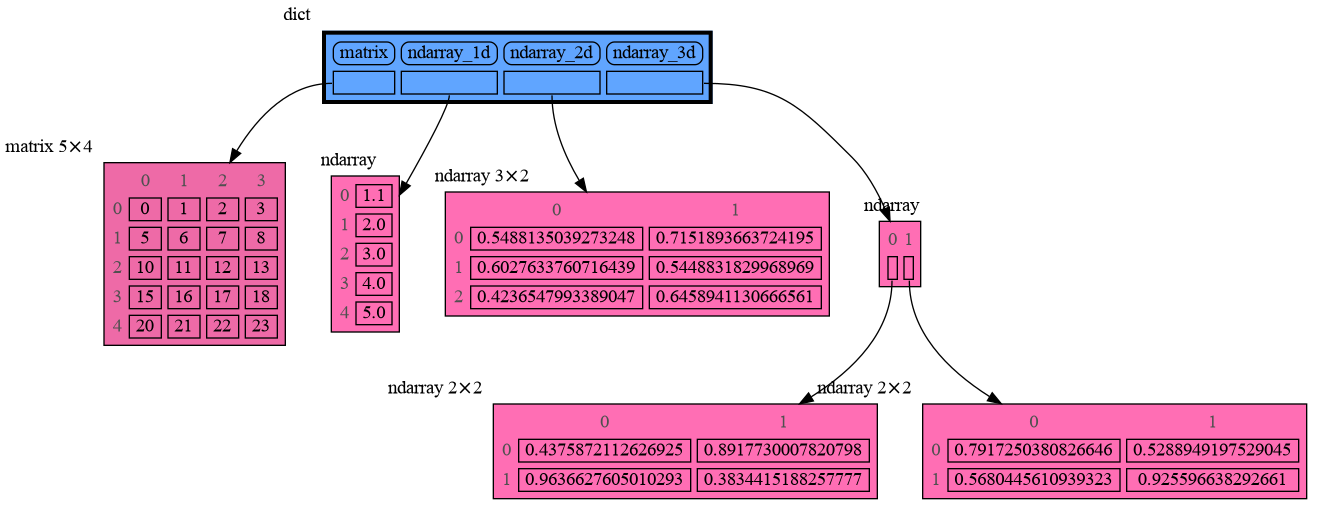
|
|
652
|
-
|
|
653
|
-
## Pandas ##
|
|
654
|
-
Pandas types `Series` and `DataFrame` can be graphed with "memory_graph.extension_pandas":
|
|
655
|
-
|
|
656
|
-
```python
|
|
657
|
-
import memory_graph as mg
|
|
658
|
-
import pandas as pd
|
|
659
|
-
import memory_graph.extension_pandas
|
|
660
|
-
|
|
661
|
-
series = pd.Series( [i for i in range(20)] )
|
|
662
|
-
dataframe1 = pd.DataFrame({ "calories": [420, 380, 390],
|
|
663
|
-
"duration": [50, 40, 45] })
|
|
664
|
-
dataframe2 = pd.DataFrame({ 'Name' : [ 'Tom', 'Anna', 'Steve', 'Lisa'],
|
|
665
|
-
'Age' : [ 28, 34, 29, 42],
|
|
666
|
-
'Length' : [ 1.70, 1.66, 1.82, 1.73] },
|
|
667
|
-
index=['one', 'two', 'three', 'four']) # with row names
|
|
668
|
-
mg.show(locals())
|
|
669
|
-
```
|
|
670
|
-

|
|
671
|
-
|
|
672
638
|
# Introspection #
|
|
673
639
|
This section is likely to change. Sometimes the introspection fails or is not as desired. For example the `bintrees.avltree.Node` object doesn't show any attributes in the graph below.
|
|
674
640
|
|
|
@@ -810,7 +776,7 @@ For binary search we can use a List_View class to represent a particular sublist
|
|
|
810
776
|
```python
|
|
811
777
|
import memory_graph as mg
|
|
812
778
|
import random
|
|
813
|
-
random.seed(2)
|
|
779
|
+
random.seed(2) # same random numbers each run
|
|
814
780
|
|
|
815
781
|
class List_View:
|
|
816
782
|
|
|
@@ -828,7 +794,7 @@ class List_View:
|
|
|
828
794
|
def bin_search(view, value):
|
|
829
795
|
mid = view.get_mid()
|
|
830
796
|
if view.begin == mid:
|
|
831
|
-
mg.show(mg.stack())
|
|
797
|
+
mg.show(mg.stack()) # <--- show stack
|
|
832
798
|
return view.begin
|
|
833
799
|
if value < view[mid]:
|
|
834
800
|
return bin_search(List_View(view.lst, view.begin, mid), value)
|
|
@@ -925,6 +891,44 @@ mg.show(locals())
|
|
|
925
891
|
```
|
|
926
892
|
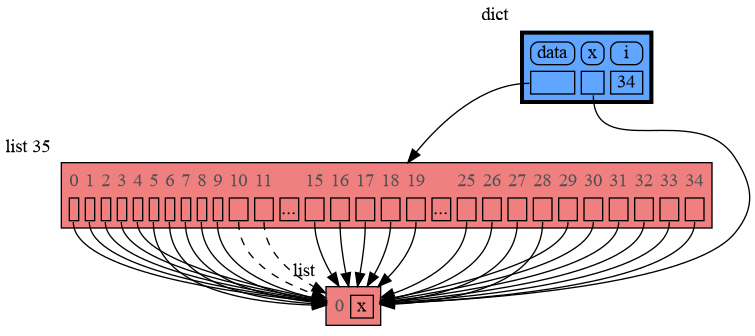
|
|
927
893
|
|
|
894
|
+
# Extensions #
|
|
895
|
+
Different extensions are available for types from other Python packages.
|
|
896
|
+
|
|
897
|
+
## Numpy ##
|
|
898
|
+
Numpy types `array` and `matrix` and `ndarray` can be graphed with "memory_graph.extension_numpy":
|
|
899
|
+
|
|
900
|
+
```python
|
|
901
|
+
import memory_graph as mg
|
|
902
|
+
import numpy as np
|
|
903
|
+
import memory_graph.extension_numpy
|
|
904
|
+
np.random.seed(0) # use same random numbers each run
|
|
905
|
+
|
|
906
|
+
array = np.array([1.1, 2, 3, 4, 5])
|
|
907
|
+
matrix = np.matrix([[i*20+j for j in range(20)] for i in range(20)])
|
|
908
|
+
ndarray = np.random.rand(20,20)
|
|
909
|
+
mg.show(locals())
|
|
910
|
+
```
|
|
911
|
+

|
|
912
|
+
|
|
913
|
+
## Pandas ##
|
|
914
|
+
Pandas types `Series` and `DataFrame` can be graphed with "memory_graph.extension_pandas":
|
|
915
|
+
|
|
916
|
+
```python
|
|
917
|
+
import memory_graph as mg
|
|
918
|
+
import pandas as pd
|
|
919
|
+
import memory_graph.extension_pandas
|
|
920
|
+
|
|
921
|
+
series = pd.Series( [i for i in range(20)] )
|
|
922
|
+
dataframe1 = pd.DataFrame({ "calories": [420, 380, 390],
|
|
923
|
+
"duration": [50, 40, 45] })
|
|
924
|
+
dataframe2 = pd.DataFrame({ 'Name' : [ 'Tom', 'Anna', 'Steve', 'Lisa'],
|
|
925
|
+
'Age' : [ 28, 34, 29, 42],
|
|
926
|
+
'Length' : [ 1.70, 1.66, 1.82, 1.73] },
|
|
927
|
+
index=['one', 'two', 'three', 'four']) # with row names
|
|
928
|
+
mg.show(locals())
|
|
929
|
+
```
|
|
930
|
+

|
|
931
|
+
|
|
928
932
|
# Jupyter Notebook #
|
|
929
933
|
In Jupyter Notebook `locals()` has additional variables that cause problems in the graph, use `mg.locals_jupyter()` to get the local variables with these problematic variables filtered out. Use `mg.stack_jupyter()` to get the whole call stack with these variables filtered out.
|
|
930
934
|
|
|
@@ -5,8 +5,11 @@ pip install --upgrade memory_graph
|
|
|
5
5
|
```
|
|
6
6
|
Additionally [Graphviz](https://graphviz.org/download/) needs to be installed.
|
|
7
7
|
|
|
8
|
-
#
|
|
8
|
+
# Highlights #
|
|
9
9
|

|
|
10
|
+
- learn the right **mental model** to think about Python data (references, mutability, shallow vs deep copy)
|
|
11
|
+
- **visualize the structure of your data** to easily understand and debug any data structure
|
|
12
|
+
- understand function calls, variable scope, and the **complete program state** through call stack visualization
|
|
10
13
|
|
|
11
14
|
# Videos #
|
|
12
15
|
| [](https://www.youtube.com/watch?v=23_bHcr7hqo) | [](https://www.youtube.com/watch?v=pvIJgHCaXhU) |
|
|
@@ -41,7 +44,7 @@ mg.render(data) # renders to default: 'memory_graph.pdf'
|
|
|
41
44
|
```
|
|
42
45
|
|
|
43
46
|
# Sharing Values #
|
|
44
|
-
In Python, assigning
|
|
47
|
+
In Python, assigning a list from variable `a` to variable `b` causes both variables to reference the same list value and thus share it. Consequently, any change applied through one variable will impact the other. This behavior can lead to elusive bugs if a programmer incorrectly assumes that list `a` and `b` are independent.
|
|
45
48
|
|
|
46
49
|
<table><tr><td>
|
|
47
50
|
|
|
@@ -80,7 +83,7 @@ b: 4, 3, 2, 1
|
|
|
80
83
|
ids: 126432214913216 126432214913216
|
|
81
84
|
identical?: True
|
|
82
85
|
```
|
|
83
|
-
A better way to understand what data is shared is to draw a graph
|
|
86
|
+
A better way to understand what data is shared is to draw a graph using [memory_graph](https://pypi.org/project/memory-graph/).
|
|
84
87
|
|
|
85
88
|
# Chapters #
|
|
86
89
|
|
|
@@ -88,20 +91,18 @@ A better way to understand what data is shared is to draw a graph of the data us
|
|
|
88
91
|
|
|
89
92
|
[Call Stack](#call-stack)
|
|
90
93
|
|
|
91
|
-
[Global Import Trick](#global-import-trick)
|
|
92
|
-
|
|
93
94
|
[Debugging](#debugging)
|
|
94
95
|
|
|
95
96
|
[Data Structure Examples](#data-structure-examples)
|
|
96
97
|
|
|
97
98
|
[Configuration](#configuration)
|
|
98
99
|
|
|
99
|
-
[Extensions](#extensions)
|
|
100
|
-
|
|
101
100
|
[Introspection](#introspection)
|
|
102
101
|
|
|
103
102
|
[Graph Depth](#graph-depth)
|
|
104
103
|
|
|
104
|
+
[Extensions](#extensions)
|
|
105
|
+
|
|
105
106
|
[Jupyter Notebook](#jupyter-notebook)
|
|
106
107
|
|
|
107
108
|
[ipython](#ipython)
|
|
@@ -128,7 +129,7 @@ ___
|
|
|
128
129
|
___
|
|
129
130
|
|
|
130
131
|
# Python Data Model #
|
|
131
|
-
The [Python Data Model](https://docs.python.org/3/reference/datamodel.html) makes a distiction between immutable and mutable types:
|
|
132
|
+
Learn the right **mental model** to think about Python data. The [Python Data Model](https://docs.python.org/3/reference/datamodel.html) makes a distiction between immutable and mutable types:
|
|
132
133
|
|
|
133
134
|
* **immutable**: bool, int, float, complex, str, tuple, bytes, frozenset
|
|
134
135
|
* **mutable**: list, set, dict, classes, ... (most other types)
|
|
@@ -162,7 +163,7 @@ a = [4, 3, 2]
|
|
|
162
163
|
b = a
|
|
163
164
|
mg.render(locals(), 'mutable1.png')
|
|
164
165
|
|
|
165
|
-
b += [1]
|
|
166
|
+
b += [1] # equivalent to: b.append(1)
|
|
166
167
|
mg.render(locals(), 'mutable2.png')
|
|
167
168
|
```
|
|
168
169
|
|  |  |
|
|
@@ -178,11 +179,11 @@ Python offers three different "copy" options that we will demonstrate using a ne
|
|
|
178
179
|
import memory_graph as mg
|
|
179
180
|
import copy
|
|
180
181
|
|
|
181
|
-
a = [ [1, 2], ['x', 'y'] ]
|
|
182
|
+
a = [ [1, 2], ['x', 'y'] ] # a nested list (a list containing lists)
|
|
182
183
|
|
|
183
184
|
# three different ways to make a "copy" of 'a':
|
|
184
185
|
c1 = a
|
|
185
|
-
c2 = copy.copy(a)
|
|
186
|
+
c2 = copy.copy(a) # equivalent to: a.copy() a[:] list(a)
|
|
186
187
|
c3 = copy.deepcopy(a)
|
|
187
188
|
|
|
188
189
|
mg.show(locals())
|
|
@@ -240,7 +241,7 @@ mg.render(locals(), 'rebinding2.png')
|
|
|
240
241
|
| rebinding1.png | rebinding2.png |
|
|
241
242
|
|
|
242
243
|
# Call Stack #
|
|
243
|
-
The `mg.stack()` function retrieves the entire call stack, including the local variables for each function on the stack. This enables us to
|
|
244
|
+
The `mg.stack()` function retrieves the entire call stack, including the local variables for each function on the stack. This enables us to understand function calls, variable scope, and the **complete program state** through call stack visualization. By examining the graph, we can determine whether any local variables from different functions share data. For instance, consider the function `add_one()` which adds the value `1` to each of its parameters `a`, `b`, and `c`.
|
|
244
245
|
|
|
245
246
|
```python
|
|
246
247
|
import memory_graph as mg
|
|
@@ -313,9 +314,9 @@ def get_subsets(subsets, data, i, subset):
|
|
|
313
314
|
subsets.append(subset.copy())
|
|
314
315
|
return
|
|
315
316
|
subset.append(data[i])
|
|
316
|
-
get_subsets(subsets, data, i+1, subset)
|
|
317
|
+
get_subsets(subsets, data, i+1, subset) # do include data[i]
|
|
317
318
|
subset.pop()
|
|
318
|
-
get_subsets(subsets, data, i+1, subset)
|
|
319
|
+
get_subsets(subsets, data, i+1, subset) # don't include data[i]
|
|
319
320
|
mg.block(mg.show, mg.stack())
|
|
320
321
|
|
|
321
322
|
def power_set(data):
|
|
@@ -403,13 +404,13 @@ and pressing <Enter> a number of times, results in:
|
|
|
403
404
|

|
|
404
405
|
|
|
405
406
|
# Data Structure Examples #
|
|
406
|
-
Package memory_graph can
|
|
407
|
+
Package memory_graph can **visualize the structure of your data** to easily understand and debug data structures, some examples:
|
|
407
408
|
|
|
408
409
|
## Circular Doubly Linked List ##
|
|
409
410
|
```python
|
|
410
411
|
import memory_graph as mg
|
|
411
412
|
import random
|
|
412
|
-
random.seed(0)
|
|
413
|
+
random.seed(0) # use same random numbers each run
|
|
413
414
|
|
|
414
415
|
class Linked_List:
|
|
415
416
|
""" Circular doubly linked list """
|
|
@@ -435,7 +436,7 @@ n = 100
|
|
|
435
436
|
for i in range(n):
|
|
436
437
|
value = random.randrange(n)
|
|
437
438
|
linked_list.add_back(value)
|
|
438
|
-
mg.block(mg.show, locals())
|
|
439
|
+
mg.block(mg.show, locals()) # <--- draw locals
|
|
439
440
|
```
|
|
440
441
|

|
|
441
442
|
|
|
@@ -469,7 +470,7 @@ class BinTree:
|
|
|
469
470
|
self.larger = BinTree(value)
|
|
470
471
|
else:
|
|
471
472
|
self.larger.add(value)
|
|
472
|
-
mg.block(mg.show, mg.stack())
|
|
473
|
+
mg.block(mg.show, mg.stack()) # <--- draw stack
|
|
473
474
|
|
|
474
475
|
tree = BinTree()
|
|
475
476
|
n = 100
|
|
@@ -488,7 +489,7 @@ Here we show values being inserted in a Binary Tree in Visual Studio Code. When
|
|
|
488
489
|
```python
|
|
489
490
|
import memory_graph as mg
|
|
490
491
|
import random
|
|
491
|
-
random.seed(0)
|
|
492
|
+
random.seed(0) # use same random numbers each run
|
|
492
493
|
|
|
493
494
|
class HashSet:
|
|
494
495
|
|
|
@@ -501,7 +502,7 @@ class HashSet:
|
|
|
501
502
|
self.buckets[index] = []
|
|
502
503
|
bucket = self.buckets[index]
|
|
503
504
|
bucket.append(value)
|
|
504
|
-
mg.block(mg.show, locals())
|
|
505
|
+
mg.block(mg.show, locals()) # <--- draw locals
|
|
505
506
|
|
|
506
507
|
def contains(self, value):
|
|
507
508
|
index = hash(value) % len(self.buckets)
|
|
@@ -529,6 +530,9 @@ Here we show values being inserted in a HashSet in PyCharm. When inserting the l
|
|
|
529
530
|
# Configuration #
|
|
530
531
|
Different aspects of memory_graph can be configured. The default configuration can be reset by calling 'mg.config_default.reset()'.
|
|
531
532
|
|
|
533
|
+
- ***mg.config.reopen_viewer*** : bool
|
|
534
|
+
- If True the viewer is reopened each time show() is called, this might change window focus, default True.
|
|
535
|
+
|
|
532
536
|
- ***mg.config.render_filename*** : str
|
|
533
537
|
- The default filename to render to, default 'memory_graph.pdf'.
|
|
534
538
|
|
|
@@ -583,7 +587,7 @@ a = [100, 200, 300]
|
|
|
583
587
|
b = a.copy()
|
|
584
588
|
mg.render(locals(), 'not_node_types1.png')
|
|
585
589
|
|
|
586
|
-
mg.config.not_node_types.remove(int)
|
|
590
|
+
mg.config.not_node_types.remove(int) # now show separate nodes for int values
|
|
587
591
|
|
|
588
592
|
mg.render(locals(), 'not_node_types2.png')
|
|
589
593
|
```
|
|
@@ -604,51 +608,13 @@ data = [ list(range(20)) for i in range(1,5)]
|
|
|
604
608
|
highlight = data[2]
|
|
605
609
|
|
|
606
610
|
mg.show( locals(),
|
|
607
|
-
colors = {id(highlight): "red" },
|
|
608
|
-
vertical_orientations = {id(highlight): False },
|
|
609
|
-
slicers = {id(highlight): Slicer()}
|
|
611
|
+
colors = {id(highlight): "red" }, # set color to red
|
|
612
|
+
vertical_orientations = {id(highlight): False }, # set horizontal orientation
|
|
613
|
+
slicers = {id(highlight): Slicer()} # set no slicing
|
|
610
614
|
)
|
|
611
615
|
```
|
|
612
616
|

|
|
613
617
|
|
|
614
|
-
# Extensions #
|
|
615
|
-
Different extensions are available for types from other Python packages.
|
|
616
|
-
|
|
617
|
-
## Numpy ##
|
|
618
|
-
Numpy types `array` and `matrix` and `ndarray` can be graphed with "memory_graph.extension_numpy":
|
|
619
|
-
|
|
620
|
-
```python
|
|
621
|
-
import memory_graph as mg
|
|
622
|
-
import numpy as np
|
|
623
|
-
import memory_graph.extension_numpy
|
|
624
|
-
np.random.seed(0) # use same random numbers each run
|
|
625
|
-
|
|
626
|
-
array = np.array([1.1, 2, 3, 4, 5])
|
|
627
|
-
matrix = np.matrix([[i*20+j for j in range(20)] for i in range(20)])
|
|
628
|
-
ndarray = np.random.rand(20,20)
|
|
629
|
-
mg.show(locals())
|
|
630
|
-
```
|
|
631
|
-

|
|
632
|
-
|
|
633
|
-
## Pandas ##
|
|
634
|
-
Pandas types `Series` and `DataFrame` can be graphed with "memory_graph.extension_pandas":
|
|
635
|
-
|
|
636
|
-
```python
|
|
637
|
-
import memory_graph as mg
|
|
638
|
-
import pandas as pd
|
|
639
|
-
import memory_graph.extension_pandas
|
|
640
|
-
|
|
641
|
-
series = pd.Series( [i for i in range(20)] )
|
|
642
|
-
dataframe1 = pd.DataFrame({ "calories": [420, 380, 390],
|
|
643
|
-
"duration": [50, 40, 45] })
|
|
644
|
-
dataframe2 = pd.DataFrame({ 'Name' : [ 'Tom', 'Anna', 'Steve', 'Lisa'],
|
|
645
|
-
'Age' : [ 28, 34, 29, 42],
|
|
646
|
-
'Length' : [ 1.70, 1.66, 1.82, 1.73] },
|
|
647
|
-
index=['one', 'two', 'three', 'four']) # with row names
|
|
648
|
-
mg.show(locals())
|
|
649
|
-
```
|
|
650
|
-

|
|
651
|
-
|
|
652
618
|
# Introspection #
|
|
653
619
|
This section is likely to change. Sometimes the introspection fails or is not as desired. For example the `bintrees.avltree.Node` object doesn't show any attributes in the graph below.
|
|
654
620
|
|
|
@@ -790,7 +756,7 @@ For binary search we can use a List_View class to represent a particular sublist
|
|
|
790
756
|
```python
|
|
791
757
|
import memory_graph as mg
|
|
792
758
|
import random
|
|
793
|
-
random.seed(2)
|
|
759
|
+
random.seed(2) # same random numbers each run
|
|
794
760
|
|
|
795
761
|
class List_View:
|
|
796
762
|
|
|
@@ -808,7 +774,7 @@ class List_View:
|
|
|
808
774
|
def bin_search(view, value):
|
|
809
775
|
mid = view.get_mid()
|
|
810
776
|
if view.begin == mid:
|
|
811
|
-
mg.show(mg.stack())
|
|
777
|
+
mg.show(mg.stack()) # <--- show stack
|
|
812
778
|
return view.begin
|
|
813
779
|
if value < view[mid]:
|
|
814
780
|
return bin_search(List_View(view.lst, view.begin, mid), value)
|
|
@@ -905,6 +871,44 @@ mg.show(locals())
|
|
|
905
871
|
```
|
|
906
872
|

|
|
907
873
|
|
|
874
|
+
# Extensions #
|
|
875
|
+
Different extensions are available for types from other Python packages.
|
|
876
|
+
|
|
877
|
+
## Numpy ##
|
|
878
|
+
Numpy types `array` and `matrix` and `ndarray` can be graphed with "memory_graph.extension_numpy":
|
|
879
|
+
|
|
880
|
+
```python
|
|
881
|
+
import memory_graph as mg
|
|
882
|
+
import numpy as np
|
|
883
|
+
import memory_graph.extension_numpy
|
|
884
|
+
np.random.seed(0) # use same random numbers each run
|
|
885
|
+
|
|
886
|
+
array = np.array([1.1, 2, 3, 4, 5])
|
|
887
|
+
matrix = np.matrix([[i*20+j for j in range(20)] for i in range(20)])
|
|
888
|
+
ndarray = np.random.rand(20,20)
|
|
889
|
+
mg.show(locals())
|
|
890
|
+
```
|
|
891
|
+

|
|
892
|
+
|
|
893
|
+
## Pandas ##
|
|
894
|
+
Pandas types `Series` and `DataFrame` can be graphed with "memory_graph.extension_pandas":
|
|
895
|
+
|
|
896
|
+
```python
|
|
897
|
+
import memory_graph as mg
|
|
898
|
+
import pandas as pd
|
|
899
|
+
import memory_graph.extension_pandas
|
|
900
|
+
|
|
901
|
+
series = pd.Series( [i for i in range(20)] )
|
|
902
|
+
dataframe1 = pd.DataFrame({ "calories": [420, 380, 390],
|
|
903
|
+
"duration": [50, 40, 45] })
|
|
904
|
+
dataframe2 = pd.DataFrame({ 'Name' : [ 'Tom', 'Anna', 'Steve', 'Lisa'],
|
|
905
|
+
'Age' : [ 28, 34, 29, 42],
|
|
906
|
+
'Length' : [ 1.70, 1.66, 1.82, 1.73] },
|
|
907
|
+
index=['one', 'two', 'three', 'four']) # with row names
|
|
908
|
+
mg.show(locals())
|
|
909
|
+
```
|
|
910
|
+

|
|
911
|
+
|
|
908
912
|
# Jupyter Notebook #
|
|
909
913
|
In Jupyter Notebook `locals()` has additional variables that cause problems in the graph, use `mg.locals_jupyter()` to get the local variables with these problematic variables filtered out. Use `mg.stack_jupyter()` to get the whole call stack with these variables filtered out.
|
|
910
914
|
|