memory-graph 0.3.2__tar.gz → 0.3.4__tar.gz
This diff represents the content of publicly available package versions that have been released to one of the supported registries. The information contained in this diff is provided for informational purposes only and reflects changes between package versions as they appear in their respective public registries.
- {memory_graph-0.3.2 → memory_graph-0.3.4}/PKG-INFO +23 -22
- {memory_graph-0.3.2 → memory_graph-0.3.4}/README.md +21 -18
- {memory_graph-0.3.2 → memory_graph-0.3.4}/memory_graph/__init__.py +1 -1
- {memory_graph-0.3.2 → memory_graph-0.3.4}/memory_graph/extension_numpy.py +2 -2
- {memory_graph-0.3.2 → memory_graph-0.3.4}/memory_graph.egg-info/PKG-INFO +24 -23
- {memory_graph-0.3.2 → memory_graph-0.3.4}/setup.py +1 -1
- {memory_graph-0.3.2 → memory_graph-0.3.4}/LICENSE.txt +0 -0
- {memory_graph-0.3.2 → memory_graph-0.3.4}/MANIFEST.in +0 -0
- {memory_graph-0.3.2 → memory_graph-0.3.4}/memory_graph/config.py +0 -0
- {memory_graph-0.3.2 → memory_graph-0.3.4}/memory_graph/config_default.py +0 -0
- {memory_graph-0.3.2 → memory_graph-0.3.4}/memory_graph/config_helpers.py +0 -0
- {memory_graph-0.3.2 → memory_graph-0.3.4}/memory_graph/extension_pandas.py +0 -0
- {memory_graph-0.3.2 → memory_graph-0.3.4}/memory_graph/html_table.py +0 -0
- {memory_graph-0.3.2 → memory_graph-0.3.4}/memory_graph/list_view.py +0 -0
- {memory_graph-0.3.2 → memory_graph-0.3.4}/memory_graph/memory_to_nodes.py +0 -0
- {memory_graph-0.3.2 → memory_graph-0.3.4}/memory_graph/node_base.py +0 -0
- {memory_graph-0.3.2 → memory_graph-0.3.4}/memory_graph/node_key_value.py +0 -0
- {memory_graph-0.3.2 → memory_graph-0.3.4}/memory_graph/node_linear.py +0 -0
- {memory_graph-0.3.2 → memory_graph-0.3.4}/memory_graph/node_table.py +0 -0
- {memory_graph-0.3.2 → memory_graph-0.3.4}/memory_graph/sequence.py +0 -0
- {memory_graph-0.3.2 → memory_graph-0.3.4}/memory_graph/slicer.py +0 -0
- {memory_graph-0.3.2 → memory_graph-0.3.4}/memory_graph/slices.py +0 -0
- {memory_graph-0.3.2 → memory_graph-0.3.4}/memory_graph/slices_iterator.py +0 -0
- {memory_graph-0.3.2 → memory_graph-0.3.4}/memory_graph/slices_table_iterator.py +0 -0
- {memory_graph-0.3.2 → memory_graph-0.3.4}/memory_graph/t.py +0 -0
- {memory_graph-0.3.2 → memory_graph-0.3.4}/memory_graph/test.py +0 -0
- {memory_graph-0.3.2 → memory_graph-0.3.4}/memory_graph/test_memory_graph.py +0 -0
- {memory_graph-0.3.2 → memory_graph-0.3.4}/memory_graph/test_memory_to_nodes.py +0 -0
- {memory_graph-0.3.2 → memory_graph-0.3.4}/memory_graph/test_sequence.py +0 -0
- {memory_graph-0.3.2 → memory_graph-0.3.4}/memory_graph/test_slicer.py +0 -0
- {memory_graph-0.3.2 → memory_graph-0.3.4}/memory_graph/test_slices.py +0 -0
- {memory_graph-0.3.2 → memory_graph-0.3.4}/memory_graph/test_slices_iterator.py +0 -0
- {memory_graph-0.3.2 → memory_graph-0.3.4}/memory_graph/utils.py +0 -0
- {memory_graph-0.3.2 → memory_graph-0.3.4}/memory_graph.egg-info/SOURCES.txt +0 -0
- {memory_graph-0.3.2 → memory_graph-0.3.4}/memory_graph.egg-info/dependency_links.txt +0 -0
- {memory_graph-0.3.2 → memory_graph-0.3.4}/memory_graph.egg-info/requires.txt +0 -0
- {memory_graph-0.3.2 → memory_graph-0.3.4}/memory_graph.egg-info/top_level.txt +0 -0
- {memory_graph-0.3.2 → memory_graph-0.3.4}/setup.cfg +0 -0
|
@@ -1,12 +1,11 @@
|
|
|
1
1
|
Metadata-Version: 2.1
|
|
2
2
|
Name: memory_graph
|
|
3
|
-
Version: 0.3.
|
|
3
|
+
Version: 0.3.4
|
|
4
4
|
Summary: Draws a graph of your data to analyze its structure.
|
|
5
5
|
Home-page: https://github.com/bterwijn/memory_graph
|
|
6
6
|
Author: Bas Terwijn
|
|
7
7
|
Author-email: bterwijn@gmail.com
|
|
8
8
|
License: BSD 2-clause
|
|
9
|
-
Platform: UNKNOWN
|
|
10
9
|
Classifier: Development Status :: 4 - Beta
|
|
11
10
|
Classifier: Intended Audience :: Education
|
|
12
11
|
Classifier: Intended Audience :: Developers
|
|
@@ -16,6 +15,7 @@ Classifier: Topic :: Education
|
|
|
16
15
|
Classifier: Topic :: Software Development :: Debuggers
|
|
17
16
|
Description-Content-Type: text/markdown
|
|
18
17
|
License-File: LICENSE.txt
|
|
18
|
+
Requires-Dist: graphviz
|
|
19
19
|
|
|
20
20
|
# Installation #
|
|
21
21
|
Install (or upgrade) `memory_graph` using pip:
|
|
@@ -124,19 +124,19 @@ ___
|
|
|
124
124
|
The [Python Data Model](https://docs.python.org/3/reference/datamodel.html) makes a distiction between immutable and mutable types:
|
|
125
125
|
|
|
126
126
|
* **immutable**: bool, int, float, complex, str, tuple, bytes, frozenset
|
|
127
|
-
* **mutable**: list, dict, set, class, ... (
|
|
127
|
+
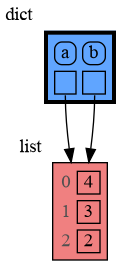
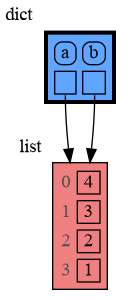
* **mutable**: list, dict, set, class, ... (most other types)
|
|
128
128
|
|
|
129
129
|
|
|
130
130
|
### Immutable Type ###
|
|
131
|
-
In the code below variable `a` and `b` both reference the same
|
|
131
|
+
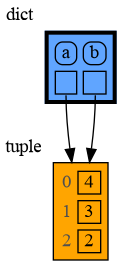
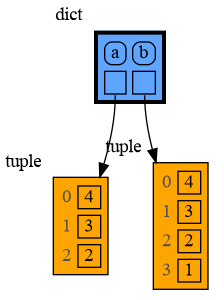
In the code below variable `a` and `b` both reference the same tuple value (4, 3, 2). A tuple is an immutable type and therefore when we change variable `a` its value can not be mutated in place, and thus a copy is made and `a` and `b` reference a different value afterwards.
|
|
132
|
+
|
|
132
133
|
```python
|
|
133
134
|
import memory_graph
|
|
134
|
-
memory_graph.config.no_reference_types.pop(int, None) # show references to ints
|
|
135
135
|
|
|
136
|
-
a =
|
|
136
|
+
a = (4, 3, 2)
|
|
137
137
|
b = a
|
|
138
138
|
memory_graph.render(locals(), 'immutable1.png')
|
|
139
|
-
a += 1
|
|
139
|
+
a += (1,)
|
|
140
140
|
memory_graph.render(locals(), 'immutable2.png')
|
|
141
141
|
```
|
|
142
142
|
|  |  |
|
|
@@ -153,7 +153,7 @@ import memory_graph
|
|
|
153
153
|
a = [4, 3, 2]
|
|
154
154
|
b = a
|
|
155
155
|
memory_graph.render(locals(), 'mutable1.png')
|
|
156
|
-
a.append(1)
|
|
156
|
+
a += [1] # equivalent to: a.append(1)
|
|
157
157
|
memory_graph.render(locals(), 'mutable2.png')
|
|
158
158
|
```
|
|
159
159
|
|  |  |
|
|
@@ -263,33 +263,36 @@ as a *watchpoint* in a debugger tool and open the "my_debug_graph.pdf" output fi
|
|
|
263
263
|
|
|
264
264
|
|
|
265
265
|
## 3. Call Stack ##
|
|
266
|
-
|
|
266
|
+
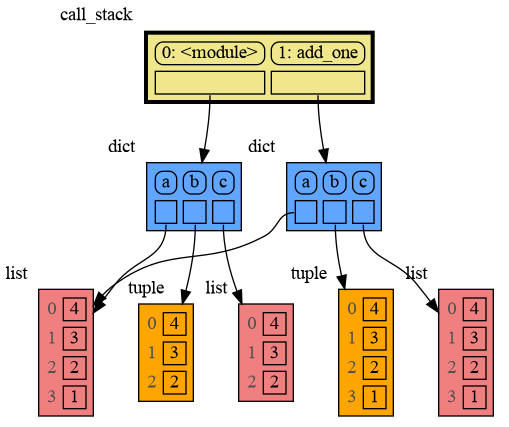
The function `memory_graph.get_call_stack()` returns the complete call stack, including all local variables for each function in the stack. This allows us to simultaneously visualize the local variables of all the called functions. By doing so, we can identify whether any local variables from different functions in the call stack share data with one another. Here for example we call function ```add_one()``` with arguments ```a, b, c``` that adds 1 to each of its arguments.
|
|
267
267
|
|
|
268
268
|
```python
|
|
269
269
|
import memory_graph
|
|
270
270
|
|
|
271
271
|
def add_one(a, b, c):
|
|
272
|
-
a += 1
|
|
273
|
-
b
|
|
274
|
-
c
|
|
272
|
+
a += (1,)
|
|
273
|
+
b += [1]
|
|
274
|
+
c += [1]
|
|
275
275
|
memory_graph.show(memory_graph.get_call_stack())
|
|
276
276
|
|
|
277
|
-
a =
|
|
277
|
+
a = (4, 3, 2)
|
|
278
278
|
b = [4, 3, 2]
|
|
279
279
|
c = [4, 3, 2]
|
|
280
280
|
|
|
281
|
-
add_one(a, b
|
|
281
|
+
add_one(a, b.copy(), c)
|
|
282
282
|
print(f"a:{a} b:{b} c:{c}")
|
|
283
283
|
```
|
|
284
284
|
|
|
285
285
|
|
|
286
|
-
|
|
286
|
+
In the printed output only `c` is changed as a result of the function call:
|
|
287
287
|
```
|
|
288
|
-
a:
|
|
288
|
+
a:(4, 3, 2) b:[4, 3, 2] c:[4, 3, 2, 1]
|
|
289
289
|
```
|
|
290
290
|
|
|
291
|
+
This is because `a` is of immutable type 'tuple' so its value gets copied automatically when it is changed. And because the function is called with a copy of `b`, its original value is not changed by the function. The only value of mutable type that is shared between the root stack frame **0: \<module>** and the **1: add_one** stack frame of the function is `c`, so only that values is changed as a result of the function call.
|
|
292
|
+
|
|
293
|
+
|
|
291
294
|
### Recursion ###
|
|
292
|
-
The call stack
|
|
295
|
+
The call stack can be used to visualize how recursion works. Here we show each step of how recursively ```factorial(3)``` is computed:
|
|
293
296
|
|
|
294
297
|
```python
|
|
295
298
|
import memory_graph
|
|
@@ -308,7 +311,7 @@ print(factorial(3))
|
|
|
308
311
|
|
|
309
312
|
and the final result is: 1 x 2 x 3 = 6
|
|
310
313
|
|
|
311
|
-
### Call Stack in Watchpoint ###
|
|
314
|
+
### Call Stack in Watchpoint Context ###
|
|
312
315
|
The ```memory_graph.get_call_stack()``` doesn't work well in a watchpoint context in most debuggers because debuggers introduce additional stack frames that cause problems. Use these alternative functions for various debuggers to filter out these problematic stack frames:
|
|
313
316
|
|
|
314
317
|
| debugger | function to get the call stack |
|
|
@@ -462,8 +465,8 @@ Different aspects of memory_graph can be configured. The default configuration i
|
|
|
462
465
|
- ***memory_graph.config.max_string_length*** : int
|
|
463
466
|
- The maximum length of strings shown in the graph. Longer strings will be truncated.
|
|
464
467
|
|
|
465
|
-
- ***memory_graph.config.
|
|
466
|
-
- Holds all types for which no seperate node is drawn but that instead are shown as elements in their parent Node.
|
|
468
|
+
- ***memory_graph.config.not_node_types*** : set
|
|
469
|
+
- Holds all types for which no seperate node is drawn but that instead are shown as elements in their parent Node.
|
|
467
470
|
|
|
468
471
|
- ***memory_graph.config.no_child_references_types*** : set
|
|
469
472
|
- The set of key_value types that don't draw references to their direct childeren but have their children shown as elements of their node.
|
|
@@ -550,5 +553,3 @@ See for example [jupyter_example.ipynb](https://raw.githubusercontent.com/bterwi
|
|
|
550
553
|
|
|
551
554
|
- When graph edges overlap it can be hard to distinguish them. Using an interactive graphviz viewer, such as [xdot](https://github.com/jrfonseca/xdot.py), on a '*.gv' DOT output file will help.
|
|
552
555
|
|
|
553
|
-
|
|
554
|
-
|
|
@@ -105,19 +105,19 @@ ___
|
|
|
105
105
|
The [Python Data Model](https://docs.python.org/3/reference/datamodel.html) makes a distiction between immutable and mutable types:
|
|
106
106
|
|
|
107
107
|
* **immutable**: bool, int, float, complex, str, tuple, bytes, frozenset
|
|
108
|
-
* **mutable**: list, dict, set, class, ... (
|
|
108
|
+
* **mutable**: list, dict, set, class, ... (most other types)
|
|
109
109
|
|
|
110
110
|
|
|
111
111
|
### Immutable Type ###
|
|
112
|
-
In the code below variable `a` and `b` both reference the same
|
|
112
|
+
In the code below variable `a` and `b` both reference the same tuple value (4, 3, 2). A tuple is an immutable type and therefore when we change variable `a` its value can not be mutated in place, and thus a copy is made and `a` and `b` reference a different value afterwards.
|
|
113
|
+
|
|
113
114
|
```python
|
|
114
115
|
import memory_graph
|
|
115
|
-
memory_graph.config.no_reference_types.pop(int, None) # show references to ints
|
|
116
116
|
|
|
117
|
-
a =
|
|
117
|
+
a = (4, 3, 2)
|
|
118
118
|
b = a
|
|
119
119
|
memory_graph.render(locals(), 'immutable1.png')
|
|
120
|
-
a += 1
|
|
120
|
+
a += (1,)
|
|
121
121
|
memory_graph.render(locals(), 'immutable2.png')
|
|
122
122
|
```
|
|
123
123
|
|  |  |
|
|
@@ -134,7 +134,7 @@ import memory_graph
|
|
|
134
134
|
a = [4, 3, 2]
|
|
135
135
|
b = a
|
|
136
136
|
memory_graph.render(locals(), 'mutable1.png')
|
|
137
|
-
a.append(1)
|
|
137
|
+
a += [1] # equivalent to: a.append(1)
|
|
138
138
|
memory_graph.render(locals(), 'mutable2.png')
|
|
139
139
|
```
|
|
140
140
|
|  |  |
|
|
@@ -244,33 +244,36 @@ as a *watchpoint* in a debugger tool and open the "my_debug_graph.pdf" output fi
|
|
|
244
244
|
|
|
245
245
|
|
|
246
246
|
## 3. Call Stack ##
|
|
247
|
-
|
|
247
|
+
The function `memory_graph.get_call_stack()` returns the complete call stack, including all local variables for each function in the stack. This allows us to simultaneously visualize the local variables of all the called functions. By doing so, we can identify whether any local variables from different functions in the call stack share data with one another. Here for example we call function ```add_one()``` with arguments ```a, b, c``` that adds 1 to each of its arguments.
|
|
248
248
|
|
|
249
249
|
```python
|
|
250
250
|
import memory_graph
|
|
251
251
|
|
|
252
252
|
def add_one(a, b, c):
|
|
253
|
-
a += 1
|
|
254
|
-
b
|
|
255
|
-
c
|
|
253
|
+
a += (1,)
|
|
254
|
+
b += [1]
|
|
255
|
+
c += [1]
|
|
256
256
|
memory_graph.show(memory_graph.get_call_stack())
|
|
257
257
|
|
|
258
|
-
a =
|
|
258
|
+
a = (4, 3, 2)
|
|
259
259
|
b = [4, 3, 2]
|
|
260
260
|
c = [4, 3, 2]
|
|
261
261
|
|
|
262
|
-
add_one(a, b
|
|
262
|
+
add_one(a, b.copy(), c)
|
|
263
263
|
print(f"a:{a} b:{b} c:{c}")
|
|
264
264
|
```
|
|
265
265
|

|
|
266
266
|
|
|
267
|
-
|
|
267
|
+
In the printed output only `c` is changed as a result of the function call:
|
|
268
268
|
```
|
|
269
|
-
a:
|
|
269
|
+
a:(4, 3, 2) b:[4, 3, 2] c:[4, 3, 2, 1]
|
|
270
270
|
```
|
|
271
271
|
|
|
272
|
+
This is because `a` is of immutable type 'tuple' so its value gets copied automatically when it is changed. And because the function is called with a copy of `b`, its original value is not changed by the function. The only value of mutable type that is shared between the root stack frame **0: \<module>** and the **1: add_one** stack frame of the function is `c`, so only that values is changed as a result of the function call.
|
|
273
|
+
|
|
274
|
+
|
|
272
275
|
### Recursion ###
|
|
273
|
-
The call stack
|
|
276
|
+
The call stack can be used to visualize how recursion works. Here we show each step of how recursively ```factorial(3)``` is computed:
|
|
274
277
|
|
|
275
278
|
```python
|
|
276
279
|
import memory_graph
|
|
@@ -289,7 +292,7 @@ print(factorial(3))
|
|
|
289
292
|
|
|
290
293
|
and the final result is: 1 x 2 x 3 = 6
|
|
291
294
|
|
|
292
|
-
### Call Stack in Watchpoint ###
|
|
295
|
+
### Call Stack in Watchpoint Context ###
|
|
293
296
|
The ```memory_graph.get_call_stack()``` doesn't work well in a watchpoint context in most debuggers because debuggers introduce additional stack frames that cause problems. Use these alternative functions for various debuggers to filter out these problematic stack frames:
|
|
294
297
|
|
|
295
298
|
| debugger | function to get the call stack |
|
|
@@ -443,8 +446,8 @@ Different aspects of memory_graph can be configured. The default configuration i
|
|
|
443
446
|
- ***memory_graph.config.max_string_length*** : int
|
|
444
447
|
- The maximum length of strings shown in the graph. Longer strings will be truncated.
|
|
445
448
|
|
|
446
|
-
- ***memory_graph.config.
|
|
447
|
-
- Holds all types for which no seperate node is drawn but that instead are shown as elements in their parent Node.
|
|
449
|
+
- ***memory_graph.config.not_node_types*** : set
|
|
450
|
+
- Holds all types for which no seperate node is drawn but that instead are shown as elements in their parent Node.
|
|
448
451
|
|
|
449
452
|
- ***memory_graph.config.no_child_references_types*** : set
|
|
450
453
|
- The set of key_value types that don't draw references to their direct childeren but have their children shown as elements of their node.
|
|
@@ -8,8 +8,8 @@ import numpy as np
|
|
|
8
8
|
|
|
9
9
|
config.not_node_types |= {
|
|
10
10
|
np.int8, np.int16, np.int32, np.int64, np.uint8, np.uint16, np.uint32, np.uint64,
|
|
11
|
-
np.float16, np.float32, np.float64,
|
|
12
|
-
np.complex64, np.complex128,
|
|
11
|
+
np.float16, np.float32, np.float64,
|
|
12
|
+
np.complex64, np.complex128,
|
|
13
13
|
np.bool_, np.bytes_, np.str_, np.datetime64, np.timedelta64
|
|
14
14
|
}
|
|
15
15
|
|
|
@@ -1,12 +1,11 @@
|
|
|
1
1
|
Metadata-Version: 2.1
|
|
2
|
-
Name:
|
|
3
|
-
Version: 0.3.
|
|
2
|
+
Name: memory_graph
|
|
3
|
+
Version: 0.3.4
|
|
4
4
|
Summary: Draws a graph of your data to analyze its structure.
|
|
5
5
|
Home-page: https://github.com/bterwijn/memory_graph
|
|
6
6
|
Author: Bas Terwijn
|
|
7
7
|
Author-email: bterwijn@gmail.com
|
|
8
8
|
License: BSD 2-clause
|
|
9
|
-
Platform: UNKNOWN
|
|
10
9
|
Classifier: Development Status :: 4 - Beta
|
|
11
10
|
Classifier: Intended Audience :: Education
|
|
12
11
|
Classifier: Intended Audience :: Developers
|
|
@@ -16,6 +15,7 @@ Classifier: Topic :: Education
|
|
|
16
15
|
Classifier: Topic :: Software Development :: Debuggers
|
|
17
16
|
Description-Content-Type: text/markdown
|
|
18
17
|
License-File: LICENSE.txt
|
|
18
|
+
Requires-Dist: graphviz
|
|
19
19
|
|
|
20
20
|
# Installation #
|
|
21
21
|
Install (or upgrade) `memory_graph` using pip:
|
|
@@ -124,19 +124,19 @@ ___
|
|
|
124
124
|
The [Python Data Model](https://docs.python.org/3/reference/datamodel.html) makes a distiction between immutable and mutable types:
|
|
125
125
|
|
|
126
126
|
* **immutable**: bool, int, float, complex, str, tuple, bytes, frozenset
|
|
127
|
-
* **mutable**: list, dict, set, class, ... (
|
|
127
|
+
* **mutable**: list, dict, set, class, ... (most other types)
|
|
128
128
|
|
|
129
129
|
|
|
130
130
|
### Immutable Type ###
|
|
131
|
-
In the code below variable `a` and `b` both reference the same
|
|
131
|
+
In the code below variable `a` and `b` both reference the same tuple value (4, 3, 2). A tuple is an immutable type and therefore when we change variable `a` its value can not be mutated in place, and thus a copy is made and `a` and `b` reference a different value afterwards.
|
|
132
|
+
|
|
132
133
|
```python
|
|
133
134
|
import memory_graph
|
|
134
|
-
memory_graph.config.no_reference_types.pop(int, None) # show references to ints
|
|
135
135
|
|
|
136
|
-
a =
|
|
136
|
+
a = (4, 3, 2)
|
|
137
137
|
b = a
|
|
138
138
|
memory_graph.render(locals(), 'immutable1.png')
|
|
139
|
-
a += 1
|
|
139
|
+
a += (1,)
|
|
140
140
|
memory_graph.render(locals(), 'immutable2.png')
|
|
141
141
|
```
|
|
142
142
|
|  |  |
|
|
@@ -153,7 +153,7 @@ import memory_graph
|
|
|
153
153
|
a = [4, 3, 2]
|
|
154
154
|
b = a
|
|
155
155
|
memory_graph.render(locals(), 'mutable1.png')
|
|
156
|
-
a.append(1)
|
|
156
|
+
a += [1] # equivalent to: a.append(1)
|
|
157
157
|
memory_graph.render(locals(), 'mutable2.png')
|
|
158
158
|
```
|
|
159
159
|
|  |  |
|
|
@@ -263,33 +263,36 @@ as a *watchpoint* in a debugger tool and open the "my_debug_graph.pdf" output fi
|
|
|
263
263
|
|
|
264
264
|
|
|
265
265
|
## 3. Call Stack ##
|
|
266
|
-
|
|
266
|
+
The function `memory_graph.get_call_stack()` returns the complete call stack, including all local variables for each function in the stack. This allows us to simultaneously visualize the local variables of all the called functions. By doing so, we can identify whether any local variables from different functions in the call stack share data with one another. Here for example we call function ```add_one()``` with arguments ```a, b, c``` that adds 1 to each of its arguments.
|
|
267
267
|
|
|
268
268
|
```python
|
|
269
269
|
import memory_graph
|
|
270
270
|
|
|
271
271
|
def add_one(a, b, c):
|
|
272
|
-
a += 1
|
|
273
|
-
b
|
|
274
|
-
c
|
|
272
|
+
a += (1,)
|
|
273
|
+
b += [1]
|
|
274
|
+
c += [1]
|
|
275
275
|
memory_graph.show(memory_graph.get_call_stack())
|
|
276
276
|
|
|
277
|
-
a =
|
|
277
|
+
a = (4, 3, 2)
|
|
278
278
|
b = [4, 3, 2]
|
|
279
279
|
c = [4, 3, 2]
|
|
280
280
|
|
|
281
|
-
add_one(a, b
|
|
281
|
+
add_one(a, b.copy(), c)
|
|
282
282
|
print(f"a:{a} b:{b} c:{c}")
|
|
283
283
|
```
|
|
284
284
|

|
|
285
285
|
|
|
286
|
-
|
|
286
|
+
In the printed output only `c` is changed as a result of the function call:
|
|
287
287
|
```
|
|
288
|
-
a:
|
|
288
|
+
a:(4, 3, 2) b:[4, 3, 2] c:[4, 3, 2, 1]
|
|
289
289
|
```
|
|
290
290
|
|
|
291
|
+
This is because `a` is of immutable type 'tuple' so its value gets copied automatically when it is changed. And because the function is called with a copy of `b`, its original value is not changed by the function. The only value of mutable type that is shared between the root stack frame **0: \<module>** and the **1: add_one** stack frame of the function is `c`, so only that values is changed as a result of the function call.
|
|
292
|
+
|
|
293
|
+
|
|
291
294
|
### Recursion ###
|
|
292
|
-
The call stack
|
|
295
|
+
The call stack can be used to visualize how recursion works. Here we show each step of how recursively ```factorial(3)``` is computed:
|
|
293
296
|
|
|
294
297
|
```python
|
|
295
298
|
import memory_graph
|
|
@@ -308,7 +311,7 @@ print(factorial(3))
|
|
|
308
311
|
|
|
309
312
|
and the final result is: 1 x 2 x 3 = 6
|
|
310
313
|
|
|
311
|
-
### Call Stack in Watchpoint ###
|
|
314
|
+
### Call Stack in Watchpoint Context ###
|
|
312
315
|
The ```memory_graph.get_call_stack()``` doesn't work well in a watchpoint context in most debuggers because debuggers introduce additional stack frames that cause problems. Use these alternative functions for various debuggers to filter out these problematic stack frames:
|
|
313
316
|
|
|
314
317
|
| debugger | function to get the call stack |
|
|
@@ -462,8 +465,8 @@ Different aspects of memory_graph can be configured. The default configuration i
|
|
|
462
465
|
- ***memory_graph.config.max_string_length*** : int
|
|
463
466
|
- The maximum length of strings shown in the graph. Longer strings will be truncated.
|
|
464
467
|
|
|
465
|
-
- ***memory_graph.config.
|
|
466
|
-
- Holds all types for which no seperate node is drawn but that instead are shown as elements in their parent Node.
|
|
468
|
+
- ***memory_graph.config.not_node_types*** : set
|
|
469
|
+
- Holds all types for which no seperate node is drawn but that instead are shown as elements in their parent Node.
|
|
467
470
|
|
|
468
471
|
- ***memory_graph.config.no_child_references_types*** : set
|
|
469
472
|
- The set of key_value types that don't draw references to their direct childeren but have their children shown as elements of their node.
|
|
@@ -550,5 +553,3 @@ See for example [jupyter_example.ipynb](https://raw.githubusercontent.com/bterwi
|
|
|
550
553
|
|
|
551
554
|
- When graph edges overlap it can be hard to distinguish them. Using an interactive graphviz viewer, such as [xdot](https://github.com/jrfonseca/xdot.py), on a '*.gv' DOT output file will help.
|
|
552
555
|
|
|
553
|
-
|
|
554
|
-
|
|
@@ -7,7 +7,7 @@ long_description_from_readme = (this_directory / "README.md").read_text()
|
|
|
7
7
|
|
|
8
8
|
setup(
|
|
9
9
|
name = 'memory_graph',
|
|
10
|
-
version = '0.3.
|
|
10
|
+
version = '0.3.04',
|
|
11
11
|
description = 'Draws a graph of your data to analyze its structure.',
|
|
12
12
|
long_description = long_description_from_readme,
|
|
13
13
|
long_description_content_type = 'text/markdown',
|
|
File without changes
|
|
File without changes
|
|
File without changes
|
|
File without changes
|
|
File without changes
|
|
File without changes
|
|
File without changes
|
|
File without changes
|
|
File without changes
|
|
File without changes
|
|
File without changes
|
|
File without changes
|
|
File without changes
|
|
File without changes
|
|
File without changes
|
|
File without changes
|
|
File without changes
|
|
File without changes
|
|
File without changes
|
|
File without changes
|
|
File without changes
|
|
File without changes
|
|
File without changes
|
|
File without changes
|
|
File without changes
|
|
File without changes
|
|
File without changes
|
|
File without changes
|
|
File without changes
|
|
File without changes
|
|
File without changes
|
|
File without changes
|