memory-graph 0.3.25__tar.gz → 0.3.27__tar.gz
This diff represents the content of publicly available package versions that have been released to one of the supported registries. The information contained in this diff is provided for informational purposes only and reflects changes between package versions as they appear in their respective public registries.
- {memory_graph-0.3.25/memory_graph.egg-info → memory_graph-0.3.27}/PKG-INFO +21 -21
- {memory_graph-0.3.25 → memory_graph-0.3.27}/README.md +19 -19
- memory_graph-0.3.27/images/cmp.sh +3 -0
- memory_graph-0.3.27/images/cmp.sh~ +1 -0
- memory_graph-0.3.27/images/debugging01.png +0 -0
- memory_graph-0.3.27/images/debugging02.png +0 -0
- memory_graph-0.3.27/images/debugging03.png +0 -0
- memory_graph-0.3.27/images/debugging04.png +0 -0
- memory_graph-0.3.27/images/debugging05.png +0 -0
- memory_graph-0.3.27/images/debugging06.png +0 -0
- memory_graph-0.3.27/images/factorial01.png +0 -0
- memory_graph-0.3.27/images/factorial02.png +0 -0
- memory_graph-0.3.27/images/factorial03.png +0 -0
- memory_graph-0.3.27/images/factorial04.png +0 -0
- memory_graph-0.3.27/images/factorial05.png +0 -0
- memory_graph-0.3.27/images/factorial06.png +0 -0
- memory_graph-0.3.27/images/factorial07.png +0 -0
- memory_graph-0.3.27/images/linked_list.png +0 -0
- {memory_graph-0.3.25 → memory_graph-0.3.27}/images/linked_list.py +12 -12
- memory_graph-0.3.27/images/name_rebinding.py~ +7 -0
- memory_graph-0.3.27/images/power_set1.png +0 -0
- memory_graph-0.3.27/images/power_set10.png +0 -0
- memory_graph-0.3.27/images/power_set11.png +0 -0
- memory_graph-0.3.27/images/power_set12.png +0 -0
- memory_graph-0.3.27/images/power_set13.png +0 -0
- memory_graph-0.3.27/images/power_set14.png +0 -0
- memory_graph-0.3.27/images/power_set15.png +0 -0
- memory_graph-0.3.27/images/power_set16.png +0 -0
- memory_graph-0.3.27/images/power_set17.png +0 -0
- memory_graph-0.3.27/images/power_set18.png +0 -0
- memory_graph-0.3.27/images/power_set19.png +0 -0
- memory_graph-0.3.27/images/power_set2.png +0 -0
- memory_graph-0.3.27/images/power_set20.png +0 -0
- memory_graph-0.3.27/images/power_set21.png +0 -0
- memory_graph-0.3.27/images/power_set22.png +0 -0
- memory_graph-0.3.27/images/power_set3.png +0 -0
- memory_graph-0.3.27/images/power_set4.png +0 -0
- memory_graph-0.3.27/images/power_set5.png +0 -0
- memory_graph-0.3.27/images/power_set6.png +0 -0
- memory_graph-0.3.27/images/power_set7.png +0 -0
- memory_graph-0.3.27/images/power_set8.png +0 -0
- memory_graph-0.3.27/images/power_set9.png +0 -0
- memory_graph-0.3.27/images/vscode_copying.gif +0 -0
- {memory_graph-0.3.25 → memory_graph-0.3.27}/memory_graph/__init__.py +11 -9
- memory_graph-0.3.27/memory_graph/t.py +6 -0
- {memory_graph-0.3.25 → memory_graph-0.3.27/memory_graph.egg-info}/PKG-INFO +21 -21
- {memory_graph-0.3.25 → memory_graph-0.3.27}/memory_graph.egg-info/SOURCES.txt +13 -101
- {memory_graph-0.3.25 → memory_graph-0.3.27}/setup.py +2 -2
- memory_graph-0.3.25/images/.ipynb_checkpoints/jupyter_example-checkpoint.ipynb +0 -85
- memory_graph-0.3.25/images/add_one.gv +0 -69
- memory_graph-0.3.25/images/avltree.py~ +0 -41
- memory_graph-0.3.25/images/avltree_dir.gv +0 -55
- memory_graph-0.3.25/images/avltree_fail.gv +0 -22
- memory_graph-0.3.25/images/avltree_key_value.gv +0 -49
- memory_graph-0.3.25/images/avltree_leaf.gv +0 -22
- memory_graph-0.3.25/images/avltree_linear.gv +0 -57
- memory_graph-0.3.25/images/avltree_table.gv +0 -49
- memory_graph-0.3.25/images/bin_tree.gv +0 -110
- memory_graph-0.3.25/images/bin_tree2.py +0 -31
- memory_graph-0.3.25/images/bin_tree2.py~ +0 -31
- memory_graph-0.3.25/images/copies.gv +0 -63
- memory_graph-0.3.25/images/copy_method.gv +0 -53
- memory_graph-0.3.25/images/debugging01.gv +0 -29
- memory_graph-0.3.25/images/debugging01.png +0 -0
- memory_graph-0.3.25/images/debugging02.gv +0 -38
- memory_graph-0.3.25/images/debugging02.png +0 -0
- memory_graph-0.3.25/images/debugging03.gv +0 -47
- memory_graph-0.3.25/images/debugging03.png +0 -0
- memory_graph-0.3.25/images/debugging04.gv +0 -57
- memory_graph-0.3.25/images/debugging04.png +0 -0
- memory_graph-0.3.25/images/debugging05.gv +0 -68
- memory_graph-0.3.25/images/debugging05.png +0 -0
- memory_graph-0.3.25/images/debugging06.gv +0 -68
- memory_graph-0.3.25/images/debugging06.png +0 -0
- memory_graph-0.3.25/images/depth.gv +0 -178
- memory_graph-0.3.25/images/depth.png +0 -0
- memory_graph-0.3.25/images/extension_numpy.gv +0 -52
- memory_graph-0.3.25/images/extension_pandas.gv +0 -49
- memory_graph-0.3.25/images/factorial0.gv +0 -15
- memory_graph-0.3.25/images/factorial0.png +0 -0
- memory_graph-0.3.25/images/factorial01.gv +0 -15
- memory_graph-0.3.25/images/factorial02.gv +0 -22
- memory_graph-0.3.25/images/factorial03.gv +0 -28
- memory_graph-0.3.25/images/factorial04.gv +0 -34
- memory_graph-0.3.25/images/factorial05.gv +0 -35
- memory_graph-0.3.25/images/factorial06.gv +0 -29
- memory_graph-0.3.25/images/factorial07.gv +0 -23
- memory_graph-0.3.25/images/factorial1.gv +0 -22
- memory_graph-0.3.25/images/factorial1.png +0 -0
- memory_graph-0.3.25/images/factorial2.gv +0 -28
- memory_graph-0.3.25/images/factorial2.png +0 -0
- memory_graph-0.3.25/images/factorial3.gv +0 -34
- memory_graph-0.3.25/images/factorial3.png +0 -0
- memory_graph-0.3.25/images/factorial4.gv +0 -35
- memory_graph-0.3.25/images/factorial4.png +0 -0
- memory_graph-0.3.25/images/factorial5.gv +0 -29
- memory_graph-0.3.25/images/factorial5.png +0 -0
- memory_graph-0.3.25/images/factorial6.gv +0 -23
- memory_graph-0.3.25/images/factorial6.png +0 -0
- memory_graph-0.3.25/images/hash_set.gv +0 -96
- memory_graph-0.3.25/images/hidden_edges.gv +0 -37
- memory_graph-0.3.25/images/hidden_edges.py +0 -8
- memory_graph-0.3.25/images/hidden_edges.py~ +0 -9
- memory_graph-0.3.25/images/highlight.gv +0 -92
- memory_graph-0.3.25/images/immutable1.gv +0 -18
- memory_graph-0.3.25/images/immutable2.gv +0 -27
- memory_graph-0.3.25/images/introspect_depth.gv +0 -178
- memory_graph-0.3.25/images/introspect_depth.py~ +0 -26
- memory_graph-0.3.25/images/linked_list.gv +0 -55
- memory_graph-0.3.25/images/linked_list.png +0 -0
- memory_graph-0.3.25/images/log.txt +0 -186
- memory_graph-0.3.25/images/many_types.gv +0 -46
- memory_graph-0.3.25/images/memory_graph.gv +0 -70
- memory_graph-0.3.25/images/memory_graph.gv.pdf +0 -0
- memory_graph-0.3.25/images/memory_graph.pdf +0 -0
- memory_graph-0.3.25/images/mutable1.gv +0 -18
- memory_graph-0.3.25/images/mutable2.gv +0 -19
- memory_graph-0.3.25/images/my_graph.gv +0 -31
- memory_graph-0.3.25/images/my_graph.pdf +0 -0
- memory_graph-0.3.25/images/not_node_types.py~ +0 -9
- memory_graph-0.3.25/images/not_node_types1.gv +0 -26
- memory_graph-0.3.25/images/not_node_types2.gv +0 -46
- memory_graph-0.3.25/images/power_set0.gv +0 -38
- memory_graph-0.3.25/images/power_set0.png +0 -0
- memory_graph-0.3.25/images/power_set1.gv +0 -53
- memory_graph-0.3.25/images/power_set1.png +0 -0
- memory_graph-0.3.25/images/power_set10.gv +0 -103
- memory_graph-0.3.25/images/power_set10.png +0 -0
- memory_graph-0.3.25/images/power_set11.gv +0 -93
- memory_graph-0.3.25/images/power_set11.png +0 -0
- memory_graph-0.3.25/images/power_set12.gv +0 -93
- memory_graph-0.3.25/images/power_set12.png +0 -0
- memory_graph-0.3.25/images/power_set13.gv +0 -103
- memory_graph-0.3.25/images/power_set13.png +0 -0
- memory_graph-0.3.25/images/power_set14.gv +0 -114
- memory_graph-0.3.25/images/power_set14.png +0 -0
- memory_graph-0.3.25/images/power_set15.gv +0 -120
- memory_graph-0.3.25/images/power_set15.png +0 -0
- memory_graph-0.3.25/images/power_set16.gv +0 -116
- memory_graph-0.3.25/images/power_set16.png +0 -0
- memory_graph-0.3.25/images/power_set17.gv +0 -116
- memory_graph-0.3.25/images/power_set17.png +0 -0
- memory_graph-0.3.25/images/power_set18.gv +0 -126
- memory_graph-0.3.25/images/power_set18.png +0 -0
- memory_graph-0.3.25/images/power_set19.gv +0 -132
- memory_graph-0.3.25/images/power_set19.png +0 -0
- memory_graph-0.3.25/images/power_set2.gv +0 -63
- memory_graph-0.3.25/images/power_set2.png +0 -0
- memory_graph-0.3.25/images/power_set20.gv +0 -128
- memory_graph-0.3.25/images/power_set20.png +0 -0
- memory_graph-0.3.25/images/power_set21.gv +0 -118
- memory_graph-0.3.25/images/power_set21.png +0 -0
- memory_graph-0.3.25/images/power_set22.gv +0 -108
- memory_graph-0.3.25/images/power_set22.png +0 -0
- memory_graph-0.3.25/images/power_set23.gv +0 -93
- memory_graph-0.3.25/images/power_set23.png +0 -0
- memory_graph-0.3.25/images/power_set3.gv +0 -74
- memory_graph-0.3.25/images/power_set3.png +0 -0
- memory_graph-0.3.25/images/power_set4.gv +0 -85
- memory_graph-0.3.25/images/power_set4.png +0 -0
- memory_graph-0.3.25/images/power_set5.gv +0 -93
- memory_graph-0.3.25/images/power_set5.png +0 -0
- memory_graph-0.3.25/images/power_set6.gv +0 -91
- memory_graph-0.3.25/images/power_set6.png +0 -0
- memory_graph-0.3.25/images/power_set7.gv +0 -90
- memory_graph-0.3.25/images/power_set7.png +0 -0
- memory_graph-0.3.25/images/power_set8.gv +0 -101
- memory_graph-0.3.25/images/power_set8.png +0 -0
- memory_graph-0.3.25/images/power_set9.gv +0 -107
- memory_graph-0.3.25/images/power_set9.png +0 -0
- memory_graph-0.3.25/images/rebinding1.gv +0 -18
- memory_graph-0.3.25/images/rebinding2.gv +0 -26
- memory_graph-0.3.25/install.txt +0 -31
- memory_graph-0.3.25/src/auto_memory_graph.py +0 -21
- memory_graph-0.3.25/src/jupyter_example.ipynb +0 -85
- memory_graph-0.3.25/src/pyodide.html +0 -182
- memory_graph-0.3.25/uml/memory_graph.uxf +0 -322
- {memory_graph-0.3.25 → memory_graph-0.3.27}/LICENSE.txt +0 -0
- {memory_graph-0.3.25 → memory_graph-0.3.27}/MANIFEST.in +0 -0
- {memory_graph-0.3.25 → memory_graph-0.3.27}/images/add_one.png +0 -0
- {memory_graph-0.3.25 → memory_graph-0.3.27}/images/add_one.py +0 -0
- {memory_graph-0.3.25 → memory_graph-0.3.27}/images/avltree.py +0 -0
- {memory_graph-0.3.25 → memory_graph-0.3.27}/images/avltree_dir.png +0 -0
- {memory_graph-0.3.25 → memory_graph-0.3.27}/images/avltree_fail.png +0 -0
- {memory_graph-0.3.25 → memory_graph-0.3.27}/images/avltree_key_value.png +0 -0
- {memory_graph-0.3.25 → memory_graph-0.3.27}/images/avltree_leaf.png +0 -0
- {memory_graph-0.3.25 → memory_graph-0.3.27}/images/avltree_linear.png +0 -0
- {memory_graph-0.3.25 → memory_graph-0.3.27}/images/avltree_table.png +0 -0
- {memory_graph-0.3.25 → memory_graph-0.3.27}/images/bin_tree.png +0 -0
- {memory_graph-0.3.25 → memory_graph-0.3.27}/images/bin_tree.py +0 -0
- {memory_graph-0.3.25 → memory_graph-0.3.27}/images/copies.png +0 -0
- {memory_graph-0.3.25 → memory_graph-0.3.27}/images/copies.py +0 -0
- {memory_graph-0.3.25 → memory_graph-0.3.27}/images/copy_method.png +0 -0
- {memory_graph-0.3.25 → memory_graph-0.3.27}/images/copy_method.py +0 -0
- {memory_graph-0.3.25 → memory_graph-0.3.27}/images/create_gif.sh +0 -0
- {memory_graph-0.3.25 → memory_graph-0.3.27}/images/create_images.sh +0 -0
- {memory_graph-0.3.25 → memory_graph-0.3.27}/images/debug_vscode.png +0 -0
- {memory_graph-0.3.25 → memory_graph-0.3.27}/images/debugging.gif +0 -0
- {memory_graph-0.3.25 → memory_graph-0.3.27}/images/debugging.py +0 -0
- {memory_graph-0.3.25 → memory_graph-0.3.27}/images/extension_numpy.png +0 -0
- {memory_graph-0.3.25 → memory_graph-0.3.27}/images/extension_numpy.py +0 -0
- {memory_graph-0.3.25 → memory_graph-0.3.27}/images/extension_pandas.png +0 -0
- {memory_graph-0.3.25 → memory_graph-0.3.27}/images/extension_pandas.py +0 -0
- {memory_graph-0.3.25 → memory_graph-0.3.27}/images/factorial.gif +0 -0
- {memory_graph-0.3.25 → memory_graph-0.3.27}/images/factorial.py +0 -0
- {memory_graph-0.3.25 → memory_graph-0.3.27}/images/hash_set.png +0 -0
- {memory_graph-0.3.25 → memory_graph-0.3.27}/images/hash_set.py +0 -0
- {memory_graph-0.3.25 → memory_graph-0.3.27}/images/hidden_edges.png +0 -0
- {memory_graph-0.3.25 → memory_graph-0.3.27}/images/highlight.png +0 -0
- {memory_graph-0.3.25 → memory_graph-0.3.27}/images/highlight.py +0 -0
- {memory_graph-0.3.25 → memory_graph-0.3.27}/images/immutable.py +0 -0
- {memory_graph-0.3.25 → memory_graph-0.3.27}/images/immutable1.png +0 -0
- {memory_graph-0.3.25 → memory_graph-0.3.27}/images/immutable2.png +0 -0
- {memory_graph-0.3.25 → memory_graph-0.3.27}/images/introspect_depth.png +0 -0
- {memory_graph-0.3.25 → memory_graph-0.3.27}/images/introspect_depth.py +0 -0
- {memory_graph-0.3.25 → memory_graph-0.3.27}/images/ipython.png +0 -0
- {memory_graph-0.3.25 → memory_graph-0.3.27}/images/jupyter_example.png +0 -0
- {memory_graph-0.3.25 → memory_graph-0.3.27}/images/many_types.png +0 -0
- {memory_graph-0.3.25 → memory_graph-0.3.27}/images/many_types.py +0 -0
- {memory_graph-0.3.25 → memory_graph-0.3.27}/images/mutable.py +0 -0
- {memory_graph-0.3.25 → memory_graph-0.3.27}/images/mutable1.png +0 -0
- {memory_graph-0.3.25 → memory_graph-0.3.27}/images/mutable2.png +0 -0
- {memory_graph-0.3.25 → memory_graph-0.3.27}/images/name_rebinding.py +0 -0
- {memory_graph-0.3.25 → memory_graph-0.3.27}/images/not_node_types.py +0 -0
- {memory_graph-0.3.25 → memory_graph-0.3.27}/images/not_node_types1.png +0 -0
- {memory_graph-0.3.25 → memory_graph-0.3.27}/images/not_node_types2.png +0 -0
- {memory_graph-0.3.25 → memory_graph-0.3.27}/images/power_set.gif +0 -0
- {memory_graph-0.3.25 → memory_graph-0.3.27}/images/power_set.py +0 -0
- {memory_graph-0.3.25 → memory_graph-0.3.27}/images/pyodide.png +0 -0
- {memory_graph-0.3.25 → memory_graph-0.3.27}/images/rebinding1.png +0 -0
- {memory_graph-0.3.25 → memory_graph-0.3.27}/images/rebinding2.png +0 -0
- {memory_graph-0.3.25 → memory_graph-0.3.27}/images/uva.png +0 -0
- {memory_graph-0.3.25 → memory_graph-0.3.27}/memory_graph/call_stack.py +0 -0
- {memory_graph-0.3.25 → memory_graph-0.3.27}/memory_graph/config.py +0 -0
- {memory_graph-0.3.25 → memory_graph-0.3.27}/memory_graph/config_default.py +0 -0
- {memory_graph-0.3.25 → memory_graph-0.3.27}/memory_graph/config_helpers.py +0 -0
- {memory_graph-0.3.25 → memory_graph-0.3.27}/memory_graph/extension_numpy.py +0 -0
- {memory_graph-0.3.25 → memory_graph-0.3.27}/memory_graph/extension_pandas.py +0 -0
- {memory_graph-0.3.25 → memory_graph-0.3.27}/memory_graph/html_table.py +0 -0
- {memory_graph-0.3.25 → memory_graph-0.3.27}/memory_graph/list_view.py +0 -0
- {memory_graph-0.3.25 → memory_graph-0.3.27}/memory_graph/memory_to_nodes.py +0 -0
- {memory_graph-0.3.25 → memory_graph-0.3.27}/memory_graph/node_base.py +0 -0
- {memory_graph-0.3.25 → memory_graph-0.3.27}/memory_graph/node_key_value.py +0 -0
- {memory_graph-0.3.25 → memory_graph-0.3.27}/memory_graph/node_leaf.py +0 -0
- {memory_graph-0.3.25 → memory_graph-0.3.27}/memory_graph/node_linear.py +0 -0
- {memory_graph-0.3.25 → memory_graph-0.3.27}/memory_graph/node_table.py +0 -0
- {memory_graph-0.3.25 → memory_graph-0.3.27}/memory_graph/sequence.py +0 -0
- {memory_graph-0.3.25 → memory_graph-0.3.27}/memory_graph/slicer.py +0 -0
- {memory_graph-0.3.25 → memory_graph-0.3.27}/memory_graph/slices.py +0 -0
- {memory_graph-0.3.25 → memory_graph-0.3.27}/memory_graph/slices_iterator.py +0 -0
- {memory_graph-0.3.25 → memory_graph-0.3.27}/memory_graph/slices_table_iterator.py +0 -0
- {memory_graph-0.3.25 → memory_graph-0.3.27}/memory_graph/test.py +0 -0
- {memory_graph-0.3.25 → memory_graph-0.3.27}/memory_graph/test_max_graph_depth.py +0 -0
- {memory_graph-0.3.25 → memory_graph-0.3.27}/memory_graph/test_memory_graph.py +0 -0
- {memory_graph-0.3.25 → memory_graph-0.3.27}/memory_graph/test_memory_to_nodes.py +0 -0
- {memory_graph-0.3.25 → memory_graph-0.3.27}/memory_graph/test_sequence.py +0 -0
- {memory_graph-0.3.25 → memory_graph-0.3.27}/memory_graph/test_slicer.py +0 -0
- {memory_graph-0.3.25 → memory_graph-0.3.27}/memory_graph/test_slices.py +0 -0
- {memory_graph-0.3.25 → memory_graph-0.3.27}/memory_graph/test_slices_iterator.py +0 -0
- {memory_graph-0.3.25 → memory_graph-0.3.27}/memory_graph/utils.py +0 -0
- {memory_graph-0.3.25 → memory_graph-0.3.27}/memory_graph.egg-info/dependency_links.txt +0 -0
- {memory_graph-0.3.25 → memory_graph-0.3.27}/memory_graph.egg-info/requires.txt +0 -0
- {memory_graph-0.3.25 → memory_graph-0.3.27}/memory_graph.egg-info/top_level.txt +0 -0
- {memory_graph-0.3.25 → memory_graph-0.3.27}/setup.cfg +0 -0
|
@@ -1,7 +1,7 @@
|
|
|
1
1
|
Metadata-Version: 2.1
|
|
2
2
|
Name: memory_graph
|
|
3
|
-
Version: 0.3.
|
|
4
|
-
Summary:
|
|
3
|
+
Version: 0.3.27
|
|
4
|
+
Summary: Teaching tool and debugging aid in context of references, mutable data types, and shallow and deep copy.
|
|
5
5
|
Home-page: https://github.com/bterwijn/memory_graph
|
|
6
6
|
Author: Bas Terwijn
|
|
7
7
|
Author-email: bterwijn@gmail.com
|
|
@@ -25,9 +25,9 @@ pip install --upgrade memory_graph
|
|
|
25
25
|
Additionally [Graphviz](https://graphviz.org/download/) needs to be installed.
|
|
26
26
|
|
|
27
27
|
# Videos #
|
|
28
|
-
| [](https://www.youtube.com/watch?v=23_bHcr7hqo) | [](https://www.youtube.com/watch?v=pvIJgHCaXhU) |
|
|
29
29
|
|:--:|:--:|
|
|
30
|
-
| [Quick Intro](https://www.youtube.com/watch?v=
|
|
30
|
+
| [Quick Intro](https://www.youtube.com/watch?v=23_bHcr7hqo) | [Mutability](https://www.youtube.com/watch?v=pvIJgHCaXhU) |
|
|
31
31
|
|
|
32
32
|
# Memory Graph #
|
|
33
33
|
For program understanding and debugging, the [memory_graph](https://pypi.org/project/memory-graph/) package can visualize your data, supporting many different data types, including but not limited to:
|
|
@@ -46,7 +46,7 @@ mg.show(data)
|
|
|
46
46
|
```
|
|
47
47
|
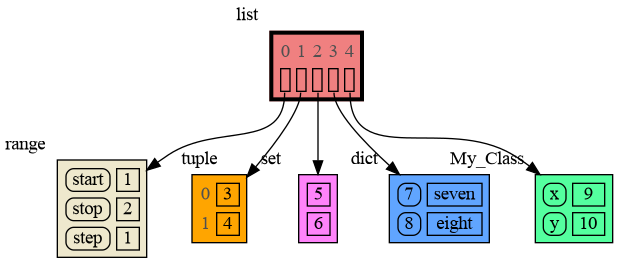
|
|
48
48
|
|
|
49
|
-
Instead of showing the graph on screen you can also render it to an output file
|
|
49
|
+
Instead of showing the graph on screen you can also render it to an output file (see [Graphviz Output Formats](https://graphviz.org/docs/outputs/)) using for example:
|
|
50
50
|
|
|
51
51
|
```python
|
|
52
52
|
mg.render(data, "my_graph.pdf")
|
|
@@ -362,7 +362,7 @@ The ```mg.stack()``` doesn't work well in *watch* context in most debuggers beca
|
|
|
362
362
|
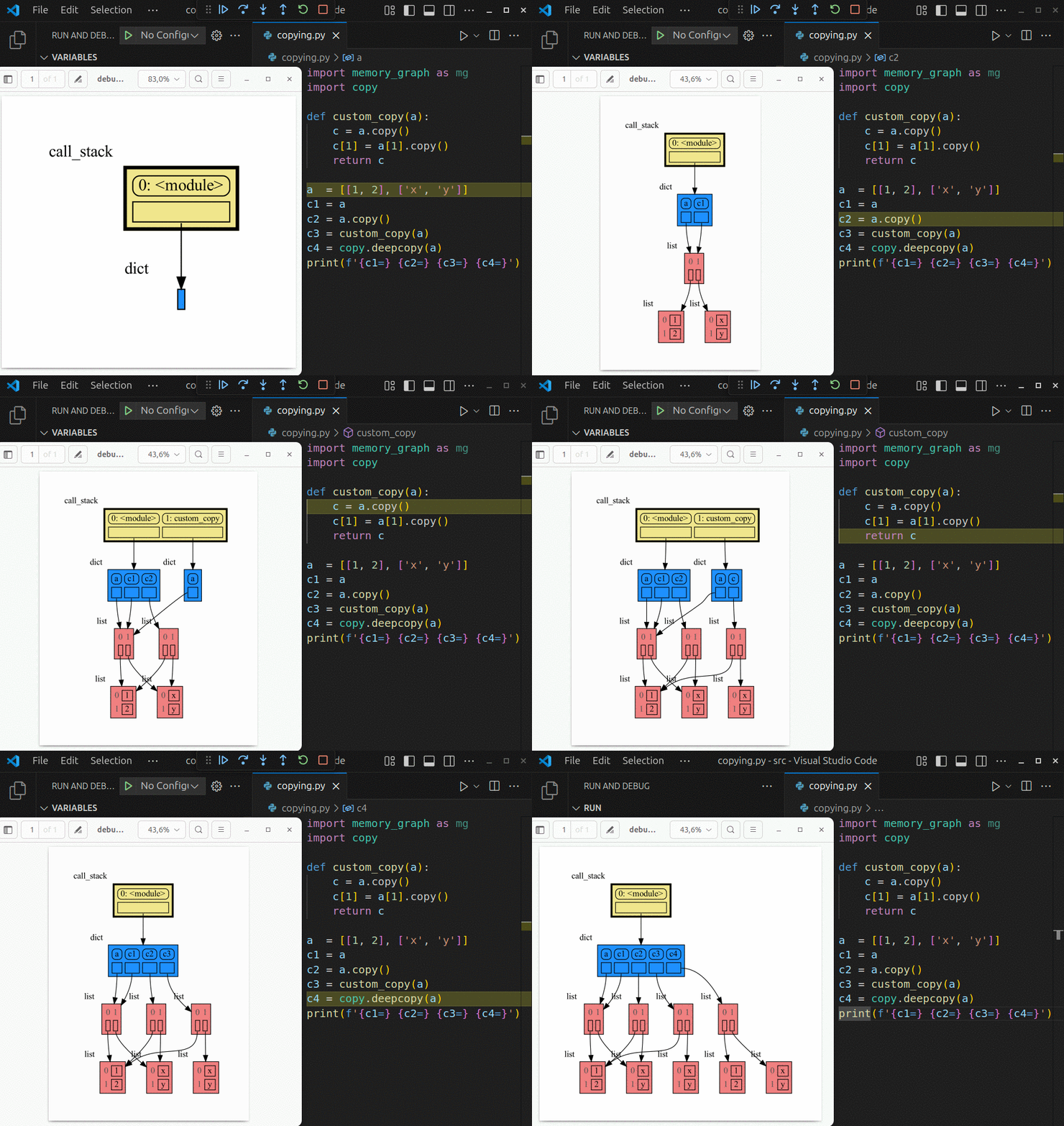
| **Visual Studio Code** | `mg.stack_vscode()` |
|
|
363
363
|
| **Pycharm** | `mg.stack_pycharm()` |
|
|
364
364
|
|
|
365
|
-
|
|
366
366
|
|
|
367
367
|
## Other Debuggers ##
|
|
368
368
|
For other debuggers, invoke this function within the *watch* context. Then, in the "call_stack.txt" file, identify the slice of functions you wish to include in the call stack.
|
|
@@ -410,37 +410,37 @@ and pressing <Enter> a number of times, results in:
|
|
|
410
410
|
# Data Structure Examples #
|
|
411
411
|
Module memory_graph can be very useful in a course about data structures, some examples:
|
|
412
412
|
|
|
413
|
-
## Doubly Linked List ##
|
|
413
|
+
## Circular Doubly Linked List ##
|
|
414
414
|
```python
|
|
415
415
|
import memory_graph as mg
|
|
416
416
|
import random
|
|
417
417
|
random.seed(0) # use same random numbers each run
|
|
418
418
|
|
|
419
419
|
class Linked_List:
|
|
420
|
+
""" Circular doubly linked list """
|
|
420
421
|
|
|
421
|
-
def __init__(self, value=None,
|
|
422
|
-
|
|
422
|
+
def __init__(self, value=None,
|
|
423
|
+
prev=None, next=None):
|
|
424
|
+
self.prev = prev if prev else self
|
|
423
425
|
self.value = value
|
|
424
|
-
self.next = next
|
|
426
|
+
self.next = next if next else self
|
|
425
427
|
|
|
426
|
-
def
|
|
428
|
+
def add_back(self, value):
|
|
427
429
|
if self.value == None:
|
|
428
430
|
self.value = value
|
|
429
|
-
elif self.next is None:
|
|
430
|
-
new_node = Linked_List(value)
|
|
431
|
-
self.prev = new_node
|
|
432
|
-
self.next = new_node
|
|
433
431
|
else:
|
|
434
|
-
new_node = Linked_List(value,
|
|
435
|
-
|
|
436
|
-
|
|
432
|
+
new_node = Linked_List(value,
|
|
433
|
+
prev=self.prev,
|
|
434
|
+
next=self)
|
|
435
|
+
self.prev.next = new_node
|
|
436
|
+
self.prev = new_node
|
|
437
437
|
|
|
438
438
|
linked_list = Linked_List()
|
|
439
439
|
n = 100
|
|
440
440
|
for i in range(n):
|
|
441
441
|
value = random.randrange(n)
|
|
442
|
-
linked_list.
|
|
443
|
-
|
|
442
|
+
linked_list.add_back(value)
|
|
443
|
+
mg.block(mg.show, locals()) # <--- draw locals
|
|
444
444
|
```
|
|
445
445
|
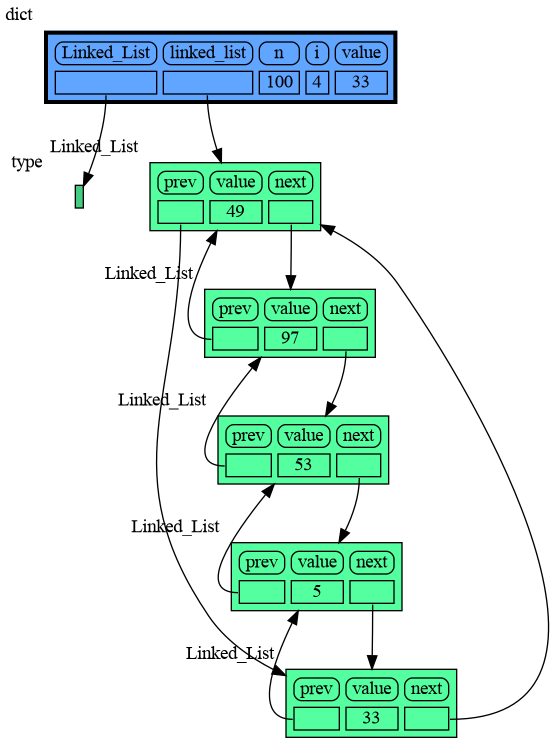
|
|
446
446
|
|
|
@@ -575,7 +575,7 @@ mg.render(locals(), 'not_node_types2.png')
|
|
|
575
575
|
|:-----------------------------------------------------------:|:-------------------------------------------------------------:|
|
|
576
576
|
| not_node_types1.png — simplified | not_node_types2.png — technically correct |
|
|
577
577
|
|
|
578
|
-
Additionally, the simplification hides away the [reuse of small int values](https://docs.python.org/3/c-api/long.html#c.PyLong_FromLong) in the current CPython implementation, an optimization that might otherwise confuse beginner Python programmers. For instance, after executing `a[1]+=1; b[1]+=1` the `201` value is, maybe surprisingly, still shared between `a` and `b`, whereas executing `a[2]+=1; b[2]+=1` does not result in sharing the `301` value.
|
|
578
|
+
Additionally, the simplification hides away the [reuse of small int values \[-5, 256\]](https://docs.python.org/3/c-api/long.html#c.PyLong_FromLong) in the current CPython implementation, an optimization that might otherwise confuse beginner Python programmers. For instance, after executing `a[1]+=1; b[1]+=1` the `201` value is, maybe surprisingly, still shared between `a` and `b`, whereas executing `a[2]+=1; b[2]+=1` does not result in sharing the `301` value.
|
|
579
579
|
|
|
580
580
|
## Temporary Configuration ##
|
|
581
581
|
In addition to the global configuration, a temporary configuration can be set for a single `show()` or `render()` call to change the colors, orientation, and slicer. This example highlights a particular list element in red, gives it a horizontal orientation, and overwrites the default slicer for lists:
|
|
@@ -6,9 +6,9 @@ pip install --upgrade memory_graph
|
|
|
6
6
|
Additionally [Graphviz](https://graphviz.org/download/) needs to be installed.
|
|
7
7
|
|
|
8
8
|
# Videos #
|
|
9
|
-
| [](https://www.youtube.com/watch?v=23_bHcr7hqo) | [](https://www.youtube.com/watch?v=pvIJgHCaXhU) |
|
|
10
10
|
|:--:|:--:|
|
|
11
|
-
| [Quick Intro](https://www.youtube.com/watch?v=
|
|
11
|
+
| [Quick Intro](https://www.youtube.com/watch?v=23_bHcr7hqo) | [Mutability](https://www.youtube.com/watch?v=pvIJgHCaXhU) |
|
|
12
12
|
|
|
13
13
|
# Memory Graph #
|
|
14
14
|
For program understanding and debugging, the [memory_graph](https://pypi.org/project/memory-graph/) package can visualize your data, supporting many different data types, including but not limited to:
|
|
@@ -27,7 +27,7 @@ mg.show(data)
|
|
|
27
27
|
```
|
|
28
28
|

|
|
29
29
|
|
|
30
|
-
Instead of showing the graph on screen you can also render it to an output file
|
|
30
|
+
Instead of showing the graph on screen you can also render it to an output file (see [Graphviz Output Formats](https://graphviz.org/docs/outputs/)) using for example:
|
|
31
31
|
|
|
32
32
|
```python
|
|
33
33
|
mg.render(data, "my_graph.pdf")
|
|
@@ -343,7 +343,7 @@ The ```mg.stack()``` doesn't work well in *watch* context in most debuggers beca
|
|
|
343
343
|
| **Visual Studio Code** | `mg.stack_vscode()` |
|
|
344
344
|
| **Pycharm** | `mg.stack_pycharm()` |
|
|
345
345
|
|
|
346
|
-

|
|
347
347
|
|
|
348
348
|
## Other Debuggers ##
|
|
349
349
|
For other debuggers, invoke this function within the *watch* context. Then, in the "call_stack.txt" file, identify the slice of functions you wish to include in the call stack.
|
|
@@ -391,37 +391,37 @@ and pressing <Enter> a number of times, results in:
|
|
|
391
391
|
# Data Structure Examples #
|
|
392
392
|
Module memory_graph can be very useful in a course about data structures, some examples:
|
|
393
393
|
|
|
394
|
-
## Doubly Linked List ##
|
|
394
|
+
## Circular Doubly Linked List ##
|
|
395
395
|
```python
|
|
396
396
|
import memory_graph as mg
|
|
397
397
|
import random
|
|
398
398
|
random.seed(0) # use same random numbers each run
|
|
399
399
|
|
|
400
400
|
class Linked_List:
|
|
401
|
+
""" Circular doubly linked list """
|
|
401
402
|
|
|
402
|
-
def __init__(self, value=None,
|
|
403
|
-
|
|
403
|
+
def __init__(self, value=None,
|
|
404
|
+
prev=None, next=None):
|
|
405
|
+
self.prev = prev if prev else self
|
|
404
406
|
self.value = value
|
|
405
|
-
self.next = next
|
|
407
|
+
self.next = next if next else self
|
|
406
408
|
|
|
407
|
-
def
|
|
409
|
+
def add_back(self, value):
|
|
408
410
|
if self.value == None:
|
|
409
411
|
self.value = value
|
|
410
|
-
elif self.next is None:
|
|
411
|
-
new_node = Linked_List(value)
|
|
412
|
-
self.prev = new_node
|
|
413
|
-
self.next = new_node
|
|
414
412
|
else:
|
|
415
|
-
new_node = Linked_List(value,
|
|
416
|
-
|
|
417
|
-
|
|
413
|
+
new_node = Linked_List(value,
|
|
414
|
+
prev=self.prev,
|
|
415
|
+
next=self)
|
|
416
|
+
self.prev.next = new_node
|
|
417
|
+
self.prev = new_node
|
|
418
418
|
|
|
419
419
|
linked_list = Linked_List()
|
|
420
420
|
n = 100
|
|
421
421
|
for i in range(n):
|
|
422
422
|
value = random.randrange(n)
|
|
423
|
-
linked_list.
|
|
424
|
-
|
|
423
|
+
linked_list.add_back(value)
|
|
424
|
+
mg.block(mg.show, locals()) # <--- draw locals
|
|
425
425
|
```
|
|
426
426
|

|
|
427
427
|
|
|
@@ -556,7 +556,7 @@ mg.render(locals(), 'not_node_types2.png')
|
|
|
556
556
|
|:-----------------------------------------------------------:|:-------------------------------------------------------------:|
|
|
557
557
|
| not_node_types1.png — simplified | not_node_types2.png — technically correct |
|
|
558
558
|
|
|
559
|
-
Additionally, the simplification hides away the [reuse of small int values](https://docs.python.org/3/c-api/long.html#c.PyLong_FromLong) in the current CPython implementation, an optimization that might otherwise confuse beginner Python programmers. For instance, after executing `a[1]+=1; b[1]+=1` the `201` value is, maybe surprisingly, still shared between `a` and `b`, whereas executing `a[2]+=1; b[2]+=1` does not result in sharing the `301` value.
|
|
559
|
+
Additionally, the simplification hides away the [reuse of small int values \[-5, 256\]](https://docs.python.org/3/c-api/long.html#c.PyLong_FromLong) in the current CPython implementation, an optimization that might otherwise confuse beginner Python programmers. For instance, after executing `a[1]+=1; b[1]+=1` the `201` value is, maybe surprisingly, still shared between `a` and `b`, whereas executing `a[2]+=1; b[2]+=1` does not result in sharing the `301` value.
|
|
560
560
|
|
|
561
561
|
## Temporary Configuration ##
|
|
562
562
|
In addition to the global configuration, a temporary configuration can be set for a single `show()` or `render()` call to change the colors, orientation, and slicer. This example highlights a particular list element in red, gives it a horizontal orientation, and overwrites the default slicer for lists:
|
|
@@ -0,0 +1 @@
|
|
|
1
|
+
o $1 && sleep 0.3 && o ../images_old/$1
|
|
Binary file
|
|
Binary file
|
|
Binary file
|
|
Binary file
|
|
Binary file
|
|
Binary file
|
|
Binary file
|
|
Binary file
|
|
Binary file
|
|
Binary file
|
|
Binary file
|
|
Binary file
|
|
Binary file
|
|
Binary file
|
|
@@ -7,29 +7,29 @@ import random
|
|
|
7
7
|
random.seed(0) # use same random numbers each run
|
|
8
8
|
|
|
9
9
|
class Linked_List:
|
|
10
|
+
""" Circular doubly linked list """
|
|
10
11
|
|
|
11
|
-
def __init__(self, value=None,
|
|
12
|
-
|
|
12
|
+
def __init__(self, value=None,
|
|
13
|
+
prev=None, next=None):
|
|
14
|
+
self.prev = prev if prev else self
|
|
13
15
|
self.value = value
|
|
14
|
-
self.next = next
|
|
16
|
+
self.next = next if next else self
|
|
15
17
|
|
|
16
|
-
def
|
|
18
|
+
def add_back(self, value):
|
|
17
19
|
if self.value == None:
|
|
18
20
|
self.value = value
|
|
19
|
-
elif self.next is None:
|
|
20
|
-
new_node = Linked_List(value)
|
|
21
|
-
self.prev = new_node
|
|
22
|
-
self.next = new_node
|
|
23
21
|
else:
|
|
24
|
-
new_node = Linked_List(value,
|
|
25
|
-
|
|
26
|
-
|
|
22
|
+
new_node = Linked_List(value,
|
|
23
|
+
prev=self.prev,
|
|
24
|
+
next=self)
|
|
25
|
+
self.prev.next = new_node
|
|
26
|
+
self.prev = new_node
|
|
27
27
|
|
|
28
28
|
linked_list = Linked_List()
|
|
29
29
|
n = 100
|
|
30
30
|
for i in range(n):
|
|
31
31
|
value = random.randrange(n)
|
|
32
|
-
linked_list.
|
|
32
|
+
linked_list.add_back(value)
|
|
33
33
|
if value == 33:
|
|
34
34
|
mg.render(locals(), "linked_list.png")
|
|
35
35
|
exit()
|
|
Binary file
|
|
Binary file
|
|
Binary file
|
|
Binary file
|
|
Binary file
|
|
Binary file
|
|
Binary file
|
|
Binary file
|
|
Binary file
|
|
Binary file
|
|
Binary file
|
|
Binary file
|
|
Binary file
|
|
Binary file
|
|
Binary file
|
|
Binary file
|
|
Binary file
|
|
Binary file
|
|
Binary file
|
|
Binary file
|
|
Binary file
|
|
Binary file
|
|
Binary file
|
|
@@ -10,11 +10,12 @@ import memory_graph.utils as utils
|
|
|
10
10
|
|
|
11
11
|
import inspect
|
|
12
12
|
import sys
|
|
13
|
+
import itertools as it
|
|
13
14
|
from memory_graph.call_stack import call_stack
|
|
14
15
|
|
|
15
16
|
import graphviz
|
|
16
17
|
|
|
17
|
-
__version__ = "0.3.
|
|
18
|
+
__version__ = "0.3.27"
|
|
18
19
|
__author__ = 'Bas Terwijn'
|
|
19
20
|
render_filename = 'memory_graph.pdf'
|
|
20
21
|
render_filename_count = 0
|
|
@@ -224,12 +225,13 @@ def get_call_stack(up_to_function="<module>",stack_index=0):
|
|
|
224
225
|
|
|
225
226
|
def stack_after_up_to(after_function,up_to_function="<module>"):
|
|
226
227
|
return get_call_stack_after_up_to(after_function, up_to_function)
|
|
227
|
-
def get_call_stack_after_up_to(after_function,up_to_function="<module>"):
|
|
228
|
-
""" Gets the call stack after the function 'after_function' up to the function 'up_to_function'
|
|
229
|
-
|
|
228
|
+
def get_call_stack_after_up_to(after_function,up_to_function="<module>", drop=0):
|
|
229
|
+
""" Gets the call stack after the function 'after_function' up to the function 'up_to_function'
|
|
230
|
+
and drop the first 'drop' stack frames. """
|
|
231
|
+
frames = reversed(list(it.islice(
|
|
230
232
|
utils.take_up_to(lambda i: i.function == up_to_function,
|
|
231
233
|
utils.take_after(lambda i: i.function == after_function, inspect.stack()))
|
|
232
|
-
))
|
|
234
|
+
, 1, None)))
|
|
233
235
|
return stack_frames_to_dict(frames)
|
|
234
236
|
|
|
235
237
|
def stack_pdb(after_function="trace_dispatch",up_to_function="<module>"):
|
|
@@ -244,11 +246,11 @@ def get_call_stack_vscode(after_function="do_wait_suspend",up_to_function="<modu
|
|
|
244
246
|
""" Get the call stack in a 'vscode' debugger session, filtering out the 'vscode' functions that polute the graph. """
|
|
245
247
|
return get_call_stack_after_up_to(after_function,up_to_function)
|
|
246
248
|
|
|
247
|
-
def stack_pycharm(after_function="
|
|
249
|
+
def stack_pycharm(after_function="do_wait_suspend",up_to_function="<module>"):
|
|
248
250
|
return get_call_stack_pycharm(after_function, up_to_function)
|
|
249
|
-
def get_call_stack_pycharm(after_function="
|
|
250
|
-
""" Get the call stack in a '
|
|
251
|
-
return get_call_stack_after_up_to(after_function,up_to_function)
|
|
251
|
+
def get_call_stack_pycharm(after_function="do_wait_suspend",up_to_function="<module>"):
|
|
252
|
+
""" Get the call stack in a 'vscode' debugger session, filtering out the 'vscode' functions that polute the graph. """
|
|
253
|
+
return get_call_stack_after_up_to(after_function,up_to_function, 1)
|
|
252
254
|
|
|
253
255
|
def save_call_stack(filename):
|
|
254
256
|
""" Saves the call stack to 'filename' for inspection to see what functions need to be
|
|
@@ -1,7 +1,7 @@
|
|
|
1
1
|
Metadata-Version: 2.1
|
|
2
2
|
Name: memory_graph
|
|
3
|
-
Version: 0.3.
|
|
4
|
-
Summary:
|
|
3
|
+
Version: 0.3.27
|
|
4
|
+
Summary: Teaching tool and debugging aid in context of references, mutable data types, and shallow and deep copy.
|
|
5
5
|
Home-page: https://github.com/bterwijn/memory_graph
|
|
6
6
|
Author: Bas Terwijn
|
|
7
7
|
Author-email: bterwijn@gmail.com
|
|
@@ -25,9 +25,9 @@ pip install --upgrade memory_graph
|
|
|
25
25
|
Additionally [Graphviz](https://graphviz.org/download/) needs to be installed.
|
|
26
26
|
|
|
27
27
|
# Videos #
|
|
28
|
-
| [](https://www.youtube.com/watch?v=23_bHcr7hqo) | [](https://www.youtube.com/watch?v=pvIJgHCaXhU) |
|
|
29
29
|
|:--:|:--:|
|
|
30
|
-
| [Quick Intro](https://www.youtube.com/watch?v=
|
|
30
|
+
| [Quick Intro](https://www.youtube.com/watch?v=23_bHcr7hqo) | [Mutability](https://www.youtube.com/watch?v=pvIJgHCaXhU) |
|
|
31
31
|
|
|
32
32
|
# Memory Graph #
|
|
33
33
|
For program understanding and debugging, the [memory_graph](https://pypi.org/project/memory-graph/) package can visualize your data, supporting many different data types, including but not limited to:
|
|
@@ -46,7 +46,7 @@ mg.show(data)
|
|
|
46
46
|
```
|
|
47
47
|

|
|
48
48
|
|
|
49
|
-
Instead of showing the graph on screen you can also render it to an output file
|
|
49
|
+
Instead of showing the graph on screen you can also render it to an output file (see [Graphviz Output Formats](https://graphviz.org/docs/outputs/)) using for example:
|
|
50
50
|
|
|
51
51
|
```python
|
|
52
52
|
mg.render(data, "my_graph.pdf")
|
|
@@ -362,7 +362,7 @@ The ```mg.stack()``` doesn't work well in *watch* context in most debuggers beca
|
|
|
362
362
|
| **Visual Studio Code** | `mg.stack_vscode()` |
|
|
363
363
|
| **Pycharm** | `mg.stack_pycharm()` |
|
|
364
364
|
|
|
365
|
-

|
|
366
366
|
|
|
367
367
|
## Other Debuggers ##
|
|
368
368
|
For other debuggers, invoke this function within the *watch* context. Then, in the "call_stack.txt" file, identify the slice of functions you wish to include in the call stack.
|
|
@@ -410,37 +410,37 @@ and pressing <Enter> a number of times, results in:
|
|
|
410
410
|
# Data Structure Examples #
|
|
411
411
|
Module memory_graph can be very useful in a course about data structures, some examples:
|
|
412
412
|
|
|
413
|
-
## Doubly Linked List ##
|
|
413
|
+
## Circular Doubly Linked List ##
|
|
414
414
|
```python
|
|
415
415
|
import memory_graph as mg
|
|
416
416
|
import random
|
|
417
417
|
random.seed(0) # use same random numbers each run
|
|
418
418
|
|
|
419
419
|
class Linked_List:
|
|
420
|
+
""" Circular doubly linked list """
|
|
420
421
|
|
|
421
|
-
def __init__(self, value=None,
|
|
422
|
-
|
|
422
|
+
def __init__(self, value=None,
|
|
423
|
+
prev=None, next=None):
|
|
424
|
+
self.prev = prev if prev else self
|
|
423
425
|
self.value = value
|
|
424
|
-
self.next = next
|
|
426
|
+
self.next = next if next else self
|
|
425
427
|
|
|
426
|
-
def
|
|
428
|
+
def add_back(self, value):
|
|
427
429
|
if self.value == None:
|
|
428
430
|
self.value = value
|
|
429
|
-
elif self.next is None:
|
|
430
|
-
new_node = Linked_List(value)
|
|
431
|
-
self.prev = new_node
|
|
432
|
-
self.next = new_node
|
|
433
431
|
else:
|
|
434
|
-
new_node = Linked_List(value,
|
|
435
|
-
|
|
436
|
-
|
|
432
|
+
new_node = Linked_List(value,
|
|
433
|
+
prev=self.prev,
|
|
434
|
+
next=self)
|
|
435
|
+
self.prev.next = new_node
|
|
436
|
+
self.prev = new_node
|
|
437
437
|
|
|
438
438
|
linked_list = Linked_List()
|
|
439
439
|
n = 100
|
|
440
440
|
for i in range(n):
|
|
441
441
|
value = random.randrange(n)
|
|
442
|
-
linked_list.
|
|
443
|
-
|
|
442
|
+
linked_list.add_back(value)
|
|
443
|
+
mg.block(mg.show, locals()) # <--- draw locals
|
|
444
444
|
```
|
|
445
445
|

|
|
446
446
|
|
|
@@ -575,7 +575,7 @@ mg.render(locals(), 'not_node_types2.png')
|
|
|
575
575
|
|:-----------------------------------------------------------:|:-------------------------------------------------------------:|
|
|
576
576
|
| not_node_types1.png — simplified | not_node_types2.png — technically correct |
|
|
577
577
|
|
|
578
|
-
Additionally, the simplification hides away the [reuse of small int values](https://docs.python.org/3/c-api/long.html#c.PyLong_FromLong) in the current CPython implementation, an optimization that might otherwise confuse beginner Python programmers. For instance, after executing `a[1]+=1; b[1]+=1` the `201` value is, maybe surprisingly, still shared between `a` and `b`, whereas executing `a[2]+=1; b[2]+=1` does not result in sharing the `301` value.
|
|
578
|
+
Additionally, the simplification hides away the [reuse of small int values \[-5, 256\]](https://docs.python.org/3/c-api/long.html#c.PyLong_FromLong) in the current CPython implementation, an optimization that might otherwise confuse beginner Python programmers. For instance, after executing `a[1]+=1; b[1]+=1` the `201` value is, maybe surprisingly, still shared between `a` and `b`, whereas executing `a[2]+=1; b[2]+=1` does not result in sharing the `301` value.
|
|
579
579
|
|
|
580
580
|
## Temporary Configuration ##
|
|
581
581
|
In addition to the global configuration, a temporary configuration can be set for a single `show()` or `render()` call to change the colors, orientation, and slicer. This example highlights a particular list element in red, gives it a horizontal orientation, and overwrites the default slicer for lists:
|