memory-graph 0.3.23__tar.gz → 0.3.24__tar.gz
This diff represents the content of publicly available package versions that have been released to one of the supported registries. The information contained in this diff is provided for informational purposes only and reflects changes between package versions as they appear in their respective public registries.
- {memory_graph-0.3.23/memory_graph.egg-info → memory_graph-0.3.24}/PKG-INFO +130 -50
- {memory_graph-0.3.23 → memory_graph-0.3.24}/README.md +129 -49
- {memory_graph-0.3.23 → memory_graph-0.3.24}/images/add_one.gv +20 -20
- memory_graph-0.3.24/images/add_one.png +0 -0
- {memory_graph-0.3.23 → memory_graph-0.3.24}/images/avltree_dir.gv +6 -6
- memory_graph-0.3.24/images/avltree_dir.png +0 -0
- memory_graph-0.3.24/images/avltree_fail.gv +22 -0
- memory_graph-0.3.24/images/avltree_fail.png +0 -0
- {memory_graph-0.3.23 → memory_graph-0.3.24}/images/avltree_key_value.gv +13 -13
- memory_graph-0.3.24/images/avltree_key_value.png +0 -0
- {memory_graph-0.3.23 → memory_graph-0.3.24}/images/avltree_leaf.gv +6 -6
- memory_graph-0.3.24/images/avltree_leaf.png +0 -0
- {memory_graph-0.3.23 → memory_graph-0.3.24}/images/avltree_linear.gv +13 -13
- memory_graph-0.3.24/images/avltree_linear.png +0 -0
- {memory_graph-0.3.23 → memory_graph-0.3.24}/images/avltree_table.gv +13 -13
- memory_graph-0.3.24/images/avltree_table.png +0 -0
- {memory_graph-0.3.23 → memory_graph-0.3.24}/images/bin_tree.gv +39 -39
- memory_graph-0.3.24/images/bin_tree.png +0 -0
- {memory_graph-0.3.23 → memory_graph-0.3.24}/images/copies.gv +21 -21
- memory_graph-0.3.24/images/copies.png +0 -0
- {memory_graph-0.3.23 → memory_graph-0.3.24}/images/copy_method.gv +17 -17
- memory_graph-0.3.24/images/copy_method.png +0 -0
- {memory_graph-0.3.23 → memory_graph-0.3.24}/images/create_images.sh +1 -0
- memory_graph-0.3.24/images/debugging.gif +0 -0
- {memory_graph-0.3.23 → memory_graph-0.3.24}/images/debugging01.gv +9 -9
- memory_graph-0.3.24/images/debugging01.png +0 -0
- {memory_graph-0.3.23 → memory_graph-0.3.24}/images/debugging02.gv +12 -12
- memory_graph-0.3.24/images/debugging02.png +0 -0
- {memory_graph-0.3.23 → memory_graph-0.3.24}/images/debugging03.gv +14 -14
- memory_graph-0.3.24/images/debugging03.png +0 -0
- {memory_graph-0.3.23 → memory_graph-0.3.24}/images/debugging04.gv +16 -16
- memory_graph-0.3.24/images/debugging04.png +0 -0
- {memory_graph-0.3.23 → memory_graph-0.3.24}/images/debugging05.gv +18 -18
- memory_graph-0.3.24/images/debugging05.png +0 -0
- {memory_graph-0.3.23 → memory_graph-0.3.24}/images/debugging06.gv +18 -18
- memory_graph-0.3.24/images/debugging06.png +0 -0
- memory_graph-0.3.24/images/depth.gv +178 -0
- memory_graph-0.3.24/images/depth.png +0 -0
- {memory_graph-0.3.23 → memory_graph-0.3.24}/images/extension_numpy.gv +31 -33
- memory_graph-0.3.24/images/extension_numpy.png +0 -0
- {memory_graph-0.3.23 → memory_graph-0.3.24}/images/extension_pandas.gv +9 -11
- memory_graph-0.3.24/images/extension_pandas.png +0 -0
- memory_graph-0.3.24/images/factorial.gif +0 -0
- memory_graph-0.3.24/images/factorial.py +16 -0
- memory_graph-0.3.24/images/factorial0.gv +15 -0
- memory_graph-0.3.24/images/factorial0.png +0 -0
- {memory_graph-0.3.23 → memory_graph-0.3.24}/images/factorial01.gv +4 -4
- {memory_graph-0.3.23 → memory_graph-0.3.24}/images/factorial02.gv +8 -8
- {memory_graph-0.3.23 → memory_graph-0.3.24}/images/factorial03.gv +11 -11
- {memory_graph-0.3.23 → memory_graph-0.3.24}/images/factorial04.gv +14 -14
- {memory_graph-0.3.23 → memory_graph-0.3.24}/images/factorial05.gv +14 -14
- {memory_graph-0.3.23 → memory_graph-0.3.24}/images/factorial06.gv +11 -11
- {memory_graph-0.3.23 → memory_graph-0.3.24}/images/factorial07.gv +8 -8
- memory_graph-0.3.24/images/factorial1.gv +22 -0
- memory_graph-0.3.24/images/factorial1.png +0 -0
- memory_graph-0.3.24/images/factorial2.gv +28 -0
- memory_graph-0.3.24/images/factorial2.png +0 -0
- memory_graph-0.3.24/images/factorial3.gv +34 -0
- memory_graph-0.3.24/images/factorial3.png +0 -0
- memory_graph-0.3.24/images/factorial4.gv +35 -0
- memory_graph-0.3.24/images/factorial4.png +0 -0
- memory_graph-0.3.24/images/factorial5.gv +29 -0
- memory_graph-0.3.24/images/factorial5.png +0 -0
- memory_graph-0.3.24/images/factorial6.gv +23 -0
- memory_graph-0.3.24/images/factorial6.png +0 -0
- {memory_graph-0.3.23 → memory_graph-0.3.24}/images/hash_set.gv +30 -30
- memory_graph-0.3.24/images/hash_set.png +0 -0
- memory_graph-0.3.24/images/hidden_edges.gv +37 -0
- memory_graph-0.3.24/images/hidden_edges.png +0 -0
- memory_graph-0.3.24/images/hidden_edges.py +8 -0
- memory_graph-0.3.24/images/hidden_edges.py~ +9 -0
- {memory_graph-0.3.23 → memory_graph-0.3.24}/images/highlight.gv +17 -23
- memory_graph-0.3.24/images/highlight.png +0 -0
- {memory_graph-0.3.23 → memory_graph-0.3.24}/images/immutable1.gv +5 -5
- memory_graph-0.3.24/images/immutable1.png +0 -0
- {memory_graph-0.3.23 → memory_graph-0.3.24}/images/immutable2.gv +7 -7
- memory_graph-0.3.24/images/immutable2.png +0 -0
- memory_graph-0.3.24/images/introspect_depth.gv +178 -0
- memory_graph-0.3.24/images/introspect_depth.png +0 -0
- memory_graph-0.3.24/images/introspect_depth.py +43 -0
- memory_graph-0.3.24/images/introspect_depth.py~ +26 -0
- {memory_graph-0.3.23 → memory_graph-0.3.24}/images/linked_list.gv +24 -24
- memory_graph-0.3.24/images/linked_list.png +0 -0
- {memory_graph-0.3.23 → memory_graph-0.3.24}/images/many_types.gv +13 -13
- memory_graph-0.3.24/images/many_types.png +0 -0
- memory_graph-0.3.24/images/memory_graph.gv +178 -0
- memory_graph-0.3.24/images/memory_graph.pdf +0 -0
- {memory_graph-0.3.23 → memory_graph-0.3.24}/images/mutable1.gv +5 -5
- memory_graph-0.3.24/images/mutable1.png +0 -0
- {memory_graph-0.3.23 → memory_graph-0.3.24}/images/mutable2.gv +5 -5
- memory_graph-0.3.24/images/mutable2.png +0 -0
- {memory_graph-0.3.23 → memory_graph-0.3.24}/images/not_node_types1.gv +7 -7
- memory_graph-0.3.24/images/not_node_types1.png +0 -0
- {memory_graph-0.3.23 → memory_graph-0.3.24}/images/not_node_types2.gv +15 -15
- memory_graph-0.3.24/images/not_node_types2.png +0 -0
- memory_graph-0.3.24/images/power_set.gif +0 -0
- {memory_graph-0.3.23 → memory_graph-0.3.24}/images/power_set.py +4 -6
- memory_graph-0.3.24/images/power_set0.gv +38 -0
- memory_graph-0.3.24/images/power_set0.png +0 -0
- {memory_graph-0.3.23 → memory_graph-0.3.24}/images/power_set1.gv +21 -21
- memory_graph-0.3.24/images/power_set1.png +0 -0
- {memory_graph-0.3.23 → memory_graph-0.3.24}/images/power_set10.gv +42 -42
- memory_graph-0.3.24/images/power_set10.png +0 -0
- memory_graph-0.3.23/images/power_set12.gv → memory_graph-0.3.24/images/power_set11.gv +38 -38
- memory_graph-0.3.24/images/power_set11.png +0 -0
- memory_graph-0.3.23/images/power_set11.gv → memory_graph-0.3.24/images/power_set12.gv +38 -38
- memory_graph-0.3.24/images/power_set12.png +0 -0
- {memory_graph-0.3.23 → memory_graph-0.3.24}/images/power_set13.gv +42 -42
- memory_graph-0.3.24/images/power_set13.png +0 -0
- {memory_graph-0.3.23 → memory_graph-0.3.24}/images/power_set14.gv +48 -48
- memory_graph-0.3.24/images/power_set14.png +0 -0
- {memory_graph-0.3.23 → memory_graph-0.3.24}/images/power_set15.gv +50 -50
- memory_graph-0.3.24/images/power_set15.png +0 -0
- memory_graph-0.3.23/images/power_set17.gv → memory_graph-0.3.24/images/power_set16.gv +48 -48
- memory_graph-0.3.24/images/power_set16.png +0 -0
- memory_graph-0.3.23/images/power_set16.gv → memory_graph-0.3.24/images/power_set17.gv +48 -48
- memory_graph-0.3.24/images/power_set17.png +0 -0
- {memory_graph-0.3.23 → memory_graph-0.3.24}/images/power_set18.gv +52 -52
- memory_graph-0.3.24/images/power_set18.png +0 -0
- {memory_graph-0.3.23 → memory_graph-0.3.24}/images/power_set19.gv +54 -54
- memory_graph-0.3.24/images/power_set19.png +0 -0
- {memory_graph-0.3.23 → memory_graph-0.3.24}/images/power_set2.gv +27 -27
- memory_graph-0.3.24/images/power_set2.png +0 -0
- {memory_graph-0.3.23 → memory_graph-0.3.24}/images/power_set20.gv +50 -50
- memory_graph-0.3.24/images/power_set20.png +0 -0
- {memory_graph-0.3.23 → memory_graph-0.3.24}/images/power_set21.gv +44 -44
- memory_graph-0.3.24/images/power_set21.png +0 -0
- {memory_graph-0.3.23 → memory_graph-0.3.24}/images/power_set22.gv +38 -38
- memory_graph-0.3.24/images/power_set22.png +0 -0
- memory_graph-0.3.24/images/power_set23.gv +93 -0
- memory_graph-0.3.24/images/power_set23.png +0 -0
- {memory_graph-0.3.23 → memory_graph-0.3.24}/images/power_set3.gv +33 -33
- memory_graph-0.3.24/images/power_set3.png +0 -0
- {memory_graph-0.3.23 → memory_graph-0.3.24}/images/power_set4.gv +39 -39
- memory_graph-0.3.24/images/power_set4.png +0 -0
- {memory_graph-0.3.23 → memory_graph-0.3.24}/images/power_set5.gv +41 -41
- memory_graph-0.3.24/images/power_set5.png +0 -0
- {memory_graph-0.3.23 → memory_graph-0.3.24}/images/power_set6.gv +38 -38
- memory_graph-0.3.24/images/power_set6.png +0 -0
- {memory_graph-0.3.23 → memory_graph-0.3.24}/images/power_set7.gv +38 -38
- memory_graph-0.3.24/images/power_set7.png +0 -0
- {memory_graph-0.3.23 → memory_graph-0.3.24}/images/power_set8.gv +44 -44
- memory_graph-0.3.24/images/power_set8.png +0 -0
- {memory_graph-0.3.23 → memory_graph-0.3.24}/images/power_set9.gv +46 -46
- memory_graph-0.3.24/images/power_set9.png +0 -0
- {memory_graph-0.3.23 → memory_graph-0.3.24}/images/rebinding1.gv +5 -5
- memory_graph-0.3.24/images/rebinding1.png +0 -0
- {memory_graph-0.3.23 → memory_graph-0.3.24}/images/rebinding2.gv +7 -7
- memory_graph-0.3.24/images/rebinding2.png +0 -0
- {memory_graph-0.3.23 → memory_graph-0.3.24}/memory_graph/__init__.py +20 -5
- {memory_graph-0.3.23 → memory_graph-0.3.24}/memory_graph/config.py +7 -3
- {memory_graph-0.3.23 → memory_graph-0.3.24}/memory_graph/config_default.py +17 -9
- {memory_graph-0.3.23 → memory_graph-0.3.24}/memory_graph/memory_to_nodes.py +10 -0
- {memory_graph-0.3.23 → memory_graph-0.3.24/memory_graph.egg-info}/PKG-INFO +130 -50
- {memory_graph-0.3.23 → memory_graph-0.3.24}/memory_graph.egg-info/SOURCES.txt +29 -7
- {memory_graph-0.3.23 → memory_graph-0.3.24}/setup.py +1 -1
- memory_graph-0.3.23/images/add_one.png +0 -0
- memory_graph-0.3.23/images/avltree_dir.png +0 -0
- memory_graph-0.3.23/images/avltree_fail.gv +0 -26
- memory_graph-0.3.23/images/avltree_fail.png +0 -0
- memory_graph-0.3.23/images/avltree_key_value.png +0 -0
- memory_graph-0.3.23/images/avltree_leaf.png +0 -0
- memory_graph-0.3.23/images/avltree_linear.png +0 -0
- memory_graph-0.3.23/images/avltree_table.png +0 -0
- memory_graph-0.3.23/images/bin_tree.png +0 -0
- memory_graph-0.3.23/images/copies.png +0 -0
- memory_graph-0.3.23/images/copy_method.png +0 -0
- memory_graph-0.3.23/images/debugging.gif +0 -0
- memory_graph-0.3.23/images/debugging01.png +0 -0
- memory_graph-0.3.23/images/debugging02.png +0 -0
- memory_graph-0.3.23/images/debugging03.png +0 -0
- memory_graph-0.3.23/images/debugging04.png +0 -0
- memory_graph-0.3.23/images/debugging05.png +0 -0
- memory_graph-0.3.23/images/debugging06.png +0 -0
- memory_graph-0.3.23/images/extension_numpy.png +0 -0
- memory_graph-0.3.23/images/extension_pandas.png +0 -0
- memory_graph-0.3.23/images/factorial.gif +0 -0
- memory_graph-0.3.23/images/factorial.py +0 -24
- memory_graph-0.3.23/images/factorial01.png +0 -0
- memory_graph-0.3.23/images/factorial02.png +0 -0
- memory_graph-0.3.23/images/factorial03.png +0 -0
- memory_graph-0.3.23/images/factorial04.png +0 -0
- memory_graph-0.3.23/images/factorial05.png +0 -0
- memory_graph-0.3.23/images/factorial06.png +0 -0
- memory_graph-0.3.23/images/factorial07.png +0 -0
- memory_graph-0.3.23/images/hash_set.png +0 -0
- memory_graph-0.3.23/images/highlight.png +0 -0
- memory_graph-0.3.23/images/immutable1.png +0 -0
- memory_graph-0.3.23/images/immutable2.png +0 -0
- memory_graph-0.3.23/images/linked_list.png +0 -0
- memory_graph-0.3.23/images/many_types.png +0 -0
- memory_graph-0.3.23/images/memory_graph.pdf +0 -0
- memory_graph-0.3.23/images/mutable1.png +0 -0
- memory_graph-0.3.23/images/mutable2.png +0 -0
- memory_graph-0.3.23/images/not_node_types1.png +0 -0
- memory_graph-0.3.23/images/not_node_types2.png +0 -0
- memory_graph-0.3.23/images/power_set.gif +0 -0
- memory_graph-0.3.23/images/power_set1.png +0 -0
- memory_graph-0.3.23/images/power_set10.png +0 -0
- memory_graph-0.3.23/images/power_set11.png +0 -0
- memory_graph-0.3.23/images/power_set12.png +0 -0
- memory_graph-0.3.23/images/power_set13.png +0 -0
- memory_graph-0.3.23/images/power_set14.png +0 -0
- memory_graph-0.3.23/images/power_set15.png +0 -0
- memory_graph-0.3.23/images/power_set16.png +0 -0
- memory_graph-0.3.23/images/power_set17.png +0 -0
- memory_graph-0.3.23/images/power_set18.png +0 -0
- memory_graph-0.3.23/images/power_set19.png +0 -0
- memory_graph-0.3.23/images/power_set2.png +0 -0
- memory_graph-0.3.23/images/power_set20.png +0 -0
- memory_graph-0.3.23/images/power_set21.png +0 -0
- memory_graph-0.3.23/images/power_set22.png +0 -0
- memory_graph-0.3.23/images/power_set3.png +0 -0
- memory_graph-0.3.23/images/power_set4.png +0 -0
- memory_graph-0.3.23/images/power_set5.png +0 -0
- memory_graph-0.3.23/images/power_set6.png +0 -0
- memory_graph-0.3.23/images/power_set7.png +0 -0
- memory_graph-0.3.23/images/power_set8.png +0 -0
- memory_graph-0.3.23/images/power_set9.png +0 -0
- memory_graph-0.3.23/images/rebinding1.png +0 -0
- memory_graph-0.3.23/images/rebinding2.png +0 -0
- {memory_graph-0.3.23 → memory_graph-0.3.24}/LICENSE.txt +0 -0
- {memory_graph-0.3.23 → memory_graph-0.3.24}/MANIFEST.in +0 -0
- {memory_graph-0.3.23 → memory_graph-0.3.24}/images/.ipynb_checkpoints/jupyter_example-checkpoint.ipynb +0 -0
- {memory_graph-0.3.23 → memory_graph-0.3.24}/images/add_one.py +0 -0
- {memory_graph-0.3.23 → memory_graph-0.3.24}/images/avltree.py +0 -0
- {memory_graph-0.3.23 → memory_graph-0.3.24}/images/avltree.py~ +0 -0
- {memory_graph-0.3.23 → memory_graph-0.3.24}/images/bin_tree.py +0 -0
- {memory_graph-0.3.23 → memory_graph-0.3.24}/images/bin_tree2.py +0 -0
- {memory_graph-0.3.23 → memory_graph-0.3.24}/images/bin_tree2.py~ +0 -0
- {memory_graph-0.3.23 → memory_graph-0.3.24}/images/copies.py +0 -0
- {memory_graph-0.3.23 → memory_graph-0.3.24}/images/copy_method.py +0 -0
- {memory_graph-0.3.23 → memory_graph-0.3.24}/images/create_gif.sh +0 -0
- {memory_graph-0.3.23 → memory_graph-0.3.24}/images/debug_vscode.png +0 -0
- {memory_graph-0.3.23 → memory_graph-0.3.24}/images/debugging.py +0 -0
- {memory_graph-0.3.23 → memory_graph-0.3.24}/images/extension_numpy.py +0 -0
- {memory_graph-0.3.23 → memory_graph-0.3.24}/images/extension_pandas.py +0 -0
- {memory_graph-0.3.23 → memory_graph-0.3.24}/images/hash_set.py +0 -0
- {memory_graph-0.3.23 → memory_graph-0.3.24}/images/highlight.py +0 -0
- {memory_graph-0.3.23 → memory_graph-0.3.24}/images/immutable.py +0 -0
- {memory_graph-0.3.23 → memory_graph-0.3.24}/images/ipython.png +0 -0
- {memory_graph-0.3.23 → memory_graph-0.3.24}/images/jupyter_example.png +0 -0
- {memory_graph-0.3.23 → memory_graph-0.3.24}/images/linked_list.py +0 -0
- {memory_graph-0.3.23 → memory_graph-0.3.24}/images/log.txt +0 -0
- {memory_graph-0.3.23 → memory_graph-0.3.24}/images/many_types.py +0 -0
- {memory_graph-0.3.23 → memory_graph-0.3.24}/images/memory_graph.gv.pdf +0 -0
- {memory_graph-0.3.23 → memory_graph-0.3.24}/images/mutable.py +0 -0
- {memory_graph-0.3.23 → memory_graph-0.3.24}/images/my_graph.gv +0 -0
- {memory_graph-0.3.23 → memory_graph-0.3.24}/images/my_graph.pdf +0 -0
- {memory_graph-0.3.23 → memory_graph-0.3.24}/images/name_rebinding.py +0 -0
- {memory_graph-0.3.23 → memory_graph-0.3.24}/images/not_node_types.py +0 -0
- {memory_graph-0.3.23 → memory_graph-0.3.24}/images/not_node_types.py~ +0 -0
- {memory_graph-0.3.23 → memory_graph-0.3.24}/images/pyodide.png +0 -0
- {memory_graph-0.3.23 → memory_graph-0.3.24}/images/uva.png +0 -0
- {memory_graph-0.3.23 → memory_graph-0.3.24}/install.txt +0 -0
- {memory_graph-0.3.23 → memory_graph-0.3.24}/memory_graph/call_stack.py +0 -0
- {memory_graph-0.3.23 → memory_graph-0.3.24}/memory_graph/config_helpers.py +0 -0
- {memory_graph-0.3.23 → memory_graph-0.3.24}/memory_graph/extension_numpy.py +0 -0
- {memory_graph-0.3.23 → memory_graph-0.3.24}/memory_graph/extension_pandas.py +0 -0
- {memory_graph-0.3.23 → memory_graph-0.3.24}/memory_graph/html_table.py +0 -0
- {memory_graph-0.3.23 → memory_graph-0.3.24}/memory_graph/list_view.py +0 -0
- {memory_graph-0.3.23 → memory_graph-0.3.24}/memory_graph/node_base.py +0 -0
- {memory_graph-0.3.23 → memory_graph-0.3.24}/memory_graph/node_key_value.py +0 -0
- {memory_graph-0.3.23 → memory_graph-0.3.24}/memory_graph/node_leaf.py +0 -0
- {memory_graph-0.3.23 → memory_graph-0.3.24}/memory_graph/node_linear.py +0 -0
- {memory_graph-0.3.23 → memory_graph-0.3.24}/memory_graph/node_table.py +0 -0
- {memory_graph-0.3.23 → memory_graph-0.3.24}/memory_graph/sequence.py +0 -0
- {memory_graph-0.3.23 → memory_graph-0.3.24}/memory_graph/slicer.py +0 -0
- {memory_graph-0.3.23 → memory_graph-0.3.24}/memory_graph/slices.py +0 -0
- {memory_graph-0.3.23 → memory_graph-0.3.24}/memory_graph/slices_iterator.py +0 -0
- {memory_graph-0.3.23 → memory_graph-0.3.24}/memory_graph/slices_table_iterator.py +0 -0
- {memory_graph-0.3.23 → memory_graph-0.3.24}/memory_graph/test.py +0 -0
- {memory_graph-0.3.23 → memory_graph-0.3.24}/memory_graph/test_max_graph_depth.py +0 -0
- {memory_graph-0.3.23 → memory_graph-0.3.24}/memory_graph/test_memory_graph.py +0 -0
- {memory_graph-0.3.23 → memory_graph-0.3.24}/memory_graph/test_memory_to_nodes.py +0 -0
- {memory_graph-0.3.23 → memory_graph-0.3.24}/memory_graph/test_sequence.py +0 -0
- {memory_graph-0.3.23 → memory_graph-0.3.24}/memory_graph/test_slicer.py +0 -0
- {memory_graph-0.3.23 → memory_graph-0.3.24}/memory_graph/test_slices.py +0 -0
- {memory_graph-0.3.23 → memory_graph-0.3.24}/memory_graph/test_slices_iterator.py +0 -0
- {memory_graph-0.3.23 → memory_graph-0.3.24}/memory_graph/utils.py +0 -0
- {memory_graph-0.3.23 → memory_graph-0.3.24}/memory_graph.egg-info/dependency_links.txt +0 -0
- {memory_graph-0.3.23 → memory_graph-0.3.24}/memory_graph.egg-info/requires.txt +0 -0
- {memory_graph-0.3.23 → memory_graph-0.3.24}/memory_graph.egg-info/top_level.txt +0 -0
- {memory_graph-0.3.23 → memory_graph-0.3.24}/setup.cfg +0 -0
- {memory_graph-0.3.23 → memory_graph-0.3.24}/src/auto_memory_graph.py +0 -0
- {memory_graph-0.3.23 → memory_graph-0.3.24}/src/jupyter_example.ipynb +0 -0
- {memory_graph-0.3.23 → memory_graph-0.3.24}/src/pyodide.html +0 -0
- {memory_graph-0.3.23 → memory_graph-0.3.24}/uml/memory_graph.uxf +0 -0
|
@@ -1,6 +1,6 @@
|
|
|
1
1
|
Metadata-Version: 2.1
|
|
2
2
|
Name: memory_graph
|
|
3
|
-
Version: 0.3.
|
|
3
|
+
Version: 0.3.24
|
|
4
4
|
Summary: Generate intuitive graphs of your Python data, great for debugging and understanding complex relationships.
|
|
5
5
|
Home-page: https://github.com/bterwijn/memory_graph
|
|
6
6
|
Author: Bas Terwijn
|
|
@@ -108,7 +108,7 @@ A better way to understand what data is shared is to draw a graph of the data us
|
|
|
108
108
|
|
|
109
109
|
[Debugging](#Debugging)
|
|
110
110
|
|
|
111
|
-
[
|
|
111
|
+
[Data Structure Examples](#data-structure-examples)
|
|
112
112
|
|
|
113
113
|
[Configuration](#configuration)
|
|
114
114
|
|
|
@@ -116,6 +116,8 @@ A better way to understand what data is shared is to draw a graph of the data us
|
|
|
116
116
|
|
|
117
117
|
[Introspection](#introspection)
|
|
118
118
|
|
|
119
|
+
[Introspection Depth](#introspection-depth)
|
|
120
|
+
|
|
119
121
|
[Jupyter Notebook](#jupyter-notebook)
|
|
120
122
|
|
|
121
123
|
[ipython](#ipython)
|
|
@@ -137,14 +139,14 @@ Inspired by [Python Tutor](https://pythontutor.com/).
|
|
|
137
139
|
___
|
|
138
140
|
___
|
|
139
141
|
|
|
140
|
-
|
|
142
|
+
# Python Data Model #
|
|
141
143
|
The [Python Data Model](https://docs.python.org/3/reference/datamodel.html) makes a distiction between immutable and mutable types:
|
|
142
144
|
|
|
143
145
|
* **immutable**: bool, int, float, complex, str, tuple, bytes, frozenset
|
|
144
146
|
* **mutable**: list, set, dict, classes, ... (most other types)
|
|
145
147
|
|
|
146
148
|
|
|
147
|
-
|
|
149
|
+
## Immutable Type ##
|
|
148
150
|
In the code below variable `a` and `b` both reference the same tuple value (4, 3, 2). A tuple is an immutable type and therefore when we change variable `b` its value **cannot** be mutated in place, and thus an automatic copy is made and `a` and `b` reference a different value afterwards.
|
|
149
151
|
|
|
150
152
|
```python
|
|
@@ -162,7 +164,7 @@ mg.render(locals(), 'immutable2.png')
|
|
|
162
164
|
| immutable1.png | immutable2.png |
|
|
163
165
|
|
|
164
166
|
|
|
165
|
-
|
|
167
|
+
## Mutable Type ##
|
|
166
168
|
With mutable types the result is different. In the code below variable `a` and `b` both reference the same `list` value [4, 3, 2]. A `list` is a mutable type and therefore when we change variable `b` its value **can** be mutated in place and thus `a` and `b` both reference the same new value afterwards. Thus changing `b` also changes `a` and vice versa. Sometimes we want this but other times we don't and then we will have to make a copy ourselfs so that `a` and `b` are independent.
|
|
167
169
|
|
|
168
170
|
```python
|
|
@@ -181,7 +183,7 @@ mg.render(locals(), 'mutable2.png')
|
|
|
181
183
|
|
|
182
184
|
One practical reason why Python makes the distinction between mutable and immutable types is that a value of a mutable type can be large, making it inefficient to copy each time we change it. Immutable values generally don't need to change as much, or are small making copying less of a concern.
|
|
183
185
|
|
|
184
|
-
|
|
186
|
+
## Copying ##
|
|
185
187
|
Python offers three different "copy" options that we will demonstrate using a nested list:
|
|
186
188
|
|
|
187
189
|
```python
|
|
@@ -205,7 +207,7 @@ mg.show(locals())
|
|
|
205
207
|
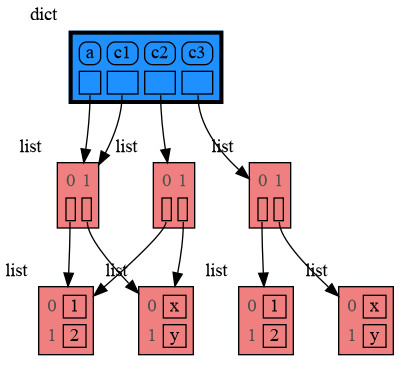
|
|
206
208
|
|
|
207
209
|
|
|
208
|
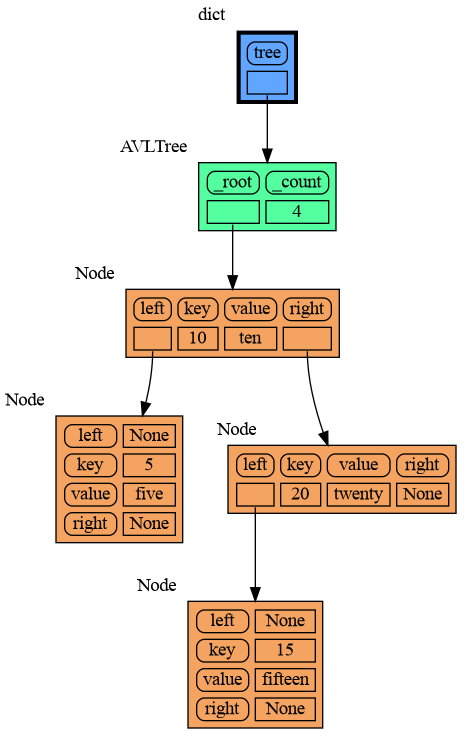
-
|
|
210
|
+
## Custom Copy ##
|
|
209
211
|
We can write our own custom copy function or method in case the three standard "copy" options don't do what we want. For example, in the code below the copy() method of My_Class copies the `digits` but shares the `letters` between two objects.
|
|
210
212
|
|
|
211
213
|
```python
|
|
@@ -231,7 +233,7 @@ mg.show(locals())
|
|
|
231
233
|
```
|
|
232
234
|
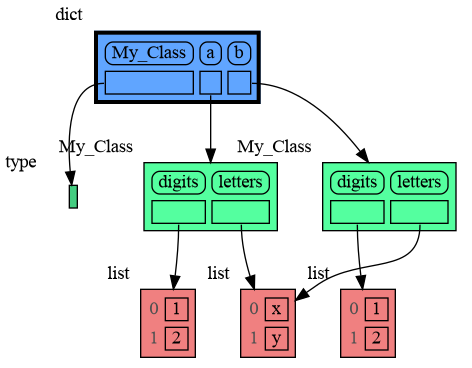
|
|
233
235
|
|
|
234
|
-
|
|
236
|
+
## Name Rebinding ##
|
|
235
237
|
When `a` and `b` share a mutable value, then changing the value of `b` changes the value of `a` and vice versa. However, reassigning `b` does not change `a`. When you reassign `b`, you only rebind the name `b` to a new value without effecting any other variables.
|
|
236
238
|
|
|
237
239
|
```python
|
|
@@ -249,7 +251,7 @@ mg.render(locals(), 'rebinding2.png')
|
|
|
249
251
|
|:-----------------------------------------------------------:|:-------------------------------------------------------------:|
|
|
250
252
|
| rebinding1.png | rebinding2.png |
|
|
251
253
|
|
|
252
|
-
|
|
254
|
+
# Call Stack #
|
|
253
255
|
The `mg.stack()` function retrieves the entire call stack, including the local variables for each function on the stack. This enables us to visualize the local variables across all active functions simultaneously. By examining the graph, we can determine whether any local variables from different functions share data. For instance, consider the function `add_one()` which adds the value `1` to each of its parameters `a`, `b`, and `c`.
|
|
254
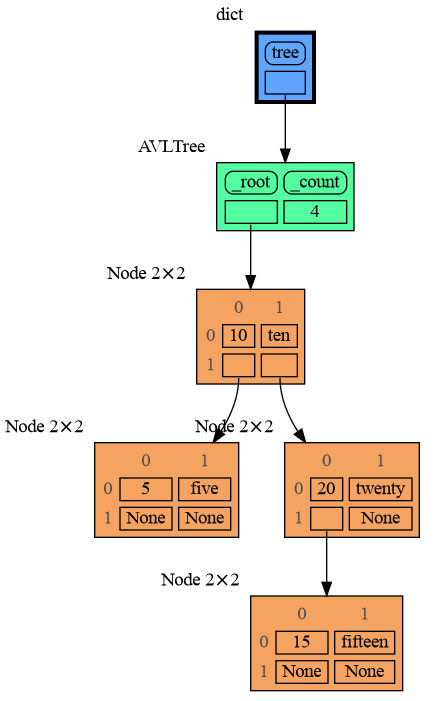
256
|
|
|
255
257
|
```python
|
|
@@ -277,7 +279,7 @@ a:[4, 3, 2, 1] b:(4, 3, 2) c:[4, 3, 2]
|
|
|
277
279
|
|
|
278
280
|
This is because `b` is of immutable type 'tuple' so its value gets copied automatically when it is changed. And because the function is called with a copy of `c`, its original value is not changed by the function. The value of variable `a` is the only value of mutable type that is shared between the root stack frame **'0: \<module>'** and the **'1: add_one'** stack frame of the function so only that variable is affected as a result of the function call. The other changes remain confined to the local variables of the ```add_one()``` function.
|
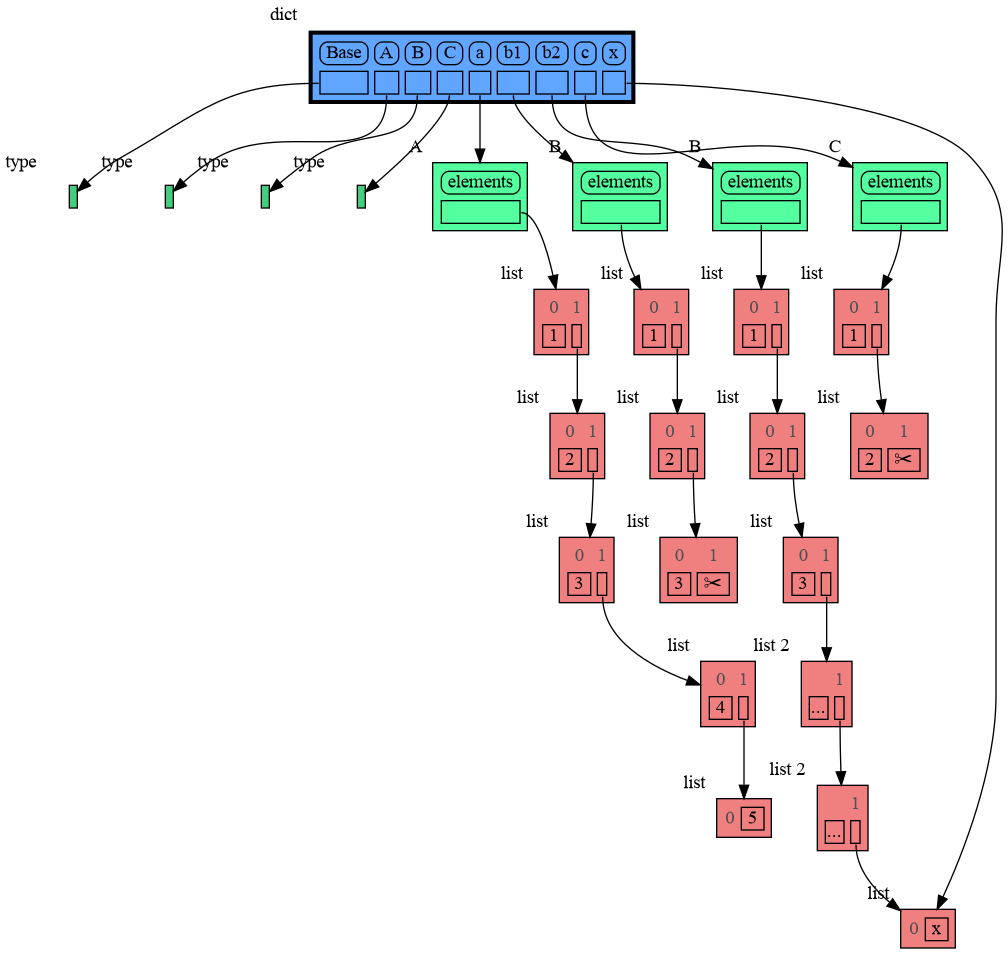
|
279
281
|
|
|
280
|
-
|
|
282
|
+
## Block ##
|
|
281
283
|
It is often helpful to temporarily block program execution to inspect the graph. For this we can use the `mg.block()` function:
|
|
282
284
|
|
|
283
285
|
```python
|
|
@@ -294,7 +296,7 @@ To change its behavior:
|
|
|
294
296
|
* Set `mg.block_prints_location = False` to skip printing the source location.
|
|
295
297
|
* Set `mg.press_enter_message = None` to skip printing "Press <Enter> to continue...".
|
|
296
298
|
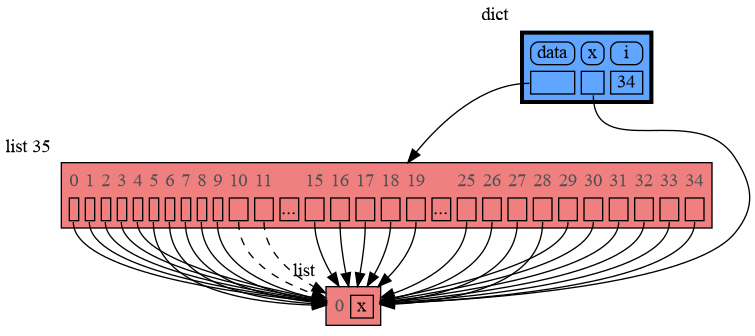
|
|
297
|
-
|
|
299
|
+
## Recursion ##
|
|
298
300
|
The call stack is also helpful to visualize how recursion works. Here we use `mg.block()` to show each step of how recursively ```factorial(3)``` is computed:
|
|
299
301
|
|
|
300
302
|
```python
|
|
@@ -315,7 +317,7 @@ print(factorial(3))
|
|
|
315
317
|
|
|
316
318
|
and the result is: 1 x 2 x 3 = 6
|
|
317
319
|
|
|
318
|
-
|
|
320
|
+
## Power Set ##
|
|
319
321
|
A more interesting recursive example that shows sharing of data is power_set(). A power set is the set of all subsets of a collection of values.
|
|
320
322
|
|
|
321
323
|
```python
|
|
@@ -345,7 +347,7 @@ print( power_set(['a', 'b', 'c']) )
|
|
|
345
347
|
[['a', 'b', 'c'], ['a', 'b'], ['a', 'c'], ['a'], ['b', 'c'], ['b'], ['c'], []]
|
|
346
348
|
```
|
|
347
349
|
|
|
348
|
-
|
|
350
|
+
# Debugging #
|
|
349
351
|
|
|
350
352
|
For the best debugging experience with memory_graph set for example expression:
|
|
351
353
|
```
|
|
@@ -353,7 +355,7 @@ mg.render(locals(), "my_graph.pdf")
|
|
|
353
355
|
```
|
|
354
356
|
as a *watch* in a debugger tool such as the integrated debugger in Visual Studio Code. Then open the "my_graph.pdf" output file to continuously see all the local variables while debugging. This avoids having to add any memory_graph `show()` or `render()` calls to your code.
|
|
355
357
|
|
|
356
|
-
|
|
358
|
+
## Call Stack in Watch Context ##
|
|
357
359
|
The ```mg.stack()``` doesn't work well in *watch* context in most debuggers because debuggers introduce additional stack frames that cause problems. Use these alternative functions for various debuggers to filter out these problematic stack frames:
|
|
358
360
|
|
|
359
361
|
| debugger | function to get the call stack |
|
|
@@ -364,7 +366,7 @@ The ```mg.stack()``` doesn't work well in *watch* context in most debuggers beca
|
|
|
364
366
|
|
|
365
367
|
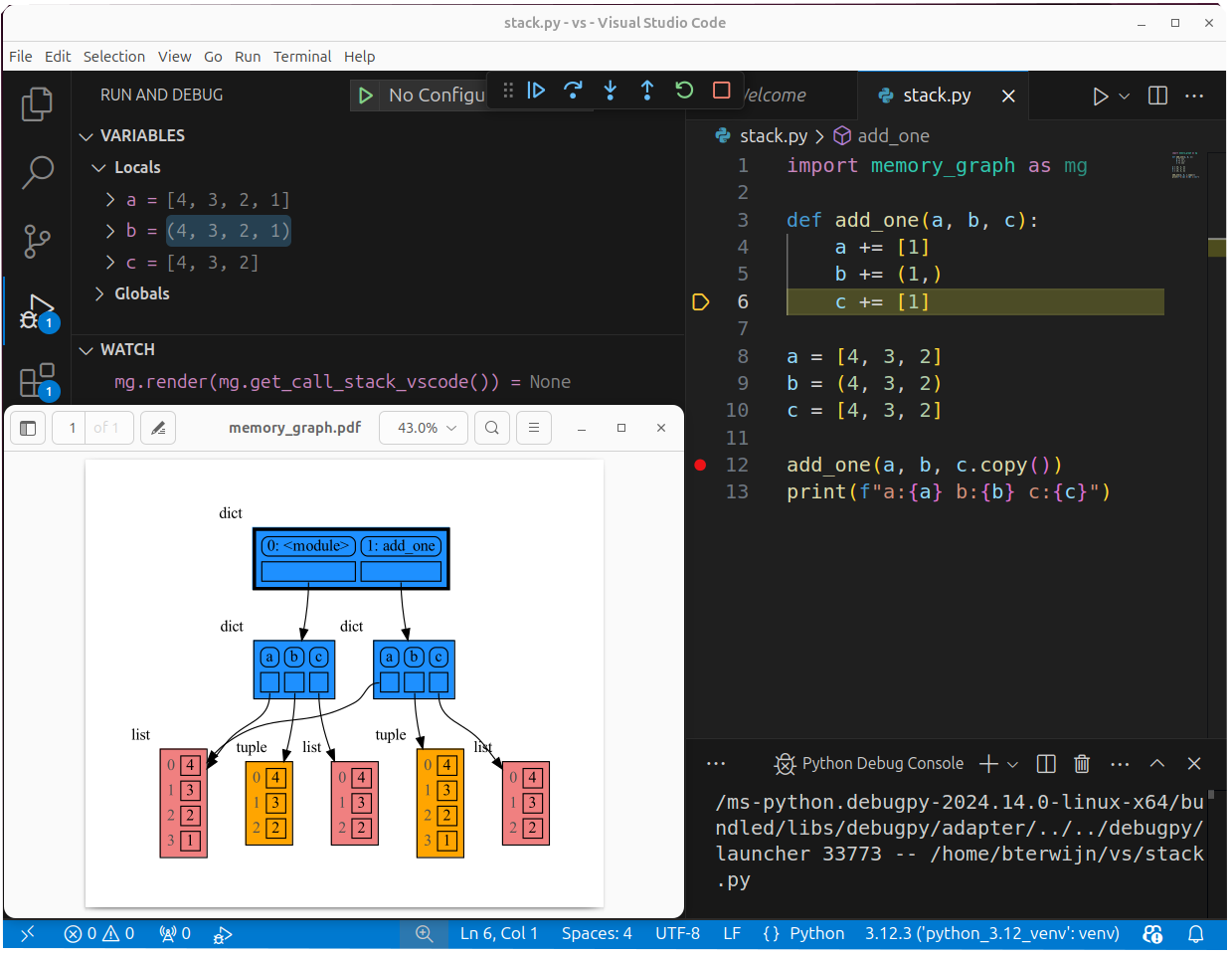
|
|
366
368
|
|
|
367
|
-
|
|
369
|
+
## Other Debuggers ##
|
|
368
370
|
For other debuggers, invoke this function within the *watch* context. Then, in the "call_stack.txt" file, identify the slice of functions you wish to include in the call stack.
|
|
369
371
|
```
|
|
370
372
|
mg.save_call_stack("call_stack.txt")
|
|
@@ -374,7 +376,7 @@ Choose 'after' and 'up_to' what function you want to slice and then call this fu
|
|
|
374
376
|
mg.stack_after_up_to(after_function, up_to_function="<module>")
|
|
375
377
|
```
|
|
376
378
|
|
|
377
|
-
|
|
379
|
+
## Debugging without Debugger Tool ##
|
|
378
380
|
|
|
379
381
|
To simplify debugging without a debugger tool, we offer these alias functions that you can insert into your code at the point where you want to visualize a graph:
|
|
380
382
|
|
|
@@ -407,10 +409,10 @@ and pressing <Enter> a number of times, results in:
|
|
|
407
409
|
|
|
408
410
|
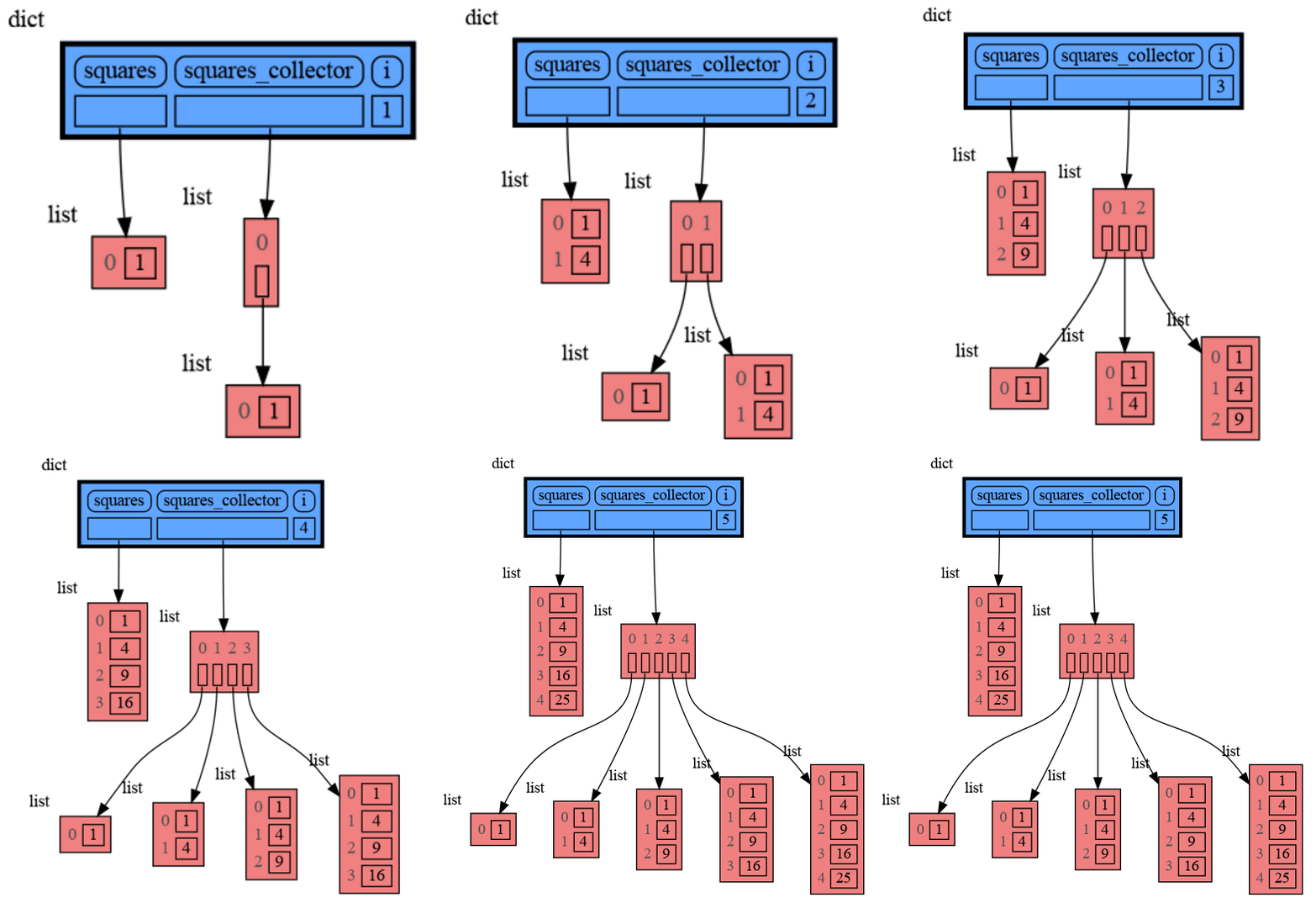
|
|
409
411
|
|
|
410
|
-
|
|
411
|
-
Module memory_graph can be very useful in a course about
|
|
412
|
+
# Data Structure Examples #
|
|
413
|
+
Module memory_graph can be very useful in a course about data structures, some examples:
|
|
412
414
|
|
|
413
|
-
|
|
415
|
+
## Doubly Linked List ##
|
|
414
416
|
```python
|
|
415
417
|
import memory_graph as mg
|
|
416
418
|
import random
|
|
@@ -448,7 +450,7 @@ for i in range(n):
|
|
|
448
450
|
```
|
|
449
451
|
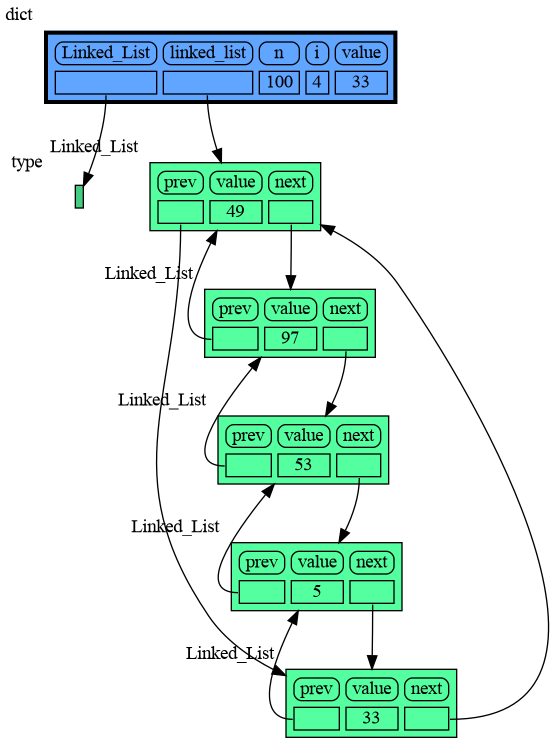
|
|
450
452
|
|
|
451
|
-
|
|
453
|
+
## Binary Tree ##
|
|
452
454
|
```python
|
|
453
455
|
import memory_graph as mg
|
|
454
456
|
import random
|
|
@@ -484,7 +486,7 @@ for i in range(n):
|
|
|
484
486
|
```
|
|
485
487
|
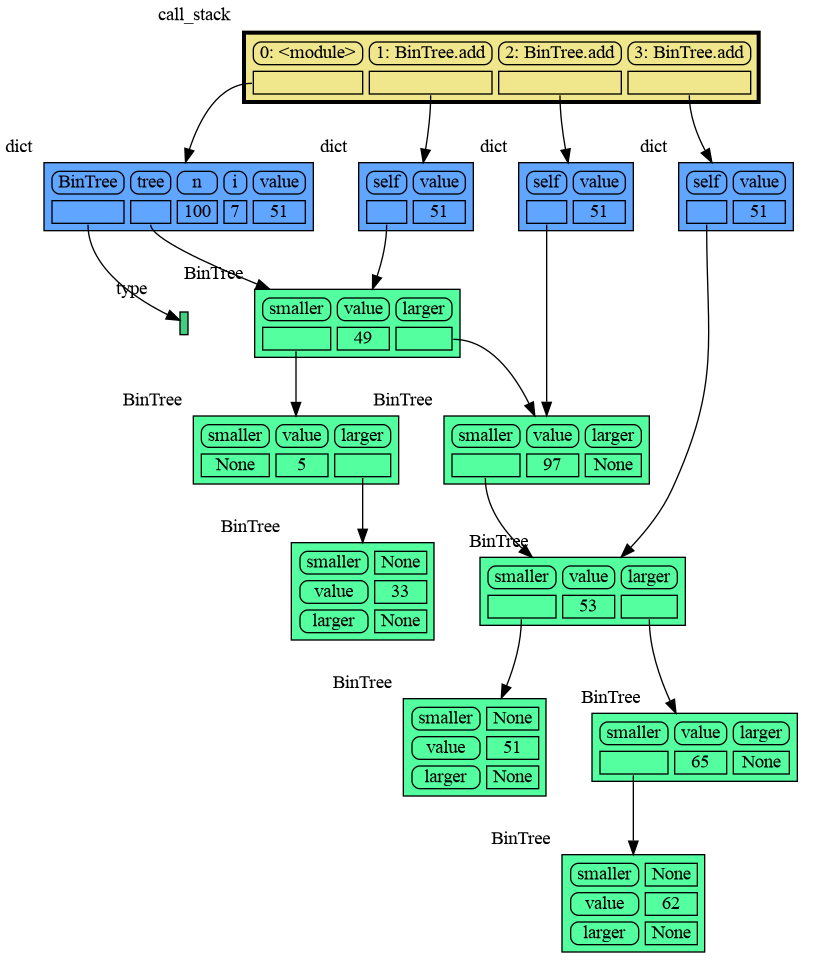
|
|
486
488
|
|
|
487
|
-
|
|
489
|
+
## Hash Set ##
|
|
488
490
|
```python
|
|
489
491
|
import memory_graph as mg
|
|
490
492
|
import random
|
|
@@ -523,34 +525,44 @@ for i in range(n):
|
|
|
523
525
|
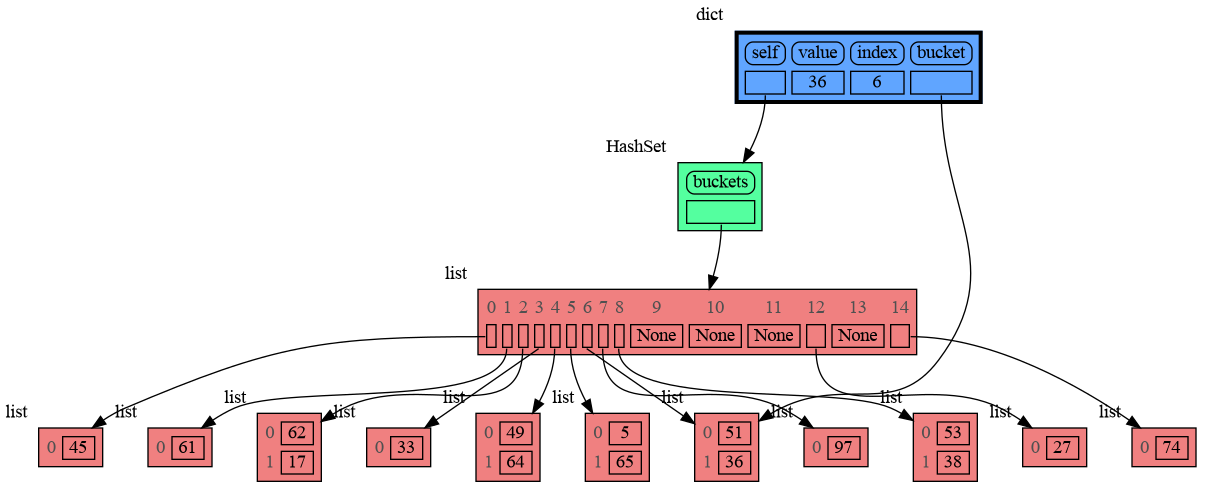
|
|
524
526
|
|
|
525
527
|
|
|
526
|
-
|
|
528
|
+
# Configuration #
|
|
527
529
|
Different aspects of memory_graph can be configured. The default configuration is reset by importing 'memory_graph.config_default'.
|
|
528
530
|
|
|
529
|
-
- ***mg.config.max_graph_depth*** : int
|
|
530
|
-
- The maxium depth of the graph with default value 12. A `✂` (scissor) symbol indicates where the graph is cut short. Dashed references indicate that there are more references to a node than are shown.
|
|
531
|
-
|
|
532
531
|
- ***mg.config.max_string_length*** : int
|
|
533
532
|
- The maximum length of strings shown in the graph. Longer strings will be truncated.
|
|
534
533
|
|
|
535
|
-
- ***mg.config.not_node_types*** : set
|
|
534
|
+
- ***mg.config.not_node_types*** : set[type]
|
|
536
535
|
- Holds all types for which no seperate node is drawn but that instead are shown as elements in their parent Node.
|
|
537
536
|
|
|
538
|
-
- ***mg.config.no_child_references_types*** : set
|
|
537
|
+
- ***mg.config.no_child_references_types*** : set[type]
|
|
539
538
|
- The set of key_value types that don't draw references to their direct childeren but have their children shown as elements of their node.
|
|
540
539
|
|
|
541
|
-
- ***mg.config.type_to_node*** : dict
|
|
540
|
+
- ***mg.config.type_to_node*** : dict[type, fun(data) -> Node]
|
|
542
541
|
- Determines how a data types is converted to a Node (sub)class for visualization in the graph.
|
|
543
542
|
|
|
544
|
-
- ***mg.config.type_to_color*** : dict
|
|
545
|
-
- Maps
|
|
543
|
+
- ***mg.config.type_to_color*** : dict[type, color]
|
|
544
|
+
- Maps a type to the [graphviz color](https://graphviz.org/doc/info/colors.html) it gets in the graph.
|
|
546
545
|
|
|
547
|
-
- ***mg.config.type_to_vertical_orientation*** : dict
|
|
548
|
-
- Maps
|
|
546
|
+
- ***mg.config.type_to_vertical_orientation*** : dict[type, bool]
|
|
547
|
+
- Maps a type to its orientation. Use 'True' for vertical and 'False' for horizontal. If not specified Node_Linear and Node_Key_Value are vertical unless they have references to children.
|
|
549
548
|
|
|
550
|
-
- ***mg.config.type_to_slicer*** : dict
|
|
551
|
-
- Maps
|
|
549
|
+
- ***mg.config.type_to_slicer*** : dict[type, int]
|
|
550
|
+
- Maps a type to a Slicer. A slicer determines how many elements of a data type are shown in the graph to prevent the graph from getting too big. 'Slicer()' does no slicing, 'Slicer(1,2,3)' shows just 1 element at the beginning, 2 in the middle, and 3 at the end.
|
|
551
|
+
|
|
552
|
+
- ***mg.config.max_graph_depth*** : int
|
|
553
|
+
- The maxium depth of the graph with default value 12.
|
|
552
554
|
|
|
553
|
-
|
|
555
|
+
- ***config.graph_cut_symbol*** : str
|
|
556
|
+
- The symbol indicating where the graph is cut short with default `✂`.
|
|
557
|
+
|
|
558
|
+
- ***mg.config.type_to_depth*** : dict[type, int]
|
|
559
|
+
- Maps a type to graph depth to limit the graph size.
|
|
560
|
+
|
|
561
|
+
- ***max_missing_edges*** : int
|
|
562
|
+
- Maximum number of missing edges that are shown with default value 2. Dashed references are used to indicate that there are more references to a node than are shown.
|
|
563
|
+
|
|
564
|
+
|
|
565
|
+
## Simplified Graph ##
|
|
554
566
|
Memory_graph simplifies the visualization (and the viewer's mental model) by **not** showing separate nodes for immutable types like `bool`, `int`, `float`, `complex`, and `str` by default. This simplification can sometimes be slightly misleading. As in the example below, after a shallow copy, lists `a` and `b` technically share their `int` values, but the graph makes it appear as though `a` and `b` each have their own copies. However, since `int` is immutable, this simplification will never lead to unexpected changes (changing `a` won’t affect `b`) so will never result in bugs.
|
|
555
567
|
|
|
556
568
|
The simplification strikes a balance: it is slightly misleading but keeps the graph clean and easy to understand and focuses on the mutable types where unexpected changes can occur. This is why it is the default behavior. If you do want to show separate nodes for `int` values, such as for educational purposes, you can simply remove `int` from the `mg.config.not_node_types` set:
|
|
@@ -571,7 +583,7 @@ mg.render(locals(), 'not_node_types2.png')
|
|
|
571
583
|
|
|
572
584
|
Additionally, the simplification hides away the [reuse of small int values](https://docs.python.org/3/c-api/long.html#c.PyLong_FromLong) in the current CPython implementation, an optimization that might otherwise confuse beginner Python programmers. For instance, after executing `a[1]+=1; b[1]+=1` the `201` value is, maybe surprisingly, still shared between `a` and `b`, whereas executing `a[2]+=1; b[2]+=1` does not result in sharing the `301` value.
|
|
573
585
|
|
|
574
|
-
|
|
586
|
+
## Temporary Configuration ##
|
|
575
587
|
In addition to the global configuration, a temporary configuration can be set for a single `show()` or `render()` call to change the colors, orientation, and slicer. This example highlights a particular list element in red, gives it a horizontal orientation, and overwrites the default slicer for lists:
|
|
576
588
|
|
|
577
589
|
```python
|
|
@@ -589,10 +601,10 @@ mg.show( locals(),
|
|
|
589
601
|
```
|
|
590
602
|
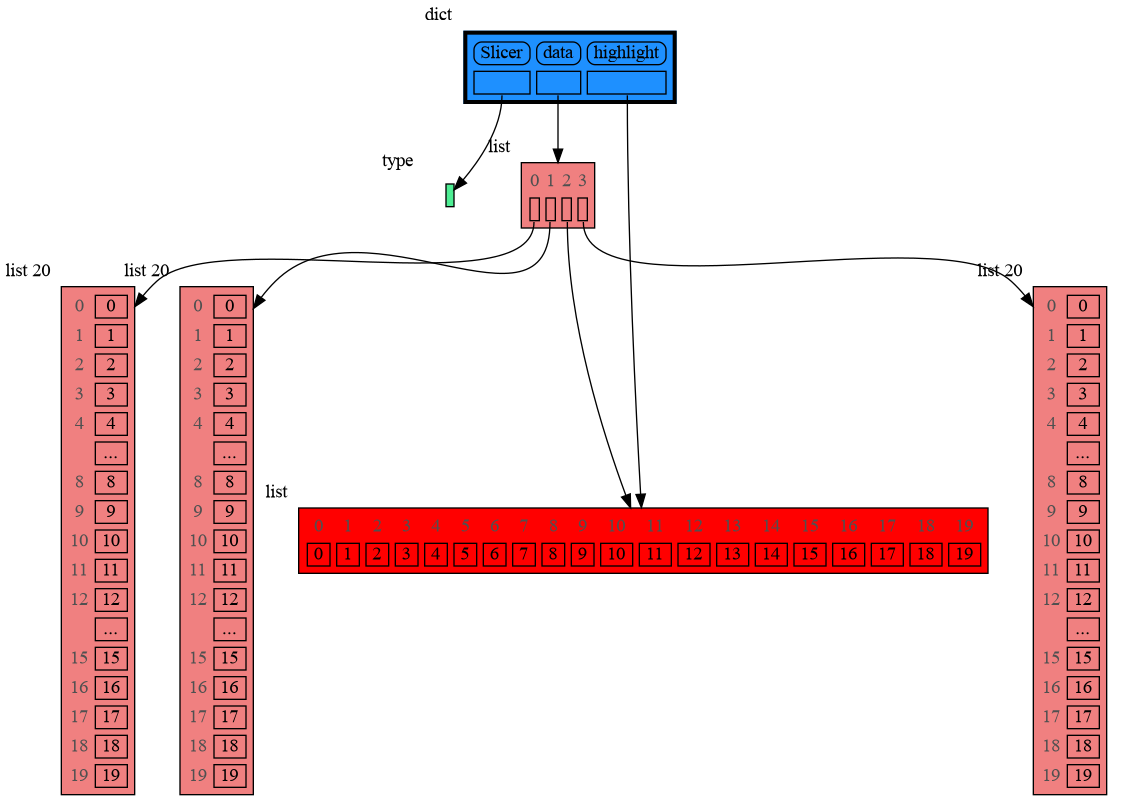
|
|
591
603
|
|
|
592
|
-
|
|
604
|
+
# Extensions #
|
|
593
605
|
Different extensions are available for types from other Python packages.
|
|
594
606
|
|
|
595
|
-
|
|
607
|
+
## Numpy ##
|
|
596
608
|
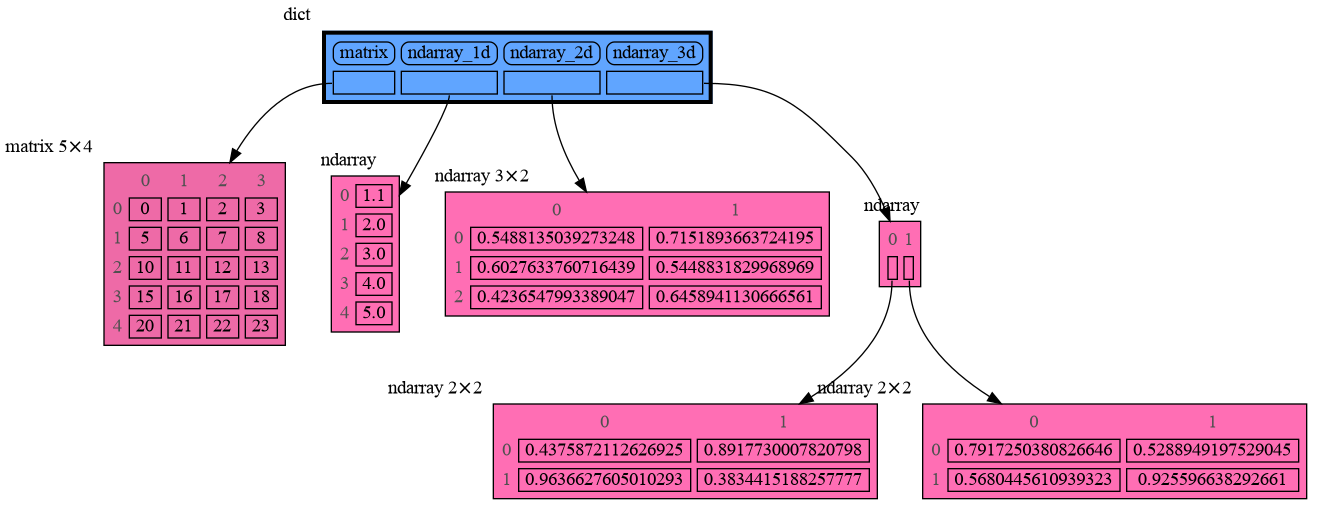
Numpy types `array` and `matrix` and `ndarray` can be graphed with "memory_graph.extension_numpy":
|
|
597
609
|
|
|
598
610
|
```python
|
|
@@ -608,7 +620,7 @@ mg.show(locals())
|
|
|
608
620
|
```
|
|
609
621
|
|
|
610
622
|
|
|
611
|
-
|
|
623
|
+
## Pandas ##
|
|
612
624
|
Pandas types `Series` and `DataFrame` can be graphed with "memory_graph.extension_pandas":
|
|
613
625
|
|
|
614
626
|
```python
|
|
@@ -627,7 +639,7 @@ mg.show(locals())
|
|
|
627
639
|
```
|
|
628
640
|

|
|
629
641
|
|
|
630
|
-
|
|
642
|
+
# Introspection #
|
|
631
643
|
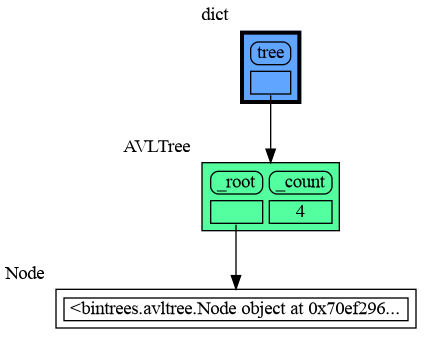
This section is likely to change. Sometimes the introspection fails or is not as desired. For example the `bintrees.avltree.Node` object doesn't show any attributes in the graph below.
|
|
632
644
|
|
|
633
645
|
```python
|
|
@@ -646,7 +658,7 @@ mg.show(locals())
|
|
|
646
658
|
|
|
647
659
|
|
|
648
660
|
|
|
649
|
-
|
|
661
|
+
## All attributes using dir() ##
|
|
650
662
|
A useful start is to give it some color, show the list of all its attributes using `dir()`, and setting an empty Slicer to see the attribute list in full.
|
|
651
663
|
|
|
652
664
|
```python
|
|
@@ -671,7 +683,7 @@ mg.show(locals())
|
|
|
671
683
|
|
|
672
684
|
Next figure out what are the attributes you want to graph and choose a Node type, there are four options:
|
|
673
685
|
|
|
674
|
-
|
|
686
|
+
## 1) Node_Leaf ##
|
|
675
687
|
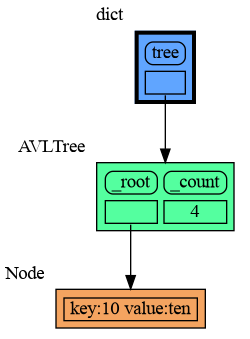
Node_Leaf is a node with no children and shows just a single value.
|
|
676
688
|
```python
|
|
677
689
|
import memory_graph as mg
|
|
@@ -692,7 +704,7 @@ mg.show(locals())
|
|
|
692
704
|
```
|
|
693
705
|
|
|
694
706
|
|
|
695
|
-
|
|
707
|
+
## 2) Node_Linear ##
|
|
696
708
|
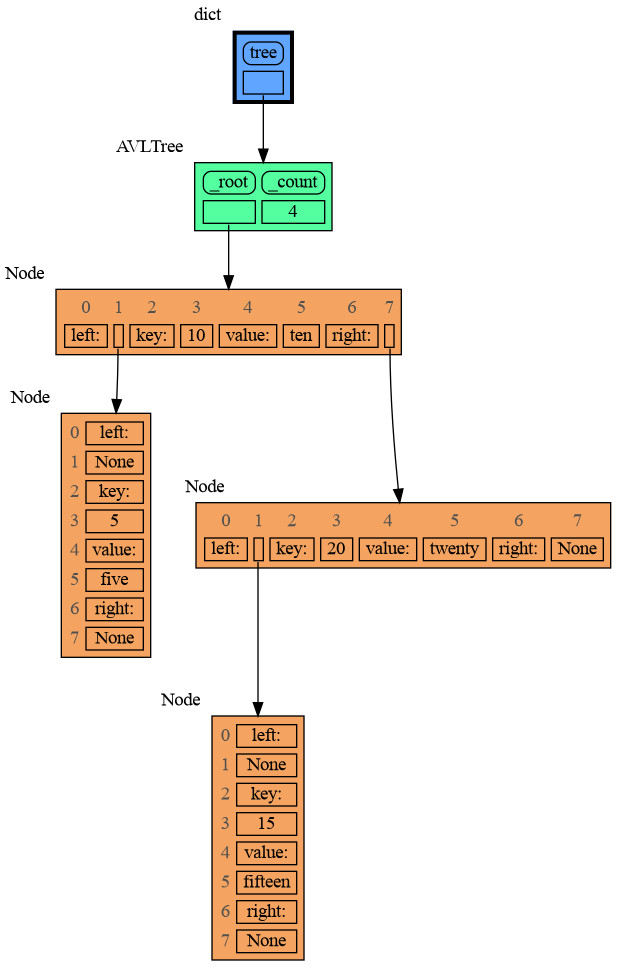
Node_Linear shows multiple values in a line like a list.
|
|
697
709
|
```python
|
|
698
710
|
import memory_graph as mg
|
|
@@ -716,7 +728,7 @@ mg.show(locals())
|
|
|
716
728
|
```
|
|
717
729
|
|
|
718
730
|
|
|
719
|
-
|
|
731
|
+
## 3) Node_Key_Value ##
|
|
720
732
|
Node_Key_Value shows key-value pairs like a dictionary. Note the required `items()` call at the end.
|
|
721
733
|
```python
|
|
722
734
|
import memory_graph as mg
|
|
@@ -740,7 +752,7 @@ mg.show(locals())
|
|
|
740
752
|
```
|
|
741
753
|
|
|
742
754
|
|
|
743
|
-
|
|
755
|
+
## 4) Node_Table ##
|
|
744
756
|
Node_Table shows all the values as a table.
|
|
745
757
|
```python
|
|
746
758
|
import memory_graph as mg
|
|
@@ -764,7 +776,75 @@ mg.show(locals())
|
|
|
764
776
|
|
|
765
777
|
|
|
766
778
|
|
|
767
|
-
|
|
779
|
+
# Introspection Depth #
|
|
780
|
+
To limit the size of the graph the maximum depth of the graph is set by `mg.config.max_graph_depth`. Additionally for each type a depth can be set to further limit the graph, as is done for type `B` in the example below. Scissors indicate where the graph is cut. Alternatively the `id()` of a data elements can be used to further limit the graph, as is done for variable `c`.
|
|
781
|
+
|
|
782
|
+
The value of variable `x` is shown as it is at depth 1 from the root of the graph, but as it can also be reached via `b2` that path need to be shown as well, so this overwrites the depth limit set for type `B`.
|
|
783
|
+
|
|
784
|
+
```python
|
|
785
|
+
import memory_graph as mg
|
|
786
|
+
|
|
787
|
+
class Base:
|
|
788
|
+
|
|
789
|
+
def __init__(self, n):
|
|
790
|
+
self.elements = [1]
|
|
791
|
+
iter = self.elements
|
|
792
|
+
for i in range(2,n):
|
|
793
|
+
iter.append([i])
|
|
794
|
+
iter = iter[-1]
|
|
795
|
+
|
|
796
|
+
def get_last(self):
|
|
797
|
+
iter = self.elements
|
|
798
|
+
while len(iter)>1:
|
|
799
|
+
iter = iter[-1]
|
|
800
|
+
return iter
|
|
801
|
+
|
|
802
|
+
class A(Base):
|
|
803
|
+
|
|
804
|
+
def __init__(self, n):
|
|
805
|
+
super().__init__(n)
|
|
806
|
+
|
|
807
|
+
class B(Base):
|
|
808
|
+
|
|
809
|
+
def __init__(self, n):
|
|
810
|
+
super().__init__(n)
|
|
811
|
+
|
|
812
|
+
class C(Base):
|
|
813
|
+
|
|
814
|
+
def __init__(self, n):
|
|
815
|
+
super().__init__(n)
|
|
816
|
+
|
|
817
|
+
a = A(6)
|
|
818
|
+
b1 = B(6)
|
|
819
|
+
b2 = B(6)
|
|
820
|
+
c = C(6)
|
|
821
|
+
|
|
822
|
+
x = ['x']
|
|
823
|
+
b2.get_last().append(x)
|
|
824
|
+
|
|
825
|
+
mg.config.type_to_depth[B] = 3
|
|
826
|
+
mg.config.type_to_depth[id(c)] = 2
|
|
827
|
+
mg.show(locals())
|
|
828
|
+
```
|
|
829
|
+
|
|
830
|
+
|
|
831
|
+
## Hidden Edges ##
|
|
832
|
+
|
|
833
|
+
As the value of `x` is shown in the graph, we would want to show all the references to it, but the Slicer hides references by slicing the list to keep the graph small. The `max_missing_edges` variable determines how many hidden references to `x` we show. If there are more references then we show, then theses hidden references are shown with dashed lines to indicate some references are left out.
|
|
834
|
+
|
|
835
|
+
```python
|
|
836
|
+
import memory_graph as mg
|
|
837
|
+
|
|
838
|
+
data = []
|
|
839
|
+
x = ['x']
|
|
840
|
+
for i in range(20):
|
|
841
|
+
data.append(x)
|
|
842
|
+
|
|
843
|
+
mg.show(locals())
|
|
844
|
+
```
|
|
845
|
+
|
|
846
|
+
|
|
847
|
+
# Jupyter Notebook #
|
|
768
848
|
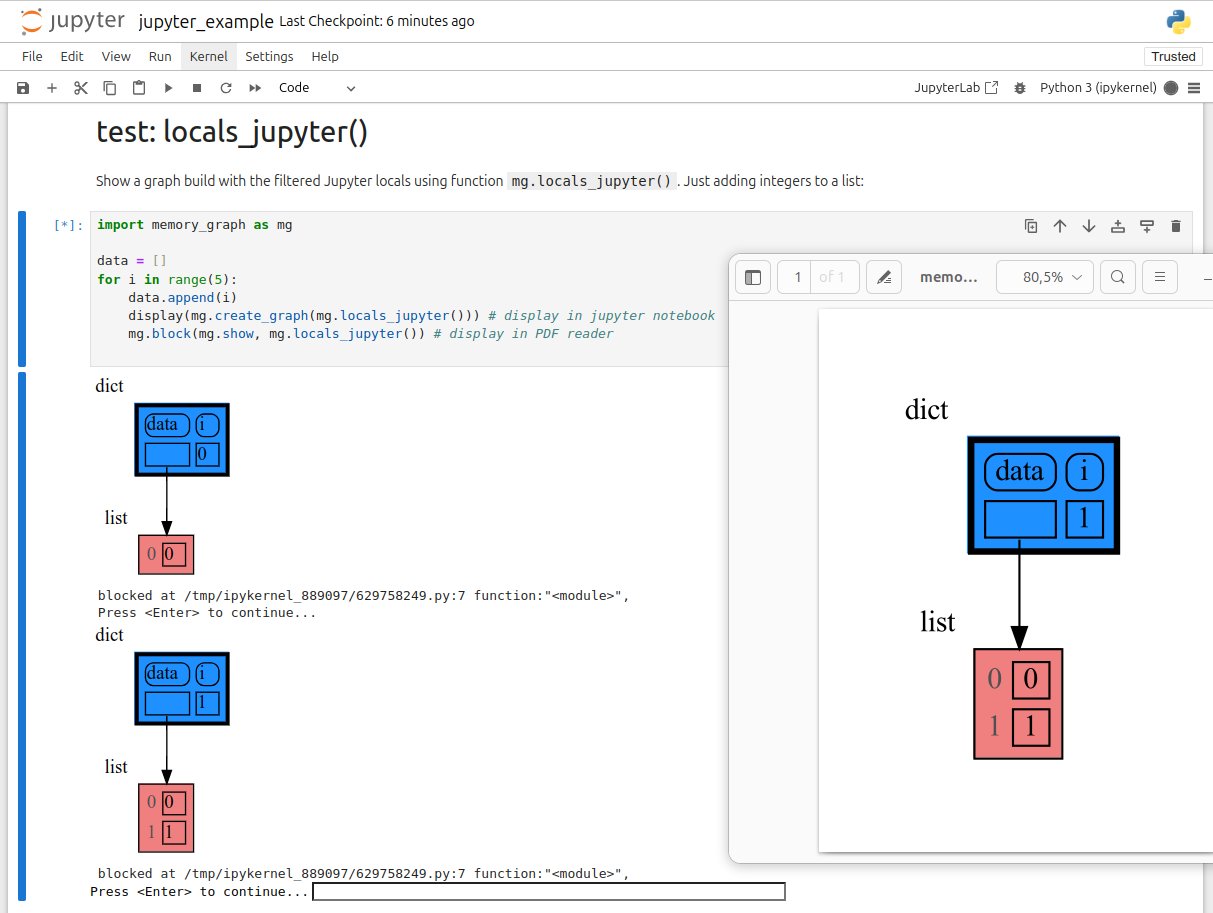
In Jupyter Notebook `locals()` has additional variables that cause problems in the graph, use `mg.locals_jupyter()` to get the local variables with these problematic variables filtered out. Use `mg.stack_jupyter()` to get the whole call stack with these variables filtered out.
|
|
769
849
|
|
|
770
850
|
We can use `mg.show()` and `mg.render()` in a Jupyter Notebook, but alternatively we can also use `mg.create_graph()` to create a graph and the `display()` function to render it inline with for example:
|
|
@@ -777,7 +857,7 @@ mg.block(display, mg.create_graph(mg.locals_jupyter()) ) # the same but blocked
|
|
|
777
857
|
See for example [jupyter_example.ipynb](https://raw.githubusercontent.com/bterwijn/memory_graph/main/src/jupyter_example.ipynb).
|
|
778
858
|
|
|
779
859
|
|
|
780
|
-
|
|
860
|
+
# ipython #
|
|
781
861
|
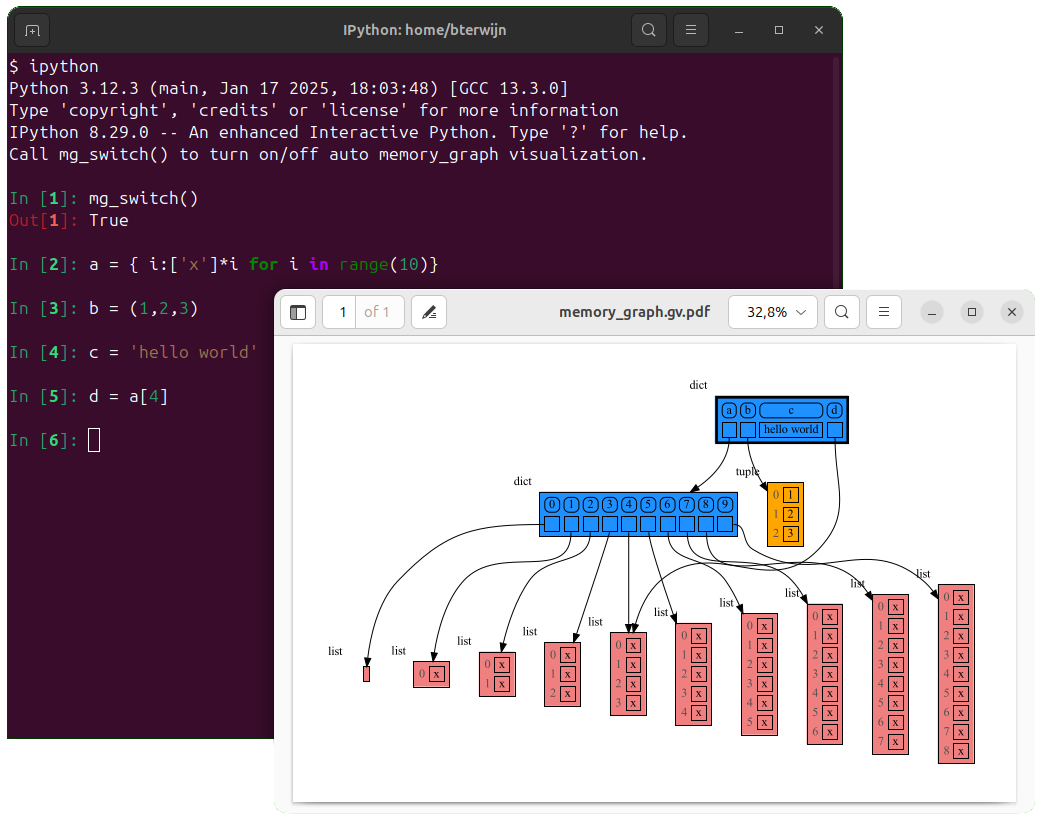
In ipython `locals()` has additional variables that cause problems in the graph, use `mg.locals_ipython()` to get the local variables with these problematic variables filtered out. Use `mg.stack_ipython()` to get the whole call stack with these variables filtered out.
|
|
782
862
|
|
|
783
863
|
Additionally install file [auto_memory_graph.py](https://raw.githubusercontent.com/bterwijn/memory_graph/main/src/auto_memory_graph.py) in the ipython startup directory:
|
|
@@ -787,15 +867,15 @@ Additionally install file [auto_memory_graph.py](https://raw.githubusercontent.c
|
|
|
787
867
|
Then after starting 'ipython' call function `mg_switch()` to turn on/off the automatic visualization of local variables after each command.
|
|
788
868
|
|
|
789
869
|
|
|
790
|
-
|
|
870
|
+
# In the Browser #
|
|
791
871
|
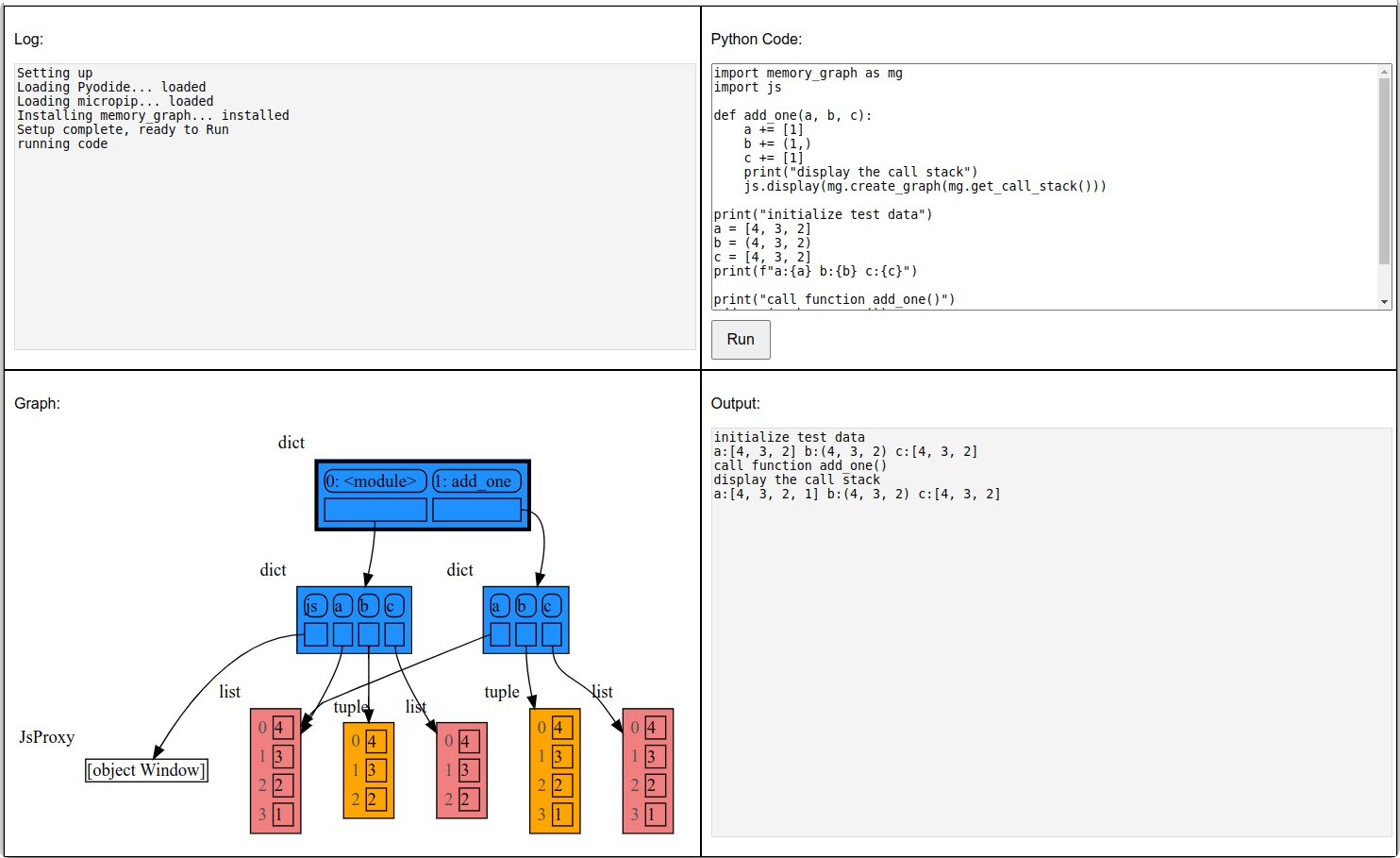
We can also run memory_graph in the browser: <a href="https://bterwijn.github.io/memory_graph/src/pyodide.html" target="_blank">Pyodide Example</a>
|
|
792
872
|
|
|
793
873
|
|
|
794
|
-
|
|
874
|
+
# Troubleshooting #
|
|
795
875
|
|
|
796
876
|
- Adobe Acrobat Reader [doesn't refresh a PDF file](https://community.adobe.com/t5/acrobat-reader-discussions/reload-refresh-pdfs/td-p/9632292) when it changes on disk and blocks updates which results in an `Could not open 'somefile.pdf' for writing : Permission denied` error. One solution is to install a PDF reader that does refresh ([SumatraPDF](https://www.sumatrapdfreader.org/), [Okular](https://okular.kde.org/), ...) and set it as the default PDF reader. Another solution is to `render()` the graph to a different output format and to open it manually.
|
|
797
877
|
|
|
798
878
|
- When graph edges overlap it can be hard to distinguish them. Using an interactive graphviz viewer, such as [xdot](https://github.com/jrfonseca/xdot.py), on a '*.gv' DOT output file will help.
|
|
799
879
|
|
|
800
|
-
|
|
880
|
+
## Invocation_Tree Package ##
|
|
801
881
|
The [memory_graph](https://pypi.org/project/memory-graph/) package visualizes your data. If instead you want to visualize function calls, check out the [invocation_tree](https://pypi.org/project/invocation-tree/) package.
|