memory-graph 0.3.19__tar.gz → 0.3.20__tar.gz
This diff represents the content of publicly available package versions that have been released to one of the supported registries. The information contained in this diff is provided for informational purposes only and reflects changes between package versions as they appear in their respective public registries.
- {memory_graph-0.3.19/memory_graph.egg-info → memory_graph-0.3.20}/PKG-INFO +15 -15
- {memory_graph-0.3.19 → memory_graph-0.3.20}/README.md +14 -14
- memory_graph-0.3.20/images/add_one.gv +69 -0
- memory_graph-0.3.20/images/avltree_dir.gv +55 -0
- memory_graph-0.3.20/images/avltree_key_value.gv +49 -0
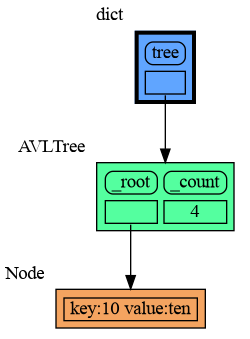
- memory_graph-0.3.20/images/avltree_leaf.gv +22 -0
- memory_graph-0.3.20/images/avltree_linear.gv +57 -0
- memory_graph-0.3.20/images/avltree_table.gv +49 -0
- memory_graph-0.3.20/images/bin_tree.gv +110 -0
- memory_graph-0.3.20/images/copies.gv +63 -0
- memory_graph-0.3.20/images/copy_method.gv +53 -0
- memory_graph-0.3.20/images/debugging01.gv +29 -0
- {memory_graph-0.3.19 → memory_graph-0.3.20}/images/debugging01.png +0 -0
- memory_graph-0.3.20/images/debugging02.gv +38 -0
- {memory_graph-0.3.19 → memory_graph-0.3.20}/images/debugging02.png +0 -0
- memory_graph-0.3.20/images/debugging03.gv +47 -0
- {memory_graph-0.3.19 → memory_graph-0.3.20}/images/debugging03.png +0 -0
- memory_graph-0.3.20/images/debugging04.gv +57 -0
- {memory_graph-0.3.19 → memory_graph-0.3.20}/images/debugging04.png +0 -0
- memory_graph-0.3.20/images/debugging05.gv +68 -0
- {memory_graph-0.3.19 → memory_graph-0.3.20}/images/debugging05.png +0 -0
- memory_graph-0.3.20/images/debugging06.gv +68 -0
- {memory_graph-0.3.19 → memory_graph-0.3.20}/images/debugging06.png +0 -0
- memory_graph-0.3.20/images/extension_numpy.gv +54 -0
- memory_graph-0.3.20/images/extension_pandas.gv +51 -0
- memory_graph-0.3.20/images/factorial01.gv +15 -0
- {memory_graph-0.3.19 → memory_graph-0.3.20}/images/factorial01.png +0 -0
- memory_graph-0.3.20/images/factorial02.gv +22 -0
- {memory_graph-0.3.19 → memory_graph-0.3.20}/images/factorial02.png +0 -0
- memory_graph-0.3.20/images/factorial03.gv +28 -0
- {memory_graph-0.3.19 → memory_graph-0.3.20}/images/factorial03.png +0 -0
- memory_graph-0.3.20/images/factorial04.gv +34 -0
- {memory_graph-0.3.19 → memory_graph-0.3.20}/images/factorial04.png +0 -0
- memory_graph-0.3.20/images/factorial05.gv +35 -0
- {memory_graph-0.3.19 → memory_graph-0.3.20}/images/factorial05.png +0 -0
- memory_graph-0.3.20/images/factorial06.gv +29 -0
- {memory_graph-0.3.19 → memory_graph-0.3.20}/images/factorial06.png +0 -0
- memory_graph-0.3.20/images/factorial07.gv +23 -0
- {memory_graph-0.3.19 → memory_graph-0.3.20}/images/factorial07.png +0 -0
- memory_graph-0.3.20/images/hash_set.gv +96 -0
- memory_graph-0.3.20/images/highlight.gv +98 -0
- {memory_graph-0.3.19 → memory_graph-0.3.20}/images/immutable.py +1 -1
- memory_graph-0.3.20/images/immutable1.gv +18 -0
- memory_graph-0.3.20/images/immutable2.gv +27 -0
- memory_graph-0.3.20/images/immutable2.png +0 -0
- memory_graph-0.3.20/images/linked_list.gv +69 -0
- memory_graph-0.3.20/images/many_types.gv +46 -0
- memory_graph-0.3.20/images/many_types.png +0 -0
- {memory_graph-0.3.19 → memory_graph-0.3.20}/images/many_types.py +2 -2
- {memory_graph-0.3.19 → memory_graph-0.3.20}/images/mutable.py +1 -1
- memory_graph-0.3.20/images/mutable1.gv +18 -0
- memory_graph-0.3.20/images/mutable2.gv +19 -0
- {memory_graph-0.3.19 → memory_graph-0.3.20}/images/name_rebinding.py +2 -2
- memory_graph-0.3.20/images/not_node_types1.gv +26 -0
- memory_graph-0.3.20/images/not_node_types2.gv +46 -0
- memory_graph-0.3.20/images/power_set1.gv +53 -0
- {memory_graph-0.3.19 → memory_graph-0.3.20}/images/power_set1.png +0 -0
- memory_graph-0.3.20/images/power_set10.gv +103 -0
- {memory_graph-0.3.19 → memory_graph-0.3.20}/images/power_set10.png +0 -0
- memory_graph-0.3.20/images/power_set11.gv +93 -0
- {memory_graph-0.3.19 → memory_graph-0.3.20}/images/power_set11.png +0 -0
- memory_graph-0.3.20/images/power_set12.gv +93 -0
- {memory_graph-0.3.19 → memory_graph-0.3.20}/images/power_set12.png +0 -0
- memory_graph-0.3.20/images/power_set13.gv +103 -0
- {memory_graph-0.3.19 → memory_graph-0.3.20}/images/power_set13.png +0 -0
- memory_graph-0.3.20/images/power_set14.gv +114 -0
- {memory_graph-0.3.19 → memory_graph-0.3.20}/images/power_set14.png +0 -0
- memory_graph-0.3.20/images/power_set15.gv +120 -0
- {memory_graph-0.3.19 → memory_graph-0.3.20}/images/power_set15.png +0 -0
- memory_graph-0.3.20/images/power_set16.gv +116 -0
- {memory_graph-0.3.19 → memory_graph-0.3.20}/images/power_set16.png +0 -0
- memory_graph-0.3.20/images/power_set17.gv +116 -0
- {memory_graph-0.3.19 → memory_graph-0.3.20}/images/power_set17.png +0 -0
- memory_graph-0.3.20/images/power_set18.gv +126 -0
- {memory_graph-0.3.19 → memory_graph-0.3.20}/images/power_set18.png +0 -0
- memory_graph-0.3.20/images/power_set19.gv +132 -0
- {memory_graph-0.3.19 → memory_graph-0.3.20}/images/power_set19.png +0 -0
- memory_graph-0.3.20/images/power_set2.gv +63 -0
- {memory_graph-0.3.19 → memory_graph-0.3.20}/images/power_set2.png +0 -0
- memory_graph-0.3.20/images/power_set20.gv +128 -0
- {memory_graph-0.3.19 → memory_graph-0.3.20}/images/power_set20.png +0 -0
- memory_graph-0.3.20/images/power_set21.gv +118 -0
- {memory_graph-0.3.19 → memory_graph-0.3.20}/images/power_set21.png +0 -0
- memory_graph-0.3.20/images/power_set22.gv +108 -0
- {memory_graph-0.3.19 → memory_graph-0.3.20}/images/power_set22.png +0 -0
- memory_graph-0.3.20/images/power_set3.gv +74 -0
- {memory_graph-0.3.19 → memory_graph-0.3.20}/images/power_set3.png +0 -0
- memory_graph-0.3.20/images/power_set4.gv +85 -0
- {memory_graph-0.3.19 → memory_graph-0.3.20}/images/power_set4.png +0 -0
- memory_graph-0.3.20/images/power_set5.gv +93 -0
- {memory_graph-0.3.19 → memory_graph-0.3.20}/images/power_set5.png +0 -0
- memory_graph-0.3.20/images/power_set6.gv +91 -0
- {memory_graph-0.3.19 → memory_graph-0.3.20}/images/power_set6.png +0 -0
- memory_graph-0.3.20/images/power_set7.gv +90 -0
- {memory_graph-0.3.19 → memory_graph-0.3.20}/images/power_set7.png +0 -0
- memory_graph-0.3.20/images/power_set8.gv +101 -0
- {memory_graph-0.3.19 → memory_graph-0.3.20}/images/power_set8.png +0 -0
- memory_graph-0.3.20/images/power_set9.gv +107 -0
- {memory_graph-0.3.19 → memory_graph-0.3.20}/images/power_set9.png +0 -0
- memory_graph-0.3.20/images/pyodide.png +0 -0
- memory_graph-0.3.20/images/rebinding1.gv +18 -0
- memory_graph-0.3.20/images/rebinding2.gv +26 -0
- memory_graph-0.3.20/images/rebinding2.png +0 -0
- {memory_graph-0.3.19 → memory_graph-0.3.20}/memory_graph/__init__.py +10 -3
- {memory_graph-0.3.19 → memory_graph-0.3.20/memory_graph.egg-info}/PKG-INFO +15 -15
- {memory_graph-0.3.19 → memory_graph-0.3.20}/memory_graph.egg-info/SOURCES.txt +58 -0
- {memory_graph-0.3.19 → memory_graph-0.3.20}/setup.py +1 -1
- memory_graph-0.3.19/images/immutable2.png +0 -0
- memory_graph-0.3.19/images/many_types.png +0 -0
- memory_graph-0.3.19/images/pyodide.png +0 -0
- memory_graph-0.3.19/images/rebinding2.png +0 -0
- {memory_graph-0.3.19 → memory_graph-0.3.20}/LICENSE.txt +0 -0
- {memory_graph-0.3.19 → memory_graph-0.3.20}/MANIFEST.in +0 -0
- {memory_graph-0.3.19 → memory_graph-0.3.20}/images/.ipynb_checkpoints/jupyter_example-checkpoint.ipynb +0 -0
- {memory_graph-0.3.19 → memory_graph-0.3.20}/images/add_one.png +0 -0
- {memory_graph-0.3.19 → memory_graph-0.3.20}/images/add_one.py +0 -0
- {memory_graph-0.3.19 → memory_graph-0.3.20}/images/avltree.py +0 -0
- {memory_graph-0.3.19 → memory_graph-0.3.20}/images/avltree.py~ +0 -0
- {memory_graph-0.3.19 → memory_graph-0.3.20}/images/avltree_dir.png +0 -0
- {memory_graph-0.3.19 → memory_graph-0.3.20}/images/avltree_fail.gv +0 -0
- {memory_graph-0.3.19 → memory_graph-0.3.20}/images/avltree_fail.png +0 -0
- {memory_graph-0.3.19 → memory_graph-0.3.20}/images/avltree_key_value.png +0 -0
- {memory_graph-0.3.19 → memory_graph-0.3.20}/images/avltree_leaf.png +0 -0
- {memory_graph-0.3.19 → memory_graph-0.3.20}/images/avltree_linear.png +0 -0
- {memory_graph-0.3.19 → memory_graph-0.3.20}/images/avltree_table.png +0 -0
- {memory_graph-0.3.19 → memory_graph-0.3.20}/images/bin_tree.png +0 -0
- {memory_graph-0.3.19 → memory_graph-0.3.20}/images/bin_tree.py +0 -0
- {memory_graph-0.3.19 → memory_graph-0.3.20}/images/bin_tree2.py +0 -0
- {memory_graph-0.3.19 → memory_graph-0.3.20}/images/bin_tree2.py~ +0 -0
- {memory_graph-0.3.19 → memory_graph-0.3.20}/images/copies.png +0 -0
- {memory_graph-0.3.19 → memory_graph-0.3.20}/images/copies.py +0 -0
- {memory_graph-0.3.19 → memory_graph-0.3.20}/images/copy_method.png +0 -0
- {memory_graph-0.3.19 → memory_graph-0.3.20}/images/copy_method.py +0 -0
- {memory_graph-0.3.19 → memory_graph-0.3.20}/images/create_gif.sh +0 -0
- {memory_graph-0.3.19 → memory_graph-0.3.20}/images/create_images.sh +0 -0
- {memory_graph-0.3.19 → memory_graph-0.3.20}/images/debug_vscode.png +0 -0
- {memory_graph-0.3.19 → memory_graph-0.3.20}/images/debugging.gif +0 -0
- {memory_graph-0.3.19 → memory_graph-0.3.20}/images/debugging.py +0 -0
- {memory_graph-0.3.19 → memory_graph-0.3.20}/images/extension_numpy.png +0 -0
- {memory_graph-0.3.19 → memory_graph-0.3.20}/images/extension_numpy.py +0 -0
- {memory_graph-0.3.19 → memory_graph-0.3.20}/images/extension_pandas.png +0 -0
- {memory_graph-0.3.19 → memory_graph-0.3.20}/images/extension_pandas.py +0 -0
- {memory_graph-0.3.19 → memory_graph-0.3.20}/images/factorial.gif +0 -0
- {memory_graph-0.3.19 → memory_graph-0.3.20}/images/factorial.py +0 -0
- {memory_graph-0.3.19 → memory_graph-0.3.20}/images/hash_set.png +0 -0
- {memory_graph-0.3.19 → memory_graph-0.3.20}/images/hash_set.py +0 -0
- {memory_graph-0.3.19 → memory_graph-0.3.20}/images/highlight.png +0 -0
- {memory_graph-0.3.19 → memory_graph-0.3.20}/images/highlight.py +0 -0
- {memory_graph-0.3.19 → memory_graph-0.3.20}/images/immutable1.png +0 -0
- {memory_graph-0.3.19 → memory_graph-0.3.20}/images/ipython.png +0 -0
- {memory_graph-0.3.19 → memory_graph-0.3.20}/images/jupyter_example.png +0 -0
- {memory_graph-0.3.19 → memory_graph-0.3.20}/images/linked_list.png +0 -0
- {memory_graph-0.3.19 → memory_graph-0.3.20}/images/linked_list.py +0 -0
- {memory_graph-0.3.19 → memory_graph-0.3.20}/images/log.txt +0 -0
- {memory_graph-0.3.19 → memory_graph-0.3.20}/images/memory_graph.gv.pdf +0 -0
- {memory_graph-0.3.19 → memory_graph-0.3.20}/images/memory_graph.pdf +0 -0
- {memory_graph-0.3.19 → memory_graph-0.3.20}/images/mutable1.png +0 -0
- {memory_graph-0.3.19 → memory_graph-0.3.20}/images/mutable2.png +0 -0
- {memory_graph-0.3.19 → memory_graph-0.3.20}/images/my_graph.gv +0 -0
- {memory_graph-0.3.19 → memory_graph-0.3.20}/images/my_graph.pdf +0 -0
- {memory_graph-0.3.19 → memory_graph-0.3.20}/images/not_node_types.py +0 -0
- {memory_graph-0.3.19 → memory_graph-0.3.20}/images/not_node_types.py~ +0 -0
- {memory_graph-0.3.19 → memory_graph-0.3.20}/images/not_node_types1.png +0 -0
- {memory_graph-0.3.19 → memory_graph-0.3.20}/images/not_node_types2.png +0 -0
- {memory_graph-0.3.19 → memory_graph-0.3.20}/images/power_set.gif +0 -0
- {memory_graph-0.3.19 → memory_graph-0.3.20}/images/power_set.py +0 -0
- {memory_graph-0.3.19 → memory_graph-0.3.20}/images/rebinding1.png +0 -0
- {memory_graph-0.3.19 → memory_graph-0.3.20}/images/uva.png +0 -0
- {memory_graph-0.3.19 → memory_graph-0.3.20}/install.txt +0 -0
- {memory_graph-0.3.19 → memory_graph-0.3.20}/memory_graph/call_stack.py +0 -0
- {memory_graph-0.3.19 → memory_graph-0.3.20}/memory_graph/config.py +0 -0
- {memory_graph-0.3.19 → memory_graph-0.3.20}/memory_graph/config_default.py +0 -0
- {memory_graph-0.3.19 → memory_graph-0.3.20}/memory_graph/config_helpers.py +0 -0
- {memory_graph-0.3.19 → memory_graph-0.3.20}/memory_graph/extension_numpy.py +0 -0
- {memory_graph-0.3.19 → memory_graph-0.3.20}/memory_graph/extension_pandas.py +0 -0
- {memory_graph-0.3.19 → memory_graph-0.3.20}/memory_graph/html_table.py +0 -0
- {memory_graph-0.3.19 → memory_graph-0.3.20}/memory_graph/list_view.py +0 -0
- {memory_graph-0.3.19 → memory_graph-0.3.20}/memory_graph/memory_to_nodes.py +0 -0
- {memory_graph-0.3.19 → memory_graph-0.3.20}/memory_graph/node_base.py +0 -0
- {memory_graph-0.3.19 → memory_graph-0.3.20}/memory_graph/node_key_value.py +0 -0
- {memory_graph-0.3.19 → memory_graph-0.3.20}/memory_graph/node_leaf.py +0 -0
- {memory_graph-0.3.19 → memory_graph-0.3.20}/memory_graph/node_linear.py +0 -0
- {memory_graph-0.3.19 → memory_graph-0.3.20}/memory_graph/node_table.py +0 -0
- {memory_graph-0.3.19 → memory_graph-0.3.20}/memory_graph/sequence.py +0 -0
- {memory_graph-0.3.19 → memory_graph-0.3.20}/memory_graph/slicer.py +0 -0
- {memory_graph-0.3.19 → memory_graph-0.3.20}/memory_graph/slices.py +0 -0
- {memory_graph-0.3.19 → memory_graph-0.3.20}/memory_graph/slices_iterator.py +0 -0
- {memory_graph-0.3.19 → memory_graph-0.3.20}/memory_graph/slices_table_iterator.py +0 -0
- {memory_graph-0.3.19 → memory_graph-0.3.20}/memory_graph/test.py +0 -0
- {memory_graph-0.3.19 → memory_graph-0.3.20}/memory_graph/test_max_graph_depth.py +0 -0
- {memory_graph-0.3.19 → memory_graph-0.3.20}/memory_graph/test_memory_graph.py +0 -0
- {memory_graph-0.3.19 → memory_graph-0.3.20}/memory_graph/test_memory_to_nodes.py +0 -0
- {memory_graph-0.3.19 → memory_graph-0.3.20}/memory_graph/test_sequence.py +0 -0
- {memory_graph-0.3.19 → memory_graph-0.3.20}/memory_graph/test_slicer.py +0 -0
- {memory_graph-0.3.19 → memory_graph-0.3.20}/memory_graph/test_slices.py +0 -0
- {memory_graph-0.3.19 → memory_graph-0.3.20}/memory_graph/test_slices_iterator.py +0 -0
- {memory_graph-0.3.19 → memory_graph-0.3.20}/memory_graph/utils.py +0 -0
- {memory_graph-0.3.19 → memory_graph-0.3.20}/memory_graph.egg-info/dependency_links.txt +0 -0
- {memory_graph-0.3.19 → memory_graph-0.3.20}/memory_graph.egg-info/requires.txt +0 -0
- {memory_graph-0.3.19 → memory_graph-0.3.20}/memory_graph.egg-info/top_level.txt +0 -0
- {memory_graph-0.3.19 → memory_graph-0.3.20}/setup.cfg +0 -0
- {memory_graph-0.3.19 → memory_graph-0.3.20}/src/auto_memory_graph.py +0 -0
- {memory_graph-0.3.19 → memory_graph-0.3.20}/src/jupyter_example.ipynb +0 -0
- {memory_graph-0.3.19 → memory_graph-0.3.20}/src/pyodide.html +0 -0
- {memory_graph-0.3.19 → memory_graph-0.3.20}/uml/memory_graph.uxf +0 -0
|
@@ -1,6 +1,6 @@
|
|
|
1
1
|
Metadata-Version: 2.1
|
|
2
2
|
Name: memory_graph
|
|
3
|
-
Version: 0.3.
|
|
3
|
+
Version: 0.3.20
|
|
4
4
|
Summary: Generate intuitive graphs of your Python data, great for debugging and understanding complex relationships.
|
|
5
5
|
Home-page: https://github.com/bterwijn/memory_graph
|
|
6
6
|
Author: Bas Terwijn
|
|
@@ -30,13 +30,13 @@ For program understanding and debugging, the [memory_graph](https://pypi.org/pro
|
|
|
30
30
|
```python
|
|
31
31
|
import memory_graph as mg
|
|
32
32
|
|
|
33
|
-
class
|
|
33
|
+
class My_Class:
|
|
34
34
|
|
|
35
35
|
def __init__(self, x, y):
|
|
36
36
|
self.x = x
|
|
37
37
|
self.y = y
|
|
38
38
|
|
|
39
|
-
data = [ range(1, 2), (3, 4), {5, 6}, {7:'seven', 8:'eight'},
|
|
39
|
+
data = [ range(1, 2), (3, 4), {5, 6}, {7:'seven', 8:'eight'}, My_Class(9, 10) ]
|
|
40
40
|
mg.show(data)
|
|
41
41
|
```
|
|
42
42
|
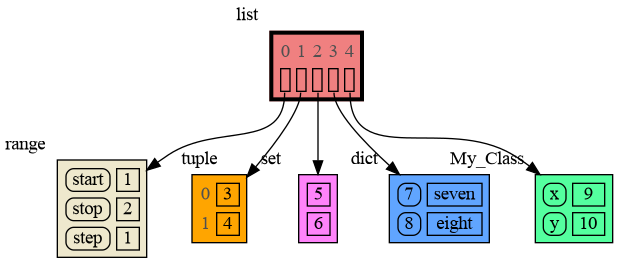
|
|
@@ -62,7 +62,7 @@ import memory_graph as mg
|
|
|
62
62
|
# create the lists 'a' and 'b'
|
|
63
63
|
a = [4, 3, 2]
|
|
64
64
|
b = a
|
|
65
|
-
|
|
65
|
+
b.append(1) # changing 'b' changes 'a'
|
|
66
66
|
|
|
67
67
|
# print the 'a' and 'b' list
|
|
68
68
|
print('a:', a)
|
|
@@ -138,7 +138,7 @@ The [Python Data Model](https://docs.python.org/3/reference/datamodel.html) make
|
|
|
138
138
|
|
|
139
139
|
|
|
140
140
|
### Immutable Type ###
|
|
141
|
-
In the code below variable `a` and `b` both reference the same tuple value (4, 3, 2). A tuple is an immutable type and therefore when we change variable `
|
|
141
|
+
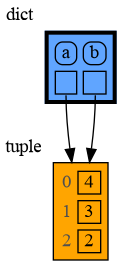
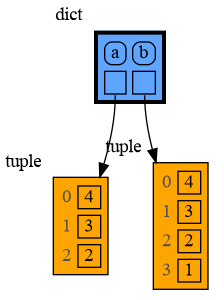
In the code below variable `a` and `b` both reference the same tuple value (4, 3, 2). A tuple is an immutable type and therefore when we change variable `b` its value **cannot** be mutated in place, and thus an automatic copy is made and `a` and `b` reference a different value afterwards.
|
|
142
142
|
|
|
143
143
|
```python
|
|
144
144
|
import memory_graph as mg
|
|
@@ -147,7 +147,7 @@ a = (4, 3, 2)
|
|
|
147
147
|
b = a
|
|
148
148
|
mg.render(locals(), 'immutable1.png')
|
|
149
149
|
|
|
150
|
-
|
|
150
|
+
b += (1,)
|
|
151
151
|
mg.render(locals(), 'immutable2.png')
|
|
152
152
|
```
|
|
153
153
|
|  |  |
|
|
@@ -156,7 +156,7 @@ mg.render(locals(), 'immutable2.png')
|
|
|
156
156
|
|
|
157
157
|
|
|
158
158
|
### Mutable Type ###
|
|
159
|
-
With mutable types the result is different. In the code below variable `a` and `b` both reference the same `list` value [4, 3, 2]. A `list` is a mutable type and therefore when we change variable `
|
|
159
|
+
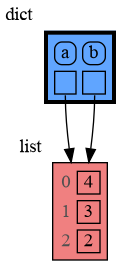
With mutable types the result is different. In the code below variable `a` and `b` both reference the same `list` value [4, 3, 2]. A `list` is a mutable type and therefore when we change variable `b` its value **can** be mutated in place and thus `a` and `b` both reference the same new value afterwards. Thus changing `b` also changes `a` and vice versa. Sometimes we want this but other times we don't and then we will have to make a copy ourselfs so that `a` and `b` are independent.
|
|
160
160
|
|
|
161
161
|
```python
|
|
162
162
|
import memory_graph as mg
|
|
@@ -165,7 +165,7 @@ a = [4, 3, 2]
|
|
|
165
165
|
b = a
|
|
166
166
|
mg.render(locals(), 'mutable1.png')
|
|
167
167
|
|
|
168
|
-
|
|
168
|
+
b += [1] # equivalent to: b.append(1)
|
|
169
169
|
mg.render(locals(), 'mutable2.png')
|
|
170
170
|
```
|
|
171
171
|
|  |  |
|
|
@@ -212,7 +212,7 @@ class My_Class:
|
|
|
212
212
|
self.letters = ['x', 'y']
|
|
213
213
|
|
|
214
214
|
def custom_copy(self):
|
|
215
|
-
|
|
215
|
+
""" Copies 'digits' but shares 'letters'. """
|
|
216
216
|
c = copy.copy(self)
|
|
217
217
|
c.digits = copy.copy(self.digits)
|
|
218
218
|
return c
|
|
@@ -225,7 +225,7 @@ mg.show(locals())
|
|
|
225
225
|
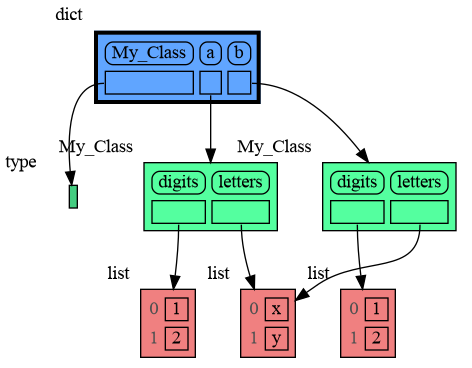
|
|
226
226
|
|
|
227
227
|
### Name Rebinding ###
|
|
228
|
-
When `a` and `b` share a mutable value, then changing the value of `
|
|
228
|
+
When `a` and `b` share a mutable value, then changing the value of `b` changes the value of `a` and vice versa. However, reassigning the value of `b` does not change `a`. When you reassign `b`, you only rebind the name `b` to a new value without effecting any other variables.
|
|
229
229
|
|
|
230
230
|
```python
|
|
231
231
|
import memory_graph as mg
|
|
@@ -234,8 +234,8 @@ a = [4, 3, 2]
|
|
|
234
234
|
b = a
|
|
235
235
|
mg.render(locals(), 'rebinding1.png')
|
|
236
236
|
|
|
237
|
-
|
|
238
|
-
|
|
237
|
+
b += [1] # changes the value of 'b' and 'a'
|
|
238
|
+
b = [100, 200] # rebinds 'b' to a new value, 'a' is uneffected
|
|
239
239
|
mg.render(locals(), 'rebinding2.png')
|
|
240
240
|
```
|
|
241
241
|
| 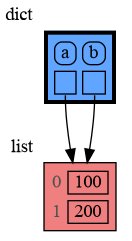 | 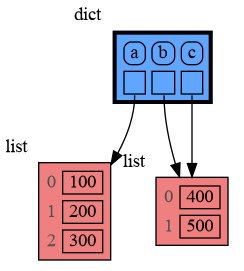 |
|
|
@@ -665,7 +665,7 @@ mg.show(locals())
|
|
|
665
665
|
Next figure out what are the attributes you want to graph and choose a Node type, there are four options:
|
|
666
666
|
|
|
667
667
|
### 1) Node_Leaf ###
|
|
668
|
-
Node_Leaf is a
|
|
668
|
+
Node_Leaf is a node with no children and shows just a single value.
|
|
669
669
|
```python
|
|
670
670
|
import memory_graph as mg
|
|
671
671
|
import bintrees
|
|
@@ -686,7 +686,7 @@ mg.show(locals())
|
|
|
686
686
|
|
|
687
687
|
|
|
688
688
|
### 2) Node_Linear ###
|
|
689
|
-
Node_Linear shows
|
|
689
|
+
Node_Linear shows multiple values in a line like a list.
|
|
690
690
|
```python
|
|
691
691
|
import memory_graph as mg
|
|
692
692
|
import bintrees
|
|
@@ -786,7 +786,7 @@ We can also run memory_graph in the browser: <a href="https://bterwijn.github.io
|
|
|
786
786
|
|
|
787
787
|
## Troubleshooting ##
|
|
788
788
|
|
|
789
|
-
- Adobe Acrobat Reader [doesn't refresh a PDF file](https://
|
|
789
|
+
- Adobe Acrobat Reader [doesn't refresh a PDF file](https://community.adobe.com/t5/acrobat-reader-discussions/reload-refresh-pdfs/td-p/9632292) when it changes on disk and blocks updates which results in an `Could not open 'somefile.pdf' for writing : Permission denied` error. One solution is to install a PDF reader that does refresh ([SumatraPDF](https://www.sumatrapdfreader.org/), [Okular](https://okular.kde.org/), ...) and set it as the default PDF reader. Another solution is to `render()` the graph to a different output format and to open it manually.
|
|
790
790
|
|
|
791
791
|
- When graph edges overlap it can be hard to distinguish them. Using an interactive graphviz viewer, such as [xdot](https://github.com/jrfonseca/xdot.py), on a '*.gv' DOT output file will help.
|
|
792
792
|
|
|
@@ -11,13 +11,13 @@ For program understanding and debugging, the [memory_graph](https://pypi.org/pro
|
|
|
11
11
|
```python
|
|
12
12
|
import memory_graph as mg
|
|
13
13
|
|
|
14
|
-
class
|
|
14
|
+
class My_Class:
|
|
15
15
|
|
|
16
16
|
def __init__(self, x, y):
|
|
17
17
|
self.x = x
|
|
18
18
|
self.y = y
|
|
19
19
|
|
|
20
|
-
data = [ range(1, 2), (3, 4), {5, 6}, {7:'seven', 8:'eight'},
|
|
20
|
+
data = [ range(1, 2), (3, 4), {5, 6}, {7:'seven', 8:'eight'}, My_Class(9, 10) ]
|
|
21
21
|
mg.show(data)
|
|
22
22
|
```
|
|
23
23
|

|
|
@@ -43,7 +43,7 @@ import memory_graph as mg
|
|
|
43
43
|
# create the lists 'a' and 'b'
|
|
44
44
|
a = [4, 3, 2]
|
|
45
45
|
b = a
|
|
46
|
-
|
|
46
|
+
b.append(1) # changing 'b' changes 'a'
|
|
47
47
|
|
|
48
48
|
# print the 'a' and 'b' list
|
|
49
49
|
print('a:', a)
|
|
@@ -119,7 +119,7 @@ The [Python Data Model](https://docs.python.org/3/reference/datamodel.html) make
|
|
|
119
119
|
|
|
120
120
|
|
|
121
121
|
### Immutable Type ###
|
|
122
|
-
In the code below variable `a` and `b` both reference the same tuple value (4, 3, 2). A tuple is an immutable type and therefore when we change variable `
|
|
122
|
+
In the code below variable `a` and `b` both reference the same tuple value (4, 3, 2). A tuple is an immutable type and therefore when we change variable `b` its value **cannot** be mutated in place, and thus an automatic copy is made and `a` and `b` reference a different value afterwards.
|
|
123
123
|
|
|
124
124
|
```python
|
|
125
125
|
import memory_graph as mg
|
|
@@ -128,7 +128,7 @@ a = (4, 3, 2)
|
|
|
128
128
|
b = a
|
|
129
129
|
mg.render(locals(), 'immutable1.png')
|
|
130
130
|
|
|
131
|
-
|
|
131
|
+
b += (1,)
|
|
132
132
|
mg.render(locals(), 'immutable2.png')
|
|
133
133
|
```
|
|
134
134
|
|  |  |
|
|
@@ -137,7 +137,7 @@ mg.render(locals(), 'immutable2.png')
|
|
|
137
137
|
|
|
138
138
|
|
|
139
139
|
### Mutable Type ###
|
|
140
|
-
With mutable types the result is different. In the code below variable `a` and `b` both reference the same `list` value [4, 3, 2]. A `list` is a mutable type and therefore when we change variable `
|
|
140
|
+
With mutable types the result is different. In the code below variable `a` and `b` both reference the same `list` value [4, 3, 2]. A `list` is a mutable type and therefore when we change variable `b` its value **can** be mutated in place and thus `a` and `b` both reference the same new value afterwards. Thus changing `b` also changes `a` and vice versa. Sometimes we want this but other times we don't and then we will have to make a copy ourselfs so that `a` and `b` are independent.
|
|
141
141
|
|
|
142
142
|
```python
|
|
143
143
|
import memory_graph as mg
|
|
@@ -146,7 +146,7 @@ a = [4, 3, 2]
|
|
|
146
146
|
b = a
|
|
147
147
|
mg.render(locals(), 'mutable1.png')
|
|
148
148
|
|
|
149
|
-
|
|
149
|
+
b += [1] # equivalent to: b.append(1)
|
|
150
150
|
mg.render(locals(), 'mutable2.png')
|
|
151
151
|
```
|
|
152
152
|
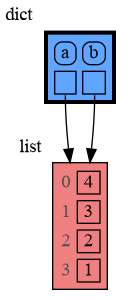
|  |  |
|
|
@@ -193,7 +193,7 @@ class My_Class:
|
|
|
193
193
|
self.letters = ['x', 'y']
|
|
194
194
|
|
|
195
195
|
def custom_copy(self):
|
|
196
|
-
|
|
196
|
+
""" Copies 'digits' but shares 'letters'. """
|
|
197
197
|
c = copy.copy(self)
|
|
198
198
|
c.digits = copy.copy(self.digits)
|
|
199
199
|
return c
|
|
@@ -206,7 +206,7 @@ mg.show(locals())
|
|
|
206
206
|

|
|
207
207
|
|
|
208
208
|
### Name Rebinding ###
|
|
209
|
-
When `a` and `b` share a mutable value, then changing the value of `
|
|
209
|
+
When `a` and `b` share a mutable value, then changing the value of `b` changes the value of `a` and vice versa. However, reassigning the value of `b` does not change `a`. When you reassign `b`, you only rebind the name `b` to a new value without effecting any other variables.
|
|
210
210
|
|
|
211
211
|
```python
|
|
212
212
|
import memory_graph as mg
|
|
@@ -215,8 +215,8 @@ a = [4, 3, 2]
|
|
|
215
215
|
b = a
|
|
216
216
|
mg.render(locals(), 'rebinding1.png')
|
|
217
217
|
|
|
218
|
-
|
|
219
|
-
|
|
218
|
+
b += [1] # changes the value of 'b' and 'a'
|
|
219
|
+
b = [100, 200] # rebinds 'b' to a new value, 'a' is uneffected
|
|
220
220
|
mg.render(locals(), 'rebinding2.png')
|
|
221
221
|
```
|
|
222
222
|
|  |  |
|
|
@@ -646,7 +646,7 @@ mg.show(locals())
|
|
|
646
646
|
Next figure out what are the attributes you want to graph and choose a Node type, there are four options:
|
|
647
647
|
|
|
648
648
|
### 1) Node_Leaf ###
|
|
649
|
-
Node_Leaf is a
|
|
649
|
+
Node_Leaf is a node with no children and shows just a single value.
|
|
650
650
|
```python
|
|
651
651
|
import memory_graph as mg
|
|
652
652
|
import bintrees
|
|
@@ -667,7 +667,7 @@ mg.show(locals())
|
|
|
667
667
|

|
|
668
668
|
|
|
669
669
|
### 2) Node_Linear ###
|
|
670
|
-
Node_Linear shows
|
|
670
|
+
Node_Linear shows multiple values in a line like a list.
|
|
671
671
|
```python
|
|
672
672
|
import memory_graph as mg
|
|
673
673
|
import bintrees
|
|
@@ -767,7 +767,7 @@ We can also run memory_graph in the browser: <a href="https://bterwijn.github.io
|
|
|
767
767
|
|
|
768
768
|
## Troubleshooting ##
|
|
769
769
|
|
|
770
|
-
- Adobe Acrobat Reader [doesn't refresh a PDF file](https://
|
|
770
|
+
- Adobe Acrobat Reader [doesn't refresh a PDF file](https://community.adobe.com/t5/acrobat-reader-discussions/reload-refresh-pdfs/td-p/9632292) when it changes on disk and blocks updates which results in an `Could not open 'somefile.pdf' for writing : Permission denied` error. One solution is to install a PDF reader that does refresh ([SumatraPDF](https://www.sumatrapdfreader.org/), [Okular](https://okular.kde.org/), ...) and set it as the default PDF reader. Another solution is to `render()` the graph to a different output format and to open it manually.
|
|
771
771
|
|
|
772
772
|
- When graph edges overlap it can be hard to distinguish them. Using an interactive graphviz viewer, such as [xdot](https://github.com/jrfonseca/xdot.py), on a '*.gv' DOT output file will help.
|
|
773
773
|
|
|
@@ -0,0 +1,69 @@
|
|
|
1
|
+
digraph memory_graph {
|
|
2
|
+
node [shape=plaintext]
|
|
3
|
+
node135680184144448 [label=<
|
|
4
|
+
<TABLE BORDER="1" CELLBORDER="1" CELLSPACING="5" CELLPADDING="0" BGCOLOR="lightcoral" PORT="table">
|
|
5
|
+
<TR><TD BORDER="0"><font color="#505050">0</font></TD><TD BORDER="1"> 4 </TD></TR>
|
|
6
|
+
<TR><TD BORDER="0"><font color="#505050">1</font></TD><TD BORDER="1"> 3 </TD></TR>
|
|
7
|
+
<TR><TD BORDER="0"><font color="#505050">2</font></TD><TD BORDER="1"> 2 </TD></TR>
|
|
8
|
+
<TR><TD BORDER="0"><font color="#505050">3</font></TD><TD BORDER="1"> 1 </TD></TR>
|
|
9
|
+
</TABLE>
|
|
10
|
+
> xlabel=list]
|
|
11
|
+
node135680173959616 [label=<
|
|
12
|
+
<TABLE BORDER="1" CELLBORDER="1" CELLSPACING="5" CELLPADDING="0" BGCOLOR="orange" PORT="table">
|
|
13
|
+
<TR><TD BORDER="0"><font color="#505050">0</font></TD><TD BORDER="1"> 4 </TD></TR>
|
|
14
|
+
<TR><TD BORDER="0"><font color="#505050">1</font></TD><TD BORDER="1"> 3 </TD></TR>
|
|
15
|
+
<TR><TD BORDER="0"><font color="#505050">2</font></TD><TD BORDER="1"> 2 </TD></TR>
|
|
16
|
+
</TABLE>
|
|
17
|
+
> xlabel=tuple]
|
|
18
|
+
node135680184142656 [label=<
|
|
19
|
+
<TABLE BORDER="1" CELLBORDER="1" CELLSPACING="5" CELLPADDING="0" BGCOLOR="lightcoral" PORT="table">
|
|
20
|
+
<TR><TD BORDER="0"><font color="#505050">0</font></TD><TD BORDER="1"> 4 </TD></TR>
|
|
21
|
+
<TR><TD BORDER="0"><font color="#505050">1</font></TD><TD BORDER="1"> 3 </TD></TR>
|
|
22
|
+
<TR><TD BORDER="0"><font color="#505050">2</font></TD><TD BORDER="1"> 2 </TD></TR>
|
|
23
|
+
</TABLE>
|
|
24
|
+
> xlabel=list]
|
|
25
|
+
node135680173961216 [label=<
|
|
26
|
+
<TABLE BORDER="1" CELLBORDER="1" CELLSPACING="5" CELLPADDING="0" BGCOLOR="dodgerblue1" PORT="table">
|
|
27
|
+
<TR><TD BORDER="1" STYLE="ROUNDED"> a </TD><TD BORDER="1" STYLE="ROUNDED"> b </TD><TD BORDER="1" STYLE="ROUNDED"> c </TD></TR>
|
|
28
|
+
<TR><TD BORDER="1" PORT="ref0"> </TD><TD BORDER="1" PORT="ref1"> </TD><TD BORDER="1" PORT="ref2"> </TD></TR>
|
|
29
|
+
</TABLE>
|
|
30
|
+
> xlabel=dict]
|
|
31
|
+
node135680173961216:ref0 -> node135680184144448:table [style=solid]
|
|
32
|
+
node135680173961216:ref1 -> node135680173959616:table [style=solid]
|
|
33
|
+
node135680173961216:ref2 -> node135680184142656:table [style=solid]
|
|
34
|
+
node135680173858288 [label=<
|
|
35
|
+
<TABLE BORDER="1" CELLBORDER="1" CELLSPACING="5" CELLPADDING="0" BGCOLOR="orange" PORT="table">
|
|
36
|
+
<TR><TD BORDER="0"><font color="#505050">0</font></TD><TD BORDER="1"> 4 </TD></TR>
|
|
37
|
+
<TR><TD BORDER="0"><font color="#505050">1</font></TD><TD BORDER="1"> 3 </TD></TR>
|
|
38
|
+
<TR><TD BORDER="0"><font color="#505050">2</font></TD><TD BORDER="1"> 2 </TD></TR>
|
|
39
|
+
<TR><TD BORDER="0"><font color="#505050">3</font></TD><TD BORDER="1"> 1 </TD></TR>
|
|
40
|
+
</TABLE>
|
|
41
|
+
> xlabel=tuple]
|
|
42
|
+
node135680173849984 [label=<
|
|
43
|
+
<TABLE BORDER="1" CELLBORDER="1" CELLSPACING="5" CELLPADDING="0" BGCOLOR="lightcoral" PORT="table">
|
|
44
|
+
<TR><TD BORDER="0"><font color="#505050">0</font></TD><TD BORDER="1"> 4 </TD></TR>
|
|
45
|
+
<TR><TD BORDER="0"><font color="#505050">1</font></TD><TD BORDER="1"> 3 </TD></TR>
|
|
46
|
+
<TR><TD BORDER="0"><font color="#505050">2</font></TD><TD BORDER="1"> 2 </TD></TR>
|
|
47
|
+
<TR><TD BORDER="0"><font color="#505050">3</font></TD><TD BORDER="1"> 1 </TD></TR>
|
|
48
|
+
</TABLE>
|
|
49
|
+
> xlabel=list]
|
|
50
|
+
node135680173844672 [label=<
|
|
51
|
+
<TABLE BORDER="1" CELLBORDER="1" CELLSPACING="5" CELLPADDING="0" BGCOLOR="dodgerblue1" PORT="table">
|
|
52
|
+
<TR><TD BORDER="1" STYLE="ROUNDED"> a </TD><TD BORDER="1" STYLE="ROUNDED"> b </TD><TD BORDER="1" STYLE="ROUNDED"> c </TD></TR>
|
|
53
|
+
<TR><TD BORDER="1" PORT="ref0"> </TD><TD BORDER="1" PORT="ref1"> </TD><TD BORDER="1" PORT="ref2"> </TD></TR>
|
|
54
|
+
</TABLE>
|
|
55
|
+
> xlabel=dict]
|
|
56
|
+
node135680173844672:ref0 -> node135680184144448:table [style=solid]
|
|
57
|
+
node135680173844672:ref1 -> node135680173858288:table [style=solid]
|
|
58
|
+
node135680173844672:ref2 -> node135680173849984:table [style=solid]
|
|
59
|
+
node135680171306160 [label=<
|
|
60
|
+
<TABLE BORDER="3" CELLBORDER="1" CELLSPACING="5" CELLPADDING="0" BGCOLOR="khaki" PORT="table">
|
|
61
|
+
<TR><TD BORDER="1" STYLE="ROUNDED"> 0: <module> </TD><TD BORDER="1" STYLE="ROUNDED"> 1: add_one </TD></TR>
|
|
62
|
+
<TR><TD BORDER="1" PORT="ref0"> </TD><TD BORDER="1" PORT="ref1"> </TD></TR>
|
|
63
|
+
</TABLE>
|
|
64
|
+
> xlabel=call_stack]
|
|
65
|
+
node135680171306160:ref0 -> node135680173961216:table [style=solid]
|
|
66
|
+
node135680171306160:ref1 -> node135680173844672:table [style=solid]
|
|
67
|
+
subgraph { rank=same; node135680173961216 -> node135680173844672[weight=10, style=invis]; }
|
|
68
|
+
subgraph { rank=same; node135680184144448 -> node135680173959616 -> node135680184142656 -> node135680173858288 -> node135680173849984[weight=10, style=invis]; }
|
|
69
|
+
}
|
|
@@ -0,0 +1,55 @@
|
|
|
1
|
+
digraph memory_graph {
|
|
2
|
+
node [shape=plaintext]
|
|
3
|
+
node127682203393520 [label=<
|
|
4
|
+
<TABLE BORDER="1" CELLBORDER="1" CELLSPACING="5" CELLPADDING="0" BGCOLOR="sandybrown" PORT="table">
|
|
5
|
+
<TR><TD BORDER="0"><font color="#505050">0</font></TD><TD BORDER="1"> __class__ </TD></TR>
|
|
6
|
+
<TR><TD BORDER="0"><font color="#505050">1</font></TD><TD BORDER="1"> __delattr__ </TD></TR>
|
|
7
|
+
<TR><TD BORDER="0"><font color="#505050">2</font></TD><TD BORDER="1"> __dir__ </TD></TR>
|
|
8
|
+
<TR><TD BORDER="0"><font color="#505050">3</font></TD><TD BORDER="1"> __doc__ </TD></TR>
|
|
9
|
+
<TR><TD BORDER="0"><font color="#505050">4</font></TD><TD BORDER="1"> __eq__ </TD></TR>
|
|
10
|
+
<TR><TD BORDER="0"><font color="#505050">5</font></TD><TD BORDER="1"> __format__ </TD></TR>
|
|
11
|
+
<TR><TD BORDER="0"><font color="#505050">6</font></TD><TD BORDER="1"> __ge__ </TD></TR>
|
|
12
|
+
<TR><TD BORDER="0"><font color="#505050">7</font></TD><TD BORDER="1"> __getattribute__ </TD></TR>
|
|
13
|
+
<TR><TD BORDER="0"><font color="#505050">8</font></TD><TD BORDER="1"> __getitem__ </TD></TR>
|
|
14
|
+
<TR><TD BORDER="0"><font color="#505050">9</font></TD><TD BORDER="1"> __getstate__ </TD></TR>
|
|
15
|
+
<TR><TD BORDER="0"><font color="#505050">10</font></TD><TD BORDER="1"> __gt__ </TD></TR>
|
|
16
|
+
<TR><TD BORDER="0"><font color="#505050">11</font></TD><TD BORDER="1"> __hash__ </TD></TR>
|
|
17
|
+
<TR><TD BORDER="0"><font color="#505050">12</font></TD><TD BORDER="1"> __init__ </TD></TR>
|
|
18
|
+
<TR><TD BORDER="0"><font color="#505050">13</font></TD><TD BORDER="1"> __init_subclass__ </TD></TR>
|
|
19
|
+
<TR><TD BORDER="0"><font color="#505050">14</font></TD><TD BORDER="1"> __le__ </TD></TR>
|
|
20
|
+
<TR><TD BORDER="0"><font color="#505050">15</font></TD><TD BORDER="1"> __lt__ </TD></TR>
|
|
21
|
+
<TR><TD BORDER="0"><font color="#505050">16</font></TD><TD BORDER="1"> __module__ </TD></TR>
|
|
22
|
+
<TR><TD BORDER="0"><font color="#505050">17</font></TD><TD BORDER="1"> __ne__ </TD></TR>
|
|
23
|
+
<TR><TD BORDER="0"><font color="#505050">18</font></TD><TD BORDER="1"> __new__ </TD></TR>
|
|
24
|
+
<TR><TD BORDER="0"><font color="#505050">19</font></TD><TD BORDER="1"> __reduce__ </TD></TR>
|
|
25
|
+
<TR><TD BORDER="0"><font color="#505050">20</font></TD><TD BORDER="1"> __reduce_ex__ </TD></TR>
|
|
26
|
+
<TR><TD BORDER="0"><font color="#505050">21</font></TD><TD BORDER="1"> __repr__ </TD></TR>
|
|
27
|
+
<TR><TD BORDER="0"><font color="#505050">22</font></TD><TD BORDER="1"> __setattr__ </TD></TR>
|
|
28
|
+
<TR><TD BORDER="0"><font color="#505050">23</font></TD><TD BORDER="1"> __setitem__ </TD></TR>
|
|
29
|
+
<TR><TD BORDER="0"><font color="#505050">24</font></TD><TD BORDER="1"> __sizeof__ </TD></TR>
|
|
30
|
+
<TR><TD BORDER="0"><font color="#505050">25</font></TD><TD BORDER="1"> __slots__ </TD></TR>
|
|
31
|
+
<TR><TD BORDER="0"><font color="#505050">26</font></TD><TD BORDER="1"> __str__ </TD></TR>
|
|
32
|
+
<TR><TD BORDER="0"><font color="#505050">27</font></TD><TD BORDER="1"> __subclasshook__ </TD></TR>
|
|
33
|
+
<TR><TD BORDER="0"><font color="#505050">28</font></TD><TD BORDER="1"> balance </TD></TR>
|
|
34
|
+
<TR><TD BORDER="0"><font color="#505050">29</font></TD><TD BORDER="1"> free </TD></TR>
|
|
35
|
+
<TR><TD BORDER="0"><font color="#505050">30</font></TD><TD BORDER="1"> key </TD></TR>
|
|
36
|
+
<TR><TD BORDER="0"><font color="#505050">31</font></TD><TD BORDER="1"> left </TD></TR>
|
|
37
|
+
<TR><TD BORDER="0"><font color="#505050">32</font></TD><TD BORDER="1"> right </TD></TR>
|
|
38
|
+
<TR><TD BORDER="0"><font color="#505050">33</font></TD><TD BORDER="1"> value </TD></TR>
|
|
39
|
+
</TABLE>
|
|
40
|
+
> xlabel="Node"]
|
|
41
|
+
node127682203572208 [label=<
|
|
42
|
+
<TABLE BORDER="1" CELLBORDER="1" CELLSPACING="5" CELLPADDING="0" BGCOLOR="seagreen1" PORT="table">
|
|
43
|
+
<TR><TD BORDER="1" STYLE="ROUNDED"> _root </TD><TD BORDER="1" STYLE="ROUNDED"> _count </TD></TR>
|
|
44
|
+
<TR><TD BORDER="1" PORT="ref0"> </TD><TD BORDER="1"> 4 </TD></TR>
|
|
45
|
+
</TABLE>
|
|
46
|
+
> xlabel=AVLTree]
|
|
47
|
+
node127682203572208:ref0 -> node127682203393520:table [style=solid]
|
|
48
|
+
node127682205425344 [label=<
|
|
49
|
+
<TABLE BORDER="3" CELLBORDER="1" CELLSPACING="5" CELLPADDING="0" BGCOLOR="dodgerblue1" PORT="table">
|
|
50
|
+
<TR><TD BORDER="1" STYLE="ROUNDED"> tree </TD></TR>
|
|
51
|
+
<TR><TD BORDER="1" PORT="ref0"> </TD></TR>
|
|
52
|
+
</TABLE>
|
|
53
|
+
> xlabel=dict]
|
|
54
|
+
node127682205425344:ref0 -> node127682203572208:table [style=solid]
|
|
55
|
+
}
|
|
@@ -0,0 +1,49 @@
|
|
|
1
|
+
digraph memory_graph {
|
|
2
|
+
node [shape=plaintext]
|
|
3
|
+
node127682203525312 [label=<
|
|
4
|
+
<TABLE BORDER="1" CELLBORDER="1" CELLSPACING="5" CELLPADDING="0" BGCOLOR="sandybrown" PORT="table">
|
|
5
|
+
<TR><TD BORDER="1" STYLE="ROUNDED"> left </TD><TD BORDER="1"> None </TD></TR>
|
|
6
|
+
<TR><TD BORDER="1" STYLE="ROUNDED"> key </TD><TD BORDER="1"> 5 </TD></TR>
|
|
7
|
+
<TR><TD BORDER="1" STYLE="ROUNDED"> value </TD><TD BORDER="1"> five </TD></TR>
|
|
8
|
+
<TR><TD BORDER="1" STYLE="ROUNDED"> right </TD><TD BORDER="1"> None </TD></TR>
|
|
9
|
+
</TABLE>
|
|
10
|
+
> xlabel="Node"]
|
|
11
|
+
node127682201029424 [label=<
|
|
12
|
+
<TABLE BORDER="1" CELLBORDER="1" CELLSPACING="5" CELLPADDING="0" BGCOLOR="sandybrown" PORT="table">
|
|
13
|
+
<TR><TD BORDER="1" STYLE="ROUNDED"> left </TD><TD BORDER="1"> None </TD></TR>
|
|
14
|
+
<TR><TD BORDER="1" STYLE="ROUNDED"> key </TD><TD BORDER="1"> 15 </TD></TR>
|
|
15
|
+
<TR><TD BORDER="1" STYLE="ROUNDED"> value </TD><TD BORDER="1"> fifteen </TD></TR>
|
|
16
|
+
<TR><TD BORDER="1" STYLE="ROUNDED"> right </TD><TD BORDER="1"> None </TD></TR>
|
|
17
|
+
</TABLE>
|
|
18
|
+
> xlabel="Node"]
|
|
19
|
+
node127682203526112 [label=<
|
|
20
|
+
<TABLE BORDER="1" CELLBORDER="1" CELLSPACING="5" CELLPADDING="0" BGCOLOR="sandybrown" PORT="table">
|
|
21
|
+
<TR><TD BORDER="1" STYLE="ROUNDED"> left </TD><TD BORDER="1" STYLE="ROUNDED"> key </TD><TD BORDER="1" STYLE="ROUNDED"> value </TD><TD BORDER="1" STYLE="ROUNDED"> right </TD></TR>
|
|
22
|
+
<TR><TD BORDER="1" PORT="ref0"> </TD><TD BORDER="1"> 20 </TD><TD BORDER="1"> twenty </TD><TD BORDER="1"> None </TD></TR>
|
|
23
|
+
</TABLE>
|
|
24
|
+
> xlabel="Node"]
|
|
25
|
+
node127682203526112:ref0 -> node127682201029424:table [style=solid]
|
|
26
|
+
node127682203393520 [label=<
|
|
27
|
+
<TABLE BORDER="1" CELLBORDER="1" CELLSPACING="5" CELLPADDING="0" BGCOLOR="sandybrown" PORT="table">
|
|
28
|
+
<TR><TD BORDER="1" STYLE="ROUNDED"> left </TD><TD BORDER="1" STYLE="ROUNDED"> key </TD><TD BORDER="1" STYLE="ROUNDED"> value </TD><TD BORDER="1" STYLE="ROUNDED"> right </TD></TR>
|
|
29
|
+
<TR><TD BORDER="1" PORT="ref0"> </TD><TD BORDER="1"> 10 </TD><TD BORDER="1"> ten </TD><TD BORDER="1" PORT="ref1"> </TD></TR>
|
|
30
|
+
</TABLE>
|
|
31
|
+
> xlabel="Node"]
|
|
32
|
+
node127682203393520:ref0 -> node127682203525312:table [style=solid]
|
|
33
|
+
node127682203393520:ref1 -> node127682203526112:table [style=solid]
|
|
34
|
+
node127682203572208 [label=<
|
|
35
|
+
<TABLE BORDER="1" CELLBORDER="1" CELLSPACING="5" CELLPADDING="0" BGCOLOR="seagreen1" PORT="table">
|
|
36
|
+
<TR><TD BORDER="1" STYLE="ROUNDED"> _root </TD><TD BORDER="1" STYLE="ROUNDED"> _count </TD></TR>
|
|
37
|
+
<TR><TD BORDER="1" PORT="ref0"> </TD><TD BORDER="1"> 4 </TD></TR>
|
|
38
|
+
</TABLE>
|
|
39
|
+
> xlabel=AVLTree]
|
|
40
|
+
node127682203572208:ref0 -> node127682203393520:table [style=solid]
|
|
41
|
+
node127682205425344 [label=<
|
|
42
|
+
<TABLE BORDER="3" CELLBORDER="1" CELLSPACING="5" CELLPADDING="0" BGCOLOR="dodgerblue1" PORT="table">
|
|
43
|
+
<TR><TD BORDER="1" STYLE="ROUNDED"> tree </TD></TR>
|
|
44
|
+
<TR><TD BORDER="1" PORT="ref0"> </TD></TR>
|
|
45
|
+
</TABLE>
|
|
46
|
+
> xlabel=dict]
|
|
47
|
+
node127682205425344:ref0 -> node127682203572208:table [style=solid]
|
|
48
|
+
subgraph { rank=same; node127682203525312 -> node127682203526112[weight=10, style=invis]; }
|
|
49
|
+
}
|
|
@@ -0,0 +1,22 @@
|
|
|
1
|
+
digraph memory_graph {
|
|
2
|
+
node [shape=plaintext]
|
|
3
|
+
node127682203393520 [label=<
|
|
4
|
+
<TABLE BORDER="1" CELLBORDER="1" CELLSPACING="5" CELLPADDING="0" BGCOLOR="sandybrown" PORT="table">
|
|
5
|
+
<TR><TD BORDER="1"> key:10 value:ten </TD></TR>
|
|
6
|
+
</TABLE>
|
|
7
|
+
> xlabel="Node"]
|
|
8
|
+
node127682203572208 [label=<
|
|
9
|
+
<TABLE BORDER="1" CELLBORDER="1" CELLSPACING="5" CELLPADDING="0" BGCOLOR="seagreen1" PORT="table">
|
|
10
|
+
<TR><TD BORDER="1" STYLE="ROUNDED"> _root </TD><TD BORDER="1" STYLE="ROUNDED"> _count </TD></TR>
|
|
11
|
+
<TR><TD BORDER="1" PORT="ref0"> </TD><TD BORDER="1"> 4 </TD></TR>
|
|
12
|
+
</TABLE>
|
|
13
|
+
> xlabel=AVLTree]
|
|
14
|
+
node127682203572208:ref0 -> node127682203393520:table [style=solid]
|
|
15
|
+
node127682205425344 [label=<
|
|
16
|
+
<TABLE BORDER="3" CELLBORDER="1" CELLSPACING="5" CELLPADDING="0" BGCOLOR="dodgerblue1" PORT="table">
|
|
17
|
+
<TR><TD BORDER="1" STYLE="ROUNDED"> tree </TD></TR>
|
|
18
|
+
<TR><TD BORDER="1" PORT="ref0"> </TD></TR>
|
|
19
|
+
</TABLE>
|
|
20
|
+
> xlabel=dict]
|
|
21
|
+
node127682205425344:ref0 -> node127682203572208:table [style=solid]
|
|
22
|
+
}
|
|
@@ -0,0 +1,57 @@
|
|
|
1
|
+
digraph memory_graph {
|
|
2
|
+
node [shape=plaintext]
|
|
3
|
+
node127682203525312 [label=<
|
|
4
|
+
<TABLE BORDER="1" CELLBORDER="1" CELLSPACING="5" CELLPADDING="0" BGCOLOR="sandybrown" PORT="table">
|
|
5
|
+
<TR><TD BORDER="0"><font color="#505050">0</font></TD><TD BORDER="1"> left: </TD></TR>
|
|
6
|
+
<TR><TD BORDER="0"><font color="#505050">1</font></TD><TD BORDER="1"> None </TD></TR>
|
|
7
|
+
<TR><TD BORDER="0"><font color="#505050">2</font></TD><TD BORDER="1"> key: </TD></TR>
|
|
8
|
+
<TR><TD BORDER="0"><font color="#505050">3</font></TD><TD BORDER="1"> 5 </TD></TR>
|
|
9
|
+
<TR><TD BORDER="0"><font color="#505050">4</font></TD><TD BORDER="1"> value: </TD></TR>
|
|
10
|
+
<TR><TD BORDER="0"><font color="#505050">5</font></TD><TD BORDER="1"> five </TD></TR>
|
|
11
|
+
<TR><TD BORDER="0"><font color="#505050">6</font></TD><TD BORDER="1"> right: </TD></TR>
|
|
12
|
+
<TR><TD BORDER="0"><font color="#505050">7</font></TD><TD BORDER="1"> None </TD></TR>
|
|
13
|
+
</TABLE>
|
|
14
|
+
> xlabel="Node"]
|
|
15
|
+
node127682201029424 [label=<
|
|
16
|
+
<TABLE BORDER="1" CELLBORDER="1" CELLSPACING="5" CELLPADDING="0" BGCOLOR="sandybrown" PORT="table">
|
|
17
|
+
<TR><TD BORDER="0"><font color="#505050">0</font></TD><TD BORDER="1"> left: </TD></TR>
|
|
18
|
+
<TR><TD BORDER="0"><font color="#505050">1</font></TD><TD BORDER="1"> None </TD></TR>
|
|
19
|
+
<TR><TD BORDER="0"><font color="#505050">2</font></TD><TD BORDER="1"> key: </TD></TR>
|
|
20
|
+
<TR><TD BORDER="0"><font color="#505050">3</font></TD><TD BORDER="1"> 15 </TD></TR>
|
|
21
|
+
<TR><TD BORDER="0"><font color="#505050">4</font></TD><TD BORDER="1"> value: </TD></TR>
|
|
22
|
+
<TR><TD BORDER="0"><font color="#505050">5</font></TD><TD BORDER="1"> fifteen </TD></TR>
|
|
23
|
+
<TR><TD BORDER="0"><font color="#505050">6</font></TD><TD BORDER="1"> right: </TD></TR>
|
|
24
|
+
<TR><TD BORDER="0"><font color="#505050">7</font></TD><TD BORDER="1"> None </TD></TR>
|
|
25
|
+
</TABLE>
|
|
26
|
+
> xlabel="Node"]
|
|
27
|
+
node127682203526112 [label=<
|
|
28
|
+
<TABLE BORDER="1" CELLBORDER="1" CELLSPACING="5" CELLPADDING="0" BGCOLOR="sandybrown" PORT="table">
|
|
29
|
+
<TR><TD BORDER="0"><font color="#505050">0</font></TD><TD BORDER="0"><font color="#505050">1</font></TD><TD BORDER="0"><font color="#505050">2</font></TD><TD BORDER="0"><font color="#505050">3</font></TD><TD BORDER="0"><font color="#505050">4</font></TD><TD BORDER="0"><font color="#505050">5</font></TD><TD BORDER="0"><font color="#505050">6</font></TD><TD BORDER="0"><font color="#505050">7</font></TD></TR>
|
|
30
|
+
<TR><TD BORDER="1"> left: </TD><TD BORDER="1" PORT="ref0"> </TD><TD BORDER="1"> key: </TD><TD BORDER="1"> 20 </TD><TD BORDER="1"> value: </TD><TD BORDER="1"> twenty </TD><TD BORDER="1"> right: </TD><TD BORDER="1"> None </TD></TR>
|
|
31
|
+
</TABLE>
|
|
32
|
+
> xlabel="Node"]
|
|
33
|
+
node127682203526112:ref0 -> node127682201029424:table [style=solid]
|
|
34
|
+
node127682203393520 [label=<
|
|
35
|
+
<TABLE BORDER="1" CELLBORDER="1" CELLSPACING="5" CELLPADDING="0" BGCOLOR="sandybrown" PORT="table">
|
|
36
|
+
<TR><TD BORDER="0"><font color="#505050">0</font></TD><TD BORDER="0"><font color="#505050">1</font></TD><TD BORDER="0"><font color="#505050">2</font></TD><TD BORDER="0"><font color="#505050">3</font></TD><TD BORDER="0"><font color="#505050">4</font></TD><TD BORDER="0"><font color="#505050">5</font></TD><TD BORDER="0"><font color="#505050">6</font></TD><TD BORDER="0"><font color="#505050">7</font></TD></TR>
|
|
37
|
+
<TR><TD BORDER="1"> left: </TD><TD BORDER="1" PORT="ref0"> </TD><TD BORDER="1"> key: </TD><TD BORDER="1"> 10 </TD><TD BORDER="1"> value: </TD><TD BORDER="1"> ten </TD><TD BORDER="1"> right: </TD><TD BORDER="1" PORT="ref1"> </TD></TR>
|
|
38
|
+
</TABLE>
|
|
39
|
+
> xlabel="Node"]
|
|
40
|
+
node127682203393520:ref0 -> node127682203525312:table [style=solid]
|
|
41
|
+
node127682203393520:ref1 -> node127682203526112:table [style=solid]
|
|
42
|
+
node127682203572208 [label=<
|
|
43
|
+
<TABLE BORDER="1" CELLBORDER="1" CELLSPACING="5" CELLPADDING="0" BGCOLOR="seagreen1" PORT="table">
|
|
44
|
+
<TR><TD BORDER="1" STYLE="ROUNDED"> _root </TD><TD BORDER="1" STYLE="ROUNDED"> _count </TD></TR>
|
|
45
|
+
<TR><TD BORDER="1" PORT="ref0"> </TD><TD BORDER="1"> 4 </TD></TR>
|
|
46
|
+
</TABLE>
|
|
47
|
+
> xlabel=AVLTree]
|
|
48
|
+
node127682203572208:ref0 -> node127682203393520:table [style=solid]
|
|
49
|
+
node127682205425344 [label=<
|
|
50
|
+
<TABLE BORDER="3" CELLBORDER="1" CELLSPACING="5" CELLPADDING="0" BGCOLOR="dodgerblue1" PORT="table">
|
|
51
|
+
<TR><TD BORDER="1" STYLE="ROUNDED"> tree </TD></TR>
|
|
52
|
+
<TR><TD BORDER="1" PORT="ref0"> </TD></TR>
|
|
53
|
+
</TABLE>
|
|
54
|
+
> xlabel=dict]
|
|
55
|
+
node127682205425344:ref0 -> node127682203572208:table [style=solid]
|
|
56
|
+
subgraph { rank=same; node127682203525312 -> node127682203526112[weight=10, style=invis]; }
|
|
57
|
+
}
|
|
@@ -0,0 +1,49 @@
|
|
|
1
|
+
digraph memory_graph {
|
|
2
|
+
node [shape=plaintext]
|
|
3
|
+
node127682203525312 [label=<
|
|
4
|
+
<TABLE BORDER="1" CELLBORDER="1" CELLSPACING="5" CELLPADDING="0" BGCOLOR="sandybrown" PORT="table">
|
|
5
|
+
<TR><TD BORDER="0"> </TD><TD BORDER="0"><font color="#505050">0</font></TD><TD BORDER="0"><font color="#505050">1</font></TD></TR>
|
|
6
|
+
<TR><TD BORDER="0"><font color="#505050">0</font></TD><TD BORDER="1"> 5 </TD><TD BORDER="1"> five </TD></TR>
|
|
7
|
+
<TR><TD BORDER="0"><font color="#505050">1</font></TD><TD BORDER="1"> None </TD><TD BORDER="1"> None </TD></TR>
|
|
8
|
+
</TABLE>
|
|
9
|
+
> xlabel="Node 2⨯2"]
|
|
10
|
+
node127682201029424 [label=<
|
|
11
|
+
<TABLE BORDER="1" CELLBORDER="1" CELLSPACING="5" CELLPADDING="0" BGCOLOR="sandybrown" PORT="table">
|
|
12
|
+
<TR><TD BORDER="0"> </TD><TD BORDER="0"><font color="#505050">0</font></TD><TD BORDER="0"><font color="#505050">1</font></TD></TR>
|
|
13
|
+
<TR><TD BORDER="0"><font color="#505050">0</font></TD><TD BORDER="1"> 15 </TD><TD BORDER="1"> fifteen </TD></TR>
|
|
14
|
+
<TR><TD BORDER="0"><font color="#505050">1</font></TD><TD BORDER="1"> None </TD><TD BORDER="1"> None </TD></TR>
|
|
15
|
+
</TABLE>
|
|
16
|
+
> xlabel="Node 2⨯2"]
|
|
17
|
+
node127682203526112 [label=<
|
|
18
|
+
<TABLE BORDER="1" CELLBORDER="1" CELLSPACING="5" CELLPADDING="0" BGCOLOR="sandybrown" PORT="table">
|
|
19
|
+
<TR><TD BORDER="0"> </TD><TD BORDER="0"><font color="#505050">0</font></TD><TD BORDER="0"><font color="#505050">1</font></TD></TR>
|
|
20
|
+
<TR><TD BORDER="0"><font color="#505050">0</font></TD><TD BORDER="1"> 20 </TD><TD BORDER="1"> twenty </TD></TR>
|
|
21
|
+
<TR><TD BORDER="0"><font color="#505050">1</font></TD><TD BORDER="1" PORT="ref0"> </TD><TD BORDER="1"> None </TD></TR>
|
|
22
|
+
</TABLE>
|
|
23
|
+
> xlabel="Node 2⨯2"]
|
|
24
|
+
node127682203526112:ref0 -> node127682201029424:table [style=solid]
|
|
25
|
+
node127682203393520 [label=<
|
|
26
|
+
<TABLE BORDER="1" CELLBORDER="1" CELLSPACING="5" CELLPADDING="0" BGCOLOR="sandybrown" PORT="table">
|
|
27
|
+
<TR><TD BORDER="0"> </TD><TD BORDER="0"><font color="#505050">0</font></TD><TD BORDER="0"><font color="#505050">1</font></TD></TR>
|
|
28
|
+
<TR><TD BORDER="0"><font color="#505050">0</font></TD><TD BORDER="1"> 10 </TD><TD BORDER="1"> ten </TD></TR>
|
|
29
|
+
<TR><TD BORDER="0"><font color="#505050">1</font></TD><TD BORDER="1" PORT="ref0"> </TD><TD BORDER="1" PORT="ref1"> </TD></TR>
|
|
30
|
+
</TABLE>
|
|
31
|
+
> xlabel="Node 2⨯2"]
|
|
32
|
+
node127682203393520:ref0 -> node127682203525312:table [style=solid]
|
|
33
|
+
node127682203393520:ref1 -> node127682203526112:table [style=solid]
|
|
34
|
+
node127682203572208 [label=<
|
|
35
|
+
<TABLE BORDER="1" CELLBORDER="1" CELLSPACING="5" CELLPADDING="0" BGCOLOR="seagreen1" PORT="table">
|
|
36
|
+
<TR><TD BORDER="1" STYLE="ROUNDED"> _root </TD><TD BORDER="1" STYLE="ROUNDED"> _count </TD></TR>
|
|
37
|
+
<TR><TD BORDER="1" PORT="ref0"> </TD><TD BORDER="1"> 4 </TD></TR>
|
|
38
|
+
</TABLE>
|
|
39
|
+
> xlabel=AVLTree]
|
|
40
|
+
node127682203572208:ref0 -> node127682203393520:table [style=solid]
|
|
41
|
+
node127682205425344 [label=<
|
|
42
|
+
<TABLE BORDER="3" CELLBORDER="1" CELLSPACING="5" CELLPADDING="0" BGCOLOR="dodgerblue1" PORT="table">
|
|
43
|
+
<TR><TD BORDER="1" STYLE="ROUNDED"> tree </TD></TR>
|
|
44
|
+
<TR><TD BORDER="1" PORT="ref0"> </TD></TR>
|
|
45
|
+
</TABLE>
|
|
46
|
+
> xlabel=dict]
|
|
47
|
+
node127682205425344:ref0 -> node127682203572208:table [style=solid]
|
|
48
|
+
subgraph { rank=same; node127682203525312 -> node127682203526112[weight=10, style=invis]; }
|
|
49
|
+
}
|