memory-graph 0.3.14__tar.gz → 0.3.16__tar.gz
This diff represents the content of publicly available package versions that have been released to one of the supported registries. The information contained in this diff is provided for informational purposes only and reflects changes between package versions as they appear in their respective public registries.
- {memory_graph-0.3.14 → memory_graph-0.3.16}/PKG-INFO +43 -24
- memory_graph-0.3.14/memory_graph.egg-info/PKG-INFO → memory_graph-0.3.16/README.md +41 -41
- {memory_graph-0.3.14 → memory_graph-0.3.16}/images/add_one.py +1 -1
- {memory_graph-0.3.14 → memory_graph-0.3.16}/images/create_images.sh +1 -0
- {memory_graph-0.3.14 → memory_graph-0.3.16}/images/debugging01.png +0 -0
- {memory_graph-0.3.14 → memory_graph-0.3.16}/images/debugging02.png +0 -0
- {memory_graph-0.3.14 → memory_graph-0.3.16}/images/debugging03.png +0 -0
- {memory_graph-0.3.14 → memory_graph-0.3.16}/images/debugging04.png +0 -0
- {memory_graph-0.3.14 → memory_graph-0.3.16}/images/debugging05.png +0 -0
- {memory_graph-0.3.14 → memory_graph-0.3.16}/images/debugging06.png +0 -0
- {memory_graph-0.3.14 → memory_graph-0.3.16}/images/factorial.py +5 -5
- {memory_graph-0.3.14 → memory_graph-0.3.16}/images/factorial01.png +0 -0
- {memory_graph-0.3.14 → memory_graph-0.3.16}/images/factorial02.png +0 -0
- {memory_graph-0.3.14 → memory_graph-0.3.16}/images/factorial03.png +0 -0
- {memory_graph-0.3.14 → memory_graph-0.3.16}/images/factorial04.png +0 -0
- {memory_graph-0.3.14 → memory_graph-0.3.16}/images/factorial05.png +0 -0
- {memory_graph-0.3.14 → memory_graph-0.3.16}/images/factorial06.png +0 -0
- {memory_graph-0.3.14 → memory_graph-0.3.16}/images/factorial07.png +0 -0
- memory_graph-0.3.16/images/name_rebinding.py +9 -0
- {memory_graph-0.3.14 → memory_graph-0.3.16}/images/power_set.py +2 -2
- {memory_graph-0.3.14 → memory_graph-0.3.16}/images/power_set1.png +0 -0
- {memory_graph-0.3.14 → memory_graph-0.3.16}/images/power_set10.png +0 -0
- {memory_graph-0.3.14 → memory_graph-0.3.16}/images/power_set11.png +0 -0
- {memory_graph-0.3.14 → memory_graph-0.3.16}/images/power_set12.png +0 -0
- {memory_graph-0.3.14 → memory_graph-0.3.16}/images/power_set13.png +0 -0
- {memory_graph-0.3.14 → memory_graph-0.3.16}/images/power_set14.png +0 -0
- {memory_graph-0.3.14 → memory_graph-0.3.16}/images/power_set15.png +0 -0
- {memory_graph-0.3.14 → memory_graph-0.3.16}/images/power_set16.png +0 -0
- {memory_graph-0.3.14 → memory_graph-0.3.16}/images/power_set17.png +0 -0
- {memory_graph-0.3.14 → memory_graph-0.3.16}/images/power_set18.png +0 -0
- {memory_graph-0.3.14 → memory_graph-0.3.16}/images/power_set19.png +0 -0
- {memory_graph-0.3.14 → memory_graph-0.3.16}/images/power_set2.png +0 -0
- {memory_graph-0.3.14 → memory_graph-0.3.16}/images/power_set20.png +0 -0
- {memory_graph-0.3.14 → memory_graph-0.3.16}/images/power_set21.png +0 -0
- {memory_graph-0.3.14 → memory_graph-0.3.16}/images/power_set22.png +0 -0
- {memory_graph-0.3.14 → memory_graph-0.3.16}/images/power_set3.png +0 -0
- {memory_graph-0.3.14 → memory_graph-0.3.16}/images/power_set4.png +0 -0
- {memory_graph-0.3.14 → memory_graph-0.3.16}/images/power_set5.png +0 -0
- {memory_graph-0.3.14 → memory_graph-0.3.16}/images/power_set6.png +0 -0
- {memory_graph-0.3.14 → memory_graph-0.3.16}/images/power_set7.png +0 -0
- {memory_graph-0.3.14 → memory_graph-0.3.16}/images/power_set8.png +0 -0
- {memory_graph-0.3.14 → memory_graph-0.3.16}/images/power_set9.png +0 -0
- memory_graph-0.3.16/images/rebinding1.png +0 -0
- memory_graph-0.3.16/images/rebinding2.png +0 -0
- {memory_graph-0.3.14 → memory_graph-0.3.16}/memory_graph/__init__.py +24 -10
- {memory_graph-0.3.14 → memory_graph-0.3.16}/memory_graph/test.py +2 -2
- memory_graph-0.3.14/README.md → memory_graph-0.3.16/memory_graph.egg-info/PKG-INFO +60 -22
- {memory_graph-0.3.14 → memory_graph-0.3.16}/memory_graph.egg-info/SOURCES.txt +3 -0
- {memory_graph-0.3.14 → memory_graph-0.3.16}/setup.py +2 -2
- {memory_graph-0.3.14 → memory_graph-0.3.16}/src/jupyter_example.ipynb +4 -4
- {memory_graph-0.3.14 → memory_graph-0.3.16}/src/pyodide.html +1 -1
- {memory_graph-0.3.14 → memory_graph-0.3.16}/LICENSE.txt +0 -0
- {memory_graph-0.3.14 → memory_graph-0.3.16}/MANIFEST.in +0 -0
- {memory_graph-0.3.14 → memory_graph-0.3.16}/TODO.txt +0 -0
- {memory_graph-0.3.14 → memory_graph-0.3.16}/images/.ipynb_checkpoints/jupyter_example-checkpoint.ipynb +0 -0
- {memory_graph-0.3.14 → memory_graph-0.3.16}/images/add_one.png +0 -0
- {memory_graph-0.3.14 → memory_graph-0.3.16}/images/avltree.py +0 -0
- {memory_graph-0.3.14 → memory_graph-0.3.16}/images/avltree.py~ +0 -0
- {memory_graph-0.3.14 → memory_graph-0.3.16}/images/avltree_base.png +0 -0
- {memory_graph-0.3.14 → memory_graph-0.3.16}/images/avltree_dir.png +0 -0
- {memory_graph-0.3.14 → memory_graph-0.3.16}/images/avltree_fail.gv +0 -0
- {memory_graph-0.3.14 → memory_graph-0.3.16}/images/avltree_fail.png +0 -0
- {memory_graph-0.3.14 → memory_graph-0.3.16}/images/avltree_key_value.png +0 -0
- {memory_graph-0.3.14 → memory_graph-0.3.16}/images/avltree_linear.png +0 -0
- {memory_graph-0.3.14 → memory_graph-0.3.16}/images/avltree_table.png +0 -0
- {memory_graph-0.3.14 → memory_graph-0.3.16}/images/bin_tree.png +0 -0
- {memory_graph-0.3.14 → memory_graph-0.3.16}/images/bin_tree.py +0 -0
- {memory_graph-0.3.14 → memory_graph-0.3.16}/images/copies.png +0 -0
- {memory_graph-0.3.14 → memory_graph-0.3.16}/images/copies.py +0 -0
- {memory_graph-0.3.14 → memory_graph-0.3.16}/images/copy_method.png +0 -0
- {memory_graph-0.3.14 → memory_graph-0.3.16}/images/copy_method.py +0 -0
- {memory_graph-0.3.14 → memory_graph-0.3.16}/images/create_gif.sh +0 -0
- {memory_graph-0.3.14 → memory_graph-0.3.16}/images/debug_vscode.png +0 -0
- {memory_graph-0.3.14 → memory_graph-0.3.16}/images/debugging.gif +0 -0
- {memory_graph-0.3.14 → memory_graph-0.3.16}/images/debugging.py +0 -0
- {memory_graph-0.3.14 → memory_graph-0.3.16}/images/extension_numpy.png +0 -0
- {memory_graph-0.3.14 → memory_graph-0.3.16}/images/extension_numpy.py +0 -0
- {memory_graph-0.3.14 → memory_graph-0.3.16}/images/extension_pandas.png +0 -0
- {memory_graph-0.3.14 → memory_graph-0.3.16}/images/extension_pandas.py +0 -0
- {memory_graph-0.3.14 → memory_graph-0.3.16}/images/factorial.gif +0 -0
- {memory_graph-0.3.14 → memory_graph-0.3.16}/images/hash_set.png +0 -0
- {memory_graph-0.3.14 → memory_graph-0.3.16}/images/hash_set.py +0 -0
- {memory_graph-0.3.14 → memory_graph-0.3.16}/images/highlight.png +0 -0
- {memory_graph-0.3.14 → memory_graph-0.3.16}/images/highlight.py +0 -0
- {memory_graph-0.3.14 → memory_graph-0.3.16}/images/immutable.py +0 -0
- {memory_graph-0.3.14 → memory_graph-0.3.16}/images/immutable1.png +0 -0
- {memory_graph-0.3.14 → memory_graph-0.3.16}/images/immutable2.png +0 -0
- {memory_graph-0.3.14 → memory_graph-0.3.16}/images/ipython.png +0 -0
- {memory_graph-0.3.14 → memory_graph-0.3.16}/images/jupyter_example.png +0 -0
- {memory_graph-0.3.14 → memory_graph-0.3.16}/images/linked_list.png +0 -0
- {memory_graph-0.3.14 → memory_graph-0.3.16}/images/linked_list.py +0 -0
- {memory_graph-0.3.14 → memory_graph-0.3.16}/images/many_types.png +0 -0
- {memory_graph-0.3.14 → memory_graph-0.3.16}/images/many_types.py +0 -0
- {memory_graph-0.3.14 → memory_graph-0.3.16}/images/memory_graph.gv +0 -0
- {memory_graph-0.3.14 → memory_graph-0.3.16}/images/memory_graph.gv.pdf +0 -0
- {memory_graph-0.3.14 → memory_graph-0.3.16}/images/mutable.py +0 -0
- {memory_graph-0.3.14 → memory_graph-0.3.16}/images/mutable1.png +0 -0
- {memory_graph-0.3.14 → memory_graph-0.3.16}/images/mutable2.png +0 -0
- {memory_graph-0.3.14 → memory_graph-0.3.16}/images/my_graph.gv +0 -0
- {memory_graph-0.3.14 → memory_graph-0.3.16}/images/my_graph.pdf +0 -0
- {memory_graph-0.3.14 → memory_graph-0.3.16}/images/not_node_types.py +0 -0
- {memory_graph-0.3.14 → memory_graph-0.3.16}/images/not_node_types.py~ +0 -0
- {memory_graph-0.3.14 → memory_graph-0.3.16}/images/not_node_types1.png +0 -0
- {memory_graph-0.3.14 → memory_graph-0.3.16}/images/not_node_types2.png +0 -0
- {memory_graph-0.3.14 → memory_graph-0.3.16}/images/power_set.gif +0 -0
- {memory_graph-0.3.14 → memory_graph-0.3.16}/images/pyodide.png +0 -0
- {memory_graph-0.3.14 → memory_graph-0.3.16}/images/uva.png +0 -0
- {memory_graph-0.3.14 → memory_graph-0.3.16}/install.txt +0 -0
- {memory_graph-0.3.14 → memory_graph-0.3.16}/memory_graph/config.py +0 -0
- {memory_graph-0.3.14 → memory_graph-0.3.16}/memory_graph/config_default.py +0 -0
- {memory_graph-0.3.14 → memory_graph-0.3.16}/memory_graph/config_helpers.py +0 -0
- {memory_graph-0.3.14 → memory_graph-0.3.16}/memory_graph/extension_numpy.py +0 -0
- {memory_graph-0.3.14 → memory_graph-0.3.16}/memory_graph/extension_pandas.py +0 -0
- {memory_graph-0.3.14 → memory_graph-0.3.16}/memory_graph/html_table.py +0 -0
- {memory_graph-0.3.14 → memory_graph-0.3.16}/memory_graph/list_view.py +0 -0
- {memory_graph-0.3.14 → memory_graph-0.3.16}/memory_graph/memory_to_nodes.py +0 -0
- {memory_graph-0.3.14 → memory_graph-0.3.16}/memory_graph/node_base.py +0 -0
- {memory_graph-0.3.14 → memory_graph-0.3.16}/memory_graph/node_key_value.py +0 -0
- {memory_graph-0.3.14 → memory_graph-0.3.16}/memory_graph/node_linear.py +0 -0
- {memory_graph-0.3.14 → memory_graph-0.3.16}/memory_graph/node_table.py +0 -0
- {memory_graph-0.3.14 → memory_graph-0.3.16}/memory_graph/sequence.py +0 -0
- {memory_graph-0.3.14 → memory_graph-0.3.16}/memory_graph/slicer.py +0 -0
- {memory_graph-0.3.14 → memory_graph-0.3.16}/memory_graph/slices.py +0 -0
- {memory_graph-0.3.14 → memory_graph-0.3.16}/memory_graph/slices_iterator.py +0 -0
- {memory_graph-0.3.14 → memory_graph-0.3.16}/memory_graph/slices_table_iterator.py +0 -0
- {memory_graph-0.3.14 → memory_graph-0.3.16}/memory_graph/test_max_graph_depth.py +0 -0
- {memory_graph-0.3.14 → memory_graph-0.3.16}/memory_graph/test_memory_graph.py +0 -0
- {memory_graph-0.3.14 → memory_graph-0.3.16}/memory_graph/test_memory_to_nodes.py +0 -0
- {memory_graph-0.3.14 → memory_graph-0.3.16}/memory_graph/test_sequence.py +0 -0
- {memory_graph-0.3.14 → memory_graph-0.3.16}/memory_graph/test_slicer.py +0 -0
- {memory_graph-0.3.14 → memory_graph-0.3.16}/memory_graph/test_slices.py +0 -0
- {memory_graph-0.3.14 → memory_graph-0.3.16}/memory_graph/test_slices_iterator.py +0 -0
- {memory_graph-0.3.14 → memory_graph-0.3.16}/memory_graph/utils.py +0 -0
- {memory_graph-0.3.14 → memory_graph-0.3.16}/memory_graph.egg-info/dependency_links.txt +0 -0
- {memory_graph-0.3.14 → memory_graph-0.3.16}/memory_graph.egg-info/requires.txt +0 -0
- {memory_graph-0.3.14 → memory_graph-0.3.16}/memory_graph.egg-info/top_level.txt +0 -0
- {memory_graph-0.3.14 → memory_graph-0.3.16}/setup.cfg +0 -0
- {memory_graph-0.3.14 → memory_graph-0.3.16}/src/auto_memory_graph.py +0 -0
- {memory_graph-0.3.14 → memory_graph-0.3.16}/uml/memory_graph.uxf +0 -0
|
@@ -1,7 +1,7 @@
|
|
|
1
1
|
Metadata-Version: 2.1
|
|
2
2
|
Name: memory_graph
|
|
3
|
-
Version: 0.3.
|
|
4
|
-
Summary: Generate intuitive graphs of your Python data,
|
|
3
|
+
Version: 0.3.16
|
|
4
|
+
Summary: Generate intuitive graphs of your Python data, great for debugging and understanding complex relationships.
|
|
5
5
|
Home-page: https://github.com/bterwijn/memory_graph
|
|
6
6
|
Author: Bas Terwijn
|
|
7
7
|
Author-email: bterwijn@gmail.com
|
|
@@ -146,6 +146,7 @@ import memory_graph as mg
|
|
|
146
146
|
a = (4, 3, 2)
|
|
147
147
|
b = a
|
|
148
148
|
mg.render(locals(), 'immutable1.png')
|
|
149
|
+
|
|
149
150
|
a += (1,)
|
|
150
151
|
mg.render(locals(), 'immutable2.png')
|
|
151
152
|
```
|
|
@@ -163,6 +164,7 @@ import memory_graph as mg
|
|
|
163
164
|
a = [4, 3, 2]
|
|
164
165
|
b = a
|
|
165
166
|
mg.render(locals(), 'mutable1.png')
|
|
167
|
+
|
|
166
168
|
a += [1] # equivalent to: a.append(1)
|
|
167
169
|
mg.render(locals(), 'mutable2.png')
|
|
168
170
|
```
|
|
@@ -197,7 +199,7 @@ mg.show(locals())
|
|
|
197
199
|
|
|
198
200
|
|
|
199
201
|
### Custom Copy ###
|
|
200
|
-
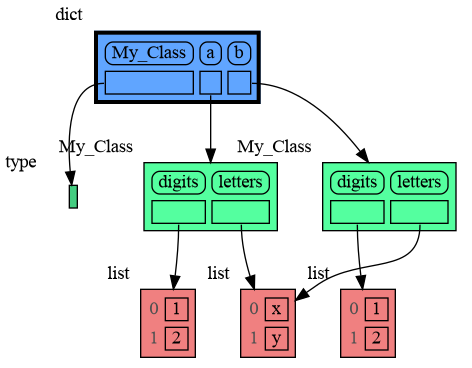
We can write our own custom copy function or method in case the three "copy" options don't do what we want. For example, in the code below the copy() method of My_Class copies the `digits` but shares the `letters` between two objects.
|
|
202
|
+
We can write our own custom copy function or method in case the three standard "copy" options don't do what we want. For example, in the code below the copy() method of My_Class copies the `digits` but shares the `letters` between two objects.
|
|
201
203
|
|
|
202
204
|
```python
|
|
203
205
|
import memory_graph as mg
|
|
@@ -221,9 +223,26 @@ mg.show(locals())
|
|
|
221
223
|
```
|
|
222
224
|
|
|
223
225
|
|
|
226
|
+
### Name Rebinding ###
|
|
227
|
+
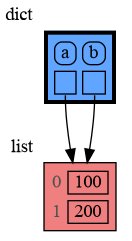
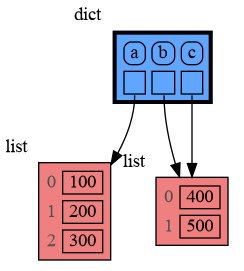
When `a` and `b` share a mutable value, then changing the value of `a` changes the value of `b` and vice versa. However, reassigning the value of `a` does not change `b`. When you reassign `a`, you only rebind the name `a` to a new value without effecting any other variables.
|
|
228
|
+
|
|
229
|
+
```python
|
|
230
|
+
import memory_graph as mg
|
|
231
|
+
|
|
232
|
+
a = [4, 3, 2]
|
|
233
|
+
b = a
|
|
234
|
+
mg.render(locals(), 'rebinding1.png')
|
|
235
|
+
|
|
236
|
+
a += [1] # changes the value of 'a' and 'b'
|
|
237
|
+
a = [100, 200] # rebinds 'a' to a new value, 'b' is uneffected
|
|
238
|
+
mg.render(locals(), 'rebinding2.png')
|
|
239
|
+
```
|
|
240
|
+
|  |  |
|
|
241
|
+
|:-----------------------------------------------------------:|:-------------------------------------------------------------:|
|
|
242
|
+
| rebinding1.png | rebinding2.png |
|
|
224
243
|
|
|
225
244
|
## Call Stack ##
|
|
226
|
-
The `mg.
|
|
245
|
+
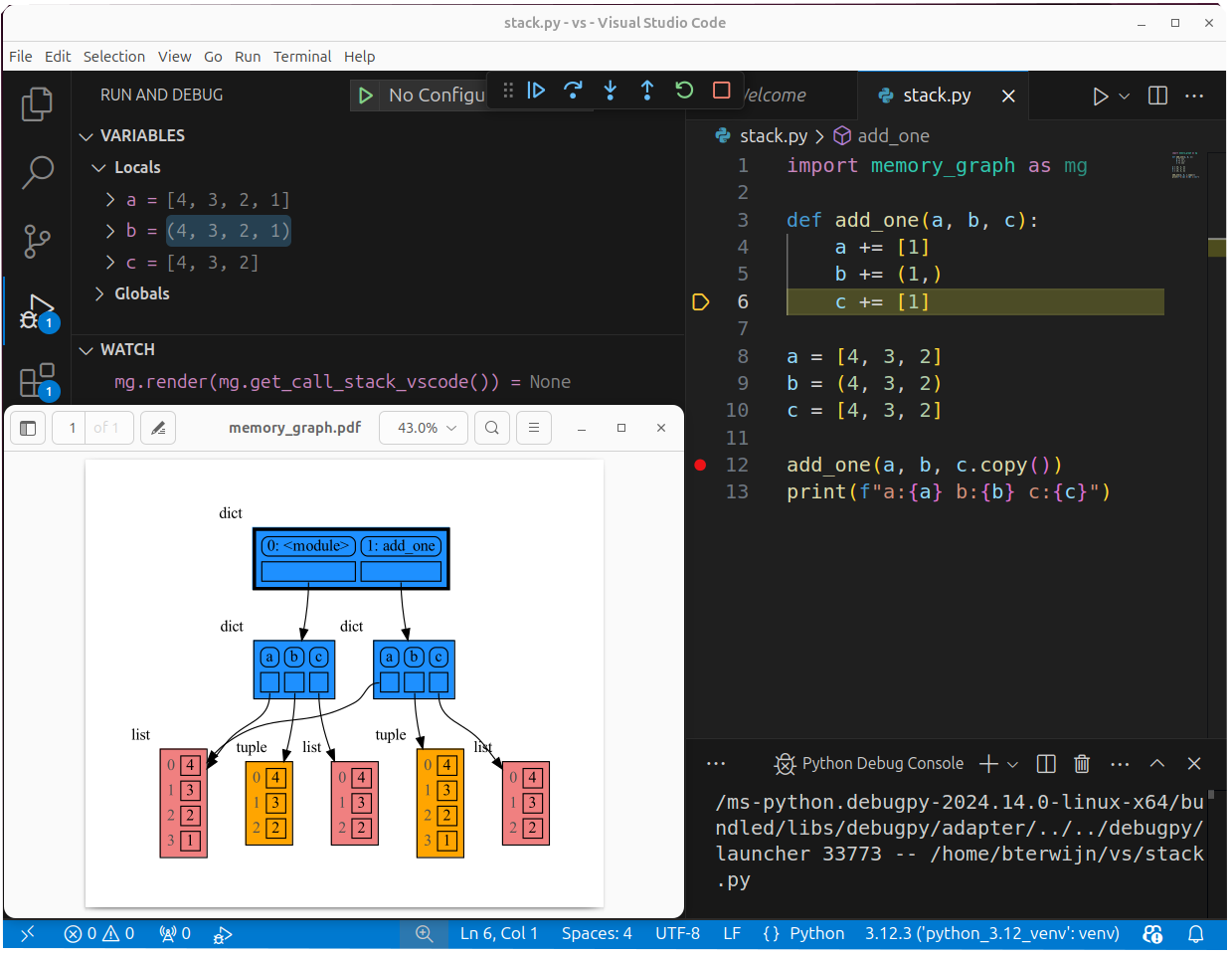
The `mg.stack()` function retrieves the entire call stack, including the local variables for each function on the stack. This enables us to visualize the local variables across all active functions simultaneously. By examining the graph, we can determine whether any local variables from different functions share data. For instance, consider the function `add_one()` which adds the value `1` to each of its parameters `a`, `b`, and `c`.
|
|
227
246
|
|
|
228
247
|
```python
|
|
229
248
|
import memory_graph as mg
|
|
@@ -232,7 +251,7 @@ def add_one(a, b, c):
|
|
|
232
251
|
a += [1]
|
|
233
252
|
b += (1,)
|
|
234
253
|
c += [1]
|
|
235
|
-
mg.show(mg.
|
|
254
|
+
mg.show(mg.stack())
|
|
236
255
|
|
|
237
256
|
a = [4, 3, 2]
|
|
238
257
|
b = (4, 3, 2)
|
|
@@ -276,9 +295,9 @@ import memory_graph as mg
|
|
|
276
295
|
def factorial(n):
|
|
277
296
|
if n==0:
|
|
278
297
|
return 1
|
|
279
|
-
mg.block(mg.show, mg.
|
|
298
|
+
mg.block(mg.show, mg.stack())
|
|
280
299
|
result = n * factorial(n-1)
|
|
281
|
-
mg.block(mg.show, mg.
|
|
300
|
+
mg.block(mg.show, mg.stack())
|
|
282
301
|
return result
|
|
283
302
|
|
|
284
303
|
print(factorial(3))
|
|
@@ -295,7 +314,7 @@ A more interesting recursive example that shows sharing of data is power_set().
|
|
|
295
314
|
import memory_graph as mg
|
|
296
315
|
|
|
297
316
|
def get_subsets(subsets, data, i, subset):
|
|
298
|
-
mg.block(mg.show, mg.
|
|
317
|
+
mg.block(mg.show, mg.stack())
|
|
299
318
|
if i == len(data):
|
|
300
319
|
subsets.append(subset.copy())
|
|
301
320
|
return
|
|
@@ -303,7 +322,7 @@ def get_subsets(subsets, data, i, subset):
|
|
|
303
322
|
get_subsets(subsets, data, i+1, subset) # do include data[i]
|
|
304
323
|
subset.pop()
|
|
305
324
|
get_subsets(subsets, data, i+1, subset) # don't include data[i]
|
|
306
|
-
mg.block(mg.show, mg.
|
|
325
|
+
mg.block(mg.show, mg.stack())
|
|
307
326
|
|
|
308
327
|
def power_set(data):
|
|
309
328
|
subsets = []
|
|
@@ -327,13 +346,13 @@ mg.render(locals(), "my_graph.pdf")
|
|
|
327
346
|
as a *watch* in a debugger tool such as the integrated debugger in Visual Studio Code. Then open the "my_graph.pdf" output file to continuously see all the local variables while debugging. This avoids having to add any memory_graph `show()` or `render()` calls to your code.
|
|
328
347
|
|
|
329
348
|
### Call Stack in Watch Context ###
|
|
330
|
-
The ```mg.
|
|
349
|
+
The ```mg.stack()``` doesn't work well in *watch* context in most debuggers because debuggers introduce additional stack frames that cause problems. Use these alternative functions for various debuggers to filter out these problematic stack frames:
|
|
331
350
|
|
|
332
351
|
| debugger | function to get the call stack |
|
|
333
352
|
|:---|:---|
|
|
334
|
-
| **pdb, pudb** | `mg.
|
|
335
|
-
| **Visual Studio Code** | `mg.
|
|
336
|
-
| **Pycharm** | `mg.
|
|
353
|
+
| **pdb, pudb** | `mg.stack_pdb()` |
|
|
354
|
+
| **Visual Studio Code** | `mg.stack_vscode()` |
|
|
355
|
+
| **Pycharm** | `mg.stack_pycharm()` |
|
|
337
356
|
|
|
338
357
|
|
|
339
358
|
|
|
@@ -344,7 +363,7 @@ mg.save_call_stack("call_stack.txt")
|
|
|
344
363
|
```
|
|
345
364
|
Choose 'after' and 'up_to' what function you want to slice and then call this function to get the desired call stack:
|
|
346
365
|
```
|
|
347
|
-
mg.
|
|
366
|
+
mg.stack_after_up_to(after_function, up_to_function="<module>")
|
|
348
367
|
```
|
|
349
368
|
|
|
350
369
|
### Debugging without Debugger Tool ###
|
|
@@ -354,13 +373,13 @@ To simplify debugging without a debugger tool, we offer these alias functions th
|
|
|
354
373
|
| alias | purpose | function call |
|
|
355
374
|
|:---|:---|:---|
|
|
356
375
|
| `mg.sl()` | **s**how **l**ocal variables | `mg.show(locals())` |
|
|
357
|
-
| `mg.ss()` | **s**how the call **s**tack | `mg.show(mg.
|
|
376
|
+
| `mg.ss()` | **s**how the call **s**tack | `mg.show(mg.stack())` |
|
|
358
377
|
| `mg.bsl()` | **b**lock after **s**howing **l**ocal variables | `mg.block(mg.show, locals())` |
|
|
359
|
-
| `mg.bss()` | **b**lock after **s**howing the call **s**tack | `mg.block(mg.show, mg.
|
|
378
|
+
| `mg.bss()` | **b**lock after **s**howing the call **s**tack | `mg.block(mg.show, mg.stack())` |
|
|
360
379
|
| `mg.rl()` | **r**ender **l**ocal variables | `mg.render(locals())` |
|
|
361
|
-
| `mg.rs()` | **r**ender the call **s**tack | `mg.render(mg.
|
|
380
|
+
| `mg.rs()` | **r**ender the call **s**tack | `mg.render(mg.stack())` |
|
|
362
381
|
| `mg.brl()` | **b**lock after **r**endering **l**ocal variables | `mg.block(mg.render, locals())` |
|
|
363
|
-
| `mg.brs()` | **b**lock after **r**endering the call **s**tack | `mg.block(mg.render, mg.
|
|
382
|
+
| `mg.brs()` | **b**lock after **r**endering the call **s**tack | `mg.block(mg.render, mg.stack())` |
|
|
364
383
|
| `mg.l()` | same as `mg.bsl()` | |
|
|
365
384
|
| `mg.s()` | same as `mg.bss()` | |
|
|
366
385
|
|
|
@@ -533,7 +552,7 @@ Different aspects of memory_graph can be configured. The default configuration i
|
|
|
533
552
|
- Maps each type to a Slicer. A slicer determines how many elements of a data type are shown in the graph to prevent the graph from getting too big. 'Slicer()' does no slicing, 'Slicer(1,2,3)' shows just 1 element at the beginning, 2 in the middle, and 3 at the end.
|
|
534
553
|
|
|
535
554
|
### Simplified Graph ###
|
|
536
|
-
Memory_graph simplifies the visualization (and the viewer's mental model) by **not** showing separate nodes for immutable types like `bool`, `int`, `float`, `complex`, and `str` by default. This simplification can sometimes be slightly misleading. As in the example below, after a shallow copy, lists `a` and `b` technically share their `int` values, but the graph makes it appear as though `a` and `b` each have their own copies. However, since `int` is immutable, this simplification will never lead to unexpected changes
|
|
555
|
+
Memory_graph simplifies the visualization (and the viewer's mental model) by **not** showing separate nodes for immutable types like `bool`, `int`, `float`, `complex`, and `str` by default. This simplification can sometimes be slightly misleading. As in the example below, after a shallow copy, lists `a` and `b` technically share their `int` values, but the graph makes it appear as though `a` and `b` each have their own copies. However, since `int` is immutable, this simplification will never lead to unexpected changes (changing `a` won’t affect `b`) so will never result in bugs.
|
|
537
556
|
|
|
538
557
|
The simplification strikes a balance: it is slightly misleading but keeps the graph clean and easy to understand and focuses on the mutable types where unexpected changes can occur. This is why it is the default behavior. If you do want to show separate nodes for `int` values, such as for educational purposes, you can simply remove `int` from the `mg.config.not_node_types` set:
|
|
539
558
|
```python
|
|
@@ -551,7 +570,7 @@ mg.render(locals(), 'not_node_types2.png')
|
|
|
551
570
|
|:-----------------------------------------------------------:|:-------------------------------------------------------------:|
|
|
552
571
|
| not_node_types1.png — simplified | not_node_types2.png — technically correct |
|
|
553
572
|
|
|
554
|
-
Additionally, the simplification hides the [reuse of small int values](https://docs.python.org/3/c-api/long.html#c.PyLong_FromLong) in the current CPython implementation, an optimization that might otherwise confuse beginner Python programmers. For instance, after executing `a[1]+=1; b[1]+=1` the `201` value is, maybe surprisingly, still shared between `a` and `b`, whereas executing `a[2]+=1; b[2]+=1` does not result in sharing the `301` value.
|
|
573
|
+
Additionally, the simplification hides away the [reuse of small int values](https://docs.python.org/3/c-api/long.html#c.PyLong_FromLong) in the current CPython implementation, an optimization that might otherwise confuse beginner Python programmers. For instance, after executing `a[1]+=1; b[1]+=1` the `201` value is, maybe surprisingly, still shared between `a` and `b`, whereas executing `a[2]+=1; b[2]+=1` does not result in sharing the `301` value.
|
|
555
574
|
|
|
556
575
|
### Temporary Configuration ###
|
|
557
576
|
In addition to the global configuration, a temporary configuration can be set for a single `show()` or `render()` call to change the colors, orientation, and slicer. This example highlights a particular list element in red, gives it a horizontal orientation, and overwrites the default slicer for lists:
|
|
@@ -746,7 +765,7 @@ mg.show(locals())
|
|
|
746
765
|
|
|
747
766
|
|
|
748
767
|
## Jupyter Notebook ##
|
|
749
|
-
In Jupyter Notebook `locals()` has additional variables that cause problems in the graph, use `mg.locals_jupyter()` to get the local variables with these problematic variables filtered out. Use `mg.
|
|
768
|
+
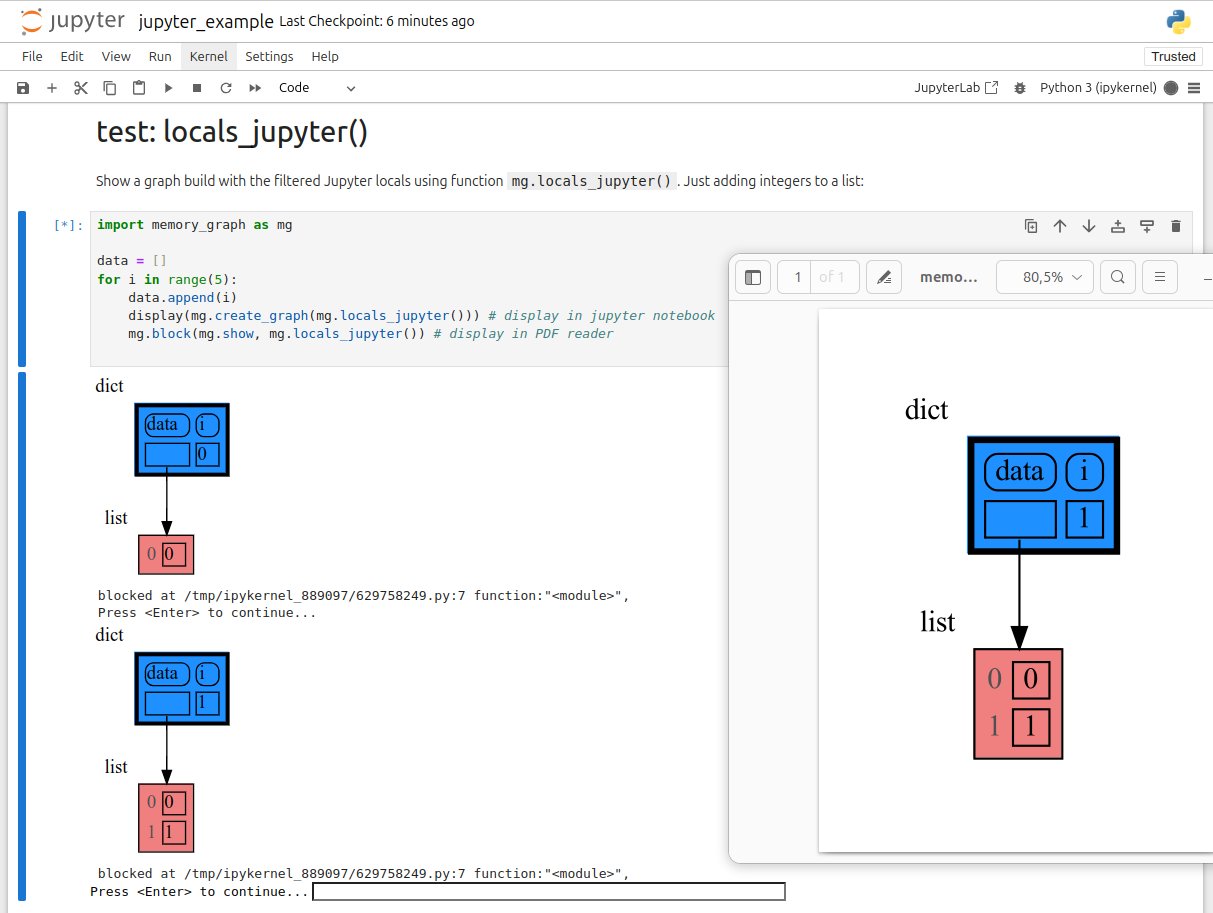
In Jupyter Notebook `locals()` has additional variables that cause problems in the graph, use `mg.locals_jupyter()` to get the local variables with these problematic variables filtered out. Use `mg.stack_jupyter()` to get the whole call stack with these variables filtered out.
|
|
750
769
|
|
|
751
770
|
We can use `mg.show()` and `mg.render()` in a Jupyter Notebook, but alternatively we can also use `mg.create_graph()` to create a graph and the `display()` function to render it inline with for example:
|
|
752
771
|
|
|
@@ -759,11 +778,11 @@ See for example [jupyter_example.ipynb](https://raw.githubusercontent.com/bterwi
|
|
|
759
778
|
|
|
760
779
|
|
|
761
780
|
## ipython ##
|
|
762
|
-
In ipython `locals()` has additional variables that cause problems in the graph, use `mg.locals_ipython()` to get the local variables with these problematic variables filtered out. Use `mg.
|
|
781
|
+
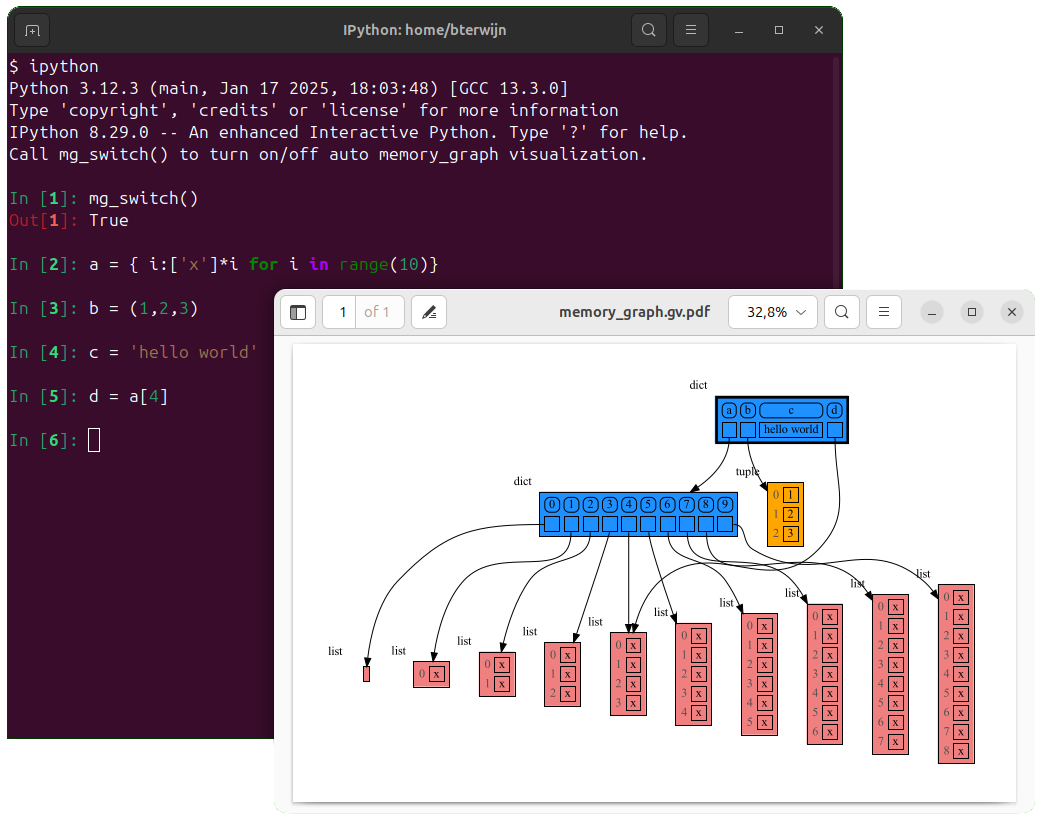
In ipython `locals()` has additional variables that cause problems in the graph, use `mg.locals_ipython()` to get the local variables with these problematic variables filtered out. Use `mg.stack_ipython()` to get the whole call stack with these variables filtered out.
|
|
763
782
|
|
|
764
783
|
Additionally install file [auto_memory_graph.py](https://raw.githubusercontent.com/bterwijn/memory_graph/main/src/auto_memory_graph.py) in the ipython startup directory:
|
|
765
|
-
* Linux/Mac:
|
|
766
|
-
* Windows:
|
|
784
|
+
* Linux/Mac: `~/.ipython/profile_default/startup/`
|
|
785
|
+
* Windows: `%USERPROFILE%\.ipython\profile_default\startup\`
|
|
767
786
|
|
|
768
787
|
Then after starting 'ipython' call function `mg_switch()` to turn on/off the automatic visualization of local variables after each command.
|
|
769
788
|
|
|
@@ -1,22 +1,3 @@
|
|
|
1
|
-
Metadata-Version: 2.1
|
|
2
|
-
Name: memory_graph
|
|
3
|
-
Version: 0.3.14
|
|
4
|
-
Summary: Generate intuitive graphs of your Python data, perfect for debugging and understanding complex relationships.
|
|
5
|
-
Home-page: https://github.com/bterwijn/memory_graph
|
|
6
|
-
Author: Bas Terwijn
|
|
7
|
-
Author-email: bterwijn@gmail.com
|
|
8
|
-
License: BSD 2-clause
|
|
9
|
-
Classifier: Development Status :: 4 - Beta
|
|
10
|
-
Classifier: Intended Audience :: Education
|
|
11
|
-
Classifier: Intended Audience :: Developers
|
|
12
|
-
Classifier: License :: OSI Approved :: BSD License
|
|
13
|
-
Classifier: Programming Language :: Python :: 3
|
|
14
|
-
Classifier: Topic :: Education
|
|
15
|
-
Classifier: Topic :: Software Development :: Debuggers
|
|
16
|
-
Description-Content-Type: text/markdown
|
|
17
|
-
License-File: LICENSE.txt
|
|
18
|
-
Requires-Dist: graphviz
|
|
19
|
-
|
|
20
1
|
# Installation #
|
|
21
2
|
Install (or upgrade) `memory_graph` using pip:
|
|
22
3
|
```
|
|
@@ -146,6 +127,7 @@ import memory_graph as mg
|
|
|
146
127
|
a = (4, 3, 2)
|
|
147
128
|
b = a
|
|
148
129
|
mg.render(locals(), 'immutable1.png')
|
|
130
|
+
|
|
149
131
|
a += (1,)
|
|
150
132
|
mg.render(locals(), 'immutable2.png')
|
|
151
133
|
```
|
|
@@ -163,6 +145,7 @@ import memory_graph as mg
|
|
|
163
145
|
a = [4, 3, 2]
|
|
164
146
|
b = a
|
|
165
147
|
mg.render(locals(), 'mutable1.png')
|
|
148
|
+
|
|
166
149
|
a += [1] # equivalent to: a.append(1)
|
|
167
150
|
mg.render(locals(), 'mutable2.png')
|
|
168
151
|
```
|
|
@@ -197,7 +180,7 @@ mg.show(locals())
|
|
|
197
180
|
|
|
198
181
|
|
|
199
182
|
### Custom Copy ###
|
|
200
|
-
We can write our own custom copy function or method in case the three "copy" options don't do what we want. For example, in the code below the copy() method of My_Class copies the `digits` but shares the `letters` between two objects.
|
|
183
|
+
We can write our own custom copy function or method in case the three standard "copy" options don't do what we want. For example, in the code below the copy() method of My_Class copies the `digits` but shares the `letters` between two objects.
|
|
201
184
|
|
|
202
185
|
```python
|
|
203
186
|
import memory_graph as mg
|
|
@@ -221,9 +204,26 @@ mg.show(locals())
|
|
|
221
204
|
```
|
|
222
205
|

|
|
223
206
|
|
|
207
|
+
### Name Rebinding ###
|
|
208
|
+
When `a` and `b` share a mutable value, then changing the value of `a` changes the value of `b` and vice versa. However, reassigning the value of `a` does not change `b`. When you reassign `a`, you only rebind the name `a` to a new value without effecting any other variables.
|
|
209
|
+
|
|
210
|
+
```python
|
|
211
|
+
import memory_graph as mg
|
|
212
|
+
|
|
213
|
+
a = [4, 3, 2]
|
|
214
|
+
b = a
|
|
215
|
+
mg.render(locals(), 'rebinding1.png')
|
|
216
|
+
|
|
217
|
+
a += [1] # changes the value of 'a' and 'b'
|
|
218
|
+
a = [100, 200] # rebinds 'a' to a new value, 'b' is uneffected
|
|
219
|
+
mg.render(locals(), 'rebinding2.png')
|
|
220
|
+
```
|
|
221
|
+
|  |  |
|
|
222
|
+
|:-----------------------------------------------------------:|:-------------------------------------------------------------:|
|
|
223
|
+
| rebinding1.png | rebinding2.png |
|
|
224
224
|
|
|
225
225
|
## Call Stack ##
|
|
226
|
-
The `mg.
|
|
226
|
+
The `mg.stack()` function retrieves the entire call stack, including the local variables for each function on the stack. This enables us to visualize the local variables across all active functions simultaneously. By examining the graph, we can determine whether any local variables from different functions share data. For instance, consider the function `add_one()` which adds the value `1` to each of its parameters `a`, `b`, and `c`.
|
|
227
227
|
|
|
228
228
|
```python
|
|
229
229
|
import memory_graph as mg
|
|
@@ -232,7 +232,7 @@ def add_one(a, b, c):
|
|
|
232
232
|
a += [1]
|
|
233
233
|
b += (1,)
|
|
234
234
|
c += [1]
|
|
235
|
-
mg.show(mg.
|
|
235
|
+
mg.show(mg.stack())
|
|
236
236
|
|
|
237
237
|
a = [4, 3, 2]
|
|
238
238
|
b = (4, 3, 2)
|
|
@@ -276,9 +276,9 @@ import memory_graph as mg
|
|
|
276
276
|
def factorial(n):
|
|
277
277
|
if n==0:
|
|
278
278
|
return 1
|
|
279
|
-
mg.block(mg.show, mg.
|
|
279
|
+
mg.block(mg.show, mg.stack())
|
|
280
280
|
result = n * factorial(n-1)
|
|
281
|
-
mg.block(mg.show, mg.
|
|
281
|
+
mg.block(mg.show, mg.stack())
|
|
282
282
|
return result
|
|
283
283
|
|
|
284
284
|
print(factorial(3))
|
|
@@ -295,7 +295,7 @@ A more interesting recursive example that shows sharing of data is power_set().
|
|
|
295
295
|
import memory_graph as mg
|
|
296
296
|
|
|
297
297
|
def get_subsets(subsets, data, i, subset):
|
|
298
|
-
mg.block(mg.show, mg.
|
|
298
|
+
mg.block(mg.show, mg.stack())
|
|
299
299
|
if i == len(data):
|
|
300
300
|
subsets.append(subset.copy())
|
|
301
301
|
return
|
|
@@ -303,7 +303,7 @@ def get_subsets(subsets, data, i, subset):
|
|
|
303
303
|
get_subsets(subsets, data, i+1, subset) # do include data[i]
|
|
304
304
|
subset.pop()
|
|
305
305
|
get_subsets(subsets, data, i+1, subset) # don't include data[i]
|
|
306
|
-
mg.block(mg.show, mg.
|
|
306
|
+
mg.block(mg.show, mg.stack())
|
|
307
307
|
|
|
308
308
|
def power_set(data):
|
|
309
309
|
subsets = []
|
|
@@ -327,13 +327,13 @@ mg.render(locals(), "my_graph.pdf")
|
|
|
327
327
|
as a *watch* in a debugger tool such as the integrated debugger in Visual Studio Code. Then open the "my_graph.pdf" output file to continuously see all the local variables while debugging. This avoids having to add any memory_graph `show()` or `render()` calls to your code.
|
|
328
328
|
|
|
329
329
|
### Call Stack in Watch Context ###
|
|
330
|
-
The ```mg.
|
|
330
|
+
The ```mg.stack()``` doesn't work well in *watch* context in most debuggers because debuggers introduce additional stack frames that cause problems. Use these alternative functions for various debuggers to filter out these problematic stack frames:
|
|
331
331
|
|
|
332
332
|
| debugger | function to get the call stack |
|
|
333
333
|
|:---|:---|
|
|
334
|
-
| **pdb, pudb** | `mg.
|
|
335
|
-
| **Visual Studio Code** | `mg.
|
|
336
|
-
| **Pycharm** | `mg.
|
|
334
|
+
| **pdb, pudb** | `mg.stack_pdb()` |
|
|
335
|
+
| **Visual Studio Code** | `mg.stack_vscode()` |
|
|
336
|
+
| **Pycharm** | `mg.stack_pycharm()` |
|
|
337
337
|
|
|
338
338
|

|
|
339
339
|
|
|
@@ -344,7 +344,7 @@ mg.save_call_stack("call_stack.txt")
|
|
|
344
344
|
```
|
|
345
345
|
Choose 'after' and 'up_to' what function you want to slice and then call this function to get the desired call stack:
|
|
346
346
|
```
|
|
347
|
-
mg.
|
|
347
|
+
mg.stack_after_up_to(after_function, up_to_function="<module>")
|
|
348
348
|
```
|
|
349
349
|
|
|
350
350
|
### Debugging without Debugger Tool ###
|
|
@@ -354,13 +354,13 @@ To simplify debugging without a debugger tool, we offer these alias functions th
|
|
|
354
354
|
| alias | purpose | function call |
|
|
355
355
|
|:---|:---|:---|
|
|
356
356
|
| `mg.sl()` | **s**how **l**ocal variables | `mg.show(locals())` |
|
|
357
|
-
| `mg.ss()` | **s**how the call **s**tack | `mg.show(mg.
|
|
357
|
+
| `mg.ss()` | **s**how the call **s**tack | `mg.show(mg.stack())` |
|
|
358
358
|
| `mg.bsl()` | **b**lock after **s**howing **l**ocal variables | `mg.block(mg.show, locals())` |
|
|
359
|
-
| `mg.bss()` | **b**lock after **s**howing the call **s**tack | `mg.block(mg.show, mg.
|
|
359
|
+
| `mg.bss()` | **b**lock after **s**howing the call **s**tack | `mg.block(mg.show, mg.stack())` |
|
|
360
360
|
| `mg.rl()` | **r**ender **l**ocal variables | `mg.render(locals())` |
|
|
361
|
-
| `mg.rs()` | **r**ender the call **s**tack | `mg.render(mg.
|
|
361
|
+
| `mg.rs()` | **r**ender the call **s**tack | `mg.render(mg.stack())` |
|
|
362
362
|
| `mg.brl()` | **b**lock after **r**endering **l**ocal variables | `mg.block(mg.render, locals())` |
|
|
363
|
-
| `mg.brs()` | **b**lock after **r**endering the call **s**tack | `mg.block(mg.render, mg.
|
|
363
|
+
| `mg.brs()` | **b**lock after **r**endering the call **s**tack | `mg.block(mg.render, mg.stack())` |
|
|
364
364
|
| `mg.l()` | same as `mg.bsl()` | |
|
|
365
365
|
| `mg.s()` | same as `mg.bss()` | |
|
|
366
366
|
|
|
@@ -533,7 +533,7 @@ Different aspects of memory_graph can be configured. The default configuration i
|
|
|
533
533
|
- Maps each type to a Slicer. A slicer determines how many elements of a data type are shown in the graph to prevent the graph from getting too big. 'Slicer()' does no slicing, 'Slicer(1,2,3)' shows just 1 element at the beginning, 2 in the middle, and 3 at the end.
|
|
534
534
|
|
|
535
535
|
### Simplified Graph ###
|
|
536
|
-
Memory_graph simplifies the visualization (and the viewer's mental model) by **not** showing separate nodes for immutable types like `bool`, `int`, `float`, `complex`, and `str` by default. This simplification can sometimes be slightly misleading. As in the example below, after a shallow copy, lists `a` and `b` technically share their `int` values, but the graph makes it appear as though `a` and `b` each have their own copies. However, since `int` is immutable, this simplification will never lead to unexpected changes
|
|
536
|
+
Memory_graph simplifies the visualization (and the viewer's mental model) by **not** showing separate nodes for immutable types like `bool`, `int`, `float`, `complex`, and `str` by default. This simplification can sometimes be slightly misleading. As in the example below, after a shallow copy, lists `a` and `b` technically share their `int` values, but the graph makes it appear as though `a` and `b` each have their own copies. However, since `int` is immutable, this simplification will never lead to unexpected changes (changing `a` won’t affect `b`) so will never result in bugs.
|
|
537
537
|
|
|
538
538
|
The simplification strikes a balance: it is slightly misleading but keeps the graph clean and easy to understand and focuses on the mutable types where unexpected changes can occur. This is why it is the default behavior. If you do want to show separate nodes for `int` values, such as for educational purposes, you can simply remove `int` from the `mg.config.not_node_types` set:
|
|
539
539
|
```python
|
|
@@ -551,7 +551,7 @@ mg.render(locals(), 'not_node_types2.png')
|
|
|
551
551
|
|:-----------------------------------------------------------:|:-------------------------------------------------------------:|
|
|
552
552
|
| not_node_types1.png — simplified | not_node_types2.png — technically correct |
|
|
553
553
|
|
|
554
|
-
Additionally, the simplification hides the [reuse of small int values](https://docs.python.org/3/c-api/long.html#c.PyLong_FromLong) in the current CPython implementation, an optimization that might otherwise confuse beginner Python programmers. For instance, after executing `a[1]+=1; b[1]+=1` the `201` value is, maybe surprisingly, still shared between `a` and `b`, whereas executing `a[2]+=1; b[2]+=1` does not result in sharing the `301` value.
|
|
554
|
+
Additionally, the simplification hides away the [reuse of small int values](https://docs.python.org/3/c-api/long.html#c.PyLong_FromLong) in the current CPython implementation, an optimization that might otherwise confuse beginner Python programmers. For instance, after executing `a[1]+=1; b[1]+=1` the `201` value is, maybe surprisingly, still shared between `a` and `b`, whereas executing `a[2]+=1; b[2]+=1` does not result in sharing the `301` value.
|
|
555
555
|
|
|
556
556
|
### Temporary Configuration ###
|
|
557
557
|
In addition to the global configuration, a temporary configuration can be set for a single `show()` or `render()` call to change the colors, orientation, and slicer. This example highlights a particular list element in red, gives it a horizontal orientation, and overwrites the default slicer for lists:
|
|
@@ -746,7 +746,7 @@ mg.show(locals())
|
|
|
746
746
|
|
|
747
747
|
|
|
748
748
|
## Jupyter Notebook ##
|
|
749
|
-
In Jupyter Notebook `locals()` has additional variables that cause problems in the graph, use `mg.locals_jupyter()` to get the local variables with these problematic variables filtered out. Use `mg.
|
|
749
|
+
In Jupyter Notebook `locals()` has additional variables that cause problems in the graph, use `mg.locals_jupyter()` to get the local variables with these problematic variables filtered out. Use `mg.stack_jupyter()` to get the whole call stack with these variables filtered out.
|
|
750
750
|
|
|
751
751
|
We can use `mg.show()` and `mg.render()` in a Jupyter Notebook, but alternatively we can also use `mg.create_graph()` to create a graph and the `display()` function to render it inline with for example:
|
|
752
752
|
|
|
@@ -759,11 +759,11 @@ See for example [jupyter_example.ipynb](https://raw.githubusercontent.com/bterwi
|
|
|
759
759
|

|
|
760
760
|
|
|
761
761
|
## ipython ##
|
|
762
|
-
In ipython `locals()` has additional variables that cause problems in the graph, use `mg.locals_ipython()` to get the local variables with these problematic variables filtered out. Use `mg.
|
|
762
|
+
In ipython `locals()` has additional variables that cause problems in the graph, use `mg.locals_ipython()` to get the local variables with these problematic variables filtered out. Use `mg.stack_ipython()` to get the whole call stack with these variables filtered out.
|
|
763
763
|
|
|
764
764
|
Additionally install file [auto_memory_graph.py](https://raw.githubusercontent.com/bterwijn/memory_graph/main/src/auto_memory_graph.py) in the ipython startup directory:
|
|
765
|
-
* Linux/Mac:
|
|
766
|
-
* Windows:
|
|
765
|
+
* Linux/Mac: `~/.ipython/profile_default/startup/`
|
|
766
|
+
* Windows: `%USERPROFILE%\.ipython\profile_default\startup\`
|
|
767
767
|
|
|
768
768
|
Then after starting 'ipython' call function `mg_switch()` to turn on/off the automatic visualization of local variables after each command.
|
|
769
769
|

|
|
Binary file
|
|
Binary file
|
|
Binary file
|
|
Binary file
|
|
Binary file
|
|
Binary file
|
|
@@ -13,12 +13,12 @@ def get_fac_name():
|
|
|
13
13
|
def factorial(n):
|
|
14
14
|
if n==0:
|
|
15
15
|
return 1
|
|
16
|
-
#mg.show( mg.
|
|
17
|
-
mg.render( mg.
|
|
16
|
+
#mg.show( mg.stack(), block=True ) # draw graph
|
|
17
|
+
mg.render( mg.stack(), get_fac_name())
|
|
18
18
|
result = n*factorial(n-1)
|
|
19
|
-
#mg.show( mg.
|
|
20
|
-
mg.render( mg.
|
|
19
|
+
#mg.show( mg.stack(), block=True ) # draw graph
|
|
20
|
+
mg.render( mg.stack(), get_fac_name())
|
|
21
21
|
return result
|
|
22
22
|
|
|
23
|
-
mg.render( mg.
|
|
23
|
+
mg.render( mg.stack(), get_fac_name())
|
|
24
24
|
factorial(3)
|
|
Binary file
|
|
Binary file
|
|
Binary file
|
|
Binary file
|
|
Binary file
|
|
Binary file
|
|
Binary file
|
|
@@ -8,7 +8,7 @@ image = 1
|
|
|
8
8
|
|
|
9
9
|
def get_subsets(subsets, data, i, subset):
|
|
10
10
|
global image
|
|
11
|
-
mg.render(mg.
|
|
11
|
+
mg.render(mg.stack(), f"power_set{image}.png")
|
|
12
12
|
image += 1
|
|
13
13
|
if i == len(data):
|
|
14
14
|
subsets.append(subset.copy())
|
|
@@ -17,7 +17,7 @@ def get_subsets(subsets, data, i, subset):
|
|
|
17
17
|
get_subsets(subsets, data, i+1, subset) # do include data[i]
|
|
18
18
|
subset.pop()
|
|
19
19
|
get_subsets(subsets, data, i+1, subset) # don't include data[i]
|
|
20
|
-
mg.render(mg.
|
|
20
|
+
mg.render(mg.stack(), f"power_set{image}.png")
|
|
21
21
|
image += 1
|
|
22
22
|
|
|
23
23
|
def power_set(data):
|
|
Binary file
|
|
Binary file
|
|
Binary file
|
|
Binary file
|
|
Binary file
|
|
Binary file
|
|
Binary file
|
|
Binary file
|
|
Binary file
|
|
Binary file
|
|
Binary file
|
|
Binary file
|
|
Binary file
|
|
Binary file
|
|
Binary file
|
|
Binary file
|
|
Binary file
|
|
Binary file
|
|
Binary file
|
|
Binary file
|
|
Binary file
|
|
Binary file
|
|
Binary file
|
|
Binary file
|