memory-graph 0.3.14__tar.gz → 0.3.15__tar.gz
This diff represents the content of publicly available package versions that have been released to one of the supported registries. The information contained in this diff is provided for informational purposes only and reflects changes between package versions as they appear in their respective public registries.
- {memory_graph-0.3.14 → memory_graph-0.3.15}/PKG-INFO +22 -3
- memory_graph-0.3.14/memory_graph.egg-info/PKG-INFO → memory_graph-0.3.15/README.md +20 -20
- memory_graph-0.3.15/images/cmp.sh +3 -0
- memory_graph-0.3.15/images/cmp.sh~ +1 -0
- {memory_graph-0.3.14 → memory_graph-0.3.15}/images/create_images.sh +1 -0
- {memory_graph-0.3.14 → memory_graph-0.3.15}/images/debugging01.png +0 -0
- {memory_graph-0.3.14 → memory_graph-0.3.15}/images/debugging02.png +0 -0
- {memory_graph-0.3.14 → memory_graph-0.3.15}/images/debugging03.png +0 -0
- {memory_graph-0.3.14 → memory_graph-0.3.15}/images/debugging04.png +0 -0
- {memory_graph-0.3.14 → memory_graph-0.3.15}/images/debugging05.png +0 -0
- {memory_graph-0.3.14 → memory_graph-0.3.15}/images/debugging06.png +0 -0
- {memory_graph-0.3.14 → memory_graph-0.3.15}/images/factorial01.png +0 -0
- {memory_graph-0.3.14 → memory_graph-0.3.15}/images/factorial02.png +0 -0
- {memory_graph-0.3.14 → memory_graph-0.3.15}/images/factorial03.png +0 -0
- {memory_graph-0.3.14 → memory_graph-0.3.15}/images/factorial04.png +0 -0
- {memory_graph-0.3.14 → memory_graph-0.3.15}/images/factorial05.png +0 -0
- {memory_graph-0.3.14 → memory_graph-0.3.15}/images/factorial06.png +0 -0
- {memory_graph-0.3.14 → memory_graph-0.3.15}/images/factorial07.png +0 -0
- memory_graph-0.3.15/images/name_rebinding.py +9 -0
- memory_graph-0.3.15/images/name_rebinding.py~ +7 -0
- {memory_graph-0.3.14 → memory_graph-0.3.15}/images/power_set1.png +0 -0
- {memory_graph-0.3.14 → memory_graph-0.3.15}/images/power_set10.png +0 -0
- {memory_graph-0.3.14 → memory_graph-0.3.15}/images/power_set11.png +0 -0
- {memory_graph-0.3.14 → memory_graph-0.3.15}/images/power_set12.png +0 -0
- {memory_graph-0.3.14 → memory_graph-0.3.15}/images/power_set13.png +0 -0
- {memory_graph-0.3.14 → memory_graph-0.3.15}/images/power_set14.png +0 -0
- {memory_graph-0.3.14 → memory_graph-0.3.15}/images/power_set15.png +0 -0
- {memory_graph-0.3.14 → memory_graph-0.3.15}/images/power_set16.png +0 -0
- {memory_graph-0.3.14 → memory_graph-0.3.15}/images/power_set17.png +0 -0
- {memory_graph-0.3.14 → memory_graph-0.3.15}/images/power_set18.png +0 -0
- {memory_graph-0.3.14 → memory_graph-0.3.15}/images/power_set19.png +0 -0
- {memory_graph-0.3.14 → memory_graph-0.3.15}/images/power_set2.png +0 -0
- {memory_graph-0.3.14 → memory_graph-0.3.15}/images/power_set20.png +0 -0
- {memory_graph-0.3.14 → memory_graph-0.3.15}/images/power_set21.png +0 -0
- {memory_graph-0.3.14 → memory_graph-0.3.15}/images/power_set22.png +0 -0
- {memory_graph-0.3.14 → memory_graph-0.3.15}/images/power_set3.png +0 -0
- {memory_graph-0.3.14 → memory_graph-0.3.15}/images/power_set4.png +0 -0
- {memory_graph-0.3.14 → memory_graph-0.3.15}/images/power_set5.png +0 -0
- {memory_graph-0.3.14 → memory_graph-0.3.15}/images/power_set6.png +0 -0
- {memory_graph-0.3.14 → memory_graph-0.3.15}/images/power_set7.png +0 -0
- {memory_graph-0.3.14 → memory_graph-0.3.15}/images/power_set8.png +0 -0
- {memory_graph-0.3.14 → memory_graph-0.3.15}/images/power_set9.png +0 -0
- memory_graph-0.3.15/images/rebinding1.png +0 -0
- memory_graph-0.3.15/images/rebinding2.png +0 -0
- {memory_graph-0.3.14 → memory_graph-0.3.15}/memory_graph/__init__.py +1 -1
- memory_graph-0.3.15/memory_graph/t.py +6 -0
- memory_graph-0.3.14/README.md → memory_graph-0.3.15/memory_graph.egg-info/PKG-INFO +39 -1
- {memory_graph-0.3.14 → memory_graph-0.3.15}/memory_graph.egg-info/SOURCES.txt +8 -15
- {memory_graph-0.3.14 → memory_graph-0.3.15}/setup.py +2 -2
- memory_graph-0.3.14/TODO.txt +0 -9
- memory_graph-0.3.14/images/.ipynb_checkpoints/jupyter_example-checkpoint.ipynb +0 -85
- memory_graph-0.3.14/images/avltree.py~ +0 -41
- memory_graph-0.3.14/images/avltree_fail.gv +0 -26
- memory_graph-0.3.14/images/memory_graph.gv +0 -20
- memory_graph-0.3.14/images/memory_graph.gv.pdf +0 -0
- memory_graph-0.3.14/images/my_graph.gv +0 -35
- memory_graph-0.3.14/images/my_graph.pdf +0 -0
- memory_graph-0.3.14/images/not_node_types.py~ +0 -9
- memory_graph-0.3.14/install.txt +0 -31
- memory_graph-0.3.14/src/auto_memory_graph.py +0 -21
- memory_graph-0.3.14/src/jupyter_example.ipynb +0 -85
- memory_graph-0.3.14/src/pyodide.html +0 -182
- memory_graph-0.3.14/uml/memory_graph.uxf +0 -322
- {memory_graph-0.3.14 → memory_graph-0.3.15}/LICENSE.txt +0 -0
- {memory_graph-0.3.14 → memory_graph-0.3.15}/MANIFEST.in +0 -0
- {memory_graph-0.3.14 → memory_graph-0.3.15}/images/add_one.png +0 -0
- {memory_graph-0.3.14 → memory_graph-0.3.15}/images/add_one.py +0 -0
- {memory_graph-0.3.14 → memory_graph-0.3.15}/images/avltree.py +0 -0
- {memory_graph-0.3.14 → memory_graph-0.3.15}/images/avltree_base.png +0 -0
- {memory_graph-0.3.14 → memory_graph-0.3.15}/images/avltree_dir.png +0 -0
- {memory_graph-0.3.14 → memory_graph-0.3.15}/images/avltree_fail.png +0 -0
- {memory_graph-0.3.14 → memory_graph-0.3.15}/images/avltree_key_value.png +0 -0
- {memory_graph-0.3.14 → memory_graph-0.3.15}/images/avltree_linear.png +0 -0
- {memory_graph-0.3.14 → memory_graph-0.3.15}/images/avltree_table.png +0 -0
- {memory_graph-0.3.14 → memory_graph-0.3.15}/images/bin_tree.png +0 -0
- {memory_graph-0.3.14 → memory_graph-0.3.15}/images/bin_tree.py +0 -0
- {memory_graph-0.3.14 → memory_graph-0.3.15}/images/copies.png +0 -0
- {memory_graph-0.3.14 → memory_graph-0.3.15}/images/copies.py +0 -0
- {memory_graph-0.3.14 → memory_graph-0.3.15}/images/copy_method.png +0 -0
- {memory_graph-0.3.14 → memory_graph-0.3.15}/images/copy_method.py +0 -0
- {memory_graph-0.3.14 → memory_graph-0.3.15}/images/create_gif.sh +0 -0
- {memory_graph-0.3.14 → memory_graph-0.3.15}/images/debug_vscode.png +0 -0
- {memory_graph-0.3.14 → memory_graph-0.3.15}/images/debugging.gif +0 -0
- {memory_graph-0.3.14 → memory_graph-0.3.15}/images/debugging.py +0 -0
- {memory_graph-0.3.14 → memory_graph-0.3.15}/images/extension_numpy.png +0 -0
- {memory_graph-0.3.14 → memory_graph-0.3.15}/images/extension_numpy.py +0 -0
- {memory_graph-0.3.14 → memory_graph-0.3.15}/images/extension_pandas.png +0 -0
- {memory_graph-0.3.14 → memory_graph-0.3.15}/images/extension_pandas.py +0 -0
- {memory_graph-0.3.14 → memory_graph-0.3.15}/images/factorial.gif +0 -0
- {memory_graph-0.3.14 → memory_graph-0.3.15}/images/factorial.py +0 -0
- {memory_graph-0.3.14 → memory_graph-0.3.15}/images/hash_set.png +0 -0
- {memory_graph-0.3.14 → memory_graph-0.3.15}/images/hash_set.py +0 -0
- {memory_graph-0.3.14 → memory_graph-0.3.15}/images/highlight.png +0 -0
- {memory_graph-0.3.14 → memory_graph-0.3.15}/images/highlight.py +0 -0
- {memory_graph-0.3.14 → memory_graph-0.3.15}/images/immutable.py +0 -0
- {memory_graph-0.3.14 → memory_graph-0.3.15}/images/immutable1.png +0 -0
- {memory_graph-0.3.14 → memory_graph-0.3.15}/images/immutable2.png +0 -0
- {memory_graph-0.3.14 → memory_graph-0.3.15}/images/ipython.png +0 -0
- {memory_graph-0.3.14 → memory_graph-0.3.15}/images/jupyter_example.png +0 -0
- {memory_graph-0.3.14 → memory_graph-0.3.15}/images/linked_list.png +0 -0
- {memory_graph-0.3.14 → memory_graph-0.3.15}/images/linked_list.py +0 -0
- {memory_graph-0.3.14 → memory_graph-0.3.15}/images/many_types.png +0 -0
- {memory_graph-0.3.14 → memory_graph-0.3.15}/images/many_types.py +0 -0
- {memory_graph-0.3.14 → memory_graph-0.3.15}/images/mutable.py +0 -0
- {memory_graph-0.3.14 → memory_graph-0.3.15}/images/mutable1.png +0 -0
- {memory_graph-0.3.14 → memory_graph-0.3.15}/images/mutable2.png +0 -0
- {memory_graph-0.3.14 → memory_graph-0.3.15}/images/not_node_types.py +0 -0
- {memory_graph-0.3.14 → memory_graph-0.3.15}/images/not_node_types1.png +0 -0
- {memory_graph-0.3.14 → memory_graph-0.3.15}/images/not_node_types2.png +0 -0
- {memory_graph-0.3.14 → memory_graph-0.3.15}/images/power_set.gif +0 -0
- {memory_graph-0.3.14 → memory_graph-0.3.15}/images/power_set.py +0 -0
- {memory_graph-0.3.14 → memory_graph-0.3.15}/images/pyodide.png +0 -0
- {memory_graph-0.3.14 → memory_graph-0.3.15}/images/uva.png +0 -0
- {memory_graph-0.3.14 → memory_graph-0.3.15}/memory_graph/config.py +0 -0
- {memory_graph-0.3.14 → memory_graph-0.3.15}/memory_graph/config_default.py +0 -0
- {memory_graph-0.3.14 → memory_graph-0.3.15}/memory_graph/config_helpers.py +0 -0
- {memory_graph-0.3.14 → memory_graph-0.3.15}/memory_graph/extension_numpy.py +0 -0
- {memory_graph-0.3.14 → memory_graph-0.3.15}/memory_graph/extension_pandas.py +0 -0
- {memory_graph-0.3.14 → memory_graph-0.3.15}/memory_graph/html_table.py +0 -0
- {memory_graph-0.3.14 → memory_graph-0.3.15}/memory_graph/list_view.py +0 -0
- {memory_graph-0.3.14 → memory_graph-0.3.15}/memory_graph/memory_to_nodes.py +0 -0
- {memory_graph-0.3.14 → memory_graph-0.3.15}/memory_graph/node_base.py +0 -0
- {memory_graph-0.3.14 → memory_graph-0.3.15}/memory_graph/node_key_value.py +0 -0
- {memory_graph-0.3.14 → memory_graph-0.3.15}/memory_graph/node_linear.py +0 -0
- {memory_graph-0.3.14 → memory_graph-0.3.15}/memory_graph/node_table.py +0 -0
- {memory_graph-0.3.14 → memory_graph-0.3.15}/memory_graph/sequence.py +0 -0
- {memory_graph-0.3.14 → memory_graph-0.3.15}/memory_graph/slicer.py +0 -0
- {memory_graph-0.3.14 → memory_graph-0.3.15}/memory_graph/slices.py +0 -0
- {memory_graph-0.3.14 → memory_graph-0.3.15}/memory_graph/slices_iterator.py +0 -0
- {memory_graph-0.3.14 → memory_graph-0.3.15}/memory_graph/slices_table_iterator.py +0 -0
- {memory_graph-0.3.14 → memory_graph-0.3.15}/memory_graph/test.py +0 -0
- {memory_graph-0.3.14 → memory_graph-0.3.15}/memory_graph/test_max_graph_depth.py +0 -0
- {memory_graph-0.3.14 → memory_graph-0.3.15}/memory_graph/test_memory_graph.py +0 -0
- {memory_graph-0.3.14 → memory_graph-0.3.15}/memory_graph/test_memory_to_nodes.py +0 -0
- {memory_graph-0.3.14 → memory_graph-0.3.15}/memory_graph/test_sequence.py +0 -0
- {memory_graph-0.3.14 → memory_graph-0.3.15}/memory_graph/test_slicer.py +0 -0
- {memory_graph-0.3.14 → memory_graph-0.3.15}/memory_graph/test_slices.py +0 -0
- {memory_graph-0.3.14 → memory_graph-0.3.15}/memory_graph/test_slices_iterator.py +0 -0
- {memory_graph-0.3.14 → memory_graph-0.3.15}/memory_graph/utils.py +0 -0
- {memory_graph-0.3.14 → memory_graph-0.3.15}/memory_graph.egg-info/dependency_links.txt +0 -0
- {memory_graph-0.3.14 → memory_graph-0.3.15}/memory_graph.egg-info/requires.txt +0 -0
- {memory_graph-0.3.14 → memory_graph-0.3.15}/memory_graph.egg-info/top_level.txt +0 -0
- {memory_graph-0.3.14 → memory_graph-0.3.15}/setup.cfg +0 -0
|
@@ -1,7 +1,7 @@
|
|
|
1
1
|
Metadata-Version: 2.1
|
|
2
2
|
Name: memory_graph
|
|
3
|
-
Version: 0.3.
|
|
4
|
-
Summary: Generate intuitive graphs of your Python data,
|
|
3
|
+
Version: 0.3.15
|
|
4
|
+
Summary: Generate intuitive graphs of your Python data, great for debugging and understanding complex relationships.
|
|
5
5
|
Home-page: https://github.com/bterwijn/memory_graph
|
|
6
6
|
Author: Bas Terwijn
|
|
7
7
|
Author-email: bterwijn@gmail.com
|
|
@@ -146,6 +146,7 @@ import memory_graph as mg
|
|
|
146
146
|
a = (4, 3, 2)
|
|
147
147
|
b = a
|
|
148
148
|
mg.render(locals(), 'immutable1.png')
|
|
149
|
+
|
|
149
150
|
a += (1,)
|
|
150
151
|
mg.render(locals(), 'immutable2.png')
|
|
151
152
|
```
|
|
@@ -163,6 +164,7 @@ import memory_graph as mg
|
|
|
163
164
|
a = [4, 3, 2]
|
|
164
165
|
b = a
|
|
165
166
|
mg.render(locals(), 'mutable1.png')
|
|
167
|
+
|
|
166
168
|
a += [1] # equivalent to: a.append(1)
|
|
167
169
|
mg.render(locals(), 'mutable2.png')
|
|
168
170
|
```
|
|
@@ -221,6 +223,23 @@ mg.show(locals())
|
|
|
221
223
|
```
|
|
222
224
|
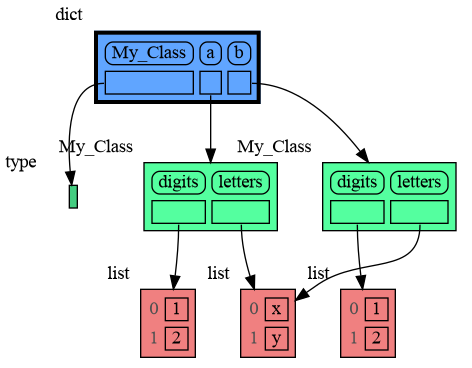
|
|
223
225
|
|
|
226
|
+
### Name Rebinding ###
|
|
227
|
+
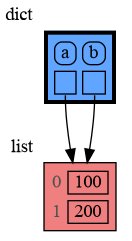
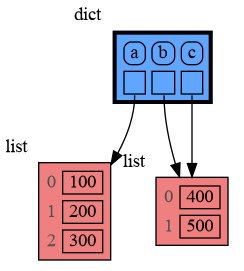
When `a` and `b` share a mutable value, then changing the value of `a` changes the value of `b` and vice versa. However, reassigning the value of `a` does not change `b`. When you reassign `a`, you only rebind the name `a` to a new value without effecting any other variables.
|
|
228
|
+
|
|
229
|
+
```python
|
|
230
|
+
import memory_graph as mg
|
|
231
|
+
|
|
232
|
+
a = [4, 3, 2]
|
|
233
|
+
b = a
|
|
234
|
+
mg.render(locals(), 'rebinding1.png')
|
|
235
|
+
|
|
236
|
+
a += [1] # changes the value of 'a' and 'b'
|
|
237
|
+
a = [100, 200] # rebinds 'a' to a new value, 'b' is uneffected
|
|
238
|
+
mg.render(locals(), 'rebinding2.png')
|
|
239
|
+
```
|
|
240
|
+
|  |  |
|
|
241
|
+
|:-----------------------------------------------------------:|:-------------------------------------------------------------:|
|
|
242
|
+
| rebinding1.png | rebinding2.png |
|
|
224
243
|
|
|
225
244
|
## Call Stack ##
|
|
226
245
|
The `mg.get_call_stack()` function retrieves the entire call stack, including the local variables for each function on the stack. This enables us to visualize the local variables across all active functions simultaneously. By examining the graph, we can determine whether any local variables from different functions share data. For instance, consider the function `add_one()` which adds the value `1` to each of its parameters `a`, `b`, and `c`.
|
|
@@ -551,7 +570,7 @@ mg.render(locals(), 'not_node_types2.png')
|
|
|
551
570
|
|:-----------------------------------------------------------:|:-------------------------------------------------------------:|
|
|
552
571
|
| not_node_types1.png — simplified | not_node_types2.png — technically correct |
|
|
553
572
|
|
|
554
|
-
Additionally, the simplification hides the [reuse of small int values](https://docs.python.org/3/c-api/long.html#c.PyLong_FromLong) in the current CPython implementation, an optimization that might otherwise confuse beginner Python programmers. For instance, after executing `a[1]+=1; b[1]+=1` the `201` value is, maybe surprisingly, still shared between `a` and `b`, whereas executing `a[2]+=1; b[2]+=1` does not result in sharing the `301` value.
|
|
573
|
+
Additionally, the simplification hides away the [reuse of small int values](https://docs.python.org/3/c-api/long.html#c.PyLong_FromLong) in the current CPython implementation, an optimization that might otherwise confuse beginner Python programmers. For instance, after executing `a[1]+=1; b[1]+=1` the `201` value is, maybe surprisingly, still shared between `a` and `b`, whereas executing `a[2]+=1; b[2]+=1` does not result in sharing the `301` value.
|
|
555
574
|
|
|
556
575
|
### Temporary Configuration ###
|
|
557
576
|
In addition to the global configuration, a temporary configuration can be set for a single `show()` or `render()` call to change the colors, orientation, and slicer. This example highlights a particular list element in red, gives it a horizontal orientation, and overwrites the default slicer for lists:
|
|
@@ -1,22 +1,3 @@
|
|
|
1
|
-
Metadata-Version: 2.1
|
|
2
|
-
Name: memory_graph
|
|
3
|
-
Version: 0.3.14
|
|
4
|
-
Summary: Generate intuitive graphs of your Python data, perfect for debugging and understanding complex relationships.
|
|
5
|
-
Home-page: https://github.com/bterwijn/memory_graph
|
|
6
|
-
Author: Bas Terwijn
|
|
7
|
-
Author-email: bterwijn@gmail.com
|
|
8
|
-
License: BSD 2-clause
|
|
9
|
-
Classifier: Development Status :: 4 - Beta
|
|
10
|
-
Classifier: Intended Audience :: Education
|
|
11
|
-
Classifier: Intended Audience :: Developers
|
|
12
|
-
Classifier: License :: OSI Approved :: BSD License
|
|
13
|
-
Classifier: Programming Language :: Python :: 3
|
|
14
|
-
Classifier: Topic :: Education
|
|
15
|
-
Classifier: Topic :: Software Development :: Debuggers
|
|
16
|
-
Description-Content-Type: text/markdown
|
|
17
|
-
License-File: LICENSE.txt
|
|
18
|
-
Requires-Dist: graphviz
|
|
19
|
-
|
|
20
1
|
# Installation #
|
|
21
2
|
Install (or upgrade) `memory_graph` using pip:
|
|
22
3
|
```
|
|
@@ -146,6 +127,7 @@ import memory_graph as mg
|
|
|
146
127
|
a = (4, 3, 2)
|
|
147
128
|
b = a
|
|
148
129
|
mg.render(locals(), 'immutable1.png')
|
|
130
|
+
|
|
149
131
|
a += (1,)
|
|
150
132
|
mg.render(locals(), 'immutable2.png')
|
|
151
133
|
```
|
|
@@ -163,6 +145,7 @@ import memory_graph as mg
|
|
|
163
145
|
a = [4, 3, 2]
|
|
164
146
|
b = a
|
|
165
147
|
mg.render(locals(), 'mutable1.png')
|
|
148
|
+
|
|
166
149
|
a += [1] # equivalent to: a.append(1)
|
|
167
150
|
mg.render(locals(), 'mutable2.png')
|
|
168
151
|
```
|
|
@@ -221,6 +204,23 @@ mg.show(locals())
|
|
|
221
204
|
```
|
|
222
205
|

|
|
223
206
|
|
|
207
|
+
### Name Rebinding ###
|
|
208
|
+
When `a` and `b` share a mutable value, then changing the value of `a` changes the value of `b` and vice versa. However, reassigning the value of `a` does not change `b`. When you reassign `a`, you only rebind the name `a` to a new value without effecting any other variables.
|
|
209
|
+
|
|
210
|
+
```python
|
|
211
|
+
import memory_graph as mg
|
|
212
|
+
|
|
213
|
+
a = [4, 3, 2]
|
|
214
|
+
b = a
|
|
215
|
+
mg.render(locals(), 'rebinding1.png')
|
|
216
|
+
|
|
217
|
+
a += [1] # changes the value of 'a' and 'b'
|
|
218
|
+
a = [100, 200] # rebinds 'a' to a new value, 'b' is uneffected
|
|
219
|
+
mg.render(locals(), 'rebinding2.png')
|
|
220
|
+
```
|
|
221
|
+
|  |  |
|
|
222
|
+
|:-----------------------------------------------------------:|:-------------------------------------------------------------:|
|
|
223
|
+
| rebinding1.png | rebinding2.png |
|
|
224
224
|
|
|
225
225
|
## Call Stack ##
|
|
226
226
|
The `mg.get_call_stack()` function retrieves the entire call stack, including the local variables for each function on the stack. This enables us to visualize the local variables across all active functions simultaneously. By examining the graph, we can determine whether any local variables from different functions share data. For instance, consider the function `add_one()` which adds the value `1` to each of its parameters `a`, `b`, and `c`.
|
|
@@ -551,7 +551,7 @@ mg.render(locals(), 'not_node_types2.png')
|
|
|
551
551
|
|:-----------------------------------------------------------:|:-------------------------------------------------------------:|
|
|
552
552
|
| not_node_types1.png — simplified | not_node_types2.png — technically correct |
|
|
553
553
|
|
|
554
|
-
Additionally, the simplification hides the [reuse of small int values](https://docs.python.org/3/c-api/long.html#c.PyLong_FromLong) in the current CPython implementation, an optimization that might otherwise confuse beginner Python programmers. For instance, after executing `a[1]+=1; b[1]+=1` the `201` value is, maybe surprisingly, still shared between `a` and `b`, whereas executing `a[2]+=1; b[2]+=1` does not result in sharing the `301` value.
|
|
554
|
+
Additionally, the simplification hides away the [reuse of small int values](https://docs.python.org/3/c-api/long.html#c.PyLong_FromLong) in the current CPython implementation, an optimization that might otherwise confuse beginner Python programmers. For instance, after executing `a[1]+=1; b[1]+=1` the `201` value is, maybe surprisingly, still shared between `a` and `b`, whereas executing `a[2]+=1; b[2]+=1` does not result in sharing the `301` value.
|
|
555
555
|
|
|
556
556
|
### Temporary Configuration ###
|
|
557
557
|
In addition to the global configuration, a temporary configuration can be set for a single `show()` or `render()` call to change the colors, orientation, and slicer. This example highlights a particular list element in red, gives it a horizontal orientation, and overwrites the default slicer for lists:
|
|
@@ -0,0 +1 @@
|
|
|
1
|
+
o $1 && sleep 0.3 && o ../images_old/$1
|
|
Binary file
|
|
Binary file
|
|
Binary file
|
|
Binary file
|
|
Binary file
|
|
Binary file
|
|
Binary file
|
|
Binary file
|
|
Binary file
|
|
Binary file
|
|
Binary file
|
|
Binary file
|
|
Binary file
|
|
Binary file
|
|
Binary file
|
|
Binary file
|
|
Binary file
|
|
Binary file
|
|
Binary file
|
|
Binary file
|
|
Binary file
|
|
Binary file
|
|
Binary file
|
|
Binary file
|
|
Binary file
|
|
Binary file
|
|
Binary file
|
|
Binary file
|
|
Binary file
|
|
Binary file
|
|
Binary file
|
|
Binary file
|
|
Binary file
|
|
Binary file
|
|
Binary file
|
|
Binary file
|
|
Binary file
|
|
@@ -1,3 +1,22 @@
|
|
|
1
|
+
Metadata-Version: 2.1
|
|
2
|
+
Name: memory_graph
|
|
3
|
+
Version: 0.3.15
|
|
4
|
+
Summary: Generate intuitive graphs of your Python data, great for debugging and understanding complex relationships.
|
|
5
|
+
Home-page: https://github.com/bterwijn/memory_graph
|
|
6
|
+
Author: Bas Terwijn
|
|
7
|
+
Author-email: bterwijn@gmail.com
|
|
8
|
+
License: BSD 2-clause
|
|
9
|
+
Classifier: Development Status :: 4 - Beta
|
|
10
|
+
Classifier: Intended Audience :: Education
|
|
11
|
+
Classifier: Intended Audience :: Developers
|
|
12
|
+
Classifier: License :: OSI Approved :: BSD License
|
|
13
|
+
Classifier: Programming Language :: Python :: 3
|
|
14
|
+
Classifier: Topic :: Education
|
|
15
|
+
Classifier: Topic :: Software Development :: Debuggers
|
|
16
|
+
Description-Content-Type: text/markdown
|
|
17
|
+
License-File: LICENSE.txt
|
|
18
|
+
Requires-Dist: graphviz
|
|
19
|
+
|
|
1
20
|
# Installation #
|
|
2
21
|
Install (or upgrade) `memory_graph` using pip:
|
|
3
22
|
```
|
|
@@ -127,6 +146,7 @@ import memory_graph as mg
|
|
|
127
146
|
a = (4, 3, 2)
|
|
128
147
|
b = a
|
|
129
148
|
mg.render(locals(), 'immutable1.png')
|
|
149
|
+
|
|
130
150
|
a += (1,)
|
|
131
151
|
mg.render(locals(), 'immutable2.png')
|
|
132
152
|
```
|
|
@@ -144,6 +164,7 @@ import memory_graph as mg
|
|
|
144
164
|
a = [4, 3, 2]
|
|
145
165
|
b = a
|
|
146
166
|
mg.render(locals(), 'mutable1.png')
|
|
167
|
+
|
|
147
168
|
a += [1] # equivalent to: a.append(1)
|
|
148
169
|
mg.render(locals(), 'mutable2.png')
|
|
149
170
|
```
|
|
@@ -202,6 +223,23 @@ mg.show(locals())
|
|
|
202
223
|
```
|
|
203
224
|

|
|
204
225
|
|
|
226
|
+
### Name Rebinding ###
|
|
227
|
+
When `a` and `b` share a mutable value, then changing the value of `a` changes the value of `b` and vice versa. However, reassigning the value of `a` does not change `b`. When you reassign `a`, you only rebind the name `a` to a new value without effecting any other variables.
|
|
228
|
+
|
|
229
|
+
```python
|
|
230
|
+
import memory_graph as mg
|
|
231
|
+
|
|
232
|
+
a = [4, 3, 2]
|
|
233
|
+
b = a
|
|
234
|
+
mg.render(locals(), 'rebinding1.png')
|
|
235
|
+
|
|
236
|
+
a += [1] # changes the value of 'a' and 'b'
|
|
237
|
+
a = [100, 200] # rebinds 'a' to a new value, 'b' is uneffected
|
|
238
|
+
mg.render(locals(), 'rebinding2.png')
|
|
239
|
+
```
|
|
240
|
+
|  |  |
|
|
241
|
+
|:-----------------------------------------------------------:|:-------------------------------------------------------------:|
|
|
242
|
+
| rebinding1.png | rebinding2.png |
|
|
205
243
|
|
|
206
244
|
## Call Stack ##
|
|
207
245
|
The `mg.get_call_stack()` function retrieves the entire call stack, including the local variables for each function on the stack. This enables us to visualize the local variables across all active functions simultaneously. By examining the graph, we can determine whether any local variables from different functions share data. For instance, consider the function `add_one()` which adds the value `1` to each of its parameters `a`, `b`, and `c`.
|
|
@@ -532,7 +570,7 @@ mg.render(locals(), 'not_node_types2.png')
|
|
|
532
570
|
|:-----------------------------------------------------------:|:-------------------------------------------------------------:|
|
|
533
571
|
| not_node_types1.png — simplified | not_node_types2.png — technically correct |
|
|
534
572
|
|
|
535
|
-
Additionally, the simplification hides the [reuse of small int values](https://docs.python.org/3/c-api/long.html#c.PyLong_FromLong) in the current CPython implementation, an optimization that might otherwise confuse beginner Python programmers. For instance, after executing `a[1]+=1; b[1]+=1` the `201` value is, maybe surprisingly, still shared between `a` and `b`, whereas executing `a[2]+=1; b[2]+=1` does not result in sharing the `301` value.
|
|
573
|
+
Additionally, the simplification hides away the [reuse of small int values](https://docs.python.org/3/c-api/long.html#c.PyLong_FromLong) in the current CPython implementation, an optimization that might otherwise confuse beginner Python programmers. For instance, after executing `a[1]+=1; b[1]+=1` the `201` value is, maybe surprisingly, still shared between `a` and `b`, whereas executing `a[2]+=1; b[2]+=1` does not result in sharing the `301` value.
|
|
536
574
|
|
|
537
575
|
### Temporary Configuration ###
|
|
538
576
|
In addition to the global configuration, a temporary configuration can be set for a single `show()` or `render()` call to change the colors, orientation, and slicer. This example highlights a particular list element in red, gives it a horizontal orientation, and overwrites the default slicer for lists:
|
|
@@ -1,22 +1,20 @@
|
|
|
1
1
|
LICENSE.txt
|
|
2
2
|
MANIFEST.in
|
|
3
3
|
README.md
|
|
4
|
-
TODO.txt
|
|
5
|
-
install.txt
|
|
6
4
|
setup.py
|
|
7
5
|
images/add_one.png
|
|
8
6
|
images/add_one.py
|
|
9
7
|
images/avltree.py
|
|
10
|
-
images/avltree.py~
|
|
11
8
|
images/avltree_base.png
|
|
12
9
|
images/avltree_dir.png
|
|
13
|
-
images/avltree_fail.gv
|
|
14
10
|
images/avltree_fail.png
|
|
15
11
|
images/avltree_key_value.png
|
|
16
12
|
images/avltree_linear.png
|
|
17
13
|
images/avltree_table.png
|
|
18
14
|
images/bin_tree.png
|
|
19
15
|
images/bin_tree.py
|
|
16
|
+
images/cmp.sh
|
|
17
|
+
images/cmp.sh~
|
|
20
18
|
images/copies.png
|
|
21
19
|
images/copies.py
|
|
22
20
|
images/copy_method.png
|
|
@@ -58,15 +56,12 @@ images/linked_list.png
|
|
|
58
56
|
images/linked_list.py
|
|
59
57
|
images/many_types.png
|
|
60
58
|
images/many_types.py
|
|
61
|
-
images/memory_graph.gv
|
|
62
|
-
images/memory_graph.gv.pdf
|
|
63
59
|
images/mutable.py
|
|
64
60
|
images/mutable1.png
|
|
65
61
|
images/mutable2.png
|
|
66
|
-
images/
|
|
67
|
-
images/
|
|
62
|
+
images/name_rebinding.py
|
|
63
|
+
images/name_rebinding.py~
|
|
68
64
|
images/not_node_types.py
|
|
69
|
-
images/not_node_types.py~
|
|
70
65
|
images/not_node_types1.png
|
|
71
66
|
images/not_node_types2.png
|
|
72
67
|
images/power_set.gif
|
|
@@ -94,8 +89,9 @@ images/power_set7.png
|
|
|
94
89
|
images/power_set8.png
|
|
95
90
|
images/power_set9.png
|
|
96
91
|
images/pyodide.png
|
|
92
|
+
images/rebinding1.png
|
|
93
|
+
images/rebinding2.png
|
|
97
94
|
images/uva.png
|
|
98
|
-
images/.ipynb_checkpoints/jupyter_example-checkpoint.ipynb
|
|
99
95
|
memory_graph/__init__.py
|
|
100
96
|
memory_graph/config.py
|
|
101
97
|
memory_graph/config_default.py
|
|
@@ -114,6 +110,7 @@ memory_graph/slicer.py
|
|
|
114
110
|
memory_graph/slices.py
|
|
115
111
|
memory_graph/slices_iterator.py
|
|
116
112
|
memory_graph/slices_table_iterator.py
|
|
113
|
+
memory_graph/t.py
|
|
117
114
|
memory_graph/test.py
|
|
118
115
|
memory_graph/test_max_graph_depth.py
|
|
119
116
|
memory_graph/test_memory_graph.py
|
|
@@ -127,8 +124,4 @@ memory_graph.egg-info/PKG-INFO
|
|
|
127
124
|
memory_graph.egg-info/SOURCES.txt
|
|
128
125
|
memory_graph.egg-info/dependency_links.txt
|
|
129
126
|
memory_graph.egg-info/requires.txt
|
|
130
|
-
memory_graph.egg-info/top_level.txt
|
|
131
|
-
src/auto_memory_graph.py
|
|
132
|
-
src/jupyter_example.ipynb
|
|
133
|
-
src/pyodide.html
|
|
134
|
-
uml/memory_graph.uxf
|
|
127
|
+
memory_graph.egg-info/top_level.txt
|
|
@@ -11,8 +11,8 @@ long_description_from_readme = (this_directory / "README.md").read_text()
|
|
|
11
11
|
|
|
12
12
|
setup(
|
|
13
13
|
name = 'memory_graph',
|
|
14
|
-
version = '0.3.
|
|
15
|
-
description = 'Generate intuitive graphs of your Python data,
|
|
14
|
+
version = '0.3.15',
|
|
15
|
+
description = 'Generate intuitive graphs of your Python data, great for debugging and understanding complex relationships.',
|
|
16
16
|
long_description = long_description_from_readme,
|
|
17
17
|
long_description_content_type = 'text/markdown',
|
|
18
18
|
readme = 'README.md',
|
memory_graph-0.3.14/TODO.txt
DELETED
|
@@ -1,9 +0,0 @@
|
|
|
1
|
-
|
|
2
|
-
mg.block(fun, print_loc=True), update docs, stack-overflow posts
|
|
3
|
-
|
|
4
|
-
Jupyter Notebook inline render using display()
|
|
5
|
-
|
|
6
|
-
webassembly inline render
|
|
7
|
-
|
|
8
|
-
optional max introspect depth for each type/id
|
|
9
|
-
https://discuss.python.org/t/request-for-feedback-memory-graph-a-python-visualization-tool-for-education/78347
|
|
@@ -1,85 +0,0 @@
|
|
|
1
|
-
{
|
|
2
|
-
"cells": [
|
|
3
|
-
{
|
|
4
|
-
"cell_type": "markdown",
|
|
5
|
-
"id": "23f6d43f-dd17-4020-971e-5bb8a5b1e30b",
|
|
6
|
-
"metadata": {},
|
|
7
|
-
"source": [
|
|
8
|
-
"# test: locals_jupyter()\n",
|
|
9
|
-
"Show a graph build with the filtered Jupyter locals using function `mg.locals_jupyter()`. Just adding integers to a list:"
|
|
10
|
-
]
|
|
11
|
-
},
|
|
12
|
-
{
|
|
13
|
-
"cell_type": "code",
|
|
14
|
-
"execution_count": null,
|
|
15
|
-
"id": "e8913787-bbef-4adb-b027-ac0f28500233",
|
|
16
|
-
"metadata": {},
|
|
17
|
-
"outputs": [],
|
|
18
|
-
"source": [
|
|
19
|
-
"import memory_graph as mg\n",
|
|
20
|
-
"\n",
|
|
21
|
-
"data = []\n",
|
|
22
|
-
"for i in range(5):\n",
|
|
23
|
-
" data.append(i)\n",
|
|
24
|
-
" display(mg.create_graph(mg.locals_jupyter())) # display in jupyter notebook\n",
|
|
25
|
-
" mg.block(mg.show, mg.locals_jupyter()) # display in PDF reader\n",
|
|
26
|
-
" "
|
|
27
|
-
]
|
|
28
|
-
},
|
|
29
|
-
{
|
|
30
|
-
"cell_type": "markdown",
|
|
31
|
-
"id": "f66d9b8d-0937-4ad0-97b4-a7459e84c4f2",
|
|
32
|
-
"metadata": {},
|
|
33
|
-
"source": [
|
|
34
|
-
"# test: get_call_stack_jupyter()\n",
|
|
35
|
-
"Show a graph build the filterd Jupyter call stack from function `mg.get_call_stack_jupyter()`. Recursively filling a list with all permutation of elements with resampling:"
|
|
36
|
-
]
|
|
37
|
-
},
|
|
38
|
-
{
|
|
39
|
-
"cell_type": "code",
|
|
40
|
-
"execution_count": null,
|
|
41
|
-
"id": "15d0c443-7cc6-4b4f-a9db-598aaf261364",
|
|
42
|
-
"metadata": {},
|
|
43
|
-
"outputs": [],
|
|
44
|
-
"source": [
|
|
45
|
-
"import memory_graph as mg\n",
|
|
46
|
-
"\n",
|
|
47
|
-
"def get_all_permutations(permutations, elements, data, max_length):\n",
|
|
48
|
-
" if len(data) == max_length: # recursive stop condition\n",
|
|
49
|
-
" permutations.append(data.copy())\n",
|
|
50
|
-
" else:\n",
|
|
51
|
-
" for i in elements:\n",
|
|
52
|
-
" data.append(i)\n",
|
|
53
|
-
" mg.block(mg.show, mg.get_call_stack_jupyter())\n",
|
|
54
|
-
" get_all_permutations(permutations, elements, data, max_length)\n",
|
|
55
|
-
" data.pop()\n",
|
|
56
|
-
" mg.block(mg.show, mg.get_call_stack_jupyter())\n",
|
|
57
|
-
"\n",
|
|
58
|
-
"permutations = []\n",
|
|
59
|
-
"get_all_permutations(permutations, ['L','R'], [], 3)\n",
|
|
60
|
-
"print(permutations)"
|
|
61
|
-
]
|
|
62
|
-
}
|
|
63
|
-
],
|
|
64
|
-
"metadata": {
|
|
65
|
-
"kernelspec": {
|
|
66
|
-
"display_name": "Python 3 (ipykernel)",
|
|
67
|
-
"language": "python",
|
|
68
|
-
"name": "python3"
|
|
69
|
-
},
|
|
70
|
-
"language_info": {
|
|
71
|
-
"codemirror_mode": {
|
|
72
|
-
"name": "ipython",
|
|
73
|
-
"version": 3
|
|
74
|
-
},
|
|
75
|
-
"file_extension": ".py",
|
|
76
|
-
"mimetype": "text/x-python",
|
|
77
|
-
"name": "python",
|
|
78
|
-
"nbconvert_exporter": "python",
|
|
79
|
-
"pygments_lexer": "ipython3",
|
|
80
|
-
"version": "3.12.3"
|
|
81
|
-
}
|
|
82
|
-
},
|
|
83
|
-
"nbformat": 4,
|
|
84
|
-
"nbformat_minor": 5
|
|
85
|
-
}
|
|
@@ -1,41 +0,0 @@
|
|
|
1
|
-
import memory_graph as mg
|
|
2
|
-
import bintrees
|
|
3
|
-
|
|
4
|
-
# Create an AVL tree
|
|
5
|
-
tree = bintrees.AVLTree()
|
|
6
|
-
tree.insert(10, "ten")
|
|
7
|
-
tree.insert(5, "five")
|
|
8
|
-
tree.insert(20, "twenty")
|
|
9
|
-
tree.insert(15, "fifteen")
|
|
10
|
-
|
|
11
|
-
mg.render(locals(), 'avltree_fail.png')
|
|
12
|
-
|
|
13
|
-
mg.config.type_to_color[bintrees.avltree.Node] = "sandybrown"
|
|
14
|
-
mg.render(locals(), 'avltree_color.png')
|
|
15
|
-
|
|
16
|
-
mg.config.type_to_node[bintrees.avltree.Node] = lambda data: mg.node_linear.Node_Linear(data, dir(data))
|
|
17
|
-
mg.config.type_to_slicer[bintrees.avltree.Node] = mg.slicer.Slicer()
|
|
18
|
-
mg.render(locals(), 'avltree_dir.png')
|
|
19
|
-
|
|
20
|
-
mg.config.type_to_node[bintrees.avltree.Node] = lambda data: mg.node_base.Node_Base(f"key:{data.key} value:{data.value}")
|
|
21
|
-
mg.render(locals(), 'avltree_base.png')
|
|
22
|
-
|
|
23
|
-
mg.config.type_to_node[bintrees.avltree.Node] = lambda data: mg.node_linear.Node_Linear(data,
|
|
24
|
-
['left', data.left,
|
|
25
|
-
'key', data.key,
|
|
26
|
-
'value', data.value,
|
|
27
|
-
'right', data.right])
|
|
28
|
-
mg.render(locals(), 'avltree_linear.png')
|
|
29
|
-
|
|
30
|
-
mg.config.type_to_node[bintrees.avltree.Node] = lambda data: mg.node_key_value.Node_Key_Value(data,
|
|
31
|
-
{'left': data.left,
|
|
32
|
-
'key': data.key,
|
|
33
|
-
'value': data.value,
|
|
34
|
-
'right': data.right}.items())
|
|
35
|
-
mg.render(locals(), 'avltree_key_value.png')
|
|
36
|
-
|
|
37
|
-
mg.config.type_to_node[bintrees.avltree.Node] = lambda data: mg.node_table.Node_Table(data,
|
|
38
|
-
[[data.key, data.value],
|
|
39
|
-
[data.left, data.right]]
|
|
40
|
-
)
|
|
41
|
-
mg.render(locals(), 'avltree_table.png')
|
|
@@ -1,26 +0,0 @@
|
|
|
1
|
-
digraph memory_graph {
|
|
2
|
-
node [shape=plaintext]
|
|
3
|
-
node130513740275104 [label=<
|
|
4
|
-
<TABLE BORDER="0" CELLBORDER="1" CELLSPACING="0" CELLPADDING="0" BGCOLOR="white"><TR><TD PORT="table">
|
|
5
|
-
<bintrees.avltree.Node object at 0x76b3992...
|
|
6
|
-
</TD></TR></TABLE>
|
|
7
|
-
> xlabel="Node"]
|
|
8
|
-
node130513740453920 [label=<
|
|
9
|
-
<TABLE BORDER="0" CELLBORDER="1" CELLSPACING="0" CELLPADDING="0" BGCOLOR="seagreen1"><TR><TD PORT="table">
|
|
10
|
-
<TABLE BORDER="0" CELLBORDER="0" CELLSPACING="5" CELLPADDING="0">
|
|
11
|
-
<TR><TD BORDER="1" STYLE="ROUNDED"> _root </TD><TD BORDER="1" STYLE="ROUNDED"> _count </TD></TR>
|
|
12
|
-
<TR><TD BORDER="1" PORT="ref0"> </TD><TD BORDER="1"> 4 </TD></TR>
|
|
13
|
-
</TABLE>
|
|
14
|
-
</TD></TR></TABLE>
|
|
15
|
-
> xlabel=AVLTree]
|
|
16
|
-
node130513740453920:ref0 -> node130513740275104:table [style=solid]
|
|
17
|
-
node130513742307200 [label=<
|
|
18
|
-
<TABLE BORDER="0" CELLBORDER="3" CELLSPACING="0" CELLPADDING="0" BGCOLOR="dodgerblue1"><TR><TD PORT="table">
|
|
19
|
-
<TABLE BORDER="0" CELLBORDER="0" CELLSPACING="5" CELLPADDING="0">
|
|
20
|
-
<TR><TD BORDER="1" STYLE="ROUNDED"> tree </TD></TR>
|
|
21
|
-
<TR><TD BORDER="1" PORT="ref0"> </TD></TR>
|
|
22
|
-
</TABLE>
|
|
23
|
-
</TD></TR></TABLE>
|
|
24
|
-
> xlabel=dict]
|
|
25
|
-
node130513742307200:ref0 -> node130513740453920:table [style=solid]
|
|
26
|
-
}
|
|
@@ -1,20 +0,0 @@
|
|
|
1
|
-
digraph memory_graph {
|
|
2
|
-
node [shape=plaintext]
|
|
3
|
-
node126810958314944 [label=<
|
|
4
|
-
<TABLE BORDER="0" CELLBORDER="1" CELLSPACING="0" CELLPADDING="0" BGCOLOR="lightcoral"><TR><TD PORT="table">
|
|
5
|
-
<TABLE BORDER="0" CELLBORDER="0" CELLSPACING="5" CELLPADDING="0">
|
|
6
|
-
<TR><TD><font color="#505050">0</font></TD><TD BORDER="1"> 0 </TD></TR>
|
|
7
|
-
<TR><TD><font color="#505050">1</font></TD><TD BORDER="1"> 1 </TD></TR>
|
|
8
|
-
</TABLE>
|
|
9
|
-
</TD></TR></TABLE>
|
|
10
|
-
> xlabel=list]
|
|
11
|
-
node126810936962048 [label=<
|
|
12
|
-
<TABLE BORDER="0" CELLBORDER="3" CELLSPACING="0" CELLPADDING="0" BGCOLOR="dodgerblue1"><TR><TD PORT="table">
|
|
13
|
-
<TABLE BORDER="0" CELLBORDER="0" CELLSPACING="5" CELLPADDING="0">
|
|
14
|
-
<TR><TD BORDER="1" STYLE="ROUNDED"> data </TD><TD BORDER="1" STYLE="ROUNDED"> i </TD></TR>
|
|
15
|
-
<TR><TD BORDER="1" PORT="ref0"> </TD><TD BORDER="1"> 1 </TD></TR>
|
|
16
|
-
</TABLE>
|
|
17
|
-
</TD></TR></TABLE>
|
|
18
|
-
> xlabel=dict]
|
|
19
|
-
node126810936962048:ref0 -> node126810958314944:table [style=solid]
|
|
20
|
-
}
|
|
Binary file
|