memory-graph 0.3.13__tar.gz → 0.3.15__tar.gz
This diff represents the content of publicly available package versions that have been released to one of the supported registries. The information contained in this diff is provided for informational purposes only and reflects changes between package versions as they appear in their respective public registries.
- memory_graph-0.3.15/MANIFEST.in +1 -0
- {memory_graph-0.3.13 → memory_graph-0.3.15}/PKG-INFO +59 -39
- memory_graph-0.3.13/memory_graph.egg-info/PKG-INFO → memory_graph-0.3.15/README.md +57 -56
- memory_graph-0.3.15/images/add_one.png +0 -0
- memory_graph-0.3.15/images/add_one.py +18 -0
- memory_graph-0.3.15/images/avltree.py +43 -0
- memory_graph-0.3.15/images/avltree_base.png +0 -0
- memory_graph-0.3.15/images/avltree_dir.png +0 -0
- memory_graph-0.3.15/images/avltree_fail.png +0 -0
- memory_graph-0.3.15/images/avltree_key_value.png +0 -0
- memory_graph-0.3.15/images/avltree_linear.png +0 -0
- memory_graph-0.3.15/images/avltree_table.png +0 -0
- memory_graph-0.3.15/images/bin_tree.png +0 -0
- memory_graph-0.3.15/images/bin_tree.py +47 -0
- memory_graph-0.3.15/images/cmp.sh +3 -0
- memory_graph-0.3.15/images/cmp.sh~ +1 -0
- memory_graph-0.3.15/images/copies.png +0 -0
- memory_graph-0.3.15/images/copies.py +15 -0
- memory_graph-0.3.15/images/copy_method.png +0 -0
- memory_graph-0.3.15/images/copy_method.py +22 -0
- memory_graph-0.3.15/images/create_gif.sh +19 -0
- memory_graph-0.3.15/images/create_images.sh +36 -0
- memory_graph-0.3.15/images/debug_vscode.png +0 -0
- memory_graph-0.3.15/images/debugging.gif +0 -0
- memory_graph-0.3.15/images/debugging.py +19 -0
- memory_graph-0.3.15/images/debugging01.png +0 -0
- memory_graph-0.3.15/images/debugging02.png +0 -0
- memory_graph-0.3.15/images/debugging03.png +0 -0
- memory_graph-0.3.15/images/debugging04.png +0 -0
- memory_graph-0.3.15/images/debugging05.png +0 -0
- memory_graph-0.3.15/images/debugging06.png +0 -0
- memory_graph-0.3.15/images/extension_numpy.png +0 -0
- memory_graph-0.3.15/images/extension_numpy.py +14 -0
- memory_graph-0.3.15/images/extension_pandas.png +0 -0
- memory_graph-0.3.15/images/extension_pandas.py +17 -0
- memory_graph-0.3.15/images/factorial.gif +0 -0
- memory_graph-0.3.15/images/factorial.py +24 -0
- memory_graph-0.3.15/images/factorial01.png +0 -0
- memory_graph-0.3.15/images/factorial02.png +0 -0
- memory_graph-0.3.15/images/factorial03.png +0 -0
- memory_graph-0.3.15/images/factorial04.png +0 -0
- memory_graph-0.3.15/images/factorial05.png +0 -0
- memory_graph-0.3.15/images/factorial06.png +0 -0
- memory_graph-0.3.15/images/factorial07.png +0 -0
- memory_graph-0.3.15/images/hash_set.png +0 -0
- memory_graph-0.3.15/images/hash_set.py +39 -0
- memory_graph-0.3.15/images/highlight.png +0 -0
- memory_graph-0.3.15/images/highlight.py +15 -0
- memory_graph-0.3.15/images/immutable.py +11 -0
- memory_graph-0.3.15/images/immutable1.png +0 -0
- memory_graph-0.3.15/images/immutable2.png +0 -0
- memory_graph-0.3.15/images/ipython.png +0 -0
- memory_graph-0.3.15/images/jupyter_example.png +0 -0
- memory_graph-0.3.15/images/linked_list.png +0 -0
- memory_graph-0.3.15/images/linked_list.py +39 -0
- memory_graph-0.3.15/images/many_types.png +0 -0
- memory_graph-0.3.15/images/many_types.py +13 -0
- memory_graph-0.3.15/images/mutable.py +11 -0
- memory_graph-0.3.15/images/mutable1.png +0 -0
- memory_graph-0.3.15/images/mutable2.png +0 -0
- memory_graph-0.3.15/images/name_rebinding.py +9 -0
- memory_graph-0.3.15/images/name_rebinding.py~ +7 -0
- memory_graph-0.3.15/images/not_node_types.py +9 -0
- memory_graph-0.3.15/images/not_node_types1.png +0 -0
- memory_graph-0.3.15/images/not_node_types2.png +0 -0
- memory_graph-0.3.15/images/power_set.gif +0 -0
- memory_graph-0.3.15/images/power_set.py +28 -0
- memory_graph-0.3.15/images/power_set1.png +0 -0
- memory_graph-0.3.15/images/power_set10.png +0 -0
- memory_graph-0.3.15/images/power_set11.png +0 -0
- memory_graph-0.3.15/images/power_set12.png +0 -0
- memory_graph-0.3.15/images/power_set13.png +0 -0
- memory_graph-0.3.15/images/power_set14.png +0 -0
- memory_graph-0.3.15/images/power_set15.png +0 -0
- memory_graph-0.3.15/images/power_set16.png +0 -0
- memory_graph-0.3.15/images/power_set17.png +0 -0
- memory_graph-0.3.15/images/power_set18.png +0 -0
- memory_graph-0.3.15/images/power_set19.png +0 -0
- memory_graph-0.3.15/images/power_set2.png +0 -0
- memory_graph-0.3.15/images/power_set20.png +0 -0
- memory_graph-0.3.15/images/power_set21.png +0 -0
- memory_graph-0.3.15/images/power_set22.png +0 -0
- memory_graph-0.3.15/images/power_set3.png +0 -0
- memory_graph-0.3.15/images/power_set4.png +0 -0
- memory_graph-0.3.15/images/power_set5.png +0 -0
- memory_graph-0.3.15/images/power_set6.png +0 -0
- memory_graph-0.3.15/images/power_set7.png +0 -0
- memory_graph-0.3.15/images/power_set8.png +0 -0
- memory_graph-0.3.15/images/power_set9.png +0 -0
- memory_graph-0.3.15/images/pyodide.png +0 -0
- memory_graph-0.3.15/images/rebinding1.png +0 -0
- memory_graph-0.3.15/images/rebinding2.png +0 -0
- memory_graph-0.3.15/images/uva.png +0 -0
- {memory_graph-0.3.13 → memory_graph-0.3.15}/memory_graph/__init__.py +20 -10
- memory_graph-0.3.13/README.md → memory_graph-0.3.15/memory_graph.egg-info/PKG-INFO +76 -37
- memory_graph-0.3.15/memory_graph.egg-info/SOURCES.txt +127 -0
- {memory_graph-0.3.13 → memory_graph-0.3.15}/setup.py +3 -3
- memory_graph-0.3.13/MANIFEST.in +0 -1
- memory_graph-0.3.13/memory_graph.egg-info/SOURCES.txt +0 -37
- {memory_graph-0.3.13 → memory_graph-0.3.15}/LICENSE.txt +0 -0
- {memory_graph-0.3.13 → memory_graph-0.3.15}/memory_graph/config.py +0 -0
- {memory_graph-0.3.13 → memory_graph-0.3.15}/memory_graph/config_default.py +0 -0
- {memory_graph-0.3.13 → memory_graph-0.3.15}/memory_graph/config_helpers.py +0 -0
- {memory_graph-0.3.13 → memory_graph-0.3.15}/memory_graph/extension_numpy.py +0 -0
- {memory_graph-0.3.13 → memory_graph-0.3.15}/memory_graph/extension_pandas.py +0 -0
- {memory_graph-0.3.13 → memory_graph-0.3.15}/memory_graph/html_table.py +0 -0
- {memory_graph-0.3.13 → memory_graph-0.3.15}/memory_graph/list_view.py +0 -0
- {memory_graph-0.3.13 → memory_graph-0.3.15}/memory_graph/memory_to_nodes.py +0 -0
- {memory_graph-0.3.13 → memory_graph-0.3.15}/memory_graph/node_base.py +0 -0
- {memory_graph-0.3.13 → memory_graph-0.3.15}/memory_graph/node_key_value.py +0 -0
- {memory_graph-0.3.13 → memory_graph-0.3.15}/memory_graph/node_linear.py +0 -0
- {memory_graph-0.3.13 → memory_graph-0.3.15}/memory_graph/node_table.py +0 -0
- {memory_graph-0.3.13 → memory_graph-0.3.15}/memory_graph/sequence.py +0 -0
- {memory_graph-0.3.13 → memory_graph-0.3.15}/memory_graph/slicer.py +0 -0
- {memory_graph-0.3.13 → memory_graph-0.3.15}/memory_graph/slices.py +0 -0
- {memory_graph-0.3.13 → memory_graph-0.3.15}/memory_graph/slices_iterator.py +0 -0
- {memory_graph-0.3.13 → memory_graph-0.3.15}/memory_graph/slices_table_iterator.py +0 -0
- {memory_graph-0.3.13 → memory_graph-0.3.15}/memory_graph/t.py +0 -0
- {memory_graph-0.3.13 → memory_graph-0.3.15}/memory_graph/test.py +0 -0
- {memory_graph-0.3.13 → memory_graph-0.3.15}/memory_graph/test_max_graph_depth.py +0 -0
- {memory_graph-0.3.13 → memory_graph-0.3.15}/memory_graph/test_memory_graph.py +0 -0
- {memory_graph-0.3.13 → memory_graph-0.3.15}/memory_graph/test_memory_to_nodes.py +0 -0
- {memory_graph-0.3.13 → memory_graph-0.3.15}/memory_graph/test_sequence.py +0 -0
- {memory_graph-0.3.13 → memory_graph-0.3.15}/memory_graph/test_slicer.py +0 -0
- {memory_graph-0.3.13 → memory_graph-0.3.15}/memory_graph/test_slices.py +0 -0
- {memory_graph-0.3.13 → memory_graph-0.3.15}/memory_graph/test_slices_iterator.py +0 -0
- {memory_graph-0.3.13 → memory_graph-0.3.15}/memory_graph/utils.py +0 -0
- {memory_graph-0.3.13 → memory_graph-0.3.15}/memory_graph.egg-info/dependency_links.txt +0 -0
- {memory_graph-0.3.13 → memory_graph-0.3.15}/memory_graph.egg-info/requires.txt +0 -0
- {memory_graph-0.3.13 → memory_graph-0.3.15}/memory_graph.egg-info/top_level.txt +0 -0
- {memory_graph-0.3.13 → memory_graph-0.3.15}/setup.cfg +0 -0
|
@@ -0,0 +1 @@
|
|
|
1
|
+
recursive-include images/ *
|
|
@@ -1,7 +1,7 @@
|
|
|
1
1
|
Metadata-Version: 2.1
|
|
2
2
|
Name: memory_graph
|
|
3
|
-
Version: 0.3.
|
|
4
|
-
Summary:
|
|
3
|
+
Version: 0.3.15
|
|
4
|
+
Summary: Generate intuitive graphs of your Python data, great for debugging and understanding complex relationships.
|
|
5
5
|
Home-page: https://github.com/bterwijn/memory_graph
|
|
6
6
|
Author: Bas Terwijn
|
|
7
7
|
Author-email: bterwijn@gmail.com
|
|
@@ -24,9 +24,35 @@ pip install --upgrade memory_graph
|
|
|
24
24
|
```
|
|
25
25
|
Additionally [Graphviz](https://graphviz.org/download/) needs to be installed.
|
|
26
26
|
|
|
27
|
-
#
|
|
27
|
+
# Memory Graph #
|
|
28
|
+
For program understanding and debugging, the [memory_graph](https://pypi.org/project/memory-graph/) package can visualize your data, supporting many different data types, including but not limited to:
|
|
29
|
+
|
|
30
|
+
```python
|
|
31
|
+
import memory_graph as mg
|
|
32
|
+
|
|
33
|
+
class MyClass:
|
|
34
|
+
|
|
35
|
+
def __init__(self, x, y):
|
|
36
|
+
self.x = x
|
|
37
|
+
self.y = y
|
|
38
|
+
|
|
39
|
+
data = [ range(1, 2), (3, 4), {5, 6}, {7:'seven', 8:'eight'}, MyClass(9, 10) ]
|
|
40
|
+
mg.show(data)
|
|
41
|
+
```
|
|
42
|
+
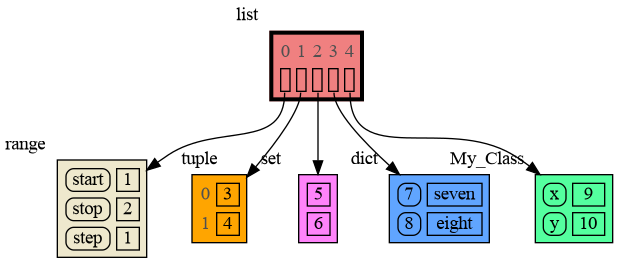
|
|
43
|
+
|
|
44
|
+
Instead of showing the graph on screen you can also render it to an output file of your choosing (see [Graphviz Output Formats](https://graphviz.org/docs/outputs/)) using for example:
|
|
28
45
|
|
|
29
|
-
|
|
46
|
+
```python
|
|
47
|
+
mg.render(data, "my_graph.pdf")
|
|
48
|
+
mg.render(data, "my_graph.svg")
|
|
49
|
+
mg.render(data, "my_graph.png")
|
|
50
|
+
mg.render(data, "my_graph.gv") # Graphviz DOT file
|
|
51
|
+
mg.render(data) # renders to 'mg.render_filename' with default value: 'memory_graph.pdf'
|
|
52
|
+
```
|
|
53
|
+
|
|
54
|
+
# Sharing Values #
|
|
55
|
+
In Python, assigning the list from variable `a` to variable `b` causes both variables to reference the same list value and thus share it. Consequently, any change applied through one variable will impact the other. This behavior can lead to elusive bugs if a programmer incorrectly assumes that list `a` and `b` are independent.
|
|
30
56
|
|
|
31
57
|
<table><tr><td>
|
|
32
58
|
|
|
@@ -67,33 +93,6 @@ identical?: True
|
|
|
67
93
|
```
|
|
68
94
|
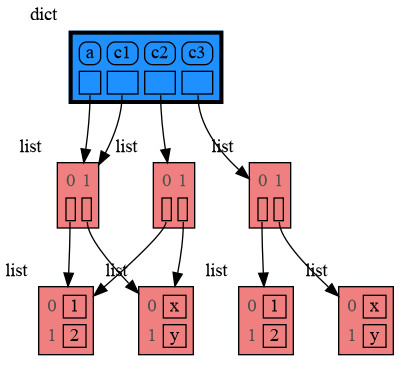
A better way to understand what data is shared is to draw a graph of the data using the [memory_graph](https://pypi.org/project/memory-graph/) package.
|
|
69
95
|
|
|
70
|
-
# Memory Graph #
|
|
71
|
-
The [memory_graph](https://pypi.org/project/memory-graph/) package can graph many different data types, not limited to:
|
|
72
|
-
|
|
73
|
-
```python
|
|
74
|
-
import memory_graph as mg
|
|
75
|
-
|
|
76
|
-
class MyClass:
|
|
77
|
-
|
|
78
|
-
def __init__(self, x, y):
|
|
79
|
-
self.x = x
|
|
80
|
-
self.y = y
|
|
81
|
-
|
|
82
|
-
data = [ range(1, 2), (3, 4), {5, 6}, {7:'seven', 8:'eight'}, MyClass(9, 10) ]
|
|
83
|
-
mg.show(data)
|
|
84
|
-
```
|
|
85
|
-

|
|
86
|
-
|
|
87
|
-
Instead of showing the graph you can also render it to an output file of your choosing (see [Graphviz Output Formats](https://graphviz.org/docs/outputs/)) using for example:
|
|
88
|
-
|
|
89
|
-
```python
|
|
90
|
-
mg.render(data, "my_graph.pdf")
|
|
91
|
-
mg.render(data, "my_graph.svg")
|
|
92
|
-
mg.render(data, "my_graph.png")
|
|
93
|
-
mg.render(data, "my_graph.gv") # Graphviz DOT file
|
|
94
|
-
mg.render(data) # renders to 'mg.render_filename' with default value: 'memory_graph.pdf'
|
|
95
|
-
```
|
|
96
|
-
|
|
97
96
|
# Chapters #
|
|
98
97
|
|
|
99
98
|
[Python Data Model](#python-data-model)
|
|
@@ -147,6 +146,7 @@ import memory_graph as mg
|
|
|
147
146
|
a = (4, 3, 2)
|
|
148
147
|
b = a
|
|
149
148
|
mg.render(locals(), 'immutable1.png')
|
|
149
|
+
|
|
150
150
|
a += (1,)
|
|
151
151
|
mg.render(locals(), 'immutable2.png')
|
|
152
152
|
```
|
|
@@ -164,6 +164,7 @@ import memory_graph as mg
|
|
|
164
164
|
a = [4, 3, 2]
|
|
165
165
|
b = a
|
|
166
166
|
mg.render(locals(), 'mutable1.png')
|
|
167
|
+
|
|
167
168
|
a += [1] # equivalent to: a.append(1)
|
|
168
169
|
mg.render(locals(), 'mutable2.png')
|
|
169
170
|
```
|
|
@@ -197,7 +198,7 @@ mg.show(locals())
|
|
|
197
198
|
|
|
198
199
|
|
|
199
200
|
|
|
200
|
-
### Custom Copy
|
|
201
|
+
### Custom Copy ###
|
|
201
202
|
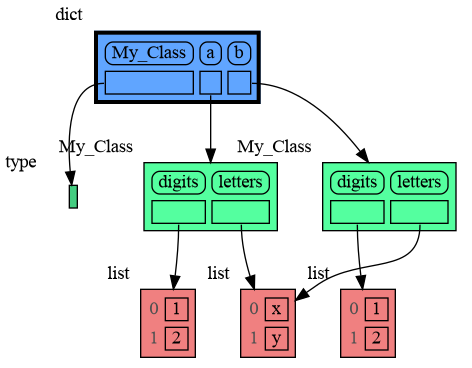
We can write our own custom copy function or method in case the three "copy" options don't do what we want. For example, in the code below the copy() method of My_Class copies the `digits` but shares the `letters` between two objects.
|
|
202
203
|
|
|
203
204
|
```python
|
|
@@ -222,9 +223,26 @@ mg.show(locals())
|
|
|
222
223
|
```
|
|
223
224
|
|
|
224
225
|
|
|
226
|
+
### Name Rebinding ###
|
|
227
|
+
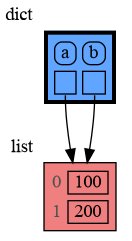
When `a` and `b` share a mutable value, then changing the value of `a` changes the value of `b` and vice versa. However, reassigning the value of `a` does not change `b`. When you reassign `a`, you only rebind the name `a` to a new value without effecting any other variables.
|
|
228
|
+
|
|
229
|
+
```python
|
|
230
|
+
import memory_graph as mg
|
|
231
|
+
|
|
232
|
+
a = [4, 3, 2]
|
|
233
|
+
b = a
|
|
234
|
+
mg.render(locals(), 'rebinding1.png')
|
|
235
|
+
|
|
236
|
+
a += [1] # changes the value of 'a' and 'b'
|
|
237
|
+
a = [100, 200] # rebinds 'a' to a new value, 'b' is uneffected
|
|
238
|
+
mg.render(locals(), 'rebinding2.png')
|
|
239
|
+
```
|
|
240
|
+
|  | 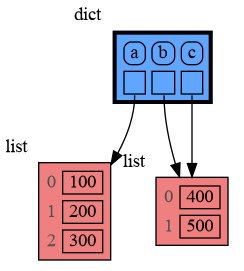 |
|
|
241
|
+
|:-----------------------------------------------------------:|:-------------------------------------------------------------:|
|
|
242
|
+
| rebinding1.png | rebinding2.png |
|
|
225
243
|
|
|
226
244
|
## Call Stack ##
|
|
227
|
-
The `mg.get_call_stack()` function retrieves the entire call stack, including the local variables for each function on the stack. This enables us to visualize the local variables across all active functions simultaneously.
|
|
245
|
+
The `mg.get_call_stack()` function retrieves the entire call stack, including the local variables for each function on the stack. This enables us to visualize the local variables across all active functions simultaneously. By examining the graph, we can determine whether any local variables from different functions share data. For instance, consider the function `add_one()` which adds the value `1` to each of its parameters `a`, `b`, and `c`.
|
|
228
246
|
|
|
229
247
|
```python
|
|
230
248
|
import memory_graph as mg
|
|
@@ -252,7 +270,7 @@ a:[4, 3, 2, 1] b:(4, 3, 2) c:[4, 3, 2]
|
|
|
252
270
|
This is because `b` is of immutable type 'tuple' so its value gets copied automatically when it is changed. And because the function is called with a copy of `c`, its original value is not changed by the function. The value of variable `a` is the only value of mutable type that is shared between the root stack frame **'0: \<module>'** and the **'1: add_one'** stack frame of the function so only that variable is affected as a result of the function call. The other changes remain confined to the local variables of the ```add_one()``` function.
|
|
253
271
|
|
|
254
272
|
### Block ###
|
|
255
|
-
It is often helpful to temporarily block program execution to inspect the graph. For this
|
|
273
|
+
It is often helpful to temporarily block program execution to inspect the graph. For this we can use the `mg.block()` function:
|
|
256
274
|
|
|
257
275
|
```python
|
|
258
276
|
mg.block(fun, arg1, arg2, ...)
|
|
@@ -264,7 +282,7 @@ This function:
|
|
|
264
282
|
* then blocks execution until the <Enter> key is pressed
|
|
265
283
|
* finally returns the value of the `fun()` call
|
|
266
284
|
|
|
267
|
-
|
|
285
|
+
To change its behavior:
|
|
268
286
|
* Set `mg.block_prints_location = False` to skip printing the source location.
|
|
269
287
|
* Set `mg.press_enter_message = None` to skip printing "Press <Enter> to continue...".
|
|
270
288
|
|
|
@@ -319,7 +337,6 @@ print( power_set(['a', 'b', 'c']) )
|
|
|
319
337
|
[['a', 'b', 'c'], ['a', 'b'], ['a', 'c'], ['a'], ['b', 'c'], ['b'], ['c'], []]
|
|
320
338
|
```
|
|
321
339
|
|
|
322
|
-
|
|
323
340
|
## Debugging ##
|
|
324
341
|
|
|
325
342
|
For the best debugging experience with memory_graph set for example expression:
|
|
@@ -463,7 +480,7 @@ class BinTree:
|
|
|
463
480
|
tree = BinTree()
|
|
464
481
|
n = 100
|
|
465
482
|
for i in range(n):
|
|
466
|
-
new_value = random.randrange(
|
|
483
|
+
new_value = random.randrange(n)
|
|
467
484
|
tree.add(new_value)
|
|
468
485
|
```
|
|
469
486
|
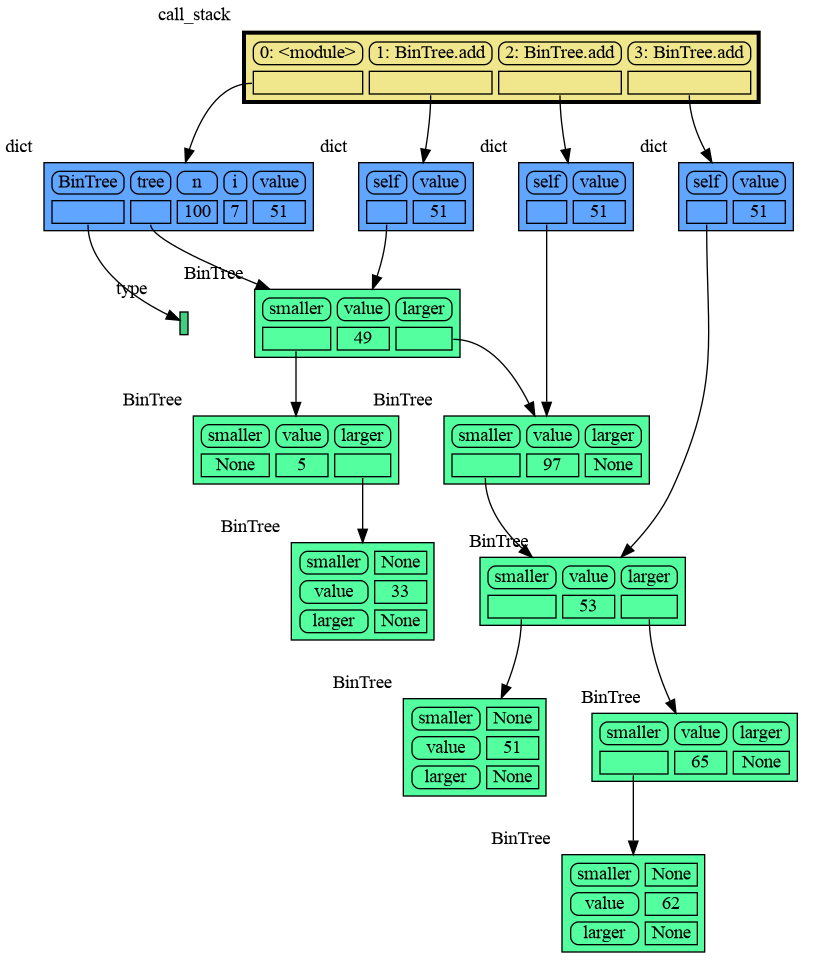
|
|
@@ -551,9 +568,9 @@ mg.render(locals(), 'not_node_types2.png')
|
|
|
551
568
|
```
|
|
552
569
|
|  |  |
|
|
553
570
|
|:-----------------------------------------------------------:|:-------------------------------------------------------------:|
|
|
554
|
-
| not_node_types1.png
|
|
571
|
+
| not_node_types1.png — simplified | not_node_types2.png — technically correct |
|
|
555
572
|
|
|
556
|
-
Additionally, the simplification hides the [reuse of small
|
|
573
|
+
Additionally, the simplification hides away the [reuse of small int values](https://docs.python.org/3/c-api/long.html#c.PyLong_FromLong) in the current CPython implementation, an optimization that might otherwise confuse beginner Python programmers. For instance, after executing `a[1]+=1; b[1]+=1` the `201` value is, maybe surprisingly, still shared between `a` and `b`, whereas executing `a[2]+=1; b[2]+=1` does not result in sharing the `301` value.
|
|
557
574
|
|
|
558
575
|
### Temporary Configuration ###
|
|
559
576
|
In addition to the global configuration, a temporary configuration can be set for a single `show()` or `render()` call to change the colors, orientation, and slicer. This example highlights a particular list element in red, gives it a horizontal orientation, and overwrites the default slicer for lists:
|
|
@@ -779,3 +796,6 @@ We can also run memory_graph in the browser: <a href="https://bterwijn.github.io
|
|
|
779
796
|
- Adobe Acrobat Reader [doesn't refresh a PDF file](https://superuser.com/questions/337011/windows-pdf-viewer-that-auto-refreshes-pdf-when-compiling-with-pdflatex) when it changes on disk and blocks updates which results in an `Could not open 'somefile.pdf' for writing : Permission denied` error. One solution is to install a PDF reader that does refresh ([Evince](https://www.fosshub.com/Evince.html), [Okular](https://okular.kde.org/), [SumatraPDF](https://www.sumatrapdfreader.org/), ...) and set it as the default PDF reader. Another solution is to `render()` the graph to a different output format and to open it manually.
|
|
780
797
|
|
|
781
798
|
- When graph edges overlap it can be hard to distinguish them. Using an interactive graphviz viewer, such as [xdot](https://github.com/jrfonseca/xdot.py), on a '*.gv' DOT output file will help.
|
|
799
|
+
|
|
800
|
+
### Invocation_Tree Package ###
|
|
801
|
+
The [memory_graph](https://pypi.org/project/memory-graph/) package visualizes your data. If instead you want to visualize function calls, check out the [invocation_tree](https://pypi.org/project/invocation-tree/) package.
|
|
@@ -1,22 +1,3 @@
|
|
|
1
|
-
Metadata-Version: 2.1
|
|
2
|
-
Name: memory_graph
|
|
3
|
-
Version: 0.3.13
|
|
4
|
-
Summary: Draws a graph of your data to analyze its structure.
|
|
5
|
-
Home-page: https://github.com/bterwijn/memory_graph
|
|
6
|
-
Author: Bas Terwijn
|
|
7
|
-
Author-email: bterwijn@gmail.com
|
|
8
|
-
License: BSD 2-clause
|
|
9
|
-
Classifier: Development Status :: 4 - Beta
|
|
10
|
-
Classifier: Intended Audience :: Education
|
|
11
|
-
Classifier: Intended Audience :: Developers
|
|
12
|
-
Classifier: License :: OSI Approved :: BSD License
|
|
13
|
-
Classifier: Programming Language :: Python :: 3
|
|
14
|
-
Classifier: Topic :: Education
|
|
15
|
-
Classifier: Topic :: Software Development :: Debuggers
|
|
16
|
-
Description-Content-Type: text/markdown
|
|
17
|
-
License-File: LICENSE.txt
|
|
18
|
-
Requires-Dist: graphviz
|
|
19
|
-
|
|
20
1
|
# Installation #
|
|
21
2
|
Install (or upgrade) `memory_graph` using pip:
|
|
22
3
|
```
|
|
@@ -24,9 +5,35 @@ pip install --upgrade memory_graph
|
|
|
24
5
|
```
|
|
25
6
|
Additionally [Graphviz](https://graphviz.org/download/) needs to be installed.
|
|
26
7
|
|
|
27
|
-
#
|
|
8
|
+
# Memory Graph #
|
|
9
|
+
For program understanding and debugging, the [memory_graph](https://pypi.org/project/memory-graph/) package can visualize your data, supporting many different data types, including but not limited to:
|
|
10
|
+
|
|
11
|
+
```python
|
|
12
|
+
import memory_graph as mg
|
|
13
|
+
|
|
14
|
+
class MyClass:
|
|
15
|
+
|
|
16
|
+
def __init__(self, x, y):
|
|
17
|
+
self.x = x
|
|
18
|
+
self.y = y
|
|
19
|
+
|
|
20
|
+
data = [ range(1, 2), (3, 4), {5, 6}, {7:'seven', 8:'eight'}, MyClass(9, 10) ]
|
|
21
|
+
mg.show(data)
|
|
22
|
+
```
|
|
23
|
+

|
|
24
|
+
|
|
25
|
+
Instead of showing the graph on screen you can also render it to an output file of your choosing (see [Graphviz Output Formats](https://graphviz.org/docs/outputs/)) using for example:
|
|
26
|
+
|
|
27
|
+
```python
|
|
28
|
+
mg.render(data, "my_graph.pdf")
|
|
29
|
+
mg.render(data, "my_graph.svg")
|
|
30
|
+
mg.render(data, "my_graph.png")
|
|
31
|
+
mg.render(data, "my_graph.gv") # Graphviz DOT file
|
|
32
|
+
mg.render(data) # renders to 'mg.render_filename' with default value: 'memory_graph.pdf'
|
|
33
|
+
```
|
|
28
34
|
|
|
29
|
-
|
|
35
|
+
# Sharing Values #
|
|
36
|
+
In Python, assigning the list from variable `a` to variable `b` causes both variables to reference the same list value and thus share it. Consequently, any change applied through one variable will impact the other. This behavior can lead to elusive bugs if a programmer incorrectly assumes that list `a` and `b` are independent.
|
|
30
37
|
|
|
31
38
|
<table><tr><td>
|
|
32
39
|
|
|
@@ -67,33 +74,6 @@ identical?: True
|
|
|
67
74
|
```
|
|
68
75
|
A better way to understand what data is shared is to draw a graph of the data using the [memory_graph](https://pypi.org/project/memory-graph/) package.
|
|
69
76
|
|
|
70
|
-
# Memory Graph #
|
|
71
|
-
The [memory_graph](https://pypi.org/project/memory-graph/) package can graph many different data types, not limited to:
|
|
72
|
-
|
|
73
|
-
```python
|
|
74
|
-
import memory_graph as mg
|
|
75
|
-
|
|
76
|
-
class MyClass:
|
|
77
|
-
|
|
78
|
-
def __init__(self, x, y):
|
|
79
|
-
self.x = x
|
|
80
|
-
self.y = y
|
|
81
|
-
|
|
82
|
-
data = [ range(1, 2), (3, 4), {5, 6}, {7:'seven', 8:'eight'}, MyClass(9, 10) ]
|
|
83
|
-
mg.show(data)
|
|
84
|
-
```
|
|
85
|
-

|
|
86
|
-
|
|
87
|
-
Instead of showing the graph you can also render it to an output file of your choosing (see [Graphviz Output Formats](https://graphviz.org/docs/outputs/)) using for example:
|
|
88
|
-
|
|
89
|
-
```python
|
|
90
|
-
mg.render(data, "my_graph.pdf")
|
|
91
|
-
mg.render(data, "my_graph.svg")
|
|
92
|
-
mg.render(data, "my_graph.png")
|
|
93
|
-
mg.render(data, "my_graph.gv") # Graphviz DOT file
|
|
94
|
-
mg.render(data) # renders to 'mg.render_filename' with default value: 'memory_graph.pdf'
|
|
95
|
-
```
|
|
96
|
-
|
|
97
77
|
# Chapters #
|
|
98
78
|
|
|
99
79
|
[Python Data Model](#python-data-model)
|
|
@@ -147,6 +127,7 @@ import memory_graph as mg
|
|
|
147
127
|
a = (4, 3, 2)
|
|
148
128
|
b = a
|
|
149
129
|
mg.render(locals(), 'immutable1.png')
|
|
130
|
+
|
|
150
131
|
a += (1,)
|
|
151
132
|
mg.render(locals(), 'immutable2.png')
|
|
152
133
|
```
|
|
@@ -164,6 +145,7 @@ import memory_graph as mg
|
|
|
164
145
|
a = [4, 3, 2]
|
|
165
146
|
b = a
|
|
166
147
|
mg.render(locals(), 'mutable1.png')
|
|
148
|
+
|
|
167
149
|
a += [1] # equivalent to: a.append(1)
|
|
168
150
|
mg.render(locals(), 'mutable2.png')
|
|
169
151
|
```
|
|
@@ -197,7 +179,7 @@ mg.show(locals())
|
|
|
197
179
|

|
|
198
180
|
|
|
199
181
|
|
|
200
|
-
### Custom Copy
|
|
182
|
+
### Custom Copy ###
|
|
201
183
|
We can write our own custom copy function or method in case the three "copy" options don't do what we want. For example, in the code below the copy() method of My_Class copies the `digits` but shares the `letters` between two objects.
|
|
202
184
|
|
|
203
185
|
```python
|
|
@@ -222,9 +204,26 @@ mg.show(locals())
|
|
|
222
204
|
```
|
|
223
205
|

|
|
224
206
|
|
|
207
|
+
### Name Rebinding ###
|
|
208
|
+
When `a` and `b` share a mutable value, then changing the value of `a` changes the value of `b` and vice versa. However, reassigning the value of `a` does not change `b`. When you reassign `a`, you only rebind the name `a` to a new value without effecting any other variables.
|
|
209
|
+
|
|
210
|
+
```python
|
|
211
|
+
import memory_graph as mg
|
|
212
|
+
|
|
213
|
+
a = [4, 3, 2]
|
|
214
|
+
b = a
|
|
215
|
+
mg.render(locals(), 'rebinding1.png')
|
|
216
|
+
|
|
217
|
+
a += [1] # changes the value of 'a' and 'b'
|
|
218
|
+
a = [100, 200] # rebinds 'a' to a new value, 'b' is uneffected
|
|
219
|
+
mg.render(locals(), 'rebinding2.png')
|
|
220
|
+
```
|
|
221
|
+
|  |  |
|
|
222
|
+
|:-----------------------------------------------------------:|:-------------------------------------------------------------:|
|
|
223
|
+
| rebinding1.png | rebinding2.png |
|
|
225
224
|
|
|
226
225
|
## Call Stack ##
|
|
227
|
-
The `mg.get_call_stack()` function retrieves the entire call stack, including the local variables for each function on the stack. This enables us to visualize the local variables across all active functions simultaneously.
|
|
226
|
+
The `mg.get_call_stack()` function retrieves the entire call stack, including the local variables for each function on the stack. This enables us to visualize the local variables across all active functions simultaneously. By examining the graph, we can determine whether any local variables from different functions share data. For instance, consider the function `add_one()` which adds the value `1` to each of its parameters `a`, `b`, and `c`.
|
|
228
227
|
|
|
229
228
|
```python
|
|
230
229
|
import memory_graph as mg
|
|
@@ -252,7 +251,7 @@ a:[4, 3, 2, 1] b:(4, 3, 2) c:[4, 3, 2]
|
|
|
252
251
|
This is because `b` is of immutable type 'tuple' so its value gets copied automatically when it is changed. And because the function is called with a copy of `c`, its original value is not changed by the function. The value of variable `a` is the only value of mutable type that is shared between the root stack frame **'0: \<module>'** and the **'1: add_one'** stack frame of the function so only that variable is affected as a result of the function call. The other changes remain confined to the local variables of the ```add_one()``` function.
|
|
253
252
|
|
|
254
253
|
### Block ###
|
|
255
|
-
It is often helpful to temporarily block program execution to inspect the graph. For this
|
|
254
|
+
It is often helpful to temporarily block program execution to inspect the graph. For this we can use the `mg.block()` function:
|
|
256
255
|
|
|
257
256
|
```python
|
|
258
257
|
mg.block(fun, arg1, arg2, ...)
|
|
@@ -264,7 +263,7 @@ This function:
|
|
|
264
263
|
* then blocks execution until the <Enter> key is pressed
|
|
265
264
|
* finally returns the value of the `fun()` call
|
|
266
265
|
|
|
267
|
-
|
|
266
|
+
To change its behavior:
|
|
268
267
|
* Set `mg.block_prints_location = False` to skip printing the source location.
|
|
269
268
|
* Set `mg.press_enter_message = None` to skip printing "Press <Enter> to continue...".
|
|
270
269
|
|
|
@@ -319,7 +318,6 @@ print( power_set(['a', 'b', 'c']) )
|
|
|
319
318
|
[['a', 'b', 'c'], ['a', 'b'], ['a', 'c'], ['a'], ['b', 'c'], ['b'], ['c'], []]
|
|
320
319
|
```
|
|
321
320
|
|
|
322
|
-
|
|
323
321
|
## Debugging ##
|
|
324
322
|
|
|
325
323
|
For the best debugging experience with memory_graph set for example expression:
|
|
@@ -463,7 +461,7 @@ class BinTree:
|
|
|
463
461
|
tree = BinTree()
|
|
464
462
|
n = 100
|
|
465
463
|
for i in range(n):
|
|
466
|
-
new_value = random.randrange(
|
|
464
|
+
new_value = random.randrange(n)
|
|
467
465
|
tree.add(new_value)
|
|
468
466
|
```
|
|
469
467
|

|
|
@@ -551,9 +549,9 @@ mg.render(locals(), 'not_node_types2.png')
|
|
|
551
549
|
```
|
|
552
550
|
|  |  |
|
|
553
551
|
|:-----------------------------------------------------------:|:-------------------------------------------------------------:|
|
|
554
|
-
| not_node_types1.png
|
|
552
|
+
| not_node_types1.png — simplified | not_node_types2.png — technically correct |
|
|
555
553
|
|
|
556
|
-
Additionally, the simplification hides the [reuse of small
|
|
554
|
+
Additionally, the simplification hides away the [reuse of small int values](https://docs.python.org/3/c-api/long.html#c.PyLong_FromLong) in the current CPython implementation, an optimization that might otherwise confuse beginner Python programmers. For instance, after executing `a[1]+=1; b[1]+=1` the `201` value is, maybe surprisingly, still shared between `a` and `b`, whereas executing `a[2]+=1; b[2]+=1` does not result in sharing the `301` value.
|
|
557
555
|
|
|
558
556
|
### Temporary Configuration ###
|
|
559
557
|
In addition to the global configuration, a temporary configuration can be set for a single `show()` or `render()` call to change the colors, orientation, and slicer. This example highlights a particular list element in red, gives it a horizontal orientation, and overwrites the default slicer for lists:
|
|
@@ -779,3 +777,6 @@ We can also run memory_graph in the browser: <a href="https://bterwijn.github.io
|
|
|
779
777
|
- Adobe Acrobat Reader [doesn't refresh a PDF file](https://superuser.com/questions/337011/windows-pdf-viewer-that-auto-refreshes-pdf-when-compiling-with-pdflatex) when it changes on disk and blocks updates which results in an `Could not open 'somefile.pdf' for writing : Permission denied` error. One solution is to install a PDF reader that does refresh ([Evince](https://www.fosshub.com/Evince.html), [Okular](https://okular.kde.org/), [SumatraPDF](https://www.sumatrapdfreader.org/), ...) and set it as the default PDF reader. Another solution is to `render()` the graph to a different output format and to open it manually.
|
|
780
778
|
|
|
781
779
|
- When graph edges overlap it can be hard to distinguish them. Using an interactive graphviz viewer, such as [xdot](https://github.com/jrfonseca/xdot.py), on a '*.gv' DOT output file will help.
|
|
780
|
+
|
|
781
|
+
### Invocation_Tree Package ###
|
|
782
|
+
The [memory_graph](https://pypi.org/project/memory-graph/) package visualizes your data. If instead you want to visualize function calls, check out the [invocation_tree](https://pypi.org/project/invocation-tree/) package.
|
|
Binary file
|
|
@@ -0,0 +1,18 @@
|
|
|
1
|
+
# This file is part of memory_graph.
|
|
2
|
+
# Copyright (c) 2023, Bas Terwijn.
|
|
3
|
+
# SPDX-License-Identifier: BSD-2-Clause
|
|
4
|
+
|
|
5
|
+
import memory_graph as mg
|
|
6
|
+
|
|
7
|
+
def add_one(a, b, c):
|
|
8
|
+
a += [1]
|
|
9
|
+
b += (1,)
|
|
10
|
+
c += [1]
|
|
11
|
+
mg.render( mg.get_call_stack(), "add_one.png")
|
|
12
|
+
|
|
13
|
+
a = [4, 3, 2]
|
|
14
|
+
b = (4, 3, 2)
|
|
15
|
+
c = [4, 3, 2]
|
|
16
|
+
|
|
17
|
+
add_one(a, b, c.copy())
|
|
18
|
+
print(f"a:{a} b:{b} c:{c}")
|
|
@@ -0,0 +1,43 @@
|
|
|
1
|
+
# This file is part of memory_graph.
|
|
2
|
+
# Copyright (c) 2023, Bas Terwijn.
|
|
3
|
+
# SPDX-License-Identifier: BSD-2-Clause
|
|
4
|
+
|
|
5
|
+
import memory_graph as mg
|
|
6
|
+
import bintrees
|
|
7
|
+
|
|
8
|
+
# Create an AVL tree
|
|
9
|
+
tree = bintrees.AVLTree()
|
|
10
|
+
tree.insert(10, "ten")
|
|
11
|
+
tree.insert(5, "five")
|
|
12
|
+
tree.insert(20, "twenty")
|
|
13
|
+
tree.insert(15, "fifteen")
|
|
14
|
+
|
|
15
|
+
# mg.render(locals(), 'avltree_fail.png') # id keeps changing
|
|
16
|
+
|
|
17
|
+
mg.config.type_to_color[bintrees.avltree.Node] = "sandybrown"
|
|
18
|
+
mg.config.type_to_node[bintrees.avltree.Node] = lambda data: mg.node_linear.Node_Linear(data, dir(data))
|
|
19
|
+
mg.config.type_to_slicer[bintrees.avltree.Node] = mg.slicer.Slicer()
|
|
20
|
+
mg.render(locals(), 'avltree_dir.png')
|
|
21
|
+
|
|
22
|
+
mg.config.type_to_node[bintrees.avltree.Node] = lambda data: mg.node_base.Node_Base(f"key:{data.key} value:{data.value}")
|
|
23
|
+
mg.render(locals(), 'avltree_base.png')
|
|
24
|
+
|
|
25
|
+
mg.config.type_to_node[bintrees.avltree.Node] = lambda data: mg.node_linear.Node_Linear(data,
|
|
26
|
+
['left:', data.left,
|
|
27
|
+
'key:', data.key,
|
|
28
|
+
'value:', data.value,
|
|
29
|
+
'right:', data.right])
|
|
30
|
+
mg.render(locals(), 'avltree_linear.png')
|
|
31
|
+
|
|
32
|
+
mg.config.type_to_node[bintrees.avltree.Node] = lambda data: mg.node_key_value.Node_Key_Value(data,
|
|
33
|
+
{'left': data.left,
|
|
34
|
+
'key': data.key,
|
|
35
|
+
'value': data.value,
|
|
36
|
+
'right': data.right}.items())
|
|
37
|
+
mg.render(locals(), 'avltree_key_value.png')
|
|
38
|
+
|
|
39
|
+
mg.config.type_to_node[bintrees.avltree.Node] = lambda data: mg.node_table.Node_Table(data,
|
|
40
|
+
[[data.key, data.value],
|
|
41
|
+
[data.left, data.right]]
|
|
42
|
+
)
|
|
43
|
+
mg.render(locals(), 'avltree_table.png')
|
|
Binary file
|
|
Binary file
|
|
Binary file
|
|
Binary file
|
|
Binary file
|
|
Binary file
|
|
Binary file
|
|
@@ -0,0 +1,47 @@
|
|
|
1
|
+
# This file is part of memory_graph.
|
|
2
|
+
# Copyright (c) 2023, Bas Terwijn.
|
|
3
|
+
# SPDX-License-Identifier: BSD-2-Clause
|
|
4
|
+
|
|
5
|
+
import memory_graph as mg
|
|
6
|
+
import random
|
|
7
|
+
random.seed(0) # use same random numbers each run
|
|
8
|
+
|
|
9
|
+
class Node:
|
|
10
|
+
|
|
11
|
+
def __init__(self, value):
|
|
12
|
+
self.smaller = None
|
|
13
|
+
self.value = value
|
|
14
|
+
self.larger = None
|
|
15
|
+
|
|
16
|
+
class BinTree:
|
|
17
|
+
|
|
18
|
+
def __init__(self):
|
|
19
|
+
self.root = None
|
|
20
|
+
|
|
21
|
+
def add_recursive(self, new_value, node):
|
|
22
|
+
if new_value < node.value:
|
|
23
|
+
if node.smaller is None:
|
|
24
|
+
node.smaller = Node(new_value)
|
|
25
|
+
else:
|
|
26
|
+
self.add_recursive(new_value, node.smaller)
|
|
27
|
+
else:
|
|
28
|
+
if node.larger is None:
|
|
29
|
+
node.larger = Node(new_value)
|
|
30
|
+
else:
|
|
31
|
+
self.add_recursive(new_value, node.larger)
|
|
32
|
+
if new_value == 51:
|
|
33
|
+
mg.render(locals(), f"bin_tree.png")
|
|
34
|
+
exit(0)
|
|
35
|
+
|
|
36
|
+
def add(self, value):
|
|
37
|
+
if self.root is None:
|
|
38
|
+
self.root = Node(value)
|
|
39
|
+
else:
|
|
40
|
+
self.add_recursive(value, self.root)
|
|
41
|
+
|
|
42
|
+
tree = BinTree()
|
|
43
|
+
n = 100
|
|
44
|
+
for i in range(n):
|
|
45
|
+
new_value = random.randrange(n)
|
|
46
|
+
tree.add(new_value)
|
|
47
|
+
|
|
@@ -0,0 +1 @@
|
|
|
1
|
+
o $1 && sleep 0.3 && o ../images_old/$1
|
|
Binary file
|
|
@@ -0,0 +1,15 @@
|
|
|
1
|
+
# This file is part of memory_graph.
|
|
2
|
+
# Copyright (c) 2023, Bas Terwijn.
|
|
3
|
+
# SPDX-License-Identifier: BSD-2-Clause
|
|
4
|
+
|
|
5
|
+
import memory_graph as mg
|
|
6
|
+
import copy
|
|
7
|
+
|
|
8
|
+
a = [ [1, 2], ['x', 'y'] ] # a nested list (a list containing lists)
|
|
9
|
+
|
|
10
|
+
# three different ways to make a "copy" of 'a':
|
|
11
|
+
c1 = a
|
|
12
|
+
c2 = copy.copy(a) # equivalent to: a.copy() a[:] list(a)
|
|
13
|
+
c3 = copy.deepcopy(a)
|
|
14
|
+
|
|
15
|
+
mg.render(locals(), 'copies.png')
|
|
Binary file
|
|
@@ -0,0 +1,22 @@
|
|
|
1
|
+
# This file is part of memory_graph.
|
|
2
|
+
# Copyright (c) 2023, Bas Terwijn.
|
|
3
|
+
# SPDX-License-Identifier: BSD-2-Clause
|
|
4
|
+
|
|
5
|
+
import memory_graph as mg
|
|
6
|
+
import copy
|
|
7
|
+
|
|
8
|
+
class My_Class:
|
|
9
|
+
|
|
10
|
+
def __init__(self):
|
|
11
|
+
self.digits = [1, 2]
|
|
12
|
+
self.letters = ['x', 'y']
|
|
13
|
+
|
|
14
|
+
def copy(self): # custom copy method copies the digits but shares the letters
|
|
15
|
+
c = copy.copy(self)
|
|
16
|
+
c.digits = copy.copy(self.digits)
|
|
17
|
+
return c
|
|
18
|
+
|
|
19
|
+
a = My_Class()
|
|
20
|
+
b = a.copy()
|
|
21
|
+
|
|
22
|
+
mg.render(locals(), 'copy_method.png')
|
|
@@ -0,0 +1,19 @@
|
|
|
1
|
+
#!/bin/bash
|
|
2
|
+
#
|
|
3
|
+
# install:
|
|
4
|
+
#
|
|
5
|
+
# sudo apt install imagemagick
|
|
6
|
+
|
|
7
|
+
name="$1"
|
|
8
|
+
files=$(ls -v $name*.png)
|
|
9
|
+
echo "creating gif with:"
|
|
10
|
+
echo "$files"
|
|
11
|
+
|
|
12
|
+
largest_size=$(identify -format "%H %Wx%H %f\n" $name*.png | sort -nr | head -n1| awk '{print $2}')
|
|
13
|
+
echo "largest_size: $largest_size"
|
|
14
|
+
|
|
15
|
+
echo "resizing images"
|
|
16
|
+
mogrify -resize $largest_size -background white -gravity center -extent $largest_size $files
|
|
17
|
+
echo "creating file: $name.gif"
|
|
18
|
+
convert -delay 150 -loop 0 $files $name.gif
|
|
19
|
+
echo "done"
|
|
@@ -0,0 +1,36 @@
|
|
|
1
|
+
# intro
|
|
2
|
+
python many_types.py
|
|
3
|
+
|
|
4
|
+
# debugging
|
|
5
|
+
python debugging.py
|
|
6
|
+
bash create_gif.sh debugging
|
|
7
|
+
|
|
8
|
+
# data model
|
|
9
|
+
python immutable.py
|
|
10
|
+
python mutable.py
|
|
11
|
+
python copies.py
|
|
12
|
+
python copy_method.py
|
|
13
|
+
python name_rebinding.py
|
|
14
|
+
|
|
15
|
+
# call stack
|
|
16
|
+
python add_one.py
|
|
17
|
+
python factorial.py
|
|
18
|
+
bash create_gif.sh factorial
|
|
19
|
+
python power_set.py
|
|
20
|
+
bash create_gif.sh power_set
|
|
21
|
+
|
|
22
|
+
# datastructures
|
|
23
|
+
python linked_list.py
|
|
24
|
+
python bin_tree.py
|
|
25
|
+
python hash_set.py
|
|
26
|
+
|
|
27
|
+
# configuration
|
|
28
|
+
python not_node_types.py
|
|
29
|
+
python highlight.py
|
|
30
|
+
|
|
31
|
+
# extensions
|
|
32
|
+
python extension_numpy.py
|
|
33
|
+
python extension_pandas.py
|
|
34
|
+
|
|
35
|
+
# introspection
|
|
36
|
+
python avltree.py
|
|
Binary file
|
|
Binary file
|
|
@@ -0,0 +1,19 @@
|
|
|
1
|
+
# This file is part of memory_graph.
|
|
2
|
+
# Copyright (c) 2023, Bas Terwijn.
|
|
3
|
+
# SPDX-License-Identifier: BSD-2-Clause
|
|
4
|
+
|
|
5
|
+
import memory_graph as mg
|
|
6
|
+
|
|
7
|
+
image=0
|
|
8
|
+
def get_fac_name():
|
|
9
|
+
global image
|
|
10
|
+
image+=1
|
|
11
|
+
return f"debugging{image:02d}.png"
|
|
12
|
+
|
|
13
|
+
squares = []
|
|
14
|
+
squares_collector = []
|
|
15
|
+
for i in range(1,6):
|
|
16
|
+
squares.append(i**2)
|
|
17
|
+
squares_collector.append(squares.copy())
|
|
18
|
+
mg.render(locals(), get_fac_name())
|
|
19
|
+
mg.render(locals(), get_fac_name())
|
|
Binary file
|
|
Binary file
|