memory-graph 0.3.10__tar.gz → 0.3.12__tar.gz
This diff represents the content of publicly available package versions that have been released to one of the supported registries. The information contained in this diff is provided for informational purposes only and reflects changes between package versions as they appear in their respective public registries.
- {memory_graph-0.3.10/memory_graph.egg-info → memory_graph-0.3.12}/PKG-INFO +13 -11
- {memory_graph-0.3.10 → memory_graph-0.3.12}/README.md +12 -10
- memory_graph-0.3.12/images/debug_vscode.png +0 -0
- {memory_graph-0.3.10 → memory_graph-0.3.12}/images/factorial.gif +0 -0
- {memory_graph-0.3.10 → memory_graph-0.3.12}/memory_graph/__init__.py +4 -2
- {memory_graph-0.3.10 → memory_graph-0.3.12}/memory_graph/config.py +2 -1
- {memory_graph-0.3.10 → memory_graph-0.3.12}/memory_graph/config_default.py +2 -2
- {memory_graph-0.3.10 → memory_graph-0.3.12}/memory_graph/html_table.py +1 -1
- {memory_graph-0.3.10 → memory_graph-0.3.12}/memory_graph/memory_to_nodes.py +7 -7
- {memory_graph-0.3.10 → memory_graph-0.3.12}/memory_graph/test.py +1 -1
- memory_graph-0.3.12/memory_graph/test_max_graph_depth.py +27 -0
- {memory_graph-0.3.10 → memory_graph-0.3.12/memory_graph.egg-info}/PKG-INFO +13 -11
- {memory_graph-0.3.10 → memory_graph-0.3.12}/memory_graph.egg-info/SOURCES.txt +2 -0
- {memory_graph-0.3.10 → memory_graph-0.3.12}/setup.py +1 -1
- {memory_graph-0.3.10 → memory_graph-0.3.12}/src/auto_memory_graph.py +5 -2
- {memory_graph-0.3.10 → memory_graph-0.3.12}/src/pyodide.html +6 -3
- {memory_graph-0.3.10 → memory_graph-0.3.12}/LICENSE.txt +0 -0
- {memory_graph-0.3.10 → memory_graph-0.3.12}/MANIFEST.in +0 -0
- {memory_graph-0.3.10 → memory_graph-0.3.12}/TODO.txt +0 -0
- {memory_graph-0.3.10 → memory_graph-0.3.12}/images/add_one.png +0 -0
- {memory_graph-0.3.10 → memory_graph-0.3.12}/images/add_one.py +0 -0
- {memory_graph-0.3.10 → memory_graph-0.3.12}/images/avltree.py +0 -0
- {memory_graph-0.3.10 → memory_graph-0.3.12}/images/avltree_base.png +0 -0
- {memory_graph-0.3.10 → memory_graph-0.3.12}/images/avltree_dir.png +0 -0
- {memory_graph-0.3.10 → memory_graph-0.3.12}/images/avltree_fail.png +0 -0
- {memory_graph-0.3.10 → memory_graph-0.3.12}/images/avltree_key_value.png +0 -0
- {memory_graph-0.3.10 → memory_graph-0.3.12}/images/avltree_linear.png +0 -0
- {memory_graph-0.3.10 → memory_graph-0.3.12}/images/avltree_table.png +0 -0
- {memory_graph-0.3.10 → memory_graph-0.3.12}/images/bin_tree.png +0 -0
- {memory_graph-0.3.10 → memory_graph-0.3.12}/images/bin_tree.py +0 -0
- {memory_graph-0.3.10 → memory_graph-0.3.12}/images/copies.png +0 -0
- {memory_graph-0.3.10 → memory_graph-0.3.12}/images/copies.py +0 -0
- {memory_graph-0.3.10 → memory_graph-0.3.12}/images/copy_method.png +0 -0
- {memory_graph-0.3.10 → memory_graph-0.3.12}/images/copy_method.py +0 -0
- {memory_graph-0.3.10 → memory_graph-0.3.12}/images/create_gif.sh +0 -0
- {memory_graph-0.3.10 → memory_graph-0.3.12}/images/create_images.sh +0 -0
- {memory_graph-0.3.10 → memory_graph-0.3.12}/images/debugging.gif +0 -0
- {memory_graph-0.3.10 → memory_graph-0.3.12}/images/debugging.py +0 -0
- {memory_graph-0.3.10 → memory_graph-0.3.12}/images/extension_numpy.png +0 -0
- {memory_graph-0.3.10 → memory_graph-0.3.12}/images/extension_numpy.py +0 -0
- {memory_graph-0.3.10 → memory_graph-0.3.12}/images/extension_pandas.png +0 -0
- {memory_graph-0.3.10 → memory_graph-0.3.12}/images/extension_pandas.py +0 -0
- {memory_graph-0.3.10 → memory_graph-0.3.12}/images/factorial.py +0 -0
- {memory_graph-0.3.10 → memory_graph-0.3.12}/images/hash_set.png +0 -0
- {memory_graph-0.3.10 → memory_graph-0.3.12}/images/hash_set.py +0 -0
- {memory_graph-0.3.10 → memory_graph-0.3.12}/images/highlight.png +0 -0
- {memory_graph-0.3.10 → memory_graph-0.3.12}/images/highlight.py +0 -0
- {memory_graph-0.3.10 → memory_graph-0.3.12}/images/immutable.py +0 -0
- {memory_graph-0.3.10 → memory_graph-0.3.12}/images/immutable1.png +0 -0
- {memory_graph-0.3.10 → memory_graph-0.3.12}/images/immutable2.png +0 -0
- {memory_graph-0.3.10 → memory_graph-0.3.12}/images/ipython.png +0 -0
- {memory_graph-0.3.10 → memory_graph-0.3.12}/images/jupyter_example.ipynb +0 -0
- {memory_graph-0.3.10 → memory_graph-0.3.12}/images/jupyter_example.png +0 -0
- {memory_graph-0.3.10 → memory_graph-0.3.12}/images/linked_list.png +0 -0
- {memory_graph-0.3.10 → memory_graph-0.3.12}/images/linked_list.py +0 -0
- {memory_graph-0.3.10 → memory_graph-0.3.12}/images/many_types.png +0 -0
- {memory_graph-0.3.10 → memory_graph-0.3.12}/images/many_types.py +0 -0
- {memory_graph-0.3.10 → memory_graph-0.3.12}/images/mutable.py +0 -0
- {memory_graph-0.3.10 → memory_graph-0.3.12}/images/mutable1.png +0 -0
- {memory_graph-0.3.10 → memory_graph-0.3.12}/images/mutable2.png +0 -0
- {memory_graph-0.3.10 → memory_graph-0.3.12}/images/power_set.gif +0 -0
- {memory_graph-0.3.10 → memory_graph-0.3.12}/images/power_set.py +0 -0
- {memory_graph-0.3.10 → memory_graph-0.3.12}/images/pyodide.png +0 -0
- {memory_graph-0.3.10 → memory_graph-0.3.12}/images/uva.png +0 -0
- {memory_graph-0.3.10 → memory_graph-0.3.12}/install.txt +0 -0
- {memory_graph-0.3.10 → memory_graph-0.3.12}/memory_graph/config_helpers.py +0 -0
- {memory_graph-0.3.10 → memory_graph-0.3.12}/memory_graph/extension_numpy.py +0 -0
- {memory_graph-0.3.10 → memory_graph-0.3.12}/memory_graph/extension_pandas.py +0 -0
- {memory_graph-0.3.10 → memory_graph-0.3.12}/memory_graph/list_view.py +0 -0
- {memory_graph-0.3.10 → memory_graph-0.3.12}/memory_graph/node_base.py +0 -0
- {memory_graph-0.3.10 → memory_graph-0.3.12}/memory_graph/node_key_value.py +0 -0
- {memory_graph-0.3.10 → memory_graph-0.3.12}/memory_graph/node_linear.py +0 -0
- {memory_graph-0.3.10 → memory_graph-0.3.12}/memory_graph/node_table.py +0 -0
- {memory_graph-0.3.10 → memory_graph-0.3.12}/memory_graph/sequence.py +0 -0
- {memory_graph-0.3.10 → memory_graph-0.3.12}/memory_graph/slicer.py +0 -0
- {memory_graph-0.3.10 → memory_graph-0.3.12}/memory_graph/slices.py +0 -0
- {memory_graph-0.3.10 → memory_graph-0.3.12}/memory_graph/slices_iterator.py +0 -0
- {memory_graph-0.3.10 → memory_graph-0.3.12}/memory_graph/slices_table_iterator.py +0 -0
- {memory_graph-0.3.10 → memory_graph-0.3.12}/memory_graph/test_memory_graph.py +0 -0
- {memory_graph-0.3.10 → memory_graph-0.3.12}/memory_graph/test_memory_to_nodes.py +0 -0
- {memory_graph-0.3.10 → memory_graph-0.3.12}/memory_graph/test_sequence.py +0 -0
- {memory_graph-0.3.10 → memory_graph-0.3.12}/memory_graph/test_slicer.py +0 -0
- {memory_graph-0.3.10 → memory_graph-0.3.12}/memory_graph/test_slices.py +0 -0
- {memory_graph-0.3.10 → memory_graph-0.3.12}/memory_graph/test_slices_iterator.py +0 -0
- {memory_graph-0.3.10 → memory_graph-0.3.12}/memory_graph/utils.py +0 -0
- {memory_graph-0.3.10 → memory_graph-0.3.12}/memory_graph.egg-info/dependency_links.txt +0 -0
- {memory_graph-0.3.10 → memory_graph-0.3.12}/memory_graph.egg-info/requires.txt +0 -0
- {memory_graph-0.3.10 → memory_graph-0.3.12}/memory_graph.egg-info/top_level.txt +0 -0
- {memory_graph-0.3.10 → memory_graph-0.3.12}/setup.cfg +0 -0
- {memory_graph-0.3.10 → memory_graph-0.3.12}/uml/memory_graph.uxf +0 -0
|
@@ -1,6 +1,6 @@
|
|
|
1
1
|
Metadata-Version: 2.1
|
|
2
2
|
Name: memory_graph
|
|
3
|
-
Version: 0.3.
|
|
3
|
+
Version: 0.3.12
|
|
4
4
|
Summary: Draws a graph of your data to analyze its structure.
|
|
5
5
|
Home-page: https://github.com/bterwijn/memory_graph
|
|
6
6
|
Author: Bas Terwijn
|
|
@@ -156,7 +156,7 @@ mg.render(locals(), 'immutable2.png')
|
|
|
156
156
|
|
|
157
157
|
|
|
158
158
|
### Mutable Type ###
|
|
159
|
-
With mutable types the result is different. In the code below variable `a` and `b` both reference the same `list` value [4, 3, 2]. A `list` is a mutable type and therefore when we change variable `a` its value **can** be mutated in place and thus `a` and `b` both reference the same new value afterwards. Thus changing `a` also changes `b` and vice versa. Sometimes we want this but other times we don't and then we will have to make a copy so that `a` and `b` are independent.
|
|
159
|
+
With mutable types the result is different. In the code below variable `a` and `b` both reference the same `list` value [4, 3, 2]. A `list` is a mutable type and therefore when we change variable `a` its value **can** be mutated in place and thus `a` and `b` both reference the same new value afterwards. Thus changing `a` also changes `b` and vice versa. Sometimes we want this but other times we don't and then we will have to make a copy ourselfs so that `a` and `b` are independent.
|
|
160
160
|
|
|
161
161
|
```python
|
|
162
162
|
import memory_graph as mg
|
|
@@ -171,7 +171,7 @@ mg.render(locals(), 'mutable2.png')
|
|
|
171
171
|
|:-----------------------------------------------------------:|:-------------------------------------------------------------:|
|
|
172
172
|
| mutable1.png | mutable2.png |
|
|
173
173
|
|
|
174
|
-
One practical reason why Python makes the distinction between mutable and immutable types is that a value of a mutable type can be large, making it inefficient to copy each time we change it. Immutable values generally don't need to change as much, or are small
|
|
174
|
+
One practical reason why Python makes the distinction between mutable and immutable types is that a value of a mutable type can be large, making it inefficient to copy each time we change it. Immutable values generally don't need to change as much, or are small making copying less of a concern.
|
|
175
175
|
|
|
176
176
|
### Copying ###
|
|
177
177
|
Python offers three different "copy" options that we will demonstrate using a nested list:
|
|
@@ -264,7 +264,7 @@ This function:
|
|
|
264
264
|
* then blocks execution until the <Enter> key is pressed
|
|
265
265
|
* finally returns the value of the `fun()` call
|
|
266
266
|
|
|
267
|
-
to change
|
|
267
|
+
to change its behavior:
|
|
268
268
|
* Set `mg.block_prints_location = False` to skip printing the source location.
|
|
269
269
|
* Set `mg.press_enter_message = None` to skip printing "Press <Enter> to continue...".
|
|
270
270
|
|
|
@@ -326,7 +326,7 @@ For the best debugging experience with memory_graph set for example expression:
|
|
|
326
326
|
```
|
|
327
327
|
mg.render(locals(), "my_graph.pdf")
|
|
328
328
|
```
|
|
329
|
-
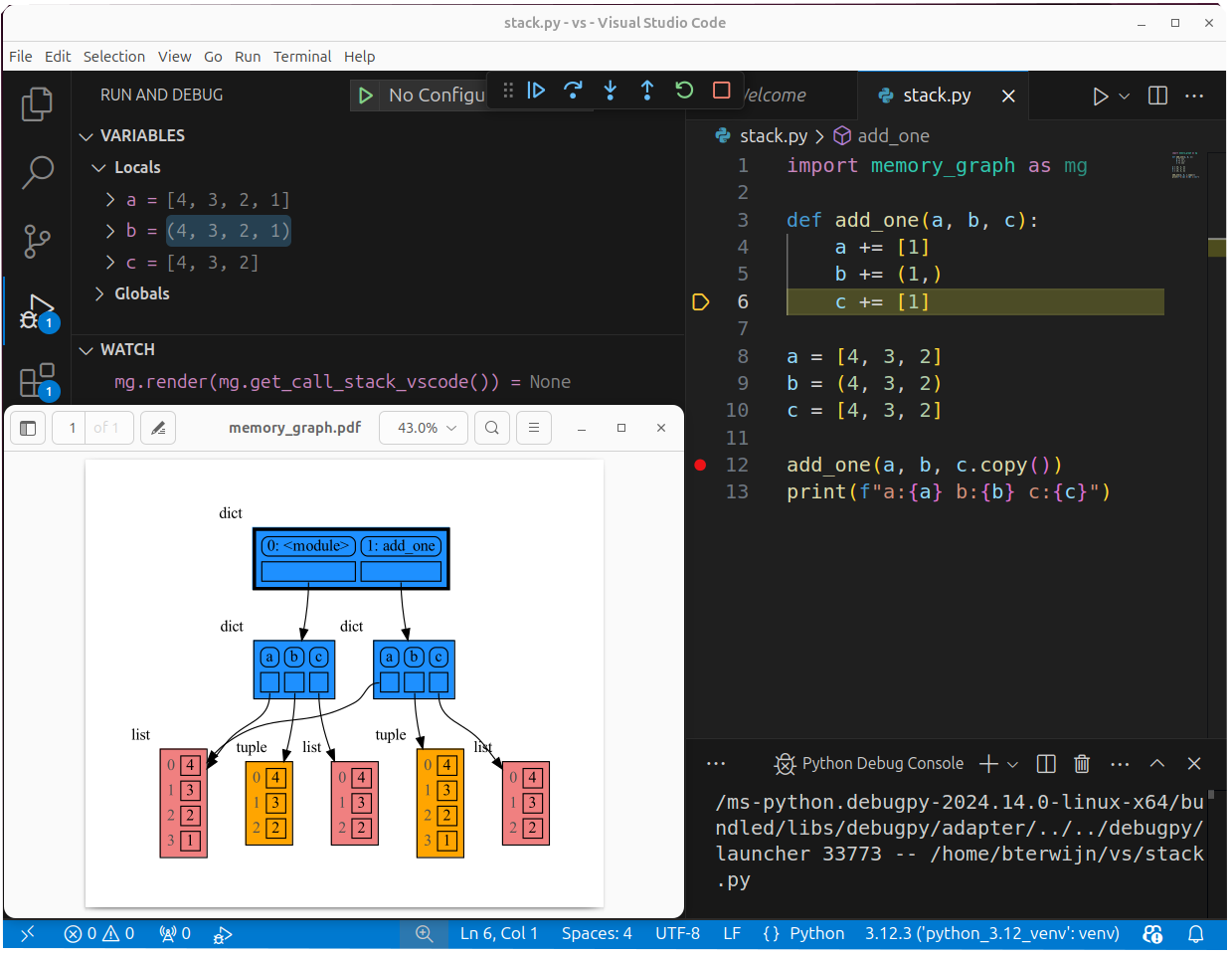
as a *watch* in a debugger tool such as the integrated debugger in Visual Studio Code. Then open the "my_graph.pdf" output file to continuously see all the local variables while debugging. This avoids having to add any memory_graph `show()
|
|
329
|
+
as a *watch* in a debugger tool such as the integrated debugger in Visual Studio Code. Then open the "my_graph.pdf" output file to continuously see all the local variables while debugging. This avoids having to add any memory_graph `show()` or `render()` calls to your code.
|
|
330
330
|
|
|
331
331
|
### Call Stack in Watch Context ###
|
|
332
332
|
The ```mg.get_call_stack()``` doesn't work well in *watch* context in most debuggers because debuggers introduce additional stack frames that cause problems. Use these alternative functions for various debuggers to filter out these problematic stack frames:
|
|
@@ -337,6 +337,8 @@ The ```mg.get_call_stack()``` doesn't work well in *watch* context in most debug
|
|
|
337
337
|
| **Visual Studio Code** | `mg.get_call_stack_vscode()` |
|
|
338
338
|
| **Pycharm** | `mg.get_call_stack_pycharm()` |
|
|
339
339
|
|
|
340
|
+
|
|
341
|
+
|
|
340
342
|
#### Other Debuggers ####
|
|
341
343
|
For other debuggers, invoke this function within the *watch* context. Then, in the "call_stack.txt" file, identify the slice of functions you wish to include in the call stack.
|
|
342
344
|
```
|
|
@@ -508,8 +510,8 @@ for i in range(n):
|
|
|
508
510
|
## Configuration ##
|
|
509
511
|
Different aspects of memory_graph can be configured. The default configuration is reset by importing 'memory_graph.config_default'.
|
|
510
512
|
|
|
511
|
-
- ***mg.config.
|
|
512
|
-
- The maxium depth of the graph. A
|
|
513
|
+
- ***mg.config.max_graph_depth*** : int
|
|
514
|
+
- The maxium depth of the graph with default value 12. A `✂` (scissor) symbol indicates where the graph is cut short. Dashed references indicate that there are more references to a node than are shown.
|
|
513
515
|
|
|
514
516
|
- ***mg.config.max_string_length*** : int
|
|
515
517
|
- The maximum length of strings shown in the graph. Longer strings will be truncated.
|
|
@@ -533,7 +535,7 @@ Different aspects of memory_graph can be configured. The default configuration i
|
|
|
533
535
|
- Maps each type to a Slicer. A slicer determines how many elements of a data type are shown in the graph to prevent the graph from getting too big. 'Slicer()' does no slicing, 'Slicer(1,2,3)' shows just 1 element at the beginning, 2 in the middle, and 3 at the end.
|
|
534
536
|
|
|
535
537
|
### Temporary Configuration ###
|
|
536
|
-
In addition to the global configuration, a temporary configuration can be set for a single `show()
|
|
538
|
+
In addition to the global configuration, a temporary configuration can be set for a single `show()` or `render()` call to change the colors, orientation, and slicer. This example highlights a particular list element in red, gives it a horizontal orientation, and overwrites the default slicer for lists:
|
|
537
539
|
|
|
538
540
|
```python
|
|
539
541
|
import memory_graph as mg
|
|
@@ -554,7 +556,7 @@ mg.show( locals(),
|
|
|
554
556
|
Different extensions are available for types from other Python packages.
|
|
555
557
|
|
|
556
558
|
### Numpy ###
|
|
557
|
-
Numpy types `
|
|
559
|
+
Numpy types `array` and `matrix` and `ndarray` can be graphed with "memory_graph.extension_numpy":
|
|
558
560
|
|
|
559
561
|
```python
|
|
560
562
|
import memory_graph as mg
|
|
@@ -740,7 +742,7 @@ See for example [jupyter_example.ipynb](https://raw.githubusercontent.com/bterwi
|
|
|
740
742
|
## ipython ##
|
|
741
743
|
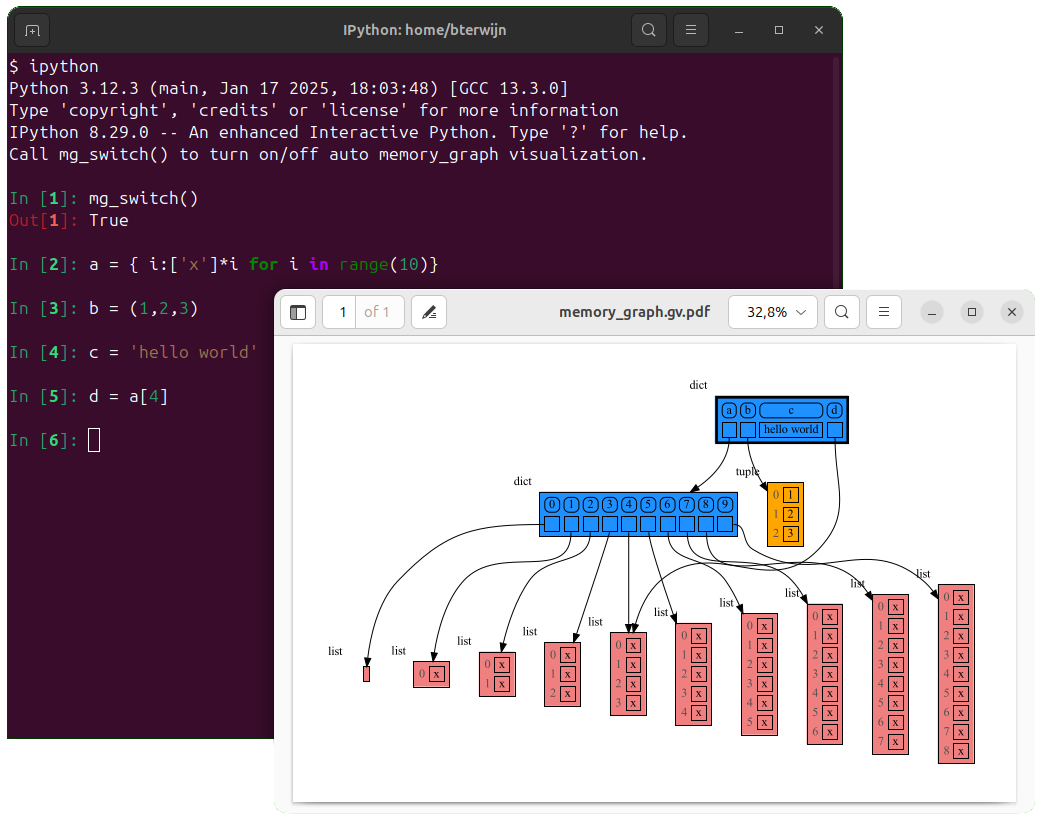
In ipython `locals()` has additional variables that cause problems in the graph, use `mg.locals_ipython()` to get the local variables with these problematic variables filtered out. Use `mg.get_call_stack_ipython()` to get the whole call stack with these variables filtered out.
|
|
742
744
|
|
|
743
|
-
Additionally install file [auto_memory_graph.py](https://raw.githubusercontent.com/bterwijn/memory_graph/main/
|
|
745
|
+
Additionally install file [auto_memory_graph.py](https://raw.githubusercontent.com/bterwijn/memory_graph/main/src/auto_memory_graph.py) in the ipython startup directory:
|
|
744
746
|
* Linux/Mac: ~/.ipython/profile_default/startup/
|
|
745
747
|
* Windows: %USERPROFILE%\.ipython\profile_default\startup\
|
|
746
748
|
|
|
@@ -748,7 +750,7 @@ Then after starting 'ipython' call function `mg_switch()` to turn on/off the aut
|
|
|
748
750
|
|
|
749
751
|
|
|
750
752
|
## In the Browser ##
|
|
751
|
-
We can run memory_graph in the browser: <a href="https://bterwijn.github.io/memory_graph/src/pyodide.html" target="_blank">Pyodide Example</a>
|
|
753
|
+
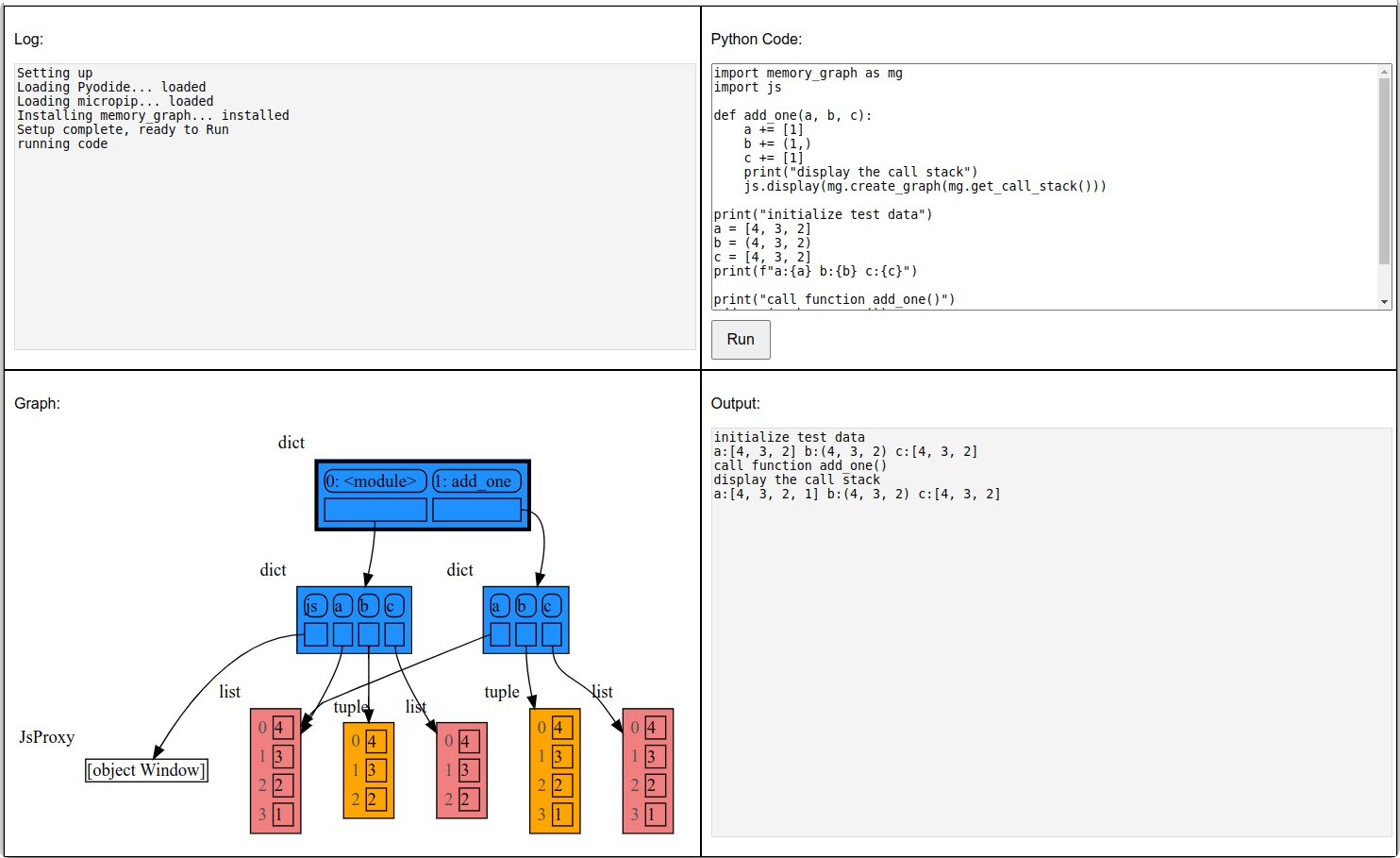
We can also run memory_graph in the browser: <a href="https://bterwijn.github.io/memory_graph/src/pyodide.html" target="_blank">Pyodide Example</a>
|
|
752
754
|
|
|
753
755
|
|
|
754
756
|
## Troubleshooting ##
|
|
@@ -137,7 +137,7 @@ mg.render(locals(), 'immutable2.png')
|
|
|
137
137
|
|
|
138
138
|
|
|
139
139
|
### Mutable Type ###
|
|
140
|
-
With mutable types the result is different. In the code below variable `a` and `b` both reference the same `list` value [4, 3, 2]. A `list` is a mutable type and therefore when we change variable `a` its value **can** be mutated in place and thus `a` and `b` both reference the same new value afterwards. Thus changing `a` also changes `b` and vice versa. Sometimes we want this but other times we don't and then we will have to make a copy so that `a` and `b` are independent.
|
|
140
|
+
With mutable types the result is different. In the code below variable `a` and `b` both reference the same `list` value [4, 3, 2]. A `list` is a mutable type and therefore when we change variable `a` its value **can** be mutated in place and thus `a` and `b` both reference the same new value afterwards. Thus changing `a` also changes `b` and vice versa. Sometimes we want this but other times we don't and then we will have to make a copy ourselfs so that `a` and `b` are independent.
|
|
141
141
|
|
|
142
142
|
```python
|
|
143
143
|
import memory_graph as mg
|
|
@@ -152,7 +152,7 @@ mg.render(locals(), 'mutable2.png')
|
|
|
152
152
|
|:-----------------------------------------------------------:|:-------------------------------------------------------------:|
|
|
153
153
|
| mutable1.png | mutable2.png |
|
|
154
154
|
|
|
155
|
-
One practical reason why Python makes the distinction between mutable and immutable types is that a value of a mutable type can be large, making it inefficient to copy each time we change it. Immutable values generally don't need to change as much, or are small
|
|
155
|
+
One practical reason why Python makes the distinction between mutable and immutable types is that a value of a mutable type can be large, making it inefficient to copy each time we change it. Immutable values generally don't need to change as much, or are small making copying less of a concern.
|
|
156
156
|
|
|
157
157
|
### Copying ###
|
|
158
158
|
Python offers three different "copy" options that we will demonstrate using a nested list:
|
|
@@ -245,7 +245,7 @@ This function:
|
|
|
245
245
|
* then blocks execution until the <Enter> key is pressed
|
|
246
246
|
* finally returns the value of the `fun()` call
|
|
247
247
|
|
|
248
|
-
to change
|
|
248
|
+
to change its behavior:
|
|
249
249
|
* Set `mg.block_prints_location = False` to skip printing the source location.
|
|
250
250
|
* Set `mg.press_enter_message = None` to skip printing "Press <Enter> to continue...".
|
|
251
251
|
|
|
@@ -307,7 +307,7 @@ For the best debugging experience with memory_graph set for example expression:
|
|
|
307
307
|
```
|
|
308
308
|
mg.render(locals(), "my_graph.pdf")
|
|
309
309
|
```
|
|
310
|
-
as a *watch* in a debugger tool such as the integrated debugger in Visual Studio Code. Then open the "my_graph.pdf" output file to continuously see all the local variables while debugging. This avoids having to add any memory_graph `show()
|
|
310
|
+
as a *watch* in a debugger tool such as the integrated debugger in Visual Studio Code. Then open the "my_graph.pdf" output file to continuously see all the local variables while debugging. This avoids having to add any memory_graph `show()` or `render()` calls to your code.
|
|
311
311
|
|
|
312
312
|
### Call Stack in Watch Context ###
|
|
313
313
|
The ```mg.get_call_stack()``` doesn't work well in *watch* context in most debuggers because debuggers introduce additional stack frames that cause problems. Use these alternative functions for various debuggers to filter out these problematic stack frames:
|
|
@@ -318,6 +318,8 @@ The ```mg.get_call_stack()``` doesn't work well in *watch* context in most debug
|
|
|
318
318
|
| **Visual Studio Code** | `mg.get_call_stack_vscode()` |
|
|
319
319
|
| **Pycharm** | `mg.get_call_stack_pycharm()` |
|
|
320
320
|
|
|
321
|
+

|
|
322
|
+
|
|
321
323
|
#### Other Debuggers ####
|
|
322
324
|
For other debuggers, invoke this function within the *watch* context. Then, in the "call_stack.txt" file, identify the slice of functions you wish to include in the call stack.
|
|
323
325
|
```
|
|
@@ -489,8 +491,8 @@ for i in range(n):
|
|
|
489
491
|
## Configuration ##
|
|
490
492
|
Different aspects of memory_graph can be configured. The default configuration is reset by importing 'memory_graph.config_default'.
|
|
491
493
|
|
|
492
|
-
- ***mg.config.
|
|
493
|
-
- The maxium depth of the graph. A
|
|
494
|
+
- ***mg.config.max_graph_depth*** : int
|
|
495
|
+
- The maxium depth of the graph with default value 12. A `✂` (scissor) symbol indicates where the graph is cut short. Dashed references indicate that there are more references to a node than are shown.
|
|
494
496
|
|
|
495
497
|
- ***mg.config.max_string_length*** : int
|
|
496
498
|
- The maximum length of strings shown in the graph. Longer strings will be truncated.
|
|
@@ -514,7 +516,7 @@ Different aspects of memory_graph can be configured. The default configuration i
|
|
|
514
516
|
- Maps each type to a Slicer. A slicer determines how many elements of a data type are shown in the graph to prevent the graph from getting too big. 'Slicer()' does no slicing, 'Slicer(1,2,3)' shows just 1 element at the beginning, 2 in the middle, and 3 at the end.
|
|
515
517
|
|
|
516
518
|
### Temporary Configuration ###
|
|
517
|
-
In addition to the global configuration, a temporary configuration can be set for a single `show()
|
|
519
|
+
In addition to the global configuration, a temporary configuration can be set for a single `show()` or `render()` call to change the colors, orientation, and slicer. This example highlights a particular list element in red, gives it a horizontal orientation, and overwrites the default slicer for lists:
|
|
518
520
|
|
|
519
521
|
```python
|
|
520
522
|
import memory_graph as mg
|
|
@@ -535,7 +537,7 @@ mg.show( locals(),
|
|
|
535
537
|
Different extensions are available for types from other Python packages.
|
|
536
538
|
|
|
537
539
|
### Numpy ###
|
|
538
|
-
Numpy types `
|
|
540
|
+
Numpy types `array` and `matrix` and `ndarray` can be graphed with "memory_graph.extension_numpy":
|
|
539
541
|
|
|
540
542
|
```python
|
|
541
543
|
import memory_graph as mg
|
|
@@ -721,7 +723,7 @@ See for example [jupyter_example.ipynb](https://raw.githubusercontent.com/bterwi
|
|
|
721
723
|
## ipython ##
|
|
722
724
|
In ipython `locals()` has additional variables that cause problems in the graph, use `mg.locals_ipython()` to get the local variables with these problematic variables filtered out. Use `mg.get_call_stack_ipython()` to get the whole call stack with these variables filtered out.
|
|
723
725
|
|
|
724
|
-
Additionally install file [auto_memory_graph.py](https://raw.githubusercontent.com/bterwijn/memory_graph/main/
|
|
726
|
+
Additionally install file [auto_memory_graph.py](https://raw.githubusercontent.com/bterwijn/memory_graph/main/src/auto_memory_graph.py) in the ipython startup directory:
|
|
725
727
|
* Linux/Mac: ~/.ipython/profile_default/startup/
|
|
726
728
|
* Windows: %USERPROFILE%\.ipython\profile_default\startup\
|
|
727
729
|
|
|
@@ -729,7 +731,7 @@ Then after starting 'ipython' call function `mg_switch()` to turn on/off the aut
|
|
|
729
731
|

|
|
730
732
|
|
|
731
733
|
## In the Browser ##
|
|
732
|
-
We can run memory_graph in the browser: <a href="https://bterwijn.github.io/memory_graph/src/pyodide.html" target="_blank">Pyodide Example</a>
|
|
734
|
+
We can also run memory_graph in the browser: <a href="https://bterwijn.github.io/memory_graph/src/pyodide.html" target="_blank">Pyodide Example</a>
|
|
733
735
|

|
|
734
736
|
|
|
735
737
|
## Troubleshooting ##
|
|
Binary file
|
|
Binary file
|
|
@@ -13,7 +13,7 @@ import sys
|
|
|
13
13
|
|
|
14
14
|
import graphviz
|
|
15
15
|
|
|
16
|
-
__version__ = "0.3.
|
|
16
|
+
__version__ = "0.3.12"
|
|
17
17
|
__author__ = 'Bas Terwijn'
|
|
18
18
|
render_filename = 'memory_graph.pdf'
|
|
19
19
|
block_prints_location = True
|
|
@@ -167,7 +167,9 @@ def stack_frames_to_dict(frames):
|
|
|
167
167
|
""" Returns a dictionary representing the data on the call stack.
|
|
168
168
|
Each key is the stack level and function name, each value is the locals of the frame at that level.
|
|
169
169
|
"""
|
|
170
|
-
|
|
170
|
+
def to_dict(value): # fix by TerenceTux for Python 3.13
|
|
171
|
+
return {k: v for k, v in value.items()}
|
|
172
|
+
return {f"{level}: {frameInfo.function}" : to_dict(frameInfo.frame.f_locals)
|
|
171
173
|
for level, frameInfo in enumerate(frames)}
|
|
172
174
|
|
|
173
175
|
def get_call_stack(up_to_function="<module>",stack_index=0):
|
|
@@ -4,7 +4,8 @@
|
|
|
4
4
|
|
|
5
5
|
""" Configuration file for the graph visualizer. The configuration values are set later by the 'config_default.py' file. """
|
|
6
6
|
|
|
7
|
-
|
|
7
|
+
max_graph_depth = None
|
|
8
|
+
graph_cut_symbol = None
|
|
8
9
|
max_missing_edges = None
|
|
9
10
|
max_string_length = None
|
|
10
11
|
graph_stability = None
|
|
@@ -16,8 +16,8 @@ import memory_graph.utils as utils
|
|
|
16
16
|
import types
|
|
17
17
|
|
|
18
18
|
""" The maximum depth of nodes in the graph. When the graph gets too big set this to a small positive number. A `✂` symbol indictes where the graph is cut short. """
|
|
19
|
-
config.
|
|
20
|
-
|
|
19
|
+
config.max_graph_depth = 12
|
|
20
|
+
config.graph_cut_symbol = '✂'
|
|
21
21
|
config.max_missing_edges = 3
|
|
22
22
|
|
|
23
23
|
""" The maximum length of strings shown in the graph. Longer strings will be truncated. """
|
|
@@ -80,7 +80,7 @@ class HTML_Table:
|
|
|
80
80
|
if child_id in id_to_slices:
|
|
81
81
|
self.add_reference(node, child, rounded, border, dashed)
|
|
82
82
|
else:
|
|
83
|
-
self.add_value(
|
|
83
|
+
self.add_value(config.graph_cut_symbol, rounded, border)
|
|
84
84
|
else:
|
|
85
85
|
self.add_value(child, rounded, border)
|
|
86
86
|
|
|
@@ -45,10 +45,10 @@ def read_nodes(data):
|
|
|
45
45
|
|
|
46
46
|
# --------------------------------------------------------------------------------------------
|
|
47
47
|
|
|
48
|
-
def slice_nodes(nodes, root_id,
|
|
48
|
+
def slice_nodes(nodes, root_id, max_graph_depth):
|
|
49
49
|
|
|
50
|
-
def slice_nodes_recursive(nodes, node_id, id_to_slices,
|
|
51
|
-
if
|
|
50
|
+
def slice_nodes_recursive(nodes, node_id, id_to_slices, max_graph_depth):
|
|
51
|
+
if max_graph_depth == 0 or node_id in id_to_slices:
|
|
52
52
|
return
|
|
53
53
|
if node_id in nodes:
|
|
54
54
|
node = nodes[node_id]
|
|
@@ -60,11 +60,11 @@ def slice_nodes(nodes, root_id, max_tree_depth):
|
|
|
60
60
|
slices = children.slice(slicer)
|
|
61
61
|
id_to_slices[node_id] = slices
|
|
62
62
|
if not node.is_hidden_node():
|
|
63
|
-
|
|
63
|
+
max_graph_depth -= 1
|
|
64
64
|
for index in slices:
|
|
65
|
-
slice_nodes_recursive(nodes, id(children[index]), id_to_slices,
|
|
65
|
+
slice_nodes_recursive(nodes, id(children[index]), id_to_slices, max_graph_depth)
|
|
66
66
|
id_to_slices = {}
|
|
67
|
-
slice_nodes_recursive(nodes, root_id, id_to_slices,
|
|
67
|
+
slice_nodes_recursive(nodes, root_id, id_to_slices, max_graph_depth)
|
|
68
68
|
return id_to_slices
|
|
69
69
|
|
|
70
70
|
# --------------------------------------------------------------------------------------------
|
|
@@ -175,7 +175,7 @@ def build_graph(graphviz_graph, nodes, root_id, id_to_slices):
|
|
|
175
175
|
def memory_to_nodes(data):
|
|
176
176
|
nodes, root_id = read_nodes(data)
|
|
177
177
|
#print('nodes:',nodes,'root_id:',root_id)
|
|
178
|
-
id_to_slices = slice_nodes(nodes, root_id, config.
|
|
178
|
+
id_to_slices = slice_nodes(nodes, root_id, config.max_graph_depth)
|
|
179
179
|
#print('id_to_slices:',id_to_slices)
|
|
180
180
|
id_to_slices = add_missing_edges(nodes, id_to_slices, config.max_missing_edges)
|
|
181
181
|
#print('id_to_slices:',id_to_slices)
|
|
@@ -0,0 +1,27 @@
|
|
|
1
|
+
# This file is part of memory_graph.
|
|
2
|
+
# Copyright (c) 2023, Bas Terwijn.
|
|
3
|
+
# SPDX-License-Identifier: BSD-2-Clause
|
|
4
|
+
|
|
5
|
+
import memory_graph as mg
|
|
6
|
+
|
|
7
|
+
def build_nested_list(depth = 15):
|
|
8
|
+
first = [1,2]
|
|
9
|
+
last = first
|
|
10
|
+
if depth>0:
|
|
11
|
+
first2, last = build_nested_list(depth-1)
|
|
12
|
+
first.append(first2)
|
|
13
|
+
return first, last
|
|
14
|
+
|
|
15
|
+
first,last = build_nested_list(15)
|
|
16
|
+
for i in range(20):
|
|
17
|
+
last.append('X')
|
|
18
|
+
|
|
19
|
+
child = ('who', 'are', 'my', 'parents?')
|
|
20
|
+
last[4] = child
|
|
21
|
+
last[5] = child
|
|
22
|
+
last[6] = child
|
|
23
|
+
last[7] = child
|
|
24
|
+
last[8] = child
|
|
25
|
+
|
|
26
|
+
mg.show([first,child])
|
|
27
|
+
#mg.show([first])
|
|
@@ -1,6 +1,6 @@
|
|
|
1
1
|
Metadata-Version: 2.1
|
|
2
2
|
Name: memory_graph
|
|
3
|
-
Version: 0.3.
|
|
3
|
+
Version: 0.3.12
|
|
4
4
|
Summary: Draws a graph of your data to analyze its structure.
|
|
5
5
|
Home-page: https://github.com/bterwijn/memory_graph
|
|
6
6
|
Author: Bas Terwijn
|
|
@@ -156,7 +156,7 @@ mg.render(locals(), 'immutable2.png')
|
|
|
156
156
|
|
|
157
157
|
|
|
158
158
|
### Mutable Type ###
|
|
159
|
-
With mutable types the result is different. In the code below variable `a` and `b` both reference the same `list` value [4, 3, 2]. A `list` is a mutable type and therefore when we change variable `a` its value **can** be mutated in place and thus `a` and `b` both reference the same new value afterwards. Thus changing `a` also changes `b` and vice versa. Sometimes we want this but other times we don't and then we will have to make a copy so that `a` and `b` are independent.
|
|
159
|
+
With mutable types the result is different. In the code below variable `a` and `b` both reference the same `list` value [4, 3, 2]. A `list` is a mutable type and therefore when we change variable `a` its value **can** be mutated in place and thus `a` and `b` both reference the same new value afterwards. Thus changing `a` also changes `b` and vice versa. Sometimes we want this but other times we don't and then we will have to make a copy ourselfs so that `a` and `b` are independent.
|
|
160
160
|
|
|
161
161
|
```python
|
|
162
162
|
import memory_graph as mg
|
|
@@ -171,7 +171,7 @@ mg.render(locals(), 'mutable2.png')
|
|
|
171
171
|
|:-----------------------------------------------------------:|:-------------------------------------------------------------:|
|
|
172
172
|
| mutable1.png | mutable2.png |
|
|
173
173
|
|
|
174
|
-
One practical reason why Python makes the distinction between mutable and immutable types is that a value of a mutable type can be large, making it inefficient to copy each time we change it. Immutable values generally don't need to change as much, or are small
|
|
174
|
+
One practical reason why Python makes the distinction between mutable and immutable types is that a value of a mutable type can be large, making it inefficient to copy each time we change it. Immutable values generally don't need to change as much, or are small making copying less of a concern.
|
|
175
175
|
|
|
176
176
|
### Copying ###
|
|
177
177
|
Python offers three different "copy" options that we will demonstrate using a nested list:
|
|
@@ -264,7 +264,7 @@ This function:
|
|
|
264
264
|
* then blocks execution until the <Enter> key is pressed
|
|
265
265
|
* finally returns the value of the `fun()` call
|
|
266
266
|
|
|
267
|
-
to change
|
|
267
|
+
to change its behavior:
|
|
268
268
|
* Set `mg.block_prints_location = False` to skip printing the source location.
|
|
269
269
|
* Set `mg.press_enter_message = None` to skip printing "Press <Enter> to continue...".
|
|
270
270
|
|
|
@@ -326,7 +326,7 @@ For the best debugging experience with memory_graph set for example expression:
|
|
|
326
326
|
```
|
|
327
327
|
mg.render(locals(), "my_graph.pdf")
|
|
328
328
|
```
|
|
329
|
-
as a *watch* in a debugger tool such as the integrated debugger in Visual Studio Code. Then open the "my_graph.pdf" output file to continuously see all the local variables while debugging. This avoids having to add any memory_graph `show()
|
|
329
|
+
as a *watch* in a debugger tool such as the integrated debugger in Visual Studio Code. Then open the "my_graph.pdf" output file to continuously see all the local variables while debugging. This avoids having to add any memory_graph `show()` or `render()` calls to your code.
|
|
330
330
|
|
|
331
331
|
### Call Stack in Watch Context ###
|
|
332
332
|
The ```mg.get_call_stack()``` doesn't work well in *watch* context in most debuggers because debuggers introduce additional stack frames that cause problems. Use these alternative functions for various debuggers to filter out these problematic stack frames:
|
|
@@ -337,6 +337,8 @@ The ```mg.get_call_stack()``` doesn't work well in *watch* context in most debug
|
|
|
337
337
|
| **Visual Studio Code** | `mg.get_call_stack_vscode()` |
|
|
338
338
|
| **Pycharm** | `mg.get_call_stack_pycharm()` |
|
|
339
339
|
|
|
340
|
+

|
|
341
|
+
|
|
340
342
|
#### Other Debuggers ####
|
|
341
343
|
For other debuggers, invoke this function within the *watch* context. Then, in the "call_stack.txt" file, identify the slice of functions you wish to include in the call stack.
|
|
342
344
|
```
|
|
@@ -508,8 +510,8 @@ for i in range(n):
|
|
|
508
510
|
## Configuration ##
|
|
509
511
|
Different aspects of memory_graph can be configured. The default configuration is reset by importing 'memory_graph.config_default'.
|
|
510
512
|
|
|
511
|
-
- ***mg.config.
|
|
512
|
-
- The maxium depth of the graph. A
|
|
513
|
+
- ***mg.config.max_graph_depth*** : int
|
|
514
|
+
- The maxium depth of the graph with default value 12. A `✂` (scissor) symbol indicates where the graph is cut short. Dashed references indicate that there are more references to a node than are shown.
|
|
513
515
|
|
|
514
516
|
- ***mg.config.max_string_length*** : int
|
|
515
517
|
- The maximum length of strings shown in the graph. Longer strings will be truncated.
|
|
@@ -533,7 +535,7 @@ Different aspects of memory_graph can be configured. The default configuration i
|
|
|
533
535
|
- Maps each type to a Slicer. A slicer determines how many elements of a data type are shown in the graph to prevent the graph from getting too big. 'Slicer()' does no slicing, 'Slicer(1,2,3)' shows just 1 element at the beginning, 2 in the middle, and 3 at the end.
|
|
534
536
|
|
|
535
537
|
### Temporary Configuration ###
|
|
536
|
-
In addition to the global configuration, a temporary configuration can be set for a single `show()
|
|
538
|
+
In addition to the global configuration, a temporary configuration can be set for a single `show()` or `render()` call to change the colors, orientation, and slicer. This example highlights a particular list element in red, gives it a horizontal orientation, and overwrites the default slicer for lists:
|
|
537
539
|
|
|
538
540
|
```python
|
|
539
541
|
import memory_graph as mg
|
|
@@ -554,7 +556,7 @@ mg.show( locals(),
|
|
|
554
556
|
Different extensions are available for types from other Python packages.
|
|
555
557
|
|
|
556
558
|
### Numpy ###
|
|
557
|
-
Numpy types `
|
|
559
|
+
Numpy types `array` and `matrix` and `ndarray` can be graphed with "memory_graph.extension_numpy":
|
|
558
560
|
|
|
559
561
|
```python
|
|
560
562
|
import memory_graph as mg
|
|
@@ -740,7 +742,7 @@ See for example [jupyter_example.ipynb](https://raw.githubusercontent.com/bterwi
|
|
|
740
742
|
## ipython ##
|
|
741
743
|
In ipython `locals()` has additional variables that cause problems in the graph, use `mg.locals_ipython()` to get the local variables with these problematic variables filtered out. Use `mg.get_call_stack_ipython()` to get the whole call stack with these variables filtered out.
|
|
742
744
|
|
|
743
|
-
Additionally install file [auto_memory_graph.py](https://raw.githubusercontent.com/bterwijn/memory_graph/main/
|
|
745
|
+
Additionally install file [auto_memory_graph.py](https://raw.githubusercontent.com/bterwijn/memory_graph/main/src/auto_memory_graph.py) in the ipython startup directory:
|
|
744
746
|
* Linux/Mac: ~/.ipython/profile_default/startup/
|
|
745
747
|
* Windows: %USERPROFILE%\.ipython\profile_default\startup\
|
|
746
748
|
|
|
@@ -748,7 +750,7 @@ Then after starting 'ipython' call function `mg_switch()` to turn on/off the aut
|
|
|
748
750
|

|
|
749
751
|
|
|
750
752
|
## In the Browser ##
|
|
751
|
-
We can run memory_graph in the browser: <a href="https://bterwijn.github.io/memory_graph/src/pyodide.html" target="_blank">Pyodide Example</a>
|
|
753
|
+
We can also run memory_graph in the browser: <a href="https://bterwijn.github.io/memory_graph/src/pyodide.html" target="_blank">Pyodide Example</a>
|
|
752
754
|

|
|
753
755
|
|
|
754
756
|
## Troubleshooting ##
|
|
@@ -21,6 +21,7 @@ images/copy_method.png
|
|
|
21
21
|
images/copy_method.py
|
|
22
22
|
images/create_gif.sh
|
|
23
23
|
images/create_images.sh
|
|
24
|
+
images/debug_vscode.png
|
|
24
25
|
images/debugging.gif
|
|
25
26
|
images/debugging.py
|
|
26
27
|
images/extension_numpy.png
|
|
@@ -69,6 +70,7 @@ memory_graph/slices.py
|
|
|
69
70
|
memory_graph/slices_iterator.py
|
|
70
71
|
memory_graph/slices_table_iterator.py
|
|
71
72
|
memory_graph/test.py
|
|
73
|
+
memory_graph/test_max_graph_depth.py
|
|
72
74
|
memory_graph/test_memory_graph.py
|
|
73
75
|
memory_graph/test_memory_to_nodes.py
|
|
74
76
|
memory_graph/test_sequence.py
|
|
@@ -11,7 +11,7 @@ long_description_from_readme = (this_directory / "README.md").read_text()
|
|
|
11
11
|
|
|
12
12
|
setup(
|
|
13
13
|
name = 'memory_graph',
|
|
14
|
-
version = '0.3.
|
|
14
|
+
version = '0.3.12',
|
|
15
15
|
description = 'Draws a graph of your data to analyze its structure.',
|
|
16
16
|
long_description = long_description_from_readme,
|
|
17
17
|
long_description_content_type = 'text/markdown',
|
|
@@ -8,9 +8,12 @@ def mg_visualization(execution_result):
|
|
|
8
8
|
ipython_locals = get_ipython().user_ns
|
|
9
9
|
mg.show(mg.ipython_locals_filter(ipython_locals))
|
|
10
10
|
|
|
11
|
-
def mg_switch():
|
|
11
|
+
def mg_switch(status = None):
|
|
12
12
|
global mg_visualization_status
|
|
13
|
-
|
|
13
|
+
if isinstance(status, bool):
|
|
14
|
+
mg_visualization_status = status
|
|
15
|
+
else:
|
|
16
|
+
mg_visualization_status = not mg_visualization_status
|
|
14
17
|
if mg_visualization_status:
|
|
15
18
|
get_ipython().events.register("post_run_cell", mg_visualization)
|
|
16
19
|
else:
|
|
@@ -54,7 +54,9 @@
|
|
|
54
54
|
</head>
|
|
55
55
|
<body>
|
|
56
56
|
<div class="container">
|
|
57
|
-
<div class="part"><!-- ========== Top Left ========== -->
|
|
57
|
+
<div class="part"><!-- ========== Top Left ========== -->
|
|
58
|
+
<p>See the <a href="https://pypi.org/project/memory-graph/" style="font-size: 1.5em;">memory_graph</a> python package.<br>
|
|
59
|
+
Log:</p>
|
|
58
60
|
<textarea id="log"></textarea>
|
|
59
61
|
</div>
|
|
60
62
|
|
|
@@ -67,7 +69,7 @@ def add_one(a, b, c):
|
|
|
67
69
|
a += [1]
|
|
68
70
|
b += (1,)
|
|
69
71
|
c += [1]
|
|
70
|
-
print("display the call stack")
|
|
72
|
+
print("display a graph of the call stack")
|
|
71
73
|
js.display(mg.create_graph(mg.get_call_stack()))
|
|
72
74
|
|
|
73
75
|
print("initialize test data")
|
|
@@ -76,9 +78,10 @@ b = (4, 3, 2)
|
|
|
76
78
|
c = [4, 3, 2]
|
|
77
79
|
print(f"a:{a} b:{b} c:{c}")
|
|
78
80
|
|
|
79
|
-
print("call function add_one()")
|
|
81
|
+
print("call function: add_one(a, b, c.copy())")
|
|
80
82
|
add_one(a, b, c.copy())
|
|
81
83
|
print(f"a:{a} b:{b} c:{c}")
|
|
84
|
+
print("only 'a' has changed, the graph explains why")
|
|
82
85
|
</textarea>
|
|
83
86
|
<button id="run-button" disabled>Run</button>
|
|
84
87
|
</div>
|
|
File without changes
|
|
File without changes
|
|
File without changes
|
|
File without changes
|
|
File without changes
|
|
File without changes
|
|
File without changes
|
|
File without changes
|
|
File without changes
|
|
File without changes
|
|
File without changes
|
|
File without changes
|
|
File without changes
|
|
File without changes
|
|
File without changes
|
|
File without changes
|
|
File without changes
|
|
File without changes
|
|
File without changes
|
|
File without changes
|
|
File without changes
|
|
File without changes
|
|
File without changes
|
|
File without changes
|
|
File without changes
|
|
File without changes
|
|
File without changes
|
|
File without changes
|
|
File without changes
|
|
File without changes
|
|
File without changes
|
|
File without changes
|
|
File without changes
|
|
File without changes
|
|
File without changes
|
|
File without changes
|
|
File without changes
|
|
File without changes
|
|
File without changes
|
|
File without changes
|
|
File without changes
|
|
File without changes
|
|
File without changes
|
|
File without changes
|
|
File without changes
|
|
File without changes
|
|
File without changes
|
|
File without changes
|
|
File without changes
|
|
File without changes
|
|
File without changes
|
|
File without changes
|
|
File without changes
|
|
File without changes
|
|
File without changes
|
|
File without changes
|
|
File without changes
|
|
File without changes
|
|
File without changes
|
|
File without changes
|
|
File without changes
|
|
File without changes
|
|
File without changes
|
|
File without changes
|
|
File without changes
|
|
File without changes
|
|
File without changes
|
|
File without changes
|
|
File without changes
|
|
File without changes
|
|
File without changes
|
|
File without changes
|
|
File without changes
|
|
File without changes
|