memeseeks 0.3.0__tar.gz
This diff represents the content of publicly available package versions that have been released to one of the supported registries. The information contained in this diff is provided for informational purposes only and reflects changes between package versions as they appear in their respective public registries.
- memeseeks-0.3.0/LICENSE +21 -0
- memeseeks-0.3.0/PKG-INFO +217 -0
- memeseeks-0.3.0/README.md +187 -0
- memeseeks-0.3.0/pyproject.toml +36 -0
- memeseeks-0.3.0/setup.cfg +4 -0
- memeseeks-0.3.0/src/memeseeks/__init__.py +3 -0
- memeseeks-0.3.0/src/memeseeks/__main__.py +3 -0
- memeseeks-0.3.0/src/memeseeks/albums.py +161 -0
- memeseeks-0.3.0/src/memeseeks/browser/memeseeks.user.js +658 -0
- memeseeks-0.3.0/src/memeseeks/cli.py +374 -0
- memeseeks-0.3.0/src/memeseeks/evalkit.py +134 -0
- memeseeks-0.3.0/src/memeseeks/images.py +77 -0
- memeseeks-0.3.0/src/memeseeks/inbox.py +118 -0
- memeseeks-0.3.0/src/memeseeks/index.py +254 -0
- memeseeks-0.3.0/src/memeseeks/indexer.py +129 -0
- memeseeks-0.3.0/src/memeseeks/library.py +176 -0
- memeseeks-0.3.0/src/memeseeks/maintext.py +197 -0
- memeseeks-0.3.0/src/memeseeks/masking.py +16 -0
- memeseeks-0.3.0/src/memeseeks/models/__init__.py +10 -0
- memeseeks-0.3.0/src/memeseeks/models/clip.py +39 -0
- memeseeks-0.3.0/src/memeseeks/models/ocr.py +35 -0
- memeseeks-0.3.0/src/memeseeks/models/textembed.py +19 -0
- memeseeks-0.3.0/src/memeseeks/models/vlm.py +68 -0
- memeseeks-0.3.0/src/memeseeks/online.py +51 -0
- memeseeks-0.3.0/src/memeseeks/phone.py +152 -0
- memeseeks-0.3.0/src/memeseeks/remote.py +131 -0
- memeseeks-0.3.0/src/memeseeks/retrieval.py +12 -0
- memeseeks-0.3.0/src/memeseeks/review.py +131 -0
- memeseeks-0.3.0/src/memeseeks/search.py +144 -0
- memeseeks-0.3.0/src/memeseeks/server.py +425 -0
- memeseeks-0.3.0/src/memeseeks/service.py +335 -0
- memeseeks-0.3.0/src/memeseeks/settings.py +60 -0
- memeseeks-0.3.0/src/memeseeks/tidy.py +187 -0
- memeseeks-0.3.0/src/memeseeks/warmup.py +92 -0
- memeseeks-0.3.0/src/memeseeks/web/app.js +1122 -0
- memeseeks-0.3.0/src/memeseeks/web/cat.js +86 -0
- memeseeks-0.3.0/src/memeseeks/web/fonts/JetBrainsMono-OFL.txt +93 -0
- memeseeks-0.3.0/src/memeseeks/web/fonts/NotoSerifSC-OFL.txt +94 -0
- memeseeks-0.3.0/src/memeseeks/web/fonts/memeseeks-mono.woff2 +0 -0
- memeseeks-0.3.0/src/memeseeks/web/fonts/memeseeks-serif.woff2 +0 -0
- memeseeks-0.3.0/src/memeseeks/web/fonts/serif-chars.txt +1 -0
- memeseeks-0.3.0/src/memeseeks/web/frame.js +81 -0
- memeseeks-0.3.0/src/memeseeks/web/icons/apple-touch-icon.png +0 -0
- memeseeks-0.3.0/src/memeseeks/web/icons/icon-192.png +0 -0
- memeseeks-0.3.0/src/memeseeks/web/icons/icon-512.png +0 -0
- memeseeks-0.3.0/src/memeseeks/web/icons/icon-maskable-512.png +0 -0
- memeseeks-0.3.0/src/memeseeks/web/icons/logo.svg +1 -0
- memeseeks-0.3.0/src/memeseeks/web/icons/memeseeks.ico +0 -0
- memeseeks-0.3.0/src/memeseeks/web/index.html +80 -0
- memeseeks-0.3.0/src/memeseeks/web/manifest.webmanifest +36 -0
- memeseeks-0.3.0/src/memeseeks/web/popcat.js +4 -0
- memeseeks-0.3.0/src/memeseeks/web/style.css +364 -0
- memeseeks-0.3.0/src/memeseeks/web/sw.js +27 -0
- memeseeks-0.3.0/src/memeseeks/web/tokens.css +81 -0
- memeseeks-0.3.0/src/memeseeks.egg-info/PKG-INFO +217 -0
- memeseeks-0.3.0/src/memeseeks.egg-info/SOURCES.txt +90 -0
- memeseeks-0.3.0/src/memeseeks.egg-info/dependency_links.txt +1 -0
- memeseeks-0.3.0/src/memeseeks.egg-info/entry_points.txt +2 -0
- memeseeks-0.3.0/src/memeseeks.egg-info/requires.txt +23 -0
- memeseeks-0.3.0/src/memeseeks.egg-info/top_level.txt +1 -0
- memeseeks-0.3.0/tests/test_albums.py +96 -0
- memeseeks-0.3.0/tests/test_albums_api.py +226 -0
- memeseeks-0.3.0/tests/test_cli.py +338 -0
- memeseeks-0.3.0/tests/test_design_assets.py +51 -0
- memeseeks-0.3.0/tests/test_e1.py +24 -0
- memeseeks-0.3.0/tests/test_e2.py +30 -0
- memeseeks-0.3.0/tests/test_e3.py +43 -0
- memeseeks-0.3.0/tests/test_evalkit.py +78 -0
- memeseeks-0.3.0/tests/test_images.py +63 -0
- memeseeks-0.3.0/tests/test_inbox.py +149 -0
- memeseeks-0.3.0/tests/test_inbox_api.py +102 -0
- memeseeks-0.3.0/tests/test_index.py +190 -0
- memeseeks-0.3.0/tests/test_install_scripts.py +39 -0
- memeseeks-0.3.0/tests/test_label_page.py +13 -0
- memeseeks-0.3.0/tests/test_library.py +49 -0
- memeseeks-0.3.0/tests/test_maintext.py +81 -0
- memeseeks-0.3.0/tests/test_masking.py +14 -0
- memeseeks-0.3.0/tests/test_models_ml.py +40 -0
- memeseeks-0.3.0/tests/test_models_pure.py +43 -0
- memeseeks-0.3.0/tests/test_online.py +51 -0
- memeseeks-0.3.0/tests/test_phone.py +120 -0
- memeseeks-0.3.0/tests/test_remote.py +111 -0
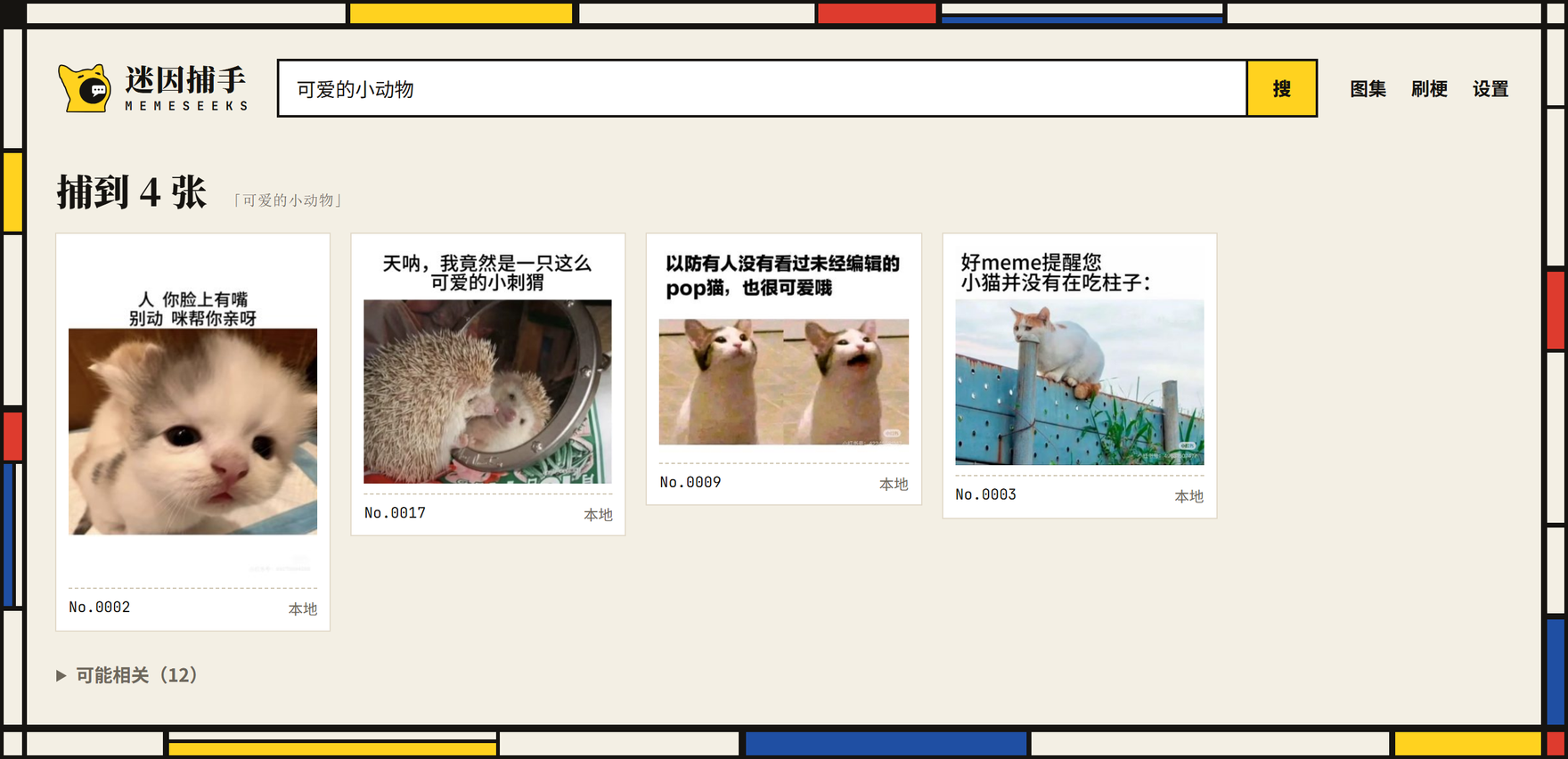
- memeseeks-0.3.0/tests/test_retrieval.py +14 -0
- memeseeks-0.3.0/tests/test_review.py +129 -0
- memeseeks-0.3.0/tests/test_search.py +111 -0
- memeseeks-0.3.0/tests/test_server.py +136 -0
- memeseeks-0.3.0/tests/test_service.py +104 -0
- memeseeks-0.3.0/tests/test_smoke.py +5 -0
- memeseeks-0.3.0/tests/test_sync.py +131 -0
- memeseeks-0.3.0/tests/test_tidy.py +87 -0
- memeseeks-0.3.0/tests/test_userscript.py +81 -0
- memeseeks-0.3.0/tests/test_warmup.py +152 -0
memeseeks-0.3.0/LICENSE
ADDED
|
@@ -0,0 +1,21 @@
|
|
|
1
|
+
MIT License
|
|
2
|
+
|
|
3
|
+
Copyright (c) 2026 Zuo Gou
|
|
4
|
+
|
|
5
|
+
Permission is hereby granted, free of charge, to any person obtaining a copy
|
|
6
|
+
of this software and associated documentation files (the "Software"), to deal
|
|
7
|
+
in the Software without restriction, including without limitation the rights
|
|
8
|
+
to use, copy, modify, merge, publish, distribute, sublicense, and/or sell
|
|
9
|
+
copies of the Software, and to permit persons to whom the Software is
|
|
10
|
+
furnished to do so, subject to the following conditions:
|
|
11
|
+
|
|
12
|
+
The above copyright notice and this permission notice shall be included in all
|
|
13
|
+
copies or substantial portions of the Software.
|
|
14
|
+
|
|
15
|
+
THE SOFTWARE IS PROVIDED "AS IS", WITHOUT WARRANTY OF ANY KIND, EXPRESS OR
|
|
16
|
+
IMPLIED, INCLUDING BUT NOT LIMITED TO THE WARRANTIES OF MERCHANTABILITY,
|
|
17
|
+
FITNESS FOR A PARTICULAR PURPOSE AND NONINFRINGEMENT. IN NO EVENT SHALL THE
|
|
18
|
+
AUTHORS OR COPYRIGHT HOLDERS BE LIABLE FOR ANY CLAIM, DAMAGES OR OTHER
|
|
19
|
+
LIABILITY, WHETHER IN AN ACTION OF CONTRACT, TORT OR OTHERWISE, ARISING FROM,
|
|
20
|
+
OUT OF OR IN CONNECTION WITH THE SOFTWARE OR THE USE OR OTHER DEALINGS IN THE
|
|
21
|
+
SOFTWARE.
|
memeseeks-0.3.0/PKG-INFO
ADDED
|
@@ -0,0 +1,217 @@
|
|
|
1
|
+
Metadata-Version: 2.4
|
|
2
|
+
Name: memeseeks
|
|
3
|
+
Version: 0.3.0
|
|
4
|
+
Summary: 迷因捕手 — find memes by what you mean, across languages.
|
|
5
|
+
License: MIT
|
|
6
|
+
Requires-Python: >=3.10
|
|
7
|
+
Description-Content-Type: text/markdown
|
|
8
|
+
License-File: LICENSE
|
|
9
|
+
Requires-Dist: pillow>=10.1
|
|
10
|
+
Requires-Dist: pillow-heif>=0.16
|
|
11
|
+
Requires-Dist: numpy>=1.26
|
|
12
|
+
Requires-Dist: pyyaml>=6
|
|
13
|
+
Requires-Dist: opencc-python-reimplemented>=0.1.7
|
|
14
|
+
Provides-Extra: ml
|
|
15
|
+
Requires-Dist: transformers<5,>=4.51; extra == "ml"
|
|
16
|
+
Requires-Dist: accelerate>=0.33; extra == "ml"
|
|
17
|
+
Requires-Dist: sentence-transformers>=3.0; extra == "ml"
|
|
18
|
+
Requires-Dist: rapidocr_onnxruntime==1.4.4; extra == "ml"
|
|
19
|
+
Provides-Extra: serve
|
|
20
|
+
Requires-Dist: fastapi>=0.110; extra == "serve"
|
|
21
|
+
Requires-Dist: uvicorn>=0.29; extra == "serve"
|
|
22
|
+
Requires-Dist: segno>=1.5; extra == "serve"
|
|
23
|
+
Provides-Extra: dev
|
|
24
|
+
Requires-Dist: pytest>=8; extra == "dev"
|
|
25
|
+
Requires-Dist: httpx2; extra == "dev"
|
|
26
|
+
Requires-Dist: fastapi>=0.110; extra == "dev"
|
|
27
|
+
Requires-Dist: uvicorn>=0.29; extra == "dev"
|
|
28
|
+
Requires-Dist: segno>=1.5; extra == "dev"
|
|
29
|
+
Dynamic: license-file
|
|
30
|
+
|
|
31
|
+
# 迷因捕手 · memeseeks
|
|
32
|
+
|
|
33
|
+
[English](https://github.com/tactino/memeseeks/blob/main/README.en.md)
|
|
34
|
+
|
|
35
|
+
说出你记得的那句话,从自己的收藏里把那张梗图找回来。中英文都能搜,程序跑在你自己的电脑上;同时搜网上是可选的,默认关闭。
|
|
36
|
+
|
|
37
|
+
它也是一个个人梗图收藏夹,有点像网易云音乐之于歌:**图集**(像歌单)、**我喜欢**、全屏一张接一张地**刷梗**,还能在逛贴吧、小红书、豆瓣时一键**采集**。
|
|
38
|
+
|
|
39
|
+
**状态:** v0.3。本地网页应用、命令行、一键安装和 Docker 镜像都已可用。跨语言的「梗图关系图」和梗图译制在规划中。
|
|
40
|
+
|
|
41
|
+

|
|
42
|
+
|
|
43
|
+
<sub>截图里的梗图都是示例图,由 `scripts/demo_memes.py` 画出。</sub>
|
|
44
|
+
|
|
45
|
+
## 安装
|
|
46
|
+
|
|
47
|
+
**Windows**:打开 PowerShell,运行:
|
|
48
|
+
|
|
49
|
+
```powershell
|
|
50
|
+
irm https://raw.githubusercontent.com/tactino/memeseeks/main/scripts/install.ps1 | iex
|
|
51
|
+
```
|
|
52
|
+
|
|
53
|
+
**macOS / Linux:**
|
|
54
|
+
|
|
55
|
+
```bash
|
|
56
|
+
curl -LsSf https://raw.githubusercontent.com/tactino/memeseeks/main/scripts/install.sh | sh
|
|
57
|
+
```
|
|
58
|
+
|
|
59
|
+
安装脚本会把程序和它自带的 Python 放进一个文件夹(Windows 是 `%LOCALAPPDATA%\memeseeks`,macOS 是 `~/Library/Application Support/memeseeks`,Linux 是 `~/.local/share/memeseeks`),建好「迷因捕手」快捷方式,然后启动。
|
|
60
|
+
|
|
61
|
+
- 第一次启动会下载约 3.9 GB 的模型,网页上能看到进度;下完就能搜索,其他功能马上就能用。
|
|
62
|
+
- 在国内会自动换用镜像(PyPI、Python 和模型都走国内镜像)。
|
|
63
|
+
- 不改系统 PATH。想卸载,删掉那个文件夹和快捷方式即可;你的图库默认在 `~/.memeseeks`,不会被删。
|
|
64
|
+
- 想更新,再运行一次同一行命令。
|
|
65
|
+
|
|
66
|
+
**不想装在 C 盘**(或者想装到别处)时,在 Windows 上这样运行:
|
|
67
|
+
|
|
68
|
+
```powershell
|
|
69
|
+
& ([scriptblock]::Create((irm https://raw.githubusercontent.com/tactino/memeseeks/main/scripts/install.ps1))) -Dir D:\memeseeks -Library D:\memeseeks-library
|
|
70
|
+
```
|
|
71
|
+
|
|
72
|
+
- `-Dir`:程序、它的 Python 和模型放在哪。
|
|
73
|
+
- `-Library`:你的图库(索引、图集、采集来的图)放在哪。
|
|
74
|
+
- `-Models D:\某处\hf-cache`:复用你已经下载过的 Hugging Face 模型缓存,不再重新下载。
|
|
75
|
+
|
|
76
|
+
macOS / Linux 上对应的是在 `sh` 前面加 `MEMESEEKS_DIR=…`、`MEMESEEKS_LIBRARY=…`、`MEMESEEKS_MODELS=…`。
|
|
77
|
+
|
|
78
|
+
## 怎么用
|
|
79
|
+
|
|
80
|
+
打开后先把梗图放进来。可以在任意图集页点「上传」,也可以直接把图片拖进页面;还可以在「设置 → 来源文件夹」里添加电脑上已有的梗图文件夹。放进来的新图会在后台建立索引,页头会显示进度。在笔记本 CPU 上每张大约 3.5 秒,1000 张大约一小时,以后只处理新增的图。
|
|
81
|
+
|
|
82
|
+
|
|
83
|
+
|
|
84
|
+
- **搜索**:输入你记得的话,比如「上班的时候想下班」。把握大的结果排在前面,其余的折叠在「可能相关」里。
|
|
85
|
+
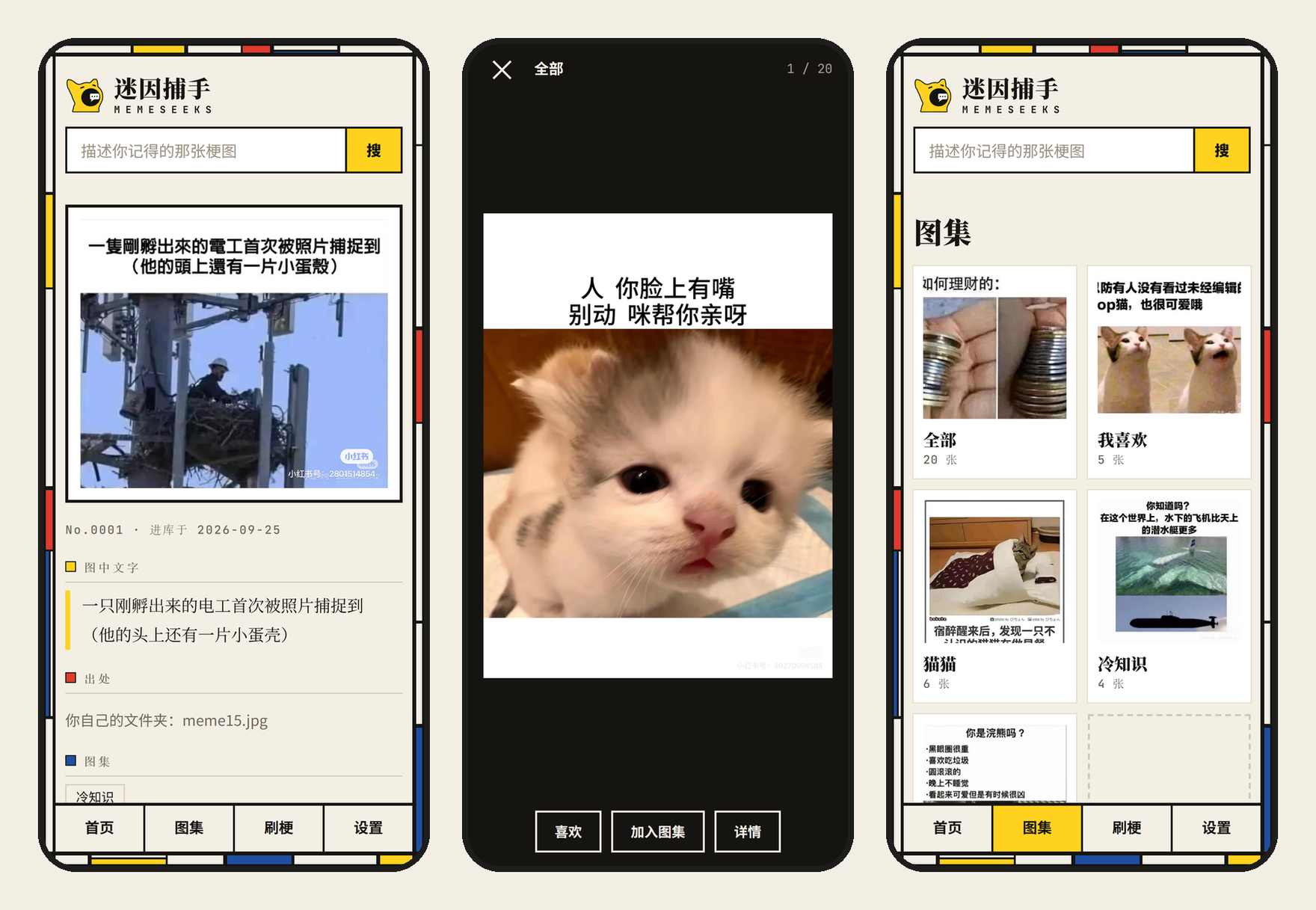
- **图集**:有「全部」「我喜欢」和你自己建的图集。在梗图页点「加入图集」;在任意图集页点「上传」,或者把图片拖进页面。
|
|
86
|
+
- **刷梗**:全屏一张接一张地看。可以按图集的顺序看,或者随机;在某张梗图上点大图,会接着刷和它相似的梗;从页头进入时,先刷最久没看过的。手机上划动,电脑上用滚轮或方向键。
|
|
87
|
+
- **首页**有今日一梗、你的图集和旧梗重温。点开一张梗图可以复制、保存、分享,也能看它的出处。
|
|
88
|
+
- **设置**:纸色 / 夜间主题、蒙德里安边框、开场动画、减少动效、网上搜索、来源文件夹、连接浏览器。设置存在图库里,用手机打开也一样。想改得更深,可以在图库文件夹里放一个 `custom.css`。
|
|
89
|
+
|
|
90
|
+
在运行它的电脑上,还可以从浏览器菜单把它装成一个应用。
|
|
91
|
+
|
|
92
|
+
### 在手机上用
|
|
93
|
+
|
|
94
|
+
|
|
95
|
+
|
|
96
|
+
在电脑上打开「设置 → 手机访问」,点「开」,再用手机相机扫出现的二维码。手机和电脑要连在同一个 Wi-Fi 上。
|
|
97
|
+
|
|
98
|
+
- 二维码里带着一个口令,同一个 Wi-Fi 下只有知道口令的设备能打开你的图库。「换一个口令」会让之前扫过的手机失效。
|
|
99
|
+
- 第一次打开时,Windows 可能会问要不要允许它访问网络,选「允许」。
|
|
100
|
+
- 手机上能搜索、刷梗和「保存」图片。「复制」「分享」和装成应用需要 HTTPS,这是浏览器的规定,暂时还不行。
|
|
101
|
+
- 高级用法:也可以用 `memeseeks serve --host 0.0.0.0 --token <一串足够长的口令>` 启动,自己管理口令。
|
|
102
|
+
|
|
103
|
+
### 从社区采集梗图
|
|
104
|
+
|
|
105
|
+
浏览器脚本会在你看的网页上放一只猫。点它,它会列出这一页的图;你勾选的图会连同网站名、帖子链接和标题一起进你的图库,大约一分钟后就能搜到。
|
|
106
|
+
|
|
107
|
+
脚本对三个站点做了专门适配:百度贴吧(每层楼的原图)、小红书(一篇笔记的全部图片)、豆瓣小组(帖子和回复里的大图)。其他网站用通用模式。
|
|
108
|
+
|
|
109
|
+
1. 给浏览器装扩展 [Violentmonkey](https://violentmonkey.github.io/)(Firefox 或 Chrome 都行)。
|
|
110
|
+
2. 在迷因捕手运行时打开网页,进入「设置 → 连接浏览器 → 安装采集 meme 脚本」。脚本是为你的服务器生成的,带着只有你的图库知道的密钥;没有这把密钥,收件箱不收图。
|
|
111
|
+
3. 在任意网页上点那只猫(可以把它拖到你喜欢的位置),勾选图片,在「放进」里选图集,然后点「采集」。
|
|
112
|
+
4. 只要一张的时候更快:直接把网页上的图片拖到猫头上,它就吞下去了,放进你上次在「放进」里选的图集。有的网站禁止拖动图片,那就用第 3 步。
|
|
113
|
+
|
|
114
|
+
字很少(少于 15 个字)的采集图多半是表情包,会先放进页头的「待确认」。点「要」就放进图库;点「不要」会移到 `<图库>/rejected`,不删除,也能一键撤销。你的选择只存在你自己的电脑上,以后用来训练一个只属于你的判别器。你自己文件夹里的图不受这条规则影响。
|
|
115
|
+
|
|
116
|
+
脚本只在你点它时动作,只采你正在看的这一页,每秒最多下载两张图。它不自动翻页,不在后台抓取,除了图片、网站名、帖子链接、帖子标题和你选的图集,什么也不发送。你可以在 Violentmonkey 的菜单里让它在某个网站上隐藏,或者把猫放回右下角。
|
|
117
|
+
|
|
118
|
+
### 网上搜索(可选)
|
|
119
|
+
|
|
120
|
+
你自己的图和网上的图分开显示。网上搜索默认关闭。要打开,先去申请一个免费的 [KLIPY](https://partner.klipy.com) API key,然后运行:
|
|
121
|
+
|
|
122
|
+
```bash
|
|
123
|
+
MEMESEEKS_KLIPY_KEY=<你的 key> memeseeks serve --online klipy # 或者设置环境变量 MEMESEEKS_ONLINE=klipy
|
|
124
|
+
```
|
|
125
|
+
|
|
126
|
+
打开之后:
|
|
127
|
+
|
|
128
|
+
- 是**浏览器**把你的搜索词发给 KLIPY,同时发送一个每个图库随机生成的 id 和你的 IP 地址;图片也直接从 KLIPY 加载。迷因捕手的服务器不转发、也不保存这些内容。
|
|
129
|
+
- KLIPY 的结果按原样显示,可能包含广告。它的条款不允许过滤或重排结果,内容偏好请在 KLIPY 的合作方后台里调整。
|
|
130
|
+
- 能打开你网页的人都能看到这个 key。
|
|
131
|
+
- KLIPY 的英文和日文内容很多,中文很少。
|
|
132
|
+
|
|
133
|
+
## 你的数据在哪、怎么备份
|
|
134
|
+
|
|
135
|
+
图库文件夹(默认 `~/.memeseeks`,可以用 `-Library`、`--lib` 或 `MEMESEEKS_HOME` 指定)里全是普通文件:
|
|
136
|
+
|
|
137
|
+
| 内容 | 位置 |
|
|
138
|
+
|---|---|
|
|
139
|
+
| 图集、我喜欢 | `collections.json` |
|
|
140
|
+
| 设置、编号、看过的记录 | `settings.json`、`numbers.json`、`seen.json` |
|
|
141
|
+
| 采集和上传的图,以及它们的出处 | `inbox/`、`provenance.jsonl` |
|
|
142
|
+
| 待确认的选择;「不要」的图 | `review.jsonl`、`rejected/` |
|
|
143
|
+
| 索引(可以重建) | `index/` |
|
|
144
|
+
|
|
145
|
+
- **你自己文件夹里的图,迷因捕手只读不改。** 「移出图库」对它们也只是隐藏,原图不会动。
|
|
146
|
+
- **备份就是复制整个图库文件夹。** 索引丢了能重建,图集和我喜欢丢了就没了,所以这才是需要备份的东西。
|
|
147
|
+
- **换电脑**:把图库文件夹复制过去,安装时用 `-Library` 指向它。如果你自己的梗图文件夹换了位置,在「设置 → 来源文件夹」里重新添加一次;图集是按图片内容认图的,不会丢。
|
|
148
|
+
|
|
149
|
+
## 它是怎么找到梗图的
|
|
150
|
+
|
|
151
|
+
每张图最多从三个方面读,结果再合并排序(倒数排名融合):
|
|
152
|
+
|
|
153
|
+
| 途径 | 用什么 | 要显卡吗 |
|
|
154
|
+
|---|---|---|
|
|
155
|
+
| 图里的字 | 先识别图中文字([RapidOCR](https://github.com/RapidAI/RapidOCR)),再用 [BGE-M3](https://huggingface.co/BAAI/bge-m3) 按意思匹配 | 不用 |
|
|
156
|
+
| 画面 | [Chinese-CLIP](https://github.com/OFA-Sys/Chinese-CLIP) 图文相似度 | 不用 |
|
|
157
|
+
| 描述(可选) | 本地视觉语言模型([Qwen2.5-VL-7B](https://huggingface.co/Qwen/Qwen2.5-VL-7B-Instruct))写出主题和笑点 | 要,约 16 GB 显存 |
|
|
158
|
+
|
|
159
|
+
在维护者那批字很多的梗图上,前两个途径已经能把每条查询要找的图排进前五,所以「描述」默认关闭。数字见 `experiments/results/`。
|
|
160
|
+
|
|
161
|
+
## 命令行
|
|
162
|
+
|
|
163
|
+
```bash
|
|
164
|
+
memeseeks add ~/Pictures/memes # 为一个文件夹建立索引;随时可以重跑,只处理新图
|
|
165
|
+
memeseeks serve # 网页在 http://127.0.0.1:8765/
|
|
166
|
+
memeseeks serve --open # 同上,并打开浏览器(已经在运行的话就直接打开)
|
|
167
|
+
memeseeks search "关于熬夜的" # 在终端里搜
|
|
168
|
+
memeseeks status # 图库里有什么,以及哪些图某一步失败了
|
|
169
|
+
memeseeks eval queries.csv # 给你自己的查询打分(见下)
|
|
170
|
+
memeseeks --lib D:\memes-lib status # --lib 这类全局选项写在子命令前面
|
|
171
|
+
```
|
|
172
|
+
|
|
173
|
+
`add --vlm` 会另外用本地视觉语言模型给图写描述(需要显卡),`add --tidy` 会让视觉语言模型把图里的文字整理成对话和评论、纠正识别错字(需要约 20 GB 显存的显卡),`--retry-failed` 会重做上次失败的图。整理时模型还会认出知名的梗:梗图页显示「梗:电车难题」,点一下就搜同一个梗的其他图;外文梗图没有中文翻译时,会在文字下面显示「【译】…」。
|
|
174
|
+
|
|
175
|
+
电脑没有显卡时,可以让另一台有显卡的电脑来整理:`memeseeks tidy-remote --host 主机 --home 目录`。它通过 ssh 连过去(要先配好密钥登录),`目录` 里要有装了 `memeseeks[ml]` 的 `.venv` 和模型缓存 `hf-cache`。之后每次更新图库,没整理过的新图都会自动送过去;结果拿回来后,那边的图会删掉。
|
|
176
|
+
|
|
177
|
+
**评测你自己的查询**:`queries.csv` 第一行是表头,之后每行一条查询和它应该找到的文件名,多个文件名用 `;` 分隔。文件名可以是相对于添加的文件夹的路径,也可以是不重名的文件名。
|
|
178
|
+
|
|
179
|
+
```csv
|
|
180
|
+
query,expected
|
|
181
|
+
关于熬夜的,night_owl.jpg
|
|
182
|
+
猫在评判你,cat_judge.png;cat_judge_2.png
|
|
183
|
+
```
|
|
184
|
+
|
|
185
|
+
## 手动安装(开发用)
|
|
186
|
+
|
|
187
|
+
需要 Python 3.10 或更新版本。
|
|
188
|
+
|
|
189
|
+
```bash
|
|
190
|
+
git clone https://github.com/tactino/memeseeks && cd memeseeks
|
|
191
|
+
python -m venv .venv && source .venv/bin/activate # Windows:.venv\Scripts\activate
|
|
192
|
+
pip install torch torchvision --index-url https://download.pytorch.org/whl/cpu # 有显卡就装对应的 CUDA 版
|
|
193
|
+
pip install -e ".[ml,serve]"
|
|
194
|
+
```
|
|
195
|
+
|
|
196
|
+
- 第一次运行会把约 3.9 GB 的模型下载到 Hugging Face 缓存(`HF_HOME`)。**在国内**请先设置 `HF_ENDPOINT=https://hf-mirror.com`。
|
|
197
|
+
- **Windows + Anaconda**:如果用 torch 2.9 或更新版本,不要用 Anaconda 的 Python 建虚拟环境,否则 torch 会报 `WinError 1114 … c10.dll`。原因是 Anaconda 在 `python.exe` 旁边放了一份旧的 MSVC 运行库。改用 python.org 的 Python,或者 uv 管理的 Python(`uv venv --managed-python --python 3.12`)。
|
|
198
|
+
|
|
199
|
+
## 用 Docker 运行
|
|
200
|
+
|
|
201
|
+
不用装 Python,只用 CPU。
|
|
202
|
+
|
|
203
|
+
```bash
|
|
204
|
+
git clone https://github.com/tactino/memeseeks && cd memeseeks
|
|
205
|
+
cp .env.example .env # 然后填好 MEMES_DIR 和口令(文件里写了怎么生成)
|
|
206
|
+
docker compose up -d
|
|
207
|
+
docker compose logs -f # 等到出现 "memeseeks is at http://…"
|
|
208
|
+
```
|
|
209
|
+
|
|
210
|
+
- 第一次启动会把约 3.9 GB 的模型下载到 `models` 卷,并为你的文件夹建立索引。**建完索引之前 8765 端口不会响应**,请看日志。
|
|
211
|
+
- 之后在每台设备上打开一次 `http://<这台电脑的局域网地址>:8765/?token=<你的口令>`,浏览器会记住它。
|
|
212
|
+
- 以后启动只处理新图。更新代码后运行 `docker compose up -d --build`;`docker compose down -v` 会删掉图库和下载的模型。
|
|
213
|
+
- 梗图文件夹以只读方式挂载。容器以 uid 1000 运行;如果你把 `library` 卷换成绑定挂载,要让 uid 1000 能写那个文件夹。
|
|
214
|
+
|
|
215
|
+
## 许可证
|
|
216
|
+
|
|
217
|
+
代码:MIT。梗图知识库(将来有了之后):CC BY-SA 4.0。字体 Noto Serif SC 与 JetBrains Mono 的子集按 SIL OFL 1.1 随附。
|
|
@@ -0,0 +1,187 @@
|
|
|
1
|
+
# 迷因捕手 · memeseeks
|
|
2
|
+
|
|
3
|
+
[English](https://github.com/tactino/memeseeks/blob/main/README.en.md)
|
|
4
|
+
|
|
5
|
+
说出你记得的那句话,从自己的收藏里把那张梗图找回来。中英文都能搜,程序跑在你自己的电脑上;同时搜网上是可选的,默认关闭。
|
|
6
|
+
|
|
7
|
+
它也是一个个人梗图收藏夹,有点像网易云音乐之于歌:**图集**(像歌单)、**我喜欢**、全屏一张接一张地**刷梗**,还能在逛贴吧、小红书、豆瓣时一键**采集**。
|
|
8
|
+
|
|
9
|
+
**状态:** v0.3。本地网页应用、命令行、一键安装和 Docker 镜像都已可用。跨语言的「梗图关系图」和梗图译制在规划中。
|
|
10
|
+
|
|
11
|
+

|
|
12
|
+
|
|
13
|
+
<sub>截图里的梗图都是示例图,由 `scripts/demo_memes.py` 画出。</sub>
|
|
14
|
+
|
|
15
|
+
## 安装
|
|
16
|
+
|
|
17
|
+
**Windows**:打开 PowerShell,运行:
|
|
18
|
+
|
|
19
|
+
```powershell
|
|
20
|
+
irm https://raw.githubusercontent.com/tactino/memeseeks/main/scripts/install.ps1 | iex
|
|
21
|
+
```
|
|
22
|
+
|
|
23
|
+
**macOS / Linux:**
|
|
24
|
+
|
|
25
|
+
```bash
|
|
26
|
+
curl -LsSf https://raw.githubusercontent.com/tactino/memeseeks/main/scripts/install.sh | sh
|
|
27
|
+
```
|
|
28
|
+
|
|
29
|
+
安装脚本会把程序和它自带的 Python 放进一个文件夹(Windows 是 `%LOCALAPPDATA%\memeseeks`,macOS 是 `~/Library/Application Support/memeseeks`,Linux 是 `~/.local/share/memeseeks`),建好「迷因捕手」快捷方式,然后启动。
|
|
30
|
+
|
|
31
|
+
- 第一次启动会下载约 3.9 GB 的模型,网页上能看到进度;下完就能搜索,其他功能马上就能用。
|
|
32
|
+
- 在国内会自动换用镜像(PyPI、Python 和模型都走国内镜像)。
|
|
33
|
+
- 不改系统 PATH。想卸载,删掉那个文件夹和快捷方式即可;你的图库默认在 `~/.memeseeks`,不会被删。
|
|
34
|
+
- 想更新,再运行一次同一行命令。
|
|
35
|
+
|
|
36
|
+
**不想装在 C 盘**(或者想装到别处)时,在 Windows 上这样运行:
|
|
37
|
+
|
|
38
|
+
```powershell
|
|
39
|
+
& ([scriptblock]::Create((irm https://raw.githubusercontent.com/tactino/memeseeks/main/scripts/install.ps1))) -Dir D:\memeseeks -Library D:\memeseeks-library
|
|
40
|
+
```
|
|
41
|
+
|
|
42
|
+
- `-Dir`:程序、它的 Python 和模型放在哪。
|
|
43
|
+
- `-Library`:你的图库(索引、图集、采集来的图)放在哪。
|
|
44
|
+
- `-Models D:\某处\hf-cache`:复用你已经下载过的 Hugging Face 模型缓存,不再重新下载。
|
|
45
|
+
|
|
46
|
+
macOS / Linux 上对应的是在 `sh` 前面加 `MEMESEEKS_DIR=…`、`MEMESEEKS_LIBRARY=…`、`MEMESEEKS_MODELS=…`。
|
|
47
|
+
|
|
48
|
+
## 怎么用
|
|
49
|
+
|
|
50
|
+
打开后先把梗图放进来。可以在任意图集页点「上传」,也可以直接把图片拖进页面;还可以在「设置 → 来源文件夹」里添加电脑上已有的梗图文件夹。放进来的新图会在后台建立索引,页头会显示进度。在笔记本 CPU 上每张大约 3.5 秒,1000 张大约一小时,以后只处理新增的图。
|
|
51
|
+
|
|
52
|
+

|
|
53
|
+
|
|
54
|
+
- **搜索**:输入你记得的话,比如「上班的时候想下班」。把握大的结果排在前面,其余的折叠在「可能相关」里。
|
|
55
|
+
- **图集**:有「全部」「我喜欢」和你自己建的图集。在梗图页点「加入图集」;在任意图集页点「上传」,或者把图片拖进页面。
|
|
56
|
+
- **刷梗**:全屏一张接一张地看。可以按图集的顺序看,或者随机;在某张梗图上点大图,会接着刷和它相似的梗;从页头进入时,先刷最久没看过的。手机上划动,电脑上用滚轮或方向键。
|
|
57
|
+
- **首页**有今日一梗、你的图集和旧梗重温。点开一张梗图可以复制、保存、分享,也能看它的出处。
|
|
58
|
+
- **设置**:纸色 / 夜间主题、蒙德里安边框、开场动画、减少动效、网上搜索、来源文件夹、连接浏览器。设置存在图库里,用手机打开也一样。想改得更深,可以在图库文件夹里放一个 `custom.css`。
|
|
59
|
+
|
|
60
|
+
在运行它的电脑上,还可以从浏览器菜单把它装成一个应用。
|
|
61
|
+
|
|
62
|
+
### 在手机上用
|
|
63
|
+
|
|
64
|
+

|
|
65
|
+
|
|
66
|
+
在电脑上打开「设置 → 手机访问」,点「开」,再用手机相机扫出现的二维码。手机和电脑要连在同一个 Wi-Fi 上。
|
|
67
|
+
|
|
68
|
+
- 二维码里带着一个口令,同一个 Wi-Fi 下只有知道口令的设备能打开你的图库。「换一个口令」会让之前扫过的手机失效。
|
|
69
|
+
- 第一次打开时,Windows 可能会问要不要允许它访问网络,选「允许」。
|
|
70
|
+
- 手机上能搜索、刷梗和「保存」图片。「复制」「分享」和装成应用需要 HTTPS,这是浏览器的规定,暂时还不行。
|
|
71
|
+
- 高级用法:也可以用 `memeseeks serve --host 0.0.0.0 --token <一串足够长的口令>` 启动,自己管理口令。
|
|
72
|
+
|
|
73
|
+
### 从社区采集梗图
|
|
74
|
+
|
|
75
|
+
浏览器脚本会在你看的网页上放一只猫。点它,它会列出这一页的图;你勾选的图会连同网站名、帖子链接和标题一起进你的图库,大约一分钟后就能搜到。
|
|
76
|
+
|
|
77
|
+
脚本对三个站点做了专门适配:百度贴吧(每层楼的原图)、小红书(一篇笔记的全部图片)、豆瓣小组(帖子和回复里的大图)。其他网站用通用模式。
|
|
78
|
+
|
|
79
|
+
1. 给浏览器装扩展 [Violentmonkey](https://violentmonkey.github.io/)(Firefox 或 Chrome 都行)。
|
|
80
|
+
2. 在迷因捕手运行时打开网页,进入「设置 → 连接浏览器 → 安装采集 meme 脚本」。脚本是为你的服务器生成的,带着只有你的图库知道的密钥;没有这把密钥,收件箱不收图。
|
|
81
|
+
3. 在任意网页上点那只猫(可以把它拖到你喜欢的位置),勾选图片,在「放进」里选图集,然后点「采集」。
|
|
82
|
+
4. 只要一张的时候更快:直接把网页上的图片拖到猫头上,它就吞下去了,放进你上次在「放进」里选的图集。有的网站禁止拖动图片,那就用第 3 步。
|
|
83
|
+
|
|
84
|
+
字很少(少于 15 个字)的采集图多半是表情包,会先放进页头的「待确认」。点「要」就放进图库;点「不要」会移到 `<图库>/rejected`,不删除,也能一键撤销。你的选择只存在你自己的电脑上,以后用来训练一个只属于你的判别器。你自己文件夹里的图不受这条规则影响。
|
|
85
|
+
|
|
86
|
+
脚本只在你点它时动作,只采你正在看的这一页,每秒最多下载两张图。它不自动翻页,不在后台抓取,除了图片、网站名、帖子链接、帖子标题和你选的图集,什么也不发送。你可以在 Violentmonkey 的菜单里让它在某个网站上隐藏,或者把猫放回右下角。
|
|
87
|
+
|
|
88
|
+
### 网上搜索(可选)
|
|
89
|
+
|
|
90
|
+
你自己的图和网上的图分开显示。网上搜索默认关闭。要打开,先去申请一个免费的 [KLIPY](https://partner.klipy.com) API key,然后运行:
|
|
91
|
+
|
|
92
|
+
```bash
|
|
93
|
+
MEMESEEKS_KLIPY_KEY=<你的 key> memeseeks serve --online klipy # 或者设置环境变量 MEMESEEKS_ONLINE=klipy
|
|
94
|
+
```
|
|
95
|
+
|
|
96
|
+
打开之后:
|
|
97
|
+
|
|
98
|
+
- 是**浏览器**把你的搜索词发给 KLIPY,同时发送一个每个图库随机生成的 id 和你的 IP 地址;图片也直接从 KLIPY 加载。迷因捕手的服务器不转发、也不保存这些内容。
|
|
99
|
+
- KLIPY 的结果按原样显示,可能包含广告。它的条款不允许过滤或重排结果,内容偏好请在 KLIPY 的合作方后台里调整。
|
|
100
|
+
- 能打开你网页的人都能看到这个 key。
|
|
101
|
+
- KLIPY 的英文和日文内容很多,中文很少。
|
|
102
|
+
|
|
103
|
+
## 你的数据在哪、怎么备份
|
|
104
|
+
|
|
105
|
+
图库文件夹(默认 `~/.memeseeks`,可以用 `-Library`、`--lib` 或 `MEMESEEKS_HOME` 指定)里全是普通文件:
|
|
106
|
+
|
|
107
|
+
| 内容 | 位置 |
|
|
108
|
+
|---|---|
|
|
109
|
+
| 图集、我喜欢 | `collections.json` |
|
|
110
|
+
| 设置、编号、看过的记录 | `settings.json`、`numbers.json`、`seen.json` |
|
|
111
|
+
| 采集和上传的图,以及它们的出处 | `inbox/`、`provenance.jsonl` |
|
|
112
|
+
| 待确认的选择;「不要」的图 | `review.jsonl`、`rejected/` |
|
|
113
|
+
| 索引(可以重建) | `index/` |
|
|
114
|
+
|
|
115
|
+
- **你自己文件夹里的图,迷因捕手只读不改。** 「移出图库」对它们也只是隐藏,原图不会动。
|
|
116
|
+
- **备份就是复制整个图库文件夹。** 索引丢了能重建,图集和我喜欢丢了就没了,所以这才是需要备份的东西。
|
|
117
|
+
- **换电脑**:把图库文件夹复制过去,安装时用 `-Library` 指向它。如果你自己的梗图文件夹换了位置,在「设置 → 来源文件夹」里重新添加一次;图集是按图片内容认图的,不会丢。
|
|
118
|
+
|
|
119
|
+
## 它是怎么找到梗图的
|
|
120
|
+
|
|
121
|
+
每张图最多从三个方面读,结果再合并排序(倒数排名融合):
|
|
122
|
+
|
|
123
|
+
| 途径 | 用什么 | 要显卡吗 |
|
|
124
|
+
|---|---|---|
|
|
125
|
+
| 图里的字 | 先识别图中文字([RapidOCR](https://github.com/RapidAI/RapidOCR)),再用 [BGE-M3](https://huggingface.co/BAAI/bge-m3) 按意思匹配 | 不用 |
|
|
126
|
+
| 画面 | [Chinese-CLIP](https://github.com/OFA-Sys/Chinese-CLIP) 图文相似度 | 不用 |
|
|
127
|
+
| 描述(可选) | 本地视觉语言模型([Qwen2.5-VL-7B](https://huggingface.co/Qwen/Qwen2.5-VL-7B-Instruct))写出主题和笑点 | 要,约 16 GB 显存 |
|
|
128
|
+
|
|
129
|
+
在维护者那批字很多的梗图上,前两个途径已经能把每条查询要找的图排进前五,所以「描述」默认关闭。数字见 `experiments/results/`。
|
|
130
|
+
|
|
131
|
+
## 命令行
|
|
132
|
+
|
|
133
|
+
```bash
|
|
134
|
+
memeseeks add ~/Pictures/memes # 为一个文件夹建立索引;随时可以重跑,只处理新图
|
|
135
|
+
memeseeks serve # 网页在 http://127.0.0.1:8765/
|
|
136
|
+
memeseeks serve --open # 同上,并打开浏览器(已经在运行的话就直接打开)
|
|
137
|
+
memeseeks search "关于熬夜的" # 在终端里搜
|
|
138
|
+
memeseeks status # 图库里有什么,以及哪些图某一步失败了
|
|
139
|
+
memeseeks eval queries.csv # 给你自己的查询打分(见下)
|
|
140
|
+
memeseeks --lib D:\memes-lib status # --lib 这类全局选项写在子命令前面
|
|
141
|
+
```
|
|
142
|
+
|
|
143
|
+
`add --vlm` 会另外用本地视觉语言模型给图写描述(需要显卡),`add --tidy` 会让视觉语言模型把图里的文字整理成对话和评论、纠正识别错字(需要约 20 GB 显存的显卡),`--retry-failed` 会重做上次失败的图。整理时模型还会认出知名的梗:梗图页显示「梗:电车难题」,点一下就搜同一个梗的其他图;外文梗图没有中文翻译时,会在文字下面显示「【译】…」。
|
|
144
|
+
|
|
145
|
+
电脑没有显卡时,可以让另一台有显卡的电脑来整理:`memeseeks tidy-remote --host 主机 --home 目录`。它通过 ssh 连过去(要先配好密钥登录),`目录` 里要有装了 `memeseeks[ml]` 的 `.venv` 和模型缓存 `hf-cache`。之后每次更新图库,没整理过的新图都会自动送过去;结果拿回来后,那边的图会删掉。
|
|
146
|
+
|
|
147
|
+
**评测你自己的查询**:`queries.csv` 第一行是表头,之后每行一条查询和它应该找到的文件名,多个文件名用 `;` 分隔。文件名可以是相对于添加的文件夹的路径,也可以是不重名的文件名。
|
|
148
|
+
|
|
149
|
+
```csv
|
|
150
|
+
query,expected
|
|
151
|
+
关于熬夜的,night_owl.jpg
|
|
152
|
+
猫在评判你,cat_judge.png;cat_judge_2.png
|
|
153
|
+
```
|
|
154
|
+
|
|
155
|
+
## 手动安装(开发用)
|
|
156
|
+
|
|
157
|
+
需要 Python 3.10 或更新版本。
|
|
158
|
+
|
|
159
|
+
```bash
|
|
160
|
+
git clone https://github.com/tactino/memeseeks && cd memeseeks
|
|
161
|
+
python -m venv .venv && source .venv/bin/activate # Windows:.venv\Scripts\activate
|
|
162
|
+
pip install torch torchvision --index-url https://download.pytorch.org/whl/cpu # 有显卡就装对应的 CUDA 版
|
|
163
|
+
pip install -e ".[ml,serve]"
|
|
164
|
+
```
|
|
165
|
+
|
|
166
|
+
- 第一次运行会把约 3.9 GB 的模型下载到 Hugging Face 缓存(`HF_HOME`)。**在国内**请先设置 `HF_ENDPOINT=https://hf-mirror.com`。
|
|
167
|
+
- **Windows + Anaconda**:如果用 torch 2.9 或更新版本,不要用 Anaconda 的 Python 建虚拟环境,否则 torch 会报 `WinError 1114 … c10.dll`。原因是 Anaconda 在 `python.exe` 旁边放了一份旧的 MSVC 运行库。改用 python.org 的 Python,或者 uv 管理的 Python(`uv venv --managed-python --python 3.12`)。
|
|
168
|
+
|
|
169
|
+
## 用 Docker 运行
|
|
170
|
+
|
|
171
|
+
不用装 Python,只用 CPU。
|
|
172
|
+
|
|
173
|
+
```bash
|
|
174
|
+
git clone https://github.com/tactino/memeseeks && cd memeseeks
|
|
175
|
+
cp .env.example .env # 然后填好 MEMES_DIR 和口令(文件里写了怎么生成)
|
|
176
|
+
docker compose up -d
|
|
177
|
+
docker compose logs -f # 等到出现 "memeseeks is at http://…"
|
|
178
|
+
```
|
|
179
|
+
|
|
180
|
+
- 第一次启动会把约 3.9 GB 的模型下载到 `models` 卷,并为你的文件夹建立索引。**建完索引之前 8765 端口不会响应**,请看日志。
|
|
181
|
+
- 之后在每台设备上打开一次 `http://<这台电脑的局域网地址>:8765/?token=<你的口令>`,浏览器会记住它。
|
|
182
|
+
- 以后启动只处理新图。更新代码后运行 `docker compose up -d --build`;`docker compose down -v` 会删掉图库和下载的模型。
|
|
183
|
+
- 梗图文件夹以只读方式挂载。容器以 uid 1000 运行;如果你把 `library` 卷换成绑定挂载,要让 uid 1000 能写那个文件夹。
|
|
184
|
+
|
|
185
|
+
## 许可证
|
|
186
|
+
|
|
187
|
+
代码:MIT。梗图知识库(将来有了之后):CC BY-SA 4.0。字体 Noto Serif SC 与 JetBrains Mono 的子集按 SIL OFL 1.1 随附。
|
|
@@ -0,0 +1,36 @@
|
|
|
1
|
+
[build-system]
|
|
2
|
+
requires = ["setuptools>=68"]
|
|
3
|
+
build-backend = "setuptools.build_meta"
|
|
4
|
+
|
|
5
|
+
[project]
|
|
6
|
+
name = "memeseeks"
|
|
7
|
+
version = "0.3.0"
|
|
8
|
+
description = "迷因捕手 — find memes by what you mean, across languages."
|
|
9
|
+
readme = "README.md"
|
|
10
|
+
license = {text = "MIT"}
|
|
11
|
+
requires-python = ">=3.10"
|
|
12
|
+
dependencies = ["pillow>=10.1", "pillow-heif>=0.16", "numpy>=1.26", "pyyaml>=6", "opencc-python-reimplemented>=0.1.7"]
|
|
13
|
+
|
|
14
|
+
[project.optional-dependencies]
|
|
15
|
+
ml = [
|
|
16
|
+
"transformers>=4.51,<5",
|
|
17
|
+
"accelerate>=0.33",
|
|
18
|
+
"sentence-transformers>=3.0",
|
|
19
|
+
"rapidocr_onnxruntime==1.4.4",
|
|
20
|
+
]
|
|
21
|
+
serve = ["fastapi>=0.110", "uvicorn>=0.29", "segno>=1.5"]
|
|
22
|
+
dev = ["pytest>=8", "httpx2", "fastapi>=0.110", "uvicorn>=0.29", "segno>=1.5"]
|
|
23
|
+
|
|
24
|
+
[tool.setuptools.packages.find]
|
|
25
|
+
where = ["src"]
|
|
26
|
+
|
|
27
|
+
[tool.setuptools.package-data]
|
|
28
|
+
memeseeks = ["web/*", "web/fonts/*", "web/icons/*", "browser/*"]
|
|
29
|
+
|
|
30
|
+
[tool.pytest.ini_options]
|
|
31
|
+
pythonpath = ["src", "."]
|
|
32
|
+
testpaths = ["tests"]
|
|
33
|
+
markers = ["ml: needs model weights; run on the GPU box with MEMESEEKS_ML_TESTS=1"]
|
|
34
|
+
|
|
35
|
+
[project.scripts]
|
|
36
|
+
memeseeks = "memeseeks.cli:main"
|
|
@@ -0,0 +1,161 @@
|
|
|
1
|
+
"""图集 (like playlists), 我喜欢, and the memes removed from the library. One JSON file each, in the library.
|
|
2
|
+
|
|
3
|
+
A 图集 holds image ids in the order they were added, never copies: a meme in five 图集 is stored once,
|
|
4
|
+
and deleting a 图集 never deletes a meme. 我喜欢 (id "liked") always exists and cannot be deleted.
|
|
5
|
+
"""
|
|
6
|
+
|
|
7
|
+
from __future__ import annotations
|
|
8
|
+
|
|
9
|
+
import json
|
|
10
|
+
import secrets
|
|
11
|
+
import threading
|
|
12
|
+
import time
|
|
13
|
+
from pathlib import Path
|
|
14
|
+
|
|
15
|
+
from .index import _atomic_write_text
|
|
16
|
+
|
|
17
|
+
FILE = "collections.json"
|
|
18
|
+
REMOVED_FILE = "removed.json"
|
|
19
|
+
LIKED = "liked"
|
|
20
|
+
VERSION = 1
|
|
21
|
+
MAX_NAME = 40
|
|
22
|
+
|
|
23
|
+
|
|
24
|
+
class CollectionError(ValueError):
|
|
25
|
+
pass
|
|
26
|
+
|
|
27
|
+
|
|
28
|
+
def _read(path: Path, default):
|
|
29
|
+
try:
|
|
30
|
+
return json.loads(path.read_text(encoding="utf-8"))
|
|
31
|
+
except FileNotFoundError:
|
|
32
|
+
return default
|
|
33
|
+
except (OSError, json.JSONDecodeError) as exc:
|
|
34
|
+
raise CollectionError(f"{path.name} is damaged ({exc}); restore it from a backup or delete it") from exc
|
|
35
|
+
|
|
36
|
+
|
|
37
|
+
class Collections:
|
|
38
|
+
def __init__(self, library_root, clock=time.time):
|
|
39
|
+
self.path = Path(library_root) / FILE
|
|
40
|
+
self.clock = clock
|
|
41
|
+
self._lock = threading.Lock()
|
|
42
|
+
|
|
43
|
+
# ---------- storage ----------
|
|
44
|
+
|
|
45
|
+
def _load(self) -> dict:
|
|
46
|
+
data = _read(self.path, {"version": VERSION, "collections": []})
|
|
47
|
+
if not any(c["id"] == LIKED for c in data["collections"]):
|
|
48
|
+
data["collections"].insert(0, {"id": LIKED, "name": "我喜欢", "created": 0, "items": []})
|
|
49
|
+
return data
|
|
50
|
+
|
|
51
|
+
def _save(self, data: dict) -> None:
|
|
52
|
+
self.path.parent.mkdir(parents=True, exist_ok=True)
|
|
53
|
+
_atomic_write_text(self.path, json.dumps(data, ensure_ascii=False, indent=1))
|
|
54
|
+
|
|
55
|
+
def _find(self, data: dict, cid: str) -> dict:
|
|
56
|
+
for c in data["collections"]:
|
|
57
|
+
if c["id"] == cid:
|
|
58
|
+
return c
|
|
59
|
+
raise CollectionError("no such 图集")
|
|
60
|
+
|
|
61
|
+
@staticmethod
|
|
62
|
+
def _clean_name(name) -> str:
|
|
63
|
+
name = " ".join(str(name or "").split())
|
|
64
|
+
if not name:
|
|
65
|
+
raise CollectionError("a 图集 needs a name")
|
|
66
|
+
if len(name) > MAX_NAME:
|
|
67
|
+
raise CollectionError(f"names are at most {MAX_NAME} characters")
|
|
68
|
+
return name
|
|
69
|
+
|
|
70
|
+
# ---------- reading ----------
|
|
71
|
+
|
|
72
|
+
def all(self) -> list[dict]:
|
|
73
|
+
return self._load()["collections"]
|
|
74
|
+
|
|
75
|
+
def get(self, cid: str) -> dict:
|
|
76
|
+
return self._find(self._load(), cid)
|
|
77
|
+
|
|
78
|
+
def containing(self, image_id: str) -> list[str]:
|
|
79
|
+
return [c["id"] for c in self.all() if any(it["id"] == image_id for it in c["items"])]
|
|
80
|
+
|
|
81
|
+
# ---------- changing ----------
|
|
82
|
+
|
|
83
|
+
def create(self, name) -> dict:
|
|
84
|
+
name = self._clean_name(name)
|
|
85
|
+
with self._lock:
|
|
86
|
+
data = self._load()
|
|
87
|
+
if any(c["name"] == name for c in data["collections"]):
|
|
88
|
+
raise CollectionError(f"there is already a 图集 called {name}")
|
|
89
|
+
c = {"id": secrets.token_hex(4), "name": name, "created": self.clock(), "items": []}
|
|
90
|
+
data["collections"].append(c)
|
|
91
|
+
self._save(data)
|
|
92
|
+
return c
|
|
93
|
+
|
|
94
|
+
def rename(self, cid: str, name) -> dict:
|
|
95
|
+
name = self._clean_name(name)
|
|
96
|
+
with self._lock:
|
|
97
|
+
data = self._load()
|
|
98
|
+
c = self._find(data, cid)
|
|
99
|
+
if cid == LIKED:
|
|
100
|
+
raise CollectionError("我喜欢 cannot be renamed")
|
|
101
|
+
if any(o["name"] == name and o["id"] != cid for o in data["collections"]):
|
|
102
|
+
raise CollectionError(f"there is already a 图集 called {name}")
|
|
103
|
+
c["name"] = name
|
|
104
|
+
self._save(data)
|
|
105
|
+
return c
|
|
106
|
+
|
|
107
|
+
def delete(self, cid: str) -> None:
|
|
108
|
+
if cid == LIKED:
|
|
109
|
+
raise CollectionError("我喜欢 cannot be deleted")
|
|
110
|
+
with self._lock:
|
|
111
|
+
data = self._load()
|
|
112
|
+
data["collections"].remove(self._find(data, cid))
|
|
113
|
+
self._save(data)
|
|
114
|
+
|
|
115
|
+
def add(self, cid: str, image_ids: list[str]) -> int:
|
|
116
|
+
"""Append memes not in the 图集 yet; returns how many were added."""
|
|
117
|
+
with self._lock:
|
|
118
|
+
data = self._load()
|
|
119
|
+
c = self._find(data, cid)
|
|
120
|
+
have = {it["id"] for it in c["items"]}
|
|
121
|
+
now = self.clock()
|
|
122
|
+
new = [i for i in dict.fromkeys(image_ids) if i not in have]
|
|
123
|
+
c["items"] += [{"id": i, "added": now} for i in new]
|
|
124
|
+
self._save(data)
|
|
125
|
+
return len(new)
|
|
126
|
+
|
|
127
|
+
def remove(self, cid: str, image_ids: list[str]) -> int:
|
|
128
|
+
drop = set(image_ids)
|
|
129
|
+
with self._lock:
|
|
130
|
+
data = self._load()
|
|
131
|
+
c = self._find(data, cid)
|
|
132
|
+
before = len(c["items"])
|
|
133
|
+
c["items"] = [it for it in c["items"] if it["id"] not in drop]
|
|
134
|
+
self._save(data)
|
|
135
|
+
return before - len(c["items"])
|
|
136
|
+
|
|
137
|
+
def forget(self, image_ids: list[str]) -> None:
|
|
138
|
+
"""A meme left the library: take it out of every 图集."""
|
|
139
|
+
drop = set(image_ids)
|
|
140
|
+
with self._lock:
|
|
141
|
+
data = self._load()
|
|
142
|
+
for c in data["collections"]:
|
|
143
|
+
c["items"] = [it for it in c["items"] if it["id"] not in drop]
|
|
144
|
+
self._save(data)
|
|
145
|
+
|
|
146
|
+
|
|
147
|
+
class Removed:
|
|
148
|
+
"""Memes removed from the library that live in your own folders: hidden, never deleted from disk."""
|
|
149
|
+
|
|
150
|
+
def __init__(self, library_root):
|
|
151
|
+
self.path = Path(library_root) / REMOVED_FILE
|
|
152
|
+
self._lock = threading.Lock()
|
|
153
|
+
|
|
154
|
+
def ids(self) -> set[str]:
|
|
155
|
+
return set(_read(self.path, {"version": VERSION, "ids": []})["ids"])
|
|
156
|
+
|
|
157
|
+
def add(self, image_ids: list[str]) -> None:
|
|
158
|
+
with self._lock:
|
|
159
|
+
ids = self.ids() | set(image_ids)
|
|
160
|
+
self.path.parent.mkdir(parents=True, exist_ok=True)
|
|
161
|
+
_atomic_write_text(self.path, json.dumps({"version": VERSION, "ids": sorted(ids)}))
|