mcp-use 1.1.5__tar.gz → 1.2.6__tar.gz
This diff represents the content of publicly available package versions that have been released to one of the supported registries. The information contained in this diff is provided for informational purposes only and reflects changes between package versions as they appear in their respective public registries.
Potentially problematic release.
This version of mcp-use might be problematic. Click here for more details.
- mcp_use-1.2.6/.github/pull_request_template.md +43 -0
- {mcp_use-1.1.5 → mcp_use-1.2.6}/PKG-INFO +128 -7
- {mcp_use-1.1.5 → mcp_use-1.2.6}/README.md +127 -6
- {mcp_use-1.1.5 → mcp_use-1.2.6}/docs/api-reference/introduction.mdx +6 -1
- mcp_use-1.2.6/docs/building-custom-agents.mdx +175 -0
- {mcp_use-1.1.5 → mcp_use-1.2.6}/docs/docs.json +17 -4
- {mcp_use-1.1.5 → mcp_use-1.2.6}/docs/essentials/configuration.mdx +1 -1
- {mcp_use-1.1.5 → mcp_use-1.2.6}/docs/essentials/connection-types.mdx +0 -29
- mcp_use-1.2.6/docs/essentials/debugging.mdx +103 -0
- mcp_use-1.2.6/docs/favicon.svg +8 -0
- {mcp_use-1.1.5 → mcp_use-1.2.6}/docs/introduction.mdx +3 -0
- {mcp_use-1.1.5 → mcp_use-1.2.6}/docs/quickstart.mdx +107 -1
- {mcp_use-1.1.5 → mcp_use-1.2.6}/examples/browser_use.py +4 -1
- {mcp_use-1.1.5 → mcp_use-1.2.6}/examples/filesystem_use.py +1 -1
- {mcp_use-1.1.5 → mcp_use-1.2.6}/examples/multi_server_example.py +1 -1
- {mcp_use-1.1.5 → mcp_use-1.2.6}/mcp_use/__init__.py +14 -1
- mcp_use-1.2.6/mcp_use/adapters/__init__.py +10 -0
- mcp_use-1.2.6/mcp_use/adapters/base.py +178 -0
- mcp_use-1.2.6/mcp_use/adapters/langchain_adapter.py +161 -0
- {mcp_use-1.1.5 → mcp_use-1.2.6}/mcp_use/agents/__init__.py +6 -2
- mcp_use-1.2.6/mcp_use/agents/mcpagent.py +531 -0
- mcp_use-1.2.6/mcp_use/agents/prompts/system_prompt_builder.py +105 -0
- mcp_use-1.2.6/mcp_use/agents/prompts/templates.py +43 -0
- mcp_use-1.2.6/mcp_use/agents/server_manager.py +282 -0
- {mcp_use-1.1.5 → mcp_use-1.2.6}/mcp_use/logging.py +51 -4
- {mcp_use-1.1.5 → mcp_use-1.2.6}/pyproject.toml +1 -1
- mcp_use-1.2.6/static/image.jpg +0 -0
- mcp_use-1.1.5/docs/favicon.svg +0 -14
- mcp_use-1.1.5/mcp_use/agents/langchain_agent.py +0 -267
- mcp_use-1.1.5/mcp_use/agents/mcpagent.py +0 -348
- mcp_use-1.1.5/mcp_use/agents/prompts/default.py +0 -22
- mcp_use-1.1.5/static/image.jpg +0 -0
- {mcp_use-1.1.5 → mcp_use-1.2.6}/.github/ISSUE_TEMPLATE/bug_report.md +0 -0
- {mcp_use-1.1.5 → mcp_use-1.2.6}/.github/workflows/publish.yml +0 -0
- {mcp_use-1.1.5 → mcp_use-1.2.6}/.github/workflows/tests.yml +0 -0
- {mcp_use-1.1.5 → mcp_use-1.2.6}/.gitignore +0 -0
- {mcp_use-1.1.5 → mcp_use-1.2.6}/.pre-commit-config.yaml +0 -0
- {mcp_use-1.1.5 → mcp_use-1.2.6}/LICENSE +0 -0
- {mcp_use-1.1.5 → mcp_use-1.2.6}/docs/README.md +0 -0
- {mcp_use-1.1.5 → mcp_use-1.2.6}/docs/development.mdx +0 -0
- {mcp_use-1.1.5 → mcp_use-1.2.6}/docs/essentials/llm-integration.mdx +0 -0
- {mcp_use-1.1.5 → mcp_use-1.2.6}/docs/images/hero-dark.png +0 -0
- {mcp_use-1.1.5 → mcp_use-1.2.6}/docs/images/hero-light.png +0 -0
- {mcp_use-1.1.5 → mcp_use-1.2.6}/docs/logo/dark.svg +0 -0
- {mcp_use-1.1.5 → mcp_use-1.2.6}/docs/logo/light.svg +0 -0
- {mcp_use-1.1.5 → mcp_use-1.2.6}/docs/snippets/snippet-intro.mdx +0 -0
- {mcp_use-1.1.5 → mcp_use-1.2.6}/examples/airbnb_mcp.json +0 -0
- {mcp_use-1.1.5 → mcp_use-1.2.6}/examples/airbnb_use.py +0 -0
- {mcp_use-1.1.5 → mcp_use-1.2.6}/examples/blender_use.py +0 -0
- {mcp_use-1.1.5 → mcp_use-1.2.6}/examples/browser_mcp.json +0 -0
- {mcp_use-1.1.5 → mcp_use-1.2.6}/examples/chat_example.py +0 -0
- {mcp_use-1.1.5 → mcp_use-1.2.6}/examples/http_example.py +0 -0
- {mcp_use-1.1.5 → mcp_use-1.2.6}/mcp_use/agents/base.py +0 -0
- {mcp_use-1.1.5 → mcp_use-1.2.6}/mcp_use/client.py +0 -0
- {mcp_use-1.1.5 → mcp_use-1.2.6}/mcp_use/config.py +0 -0
- {mcp_use-1.1.5 → mcp_use-1.2.6}/mcp_use/connectors/__init__.py +0 -0
- {mcp_use-1.1.5 → mcp_use-1.2.6}/mcp_use/connectors/base.py +0 -0
- {mcp_use-1.1.5 → mcp_use-1.2.6}/mcp_use/connectors/http.py +0 -0
- {mcp_use-1.1.5 → mcp_use-1.2.6}/mcp_use/connectors/stdio.py +0 -0
- {mcp_use-1.1.5 → mcp_use-1.2.6}/mcp_use/connectors/websocket.py +0 -0
- {mcp_use-1.1.5 → mcp_use-1.2.6}/mcp_use/session.py +0 -0
- {mcp_use-1.1.5 → mcp_use-1.2.6}/mcp_use/task_managers/__init__.py +0 -0
- {mcp_use-1.1.5 → mcp_use-1.2.6}/mcp_use/task_managers/base.py +0 -0
- {mcp_use-1.1.5 → mcp_use-1.2.6}/mcp_use/task_managers/sse.py +0 -0
- {mcp_use-1.1.5 → mcp_use-1.2.6}/mcp_use/task_managers/stdio.py +0 -0
- {mcp_use-1.1.5 → mcp_use-1.2.6}/mcp_use/task_managers/websocket.py +0 -0
- {mcp_use-1.1.5 → mcp_use-1.2.6}/pytest.ini +0 -0
- {mcp_use-1.1.5 → mcp_use-1.2.6}/tests/conftest.py +0 -0
- {mcp_use-1.1.5 → mcp_use-1.2.6}/tests/unit/test_client.py +0 -0
- {mcp_use-1.1.5 → mcp_use-1.2.6}/tests/unit/test_config.py +0 -0
- {mcp_use-1.1.5 → mcp_use-1.2.6}/tests/unit/test_http_connector.py +0 -0
- {mcp_use-1.1.5 → mcp_use-1.2.6}/tests/unit/test_logging.py +0 -0
- {mcp_use-1.1.5 → mcp_use-1.2.6}/tests/unit/test_session.py +0 -0
- {mcp_use-1.1.5 → mcp_use-1.2.6}/tests/unit/test_stdio_connector.py +0 -0
|
@@ -0,0 +1,43 @@
|
|
|
1
|
+
# Pull Request Description
|
|
2
|
+
|
|
3
|
+
## Changes
|
|
4
|
+
|
|
5
|
+
Describe the changes introduced by this PR in a concise manner.
|
|
6
|
+
|
|
7
|
+
## Implementation Details
|
|
8
|
+
|
|
9
|
+
1. List the specific implementation details
|
|
10
|
+
2. Include code organization, architectural decisions
|
|
11
|
+
3. Note any dependencies that were added or modified
|
|
12
|
+
|
|
13
|
+
## Example Usage (Before)
|
|
14
|
+
|
|
15
|
+
```python
|
|
16
|
+
# Include example code showing how things worked before (if applicable)
|
|
17
|
+
```
|
|
18
|
+
|
|
19
|
+
## Example Usage (After)
|
|
20
|
+
|
|
21
|
+
```python
|
|
22
|
+
# Include example code showing how things work after your changes
|
|
23
|
+
```
|
|
24
|
+
|
|
25
|
+
## Documentation Updates
|
|
26
|
+
|
|
27
|
+
* List any documentation files that were updated
|
|
28
|
+
* Explain what was changed in each file
|
|
29
|
+
|
|
30
|
+
## Testing
|
|
31
|
+
|
|
32
|
+
Describe how you tested these changes:
|
|
33
|
+
- Unit tests added/modified
|
|
34
|
+
- Manual testing performed
|
|
35
|
+
- Edge cases considered
|
|
36
|
+
|
|
37
|
+
## Backwards Compatibility
|
|
38
|
+
|
|
39
|
+
Explain whether these changes are backwards compatible. If not, describe what users will need to do to adapt to these changes.
|
|
40
|
+
|
|
41
|
+
## Related Issues
|
|
42
|
+
|
|
43
|
+
Closes #[issue_number]
|
|
@@ -1,6 +1,6 @@
|
|
|
1
1
|
Metadata-Version: 2.4
|
|
2
2
|
Name: mcp-use
|
|
3
|
-
Version: 1.
|
|
3
|
+
Version: 1.2.6
|
|
4
4
|
Summary: MCP Library for LLMs
|
|
5
5
|
Author-email: Pietro Zullo <pietro.zullo@gmail.com>
|
|
6
6
|
License: MIT
|
|
@@ -41,9 +41,9 @@ Description-Content-Type: text/markdown
|
|
|
41
41
|
<img alt="" src="./static/image.jpg" width="full">
|
|
42
42
|
</picture>
|
|
43
43
|
|
|
44
|
-
<h1 align="center">
|
|
44
|
+
<h1 align="center">Unified MCP Client Library </h1>
|
|
45
45
|
|
|
46
|
-
[](https://pypi.org/project/mcp_use/)
|
|
47
47
|
[](https://pypi.org/project/mcp_use/)
|
|
48
48
|
[](https://pypi.org/project/mcp_use/)
|
|
49
49
|
[](https://pypi.org/project/mcp_use/)
|
|
@@ -51,8 +51,9 @@ Description-Content-Type: text/markdown
|
|
|
51
51
|
[](https://github.com/pietrozullo/mcp-use/blob/main/LICENSE)
|
|
52
52
|
[](https://github.com/astral-sh/ruff)
|
|
53
53
|
[](https://github.com/pietrozullo/mcp-use/stargazers)
|
|
54
|
+
[](https://x.com/pietrozullo)
|
|
54
55
|
|
|
55
|
-
🌐 MCP-Use is the open source way to connect any LLM to MCP
|
|
56
|
+
🌐 MCP-Use is the open source way to connect **any LLM to any MCP server** and build custom agents that have tool access, without using closed source or application clients.
|
|
56
57
|
|
|
57
58
|
💡 Let developers easily connect any LLM to tools like web browsing, file operations, and more.
|
|
58
59
|
|
|
@@ -65,8 +66,10 @@ Description-Content-Type: text/markdown
|
|
|
65
66
|
| 🔄 **Ease of use** | Create your first MCP capable agent you need only 6 lines of code |
|
|
66
67
|
| 🤖 **LLM Flexibility** | Works with any langchain supported LLM that supports tool calling (OpenAI, Anthropic, Groq, LLama etc.) |
|
|
67
68
|
| 🌐 **HTTP Support** | Direct connection to MCP servers running on specific HTTP ports |
|
|
69
|
+
| ⚙️ **Dynamic Server Selection** | Agents can dynamically choose the most appropriate MCP server for a given task from the available pool |
|
|
68
70
|
| 🧩 **Multi-Server Support** | Use multiple MCP servers simultaneously in a single agent |
|
|
69
71
|
| 🛡️ **Tool Restrictions** | Restrict potentially dangerous tools like file system or network access |
|
|
72
|
+
| 🔧 **Custom Agents** | Build your own agents with any framework using the LangChain adapter or create new adapters |
|
|
70
73
|
|
|
71
74
|
|
|
72
75
|
# Quick start
|
|
@@ -388,7 +391,7 @@ This example demonstrates how to connect to an MCP server running on a specific
|
|
|
388
391
|
|
|
389
392
|
# Multi-Server Support
|
|
390
393
|
|
|
391
|
-
MCP-Use
|
|
394
|
+
MCP-Use allows configuring and connecting to multiple MCP servers simultaneously using the `MCPClient`. This enables complex workflows that require tools from different servers, such as web browsing combined with file operations or 3D modeling.
|
|
392
395
|
|
|
393
396
|
## Configuration
|
|
394
397
|
|
|
@@ -414,7 +417,28 @@ You can configure multiple servers in your configuration file:
|
|
|
414
417
|
|
|
415
418
|
## Usage
|
|
416
419
|
|
|
417
|
-
The `MCPClient` class provides
|
|
420
|
+
The `MCPClient` class provides methods for managing connections to multiple servers. When creating an `MCPAgent`, you can provide an `MCPClient` configured with multiple servers.
|
|
421
|
+
|
|
422
|
+
By default, the agent will have access to tools from all configured servers. If you need to target a specific server for a particular task, you can specify the `server_name` when calling the `agent.run()` method.
|
|
423
|
+
|
|
424
|
+
```python
|
|
425
|
+
# Example: Manually selecting a server for a specific task
|
|
426
|
+
result = await agent.run(
|
|
427
|
+
"Search for Airbnb listings in Barcelona",
|
|
428
|
+
server_name="airbnb" # Explicitly use the airbnb server
|
|
429
|
+
)
|
|
430
|
+
|
|
431
|
+
result_google = await agent.run(
|
|
432
|
+
"Find restaurants near the first result using Google Search",
|
|
433
|
+
server_name="playwright" # Explicitly use the playwright server
|
|
434
|
+
)
|
|
435
|
+
```
|
|
436
|
+
|
|
437
|
+
## Dynamic Server Selection (Server Manager)
|
|
438
|
+
|
|
439
|
+
For enhanced efficiency and to reduce potential agent confusion when dealing with many tools from different servers, you can enable the Server Manager by setting `use_server_manager=True` during `MCPAgent` initialization.
|
|
440
|
+
|
|
441
|
+
When enabled, the agent intelligently selects the correct MCP server based on the tool chosen by the LLM for a specific step. This minimizes unnecessary connections and ensures the agent uses the appropriate tools for the task.
|
|
418
442
|
|
|
419
443
|
```python
|
|
420
444
|
import asyncio
|
|
@@ -428,7 +452,8 @@ async def main():
|
|
|
428
452
|
# Create agent with the client
|
|
429
453
|
agent = MCPAgent(
|
|
430
454
|
llm=ChatAnthropic(model="claude-3-5-sonnet-20240620"),
|
|
431
|
-
client=client
|
|
455
|
+
client=client,
|
|
456
|
+
use_server_manager=True # Enable the Server Manager
|
|
432
457
|
)
|
|
433
458
|
|
|
434
459
|
try:
|
|
@@ -479,6 +504,98 @@ if __name__ == "__main__":
|
|
|
479
504
|
asyncio.run(main())
|
|
480
505
|
```
|
|
481
506
|
|
|
507
|
+
# Build a Custom Agent:
|
|
508
|
+
|
|
509
|
+
You can also build your own custom agent using the LangChain adapter:
|
|
510
|
+
|
|
511
|
+
```python
|
|
512
|
+
import asyncio
|
|
513
|
+
from langchain_openai import ChatOpenAI
|
|
514
|
+
from mcp_use.client import MCPClient
|
|
515
|
+
from mcp_use.adapters.langchain_adapter import LangChainAdapter
|
|
516
|
+
from dotenv import load_dotenv
|
|
517
|
+
|
|
518
|
+
load_dotenv()
|
|
519
|
+
|
|
520
|
+
|
|
521
|
+
async def main():
|
|
522
|
+
# Initialize MCP client
|
|
523
|
+
client = MCPClient.from_config_file("examples/browser_mcp.json")
|
|
524
|
+
llm = ChatOpenAI(model="gpt-4o")
|
|
525
|
+
|
|
526
|
+
# Create adapter instance
|
|
527
|
+
adapter = LangChainAdapter()
|
|
528
|
+
# Get LangChain tools with a single line
|
|
529
|
+
tools = await adapter.create_tools(client)
|
|
530
|
+
|
|
531
|
+
# Create a custom LangChain agent
|
|
532
|
+
llm_with_tools = llm.bind_tools(tools)
|
|
533
|
+
result = await llm_with_tools.ainvoke("What tools do you have avilable ? ")
|
|
534
|
+
print(result)
|
|
535
|
+
|
|
536
|
+
|
|
537
|
+
if __name__ == "__main__":
|
|
538
|
+
asyncio.run(main())
|
|
539
|
+
|
|
540
|
+
|
|
541
|
+
```
|
|
542
|
+
|
|
543
|
+
# Debugging
|
|
544
|
+
|
|
545
|
+
MCP-Use provides a built-in debug mode that increases log verbosity and helps diagnose issues in your agent implementation.
|
|
546
|
+
|
|
547
|
+
## Enabling Debug Mode
|
|
548
|
+
|
|
549
|
+
There are two primary ways to enable debug mode:
|
|
550
|
+
|
|
551
|
+
### 1. Environment Variable (Recommended for One-off Runs)
|
|
552
|
+
|
|
553
|
+
Run your script with the `DEBUG` environment variable set to the desired level:
|
|
554
|
+
|
|
555
|
+
```bash
|
|
556
|
+
# Level 1: Show INFO level messages
|
|
557
|
+
DEBUG=1 python3.11 examples/browser_use.py
|
|
558
|
+
|
|
559
|
+
# Level 2: Show DEBUG level messages (full verbose output)
|
|
560
|
+
DEBUG=2 python3.11 examples/browser_use.py
|
|
561
|
+
```
|
|
562
|
+
|
|
563
|
+
This sets the debug level only for the duration of that specific Python process.
|
|
564
|
+
|
|
565
|
+
Alternatively you can set the following environment variable to the desired logging level:
|
|
566
|
+
|
|
567
|
+
```bash
|
|
568
|
+
export MCP_USE_DEBUG=1 # or 2
|
|
569
|
+
```
|
|
570
|
+
|
|
571
|
+
### 2. Setting the Debug Flag Programmatically
|
|
572
|
+
|
|
573
|
+
You can set the global debug flag directly in your code:
|
|
574
|
+
|
|
575
|
+
```python
|
|
576
|
+
import mcp_use
|
|
577
|
+
|
|
578
|
+
mcp_use.set_debug(1) # INFO level
|
|
579
|
+
# or
|
|
580
|
+
mcp_use.set_debug(2) # DEBUG level (full verbose output)
|
|
581
|
+
```
|
|
582
|
+
|
|
583
|
+
### 3. Agent-Specific Verbosity
|
|
584
|
+
|
|
585
|
+
If you only want to see debug information from the agent without enabling full debug logging, you can set the `verbose` parameter when creating an MCPAgent:
|
|
586
|
+
|
|
587
|
+
```python
|
|
588
|
+
# Create agent with increased verbosity
|
|
589
|
+
agent = MCPAgent(
|
|
590
|
+
llm=your_llm,
|
|
591
|
+
client=your_client,
|
|
592
|
+
verbose=True # Only shows debug messages from the agent
|
|
593
|
+
)
|
|
594
|
+
```
|
|
595
|
+
|
|
596
|
+
This is useful when you only need to see the agent's steps and decision-making process without all the low-level debug information from other components.
|
|
597
|
+
|
|
598
|
+
|
|
482
599
|
# Roadmap
|
|
483
600
|
|
|
484
601
|
<ul>
|
|
@@ -487,6 +604,10 @@ if __name__ == "__main__":
|
|
|
487
604
|
<li>[ ] ... </li>
|
|
488
605
|
</ul>
|
|
489
606
|
|
|
607
|
+
## Star History
|
|
608
|
+
|
|
609
|
+
[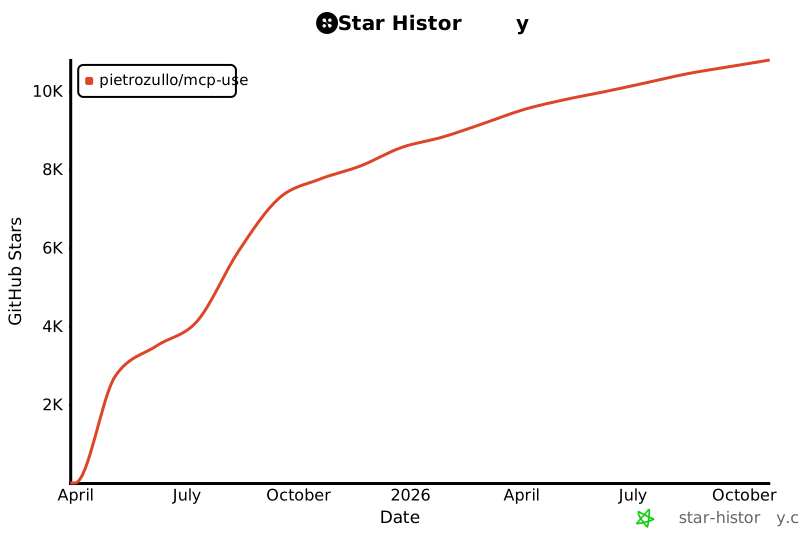](https://www.star-history.com/#pietrozullo/mcp-use&Date)
|
|
610
|
+
|
|
490
611
|
# Contributing
|
|
491
612
|
|
|
492
613
|
We love contributions! Feel free to open issues for bugs or feature requests.
|
|
@@ -2,9 +2,9 @@
|
|
|
2
2
|
<img alt="" src="./static/image.jpg" width="full">
|
|
3
3
|
</picture>
|
|
4
4
|
|
|
5
|
-
<h1 align="center">
|
|
5
|
+
<h1 align="center">Unified MCP Client Library </h1>
|
|
6
6
|
|
|
7
|
-
[](https://pypi.org/project/mcp_use/)
|
|
8
8
|
[](https://pypi.org/project/mcp_use/)
|
|
9
9
|
[](https://pypi.org/project/mcp_use/)
|
|
10
10
|
[](https://pypi.org/project/mcp_use/)
|
|
@@ -12,8 +12,9 @@
|
|
|
12
12
|
[](https://github.com/pietrozullo/mcp-use/blob/main/LICENSE)
|
|
13
13
|
[](https://github.com/astral-sh/ruff)
|
|
14
14
|
[](https://github.com/pietrozullo/mcp-use/stargazers)
|
|
15
|
+
[](https://x.com/pietrozullo)
|
|
15
16
|
|
|
16
|
-
🌐 MCP-Use is the open source way to connect any LLM to MCP
|
|
17
|
+
🌐 MCP-Use is the open source way to connect **any LLM to any MCP server** and build custom agents that have tool access, without using closed source or application clients.
|
|
17
18
|
|
|
18
19
|
💡 Let developers easily connect any LLM to tools like web browsing, file operations, and more.
|
|
19
20
|
|
|
@@ -26,8 +27,10 @@
|
|
|
26
27
|
| 🔄 **Ease of use** | Create your first MCP capable agent you need only 6 lines of code |
|
|
27
28
|
| 🤖 **LLM Flexibility** | Works with any langchain supported LLM that supports tool calling (OpenAI, Anthropic, Groq, LLama etc.) |
|
|
28
29
|
| 🌐 **HTTP Support** | Direct connection to MCP servers running on specific HTTP ports |
|
|
30
|
+
| ⚙️ **Dynamic Server Selection** | Agents can dynamically choose the most appropriate MCP server for a given task from the available pool |
|
|
29
31
|
| 🧩 **Multi-Server Support** | Use multiple MCP servers simultaneously in a single agent |
|
|
30
32
|
| 🛡️ **Tool Restrictions** | Restrict potentially dangerous tools like file system or network access |
|
|
33
|
+
| 🔧 **Custom Agents** | Build your own agents with any framework using the LangChain adapter or create new adapters |
|
|
31
34
|
|
|
32
35
|
|
|
33
36
|
# Quick start
|
|
@@ -349,7 +352,7 @@ This example demonstrates how to connect to an MCP server running on a specific
|
|
|
349
352
|
|
|
350
353
|
# Multi-Server Support
|
|
351
354
|
|
|
352
|
-
MCP-Use
|
|
355
|
+
MCP-Use allows configuring and connecting to multiple MCP servers simultaneously using the `MCPClient`. This enables complex workflows that require tools from different servers, such as web browsing combined with file operations or 3D modeling.
|
|
353
356
|
|
|
354
357
|
## Configuration
|
|
355
358
|
|
|
@@ -375,7 +378,28 @@ You can configure multiple servers in your configuration file:
|
|
|
375
378
|
|
|
376
379
|
## Usage
|
|
377
380
|
|
|
378
|
-
The `MCPClient` class provides
|
|
381
|
+
The `MCPClient` class provides methods for managing connections to multiple servers. When creating an `MCPAgent`, you can provide an `MCPClient` configured with multiple servers.
|
|
382
|
+
|
|
383
|
+
By default, the agent will have access to tools from all configured servers. If you need to target a specific server for a particular task, you can specify the `server_name` when calling the `agent.run()` method.
|
|
384
|
+
|
|
385
|
+
```python
|
|
386
|
+
# Example: Manually selecting a server for a specific task
|
|
387
|
+
result = await agent.run(
|
|
388
|
+
"Search for Airbnb listings in Barcelona",
|
|
389
|
+
server_name="airbnb" # Explicitly use the airbnb server
|
|
390
|
+
)
|
|
391
|
+
|
|
392
|
+
result_google = await agent.run(
|
|
393
|
+
"Find restaurants near the first result using Google Search",
|
|
394
|
+
server_name="playwright" # Explicitly use the playwright server
|
|
395
|
+
)
|
|
396
|
+
```
|
|
397
|
+
|
|
398
|
+
## Dynamic Server Selection (Server Manager)
|
|
399
|
+
|
|
400
|
+
For enhanced efficiency and to reduce potential agent confusion when dealing with many tools from different servers, you can enable the Server Manager by setting `use_server_manager=True` during `MCPAgent` initialization.
|
|
401
|
+
|
|
402
|
+
When enabled, the agent intelligently selects the correct MCP server based on the tool chosen by the LLM for a specific step. This minimizes unnecessary connections and ensures the agent uses the appropriate tools for the task.
|
|
379
403
|
|
|
380
404
|
```python
|
|
381
405
|
import asyncio
|
|
@@ -389,7 +413,8 @@ async def main():
|
|
|
389
413
|
# Create agent with the client
|
|
390
414
|
agent = MCPAgent(
|
|
391
415
|
llm=ChatAnthropic(model="claude-3-5-sonnet-20240620"),
|
|
392
|
-
client=client
|
|
416
|
+
client=client,
|
|
417
|
+
use_server_manager=True # Enable the Server Manager
|
|
393
418
|
)
|
|
394
419
|
|
|
395
420
|
try:
|
|
@@ -440,6 +465,98 @@ if __name__ == "__main__":
|
|
|
440
465
|
asyncio.run(main())
|
|
441
466
|
```
|
|
442
467
|
|
|
468
|
+
# Build a Custom Agent:
|
|
469
|
+
|
|
470
|
+
You can also build your own custom agent using the LangChain adapter:
|
|
471
|
+
|
|
472
|
+
```python
|
|
473
|
+
import asyncio
|
|
474
|
+
from langchain_openai import ChatOpenAI
|
|
475
|
+
from mcp_use.client import MCPClient
|
|
476
|
+
from mcp_use.adapters.langchain_adapter import LangChainAdapter
|
|
477
|
+
from dotenv import load_dotenv
|
|
478
|
+
|
|
479
|
+
load_dotenv()
|
|
480
|
+
|
|
481
|
+
|
|
482
|
+
async def main():
|
|
483
|
+
# Initialize MCP client
|
|
484
|
+
client = MCPClient.from_config_file("examples/browser_mcp.json")
|
|
485
|
+
llm = ChatOpenAI(model="gpt-4o")
|
|
486
|
+
|
|
487
|
+
# Create adapter instance
|
|
488
|
+
adapter = LangChainAdapter()
|
|
489
|
+
# Get LangChain tools with a single line
|
|
490
|
+
tools = await adapter.create_tools(client)
|
|
491
|
+
|
|
492
|
+
# Create a custom LangChain agent
|
|
493
|
+
llm_with_tools = llm.bind_tools(tools)
|
|
494
|
+
result = await llm_with_tools.ainvoke("What tools do you have avilable ? ")
|
|
495
|
+
print(result)
|
|
496
|
+
|
|
497
|
+
|
|
498
|
+
if __name__ == "__main__":
|
|
499
|
+
asyncio.run(main())
|
|
500
|
+
|
|
501
|
+
|
|
502
|
+
```
|
|
503
|
+
|
|
504
|
+
# Debugging
|
|
505
|
+
|
|
506
|
+
MCP-Use provides a built-in debug mode that increases log verbosity and helps diagnose issues in your agent implementation.
|
|
507
|
+
|
|
508
|
+
## Enabling Debug Mode
|
|
509
|
+
|
|
510
|
+
There are two primary ways to enable debug mode:
|
|
511
|
+
|
|
512
|
+
### 1. Environment Variable (Recommended for One-off Runs)
|
|
513
|
+
|
|
514
|
+
Run your script with the `DEBUG` environment variable set to the desired level:
|
|
515
|
+
|
|
516
|
+
```bash
|
|
517
|
+
# Level 1: Show INFO level messages
|
|
518
|
+
DEBUG=1 python3.11 examples/browser_use.py
|
|
519
|
+
|
|
520
|
+
# Level 2: Show DEBUG level messages (full verbose output)
|
|
521
|
+
DEBUG=2 python3.11 examples/browser_use.py
|
|
522
|
+
```
|
|
523
|
+
|
|
524
|
+
This sets the debug level only for the duration of that specific Python process.
|
|
525
|
+
|
|
526
|
+
Alternatively you can set the following environment variable to the desired logging level:
|
|
527
|
+
|
|
528
|
+
```bash
|
|
529
|
+
export MCP_USE_DEBUG=1 # or 2
|
|
530
|
+
```
|
|
531
|
+
|
|
532
|
+
### 2. Setting the Debug Flag Programmatically
|
|
533
|
+
|
|
534
|
+
You can set the global debug flag directly in your code:
|
|
535
|
+
|
|
536
|
+
```python
|
|
537
|
+
import mcp_use
|
|
538
|
+
|
|
539
|
+
mcp_use.set_debug(1) # INFO level
|
|
540
|
+
# or
|
|
541
|
+
mcp_use.set_debug(2) # DEBUG level (full verbose output)
|
|
542
|
+
```
|
|
543
|
+
|
|
544
|
+
### 3. Agent-Specific Verbosity
|
|
545
|
+
|
|
546
|
+
If you only want to see debug information from the agent without enabling full debug logging, you can set the `verbose` parameter when creating an MCPAgent:
|
|
547
|
+
|
|
548
|
+
```python
|
|
549
|
+
# Create agent with increased verbosity
|
|
550
|
+
agent = MCPAgent(
|
|
551
|
+
llm=your_llm,
|
|
552
|
+
client=your_client,
|
|
553
|
+
verbose=True # Only shows debug messages from the agent
|
|
554
|
+
)
|
|
555
|
+
```
|
|
556
|
+
|
|
557
|
+
This is useful when you only need to see the agent's steps and decision-making process without all the low-level debug information from other components.
|
|
558
|
+
|
|
559
|
+
|
|
443
560
|
# Roadmap
|
|
444
561
|
|
|
445
562
|
<ul>
|
|
@@ -448,6 +565,10 @@ if __name__ == "__main__":
|
|
|
448
565
|
<li>[ ] ... </li>
|
|
449
566
|
</ul>
|
|
450
567
|
|
|
568
|
+
## Star History
|
|
569
|
+
|
|
570
|
+
[](https://www.star-history.com/#pietrozullo/mcp-use&Date)
|
|
571
|
+
|
|
451
572
|
# Contributing
|
|
452
573
|
|
|
453
574
|
We love contributions! Feel free to open issues for bugs or feature requests.
|
|
@@ -128,7 +128,8 @@ agent = MCPAgent(
|
|
|
128
128
|
system_prompt=None,
|
|
129
129
|
system_prompt_template=None,
|
|
130
130
|
additional_instructions=None,
|
|
131
|
-
disallowed_tools=None
|
|
131
|
+
disallowed_tools=None,
|
|
132
|
+
use_server_manager=False
|
|
132
133
|
)
|
|
133
134
|
```
|
|
134
135
|
|
|
@@ -146,6 +147,7 @@ agent = MCPAgent(
|
|
|
146
147
|
| `additional_instructions` | str | No | None | Additional instructions for the agent |
|
|
147
148
|
| `session_options` | dict | No | {} | Additional options for session creation |
|
|
148
149
|
| `output_parser` | OutputParser | No | None | Custom output parser for LLM responses |
|
|
150
|
+
| `use_server_manager` | bool | No | False | If `True`, enables automatic selection of the appropriate server based on the chosen tool when multiple servers are configured via `MCPClient`. |
|
|
149
151
|
| `disallowed_tools` | list[str] | No | None | List of tool names that should not be available to the agent |
|
|
150
152
|
|
|
151
153
|
**When to use different parameters**:
|
|
@@ -178,6 +180,9 @@ agent = MCPAgent(
|
|
|
178
180
|
- **session_options**:
|
|
179
181
|
- Customize timeout for long-running server operations
|
|
180
182
|
- Set retry parameters for unstable connections
|
|
183
|
+
- **use_server_manager**:
|
|
184
|
+
- Set to `True` when using an `MCPClient` configured with multiple servers to enable efficient, automatic server selection per tool call. This can reduce agent confusion and minimize unnecessary server connections.
|
|
185
|
+
- Keep as `False` (default) if using a single server or if you prefer to manually specify the target server using the `server_name` parameter in `agent.run()` or rely on the agent to handle tool availability across all connected servers.
|
|
181
186
|
- **disallowed_tools**:
|
|
182
187
|
- Use to restrict which tools the agent can access
|
|
183
188
|
- Helpful for security or to limit agent capabilities
|
|
@@ -0,0 +1,175 @@
|
|
|
1
|
+
---
|
|
2
|
+
title: Building Custom Agents
|
|
3
|
+
description: Learn how to build custom agents using MCPClient and integrate tools with different agent frameworks
|
|
4
|
+
---
|
|
5
|
+
|
|
6
|
+
# Building Custom Agents
|
|
7
|
+
|
|
8
|
+
MCP-Use provides flexible options for building custom agents that can utilize MCP tools. This guide will show you how to create your own agents by leveraging the existing adapters, particularly focusing on the LangChain adapter.
|
|
9
|
+
|
|
10
|
+
## Overview
|
|
11
|
+
|
|
12
|
+
MCP-Use allows you to:
|
|
13
|
+
|
|
14
|
+
1. Access powerful tools from MCP through connectors
|
|
15
|
+
2. Convert those tools to different frameworks using adapters
|
|
16
|
+
3. Build custom agents that utilize these tools
|
|
17
|
+
|
|
18
|
+
While MCP-Use provides a built-in `MCPAgent` class, you may want to create your own custom agent implementation for more flexibility or to integrate with other frameworks.
|
|
19
|
+
|
|
20
|
+
## Using the LangChain Adapter
|
|
21
|
+
|
|
22
|
+
The `LangChainAdapter` is a powerful component that converts MCP tools to LangChain tools, enabling you to use MCP tools with any LangChain-compatible agent.
|
|
23
|
+
|
|
24
|
+
### Basic Example
|
|
25
|
+
|
|
26
|
+
Here's a simple example of creating a custom agent using the LangChain adapter with the simplified API:
|
|
27
|
+
|
|
28
|
+
```python
|
|
29
|
+
import asyncio
|
|
30
|
+
from langchain_openai import ChatOpenAI
|
|
31
|
+
from langchain.agents import AgentExecutor, create_tool_calling_agent
|
|
32
|
+
from langchain.prompts import ChatPromptTemplate, MessagesPlaceholder
|
|
33
|
+
|
|
34
|
+
from mcp_use.client import MCPClient
|
|
35
|
+
from mcp_use.adapters import LangChainAdapter
|
|
36
|
+
|
|
37
|
+
async def main():
|
|
38
|
+
# Initialize the MCP client
|
|
39
|
+
client = MCPClient.from_config_file("path/to/config.json")
|
|
40
|
+
|
|
41
|
+
# Create adapter instance
|
|
42
|
+
adapter = LangChainAdapter()
|
|
43
|
+
|
|
44
|
+
# Get LangChain tools directly from the client with a single line
|
|
45
|
+
tools = await adapter.create_tools(client)
|
|
46
|
+
|
|
47
|
+
# Initialize your language model
|
|
48
|
+
llm = ChatOpenAI(model="gpt-4o")
|
|
49
|
+
|
|
50
|
+
# Create a prompt template
|
|
51
|
+
prompt = ChatPromptTemplate.from_messages([
|
|
52
|
+
("system", "You are a helpful assistant with access to powerful tools."),
|
|
53
|
+
MessagesPlaceholder(variable_name="chat_history"),
|
|
54
|
+
("human", "{input}"),
|
|
55
|
+
MessagesPlaceholder(variable_name="agent_scratchpad"),
|
|
56
|
+
])
|
|
57
|
+
|
|
58
|
+
# Create the agent
|
|
59
|
+
agent = create_tool_calling_agent(llm=llm, tools=tools, prompt=prompt)
|
|
60
|
+
|
|
61
|
+
# Create the agent executor
|
|
62
|
+
agent_executor = AgentExecutor(agent=agent, tools=tools, verbose=True)
|
|
63
|
+
|
|
64
|
+
# Run the agent
|
|
65
|
+
result = await agent_executor.ainvoke({"input": "What can you do?"})
|
|
66
|
+
print(result["output"])
|
|
67
|
+
|
|
68
|
+
if __name__ == "__main__":
|
|
69
|
+
asyncio.run(main())
|
|
70
|
+
```
|
|
71
|
+
|
|
72
|
+
Note how the API simplifies tool creation - all you need is to create an adapter instance and call its `create_tools` method:
|
|
73
|
+
```python
|
|
74
|
+
adapter = LangChainAdapter()
|
|
75
|
+
tools = await adapter.create_tools(client)
|
|
76
|
+
```
|
|
77
|
+
|
|
78
|
+
You don't need to worry about sessions, connectors, or initialization. The adapter handles everything for you.
|
|
79
|
+
|
|
80
|
+
## Contributing New Adapters
|
|
81
|
+
|
|
82
|
+
MCP-Use welcomes contributions for integrating with different agent frameworks. The adapter architecture is designed to make this process straightforward.
|
|
83
|
+
|
|
84
|
+
### Adapter Architecture
|
|
85
|
+
|
|
86
|
+
MCP-Use provides a `BaseAdapter` abstract class that handles most of the common functionality:
|
|
87
|
+
- Managing tool caching
|
|
88
|
+
- Loading tools from connectors
|
|
89
|
+
- Handling connector initialization
|
|
90
|
+
- Iterating through tools from multiple connectors
|
|
91
|
+
|
|
92
|
+
To create an adapter for a new framework, you only need to implement one required method:
|
|
93
|
+
|
|
94
|
+
- `_convert_tool`: Convert a single MCP tool to your framework's tool format
|
|
95
|
+
|
|
96
|
+
### Creating a New Adapter
|
|
97
|
+
|
|
98
|
+
Here's a simple template for creating a new adapter:
|
|
99
|
+
|
|
100
|
+
```python
|
|
101
|
+
from typing import Any
|
|
102
|
+
|
|
103
|
+
from mcp_use.adapters.base import BaseAdapter
|
|
104
|
+
from mcp_use.connectors.base import BaseConnector
|
|
105
|
+
from your_framework import YourFrameworkTool # Import your framework's tool class
|
|
106
|
+
|
|
107
|
+
class YourFrameworkAdapter(BaseAdapter):
|
|
108
|
+
"""Adapter for converting MCP tools to YourFramework tools."""
|
|
109
|
+
|
|
110
|
+
def _convert_tool(self, mcp_tool: dict[str, Any], connector: BaseConnector) -> YourFrameworkTool:
|
|
111
|
+
"""Convert an MCP tool to your framework's tool format.
|
|
112
|
+
|
|
113
|
+
Args:
|
|
114
|
+
mcp_tool: The MCP tool to convert.
|
|
115
|
+
connector: The connector that provides this tool.
|
|
116
|
+
|
|
117
|
+
Returns:
|
|
118
|
+
A tool in your framework's format, or None if conversion failed.
|
|
119
|
+
"""
|
|
120
|
+
try:
|
|
121
|
+
# Implement your framework-specific conversion logic
|
|
122
|
+
converted_tool = YourFrameworkTool(
|
|
123
|
+
name=mcp_tool.name,
|
|
124
|
+
description=mcp_tool.description,
|
|
125
|
+
# Map the MCP tool properties to your framework's tool properties
|
|
126
|
+
# You might need custom handling for argument schemas, function execution, etc.
|
|
127
|
+
)
|
|
128
|
+
|
|
129
|
+
return converted_tool
|
|
130
|
+
except Exception as e:
|
|
131
|
+
self.logger.error(f"Error converting tool {mcp_tool.name}: {e}")
|
|
132
|
+
return None
|
|
133
|
+
```
|
|
134
|
+
|
|
135
|
+
### Using Your Custom Adapter
|
|
136
|
+
|
|
137
|
+
Once you've implemented your adapter, you can use it with the simplified API:
|
|
138
|
+
|
|
139
|
+
```python
|
|
140
|
+
from your_module import YourFrameworkAdapter
|
|
141
|
+
from mcp_use.client import MCPClient
|
|
142
|
+
|
|
143
|
+
# Initialize the client
|
|
144
|
+
client = MCPClient.from_config_file("config.json")
|
|
145
|
+
|
|
146
|
+
# Create an adapter instance
|
|
147
|
+
adapter = YourFrameworkAdapter()
|
|
148
|
+
|
|
149
|
+
# Get tools with a single line
|
|
150
|
+
tools = await adapter.create_tools(client)
|
|
151
|
+
|
|
152
|
+
# Use the tools with your framework
|
|
153
|
+
agent = your_framework.create_agent(tools=tools)
|
|
154
|
+
```
|
|
155
|
+
|
|
156
|
+
### Tips for Implementing an Adapter
|
|
157
|
+
|
|
158
|
+
1. **Schema Conversion**: Most frameworks have their own way of handling argument schemas. You'll need to convert the MCP tool's JSON Schema to your framework's format.
|
|
159
|
+
|
|
160
|
+
2. **Tool Execution**: When a tool is called in your framework, you'll need to pass the call to the connector's `call_tool` method and handle the result.
|
|
161
|
+
|
|
162
|
+
3. **Result Parsing**: MCP tools return structured data with types like text, images, or embedded resources. Your adapter should parse these into a format your framework understands.
|
|
163
|
+
|
|
164
|
+
4. **Error Handling**: Ensure your adapter handles errors gracefully, both during tool conversion and execution.
|
|
165
|
+
|
|
166
|
+
|
|
167
|
+
## Conclusion
|
|
168
|
+
|
|
169
|
+
Building custom agents with MCP-Use offers tremendous flexibility while leveraging the power of MCP tools. By combining different connectors and adapters, you can create specialized agents tailored to specific tasks or integrate MCP capabilities into existing agent frameworks.
|
|
170
|
+
|
|
171
|
+
The adapter architecture makes it easy to extend MCP-Use to support new frameworks - you just need to implement the `_convert_tool` method to bridge between MCP tools and your framework of choice.
|
|
172
|
+
|
|
173
|
+
With the simplified API, you can create tools for your framework directly from an MCPClient by instantiating the appropriate adapter and calling its `create_tools` method, hiding all the complexity of session and connector management.
|
|
174
|
+
|
|
175
|
+
We welcome contributions to expand the adapter ecosystem - if you develop an adapter for a new framework, please consider contributing it back to the project!
|
|
@@ -15,19 +15,32 @@
|
|
|
15
15
|
"groups": [
|
|
16
16
|
{
|
|
17
17
|
"group": "Getting Started",
|
|
18
|
-
"pages": [
|
|
18
|
+
"pages": [
|
|
19
|
+
"introduction",
|
|
20
|
+
"quickstart"
|
|
21
|
+
]
|
|
19
22
|
},
|
|
20
23
|
{
|
|
21
24
|
"group": "Essentials",
|
|
22
|
-
"pages": [
|
|
25
|
+
"pages": [
|
|
26
|
+
"essentials/configuration",
|
|
27
|
+
"essentials/llm-integration",
|
|
28
|
+
"essentials/debugging",
|
|
29
|
+
"essentials/connection-types",
|
|
30
|
+
"building-custom-agents"
|
|
31
|
+
]
|
|
23
32
|
},
|
|
24
33
|
{
|
|
25
34
|
"group": "API Reference",
|
|
26
|
-
"pages": [
|
|
35
|
+
"pages": [
|
|
36
|
+
"api-reference/introduction"
|
|
37
|
+
]
|
|
27
38
|
},
|
|
28
39
|
{
|
|
29
40
|
"group": "Development",
|
|
30
|
-
"pages": [
|
|
41
|
+
"pages": [
|
|
42
|
+
"development"
|
|
43
|
+
]
|
|
31
44
|
}
|
|
32
45
|
]
|
|
33
46
|
}
|
|
@@ -66,7 +66,7 @@ The configuration is defined in a JSON file with the following structure:
|
|
|
66
66
|
}
|
|
67
67
|
```
|
|
68
68
|
|
|
69
|
-
MCP servers can use different connection types (STDIO, HTTP
|
|
69
|
+
MCP servers can use different connection types (STDIO, HTTP). For details on these connection types and how to configure them, see the [Connection Types](./connection-types) guide.
|
|
70
70
|
|
|
71
71
|
### Configuration Options
|
|
72
72
|
|