mcp-use 1.1.4__tar.gz → 1.2.5__tar.gz
This diff represents the content of publicly available package versions that have been released to one of the supported registries. The information contained in this diff is provided for informational purposes only and reflects changes between package versions as they appear in their respective public registries.
Potentially problematic release.
This version of mcp-use might be problematic. Click here for more details.
- {mcp_use-1.1.4 → mcp_use-1.2.5}/PKG-INFO +92 -8
- {mcp_use-1.1.4 → mcp_use-1.2.5}/README.md +91 -7
- {mcp_use-1.1.4 → mcp_use-1.2.5}/docs/api-reference/introduction.mdx +6 -1
- {mcp_use-1.1.4 → mcp_use-1.2.5}/docs/docs.json +1 -1
- {mcp_use-1.1.4 → mcp_use-1.2.5}/docs/essentials/configuration.mdx +1 -1
- {mcp_use-1.1.4 → mcp_use-1.2.5}/docs/essentials/connection-types.mdx +0 -29
- mcp_use-1.2.5/docs/essentials/debugging.mdx +103 -0
- {mcp_use-1.1.4 → mcp_use-1.2.5}/docs/introduction.mdx +3 -0
- {mcp_use-1.1.4 → mcp_use-1.2.5}/docs/quickstart.mdx +59 -1
- {mcp_use-1.1.4 → mcp_use-1.2.5}/examples/browser_use.py +4 -1
- {mcp_use-1.1.4 → mcp_use-1.2.5}/examples/filesystem_use.py +1 -1
- {mcp_use-1.1.4 → mcp_use-1.2.5}/examples/multi_server_example.py +1 -1
- {mcp_use-1.1.4 → mcp_use-1.2.5}/mcp_use/__init__.py +14 -1
- mcp_use-1.2.5/mcp_use/adapters/__init__.py +5 -0
- mcp_use-1.2.5/mcp_use/adapters/langchain_adapter.py +212 -0
- {mcp_use-1.1.4 → mcp_use-1.2.5}/mcp_use/agents/__init__.py +6 -2
- mcp_use-1.2.5/mcp_use/agents/mcpagent.py +524 -0
- mcp_use-1.2.5/mcp_use/agents/prompts/system_prompt_builder.py +105 -0
- mcp_use-1.2.5/mcp_use/agents/prompts/templates.py +43 -0
- mcp_use-1.2.5/mcp_use/agents/server_manager.py +280 -0
- {mcp_use-1.1.4 → mcp_use-1.2.5}/mcp_use/client.py +3 -3
- {mcp_use-1.1.4 → mcp_use-1.2.5}/mcp_use/connectors/base.py +5 -4
- {mcp_use-1.1.4 → mcp_use-1.2.5}/mcp_use/connectors/http.py +2 -2
- {mcp_use-1.1.4 → mcp_use-1.2.5}/mcp_use/connectors/stdio.py +2 -2
- {mcp_use-1.1.4 → mcp_use-1.2.5}/mcp_use/connectors/websocket.py +6 -6
- {mcp_use-1.1.4 → mcp_use-1.2.5}/mcp_use/logging.py +51 -4
- {mcp_use-1.1.4 → mcp_use-1.2.5}/pyproject.toml +1 -1
- mcp_use-1.2.5/static/image.jpg +0 -0
- mcp_use-1.1.4/mcp_use/agents/langchain_agent.py +0 -267
- mcp_use-1.1.4/mcp_use/agents/mcpagent.py +0 -348
- mcp_use-1.1.4/mcp_use/agents/prompts/default.py +0 -22
- mcp_use-1.1.4/static/image.jpg +0 -0
- {mcp_use-1.1.4 → mcp_use-1.2.5}/.github/ISSUE_TEMPLATE/bug_report.md +0 -0
- {mcp_use-1.1.4 → mcp_use-1.2.5}/.github/workflows/publish.yml +0 -0
- {mcp_use-1.1.4 → mcp_use-1.2.5}/.github/workflows/tests.yml +0 -0
- {mcp_use-1.1.4 → mcp_use-1.2.5}/.gitignore +0 -0
- {mcp_use-1.1.4 → mcp_use-1.2.5}/.pre-commit-config.yaml +0 -0
- {mcp_use-1.1.4 → mcp_use-1.2.5}/LICENSE +0 -0
- {mcp_use-1.1.4 → mcp_use-1.2.5}/docs/README.md +0 -0
- {mcp_use-1.1.4 → mcp_use-1.2.5}/docs/development.mdx +0 -0
- {mcp_use-1.1.4 → mcp_use-1.2.5}/docs/essentials/llm-integration.mdx +0 -0
- {mcp_use-1.1.4 → mcp_use-1.2.5}/docs/favicon.svg +0 -0
- {mcp_use-1.1.4 → mcp_use-1.2.5}/docs/images/hero-dark.png +0 -0
- {mcp_use-1.1.4 → mcp_use-1.2.5}/docs/images/hero-light.png +0 -0
- {mcp_use-1.1.4 → mcp_use-1.2.5}/docs/logo/dark.svg +0 -0
- {mcp_use-1.1.4 → mcp_use-1.2.5}/docs/logo/light.svg +0 -0
- {mcp_use-1.1.4 → mcp_use-1.2.5}/docs/snippets/snippet-intro.mdx +0 -0
- {mcp_use-1.1.4 → mcp_use-1.2.5}/examples/airbnb_mcp.json +0 -0
- {mcp_use-1.1.4 → mcp_use-1.2.5}/examples/airbnb_use.py +0 -0
- {mcp_use-1.1.4 → mcp_use-1.2.5}/examples/blender_use.py +0 -0
- {mcp_use-1.1.4 → mcp_use-1.2.5}/examples/browser_mcp.json +0 -0
- {mcp_use-1.1.4 → mcp_use-1.2.5}/examples/chat_example.py +0 -0
- {mcp_use-1.1.4 → mcp_use-1.2.5}/examples/http_example.py +0 -0
- {mcp_use-1.1.4 → mcp_use-1.2.5}/mcp_use/agents/base.py +0 -0
- {mcp_use-1.1.4 → mcp_use-1.2.5}/mcp_use/config.py +0 -0
- {mcp_use-1.1.4 → mcp_use-1.2.5}/mcp_use/connectors/__init__.py +0 -0
- {mcp_use-1.1.4 → mcp_use-1.2.5}/mcp_use/session.py +0 -0
- {mcp_use-1.1.4 → mcp_use-1.2.5}/mcp_use/task_managers/__init__.py +0 -0
- {mcp_use-1.1.4 → mcp_use-1.2.5}/mcp_use/task_managers/base.py +0 -0
- {mcp_use-1.1.4 → mcp_use-1.2.5}/mcp_use/task_managers/sse.py +0 -0
- {mcp_use-1.1.4 → mcp_use-1.2.5}/mcp_use/task_managers/stdio.py +0 -0
- {mcp_use-1.1.4 → mcp_use-1.2.5}/mcp_use/task_managers/websocket.py +0 -0
- {mcp_use-1.1.4 → mcp_use-1.2.5}/pytest.ini +0 -0
- {mcp_use-1.1.4 → mcp_use-1.2.5}/tests/conftest.py +0 -0
- {mcp_use-1.1.4 → mcp_use-1.2.5}/tests/unit/test_client.py +0 -0
- {mcp_use-1.1.4 → mcp_use-1.2.5}/tests/unit/test_config.py +0 -0
- {mcp_use-1.1.4 → mcp_use-1.2.5}/tests/unit/test_http_connector.py +0 -0
- {mcp_use-1.1.4 → mcp_use-1.2.5}/tests/unit/test_logging.py +0 -0
- {mcp_use-1.1.4 → mcp_use-1.2.5}/tests/unit/test_session.py +0 -0
- {mcp_use-1.1.4 → mcp_use-1.2.5}/tests/unit/test_stdio_connector.py +0 -0
|
@@ -1,6 +1,6 @@
|
|
|
1
1
|
Metadata-Version: 2.4
|
|
2
2
|
Name: mcp-use
|
|
3
|
-
Version: 1.
|
|
3
|
+
Version: 1.2.5
|
|
4
4
|
Summary: MCP Library for LLMs
|
|
5
5
|
Author-email: Pietro Zullo <pietro.zullo@gmail.com>
|
|
6
6
|
License: MIT
|
|
@@ -41,9 +41,9 @@ Description-Content-Type: text/markdown
|
|
|
41
41
|
<img alt="" src="./static/image.jpg" width="full">
|
|
42
42
|
</picture>
|
|
43
43
|
|
|
44
|
-
<h1 align="center">
|
|
44
|
+
<h1 align="center">Unified MCP Client Library </h1>
|
|
45
45
|
|
|
46
|
-
[](https://pypi.org/project/mcp_use/)
|
|
47
47
|
[](https://pypi.org/project/mcp_use/)
|
|
48
48
|
[](https://pypi.org/project/mcp_use/)
|
|
49
49
|
[](https://pypi.org/project/mcp_use/)
|
|
@@ -51,8 +51,9 @@ Description-Content-Type: text/markdown
|
|
|
51
51
|
[](https://github.com/pietrozullo/mcp-use/blob/main/LICENSE)
|
|
52
52
|
[](https://github.com/astral-sh/ruff)
|
|
53
53
|
[](https://github.com/pietrozullo/mcp-use/stargazers)
|
|
54
|
+
[](https://x.com/pietrozullo)
|
|
54
55
|
|
|
55
|
-
🌐 MCP-Use is the open source way to connect any LLM to MCP
|
|
56
|
+
🌐 MCP-Use is the open source way to connect **any LLM to any MCP server** and build custom agents that have tool access, without using closed source or application clients.
|
|
56
57
|
|
|
57
58
|
💡 Let developers easily connect any LLM to tools like web browsing, file operations, and more.
|
|
58
59
|
|
|
@@ -65,6 +66,7 @@ Description-Content-Type: text/markdown
|
|
|
65
66
|
| 🔄 **Ease of use** | Create your first MCP capable agent you need only 6 lines of code |
|
|
66
67
|
| 🤖 **LLM Flexibility** | Works with any langchain supported LLM that supports tool calling (OpenAI, Anthropic, Groq, LLama etc.) |
|
|
67
68
|
| 🌐 **HTTP Support** | Direct connection to MCP servers running on specific HTTP ports |
|
|
69
|
+
| ⚙️ **Dynamic Server Selection** | Agents can dynamically choose the most appropriate MCP server for a given task from the available pool |
|
|
68
70
|
| 🧩 **Multi-Server Support** | Use multiple MCP servers simultaneously in a single agent |
|
|
69
71
|
| 🛡️ **Tool Restrictions** | Restrict potentially dangerous tools like file system or network access |
|
|
70
72
|
|
|
@@ -179,7 +181,6 @@ Example configuration file (`browser_mcp.json`):
|
|
|
179
181
|
|
|
180
182
|
For other settings, models, and more, check out the documentation.
|
|
181
183
|
|
|
182
|
-
# Features
|
|
183
184
|
|
|
184
185
|
# Example Use Cases
|
|
185
186
|
|
|
@@ -389,7 +390,7 @@ This example demonstrates how to connect to an MCP server running on a specific
|
|
|
389
390
|
|
|
390
391
|
# Multi-Server Support
|
|
391
392
|
|
|
392
|
-
MCP-Use
|
|
393
|
+
MCP-Use allows configuring and connecting to multiple MCP servers simultaneously using the `MCPClient`. This enables complex workflows that require tools from different servers, such as web browsing combined with file operations or 3D modeling.
|
|
393
394
|
|
|
394
395
|
## Configuration
|
|
395
396
|
|
|
@@ -415,7 +416,28 @@ You can configure multiple servers in your configuration file:
|
|
|
415
416
|
|
|
416
417
|
## Usage
|
|
417
418
|
|
|
418
|
-
The `MCPClient` class provides
|
|
419
|
+
The `MCPClient` class provides methods for managing connections to multiple servers. When creating an `MCPAgent`, you can provide an `MCPClient` configured with multiple servers.
|
|
420
|
+
|
|
421
|
+
By default, the agent will have access to tools from all configured servers. If you need to target a specific server for a particular task, you can specify the `server_name` when calling the `agent.run()` method.
|
|
422
|
+
|
|
423
|
+
```python
|
|
424
|
+
# Example: Manually selecting a server for a specific task
|
|
425
|
+
result = await agent.run(
|
|
426
|
+
"Search for Airbnb listings in Barcelona",
|
|
427
|
+
server_name="airbnb" # Explicitly use the airbnb server
|
|
428
|
+
)
|
|
429
|
+
|
|
430
|
+
result_google = await agent.run(
|
|
431
|
+
"Find restaurants near the first result using Google Search",
|
|
432
|
+
server_name="playwright" # Explicitly use the playwright server
|
|
433
|
+
)
|
|
434
|
+
```
|
|
435
|
+
|
|
436
|
+
## Dynamic Server Selection (Server Manager)
|
|
437
|
+
|
|
438
|
+
For enhanced efficiency and to reduce potential agent confusion when dealing with many tools from different servers, you can enable the Server Manager by setting `use_server_manager=True` during `MCPAgent` initialization.
|
|
439
|
+
|
|
440
|
+
When enabled, the agent intelligently selects the correct MCP server based on the tool chosen by the LLM for a specific step. This minimizes unnecessary connections and ensures the agent uses the appropriate tools for the task.
|
|
419
441
|
|
|
420
442
|
```python
|
|
421
443
|
import asyncio
|
|
@@ -429,7 +451,8 @@ async def main():
|
|
|
429
451
|
# Create agent with the client
|
|
430
452
|
agent = MCPAgent(
|
|
431
453
|
llm=ChatAnthropic(model="claude-3-5-sonnet-20240620"),
|
|
432
|
-
client=client
|
|
454
|
+
client=client,
|
|
455
|
+
use_server_manager=True # Enable the Server Manager
|
|
433
456
|
)
|
|
434
457
|
|
|
435
458
|
try:
|
|
@@ -480,6 +503,63 @@ if __name__ == "__main__":
|
|
|
480
503
|
asyncio.run(main())
|
|
481
504
|
```
|
|
482
505
|
|
|
506
|
+
|
|
507
|
+
# Debugging
|
|
508
|
+
|
|
509
|
+
MCP-Use provides a built-in debug mode that increases log verbosity and helps diagnose issues in your agent implementation.
|
|
510
|
+
|
|
511
|
+
## Enabling Debug Mode
|
|
512
|
+
|
|
513
|
+
There are two primary ways to enable debug mode:
|
|
514
|
+
|
|
515
|
+
### 1. Environment Variable (Recommended for One-off Runs)
|
|
516
|
+
|
|
517
|
+
Run your script with the `DEBUG` environment variable set to the desired level:
|
|
518
|
+
|
|
519
|
+
```bash
|
|
520
|
+
# Level 1: Show INFO level messages
|
|
521
|
+
DEBUG=1 python3.11 examples/browser_use.py
|
|
522
|
+
|
|
523
|
+
# Level 2: Show DEBUG level messages (full verbose output)
|
|
524
|
+
DEBUG=2 python3.11 examples/browser_use.py
|
|
525
|
+
```
|
|
526
|
+
|
|
527
|
+
This sets the debug level only for the duration of that specific Python process.
|
|
528
|
+
|
|
529
|
+
Alternatively you can set the following environment variable to the desired logging level:
|
|
530
|
+
|
|
531
|
+
```bash
|
|
532
|
+
export MCP_USE_DEBUG=1 # or 2
|
|
533
|
+
```
|
|
534
|
+
|
|
535
|
+
### 2. Setting the Debug Flag Programmatically
|
|
536
|
+
|
|
537
|
+
You can set the global debug flag directly in your code:
|
|
538
|
+
|
|
539
|
+
```python
|
|
540
|
+
import mcp_use
|
|
541
|
+
|
|
542
|
+
mcp_use.set_debug(1) # INFO level
|
|
543
|
+
# or
|
|
544
|
+
mcp_use.set_debug(2) # DEBUG level (full verbose output)
|
|
545
|
+
```
|
|
546
|
+
|
|
547
|
+
### 3. Agent-Specific Verbosity
|
|
548
|
+
|
|
549
|
+
If you only want to see debug information from the agent without enabling full debug logging, you can set the `verbose` parameter when creating an MCPAgent:
|
|
550
|
+
|
|
551
|
+
```python
|
|
552
|
+
# Create agent with increased verbosity
|
|
553
|
+
agent = MCPAgent(
|
|
554
|
+
llm=your_llm,
|
|
555
|
+
client=your_client,
|
|
556
|
+
verbose=True # Only shows debug messages from the agent
|
|
557
|
+
)
|
|
558
|
+
```
|
|
559
|
+
|
|
560
|
+
This is useful when you only need to see the agent's steps and decision-making process without all the low-level debug information from other components.
|
|
561
|
+
|
|
562
|
+
|
|
483
563
|
# Roadmap
|
|
484
564
|
|
|
485
565
|
<ul>
|
|
@@ -488,6 +568,10 @@ if __name__ == "__main__":
|
|
|
488
568
|
<li>[ ] ... </li>
|
|
489
569
|
</ul>
|
|
490
570
|
|
|
571
|
+
## Star History
|
|
572
|
+
|
|
573
|
+
[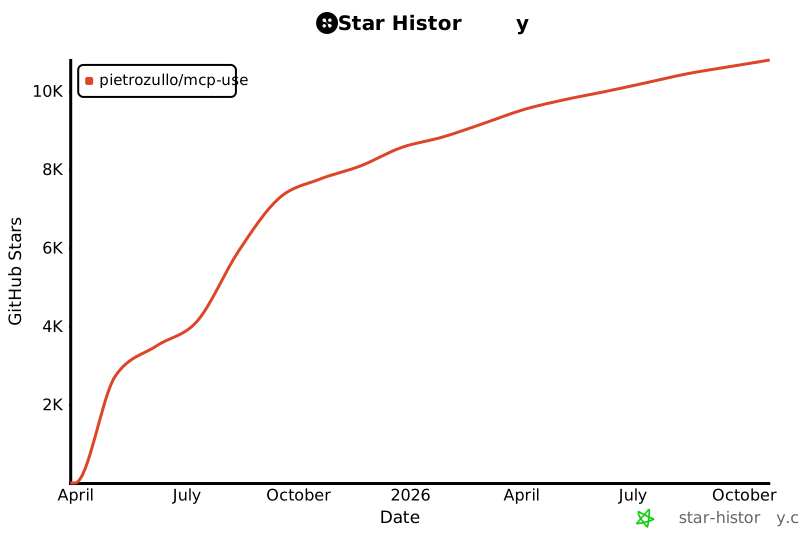](https://www.star-history.com/#pietrozullo/mcp-use&Date)
|
|
574
|
+
|
|
491
575
|
# Contributing
|
|
492
576
|
|
|
493
577
|
We love contributions! Feel free to open issues for bugs or feature requests.
|
|
@@ -2,9 +2,9 @@
|
|
|
2
2
|
<img alt="" src="./static/image.jpg" width="full">
|
|
3
3
|
</picture>
|
|
4
4
|
|
|
5
|
-
<h1 align="center">
|
|
5
|
+
<h1 align="center">Unified MCP Client Library </h1>
|
|
6
6
|
|
|
7
|
-
[](https://pypi.org/project/mcp_use/)
|
|
8
8
|
[](https://pypi.org/project/mcp_use/)
|
|
9
9
|
[](https://pypi.org/project/mcp_use/)
|
|
10
10
|
[](https://pypi.org/project/mcp_use/)
|
|
@@ -12,8 +12,9 @@
|
|
|
12
12
|
[](https://github.com/pietrozullo/mcp-use/blob/main/LICENSE)
|
|
13
13
|
[](https://github.com/astral-sh/ruff)
|
|
14
14
|
[](https://github.com/pietrozullo/mcp-use/stargazers)
|
|
15
|
+
[](https://x.com/pietrozullo)
|
|
15
16
|
|
|
16
|
-
🌐 MCP-Use is the open source way to connect any LLM to MCP
|
|
17
|
+
🌐 MCP-Use is the open source way to connect **any LLM to any MCP server** and build custom agents that have tool access, without using closed source or application clients.
|
|
17
18
|
|
|
18
19
|
💡 Let developers easily connect any LLM to tools like web browsing, file operations, and more.
|
|
19
20
|
|
|
@@ -26,6 +27,7 @@
|
|
|
26
27
|
| 🔄 **Ease of use** | Create your first MCP capable agent you need only 6 lines of code |
|
|
27
28
|
| 🤖 **LLM Flexibility** | Works with any langchain supported LLM that supports tool calling (OpenAI, Anthropic, Groq, LLama etc.) |
|
|
28
29
|
| 🌐 **HTTP Support** | Direct connection to MCP servers running on specific HTTP ports |
|
|
30
|
+
| ⚙️ **Dynamic Server Selection** | Agents can dynamically choose the most appropriate MCP server for a given task from the available pool |
|
|
29
31
|
| 🧩 **Multi-Server Support** | Use multiple MCP servers simultaneously in a single agent |
|
|
30
32
|
| 🛡️ **Tool Restrictions** | Restrict potentially dangerous tools like file system or network access |
|
|
31
33
|
|
|
@@ -140,7 +142,6 @@ Example configuration file (`browser_mcp.json`):
|
|
|
140
142
|
|
|
141
143
|
For other settings, models, and more, check out the documentation.
|
|
142
144
|
|
|
143
|
-
# Features
|
|
144
145
|
|
|
145
146
|
# Example Use Cases
|
|
146
147
|
|
|
@@ -350,7 +351,7 @@ This example demonstrates how to connect to an MCP server running on a specific
|
|
|
350
351
|
|
|
351
352
|
# Multi-Server Support
|
|
352
353
|
|
|
353
|
-
MCP-Use
|
|
354
|
+
MCP-Use allows configuring and connecting to multiple MCP servers simultaneously using the `MCPClient`. This enables complex workflows that require tools from different servers, such as web browsing combined with file operations or 3D modeling.
|
|
354
355
|
|
|
355
356
|
## Configuration
|
|
356
357
|
|
|
@@ -376,7 +377,28 @@ You can configure multiple servers in your configuration file:
|
|
|
376
377
|
|
|
377
378
|
## Usage
|
|
378
379
|
|
|
379
|
-
The `MCPClient` class provides
|
|
380
|
+
The `MCPClient` class provides methods for managing connections to multiple servers. When creating an `MCPAgent`, you can provide an `MCPClient` configured with multiple servers.
|
|
381
|
+
|
|
382
|
+
By default, the agent will have access to tools from all configured servers. If you need to target a specific server for a particular task, you can specify the `server_name` when calling the `agent.run()` method.
|
|
383
|
+
|
|
384
|
+
```python
|
|
385
|
+
# Example: Manually selecting a server for a specific task
|
|
386
|
+
result = await agent.run(
|
|
387
|
+
"Search for Airbnb listings in Barcelona",
|
|
388
|
+
server_name="airbnb" # Explicitly use the airbnb server
|
|
389
|
+
)
|
|
390
|
+
|
|
391
|
+
result_google = await agent.run(
|
|
392
|
+
"Find restaurants near the first result using Google Search",
|
|
393
|
+
server_name="playwright" # Explicitly use the playwright server
|
|
394
|
+
)
|
|
395
|
+
```
|
|
396
|
+
|
|
397
|
+
## Dynamic Server Selection (Server Manager)
|
|
398
|
+
|
|
399
|
+
For enhanced efficiency and to reduce potential agent confusion when dealing with many tools from different servers, you can enable the Server Manager by setting `use_server_manager=True` during `MCPAgent` initialization.
|
|
400
|
+
|
|
401
|
+
When enabled, the agent intelligently selects the correct MCP server based on the tool chosen by the LLM for a specific step. This minimizes unnecessary connections and ensures the agent uses the appropriate tools for the task.
|
|
380
402
|
|
|
381
403
|
```python
|
|
382
404
|
import asyncio
|
|
@@ -390,7 +412,8 @@ async def main():
|
|
|
390
412
|
# Create agent with the client
|
|
391
413
|
agent = MCPAgent(
|
|
392
414
|
llm=ChatAnthropic(model="claude-3-5-sonnet-20240620"),
|
|
393
|
-
client=client
|
|
415
|
+
client=client,
|
|
416
|
+
use_server_manager=True # Enable the Server Manager
|
|
394
417
|
)
|
|
395
418
|
|
|
396
419
|
try:
|
|
@@ -441,6 +464,63 @@ if __name__ == "__main__":
|
|
|
441
464
|
asyncio.run(main())
|
|
442
465
|
```
|
|
443
466
|
|
|
467
|
+
|
|
468
|
+
# Debugging
|
|
469
|
+
|
|
470
|
+
MCP-Use provides a built-in debug mode that increases log verbosity and helps diagnose issues in your agent implementation.
|
|
471
|
+
|
|
472
|
+
## Enabling Debug Mode
|
|
473
|
+
|
|
474
|
+
There are two primary ways to enable debug mode:
|
|
475
|
+
|
|
476
|
+
### 1. Environment Variable (Recommended for One-off Runs)
|
|
477
|
+
|
|
478
|
+
Run your script with the `DEBUG` environment variable set to the desired level:
|
|
479
|
+
|
|
480
|
+
```bash
|
|
481
|
+
# Level 1: Show INFO level messages
|
|
482
|
+
DEBUG=1 python3.11 examples/browser_use.py
|
|
483
|
+
|
|
484
|
+
# Level 2: Show DEBUG level messages (full verbose output)
|
|
485
|
+
DEBUG=2 python3.11 examples/browser_use.py
|
|
486
|
+
```
|
|
487
|
+
|
|
488
|
+
This sets the debug level only for the duration of that specific Python process.
|
|
489
|
+
|
|
490
|
+
Alternatively you can set the following environment variable to the desired logging level:
|
|
491
|
+
|
|
492
|
+
```bash
|
|
493
|
+
export MCP_USE_DEBUG=1 # or 2
|
|
494
|
+
```
|
|
495
|
+
|
|
496
|
+
### 2. Setting the Debug Flag Programmatically
|
|
497
|
+
|
|
498
|
+
You can set the global debug flag directly in your code:
|
|
499
|
+
|
|
500
|
+
```python
|
|
501
|
+
import mcp_use
|
|
502
|
+
|
|
503
|
+
mcp_use.set_debug(1) # INFO level
|
|
504
|
+
# or
|
|
505
|
+
mcp_use.set_debug(2) # DEBUG level (full verbose output)
|
|
506
|
+
```
|
|
507
|
+
|
|
508
|
+
### 3. Agent-Specific Verbosity
|
|
509
|
+
|
|
510
|
+
If you only want to see debug information from the agent without enabling full debug logging, you can set the `verbose` parameter when creating an MCPAgent:
|
|
511
|
+
|
|
512
|
+
```python
|
|
513
|
+
# Create agent with increased verbosity
|
|
514
|
+
agent = MCPAgent(
|
|
515
|
+
llm=your_llm,
|
|
516
|
+
client=your_client,
|
|
517
|
+
verbose=True # Only shows debug messages from the agent
|
|
518
|
+
)
|
|
519
|
+
```
|
|
520
|
+
|
|
521
|
+
This is useful when you only need to see the agent's steps and decision-making process without all the low-level debug information from other components.
|
|
522
|
+
|
|
523
|
+
|
|
444
524
|
# Roadmap
|
|
445
525
|
|
|
446
526
|
<ul>
|
|
@@ -449,6 +529,10 @@ if __name__ == "__main__":
|
|
|
449
529
|
<li>[ ] ... </li>
|
|
450
530
|
</ul>
|
|
451
531
|
|
|
532
|
+
## Star History
|
|
533
|
+
|
|
534
|
+
[](https://www.star-history.com/#pietrozullo/mcp-use&Date)
|
|
535
|
+
|
|
452
536
|
# Contributing
|
|
453
537
|
|
|
454
538
|
We love contributions! Feel free to open issues for bugs or feature requests.
|
|
@@ -128,7 +128,8 @@ agent = MCPAgent(
|
|
|
128
128
|
system_prompt=None,
|
|
129
129
|
system_prompt_template=None,
|
|
130
130
|
additional_instructions=None,
|
|
131
|
-
disallowed_tools=None
|
|
131
|
+
disallowed_tools=None,
|
|
132
|
+
use_server_manager=False
|
|
132
133
|
)
|
|
133
134
|
```
|
|
134
135
|
|
|
@@ -146,6 +147,7 @@ agent = MCPAgent(
|
|
|
146
147
|
| `additional_instructions` | str | No | None | Additional instructions for the agent |
|
|
147
148
|
| `session_options` | dict | No | {} | Additional options for session creation |
|
|
148
149
|
| `output_parser` | OutputParser | No | None | Custom output parser for LLM responses |
|
|
150
|
+
| `use_server_manager` | bool | No | False | If `True`, enables automatic selection of the appropriate server based on the chosen tool when multiple servers are configured via `MCPClient`. |
|
|
149
151
|
| `disallowed_tools` | list[str] | No | None | List of tool names that should not be available to the agent |
|
|
150
152
|
|
|
151
153
|
**When to use different parameters**:
|
|
@@ -178,6 +180,9 @@ agent = MCPAgent(
|
|
|
178
180
|
- **session_options**:
|
|
179
181
|
- Customize timeout for long-running server operations
|
|
180
182
|
- Set retry parameters for unstable connections
|
|
183
|
+
- **use_server_manager**:
|
|
184
|
+
- Set to `True` when using an `MCPClient` configured with multiple servers to enable efficient, automatic server selection per tool call. This can reduce agent confusion and minimize unnecessary server connections.
|
|
185
|
+
- Keep as `False` (default) if using a single server or if you prefer to manually specify the target server using the `server_name` parameter in `agent.run()` or rely on the agent to handle tool availability across all connected servers.
|
|
181
186
|
- **disallowed_tools**:
|
|
182
187
|
- Use to restrict which tools the agent can access
|
|
183
188
|
- Helpful for security or to limit agent capabilities
|
|
@@ -19,7 +19,7 @@
|
|
|
19
19
|
},
|
|
20
20
|
{
|
|
21
21
|
"group": "Essentials",
|
|
22
|
-
"pages": ["essentials/configuration", "essentials/llm-integration"]
|
|
22
|
+
"pages": ["essentials/configuration", "essentials/llm-integration", "essentials/debugging", "essentials/connection-types"]
|
|
23
23
|
},
|
|
24
24
|
{
|
|
25
25
|
"group": "API Reference",
|
|
@@ -66,7 +66,7 @@ The configuration is defined in a JSON file with the following structure:
|
|
|
66
66
|
}
|
|
67
67
|
```
|
|
68
68
|
|
|
69
|
-
MCP servers can use different connection types (STDIO, HTTP
|
|
69
|
+
MCP servers can use different connection types (STDIO, HTTP). For details on these connection types and how to configure them, see the [Connection Types](./connection-types) guide.
|
|
70
70
|
|
|
71
71
|
### Configuration Options
|
|
72
72
|
|
|
@@ -58,32 +58,6 @@ HTTP connections communicate with MCP servers over standard HTTP/HTTPS protocols
|
|
|
58
58
|
}
|
|
59
59
|
```
|
|
60
60
|
|
|
61
|
-
## WebSocket (WS) Connections
|
|
62
|
-
|
|
63
|
-
WebSocket connections provide a persistent, bidirectional communication channel between the client and server.
|
|
64
|
-
|
|
65
|
-
### Characteristics:
|
|
66
|
-
|
|
67
|
-
- **Real-time Communication**: Low-latency bidirectional data flow
|
|
68
|
-
- **Persistent Connection**: Maintains connection state
|
|
69
|
-
- **Efficiency**: Lower overhead for multiple interactions
|
|
70
|
-
- **Event-Driven**: Well-suited for streaming and event-based operations
|
|
71
|
-
|
|
72
|
-
### Configuration Example:
|
|
73
|
-
|
|
74
|
-
```json
|
|
75
|
-
{
|
|
76
|
-
"mcpServers": {
|
|
77
|
-
"ws_server": {
|
|
78
|
-
"url": "ws://localhost:3001",
|
|
79
|
-
"headers": {
|
|
80
|
-
"Authorization": "Bearer ${AUTH_TOKEN}"
|
|
81
|
-
}
|
|
82
|
-
}
|
|
83
|
-
}
|
|
84
|
-
}
|
|
85
|
-
```
|
|
86
|
-
|
|
87
61
|
## Choosing the Right Connection Type
|
|
88
62
|
|
|
89
63
|
The choice of connection type depends on your specific use case:
|
|
@@ -92,8 +66,6 @@ The choice of connection type depends on your specific use case:
|
|
|
92
66
|
|
|
93
67
|
2. **HTTP**: Ideal for stateless operations, simple integrations, and when working with existing HTTP infrastructure
|
|
94
68
|
|
|
95
|
-
3. **WebSocket**: Preferred for real-time applications, streaming data, and scenarios requiring persistent connections
|
|
96
|
-
|
|
97
69
|
When configuring your mcp_use environment, you can specify the connection type in your configuration file as shown in the examples above.
|
|
98
70
|
|
|
99
71
|
## Using Connection Types
|
|
@@ -111,7 +83,6 @@ For example:
|
|
|
111
83
|
|
|
112
84
|
- If your configuration includes `command` and `args`, a STDIO connection will be used
|
|
113
85
|
- If your configuration has a `url` starting with `http://` or `https://`, an HTTP connection will be used
|
|
114
|
-
- If your configuration has a `url` starting with `ws://` or `wss://`, a WebSocket connection will be used
|
|
115
86
|
|
|
116
87
|
This automatic inference simplifies the configuration process and ensures the appropriate connection type is used without requiring explicit specification.
|
|
117
88
|
|
|
@@ -0,0 +1,103 @@
|
|
|
1
|
+
---
|
|
2
|
+
title: 'Debugging'
|
|
3
|
+
description: 'Learn how to debug and log in mcp-use'
|
|
4
|
+
---
|
|
5
|
+
|
|
6
|
+
# Debugging MCP-Use
|
|
7
|
+
|
|
8
|
+
MCP-Use provides built-in debugging functionality that increases log verbosity and helps diagnose issues in your agent implementation.
|
|
9
|
+
|
|
10
|
+
## Enabling Debug Mode
|
|
11
|
+
|
|
12
|
+
There are two primary ways to enable debug mode:
|
|
13
|
+
|
|
14
|
+
### 1. Environment Variable (Recommended for One-off Runs)
|
|
15
|
+
|
|
16
|
+
Run your script with the `DEBUG` environment variable set to the desired level:
|
|
17
|
+
|
|
18
|
+
```bash
|
|
19
|
+
# Level 1: Show INFO level messages
|
|
20
|
+
DEBUG=1 python3.11 examples/browser_use.py
|
|
21
|
+
|
|
22
|
+
# Level 2: Show DEBUG level messages (full verbose output)
|
|
23
|
+
DEBUG=2 python3.11 examples/browser_use.py
|
|
24
|
+
```
|
|
25
|
+
|
|
26
|
+
This sets the debug level only for the duration of that specific Python process. This is particularly useful for quickly troubleshooting issues without modifying your code.
|
|
27
|
+
Alternatively you can set the environment variable MCP_USE_DEBUG as such:
|
|
28
|
+
```bash
|
|
29
|
+
export MCP_USE_DEBUG=1 # or 2
|
|
30
|
+
```
|
|
31
|
+
|
|
32
|
+
### 2. Setting the Debug Flag Programmatically
|
|
33
|
+
|
|
34
|
+
You can set the global debug flag directly in your code, which is useful for debugging specific parts of your application or conditionally enabling debug mode based on your application state:
|
|
35
|
+
|
|
36
|
+
```python
|
|
37
|
+
import mcp_use
|
|
38
|
+
|
|
39
|
+
mcp_use.set_debug(1) # INFO level
|
|
40
|
+
# or
|
|
41
|
+
mcp_use.set_debug(2) # DEBUG level (full verbose output)
|
|
42
|
+
# or
|
|
43
|
+
mcp_use.set_debug(0) # Turn off debug (WARNING level)
|
|
44
|
+
```
|
|
45
|
+
|
|
46
|
+
## Debug Levels
|
|
47
|
+
|
|
48
|
+
MCP-Use supports different levels of debugging:
|
|
49
|
+
|
|
50
|
+
| Level | Environment Variable | Program Setting | Description |
|
|
51
|
+
|-------|---------------------|-----------------|-------------|
|
|
52
|
+
| 0 | (not set) | `set_debug(0)` | Normal operation, only WARNING and above messages are shown |
|
|
53
|
+
| 1 | `DEBUG=1` | `set_debug(1)` | INFO level messages are shown - useful for basic operational information. Shows tool calls.|
|
|
54
|
+
| 2 | `DEBUG=2` | `set_debug(2)` | Full DEBUG level - all detailed debugging information is shown |
|
|
55
|
+
|
|
56
|
+
## Agent-Specific Verbosity
|
|
57
|
+
|
|
58
|
+
If you only want to increase verbosity for the agent component without enabling full debug mode for the entire package, you can use the `verbose` parameter when creating an MCPAgent:
|
|
59
|
+
|
|
60
|
+
```python
|
|
61
|
+
from mcp_use import MCPAgent
|
|
62
|
+
|
|
63
|
+
# Create agent with increased verbosity
|
|
64
|
+
agent = MCPAgent(
|
|
65
|
+
llm=your_llm,
|
|
66
|
+
client=your_client,
|
|
67
|
+
verbose=True # Only shows debug messages from the agent
|
|
68
|
+
)
|
|
69
|
+
```
|
|
70
|
+
|
|
71
|
+
This option is useful when you want to see the agent's steps and decision-making process without all the low-level debug information from other components.
|
|
72
|
+
|
|
73
|
+
## Debug Information
|
|
74
|
+
|
|
75
|
+
When debug mode is enabled, you'll see more detailed information about:
|
|
76
|
+
|
|
77
|
+
- Server initialization and connection details
|
|
78
|
+
- Tool registration and resolution
|
|
79
|
+
- Agent steps and decision-making
|
|
80
|
+
- Request and response formats
|
|
81
|
+
- Communication with MCP servers
|
|
82
|
+
- Error details and stack traces
|
|
83
|
+
|
|
84
|
+
This can be extremely helpful when diagnosing issues with custom MCP servers or understanding why an agent might be behaving unexpectedly.
|
|
85
|
+
|
|
86
|
+
## Langsmith
|
|
87
|
+
|
|
88
|
+
Langchain offers a very nice tool to debug agent behaviour which integrates seamlessly with mcp-use. You can visit https://smith.langchain.com/ and login, they will give you a set of variables to copy in an .env file
|
|
89
|
+
you will be then able to visualize the agent behaviour on their platform.
|
|
90
|
+
|
|
91
|
+
## Troubleshooting Common Issues
|
|
92
|
+
|
|
93
|
+
### Server Connection Problems
|
|
94
|
+
|
|
95
|
+
If you're having issues connecting to MCP servers, enabling debug mode will show detailed information about the connection attempts, server initialization, and any errors encountered.
|
|
96
|
+
|
|
97
|
+
### Agent Not Using Expected Tools
|
|
98
|
+
|
|
99
|
+
When debug mode is enabled, you'll see each tool registration and the exact prompts being sent to the LLM, which can help diagnose why certain tools might not be used as expected.
|
|
100
|
+
|
|
101
|
+
### Performance Issues
|
|
102
|
+
|
|
103
|
+
Debug logs can help identify potential bottlenecks in your implementation by showing timing information for various operations.
|
|
@@ -28,6 +28,9 @@ mcp_use is an open source library that enables developers to connect any Languag
|
|
|
28
28
|
<Card title="HTTP Connection" icon="network" href="/quickstart">
|
|
29
29
|
Connect to MCP servers running on specific HTTP ports for web-based integrations
|
|
30
30
|
</Card>
|
|
31
|
+
<Card title="Dynamic Server Selection" icon="shuffle" href="/quickstart">
|
|
32
|
+
Agents can dynamically choose the most appropriate MCP server for the task.
|
|
33
|
+
</Card>
|
|
31
34
|
</CardGroup>
|
|
32
35
|
|
|
33
36
|
## Getting Started
|
|
@@ -121,6 +121,65 @@ Example configuration file (`browser_mcp.json`):
|
|
|
121
121
|
}
|
|
122
122
|
```
|
|
123
123
|
|
|
124
|
+
## Using Multiple Servers
|
|
125
|
+
|
|
126
|
+
The `MCPClient` can be configured with multiple MCP servers, allowing your agent to access tools from different sources. This capability enables complex workflows spanning various domains (e.g., web browsing and API interaction).
|
|
127
|
+
|
|
128
|
+
**Configuration:**
|
|
129
|
+
|
|
130
|
+
Define multiple servers in your configuration file (`multi_server_config.json`):
|
|
131
|
+
|
|
132
|
+
```json
|
|
133
|
+
{
|
|
134
|
+
"mcpServers": {
|
|
135
|
+
"airbnb": {
|
|
136
|
+
"command": "npx",
|
|
137
|
+
"args": ["-y", "@openbnb/mcp-server-airbnb", "--ignore-robots-txt"]
|
|
138
|
+
},
|
|
139
|
+
"playwright": {
|
|
140
|
+
"command": "npx",
|
|
141
|
+
"args": ["@playwright/mcp@latest"],
|
|
142
|
+
"env": {
|
|
143
|
+
"DISPLAY": ":1"
|
|
144
|
+
}
|
|
145
|
+
}
|
|
146
|
+
}
|
|
147
|
+
}
|
|
148
|
+
```
|
|
149
|
+
|
|
150
|
+
**Usage:**
|
|
151
|
+
|
|
152
|
+
When an `MCPClient` with multiple servers is passed to an `MCPAgent`, the agent gains access to tools from all configured servers. By default, you might need to guide the agent or explicitly specify which server to use for a given task using the `server_name` parameter in the `agent.run()` method.
|
|
153
|
+
|
|
154
|
+
```python
|
|
155
|
+
# Assuming MCPClient is initialized with the multi_server_config.json
|
|
156
|
+
client = MCPClient.from_config_file("multi_server_config.json")
|
|
157
|
+
agent = MCPAgent(llm=llm, client=client) # Server manager not enabled by default
|
|
158
|
+
|
|
159
|
+
# Manually specify the server if needed
|
|
160
|
+
result = await agent.run(
|
|
161
|
+
"Search for Airbnb listings in Barcelona",
|
|
162
|
+
server_name="airbnb"
|
|
163
|
+
)
|
|
164
|
+
```
|
|
165
|
+
|
|
166
|
+
## Enabling Dynamic Server Selection (Server Manager)
|
|
167
|
+
|
|
168
|
+
To improve efficiency and potentially reduce agent confusion when many tools are available, you can enable the Server Manager. Set `use_server_manager=True` when creating the `MCPAgent`.
|
|
169
|
+
|
|
170
|
+
When enabled, the agent will automatically select the appropriate server based on the tool chosen by the LLM for each step. This avoids connecting to unnecessary servers.
|
|
171
|
+
|
|
172
|
+
```python
|
|
173
|
+
# Assuming MCPClient is initialized with the multi_server_config.json
|
|
174
|
+
client = MCPClient.from_config_file("multi_server_config.json")
|
|
175
|
+
agent = MCPAgent(llm=llm, client=client, use_server_manager=True) # Enable server manager
|
|
176
|
+
|
|
177
|
+
# The agent can now use tools from both airbnb and playwright servers
|
|
178
|
+
result = await agent.run(
|
|
179
|
+
"Search for a place in Barcelona on Airbnb, then Google nearby restaurants."
|
|
180
|
+
)
|
|
181
|
+
```
|
|
182
|
+
|
|
124
183
|
## Restricting Tool Access
|
|
125
184
|
|
|
126
185
|
You can control which tools are available to the agent:
|
|
@@ -177,7 +236,6 @@ if __name__ == "__main__":
|
|
|
177
236
|
|
|
178
237
|
mcp_use supports any MCP server, allowing you to connect to a wide range of server implementations. For a comprehensive list of available servers, check out the [awesome-mcp-servers](https://github.com/punkpeye/awesome-mcp-servers) repository.
|
|
179
238
|
|
|
180
|
-
|
|
181
239
|
Each server requires its own configuration. Check the [Configuration Guide](/essentials/configuration) for details.
|
|
182
240
|
|
|
183
241
|
## HTTP Connection
|
|
@@ -35,7 +35,10 @@ async def main():
|
|
|
35
35
|
|
|
36
36
|
# Run the query
|
|
37
37
|
result = await agent.run(
|
|
38
|
-
"
|
|
38
|
+
"""
|
|
39
|
+
Navigate to https://github.com/mcp-use/mcp-use, give a star to the project and write
|
|
40
|
+
a summary of the project.
|
|
41
|
+
""",
|
|
39
42
|
max_steps=30,
|
|
40
43
|
)
|
|
41
44
|
print(f"\nResult: {result}")
|
|
@@ -11,7 +11,7 @@ from .agents.mcpagent import MCPAgent
|
|
|
11
11
|
from .client import MCPClient
|
|
12
12
|
from .config import load_config_file
|
|
13
13
|
from .connectors import BaseConnector, HttpConnector, StdioConnector, WebSocketConnector
|
|
14
|
-
from .logging import logger
|
|
14
|
+
from .logging import MCP_USE_DEBUG, Logger, logger
|
|
15
15
|
from .session import MCPSession
|
|
16
16
|
|
|
17
17
|
__version__ = version("mcp-use")
|
|
@@ -27,4 +27,17 @@ __all__ = [
|
|
|
27
27
|
"create_session_from_config",
|
|
28
28
|
"load_config_file",
|
|
29
29
|
"logger",
|
|
30
|
+
"MCP_USE_DEBUG",
|
|
31
|
+
"Logger",
|
|
32
|
+
"set_debug",
|
|
30
33
|
]
|
|
34
|
+
|
|
35
|
+
|
|
36
|
+
# Helper function to set debug mode
|
|
37
|
+
def set_debug(debug=2):
|
|
38
|
+
"""Set the debug mode for mcp_use.
|
|
39
|
+
|
|
40
|
+
Args:
|
|
41
|
+
debug: Whether to enable debug mode (default: True)
|
|
42
|
+
"""
|
|
43
|
+
Logger.set_debug(debug)
|