mc-xbox-dl 0.2.0__tar.gz
This diff represents the content of publicly available package versions that have been released to one of the supported registries. The information contained in this diff is provided for informational purposes only and reflects changes between package versions as they appear in their respective public registries.
- mc_xbox_dl-0.2.0/LICENSE +21 -0
- mc_xbox_dl-0.2.0/PKG-INFO +312 -0
- mc_xbox_dl-0.2.0/README.md +281 -0
- mc_xbox_dl-0.2.0/pyproject.toml +60 -0
- mc_xbox_dl-0.2.0/setup.cfg +4 -0
- mc_xbox_dl-0.2.0/src/mc_xbox_dl/__init__.py +3 -0
- mc_xbox_dl-0.2.0/src/mc_xbox_dl/__main__.py +6 -0
- mc_xbox_dl-0.2.0/src/mc_xbox_dl/auth/__init__.py +162 -0
- mc_xbox_dl-0.2.0/src/mc_xbox_dl/auth/msa.py +184 -0
- mc_xbox_dl-0.2.0/src/mc_xbox_dl/auth/signer.py +100 -0
- mc_xbox_dl-0.2.0/src/mc_xbox_dl/auth/sisu.py +165 -0
- mc_xbox_dl-0.2.0/src/mc_xbox_dl/auth/xbl.py +174 -0
- mc_xbox_dl-0.2.0/src/mc_xbox_dl/cli.py +857 -0
- mc_xbox_dl-0.2.0/src/mc_xbox_dl/config.py +112 -0
- mc_xbox_dl-0.2.0/src/mc_xbox_dl/errors.py +60 -0
- mc_xbox_dl-0.2.0/src/mc_xbox_dl/http.py +291 -0
- mc_xbox_dl-0.2.0/src/mc_xbox_dl/i18n.py +598 -0
- mc_xbox_dl-0.2.0/src/mc_xbox_dl/messages.py +38 -0
- mc_xbox_dl-0.2.0/src/mc_xbox_dl/packer/__init__.py +50 -0
- mc_xbox_dl-0.2.0/src/mc_xbox_dl/packer/assemble.py +125 -0
- mc_xbox_dl-0.2.0/src/mc_xbox_dl/packer/converter.py +408 -0
- mc_xbox_dl-0.2.0/src/mc_xbox_dl/packer/install.py +117 -0
- mc_xbox_dl-0.2.0/src/mc_xbox_dl/packer/locator.py +195 -0
- mc_xbox_dl-0.2.0/src/mc_xbox_dl/packer/mcworld.py +88 -0
- mc_xbox_dl-0.2.0/src/mc_xbox_dl/packer/validate.py +69 -0
- mc_xbox_dl-0.2.0/src/mc_xbox_dl/redact.py +68 -0
- mc_xbox_dl-0.2.0/src/mc_xbox_dl/session.py +167 -0
- mc_xbox_dl-0.2.0/src/mc_xbox_dl/storage/__init__.py +1 -0
- mc_xbox_dl-0.2.0/src/mc_xbox_dl/storage/client.py +419 -0
- mc_xbox_dl-0.2.0/src/mc_xbox_dl/storage/models.py +50 -0
- mc_xbox_dl-0.2.0/src/mc_xbox_dl.egg-info/PKG-INFO +312 -0
- mc_xbox_dl-0.2.0/src/mc_xbox_dl.egg-info/SOURCES.txt +48 -0
- mc_xbox_dl-0.2.0/src/mc_xbox_dl.egg-info/dependency_links.txt +1 -0
- mc_xbox_dl-0.2.0/src/mc_xbox_dl.egg-info/entry_points.txt +2 -0
- mc_xbox_dl-0.2.0/src/mc_xbox_dl.egg-info/requires.txt +9 -0
- mc_xbox_dl-0.2.0/src/mc_xbox_dl.egg-info/top_level.txt +1 -0
- mc_xbox_dl-0.2.0/tests/test_assemble.py +84 -0
- mc_xbox_dl-0.2.0/tests/test_auth_msa.py +132 -0
- mc_xbox_dl-0.2.0/tests/test_auth_orchestration.py +178 -0
- mc_xbox_dl-0.2.0/tests/test_auth_xbl.py +85 -0
- mc_xbox_dl-0.2.0/tests/test_cli.py +1013 -0
- mc_xbox_dl-0.2.0/tests/test_converter.py +492 -0
- mc_xbox_dl-0.2.0/tests/test_http.py +109 -0
- mc_xbox_dl-0.2.0/tests/test_i18n.py +196 -0
- mc_xbox_dl-0.2.0/tests/test_install.py +228 -0
- mc_xbox_dl-0.2.0/tests/test_mcworld.py +85 -0
- mc_xbox_dl-0.2.0/tests/test_redact.py +75 -0
- mc_xbox_dl-0.2.0/tests/test_session.py +95 -0
- mc_xbox_dl-0.2.0/tests/test_storage.py +327 -0
- mc_xbox_dl-0.2.0/tests/test_validate.py +82 -0
mc_xbox_dl-0.2.0/LICENSE
ADDED
|
@@ -0,0 +1,21 @@
|
|
|
1
|
+
MIT License
|
|
2
|
+
|
|
3
|
+
Copyright (c) 2026 Vinicius de Freitas Paulino
|
|
4
|
+
|
|
5
|
+
Permission is hereby granted, free of charge, to any person obtaining a copy
|
|
6
|
+
of this software and associated documentation files (the "Software"), to deal
|
|
7
|
+
in the Software without restriction, including without limitation the rights
|
|
8
|
+
to use, copy, modify, merge, publish, distribute, sublicense, and/or sell
|
|
9
|
+
copies of the Software, and to permit persons to whom the Software is
|
|
10
|
+
furnished to do so, subject to the following conditions:
|
|
11
|
+
|
|
12
|
+
The above copyright notice and this permission notice shall be included in all
|
|
13
|
+
copies or substantial portions of the Software.
|
|
14
|
+
|
|
15
|
+
THE SOFTWARE IS PROVIDED "AS IS", WITHOUT WARRANTY OF ANY KIND, EXPRESS OR
|
|
16
|
+
IMPLIED, INCLUDING BUT NOT LIMITED TO THE WARRANTIES OF MERCHANTABILITY,
|
|
17
|
+
FITNESS FOR A PARTICULAR PURPOSE AND NONINFRINGEMENT. IN NO EVENT SHALL THE
|
|
18
|
+
AUTHORS OR COPYRIGHT HOLDERS BE LIABLE FOR ANY CLAIM, DAMAGES OR OTHER
|
|
19
|
+
LIABILITY, WHETHER IN AN ACTION OF CONTRACT, TORT OR OTHERWISE, ARISING FROM,
|
|
20
|
+
OUT OF OR IN CONNECTION WITH THE SOFTWARE OR THE USE OR OTHER DEALINGS IN THE
|
|
21
|
+
SOFTWARE.
|
|
@@ -0,0 +1,312 @@
|
|
|
1
|
+
Metadata-Version: 2.4
|
|
2
|
+
Name: mc-xbox-dl
|
|
3
|
+
Version: 0.2.0
|
|
4
|
+
Summary: CLI tool to list, download, and backup Minecraft Bedrock (Xbox) cloud saves as .mcworld packages
|
|
5
|
+
Author: Vinicius de Freitas Paulino
|
|
6
|
+
License: MIT
|
|
7
|
+
Project-URL: Repository, https://github.com/vinifreitaspaulino/mc-xbox-dl.git
|
|
8
|
+
Project-URL: Issues, https://github.com/vinifreitaspaulino/mc-xbox-dl/issues
|
|
9
|
+
Project-URL: Changelog, https://github.com/vinifreitaspaulino/mc-xbox-dl/blob/main/CHANGELOG.md
|
|
10
|
+
Keywords: minecraft,bedrock,xbox,cloud-save,mcworld
|
|
11
|
+
Classifier: Programming Language :: Python :: 3
|
|
12
|
+
Classifier: Programming Language :: Python :: 3.11
|
|
13
|
+
Classifier: Programming Language :: Python :: 3.12
|
|
14
|
+
Classifier: Programming Language :: Python :: 3.13
|
|
15
|
+
Classifier: Operating System :: Microsoft :: Windows
|
|
16
|
+
Classifier: Operating System :: POSIX :: Linux
|
|
17
|
+
Classifier: Topic :: Games/Entertainment
|
|
18
|
+
Classifier: Topic :: Utilities
|
|
19
|
+
Requires-Python: >=3.11
|
|
20
|
+
Description-Content-Type: text/markdown
|
|
21
|
+
License-File: LICENSE
|
|
22
|
+
Requires-Dist: cryptography>=42.0.0
|
|
23
|
+
Requires-Dist: httpx>=0.25.0
|
|
24
|
+
Requires-Dist: platformdirs>=3.0.0
|
|
25
|
+
Requires-Dist: rich>=13.0.0
|
|
26
|
+
Provides-Extra: dev
|
|
27
|
+
Requires-Dist: pytest>=7.4.0; extra == "dev"
|
|
28
|
+
Requires-Dist: respx>=0.21.0; extra == "dev"
|
|
29
|
+
Requires-Dist: ruff>=0.1.0; extra == "dev"
|
|
30
|
+
Dynamic: license-file
|
|
31
|
+
|
|
32
|
+
# mc-xbox-dl
|
|
33
|
+
|
|
34
|
+
[](https://github.com/vinifreitaspaulino/mc-xbox-dl/actions/workflows/ci.yml)
|
|
35
|
+
[](https://github.com/vinifreitaspaulino/mc-xbox-dl/blob/main/LICENSE)
|
|
36
|
+
[](https://www.python.org/downloads/)
|
|
37
|
+
[](#)
|
|
38
|
+
|
|
39
|
+
> **Read this in another language:** [Português Brasileiro](https://github.com/vinifreitaspaulino/mc-xbox-dl/blob/main/README.pt-br.md)
|
|
40
|
+
|
|
41
|
+
CLI tool to list, export, and download personal **Minecraft Bedrock (Xbox)** worlds saved in Xbox Live cloud storage as `.mcworld` packages or install them directly into your local PC game directory.
|
|
42
|
+
|
|
43
|
+
> **NOT AN OFFICIAL MINECRAFT PRODUCT. NOT APPROVED BY OR ASSOCIATED WITH MOJANG OR MICROSOFT.**
|
|
44
|
+
> `mc-xbox-dl` is an independent, free, open-source utility created exclusively for personal backup and data portability under user-controlled credentials. It is not affiliated with, maintained by, or endorsed by Microsoft Corporation or Mojang Studios.
|
|
45
|
+
|
|
46
|
+
|
|
47
|
+

|
|
48
|
+
|
|
49
|
+
---
|
|
50
|
+
|
|
51
|
+
## Important Notice & Risk Disclaimer
|
|
52
|
+
|
|
53
|
+
- **Unofficial API & Client Emulation:** This tool communicates directly with undocumented Xbox Live Connected Storage and Title Storage endpoints (`titlestorage.xboxlive.com`). To authenticate, it uses the public `client_id` of **Minecraft Bedrock (Android)** (`0000000048183522`), signs Proof-of-Possession requests with an ephemeral ECDSA P-256 device key, and requests SISU/XSTS authorization tokens bound to the console `TitleId` (`1828326430`).
|
|
54
|
+
- **Contractual & Account Risks:** Accessing undocumented Xbox Live APIs using first-party client identifiers is not officially supported by Microsoft or Mojang. Potential risks include **endpoint changes or blocking by Microsoft**, temporary rate-limiting, or **enforcement actions (including suspension or termination of your Xbox Live / Microsoft account)** for violating the Microsoft Services Agreement. Use of this tool is strictly at your own responsibility and risk.
|
|
55
|
+
- **Read-Only & Rate-Limited Design:** To minimize risk, `mc-xbox-dl` operates in **strict read-only (`GET`)** mode, transfers only your own cloud-saved worlds, enforces inter-download pacing, and immediately aborts (`fail-fast`) upon encountering HTTP `401`, `403`, or `429`.
|
|
56
|
+
- **Explicit Consent Required:** Running `mc-xbox-dl login` requires explicit interactive risk acceptance, or the `--accept-risk` flag for automated scripts.
|
|
57
|
+
- **Local-First Privacy:** All credentials and tokens are stored locally on your machine (`%APPDATA%\mc-xbox-dl` on Windows or `~/.config/mc-xbox-dl` on Linux). No data is sent to third parties or external telemetry servers. See [SECURITY.md](https://github.com/vinifreitaspaulino/mc-xbox-dl/blob/main/SECURITY.md) for details.
|
|
58
|
+
|
|
59
|
+
---
|
|
60
|
+
|
|
61
|
+
## Key Features
|
|
62
|
+
|
|
63
|
+
- **100% Free & Open Source:** No subscription fees, no third-party servers, and no Minecraft Realms subscription required.
|
|
64
|
+
- **Device Code Authentication:** Log in securely via Microsoft's OAuth 2.0 Device Authorization flow (`https://www.microsoft.com/link`). Passwords are never entered or stored in the CLI.
|
|
65
|
+
- **Bilingual Interface (i18n):** Automatic operating system language detection (English / Portuguese) with manual override and persistent preference (`--lang en` / `--lang pt`).
|
|
66
|
+
- **Cloud World Listing with Caching:** Fast inspection of world names, modification dates, and sizes with 5-minute local caching (`--no-cache` to force a live refresh).
|
|
67
|
+
- **Single & Batch Downloads:** Download individual worlds by index, name, or ID, or batch export all cloud saves (`--all`) with automatic resume and rate-paced transfers.
|
|
68
|
+
- **Direct PC Installation (`--install`):** Automatically detects modern **GDK** (`%APPDATA%\Minecraft Bedrock\Users\<ID>\...`) and legacy **UWP** (`%LOCALAPPDATA%\Packages\Microsoft.MinecraftUWP_...\...`) installations on Windows, extracting worlds directly into `minecraftWorlds`.
|
|
69
|
+
- **Automatic Minecraft Java Edition Conversion (`--java`, `--install-java`):** Automatically downloads and runs the official [Chunker CLI](https://github.com/HiveGamesOSS/Chunker) (`HiveGamesOSS/Chunker`) to convert Xbox Bedrock worlds into Minecraft Java Edition worlds and optionally install them directly into `.minecraft/saves` on Windows and Linux.
|
|
70
|
+
- **Cross-Platform Support (Windows & Linux):** Native `.mcworld` export on both Windows and Linux, with helpful path guidance for Linux Bedrock launchers (`mcpelauncher`) when `--install` is used.
|
|
71
|
+
- **Structural Integrity Validation:** Verifies Bedrock NBT headers (`level.dat`), world title (`levelname.txt`), and LevelDB database files (`db/CURRENT`, `db/MANIFEST-*`) before completing any package or installation.
|
|
72
|
+
- **Network Safeguards & Fail-Fast:** Enforces request pacing between batch downloads, uses neutral HTTP headers, and immediately aborts on HTTP `401`, `403`, or `429`.
|
|
73
|
+
|
|
74
|
+
---
|
|
75
|
+
|
|
76
|
+
## Installation
|
|
77
|
+
|
|
78
|
+
### 1. Prerequisites
|
|
79
|
+
- **Python 3.11 or higher:** Download from [python.org](https://www.python.org/downloads/) or via your Linux package manager.
|
|
80
|
+
> **Windows Note:** On the first screen of the Python installer, check **"Add python.exe to PATH"** before clicking *Install Now*.
|
|
81
|
+
- **Git** (optional; you can also download the repository as a `.zip` archive).
|
|
82
|
+
- **Java 17 or higher** *(optional — required only if using `--java` or `--install-java` for Minecraft Java Edition conversion)*: Download OpenJDK 17+ from [Adoptium Temurin](https://adoptium.net/) or install via your package manager.
|
|
83
|
+
|
|
84
|
+
### 2. Clone and Set Up Virtual Environment
|
|
85
|
+
|
|
86
|
+
#### On Windows (PowerShell):
|
|
87
|
+
```powershell
|
|
88
|
+
# Clone the repository
|
|
89
|
+
git clone https://github.com/vinifreitaspaulino/mc-xbox-dl.git
|
|
90
|
+
cd mc-xbox-dl
|
|
91
|
+
|
|
92
|
+
# Allow script execution for the current PowerShell session (if restricted)
|
|
93
|
+
Set-ExecutionPolicy -Scope Process -ExecutionPolicy Bypass
|
|
94
|
+
|
|
95
|
+
# Create and activate virtual environment
|
|
96
|
+
python -m venv .venv
|
|
97
|
+
.\.venv\Scripts\Activate.ps1
|
|
98
|
+
|
|
99
|
+
# Install package in editable mode
|
|
100
|
+
pip install -e .
|
|
101
|
+
```
|
|
102
|
+
|
|
103
|
+
#### On Linux (Bash / Zsh):
|
|
104
|
+
```bash
|
|
105
|
+
# Clone the repository
|
|
106
|
+
git clone https://github.com/vinifreitaspaulino/mc-xbox-dl.git
|
|
107
|
+
cd mc-xbox-dl
|
|
108
|
+
|
|
109
|
+
# Create and activate virtual environment
|
|
110
|
+
python3 -m venv .venv
|
|
111
|
+
source .venv/bin/activate
|
|
112
|
+
|
|
113
|
+
# Install package in editable mode
|
|
114
|
+
pip install -e .
|
|
115
|
+
```
|
|
116
|
+
|
|
117
|
+
---
|
|
118
|
+
|
|
119
|
+
## Usage Guide
|
|
120
|
+
|
|
121
|
+
### 1. Authenticate (`login`)
|
|
122
|
+
```bash
|
|
123
|
+
# Interactive login (displays risk notice and asks for confirmation)
|
|
124
|
+
mc-xbox-dl login
|
|
125
|
+
|
|
126
|
+
# Non-interactive login (for scripts/automation)
|
|
127
|
+
mc-xbox-dl login --accept-risk
|
|
128
|
+
```
|
|
129
|
+
Follow the instructions displayed in the terminal:
|
|
130
|
+
1. Open the verification URL shown on screen (typically `https://www.microsoft.com/link`) in any browser on your PC or phone.
|
|
131
|
+
2. Enter the 8-character device code displayed in your terminal.
|
|
132
|
+
3. Sign in with the Microsoft account that holds your Xbox Minecraft cloud saves.
|
|
133
|
+
|
|
134
|
+
### 2. Check Active Session (`whoami`)
|
|
135
|
+
```bash
|
|
136
|
+
mc-xbox-dl whoami
|
|
137
|
+
```
|
|
138
|
+
|
|
139
|
+
### 3. List Cloud Worlds (`list`)
|
|
140
|
+
```bash
|
|
141
|
+
# Display formatted table of synchronized cloud worlds
|
|
142
|
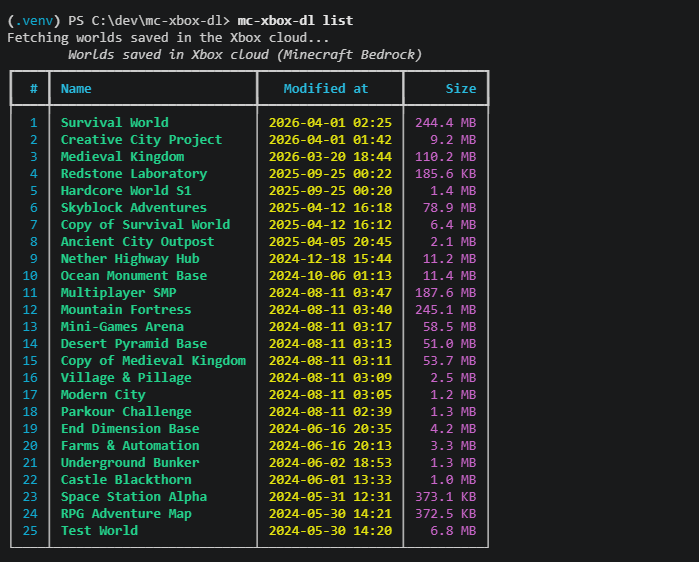
+
mc-xbox-dl list
|
|
143
|
+
|
|
144
|
+
# Bypass the 5-minute local cache and fetch live data from Xbox Live
|
|
145
|
+
mc-xbox-dl list --no-cache
|
|
146
|
+
```
|
|
147
|
+
|
|
148
|
+
### 4. Download and Export Worlds (`download`)
|
|
149
|
+
|
|
150
|
+
#### Option A: Download a Single World as `.mcworld`
|
|
151
|
+
You can specify the world by its **index number (`#`)** from `mc-xbox-dl list`, its **exact world name**, or its **cloud `world_id`**:
|
|
152
|
+
```bash
|
|
153
|
+
# Download world #1 to the current directory
|
|
154
|
+
mc-xbox-dl download 1
|
|
155
|
+
|
|
156
|
+
# Download world #1 to a custom folder
|
|
157
|
+
mc-xbox-dl download 1 -o ./downloads
|
|
158
|
+
|
|
159
|
+
# Download by world name and overwrite if the .mcworld file already exists
|
|
160
|
+
mc-xbox-dl download "My Survival World" -o ./downloads --force
|
|
161
|
+
```
|
|
162
|
+
|
|
163
|
+
#### Option B: Batch Download All Worlds (`--all`)
|
|
164
|
+
```bash
|
|
165
|
+
# Download all cloud worlds as .mcworld files (skips existing files automatically)
|
|
166
|
+
mc-xbox-dl download --all -o ./my_worlds
|
|
167
|
+
|
|
168
|
+
# Force re-download and overwrite existing .mcworld files
|
|
169
|
+
mc-xbox-dl download --all -o ./my_worlds --force
|
|
170
|
+
```
|
|
171
|
+
|
|
172
|
+
#### Option C: Direct Installation into Minecraft Bedrock (`--install`, `--install-dir`)
|
|
173
|
+
On Windows, `--install` extracts and validates the world folder directly inside your local `minecraftWorlds` directory so it appears immediately in-game:
|
|
174
|
+
```bash
|
|
175
|
+
# Auto-detect Minecraft Bedrock on Windows and install world #1 directly (no .mcworld created)
|
|
176
|
+
mc-xbox-dl download 1 --install
|
|
177
|
+
|
|
178
|
+
# Install world #1 directly into Minecraft AND also save a .mcworld backup copy in ./backups
|
|
179
|
+
mc-xbox-dl download 1 --install -o ./backups
|
|
180
|
+
|
|
181
|
+
# Batch install ALL cloud worlds directly into Minecraft Bedrock
|
|
182
|
+
mc-xbox-dl download --all --install
|
|
183
|
+
|
|
184
|
+
# Install into a manually specified 'minecraftWorlds' directory (works on any OS)
|
|
185
|
+
mc-xbox-dl download 1 --install-dir "C:\CustomPath\games\com.mojang\minecraftWorlds"
|
|
186
|
+
```
|
|
187
|
+
|
|
188
|
+
**How `--install` Works:**
|
|
189
|
+
1. **Primary Discovery (Modern GDK on Windows):** Scans `%APPDATA%\Minecraft Bedrock\Users\<USER_ID>\games\com.mojang\minecraftWorlds` across numeric 64-bit user folders (ignoring `Shared`).
|
|
190
|
+
2. **Fallback Discovery (Legacy UWP on Windows):** Checks retail (`Microsoft.MinecraftUWP_8wekyb3d8bbwe`) and Beta/Preview (`Microsoft.MinecraftWindowsBeta_8wekyb3d8bbwe`) package folders under `%LOCALAPPDATA%\Packages\`.
|
|
191
|
+
3. **Multiple Profiles Resolution:** If multiple installations or user profiles are found, interactive mode prompts you with a selection table; non-interactive mode selects the most recently modified profile automatically.
|
|
192
|
+
4. **Atomic Staging & Validation:** Worlds are assembled in a temporary staging directory, checked for `level.dat`, `levelname.txt`, and `db/`, and atomically moved into `minecraftWorlds`.
|
|
193
|
+
5. **Linux Behavior:** On Linux, running `--install` (without `--install-dir`) safely exports the `.mcworld` file to your output folder and displays a notice with standard `mcpelauncher` world directories (`~/.var/app/io.mrarm.mcpelauncher/...` and `~/.local/share/mcpelauncher/...`).
|
|
194
|
+
|
|
195
|
+
#### Option D: Convert to Minecraft Java Edition (`--java`, `--install-java`)
|
|
196
|
+
Using the official [Chunker CLI](https://github.com/HiveGamesOSS/Chunker), `mc-xbox-dl` can convert downloaded Bedrock worlds directly into Minecraft Java Edition format (requires **Java 17+** in your `PATH`; `chunker-cli.jar` is downloaded and cached automatically on first run):
|
|
197
|
+
```bash
|
|
198
|
+
# Convert world #1 to a Java Edition world folder in the current directory (./<World Name> (Java)/)
|
|
199
|
+
mc-xbox-dl download 1 --java
|
|
200
|
+
|
|
201
|
+
# Convert world #1 targeting a specific Minecraft Java version (default: 1.21.4)
|
|
202
|
+
mc-xbox-dl download 1 --java --java-version 1.20.6 -o ./java_worlds
|
|
203
|
+
|
|
204
|
+
# Convert and install world #1 directly into your local '.minecraft/saves' folder (Windows & Linux)
|
|
205
|
+
mc-xbox-dl download 1 --install-java
|
|
206
|
+
|
|
207
|
+
# Install into BOTH Minecraft Bedrock AND Minecraft Java Edition simultaneously
|
|
208
|
+
mc-xbox-dl download 1 --install --install-java
|
|
209
|
+
|
|
210
|
+
# Convert and install into a custom Java 'saves' directory
|
|
211
|
+
mc-xbox-dl download 1 --java-saves-dir "D:\MultiMC\instances\1.21.4\.minecraft\saves"
|
|
212
|
+
|
|
213
|
+
# Install into Java Edition AND keep an original .mcworld Bedrock backup copy in ./backups
|
|
214
|
+
mc-xbox-dl download 1 --install-java -o ./backups
|
|
215
|
+
```
|
|
216
|
+
|
|
217
|
+
**How `-o` / `--output` behaves with `--java`:**
|
|
218
|
+
- **With `--java` alone (without installation):** `-o` specifies the destination directory for the converted Java world folder (e.g. `./output/<World Name> (Java)/`). No `.mcworld` file is generated.
|
|
219
|
+
- **With `--install-java`:** The Java world is placed directly in `.minecraft/saves`. If `-o` is also passed, it saves an additional `.mcworld` backup copy in that folder. If `-o` is omitted, no extra files remain in your working directory.
|
|
220
|
+
|
|
221
|
+
### 5. Play Your World in Minecraft
|
|
222
|
+
- **If you exported a `.mcworld` file:** Double-click the `.mcworld` file in your file manager to import it into Minecraft Bedrock.
|
|
223
|
+
- **If you used `--install` on Windows:** Launch Minecraft Bedrock (or restart the game if it was already running) and the world will appear directly in your worlds list.
|
|
224
|
+
|
|
225
|
+
### 6. Log Out (`logout`)
|
|
226
|
+
Deletes local session tokens from your computer:
|
|
227
|
+
```bash
|
|
228
|
+
mc-xbox-dl logout
|
|
229
|
+
```
|
|
230
|
+
|
|
231
|
+
### 7. Change Interface Language (`--lang`)
|
|
232
|
+
`mc-xbox-dl` detects your OS language automatically on first run (`en` or `pt`). Passing `--lang` switches the language and saves your choice for future commands:
|
|
233
|
+
```bash
|
|
234
|
+
mc-xbox-dl --lang pt list # Switch to Portuguese and save preference
|
|
235
|
+
mc-xbox-dl --lang en list # Switch to English and save preference
|
|
236
|
+
```
|
|
237
|
+
|
|
238
|
+
---
|
|
239
|
+
|
|
240
|
+
## CLI Reference & Exit Codes
|
|
241
|
+
|
|
242
|
+
### Global Options
|
|
243
|
+
| Flag | Description |
|
|
244
|
+
| :--- | :--- |
|
|
245
|
+
| `--lang {en,pt,en-US,pt-BR}` | Override interface language and persist choice in local settings |
|
|
246
|
+
| `--debug` | Save redacted HTTP diagnostic dumps to the local `debug/` directory |
|
|
247
|
+
| `--version` | Display installed program version |
|
|
248
|
+
| `-h`, `--help` | Show command help message |
|
|
249
|
+
|
|
250
|
+
### Exit Codes
|
|
251
|
+
| Code | Meaning |
|
|
252
|
+
| :--- | :--- |
|
|
253
|
+
| `0` | Success |
|
|
254
|
+
| `1` | Unexpected error, user cancellation, or partial batch failure |
|
|
255
|
+
| `2` | Invalid CLI arguments or target file already exists (without `--force`) |
|
|
256
|
+
| `3` | Not authenticated or expired/invalid session (run `mc-xbox-dl login`) |
|
|
257
|
+
| `4` | Network timeout, connection failure, or rate limit (`429`) |
|
|
258
|
+
| `5` | World not found or cloud storage list is empty |
|
|
259
|
+
| `6` | World assembly, integrity validation, or packaging error |
|
|
260
|
+
| `7` | Access denied (`401` / `403`) by Xbox Live |
|
|
261
|
+
| `8` | Xbox Live rate limit encountered (`429`) |
|
|
262
|
+
| `9` | Java runtime missing/outdated, Chunker CLI download failure, or Java conversion error (`ConversionError`) |
|
|
263
|
+
|
|
264
|
+
---
|
|
265
|
+
|
|
266
|
+
## FAQ & Troubleshooting
|
|
267
|
+
|
|
268
|
+
### Why is a world from my Xbox missing in `mc-xbox-dl list`?
|
|
269
|
+
Only worlds that have been **synchronized to Xbox Live cloud storage** by your console appear in the list. Open Minecraft on your Xbox while connected to the internet, load the world, and save/quit to trigger cloud synchronization.
|
|
270
|
+
|
|
271
|
+
### Are Minecraft Realms worlds supported?
|
|
272
|
+
**No.** Minecraft Realms is a paid subscription hosting service that uses separate infrastructure and APIs. `mc-xbox-dl` only accesses personal saves stored in free Xbox Live Connected Storage.
|
|
273
|
+
|
|
274
|
+
### What happens if Xbox Live rate-limits a batch download?
|
|
275
|
+
During `--all` downloads, `mc-xbox-dl` pauses briefly between worlds to respect server limits. If Xbox Live returns HTTP `429` (Too Many Requests) or `401`/`403`, the tool immediately aborts the batch (`fail-fast`) to protect your account. Wait several minutes before resuming—already downloaded worlds will be skipped automatically.
|
|
276
|
+
|
|
277
|
+
### How do I generate diagnostic logs (`--debug`)?
|
|
278
|
+
Run any command with `--debug` to write redacted JSON traces (with all tokens, headers, and secrets stripped) to `%APPDATA%\mc-xbox-dl\debug\` (Windows) or `~/.config/mc-xbox-dl/debug/` (Linux):
|
|
279
|
+
```bash
|
|
280
|
+
mc-xbox-dl --debug list
|
|
281
|
+
```
|
|
282
|
+
|
|
283
|
+
---
|
|
284
|
+
|
|
285
|
+
## Development & Testing
|
|
286
|
+
|
|
287
|
+
```bash
|
|
288
|
+
# Install development dependencies (pytest, respx, ruff)
|
|
289
|
+
pip install -e ".[dev]"
|
|
290
|
+
|
|
291
|
+
# Run the automated test suite
|
|
292
|
+
pytest
|
|
293
|
+
|
|
294
|
+
# Run linter and code formatter checks
|
|
295
|
+
ruff check .
|
|
296
|
+
ruff format --check .
|
|
297
|
+
```
|
|
298
|
+
|
|
299
|
+
---
|
|
300
|
+
|
|
301
|
+
## Documentation Links
|
|
302
|
+
- [Português Brasileiro (README.pt-br.md)](https://github.com/vinifreitaspaulino/mc-xbox-dl/blob/main/README.pt-br.md)
|
|
303
|
+
- [Changelog (CHANGELOG.md)](https://github.com/vinifreitaspaulino/mc-xbox-dl/blob/main/CHANGELOG.md)
|
|
304
|
+
- [Security Policy (SECURITY.md)](https://github.com/vinifreitaspaulino/mc-xbox-dl/blob/main/SECURITY.md)
|
|
305
|
+
- [Architecture & Technical Decisions (docs/DECISIONS.md)](https://github.com/vinifreitaspaulino/mc-xbox-dl/blob/main/docs/DECISIONS.md)
|
|
306
|
+
- [Protocol & Endpoint Research (docs/RESEARCH.md)](https://github.com/vinifreitaspaulino/mc-xbox-dl/blob/main/docs/RESEARCH.md)
|
|
307
|
+
- [Connected Storage Protocol Specification (docs/PROTOCOL.md)](https://github.com/vinifreitaspaulino/mc-xbox-dl/blob/main/docs/PROTOCOL.md)
|
|
308
|
+
|
|
309
|
+
---
|
|
310
|
+
|
|
311
|
+
## License
|
|
312
|
+
Distributed under the MIT License. See [LICENSE](https://github.com/vinifreitaspaulino/mc-xbox-dl/blob/main/LICENSE) for details.
|
|
@@ -0,0 +1,281 @@
|
|
|
1
|
+
# mc-xbox-dl
|
|
2
|
+
|
|
3
|
+
[](https://github.com/vinifreitaspaulino/mc-xbox-dl/actions/workflows/ci.yml)
|
|
4
|
+
[](https://github.com/vinifreitaspaulino/mc-xbox-dl/blob/main/LICENSE)
|
|
5
|
+
[](https://www.python.org/downloads/)
|
|
6
|
+
[](#)
|
|
7
|
+
|
|
8
|
+
> **Read this in another language:** [Português Brasileiro](https://github.com/vinifreitaspaulino/mc-xbox-dl/blob/main/README.pt-br.md)
|
|
9
|
+
|
|
10
|
+
CLI tool to list, export, and download personal **Minecraft Bedrock (Xbox)** worlds saved in Xbox Live cloud storage as `.mcworld` packages or install them directly into your local PC game directory.
|
|
11
|
+
|
|
12
|
+
> **NOT AN OFFICIAL MINECRAFT PRODUCT. NOT APPROVED BY OR ASSOCIATED WITH MOJANG OR MICROSOFT.**
|
|
13
|
+
> `mc-xbox-dl` is an independent, free, open-source utility created exclusively for personal backup and data portability under user-controlled credentials. It is not affiliated with, maintained by, or endorsed by Microsoft Corporation or Mojang Studios.
|
|
14
|
+
|
|
15
|
+

|
|
16
|
+

|
|
17
|
+
|
|
18
|
+
---
|
|
19
|
+
|
|
20
|
+
## Important Notice & Risk Disclaimer
|
|
21
|
+
|
|
22
|
+
- **Unofficial API & Client Emulation:** This tool communicates directly with undocumented Xbox Live Connected Storage and Title Storage endpoints (`titlestorage.xboxlive.com`). To authenticate, it uses the public `client_id` of **Minecraft Bedrock (Android)** (`0000000048183522`), signs Proof-of-Possession requests with an ephemeral ECDSA P-256 device key, and requests SISU/XSTS authorization tokens bound to the console `TitleId` (`1828326430`).
|
|
23
|
+
- **Contractual & Account Risks:** Accessing undocumented Xbox Live APIs using first-party client identifiers is not officially supported by Microsoft or Mojang. Potential risks include **endpoint changes or blocking by Microsoft**, temporary rate-limiting, or **enforcement actions (including suspension or termination of your Xbox Live / Microsoft account)** for violating the Microsoft Services Agreement. Use of this tool is strictly at your own responsibility and risk.
|
|
24
|
+
- **Read-Only & Rate-Limited Design:** To minimize risk, `mc-xbox-dl` operates in **strict read-only (`GET`)** mode, transfers only your own cloud-saved worlds, enforces inter-download pacing, and immediately aborts (`fail-fast`) upon encountering HTTP `401`, `403`, or `429`.
|
|
25
|
+
- **Explicit Consent Required:** Running `mc-xbox-dl login` requires explicit interactive risk acceptance, or the `--accept-risk` flag for automated scripts.
|
|
26
|
+
- **Local-First Privacy:** All credentials and tokens are stored locally on your machine (`%APPDATA%\mc-xbox-dl` on Windows or `~/.config/mc-xbox-dl` on Linux). No data is sent to third parties or external telemetry servers. See [SECURITY.md](https://github.com/vinifreitaspaulino/mc-xbox-dl/blob/main/SECURITY.md) for details.
|
|
27
|
+
|
|
28
|
+
---
|
|
29
|
+
|
|
30
|
+
## Key Features
|
|
31
|
+
|
|
32
|
+
- **100% Free & Open Source:** No subscription fees, no third-party servers, and no Minecraft Realms subscription required.
|
|
33
|
+
- **Device Code Authentication:** Log in securely via Microsoft's OAuth 2.0 Device Authorization flow (`https://www.microsoft.com/link`). Passwords are never entered or stored in the CLI.
|
|
34
|
+
- **Bilingual Interface (i18n):** Automatic operating system language detection (English / Portuguese) with manual override and persistent preference (`--lang en` / `--lang pt`).
|
|
35
|
+
- **Cloud World Listing with Caching:** Fast inspection of world names, modification dates, and sizes with 5-minute local caching (`--no-cache` to force a live refresh).
|
|
36
|
+
- **Single & Batch Downloads:** Download individual worlds by index, name, or ID, or batch export all cloud saves (`--all`) with automatic resume and rate-paced transfers.
|
|
37
|
+
- **Direct PC Installation (`--install`):** Automatically detects modern **GDK** (`%APPDATA%\Minecraft Bedrock\Users\<ID>\...`) and legacy **UWP** (`%LOCALAPPDATA%\Packages\Microsoft.MinecraftUWP_...\...`) installations on Windows, extracting worlds directly into `minecraftWorlds`.
|
|
38
|
+
- **Automatic Minecraft Java Edition Conversion (`--java`, `--install-java`):** Automatically downloads and runs the official [Chunker CLI](https://github.com/HiveGamesOSS/Chunker) (`HiveGamesOSS/Chunker`) to convert Xbox Bedrock worlds into Minecraft Java Edition worlds and optionally install them directly into `.minecraft/saves` on Windows and Linux.
|
|
39
|
+
- **Cross-Platform Support (Windows & Linux):** Native `.mcworld` export on both Windows and Linux, with helpful path guidance for Linux Bedrock launchers (`mcpelauncher`) when `--install` is used.
|
|
40
|
+
- **Structural Integrity Validation:** Verifies Bedrock NBT headers (`level.dat`), world title (`levelname.txt`), and LevelDB database files (`db/CURRENT`, `db/MANIFEST-*`) before completing any package or installation.
|
|
41
|
+
- **Network Safeguards & Fail-Fast:** Enforces request pacing between batch downloads, uses neutral HTTP headers, and immediately aborts on HTTP `401`, `403`, or `429`.
|
|
42
|
+
|
|
43
|
+
---
|
|
44
|
+
|
|
45
|
+
## Installation
|
|
46
|
+
|
|
47
|
+
### 1. Prerequisites
|
|
48
|
+
- **Python 3.11 or higher:** Download from [python.org](https://www.python.org/downloads/) or via your Linux package manager.
|
|
49
|
+
> **Windows Note:** On the first screen of the Python installer, check **"Add python.exe to PATH"** before clicking *Install Now*.
|
|
50
|
+
- **Git** (optional; you can also download the repository as a `.zip` archive).
|
|
51
|
+
- **Java 17 or higher** *(optional — required only if using `--java` or `--install-java` for Minecraft Java Edition conversion)*: Download OpenJDK 17+ from [Adoptium Temurin](https://adoptium.net/) or install via your package manager.
|
|
52
|
+
|
|
53
|
+
### 2. Clone and Set Up Virtual Environment
|
|
54
|
+
|
|
55
|
+
#### On Windows (PowerShell):
|
|
56
|
+
```powershell
|
|
57
|
+
# Clone the repository
|
|
58
|
+
git clone https://github.com/vinifreitaspaulino/mc-xbox-dl.git
|
|
59
|
+
cd mc-xbox-dl
|
|
60
|
+
|
|
61
|
+
# Allow script execution for the current PowerShell session (if restricted)
|
|
62
|
+
Set-ExecutionPolicy -Scope Process -ExecutionPolicy Bypass
|
|
63
|
+
|
|
64
|
+
# Create and activate virtual environment
|
|
65
|
+
python -m venv .venv
|
|
66
|
+
.\.venv\Scripts\Activate.ps1
|
|
67
|
+
|
|
68
|
+
# Install package in editable mode
|
|
69
|
+
pip install -e .
|
|
70
|
+
```
|
|
71
|
+
|
|
72
|
+
#### On Linux (Bash / Zsh):
|
|
73
|
+
```bash
|
|
74
|
+
# Clone the repository
|
|
75
|
+
git clone https://github.com/vinifreitaspaulino/mc-xbox-dl.git
|
|
76
|
+
cd mc-xbox-dl
|
|
77
|
+
|
|
78
|
+
# Create and activate virtual environment
|
|
79
|
+
python3 -m venv .venv
|
|
80
|
+
source .venv/bin/activate
|
|
81
|
+
|
|
82
|
+
# Install package in editable mode
|
|
83
|
+
pip install -e .
|
|
84
|
+
```
|
|
85
|
+
|
|
86
|
+
---
|
|
87
|
+
|
|
88
|
+
## Usage Guide
|
|
89
|
+
|
|
90
|
+
### 1. Authenticate (`login`)
|
|
91
|
+
```bash
|
|
92
|
+
# Interactive login (displays risk notice and asks for confirmation)
|
|
93
|
+
mc-xbox-dl login
|
|
94
|
+
|
|
95
|
+
# Non-interactive login (for scripts/automation)
|
|
96
|
+
mc-xbox-dl login --accept-risk
|
|
97
|
+
```
|
|
98
|
+
Follow the instructions displayed in the terminal:
|
|
99
|
+
1. Open the verification URL shown on screen (typically `https://www.microsoft.com/link`) in any browser on your PC or phone.
|
|
100
|
+
2. Enter the 8-character device code displayed in your terminal.
|
|
101
|
+
3. Sign in with the Microsoft account that holds your Xbox Minecraft cloud saves.
|
|
102
|
+
|
|
103
|
+
### 2. Check Active Session (`whoami`)
|
|
104
|
+
```bash
|
|
105
|
+
mc-xbox-dl whoami
|
|
106
|
+
```
|
|
107
|
+
|
|
108
|
+
### 3. List Cloud Worlds (`list`)
|
|
109
|
+
```bash
|
|
110
|
+
# Display formatted table of synchronized cloud worlds
|
|
111
|
+
mc-xbox-dl list
|
|
112
|
+
|
|
113
|
+
# Bypass the 5-minute local cache and fetch live data from Xbox Live
|
|
114
|
+
mc-xbox-dl list --no-cache
|
|
115
|
+
```
|
|
116
|
+
|
|
117
|
+
### 4. Download and Export Worlds (`download`)
|
|
118
|
+
|
|
119
|
+
#### Option A: Download a Single World as `.mcworld`
|
|
120
|
+
You can specify the world by its **index number (`#`)** from `mc-xbox-dl list`, its **exact world name**, or its **cloud `world_id`**:
|
|
121
|
+
```bash
|
|
122
|
+
# Download world #1 to the current directory
|
|
123
|
+
mc-xbox-dl download 1
|
|
124
|
+
|
|
125
|
+
# Download world #1 to a custom folder
|
|
126
|
+
mc-xbox-dl download 1 -o ./downloads
|
|
127
|
+
|
|
128
|
+
# Download by world name and overwrite if the .mcworld file already exists
|
|
129
|
+
mc-xbox-dl download "My Survival World" -o ./downloads --force
|
|
130
|
+
```
|
|
131
|
+
|
|
132
|
+
#### Option B: Batch Download All Worlds (`--all`)
|
|
133
|
+
```bash
|
|
134
|
+
# Download all cloud worlds as .mcworld files (skips existing files automatically)
|
|
135
|
+
mc-xbox-dl download --all -o ./my_worlds
|
|
136
|
+
|
|
137
|
+
# Force re-download and overwrite existing .mcworld files
|
|
138
|
+
mc-xbox-dl download --all -o ./my_worlds --force
|
|
139
|
+
```
|
|
140
|
+
|
|
141
|
+
#### Option C: Direct Installation into Minecraft Bedrock (`--install`, `--install-dir`)
|
|
142
|
+
On Windows, `--install` extracts and validates the world folder directly inside your local `minecraftWorlds` directory so it appears immediately in-game:
|
|
143
|
+
```bash
|
|
144
|
+
# Auto-detect Minecraft Bedrock on Windows and install world #1 directly (no .mcworld created)
|
|
145
|
+
mc-xbox-dl download 1 --install
|
|
146
|
+
|
|
147
|
+
# Install world #1 directly into Minecraft AND also save a .mcworld backup copy in ./backups
|
|
148
|
+
mc-xbox-dl download 1 --install -o ./backups
|
|
149
|
+
|
|
150
|
+
# Batch install ALL cloud worlds directly into Minecraft Bedrock
|
|
151
|
+
mc-xbox-dl download --all --install
|
|
152
|
+
|
|
153
|
+
# Install into a manually specified 'minecraftWorlds' directory (works on any OS)
|
|
154
|
+
mc-xbox-dl download 1 --install-dir "C:\CustomPath\games\com.mojang\minecraftWorlds"
|
|
155
|
+
```
|
|
156
|
+
|
|
157
|
+
**How `--install` Works:**
|
|
158
|
+
1. **Primary Discovery (Modern GDK on Windows):** Scans `%APPDATA%\Minecraft Bedrock\Users\<USER_ID>\games\com.mojang\minecraftWorlds` across numeric 64-bit user folders (ignoring `Shared`).
|
|
159
|
+
2. **Fallback Discovery (Legacy UWP on Windows):** Checks retail (`Microsoft.MinecraftUWP_8wekyb3d8bbwe`) and Beta/Preview (`Microsoft.MinecraftWindowsBeta_8wekyb3d8bbwe`) package folders under `%LOCALAPPDATA%\Packages\`.
|
|
160
|
+
3. **Multiple Profiles Resolution:** If multiple installations or user profiles are found, interactive mode prompts you with a selection table; non-interactive mode selects the most recently modified profile automatically.
|
|
161
|
+
4. **Atomic Staging & Validation:** Worlds are assembled in a temporary staging directory, checked for `level.dat`, `levelname.txt`, and `db/`, and atomically moved into `minecraftWorlds`.
|
|
162
|
+
5. **Linux Behavior:** On Linux, running `--install` (without `--install-dir`) safely exports the `.mcworld` file to your output folder and displays a notice with standard `mcpelauncher` world directories (`~/.var/app/io.mrarm.mcpelauncher/...` and `~/.local/share/mcpelauncher/...`).
|
|
163
|
+
|
|
164
|
+
#### Option D: Convert to Minecraft Java Edition (`--java`, `--install-java`)
|
|
165
|
+
Using the official [Chunker CLI](https://github.com/HiveGamesOSS/Chunker), `mc-xbox-dl` can convert downloaded Bedrock worlds directly into Minecraft Java Edition format (requires **Java 17+** in your `PATH`; `chunker-cli.jar` is downloaded and cached automatically on first run):
|
|
166
|
+
```bash
|
|
167
|
+
# Convert world #1 to a Java Edition world folder in the current directory (./<World Name> (Java)/)
|
|
168
|
+
mc-xbox-dl download 1 --java
|
|
169
|
+
|
|
170
|
+
# Convert world #1 targeting a specific Minecraft Java version (default: 1.21.4)
|
|
171
|
+
mc-xbox-dl download 1 --java --java-version 1.20.6 -o ./java_worlds
|
|
172
|
+
|
|
173
|
+
# Convert and install world #1 directly into your local '.minecraft/saves' folder (Windows & Linux)
|
|
174
|
+
mc-xbox-dl download 1 --install-java
|
|
175
|
+
|
|
176
|
+
# Install into BOTH Minecraft Bedrock AND Minecraft Java Edition simultaneously
|
|
177
|
+
mc-xbox-dl download 1 --install --install-java
|
|
178
|
+
|
|
179
|
+
# Convert and install into a custom Java 'saves' directory
|
|
180
|
+
mc-xbox-dl download 1 --java-saves-dir "D:\MultiMC\instances\1.21.4\.minecraft\saves"
|
|
181
|
+
|
|
182
|
+
# Install into Java Edition AND keep an original .mcworld Bedrock backup copy in ./backups
|
|
183
|
+
mc-xbox-dl download 1 --install-java -o ./backups
|
|
184
|
+
```
|
|
185
|
+
|
|
186
|
+
**How `-o` / `--output` behaves with `--java`:**
|
|
187
|
+
- **With `--java` alone (without installation):** `-o` specifies the destination directory for the converted Java world folder (e.g. `./output/<World Name> (Java)/`). No `.mcworld` file is generated.
|
|
188
|
+
- **With `--install-java`:** The Java world is placed directly in `.minecraft/saves`. If `-o` is also passed, it saves an additional `.mcworld` backup copy in that folder. If `-o` is omitted, no extra files remain in your working directory.
|
|
189
|
+
|
|
190
|
+
### 5. Play Your World in Minecraft
|
|
191
|
+
- **If you exported a `.mcworld` file:** Double-click the `.mcworld` file in your file manager to import it into Minecraft Bedrock.
|
|
192
|
+
- **If you used `--install` on Windows:** Launch Minecraft Bedrock (or restart the game if it was already running) and the world will appear directly in your worlds list.
|
|
193
|
+
|
|
194
|
+
### 6. Log Out (`logout`)
|
|
195
|
+
Deletes local session tokens from your computer:
|
|
196
|
+
```bash
|
|
197
|
+
mc-xbox-dl logout
|
|
198
|
+
```
|
|
199
|
+
|
|
200
|
+
### 7. Change Interface Language (`--lang`)
|
|
201
|
+
`mc-xbox-dl` detects your OS language automatically on first run (`en` or `pt`). Passing `--lang` switches the language and saves your choice for future commands:
|
|
202
|
+
```bash
|
|
203
|
+
mc-xbox-dl --lang pt list # Switch to Portuguese and save preference
|
|
204
|
+
mc-xbox-dl --lang en list # Switch to English and save preference
|
|
205
|
+
```
|
|
206
|
+
|
|
207
|
+
---
|
|
208
|
+
|
|
209
|
+
## CLI Reference & Exit Codes
|
|
210
|
+
|
|
211
|
+
### Global Options
|
|
212
|
+
| Flag | Description |
|
|
213
|
+
| :--- | :--- |
|
|
214
|
+
| `--lang {en,pt,en-US,pt-BR}` | Override interface language and persist choice in local settings |
|
|
215
|
+
| `--debug` | Save redacted HTTP diagnostic dumps to the local `debug/` directory |
|
|
216
|
+
| `--version` | Display installed program version |
|
|
217
|
+
| `-h`, `--help` | Show command help message |
|
|
218
|
+
|
|
219
|
+
### Exit Codes
|
|
220
|
+
| Code | Meaning |
|
|
221
|
+
| :--- | :--- |
|
|
222
|
+
| `0` | Success |
|
|
223
|
+
| `1` | Unexpected error, user cancellation, or partial batch failure |
|
|
224
|
+
| `2` | Invalid CLI arguments or target file already exists (without `--force`) |
|
|
225
|
+
| `3` | Not authenticated or expired/invalid session (run `mc-xbox-dl login`) |
|
|
226
|
+
| `4` | Network timeout, connection failure, or rate limit (`429`) |
|
|
227
|
+
| `5` | World not found or cloud storage list is empty |
|
|
228
|
+
| `6` | World assembly, integrity validation, or packaging error |
|
|
229
|
+
| `7` | Access denied (`401` / `403`) by Xbox Live |
|
|
230
|
+
| `8` | Xbox Live rate limit encountered (`429`) |
|
|
231
|
+
| `9` | Java runtime missing/outdated, Chunker CLI download failure, or Java conversion error (`ConversionError`) |
|
|
232
|
+
|
|
233
|
+
---
|
|
234
|
+
|
|
235
|
+
## FAQ & Troubleshooting
|
|
236
|
+
|
|
237
|
+
### Why is a world from my Xbox missing in `mc-xbox-dl list`?
|
|
238
|
+
Only worlds that have been **synchronized to Xbox Live cloud storage** by your console appear in the list. Open Minecraft on your Xbox while connected to the internet, load the world, and save/quit to trigger cloud synchronization.
|
|
239
|
+
|
|
240
|
+
### Are Minecraft Realms worlds supported?
|
|
241
|
+
**No.** Minecraft Realms is a paid subscription hosting service that uses separate infrastructure and APIs. `mc-xbox-dl` only accesses personal saves stored in free Xbox Live Connected Storage.
|
|
242
|
+
|
|
243
|
+
### What happens if Xbox Live rate-limits a batch download?
|
|
244
|
+
During `--all` downloads, `mc-xbox-dl` pauses briefly between worlds to respect server limits. If Xbox Live returns HTTP `429` (Too Many Requests) or `401`/`403`, the tool immediately aborts the batch (`fail-fast`) to protect your account. Wait several minutes before resuming—already downloaded worlds will be skipped automatically.
|
|
245
|
+
|
|
246
|
+
### How do I generate diagnostic logs (`--debug`)?
|
|
247
|
+
Run any command with `--debug` to write redacted JSON traces (with all tokens, headers, and secrets stripped) to `%APPDATA%\mc-xbox-dl\debug\` (Windows) or `~/.config/mc-xbox-dl/debug/` (Linux):
|
|
248
|
+
```bash
|
|
249
|
+
mc-xbox-dl --debug list
|
|
250
|
+
```
|
|
251
|
+
|
|
252
|
+
---
|
|
253
|
+
|
|
254
|
+
## Development & Testing
|
|
255
|
+
|
|
256
|
+
```bash
|
|
257
|
+
# Install development dependencies (pytest, respx, ruff)
|
|
258
|
+
pip install -e ".[dev]"
|
|
259
|
+
|
|
260
|
+
# Run the automated test suite
|
|
261
|
+
pytest
|
|
262
|
+
|
|
263
|
+
# Run linter and code formatter checks
|
|
264
|
+
ruff check .
|
|
265
|
+
ruff format --check .
|
|
266
|
+
```
|
|
267
|
+
|
|
268
|
+
---
|
|
269
|
+
|
|
270
|
+
## Documentation Links
|
|
271
|
+
- [Português Brasileiro (README.pt-br.md)](https://github.com/vinifreitaspaulino/mc-xbox-dl/blob/main/README.pt-br.md)
|
|
272
|
+
- [Changelog (CHANGELOG.md)](https://github.com/vinifreitaspaulino/mc-xbox-dl/blob/main/CHANGELOG.md)
|
|
273
|
+
- [Security Policy (SECURITY.md)](https://github.com/vinifreitaspaulino/mc-xbox-dl/blob/main/SECURITY.md)
|
|
274
|
+
- [Architecture & Technical Decisions (docs/DECISIONS.md)](https://github.com/vinifreitaspaulino/mc-xbox-dl/blob/main/docs/DECISIONS.md)
|
|
275
|
+
- [Protocol & Endpoint Research (docs/RESEARCH.md)](https://github.com/vinifreitaspaulino/mc-xbox-dl/blob/main/docs/RESEARCH.md)
|
|
276
|
+
- [Connected Storage Protocol Specification (docs/PROTOCOL.md)](https://github.com/vinifreitaspaulino/mc-xbox-dl/blob/main/docs/PROTOCOL.md)
|
|
277
|
+
|
|
278
|
+
---
|
|
279
|
+
|
|
280
|
+
## License
|
|
281
|
+
Distributed under the MIT License. See [LICENSE](https://github.com/vinifreitaspaulino/mc-xbox-dl/blob/main/LICENSE) for details.
|