macpm 2.0__tar.gz → 2.1__tar.gz
This diff represents the content of publicly available package versions that have been released to one of the supported registries. The information contained in this diff is provided for informational purposes only and reflects changes between package versions as they appear in their respective public registries.
- {macpm-2.0 → macpm-2.1}/CHANGELOG.md +34 -0
- {macpm-2.0/macpm.egg-info → macpm-2.1}/PKG-INFO +59 -26
- {macpm-2.0 → macpm-2.1}/README.md +58 -25
- macpm-2.1/RELEASE.md +155 -0
- {macpm-2.0 → macpm-2.1}/macpm/__init__.py +1 -1
- {macpm-2.0 → macpm-2.1}/macpm/macpm.py +353 -102
- macpm-2.1/macpm/processes.py +681 -0
- {macpm-2.0 → macpm-2.1}/macpm/sampler.py +57 -0
- macpm-2.1/macpm/sensors.py +128 -0
- {macpm-2.0 → macpm-2.1}/macpm/smc.py +33 -13
- {macpm-2.0 → macpm-2.1/macpm.egg-info}/PKG-INFO +59 -26
- {macpm-2.0 → macpm-2.1}/macpm.egg-info/SOURCES.txt +6 -4
- {macpm-2.0 → macpm-2.1}/macpm.egg-info/entry_points.txt +0 -1
- {macpm-2.0 → macpm-2.1}/packaging/README.txt +8 -5
- {macpm-2.0 → macpm-2.1}/packaging/build.sh +7 -17
- {macpm-2.0 → macpm-2.1}/packaging/install.sh +3 -5
- {macpm-2.0 → macpm-2.1}/setup.py +1 -2
- {macpm-2.0 → macpm-2.1}/tests/test_cli.py +1 -1
- macpm-2.1/tests/test_layout.py +81 -0
- macpm-2.1/tests/test_processes.py +157 -0
- macpm-2.1/tests/test_sampler.py +35 -0
- macpm-2.1/tests/test_sensors.py +89 -0
- macpm-2.0/RELEASE.md +0 -102
- macpm-2.0/macpm/sensors.py +0 -56
- macpm-2.0/packaging/__pycache__/entry_sensors.cpython-312.pyc +0 -0
- macpm-2.0/packaging/__pycache__/entry_tui.cpython-312.pyc +0 -0
- macpm-2.0/packaging/entry_sensors.py +0 -4
- {macpm-2.0 → macpm-2.1}/LICENSE +0 -0
- {macpm-2.0 → macpm-2.1}/MANIFEST.in +0 -0
- {macpm-2.0 → macpm-2.1}/macpm/__main__.py +0 -0
- {macpm-2.0 → macpm-2.1}/macpm/dump.py +0 -0
- {macpm-2.0 → macpm-2.1}/macpm/ioreport.py +0 -0
- {macpm-2.0 → macpm-2.1}/macpm/soc.py +0 -0
- {macpm-2.0 → macpm-2.1}/macpm.egg-info/dependency_links.txt +0 -0
- {macpm-2.0 → macpm-2.1}/macpm.egg-info/not-zip-safe +0 -0
- {macpm-2.0 → macpm-2.1}/macpm.egg-info/requires.txt +0 -0
- {macpm-2.0 → macpm-2.1}/macpm.egg-info/top_level.txt +0 -0
- {macpm-2.0 → macpm-2.1}/packaging/entry_tui.py +0 -0
- {macpm-2.0 → macpm-2.1}/packaging/macpm.command +0 -0
- {macpm-2.0 → macpm-2.1}/pyproject.toml +0 -0
- {macpm-2.0 → macpm-2.1}/setup.cfg +0 -0
- {macpm-2.0 → macpm-2.1}/tests/__init__.py +0 -0
- {macpm-2.0 → macpm-2.1}/tests/test_calc_freq.py +0 -0
|
@@ -1,5 +1,39 @@
|
|
|
1
1
|
# Changelog
|
|
2
2
|
|
|
3
|
+
## 2.1 — 2026-11-11
|
|
4
|
+
|
|
5
|
+
### Changed
|
|
6
|
+
|
|
7
|
+
- The power panel is titled `Power` instead of `CPU+GPU+ANE Power`, and every
|
|
8
|
+
panel title is clipped to its box so a long title never wraps the frame.
|
|
9
|
+
- The Temps & Fans panel now uses its spare rows for CPU/GPU peak temperatures
|
|
10
|
+
and fan limits instead of leaving them blank.
|
|
11
|
+
- Per-core gauges are labelled `E1…` / `P1…` instead of `Core-1` / `C-1`, so
|
|
12
|
+
narrow gauges keep the percentage readable.
|
|
13
|
+
|
|
14
|
+
### Added
|
|
15
|
+
|
|
16
|
+
- **Temps & Fans panel** in the default view — hottest CPU and GPU sensor in
|
|
17
|
+
°C and the current RPM of every fan, read from `AppleSMC` without root.
|
|
18
|
+
- **Process view** on key `3` — a macmon-style two-box layout: a
|
|
19
|
+
CPU/GPU/RAM summary box (with wired/active/inactive/free memory) and a
|
|
20
|
+
process table with PID, NAME, USER, CPU%, MEM and GPU% columns, sorted with
|
|
21
|
+
`s`, scrolled with `↑`/`↓` and paused with `Space`. The table refreshes
|
|
22
|
+
every 2 seconds to keep macpm's own CPU low. There is no power column.
|
|
23
|
+
|
|
24
|
+
### Removed
|
|
25
|
+
|
|
26
|
+
- The separate `macpm-sensors` command. The SMC reader is now part of the TUI
|
|
27
|
+
(`macpm.sensors.SensorReader`).
|
|
28
|
+
|
|
29
|
+
### Fixed
|
|
30
|
+
|
|
31
|
+
- Impossible power peaks (such as `peak: 6208.38W`) caused by coalesced or
|
|
32
|
+
reset Energy Model counters are now discarded instead of being recorded.
|
|
33
|
+
- When the unprivileged Energy Model counters never report, the power panel
|
|
34
|
+
shows `n/a` instead of a misleading `0.00W`; the total is withheld only when
|
|
35
|
+
both CPU and GPU are unreadable.
|
|
36
|
+
|
|
3
37
|
## 2.0 — 2026-11-10
|
|
4
38
|
|
|
5
39
|
### Changed
|
|
@@ -1,6 +1,6 @@
|
|
|
1
1
|
Metadata-Version: 2.4
|
|
2
2
|
Name: macpm
|
|
3
|
-
Version: 2.
|
|
3
|
+
Version: 2.1
|
|
4
4
|
Summary: Rootless performance monitoring CLI tool for Apple Silicon
|
|
5
5
|
Home-page: https://github.com/visualcjy/macpm
|
|
6
6
|
Author: Jinyu Chen
|
|
@@ -42,7 +42,7 @@ Dynamic: summary
|
|
|
42
42
|
# macpm
|
|
43
43
|
|
|
44
44
|
**Rootless performance monitoring CLI for Apple Silicon.**<br>
|
|
45
|
-
macpm 2.
|
|
45
|
+
macpm 2.1 reads the same hardware counters as `powermetrics`, but through
|
|
46
46
|
IOReport/IOKit/SMC — no `sudo`, no password, no privileged helper.
|
|
47
47
|
|
|
48
48
|
A Python-based `nvtop`-inspired terminal monitor for Apple Silicon Macs,
|
|
@@ -50,8 +50,8 @@ forked from [asitop](https://github.com/tlkh/asitop).
|
|
|
50
50
|
|
|
51
51
|
## Demo
|
|
52
52
|
|
|
53
|
-
Default view — CPU/GPU/ANE utilisation and power, memory,
|
|
54
|
-
network, updating once per second:
|
|
53
|
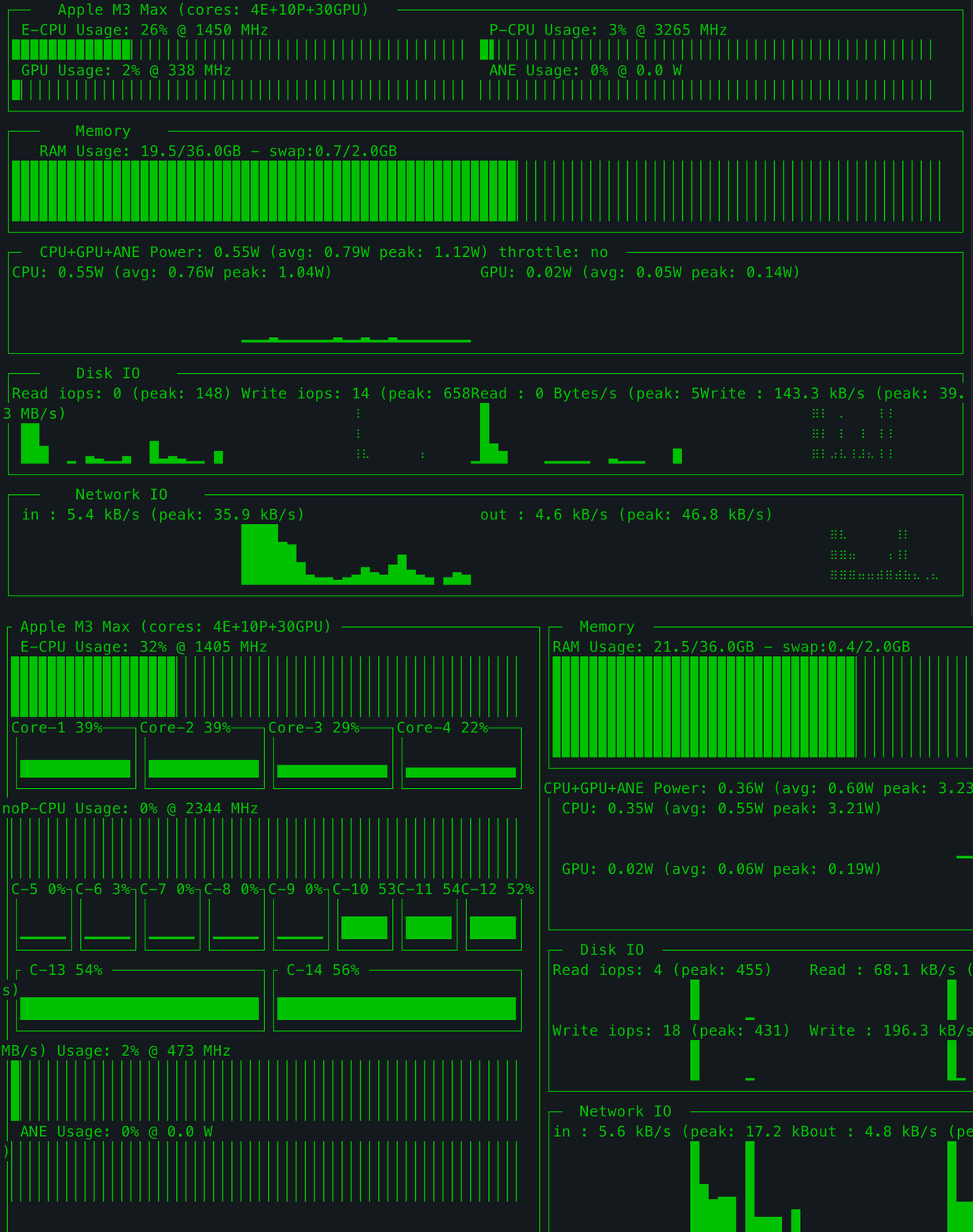
+
Default view — CPU/GPU/ANE utilisation and power, memory, temperatures/fans,
|
|
54
|
+
disk I/O and network, updating once per second:
|
|
55
55
|
|
|
56
56
|
|
|
57
57
|
|
|
@@ -70,9 +70,10 @@ Per-core view (`--show_cores`, or press `2` while running):
|
|
|
70
70
|
- GPU utilisation and frequency
|
|
71
71
|
- CPU / GPU / ANE power, rolling average, peaks and throttle state
|
|
72
72
|
- RAM and swap usage
|
|
73
|
+
- CPU/GPU temperature and fan RPM panel (SMC, read-only, no root)
|
|
73
74
|
- Disk IOPS/throughput and network throughput
|
|
74
|
-
-
|
|
75
|
-
-
|
|
75
|
+
- Process view with per-process CPU, memory and GPU usage, sortable with `s`
|
|
76
|
+
- Familiar terminal layout, colours, charts and key bindings from macpm 0.x
|
|
76
77
|
|
|
77
78
|
## Install
|
|
78
79
|
|
|
@@ -88,7 +89,7 @@ Then run:
|
|
|
88
89
|
macpm
|
|
89
90
|
```
|
|
90
91
|
|
|
91
|
-
There is **no `sudo macpm`**
|
|
92
|
+
There is **no `sudo macpm`** since 2.0. Running it with `sudo` still works, but it
|
|
92
93
|
is unnecessary and no longer recommended.
|
|
93
94
|
|
|
94
95
|
Prefer a standalone binary with no Python installation? See
|
|
@@ -113,7 +114,10 @@ Keys:
|
|
|
113
114
|
```text
|
|
114
115
|
q / ESC quit
|
|
115
116
|
← / → change colour
|
|
116
|
-
1 / 2
|
|
117
|
+
1 / 2 / 3 default / per-core / process view
|
|
118
|
+
s cycle the process sort column (process view)
|
|
119
|
+
↑ / ↓ scroll the process list (process view)
|
|
120
|
+
Space pause / resume the process list (process view)
|
|
117
121
|
Ctrl+R reset peaks
|
|
118
122
|
```
|
|
119
123
|
|
|
@@ -143,6 +147,9 @@ requires root and Apple's private entitlements.
|
|
|
143
147
|
| CPU / GPU / ANE power | IOReport `Energy Model` |
|
|
144
148
|
| RAM / swap | `psutil` |
|
|
145
149
|
| Disk / network | `psutil` counters |
|
|
150
|
+
| Per-process CPU / memory | `psutil`, plus `/bin/ps` for other users |
|
|
151
|
+
| Per-process GPU | `IOAccelerator` user clients in the IORegistry |
|
|
152
|
+
| CPU/GPU temperature, fan RPM | `AppleSMC` via the IOKit user client |
|
|
146
153
|
| Thermal throttle | `pmset -g therm` |
|
|
147
154
|
| SoC name / core counts | `sysctl` |
|
|
148
155
|
| GPU core count | `ioreg` `gpu-core-count` |
|
|
@@ -152,18 +159,41 @@ M1–M3 store Hz there, M4+ store kHz.
|
|
|
152
159
|
|
|
153
160
|
## Temperatures and fans
|
|
154
161
|
|
|
155
|
-
The default
|
|
156
|
-
|
|
162
|
+
The default view has a **Temps & Fans** box next to the memory gauge. It shows
|
|
163
|
+
the hottest CPU and GPU sensor in °C and the current RPM of every fan, for
|
|
164
|
+
example:
|
|
157
165
|
|
|
158
|
-
```
|
|
159
|
-
|
|
160
|
-
|
|
166
|
+
```text
|
|
167
|
+
┌ Temps & Fans ──────────────────────────┐
|
|
168
|
+
│ CPU 52.4°C GPU 43.1°C │
|
|
169
|
+
│ Fan 1 2318 rpm Fan 2 2502 rpm │
|
|
170
|
+
└────────────────────────────────────────┘
|
|
161
171
|
```
|
|
162
172
|
|
|
163
|
-
|
|
164
|
-
|
|
165
|
-
|
|
166
|
-
implemented.
|
|
173
|
+
The values come from `AppleSMC` through the IOKit user client (read-only, no
|
|
174
|
+
root). SMC key names differ between chip generations, so the CPU/GPU sensor
|
|
175
|
+
groups are selected per chip family and a missing key is simply shown as `--`.
|
|
176
|
+
Fan **control** requires root and is not implemented.
|
|
177
|
+
|
|
178
|
+
## Process view
|
|
179
|
+
|
|
180
|
+
Press `3` for a macmon-style two-box layout. The top box is titled with the
|
|
181
|
+
SoC and core counts (as in views 1/2) and keeps the top-style CPU (E/P
|
|
182
|
+
percentages and frequencies), GPU (%, MHz), RAM/swap and
|
|
183
|
+
wired/active/inactive/free memory summary. The second box is the
|
|
184
|
+
process table with `PID`, `NAME`, `USER`, `CPU%`, `MEM` and `GPU%`; there is no
|
|
185
|
+
power column. The list is sorted by CPU usage by default; press `s` to cycle
|
|
186
|
+
through CPU → MEM → GPU → PID → NAME → USER, and `↑` / `↓` to scroll. The
|
|
187
|
+
header shows the current sort column and direction. Press `Space` to pause the
|
|
188
|
+
list while you scroll through it; the footer changes to `Space resume` and the
|
|
189
|
+
summary keeps updating. The process table refreshes every 2 seconds (or
|
|
190
|
+
`--interval`, if larger) to keep macpm's own CPU usage low; the summary above
|
|
191
|
+
it refreshes every interval. macpm's own process is listed as `macpm`.
|
|
192
|
+
|
|
193
|
+
Per-process CPU and memory come from `psutil`, with `/bin/ps` for processes
|
|
194
|
+
owned by other users (so system processes such as WindowServer appear too).
|
|
195
|
+
GPU usage is the GPU time of the process' `IOAccelerator` user clients;
|
|
196
|
+
processes without a readable GPU client show `0.0`.
|
|
167
197
|
|
|
168
198
|
## Compatibility
|
|
169
199
|
|
|
@@ -181,15 +211,15 @@ generation than on the macOS version:
|
|
|
181
211
|
|
|
182
212
|
## Standalone binaries
|
|
183
213
|
|
|
184
|
-
Standalone unsigned/ad-hoc arm64
|
|
185
|
-
|
|
186
|
-
|
|
214
|
+
Standalone unsigned/ad-hoc arm64 binary (`macpm`) can be built with
|
|
215
|
+
`packaging/build.sh` and attached to a GitHub release. It bundles Python and
|
|
216
|
+
all dependencies, so the target Mac needs no Python installation.
|
|
187
217
|
|
|
188
218
|
On first launch from a browser download, macOS Gatekeeper may ask you to
|
|
189
219
|
right-click → Open, or you can remove the quarantine flag:
|
|
190
220
|
|
|
191
221
|
```sh
|
|
192
|
-
xattr -d com.apple.quarantine ./macpm ./macpm
|
|
222
|
+
xattr -d com.apple.quarantine ./macpm ./macpm.command
|
|
193
223
|
```
|
|
194
224
|
|
|
195
225
|
See [packaging/README.txt](https://github.com/visualcjy/macpm/blob/main/packaging/README.txt) for details.
|
|
@@ -226,13 +256,16 @@ Release steps are documented in [RELEASE.md](https://github.com/visualcjy/macpm/
|
|
|
226
256
|
|
|
227
257
|
- **`macpm: command not found`** — add your Python user-base `bin` directory to
|
|
228
258
|
`PATH`, or run `python3 -m macpm`.
|
|
229
|
-
- **Power readings freeze on macOS 27** — some builds restrict
|
|
230
|
-
`Energy Model` refreshes. CPU/GPU usage and frequency still
|
|
231
|
-
`
|
|
259
|
+
- **Power readings freeze or show `n/a` on macOS 27** — some builds restrict
|
|
260
|
+
unprivileged `Energy Model` refreshes. CPU/GPU usage and frequency still
|
|
261
|
+
work; a counter that never reports is shown as `n/a` instead of `0.00W`.
|
|
262
|
+
Run `macpm-dump` to inspect the raw values.
|
|
232
263
|
- **M5/Ultra values look wrong** — CPU tier/channel mapping is not complete;
|
|
233
264
|
see the compatibility table.
|
|
234
|
-
-
|
|
235
|
-
|
|
265
|
+
- **The Temps & Fans box says `SMC unavailable`** — the AppleSMC user client
|
|
266
|
+
could not be opened on this macOS build; the rest of macpm still works.
|
|
267
|
+
- **A temperature shows `--`** — not every SMC key exists on every chip; the
|
|
268
|
+
reader only reports the keys that are present.
|
|
236
269
|
|
|
237
270
|
## Changelog
|
|
238
271
|
|
|
@@ -1,7 +1,7 @@
|
|
|
1
1
|
# macpm
|
|
2
2
|
|
|
3
3
|
**Rootless performance monitoring CLI for Apple Silicon.**<br>
|
|
4
|
-
macpm 2.
|
|
4
|
+
macpm 2.1 reads the same hardware counters as `powermetrics`, but through
|
|
5
5
|
IOReport/IOKit/SMC — no `sudo`, no password, no privileged helper.
|
|
6
6
|
|
|
7
7
|
A Python-based `nvtop`-inspired terminal monitor for Apple Silicon Macs,
|
|
@@ -9,8 +9,8 @@ forked from [asitop](https://github.com/tlkh/asitop).
|
|
|
9
9
|
|
|
10
10
|
## Demo
|
|
11
11
|
|
|
12
|
-
Default view — CPU/GPU/ANE utilisation and power, memory,
|
|
13
|
-
network, updating once per second:
|
|
12
|
+
Default view — CPU/GPU/ANE utilisation and power, memory, temperatures/fans,
|
|
13
|
+
disk I/O and network, updating once per second:
|
|
14
14
|
|
|
15
15
|

|
|
16
16
|
|
|
@@ -29,9 +29,10 @@ Per-core view (`--show_cores`, or press `2` while running):
|
|
|
29
29
|
- GPU utilisation and frequency
|
|
30
30
|
- CPU / GPU / ANE power, rolling average, peaks and throttle state
|
|
31
31
|
- RAM and swap usage
|
|
32
|
+
- CPU/GPU temperature and fan RPM panel (SMC, read-only, no root)
|
|
32
33
|
- Disk IOPS/throughput and network throughput
|
|
33
|
-
-
|
|
34
|
-
-
|
|
34
|
+
- Process view with per-process CPU, memory and GPU usage, sortable with `s`
|
|
35
|
+
- Familiar terminal layout, colours, charts and key bindings from macpm 0.x
|
|
35
36
|
|
|
36
37
|
## Install
|
|
37
38
|
|
|
@@ -47,7 +48,7 @@ Then run:
|
|
|
47
48
|
macpm
|
|
48
49
|
```
|
|
49
50
|
|
|
50
|
-
There is **no `sudo macpm`**
|
|
51
|
+
There is **no `sudo macpm`** since 2.0. Running it with `sudo` still works, but it
|
|
51
52
|
is unnecessary and no longer recommended.
|
|
52
53
|
|
|
53
54
|
Prefer a standalone binary with no Python installation? See
|
|
@@ -72,7 +73,10 @@ Keys:
|
|
|
72
73
|
```text
|
|
73
74
|
q / ESC quit
|
|
74
75
|
← / → change colour
|
|
75
|
-
1 / 2
|
|
76
|
+
1 / 2 / 3 default / per-core / process view
|
|
77
|
+
s cycle the process sort column (process view)
|
|
78
|
+
↑ / ↓ scroll the process list (process view)
|
|
79
|
+
Space pause / resume the process list (process view)
|
|
76
80
|
Ctrl+R reset peaks
|
|
77
81
|
```
|
|
78
82
|
|
|
@@ -102,6 +106,9 @@ requires root and Apple's private entitlements.
|
|
|
102
106
|
| CPU / GPU / ANE power | IOReport `Energy Model` |
|
|
103
107
|
| RAM / swap | `psutil` |
|
|
104
108
|
| Disk / network | `psutil` counters |
|
|
109
|
+
| Per-process CPU / memory | `psutil`, plus `/bin/ps` for other users |
|
|
110
|
+
| Per-process GPU | `IOAccelerator` user clients in the IORegistry |
|
|
111
|
+
| CPU/GPU temperature, fan RPM | `AppleSMC` via the IOKit user client |
|
|
105
112
|
| Thermal throttle | `pmset -g therm` |
|
|
106
113
|
| SoC name / core counts | `sysctl` |
|
|
107
114
|
| GPU core count | `ioreg` `gpu-core-count` |
|
|
@@ -111,18 +118,41 @@ M1–M3 store Hz there, M4+ store kHz.
|
|
|
111
118
|
|
|
112
119
|
## Temperatures and fans
|
|
113
120
|
|
|
114
|
-
The default
|
|
115
|
-
|
|
121
|
+
The default view has a **Temps & Fans** box next to the memory gauge. It shows
|
|
122
|
+
the hottest CPU and GPU sensor in °C and the current RPM of every fan, for
|
|
123
|
+
example:
|
|
116
124
|
|
|
117
|
-
```
|
|
118
|
-
|
|
119
|
-
|
|
125
|
+
```text
|
|
126
|
+
┌ Temps & Fans ──────────────────────────┐
|
|
127
|
+
│ CPU 52.4°C GPU 43.1°C │
|
|
128
|
+
│ Fan 1 2318 rpm Fan 2 2502 rpm │
|
|
129
|
+
└────────────────────────────────────────┘
|
|
120
130
|
```
|
|
121
131
|
|
|
122
|
-
|
|
123
|
-
|
|
124
|
-
|
|
125
|
-
implemented.
|
|
132
|
+
The values come from `AppleSMC` through the IOKit user client (read-only, no
|
|
133
|
+
root). SMC key names differ between chip generations, so the CPU/GPU sensor
|
|
134
|
+
groups are selected per chip family and a missing key is simply shown as `--`.
|
|
135
|
+
Fan **control** requires root and is not implemented.
|
|
136
|
+
|
|
137
|
+
## Process view
|
|
138
|
+
|
|
139
|
+
Press `3` for a macmon-style two-box layout. The top box is titled with the
|
|
140
|
+
SoC and core counts (as in views 1/2) and keeps the top-style CPU (E/P
|
|
141
|
+
percentages and frequencies), GPU (%, MHz), RAM/swap and
|
|
142
|
+
wired/active/inactive/free memory summary. The second box is the
|
|
143
|
+
process table with `PID`, `NAME`, `USER`, `CPU%`, `MEM` and `GPU%`; there is no
|
|
144
|
+
power column. The list is sorted by CPU usage by default; press `s` to cycle
|
|
145
|
+
through CPU → MEM → GPU → PID → NAME → USER, and `↑` / `↓` to scroll. The
|
|
146
|
+
header shows the current sort column and direction. Press `Space` to pause the
|
|
147
|
+
list while you scroll through it; the footer changes to `Space resume` and the
|
|
148
|
+
summary keeps updating. The process table refreshes every 2 seconds (or
|
|
149
|
+
`--interval`, if larger) to keep macpm's own CPU usage low; the summary above
|
|
150
|
+
it refreshes every interval. macpm's own process is listed as `macpm`.
|
|
151
|
+
|
|
152
|
+
Per-process CPU and memory come from `psutil`, with `/bin/ps` for processes
|
|
153
|
+
owned by other users (so system processes such as WindowServer appear too).
|
|
154
|
+
GPU usage is the GPU time of the process' `IOAccelerator` user clients;
|
|
155
|
+
processes without a readable GPU client show `0.0`.
|
|
126
156
|
|
|
127
157
|
## Compatibility
|
|
128
158
|
|
|
@@ -140,15 +170,15 @@ generation than on the macOS version:
|
|
|
140
170
|
|
|
141
171
|
## Standalone binaries
|
|
142
172
|
|
|
143
|
-
Standalone unsigned/ad-hoc arm64
|
|
144
|
-
|
|
145
|
-
|
|
173
|
+
Standalone unsigned/ad-hoc arm64 binary (`macpm`) can be built with
|
|
174
|
+
`packaging/build.sh` and attached to a GitHub release. It bundles Python and
|
|
175
|
+
all dependencies, so the target Mac needs no Python installation.
|
|
146
176
|
|
|
147
177
|
On first launch from a browser download, macOS Gatekeeper may ask you to
|
|
148
178
|
right-click → Open, or you can remove the quarantine flag:
|
|
149
179
|
|
|
150
180
|
```sh
|
|
151
|
-
xattr -d com.apple.quarantine ./macpm ./macpm
|
|
181
|
+
xattr -d com.apple.quarantine ./macpm ./macpm.command
|
|
152
182
|
```
|
|
153
183
|
|
|
154
184
|
See [packaging/README.txt](https://github.com/visualcjy/macpm/blob/main/packaging/README.txt) for details.
|
|
@@ -185,13 +215,16 @@ Release steps are documented in [RELEASE.md](https://github.com/visualcjy/macpm/
|
|
|
185
215
|
|
|
186
216
|
- **`macpm: command not found`** — add your Python user-base `bin` directory to
|
|
187
217
|
`PATH`, or run `python3 -m macpm`.
|
|
188
|
-
- **Power readings freeze on macOS 27** — some builds restrict
|
|
189
|
-
`Energy Model` refreshes. CPU/GPU usage and frequency still
|
|
190
|
-
`
|
|
218
|
+
- **Power readings freeze or show `n/a` on macOS 27** — some builds restrict
|
|
219
|
+
unprivileged `Energy Model` refreshes. CPU/GPU usage and frequency still
|
|
220
|
+
work; a counter that never reports is shown as `n/a` instead of `0.00W`.
|
|
221
|
+
Run `macpm-dump` to inspect the raw values.
|
|
191
222
|
- **M5/Ultra values look wrong** — CPU tier/channel mapping is not complete;
|
|
192
223
|
see the compatibility table.
|
|
193
|
-
-
|
|
194
|
-
|
|
224
|
+
- **The Temps & Fans box says `SMC unavailable`** — the AppleSMC user client
|
|
225
|
+
could not be opened on this macOS build; the rest of macpm still works.
|
|
226
|
+
- **A temperature shows `--`** — not every SMC key exists on every chip; the
|
|
227
|
+
reader only reports the keys that are present.
|
|
195
228
|
|
|
196
229
|
## Changelog
|
|
197
230
|
|
macpm-2.1/RELEASE.md
ADDED
|
@@ -0,0 +1,155 @@
|
|
|
1
|
+
# Releasing macpm 2.1
|
|
2
|
+
|
|
3
|
+
This checklist prepares a GitHub tag and a PyPI upload. It does not push or
|
|
4
|
+
publish anything by itself.
|
|
5
|
+
|
|
6
|
+
## 1. Preconditions
|
|
7
|
+
|
|
8
|
+
- macOS Apple Silicon, Python 3.9+.
|
|
9
|
+
- Clean working tree (`git status`), all tests passing.
|
|
10
|
+
- Version is `2.1` in:
|
|
11
|
+
- `setup.py`
|
|
12
|
+
- `macpm/__init__.py`
|
|
13
|
+
- `macpm/macpm.py` (`version = 'macpm v2.1'`)
|
|
14
|
+
- `CHANGELOG.md` has the 2.1 entry.
|
|
15
|
+
|
|
16
|
+
## 2. Test from source
|
|
17
|
+
|
|
18
|
+
```sh
|
|
19
|
+
python3 -m venv .venv
|
|
20
|
+
. .venv/bin/activate
|
|
21
|
+
python3 -m pip install -e .
|
|
22
|
+
python3 -m unittest discover -s tests -v
|
|
23
|
+
|
|
24
|
+
macpm --help
|
|
25
|
+
macpm-dump # one sample per second, Ctrl+C to stop
|
|
26
|
+
```
|
|
27
|
+
|
|
28
|
+
## 3. Build and validate PyPI artifacts
|
|
29
|
+
|
|
30
|
+
```sh
|
|
31
|
+
python3 -m pip install --upgrade build twine
|
|
32
|
+
rm -rf dist build *.egg-info
|
|
33
|
+
python3 -m build
|
|
34
|
+
python3 -m twine check dist/*
|
|
35
|
+
```
|
|
36
|
+
|
|
37
|
+
Test the wheel in a **clean** venv (this is the real "no source tree" test):
|
|
38
|
+
|
|
39
|
+
```sh
|
|
40
|
+
python3 -m venv /tmp/macpm-wheel-test
|
|
41
|
+
/tmp/macpm-wheel-test/bin/pip install dist/macpm-2.1-py3-none-any.whl
|
|
42
|
+
/tmp/macpm-wheel-test/bin/macpm --help
|
|
43
|
+
/tmp/macpm-wheel-test/bin/macpm-dump # Ctrl+C
|
|
44
|
+
```
|
|
45
|
+
|
|
46
|
+
## 4. Publish to PyPI
|
|
47
|
+
|
|
48
|
+
Publishing uses PyPI Trusted Publishing (OIDC) — no API token is stored in
|
|
49
|
+
the repository or in GitHub secrets.
|
|
50
|
+
|
|
51
|
+
One-time setup:
|
|
52
|
+
|
|
53
|
+
1. On PyPI, add a trusted publisher. Because `macpm` already exists on
|
|
54
|
+
PyPI, use the project settings page —
|
|
55
|
+
<https://pypi.org/manage/project/macpm/settings/publishing/> —
|
|
56
|
+
not the account-level "pending publisher" page (that one is only for
|
|
57
|
+
projects that do not exist yet).
|
|
58
|
+
|
|
59
|
+
| Field | Value |
|
|
60
|
+
|---|---|
|
|
61
|
+
| Owner | `visualcjy` |
|
|
62
|
+
| Repository name | `macpm` |
|
|
63
|
+
| Workflow name | `release.yml` |
|
|
64
|
+
| Environment name | `pypi` |
|
|
65
|
+
|
|
66
|
+
2. On GitHub, keep the repository variable
|
|
67
|
+
`PUBLISH_PYPI=true` (Settings → Secrets and variables → Actions →
|
|
68
|
+
Variables) and the `pypi` environment. Without the variable the release
|
|
69
|
+
workflow only creates the GitHub release.
|
|
70
|
+
|
|
71
|
+
After that, pushing a `v*` tag builds and uploads to PyPI automatically:
|
|
72
|
+
the `release.yml` workflow runs in the `pypi` environment, and the PyPI job
|
|
73
|
+
skips files that already exist, so re-runs are safe. A manual
|
|
74
|
+
`workflow_dispatch` on the tag re-runs only the build and PyPI jobs.
|
|
75
|
+
|
|
76
|
+
Manual alternative (fallback, e.g. when OIDC is unavailable):
|
|
77
|
+
|
|
78
|
+
```sh
|
|
79
|
+
# requires a PyPI API token in ~/.pypirc or TWINE_PASSWORD
|
|
80
|
+
python3 -m twine upload --non-interactive \
|
|
81
|
+
dist/macpm-2.1.tar.gz dist/macpm-2.1-py3-none-any.whl
|
|
82
|
+
```
|
|
83
|
+
|
|
84
|
+
Then verify:
|
|
85
|
+
|
|
86
|
+
```sh
|
|
87
|
+
python3 -m pip install --upgrade macpm==2.1
|
|
88
|
+
macpm --version
|
|
89
|
+
```
|
|
90
|
+
|
|
91
|
+
## 5. Publish to GitHub
|
|
92
|
+
|
|
93
|
+
```sh
|
|
94
|
+
git add setup.py pyproject.toml MANIFEST.in README.md CHANGELOG.md RELEASE.md \
|
|
95
|
+
macpm packaging tests .github bin
|
|
96
|
+
git commit -m "Release macpm 2.1: process view, SMC panel and power fixes"
|
|
97
|
+
git tag -a v2.1 -m "macpm 2.1"
|
|
98
|
+
git push origin main
|
|
99
|
+
git push origin v2.1
|
|
100
|
+
```
|
|
101
|
+
|
|
102
|
+
The `Release` workflow builds the sdist/wheel, checks metadata and attaches
|
|
103
|
+
the artifacts to a GitHub release. The PyPI job is opt-in: set the repository
|
|
104
|
+
variable `PUBLISH_PYPI=true` (Settings → Secrets and variables → Actions →
|
|
105
|
+
Variables) to publish to PyPI via trusted publishing. Leaving it unset keeps
|
|
106
|
+
tag pushes to a GitHub release only.
|
|
107
|
+
If you prefer a manual release, create one from the tag and upload
|
|
108
|
+
`dist/*.whl`, `dist/*.tar.gz` and the standalone tarball.
|
|
109
|
+
|
|
110
|
+
## 6. Standalone arm64 binaries (optional)
|
|
111
|
+
|
|
112
|
+
On an Apple Silicon build machine:
|
|
113
|
+
|
|
114
|
+
```sh
|
|
115
|
+
PYTHON=python3 packaging/build.sh
|
|
116
|
+
```
|
|
117
|
+
|
|
118
|
+
This produces:
|
|
119
|
+
|
|
120
|
+
```text
|
|
121
|
+
dist/macpm-2.1-macos-arm64.tar.gz
|
|
122
|
+
```
|
|
123
|
+
|
|
124
|
+
Attach it to the GitHub release. The binaries are ad-hoc signed, not
|
|
125
|
+
notarized; see `packaging/README.txt` for the Gatekeeper note. To notarize,
|
|
126
|
+
pass `CODESIGN_ID` to the build script and submit/staple the archive with
|
|
127
|
+
`notarytool`.
|
|
128
|
+
|
|
129
|
+
## 7. Update the Homebrew tap
|
|
130
|
+
|
|
131
|
+
`brew install visualcjy/macpm/macpm` installs the standalone tarball from the
|
|
132
|
+
tap at <https://github.com/visualcjy/homebrew-macpm>. After attaching a new
|
|
133
|
+
`dist/macpm-X.Y-macos-arm64.tar.gz` to the release, bump the formula:
|
|
134
|
+
|
|
135
|
+
```sh
|
|
136
|
+
shasum -a 256 dist/macpm-X.Y-macos-arm64.tar.gz
|
|
137
|
+
```
|
|
138
|
+
|
|
139
|
+
then in the tap repository, `Formula/macpm.rb`:
|
|
140
|
+
|
|
141
|
+
```ruby
|
|
142
|
+
url "https://github.com/visualcjy/macpm/releases/download/vX.Y/macpm-X.Y-macos-arm64.tar.gz"
|
|
143
|
+
sha256 "<the hash above>"
|
|
144
|
+
```
|
|
145
|
+
|
|
146
|
+
Verify before pushing:
|
|
147
|
+
|
|
148
|
+
```sh
|
|
149
|
+
brew audit --strict visualcjy/macpm/macpm
|
|
150
|
+
brew style visualcjy/macpm/macpm
|
|
151
|
+
brew reinstall visualcjy/macpm/macpm
|
|
152
|
+
brew test macpm
|
|
153
|
+
```
|
|
154
|
+
|
|
155
|
+
The formula only needs a version/sha bump; `version` is derived from the URL.
|