mac-pkg-history 1.0.0__tar.gz
This diff represents the content of publicly available package versions that have been released to one of the supported registries. The information contained in this diff is provided for informational purposes only and reflects changes between package versions as they appear in their respective public registries.
- mac_pkg_history-1.0.0/LICENSE +21 -0
- mac_pkg_history-1.0.0/PKG-INFO +129 -0
- mac_pkg_history-1.0.0/README.md +108 -0
- mac_pkg_history-1.0.0/mac_pkg_history.egg-info/PKG-INFO +129 -0
- mac_pkg_history-1.0.0/mac_pkg_history.egg-info/SOURCES.txt +9 -0
- mac_pkg_history-1.0.0/mac_pkg_history.egg-info/dependency_links.txt +1 -0
- mac_pkg_history-1.0.0/mac_pkg_history.egg-info/entry_points.txt +2 -0
- mac_pkg_history-1.0.0/mac_pkg_history.egg-info/requires.txt +1 -0
- mac_pkg_history-1.0.0/mac_pkg_history.egg-info/top_level.txt +1 -0
- mac_pkg_history-1.0.0/pyproject.toml +34 -0
- mac_pkg_history-1.0.0/setup.cfg +4 -0
|
@@ -0,0 +1,21 @@
|
|
|
1
|
+
MIT License
|
|
2
|
+
|
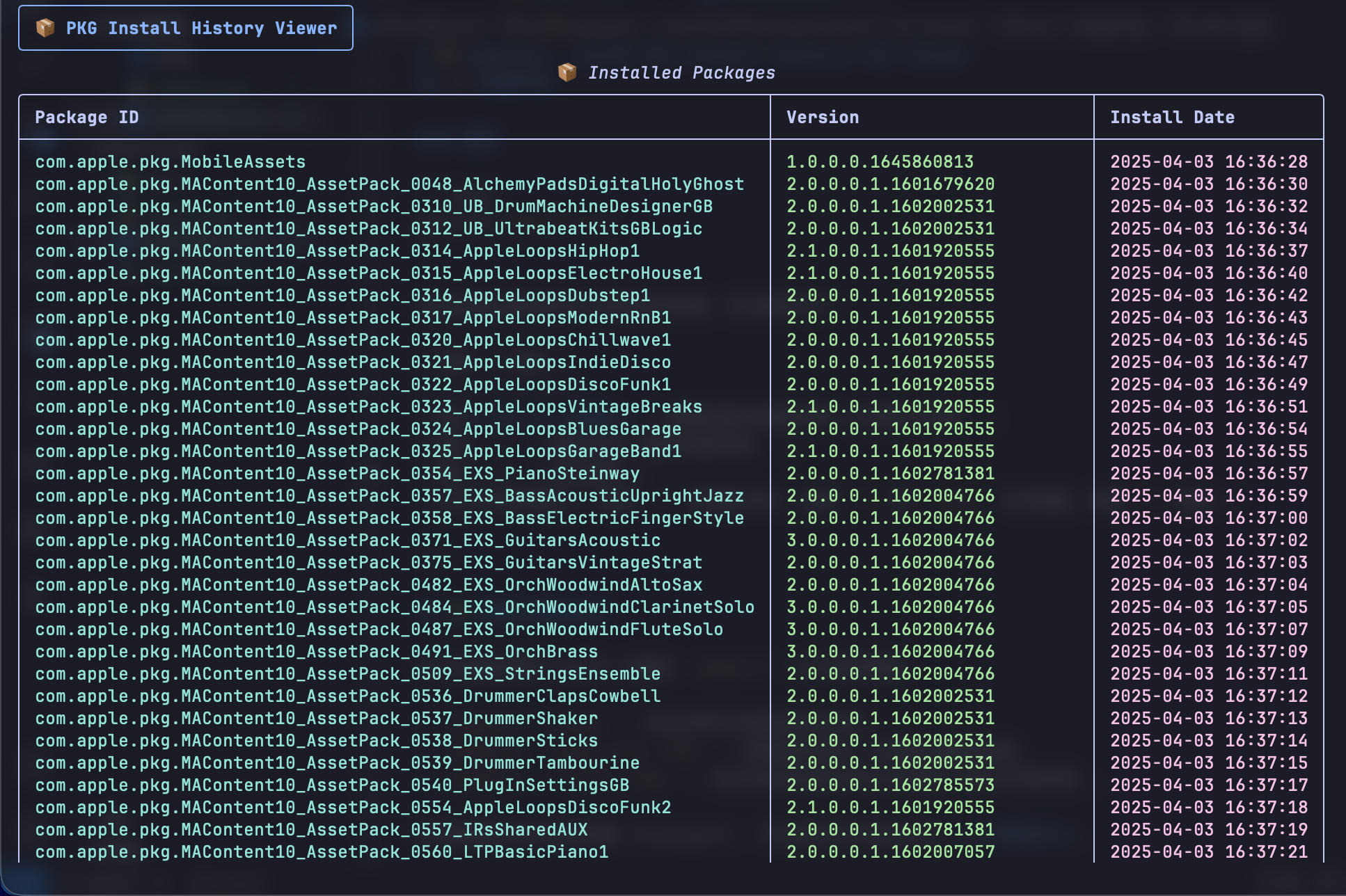
|
3
|
+
Copyright (c) 2026 Yalois
|
|
4
|
+
|
|
5
|
+
Permission is hereby granted, free of charge, to any person obtaining a copy
|
|
6
|
+
of this software and associated documentation files (the "Software"), to deal
|
|
7
|
+
in the Software without restriction, including without limitation the rights
|
|
8
|
+
to use, copy, modify, merge, publish, distribute, sublicense, and/or sell
|
|
9
|
+
copies of the Software, and to permit persons to whom the Software is
|
|
10
|
+
furnished to do so, subject to the following conditions:
|
|
11
|
+
|
|
12
|
+
The above copyright notice and this permission notice shall be included in all
|
|
13
|
+
copies or substantial portions of the Software.
|
|
14
|
+
|
|
15
|
+
THE SOFTWARE IS PROVIDED "AS IS", WITHOUT WARRANTY OF ANY KIND, EXPRESS OR
|
|
16
|
+
IMPLIED, INCLUDING BUT NOT LIMITED TO THE WARRANTIES OF MERCHANTABILITY,
|
|
17
|
+
FITNESS FOR A PARTICULAR PURPOSE AND NONINFRINGEMENT. IN NO EVENT SHALL THE
|
|
18
|
+
AUTHORS OR COPYRIGHT HOLDERS BE LIABLE FOR ANY CLAIM, DAMAGES OR OTHER
|
|
19
|
+
LIABILITY, WHETHER IN AN ACTION OF CONTRACT, TORT OR OTHERWISE, ARISING FROM,
|
|
20
|
+
OUT OF OR IN CONNECTION WITH THE SOFTWARE OR THE USE OR OTHER DEALINGS IN THE
|
|
21
|
+
SOFTWARE.
|
|
@@ -0,0 +1,129 @@
|
|
|
1
|
+
Metadata-Version: 2.4
|
|
2
|
+
Name: mac-pkg-history
|
|
3
|
+
Version: 1.0.0
|
|
4
|
+
Summary: A TUI tool to view macOS PKG installation history and files
|
|
5
|
+
Author-email: Yalois <yalois.xy@foxmail.com>
|
|
6
|
+
License: MIT
|
|
7
|
+
Project-URL: Homepage, https://github.com/Yalois/mac-pkg-history
|
|
8
|
+
Project-URL: Repository, https://github.com/Yalois/mac-pkg-history
|
|
9
|
+
Project-URL: Issues, https://github.com/Yalois/mac-pkg-history/issues
|
|
10
|
+
Classifier: Programming Language :: Python :: 3
|
|
11
|
+
Classifier: License :: OSI Approved :: MIT License
|
|
12
|
+
Classifier: Operating System :: MacOS :: MacOS X
|
|
13
|
+
Classifier: Environment :: Console
|
|
14
|
+
Classifier: Topic :: System :: Systems Administration
|
|
15
|
+
Classifier: Intended Audience :: System Administrators
|
|
16
|
+
Classifier: Intended Audience :: Developers
|
|
17
|
+
Description-Content-Type: text/markdown
|
|
18
|
+
License-File: LICENSE
|
|
19
|
+
Requires-Dist: rich
|
|
20
|
+
Dynamic: license-file
|
|
21
|
+
|
|
22
|
+
# 📦 mac-pkg-history —— macOS PKG Install History TUI Viewer
|
|
23
|
+
|
|
24
|
+
[](https://opensource.org/licenses/MIT)
|
|
25
|
+
[](https://www.python.org/downloads/)
|
|
26
|
+
[](https://www.apple.com/macos)
|
|
27
|
+
|
|
28
|
+
**mac-pkg-history** 是一个交互式命令行工具(TUI),用于查看 macOS 上通过 `.pkg` 安装包安装的所有软件及其详细文件清单。它基于系统自带的 `pkgutil` 命令,提供更直观、高效的浏览体验。
|
|
29
|
+
|
|
30
|
+
|
|
31
|
+
|
|
32
|
+
|
|
33
|
+
---
|
|
34
|
+
|
|
35
|
+
## ✨ 特性
|
|
36
|
+
|
|
37
|
+
- 📋 **全量扫描** – 自动列出所有已安装的 `.pkg` 包,显示标识符、版本和安装日期。
|
|
38
|
+
- 🔍 **快速检索** – 输入包 ID 的一部分即可模糊匹配,支持多选。
|
|
39
|
+
- 📂 **文件清单** – 查看指定包安装的所有文件路径(相当于 `pkgutil --files`)。
|
|
40
|
+
- 📄 **智能分页** – 文件较多时自动提供预览、`less` 分页器或跳过的选项。
|
|
41
|
+
- ⏱️ **时间排序** – 默认按安装时间正序排列,方便查看最近安装的包。
|
|
42
|
+
- 🔄 **刷新缓存** – 支持重新扫描系统(`r` 键),无需重启程序。
|
|
43
|
+
- 🎨 **美观界面** – 使用 [Rich](https://github.com/Textualize/rich) 库生成彩色表格和面板。
|
|
44
|
+
|
|
45
|
+
---
|
|
46
|
+
|
|
47
|
+
## 🚀 快速开始
|
|
48
|
+
|
|
49
|
+
### 前提条件
|
|
50
|
+
|
|
51
|
+
- macOS 10.13+(依赖 `pkgutil` 命令)
|
|
52
|
+
- Python 3.6 或更高版本
|
|
53
|
+
- (可选)`less` 分页器(系统自带)
|
|
54
|
+
|
|
55
|
+
### 安装
|
|
56
|
+
|
|
57
|
+
`pip install mac-pkg-history`
|
|
58
|
+
|
|
59
|
+
### 使用
|
|
60
|
+
|
|
61
|
+
启动后你会看到所有已安装包的表格。交互操作如下:
|
|
62
|
+
|
|
63
|
+
| 操作 | 说明 |
|
|
64
|
+
| :--- | :--- |
|
|
65
|
+
| 输入**包 ID 关键词** | 模糊匹配并查看详情(支持部分匹配) |
|
|
66
|
+
| 输入 `r` | 刷新列表(重新扫描系统) |
|
|
67
|
+
| 输入 `q` | 退出程序 |
|
|
68
|
+
| 在文件列表界面 | 选择 `1` 预览前30行,选择 `2` 用 `less` 分页查看,选择 `3` 跳过 |
|
|
69
|
+
|
|
70
|
+
---
|
|
71
|
+
|
|
72
|
+
## 🧩 原理与数据来源
|
|
73
|
+
|
|
74
|
+
本工具通过调用 macOS 内置的 `pkgutil` 命令获取数据:
|
|
75
|
+
|
|
76
|
+
- `pkgutil --pkgs` – 列出所有已安装包的标识符。
|
|
77
|
+
- `pkgutil --pkg-info <ID>` – 获取包的版本、安装时间戳等信息。
|
|
78
|
+
- `pkgutil --files <ID>` – 列出该包安装的所有文件路径(相对于根目录)。
|
|
79
|
+
|
|
80
|
+
所有数据均来自系统收据(receipts),不会修改任何系统文件,**只读安全**。
|
|
81
|
+
|
|
82
|
+
---
|
|
83
|
+
|
|
84
|
+
## 🛠️ 开发说明
|
|
85
|
+
|
|
86
|
+
### 技术栈
|
|
87
|
+
|
|
88
|
+
- **Python 3** – 核心逻辑
|
|
89
|
+
- **Rich** – TUI 渲染
|
|
90
|
+
- **subprocess** – 调用系统命令
|
|
91
|
+
- **datetime** – 时间戳转换
|
|
92
|
+
|
|
93
|
+
### 项目结构
|
|
94
|
+
|
|
95
|
+
mac-pkg-history/
|
|
96
|
+
├── mac_pkg_history/
|
|
97
|
+
│ ├── \_\_init\_\_.py
|
|
98
|
+
│ └── main.py
|
|
99
|
+
├── pyproject.toml
|
|
100
|
+
├── README.md
|
|
101
|
+
├── LICENSE
|
|
102
|
+
└── .gitignore
|
|
103
|
+
|
|
104
|
+
---
|
|
105
|
+
|
|
106
|
+
## 📝 声明
|
|
107
|
+
|
|
108
|
+
- **作者(Maintainer)**:[@Yalois](https://github.com/Yalois)
|
|
109
|
+
- **开发说明**:本项目在开发过程中借助了 AI 工具(DeepSeek)进行代码框架搭建和优化。所有功能整合、交互设计、测试及后续维护均由作者独立完成。
|
|
110
|
+
- **许可证**:MIT License – 你可以自由使用、修改、分发,但需保留版权声明。
|
|
111
|
+
|
|
112
|
+
---
|
|
113
|
+
|
|
114
|
+
## ⚠️ 免责声明
|
|
115
|
+
|
|
116
|
+
本工具仅用于查看系统安装记录,**不会**执行卸载或修改操作。请勿尝试通过本工具删除文件或收据,否则可能导致系统或应用程序异常。作者不对误操作造成的任何损失负责。
|
|
117
|
+
|
|
118
|
+
---
|
|
119
|
+
|
|
120
|
+
## 🙏 致谢
|
|
121
|
+
|
|
122
|
+
- [Rich](https://github.com/Textualize/rich) – 让终端变得如此多彩
|
|
123
|
+
- Apple 的 `pkgutil` – 提供了强大的包管理接口
|
|
124
|
+
|
|
125
|
+
---
|
|
126
|
+
|
|
127
|
+
**如果这个工具对你有帮助,请给它一个 ⭐ Star 支持一下!** 😊
|
|
128
|
+
|
|
129
|
+
---
|
|
@@ -0,0 +1,108 @@
|
|
|
1
|
+
# 📦 mac-pkg-history —— macOS PKG Install History TUI Viewer
|
|
2
|
+
|
|
3
|
+
[](https://opensource.org/licenses/MIT)
|
|
4
|
+
[](https://www.python.org/downloads/)
|
|
5
|
+
[](https://www.apple.com/macos)
|
|
6
|
+
|
|
7
|
+
**mac-pkg-history** 是一个交互式命令行工具(TUI),用于查看 macOS 上通过 `.pkg` 安装包安装的所有软件及其详细文件清单。它基于系统自带的 `pkgutil` 命令,提供更直观、高效的浏览体验。
|
|
8
|
+
|
|
9
|
+

|
|
10
|
+
|
|
11
|
+
|
|
12
|
+
---
|
|
13
|
+
|
|
14
|
+
## ✨ 特性
|
|
15
|
+
|
|
16
|
+
- 📋 **全量扫描** – 自动列出所有已安装的 `.pkg` 包,显示标识符、版本和安装日期。
|
|
17
|
+
- 🔍 **快速检索** – 输入包 ID 的一部分即可模糊匹配,支持多选。
|
|
18
|
+
- 📂 **文件清单** – 查看指定包安装的所有文件路径(相当于 `pkgutil --files`)。
|
|
19
|
+
- 📄 **智能分页** – 文件较多时自动提供预览、`less` 分页器或跳过的选项。
|
|
20
|
+
- ⏱️ **时间排序** – 默认按安装时间正序排列,方便查看最近安装的包。
|
|
21
|
+
- 🔄 **刷新缓存** – 支持重新扫描系统(`r` 键),无需重启程序。
|
|
22
|
+
- 🎨 **美观界面** – 使用 [Rich](https://github.com/Textualize/rich) 库生成彩色表格和面板。
|
|
23
|
+
|
|
24
|
+
---
|
|
25
|
+
|
|
26
|
+
## 🚀 快速开始
|
|
27
|
+
|
|
28
|
+
### 前提条件
|
|
29
|
+
|
|
30
|
+
- macOS 10.13+(依赖 `pkgutil` 命令)
|
|
31
|
+
- Python 3.6 或更高版本
|
|
32
|
+
- (可选)`less` 分页器(系统自带)
|
|
33
|
+
|
|
34
|
+
### 安装
|
|
35
|
+
|
|
36
|
+
`pip install mac-pkg-history`
|
|
37
|
+
|
|
38
|
+
### 使用
|
|
39
|
+
|
|
40
|
+
启动后你会看到所有已安装包的表格。交互操作如下:
|
|
41
|
+
|
|
42
|
+
| 操作 | 说明 |
|
|
43
|
+
| :--- | :--- |
|
|
44
|
+
| 输入**包 ID 关键词** | 模糊匹配并查看详情(支持部分匹配) |
|
|
45
|
+
| 输入 `r` | 刷新列表(重新扫描系统) |
|
|
46
|
+
| 输入 `q` | 退出程序 |
|
|
47
|
+
| 在文件列表界面 | 选择 `1` 预览前30行,选择 `2` 用 `less` 分页查看,选择 `3` 跳过 |
|
|
48
|
+
|
|
49
|
+
---
|
|
50
|
+
|
|
51
|
+
## 🧩 原理与数据来源
|
|
52
|
+
|
|
53
|
+
本工具通过调用 macOS 内置的 `pkgutil` 命令获取数据:
|
|
54
|
+
|
|
55
|
+
- `pkgutil --pkgs` – 列出所有已安装包的标识符。
|
|
56
|
+
- `pkgutil --pkg-info <ID>` – 获取包的版本、安装时间戳等信息。
|
|
57
|
+
- `pkgutil --files <ID>` – 列出该包安装的所有文件路径(相对于根目录)。
|
|
58
|
+
|
|
59
|
+
所有数据均来自系统收据(receipts),不会修改任何系统文件,**只读安全**。
|
|
60
|
+
|
|
61
|
+
---
|
|
62
|
+
|
|
63
|
+
## 🛠️ 开发说明
|
|
64
|
+
|
|
65
|
+
### 技术栈
|
|
66
|
+
|
|
67
|
+
- **Python 3** – 核心逻辑
|
|
68
|
+
- **Rich** – TUI 渲染
|
|
69
|
+
- **subprocess** – 调用系统命令
|
|
70
|
+
- **datetime** – 时间戳转换
|
|
71
|
+
|
|
72
|
+
### 项目结构
|
|
73
|
+
|
|
74
|
+
mac-pkg-history/
|
|
75
|
+
├── mac_pkg_history/
|
|
76
|
+
│ ├── \_\_init\_\_.py
|
|
77
|
+
│ └── main.py
|
|
78
|
+
├── pyproject.toml
|
|
79
|
+
├── README.md
|
|
80
|
+
├── LICENSE
|
|
81
|
+
└── .gitignore
|
|
82
|
+
|
|
83
|
+
---
|
|
84
|
+
|
|
85
|
+
## 📝 声明
|
|
86
|
+
|
|
87
|
+
- **作者(Maintainer)**:[@Yalois](https://github.com/Yalois)
|
|
88
|
+
- **开发说明**:本项目在开发过程中借助了 AI 工具(DeepSeek)进行代码框架搭建和优化。所有功能整合、交互设计、测试及后续维护均由作者独立完成。
|
|
89
|
+
- **许可证**:MIT License – 你可以自由使用、修改、分发,但需保留版权声明。
|
|
90
|
+
|
|
91
|
+
---
|
|
92
|
+
|
|
93
|
+
## ⚠️ 免责声明
|
|
94
|
+
|
|
95
|
+
本工具仅用于查看系统安装记录,**不会**执行卸载或修改操作。请勿尝试通过本工具删除文件或收据,否则可能导致系统或应用程序异常。作者不对误操作造成的任何损失负责。
|
|
96
|
+
|
|
97
|
+
---
|
|
98
|
+
|
|
99
|
+
## 🙏 致谢
|
|
100
|
+
|
|
101
|
+
- [Rich](https://github.com/Textualize/rich) – 让终端变得如此多彩
|
|
102
|
+
- Apple 的 `pkgutil` – 提供了强大的包管理接口
|
|
103
|
+
|
|
104
|
+
---
|
|
105
|
+
|
|
106
|
+
**如果这个工具对你有帮助,请给它一个 ⭐ Star 支持一下!** 😊
|
|
107
|
+
|
|
108
|
+
---
|
|
@@ -0,0 +1,129 @@
|
|
|
1
|
+
Metadata-Version: 2.4
|
|
2
|
+
Name: mac-pkg-history
|
|
3
|
+
Version: 1.0.0
|
|
4
|
+
Summary: A TUI tool to view macOS PKG installation history and files
|
|
5
|
+
Author-email: Yalois <yalois.xy@foxmail.com>
|
|
6
|
+
License: MIT
|
|
7
|
+
Project-URL: Homepage, https://github.com/Yalois/mac-pkg-history
|
|
8
|
+
Project-URL: Repository, https://github.com/Yalois/mac-pkg-history
|
|
9
|
+
Project-URL: Issues, https://github.com/Yalois/mac-pkg-history/issues
|
|
10
|
+
Classifier: Programming Language :: Python :: 3
|
|
11
|
+
Classifier: License :: OSI Approved :: MIT License
|
|
12
|
+
Classifier: Operating System :: MacOS :: MacOS X
|
|
13
|
+
Classifier: Environment :: Console
|
|
14
|
+
Classifier: Topic :: System :: Systems Administration
|
|
15
|
+
Classifier: Intended Audience :: System Administrators
|
|
16
|
+
Classifier: Intended Audience :: Developers
|
|
17
|
+
Description-Content-Type: text/markdown
|
|
18
|
+
License-File: LICENSE
|
|
19
|
+
Requires-Dist: rich
|
|
20
|
+
Dynamic: license-file
|
|
21
|
+
|
|
22
|
+
# 📦 mac-pkg-history —— macOS PKG Install History TUI Viewer
|
|
23
|
+
|
|
24
|
+
[](https://opensource.org/licenses/MIT)
|
|
25
|
+
[](https://www.python.org/downloads/)
|
|
26
|
+
[](https://www.apple.com/macos)
|
|
27
|
+
|
|
28
|
+
**mac-pkg-history** 是一个交互式命令行工具(TUI),用于查看 macOS 上通过 `.pkg` 安装包安装的所有软件及其详细文件清单。它基于系统自带的 `pkgutil` 命令,提供更直观、高效的浏览体验。
|
|
29
|
+
|
|
30
|
+

|
|
31
|
+
|
|
32
|
+
|
|
33
|
+
---
|
|
34
|
+
|
|
35
|
+
## ✨ 特性
|
|
36
|
+
|
|
37
|
+
- 📋 **全量扫描** – 自动列出所有已安装的 `.pkg` 包,显示标识符、版本和安装日期。
|
|
38
|
+
- 🔍 **快速检索** – 输入包 ID 的一部分即可模糊匹配,支持多选。
|
|
39
|
+
- 📂 **文件清单** – 查看指定包安装的所有文件路径(相当于 `pkgutil --files`)。
|
|
40
|
+
- 📄 **智能分页** – 文件较多时自动提供预览、`less` 分页器或跳过的选项。
|
|
41
|
+
- ⏱️ **时间排序** – 默认按安装时间正序排列,方便查看最近安装的包。
|
|
42
|
+
- 🔄 **刷新缓存** – 支持重新扫描系统(`r` 键),无需重启程序。
|
|
43
|
+
- 🎨 **美观界面** – 使用 [Rich](https://github.com/Textualize/rich) 库生成彩色表格和面板。
|
|
44
|
+
|
|
45
|
+
---
|
|
46
|
+
|
|
47
|
+
## 🚀 快速开始
|
|
48
|
+
|
|
49
|
+
### 前提条件
|
|
50
|
+
|
|
51
|
+
- macOS 10.13+(依赖 `pkgutil` 命令)
|
|
52
|
+
- Python 3.6 或更高版本
|
|
53
|
+
- (可选)`less` 分页器(系统自带)
|
|
54
|
+
|
|
55
|
+
### 安装
|
|
56
|
+
|
|
57
|
+
`pip install mac-pkg-history`
|
|
58
|
+
|
|
59
|
+
### 使用
|
|
60
|
+
|
|
61
|
+
启动后你会看到所有已安装包的表格。交互操作如下:
|
|
62
|
+
|
|
63
|
+
| 操作 | 说明 |
|
|
64
|
+
| :--- | :--- |
|
|
65
|
+
| 输入**包 ID 关键词** | 模糊匹配并查看详情(支持部分匹配) |
|
|
66
|
+
| 输入 `r` | 刷新列表(重新扫描系统) |
|
|
67
|
+
| 输入 `q` | 退出程序 |
|
|
68
|
+
| 在文件列表界面 | 选择 `1` 预览前30行,选择 `2` 用 `less` 分页查看,选择 `3` 跳过 |
|
|
69
|
+
|
|
70
|
+
---
|
|
71
|
+
|
|
72
|
+
## 🧩 原理与数据来源
|
|
73
|
+
|
|
74
|
+
本工具通过调用 macOS 内置的 `pkgutil` 命令获取数据:
|
|
75
|
+
|
|
76
|
+
- `pkgutil --pkgs` – 列出所有已安装包的标识符。
|
|
77
|
+
- `pkgutil --pkg-info <ID>` – 获取包的版本、安装时间戳等信息。
|
|
78
|
+
- `pkgutil --files <ID>` – 列出该包安装的所有文件路径(相对于根目录)。
|
|
79
|
+
|
|
80
|
+
所有数据均来自系统收据(receipts),不会修改任何系统文件,**只读安全**。
|
|
81
|
+
|
|
82
|
+
---
|
|
83
|
+
|
|
84
|
+
## 🛠️ 开发说明
|
|
85
|
+
|
|
86
|
+
### 技术栈
|
|
87
|
+
|
|
88
|
+
- **Python 3** – 核心逻辑
|
|
89
|
+
- **Rich** – TUI 渲染
|
|
90
|
+
- **subprocess** – 调用系统命令
|
|
91
|
+
- **datetime** – 时间戳转换
|
|
92
|
+
|
|
93
|
+
### 项目结构
|
|
94
|
+
|
|
95
|
+
mac-pkg-history/
|
|
96
|
+
├── mac_pkg_history/
|
|
97
|
+
│ ├── \_\_init\_\_.py
|
|
98
|
+
│ └── main.py
|
|
99
|
+
├── pyproject.toml
|
|
100
|
+
├── README.md
|
|
101
|
+
├── LICENSE
|
|
102
|
+
└── .gitignore
|
|
103
|
+
|
|
104
|
+
---
|
|
105
|
+
|
|
106
|
+
## 📝 声明
|
|
107
|
+
|
|
108
|
+
- **作者(Maintainer)**:[@Yalois](https://github.com/Yalois)
|
|
109
|
+
- **开发说明**:本项目在开发过程中借助了 AI 工具(DeepSeek)进行代码框架搭建和优化。所有功能整合、交互设计、测试及后续维护均由作者独立完成。
|
|
110
|
+
- **许可证**:MIT License – 你可以自由使用、修改、分发,但需保留版权声明。
|
|
111
|
+
|
|
112
|
+
---
|
|
113
|
+
|
|
114
|
+
## ⚠️ 免责声明
|
|
115
|
+
|
|
116
|
+
本工具仅用于查看系统安装记录,**不会**执行卸载或修改操作。请勿尝试通过本工具删除文件或收据,否则可能导致系统或应用程序异常。作者不对误操作造成的任何损失负责。
|
|
117
|
+
|
|
118
|
+
---
|
|
119
|
+
|
|
120
|
+
## 🙏 致谢
|
|
121
|
+
|
|
122
|
+
- [Rich](https://github.com/Textualize/rich) – 让终端变得如此多彩
|
|
123
|
+
- Apple 的 `pkgutil` – 提供了强大的包管理接口
|
|
124
|
+
|
|
125
|
+
---
|
|
126
|
+
|
|
127
|
+
**如果这个工具对你有帮助,请给它一个 ⭐ Star 支持一下!** 😊
|
|
128
|
+
|
|
129
|
+
---
|
|
@@ -0,0 +1,9 @@
|
|
|
1
|
+
LICENSE
|
|
2
|
+
README.md
|
|
3
|
+
pyproject.toml
|
|
4
|
+
mac_pkg_history.egg-info/PKG-INFO
|
|
5
|
+
mac_pkg_history.egg-info/SOURCES.txt
|
|
6
|
+
mac_pkg_history.egg-info/dependency_links.txt
|
|
7
|
+
mac_pkg_history.egg-info/entry_points.txt
|
|
8
|
+
mac_pkg_history.egg-info/requires.txt
|
|
9
|
+
mac_pkg_history.egg-info/top_level.txt
|
|
@@ -0,0 +1 @@
|
|
|
1
|
+
|
|
@@ -0,0 +1 @@
|
|
|
1
|
+
rich
|
|
@@ -0,0 +1 @@
|
|
|
1
|
+
|
|
@@ -0,0 +1,34 @@
|
|
|
1
|
+
[build-system]
|
|
2
|
+
requires = ["setuptools>=61.0"]
|
|
3
|
+
build-backend = "setuptools.build_meta"
|
|
4
|
+
|
|
5
|
+
[project]
|
|
6
|
+
name = "mac-pkg-history"
|
|
7
|
+
version = "1.0.0"
|
|
8
|
+
description = "A TUI tool to view macOS PKG installation history and files"
|
|
9
|
+
readme = "README.md"
|
|
10
|
+
license = { text = "MIT" }
|
|
11
|
+
authors = [
|
|
12
|
+
{ name = "Yalois", email = "yalois.xy@foxmail.com" },
|
|
13
|
+
]
|
|
14
|
+
classifiers = [
|
|
15
|
+
"Programming Language :: Python :: 3",
|
|
16
|
+
"License :: OSI Approved :: MIT License",
|
|
17
|
+
"Operating System :: MacOS :: MacOS X",
|
|
18
|
+
"Environment :: Console",
|
|
19
|
+
"Topic :: System :: Systems Administration",
|
|
20
|
+
"Intended Audience :: System Administrators",
|
|
21
|
+
"Intended Audience :: Developers"
|
|
22
|
+
|
|
23
|
+
]
|
|
24
|
+
dependencies = [
|
|
25
|
+
"rich",
|
|
26
|
+
]
|
|
27
|
+
|
|
28
|
+
[project.urls]
|
|
29
|
+
Homepage = "https://github.com/Yalois/mac-pkg-history"
|
|
30
|
+
Repository = "https://github.com/Yalois/mac-pkg-history"
|
|
31
|
+
Issues = "https://github.com/Yalois/mac-pkg-history/issues"
|
|
32
|
+
|
|
33
|
+
[project.scripts]
|
|
34
|
+
mac-pkg-history = "mac_pkg_history.main:main"
|