llms-py 2.0.23__tar.gz → 2.0.25__tar.gz
This diff represents the content of publicly available package versions that have been released to one of the supported registries. The information contained in this diff is provided for informational purposes only and reflects changes between package versions as they appear in their respective public registries.
- {llms_py-2.0.23 → llms_py-2.0.25}/LICENSE +1 -2
- {llms_py-2.0.23/llms_py.egg-info → llms_py-2.0.25}/PKG-INFO +337 -44
- {llms_py-2.0.23 → llms_py-2.0.25}/README.md +336 -43
- {llms_py-2.0.23 → llms_py-2.0.25}/llms/llms.json +1 -1
- {llms_py-2.0.23 → llms_py-2.0.25}/llms/main.py +108 -84
- {llms_py-2.0.23 → llms_py-2.0.25}/llms/ui/Main.mjs +1 -9
- {llms_py-2.0.23 → llms_py-2.0.25}/llms/ui/ai.mjs +1 -1
- {llms_py-2.0.23 → llms_py-2.0.25/llms_py.egg-info}/PKG-INFO +337 -44
- {llms_py-2.0.23 → llms_py-2.0.25}/pyproject.toml +1 -1
- {llms_py-2.0.23 → llms_py-2.0.25}/setup.py +1 -1
- {llms_py-2.0.23 → llms_py-2.0.25}/MANIFEST.in +0 -0
- {llms_py-2.0.23 → llms_py-2.0.25}/llms/__init__.py +0 -0
- {llms_py-2.0.23 → llms_py-2.0.25}/llms/__main__.py +0 -0
- {llms_py-2.0.23 → llms_py-2.0.25}/llms/index.html +0 -0
- {llms_py-2.0.23 → llms_py-2.0.25}/llms/ui/Analytics.mjs +0 -0
- {llms_py-2.0.23 → llms_py-2.0.25}/llms/ui/App.mjs +0 -0
- {llms_py-2.0.23 → llms_py-2.0.25}/llms/ui/Avatar.mjs +0 -0
- {llms_py-2.0.23 → llms_py-2.0.25}/llms/ui/Brand.mjs +0 -0
- {llms_py-2.0.23 → llms_py-2.0.25}/llms/ui/ChatPrompt.mjs +0 -0
- {llms_py-2.0.23 → llms_py-2.0.25}/llms/ui/ModelSelector.mjs +0 -0
- {llms_py-2.0.23 → llms_py-2.0.25}/llms/ui/ProviderIcon.mjs +0 -0
- {llms_py-2.0.23 → llms_py-2.0.25}/llms/ui/ProviderStatus.mjs +0 -0
- {llms_py-2.0.23 → llms_py-2.0.25}/llms/ui/Recents.mjs +0 -0
- {llms_py-2.0.23 → llms_py-2.0.25}/llms/ui/SettingsDialog.mjs +0 -0
- {llms_py-2.0.23 → llms_py-2.0.25}/llms/ui/Sidebar.mjs +0 -0
- {llms_py-2.0.23 → llms_py-2.0.25}/llms/ui/SignIn.mjs +0 -0
- {llms_py-2.0.23 → llms_py-2.0.25}/llms/ui/SystemPromptEditor.mjs +0 -0
- {llms_py-2.0.23 → llms_py-2.0.25}/llms/ui/SystemPromptSelector.mjs +0 -0
- {llms_py-2.0.23 → llms_py-2.0.25}/llms/ui/Welcome.mjs +0 -0
- {llms_py-2.0.23 → llms_py-2.0.25}/llms/ui/app.css +0 -0
- {llms_py-2.0.23 → llms_py-2.0.25}/llms/ui/fav.svg +0 -0
- {llms_py-2.0.23 → llms_py-2.0.25}/llms/ui/lib/chart.js +0 -0
- {llms_py-2.0.23 → llms_py-2.0.25}/llms/ui/lib/charts.mjs +0 -0
- {llms_py-2.0.23 → llms_py-2.0.25}/llms/ui/lib/color.js +0 -0
- {llms_py-2.0.23 → llms_py-2.0.25}/llms/ui/lib/highlight.min.mjs +0 -0
- {llms_py-2.0.23 → llms_py-2.0.25}/llms/ui/lib/idb.min.mjs +0 -0
- {llms_py-2.0.23 → llms_py-2.0.25}/llms/ui/lib/marked.min.mjs +0 -0
- {llms_py-2.0.23 → llms_py-2.0.25}/llms/ui/lib/servicestack-client.mjs +0 -0
- {llms_py-2.0.23 → llms_py-2.0.25}/llms/ui/lib/servicestack-vue.mjs +0 -0
- {llms_py-2.0.23 → llms_py-2.0.25}/llms/ui/lib/vue-router.min.mjs +0 -0
- {llms_py-2.0.23 → llms_py-2.0.25}/llms/ui/lib/vue.min.mjs +0 -0
- {llms_py-2.0.23 → llms_py-2.0.25}/llms/ui/lib/vue.mjs +0 -0
- {llms_py-2.0.23 → llms_py-2.0.25}/llms/ui/markdown.mjs +0 -0
- {llms_py-2.0.23 → llms_py-2.0.25}/llms/ui/tailwind.input.css +0 -0
- {llms_py-2.0.23 → llms_py-2.0.25}/llms/ui/threadStore.mjs +0 -0
- {llms_py-2.0.23 → llms_py-2.0.25}/llms/ui/typography.css +0 -0
- {llms_py-2.0.23 → llms_py-2.0.25}/llms/ui/utils.mjs +0 -0
- {llms_py-2.0.23 → llms_py-2.0.25}/llms/ui.json +0 -0
- {llms_py-2.0.23 → llms_py-2.0.25}/llms_py.egg-info/SOURCES.txt +0 -0
- {llms_py-2.0.23 → llms_py-2.0.25}/llms_py.egg-info/dependency_links.txt +0 -0
- {llms_py-2.0.23 → llms_py-2.0.25}/llms_py.egg-info/entry_points.txt +0 -0
- {llms_py-2.0.23 → llms_py-2.0.25}/llms_py.egg-info/not-zip-safe +0 -0
- {llms_py-2.0.23 → llms_py-2.0.25}/llms_py.egg-info/requires.txt +0 -0
- {llms_py-2.0.23 → llms_py-2.0.25}/llms_py.egg-info/top_level.txt +0 -0
- {llms_py-2.0.23 → llms_py-2.0.25}/requirements.txt +0 -0
- {llms_py-2.0.23 → llms_py-2.0.25}/setup.cfg +0 -0
|
@@ -1,6 +1,5 @@
|
|
|
1
1
|
Copyright (c) 2007-present, Demis Bellot, ServiceStack, Inc.
|
|
2
2
|
https://servicestack.net
|
|
3
|
-
All rights reserved.
|
|
4
3
|
|
|
5
4
|
Redistribution and use in source and binary forms, with or without
|
|
6
5
|
modification, are permitted provided that the following conditions are met:
|
|
@@ -9,7 +8,7 @@ modification, are permitted provided that the following conditions are met:
|
|
|
9
8
|
* Redistributions in binary form must reproduce the above copyright
|
|
10
9
|
notice, this list of conditions and the following disclaimer in the
|
|
11
10
|
documentation and/or other materials provided with the distribution.
|
|
12
|
-
* Neither the name of the
|
|
11
|
+
* Neither the name of the copyright holder nor the
|
|
13
12
|
names of its contributors may be used to endorse or promote products
|
|
14
13
|
derived from this software without specific prior written permission.
|
|
15
14
|
|
|
@@ -1,6 +1,6 @@
|
|
|
1
1
|
Metadata-Version: 2.4
|
|
2
2
|
Name: llms-py
|
|
3
|
-
Version: 2.0.
|
|
3
|
+
Version: 2.0.25
|
|
4
4
|
Summary: A lightweight CLI tool and OpenAI-compatible server for querying multiple Large Language Model (LLM) providers
|
|
5
5
|
Home-page: https://github.com/ServiceStack/llms
|
|
6
6
|
Author: ServiceStack
|
|
@@ -50,7 +50,7 @@ Configure additional providers and models in [llms.json](llms/llms.json)
|
|
|
50
50
|
|
|
51
51
|
## Features
|
|
52
52
|
|
|
53
|
-
- **Lightweight**: Single [llms.py](llms.py) Python file with single `aiohttp` dependency
|
|
53
|
+
- **Lightweight**: Single [llms.py](https://github.com/ServiceStack/llms/blob/main/llms/main.py) Python file with single `aiohttp` dependency
|
|
54
54
|
- **Multi-Provider Support**: OpenRouter, Ollama, Anthropic, Google, OpenAI, Grok, Groq, Qwen, Z.ai, Mistral
|
|
55
55
|
- **OpenAI-Compatible API**: Works with any client that supports OpenAI's chat completion API
|
|
56
56
|
- **Built-in Analytics**: Built-in analytics UI to visualize costs, requests, and token usage
|
|
@@ -68,24 +68,100 @@ Configure additional providers and models in [llms.json](llms/llms.json)
|
|
|
68
68
|
|
|
69
69
|
Access all your local all remote LLMs with a single ChatGPT-like UI:
|
|
70
70
|
|
|
71
|
-
[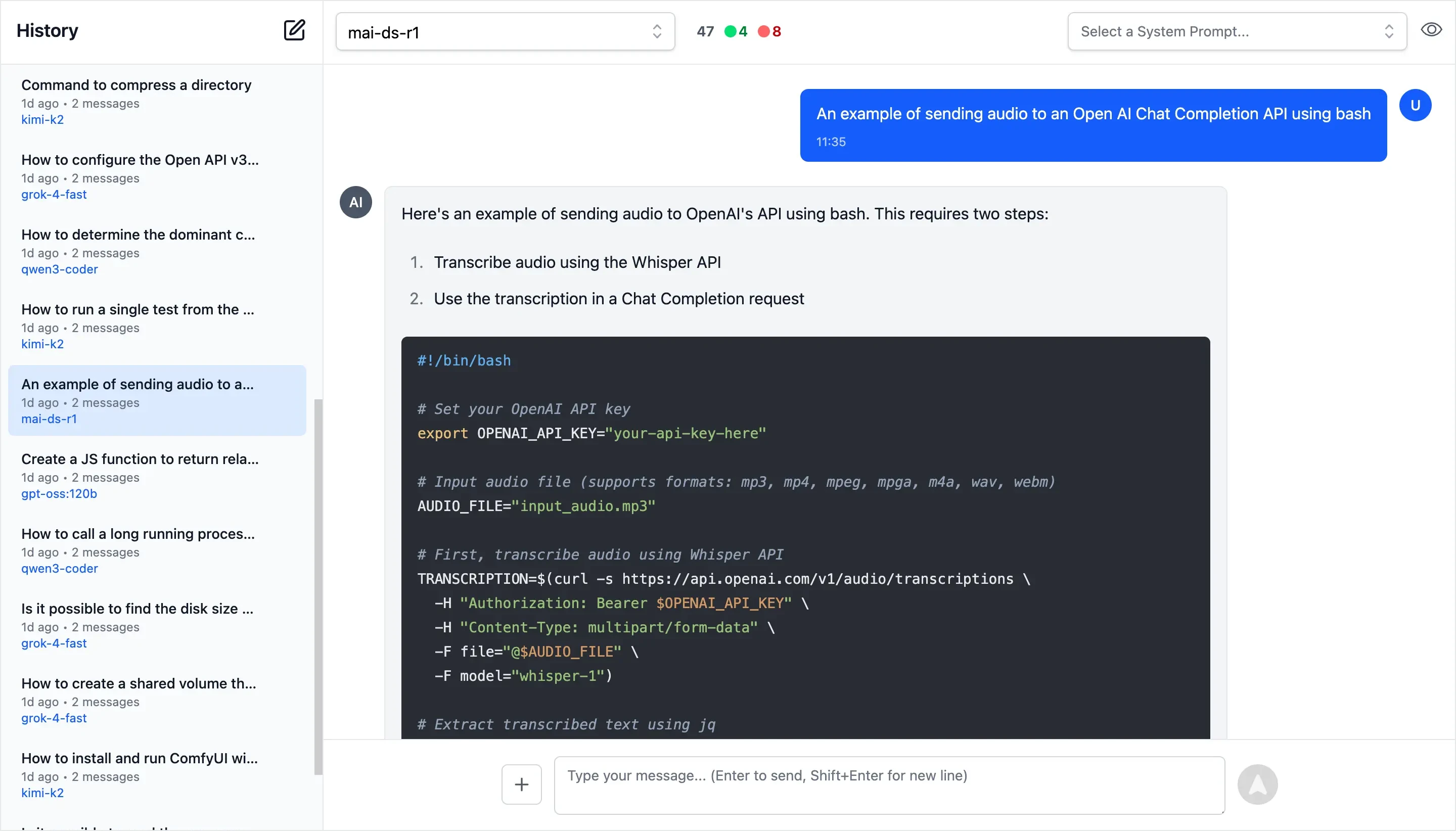](https://servicestack.net/posts/llms-py-ui)
|
|
71
|
+
[](https://servicestack.net/posts/llms-py-ui)
|
|
72
72
|
|
|
73
73
|
**Monthly Costs Analysis**
|
|
74
74
|
|
|
75
75
|
[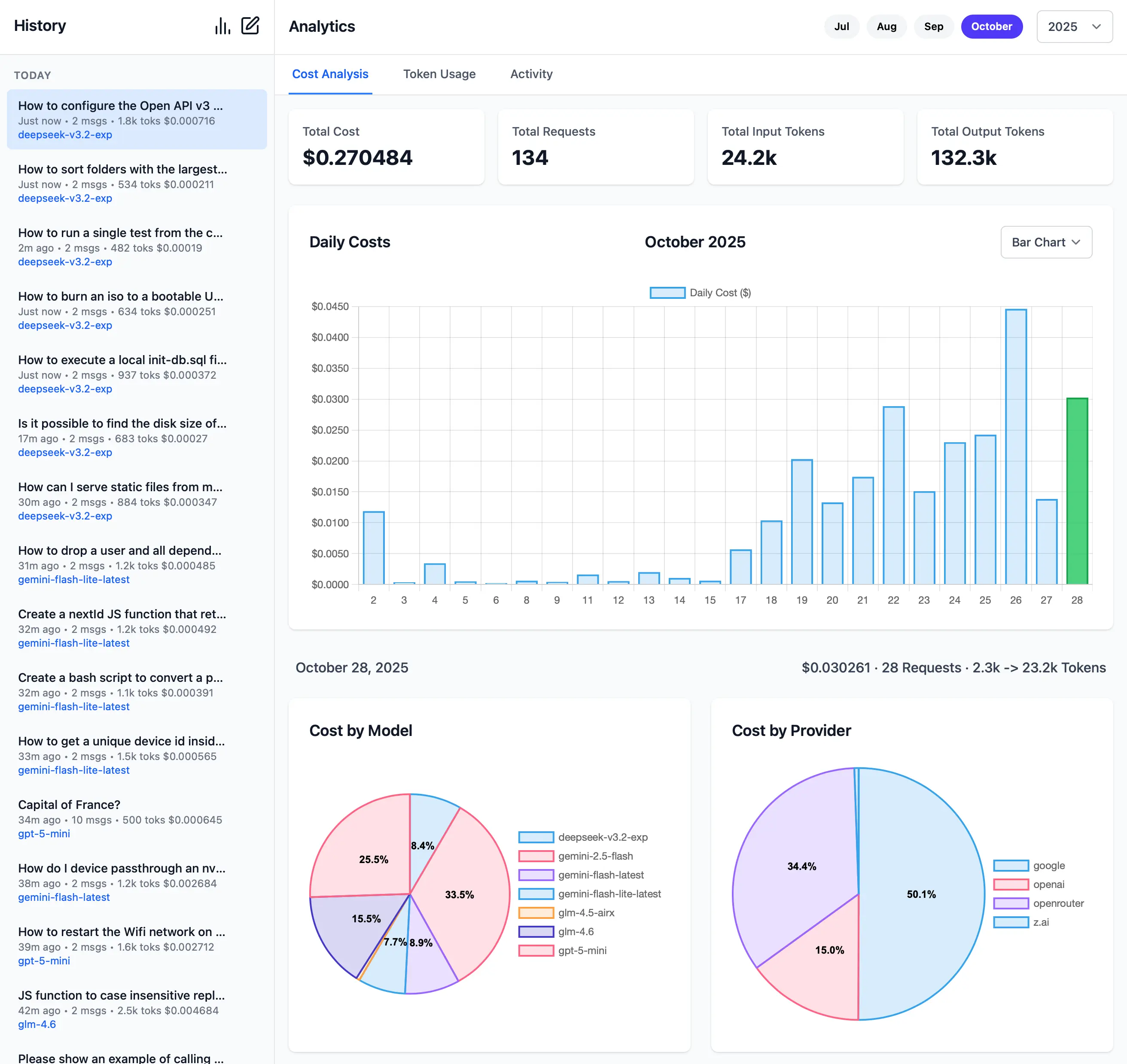](https://servicestack.net/posts/llms-py-ui)
|
|
76
76
|
|
|
77
|
+
**Monthly Token Usage**
|
|
78
|
+
|
|
79
|
+
[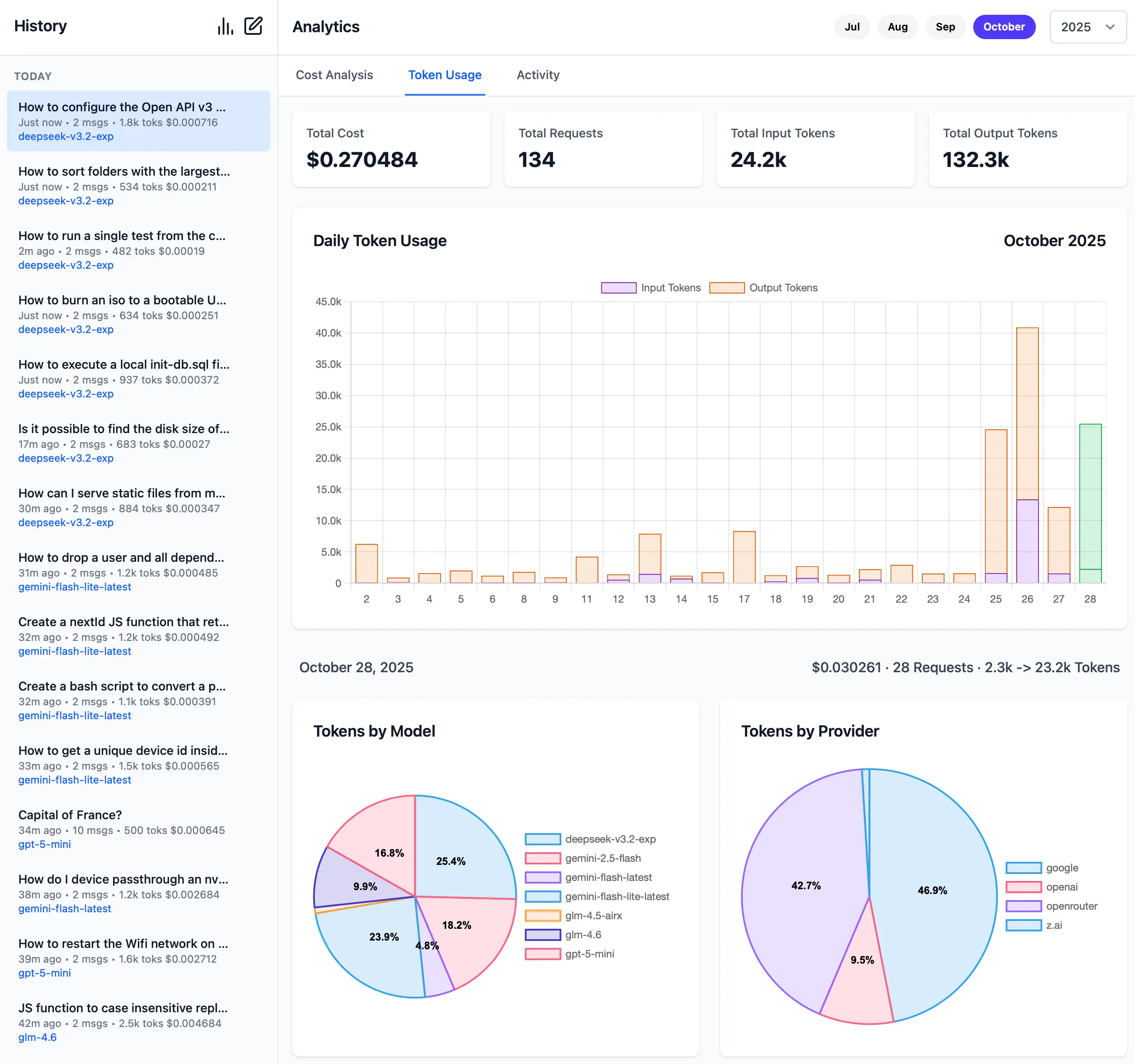](https://servicestack.net/posts/llms-py-ui)
|
|
80
|
+
|
|
77
81
|
**Monthly Activity Log**
|
|
78
82
|
|
|
79
83
|
[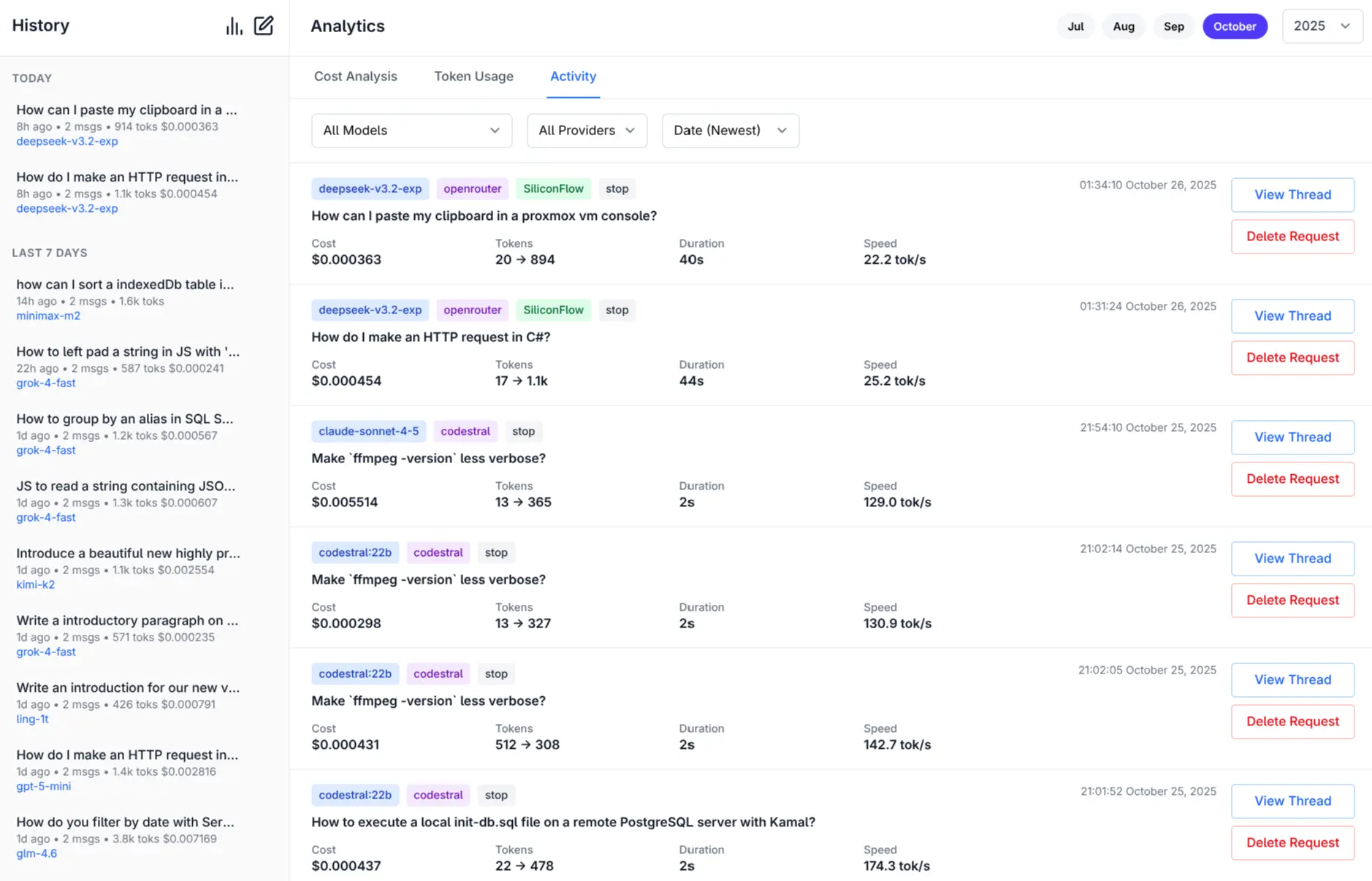](https://servicestack.net/posts/llms-py-ui)
|
|
80
84
|
|
|
81
85
|
[More Features and Screenshots](https://servicestack.net/posts/llms-py-ui).
|
|
82
86
|
|
|
87
|
+
**Check Provider Reliability and Response Times**
|
|
88
|
+
|
|
89
|
+
Check the status of configured providers to test if they're configured correctly, reachable and what their response times is for the simplest `1+1=` request:
|
|
90
|
+
|
|
91
|
+
```bash
|
|
92
|
+
# Check all models for a provider:
|
|
93
|
+
llms --check groq
|
|
94
|
+
|
|
95
|
+
# Check specific models for a provider:
|
|
96
|
+
llms --check groq kimi-k2 llama4:400b gpt-oss:120b
|
|
97
|
+
```
|
|
98
|
+
|
|
99
|
+
[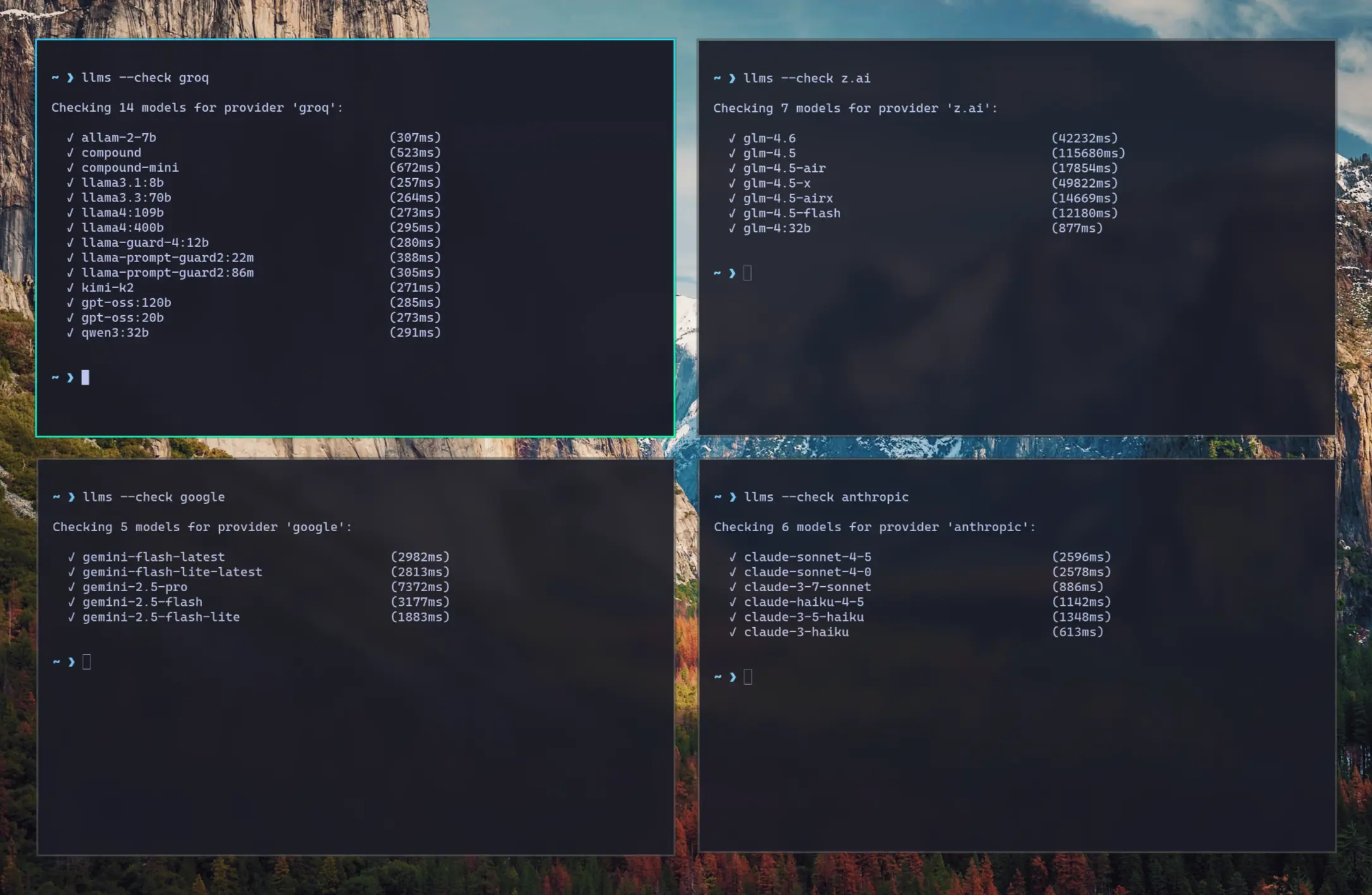](https://servicestack.net/img/posts/llms-py-ui/llms-check.webp)
|
|
100
|
+
|
|
101
|
+
As they're a good indicator for the reliability and speed you can expect from different providers we've created a
|
|
102
|
+
[test-providers.yml](https://github.com/ServiceStack/llms/actions/workflows/test-providers.yml) GitHub Action to
|
|
103
|
+
test the response times for all configured providers and models, the results of which will be frequently published to
|
|
104
|
+
[/checks/latest.txt](https://github.com/ServiceStack/llms/blob/main/docs/checks/latest.txt)
|
|
105
|
+
|
|
83
106
|
## Installation
|
|
84
107
|
|
|
108
|
+
### Using pip
|
|
109
|
+
|
|
85
110
|
```bash
|
|
86
111
|
pip install llms-py
|
|
87
112
|
```
|
|
88
113
|
|
|
114
|
+
### Using Docker
|
|
115
|
+
|
|
116
|
+
**a) Simple - Run in a Docker container:**
|
|
117
|
+
|
|
118
|
+
Run the server on port `8000`:
|
|
119
|
+
|
|
120
|
+
```bash
|
|
121
|
+
docker run -p 8000:8000 -e GROQ_API_KEY=$GROQ_API_KEY ghcr.io/servicestack/llms:latest
|
|
122
|
+
```
|
|
123
|
+
|
|
124
|
+
Get the latest version:
|
|
125
|
+
|
|
126
|
+
```bash
|
|
127
|
+
docker pull ghcr.io/servicestack/llms:latest
|
|
128
|
+
```
|
|
129
|
+
|
|
130
|
+
Use custom `llms.json` and `ui.json` config files outside of the container (auto created if they don't exist):
|
|
131
|
+
|
|
132
|
+
```bash
|
|
133
|
+
docker run -p 8000:8000 -e GROQ_API_KEY=$GROQ_API_KEY \
|
|
134
|
+
-v ~/.llms:/home/llms/.llms \
|
|
135
|
+
ghcr.io/servicestack/llms:latest
|
|
136
|
+
```
|
|
137
|
+
|
|
138
|
+
**b) Recommended - Use Docker Compose:**
|
|
139
|
+
|
|
140
|
+
Download and use [docker-compose.yml](https://raw.githubusercontent.com/ServiceStack/llms/refs/heads/main/docker-compose.yml):
|
|
141
|
+
|
|
142
|
+
```bash
|
|
143
|
+
curl -O https://raw.githubusercontent.com/ServiceStack/llms/refs/heads/main/docker-compose.yml
|
|
144
|
+
```
|
|
145
|
+
|
|
146
|
+
Update API Keys in `docker-compose.yml` then start the server:
|
|
147
|
+
|
|
148
|
+
```bash
|
|
149
|
+
docker-compose up -d
|
|
150
|
+
```
|
|
151
|
+
|
|
152
|
+
**c) Build and run local Docker image from source:**
|
|
153
|
+
|
|
154
|
+
```bash
|
|
155
|
+
git clone https://github.com/ServiceStack/llms
|
|
156
|
+
|
|
157
|
+
docker-compose -f docker-compose.local.yml up -d --build
|
|
158
|
+
```
|
|
159
|
+
|
|
160
|
+
After the container starts, you can access the UI and API at `http://localhost:8000`.
|
|
161
|
+
|
|
162
|
+
|
|
163
|
+
See [DOCKER.md](DOCKER.md) for detailed instructions on customizing configuration files.
|
|
164
|
+
|
|
89
165
|
## Quick Start
|
|
90
166
|
|
|
91
167
|
### 1. Set API Keys
|
|
@@ -112,34 +188,42 @@ export OPENROUTER_API_KEY="..."
|
|
|
112
188
|
| z.ai | `ZAI_API_KEY` | Z.ai API key | `sk-...` |
|
|
113
189
|
| mistral | `MISTRAL_API_KEY` | Mistral API key | `...` |
|
|
114
190
|
|
|
115
|
-
### 2.
|
|
191
|
+
### 2. Run Server
|
|
116
192
|
|
|
117
|
-
|
|
193
|
+
Start the UI and an OpenAI compatible API on port **8000**:
|
|
118
194
|
|
|
119
195
|
```bash
|
|
120
|
-
|
|
121
|
-
llms --enable openrouter_free google_free groq
|
|
122
|
-
|
|
123
|
-
# Enable paid providers
|
|
124
|
-
llms --enable openrouter anthropic google openai mistral grok qwen
|
|
196
|
+
llms --serve 8000
|
|
125
197
|
```
|
|
126
198
|
|
|
127
|
-
|
|
199
|
+
Launches UI at `http://localhost:8000` and OpenAI Endpoint at `http://localhost:8000/v1/chat/completions`.
|
|
128
200
|
|
|
129
|
-
|
|
201
|
+
To see detailed request/response logging, add `--verbose`:
|
|
130
202
|
|
|
131
203
|
```bash
|
|
132
|
-
llms --serve 8000
|
|
204
|
+
llms --serve 8000 --verbose
|
|
133
205
|
```
|
|
134
206
|
|
|
135
|
-
|
|
136
|
-
|
|
137
|
-
### 4. Use llms.py CLI
|
|
207
|
+
### Use llms.py CLI
|
|
138
208
|
|
|
139
209
|
```bash
|
|
140
210
|
llms "What is the capital of France?"
|
|
141
211
|
```
|
|
142
212
|
|
|
213
|
+
### Enable Providers
|
|
214
|
+
|
|
215
|
+
Any providers that have their API Keys set and enabled in `llms.json` are automatically made available.
|
|
216
|
+
|
|
217
|
+
Providers can be enabled or disabled in the UI at runtime next to the model selector, or on the command line:
|
|
218
|
+
|
|
219
|
+
```bash
|
|
220
|
+
# Disable free providers with free models and free tiers
|
|
221
|
+
llms --disable openrouter_free codestral google_free groq
|
|
222
|
+
|
|
223
|
+
# Enable paid providers
|
|
224
|
+
llms --enable openrouter anthropic google openai grok z.ai qwen mistral
|
|
225
|
+
```
|
|
226
|
+
|
|
143
227
|
## Configuration
|
|
144
228
|
|
|
145
229
|
The configuration file [llms.json](llms/llms.json) is saved to `~/.llms/llms.json` and defines available providers, models, and default settings. Key sections:
|
|
@@ -147,6 +231,10 @@ The configuration file [llms.json](llms/llms.json) is saved to `~/.llms/llms.jso
|
|
|
147
231
|
### Defaults
|
|
148
232
|
- `headers`: Common HTTP headers for all requests
|
|
149
233
|
- `text`: Default chat completion request template for text prompts
|
|
234
|
+
- `image`: Default chat completion request template for image prompts
|
|
235
|
+
- `audio`: Default chat completion request template for audio prompts
|
|
236
|
+
- `file`: Default chat completion request template for file prompts
|
|
237
|
+
- `check`: Check request template for testing provider connectivity
|
|
150
238
|
|
|
151
239
|
### Providers
|
|
152
240
|
|
|
@@ -156,7 +244,9 @@ Each provider configuration includes:
|
|
|
156
244
|
- `api_key`: API key (supports environment variables with `$VAR_NAME`)
|
|
157
245
|
- `base_url`: API endpoint URL
|
|
158
246
|
- `models`: Model name mappings (local name → provider name)
|
|
159
|
-
|
|
247
|
+
- `pricing`: Pricing per token (input/output) for each model
|
|
248
|
+
- `default_pricing`: Default pricing if not specified in `pricing`
|
|
249
|
+
- `check`: Check request template for testing provider connectivity
|
|
160
250
|
|
|
161
251
|
## Command Line Usage
|
|
162
252
|
|
|
@@ -498,9 +588,6 @@ llms --verbose --logprefix "[DEBUG] " "Hello world"
|
|
|
498
588
|
# Set default model (updates config file)
|
|
499
589
|
llms --default grok-4
|
|
500
590
|
|
|
501
|
-
# Update llms.py to latest version
|
|
502
|
-
llms --update
|
|
503
|
-
|
|
504
591
|
# Pass custom parameters to chat request (URL-encoded)
|
|
505
592
|
llms --args "temperature=0.7&seed=111" "What is 2+2?"
|
|
506
593
|
|
|
@@ -570,19 +657,10 @@ When you set a default model:
|
|
|
570
657
|
|
|
571
658
|
### Updating llms.py
|
|
572
659
|
|
|
573
|
-
The `--update` option downloads and installs the latest version of `llms.py` from the GitHub repository:
|
|
574
|
-
|
|
575
660
|
```bash
|
|
576
|
-
|
|
577
|
-
llms --update
|
|
661
|
+
pip install llms-py --upgrade
|
|
578
662
|
```
|
|
579
663
|
|
|
580
|
-
This command:
|
|
581
|
-
- Downloads the latest `llms.py` from `github.com/ServiceStack/llms/blob/main/llms/main.py`
|
|
582
|
-
- Overwrites your current `llms.py` file with the latest version
|
|
583
|
-
- Preserves your existing configuration file (`llms.json`)
|
|
584
|
-
- Requires an internet connection to download the update
|
|
585
|
-
|
|
586
664
|
### Beautiful rendered Markdown
|
|
587
665
|
|
|
588
666
|
Pipe Markdown output to [glow](https://github.com/charmbracelet/glow) to beautifully render it in the terminal:
|
|
@@ -818,35 +896,249 @@ Example: If both OpenAI and OpenRouter support `kimi-k2`, the request will first
|
|
|
818
896
|
|
|
819
897
|
## Usage
|
|
820
898
|
|
|
821
|
-
|
|
822
|
-
|
|
823
|
-
|
|
824
|
-
[--file FILE] [--raw] [--list] [--serve PORT] [--enable PROVIDER] [--disable PROVIDER]
|
|
825
|
-
[--default MODEL] [--init] [--logprefix PREFIX] [--verbose] [--update]
|
|
899
|
+
usage: llms [-h] [--config FILE] [-m MODEL] [--chat REQUEST] [-s PROMPT] [--image IMAGE] [--audio AUDIO] [--file FILE]
|
|
900
|
+
[--args PARAMS] [--raw] [--list] [--check PROVIDER] [--serve PORT] [--enable PROVIDER] [--disable PROVIDER]
|
|
901
|
+
[--default MODEL] [--init] [--root PATH] [--logprefix PREFIX] [--verbose]
|
|
826
902
|
|
|
827
|
-
llms
|
|
903
|
+
llms v2.0.24
|
|
828
904
|
|
|
829
905
|
options:
|
|
830
906
|
-h, --help show this help message and exit
|
|
831
907
|
--config FILE Path to config file
|
|
832
|
-
-m
|
|
833
|
-
Model to use
|
|
908
|
+
-m, --model MODEL Model to use
|
|
834
909
|
--chat REQUEST OpenAI Chat Completion Request to send
|
|
835
|
-
-s
|
|
836
|
-
System prompt to use for chat completion
|
|
910
|
+
-s, --system PROMPT System prompt to use for chat completion
|
|
837
911
|
--image IMAGE Image input to use in chat completion
|
|
838
912
|
--audio AUDIO Audio input to use in chat completion
|
|
839
913
|
--file FILE File input to use in chat completion
|
|
914
|
+
--args PARAMS URL-encoded parameters to add to chat request (e.g. "temperature=0.7&seed=111")
|
|
840
915
|
--raw Return raw AI JSON response
|
|
841
916
|
--list Show list of enabled providers and their models (alias ls provider?)
|
|
917
|
+
--check PROVIDER Check validity of models for a provider
|
|
842
918
|
--serve PORT Port to start an OpenAI Chat compatible server on
|
|
843
919
|
--enable PROVIDER Enable a provider
|
|
844
920
|
--disable PROVIDER Disable a provider
|
|
845
921
|
--default MODEL Configure the default model to use
|
|
846
922
|
--init Create a default llms.json
|
|
923
|
+
--root PATH Change root directory for UI files
|
|
847
924
|
--logprefix PREFIX Prefix used in log messages
|
|
848
925
|
--verbose Verbose output
|
|
849
|
-
|
|
926
|
+
|
|
927
|
+
## Docker Deployment
|
|
928
|
+
|
|
929
|
+
### Quick Start with Docker
|
|
930
|
+
|
|
931
|
+
The easiest way to run llms-py is using Docker:
|
|
932
|
+
|
|
933
|
+
```bash
|
|
934
|
+
# Using docker-compose (recommended)
|
|
935
|
+
docker-compose up -d
|
|
936
|
+
|
|
937
|
+
# Or pull and run directly
|
|
938
|
+
docker run -p 8000:8000 \
|
|
939
|
+
-e OPENROUTER_API_KEY="your-key" \
|
|
940
|
+
ghcr.io/servicestack/llms:latest
|
|
941
|
+
```
|
|
942
|
+
|
|
943
|
+
### Docker Images
|
|
944
|
+
|
|
945
|
+
Pre-built Docker images are automatically published to GitHub Container Registry:
|
|
946
|
+
|
|
947
|
+
- **Latest stable**: `ghcr.io/servicestack/llms:latest`
|
|
948
|
+
- **Specific version**: `ghcr.io/servicestack/llms:v2.0.24`
|
|
949
|
+
- **Main branch**: `ghcr.io/servicestack/llms:main`
|
|
950
|
+
|
|
951
|
+
### Environment Variables
|
|
952
|
+
|
|
953
|
+
Pass API keys as environment variables:
|
|
954
|
+
|
|
955
|
+
```bash
|
|
956
|
+
docker run -p 8000:8000 \
|
|
957
|
+
-e OPENROUTER_API_KEY="sk-or-..." \
|
|
958
|
+
-e GROQ_API_KEY="gsk_..." \
|
|
959
|
+
-e GOOGLE_FREE_API_KEY="AIza..." \
|
|
960
|
+
-e ANTHROPIC_API_KEY="sk-ant-..." \
|
|
961
|
+
-e OPENAI_API_KEY="sk-..." \
|
|
962
|
+
ghcr.io/servicestack/llms:latest
|
|
963
|
+
```
|
|
964
|
+
|
|
965
|
+
### Using docker-compose
|
|
966
|
+
|
|
967
|
+
Create a `docker-compose.yml` file (or use the one in the repository):
|
|
968
|
+
|
|
969
|
+
```yaml
|
|
970
|
+
version: '3.8'
|
|
971
|
+
|
|
972
|
+
services:
|
|
973
|
+
llms:
|
|
974
|
+
image: ghcr.io/servicestack/llms:latest
|
|
975
|
+
ports:
|
|
976
|
+
- "8000:8000"
|
|
977
|
+
environment:
|
|
978
|
+
- OPENROUTER_API_KEY=${OPENROUTER_API_KEY}
|
|
979
|
+
- GROQ_API_KEY=${GROQ_API_KEY}
|
|
980
|
+
- GOOGLE_FREE_API_KEY=${GOOGLE_FREE_API_KEY}
|
|
981
|
+
volumes:
|
|
982
|
+
- llms-data:/home/llms/.llms
|
|
983
|
+
restart: unless-stopped
|
|
984
|
+
|
|
985
|
+
volumes:
|
|
986
|
+
llms-data:
|
|
987
|
+
```
|
|
988
|
+
|
|
989
|
+
Create a `.env` file with your API keys:
|
|
990
|
+
|
|
991
|
+
```bash
|
|
992
|
+
OPENROUTER_API_KEY=sk-or-...
|
|
993
|
+
GROQ_API_KEY=gsk_...
|
|
994
|
+
GOOGLE_FREE_API_KEY=AIza...
|
|
995
|
+
```
|
|
996
|
+
|
|
997
|
+
Start the service:
|
|
998
|
+
|
|
999
|
+
```bash
|
|
1000
|
+
docker-compose up -d
|
|
1001
|
+
```
|
|
1002
|
+
|
|
1003
|
+
### Building Locally
|
|
1004
|
+
|
|
1005
|
+
Build the Docker image from source:
|
|
1006
|
+
|
|
1007
|
+
```bash
|
|
1008
|
+
# Using the build script
|
|
1009
|
+
./docker-build.sh
|
|
1010
|
+
|
|
1011
|
+
# Or manually
|
|
1012
|
+
docker build -t llms-py:latest .
|
|
1013
|
+
|
|
1014
|
+
# Run your local build
|
|
1015
|
+
docker run -p 8000:8000 \
|
|
1016
|
+
-e OPENROUTER_API_KEY="your-key" \
|
|
1017
|
+
llms-py:latest
|
|
1018
|
+
```
|
|
1019
|
+
|
|
1020
|
+
### Volume Mounting
|
|
1021
|
+
|
|
1022
|
+
To persist configuration and analytics data between container restarts:
|
|
1023
|
+
|
|
1024
|
+
```bash
|
|
1025
|
+
# Using a named volume (recommended)
|
|
1026
|
+
docker run -p 8000:8000 \
|
|
1027
|
+
-v llms-data:/home/llms/.llms \
|
|
1028
|
+
-e OPENROUTER_API_KEY="your-key" \
|
|
1029
|
+
ghcr.io/servicestack/llms:latest
|
|
1030
|
+
|
|
1031
|
+
# Or mount a local directory
|
|
1032
|
+
docker run -p 8000:8000 \
|
|
1033
|
+
-v $(pwd)/llms-config:/home/llms/.llms \
|
|
1034
|
+
-e OPENROUTER_API_KEY="your-key" \
|
|
1035
|
+
ghcr.io/servicestack/llms:latest
|
|
1036
|
+
```
|
|
1037
|
+
|
|
1038
|
+
### Custom Configuration Files
|
|
1039
|
+
|
|
1040
|
+
Customize llms-py behavior by providing your own `llms.json` and `ui.json` files:
|
|
1041
|
+
|
|
1042
|
+
**Option 1: Mount a directory with custom configs**
|
|
1043
|
+
|
|
1044
|
+
```bash
|
|
1045
|
+
# Create config directory with your custom files
|
|
1046
|
+
mkdir -p config
|
|
1047
|
+
# Add your custom llms.json and ui.json to config/
|
|
1048
|
+
|
|
1049
|
+
# Mount the directory
|
|
1050
|
+
docker run -p 8000:8000 \
|
|
1051
|
+
-v $(pwd)/config:/home/llms/.llms \
|
|
1052
|
+
-e OPENROUTER_API_KEY="your-key" \
|
|
1053
|
+
ghcr.io/servicestack/llms:latest
|
|
1054
|
+
```
|
|
1055
|
+
|
|
1056
|
+
**Option 2: Mount individual config files**
|
|
1057
|
+
|
|
1058
|
+
```bash
|
|
1059
|
+
docker run -p 8000:8000 \
|
|
1060
|
+
-v $(pwd)/my-llms.json:/home/llms/.llms/llms.json:ro \
|
|
1061
|
+
-v $(pwd)/my-ui.json:/home/llms/.llms/ui.json:ro \
|
|
1062
|
+
-e OPENROUTER_API_KEY="your-key" \
|
|
1063
|
+
ghcr.io/servicestack/llms:latest
|
|
1064
|
+
```
|
|
1065
|
+
|
|
1066
|
+
**With docker-compose:**
|
|
1067
|
+
|
|
1068
|
+
```yaml
|
|
1069
|
+
volumes:
|
|
1070
|
+
# Use local directory
|
|
1071
|
+
- ./config:/home/llms/.llms
|
|
1072
|
+
|
|
1073
|
+
# Or mount individual files
|
|
1074
|
+
# - ./my-llms.json:/home/llms/.llms/llms.json:ro
|
|
1075
|
+
# - ./my-ui.json:/home/llms/.llms/ui.json:ro
|
|
1076
|
+
```
|
|
1077
|
+
|
|
1078
|
+
The container will auto-create default config files on first run if they don't exist. You can customize these to:
|
|
1079
|
+
- Enable/disable specific providers
|
|
1080
|
+
- Add or remove models
|
|
1081
|
+
- Configure API endpoints
|
|
1082
|
+
- Set custom pricing
|
|
1083
|
+
- Customize chat templates
|
|
1084
|
+
- Configure UI settings
|
|
1085
|
+
|
|
1086
|
+
See [DOCKER.md](DOCKER.md) for detailed configuration examples.
|
|
1087
|
+
|
|
1088
|
+
### Custom Port
|
|
1089
|
+
|
|
1090
|
+
Change the port mapping to run on a different port:
|
|
1091
|
+
|
|
1092
|
+
```bash
|
|
1093
|
+
# Run on port 3000 instead of 8000
|
|
1094
|
+
docker run -p 3000:8000 \
|
|
1095
|
+
-e OPENROUTER_API_KEY="your-key" \
|
|
1096
|
+
ghcr.io/servicestack/llms:latest
|
|
1097
|
+
```
|
|
1098
|
+
|
|
1099
|
+
### Docker CLI Usage
|
|
1100
|
+
|
|
1101
|
+
You can also use the Docker container for CLI commands:
|
|
1102
|
+
|
|
1103
|
+
```bash
|
|
1104
|
+
# Run a single query
|
|
1105
|
+
docker run --rm \
|
|
1106
|
+
-e OPENROUTER_API_KEY="your-key" \
|
|
1107
|
+
ghcr.io/servicestack/llms:latest \
|
|
1108
|
+
llms "What is the capital of France?"
|
|
1109
|
+
|
|
1110
|
+
# List available models
|
|
1111
|
+
docker run --rm \
|
|
1112
|
+
-e OPENROUTER_API_KEY="your-key" \
|
|
1113
|
+
ghcr.io/servicestack/llms:latest \
|
|
1114
|
+
llms --list
|
|
1115
|
+
|
|
1116
|
+
# Check provider status
|
|
1117
|
+
docker run --rm \
|
|
1118
|
+
-e GROQ_API_KEY="your-key" \
|
|
1119
|
+
ghcr.io/servicestack/llms:latest \
|
|
1120
|
+
llms --check groq
|
|
1121
|
+
```
|
|
1122
|
+
|
|
1123
|
+
### Health Checks
|
|
1124
|
+
|
|
1125
|
+
The Docker image includes a health check that verifies the server is responding:
|
|
1126
|
+
|
|
1127
|
+
```bash
|
|
1128
|
+
# Check container health
|
|
1129
|
+
docker ps
|
|
1130
|
+
|
|
1131
|
+
# View health check logs
|
|
1132
|
+
docker inspect --format='{{json .State.Health}}' llms-server
|
|
1133
|
+
```
|
|
1134
|
+
|
|
1135
|
+
### Multi-Architecture Support
|
|
1136
|
+
|
|
1137
|
+
The Docker images support multiple architectures:
|
|
1138
|
+
- `linux/amd64` (x86_64)
|
|
1139
|
+
- `linux/arm64` (ARM64/Apple Silicon)
|
|
1140
|
+
|
|
1141
|
+
Docker will automatically pull the correct image for your platform.
|
|
850
1142
|
|
|
851
1143
|
## Troubleshooting
|
|
852
1144
|
|
|
@@ -908,9 +1200,10 @@ This shows:
|
|
|
908
1200
|
|
|
909
1201
|
### Project Structure
|
|
910
1202
|
|
|
911
|
-
- `llms.py` - Main script with CLI and server functionality
|
|
912
|
-
- `llms.json` - Default configuration file
|
|
913
|
-
- `
|
|
1203
|
+
- `llms/main.py` - Main script with CLI and server functionality
|
|
1204
|
+
- `llms/llms.json` - Default configuration file
|
|
1205
|
+
- `llms/ui.json` - UI configuration file
|
|
1206
|
+
- `requirements.txt` - Python dependencies (aiohttp)
|
|
914
1207
|
|
|
915
1208
|
### Provider Classes
|
|
916
1209
|
|