lazyrate 0.1.0__tar.gz
This diff represents the content of publicly available package versions that have been released to one of the supported registries. The information contained in this diff is provided for informational purposes only and reflects changes between package versions as they appear in their respective public registries.
- lazyrate-0.1.0/LICENSE +21 -0
- lazyrate-0.1.0/PKG-INFO +489 -0
- lazyrate-0.1.0/README.md +457 -0
- lazyrate-0.1.0/pyproject.toml +88 -0
- lazyrate-0.1.0/pyproject.toml.orig +68 -0
- lazyrate-0.1.0/src/lazyrate/__init__.py +5 -0
- lazyrate-0.1.0/src/lazyrate/app.py +2221 -0
- lazyrate-0.1.0/src/lazyrate/cli.py +705 -0
- lazyrate-0.1.0/src/lazyrate/data/basemap.npz +0 -0
- lazyrate-0.1.0/src/lazyrate/data/places.tsv.gz +0 -0
- lazyrate-0.1.0/src/lazyrate/duplicates.py +90 -0
- lazyrate-0.1.0/src/lazyrate/embeddings.py +127 -0
- lazyrate-0.1.0/src/lazyrate/export.py +108 -0
- lazyrate-0.1.0/src/lazyrate/fingerprints.py +113 -0
- lazyrate-0.1.0/src/lazyrate/geo_map.py +773 -0
- lazyrate-0.1.0/src/lazyrate/geo_search.py +170 -0
- lazyrate-0.1.0/src/lazyrate/grid_layout.py +108 -0
- lazyrate-0.1.0/src/lazyrate/learning.py +175 -0
- lazyrate-0.1.0/src/lazyrate/locations.py +337 -0
- lazyrate-0.1.0/src/lazyrate/media.py +145 -0
- lazyrate-0.1.0/src/lazyrate/one_offs.py +91 -0
- lazyrate-0.1.0/src/lazyrate/pace.py +56 -0
- lazyrate-0.1.0/src/lazyrate/photo_files.py +256 -0
- lazyrate-0.1.0/src/lazyrate/preview.py +312 -0
- lazyrate-0.1.0/src/lazyrate/ratings.py +71 -0
- lazyrate-0.1.0/src/lazyrate/relocation.py +95 -0
- lazyrate-0.1.0/src/lazyrate/screens.py +405 -0
- lazyrate-0.1.0/src/lazyrate/search_filters.py +173 -0
- lazyrate-0.1.0/src/lazyrate/session.py +1079 -0
- lazyrate-0.1.0/src/lazyrate/store.py +392 -0
- lazyrate-0.1.0/src/lazyrate/suggestions.py +337 -0
- lazyrate-0.1.0/src/lazyrate/terminal_images.py +112 -0
- lazyrate-0.1.0/src/lazyrate/xmp.py +303 -0
lazyrate-0.1.0/LICENSE
ADDED
|
@@ -0,0 +1,21 @@
|
|
|
1
|
+
MIT License
|
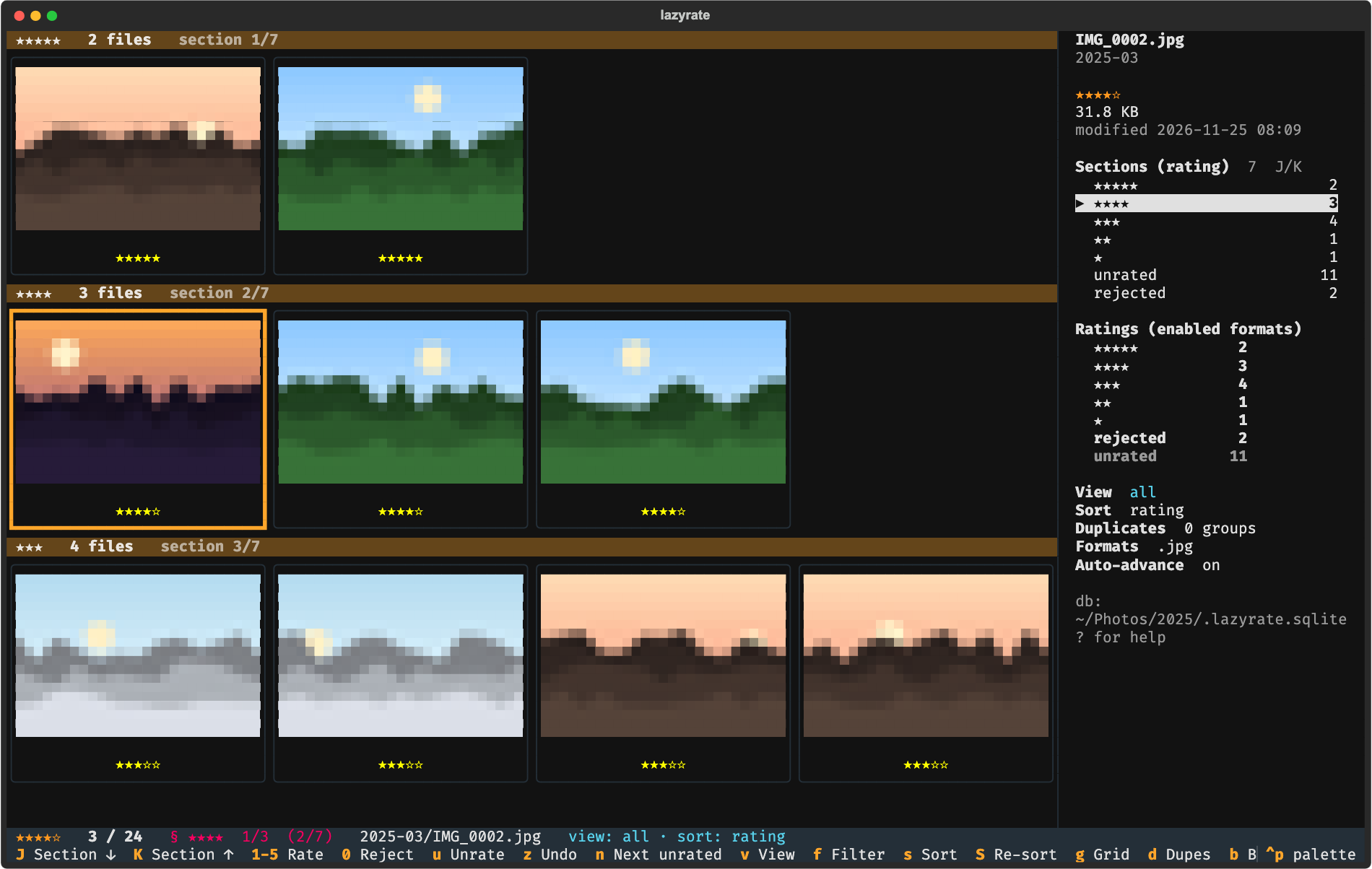
|
2
|
+
|
|
3
|
+
Copyright (c) 2026 Willi Richert
|
|
4
|
+
|
|
5
|
+
Permission is hereby granted, free of charge, to any person obtaining a copy
|
|
6
|
+
of this software and associated documentation files (the "Software"), to deal
|
|
7
|
+
in the Software without restriction, including without limitation the rights
|
|
8
|
+
to use, copy, modify, merge, publish, distribute, sublicense, and/or sell
|
|
9
|
+
copies of the Software, and to permit persons to whom the Software is
|
|
10
|
+
furnished to do so, subject to the following conditions:
|
|
11
|
+
|
|
12
|
+
The above copyright notice and this permission notice shall be included in all
|
|
13
|
+
copies or substantial portions of the Software.
|
|
14
|
+
|
|
15
|
+
THE SOFTWARE IS PROVIDED "AS IS", WITHOUT WARRANTY OF ANY KIND, EXPRESS OR
|
|
16
|
+
IMPLIED, INCLUDING BUT NOT LIMITED TO THE WARRANTIES OF MERCHANTABILITY,
|
|
17
|
+
FITNESS FOR A PARTICULAR PURPOSE AND NONINFRINGEMENT. IN NO EVENT SHALL THE
|
|
18
|
+
AUTHORS OR COPYRIGHT HOLDERS BE LIABLE FOR ANY CLAIM, DAMAGES OR OTHER
|
|
19
|
+
LIABILITY, WHETHER IN AN ACTION OF CONTRACT, TORT OR OTHERWISE, ARISING FROM,
|
|
20
|
+
OUT OF OR IN CONNECTION WITH THE SOFTWARE OR THE USE OR OTHER DEALINGS IN THE
|
|
21
|
+
SOFTWARE.
|
lazyrate-0.1.0/PKG-INFO
ADDED
|
@@ -0,0 +1,489 @@
|
|
|
1
|
+
Metadata-Version: 2.4
|
|
2
|
+
Name: lazyrate
|
|
3
|
+
Version: 0.1.0
|
|
4
|
+
Summary: Terminal UI to rate thousands of images fast and keep only the best
|
|
5
|
+
Keywords: photo,photos,rating,culling,tui,terminal,textual,raw,xmp,clip
|
|
6
|
+
Author: Willi Richert
|
|
7
|
+
License-Expression: MIT
|
|
8
|
+
License-File: LICENSE
|
|
9
|
+
Classifier: Development Status :: 4 - Beta
|
|
10
|
+
Classifier: Environment :: Console
|
|
11
|
+
Classifier: Intended Audience :: End Users/Desktop
|
|
12
|
+
Classifier: Operating System :: MacOS
|
|
13
|
+
Classifier: Operating System :: POSIX :: Linux
|
|
14
|
+
Classifier: Programming Language :: Python :: 3
|
|
15
|
+
Classifier: Programming Language :: Python :: 3.12
|
|
16
|
+
Classifier: Programming Language :: Python :: 3.13
|
|
17
|
+
Classifier: Topic :: Multimedia :: Graphics :: Viewers
|
|
18
|
+
Requires-Dist: pillow>=13.0.0
|
|
19
|
+
Requires-Dist: pillow-heif>=1.8.1
|
|
20
|
+
Requires-Dist: textual>=8.2.8
|
|
21
|
+
Requires-Dist: textual-image>=0.14.4
|
|
22
|
+
Requires-Dist: numpy>=2.0
|
|
23
|
+
Requires-Dist: open-clip-torch>=2.30 ; extra == 'ml'
|
|
24
|
+
Requires-Dist: torch>=2.5 ; extra == 'ml'
|
|
25
|
+
Requires-Python: >=3.12
|
|
26
|
+
Project-URL: Homepage, https://github.com/wrichert/lazyrate
|
|
27
|
+
Project-URL: Repository, https://github.com/wrichert/lazyrate
|
|
28
|
+
Project-URL: Issues, https://github.com/wrichert/lazyrate/issues
|
|
29
|
+
Project-URL: Changelog, https://github.com/wrichert/lazyrate/blob/main/CHANGELOG.md
|
|
30
|
+
Provides-Extra: ml
|
|
31
|
+
Description-Content-Type: text/markdown
|
|
32
|
+
|
|
33
|
+
# lazyrate
|
|
34
|
+
|
|
35
|
+
[](https://github.com/wrichert/lazyrate/actions/workflows/ci.yml)
|
|
36
|
+
[](https://pypi.org/project/lazyrate/)
|
|
37
|
+
[](https://pypi.org/project/lazyrate/)
|
|
38
|
+
|
|
39
|
+
Terminal UI to rate thousands of photos fast and keep only the best ones (e.g. for a year calendar).
|
|
40
|
+
|
|
41
|
+
## Why
|
|
42
|
+
|
|
43
|
+
A year of phone and camera photos easily means thousands of files spread over many folders, with bursts and
|
|
44
|
+
near-identical shots. Picking the twelve best for a calendar (or the fifty best for a photo book) in a file browser is
|
|
45
|
+
slow: you lose track of what you already looked at, and there is no place to keep the verdicts.
|
|
46
|
+
|
|
47
|
+
lazyrate turns this into a keyboard-only pass: one key per photo (`1`–`5` stars, `0` reject), previews right in the
|
|
48
|
+
terminal, ratings saved instantly in a small database next to the photos. Afterwards you review by rating (only the
|
|
49
|
+
5-star ones, only the unrated), weed out near duplicates, and export the keepers to a separate folder. Your photos
|
|
50
|
+
themselves are never touched.
|
|
51
|
+
|
|
52
|
+
|
|
53
|
+
|
|
54
|
+
<sub>Screenshot taken headless with generated demo images, so the thumbnails use the block-character fallback. In
|
|
55
|
+
terminals with a graphics protocol (Ghostty, Kitty, WezTerm, iTerm2) they are shown at full resolution.</sub>
|
|
56
|
+
|
|
57
|
+
## Use cases
|
|
58
|
+
|
|
59
|
+
| You want to … | lazyrate helps by … |
|
|
60
|
+
| --- | --- |
|
|
61
|
+
| **Pick the 12 best photos of the year for a calendar** (or 50 for a photo book) | fast one-key rating, review only the ★★★★★, one section per month, export the keepers |
|
|
62
|
+
| **Clean up a phone camera roll** | grouping bursts and near duplicates (`B` keeps the sharpest), AI suggests rejecting screenshots, receipts and documents from the first photo on, `Y` rejects them in one go |
|
|
63
|
+
| **Curate a trip album or slideshow** | sort by date taken, rate, export ≥ ★★★★ by copy or symlink, flat or with folders |
|
|
64
|
+
| **Find that one photo** | AI text search: `/` → "dog in snow" |
|
|
65
|
+
| **Show all photos from one trip or place** | GPS search, works without AI: `/` → "madeira", "lisbon", "portugal", or `@32.75,-16.95 50km`; one section per town |
|
|
66
|
+
| **Find "that beach on Madeira"** | place + AI text combined: `/` → "beach madeira" (only Madeira photos, best beach matches first) |
|
|
67
|
+
| **Browse the archive by where, not when** | sort **place**: sections per country › region › town |
|
|
68
|
+
| **See where the photos of a trip (or a search) were taken** | `m`: offline map in the right pane, current photo marked; `M`: zoomable map in the browser with thumbnails |
|
|
69
|
+
| **Cull a camera shoot (RAW+JPEG)** | RAW files show their embedded JPEG (no RAW decoder needed), a RAW and its JPEG are one photo with one rating, `i` checks focus at 100 %, ratings go to Lightroom & co. as XMP (`X`) |
|
|
70
|
+
| **"Only the Nikon shots" / "only the phone"** | search filters: `/` → `camera:nikon`, `camera:phone 2024-08`, `madeira camera:nikon`, `lens:24-70` |
|
|
71
|
+
| **Keep up with new photos** | ratings stay with the folder; rescan, only new photos are unrated, the AI already knows your taste |
|
|
72
|
+
|
|
73
|
+
lazyrate never deletes photos and only changes them if you ask it to write ratings into JPEGs (`X`, then only the
|
|
74
|
+
XMP block; RAW files are never touched). Rejected photos are just marked; to clean up, export them
|
|
75
|
+
(`lazyrate export ROOT ~/to-delete --rating 0 --symlink`) and decide there.
|
|
76
|
+
|
|
77
|
+
## How it works
|
|
78
|
+
|
|
79
|
+
```mermaid
|
|
80
|
+
flowchart TD
|
|
81
|
+
folder["Photo folder<br/>thousands of photos"] --> start["lazyrate ~/Pictures/2025"]
|
|
82
|
+
start -. "background, once per photo" .-> index["Duplicate fingerprints · GPS places · camera, lens, date<br/>+ AI image descriptions (optional)"]
|
|
83
|
+
start --> dupes["1 · Clear out bursts<br/>d: duplicate groups · b / B: keep the best"]
|
|
84
|
+
dupes --> pass["2 · Quick pass over the unrated<br/>x: reject · 1–5: stars"]
|
|
85
|
+
pass --> enough{"AI installed and<br/>≥ 10 rejected + ≥ 10 starred?"}
|
|
86
|
+
enough -- "no" --> narrow
|
|
87
|
+
enough -- "yes" --> learn["3 · AI learns your taste<br/>retrains every 10 ratings (L: now)"]
|
|
88
|
+
learn --> accept["Accept suggestions<br/>s: sort 'suggested rating' · y / Y: accept"]
|
|
89
|
+
accept --> teach["Teach it where it is unsure<br/>s: sort 'most informative'"]
|
|
90
|
+
teach --> learn
|
|
91
|
+
accept --> narrow["4 · Narrow down<br/>view ≥ ★★★★, compare, promote to ★★★★★"]
|
|
92
|
+
narrow --> export["5 · Export the keepers<br/>E: copy or symlink"]
|
|
93
|
+
export --> result["Calendar · photo book · album"]
|
|
94
|
+
```
|
|
95
|
+
|
|
96
|
+
1. **Start** lazyrate on a folder. It scans all sub folders and, in the background (with progress bars),
|
|
97
|
+
fingerprints every photo for duplicate detection, reads where, when and with which camera it was taken and —
|
|
98
|
+
with the AI extra — describes its content once. RAW files take part through their embedded JPEG. `/` finds
|
|
99
|
+
photos by place, coordinates, camera, date or (AI) description at any point.
|
|
100
|
+
2. **Clear out bursts** in duplicates mode: keep the best shot of each group with one key.
|
|
101
|
+
3. **Rate quickly**: one key per photo, the list doesn't jump while you rate, `z` undoes.
|
|
102
|
+
4. **Let the AI help** (optional): after a few dozen ratings it suggests ratings for the rest; you accept them
|
|
103
|
+
per photo or per section, and teach it by rating the photos it is least sure about.
|
|
104
|
+
5. **Narrow down and export**: view only the best, compare in the grid or full view, export.
|
|
105
|
+
|
|
106
|
+
## Features
|
|
107
|
+
|
|
108
|
+
- Recursively scans a folder (hidden folders and NAS metadata like `@eaDir` are skipped)
|
|
109
|
+
- Real image previews in the terminal: Kitty graphics protocol (Ghostty, Kitty, WezTerm), Sixel (iTerm2, foot, …), unicode fallback elsewhere
|
|
110
|
+
- Background decoding + prefetch of the next images, JPEG draft-mode decoding (24 MP → ~25 ms), EXIF orientation, HEIC/HEIF
|
|
111
|
+
- RAW files (NEF, CR2, CR3, ARW, DNG, ORF, RW2, RAF, PEF, SRW) through their embedded full-size JPEG: preview, AI,
|
|
112
|
+
GPS, camera and lens like any photo; RAW+JPEG pairs count as one photo
|
|
113
|
+
- 100 % view to check focus (`i`), keeps the spot when you go to the next shot of a burst
|
|
114
|
+
- Ratings also as XMP for Lightroom, darktable, digiKam, Capture One (`X`: sidecars or inside JPEGs); ratings set in
|
|
115
|
+
the camera or another program are taken over for unrated photos
|
|
116
|
+
- Ratings stored immediately in SQLite (`ROOT/.lazyrate.sqlite`), keyed by path relative to the root, so the folder can be moved
|
|
117
|
+
(a `.imgrate.sqlite` from before the rename to lazyrate is renamed automatically, ratings are kept)
|
|
118
|
+
- Photos moved or renamed inside the folder keep their rating (see [Moving and renaming photos](#moving-and-renaming-photos));
|
|
119
|
+
`lazyrate prune` forgets photos that are gone
|
|
120
|
+
- Info panel per photo: size, date taken, camera and lens (`NIKON Z 6_2` · `NIKKOR Z 24-70mm f/4 S`, or
|
|
121
|
+
`Apple iPhone 15 Pro` · `back triple camera 6.86mm f/1.78`), place
|
|
122
|
+
- Sort by path, rating (best first), date taken or place
|
|
123
|
+
- Search filters by camera, lens and date (`camera:phone`, `lens:50mm`, `2024-08`), alone or with any search
|
|
124
|
+
- Your pace and the time left for the unrated photos in the status bar
|
|
125
|
+
- Search by place: GPS positions are read once and named offline (nearest town, region, country from
|
|
126
|
+
[GeoNames](https://www.geonames.org/)); `/madeira`, `/funchal`, `/portugal` or `/@32.75,-16.95 50km`
|
|
127
|
+
- Maps: an offline map of the view or the search matches in the right pane (`m`), and a browser map with
|
|
128
|
+
clustered markers, satellite layer and thumbnail popups (`M`, or `lazyrate map ROOT [query]`)
|
|
129
|
+
- Near-duplicate detection (bursts, re-saved or resized copies): perceptual hash computed once in the background
|
|
130
|
+
and cached in SQLite; review one group at a time and keep the best with a single key
|
|
131
|
+
- Review any rating bucket (unrated, rejected, ≥ N stars, any combination) in single view or as a thumbnail grid
|
|
132
|
+
- Export from the app (`E`) or the shell, by copy or symlink, flat or with sub folders
|
|
133
|
+
- Choose which file formats take part (photos incl. RAW on by default; videos off unless you enable them)
|
|
134
|
+
- Sharpest shot of each burst marked `best?` (`B` keeps it)
|
|
135
|
+
- Optional AI: receipts, screenshots and documents suggested for rejection from the first photo on; suggested
|
|
136
|
+
ratings learned from **your own** ratings (rejected 0 and 1–5 stars), "rate where it learns most", text search
|
|
137
|
+
("beach sunset") — all local, nothing is uploaded
|
|
138
|
+
- Progress bars for everything that runs in the background
|
|
139
|
+
|
|
140
|
+
## Quick start
|
|
141
|
+
|
|
142
|
+
Try it without cloning or installing anything (needs [uv](https://docs.astral.sh/uv/)):
|
|
143
|
+
|
|
144
|
+
```sh
|
|
145
|
+
uvx lazyrate ~/Pictures/2025
|
|
146
|
+
# with AI suggestions and search (~600 MB torch + 605 MB CLIP model on first start; ~400 photos/s on Apple GPUs):
|
|
147
|
+
uvx --from 'lazyrate[ml]' lazyrate ~/Pictures/2025
|
|
148
|
+
```
|
|
149
|
+
|
|
150
|
+
## Install
|
|
151
|
+
|
|
152
|
+
```sh
|
|
153
|
+
uv tool install lazyrate # or: pipx install lazyrate then: lazyrate ~/Pictures/2025
|
|
154
|
+
uv tool install 'lazyrate[ml]' # or: pipx install 'lazyrate[ml]' same, with AI
|
|
155
|
+
uv tool upgrade lazyrate # later, to update
|
|
156
|
+
# the latest development version
|
|
157
|
+
uv tool install 'lazyrate[ml] @ git+https://github.com/wrichert/lazyrate'
|
|
158
|
+
# or, from a checkout
|
|
159
|
+
uv sync && uv run lazyrate ~/Pictures/2025 # add --extra ml for the AI features
|
|
160
|
+
```
|
|
161
|
+
|
|
162
|
+
Needs Python 3.12+ (uv installs it if missing) and a terminal; macOS and Linux. Without AI the install is about
|
|
163
|
+
60 MB. The AI extra adds torch and open_clip (~600 MB), and the first start with AI downloads the CLIP model
|
|
164
|
+
(605 MB, kept in `~/.cache/huggingface`). Photos look best in terminals with the kitty graphics protocol (Ghostty,
|
|
165
|
+
kitty, WezTerm); others get Sixel or block characters.
|
|
166
|
+
|
|
167
|
+
## Usage
|
|
168
|
+
|
|
169
|
+
```sh
|
|
170
|
+
lazyrate ~/Pictures/2025 # rate (TUI)
|
|
171
|
+
lazyrate # ... the current folder (also for stats, classify, search, map)
|
|
172
|
+
lazyrate stats ~/Pictures/2025 # counts per rating (and photos no longer on disk)
|
|
173
|
+
lazyrate prune ~/Pictures/2025 [--dry-run] # forget photos no longer on disk (rating, metadata, AI index)
|
|
174
|
+
lazyrate export ~/Pictures/2025 ~/calendar --min-rating 4 [--flat] [--symlink] [--dry-run] # 4 and 5 stars
|
|
175
|
+
lazyrate export ~/Pictures/2025 ~/maybe --rating 3 # exactly 3 stars (repeatable; 0 = rejected)
|
|
176
|
+
lazyrate list ~/Pictures/2025 --rating 0 # paths of the rejects, relative to the folder (-0 for xargs -0)
|
|
177
|
+
lazyrate rate ~/Pictures/2025 --db ~/ratings.sqlite # keep the DB elsewhere (e.g. read-only folder)
|
|
178
|
+
lazyrate classify ~/Pictures/2025 # AI: index, learn from your ratings, report accuracy + suggestions
|
|
179
|
+
lazyrate search ~/Pictures/2025 madeira # all photos taken in Madeira (GPS), grouped by town
|
|
180
|
+
lazyrate search funchal # ... in the current folder (a word that is no sub folder is the query)
|
|
181
|
+
lazyrate search ~/Pictures/2025 --near=32.75,-16.95 --radius 50 # within 50 km, nearest first
|
|
182
|
+
lazyrate search "camera:nikon 2024-08" # filters: camera, lens, date (alone or with any search)
|
|
183
|
+
lazyrate search "madeira camera:phone" # ... phone photos taken in Madeira
|
|
184
|
+
lazyrate map ~/Pictures/2025 # browser map of all photos with GPS data
|
|
185
|
+
lazyrate map ~/Pictures/2025 madeira # ... of a search's matches (any search form; --output, --no-open)
|
|
186
|
+
lazyrate search ~/Pictures/2025 "dog in snow" # AI: best matches for a description
|
|
187
|
+
lazyrate search ~/Pictures/2025 "beach madeira" # AI: Madeira photos, best beach matches first
|
|
188
|
+
lazyrate ~/Pictures/2025 --no-ai # TUI without AI even if installed
|
|
189
|
+
```
|
|
190
|
+
|
|
191
|
+
### Keys
|
|
192
|
+
|
|
193
|
+
| Key | Action |
|
|
194
|
+
| --- | --- |
|
|
195
|
+
| `1`–`5` | rate (auto-advances; toggle with `a`) |
|
|
196
|
+
| `0` / `x` | reject |
|
|
197
|
+
| `u` | clear rating |
|
|
198
|
+
| `z` | undo |
|
|
199
|
+
| `→` `l` `space` / `←` `h` | next / previous |
|
|
200
|
+
| `i` | 100 % view to check focus: arrows / `hjkl` pan, `space` next photo (same spot), `i` / `esc` back |
|
|
201
|
+
| `↓` `↑` | next / previous (grid: row) |
|
|
202
|
+
| `pgdn` `pgup` | jump 10 (grid: page) |
|
|
203
|
+
| `ctrl+↑` `ctrl+↓` (or `ctrl+k` `ctrl+j`, `home` `end`) | first / last |
|
|
204
|
+
| `J` / `K` | next / previous section (folder, rating, month or duplicate group, depending on sort); also `]` `.` / `[` `,` |
|
|
205
|
+
| `n` | next unrated |
|
|
206
|
+
| `v` / `V` | cycle view: all · unrated · not rejected · ≥★ … ★★★★★ · rejected |
|
|
207
|
+
| `f` | choose any combination of ratings to view |
|
|
208
|
+
| `s` | cycle sort: rating (best first, default) · date taken · path · place (once photos with GPS exist) |
|
|
209
|
+
| `S` | re-sort / re-filter now (re-rated photos move to their new section) |
|
|
210
|
+
| `g` | toggle thumbnail grid (default) / single image |
|
|
211
|
+
| `enter` | full view of the image (nothing else on screen); `enter` or `esc` returns to the previous view |
|
|
212
|
+
| `p` | grid: switch the right pane between a large preview of the highlighted image and the metadata (remembered) |
|
|
213
|
+
| `m` | switch the right pane to a map of the photos in the view (or the search matches), current photo in red |
|
|
214
|
+
| `+` `-` `*` | map: zoom in / out (also the mouse wheel), fit all photos again; shift+arrows or dragging pan; clicking a dot selects its photo |
|
|
215
|
+
| `M` | open that map in the browser |
|
|
216
|
+
| `d` | toggle duplicates mode (each group is a section) |
|
|
217
|
+
| `b` | duplicates mode: keep this one, reject the rest of the group, jump to next group |
|
|
218
|
+
| `E` | export: pick ratings, destination, flat / symlink (remembered for next time) |
|
|
219
|
+
| `X` | store ratings also as XMP: off · sidecars · inside JPEGs (see [RAW files and XMP](#raw-files-and-xmp)) |
|
|
220
|
+
| `e` | choose file formats |
|
|
221
|
+
| `o` | open in the system viewer (also for videos) |
|
|
222
|
+
| `c` | copy the full path to the clipboard |
|
|
223
|
+
| `r` | rescan folder |
|
|
224
|
+
| `y` | AI: accept the suggested rating of this photo |
|
|
225
|
+
| `Y` | AI: accept the suggestions of all unrated photos in the section (one undo step) |
|
|
226
|
+
| `B` | duplicates mode: keep the suggested best of the group (the sharpest of those the AI rates highest), reject the rest |
|
|
227
|
+
| `/` | search by place (`madeira`), coordinates (`@32.75,-16.95 50km`) or, with AI, content (`beach sunset`, `beach madeira`); `esc` ends the search |
|
|
228
|
+
| `L` | AI: retrain now (otherwise automatic every 10 ratings) |
|
|
229
|
+
| `?` | help |
|
|
230
|
+
|
|
231
|
+
### Near duplicates
|
|
232
|
+
|
|
233
|
+
Each image gets a 64-bit difference hash (grayscale 9×8 thumbnail). Two images are grouped when their hashes
|
|
234
|
+
differ in ≤ 10 bits and they were taken ≤ 15 minutes apart (EXIF capture time, else file time). This reliably
|
|
235
|
+
catches bursts, re-saved and resized copies; it misses the same scene with a different crop or zoom.
|
|
236
|
+
Indexing takes about 3–7 ms per photo, runs in the background on start, and is reused on later runs
|
|
237
|
+
(recomputed only for changed files).
|
|
238
|
+
|
|
239
|
+
The same pass measures **sharpness** (edge contrast of the sharpest region, so a sharp face before a blurred
|
|
240
|
+
background counts as sharp). It marks the sharpest shot of each group `best?`, and `B` keeps it; with AI
|
|
241
|
+
suggestions, the sharpest of the shots the AI rates highest. Sharpness only compares shots of the same scene: across
|
|
242
|
+
different photos it mostly measures how much texture there is (a calm sea or fog scores low though in focus), so
|
|
243
|
+
lazyrate does not flag single photos as blurry. For that, `i` shows the photo at 100 %.
|
|
244
|
+
|
|
245
|
+
### Sections
|
|
246
|
+
|
|
247
|
+
The list is split into sections depending on the sort order: folders (path), ratings (rating), months
|
|
248
|
+
(date taken), towns (place: `Portugal › Madeira › Funchal`) or duplicate groups. The grid shows a header line per section and starts each section on a new row;
|
|
249
|
+
`J`/`K` (or `]`/`.` and `[`/`,`) jump between sections, also in the single-image view. The sidebar lists the
|
|
250
|
+
sections around the current one with their sizes.
|
|
251
|
+
|
|
252
|
+
The app starts in the grid, sorted by rating. Within a view the list stays stable while you rate, so rating
|
|
253
|
+
doesn't make the cursor jump; press `S` to re-sort and re-filter (re-rated photos move to their new section).
|
|
254
|
+
Section counts are live: a section with re-rated photos waiting for `S` is marked with ↻.
|
|
255
|
+
|
|
256
|
+
### Places (GPS)
|
|
257
|
+
|
|
258
|
+
On start lazyrate reads the GPS position of every photo once in the background (EXIF only, about 1 ms per photo;
|
|
259
|
+
JPEG, HEIC and RAW) and names it offline after the nearest town, with its region and country. The town table is built
|
|
260
|
+
from GeoNames (every town with ≥ 1,000 inhabitants, 2.7 MB, bundled); big cities get a larger radius, so a photo in
|
|
261
|
+
central Funchal says Funchal and not the parish next door. Nothing is looked up online.
|
|
262
|
+
|
|
263
|
+
| Search (`/` or `lazyrate search ROOT …`) | Finds |
|
|
264
|
+
| --- | --- |
|
|
265
|
+
| `madeira`, `funchal`, `portugal`, `são vicente` / `sao vicente` | photos whose town, region or country has that name (case and accents don't matter), one section per town |
|
|
266
|
+
| `@32.75,-16.95 50km`, `32.75 -16.95 +-5km`, `near:32.75,-16.95` | photos within the radius (default 10 km), nearest first, sections by distance (`< 1 km`, `1-5 km`, …) |
|
|
267
|
+
| `beach madeira` (AI) | photos taken in Madeira, ranked by how well they match "beach" |
|
|
268
|
+
| `camera:nikon`, `camera:phone`, `camera:"z 6"`, `lens:24-70`, `2024`, `2024-08`, `2024-08-15`, `2023..2024` | filters; alone: those photos by month, oldest first; with any other search: narrow it (`madeira camera:nikon`, `beach 2023`) |
|
|
269
|
+
| anything else (AI) | text search over image content |
|
|
270
|
+
|
|
271
|
+
Sort **place** (`s`) shows the whole folder by country › region › town; photos without GPS come last. The info pane
|
|
272
|
+
shows town, region, country and the coordinates of the current photo.
|
|
273
|
+
|
|
274
|
+
#### Maps
|
|
275
|
+
|
|
276
|
+
- **`m`: map in the right pane**, offline. Land, coastlines and borders from
|
|
277
|
+
[Natural Earth](https://www.naturalearthdata.com/) (public domain, bundled, 1.7 MB), a yellow dot per photo in
|
|
278
|
+
the view (while searching: per match), labels for the towns with the most photos, a scale bar, and the current
|
|
279
|
+
photo in red. It frames the photos: a whole island, a country or the world; `+` / `-` or the mouse wheel zoom,
|
|
280
|
+
dragging or shift+arrows pan, `*` frames all photos again. Clicking a dot selects its photo in the grid (click
|
|
281
|
+
again to step through photos taken at the same spot); clicking elsewhere centers the map there. Good for "where was this?" and
|
|
282
|
+
"where did I take photos on this trip?"; there are no streets at city level, use the browser map for that.
|
|
283
|
+
- **`M`: map in the browser** (or `lazyrate map ROOT [query]`). One HTML page next to the database
|
|
284
|
+
(`.lazyrate-map.html`) with clustered markers on OpenStreetMap, a satellite (Esri) and a terrain (OpenTopoMap)
|
|
285
|
+
layer; clicking a marker shows a thumbnail, rating, place and path (click the thumbnail to open the photo).
|
|
286
|
+
Thumbnails and coordinates are embedded in the page and never uploaded, but the map tiles are loaded from those
|
|
287
|
+
services, so they see which area you look at.
|
|
288
|
+
|
|
289
|
+
Limits: photos without GPS data can't be found this way (older cameras, and images sent through messengers or
|
|
290
|
+
editors that strip EXIF). Names are the English GeoNames names of towns, regions (state, province, island group)
|
|
291
|
+
and countries; landmarks, beaches or mountains ("Pico do Arieiro") are not in the table, but their coordinates are:
|
|
292
|
+
`@32.735,-16.929 3km`.
|
|
293
|
+
|
|
294
|
+
### RAW files and XMP
|
|
295
|
+
|
|
296
|
+
**RAW.** Every RAW file carries a JPEG preview rendered by the camera, for Nikon, Canon, Sony and Fujifilm at or
|
|
297
|
+
near full size. lazyrate shows that preview (no RAW decoder, no extra install) and reads camera, lens, date and GPS
|
|
298
|
+
from the RAW itself, so RAW files get previews, AI suggestions, duplicates detection and maps like any photo.
|
|
299
|
+
Shooting RAW+JPEG gives `DSC_1234.NEF` and `DSC_1234.JPG`: lazyrate shows the JPEG (with "+ NEF" in the info
|
|
300
|
+
panel), a rating applies to both, export copies both. Without a JPEG twin, the RAW is a photo of its own.
|
|
301
|
+
|
|
302
|
+
**Checking focus.** `i` shows the photo at 100 % (one photo pixel per screen pixel); arrows or `hjkl` pan, `space`
|
|
303
|
+
goes to the next photo and keeps the spot, so the sharpest shot of a burst is easy to find. `i` or `esc` returns.
|
|
304
|
+
|
|
305
|
+
**XMP.** Ratings live in `.lazyrate.sqlite`. With `X` they are also written as XMP, which Lightroom, darktable,
|
|
306
|
+
digiKam, Capture One and Bridge read (`xmp:Rating`, rejected = -1):
|
|
307
|
+
|
|
308
|
+
| Mode | Where | Renaming / moving files |
|
|
309
|
+
| --- | --- | --- |
|
|
310
|
+
| off (default) | only the database | kept when moved inside the folder with the file date unchanged (see below) |
|
|
311
|
+
| sidecars | `DSC_1234.xmp` next to the photo; an existing sidecar (e.g. with Lightroom edits) only gets its rating changed | kept if the sidecar is renamed too (Lightroom, Capture One do that) |
|
|
312
|
+
| inside JPEGs | the JPEG's XMP block (lossless, picture unchanged, file date kept); RAW, HEIC and others get sidecars | kept: the rating travels with the file |
|
|
313
|
+
|
|
314
|
+
Switching on writes every existing rating once; files are written in the background (lazyrate waits for the last
|
|
315
|
+
ones when you quit). Filtering and sorting always use the database, so neither mode slows them down. The other way
|
|
316
|
+
round, ratings found in sidecars or inside the files (set in the camera, in Lightroom, or by lazyrate on another
|
|
317
|
+
computer) are taken over for photos that have no lazyrate rating yet; lazyrate's own rating wins.
|
|
318
|
+
|
|
319
|
+
### Moving and renaming photos
|
|
320
|
+
|
|
321
|
+
The database keys photos by their path inside the rated folder. When a photo vanishes from one path and a photo with
|
|
322
|
+
the same size, file date and format appears at another, lazyrate takes it as moved: its rating, fingerprint,
|
|
323
|
+
metadata and AI index follow it, on start and on rescan (`r`), and a notification says how many. `mv`, Finder and
|
|
324
|
+
most photo tools keep the file date; copying without it (`cp` without `-p`) makes a new, unrated photo. If several
|
|
325
|
+
vanished and new photos share size and date, none of them is matched. Moving a photo into another rated folder
|
|
326
|
+
(its own `.lazyrate.sqlite`) does not carry the rating over, unless it is in the file (XMP, below).
|
|
327
|
+
|
|
328
|
+
Records of photos that are gone for good stay in the database and do no harm; `lazyrate stats` counts them,
|
|
329
|
+
`lazyrate prune` (`--dry-run` to list first) forgets them. Run it only when every sub folder and disk is there: a
|
|
330
|
+
photo on an unmounted drive counts as gone.
|
|
331
|
+
|
|
332
|
+
### AI suggestions (optional)
|
|
333
|
+
|
|
334
|
+
The AI features need the `ml` extra (torch + open_clip):
|
|
335
|
+
|
|
336
|
+
```sh
|
|
337
|
+
# one-off run, nothing installed
|
|
338
|
+
uvx --from 'lazyrate[ml] @ git+https://github.com/wrichert/lazyrate' lazyrate ~/Pictures/2025
|
|
339
|
+
# installed tool (if you already installed it without AI, add --force to replace it)
|
|
340
|
+
uv tool install 'lazyrate[ml] @ git+https://github.com/wrichert/lazyrate'
|
|
341
|
+
# from a checkout
|
|
342
|
+
uv sync --extra ml && uv run lazyrate ~/Pictures/2025
|
|
343
|
+
```
|
|
344
|
+
|
|
345
|
+
What that costs:
|
|
346
|
+
|
|
347
|
+
| Part | Download / disk | When |
|
|
348
|
+
|---|---|---|
|
|
349
|
+
| torch + open_clip (the `ml` extra) | ~600 MB installed | once, at install |
|
|
350
|
+
| CLIP ViT-B/32 weights (`laion2b_s34b_b79k`) | 605 MB, kept in `~/.cache/huggingface` | once, on first AI start |
|
|
351
|
+
| Photo descriptions (embeddings) | ~1 KB per photo, in the folder's `.lazyrate.sqlite` | once per photo, ~400 photos/s on Apple GPUs (MPS); slower on CPU |
|
|
352
|
+
| Reject and star models (the rating regressors) | nothing: plain numpy, trained on your ratings | retrained in well under a second, after every 10 ratings or on `L` |
|
|
353
|
+
|
|
354
|
+
Everything runs locally; no photo or rating leaves your machine. Without the extra, lazyrate works as before and
|
|
355
|
+
the AI keys only tell you how to install it.
|
|
356
|
+
|
|
357
|
+
With the extra installed, lazyrate describes every photo once with [CLIP](https://github.com/mlfoundations/open_clip)
|
|
358
|
+
(ViT-B/32, LAION-2B weights; ~400 photos/s on an Apple GPU, cached in the database, about 1 KB per photo) and learns
|
|
359
|
+
from the ratings you give:
|
|
360
|
+
|
|
361
|
+
- a **reject model** (rejected vs. kept): receipts, screenshots, pocket shots are a *kind* of picture, not the
|
|
362
|
+
bottom of the quality scale, so they get their own yes/no model;
|
|
363
|
+
- a **star model** for 1–5 stars (ordinal: predicting 4 for a 5 is a small error, 1 for a 5 a big one).
|
|
364
|
+
|
|
365
|
+
Both are small linear models (numpy, retrained in well under a second) with class balancing, so 40 five-star
|
|
366
|
+
photos are not drowned by 2,000 three-star ones. Unrated photos are never used as training data. Suggestions appear
|
|
367
|
+
once you have rejected 10 and starred 10 photos; star suggestions after 30 starred photos.
|
|
368
|
+
|
|
369
|
+
**One-offs from the first photo on.** Receipts, documents, screenshots, signs, whiteboards and tickets are found
|
|
370
|
+
without any rating: CLIP compares each photo with short descriptions of these and of ordinary photo scenes
|
|
371
|
+
(people, landscapes, streets, food, ...). From 95 % they are suggested for rejection, shown as
|
|
372
|
+
`rejected? document 99%`. On a test folder of 446 holiday photos none was flagged (the highest scored 90 %), while
|
|
373
|
+
photographed receipts and documents scored 100 %. Once your reject model is ready it decides; the `document` label
|
|
374
|
+
stays where both agree.
|
|
375
|
+
|
|
376
|
+
#### Getting the AI to rate your photos
|
|
377
|
+
|
|
378
|
+
1. Wait until the **Reading image content** progress bar is done (first start only).
|
|
379
|
+
2. Rate a mix by hand: at least 10 rejects (`x`) and 10 starred photos (`1`–`5`), ideally with different star
|
|
380
|
+
counts. The **AI** line in the sidebar says how many more it needs.
|
|
381
|
+
3. It retrains automatically every 10 ratings; `L` retrains now.
|
|
382
|
+
4. Press `s` until the sort says **suggested rating**. Unrated photos are grouped into sections like
|
|
383
|
+
"suggested ★★★★★" … "suggested rejected"; thumbnails show what it thinks.
|
|
384
|
+
5. Accept: `y` for the current photo, `Y` for the whole section (`z` undoes the batch). A good start: `J`/`K` to
|
|
385
|
+
**suggested rejected**, skim it, `Y`.
|
|
386
|
+
6. Make it smarter: `s` to **most informative**, rate a few dozen of those, `L`.
|
|
387
|
+
|
|
388
|
+
#### What you see
|
|
389
|
+
|
|
390
|
+
- Unrated thumbnails show a ghost label: `★★★★? 80%`, `rejected? 92%`, `rejected? document 99%` (receipt,
|
|
391
|
+
screenshot, ...), `keeper? 70%` (stars not learned yet).
|
|
392
|
+
- `s` adds two sorts: **suggested rating** (best suggestions first, surest rejects together — `Y` rejects them in one
|
|
393
|
+
go) and **most informative** (the photos the model is least sure about first: rating these teaches it the most).
|
|
394
|
+
- In duplicates mode the sharpest of the members with the best predicted rating is marked `best?`; `B` keeps it.
|
|
395
|
+
- Your ratings always win: suggestions are stored separately and nothing is rated without a key press.
|
|
396
|
+
- `lazyrate stats` / `classify` report cross-validated accuracy, e.g. "within ±1 star 87%", so you can judge
|
|
397
|
+
how much to trust it. Expect reject suggestions to be very good and exact stars to be a matter of taste (±1).
|
|
398
|
+
|
|
399
|
+
### Recipes
|
|
400
|
+
|
|
401
|
+
**Year calendar (12 photos out of thousands)**
|
|
402
|
+
|
|
403
|
+
1. `d`: go through the duplicate groups, `b` on the shot you want, or `B` to keep the one marked `best?`;
|
|
404
|
+
`d` again to leave.
|
|
405
|
+
2. `v` until the view is **unrated**, go through quickly: `x` reject, `3` "maybe", `4`/`5` good.
|
|
406
|
+
With AI: after ~20 ratings switch the sort to **suggested rating** and accept whole sections with `Y`.
|
|
407
|
+
3. View **≥ ★★★★** in the grid, `p` for a large preview or `enter` for full view, promote the best to `5`.
|
|
408
|
+
4. View **★★★★★ only**, `s` to **date taken** (one section per month), until 12–13 remain, `E` to export.
|
|
409
|
+
|
|
410
|
+
**Camera roll clean-up**
|
|
411
|
+
|
|
412
|
+
1. `d`, `b` through the bursts.
|
|
413
|
+
2. With AI: reject 10 screenshots / receipts / blurry shots and star 10 real photos, sort **suggested rating**,
|
|
414
|
+
check **suggested rejected**, `Y`.
|
|
415
|
+
3. `lazyrate export ROOT ~/to-delete --rating 0 --symlink` collects the rejects for a final look before you delete
|
|
416
|
+
them with your usual tool.
|
|
417
|
+
|
|
418
|
+
**Find a photo**
|
|
419
|
+
|
|
420
|
+
`/` and describe it ("birthday cake", "boat at sunset"); best matches come first, `esc` ends the search.
|
|
421
|
+
From the shell: `lazyrate search ROOT "birthday cake"`.
|
|
422
|
+
|
|
423
|
+
**Cull a camera shoot (RAW+JPEG)**
|
|
424
|
+
|
|
425
|
+
1. `lazyrate /Volumes/SD/DCIM` (or the import folder): each RAW+JPEG pair is one photo; `X` → **sidecars** if the
|
|
426
|
+
ratings should end up in Lightroom, darktable or Capture One.
|
|
427
|
+
2. `d`: bursts are duplicate groups; in each, `i` for 100 %, `space` to step through the burst at the same spot,
|
|
428
|
+
`esc`, then `b` on the sharpest.
|
|
429
|
+
3. Quick pass over the rest (`x` / `1`–`5`); the status bar shows how long the rest will take at your pace.
|
|
430
|
+
4. Import into Lightroom & co.: the XMP sidecars carry the ratings (rejected = -1). Or `E` to export ≥ ★★★★,
|
|
431
|
+
RAW files included.
|
|
432
|
+
|
|
433
|
+
**Only the phone photos (or only the Nikon)**
|
|
434
|
+
|
|
435
|
+
`/camera:phone` (or `/camera:nikon`, `/camera:"z 6" 2024`): those photos by month; add a place or a description
|
|
436
|
+
to narrow any search, e.g. `/madeira camera:nikon`. From the shell: `lazyrate search "camera:phone 2024-08"`.
|
|
437
|
+
|
|
438
|
+
**Delete the rejects from the folder you copied from**
|
|
439
|
+
|
|
440
|
+
You rated a copy (e.g. `~/Pictures/2025`, copied from `~/phone-backup` with rsync) and want the rejects gone in the
|
|
441
|
+
original too. `lazyrate list` prints the rejected photos' paths relative to the rated folder, which are the same
|
|
442
|
+
paths in the copy's source:
|
|
443
|
+
|
|
444
|
+
```sh
|
|
445
|
+
cd ~/phone-backup
|
|
446
|
+
lazyrate list ~/Pictures/2025 --rating 0 -0 | xargs -0 ls -l # look first
|
|
447
|
+
lazyrate list ~/Pictures/2025 --rating 0 -0 | xargs -0 trash # to the Trash (macOS 15+; Linux: gio trash)
|
|
448
|
+
```
|
|
449
|
+
|
|
450
|
+
`-0` separates the paths by NUL, so names with spaces are safe. RAW+JPEG pairs are listed with both files. Only
|
|
451
|
+
photos still in the rated folder are listed.
|
|
452
|
+
|
|
453
|
+
**Trip album from a mixed archive**
|
|
454
|
+
|
|
455
|
+
1. `/madeira` (or `/@32.75,-16.95 60km`): every photo taken there, one section per town; `m` shows them on a map.
|
|
456
|
+
2. Rate within the search as usual, `J`/`K` to jump between towns.
|
|
457
|
+
3. `esc`, view **≥ ★★★★**, `s` to **place**: the Madeira keepers are one block; `E` to export.
|
|
458
|
+
|
|
459
|
+
## Development
|
|
460
|
+
|
|
461
|
+
```sh
|
|
462
|
+
uv sync
|
|
463
|
+
uv run pytest
|
|
464
|
+
uv run ruff check . && uv run ruff format .
|
|
465
|
+
```
|
|
466
|
+
|
|
467
|
+
CI runs lint and tests on macOS and Linux with Python 3.12 and 3.13. To release: bump `version` in
|
|
468
|
+
`pyproject.toml`, add a section to `CHANGELOG.md`, commit, then `git tag v0.2.0 && git push --tags`. The release
|
|
469
|
+
workflow tests, publishes to PyPI (trusted publishing) and creates the GitHub release with the changelog section.
|
|
470
|
+
|
|
471
|
+
## Disclaimer
|
|
472
|
+
|
|
473
|
+
Use at your own risk. lazyrate never deletes or moves your photos. It reads them, keeps ratings in a separate SQLite
|
|
474
|
+
file and exports by copying or linking without overwriting existing files. It writes to your photo folder only if
|
|
475
|
+
you switch on XMP ratings (`X`): sidecar files, or, if you choose so, the XMP block inside JPEGs (written to a temporary
|
|
476
|
+
file first, then swapped in; RAW files are never modified). Still, this software comes
|
|
477
|
+
without any warranty, and the author accepts no liability for lost data or any other damage. Keep a backup of your
|
|
478
|
+
photos.
|
|
479
|
+
|
|
480
|
+
## License
|
|
481
|
+
|
|
482
|
+
MIT, see [LICENSE](LICENSE).
|
|
483
|
+
|
|
484
|
+
The bundled town table `src/lazyrate/data/places.tsv.gz` is derived from [GeoNames](https://www.geonames.org/)
|
|
485
|
+
(`cities1000`, admin1 codes, country info) under [CC BY 4.0](https://creativecommons.org/licenses/by/4.0/);
|
|
486
|
+
rebuild it with `scripts/build_places.py`. The offline map outlines `src/lazyrate/data/basemap.npz` are from
|
|
487
|
+
[Natural Earth](https://www.naturalearthdata.com/) (public domain); rebuild with `scripts/build_basemap.py`. The
|
|
488
|
+
browser map loads [Leaflet](https://leafletjs.com/) and map tiles from OpenStreetMap, Esri and OpenTopoMap, each
|
|
489
|
+
credited on the map.
|