langgraph2slack 0.2.0__tar.gz
This diff represents the content of publicly available package versions that have been released to one of the supported registries. The information contained in this diff is provided for informational purposes only and reflects changes between package versions as they appear in their respective public registries.
- langgraph2slack-0.2.0/PKG-INFO +464 -0
- langgraph2slack-0.2.0/README.md +427 -0
- langgraph2slack-0.2.0/langgraph2slack/__init__.py +32 -0
- langgraph2slack-0.2.0/langgraph2slack/bot.py +1008 -0
- langgraph2slack-0.2.0/langgraph2slack/config.py +124 -0
- langgraph2slack-0.2.0/langgraph2slack/handlers/__init__.py +13 -0
- langgraph2slack-0.2.0/langgraph2slack/handlers/base.py +144 -0
- langgraph2slack-0.2.0/langgraph2slack/handlers/message.py +218 -0
- langgraph2slack-0.2.0/langgraph2slack/handlers/stream.py +711 -0
- langgraph2slack-0.2.0/langgraph2slack/mixins/__init__.py +5 -0
- langgraph2slack-0.2.0/langgraph2slack/mixins/reactions.py +110 -0
- langgraph2slack-0.2.0/langgraph2slack/templates/basic.py +14 -0
- langgraph2slack-0.2.0/langgraph2slack/templates/with_transformers.py +35 -0
- langgraph2slack-0.2.0/langgraph2slack/transformers.py +114 -0
- langgraph2slack-0.2.0/langgraph2slack/utils.py +294 -0
- langgraph2slack-0.2.0/langgraph2slack.egg-info/PKG-INFO +464 -0
- langgraph2slack-0.2.0/langgraph2slack.egg-info/SOURCES.txt +29 -0
- langgraph2slack-0.2.0/langgraph2slack.egg-info/dependency_links.txt +1 -0
- langgraph2slack-0.2.0/langgraph2slack.egg-info/requires.txt +15 -0
- langgraph2slack-0.2.0/langgraph2slack.egg-info/top_level.txt +1 -0
- langgraph2slack-0.2.0/pyproject.toml +66 -0
- langgraph2slack-0.2.0/setup.cfg +4 -0
- langgraph2slack-0.2.0/tests/test_bot_core.py +379 -0
- langgraph2slack-0.2.0/tests/test_bot_should_process.py +626 -0
- langgraph2slack-0.2.0/tests/test_config.py +327 -0
- langgraph2slack-0.2.0/tests/test_handlers_base.py +395 -0
- langgraph2slack-0.2.0/tests/test_handlers_message.py +673 -0
- langgraph2slack-0.2.0/tests/test_handlers_stream.py +951 -0
- langgraph2slack-0.2.0/tests/test_reactions.py +326 -0
- langgraph2slack-0.2.0/tests/test_transformers.py +312 -0
- langgraph2slack-0.2.0/tests/test_utils.py +725 -0
|
@@ -0,0 +1,464 @@
|
|
|
1
|
+
Metadata-Version: 2.4
|
|
2
|
+
Name: langgraph2slack
|
|
3
|
+
Version: 0.2.0
|
|
4
|
+
Summary: Simple package to connect LangGraph applications to Slack
|
|
5
|
+
Author-email: Siavash Yasini <siavash.yasini@gmail.com>
|
|
6
|
+
License: MIT
|
|
7
|
+
Project-URL: Homepage, https://github.com/syasini/langgraph2slack
|
|
8
|
+
Project-URL: Documentation, https://github.com/syasini/langgraph2slack#readme
|
|
9
|
+
Project-URL: Repository, https://github.com/syasini/langgraph2slack
|
|
10
|
+
Project-URL: Issues, https://github.com/syasini/langgraph2slack/issues
|
|
11
|
+
Keywords: langgraph,slack,chatbot,ai,langchain
|
|
12
|
+
Classifier: Development Status :: 3 - Alpha
|
|
13
|
+
Classifier: Intended Audience :: Developers
|
|
14
|
+
Classifier: License :: OSI Approved :: MIT License
|
|
15
|
+
Classifier: Programming Language :: Python :: 3
|
|
16
|
+
Classifier: Programming Language :: Python :: 3.10
|
|
17
|
+
Classifier: Programming Language :: Python :: 3.11
|
|
18
|
+
Classifier: Programming Language :: Python :: 3.12
|
|
19
|
+
Classifier: Topic :: Software Development :: Libraries :: Python Modules
|
|
20
|
+
Classifier: Topic :: Communications :: Chat
|
|
21
|
+
Requires-Python: >=3.10
|
|
22
|
+
Description-Content-Type: text/markdown
|
|
23
|
+
Requires-Dist: fastapi>=0.100.0
|
|
24
|
+
Requires-Dist: langgraph-sdk>=0.1.0
|
|
25
|
+
Requires-Dist: langsmith>=0.1.0
|
|
26
|
+
Requires-Dist: slack-bolt>=1.18.0
|
|
27
|
+
Requires-Dist: aiohttp>=3.8.0
|
|
28
|
+
Requires-Dist: pydantic>=2.0.0
|
|
29
|
+
Requires-Dist: pydantic-settings>=2.0.0
|
|
30
|
+
Requires-Dist: python-dotenv>=1.0.0
|
|
31
|
+
Requires-Dist: uvicorn>=0.23.0
|
|
32
|
+
Provides-Extra: dev
|
|
33
|
+
Requires-Dist: pytest>=7.4.0; extra == "dev"
|
|
34
|
+
Requires-Dist: pytest-asyncio>=0.21.0; extra == "dev"
|
|
35
|
+
Requires-Dist: black>=23.0.0; extra == "dev"
|
|
36
|
+
Requires-Dist: ruff>=0.1.0; extra == "dev"
|
|
37
|
+
|
|
38
|
+
# langgraph2slack
|
|
39
|
+
|
|
40
|
+
[](https://badge.fury.io/py/langgraph2slack)
|
|
41
|
+
[](https://www.python.org/downloads/)
|
|
42
|
+
[](https://opensource.org/licenses/MIT)
|
|
43
|
+
|
|
44
|
+
Simple, minimal package to connect LangGraph applications to Slack with just a few lines of code.
|
|
45
|
+
|
|
46
|
+
## Installation
|
|
47
|
+
|
|
48
|
+
```bash
|
|
49
|
+
pip install langgraph2slack
|
|
50
|
+
```
|
|
51
|
+
|
|
52
|
+
## Quick Start
|
|
53
|
+
|
|
54
|
+
### 1. Create a LangGraph App
|
|
55
|
+
|
|
56
|
+
First, create a simple LangGraph chatbot that will power your Slack bot:
|
|
57
|
+
|
|
58
|
+
```python
|
|
59
|
+
# agent.py
|
|
60
|
+
from langchain_anthropic import ChatAnthropic
|
|
61
|
+
from langgraph.graph import MessagesState, StateGraph, START, END
|
|
62
|
+
from langgraph.checkpoint.memory import MemorySaver
|
|
63
|
+
|
|
64
|
+
# Define the chatbot function
|
|
65
|
+
def chatbot(state: MessagesState):
|
|
66
|
+
model = ChatAnthropic(model="claude-3-5-sonnet-20241022")
|
|
67
|
+
return {"messages": [model.invoke(state["messages"])]}
|
|
68
|
+
|
|
69
|
+
# Build the graph
|
|
70
|
+
graph = StateGraph(MessagesState)
|
|
71
|
+
graph.add_node("chatbot", chatbot)
|
|
72
|
+
graph.add_edge(START, "chatbot")
|
|
73
|
+
graph.add_edge("chatbot", END)
|
|
74
|
+
|
|
75
|
+
# Compile with memory to maintain conversation history
|
|
76
|
+
app = graph.compile(checkpointer=MemorySaver())
|
|
77
|
+
```
|
|
78
|
+
|
|
79
|
+
This creates a simple chatbot that maintains conversation history across messages.
|
|
80
|
+
|
|
81
|
+
### 2. Create Your Slack Bot Server
|
|
82
|
+
|
|
83
|
+
This is where the magic happens.
|
|
84
|
+
|
|
85
|
+
Create a `slack/server.py` file in your project directory:
|
|
86
|
+
|
|
87
|
+
```python
|
|
88
|
+
# slack/server.py
|
|
89
|
+
from langgraph2slack import SlackBot
|
|
90
|
+
|
|
91
|
+
bot = SlackBot()
|
|
92
|
+
|
|
93
|
+
# Export the app for langgraph.json
|
|
94
|
+
app = bot.app
|
|
95
|
+
```
|
|
96
|
+
|
|
97
|
+
That's it! Just 3 lines of code.
|
|
98
|
+
|
|
99
|
+
### 3. Configure Environment Variables
|
|
100
|
+
|
|
101
|
+
Create a `.env` file with your credentials:
|
|
102
|
+
|
|
103
|
+
```bash
|
|
104
|
+
# Slack credentials (from https://api.slack.com/apps -> Your App)
|
|
105
|
+
SLACK_BOT_TOKEN=xoxb-your-bot-token
|
|
106
|
+
SLACK_SIGNING_SECRET=your-signing-secret
|
|
107
|
+
|
|
108
|
+
# LangGraph agent name
|
|
109
|
+
# This is the key you will set in langgraph.json
|
|
110
|
+
ASSISTANT_ID=my-assistant
|
|
111
|
+
```
|
|
112
|
+
You can find `SLACK_SIGNING_SECRET` and `SLACK_BOT_TOKEN` in the following pages on `https://api.slack.com/apps`:
|
|
113
|
+
|
|
114
|
+
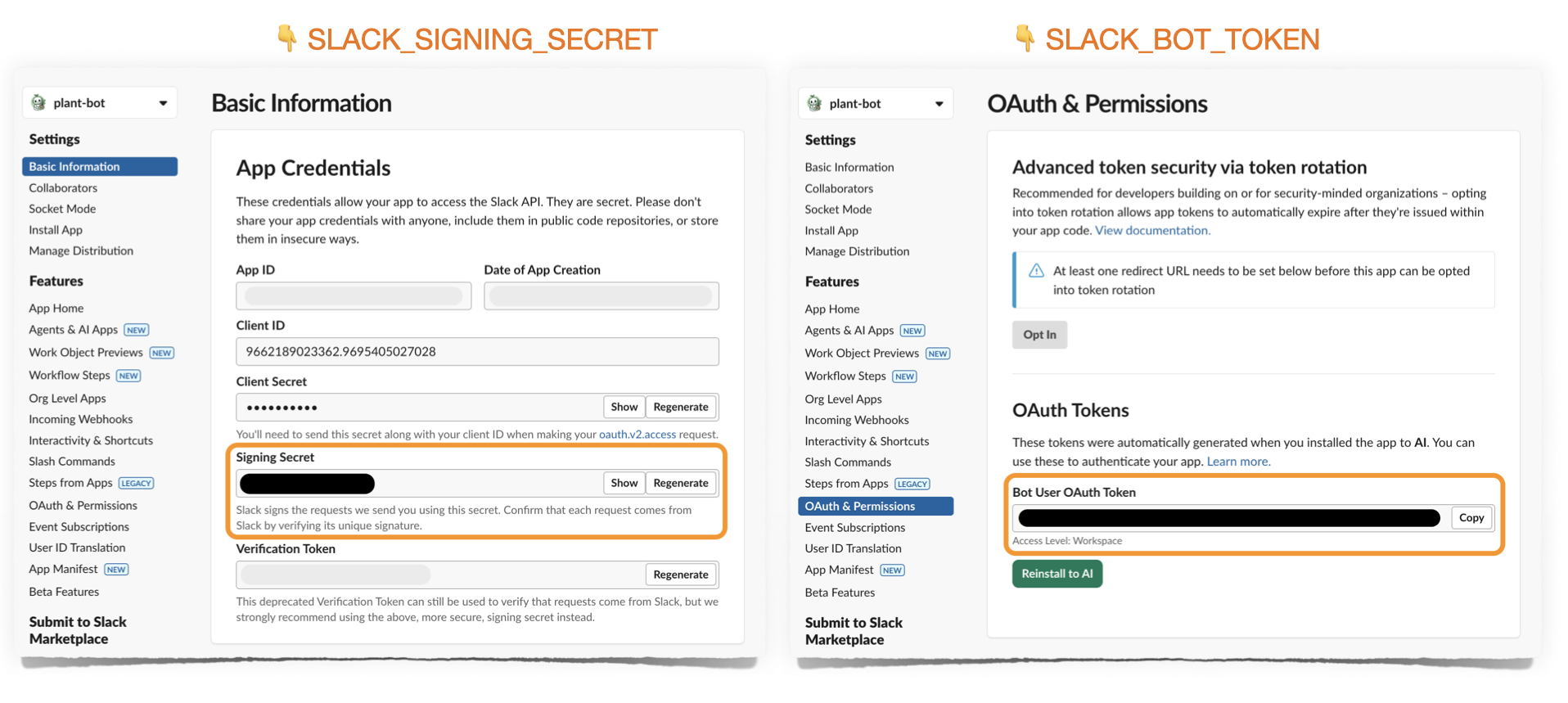
|
|
115
|
+
|
|
116
|
+
|
|
117
|
+
### 4. Configure LangGraph Deployment
|
|
118
|
+
|
|
119
|
+
Add your agent and Slack server paths to `langgraph.json`:
|
|
120
|
+
|
|
121
|
+
```json
|
|
122
|
+
{
|
|
123
|
+
"dependencies": ["langgraph2slack", "."],
|
|
124
|
+
"graphs": {
|
|
125
|
+
"my-assistant": "./agent.py:app"
|
|
126
|
+
},
|
|
127
|
+
"env": ".env",
|
|
128
|
+
"http": {
|
|
129
|
+
"/events/slack": "slack/server:app"
|
|
130
|
+
}
|
|
131
|
+
}
|
|
132
|
+
```
|
|
133
|
+
|
|
134
|
+
## Local Testing
|
|
135
|
+
|
|
136
|
+
|
|
137
|
+
|
|
138
|
+
Before deploying to production, test your bot locally using ngrok.
|
|
139
|
+
|
|
140
|
+
**Important:** You'll need **separate Slack apps** for local development and production deployment, since each environment has its own request URL where Slack sends events.
|
|
141
|
+
|
|
142
|
+
### 1. Create a Slack App for Local Development
|
|
143
|
+
|
|
144
|
+
- Go to https://api.slack.com/apps
|
|
145
|
+
- Click "Create New App" → "From a manifest"
|
|
146
|
+
- Copy the contents of `slack_manifest.yaml` from this repo
|
|
147
|
+
- Replace placeholder values:
|
|
148
|
+
- `your-app-name` → Your app name (e.g., "My Bot - Local")
|
|
149
|
+
- `your-deployment-url` → This is your ngrok or Langgraph deployment URL. Leave as placeholder for now
|
|
150
|
+
- Install the app to your workspace
|
|
151
|
+
- Copy the Bot Token and Signing Secret to your `.env` file
|
|
152
|
+
|
|
153
|
+
### 2. Start LangGraph Dev Server
|
|
154
|
+
|
|
155
|
+
```bash
|
|
156
|
+
langgraph dev
|
|
157
|
+
# Runs on http://localhost:2024 and automatically mounts your FastAPI app
|
|
158
|
+
```
|
|
159
|
+
|
|
160
|
+
Note: You don't need to run a separate server! LangGraph dev automatically imports and serves the FastAPI app from your `langgraph.json`.
|
|
161
|
+
|
|
162
|
+
### 3. Expose with ngrok
|
|
163
|
+
|
|
164
|
+
Install ngrok if you haven't already:
|
|
165
|
+
```bash
|
|
166
|
+
# macOS
|
|
167
|
+
brew install ngrok
|
|
168
|
+
|
|
169
|
+
# Or download from https://ngrok.com/download
|
|
170
|
+
```
|
|
171
|
+
|
|
172
|
+
Start ngrok to expose your local server:
|
|
173
|
+
```bash
|
|
174
|
+
ngrok http 2024
|
|
175
|
+
```
|
|
176
|
+
|
|
177
|
+
This will output something like:
|
|
178
|
+
```
|
|
179
|
+
Forwarding https://abc123.ngrok.io -> http://localhost:2024
|
|
180
|
+
```
|
|
181
|
+
|
|
182
|
+
**Tip:** View all requests in ngrok's web interface at http://localhost:4040
|
|
183
|
+
|
|
184
|
+
### 4. Update Slack App Event URL
|
|
185
|
+
|
|
186
|
+
Go to your Slack app settings → Event Subscriptions:
|
|
187
|
+
- Request URL: `https://abc123.ngrok.io/events/slack` (use YOUR ngrok URL)
|
|
188
|
+
- Slack will verify the URL - you should see a green checkmark
|
|
189
|
+
|
|
190
|
+
### 5. Test Your Bot
|
|
191
|
+
|
|
192
|
+
Send a DM to your bot or @mention it in a channel! You'll see requests in both:
|
|
193
|
+
- LangGraph dev console
|
|
194
|
+
- ngrok web interface (http://localhost:4040)
|
|
195
|
+
|
|
196
|
+
|
|
197
|
+
|
|
198
|
+
## Production Deployment
|
|
199
|
+
|
|
200
|
+
Once local testing looks good, deploy to LangGraph Platform.
|
|
201
|
+
|
|
202
|
+
### 1. Create a Production Slack App
|
|
203
|
+
|
|
204
|
+
Create a **new** Slack app for production (separate from your local dev app):
|
|
205
|
+
|
|
206
|
+
1. Go to https://api.slack.com/apps
|
|
207
|
+
2. Click "Create New App" → "From a manifest"
|
|
208
|
+
3. Use the same manifest, but name it differently (e.g., "My Bot - Production")
|
|
209
|
+
4. After deployment, you'll update the request URL to your LangGraph Platform URL
|
|
210
|
+
|
|
211
|
+
### 2. Update Environment Variables
|
|
212
|
+
|
|
213
|
+
Update your `.env` file with the **production** Slack app credentials:
|
|
214
|
+
|
|
215
|
+
```bash
|
|
216
|
+
# Production Slack credentials
|
|
217
|
+
SLACK_BOT_TOKEN=xoxb-your-production-bot-token
|
|
218
|
+
SLACK_SIGNING_SECRET=your-production-signing-secret
|
|
219
|
+
|
|
220
|
+
# LangGraph configuration
|
|
221
|
+
ASSISTANT_ID=my-assistant
|
|
222
|
+
```
|
|
223
|
+
|
|
224
|
+
### 3. Deploy to LangGraph Platform
|
|
225
|
+
|
|
226
|
+
```bash
|
|
227
|
+
langgraph deploy
|
|
228
|
+
```
|
|
229
|
+
|
|
230
|
+
After deployment, you'll receive a URL like: `https://your-deployment.langraph.app`
|
|
231
|
+
|
|
232
|
+
### 4. Update Production Slack App URL
|
|
233
|
+
|
|
234
|
+
Go to your **production** Slack app settings → Event Subscriptions:
|
|
235
|
+
- Request URL: `https://your-deployment.langraph.app/events/slack`
|
|
236
|
+
|
|
237
|
+
Your bot is now live! Chat with it by:
|
|
238
|
+
- Sending a DM to the bot
|
|
239
|
+
- @mentioning the bot in a channel
|
|
240
|
+
|
|
241
|
+
## Advanced Usage
|
|
242
|
+
|
|
243
|
+
### Configuration Options
|
|
244
|
+
|
|
245
|
+
|
|
246
|
+
|
|
247
|
+
The `SlackBot` class accepts many parameters to customize behavior:
|
|
248
|
+
|
|
249
|
+
```python
|
|
250
|
+
bot = SlackBot(
|
|
251
|
+
# LangGraph settings
|
|
252
|
+
assistant_id="my-assistant", # Or from env: ASSISTANT_ID
|
|
253
|
+
langgraph_url=None, # Or from env: LANGGRAPH_URL (None = loopback)
|
|
254
|
+
|
|
255
|
+
# Response settings
|
|
256
|
+
streaming=True, # Stream responses token-by-token (default: True)
|
|
257
|
+
reply_in_thread=True, # Always reply in threads (default: True)
|
|
258
|
+
|
|
259
|
+
# Slack credentials (or from env)
|
|
260
|
+
slack_bot_token=None, # From env: SLACK_BOT_TOKEN
|
|
261
|
+
slack_signing_secret=None, # From env: SLACK_SIGNING_SECRET
|
|
262
|
+
|
|
263
|
+
# Feedback integration
|
|
264
|
+
show_feedback_buttons=False, # Show thumbs up/down buttons (default: False)
|
|
265
|
+
enable_feedback_comments=False, # Allow text feedback on negative reactions (default: False)
|
|
266
|
+
show_thread_id=False, # Show LangGraph thread_id in footer (default: False)
|
|
267
|
+
|
|
268
|
+
# Image handling
|
|
269
|
+
extract_images=True, # Convert markdown images to Slack blocks (default: True)
|
|
270
|
+
max_image_blocks=5, # Max images per message (default: 5)
|
|
271
|
+
|
|
272
|
+
# Metadata tracking
|
|
273
|
+
include_metadata=True, # Pass Slack context to LangSmith (default: True)
|
|
274
|
+
|
|
275
|
+
# Visual feedback
|
|
276
|
+
processing_reaction="eyes", # Show emoji while processing (default: None)
|
|
277
|
+
# Examples: "eyes", "hourglass", "robot_face"
|
|
278
|
+
|
|
279
|
+
# Message filtering (streaming only)
|
|
280
|
+
message_types=["AIMessageChunk"], # Which message types to stream (default: ["AIMessageChunk"])
|
|
281
|
+
# Options: "AIMessageChunk", "ai", "tool", "human", "system"
|
|
282
|
+
)
|
|
283
|
+
```
|
|
284
|
+
|
|
285
|
+
### Input/Output Transformers
|
|
286
|
+
|
|
287
|
+
Customize message processing with transformers:
|
|
288
|
+
|
|
289
|
+
```python
|
|
290
|
+
from langgraph2slack import SlackBot
|
|
291
|
+
|
|
292
|
+
bot = SlackBot()
|
|
293
|
+
|
|
294
|
+
# Transform user input before sending to LangGraph
|
|
295
|
+
@bot.transform_input
|
|
296
|
+
async def add_context(message: str, context) -> str:
|
|
297
|
+
return f"User {context.user_id} asks: {message}"
|
|
298
|
+
|
|
299
|
+
# Transform AI output before sending to Slack
|
|
300
|
+
@bot.transform_output
|
|
301
|
+
async def add_footer(response: str, context) -> str:
|
|
302
|
+
return f"{response}\n\n_Powered by LangGraph_"
|
|
303
|
+
|
|
304
|
+
app = bot.app
|
|
305
|
+
```
|
|
306
|
+
|
|
307
|
+
**Multiple transformers** are applied in registration order:
|
|
308
|
+
|
|
309
|
+
```python
|
|
310
|
+
@bot.transform_input
|
|
311
|
+
async def first_transform(message: str, context) -> str:
|
|
312
|
+
return f"[1] {message}"
|
|
313
|
+
|
|
314
|
+
@bot.transform_input
|
|
315
|
+
async def second_transform(message: str, context) -> str:
|
|
316
|
+
return f"[2] {message}"
|
|
317
|
+
|
|
318
|
+
# Input "hello" becomes: "[2] [1] hello"
|
|
319
|
+
```
|
|
320
|
+
|
|
321
|
+
### Metadata Transformers
|
|
322
|
+
|
|
323
|
+
Customize what Slack context gets passed to LangSmith:
|
|
324
|
+
|
|
325
|
+
```python
|
|
326
|
+
bot = SlackBot(include_metadata=True)
|
|
327
|
+
|
|
328
|
+
@bot.transform_metadata
|
|
329
|
+
async def custom_metadata(context) -> dict:
|
|
330
|
+
"""Customize metadata sent to LangSmith."""
|
|
331
|
+
return {
|
|
332
|
+
"channel_id": context.channel_id,
|
|
333
|
+
"is_dm": context.is_dm,
|
|
334
|
+
"user_id_hash": hash(context.user_id), # Hash PII for privacy
|
|
335
|
+
}
|
|
336
|
+
```
|
|
337
|
+
|
|
338
|
+
By default, the following fields are passed:
|
|
339
|
+
- `slack_user_id`
|
|
340
|
+
- `slack_channel_id`
|
|
341
|
+
- `slack_message_ts`
|
|
342
|
+
- `slack_thread_ts`
|
|
343
|
+
- `slack_channel_type`
|
|
344
|
+
- `slack_is_dm`
|
|
345
|
+
- `slack_is_thread`
|
|
346
|
+
|
|
347
|
+
### Streaming Mode Control
|
|
348
|
+
|
|
349
|
+
Control which message types to stream to users:
|
|
350
|
+
|
|
351
|
+
```python
|
|
352
|
+
# Stream only AI responses (default)
|
|
353
|
+
bot = SlackBot(message_types=["AIMessageChunk"])
|
|
354
|
+
|
|
355
|
+
# Stream AI responses AND tool calls
|
|
356
|
+
bot = SlackBot(message_types=["AIMessageChunk", "tool"])
|
|
357
|
+
|
|
358
|
+
# Stream everything (highly verbose!)
|
|
359
|
+
bot = SlackBot(message_types=["AIMessageChunk", "ai", "tool", "system"])
|
|
360
|
+
```
|
|
361
|
+
|
|
362
|
+
### Processing Reaction
|
|
363
|
+
|
|
364
|
+
Show a visual indicator while the bot is thinking:
|
|
365
|
+
|
|
366
|
+
```python
|
|
367
|
+
# Show hourglass emoji while processing
|
|
368
|
+
bot = SlackBot(processing_reaction="hourglass")
|
|
369
|
+
|
|
370
|
+
# Other options: "eyes", "robot_face", "thinking_face", etc.
|
|
371
|
+
# Must be emoji NAME, not the emoji character itself
|
|
372
|
+
```
|
|
373
|
+
|
|
374
|
+
The reaction is automatically removed when the response is ready.
|
|
375
|
+
|
|
376
|
+
### Image Support
|
|
377
|
+
|
|
378
|
+
The bot automatically extracts markdown images and renders them as Slack image blocks:
|
|
379
|
+
|
|
380
|
+
```python
|
|
381
|
+
# Enable image extraction (default)
|
|
382
|
+
bot = SlackBot(extract_images=True, max_image_blocks=5)
|
|
383
|
+
|
|
384
|
+
# Disable image extraction
|
|
385
|
+
bot = SlackBot(extract_images=False)
|
|
386
|
+
```
|
|
387
|
+
|
|
388
|
+
When enabled, markdown like `` in AI responses will:
|
|
389
|
+
1. Appear as text in the message
|
|
390
|
+
2. Render as a native Slack image block below the text
|
|
391
|
+
|
|
392
|
+
### Feedback Integration
|
|
393
|
+
|
|
394
|
+
Collect user feedback and send it to LangSmith:
|
|
395
|
+
|
|
396
|
+
```python
|
|
397
|
+
bot = SlackBot(
|
|
398
|
+
show_thread_id=True, # Show thread ID for debugging
|
|
399
|
+
show_feedback_buttons=True, # Show thumbs up/down
|
|
400
|
+
enable_feedback_comments=True, # Allow text feedback for negative reactions
|
|
401
|
+
|
|
402
|
+
)
|
|
403
|
+
```
|
|
404
|
+
|
|
405
|
+
## How It Works
|
|
406
|
+
|
|
407
|
+
### Architecture
|
|
408
|
+
|
|
409
|
+
```
|
|
410
|
+
Slack [user] → langgraph2slack → [INPUT TRANSFORMERS] → LangGraph [HumanMessage]
|
|
411
|
+
↓
|
|
412
|
+
Slack [bot] ← langgraph2slack ← [OUTPUT TRANSFORMERS] ← LangGraph [AIMessage]
|
|
413
|
+
```
|
|
414
|
+
|
|
415
|
+
### Message Flow
|
|
416
|
+
|
|
417
|
+
1. **User sends message** in Slack (DM or @mention)
|
|
418
|
+
2. **Input transformers** process the message
|
|
419
|
+
3. **Slack sends event** to `/events/slack` endpoint
|
|
420
|
+
4. **Message passed to LangGraph** as HumanMessage with thread_id
|
|
421
|
+
5. **LangGraph processes** and generates response as AIMessage
|
|
422
|
+
6. **Streaming mode:** Each token immediately forwarded to Slack
|
|
423
|
+
7. **Output transformers** process the complete response
|
|
424
|
+
8. **Final message** displayed in Slack with optional feedback buttons
|
|
425
|
+
9. **Feedback and Metadata** optionally stored in LangSmith if enabled in `.env`
|
|
426
|
+
|
|
427
|
+
### Streaming vs Non-Streaming
|
|
428
|
+
langgraph2slack assumes you are generating streaming responses from LangGraph, but you have the option to show them on Slack in streaming on non-streaming modes.
|
|
429
|
+
|
|
430
|
+
**Streaming mode (default):**
|
|
431
|
+
- Low-latency streaming
|
|
432
|
+
- Each token forwarded immediately to Slack
|
|
433
|
+
- Uses Slack's `chat_startStream`, `chat_appendStream`, `chat_stopStream` APIs
|
|
434
|
+
- If images are extracted, the text will be replaced with a markdown block.
|
|
435
|
+
|
|
436
|
+
**Non-streaming mode:**
|
|
437
|
+
```python
|
|
438
|
+
bot = SlackBot(streaming=False)
|
|
439
|
+
```
|
|
440
|
+
- Waits for complete response
|
|
441
|
+
- Sends entire message at once
|
|
442
|
+
- Useful for debugging or if streaming causes issues
|
|
443
|
+
|
|
444
|
+
## Examples
|
|
445
|
+
|
|
446
|
+
Check out the [`examples/plant_bot`](https://github.com/syasini/langgraph2slack/tree/main/examples/plant_bot) directory for a complete working example:
|
|
447
|
+
|
|
448
|
+
- **[plant_agent.py](https://github.com/syasini/langgraph2slack/blob/main/examples/plant_bot/plant_agent.py)** - LangGraph agent with conditional image search
|
|
449
|
+
- **[slack_server.py](https://github.com/syasini/langgraph2slack/blob/main/examples/plant_bot/slack_server.py)** - SlackBot setup with transformers
|
|
450
|
+
- **[langgraph.json](https://github.com/syasini/langgraph2slack/blob/main/examples/plant_bot/langgraph.json)** - Simple deployment configuration
|
|
451
|
+
|
|
452
|
+
## Requirements
|
|
453
|
+
|
|
454
|
+
- Python 3.10+
|
|
455
|
+
- LangGraph deployment with `messages` state key
|
|
456
|
+
- Slack workspace with bot permissions
|
|
457
|
+
|
|
458
|
+
## License
|
|
459
|
+
|
|
460
|
+
MIT
|
|
461
|
+
|
|
462
|
+
## Contributing
|
|
463
|
+
|
|
464
|
+
Contributions welcome! Please open an issue or PR.
|