labforge 0.1.0__tar.gz → 0.2.0__tar.gz
This diff represents the content of publicly available package versions that have been released to one of the supported registries. The information contained in this diff is provided for informational purposes only and reflects changes between package versions as they appear in their respective public registries.
- labforge-0.2.0/CHANGELOG.md +80 -0
- {labforge-0.1.0 → labforge-0.2.0}/PKG-INFO +42 -7
- {labforge-0.1.0 → labforge-0.2.0}/README.md +41 -6
- labforge-0.2.0/assets/multi_worker.png +0 -0
- labforge-0.2.0/assets/screenshot.png +0 -0
- labforge-0.2.0/assets/theme_glacier.png +0 -0
- labforge-0.2.0/assets/theme_instrument.png +0 -0
- labforge-0.2.0/assets/theme_lavender.png +0 -0
- labforge-0.2.0/assets/theme_mint.png +0 -0
- labforge-0.2.0/assets/theme_neon_gold.png +0 -0
- labforge-0.2.0/assets/theme_neon_violet.png +0 -0
- labforge-0.2.0/assets/theme_paper.png +0 -0
- labforge-0.2.0/assets/theme_retro_green.png +0 -0
- {labforge-0.1.0 → labforge-0.2.0}/examples/demo_lab.py +121 -8
- labforge-0.2.0/examples/theory_gamma.md +37 -0
- {labforge-0.1.0 → labforge-0.2.0}/pyproject.toml +1 -1
- labforge-0.2.0/src/labforge/assets/fonts/Inter-OFL.txt +93 -0
- labforge-0.2.0/src/labforge/assets/fonts/Inter.ttf +0 -0
- labforge-0.2.0/src/labforge/assets/fonts/RobotoMono-OFL.txt +93 -0
- labforge-0.2.0/src/labforge/assets/fonts/RobotoMono.ttf +0 -0
- {labforge-0.1.0 → labforge-0.2.0}/src/labforge/controls.py +42 -1
- labforge-0.2.0/src/labforge/lab.py +290 -0
- {labforge-0.1.0 → labforge-0.2.0}/src/labforge/mathtext.py +4 -0
- {labforge-0.1.0 → labforge-0.2.0}/src/labforge/pages/analysis.py +1 -1
- {labforge-0.1.0 → labforge-0.2.0}/src/labforge/pages/panel.py +11 -2
- {labforge-0.1.0 → labforge-0.2.0}/src/labforge/pages/scroll.py +31 -4
- labforge-0.2.0/src/labforge/pages/simulation.py +118 -0
- labforge-0.2.0/src/labforge/pages/theory.py +84 -0
- {labforge-0.1.0 → labforge-0.2.0}/src/labforge/pages/visualization.py +1 -1
- {labforge-0.1.0 → labforge-0.2.0}/src/labforge/param.py +31 -2
- labforge-0.2.0/src/labforge/registry.py +72 -0
- {labforge-0.1.0 → labforge-0.2.0}/src/labforge/scan.py +9 -3
- {labforge-0.1.0 → labforge-0.2.0}/src/labforge/shell.py +81 -38
- labforge-0.2.0/src/labforge/state.py +202 -0
- {labforge-0.1.0 → labforge-0.2.0}/src/labforge/ui.py +7 -4
- {labforge-0.1.0 → labforge-0.2.0}/tests/stubs.py +7 -0
- labforge-0.2.0/tests/test_lab.py +235 -0
- {labforge-0.1.0 → labforge-0.2.0}/tests/test_param.py +38 -1
- {labforge-0.1.0 → labforge-0.2.0}/tests/test_scan.py +15 -0
- labforge-0.2.0/tests/test_smoke.py +366 -0
- labforge-0.1.0/CHANGELOG.md +0 -32
- labforge-0.1.0/assets/screenshot.png +0 -0
- labforge-0.1.0/assets/theme_glacier.png +0 -0
- labforge-0.1.0/assets/theme_instrument.png +0 -0
- labforge-0.1.0/assets/theme_lavender.png +0 -0
- labforge-0.1.0/assets/theme_mint.png +0 -0
- labforge-0.1.0/assets/theme_neon_gold.png +0 -0
- labforge-0.1.0/assets/theme_neon_violet.png +0 -0
- labforge-0.1.0/assets/theme_paper.png +0 -0
- labforge-0.1.0/assets/theme_retro_green.png +0 -0
- labforge-0.1.0/src/labforge/lab.py +0 -165
- labforge-0.1.0/src/labforge/pages/simulation.py +0 -71
- labforge-0.1.0/src/labforge/pages/theory.py +0 -40
- labforge-0.1.0/src/labforge/registry.py +0 -36
- labforge-0.1.0/src/labforge/state.py +0 -74
- labforge-0.1.0/tests/test_lab.py +0 -77
- labforge-0.1.0/tests/test_smoke.py +0 -185
- {labforge-0.1.0 → labforge-0.2.0}/.gitignore +0 -0
- {labforge-0.1.0 → labforge-0.2.0}/LICENSE +0 -0
- {labforge-0.1.0 → labforge-0.2.0}/examples/theory.md +0 -0
- {labforge-0.1.0 → labforge-0.2.0}/src/labforge/__init__.py +0 -0
- {labforge-0.1.0 → labforge-0.2.0}/src/labforge/figures.py +0 -0
- {labforge-0.1.0 → labforge-0.2.0}/src/labforge/pages/__init__.py +0 -0
- {labforge-0.1.0 → labforge-0.2.0}/src/labforge/theme.py +0 -0
- {labforge-0.1.0 → labforge-0.2.0}/tests/test_render.py +0 -0
- {labforge-0.1.0 → labforge-0.2.0}/tests/test_theme.py +0 -0
|
@@ -0,0 +1,80 @@
|
|
|
1
|
+
# Changelog
|
|
2
|
+
|
|
3
|
+
Notable changes to labforge. Versions follow [semantic versioning](https://semver.org).
|
|
4
|
+
|
|
5
|
+
## 0.2.0 — 2026-07-22
|
|
6
|
+
|
|
7
|
+
- **`choice` param** — `Param(kind="choice", options=[...])` renders a Dropdown
|
|
8
|
+
and commits the selected string like any other control. The default must be
|
|
9
|
+
one of the options and the options must be non-empty (checked at registration);
|
|
10
|
+
a choice cannot be scanned.
|
|
11
|
+
- **Theory-page selector** — `set_theory_selector(name, param, theory)` puts a
|
|
12
|
+
`choice` control on the Theory page whose value both rebuilds the theory
|
|
13
|
+
markdown (via a `theory(selection) -> markdown` callback) and writes the lab's
|
|
14
|
+
shared context. The static `set_theory` behavior is unchanged; the selector
|
|
15
|
+
takes precedence when both are set.
|
|
16
|
+
- **Model-driven worker selector** — `set_theory_selector(..., selects_worker=True)`
|
|
17
|
+
makes the Theory dropdown the model switch: its options name registered workers,
|
|
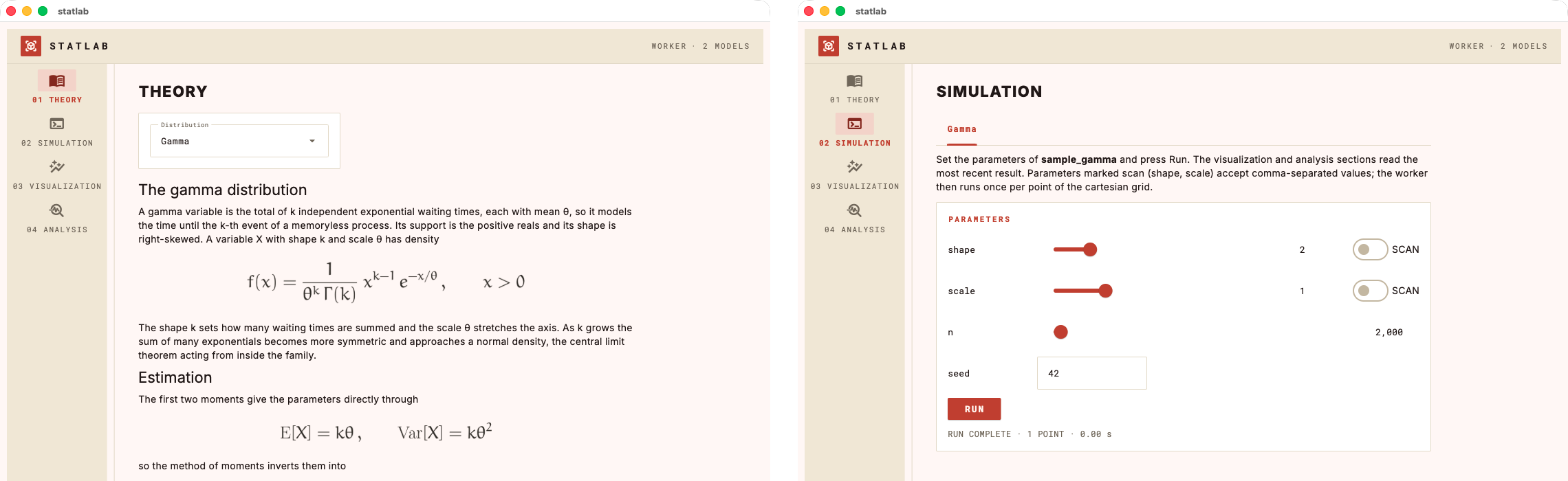
18
|
+
and choosing one makes that worker active. The Simulation page then shows the
|
|
19
|
+
active worker as a single tab so it matches the tabbed Visualization and
|
|
20
|
+
Analysis pages.
|
|
21
|
+
- **Shared context** — a per-session lab-level context that the Theory selector
|
|
22
|
+
writes and any worker, viz or analysis reads by declaring a `context`
|
|
23
|
+
parameter (injected at call time, never rendered as a control). So a choice is
|
|
24
|
+
made once and every page sees it.
|
|
25
|
+
- **Multiple workers** — call `add_worker` more than once to build a lab with
|
|
26
|
+
several workers. Each worker keeps its own workspace (controls, last result,
|
|
27
|
+
and per-tab settings), and the `add_viz` / `add_analysis` calls after each
|
|
28
|
+
`add_worker` attach that worker's own tabs. Several workers need a way to choose
|
|
29
|
+
among them, checked at build: a `selects_worker` model selector, or
|
|
30
|
+
`worker_view="tabs"` to lay the workers out as Simulation-page tabs (sharing one
|
|
31
|
+
set of visualizations and analyses). There is no top-bar worker dropdown.
|
|
32
|
+
Single-worker labs are unchanged. (`worker_view` is `"panels"` by default, or
|
|
33
|
+
`"tabs"`.)
|
|
34
|
+
- **Bundled fonts** — the app now ships its typefaces (Inter and Roboto Mono),
|
|
35
|
+
so the browser view renders the same faces and weights as the desktop window
|
|
36
|
+
instead of falling back to the platform default.
|
|
37
|
+
- **Clearer theory errors** — `set_theory` now raises on a mistyped file path
|
|
38
|
+
(a missing `Path`, or a bare `".md"` string) instead of silently rendering the
|
|
39
|
+
path as a one-line page.
|
|
40
|
+
- **Non-blocking Run** — the worker now runs off the UI thread, so a slow worker
|
|
41
|
+
no longer freezes the window. Run shows a `RUNNING…` status and disables the
|
|
42
|
+
button until the run settles. Fast workers are unaffected.
|
|
43
|
+
|
|
44
|
+
## 0.1.1 — 2026-07-22
|
|
45
|
+
|
|
46
|
+
Packaging and documentation only; no functional change.
|
|
47
|
+
|
|
48
|
+
- Complete PyPI metadata: `readme`, keywords, trove classifiers, and project
|
|
49
|
+
URLs, so the project page renders the README and links back to the repository.
|
|
50
|
+
- README image links use absolute URLs, so screenshots and the theme gallery
|
|
51
|
+
render on the PyPI project page rather than showing as broken images.
|
|
52
|
+
|
|
53
|
+
## 0.1.0 — 2026-07-22
|
|
54
|
+
|
|
55
|
+
Initial release.
|
|
56
|
+
|
|
57
|
+
- **`Lab`** — register plain Python functions (one worker, any number of
|
|
58
|
+
visualization and analysis functions) and a markdown theory source, then
|
|
59
|
+
`open()` the assembled app: as a native desktop window or served to the
|
|
60
|
+
browser, laid out as four rail-navigated pages or one continuous scrolling
|
|
61
|
+
page. All registration is validated on the spot, so a malformed app fails at
|
|
62
|
+
assembly rather than mid-navigation.
|
|
63
|
+
- **`Param` specs** — each worker/viz/analysis kwarg gets a UI control from its
|
|
64
|
+
`Param` (or a shorthand string such as `"int"` or `"scalar or array"`);
|
|
65
|
+
bounded params render as sliders with live readouts, unbounded ones as
|
|
66
|
+
validated text fields, tuples as per-element fields. Defaults are inferred
|
|
67
|
+
from the function signature.
|
|
68
|
+
- **Parameter scans** — a kwarg declared `scan=True` accepts comma-separated
|
|
69
|
+
values; the worker runs once per point of the cartesian grid and downstream
|
|
70
|
+
functions receive a `ScanResult` of `(params, result)` records.
|
|
71
|
+
- **Analysis dispatch** — an analysis may return a dict (two-column table), a
|
|
72
|
+
list of dicts or a DataFrame (table), a string (markdown), or a matplotlib
|
|
73
|
+
figure; the return shape picks the rendering.
|
|
74
|
+
- **Themes** — eight palettes selected by `open(theme=...)`, four dark and
|
|
75
|
+
four light; chrome, plot palette and equation ink move together, and
|
|
76
|
+
`labforge.palette()` / `labforge.style(fig, ax)` let an author's figures
|
|
77
|
+
follow the active theme.
|
|
78
|
+
- **LaTeX theory** — `$$...$$` blocks in the theory markdown render as crisp
|
|
79
|
+
equation images via system LaTeX, falling back to matplotlib mathtext.
|
|
80
|
+
- **MIT licensed.**
|
|
@@ -1,6 +1,6 @@
|
|
|
1
1
|
Metadata-Version: 2.4
|
|
2
2
|
Name: labforge
|
|
3
|
-
Version: 0.
|
|
3
|
+
Version: 0.2.0
|
|
4
4
|
Summary: Wrap plain Python functions into a small scientific Flet desktop app: theory, simulation, visualization, analysis.
|
|
5
5
|
Project-URL: Homepage, https://github.com/laroccod/labforge
|
|
6
6
|
Project-URL: Repository, https://github.com/laroccod/labforge
|
|
@@ -35,15 +35,15 @@ Description-Content-Type: text/markdown
|
|
|
35
35
|
|
|
36
36
|
*By Daniel La Rocco*
|
|
37
37
|
|
|
38
|
-
## **Turn plain Python scripts into
|
|
38
|
+
## **Turn plain Python scripts into small scientific desktop apps.**
|
|
39
39
|
|
|
40
|
-
labforge wraps a simulation you already have — a function that produces data,
|
|
40
|
+
`labforge` wraps a simulation you already have — a function that produces data,
|
|
41
41
|
a function that plots it, a function that summarizes it — into a polished
|
|
42
42
|
four-section app following the **theory → simulation → visualization →
|
|
43
43
|
analysis** workflow. Pure Python, rendered with [Flet](https://flet.dev); no
|
|
44
44
|
HTML, no JavaScript, no callbacks to wire up.
|
|
45
45
|
|
|
46
|
-
You provide the science and labforge supplies the app shell, the parameter controls
|
|
46
|
+
You provide the science and `labforge` supplies the app shell, the parameter controls
|
|
47
47
|
generated from your function signatures, the parameter-scan engine,
|
|
48
48
|
LaTeX rendering for your theory notes, and eight instrument-panel themes, four
|
|
49
49
|
dark and four light.
|
|
@@ -139,7 +139,7 @@ bounds, or a scan spec on a non-worker function raise `ValueError` when the
|
|
|
139
139
|
app is assembled, never mid-use.
|
|
140
140
|
|
|
141
141
|
**Parameter scans.** A kwarg declared `scan=True` gets a scan toggle (bounded)
|
|
142
|
-
or a comma-separated field (unbounded). Enter `0, 1, 2` and labforge calls the
|
|
142
|
+
or a comma-separated field (unbounded). Enter `0, 1, 2` and `labforge` calls the
|
|
143
143
|
worker once per point of the cartesian grid across all scanned parameters —
|
|
144
144
|
the worker itself always receives scalars. Downstream functions then receive a
|
|
145
145
|
`ScanResult`: a list of `(params, result)` records with `keys`, `values()` and
|
|
@@ -147,7 +147,7 @@ the worker itself always receives scalars. Downstream functions then receive a
|
|
|
147
147
|
|
|
148
148
|
**Visualizations.** Functions `viz(data, **kwargs)` returning a matplotlib
|
|
149
149
|
figure (bare or `(fig, ax)`). Each gets a tab with its own controls and a
|
|
150
|
-
Render button. Figures are yours — labforge only serializes them; the house
|
|
150
|
+
Render button. Figures are yours — `labforge` only serializes them; the house
|
|
151
151
|
style (`labforge.style(fig, ax)`) is strictly opt-in.
|
|
152
152
|
|
|
153
153
|
**Analyses.** Functions `analysis(data, **kwargs)` — the return shape picks
|
|
@@ -161,6 +161,35 @@ the rendering:
|
|
|
161
161
|
| Figure or `(fig, ax)` | image |
|
|
162
162
|
| anything else | its `repr` |
|
|
163
163
|
|
|
164
|
+
**Multiple workers.** Call `add_worker` more than once for a lab with several
|
|
165
|
+
workers. Each worker keeps its own workspace — its controls, its last result and
|
|
166
|
+
its per-tab settings — and the `add_viz` / `add_analysis` calls after each
|
|
167
|
+
`add_worker` attach that worker's own tabs, so switching workers and back
|
|
168
|
+
restores exactly what was there. Several workers need a way to choose among them
|
|
169
|
+
(checked at build): a `selects_worker` model selector, or `worker_view="tabs"`
|
|
170
|
+
to lay the workers out as Simulation-page tabs.
|
|
171
|
+
|
|
172
|
+
The clean way is a Theory-page selector with `selects_worker=True`: its options
|
|
173
|
+
name the workers, so choosing one both swaps the theory and makes that worker
|
|
174
|
+
active. There is no top-bar dropdown; the Simulation page shows the active
|
|
175
|
+
worker as a single tab, matching the tabbed Visualization and Analysis pages.
|
|
176
|
+
The demo (`examples/demo_lab.py`) uses this to switch between a normal and a
|
|
177
|
+
gamma model:
|
|
178
|
+
|
|
179
|
+
```python
|
|
180
|
+
lab.set_theory_selector(
|
|
181
|
+
"model",
|
|
182
|
+
Param(kind="choice", options=["Normal", "Gamma"]),
|
|
183
|
+
theory_for, # theory_for(selection) -> markdown
|
|
184
|
+
label="Distribution",
|
|
185
|
+
selects_worker=True,
|
|
186
|
+
)
|
|
187
|
+
lab.add_worker(sample, {...}, name="Normal") # its own viz/analysis tabs
|
|
188
|
+
lab.add_worker(sample_gamma, {...}, name="Gamma")
|
|
189
|
+
```
|
|
190
|
+
|
|
191
|
+
|
|
192
|
+
|
|
164
193
|
**Theory.** A markdown file or string. Displayed `$$...$$` equations render as
|
|
165
194
|
crisp images — through your system LaTeX toolchain when one is installed
|
|
166
195
|
(with the Euler math font), falling back to matplotlib's mathtext otherwise.
|
|
@@ -203,7 +232,13 @@ the theme's ink:
|
|
|
203
232
|
|
|
204
233
|
## Install
|
|
205
234
|
|
|
206
|
-
Requires Python ≥ 3.10.
|
|
235
|
+
Requires Python ≥ 3.10.
|
|
236
|
+
|
|
237
|
+
```bash
|
|
238
|
+
pip install labforge
|
|
239
|
+
```
|
|
240
|
+
|
|
241
|
+
Or from a clone, if you want to work on the code directly:
|
|
207
242
|
|
|
208
243
|
```bash
|
|
209
244
|
git clone https://github.com/laroccod/labforge.git
|
|
@@ -2,15 +2,15 @@
|
|
|
2
2
|
|
|
3
3
|
*By Daniel La Rocco*
|
|
4
4
|
|
|
5
|
-
## **Turn plain Python scripts into
|
|
5
|
+
## **Turn plain Python scripts into small scientific desktop apps.**
|
|
6
6
|
|
|
7
|
-
labforge wraps a simulation you already have — a function that produces data,
|
|
7
|
+
`labforge` wraps a simulation you already have — a function that produces data,
|
|
8
8
|
a function that plots it, a function that summarizes it — into a polished
|
|
9
9
|
four-section app following the **theory → simulation → visualization →
|
|
10
10
|
analysis** workflow. Pure Python, rendered with [Flet](https://flet.dev); no
|
|
11
11
|
HTML, no JavaScript, no callbacks to wire up.
|
|
12
12
|
|
|
13
|
-
You provide the science and labforge supplies the app shell, the parameter controls
|
|
13
|
+
You provide the science and `labforge` supplies the app shell, the parameter controls
|
|
14
14
|
generated from your function signatures, the parameter-scan engine,
|
|
15
15
|
LaTeX rendering for your theory notes, and eight instrument-panel themes, four
|
|
16
16
|
dark and four light.
|
|
@@ -106,7 +106,7 @@ bounds, or a scan spec on a non-worker function raise `ValueError` when the
|
|
|
106
106
|
app is assembled, never mid-use.
|
|
107
107
|
|
|
108
108
|
**Parameter scans.** A kwarg declared `scan=True` gets a scan toggle (bounded)
|
|
109
|
-
or a comma-separated field (unbounded). Enter `0, 1, 2` and labforge calls the
|
|
109
|
+
or a comma-separated field (unbounded). Enter `0, 1, 2` and `labforge` calls the
|
|
110
110
|
worker once per point of the cartesian grid across all scanned parameters —
|
|
111
111
|
the worker itself always receives scalars. Downstream functions then receive a
|
|
112
112
|
`ScanResult`: a list of `(params, result)` records with `keys`, `values()` and
|
|
@@ -114,7 +114,7 @@ the worker itself always receives scalars. Downstream functions then receive a
|
|
|
114
114
|
|
|
115
115
|
**Visualizations.** Functions `viz(data, **kwargs)` returning a matplotlib
|
|
116
116
|
figure (bare or `(fig, ax)`). Each gets a tab with its own controls and a
|
|
117
|
-
Render button. Figures are yours — labforge only serializes them; the house
|
|
117
|
+
Render button. Figures are yours — `labforge` only serializes them; the house
|
|
118
118
|
style (`labforge.style(fig, ax)`) is strictly opt-in.
|
|
119
119
|
|
|
120
120
|
**Analyses.** Functions `analysis(data, **kwargs)` — the return shape picks
|
|
@@ -128,6 +128,35 @@ the rendering:
|
|
|
128
128
|
| Figure or `(fig, ax)` | image |
|
|
129
129
|
| anything else | its `repr` |
|
|
130
130
|
|
|
131
|
+
**Multiple workers.** Call `add_worker` more than once for a lab with several
|
|
132
|
+
workers. Each worker keeps its own workspace — its controls, its last result and
|
|
133
|
+
its per-tab settings — and the `add_viz` / `add_analysis` calls after each
|
|
134
|
+
`add_worker` attach that worker's own tabs, so switching workers and back
|
|
135
|
+
restores exactly what was there. Several workers need a way to choose among them
|
|
136
|
+
(checked at build): a `selects_worker` model selector, or `worker_view="tabs"`
|
|
137
|
+
to lay the workers out as Simulation-page tabs.
|
|
138
|
+
|
|
139
|
+
The clean way is a Theory-page selector with `selects_worker=True`: its options
|
|
140
|
+
name the workers, so choosing one both swaps the theory and makes that worker
|
|
141
|
+
active. There is no top-bar dropdown; the Simulation page shows the active
|
|
142
|
+
worker as a single tab, matching the tabbed Visualization and Analysis pages.
|
|
143
|
+
The demo (`examples/demo_lab.py`) uses this to switch between a normal and a
|
|
144
|
+
gamma model:
|
|
145
|
+
|
|
146
|
+
```python
|
|
147
|
+
lab.set_theory_selector(
|
|
148
|
+
"model",
|
|
149
|
+
Param(kind="choice", options=["Normal", "Gamma"]),
|
|
150
|
+
theory_for, # theory_for(selection) -> markdown
|
|
151
|
+
label="Distribution",
|
|
152
|
+
selects_worker=True,
|
|
153
|
+
)
|
|
154
|
+
lab.add_worker(sample, {...}, name="Normal") # its own viz/analysis tabs
|
|
155
|
+
lab.add_worker(sample_gamma, {...}, name="Gamma")
|
|
156
|
+
```
|
|
157
|
+
|
|
158
|
+

|
|
159
|
+
|
|
131
160
|
**Theory.** A markdown file or string. Displayed `$$...$$` equations render as
|
|
132
161
|
crisp images — through your system LaTeX toolchain when one is installed
|
|
133
162
|
(with the Euler math font), falling back to matplotlib's mathtext otherwise.
|
|
@@ -170,7 +199,13 @@ the theme's ink:
|
|
|
170
199
|
|
|
171
200
|
## Install
|
|
172
201
|
|
|
173
|
-
Requires Python ≥ 3.10.
|
|
202
|
+
Requires Python ≥ 3.10.
|
|
203
|
+
|
|
204
|
+
```bash
|
|
205
|
+
pip install labforge
|
|
206
|
+
```
|
|
207
|
+
|
|
208
|
+
Or from a clone, if you want to work on the code directly:
|
|
174
209
|
|
|
175
210
|
```bash
|
|
176
211
|
git clone https://github.com/laroccod/labforge.git
|
|
Binary file
|
|
Binary file
|
|
Binary file
|
|
Binary file
|
|
Binary file
|
|
Binary file
|
|
Binary file
|
|
Binary file
|
|
Binary file
|
|
Binary file
|
|
@@ -1,16 +1,22 @@
|
|
|
1
1
|
"""
|
|
2
2
|
Demo lab
|
|
3
3
|
|
|
4
|
-
|
|
5
|
-
histogram (with fitted density)
|
|
6
|
-
|
|
7
|
-
|
|
8
|
-
|
|
4
|
+
Two samplers on one lab, to show off multiple workers and the Theory-page model
|
|
5
|
+
selector. A normal worker carries a histogram (with fitted density), a Q-Q plot
|
|
6
|
+
and a moments table; a gamma worker carries its own histogram and a
|
|
7
|
+
method-of-moments fit. The Theory-page dropdown is the single model switch
|
|
8
|
+
(selects_worker=True): choosing Normal or Gamma swaps the theory math and makes
|
|
9
|
+
that worker active, so the Simulation page shows its parameters as one tab and
|
|
10
|
+
the Visualization and Analysis pages show its own tabs. No top-bar worker
|
|
11
|
+
dropdown is needed. Each worker handles both a single run and a parameter scan.
|
|
12
|
+
Launch with `python examples/demo_lab.py`; add `--browser [port]` to serve it to
|
|
13
|
+
the default web browser instead, `--scroll` for one continuous scrolling page
|
|
9
14
|
instead of four, and/or `--theme <name>` to try a colour scheme (see
|
|
10
15
|
labforge.themes()).
|
|
11
16
|
"""
|
|
12
17
|
|
|
13
18
|
import argparse
|
|
19
|
+
from math import gamma as gamma_func
|
|
14
20
|
from pathlib import Path
|
|
15
21
|
from statistics import NormalDist
|
|
16
22
|
|
|
@@ -20,12 +26,32 @@ import numpy as np
|
|
|
20
26
|
import labforge
|
|
21
27
|
from labforge import Lab, Param, ScanResult
|
|
22
28
|
|
|
23
|
-
lab = Lab("
|
|
24
|
-
|
|
29
|
+
lab = Lab("statlab")
|
|
30
|
+
|
|
31
|
+
# The Theory page carries a dropdown that swaps the whole page between the two
|
|
32
|
+
# families; each option maps to its own markdown source.
|
|
33
|
+
THEORY = {
|
|
34
|
+
"Normal": Path(__file__).with_name("theory.md").read_text(encoding="utf-8"),
|
|
35
|
+
"Gamma": Path(__file__).with_name("theory_gamma.md").read_text(encoding="utf-8"),
|
|
36
|
+
}
|
|
37
|
+
|
|
38
|
+
|
|
39
|
+
def theory_for(model):
|
|
40
|
+
"""The theory markdown for the selected distribution."""
|
|
41
|
+
return THEORY[model]
|
|
42
|
+
|
|
43
|
+
|
|
44
|
+
lab.set_theory_selector(
|
|
45
|
+
"model",
|
|
46
|
+
Param(kind="choice", options=["Normal", "Gamma"], default="Normal"),
|
|
47
|
+
theory_for,
|
|
48
|
+
label="Distribution",
|
|
49
|
+
selects_worker=True,
|
|
50
|
+
)
|
|
25
51
|
|
|
26
52
|
|
|
27
53
|
def sample(mu=0.0, sigma=1.0, n=2000, seed=42):
|
|
28
|
-
"""Draw n
|
|
54
|
+
"""Draw n normal variates; reproducible for a given seed."""
|
|
29
55
|
return np.random.default_rng(seed).normal(mu, sigma, n)
|
|
30
56
|
|
|
31
57
|
|
|
@@ -37,6 +63,7 @@ lab.add_worker(
|
|
|
37
63
|
"n": Param(kind="int", default=2000, bounds=(10, 100_000)),
|
|
38
64
|
"seed": "int",
|
|
39
65
|
},
|
|
66
|
+
name="Normal",
|
|
40
67
|
)
|
|
41
68
|
|
|
42
69
|
|
|
@@ -131,6 +158,92 @@ lab.add_analysis(
|
|
|
131
158
|
)
|
|
132
159
|
|
|
133
160
|
|
|
161
|
+
# The gamma worker. Registering a second worker turns the top bar into a model
|
|
162
|
+
# selector, and add_viz/add_analysis below attach to this worker, not the normal
|
|
163
|
+
# one, so each model owns its own tabs.
|
|
164
|
+
def sample_gamma(shape=2.0, scale=1.0, n=2000, seed=42):
|
|
165
|
+
"""Draw n gamma variates; reproducible for a given seed."""
|
|
166
|
+
return np.random.default_rng(seed).gamma(shape, scale, n)
|
|
167
|
+
|
|
168
|
+
|
|
169
|
+
lab.add_worker(
|
|
170
|
+
sample_gamma,
|
|
171
|
+
{
|
|
172
|
+
"shape": Param(default=2.0, bounds=(0.5, 10), scan=True),
|
|
173
|
+
"scale": Param(default=1.0, bounds=(0.1, 4), scan=True),
|
|
174
|
+
"n": Param(kind="int", default=2000, bounds=(10, 100_000)),
|
|
175
|
+
"seed": "int",
|
|
176
|
+
},
|
|
177
|
+
name="Gamma",
|
|
178
|
+
)
|
|
179
|
+
|
|
180
|
+
|
|
181
|
+
def gamma_density(x, shape, scale):
|
|
182
|
+
"""The gamma density at x for shape k and scale θ."""
|
|
183
|
+
return x ** (shape - 1) * np.exp(-x / scale) / (scale**shape * gamma_func(shape))
|
|
184
|
+
|
|
185
|
+
|
|
186
|
+
def gamma_histogram(data, bins=40):
|
|
187
|
+
"""Density histogram of the draw; a scan overlays one histogram per point."""
|
|
188
|
+
fig, ax = plt.subplots(figsize=(7, 3.4))
|
|
189
|
+
if isinstance(data, ScanResult):
|
|
190
|
+
for params, draws in data:
|
|
191
|
+
label = ", ".join(f"{key} = {params[key]:g}" for key in data.keys)
|
|
192
|
+
ax.hist(draws, bins=bins, density=True, alpha=0.5, label=label)
|
|
193
|
+
else:
|
|
194
|
+
colors = labforge.palette()
|
|
195
|
+
ax.hist(data, bins=bins, density=True, color=colors.data, label="draw")
|
|
196
|
+
# The method-of-moments fit: shape and scale from the sample mean and variance.
|
|
197
|
+
mean, var = np.mean(data), np.var(data, ddof=1)
|
|
198
|
+
shape, scale = mean**2 / var, var / mean
|
|
199
|
+
x = np.linspace(np.min(data), np.max(data), 400)
|
|
200
|
+
ax.plot(
|
|
201
|
+
x,
|
|
202
|
+
gamma_density(x, shape, scale),
|
|
203
|
+
color=colors.model,
|
|
204
|
+
linewidth=1.6,
|
|
205
|
+
label="fitted density",
|
|
206
|
+
)
|
|
207
|
+
ax.legend()
|
|
208
|
+
ax.set_xlabel("x")
|
|
209
|
+
ax.set_ylabel("density")
|
|
210
|
+
labforge.style(fig, ax)
|
|
211
|
+
return fig, ax
|
|
212
|
+
|
|
213
|
+
|
|
214
|
+
lab.add_viz(
|
|
215
|
+
gamma_histogram,
|
|
216
|
+
"Histogram",
|
|
217
|
+
"Density-normalized histogram of the most recent draw, with the "
|
|
218
|
+
"method-of-moments gamma density on top. On a scan, one translucent "
|
|
219
|
+
"histogram per grid point shows how the shape sharpens and the scale "
|
|
220
|
+
"stretches the density.",
|
|
221
|
+
{"bins": Param(kind="int", default=40, bounds=(5, 200))},
|
|
222
|
+
)
|
|
223
|
+
|
|
224
|
+
|
|
225
|
+
def gamma_fit(data):
|
|
226
|
+
"""Method-of-moments shape and scale from the sample moments; one row per grid point on a scan."""
|
|
227
|
+
|
|
228
|
+
def row(draws):
|
|
229
|
+
mean, var = float(np.mean(draws)), float(np.var(draws, ddof=1))
|
|
230
|
+
return {"shape": mean**2 / var, "scale": var / mean, "mean": mean}
|
|
231
|
+
|
|
232
|
+
if isinstance(data, ScanResult):
|
|
233
|
+
return [{**params, **row(draws)} for params, draws in data]
|
|
234
|
+
return row(data)
|
|
235
|
+
|
|
236
|
+
|
|
237
|
+
lab.add_analysis(
|
|
238
|
+
gamma_fit,
|
|
239
|
+
"Fit",
|
|
240
|
+
"The mean is kθ and the variance is kθ², so the method of moments recovers "
|
|
241
|
+
"the shape as X̄²/s² and the scale as s²/X̄. The maximum-likelihood shape "
|
|
242
|
+
"has no closed form for this family, so the sample moments are the quick "
|
|
243
|
+
"estimate.",
|
|
244
|
+
)
|
|
245
|
+
|
|
246
|
+
|
|
134
247
|
if __name__ == "__main__":
|
|
135
248
|
parser = argparse.ArgumentParser(description="Run the labforge Gaussian demo.")
|
|
136
249
|
parser.add_argument(
|
|
@@ -0,0 +1,37 @@
|
|
|
1
|
+
## The gamma distribution
|
|
2
|
+
|
|
3
|
+
A gamma variable is the total of k independent exponential waiting times, each
|
|
4
|
+
with mean θ, so it models the time until the k-th event of a memoryless process.
|
|
5
|
+
Its support is the positive reals and its shape is right-skewed. A variable X
|
|
6
|
+
with shape k and scale θ has density
|
|
7
|
+
|
|
8
|
+
$$f(x) = \frac{1}{\theta^{k}\,\Gamma(k)}\; x^{k-1}\, e^{-x/\theta} \,, \qquad x > 0$$
|
|
9
|
+
|
|
10
|
+
The shape k sets how many waiting times are summed and the scale θ stretches the
|
|
11
|
+
axis. As k grows the sum of many exponentials becomes more symmetric and
|
|
12
|
+
approaches a normal density, the central limit theorem acting from inside the
|
|
13
|
+
family.
|
|
14
|
+
|
|
15
|
+
## Estimation
|
|
16
|
+
|
|
17
|
+
The first two moments give the parameters directly through
|
|
18
|
+
|
|
19
|
+
$$\mathrm{E}[X] = k\theta \,, \qquad \mathrm{Var}[X] = k\theta^{2}$$
|
|
20
|
+
|
|
21
|
+
so the method of moments inverts them into
|
|
22
|
+
|
|
23
|
+
$$\hat{k} = \frac{\bar{X}^{2}}{s^{2}} \,, \qquad
|
|
24
|
+
\hat{\theta} = \frac{s^{2}}{\bar{X}}$$
|
|
25
|
+
|
|
26
|
+
where X̄ is the sample mean and s² the sample variance. Unlike the normal family
|
|
27
|
+
the maximum-likelihood shape has no closed form and is found numerically, so the
|
|
28
|
+
method of moments is the quick estimate the analysis tab reports.
|
|
29
|
+
|
|
30
|
+
## What the simulation shows
|
|
31
|
+
|
|
32
|
+
The worker draws n independent gamma variates with numpy's `default_rng(seed)`,
|
|
33
|
+
so a given seed reproduces the sample. The **histogram** compares the draw
|
|
34
|
+
against its method-of-moments density, and the **fit** analysis recovers the
|
|
35
|
+
shape and scale from the sample moments. Scanning the shape sharpens the density
|
|
36
|
+
and pulls it toward symmetry as k rises, and scanning the scale stretches it
|
|
37
|
+
along the x axis without changing its form.
|
|
@@ -4,7 +4,7 @@ build-backend = "hatchling.build"
|
|
|
4
4
|
|
|
5
5
|
[project]
|
|
6
6
|
name = "labforge"
|
|
7
|
-
version = "0.
|
|
7
|
+
version = "0.2.0"
|
|
8
8
|
description = "Wrap plain Python functions into a small scientific Flet desktop app: theory, simulation, visualization, analysis."
|
|
9
9
|
readme = "README.md"
|
|
10
10
|
license = "MIT"
|
|
@@ -0,0 +1,93 @@
|
|
|
1
|
+
Copyright 2020 The Inter Project Authors (https://github.com/rsms/inter)
|
|
2
|
+
|
|
3
|
+
This Font Software is licensed under the SIL Open Font License, Version 1.1.
|
|
4
|
+
This license is copied below, and is also available with a FAQ at:
|
|
5
|
+
https://scripts.sil.org/OFL
|
|
6
|
+
|
|
7
|
+
|
|
8
|
+
-----------------------------------------------------------
|
|
9
|
+
SIL OPEN FONT LICENSE Version 1.1 - 26 February 2007
|
|
10
|
+
-----------------------------------------------------------
|
|
11
|
+
|
|
12
|
+
PREAMBLE
|
|
13
|
+
The goals of the Open Font License (OFL) are to stimulate worldwide
|
|
14
|
+
development of collaborative font projects, to support the font creation
|
|
15
|
+
efforts of academic and linguistic communities, and to provide a free and
|
|
16
|
+
open framework in which fonts may be shared and improved in partnership
|
|
17
|
+
with others.
|
|
18
|
+
|
|
19
|
+
The OFL allows the licensed fonts to be used, studied, modified and
|
|
20
|
+
redistributed freely as long as they are not sold by themselves. The
|
|
21
|
+
fonts, including any derivative works, can be bundled, embedded,
|
|
22
|
+
redistributed and/or sold with any software provided that any reserved
|
|
23
|
+
names are not used by derivative works. The fonts and derivatives,
|
|
24
|
+
however, cannot be released under any other type of license. The
|
|
25
|
+
requirement for fonts to remain under this license does not apply
|
|
26
|
+
to any document created using the fonts or their derivatives.
|
|
27
|
+
|
|
28
|
+
DEFINITIONS
|
|
29
|
+
"Font Software" refers to the set of files released by the Copyright
|
|
30
|
+
Holder(s) under this license and clearly marked as such. This may
|
|
31
|
+
include source files, build scripts and documentation.
|
|
32
|
+
|
|
33
|
+
"Reserved Font Name" refers to any names specified as such after the
|
|
34
|
+
copyright statement(s).
|
|
35
|
+
|
|
36
|
+
"Original Version" refers to the collection of Font Software components as
|
|
37
|
+
distributed by the Copyright Holder(s).
|
|
38
|
+
|
|
39
|
+
"Modified Version" refers to any derivative made by adding to, deleting,
|
|
40
|
+
or substituting -- in part or in whole -- any of the components of the
|
|
41
|
+
Original Version, by changing formats or by porting the Font Software to a
|
|
42
|
+
new environment.
|
|
43
|
+
|
|
44
|
+
"Author" refers to any designer, engineer, programmer, technical
|
|
45
|
+
writer or other person who contributed to the Font Software.
|
|
46
|
+
|
|
47
|
+
PERMISSION & CONDITIONS
|
|
48
|
+
Permission is hereby granted, free of charge, to any person obtaining
|
|
49
|
+
a copy of the Font Software, to use, study, copy, merge, embed, modify,
|
|
50
|
+
redistribute, and sell modified and unmodified copies of the Font
|
|
51
|
+
Software, subject to the following conditions:
|
|
52
|
+
|
|
53
|
+
1) Neither the Font Software nor any of its individual components,
|
|
54
|
+
in Original or Modified Versions, may be sold by itself.
|
|
55
|
+
|
|
56
|
+
2) Original or Modified Versions of the Font Software may be bundled,
|
|
57
|
+
redistributed and/or sold with any software, provided that each copy
|
|
58
|
+
contains the above copyright notice and this license. These can be
|
|
59
|
+
included either as stand-alone text files, human-readable headers or
|
|
60
|
+
in the appropriate machine-readable metadata fields within text or
|
|
61
|
+
binary files as long as those fields can be easily viewed by the user.
|
|
62
|
+
|
|
63
|
+
3) No Modified Version of the Font Software may use the Reserved Font
|
|
64
|
+
Name(s) unless explicit written permission is granted by the corresponding
|
|
65
|
+
Copyright Holder. This restriction only applies to the primary font name as
|
|
66
|
+
presented to the users.
|
|
67
|
+
|
|
68
|
+
4) The name(s) of the Copyright Holder(s) or the Author(s) of the Font
|
|
69
|
+
Software shall not be used to promote, endorse or advertise any
|
|
70
|
+
Modified Version, except to acknowledge the contribution(s) of the
|
|
71
|
+
Copyright Holder(s) and the Author(s) or with their explicit written
|
|
72
|
+
permission.
|
|
73
|
+
|
|
74
|
+
5) The Font Software, modified or unmodified, in part or in whole,
|
|
75
|
+
must be distributed entirely under this license, and must not be
|
|
76
|
+
distributed under any other license. The requirement for fonts to
|
|
77
|
+
remain under this license does not apply to any document created
|
|
78
|
+
using the Font Software.
|
|
79
|
+
|
|
80
|
+
TERMINATION
|
|
81
|
+
This license becomes null and void if any of the above conditions are
|
|
82
|
+
not met.
|
|
83
|
+
|
|
84
|
+
DISCLAIMER
|
|
85
|
+
THE FONT SOFTWARE IS PROVIDED "AS IS", WITHOUT WARRANTY OF ANY KIND,
|
|
86
|
+
EXPRESS OR IMPLIED, INCLUDING BUT NOT LIMITED TO ANY WARRANTIES OF
|
|
87
|
+
MERCHANTABILITY, FITNESS FOR A PARTICULAR PURPOSE AND NONINFRINGEMENT
|
|
88
|
+
OF COPYRIGHT, PATENT, TRADEMARK, OR OTHER RIGHT. IN NO EVENT SHALL THE
|
|
89
|
+
COPYRIGHT HOLDER BE LIABLE FOR ANY CLAIM, DAMAGES OR OTHER LIABILITY,
|
|
90
|
+
INCLUDING ANY GENERAL, SPECIAL, INDIRECT, INCIDENTAL, OR CONSEQUENTIAL
|
|
91
|
+
DAMAGES, WHETHER IN AN ACTION OF CONTRACT, TORT OR OTHERWISE, ARISING
|
|
92
|
+
FROM, OUT OF THE USE OR INABILITY TO USE THE FONT SOFTWARE OR FROM
|
|
93
|
+
OTHER DEALINGS IN THE FONT SOFTWARE.
|
|
Binary file
|