labelimage-tools 0.1.3__tar.gz
This diff represents the content of publicly available package versions that have been released to one of the supported registries. The information contained in this diff is provided for informational purposes only and reflects changes between package versions as they appear in their respective public registries.
- labelimage_tools-0.1.3/LICENSE +28 -0
- labelimage_tools-0.1.3/PKG-INFO +286 -0
- labelimage_tools-0.1.3/README-pypi.md +234 -0
- labelimage_tools-0.1.3/README.md +225 -0
- labelimage_tools-0.1.3/pyproject.toml +75 -0
- labelimage_tools-0.1.3/setup.cfg +4 -0
- labelimage_tools-0.1.3/src/labelimage_tools/__init__.py +117 -0
- labelimage_tools-0.1.3/src/labelimage_tools/_bbox.py +148 -0
- labelimage_tools-0.1.3/src/labelimage_tools/_graph_io.py +298 -0
- labelimage_tools-0.1.3/src/labelimage_tools/_optional.py +26 -0
- labelimage_tools-0.1.3/src/labelimage_tools/adjacency.py +363 -0
- labelimage_tools-0.1.3/src/labelimage_tools/coloring.py +408 -0
- labelimage_tools-0.1.3/src/labelimage_tools/contours.py +86 -0
- labelimage_tools-0.1.3/src/labelimage_tools/io.py +264 -0
- labelimage_tools-0.1.3/src/labelimage_tools/junctions.py +417 -0
- labelimage_tools-0.1.3/src/labelimage_tools/plotting.py +433 -0
- labelimage_tools-0.1.3/src/labelimage_tools/preprocessing.py +520 -0
- labelimage_tools-0.1.3/src/labelimage_tools/typing.py +17 -0
- labelimage_tools-0.1.3/src/labelimage_tools/validation.py +78 -0
- labelimage_tools-0.1.3/src/labelimage_tools.egg-info/PKG-INFO +286 -0
- labelimage_tools-0.1.3/src/labelimage_tools.egg-info/SOURCES.txt +31 -0
- labelimage_tools-0.1.3/src/labelimage_tools.egg-info/dependency_links.txt +1 -0
- labelimage_tools-0.1.3/src/labelimage_tools.egg-info/requires.txt +50 -0
- labelimage_tools-0.1.3/src/labelimage_tools.egg-info/top_level.txt +1 -0
- labelimage_tools-0.1.3/tests/test_adjacency.py +69 -0
- labelimage_tools-0.1.3/tests/test_bbox.py +78 -0
- labelimage_tools-0.1.3/tests/test_coloring.py +49 -0
- labelimage_tools-0.1.3/tests/test_contours.py +24 -0
- labelimage_tools-0.1.3/tests/test_io.py +145 -0
- labelimage_tools-0.1.3/tests/test_junctions.py +219 -0
- labelimage_tools-0.1.3/tests/test_plotting.py +38 -0
- labelimage_tools-0.1.3/tests/test_preprocessing.py +60 -0
- labelimage_tools-0.1.3/tests/test_validation.py +27 -0
|
@@ -0,0 +1,28 @@
|
|
|
1
|
+
BSD 3-Clause License
|
|
2
|
+
|
|
3
|
+
Copyright (c) 2026, zen-lab and mwappner
|
|
4
|
+
|
|
5
|
+
Redistribution and use in source and binary forms, with or without
|
|
6
|
+
modification, are permitted provided that the following conditions are met:
|
|
7
|
+
|
|
8
|
+
1. Redistributions of source code must retain the above copyright notice, this
|
|
9
|
+
list of conditions and the following disclaimer.
|
|
10
|
+
|
|
11
|
+
2. Redistributions in binary form must reproduce the above copyright notice,
|
|
12
|
+
this list of conditions and the following disclaimer in the documentation
|
|
13
|
+
and/or other materials provided with the distribution.
|
|
14
|
+
|
|
15
|
+
3. Neither the name of the copyright holder nor the names of its
|
|
16
|
+
contributors may be used to endorse or promote products derived from
|
|
17
|
+
this software without specific prior written permission.
|
|
18
|
+
|
|
19
|
+
THIS SOFTWARE IS PROVIDED BY THE COPYRIGHT HOLDERS AND CONTRIBUTORS "AS IS"
|
|
20
|
+
AND ANY EXPRESS OR IMPLIED WARRANTIES, INCLUDING, BUT NOT LIMITED TO, THE
|
|
21
|
+
IMPLIED WARRANTIES OF MERCHANTABILITY AND FITNESS FOR A PARTICULAR PURPOSE ARE
|
|
22
|
+
DISCLAIMED. IN NO EVENT SHALL THE COPYRIGHT HOLDER OR CONTRIBUTORS BE LIABLE
|
|
23
|
+
FOR ANY DIRECT, INDIRECT, INCIDENTAL, SPECIAL, EXEMPLARY, OR CONSEQUENTIAL
|
|
24
|
+
DAMAGES (INCLUDING, BUT NOT LIMITED TO, PROCUREMENT OF SUBSTITUTE GOODS OR
|
|
25
|
+
SERVICES; LOSS OF USE, DATA, OR PROFITS; OR BUSINESS INTERRUPTION) HOWEVER
|
|
26
|
+
CAUSED AND ON ANY THEORY OF LIABILITY, WHETHER IN CONTRACT, STRICT LIABILITY,
|
|
27
|
+
OR TORT (INCLUDING NEGLIGENCE OR OTHERWISE) ARISING IN ANY WAY OUT OF THE USE
|
|
28
|
+
OF THIS SOFTWARE, EVEN IF ADVISED OF THE POSSIBILITY OF SUCH DAMAGE.
|
|
@@ -0,0 +1,286 @@
|
|
|
1
|
+
Metadata-Version: 2.4
|
|
2
|
+
Name: labelimage-tools
|
|
3
|
+
Version: 0.1.3
|
|
4
|
+
Summary: Utilities for 2-D labeled tissue segmentation images
|
|
5
|
+
Author: zen-lab, mwappner
|
|
6
|
+
License-Expression: BSD-3-Clause
|
|
7
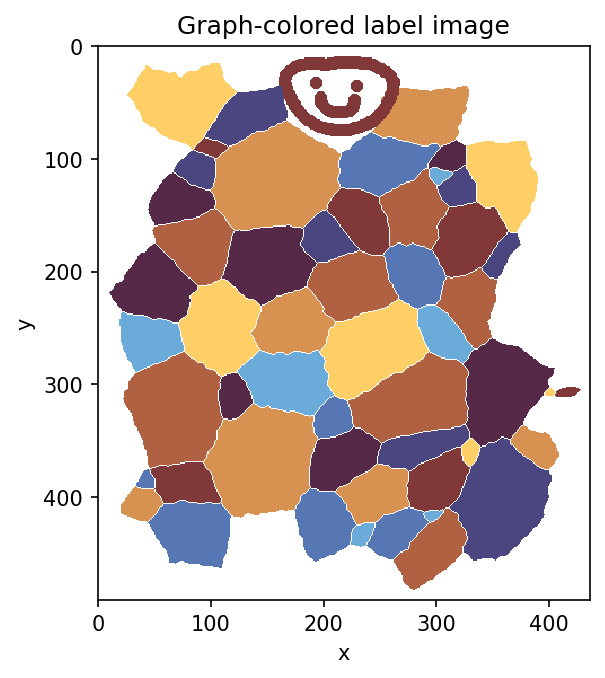
|
+
Requires-Python: >=3.10
|
|
8
|
+
Description-Content-Type: text/markdown
|
|
9
|
+
License-File: LICENSE
|
|
10
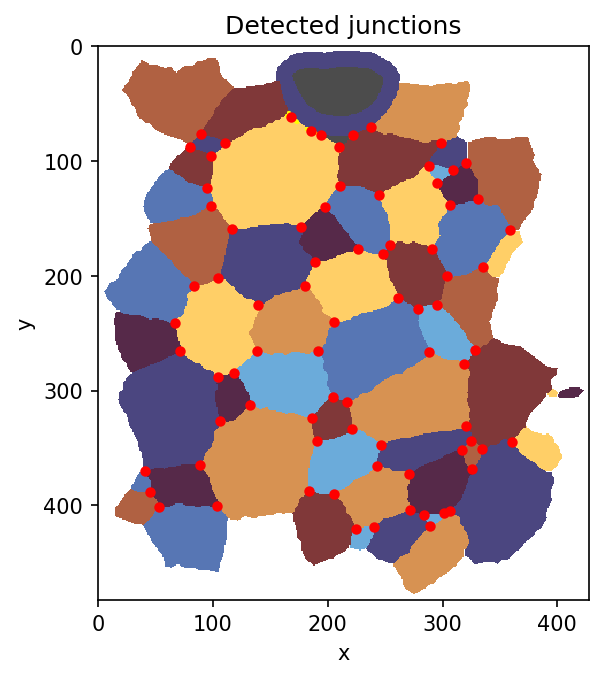
|
+
Requires-Dist: numpy>=1.24
|
|
11
|
+
Requires-Dist: scipy>=1.10
|
|
12
|
+
Provides-Extra: tiff
|
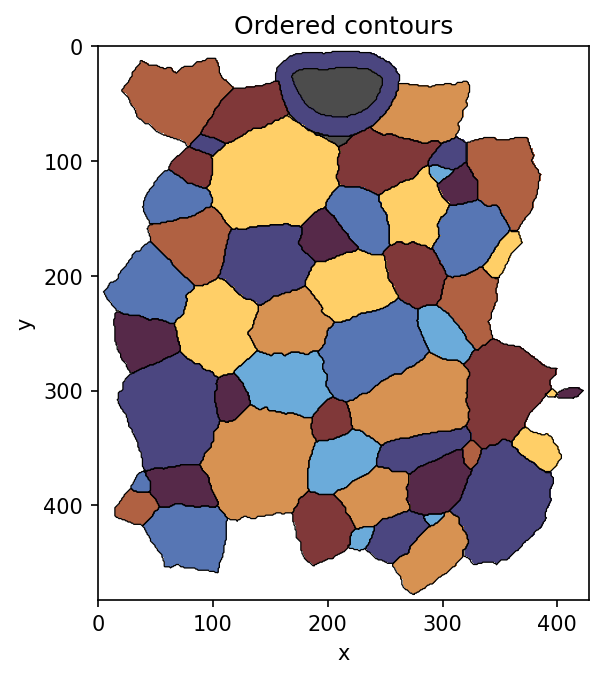
|
13
|
+
Requires-Dist: tifffile>=2022.8.12; extra == "tiff"
|
|
14
|
+
Provides-Extra: pillow
|
|
15
|
+
Requires-Dist: pillow>=9; extra == "pillow"
|
|
16
|
+
Provides-Extra: plot
|
|
17
|
+
Requires-Dist: matplotlib>=3.7; extra == "plot"
|
|
18
|
+
Requires-Dist: scikit-image>=0.21; extra == "plot"
|
|
19
|
+
Requires-Dist: networkx>=3.0; extra == "plot"
|
|
20
|
+
Provides-Extra: graph-standard
|
|
21
|
+
Requires-Dist: networkx>=3.0; extra == "graph-standard"
|
|
22
|
+
Provides-Extra: junctions-accelerated
|
|
23
|
+
Requires-Dist: numba>=0.57; extra == "junctions-accelerated"
|
|
24
|
+
Provides-Extra: recommended
|
|
25
|
+
Requires-Dist: tifffile>=2022.8.12; extra == "recommended"
|
|
26
|
+
Requires-Dist: numba>=0.57; extra == "recommended"
|
|
27
|
+
Provides-Extra: all
|
|
28
|
+
Requires-Dist: tifffile>=2022.8.12; extra == "all"
|
|
29
|
+
Requires-Dist: pillow>=9; extra == "all"
|
|
30
|
+
Requires-Dist: matplotlib>=3.7; extra == "all"
|
|
31
|
+
Requires-Dist: scikit-image>=0.21; extra == "all"
|
|
32
|
+
Requires-Dist: networkx>=3.0; extra == "all"
|
|
33
|
+
Requires-Dist: numba>=0.57; extra == "all"
|
|
34
|
+
Provides-Extra: test
|
|
35
|
+
Requires-Dist: pytest>=7; extra == "test"
|
|
36
|
+
Requires-Dist: tifffile>=2022.8.12; extra == "test"
|
|
37
|
+
Requires-Dist: pillow>=9; extra == "test"
|
|
38
|
+
Requires-Dist: matplotlib>=3.7; extra == "test"
|
|
39
|
+
Requires-Dist: scikit-image>=0.21; extra == "test"
|
|
40
|
+
Requires-Dist: networkx>=3.0; extra == "test"
|
|
41
|
+
Requires-Dist: numba>=0.57; extra == "test"
|
|
42
|
+
Provides-Extra: dev
|
|
43
|
+
Requires-Dist: pytest>=7; extra == "dev"
|
|
44
|
+
Requires-Dist: ruff>=0.5; extra == "dev"
|
|
45
|
+
Requires-Dist: tifffile>=2022.8.12; extra == "dev"
|
|
46
|
+
Requires-Dist: pillow>=9; extra == "dev"
|
|
47
|
+
Requires-Dist: matplotlib>=3.7; extra == "dev"
|
|
48
|
+
Requires-Dist: scikit-image>=0.21; extra == "dev"
|
|
49
|
+
Requires-Dist: networkx>=3.0; extra == "dev"
|
|
50
|
+
Requires-Dist: numba>=0.57; extra == "dev"
|
|
51
|
+
Dynamic: license-file
|
|
52
|
+
|
|
53
|
+
# labelimage-tools
|
|
54
|
+
|
|
55
|
+
`labelimage-tools` is a small utility package for 2-D labeled tissue
|
|
56
|
+
segmentation images. It provides loading, validation, preprocessing, adjacency
|
|
57
|
+
and contact extraction, junction detection, graph coloring, contours, and
|
|
58
|
+
matplotlib plotting helpers.
|
|
59
|
+
|
|
60
|
+
## Conventions
|
|
61
|
+
|
|
62
|
+
- Label images are 2-D NumPy arrays.
|
|
63
|
+
- Image coordinates are represented as `(y, x)`.
|
|
64
|
+
- The default background label is `0`.
|
|
65
|
+
- Labels do not need to be consecutive.
|
|
66
|
+
- Integer label values are preserved unless a function explicitly documents a
|
|
67
|
+
relabeling operation.
|
|
68
|
+
|
|
69
|
+
## Installation
|
|
70
|
+
|
|
71
|
+
### Light install
|
|
72
|
+
|
|
73
|
+
```bash
|
|
74
|
+
pip install labelimage-tools
|
|
75
|
+
```
|
|
76
|
+
|
|
77
|
+
The light install supports array-based preprocessing, adjacency/contact graph
|
|
78
|
+
calculation, and native NPZ/JSON graph I/O.
|
|
79
|
+
|
|
80
|
+
### TIFF image I/O
|
|
81
|
+
|
|
82
|
+
For label-image I/O, installing the `tiff` extra is recommended because most
|
|
83
|
+
scientific label images are TIFF files:
|
|
84
|
+
|
|
85
|
+
```bash
|
|
86
|
+
pip install "labelimage-tools[tiff]"
|
|
87
|
+
```
|
|
88
|
+
|
|
89
|
+
This installs `tifffile`, the recommended backend for scientific TIFF label
|
|
90
|
+
images.
|
|
91
|
+
|
|
92
|
+
### Recommended scientific-image install
|
|
93
|
+
|
|
94
|
+
For most scientific label-image workflows, install TIFF support plus accelerated
|
|
95
|
+
junction scanning:
|
|
96
|
+
|
|
97
|
+
```bash
|
|
98
|
+
pip install "labelimage-tools[recommended]"
|
|
99
|
+
```
|
|
100
|
+
|
|
101
|
+
### Other optional features
|
|
102
|
+
|
|
103
|
+
```bash
|
|
104
|
+
pip install "labelimage-tools[pillow]" # PNG/JPEG/general image I/O
|
|
105
|
+
pip install "labelimage-tools[plot]" # plotting, contours, graph coloring
|
|
106
|
+
pip install "labelimage-tools[graph-standard]" # GraphML/GEXF graph I/O
|
|
107
|
+
pip install "labelimage-tools[junctions-accelerated]" # numba-accelerated junction scanning
|
|
108
|
+
pip install "labelimage-tools[all]" # everything
|
|
109
|
+
```
|
|
110
|
+
|
|
111
|
+
| Feature | Install |
|
|
112
|
+
|---|---|
|
|
113
|
+
| Core array processing, adjacency, NPZ/JSON graph I/O | `labelimage-tools` |
|
|
114
|
+
| TIFF image I/O | `labelimage-tools[tiff]` |
|
|
115
|
+
| TIFF image I/O + accelerated junction scanning | `labelimage-tools[recommended]` |
|
|
116
|
+
| PNG/JPEG/general image I/O | `labelimage-tools[pillow]` |
|
|
117
|
+
| Plotting, contours, graph coloring | `labelimage-tools[plot]` |
|
|
118
|
+
| GraphML/GEXF graph I/O | `labelimage-tools[graph-standard]` |
|
|
119
|
+
| Everything | `labelimage-tools[all]` |
|
|
120
|
+
|
|
121
|
+
From a source checkout:
|
|
122
|
+
|
|
123
|
+
```bash
|
|
124
|
+
python -m pip install -e .
|
|
125
|
+
```
|
|
126
|
+
|
|
127
|
+
For tests:
|
|
128
|
+
|
|
129
|
+
```bash
|
|
130
|
+
python -m pip install -e '.[test]'
|
|
131
|
+
python -m pytest
|
|
132
|
+
```
|
|
133
|
+
|
|
134
|
+
## Load and preprocess labels
|
|
135
|
+
|
|
136
|
+
Use these helpers directly from scripts or notebooks. The intended starting
|
|
137
|
+
point is `load_image_pipeline(...)`: with its defaults, it crops foreground,
|
|
138
|
+
removes disconnected bits of repeated labels, and fills internal gaps. This
|
|
139
|
+
prepares the image so labels are clean, self-connected, unique regions that are
|
|
140
|
+
ready for adjacency, contour, and junction operations, with neighboring labels
|
|
141
|
+
touching across filled internal gaps rather than being separated by stray
|
|
142
|
+
background holes.
|
|
143
|
+
|
|
144
|
+
```python
|
|
145
|
+
import labelimage_tools as lit
|
|
146
|
+
|
|
147
|
+
labels = lit.load_image_pipeline("segmentation.tif")
|
|
148
|
+
```
|
|
149
|
+
|
|
150
|
+
## Adjacency and contact graph
|
|
151
|
+
|
|
152
|
+
Adjacency is computed by vectorized neighbor scanning. Contact values are
|
|
153
|
+
neighboring pixel-pair counts, useful as weights but not exact geometric
|
|
154
|
+
lengths. Original label IDs are preserved as graph node IDs.
|
|
155
|
+
|
|
156
|
+
```python
|
|
157
|
+
neighbors, contacts, centroids, pixel_counts = lit.graph_from_labels(labels)
|
|
158
|
+
|
|
159
|
+
lit.save_label_graph(
|
|
160
|
+
"label_graph.npz",
|
|
161
|
+
neighbors,
|
|
162
|
+
contacts=contacts,
|
|
163
|
+
centroids=centroids,
|
|
164
|
+
pixel_counts=pixel_counts,
|
|
165
|
+
source_image="segmentation.tif",
|
|
166
|
+
)
|
|
167
|
+
|
|
168
|
+
neighbors, contacts, centroids, pixel_counts, metadata = lit.load_label_graph(
|
|
169
|
+
"label_graph.npz"
|
|
170
|
+
)
|
|
171
|
+
|
|
172
|
+
# JSON is a readable alternative for smaller graphs or inspection.
|
|
173
|
+
lit.save_label_graph("label_graph.json", neighbors, contacts=contacts)
|
|
174
|
+
```
|
|
175
|
+
|
|
176
|
+
## Junction detection
|
|
177
|
+
|
|
178
|
+
Junction pixels are pixels whose 3×3 neighborhood contains at least three
|
|
179
|
+
distinct labels. Connected junction pixels are clustered into `Junction`
|
|
180
|
+
objects with subpixel `(y, x)` centroids and the set of labels that meet there.
|
|
181
|
+
|
|
182
|
+
```python
|
|
183
|
+
junction_label_image, junctions = lit.junctions_from_labels(
|
|
184
|
+
labels,
|
|
185
|
+
background=None,
|
|
186
|
+
min_labels=3,
|
|
187
|
+
connectivity=2,
|
|
188
|
+
)
|
|
189
|
+
|
|
190
|
+
for junction in junctions:
|
|
191
|
+
print(junction.id, junction.yx, sorted(junction.labels))
|
|
192
|
+
```
|
|
193
|
+
|
|
194
|
+
## Graph-colored plotting
|
|
195
|
+
|
|
196
|
+
Plotting helpers return matplotlib objects and never call `plt.show()`, so they
|
|
197
|
+
compose cleanly in notebooks.
|
|
198
|
+
|
|
199
|
+
```python
|
|
200
|
+
fig, ax = lit.plot_label_image(
|
|
201
|
+
labels,
|
|
202
|
+
use_graph_coloring=True,
|
|
203
|
+
K=8,
|
|
204
|
+
seed=1,
|
|
205
|
+
title="Graph-colored labels",
|
|
206
|
+
)
|
|
207
|
+
|
|
208
|
+
fig, ax = lit.plot_junctions(labels, junctions=junctions, ax=ax)
|
|
209
|
+
```
|
|
210
|
+
|
|
211
|
+
You can also use the lower-level coloring helper:
|
|
212
|
+
|
|
213
|
+
```python
|
|
214
|
+
image, lut, ax = lit.show_map_with_colors(labels, K=8, seed=1)
|
|
215
|
+
```
|
|
216
|
+
|
|
217
|
+
## Examples and cookbook
|
|
218
|
+
|
|
219
|
+
The `examples/` directory contains script-style examples. Edit the constants at
|
|
220
|
+
the top of each script, run it, or copy sections into a notebook.
|
|
221
|
+
|
|
222
|
+
```bash
|
|
223
|
+
python examples/01_graph_coloring.py
|
|
224
|
+
python examples/02_preprocessing_gallery.py
|
|
225
|
+
python examples/03_junctions_and_contours.py
|
|
226
|
+
python examples/04_graph_io.py
|
|
227
|
+
```
|
|
228
|
+
|
|
229
|
+
The cookbook walks through the same workflows and embeds the generated images
|
|
230
|
+
in the GitHub/local documentation.
|
|
231
|
+
|
|
232
|
+
- Examples: <https://github.com/zen-laboratory/labelimage-tools/tree/main/examples>
|
|
233
|
+
- Cookbook: <https://github.com/zen-laboratory/labelimage-tools/blob/main/docs/cookbook.md>
|
|
234
|
+
- Generated example plots: <https://github.com/zen-laboratory/labelimage-tools/tree/main/examples/plots>
|
|
235
|
+
|
|
236
|
+
### Essential processing outputs
|
|
237
|
+
|
|
238
|
+
The GitHub README and cookbook show rendered images for the graph-colored label
|
|
239
|
+
image, detected junctions, and ordered contours. For PyPI/TestPyPI, those local
|
|
240
|
+
relative image embeds are replaced with repository links so the long
|
|
241
|
+
description renders safely.
|
|
242
|
+
|
|
243
|
+
Graph-colored label image using the cyclic `managua` colormap:
|
|
244
|
+
|
|
245
|
+
```python
|
|
246
|
+
labels = lit.load_image_pipeline("samples/test_cells2D.tif")
|
|
247
|
+
|
|
248
|
+
fig, ax = lit.plot_label_image(
|
|
249
|
+
labels,
|
|
250
|
+
use_graph_coloring=True,
|
|
251
|
+
K=8,
|
|
252
|
+
seed=4,
|
|
253
|
+
cmap="managua",
|
|
254
|
+
cyclic_cmap=True,
|
|
255
|
+
title="Graph-colored label image",
|
|
256
|
+
)
|
|
257
|
+
```
|
|
258
|
+
|
|
259
|
+
|
|
260
|
+
|
|
261
|
+
Detected junctions:
|
|
262
|
+
|
|
263
|
+
```python
|
|
264
|
+
labels = lit.load_image_pipeline("samples/test_cells2D.tif")
|
|
265
|
+
junction_label_image, junctions = lit.junctions_from_labels(
|
|
266
|
+
labels,
|
|
267
|
+
background=0,
|
|
268
|
+
min_labels=3,
|
|
269
|
+
connectivity=2,
|
|
270
|
+
)
|
|
271
|
+
fig, ax = lit.plot_label_image(labels, cmap="managua", cyclic_cmap=True)
|
|
272
|
+
lit.plot_junctions(junctions=junctions, junction_mask=junction_label_image > 0, ax=ax)
|
|
273
|
+
```
|
|
274
|
+
|
|
275
|
+
|
|
276
|
+
|
|
277
|
+
Ordered contours:
|
|
278
|
+
|
|
279
|
+
```python
|
|
280
|
+
labels = lit.load_image_pipeline("samples/test_cells2D.tif")
|
|
281
|
+
contours = lit.ordered_contours_from_labels(labels, background=0)
|
|
282
|
+
fig, ax = lit.plot_label_image(labels, cmap="managua", cyclic_cmap=True)
|
|
283
|
+
lit.plot_contours(labels, ax=ax, background=0, color="black", linewidth=0.6)
|
|
284
|
+
```
|
|
285
|
+
|
|
286
|
+
|
|
@@ -0,0 +1,234 @@
|
|
|
1
|
+
# labelimage-tools
|
|
2
|
+
|
|
3
|
+
`labelimage-tools` is a small utility package for 2-D labeled tissue
|
|
4
|
+
segmentation images. It provides loading, validation, preprocessing, adjacency
|
|
5
|
+
and contact extraction, junction detection, graph coloring, contours, and
|
|
6
|
+
matplotlib plotting helpers.
|
|
7
|
+
|
|
8
|
+
## Conventions
|
|
9
|
+
|
|
10
|
+
- Label images are 2-D NumPy arrays.
|
|
11
|
+
- Image coordinates are represented as `(y, x)`.
|
|
12
|
+
- The default background label is `0`.
|
|
13
|
+
- Labels do not need to be consecutive.
|
|
14
|
+
- Integer label values are preserved unless a function explicitly documents a
|
|
15
|
+
relabeling operation.
|
|
16
|
+
|
|
17
|
+
## Installation
|
|
18
|
+
|
|
19
|
+
### Light install
|
|
20
|
+
|
|
21
|
+
```bash
|
|
22
|
+
pip install labelimage-tools
|
|
23
|
+
```
|
|
24
|
+
|
|
25
|
+
The light install supports array-based preprocessing, adjacency/contact graph
|
|
26
|
+
calculation, and native NPZ/JSON graph I/O.
|
|
27
|
+
|
|
28
|
+
### TIFF image I/O
|
|
29
|
+
|
|
30
|
+
For label-image I/O, installing the `tiff` extra is recommended because most
|
|
31
|
+
scientific label images are TIFF files:
|
|
32
|
+
|
|
33
|
+
```bash
|
|
34
|
+
pip install "labelimage-tools[tiff]"
|
|
35
|
+
```
|
|
36
|
+
|
|
37
|
+
This installs `tifffile`, the recommended backend for scientific TIFF label
|
|
38
|
+
images.
|
|
39
|
+
|
|
40
|
+
### Recommended scientific-image install
|
|
41
|
+
|
|
42
|
+
For most scientific label-image workflows, install TIFF support plus accelerated
|
|
43
|
+
junction scanning:
|
|
44
|
+
|
|
45
|
+
```bash
|
|
46
|
+
pip install "labelimage-tools[recommended]"
|
|
47
|
+
```
|
|
48
|
+
|
|
49
|
+
### Other optional features
|
|
50
|
+
|
|
51
|
+
```bash
|
|
52
|
+
pip install "labelimage-tools[pillow]" # PNG/JPEG/general image I/O
|
|
53
|
+
pip install "labelimage-tools[plot]" # plotting, contours, graph coloring
|
|
54
|
+
pip install "labelimage-tools[graph-standard]" # GraphML/GEXF graph I/O
|
|
55
|
+
pip install "labelimage-tools[junctions-accelerated]" # numba-accelerated junction scanning
|
|
56
|
+
pip install "labelimage-tools[all]" # everything
|
|
57
|
+
```
|
|
58
|
+
|
|
59
|
+
| Feature | Install |
|
|
60
|
+
|---|---|
|
|
61
|
+
| Core array processing, adjacency, NPZ/JSON graph I/O | `labelimage-tools` |
|
|
62
|
+
| TIFF image I/O | `labelimage-tools[tiff]` |
|
|
63
|
+
| TIFF image I/O + accelerated junction scanning | `labelimage-tools[recommended]` |
|
|
64
|
+
| PNG/JPEG/general image I/O | `labelimage-tools[pillow]` |
|
|
65
|
+
| Plotting, contours, graph coloring | `labelimage-tools[plot]` |
|
|
66
|
+
| GraphML/GEXF graph I/O | `labelimage-tools[graph-standard]` |
|
|
67
|
+
| Everything | `labelimage-tools[all]` |
|
|
68
|
+
|
|
69
|
+
From a source checkout:
|
|
70
|
+
|
|
71
|
+
```bash
|
|
72
|
+
python -m pip install -e .
|
|
73
|
+
```
|
|
74
|
+
|
|
75
|
+
For tests:
|
|
76
|
+
|
|
77
|
+
```bash
|
|
78
|
+
python -m pip install -e '.[test]'
|
|
79
|
+
python -m pytest
|
|
80
|
+
```
|
|
81
|
+
|
|
82
|
+
## Load and preprocess labels
|
|
83
|
+
|
|
84
|
+
Use these helpers directly from scripts or notebooks. The intended starting
|
|
85
|
+
point is `load_image_pipeline(...)`: with its defaults, it crops foreground,
|
|
86
|
+
removes disconnected bits of repeated labels, and fills internal gaps. This
|
|
87
|
+
prepares the image so labels are clean, self-connected, unique regions that are
|
|
88
|
+
ready for adjacency, contour, and junction operations, with neighboring labels
|
|
89
|
+
touching across filled internal gaps rather than being separated by stray
|
|
90
|
+
background holes.
|
|
91
|
+
|
|
92
|
+
```python
|
|
93
|
+
import labelimage_tools as lit
|
|
94
|
+
|
|
95
|
+
labels = lit.load_image_pipeline("segmentation.tif")
|
|
96
|
+
```
|
|
97
|
+
|
|
98
|
+
## Adjacency and contact graph
|
|
99
|
+
|
|
100
|
+
Adjacency is computed by vectorized neighbor scanning. Contact values are
|
|
101
|
+
neighboring pixel-pair counts, useful as weights but not exact geometric
|
|
102
|
+
lengths. Original label IDs are preserved as graph node IDs.
|
|
103
|
+
|
|
104
|
+
```python
|
|
105
|
+
neighbors, contacts, centroids, pixel_counts = lit.graph_from_labels(labels)
|
|
106
|
+
|
|
107
|
+
lit.save_label_graph(
|
|
108
|
+
"label_graph.npz",
|
|
109
|
+
neighbors,
|
|
110
|
+
contacts=contacts,
|
|
111
|
+
centroids=centroids,
|
|
112
|
+
pixel_counts=pixel_counts,
|
|
113
|
+
source_image="segmentation.tif",
|
|
114
|
+
)
|
|
115
|
+
|
|
116
|
+
neighbors, contacts, centroids, pixel_counts, metadata = lit.load_label_graph(
|
|
117
|
+
"label_graph.npz"
|
|
118
|
+
)
|
|
119
|
+
|
|
120
|
+
# JSON is a readable alternative for smaller graphs or inspection.
|
|
121
|
+
lit.save_label_graph("label_graph.json", neighbors, contacts=contacts)
|
|
122
|
+
```
|
|
123
|
+
|
|
124
|
+
## Junction detection
|
|
125
|
+
|
|
126
|
+
Junction pixels are pixels whose 3×3 neighborhood contains at least three
|
|
127
|
+
distinct labels. Connected junction pixels are clustered into `Junction`
|
|
128
|
+
objects with subpixel `(y, x)` centroids and the set of labels that meet there.
|
|
129
|
+
|
|
130
|
+
```python
|
|
131
|
+
junction_label_image, junctions = lit.junctions_from_labels(
|
|
132
|
+
labels,
|
|
133
|
+
background=None,
|
|
134
|
+
min_labels=3,
|
|
135
|
+
connectivity=2,
|
|
136
|
+
)
|
|
137
|
+
|
|
138
|
+
for junction in junctions:
|
|
139
|
+
print(junction.id, junction.yx, sorted(junction.labels))
|
|
140
|
+
```
|
|
141
|
+
|
|
142
|
+
## Graph-colored plotting
|
|
143
|
+
|
|
144
|
+
Plotting helpers return matplotlib objects and never call `plt.show()`, so they
|
|
145
|
+
compose cleanly in notebooks.
|
|
146
|
+
|
|
147
|
+
```python
|
|
148
|
+
fig, ax = lit.plot_label_image(
|
|
149
|
+
labels,
|
|
150
|
+
use_graph_coloring=True,
|
|
151
|
+
K=8,
|
|
152
|
+
seed=1,
|
|
153
|
+
title="Graph-colored labels",
|
|
154
|
+
)
|
|
155
|
+
|
|
156
|
+
fig, ax = lit.plot_junctions(labels, junctions=junctions, ax=ax)
|
|
157
|
+
```
|
|
158
|
+
|
|
159
|
+
You can also use the lower-level coloring helper:
|
|
160
|
+
|
|
161
|
+
```python
|
|
162
|
+
image, lut, ax = lit.show_map_with_colors(labels, K=8, seed=1)
|
|
163
|
+
```
|
|
164
|
+
|
|
165
|
+
## Examples and cookbook
|
|
166
|
+
|
|
167
|
+
The `examples/` directory contains script-style examples. Edit the constants at
|
|
168
|
+
the top of each script, run it, or copy sections into a notebook.
|
|
169
|
+
|
|
170
|
+
```bash
|
|
171
|
+
python examples/01_graph_coloring.py
|
|
172
|
+
python examples/02_preprocessing_gallery.py
|
|
173
|
+
python examples/03_junctions_and_contours.py
|
|
174
|
+
python examples/04_graph_io.py
|
|
175
|
+
```
|
|
176
|
+
|
|
177
|
+
The cookbook walks through the same workflows and embeds the generated images
|
|
178
|
+
in the GitHub/local documentation.
|
|
179
|
+
|
|
180
|
+
- Examples: <https://github.com/zen-laboratory/labelimage-tools/tree/main/examples>
|
|
181
|
+
- Cookbook: <https://github.com/zen-laboratory/labelimage-tools/blob/main/docs/cookbook.md>
|
|
182
|
+
- Generated example plots: <https://github.com/zen-laboratory/labelimage-tools/tree/main/examples/plots>
|
|
183
|
+
|
|
184
|
+
### Essential processing outputs
|
|
185
|
+
|
|
186
|
+
The GitHub README and cookbook show rendered images for the graph-colored label
|
|
187
|
+
image, detected junctions, and ordered contours. For PyPI/TestPyPI, those local
|
|
188
|
+
relative image embeds are replaced with repository links so the long
|
|
189
|
+
description renders safely.
|
|
190
|
+
|
|
191
|
+
Graph-colored label image using the cyclic `managua` colormap:
|
|
192
|
+
|
|
193
|
+
```python
|
|
194
|
+
labels = lit.load_image_pipeline("samples/test_cells2D.tif")
|
|
195
|
+
|
|
196
|
+
fig, ax = lit.plot_label_image(
|
|
197
|
+
labels,
|
|
198
|
+
use_graph_coloring=True,
|
|
199
|
+
K=8,
|
|
200
|
+
seed=4,
|
|
201
|
+
cmap="managua",
|
|
202
|
+
cyclic_cmap=True,
|
|
203
|
+
title="Graph-colored label image",
|
|
204
|
+
)
|
|
205
|
+
```
|
|
206
|
+
|
|
207
|
+

|
|
208
|
+
|
|
209
|
+
Detected junctions:
|
|
210
|
+
|
|
211
|
+
```python
|
|
212
|
+
labels = lit.load_image_pipeline("samples/test_cells2D.tif")
|
|
213
|
+
junction_label_image, junctions = lit.junctions_from_labels(
|
|
214
|
+
labels,
|
|
215
|
+
background=0,
|
|
216
|
+
min_labels=3,
|
|
217
|
+
connectivity=2,
|
|
218
|
+
)
|
|
219
|
+
fig, ax = lit.plot_label_image(labels, cmap="managua", cyclic_cmap=True)
|
|
220
|
+
lit.plot_junctions(junctions=junctions, junction_mask=junction_label_image > 0, ax=ax)
|
|
221
|
+
```
|
|
222
|
+
|
|
223
|
+

|
|
224
|
+
|
|
225
|
+
Ordered contours:
|
|
226
|
+
|
|
227
|
+
```python
|
|
228
|
+
labels = lit.load_image_pipeline("samples/test_cells2D.tif")
|
|
229
|
+
contours = lit.ordered_contours_from_labels(labels, background=0)
|
|
230
|
+
fig, ax = lit.plot_label_image(labels, cmap="managua", cyclic_cmap=True)
|
|
231
|
+
lit.plot_contours(labels, ax=ax, background=0, color="black", linewidth=0.6)
|
|
232
|
+
```
|
|
233
|
+
|
|
234
|
+

|