kobo-hardcover-sync 0.1.0__tar.gz
This diff represents the content of publicly available package versions that have been released to one of the supported registries. The information contained in this diff is provided for informational purposes only and reflects changes between package versions as they appear in their respective public registries.
- kobo_hardcover_sync-0.1.0/.gitignore +8 -0
- kobo_hardcover_sync-0.1.0/CHANGELOG.md +41 -0
- kobo_hardcover_sync-0.1.0/LICENSE +21 -0
- kobo_hardcover_sync-0.1.0/PKG-INFO +435 -0
- kobo_hardcover_sync-0.1.0/README.md +404 -0
- kobo_hardcover_sync-0.1.0/THIRD-PARTY-NOTICES.md +91 -0
- kobo_hardcover_sync-0.1.0/docs/hardcover-api.md +81 -0
- kobo_hardcover_sync-0.1.0/docs/how-it-works.md +199 -0
- kobo_hardcover_sync-0.1.0/docs/img/books.png +0 -0
- kobo_hardcover_sync-0.1.0/docs/img/match.png +0 -0
- kobo_hardcover_sync-0.1.0/docs/img/phone-night.png +0 -0
- kobo_hardcover_sync-0.1.0/docs/local-mode.md +220 -0
- kobo_hardcover_sync-0.1.0/docs/releasing.md +49 -0
- kobo_hardcover_sync-0.1.0/docs/sync-rules.md +319 -0
- kobo_hardcover_sync-0.1.0/examples/docker-compose.example.yml +49 -0
- kobo_hardcover_sync-0.1.0/packaging/homebrew/README.md +84 -0
- kobo_hardcover_sync-0.1.0/pyproject.toml +88 -0
- kobo_hardcover_sync-0.1.0/src/kobo_hardcover_sync/__init__.py +17 -0
- kobo_hardcover_sync-0.1.0/src/kobo_hardcover_sync/__main__.py +3 -0
- kobo_hardcover_sync-0.1.0/src/kobo_hardcover_sync/cli.py +317 -0
- kobo_hardcover_sync-0.1.0/src/kobo_hardcover_sync/computer/__init__.py +10 -0
- kobo_hardcover_sync-0.1.0/src/kobo_hardcover_sync/computer/config.py +79 -0
- kobo_hardcover_sync-0.1.0/src/kobo_hardcover_sync/computer/linux.py +205 -0
- kobo_hardcover_sync-0.1.0/src/kobo_hardcover_sync/computer/macos.py +250 -0
- kobo_hardcover_sync-0.1.0/src/kobo_hardcover_sync/computer/page.py +213 -0
- kobo_hardcover_sync-0.1.0/src/kobo_hardcover_sync/computer/platform.py +84 -0
- kobo_hardcover_sync-0.1.0/src/kobo_hardcover_sync/computer/remote.py +70 -0
- kobo_hardcover_sync-0.1.0/src/kobo_hardcover_sync/computer/runner.py +270 -0
- kobo_hardcover_sync-0.1.0/src/kobo_hardcover_sync/engine/__init__.py +0 -0
- kobo_hardcover_sync-0.1.0/src/kobo_hardcover_sync/engine/collection.py +559 -0
- kobo_hardcover_sync-0.1.0/src/kobo_hardcover_sync/engine/hardcover.py +531 -0
- kobo_hardcover_sync-0.1.0/src/kobo_hardcover_sync/engine/job.py +170 -0
- kobo_hardcover_sync-0.1.0/src/kobo_hardcover_sync/engine/kobo_db.py +180 -0
- kobo_hardcover_sync-0.1.0/src/kobo_hardcover_sync/engine/plan.py +109 -0
- kobo_hardcover_sync-0.1.0/src/kobo_hardcover_sync/engine/state.py +257 -0
- kobo_hardcover_sync-0.1.0/src/kobo_hardcover_sync/engine/syncback.py +145 -0
- kobo_hardcover_sync-0.1.0/src/kobo_hardcover_sync/env.py +9 -0
- kobo_hardcover_sync-0.1.0/src/kobo_hardcover_sync/server/__init__.py +0 -0
- kobo_hardcover_sync-0.1.0/src/kobo_hardcover_sync/server/accounts.py +427 -0
- kobo_hardcover_sync-0.1.0/src/kobo_hardcover_sync/server/proxy.py +50 -0
- kobo_hardcover_sync-0.1.0/src/kobo_hardcover_sync/server/stats.py +53 -0
- kobo_hardcover_sync-0.1.0/src/kobo_hardcover_sync/server/upload.py +109 -0
- kobo_hardcover_sync-0.1.0/src/kobo_hardcover_sync/web/__init__.py +0 -0
- kobo_hardcover_sync-0.1.0/src/kobo_hardcover_sync/web/account_pages.py +280 -0
- kobo_hardcover_sync-0.1.0/src/kobo_hardcover_sync/web/app.py +1231 -0
- kobo_hardcover_sync-0.1.0/src/kobo_hardcover_sync/web/covers.py +60 -0
- kobo_hardcover_sync-0.1.0/src/kobo_hardcover_sync/web/fmt.py +49 -0
- kobo_hardcover_sync-0.1.0/src/kobo_hardcover_sync/web/static/apple-touch-icon.png +0 -0
- kobo_hardcover_sync-0.1.0/src/kobo_hardcover_sync/web/static/favicon.svg +10 -0
- kobo_hardcover_sync-0.1.0/src/kobo_hardcover_sync/web/static/fonts/Literata-LICENSE.txt +93 -0
- kobo_hardcover_sync-0.1.0/src/kobo_hardcover_sync/web/static/fonts/Literata-latin-ext.woff2 +0 -0
- kobo_hardcover_sync-0.1.0/src/kobo_hardcover_sync/web/static/fonts/Literata-latin.woff2 +0 -0
- kobo_hardcover_sync-0.1.0/src/kobo_hardcover_sync/web/static/fonts/README.txt +16 -0
- kobo_hardcover_sync-0.1.0/src/kobo_hardcover_sync/web/static/fonts/Sora-LICENSE.txt +93 -0
- kobo_hardcover_sync-0.1.0/src/kobo_hardcover_sync/web/static/fonts/Sora-latin-ext.woff2 +0 -0
- kobo_hardcover_sync-0.1.0/src/kobo_hardcover_sync/web/static/fonts/Sora-latin.woff2 +0 -0
- kobo_hardcover_sync-0.1.0/src/kobo_hardcover_sync/web/static/img/CREDITS.txt +12 -0
- kobo_hardcover_sync-0.1.0/src/kobo_hardcover_sync/web/static/img/kobo-day.webp +0 -0
- kobo_hardcover_sync-0.1.0/src/kobo_hardcover_sync/web/static/img/kobo-night.webp +0 -0
- kobo_hardcover_sync-0.1.0/src/kobo_hardcover_sync/web/static/kobo.css +484 -0
- kobo_hardcover_sync-0.1.0/src/kobo_hardcover_sync/web/static/kobo.js +148 -0
- kobo_hardcover_sync-0.1.0/src/kobo_hardcover_sync/web/strings.py +375 -0
- kobo_hardcover_sync-0.1.0/tests/__init__.py +17 -0
- kobo_hardcover_sync-0.1.0/tests/conftest.py +31 -0
- kobo_hardcover_sync-0.1.0/tests/kobo_fixture.py +109 -0
- kobo_hardcover_sync-0.1.0/tests/test_accounts.py +345 -0
- kobo_hardcover_sync-0.1.0/tests/test_collection.py +466 -0
- kobo_hardcover_sync-0.1.0/tests/test_computer.py +505 -0
- kobo_hardcover_sync-0.1.0/tests/test_core.py +158 -0
- kobo_hardcover_sync-0.1.0/tests/test_covers.py +76 -0
- kobo_hardcover_sync-0.1.0/tests/test_design_tokens.py +56 -0
- kobo_hardcover_sync-0.1.0/tests/test_env.py +10 -0
- kobo_hardcover_sync-0.1.0/tests/test_hardcover.py +400 -0
- kobo_hardcover_sync-0.1.0/tests/test_hardcover_client.py +267 -0
- kobo_hardcover_sync-0.1.0/tests/test_homebrew.py +87 -0
- kobo_hardcover_sync-0.1.0/tests/test_licences.py +71 -0
- kobo_hardcover_sync-0.1.0/tests/test_linux.py +237 -0
- kobo_hardcover_sync-0.1.0/tests/test_local.py +535 -0
- kobo_hardcover_sync-0.1.0/tests/test_package.py +86 -0
- kobo_hardcover_sync-0.1.0/tests/test_proxy.py +114 -0
- kobo_hardcover_sync-0.1.0/tests/test_publishable.py +95 -0
- kobo_hardcover_sync-0.1.0/tests/test_readme.py +70 -0
- kobo_hardcover_sync-0.1.0/tests/test_rules.py +360 -0
- kobo_hardcover_sync-0.1.0/tests/test_rules_document.py +40 -0
- kobo_hardcover_sync-0.1.0/tests/test_stats.py +39 -0
- kobo_hardcover_sync-0.1.0/tests/test_upload.py +114 -0
- kobo_hardcover_sync-0.1.0/tests/test_web.py +307 -0
|
@@ -0,0 +1,41 @@
|
|
|
1
|
+
# Changelog
|
|
2
|
+
|
|
3
|
+
What changed, for people who use the tool. The format follows
|
|
4
|
+
[Keep a Changelog](https://keepachangelog.com/en/1.1.0/); versions follow
|
|
5
|
+
[Semantic Versioning](https://semver.org/spec/v2.0.0.html). Before 1.0, a
|
|
6
|
+
minor version may change behaviour; the notes will say so.
|
|
7
|
+
|
|
8
|
+
## 0.1.0 - 2026-10-02
|
|
9
|
+
|
|
10
|
+
The first public release.
|
|
11
|
+
|
|
12
|
+
### What it does
|
|
13
|
+
|
|
14
|
+
- Reads a stock Kobo's database when the Kobo is plugged in, and sends
|
|
15
|
+
status, progress and dates to Hardcover for the books switched on.
|
|
16
|
+
- Two ways to run it: on your own computer (local mode), or on your own
|
|
17
|
+
server for a household behind a sign-in proxy (server mode).
|
|
18
|
+
- A dry run until you go live. A match is never guessed.
|
|
19
|
+
- Takes over edits made on Hardcover: a status, a finish date, an edition,
|
|
20
|
+
a book taken off the shelf.
|
|
21
|
+
- An optional collection on the Kobo with the books that sync, written
|
|
22
|
+
only behind a version gate and after a backup.
|
|
23
|
+
- A page for choosing books, fixing matches and settings; light and dark;
|
|
24
|
+
works on a phone and without JavaScript.
|
|
25
|
+
- macOS and desktop Linux: a trigger on plug-in, the secret store for
|
|
26
|
+
tokens, notifications.
|
|
27
|
+
|
|
28
|
+
### Tested
|
|
29
|
+
|
|
30
|
+
- With a real device: one Kobo Clara Colour (software 6.0.274403), on
|
|
31
|
+
macOS 27, in server mode.
|
|
32
|
+
- Local mode on macOS 27, with that Kobo: installed on a clean account
|
|
33
|
+
from the README, synced, uninstalled.
|
|
34
|
+
- The Homebrew formula: built from source and tested on macOS 27; an
|
|
35
|
+
upgrade kept the Full Disk Access permission.
|
|
36
|
+
- A Hardcover token with only the four permissions the tool asks for.
|
|
37
|
+
- Everything on Linux: tested without a device.
|
|
38
|
+
|
|
39
|
+
### Known limits
|
|
40
|
+
|
|
41
|
+
See the end of [docs/sync-rules.md](docs/sync-rules.md).
|
|
@@ -0,0 +1,21 @@
|
|
|
1
|
+
MIT License
|
|
2
|
+
|
|
3
|
+
Copyright (c) 2026 Merlijn Tishauser
|
|
4
|
+
|
|
5
|
+
Permission is hereby granted, free of charge, to any person obtaining a copy
|
|
6
|
+
of this software and associated documentation files (the "Software"), to deal
|
|
7
|
+
in the Software without restriction, including without limitation the rights
|
|
8
|
+
to use, copy, modify, merge, publish, distribute, sublicense, and/or sell
|
|
9
|
+
copies of the Software, and to permit persons to whom the Software is
|
|
10
|
+
furnished to do so, subject to the following conditions:
|
|
11
|
+
|
|
12
|
+
The above copyright notice and this permission notice shall be included in all
|
|
13
|
+
copies or substantial portions of the Software.
|
|
14
|
+
|
|
15
|
+
THE SOFTWARE IS PROVIDED "AS IS", WITHOUT WARRANTY OF ANY KIND, EXPRESS OR
|
|
16
|
+
IMPLIED, INCLUDING BUT NOT LIMITED TO THE WARRANTIES OF MERCHANTABILITY,
|
|
17
|
+
FITNESS FOR A PARTICULAR PURPOSE AND NONINFRINGEMENT. IN NO EVENT SHALL THE
|
|
18
|
+
AUTHORS OR COPYRIGHT HOLDERS BE LIABLE FOR ANY CLAIM, DAMAGES OR OTHER
|
|
19
|
+
LIABILITY, WHETHER IN AN ACTION OF CONTRACT, TORT OR OTHERWISE, ARISING FROM,
|
|
20
|
+
OUT OF OR IN CONNECTION WITH THE SOFTWARE OR THE USE OR OTHER DEALINGS IN THE
|
|
21
|
+
SOFTWARE.
|
|
@@ -0,0 +1,435 @@
|
|
|
1
|
+
Metadata-Version: 2.5
|
|
2
|
+
Name: kobo-hardcover-sync
|
|
3
|
+
Version: 0.1.0
|
|
4
|
+
Summary: Reading progress from a stock Kobo e-reader to Hardcover, on your own computer or your own server
|
|
5
|
+
Project-URL: Homepage, https://github.com/merlijntishauser/kobo-hardcover-sync
|
|
6
|
+
Project-URL: Documentation, https://github.com/merlijntishauser/kobo-hardcover-sync#readme
|
|
7
|
+
Project-URL: Changelog, https://github.com/merlijntishauser/kobo-hardcover-sync/blob/main/CHANGELOG.md
|
|
8
|
+
Project-URL: Issues, https://github.com/merlijntishauser/kobo-hardcover-sync/issues
|
|
9
|
+
Author-email: Merlijn Tishauser <merlijn@ccadd.nl>
|
|
10
|
+
License-Expression: MIT
|
|
11
|
+
License-File: LICENSE
|
|
12
|
+
License-File: THIRD-PARTY-NOTICES.md
|
|
13
|
+
Keywords: e-reader,hardcover,kobo,reading,sync
|
|
14
|
+
Classifier: Development Status :: 4 - Beta
|
|
15
|
+
Classifier: Environment :: Console
|
|
16
|
+
Classifier: Environment :: Web Environment
|
|
17
|
+
Classifier: Intended Audience :: End Users/Desktop
|
|
18
|
+
Classifier: Operating System :: MacOS
|
|
19
|
+
Classifier: Operating System :: POSIX :: Linux
|
|
20
|
+
Classifier: Programming Language :: Python :: 3.12
|
|
21
|
+
Classifier: Programming Language :: Python :: 3.13
|
|
22
|
+
Classifier: Programming Language :: Python :: 3.14
|
|
23
|
+
Classifier: Topic :: Utilities
|
|
24
|
+
Requires-Python: >=3.12
|
|
25
|
+
Requires-Dist: cryptography==50.0.2
|
|
26
|
+
Requires-Dist: fastapi==0.115.6
|
|
27
|
+
Requires-Dist: python-multipart==0.0.20
|
|
28
|
+
Requires-Dist: pyyaml==6.0.2
|
|
29
|
+
Requires-Dist: uvicorn==0.34.0
|
|
30
|
+
Description-Content-Type: text/markdown
|
|
31
|
+
|
|
32
|
+
# kobo-hardcover-sync
|
|
33
|
+
|
|
34
|
+
<img src="https://raw.githubusercontent.com/merlijntishauser/kobo-hardcover-sync/v0.1.0/src/kobo_hardcover_sync/web/static/favicon.svg" width="48" alt="" align="right">
|
|
35
|
+
|
|
36
|
+
Keeps your shelf on [Hardcover](https://hardcover.app) in step with what
|
|
37
|
+
you read on a **Kobo e-reader**: which books, how far, finished when. It
|
|
38
|
+
works with the Kobo as it comes, with books bought in the **Kobo store**.
|
|
39
|
+
|
|
40
|
+
Plug the Kobo into your computer and it syncs. Nothing is installed on the
|
|
41
|
+
Kobo, and nothing about how you read changes.
|
|
42
|
+
|
|
43
|
+
|
|
44
|
+
|
|
45
|
+
> **Beta.** It has been used daily on one Kobo and one Mac. It can write
|
|
46
|
+
> one thing to your Kobo, a collection, and only if you ask for it; see
|
|
47
|
+
> [what is written to the Kobo](#the-collection-on-the-kobo). Read that
|
|
48
|
+
> part before you give the collection a name.
|
|
49
|
+
|
|
50
|
+
An independent project: not affiliated with, endorsed by or sponsored by
|
|
51
|
+
Rakuten Kobo or Hardcover.
|
|
52
|
+
|
|
53
|
+
## What it does
|
|
54
|
+
|
|
55
|
+
- Reads the Kobo's own database when the Kobo is plugged in. That is the
|
|
56
|
+
only place a stock Kobo keeps your reading; Kobo's cloud has no public
|
|
57
|
+
API.
|
|
58
|
+
- Sends **status, progress and dates** to Hardcover for the books you
|
|
59
|
+
switched on. A book you finished becomes *Read* with its date; a book
|
|
60
|
+
you are reading becomes *Currently reading* with how far you are.
|
|
61
|
+
- Starts as a **dry run**: it shows what it would send, and sends nothing
|
|
62
|
+
until you say so.
|
|
63
|
+
- **Never guesses a match.** A book it cannot place on Hardcover by ISBN,
|
|
64
|
+
or by title and author together, waits for you to choose.
|
|
65
|
+
- Takes over what you change on Hardcover (a status, a finish date, an
|
|
66
|
+
edition) instead of overwriting it.
|
|
67
|
+
- Can put a **collection** of your synced books on the Kobo. Handy when a
|
|
68
|
+
Kobo account is shared and the device lists everyone's books.
|
|
69
|
+
- Keeps your reading minutes, for a dashboard of your own if you have one.
|
|
70
|
+
|
|
71
|
+
It does not sync highlights, notes or ratings, and it does not manage
|
|
72
|
+
books: it works with whatever is on the Kobo.
|
|
73
|
+
|
|
74
|
+
Every rule it follows is written down, each with the test that holds it:
|
|
75
|
+
[docs/sync-rules.md](https://github.com/merlijntishauser/kobo-hardcover-sync/blob/v0.1.0/docs/sync-rules.md).
|
|
76
|
+
|
|
77
|
+
## Two ways to run it
|
|
78
|
+
|
|
79
|
+
- **On your own computer** (local mode). One reader, no server. A sync
|
|
80
|
+
runs when you plug in the Kobo; a page in your browser shows your books
|
|
81
|
+
when you ask for it.
|
|
82
|
+
- **On your own server, for a household** (server mode). Several readers,
|
|
83
|
+
each with their own books and their own Hardcover account, behind the
|
|
84
|
+
sign-in you already have. The computer the Kobo is plugged into sends
|
|
85
|
+
the book list to the server.
|
|
86
|
+
|
|
87
|
+
Either way it is yours: there is no account with this project and no
|
|
88
|
+
service of its own.
|
|
89
|
+
|
|
90
|
+
## Is this the right tool for you?
|
|
91
|
+
|
|
92
|
+
There are other good ways to get reading progress onto Hardcover. As far
|
|
93
|
+
as their own documentation said on 2 October 2026:
|
|
94
|
+
|
|
95
|
+
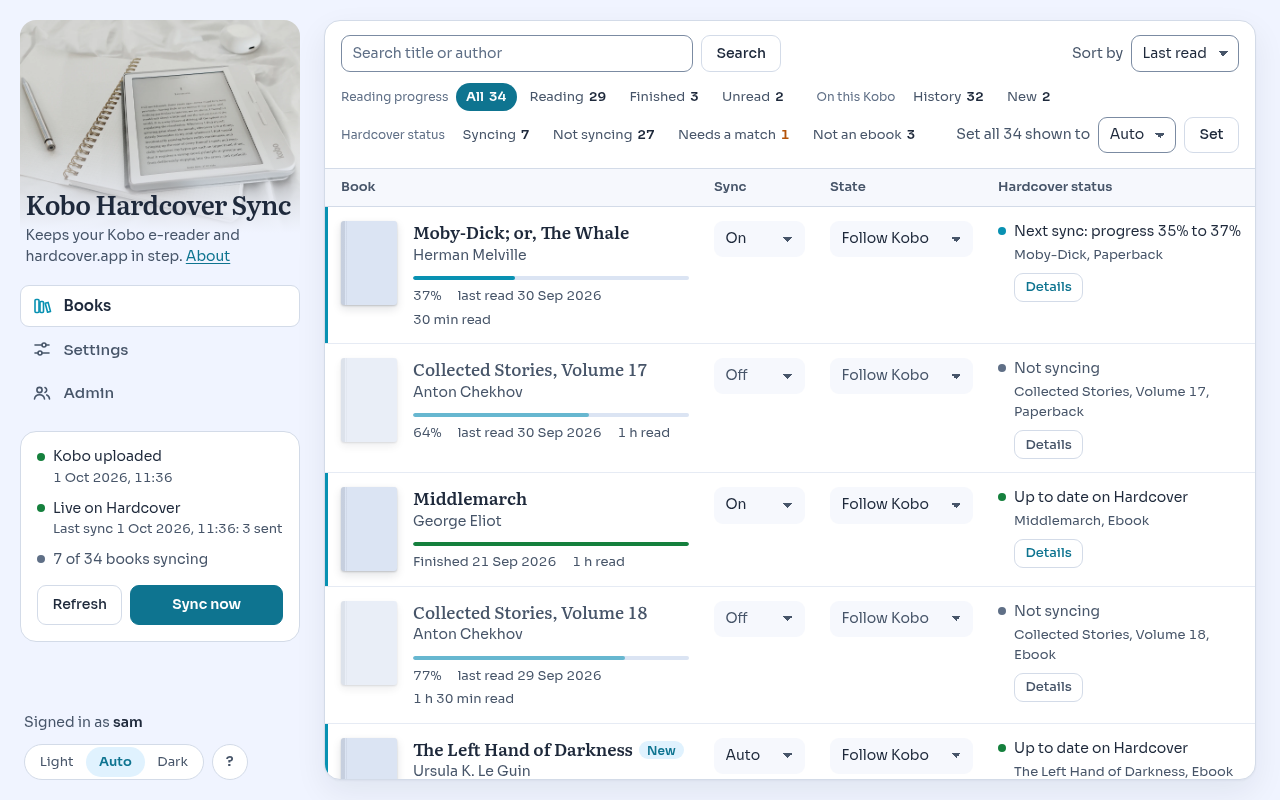
| | What it needs | Choose it when |
|
|
96
|
+
|---|---|---|
|
|
97
|
+
| **kobo-hardcover-sync** | A computer to plug the Kobo into. Nothing on the Kobo. | You read Kobo-store books on an unmodified Kobo, or your Kobo's software is too new for the tools below. |
|
|
98
|
+
| [NickelHardcover](https://codeberg.org/StrayRose/NickelHardcover) | An add-on installed on the Kobo itself. Its README says firmware 5.x is not supported yet. | Your Kobo's firmware is supported and you are happy to modify the device. It syncs over Wi-Fi without a computer, and also does highlights, notes and reviews. |
|
|
99
|
+
| [KOReader with the Hardcover plugin](https://github.com/Billiam/hardcoverapp.koplugin) | KOReader on the device. KOReader cannot open the store's DRM books. | You read your own, DRM-free books in KOReader. |
|
|
100
|
+
| [Calibre-Web Automated](https://github.com/crocodilestick/Calibre-Web-Automated) | A Calibre library on a server that the Kobo syncs with. | Your books live in Calibre and reach the Kobo from there. |
|
|
101
|
+
|
|
102
|
+
## What you need
|
|
103
|
+
|
|
104
|
+
- A Kobo e-reader and its USB cable.
|
|
105
|
+
- A Mac, or a Linux computer with a desktop (GNOME, KDE and the like).
|
|
106
|
+
- A [Hardcover](https://hardcover.app) account.
|
|
107
|
+
- [Homebrew](https://brew.sh) on a Mac, or [uv](https://docs.astral.sh/uv/)
|
|
108
|
+
on any computer, to install the tool.
|
|
109
|
+
|
|
110
|
+
What has been seen working with a real Kobo:
|
|
111
|
+
|
|
112
|
+
| | Tested |
|
|
113
|
+
|---|---|
|
|
114
|
+
| Kobo | Clara Colour, Kobo software 6.0.274403 |
|
|
115
|
+
| macOS 27, with a server | daily use since 1 October 2026 |
|
|
116
|
+
| macOS 27, local mode | a clean account, from this README: install, sync, uninstall (2 October 2026) |
|
|
117
|
+
| Desktop Linux | built and tested without a device; not yet with a real Kobo |
|
|
118
|
+
|
|
119
|
+
Syncing to Hardcover reads the Kobo and should work on other models and
|
|
120
|
+
software. Writing the collection is held back on any Kobo database version
|
|
121
|
+
that has not been tried: see below. If it works on yours, please say so in
|
|
122
|
+
an issue, with the model and the software version.
|
|
123
|
+
|
|
124
|
+
## Install and first run, on your own computer
|
|
125
|
+
|
|
126
|
+
On a Mac, with Homebrew:
|
|
127
|
+
|
|
128
|
+
```
|
|
129
|
+
brew install merlijntishauser/tap/kobo-hardcover-sync
|
|
130
|
+
```
|
|
131
|
+
|
|
132
|
+
It is built on your Mac from source, which takes a few minutes the first
|
|
133
|
+
time. On any computer, with uv, which brings the Python it needs:
|
|
134
|
+
|
|
135
|
+
```
|
|
136
|
+
uv tool install kobo-hardcover-sync
|
|
137
|
+
```
|
|
138
|
+
|
|
139
|
+
Then, either way:
|
|
140
|
+
|
|
141
|
+
```
|
|
142
|
+
kobo-hardcover-sync setup
|
|
143
|
+
kobo-hardcover-sync token
|
|
144
|
+
kobo-hardcover-sync open
|
|
145
|
+
```
|
|
146
|
+
|
|
147
|
+
1. **`setup`** makes the trigger that runs a sync when the Kobo is plugged
|
|
148
|
+
in, and says what it did.
|
|
149
|
+
|
|
150
|
+
On a Mac it builds a small app, `KoboHardcoverSync.app`, and that app
|
|
151
|
+
needs one permission that macOS does not ask for by itself: **Full Disk
|
|
152
|
+
Access**. System Settings, Privacy & Security, Full Disk Access, the
|
|
153
|
+
plus button, then Cmd+Shift+G and the path `setup` printed. Without it
|
|
154
|
+
the sync cannot read the Kobo.
|
|
155
|
+
|
|
156
|
+
On Linux no permission is needed.
|
|
157
|
+
|
|
158
|
+
2. **`token`** asks for your Hardcover token, checks it with Hardcover and
|
|
159
|
+
stores it in your computer's secret store (the Keychain on a Mac). It
|
|
160
|
+
prints a link to Hardcover's page for making a token, with the four
|
|
161
|
+
permissions this tool needs already ticked: your profile name, the
|
|
162
|
+
catalogue, reading your library, changing your library. A token stops
|
|
163
|
+
working on the date you choose there; you then make a new one.
|
|
164
|
+
|
|
165
|
+
3. **Plug in the Kobo** and tap *Connect* on it. The first sync reads your
|
|
166
|
+
books.
|
|
167
|
+
|
|
168
|
+
4. **`open`** shows them in your browser. Everything you read before today
|
|
169
|
+
is listed and switched *Off*: choose the books that are yours and switch
|
|
170
|
+
them *On*. Books you open on the Kobo from now on switch on by
|
|
171
|
+
themselves.
|
|
172
|
+
|
|
173
|
+
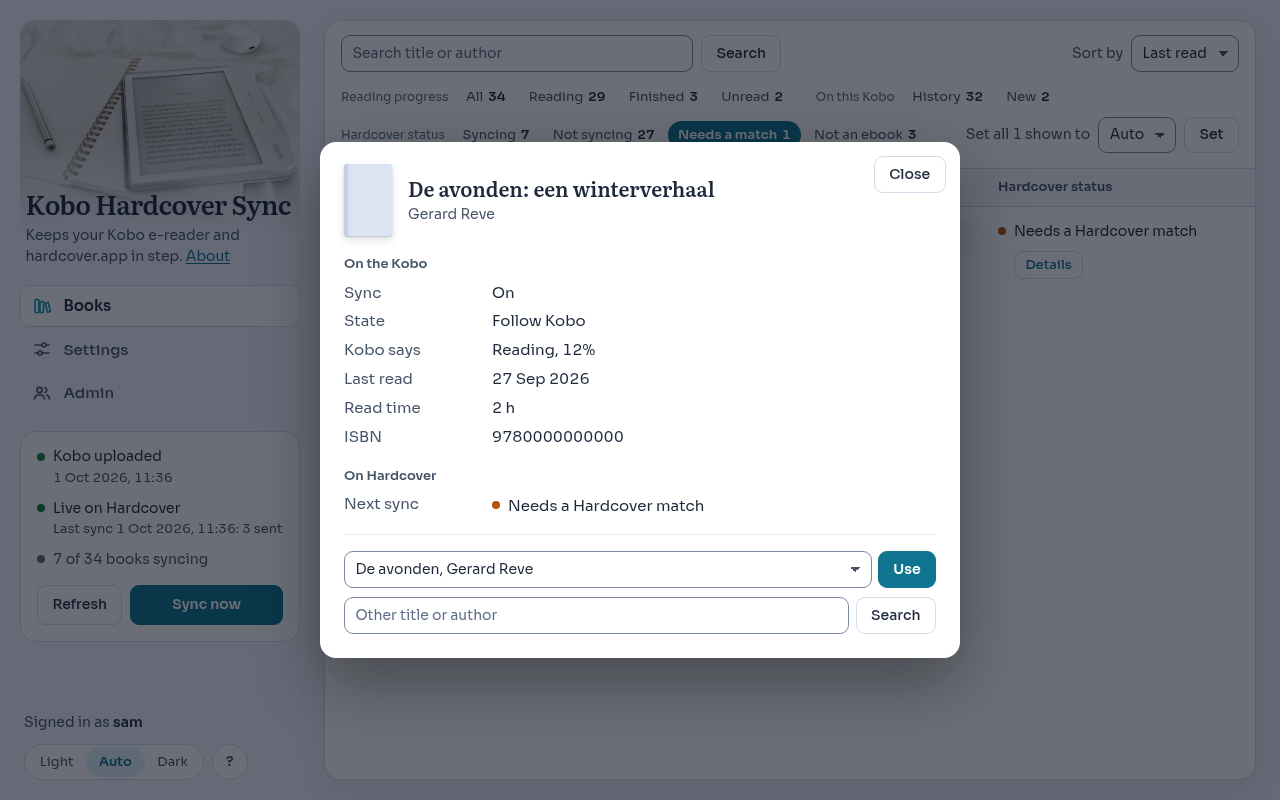
5. Look at what it would send. Fix the books that say *Needs a Hardcover
|
|
174
|
+
match*. Then, under Settings, go **live**.
|
|
175
|
+
|
|
176
|
+
|
|
177
|
+
|
|
178
|
+
## Every day
|
|
179
|
+
|
|
180
|
+
Plug in the Kobo. A notification says what happened, for example:
|
|
181
|
+
|
|
182
|
+
> Kobo synced. 8 book(s) updated.
|
|
183
|
+
|
|
184
|
+
That is all. Nothing runs in between: the sync starts when the Kobo is
|
|
185
|
+
mounted and exits when it is done. Open the page when you want to switch a
|
|
186
|
+
book on or off, fix a match, set a finish date, or see why something did
|
|
187
|
+
not sync.
|
|
188
|
+
|
|
189
|
+
Other commands:
|
|
190
|
+
|
|
191
|
+
| | |
|
|
192
|
+
|---|---|
|
|
193
|
+
| `kobo-hardcover-sync sync` | One sync now, from a terminal. Without a Kobo it still exchanges changes with Hardcover (local mode). |
|
|
194
|
+
| `kobo-hardcover-sync status` | What is set up, the Kobo it sees, its model and software, the last message. |
|
|
195
|
+
| `kobo-hardcover-sync open` | The page. |
|
|
196
|
+
| `kobo-hardcover-sync token --remove` | Forget the Hardcover token and go back to dry run. |
|
|
197
|
+
| `kobo-hardcover-sync uninstall` | Remove the trigger. `--purge` also removes the state and the tokens. |
|
|
198
|
+
|
|
199
|
+
<img src="https://raw.githubusercontent.com/merlijntishauser/kobo-hardcover-sync/v0.1.0/docs/img/phone-night.png" alt="The same page on a phone, at night" width="300">
|
|
200
|
+
|
|
201
|
+
## The collection on the Kobo
|
|
202
|
+
|
|
203
|
+
Optional. Give the collection a name under Settings and the Kobo gets a
|
|
204
|
+
collection holding the books that sync. This is **the only thing this tool
|
|
205
|
+
ever writes to your Kobo**. Without a name, it writes nothing at all.
|
|
206
|
+
|
|
207
|
+
What is written, and how:
|
|
208
|
+
|
|
209
|
+
- Only a collection this tool made itself. A collection of yours is never
|
|
210
|
+
touched, also when it has the same name.
|
|
211
|
+
- Only when the list changed.
|
|
212
|
+
- In one step that happens completely or not at all.
|
|
213
|
+
- After a copy of the Kobo's whole database was saved on your computer.
|
|
214
|
+
The last three copies are kept.
|
|
215
|
+
- The collection is the tool's: a book you add to it on the Kobo is taken
|
|
216
|
+
out again. Another name under Settings replaces the old collection at
|
|
217
|
+
the next plug-in; clearing the name removes it.
|
|
218
|
+
|
|
219
|
+
**A gate comes before all of that.** The Kobo's database says which version
|
|
220
|
+
it is. A version nobody has tried is refused: nothing is written, not even
|
|
221
|
+
the copy, and the message names the version. Syncing to Hardcover goes on
|
|
222
|
+
as usual.
|
|
223
|
+
|
|
224
|
+
| Kobo software | Database version | Seen working |
|
|
225
|
+
|---|---|---|
|
|
226
|
+
| 6.0.274403 | 222 | 1 October 2026, one device |
|
|
227
|
+
|
|
228
|
+
To try another version on purpose, put `allow_untested_kobo = true` in
|
|
229
|
+
`config.toml` in the tool's folder. Even then it refuses a database that
|
|
230
|
+
lacks a column it writes, or that has one it does not know how to fill in.
|
|
231
|
+
If it works, please report the versions.
|
|
232
|
+
|
|
233
|
+
**Always eject before unplugging** after a notification says the collection
|
|
234
|
+
changed.
|
|
235
|
+
|
|
236
|
+
### If something looks wrong on the Kobo
|
|
237
|
+
|
|
238
|
+
1. The gentle way: delete the collection on the Kobo itself (*My Books*,
|
|
239
|
+
*Collections*). Your books and your reading are not part of it. Clear
|
|
240
|
+
the name under Settings if you do not want it back.
|
|
241
|
+
2. The whole database back, as it was before the write. Plug in the Kobo,
|
|
242
|
+
then on a Mac:
|
|
243
|
+
|
|
244
|
+
```
|
|
245
|
+
cd ~/Library/Application\ Support/kobo-hardcover-sync/collection/backups
|
|
246
|
+
gunzip -c KoboReader-<date>.sqlite.gz > /Volumes/KOBOeReader/.kobo/KoboReader.sqlite
|
|
247
|
+
```
|
|
248
|
+
|
|
249
|
+
Eject, then unplug. Everything on the device goes back to that moment,
|
|
250
|
+
reading positions included; for Kobo-store books the Kobo fetches the
|
|
251
|
+
newer positions from your account at its next sync.
|
|
252
|
+
|
|
253
|
+
## For a household, on your own server
|
|
254
|
+
|
|
255
|
+
The server holds the books and the settings of every reader, and talks to
|
|
256
|
+
Hardcover for each of them. It has **no login of its own**: it sits behind
|
|
257
|
+
a sign-in proxy you already run (forward authentication) and believes the
|
|
258
|
+
`Remote-User` header only from that proxy's address.
|
|
259
|
+
|
|
260
|
+
```
|
|
261
|
+
docker build -t kobo-hardcover-sync .
|
|
262
|
+
cp examples/docker-compose.example.yml docker-compose.yml
|
|
263
|
+
python3 -c "import base64,os;print('KHS_SECRET_KEY='+base64.urlsafe_b64encode(os.urandom(32)).decode())" > .env
|
|
264
|
+
chmod 600 .env && mkdir -p data
|
|
265
|
+
docker compose up -d
|
|
266
|
+
```
|
|
267
|
+
|
|
268
|
+
- Set `KHS_TRUSTED_PROXIES` in the compose file to the address your proxy
|
|
269
|
+
connects from. The server refuses to start without it, and answers 403
|
|
270
|
+
to anyone else who sends a `Remote-User` header. Publish the port only
|
|
271
|
+
where the proxy can reach it.
|
|
272
|
+
- Open the page through the proxy and press *Start using Kobo Hardcover
|
|
273
|
+
Sync*. The first reader is the admin. Everyone else the proxy lets in
|
|
274
|
+
signs up with one click and starts in dry run.
|
|
275
|
+
- Each reader enters their own Hardcover token under Settings. Tokens are
|
|
276
|
+
encrypted in the database with `KHS_SECRET_KEY`; keep that key out of the
|
|
277
|
+
data folder and its backups.
|
|
278
|
+
- `/upload` and `/collection` are for the computers that send a Kobo's
|
|
279
|
+
books: route them past the sign-in, because they carry a token of their
|
|
280
|
+
own. `/api/stats/<reader>` gives reading minutes and the current book to
|
|
281
|
+
a dashboard, once that reader made a stats token under Settings.
|
|
282
|
+
|
|
283
|
+
On the computer the Kobo is plugged into:
|
|
284
|
+
|
|
285
|
+
```
|
|
286
|
+
kobo-hardcover-sync setup --server https://kobo.example.org
|
|
287
|
+
```
|
|
288
|
+
|
|
289
|
+
`setup` makes an upload token, keeps it in the secret store and prints its
|
|
290
|
+
SHA-256. Paste that hash on the page under Settings, Devices. The hash
|
|
291
|
+
alone cannot upload anything.
|
|
292
|
+
|
|
293
|
+
Settings of the server, as environment variables: `KHS_DATA`, `KHS_HOST`,
|
|
294
|
+
`KHS_TRUSTED_PROXIES`, `KHS_SECRET_KEY`, `KHS_INTERVAL` (seconds between
|
|
295
|
+
syncs with Hardcover, 0 for never), `KHS_MAX_UPLOAD_MB`,
|
|
296
|
+
`KHS_SNAPSHOT_DAYS`, `KHS_COVER_URL`, and `TZ` for the time zone.
|
|
297
|
+
|
|
298
|
+
## Privacy
|
|
299
|
+
|
|
300
|
+
There is no telemetry, no update check and no account with this project.
|
|
301
|
+
This is everything that leaves the computer it runs on.
|
|
302
|
+
|
|
303
|
+
**To Hardcover**, with your token:
|
|
304
|
+
|
|
305
|
+
- to find a book: its ISBN, or its title and author. Only for books that
|
|
306
|
+
are switched on, and for a search you type yourself;
|
|
307
|
+
- for those books: the status, how far you are, and the dates.
|
|
308
|
+
|
|
309
|
+
**To Kobo's cover server**: the cover number of each book the page shows.
|
|
310
|
+
The tool fetches the cover once and keeps it; your browser talks to the
|
|
311
|
+
tool only.
|
|
312
|
+
|
|
313
|
+
**In server mode, from the computer to your own server**: for every book
|
|
314
|
+
on the Kobo, the title, author, ISBN, progress, dates, cover number and
|
|
315
|
+
language, and the times books were opened on that Kobo. On a shared Kobo
|
|
316
|
+
account that includes the books of the others on the account; each reader
|
|
317
|
+
decides which are theirs. The server keeps what was uploaded for 90 days.
|
|
318
|
+
|
|
319
|
+
**Never, in either mode**: the Kobo account's login tokens, the keys of
|
|
320
|
+
your books, reviews, wishlist or anything else in the Kobo's database. The
|
|
321
|
+
upload is built from a list of what is needed, and the server refuses an
|
|
322
|
+
upload that holds more.
|
|
323
|
+
|
|
324
|
+
Your Hardcover token is kept in your computer's secret store (local mode)
|
|
325
|
+
or encrypted in the server's database (server mode). It is never shown
|
|
326
|
+
again, never logged, and never put on a command line.
|
|
327
|
+
|
|
328
|
+
## Limits worth knowing
|
|
329
|
+
|
|
330
|
+
- The Kobo has to be plugged into a computer. There is no sync over Wi-Fi.
|
|
331
|
+
- Edits you make on Hardcover are seen at the next sync, not at once.
|
|
332
|
+
- Finish dates are the Kobo's own, which are in UTC: a book finished just
|
|
333
|
+
after midnight can carry the day before. Set the date on the page when
|
|
334
|
+
it matters.
|
|
335
|
+
- Two copies of one book on the Kobo (a sample and the book, two editions):
|
|
336
|
+
the copy you read last speaks for the book on Hardcover.
|
|
337
|
+
- Books you put on the Kobo yourself can sync to Hardcover, but are not put
|
|
338
|
+
in the collection.
|
|
339
|
+
- A very large first sync can take more than a day: Hardcover allows 5000
|
|
340
|
+
requests a day. It carries on at the next sync.
|
|
341
|
+
|
|
342
|
+
The full list is at the end of [docs/sync-rules.md](https://github.com/merlijntishauser/kobo-hardcover-sync/blob/v0.1.0/docs/sync-rules.md).
|
|
343
|
+
|
|
344
|
+
## When something does not work
|
|
345
|
+
|
|
346
|
+
Start with `kobo-hardcover-sync status`. The log is `agent.log` in the
|
|
347
|
+
tool's folder: `~/Library/Application Support/kobo-hardcover-sync/` on a
|
|
348
|
+
Mac, `~/.local/share/kobo-hardcover-sync/` on Linux.
|
|
349
|
+
|
|
350
|
+
| You see | What to do |
|
|
351
|
+
|---|---|
|
|
352
|
+
| Nothing happens when the Kobo is plugged in | Tap *Connect* on the Kobo. On a Mac, check that `KoboHardcoverSync.app` has Full Disk Access. Run `kobo-hardcover-sync sync` in a terminal to see the message. |
|
|
353
|
+
| "Could not read the Kobo's database. Does the app have Full Disk Access?" | Give the app the permission (step 1 above). If you rebuilt the app, remove its old entry there first and add it again. |
|
|
354
|
+
| "Nothing new." | The Kobo is as it was at the last sync. Read a page and plug it in again. |
|
|
355
|
+
| "Hardcover does not accept your token" | It expired or was removed. Make a new one: `kobo-hardcover-sync token`, or Settings on a server. |
|
|
356
|
+
| "Your Hardcover token may not do this (it lacks: ...)" | The token was made without one of the four permissions. Make a new one with the link the tool gives. |
|
|
357
|
+
| *Needs a Hardcover match* on a book | Open its Details and choose the right book, or search for it there. |
|
|
358
|
+
| "Collection not updated: ..." with a database version | Your Kobo's software has not been tried yet. Syncing to Hardcover still works. See [the collection](#the-collection-on-the-kobo). |
|
|
359
|
+
| "None of the N books this tool put on your Hardcover shelf are on the shelf ..." | The token belongs to another Hardcover account, or you emptied the shelf yourself. Nothing was switched off. Fix the token, or switch those books off on the page. |
|
|
360
|
+
| "Hardcover could not be reached" or "Today's number of requests ... is used up" | Nothing is lost. The next sync carries on. |
|
|
361
|
+
| The server answers 403 to everything, or does not start | `KHS_TRUSTED_PROXIES` does not name the address your proxy connects from. |
|
|
362
|
+
|
|
363
|
+
On Linux, a Kobo mounted somewhere unusual is found when `KHS_VOLUMES`
|
|
364
|
+
names the folder above it. Without a desktop keyring the tokens are kept in
|
|
365
|
+
a file only you can read; `status` says which.
|
|
366
|
+
|
|
367
|
+
## Uninstall
|
|
368
|
+
|
|
369
|
+
```
|
|
370
|
+
kobo-hardcover-sync uninstall --purge
|
|
371
|
+
brew uninstall kobo-hardcover-sync # or: uv tool uninstall kobo-hardcover-sync
|
|
372
|
+
```
|
|
373
|
+
|
|
374
|
+
Run the first line first: it removes the trigger, and with `--purge` your
|
|
375
|
+
books, settings and tokens on this computer. Without `--purge` they stay.
|
|
376
|
+
|
|
377
|
+
On a Mac, remove the app's entry under Full Disk Access by hand. A
|
|
378
|
+
collection it made stays on the Kobo until you delete it there; clearing
|
|
379
|
+
its name under Settings before you uninstall removes it at the next
|
|
380
|
+
plug-in.
|
|
381
|
+
|
|
382
|
+
## More to read
|
|
383
|
+
|
|
384
|
+
- [docs/sync-rules.md](https://github.com/merlijntishauser/kobo-hardcover-sync/blob/v0.1.0/docs/sync-rules.md): every rule, and the test that
|
|
385
|
+
holds it.
|
|
386
|
+
- [docs/how-it-works.md](https://github.com/merlijntishauser/kobo-hardcover-sync/blob/v0.1.0/docs/how-it-works.md): the parts, and why it is
|
|
387
|
+
built this way.
|
|
388
|
+
- [docs/local-mode.md](https://github.com/merlijntishauser/kobo-hardcover-sync/blob/v0.1.0/docs/local-mode.md): local mode in detail.
|
|
389
|
+
- [docs/hardcover-api.md](https://github.com/merlijntishauser/kobo-hardcover-sync/blob/v0.1.0/docs/hardcover-api.md): what Hardcover's API asks
|
|
390
|
+
of a tool like this.
|
|
391
|
+
- [CONTRIBUTING.md](https://github.com/merlijntishauser/kobo-hardcover-sync/blob/v0.1.0/CONTRIBUTING.md), [SECURITY.md](https://github.com/merlijntishauser/kobo-hardcover-sync/blob/v0.1.0/SECURITY.md),
|
|
392
|
+
[CHANGELOG.md](https://github.com/merlijntishauser/kobo-hardcover-sync/blob/v0.1.0/CHANGELOG.md).
|
|
393
|
+
|
|
394
|
+
## What 1.0 would need
|
|
395
|
+
|
|
396
|
+
This is 0.1: it works for the one household it was built in. Before it is
|
|
397
|
+
called 1.0:
|
|
398
|
+
|
|
399
|
+
- more than one Kobo model and more than one software version confirmed,
|
|
400
|
+
for syncing and for the collection;
|
|
401
|
+
- local mode on a Mac and the Linux desktop seen working with real Kobos,
|
|
402
|
+
by more people than its author;
|
|
403
|
+
- a season of use without a damaged Kobo database, on more than one
|
|
404
|
+
device;
|
|
405
|
+
- Hardcover's API out of beta, or its changes handled as they came;
|
|
406
|
+
- signing in to Hardcover without pasting a token.
|
|
407
|
+
|
|
408
|
+
## AI disclaimer
|
|
409
|
+
|
|
410
|
+
Yes, LLMs and coding agents are (and will be) used in this project. We
|
|
411
|
+
integrate AI carefully and responsibly, and never in a way that compromises
|
|
412
|
+
data integrity, privacy, or security.
|
|
413
|
+
|
|
414
|
+
Please be responsible and transparent when using AI tools, and always put
|
|
415
|
+
user privacy and data security first.
|
|
416
|
+
|
|
417
|
+
When you submit a PR, make sure you fully understand what the code does and
|
|
418
|
+
what it might affect. Keep PRs small, and always run the tests before
|
|
419
|
+
opening or updating one.
|
|
420
|
+
|
|
421
|
+
And a small personal note: using AI tools doesn't mean this project didn't
|
|
422
|
+
take a lot of time and effort. Built with care, and with real appreciation
|
|
423
|
+
for [Hardcover](https://hardcover.app) and the people who build it: a place
|
|
424
|
+
for readers that is open enough to let a tool like this exist. And Kobo:
|
|
425
|
+
great e-readers, but finally give us a family account!
|
|
426
|
+
|
|
427
|
+
## Licence
|
|
428
|
+
|
|
429
|
+
The code, the documentation and the icon are under the [MIT licence](https://github.com/merlijntishauser/kobo-hardcover-sync/blob/v0.1.0/LICENSE).
|
|
430
|
+
|
|
431
|
+
Two kinds of files in this repository are not, and keep their own licence:
|
|
432
|
+
the two fonts (SIL Open Font License 1.1) and the two photographs (Unsplash
|
|
433
|
+
License). What that means, where their licence texts are, and the licences
|
|
434
|
+
of the Python packages installed next to the tool:
|
|
435
|
+
[THIRD-PARTY-NOTICES.md](https://github.com/merlijntishauser/kobo-hardcover-sync/blob/v0.1.0/THIRD-PARTY-NOTICES.md).
|