kitsune-browser 0.7.0__tar.gz
This diff represents the content of publicly available package versions that have been released to one of the supported registries. The information contained in this diff is provided for informational purposes only and reflects changes between package versions as they appear in their respective public registries.
- kitsune_browser-0.7.0/.gitignore +8 -0
- kitsune_browser-0.7.0/LICENSE +22 -0
- kitsune_browser-0.7.0/PKG-INFO +305 -0
- kitsune_browser-0.7.0/README.md +274 -0
- kitsune_browser-0.7.0/pyproject.toml +62 -0
- kitsune_browser-0.7.0/src/kitsune/__init__.py +7 -0
- kitsune_browser-0.7.0/src/kitsune/bridge.py +4638 -0
- kitsune_browser-0.7.0/src/kitsune/bridge_client.py +308 -0
- kitsune_browser-0.7.0/src/kitsune/bridge_control.py +163 -0
- kitsune_browser-0.7.0/src/kitsune/browser.py +1024 -0
- kitsune_browser-0.7.0/src/kitsune/capabilities.py +138 -0
- kitsune_browser-0.7.0/src/kitsune/errors.py +79 -0
- kitsune_browser-0.7.0/src/kitsune/playwright_tools.json +919 -0
- kitsune_browser-0.7.0/src/kitsune/playwright_tools.py +542 -0
- kitsune_browser-0.7.0/src/kitsune/server.py +542 -0
- kitsune_browser-0.7.0/src/kitsune/task_modes.py +102 -0
- kitsune_browser-0.7.0/src/kitsune/tools.py +1727 -0
- kitsune_browser-0.7.0/src/kitsune/version.py +84 -0
- kitsune_browser-0.7.0/src/kitsune/waits.py +125 -0
- kitsune_browser-0.7.0/src/kitsune/workflows/gmail-template-draft.md +49 -0
- kitsune_browser-0.7.0/src/kitsune/workflows/test.md +24 -0
- kitsune_browser-0.7.0/src/kitsune/workflows/wp-html.md +34 -0
- kitsune_browser-0.7.0/tests/action_errors.cjs +595 -0
- kitsune_browser-0.7.0/tests/actionability_wait.cjs +385 -0
- kitsune_browser-0.7.0/tests/ask_before_act.cjs +294 -0
- kitsune_browser-0.7.0/tests/background_cleanup.cjs +232 -0
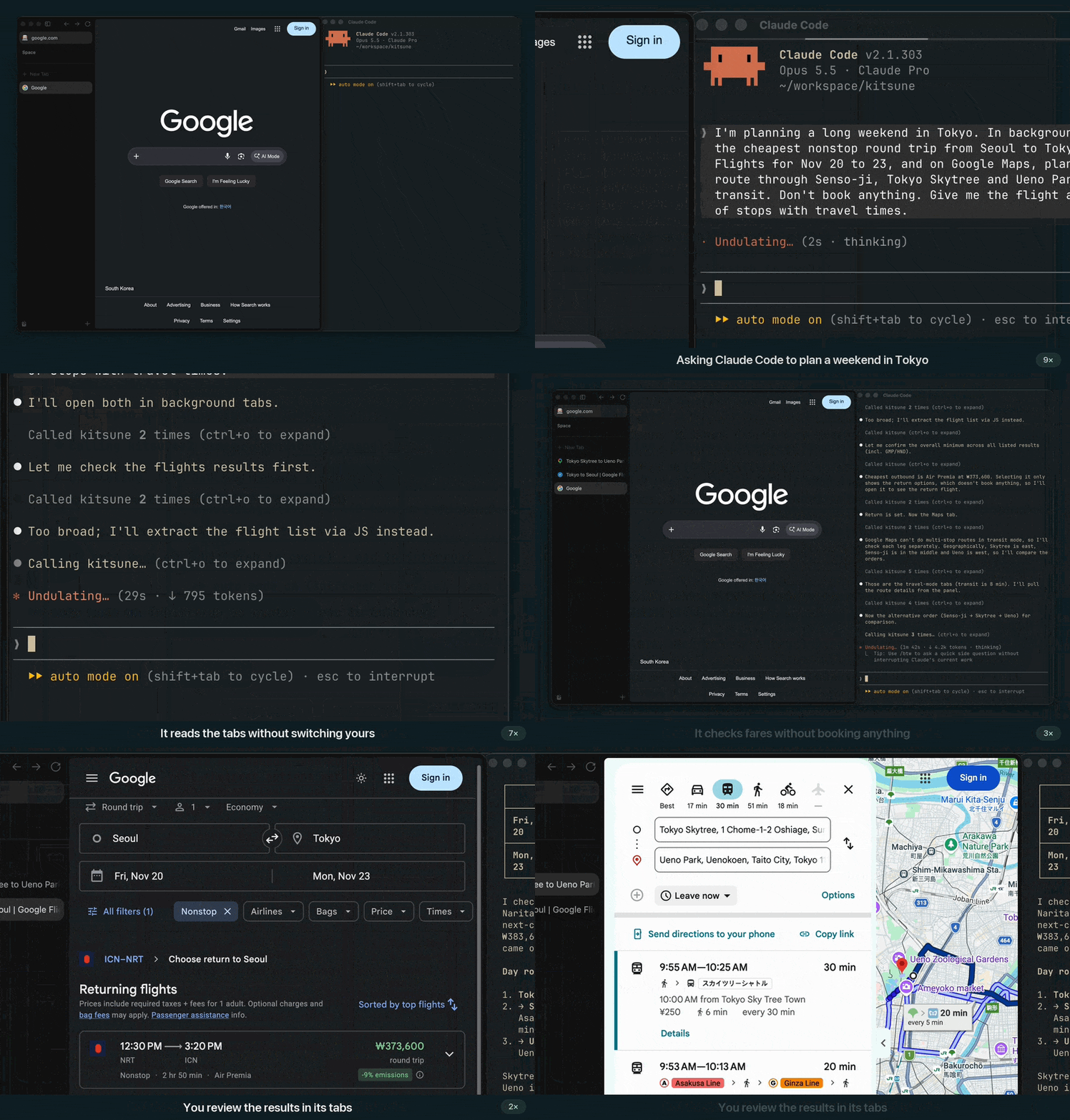
- kitsune_browser-0.7.0/tests/bounded_snapshot.cjs +141 -0
- kitsune_browser-0.7.0/tests/click_caret.cjs +240 -0
- kitsune_browser-0.7.0/tests/click_events.cjs +200 -0
- kitsune_browser-0.7.0/tests/closed_shadow_fill.cjs +215 -0
- kitsune_browser-0.7.0/tests/collapsed_items.cjs +204 -0
- kitsune_browser-0.7.0/tests/connection_diagnostics.cjs +211 -0
- kitsune_browser-0.7.0/tests/drag_events.cjs +136 -0
- kitsune_browser-0.7.0/tests/editor_textbox.cjs +237 -0
- kitsune_browser-0.7.0/tests/find_query_scoring.cjs +110 -0
- kitsune_browser-0.7.0/tests/form_fill.cjs +138 -0
- kitsune_browser-0.7.0/tests/history_lookup.cjs +296 -0
- kitsune_browser-0.7.0/tests/hover_scroll.cjs +75 -0
- kitsune_browser-0.7.0/tests/key_defaults.cjs +358 -0
- kitsune_browser-0.7.0/tests/keypress_names.cjs +118 -0
- kitsune_browser-0.7.0/tests/media_controls.cjs +182 -0
- kitsune_browser-0.7.0/tests/navigate_wait.cjs +207 -0
- kitsune_browser-0.7.0/tests/new_tab_wait.cjs +183 -0
- kitsune_browser-0.7.0/tests/opened_tabs.cjs +290 -0
- kitsune_browser-0.7.0/tests/password_redaction.cjs +198 -0
- kitsune_browser-0.7.0/tests/playwright_actions.cjs +129 -0
- kitsune_browser-0.7.0/tests/playwright_selectors.cjs +725 -0
- kitsune_browser-0.7.0/tests/protected_tabs.cjs +87 -0
- kitsune_browser-0.7.0/tests/readable_snapshot.cjs +231 -0
- kitsune_browser-0.7.0/tests/real_browser_harness.py +333 -0
- kitsune_browser-0.7.0/tests/same_origin_frames.cjs +326 -0
- kitsune_browser-0.7.0/tests/screenshot_capture.cjs +148 -0
- kitsune_browser-0.7.0/tests/scroll_page.cjs +136 -0
- kitsune_browser-0.7.0/tests/sensitive_field_redaction.cjs +525 -0
- kitsune_browser-0.7.0/tests/shadow_dom_traversal.cjs +344 -0
- kitsune_browser-0.7.0/tests/shared_browser.cjs +545 -0
- kitsune_browser-0.7.0/tests/short_refs.cjs +306 -0
- kitsune_browser-0.7.0/tests/signed_build.cjs +63 -0
- kitsune_browser-0.7.0/tests/snapshot_images.cjs +119 -0
- kitsune_browser-0.7.0/tests/snapshot_readiness.cjs +100 -0
- kitsune_browser-0.7.0/tests/snapshot_refs.cjs +593 -0
- kitsune_browser-0.7.0/tests/strict_selectors.cjs +263 -0
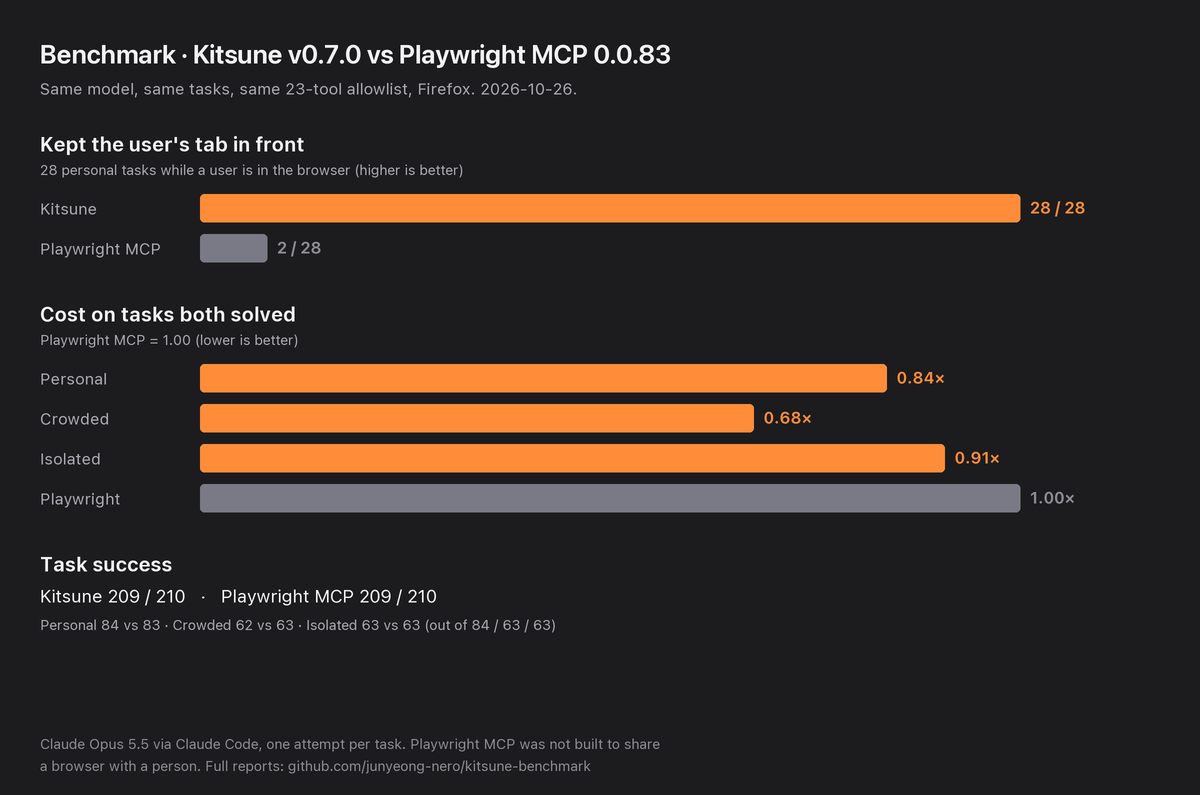
- kitsune_browser-0.7.0/tests/submit_form_target.cjs +240 -0
- kitsune_browser-0.7.0/tests/test_action_errors.py +369 -0
- kitsune_browser-0.7.0/tests/test_action_outcome.py +650 -0
- kitsune_browser-0.7.0/tests/test_actionability_wait.py +233 -0
- kitsune_browser-0.7.0/tests/test_ask_before_act.py +578 -0
- kitsune_browser-0.7.0/tests/test_batch_control_flow.py +206 -0
- kitsune_browser-0.7.0/tests/test_bridge_audit.py +351 -0
- kitsune_browser-0.7.0/tests/test_bridge_caps.py +298 -0
- kitsune_browser-0.7.0/tests/test_bridge_client.py +40 -0
- kitsune_browser-0.7.0/tests/test_bridge_commands.py +154 -0
- kitsune_browser-0.7.0/tests/test_bridge_idle_shutdown.py +150 -0
- kitsune_browser-0.7.0/tests/test_bridge_lifecycle.py +474 -0
- kitsune_browser-0.7.0/tests/test_bridge_policy_admission.py +167 -0
- kitsune_browser-0.7.0/tests/test_bridge_security.py +554 -0
- kitsune_browser-0.7.0/tests/test_bridge_websocket.py +178 -0
- kitsune_browser-0.7.0/tests/test_build_extension.py +69 -0
- kitsune_browser-0.7.0/tests/test_compact_results.py +220 -0
- kitsune_browser-0.7.0/tests/test_connection_diagnostics.py +773 -0
- kitsune_browser-0.7.0/tests/test_container_progress.py +516 -0
- kitsune_browser-0.7.0/tests/test_core_output_paths.py +182 -0
- kitsune_browser-0.7.0/tests/test_core_tab_results.py +88 -0
- kitsune_browser-0.7.0/tests/test_current_tab.py +159 -0
- kitsune_browser-0.7.0/tests/test_demo_edits.py +45 -0
- kitsune_browser-0.7.0/tests/test_distributions.py +49 -0
- kitsune_browser-0.7.0/tests/test_history_lookup.py +306 -0
- kitsune_browser-0.7.0/tests/test_playwright_tools.py +341 -0
- kitsune_browser-0.7.0/tests/test_protected_tabs.py +168 -0
- kitsune_browser-0.7.0/tests/test_python_api.py +659 -0
- kitsune_browser-0.7.0/tests/test_real_browser.py +555 -0
- kitsune_browser-0.7.0/tests/test_real_browser_action_targets.py +282 -0
- kitsune_browser-0.7.0/tests/test_real_browser_bounded_snapshot.py +183 -0
- kitsune_browser-0.7.0/tests/test_real_browser_caret.py +123 -0
- kitsune_browser-0.7.0/tests/test_real_browser_click_events.py +194 -0
- kitsune_browser-0.7.0/tests/test_real_browser_connection_diagnostics.py +327 -0
- kitsune_browser-0.7.0/tests/test_real_browser_current_tab.py +101 -0
- kitsune_browser-0.7.0/tests/test_real_browser_editor.py +100 -0
- kitsune_browser-0.7.0/tests/test_real_browser_error_pages.py +143 -0
- kitsune_browser-0.7.0/tests/test_real_browser_find.py +113 -0
- kitsune_browser-0.7.0/tests/test_real_browser_harness.py +54 -0
- kitsune_browser-0.7.0/tests/test_real_browser_history.py +168 -0
- kitsune_browser-0.7.0/tests/test_real_browser_iframes.py +131 -0
- kitsune_browser-0.7.0/tests/test_real_browser_images.py +85 -0
- kitsune_browser-0.7.0/tests/test_real_browser_key_defaults.py +157 -0
- kitsune_browser-0.7.0/tests/test_real_browser_media.py +146 -0
- kitsune_browser-0.7.0/tests/test_real_browser_observation.py +178 -0
- kitsune_browser-0.7.0/tests/test_real_browser_opened_tabs.py +180 -0
- kitsune_browser-0.7.0/tests/test_real_browser_outcome_deadline.py +148 -0
- kitsune_browser-0.7.0/tests/test_real_browser_playwright_selectors.py +213 -0
- kitsune_browser-0.7.0/tests/test_real_browser_playwright_tools.py +241 -0
- kitsune_browser-0.7.0/tests/test_real_browser_protected_tabs.py +134 -0
- kitsune_browser-0.7.0/tests/test_real_browser_python_api.py +149 -0
- kitsune_browser-0.7.0/tests/test_real_browser_redaction.py +626 -0
- kitsune_browser-0.7.0/tests/test_real_browser_screenshots.py +133 -0
- kitsune_browser-0.7.0/tests/test_real_browser_shadow_dom.py +104 -0
- kitsune_browser-0.7.0/tests/test_real_browser_shared_browser.py +257 -0
- kitsune_browser-0.7.0/tests/test_real_browser_submit_form.py +129 -0
- kitsune_browser-0.7.0/tests/test_real_browser_wait_for_names.py +75 -0
- kitsune_browser-0.7.0/tests/test_resume.py +581 -0
- kitsune_browser-0.7.0/tests/test_server_instructions.py +37 -0
- kitsune_browser-0.7.0/tests/test_server_json.py +39 -0
- kitsune_browser-0.7.0/tests/test_snapshot_tools.py +290 -0
- kitsune_browser-0.7.0/tests/test_strict_selectors.py +103 -0
- kitsune_browser-0.7.0/tests/test_tab_inventory.py +103 -0
- kitsune_browser-0.7.0/tests/test_tab_inventory_bridge.py +190 -0
- kitsune_browser-0.7.0/tests/test_task_modes.py +300 -0
- kitsune_browser-0.7.0/tests/test_tool_first_paragraph.py +103 -0
- kitsune_browser-0.7.0/tests/test_tool_gateway.py +331 -0
- kitsune_browser-0.7.0/tests/test_tool_schema_optionals.py +136 -0
- kitsune_browser-0.7.0/tests/test_tool_schema_size.py +61 -0
- kitsune_browser-0.7.0/tests/test_tool_schema_titles.py +175 -0
- kitsune_browser-0.7.0/tests/test_tool_surface.py +207 -0
- kitsune_browser-0.7.0/tests/test_tools_registry.py +65 -0
- kitsune_browser-0.7.0/tests/test_trusted_click.py +261 -0
- kitsune_browser-0.7.0/tests/test_unpublished_tools.py +82 -0
- kitsune_browser-0.7.0/tests/test_update_manifest.py +61 -0
- kitsune_browser-0.7.0/tests/test_user_tabs.py +151 -0
- kitsune_browser-0.7.0/tests/test_wait_for_deadline.py +126 -0
- kitsune_browser-0.7.0/tests/test_wait_for_navigation.py +65 -0
- kitsune_browser-0.7.0/tests/tool_schema_sizes.json +177 -0
- kitsune_browser-0.7.0/tests/user_activity.cjs +111 -0
- kitsune_browser-0.7.0/tests/wait_for_navigation.cjs +173 -0
- kitsune_browser-0.7.0/tests/wake_tab.cjs +254 -0
|
@@ -0,0 +1,22 @@
|
|
|
1
|
+
MIT License
|
|
2
|
+
|
|
3
|
+
Copyright (c) 2026 Jay-Quan (ZenLink, ZenLink-MCP)
|
|
4
|
+
Copyright (c) 2026 junyeong-nero (Kitsune)
|
|
5
|
+
|
|
6
|
+
Permission is hereby granted, free of charge, to any person obtaining a copy
|
|
7
|
+
of this software and associated documentation files (the "Software"), to deal
|
|
8
|
+
in the Software without restriction, including without limitation the rights
|
|
9
|
+
to use, copy, modify, merge, publish, distribute, sublicense, and/or sell
|
|
10
|
+
copies of the Software, and to permit persons to whom the Software is
|
|
11
|
+
furnished to do so, subject to the following conditions:
|
|
12
|
+
|
|
13
|
+
The above copyright notice and this permission notice shall be included in all
|
|
14
|
+
copies or substantial portions of the Software.
|
|
15
|
+
|
|
16
|
+
THE SOFTWARE IS PROVIDED "AS IS", WITHOUT WARRANTY OF ANY KIND, EXPRESS OR
|
|
17
|
+
IMPLIED, INCLUDING BUT NOT LIMITED TO THE WARRANTIES OF MERCHANTABILITY,
|
|
18
|
+
FITNESS FOR A PARTICULAR PURPOSE AND NONINFRINGEMENT. IN NO EVENT SHALL THE
|
|
19
|
+
AUTHORS OR COPYRIGHT HOLDERS BE LIABLE FOR ANY CLAIM, DAMAGES OR OTHER
|
|
20
|
+
LIABILITY, WHETHER IN AN ACTION OF CONTRACT, TORT OR OTHERWISE, ARISING FROM,
|
|
21
|
+
OUT OF OR IN CONNECTION WITH THE SOFTWARE OR THE USE OR OTHER DEALINGS IN THE
|
|
22
|
+
SOFTWARE.
|
|
@@ -0,0 +1,305 @@
|
|
|
1
|
+
Metadata-Version: 2.5
|
|
2
|
+
Name: kitsune-browser
|
|
3
|
+
Version: 0.7.0
|
|
4
|
+
Summary: Drive the Firefox, Zen, or LibreWolf browser you already have open from Python or an AI agent.
|
|
5
|
+
Project-URL: Homepage, https://github.com/junyeong-nero/kitsune
|
|
6
|
+
Project-URL: Documentation, https://github.com/junyeong-nero/kitsune/blob/main/docs/guide.md
|
|
7
|
+
Project-URL: Issues, https://github.com/junyeong-nero/kitsune/issues
|
|
8
|
+
Project-URL: Changelog, https://github.com/junyeong-nero/kitsune/releases
|
|
9
|
+
Author: junyeong-nero
|
|
10
|
+
License-Expression: MIT
|
|
11
|
+
License-File: LICENSE
|
|
12
|
+
Keywords: ai-agents,browser-automation,firefox,mcp,zen-browser
|
|
13
|
+
Classifier: Development Status :: 3 - Alpha
|
|
14
|
+
Classifier: Environment :: Console
|
|
15
|
+
Classifier: Intended Audience :: Developers
|
|
16
|
+
Classifier: Operating System :: MacOS
|
|
17
|
+
Classifier: Operating System :: POSIX :: Linux
|
|
18
|
+
Classifier: Programming Language :: Python :: 3
|
|
19
|
+
Classifier: Programming Language :: Python :: 3 :: Only
|
|
20
|
+
Classifier: Topic :: Internet :: WWW/HTTP :: Browsers
|
|
21
|
+
Classifier: Topic :: Software Development :: Testing
|
|
22
|
+
Requires-Python: >=3.10
|
|
23
|
+
Requires-Dist: httpx>=0.27.0
|
|
24
|
+
Requires-Dist: pydantic<3,>=2.7
|
|
25
|
+
Requires-Dist: websockets>=14.2
|
|
26
|
+
Provides-Extra: macos
|
|
27
|
+
Requires-Dist: pyobjc-framework-quartz>=10; (sys_platform == 'darwin') and extra == 'macos'
|
|
28
|
+
Provides-Extra: mcp
|
|
29
|
+
Requires-Dist: mcp[cli]<2,>=1.2.0; extra == 'mcp'
|
|
30
|
+
Description-Content-Type: text/markdown
|
|
31
|
+
|
|
32
|
+
# Kitsune
|
|
33
|
+
|
|
34
|
+
<!-- mcp-name: io.github.junyeong-nero/kitsune -->
|
|
35
|
+
|
|
36
|
+

|
|
37
|
+
|
|
38
|
+
[](https://pypi.org/project/kitsune-browser-mcp/)
|
|
39
|
+
[](https://pypi.org/project/kitsune-browser-mcp/)
|
|
40
|
+
[](https://github.com/junyeong-nero/kitsune/releases/latest)
|
|
41
|
+
[](https://github.com/junyeong-nero/kitsune/blob/main/LICENSE)
|
|
42
|
+
|
|
43
|
+
**Bring your coding agent into Firefox and keep working alongside it.**
|
|
44
|
+
|
|
45
|
+
Kitsune lets AI agents such as Claude Code, Codex, Pi, and OpenCode use the Firefox,
|
|
46
|
+
Zen, or LibreWolf browser you already have open. Your sessions, cookies, and
|
|
47
|
+
extensions stay where they are, and there is no Playwright, Chromium, or WebDriver
|
|
48
|
+
to install.
|
|
49
|
+
|
|
50
|
+
The agent can research in background tabs and prepare form drafts while you keep
|
|
51
|
+
using the same browser. You stay with the agent you already use; Kitsune is not a
|
|
52
|
+
separate browser or a built-in assistant.
|
|
53
|
+
|
|
54
|
+
The design follows two principles: the user's browser belongs to the user, and
|
|
55
|
+
the agent gets fewer, sharper tools. See [Philosophy](https://github.com/junyeong-nero/kitsune/blob/main/docs/philosophy.md).
|
|
56
|
+
|
|
57
|
+
|
|
58
|
+
|
|
59
|
+
<sub>A real screen recording of Claude Code and Zen Browser on the live Google sites, sped up while the agent thinks and zoomed in afterwards (<a href="https://github.com/user-attachments/assets/9b61f335-073d-4035-b479-ee03e96ae202">full 38-second video</a>).</sub>
|
|
60
|
+
|
|
61
|
+
## Why Kitsune?
|
|
62
|
+
|
|
63
|
+
- Tabs the agent creates open in the background. Kitsune holds writes to a tab
|
|
64
|
+
you are actively using, and closing one of your own tabs takes a separate
|
|
65
|
+
confirmation step. This reduces interference, but OS-level clicks and popups
|
|
66
|
+
opened by sites still have [focus and input limitations](https://github.com/junyeong-nero/kitsune/blob/main/docs/api-reference.md#shared-browser).
|
|
67
|
+
- You decide how much to delegate. `KITSUNE_MODE=read`, `draft`, or `act` limits
|
|
68
|
+
both the tools the agent sees and the requests the bridge accepts. Draft mode
|
|
69
|
+
lets the agent fill supported fields without click or submit tools, although
|
|
70
|
+
sites may still autosave what it types. The default, `act`, has no such
|
|
71
|
+
restriction. See [Task modes](https://github.com/junyeong-nero/kitsune/blob/main/docs/guide.md#task-modes).
|
|
72
|
+
- The agent starts with Playwright MCP's 25 core tools. Kitsune's other tools
|
|
73
|
+
stay off until you allow them, and the agent can find and call the allowed ones
|
|
74
|
+
without restarting its session. See [Choosing tools](https://github.com/junyeong-nero/kitsune#choosing-tools).
|
|
75
|
+
- With the optional `automation` capability, an interrupted batch, parallel, or
|
|
76
|
+
workflow call can be resumed without resending the writes that already
|
|
77
|
+
succeeded. A write with an uncertain outcome needs an observation before it is
|
|
78
|
+
retried. [Checkpoints](https://github.com/junyeong-nero/kitsune/blob/main/docs/checkpoint-resume.md) are temporary and are lost when the bridge restarts.
|
|
79
|
+
|
|
80
|
+
## What can it do?
|
|
81
|
+
|
|
82
|
+
In your browser, the agent can:
|
|
83
|
+
|
|
84
|
+
- Search the web, read pages, and summarize what it finds with links.
|
|
85
|
+
- Click, type, select options, and fill forms, including on sites where you are
|
|
86
|
+
already signed in.
|
|
87
|
+
- Take screenshots or turn page content into text and Markdown.
|
|
88
|
+
- Keep research and tasks in separate tabs without replacing the page you are
|
|
89
|
+
using.
|
|
90
|
+
|
|
91
|
+
## Benchmark
|
|
92
|
+
|
|
93
|
+
|
|
94
|
+
|
|
95
|
+
With the same tasks and tool allowlist, Kitsune v0.4.0 kept the user's tab in
|
|
96
|
+
front in 23 of 24 shared-browser tasks, against 2 of 24 for Playwright MCP. On
|
|
97
|
+
the tasks both solved, Kitsune cost 0.83 to 0.93 times as much. It solved 191 of
|
|
98
|
+
198 tasks, and Playwright MCP solved 197. Each task was run once with Claude Opus
|
|
99
|
+
5.5. Playwright MCP was not designed to share a browser with a person. See the
|
|
100
|
+
[full reports](https://github.com/junyeong-nero/kitsune-benchmark/tree/main/docs/results).
|
|
101
|
+
|
|
102
|
+
## How is it different?
|
|
103
|
+
|
|
104
|
+
Kitsune is one of several ways to connect an agent to a browser. Which one fits
|
|
105
|
+
depends on the browser you use and the work you want to hand off:
|
|
106
|
+
|
|
107
|
+
| If you want to… | Consider |
|
|
108
|
+
| --- | --- |
|
|
109
|
+
| Delegate tasks in the Firefox-family browser you are using, with background tabs, read/draft/act modes, and resumable batches | **Kitsune** |
|
|
110
|
+
| Debug or profile pages in Firefox (debugger, profiler, deep protocol access) | [Mozilla Firefox DevTools MCP](https://github.com/mozilla/firefox-devtools-mcp), which attaches to a running Firefox started with remote-debugging flags |
|
|
111
|
+
| Test across Chromium, Firefox, and WebKit in launched browsers | [Playwright MCP](https://github.com/microsoft/playwright-mcp); Kitsune publishes its 25 core tools, so prompts written for it carry over |
|
|
112
|
+
| Drive the Chrome you already use | A Chromium extension MCP such as [Browser MCP](https://github.com/BrowserMCP/mcp) |
|
|
113
|
+
|
|
114
|
+
Kitsune connects through an extension and a local bridge, so Firefox needs no
|
|
115
|
+
startup flags or WebDriver. Other Firefox extension projects also reuse your
|
|
116
|
+
logins. Kitsune concentrates on sharing the browser with you while the agent
|
|
117
|
+
works. [Positioning](https://github.com/junyeong-nero/kitsune/blob/main/docs/positioning.md)
|
|
118
|
+
has the full comparison and its limits.
|
|
119
|
+
|
|
120
|
+
## How do I use it?
|
|
121
|
+
|
|
122
|
+
1. Install [uv](https://docs.astral.sh/uv/getting-started/installation/), then
|
|
123
|
+
follow the [MCP setup](#mcp-setup) for your agent below.
|
|
124
|
+
[Install the browser extension](https://github.com/junyeong-nero/kitsune/blob/main/docs/installation.md#2-install-the-browser-extension)
|
|
125
|
+
in Firefox, Zen, or LibreWolf. The signed build stays installed; the
|
|
126
|
+
developer build, which `browser_evaluate` needs, is a temporary add-on.
|
|
127
|
+
2. Keep the browser open. Kitsune starts its shared bridge automatically. Before
|
|
128
|
+
your first task, ask the agent to check the connection.
|
|
129
|
+
3. Ask in plain language. For example:
|
|
130
|
+
|
|
131
|
+
> Research these three products in new background tabs and compare them with
|
|
132
|
+
> source links. Leave my current tab alone.
|
|
133
|
+
|
|
134
|
+
> Inspect this page's form and fill a draft. Don't submit it yet.
|
|
135
|
+
|
|
136
|
+
> Open Hacker News in a background tab and summarize the top three stories
|
|
137
|
+
> with links.
|
|
138
|
+
|
|
139
|
+
Asking in plain language does not change the mode. To enforce a draft-only
|
|
140
|
+
tool set, set `KITSUNE_MODE=draft` before starting the MCP client.
|
|
141
|
+
|
|
142
|
+
Use a dedicated browser profile, and give the agent access only to the accounts
|
|
143
|
+
it needs. Have it ask you before it sends, buys, or deletes anything. The opt-in
|
|
144
|
+
[ask-before-act](https://github.com/junyeong-nero/kitsune/blob/main/docs/guide.md#ask-before-act)
|
|
145
|
+
policy makes the bridge hold submits, payment pages, JavaScript, and cookie access
|
|
146
|
+
until the agent repeats the call with a confirmation token. The agent can make
|
|
147
|
+
that second call on its own, so it does not prove that a person approved, and
|
|
148
|
+
none of these controls prevent prompt injection. Read the [security guidance](https://github.com/junyeong-nero/kitsune/blob/main/docs/guide.md#security) before using sensitive accounts.
|
|
149
|
+
|
|
150
|
+
## MCP setup
|
|
151
|
+
|
|
152
|
+
Every client launches the same local stdio server:
|
|
153
|
+
`uvx --from kitsune-browser-mcp kitsune`. Use only one setup method per client.
|
|
154
|
+
Several clients can share one bridge; keep them on the same Kitsune version and
|
|
155
|
+
install source.
|
|
156
|
+
|
|
157
|
+
### CLI registration: Claude Code, Codex, and Pi
|
|
158
|
+
|
|
159
|
+
**Claude Code**, available in every project with `--scope user`:
|
|
160
|
+
|
|
161
|
+
```bash
|
|
162
|
+
claude mcp add --scope user kitsune -- uvx --from kitsune-browser-mcp kitsune
|
|
163
|
+
```
|
|
164
|
+
|
|
165
|
+
**Codex CLI**, which registers the server in `~/.codex/config.toml`:
|
|
166
|
+
|
|
167
|
+
```bash
|
|
168
|
+
codex mcp add kitsune -- uvx --from kitsune-browser-mcp kitsune
|
|
169
|
+
```
|
|
170
|
+
|
|
171
|
+
**Pi** has [built-in MCP support](https://github.com/earendil-works/pi/blob/main/packages/coding-agent/docs/mcp.md)
|
|
172
|
+
and registers servers for your user by default:
|
|
173
|
+
|
|
174
|
+
```bash
|
|
175
|
+
pi mcp add kitsune -- uvx --from kitsune-browser-mcp kitsune
|
|
176
|
+
pi mcp list
|
|
177
|
+
```
|
|
178
|
+
|
|
179
|
+
To register the server only for the current project, add `--local` before
|
|
180
|
+
`kitsune`. In a Pi session that is already running, run `/reload`, then `/mcp` to
|
|
181
|
+
check the connection. If an MCP adapter extension replaces Pi's built-in support,
|
|
182
|
+
follow that extension's instructions instead.
|
|
183
|
+
|
|
184
|
+
### OpenCode
|
|
185
|
+
|
|
186
|
+
Merge this into `~/.config/opencode/opencode.json` (global) or `opencode.json`
|
|
187
|
+
in your project root. OpenCode uses an `mcp` object with a command array, not
|
|
188
|
+
`mcpServers`:
|
|
189
|
+
|
|
190
|
+
```json
|
|
191
|
+
{
|
|
192
|
+
"$schema": "https://opencode.ai/config.json",
|
|
193
|
+
"mcp": {
|
|
194
|
+
"kitsune": {
|
|
195
|
+
"type": "local",
|
|
196
|
+
"command": ["uvx", "--from", "kitsune-browser-mcp", "kitsune"],
|
|
197
|
+
"enabled": true
|
|
198
|
+
}
|
|
199
|
+
}
|
|
200
|
+
}
|
|
201
|
+
```
|
|
202
|
+
|
|
203
|
+
### JSON configuration: Pi, Claude Desktop, and Cursor
|
|
204
|
+
|
|
205
|
+
These clients use the same `mcpServers` format. Instead of CLI registration,
|
|
206
|
+
where a client has it, you can merge this entry into the client's config file
|
|
207
|
+
and keep any servers already there:
|
|
208
|
+
|
|
209
|
+
| Client | Config file |
|
|
210
|
+
| --- | --- |
|
|
211
|
+
| Pi (built-in MCP) | `~/.pi/agent/mcp.json` (user) or `.pi/mcp.json` (project; requires project trust) |
|
|
212
|
+
| Claude Desktop (macOS) | `~/Library/Application Support/Claude/claude_desktop_config.json` |
|
|
213
|
+
| Cursor | `~/.cursor/mcp.json` (global) or `.cursor/mcp.json` (project) |
|
|
214
|
+
|
|
215
|
+
```json
|
|
216
|
+
{
|
|
217
|
+
"mcpServers": {
|
|
218
|
+
"kitsune": {
|
|
219
|
+
"command": "uvx",
|
|
220
|
+
"args": ["--from", "kitsune-browser-mcp", "kitsune"]
|
|
221
|
+
}
|
|
222
|
+
}
|
|
223
|
+
}
|
|
224
|
+
```
|
|
225
|
+
|
|
226
|
+
After configuring a client, restart or reconnect it and ask it to list your tabs
|
|
227
|
+
(`browser_tabs` with `action: "list"`). If that fails, the error's `hint` says
|
|
228
|
+
what to fix. A GUI app that does not inherit your shell's `PATH` may need the
|
|
229
|
+
full path from `which uvx` in place of `uvx`.
|
|
230
|
+
|
|
231
|
+
### Choosing tools
|
|
232
|
+
|
|
233
|
+
By default Kitsune publishes [Playwright MCP](https://github.com/microsoft/playwright-mcp)'s
|
|
234
|
+
25 core tools with the same names, descriptions, and schemas, and they drive your
|
|
235
|
+
own browser. Prompts and clients written for Playwright MCP work unchanged
|
|
236
|
+
([Core tools](https://github.com/junyeong-nero/kitsune/blob/main/docs/guide.md#core-tools)). Kitsune's own tools are sorted into capability groups,
|
|
237
|
+
which you enable with `KITSUNE_CAPS` in the MCP server's environment:
|
|
238
|
+
|
|
239
|
+
| Group | Tools for |
|
|
240
|
+
| --- | --- |
|
|
241
|
+
| `browse` | Scrolling, forward navigation, checkboxes, focus, form submits, trusted OS clicks |
|
|
242
|
+
| `read` | Page text and Markdown, forms, DOM, links, images, metadata |
|
|
243
|
+
| `inspect` | Element bounds, computed styles, selector diagnosis, highlights |
|
|
244
|
+
| `tabs` | Pinning, muting, zoom, windows, tab tags, keep-alive |
|
|
245
|
+
| `automation` | Batches, retries, workflows, parallel tabs, resume |
|
|
246
|
+
| `network` | Downloads, request interception and capture |
|
|
247
|
+
| `admin` | Connection status, logs, audit, cache, policy |
|
|
248
|
+
| `storage`, `history` | Cookies, page storage, clipboard and saved sessions; history and bookmarks. They read personal data, so `all` leaves them out and you enable them by name |
|
|
249
|
+
|
|
250
|
+
You can allow more tools than you publish, which keeps the agent's starting tool
|
|
251
|
+
list small. With `KITSUNE_CAPS=all` and `KITSUNE_PUBLISH=core`, the agent starts
|
|
252
|
+
with the core tools and can find and call the others in the same session
|
|
253
|
+
([Finding tools without a restart](https://github.com/junyeong-nero/kitsune/blob/main/docs/guide.md#finding-tools-without-a-restart)). With Claude Code, for
|
|
254
|
+
example:
|
|
255
|
+
|
|
256
|
+
```bash
|
|
257
|
+
claude mcp add --scope user kitsune -e KITSUNE_CAPS=all -e KITSUNE_PUBLISH=core -- uvx --from kitsune-browser-mcp kitsune
|
|
258
|
+
```
|
|
259
|
+
|
|
260
|
+
In the JSON configurations above, add `"env": {"KITSUNE_CAPS": "all", "KITSUNE_PUBLISH": "core"}`
|
|
261
|
+
next to `"args"`. The bridge checks the groups on every request, including batch
|
|
262
|
+
steps. A tool called without a tab acts on the agent's current tab, not the one
|
|
263
|
+
you are looking at.
|
|
264
|
+
|
|
265
|
+
If you are upgrading from 0.3: the `devtools`, `parallel`, `windows` and `session`
|
|
266
|
+
groups were replaced by the groups above, and `all` no longer includes `storage`.
|
|
267
|
+
A configuration that names a removed group fails at startup. [Tools](https://github.com/junyeong-nero/kitsune/blob/main/docs/guide.md#tools) lists
|
|
268
|
+
where each tool went.
|
|
269
|
+
|
|
270
|
+
[Installation](https://github.com/junyeong-nero/kitsune/blob/main/docs/installation.md) covers Codex's TOML configuration, environment
|
|
271
|
+
variables, version pinning, and upgrades.
|
|
272
|
+
|
|
273
|
+
More documentation: [Tools](https://github.com/junyeong-nero/kitsune/blob/main/docs/guide.md#tools) ·
|
|
274
|
+
[Configuration](https://github.com/junyeong-nero/kitsune/blob/main/docs/guide.md#configuration) ·
|
|
275
|
+
[Troubleshooting](https://github.com/junyeong-nero/kitsune/blob/main/docs/guide.md#troubleshooting) ·
|
|
276
|
+
[Updating](https://github.com/junyeong-nero/kitsune/blob/main/docs/guide.md#updating-kitsune) ·
|
|
277
|
+
[API reference](https://github.com/junyeong-nero/kitsune/blob/main/docs/api-reference.md) ·
|
|
278
|
+
[Python API](https://github.com/junyeong-nero/kitsune/blob/main/docs/python-api.md) ·
|
|
279
|
+
[Development](https://github.com/junyeong-nero/kitsune/blob/main/docs/guide.md#development) ·
|
|
280
|
+
[FAQ](https://github.com/junyeong-nero/kitsune/blob/main/docs/faq.md)
|
|
281
|
+
|
|
282
|
+
The architecture, product trade-offs, and comparisons with other browser MCP
|
|
283
|
+
servers are in [Positioning](https://github.com/junyeong-nero/kitsune/blob/main/docs/positioning.md).
|
|
284
|
+
|
|
285
|
+
## Python API
|
|
286
|
+
|
|
287
|
+
The same extension and bridge also work from your own code. The code is the
|
|
288
|
+
`kitsune-browser` package, which the MCP server's package installs with the server;
|
|
289
|
+
`pip install kitsune-browser` alone gives you a Python API with every capability group,
|
|
290
|
+
storage and history included:
|
|
291
|
+
|
|
292
|
+
```python
|
|
293
|
+
import kitsune
|
|
294
|
+
|
|
295
|
+
browser = kitsune.connect() # starts the bridge if none runs
|
|
296
|
+
tab = browser.new_tab("https://news.ycombinator.com") # a background tab you don't see
|
|
297
|
+
for link in tab.query(".titleline > a", fields=["text", "href"], limit=3):
|
|
298
|
+
print(link["text"], link["href"])
|
|
299
|
+
tab.close()
|
|
300
|
+
```
|
|
301
|
+
|
|
302
|
+
The MCP server limits what an agent sees; the Python API does not, but the bridge's
|
|
303
|
+
shared-browser rules hold for both: tabs open in the background, your own tabs close
|
|
304
|
+
only with your approval, and sensitive fields stay redacted. `kitsune.connect(confirm=...)`
|
|
305
|
+
lets a person approve each action that needs it. See [Python API](https://github.com/junyeong-nero/kitsune/blob/main/docs/python-api.md).
|
|
@@ -0,0 +1,274 @@
|
|
|
1
|
+
# Kitsune
|
|
2
|
+
|
|
3
|
+
<!-- mcp-name: io.github.junyeong-nero/kitsune -->
|
|
4
|
+
|
|
5
|
+

|
|
6
|
+
|
|
7
|
+
[](https://pypi.org/project/kitsune-browser-mcp/)
|
|
8
|
+
[](https://pypi.org/project/kitsune-browser-mcp/)
|
|
9
|
+
[](https://github.com/junyeong-nero/kitsune/releases/latest)
|
|
10
|
+
[](https://github.com/junyeong-nero/kitsune/blob/main/LICENSE)
|
|
11
|
+
|
|
12
|
+
**Bring your coding agent into Firefox and keep working alongside it.**
|
|
13
|
+
|
|
14
|
+
Kitsune lets AI agents such as Claude Code, Codex, Pi, and OpenCode use the Firefox,
|
|
15
|
+
Zen, or LibreWolf browser you already have open. Your sessions, cookies, and
|
|
16
|
+
extensions stay where they are, and there is no Playwright, Chromium, or WebDriver
|
|
17
|
+
to install.
|
|
18
|
+
|
|
19
|
+
The agent can research in background tabs and prepare form drafts while you keep
|
|
20
|
+
using the same browser. You stay with the agent you already use; Kitsune is not a
|
|
21
|
+
separate browser or a built-in assistant.
|
|
22
|
+
|
|
23
|
+
The design follows two principles: the user's browser belongs to the user, and
|
|
24
|
+
the agent gets fewer, sharper tools. See [Philosophy](https://github.com/junyeong-nero/kitsune/blob/main/docs/philosophy.md).
|
|
25
|
+
|
|
26
|
+

|
|
27
|
+
|
|
28
|
+
<sub>A real screen recording of Claude Code and Zen Browser on the live Google sites, sped up while the agent thinks and zoomed in afterwards (<a href="https://github.com/user-attachments/assets/9b61f335-073d-4035-b479-ee03e96ae202">full 38-second video</a>).</sub>
|
|
29
|
+
|
|
30
|
+
## Why Kitsune?
|
|
31
|
+
|
|
32
|
+
- Tabs the agent creates open in the background. Kitsune holds writes to a tab
|
|
33
|
+
you are actively using, and closing one of your own tabs takes a separate
|
|
34
|
+
confirmation step. This reduces interference, but OS-level clicks and popups
|
|
35
|
+
opened by sites still have [focus and input limitations](https://github.com/junyeong-nero/kitsune/blob/main/docs/api-reference.md#shared-browser).
|
|
36
|
+
- You decide how much to delegate. `KITSUNE_MODE=read`, `draft`, or `act` limits
|
|
37
|
+
both the tools the agent sees and the requests the bridge accepts. Draft mode
|
|
38
|
+
lets the agent fill supported fields without click or submit tools, although
|
|
39
|
+
sites may still autosave what it types. The default, `act`, has no such
|
|
40
|
+
restriction. See [Task modes](https://github.com/junyeong-nero/kitsune/blob/main/docs/guide.md#task-modes).
|
|
41
|
+
- The agent starts with Playwright MCP's 25 core tools. Kitsune's other tools
|
|
42
|
+
stay off until you allow them, and the agent can find and call the allowed ones
|
|
43
|
+
without restarting its session. See [Choosing tools](https://github.com/junyeong-nero/kitsune#choosing-tools).
|
|
44
|
+
- With the optional `automation` capability, an interrupted batch, parallel, or
|
|
45
|
+
workflow call can be resumed without resending the writes that already
|
|
46
|
+
succeeded. A write with an uncertain outcome needs an observation before it is
|
|
47
|
+
retried. [Checkpoints](https://github.com/junyeong-nero/kitsune/blob/main/docs/checkpoint-resume.md) are temporary and are lost when the bridge restarts.
|
|
48
|
+
|
|
49
|
+
## What can it do?
|
|
50
|
+
|
|
51
|
+
In your browser, the agent can:
|
|
52
|
+
|
|
53
|
+
- Search the web, read pages, and summarize what it finds with links.
|
|
54
|
+
- Click, type, select options, and fill forms, including on sites where you are
|
|
55
|
+
already signed in.
|
|
56
|
+
- Take screenshots or turn page content into text and Markdown.
|
|
57
|
+
- Keep research and tasks in separate tabs without replacing the page you are
|
|
58
|
+
using.
|
|
59
|
+
|
|
60
|
+
## Benchmark
|
|
61
|
+
|
|
62
|
+

|
|
63
|
+
|
|
64
|
+
With the same tasks and tool allowlist, Kitsune v0.4.0 kept the user's tab in
|
|
65
|
+
front in 23 of 24 shared-browser tasks, against 2 of 24 for Playwright MCP. On
|
|
66
|
+
the tasks both solved, Kitsune cost 0.83 to 0.93 times as much. It solved 191 of
|
|
67
|
+
198 tasks, and Playwright MCP solved 197. Each task was run once with Claude Opus
|
|
68
|
+
5.5. Playwright MCP was not designed to share a browser with a person. See the
|
|
69
|
+
[full reports](https://github.com/junyeong-nero/kitsune-benchmark/tree/main/docs/results).
|
|
70
|
+
|
|
71
|
+
## How is it different?
|
|
72
|
+
|
|
73
|
+
Kitsune is one of several ways to connect an agent to a browser. Which one fits
|
|
74
|
+
depends on the browser you use and the work you want to hand off:
|
|
75
|
+
|
|
76
|
+
| If you want to… | Consider |
|
|
77
|
+
| --- | --- |
|
|
78
|
+
| Delegate tasks in the Firefox-family browser you are using, with background tabs, read/draft/act modes, and resumable batches | **Kitsune** |
|
|
79
|
+
| Debug or profile pages in Firefox (debugger, profiler, deep protocol access) | [Mozilla Firefox DevTools MCP](https://github.com/mozilla/firefox-devtools-mcp), which attaches to a running Firefox started with remote-debugging flags |
|
|
80
|
+
| Test across Chromium, Firefox, and WebKit in launched browsers | [Playwright MCP](https://github.com/microsoft/playwright-mcp); Kitsune publishes its 25 core tools, so prompts written for it carry over |
|
|
81
|
+
| Drive the Chrome you already use | A Chromium extension MCP such as [Browser MCP](https://github.com/BrowserMCP/mcp) |
|
|
82
|
+
|
|
83
|
+
Kitsune connects through an extension and a local bridge, so Firefox needs no
|
|
84
|
+
startup flags or WebDriver. Other Firefox extension projects also reuse your
|
|
85
|
+
logins. Kitsune concentrates on sharing the browser with you while the agent
|
|
86
|
+
works. [Positioning](https://github.com/junyeong-nero/kitsune/blob/main/docs/positioning.md)
|
|
87
|
+
has the full comparison and its limits.
|
|
88
|
+
|
|
89
|
+
## How do I use it?
|
|
90
|
+
|
|
91
|
+
1. Install [uv](https://docs.astral.sh/uv/getting-started/installation/), then
|
|
92
|
+
follow the [MCP setup](#mcp-setup) for your agent below.
|
|
93
|
+
[Install the browser extension](https://github.com/junyeong-nero/kitsune/blob/main/docs/installation.md#2-install-the-browser-extension)
|
|
94
|
+
in Firefox, Zen, or LibreWolf. The signed build stays installed; the
|
|
95
|
+
developer build, which `browser_evaluate` needs, is a temporary add-on.
|
|
96
|
+
2. Keep the browser open. Kitsune starts its shared bridge automatically. Before
|
|
97
|
+
your first task, ask the agent to check the connection.
|
|
98
|
+
3. Ask in plain language. For example:
|
|
99
|
+
|
|
100
|
+
> Research these three products in new background tabs and compare them with
|
|
101
|
+
> source links. Leave my current tab alone.
|
|
102
|
+
|
|
103
|
+
> Inspect this page's form and fill a draft. Don't submit it yet.
|
|
104
|
+
|
|
105
|
+
> Open Hacker News in a background tab and summarize the top three stories
|
|
106
|
+
> with links.
|
|
107
|
+
|
|
108
|
+
Asking in plain language does not change the mode. To enforce a draft-only
|
|
109
|
+
tool set, set `KITSUNE_MODE=draft` before starting the MCP client.
|
|
110
|
+
|
|
111
|
+
Use a dedicated browser profile, and give the agent access only to the accounts
|
|
112
|
+
it needs. Have it ask you before it sends, buys, or deletes anything. The opt-in
|
|
113
|
+
[ask-before-act](https://github.com/junyeong-nero/kitsune/blob/main/docs/guide.md#ask-before-act)
|
|
114
|
+
policy makes the bridge hold submits, payment pages, JavaScript, and cookie access
|
|
115
|
+
until the agent repeats the call with a confirmation token. The agent can make
|
|
116
|
+
that second call on its own, so it does not prove that a person approved, and
|
|
117
|
+
none of these controls prevent prompt injection. Read the [security guidance](https://github.com/junyeong-nero/kitsune/blob/main/docs/guide.md#security) before using sensitive accounts.
|
|
118
|
+
|
|
119
|
+
## MCP setup
|
|
120
|
+
|
|
121
|
+
Every client launches the same local stdio server:
|
|
122
|
+
`uvx --from kitsune-browser-mcp kitsune`. Use only one setup method per client.
|
|
123
|
+
Several clients can share one bridge; keep them on the same Kitsune version and
|
|
124
|
+
install source.
|
|
125
|
+
|
|
126
|
+
### CLI registration: Claude Code, Codex, and Pi
|
|
127
|
+
|
|
128
|
+
**Claude Code**, available in every project with `--scope user`:
|
|
129
|
+
|
|
130
|
+
```bash
|
|
131
|
+
claude mcp add --scope user kitsune -- uvx --from kitsune-browser-mcp kitsune
|
|
132
|
+
```
|
|
133
|
+
|
|
134
|
+
**Codex CLI**, which registers the server in `~/.codex/config.toml`:
|
|
135
|
+
|
|
136
|
+
```bash
|
|
137
|
+
codex mcp add kitsune -- uvx --from kitsune-browser-mcp kitsune
|
|
138
|
+
```
|
|
139
|
+
|
|
140
|
+
**Pi** has [built-in MCP support](https://github.com/earendil-works/pi/blob/main/packages/coding-agent/docs/mcp.md)
|
|
141
|
+
and registers servers for your user by default:
|
|
142
|
+
|
|
143
|
+
```bash
|
|
144
|
+
pi mcp add kitsune -- uvx --from kitsune-browser-mcp kitsune
|
|
145
|
+
pi mcp list
|
|
146
|
+
```
|
|
147
|
+
|
|
148
|
+
To register the server only for the current project, add `--local` before
|
|
149
|
+
`kitsune`. In a Pi session that is already running, run `/reload`, then `/mcp` to
|
|
150
|
+
check the connection. If an MCP adapter extension replaces Pi's built-in support,
|
|
151
|
+
follow that extension's instructions instead.
|
|
152
|
+
|
|
153
|
+
### OpenCode
|
|
154
|
+
|
|
155
|
+
Merge this into `~/.config/opencode/opencode.json` (global) or `opencode.json`
|
|
156
|
+
in your project root. OpenCode uses an `mcp` object with a command array, not
|
|
157
|
+
`mcpServers`:
|
|
158
|
+
|
|
159
|
+
```json
|
|
160
|
+
{
|
|
161
|
+
"$schema": "https://opencode.ai/config.json",
|
|
162
|
+
"mcp": {
|
|
163
|
+
"kitsune": {
|
|
164
|
+
"type": "local",
|
|
165
|
+
"command": ["uvx", "--from", "kitsune-browser-mcp", "kitsune"],
|
|
166
|
+
"enabled": true
|
|
167
|
+
}
|
|
168
|
+
}
|
|
169
|
+
}
|
|
170
|
+
```
|
|
171
|
+
|
|
172
|
+
### JSON configuration: Pi, Claude Desktop, and Cursor
|
|
173
|
+
|
|
174
|
+
These clients use the same `mcpServers` format. Instead of CLI registration,
|
|
175
|
+
where a client has it, you can merge this entry into the client's config file
|
|
176
|
+
and keep any servers already there:
|
|
177
|
+
|
|
178
|
+
| Client | Config file |
|
|
179
|
+
| --- | --- |
|
|
180
|
+
| Pi (built-in MCP) | `~/.pi/agent/mcp.json` (user) or `.pi/mcp.json` (project; requires project trust) |
|
|
181
|
+
| Claude Desktop (macOS) | `~/Library/Application Support/Claude/claude_desktop_config.json` |
|
|
182
|
+
| Cursor | `~/.cursor/mcp.json` (global) or `.cursor/mcp.json` (project) |
|
|
183
|
+
|
|
184
|
+
```json
|
|
185
|
+
{
|
|
186
|
+
"mcpServers": {
|
|
187
|
+
"kitsune": {
|
|
188
|
+
"command": "uvx",
|
|
189
|
+
"args": ["--from", "kitsune-browser-mcp", "kitsune"]
|
|
190
|
+
}
|
|
191
|
+
}
|
|
192
|
+
}
|
|
193
|
+
```
|
|
194
|
+
|
|
195
|
+
After configuring a client, restart or reconnect it and ask it to list your tabs
|
|
196
|
+
(`browser_tabs` with `action: "list"`). If that fails, the error's `hint` says
|
|
197
|
+
what to fix. A GUI app that does not inherit your shell's `PATH` may need the
|
|
198
|
+
full path from `which uvx` in place of `uvx`.
|
|
199
|
+
|
|
200
|
+
### Choosing tools
|
|
201
|
+
|
|
202
|
+
By default Kitsune publishes [Playwright MCP](https://github.com/microsoft/playwright-mcp)'s
|
|
203
|
+
25 core tools with the same names, descriptions, and schemas, and they drive your
|
|
204
|
+
own browser. Prompts and clients written for Playwright MCP work unchanged
|
|
205
|
+
([Core tools](https://github.com/junyeong-nero/kitsune/blob/main/docs/guide.md#core-tools)). Kitsune's own tools are sorted into capability groups,
|
|
206
|
+
which you enable with `KITSUNE_CAPS` in the MCP server's environment:
|
|
207
|
+
|
|
208
|
+
| Group | Tools for |
|
|
209
|
+
| --- | --- |
|
|
210
|
+
| `browse` | Scrolling, forward navigation, checkboxes, focus, form submits, trusted OS clicks |
|
|
211
|
+
| `read` | Page text and Markdown, forms, DOM, links, images, metadata |
|
|
212
|
+
| `inspect` | Element bounds, computed styles, selector diagnosis, highlights |
|
|
213
|
+
| `tabs` | Pinning, muting, zoom, windows, tab tags, keep-alive |
|
|
214
|
+
| `automation` | Batches, retries, workflows, parallel tabs, resume |
|
|
215
|
+
| `network` | Downloads, request interception and capture |
|
|
216
|
+
| `admin` | Connection status, logs, audit, cache, policy |
|
|
217
|
+
| `storage`, `history` | Cookies, page storage, clipboard and saved sessions; history and bookmarks. They read personal data, so `all` leaves them out and you enable them by name |
|
|
218
|
+
|
|
219
|
+
You can allow more tools than you publish, which keeps the agent's starting tool
|
|
220
|
+
list small. With `KITSUNE_CAPS=all` and `KITSUNE_PUBLISH=core`, the agent starts
|
|
221
|
+
with the core tools and can find and call the others in the same session
|
|
222
|
+
([Finding tools without a restart](https://github.com/junyeong-nero/kitsune/blob/main/docs/guide.md#finding-tools-without-a-restart)). With Claude Code, for
|
|
223
|
+
example:
|
|
224
|
+
|
|
225
|
+
```bash
|
|
226
|
+
claude mcp add --scope user kitsune -e KITSUNE_CAPS=all -e KITSUNE_PUBLISH=core -- uvx --from kitsune-browser-mcp kitsune
|
|
227
|
+
```
|
|
228
|
+
|
|
229
|
+
In the JSON configurations above, add `"env": {"KITSUNE_CAPS": "all", "KITSUNE_PUBLISH": "core"}`
|
|
230
|
+
next to `"args"`. The bridge checks the groups on every request, including batch
|
|
231
|
+
steps. A tool called without a tab acts on the agent's current tab, not the one
|
|
232
|
+
you are looking at.
|
|
233
|
+
|
|
234
|
+
If you are upgrading from 0.3: the `devtools`, `parallel`, `windows` and `session`
|
|
235
|
+
groups were replaced by the groups above, and `all` no longer includes `storage`.
|
|
236
|
+
A configuration that names a removed group fails at startup. [Tools](https://github.com/junyeong-nero/kitsune/blob/main/docs/guide.md#tools) lists
|
|
237
|
+
where each tool went.
|
|
238
|
+
|
|
239
|
+
[Installation](https://github.com/junyeong-nero/kitsune/blob/main/docs/installation.md) covers Codex's TOML configuration, environment
|
|
240
|
+
variables, version pinning, and upgrades.
|
|
241
|
+
|
|
242
|
+
More documentation: [Tools](https://github.com/junyeong-nero/kitsune/blob/main/docs/guide.md#tools) ·
|
|
243
|
+
[Configuration](https://github.com/junyeong-nero/kitsune/blob/main/docs/guide.md#configuration) ·
|
|
244
|
+
[Troubleshooting](https://github.com/junyeong-nero/kitsune/blob/main/docs/guide.md#troubleshooting) ·
|
|
245
|
+
[Updating](https://github.com/junyeong-nero/kitsune/blob/main/docs/guide.md#updating-kitsune) ·
|
|
246
|
+
[API reference](https://github.com/junyeong-nero/kitsune/blob/main/docs/api-reference.md) ·
|
|
247
|
+
[Python API](https://github.com/junyeong-nero/kitsune/blob/main/docs/python-api.md) ·
|
|
248
|
+
[Development](https://github.com/junyeong-nero/kitsune/blob/main/docs/guide.md#development) ·
|
|
249
|
+
[FAQ](https://github.com/junyeong-nero/kitsune/blob/main/docs/faq.md)
|
|
250
|
+
|
|
251
|
+
The architecture, product trade-offs, and comparisons with other browser MCP
|
|
252
|
+
servers are in [Positioning](https://github.com/junyeong-nero/kitsune/blob/main/docs/positioning.md).
|
|
253
|
+
|
|
254
|
+
## Python API
|
|
255
|
+
|
|
256
|
+
The same extension and bridge also work from your own code. The code is the
|
|
257
|
+
`kitsune-browser` package, which the MCP server's package installs with the server;
|
|
258
|
+
`pip install kitsune-browser` alone gives you a Python API with every capability group,
|
|
259
|
+
storage and history included:
|
|
260
|
+
|
|
261
|
+
```python
|
|
262
|
+
import kitsune
|
|
263
|
+
|
|
264
|
+
browser = kitsune.connect() # starts the bridge if none runs
|
|
265
|
+
tab = browser.new_tab("https://news.ycombinator.com") # a background tab you don't see
|
|
266
|
+
for link in tab.query(".titleline > a", fields=["text", "href"], limit=3):
|
|
267
|
+
print(link["text"], link["href"])
|
|
268
|
+
tab.close()
|
|
269
|
+
```
|
|
270
|
+
|
|
271
|
+
The MCP server limits what an agent sees; the Python API does not, but the bridge's
|
|
272
|
+
shared-browser rules hold for both: tabs open in the background, your own tabs close
|
|
273
|
+
only with your approval, and sensitive fields stay redacted. `kitsune.connect(confirm=...)`
|
|
274
|
+
lets a person approve each action that needs it. See [Python API](https://github.com/junyeong-nero/kitsune/blob/main/docs/python-api.md).
|