kikit 1.8.0__tar.gz
This diff represents the content of publicly available package versions that have been released to one of the supported registries. The information contained in this diff is provided for informational purposes only and reflects changes between package versions as they appear in their respective public registries.
- kikit-1.8.0/LICENCE +21 -0
- kikit-1.8.0/MANIFEST.in +6 -0
- kikit-1.8.0/PKG-INFO +117 -0
- kikit-1.8.0/README.md +102 -0
- kikit-1.8.0/kikit/__init__.py +3 -0
- kikit-1.8.0/kikit/_version.py +21 -0
- kikit-1.8.0/kikit/actionPlugins/__init__.py +26 -0
- kikit-1.8.0/kikit/actionPlugins/common.py +25 -0
- kikit-1.8.0/kikit/actionPlugins/hideReferences.py +302 -0
- kikit-1.8.0/kikit/actionPlugins/panelize.py +750 -0
- kikit-1.8.0/kikit/annotations.py +121 -0
- kikit-1.8.0/kikit/common.py +429 -0
- kikit-1.8.0/kikit/defs.py +144 -0
- kikit-1.8.0/kikit/doc.py +151 -0
- kikit-1.8.0/kikit/drc.py +424 -0
- kikit-1.8.0/kikit/drc_ui.py +65 -0
- kikit-1.8.0/kikit/eeschema.py +184 -0
- kikit-1.8.0/kikit/eeschema_v6.py +238 -0
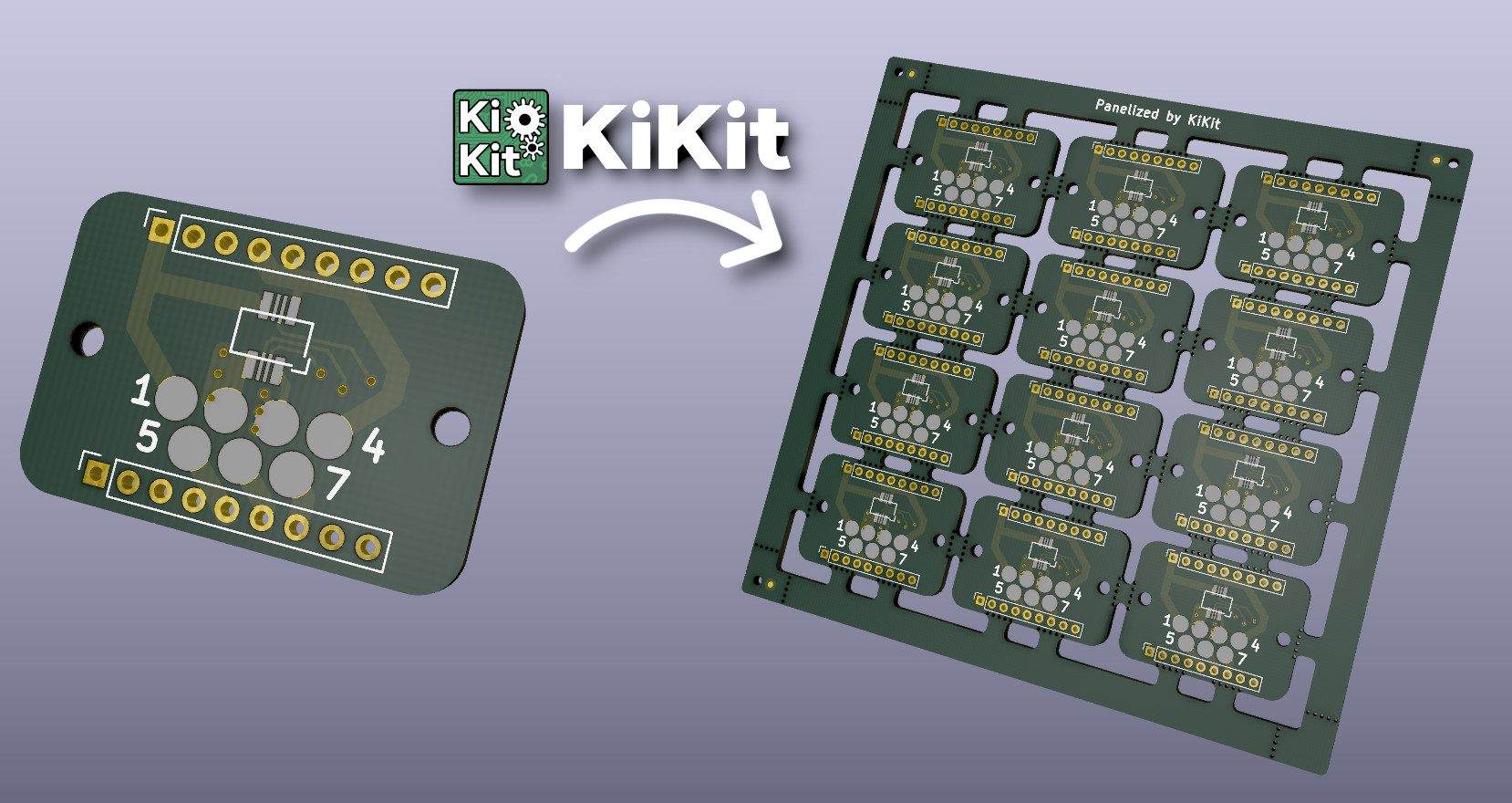
- kikit-1.8.0/kikit/export.py +220 -0
- kikit-1.8.0/kikit/export_ui.py +38 -0
- kikit-1.8.0/kikit/fab/__init__.py +0 -0
- kikit-1.8.0/kikit/fab/common.py +253 -0
- kikit-1.8.0/kikit/fab/jlcpcb.py +119 -0
- kikit-1.8.0/kikit/fab/neodenyy1.py +160 -0
- kikit-1.8.0/kikit/fab/openpnp.py +57 -0
- kikit-1.8.0/kikit/fab/oshpark.py +25 -0
- kikit-1.8.0/kikit/fab/pcbway.py +176 -0
- kikit-1.8.0/kikit/fab_ui.py +126 -0
- kikit-1.8.0/kikit/info.py +38 -0
- kikit-1.8.0/kikit/intervals.py +543 -0
- kikit-1.8.0/kikit/kicadUtil.py +25 -0
- kikit-1.8.0/kikit/modify.py +39 -0
- kikit-1.8.0/kikit/modify_ui.py +43 -0
- kikit-1.8.0/kikit/panel_features/__init__.py +1 -0
- kikit-1.8.0/kikit/panel_features/baseFeature.py +8 -0
- kikit-1.8.0/kikit/panel_features/copperFill.py +157 -0
- kikit-1.8.0/kikit/panelize.py +2635 -0
- kikit-1.8.0/kikit/panelize_ui.py +382 -0
- kikit-1.8.0/kikit/panelize_ui_impl.py +796 -0
- kikit-1.8.0/kikit/panelize_ui_sections.py +828 -0
- kikit-1.8.0/kikit/pcbnew_utils.py +37 -0
- kikit-1.8.0/kikit/plugin.py +241 -0
- kikit-1.8.0/kikit/present.py +197 -0
- kikit-1.8.0/kikit/present_ui.py +33 -0
- kikit-1.8.0/kikit/project.py +83 -0
- kikit-1.8.0/kikit/resources/graphics/kikitIcon.svg +191 -0
- kikit-1.8.0/kikit/resources/graphics/kikitIcon_48x48.png +0 -0
- kikit-1.8.0/kikit/resources/graphics/kikitIcon_64x64.png +0 -0
- kikit-1.8.0/kikit/resources/graphics/panelizeIcon.svg +186 -0
- kikit-1.8.0/kikit/resources/graphics/panelizeIcon_24x24.png +0 -0
- kikit-1.8.0/kikit/resources/graphics/pcbBg.png +0 -0
- kikit-1.8.0/kikit/resources/graphics/removeRefIcon.svg +169 -0
- kikit-1.8.0/kikit/resources/graphics/removeRefIcon_24x24.png +0 -0
- kikit-1.8.0/kikit/resources/kikit.kicad_sym +150 -0
- kikit-1.8.0/kikit/resources/kikit.pretty/Board.kicad_mod +21 -0
- kikit-1.8.0/kikit/resources/kikit.pretty/Error.kicad_mod +25 -0
- kikit-1.8.0/kikit/resources/kikit.pretty/Fiducial.kicad_mod +20 -0
- kikit-1.8.0/kikit/resources/kikit.pretty/NPTH.kicad_mod +9 -0
- kikit-1.8.0/kikit/resources/kikit.pretty/Tab.kicad_mod +25 -0
- kikit-1.8.0/kikit/resources/panelizePresets/default.json +214 -0
- kikit-1.8.0/kikit/resources/panelizePresets/jlcTooling.json +8 -0
- kikit-1.8.0/kikit/resources/panelizePresets/jlcVcuts.json +6 -0
- kikit-1.8.0/kikit/resources/present/templates/default/.gitignore +1 -0
- kikit-1.8.0/kikit/resources/present/templates/default/css/styles.css +1 -0
- kikit-1.8.0/kikit/resources/present/templates/default/index.html +55 -0
- kikit-1.8.0/kikit/resources/present/templates/default/src/styles.css +58 -0
- kikit-1.8.0/kikit/resources/present/templates/default/template.json +4 -0
- kikit-1.8.0/kikit/sexpr.py +437 -0
- kikit-1.8.0/kikit/stencil.py +489 -0
- kikit-1.8.0/kikit/stencil_ui.py +74 -0
- kikit-1.8.0/kikit/substrate.py +1155 -0
- kikit-1.8.0/kikit/text.py +49 -0
- kikit-1.8.0/kikit/typing.py +18 -0
- kikit-1.8.0/kikit/ui.py +28 -0
- kikit-1.8.0/kikit/units.py +120 -0
- kikit-1.8.0/kikit.egg-info/PKG-INFO +117 -0
- kikit-1.8.0/kikit.egg-info/SOURCES.txt +84 -0
- kikit-1.8.0/kikit.egg-info/dependency_links.txt +1 -0
- kikit-1.8.0/kikit.egg-info/entry_points.txt +3 -0
- kikit-1.8.0/kikit.egg-info/not-zip-safe +1 -0
- kikit-1.8.0/kikit.egg-info/requires.txt +10 -0
- kikit-1.8.0/kikit.egg-info/top_level.txt +1 -0
- kikit-1.8.0/setup.cfg +12 -0
- kikit-1.8.0/setup.py +50 -0
- kikit-1.8.0/versioneer.py +2277 -0
kikit-1.8.0/LICENCE
ADDED
|
@@ -0,0 +1,21 @@
|
|
|
1
|
+
MIT License
|
|
2
|
+
|
|
3
|
+
Copyright (c) 2020 Jan Mrázek
|
|
4
|
+
|
|
5
|
+
Permission is hereby granted, free of charge, to any person obtaining a copy
|
|
6
|
+
of this software and associated documentation files (the "Software"), to deal
|
|
7
|
+
in the Software without restriction, including without limitation the rights
|
|
8
|
+
to use, copy, modify, merge, publish, distribute, sublicense, and/or sell
|
|
9
|
+
copies of the Software, and to permit persons to whom the Software is
|
|
10
|
+
furnished to do so, subject to the following conditions:
|
|
11
|
+
|
|
12
|
+
The above copyright notice and this permission notice shall be included in all
|
|
13
|
+
copies or substantial portions of the Software.
|
|
14
|
+
|
|
15
|
+
THE SOFTWARE IS PROVIDED "AS IS", WITHOUT WARRANTY OF ANY KIND, EXPRESS OR
|
|
16
|
+
IMPLIED, INCLUDING BUT NOT LIMITED TO THE WARRANTIES OF MERCHANTABILITY,
|
|
17
|
+
FITNESS FOR A PARTICULAR PURPOSE AND NONINFRINGEMENT. IN NO EVENT SHALL THE
|
|
18
|
+
AUTHORS OR COPYRIGHT HOLDERS BE LIABLE FOR ANY CLAIM, DAMAGES OR OTHER
|
|
19
|
+
LIABILITY, WHETHER IN AN ACTION OF CONTRACT, TORT OR OTHERWISE, ARISING FROM,
|
|
20
|
+
OUT OF OR IN CONNECTION WITH THE SOFTWARE OR THE USE OR OTHER DEALINGS IN THE
|
|
21
|
+
SOFTWARE.
|
kikit-1.8.0/MANIFEST.in
ADDED
kikit-1.8.0/PKG-INFO
ADDED
|
@@ -0,0 +1,117 @@
|
|
|
1
|
+
Metadata-Version: 2.1
|
|
2
|
+
Name: kikit
|
|
3
|
+
Version: 1.8.0
|
|
4
|
+
Summary: Automation for KiCAD boards
|
|
5
|
+
Home-page: https://github.com/yaqwsx/KiKit
|
|
6
|
+
Author: Jan Mrázek
|
|
7
|
+
Author-email: email@honzamrazek.cz
|
|
8
|
+
Classifier: Programming Language :: Python :: 3
|
|
9
|
+
Classifier: License :: OSI Approved :: MIT License
|
|
10
|
+
Classifier: Operating System :: OS Independent
|
|
11
|
+
Requires-Python: >=3.7
|
|
12
|
+
Description-Content-Type: text/markdown
|
|
13
|
+
Provides-Extra: dev
|
|
14
|
+
License-File: LICENCE
|
|
15
|
+
|
|
16
|
+
# KiKit – Automation for KiCAD
|
|
17
|
+
|
|
18
|
+

|
|
19
|
+
|
|
20
|
+
KiKit is a Python library, KiCAD plugin and a CLI tool to automate several
|
|
21
|
+
tasks in a standard KiCAD workflow like:
|
|
22
|
+
|
|
23
|
+
- panelization of both, regular and oddly shaped, boards (see
|
|
24
|
+
[examples](https://yaqwsx.github.io/KiKit/latest/panelization/examples/))
|
|
25
|
+
- automated exporting manufacturing data based on manufacturer presets
|
|
26
|
+
- multi-board project in KiCAD
|
|
27
|
+
- building board presentation pages (see [an example presentation page generated
|
|
28
|
+
by KiKit](https://roboticsbrno.github.io/RB0002-BatteryPack))
|
|
29
|
+
|
|
30
|
+
|
|
31
|
+
|
|
32
|
+
## Do You Enjoy KiKit or Does It Save You Time?
|
|
33
|
+
|
|
34
|
+
Then definitely consider:
|
|
35
|
+
|
|
36
|
+
- [**supporting me on GitHub Sponsors**](https://github.com/sponsors/yaqwsx)
|
|
37
|
+
- or become my [Patreon](https://patreon.com/yaqwsx),
|
|
38
|
+
- or buy me a coffee: [](https://ko-fi.com/E1E2181LU)
|
|
39
|
+
|
|
40
|
+
Your support will allow me to allocate time to properly maintain my projects
|
|
41
|
+
like this.
|
|
42
|
+
|
|
43
|
+
PS: Be sure to check out my other KiCAD & PCB related projects:
|
|
44
|
+
|
|
45
|
+
- [Pinion](https://github.com/yaqwsx/Pinion/)
|
|
46
|
+
- [PcbDraw](https://github.com/yaqwsx/PcbDraw/)
|
|
47
|
+
- [JlcParts](https://github.com/yaqwsx/jlcparts)
|
|
48
|
+
|
|
49
|
+
## Installation
|
|
50
|
+
|
|
51
|
+
KiKit is available as a [PyPi package](https://pypi.org/project/KiKit/).
|
|
52
|
+
However, due to packaging of KiCAD, installation on some platforms requires
|
|
53
|
+
usage of specific Python interpreter.
|
|
54
|
+
|
|
55
|
+
Please follow the detailed [installation
|
|
56
|
+
guide](https://yaqwsx.github.io/KiKit/latest/installation/intro/) that covers
|
|
57
|
+
installation based on the platform you use.
|
|
58
|
+
|
|
59
|
+
## Why Should I Use It?
|
|
60
|
+
|
|
61
|
+
Everything KiKit does, can also be done via Pcbnew in KiCAD. However, you have
|
|
62
|
+
to do it manually. One of the common scenarios is the creation of panels. Most
|
|
63
|
+
of the tutorials on the internet guide you to use the "append board"
|
|
64
|
+
functionality of Pcbnew. However, this approach is labour-intensive, error-prone
|
|
65
|
+
and whenever, you change the board, you have to do it again.
|
|
66
|
+
|
|
67
|
+
With KiKit you just call a CLI command if you have a simple layout (e.g., a
|
|
68
|
+
grid) or write few Python instructions like "place board here", "add bridge
|
|
69
|
+
here", "separate boards via mouse bites/v-cuts" and you are done. The process is
|
|
70
|
+
repeatable and actually much simpler than hand-drawing the panels. KiKit also
|
|
71
|
+
allows you to easily export all the Gerbers in a single step.
|
|
72
|
+
|
|
73
|
+
You can then write a Makefile and simply call `make` to get all your
|
|
74
|
+
manufacturing data and board presentation pages.
|
|
75
|
+
|
|
76
|
+
## Feature List
|
|
77
|
+
|
|
78
|
+
- create panels by appending boards and pieces of substrate (bridges)
|
|
79
|
+
- supports board with arbitrary shapes
|
|
80
|
+
- easily create mouse-bites/V-CUTS
|
|
81
|
+
- compared to hand-creation of panels, your panels will pass DRC (as tracks from
|
|
82
|
+
different instances of the same board have distinct nets when using KiKit)
|
|
83
|
+
- if you have multiple boards in a single file, you can split them
|
|
84
|
+
- simplifying [multi-board project in KiCAD](https://yaqwsx.github.io/KiKit/latest/multiboard/)
|
|
85
|
+
- [automated export of gerbers and assembly data](https://yaqwsx.github.io/KiKit/latest/fabrication/intro/)
|
|
86
|
+
- [3D printed self-registering solder paste stencils](https://yaqwsx.github.io/KiKit/upstream/latest/stencil/#3d-printed-stencils)
|
|
87
|
+
- [steel stencils with alignment jig](https://yaqwsx.github.io/KiKit/latest/stencil/#steel-stencils)
|
|
88
|
+
- create powerfull shell scrips or Makefiles which automates your workflow...
|
|
89
|
+
- ...or invoke the functionality via [GUI in KiCAD](https://yaqwsx.github.io/KiKit/latest/panelization/gui/).
|
|
90
|
+
|
|
91
|
+
## How To Use It?
|
|
92
|
+
|
|
93
|
+
Start with reading the [panelization
|
|
94
|
+
documentation](https://yaqwsx.github.io/KiKit/latest/panelization/intro/). This
|
|
95
|
+
page will you guide through CLI, GUI and scripting usage. Also don't miss the
|
|
96
|
+
[examples](https://yaqwsx.github.io/KiKit/latest/panelization/examples/).
|
|
97
|
+
There is also a quick note on how to use [panelization action
|
|
98
|
+
plugin](https://yaqwsx.github.io/KiKit/latest/panelization/gui/). If you are
|
|
99
|
+
interested in generating solder paste stencils, see [Stencil
|
|
100
|
+
documentation](https://yaqwsx.github.io/KiKit/latest/stencil/)
|
|
101
|
+
|
|
102
|
+
## Acknowledgements
|
|
103
|
+
|
|
104
|
+
The project is supported by:
|
|
105
|
+
|
|
106
|
+
- [My GitHub sponsors](https://github.com/sponsors/yaqwsx) and
|
|
107
|
+
- [<img src="https://nlnet.nl/logo/banner.svg" width="150"/>](https://nlnet.nl/project/KiKit/#ack)
|
|
108
|
+
|
|
109
|
+
## KiKit Is Broken or Does Not Work as Expected
|
|
110
|
+
|
|
111
|
+
Please, first check [FAQ](https://yaqwsx.github.io/KiKit/latest/faq/). If you have not found answer for your
|
|
112
|
+
problem there, feel free to open an issue on GitHub.
|
|
113
|
+
|
|
114
|
+
If you would like to have a feature in KiKit that is currently not on a roadmap,
|
|
115
|
+
or if you need to prepare custom panelization script (e.g., multi-design panels,
|
|
116
|
+
panels with specific arrangement), you can consider hiring me to do the job.
|
|
117
|
+
Just reach out to me via e-mail and we can discuss further details.
|
kikit-1.8.0/README.md
ADDED
|
@@ -0,0 +1,102 @@
|
|
|
1
|
+
# KiKit – Automation for KiCAD
|
|
2
|
+
|
|
3
|
+

|
|
4
|
+
|
|
5
|
+
KiKit is a Python library, KiCAD plugin and a CLI tool to automate several
|
|
6
|
+
tasks in a standard KiCAD workflow like:
|
|
7
|
+
|
|
8
|
+
- panelization of both, regular and oddly shaped, boards (see
|
|
9
|
+
[examples](https://yaqwsx.github.io/KiKit/latest/panelization/examples/))
|
|
10
|
+
- automated exporting manufacturing data based on manufacturer presets
|
|
11
|
+
- multi-board project in KiCAD
|
|
12
|
+
- building board presentation pages (see [an example presentation page generated
|
|
13
|
+
by KiKit](https://roboticsbrno.github.io/RB0002-BatteryPack))
|
|
14
|
+
|
|
15
|
+

|
|
16
|
+
|
|
17
|
+
## Do You Enjoy KiKit or Does It Save You Time?
|
|
18
|
+
|
|
19
|
+
Then definitely consider:
|
|
20
|
+
|
|
21
|
+
- [**supporting me on GitHub Sponsors**](https://github.com/sponsors/yaqwsx)
|
|
22
|
+
- or become my [Patreon](https://patreon.com/yaqwsx),
|
|
23
|
+
- or buy me a coffee: [](https://ko-fi.com/E1E2181LU)
|
|
24
|
+
|
|
25
|
+
Your support will allow me to allocate time to properly maintain my projects
|
|
26
|
+
like this.
|
|
27
|
+
|
|
28
|
+
PS: Be sure to check out my other KiCAD & PCB related projects:
|
|
29
|
+
|
|
30
|
+
- [Pinion](https://github.com/yaqwsx/Pinion/)
|
|
31
|
+
- [PcbDraw](https://github.com/yaqwsx/PcbDraw/)
|
|
32
|
+
- [JlcParts](https://github.com/yaqwsx/jlcparts)
|
|
33
|
+
|
|
34
|
+
## Installation
|
|
35
|
+
|
|
36
|
+
KiKit is available as a [PyPi package](https://pypi.org/project/KiKit/).
|
|
37
|
+
However, due to packaging of KiCAD, installation on some platforms requires
|
|
38
|
+
usage of specific Python interpreter.
|
|
39
|
+
|
|
40
|
+
Please follow the detailed [installation
|
|
41
|
+
guide](https://yaqwsx.github.io/KiKit/latest/installation/intro/) that covers
|
|
42
|
+
installation based on the platform you use.
|
|
43
|
+
|
|
44
|
+
## Why Should I Use It?
|
|
45
|
+
|
|
46
|
+
Everything KiKit does, can also be done via Pcbnew in KiCAD. However, you have
|
|
47
|
+
to do it manually. One of the common scenarios is the creation of panels. Most
|
|
48
|
+
of the tutorials on the internet guide you to use the "append board"
|
|
49
|
+
functionality of Pcbnew. However, this approach is labour-intensive, error-prone
|
|
50
|
+
and whenever, you change the board, you have to do it again.
|
|
51
|
+
|
|
52
|
+
With KiKit you just call a CLI command if you have a simple layout (e.g., a
|
|
53
|
+
grid) or write few Python instructions like "place board here", "add bridge
|
|
54
|
+
here", "separate boards via mouse bites/v-cuts" and you are done. The process is
|
|
55
|
+
repeatable and actually much simpler than hand-drawing the panels. KiKit also
|
|
56
|
+
allows you to easily export all the Gerbers in a single step.
|
|
57
|
+
|
|
58
|
+
You can then write a Makefile and simply call `make` to get all your
|
|
59
|
+
manufacturing data and board presentation pages.
|
|
60
|
+
|
|
61
|
+
## Feature List
|
|
62
|
+
|
|
63
|
+
- create panels by appending boards and pieces of substrate (bridges)
|
|
64
|
+
- supports board with arbitrary shapes
|
|
65
|
+
- easily create mouse-bites/V-CUTS
|
|
66
|
+
- compared to hand-creation of panels, your panels will pass DRC (as tracks from
|
|
67
|
+
different instances of the same board have distinct nets when using KiKit)
|
|
68
|
+
- if you have multiple boards in a single file, you can split them
|
|
69
|
+
- simplifying [multi-board project in KiCAD](https://yaqwsx.github.io/KiKit/latest/multiboard/)
|
|
70
|
+
- [automated export of gerbers and assembly data](https://yaqwsx.github.io/KiKit/latest/fabrication/intro/)
|
|
71
|
+
- [3D printed self-registering solder paste stencils](https://yaqwsx.github.io/KiKit/upstream/latest/stencil/#3d-printed-stencils)
|
|
72
|
+
- [steel stencils with alignment jig](https://yaqwsx.github.io/KiKit/latest/stencil/#steel-stencils)
|
|
73
|
+
- create powerfull shell scrips or Makefiles which automates your workflow...
|
|
74
|
+
- ...or invoke the functionality via [GUI in KiCAD](https://yaqwsx.github.io/KiKit/latest/panelization/gui/).
|
|
75
|
+
|
|
76
|
+
## How To Use It?
|
|
77
|
+
|
|
78
|
+
Start with reading the [panelization
|
|
79
|
+
documentation](https://yaqwsx.github.io/KiKit/latest/panelization/intro/). This
|
|
80
|
+
page will you guide through CLI, GUI and scripting usage. Also don't miss the
|
|
81
|
+
[examples](https://yaqwsx.github.io/KiKit/latest/panelization/examples/).
|
|
82
|
+
There is also a quick note on how to use [panelization action
|
|
83
|
+
plugin](https://yaqwsx.github.io/KiKit/latest/panelization/gui/). If you are
|
|
84
|
+
interested in generating solder paste stencils, see [Stencil
|
|
85
|
+
documentation](https://yaqwsx.github.io/KiKit/latest/stencil/)
|
|
86
|
+
|
|
87
|
+
## Acknowledgements
|
|
88
|
+
|
|
89
|
+
The project is supported by:
|
|
90
|
+
|
|
91
|
+
- [My GitHub sponsors](https://github.com/sponsors/yaqwsx) and
|
|
92
|
+
- [<img src="https://nlnet.nl/logo/banner.svg" width="150"/>](https://nlnet.nl/project/KiKit/#ack)
|
|
93
|
+
|
|
94
|
+
## KiKit Is Broken or Does Not Work as Expected
|
|
95
|
+
|
|
96
|
+
Please, first check [FAQ](https://yaqwsx.github.io/KiKit/latest/faq/). If you have not found answer for your
|
|
97
|
+
problem there, feel free to open an issue on GitHub.
|
|
98
|
+
|
|
99
|
+
If you would like to have a feature in KiKit that is currently not on a roadmap,
|
|
100
|
+
or if you need to prepare custom panelization script (e.g., multi-design panels,
|
|
101
|
+
panels with specific arrangement), you can consider hiring me to do the job.
|
|
102
|
+
Just reach out to me via e-mail and we can discuss further details.
|
|
@@ -0,0 +1,21 @@
|
|
|
1
|
+
|
|
2
|
+
# This file was generated by 'versioneer.py' (0.29) from
|
|
3
|
+
# revision-control system data, or from the parent directory name of an
|
|
4
|
+
# unpacked source archive. Distribution tarballs contain a pre-generated copy
|
|
5
|
+
# of this file.
|
|
6
|
+
|
|
7
|
+
import json
|
|
8
|
+
|
|
9
|
+
version_json = '''
|
|
10
|
+
{
|
|
11
|
+
"date": "2026-04-12T12:10:08+0200",
|
|
12
|
+
"dirty": false,
|
|
13
|
+
"error": null,
|
|
14
|
+
"full-revisionid": "6eb4e7aed72165c0179af485a1a1de2d98abfe95",
|
|
15
|
+
"version": "1.8.0"
|
|
16
|
+
}
|
|
17
|
+
''' # END VERSION_JSON
|
|
18
|
+
|
|
19
|
+
|
|
20
|
+
def get_versions():
|
|
21
|
+
return json.loads(version_json)
|
|
@@ -0,0 +1,26 @@
|
|
|
1
|
+
from dataclasses import dataclass
|
|
2
|
+
|
|
3
|
+
@dataclass
|
|
4
|
+
class KiKitActionPlugin:
|
|
5
|
+
package: str
|
|
6
|
+
name: str
|
|
7
|
+
description: str
|
|
8
|
+
|
|
9
|
+
availablePlugins = [
|
|
10
|
+
KiKitActionPlugin("hideReferences", "Show/hide references",
|
|
11
|
+
"Allows you to batch show or hide references based on regular expression"),
|
|
12
|
+
KiKitActionPlugin("panelize", "Panelize design",
|
|
13
|
+
"Allows you to specify panelization process via GUI")
|
|
14
|
+
]
|
|
15
|
+
|
|
16
|
+
def importAllPlugins():
|
|
17
|
+
"""
|
|
18
|
+
Bring all plugins that KiKit offers into a the global namespace. This
|
|
19
|
+
function is impure as it modifies the global variable scope. The purpose
|
|
20
|
+
of this function is to allow the PCM proxy to operate.
|
|
21
|
+
"""
|
|
22
|
+
import importlib
|
|
23
|
+
|
|
24
|
+
for plugin in availablePlugins:
|
|
25
|
+
module = importlib.import_module(f"kikit.actionPlugins.{plugin.package}")
|
|
26
|
+
module.plugin().register()
|
|
@@ -0,0 +1,25 @@
|
|
|
1
|
+
import wx
|
|
2
|
+
import threading
|
|
3
|
+
|
|
4
|
+
app = None
|
|
5
|
+
|
|
6
|
+
def initDialog(initFn):
|
|
7
|
+
global app
|
|
8
|
+
try:
|
|
9
|
+
return initFn()
|
|
10
|
+
except Exception:
|
|
11
|
+
try:
|
|
12
|
+
# Some Linux distributions ship incompatible wxPhoenix version.
|
|
13
|
+
# So we start a custom wxApp loop
|
|
14
|
+
app = wx.App()
|
|
15
|
+
app.InitLocale()
|
|
16
|
+
t = threading.Thread(target=app.MainLoop)
|
|
17
|
+
t.daemon = True
|
|
18
|
+
t.start()
|
|
19
|
+
return initFn()
|
|
20
|
+
except Exception as e:
|
|
21
|
+
raise e from None
|
|
22
|
+
|
|
23
|
+
def destroyDialog(dialog):
|
|
24
|
+
if dialog is not None:
|
|
25
|
+
dialog.Destroy()
|
|
@@ -0,0 +1,302 @@
|
|
|
1
|
+
import pcbnew
|
|
2
|
+
import wx
|
|
3
|
+
import re
|
|
4
|
+
import os
|
|
5
|
+
import kikit
|
|
6
|
+
from kikit import modify
|
|
7
|
+
from kikit.defs import Layer
|
|
8
|
+
from kikit.common import PKG_BASE
|
|
9
|
+
from .common import initDialog, destroyDialog
|
|
10
|
+
|
|
11
|
+
class HideReferencesDialog(wx.Dialog):
|
|
12
|
+
def __init__(self, state, parent=None, board=None, action=None, updateState=None):
|
|
13
|
+
wx.Dialog.__init__(self,
|
|
14
|
+
parent,
|
|
15
|
+
title=f'Specify which components to hide (version {kikit.__version__})',
|
|
16
|
+
style=wx.RESIZE_BORDER | wx.DEFAULT_DIALOG_STYLE)
|
|
17
|
+
self.board = board
|
|
18
|
+
self.actionCallback = action
|
|
19
|
+
self.updateStatusCallback = updateState
|
|
20
|
+
self.text = ""
|
|
21
|
+
self.selectedItemOnly = False
|
|
22
|
+
|
|
23
|
+
self.Bind(wx.EVT_CLOSE, self.OnCancel, id=self.GetId())
|
|
24
|
+
self.Bind(wx.EVT_SIZE, self.OnSize)
|
|
25
|
+
|
|
26
|
+
self.SetMinSize(wx.Size(520, 620))
|
|
27
|
+
|
|
28
|
+
panel = self
|
|
29
|
+
|
|
30
|
+
vbox = wx.BoxSizer(wx.VERTICAL)
|
|
31
|
+
self.item_grid = wx.FlexGridSizer(0, 2, 3, 5)
|
|
32
|
+
self.item_grid.AddGrowableCol(1)
|
|
33
|
+
|
|
34
|
+
label = wx.StaticText(panel,
|
|
35
|
+
label="Apply to labels pattern:\n(regular expression)",
|
|
36
|
+
size=wx.Size(200, -1),
|
|
37
|
+
style=wx.ALIGN_RIGHT)
|
|
38
|
+
label.Wrap(200)
|
|
39
|
+
self.item_grid.Add(label, 1, wx.ALIGN_CENTRE_VERTICAL)
|
|
40
|
+
self.pattern = wx.TextCtrl(panel, style=wx.TE_LEFT, value=state.get("pattern", ".*"),
|
|
41
|
+
size=wx.Size(350, -1))
|
|
42
|
+
self.Bind(wx.EVT_TEXT, self.OnPatternChange, id=self.pattern.GetId())
|
|
43
|
+
self.item_grid.Add(self.pattern, 0, wx.EXPAND)
|
|
44
|
+
|
|
45
|
+
label = wx.StaticText(panel, label="Only Selected items:",
|
|
46
|
+
size=wx.Size(200, -1),
|
|
47
|
+
style=wx.ALIGN_RIGHT)
|
|
48
|
+
label.Wrap(200)
|
|
49
|
+
self.item_grid.Add(label, 1, wx.ALIGN_CENTRE_VERTICAL)
|
|
50
|
+
self.selected_only = wx.CheckBox(panel, style=wx.CHK_2STATE)
|
|
51
|
+
self.Bind(wx.EVT_CHECKBOX, self.OnselectedItemOnlyChange)
|
|
52
|
+
self.selected_only.SetValue(self.selectedItemOnly)
|
|
53
|
+
self.item_grid.Add(self.selected_only, 0, wx.EXPAND)
|
|
54
|
+
|
|
55
|
+
label = wx.StaticText(panel, label="What to do:",
|
|
56
|
+
size=wx.Size(200, -1),
|
|
57
|
+
style=wx.ALIGN_RIGHT)
|
|
58
|
+
label.Wrap(200)
|
|
59
|
+
self.item_grid.Add(label, 1, wx.ALIGN_CENTRE_VERTICAL)
|
|
60
|
+
self.action = wx.Choice(panel, style=wx.CB_DROPDOWN,
|
|
61
|
+
choices=["Show", "Hide"])
|
|
62
|
+
self.action.SetSelection(state.get("action", 1))
|
|
63
|
+
self.item_grid.Add(self.action, 0, wx.EXPAND)
|
|
64
|
+
|
|
65
|
+
label = wx.StaticText(panel, label="Apply to:",
|
|
66
|
+
size=wx.Size(200, -1),
|
|
67
|
+
style=wx.ALIGN_RIGHT)
|
|
68
|
+
label.Wrap(200)
|
|
69
|
+
self.item_grid.Add(label, 1, wx.ALIGN_CENTRE_VERTICAL)
|
|
70
|
+
self.scope = wx.Choice(panel, style=wx.CB_DROPDOWN,
|
|
71
|
+
choices=["References only", "Values only", "References and values"])
|
|
72
|
+
self.scope.SetSelection(state.get("scope", 2))
|
|
73
|
+
self.item_grid.Add(self.scope, 0, wx.EXPAND)
|
|
74
|
+
|
|
75
|
+
label = wx.StaticText(panel, label="Layers to include:",
|
|
76
|
+
size=wx.Size(200, -1),
|
|
77
|
+
style=wx.ALIGN_RIGHT | wx.ALIGN_TOP)
|
|
78
|
+
label.Wrap(200)
|
|
79
|
+
self.item_grid.Add(label, 0, wx.ALIGN_CENTRE_VERTICAL)
|
|
80
|
+
|
|
81
|
+
self.layers = wx.CheckListBox(panel, choices=[str(Layer(l).name) for l in Layer.all()])
|
|
82
|
+
layerCheckState = state.get("layers", [True for _ in Layer.all()])
|
|
83
|
+
for l, checked in zip(Layer.all(), layerCheckState):
|
|
84
|
+
self.layers.Check(l, checked)
|
|
85
|
+
self.item_grid.Add(self.layers, 0, wx.EXPAND)
|
|
86
|
+
|
|
87
|
+
label = wx.StaticText(panel, label="Select layers:",
|
|
88
|
+
size=wx.Size(200, -1),
|
|
89
|
+
style=wx.ALIGN_RIGHT | wx.ALIGN_TOP)
|
|
90
|
+
label.Wrap(200)
|
|
91
|
+
self.item_grid.Add(label, 0, wx.ALIGN_CENTRE_VERTICAL)
|
|
92
|
+
|
|
93
|
+
buttonGrid = wx.FlexGridSizer(0, 2, 3, 5)
|
|
94
|
+
buttonGrid.AddGrowableCol(0)
|
|
95
|
+
buttonGrid.AddGrowableCol(1)
|
|
96
|
+
self.item_grid.Add(buttonGrid, 0, wx.EXPAND)
|
|
97
|
+
|
|
98
|
+
allLayersBtn = wx.Button(panel, label='All layers')
|
|
99
|
+
self.Bind(wx.EVT_BUTTON, self.OnAllLayers, id=allLayersBtn.GetId())
|
|
100
|
+
buttonGrid.Add(allLayersBtn, 1, wx.EXPAND)
|
|
101
|
+
|
|
102
|
+
noLayersBtn = wx.Button(panel, label='No layers')
|
|
103
|
+
self.Bind(wx.EVT_BUTTON, self.OnNoLayers, id=noLayersBtn.GetId())
|
|
104
|
+
buttonGrid.Add(noLayersBtn, 1, wx.EXPAND)
|
|
105
|
+
|
|
106
|
+
techLayersBtn = wx.Button(panel, label='Toggle technical layers')
|
|
107
|
+
self.Bind(wx.EVT_BUTTON, self.OnTechnicalLayers, id=techLayersBtn.GetId())
|
|
108
|
+
buttonGrid.Add(techLayersBtn, 1, wx.EXPAND)
|
|
109
|
+
|
|
110
|
+
silkLayersBtn = wx.Button(panel, label='Toggle silkscreen layers')
|
|
111
|
+
self.Bind(wx.EVT_BUTTON, self.OnSilkscreenLayers, id=silkLayersBtn.GetId())
|
|
112
|
+
buttonGrid.Add(silkLayersBtn, 1, wx.EXPAND)
|
|
113
|
+
|
|
114
|
+
|
|
115
|
+
label = wx.StaticText(panel,
|
|
116
|
+
label="Matching references:",
|
|
117
|
+
size=wx.Size(200, -1),
|
|
118
|
+
style=wx.ALIGN_RIGHT)
|
|
119
|
+
label.Wrap(200)
|
|
120
|
+
self.item_grid.Add(label, 1, wx.ALIGN_TOP)
|
|
121
|
+
self.matchingText = wx.StaticText(panel,
|
|
122
|
+
label="Matching references:",
|
|
123
|
+
size=wx.Size(350, 80),
|
|
124
|
+
style=wx.ALIGN_LEFT | wx.ST_ELLIPSIZE_END)
|
|
125
|
+
self.item_grid.Add(self.matchingText, 1, wx.EXPAND)
|
|
126
|
+
self.item_grid.AddGrowableRow(5)
|
|
127
|
+
|
|
128
|
+
button_box = wx.BoxSizer(wx.HORIZONTAL)
|
|
129
|
+
|
|
130
|
+
cancelButton = wx.Button(panel, label='Close')
|
|
131
|
+
self.Bind(wx.EVT_BUTTON, self.OnCancel, id=cancelButton.GetId())
|
|
132
|
+
button_box.Add(cancelButton, 1, wx.RIGHT, 10)
|
|
133
|
+
|
|
134
|
+
self.applyButton = wx.Button(panel, label='Apply')
|
|
135
|
+
self.Bind(wx.EVT_BUTTON, self.OnApply, id=self.applyButton.GetId())
|
|
136
|
+
button_box.Add(self.applyButton, 1)
|
|
137
|
+
|
|
138
|
+
vbox.Add(self.item_grid, 1, wx.EXPAND | wx.ALL, 10)
|
|
139
|
+
vbox.Add(button_box, 0, wx.ALIGN_RIGHT | wx.LEFT | wx.RIGHT | wx.BOTTOM, 20)
|
|
140
|
+
|
|
141
|
+
panel.SetSizer(vbox)
|
|
142
|
+
vbox.Fit(self)
|
|
143
|
+
self.Centre()
|
|
144
|
+
self.OnPatternChange(None)
|
|
145
|
+
|
|
146
|
+
def SetTextPreview(self, text = None):
|
|
147
|
+
if text is not None:
|
|
148
|
+
self.text = text
|
|
149
|
+
self.matchingText.SetLabel(self.text)
|
|
150
|
+
self.matchingText.Wrap(self.item_grid.GetColWidths()[1])
|
|
151
|
+
|
|
152
|
+
def Show(self):
|
|
153
|
+
self.OnPatternChange(None)
|
|
154
|
+
super().Show()
|
|
155
|
+
|
|
156
|
+
def OnSize(self, event):
|
|
157
|
+
self.SetTextPreview()
|
|
158
|
+
if event is not None:
|
|
159
|
+
event.Skip()
|
|
160
|
+
|
|
161
|
+
def OnCancel(self, event):
|
|
162
|
+
if self.updateStatusCallback is not None:
|
|
163
|
+
selectedLayers = self.GetActiveLayers()
|
|
164
|
+
self.updateStatusCallback({
|
|
165
|
+
"pattern": self.GetPattern(),
|
|
166
|
+
"scope": self.scope.GetSelection(),
|
|
167
|
+
"action": self.action.GetSelection(),
|
|
168
|
+
"layers": [l in selectedLayers for l in Layer.all()]
|
|
169
|
+
})
|
|
170
|
+
destroyDialog(self)
|
|
171
|
+
|
|
172
|
+
def OnApply(self, event):
|
|
173
|
+
if self.actionCallback is not None:
|
|
174
|
+
self.actionCallback(self)
|
|
175
|
+
|
|
176
|
+
def OnAllLayers(self, event):
|
|
177
|
+
for l in Layer.all():
|
|
178
|
+
self.layers.Check(l)
|
|
179
|
+
|
|
180
|
+
def OnNoLayers(self, event):
|
|
181
|
+
for l in Layer.all():
|
|
182
|
+
self.layers.Check(l, False)
|
|
183
|
+
|
|
184
|
+
def OnTechnicalLayers(self, event):
|
|
185
|
+
checked = set(self.layers.GetCheckedItems())
|
|
186
|
+
enable = not all(x in checked for x in Layer.allTech())
|
|
187
|
+
for l in Layer.allTech():
|
|
188
|
+
self.layers.Check(l, enable)
|
|
189
|
+
|
|
190
|
+
def OnSilkscreenLayers(self, event):
|
|
191
|
+
checked = set(self.layers.GetCheckedItems())
|
|
192
|
+
enable = not all(x in checked for x in Layer.allSilk())
|
|
193
|
+
for l in Layer.allSilk():
|
|
194
|
+
self.layers.Check(l, enable)
|
|
195
|
+
|
|
196
|
+
def GetShowLabels(self):
|
|
197
|
+
return self.action.GetSelection() == 0
|
|
198
|
+
|
|
199
|
+
def GetPattern(self):
|
|
200
|
+
return self.pattern.GetValue()
|
|
201
|
+
|
|
202
|
+
def GetActiveLayers(self):
|
|
203
|
+
return set(self.layers.GetCheckedItems())
|
|
204
|
+
|
|
205
|
+
def GetSelectedItemOnly(self):
|
|
206
|
+
return self.selectedItemOnly
|
|
207
|
+
|
|
208
|
+
def ModifyReferences(self):
|
|
209
|
+
return self.scope.GetSelection() in [0, 2]
|
|
210
|
+
|
|
211
|
+
def ModifyValues(self):
|
|
212
|
+
return self.scope.GetSelection() in [1, 2]
|
|
213
|
+
|
|
214
|
+
def OnselectedItemOnlyChange(self, event):
|
|
215
|
+
self.selectedItemOnly = not self.selectedItemOnly
|
|
216
|
+
self.OnPatternChange(None)
|
|
217
|
+
|
|
218
|
+
def OnPatternChange(self, event):
|
|
219
|
+
try:
|
|
220
|
+
regex = re.compile(self.pattern.GetValue())
|
|
221
|
+
self.applyButton.Enable()
|
|
222
|
+
if not self.board:
|
|
223
|
+
self.SetTextPreview("")
|
|
224
|
+
else:
|
|
225
|
+
refs = []
|
|
226
|
+
for footprint in self.board.GetFootprints():
|
|
227
|
+
if self.selectedItemOnly and not footprint.IsSelected():
|
|
228
|
+
continue
|
|
229
|
+
|
|
230
|
+
if regex.match(footprint.GetReference()):
|
|
231
|
+
refs.append(footprint.GetReference())
|
|
232
|
+
if len(refs) > 0:
|
|
233
|
+
self.SetTextPreview(", ".join(refs))
|
|
234
|
+
else:
|
|
235
|
+
self.SetTextPreview("None")
|
|
236
|
+
except re.error as e:
|
|
237
|
+
self.applyButton.Disable()
|
|
238
|
+
self.SetTextPreview(f"Invalid regular expression: {e}")
|
|
239
|
+
finally:
|
|
240
|
+
self.SendSizeEvent()
|
|
241
|
+
|
|
242
|
+
|
|
243
|
+
class HideReferencesPlugin(pcbnew.ActionPlugin):
|
|
244
|
+
def defaults(self):
|
|
245
|
+
self.name = "KiKit: Show/hide references"
|
|
246
|
+
self.category = "KiKit"
|
|
247
|
+
self.description = "Show/hide references in the board based on regular expression"
|
|
248
|
+
self.icon_file_name = os.path.join(PKG_BASE, "resources", "graphics", "removeRefIcon_24x24.png")
|
|
249
|
+
self.show_toolbar_button = True
|
|
250
|
+
|
|
251
|
+
def __init__(self, *args, **kwargs):
|
|
252
|
+
super().__init__(*args, **kwargs)
|
|
253
|
+
self._dialogState = {}
|
|
254
|
+
|
|
255
|
+
def error(self, msg):
|
|
256
|
+
wx.MessageBox(msg, "Error", wx.OK | wx.ICON_ERROR)
|
|
257
|
+
|
|
258
|
+
def action(self, dialog):
|
|
259
|
+
try:
|
|
260
|
+
if dialog.ModifyReferences():
|
|
261
|
+
modify.references(dialog.board, dialog.GetShowLabels(),
|
|
262
|
+
dialog.GetPattern(), dialog.GetActiveLayers(),
|
|
263
|
+
dialog.GetSelectedItemOnly())
|
|
264
|
+
if dialog.ModifyValues():
|
|
265
|
+
modify.values(dialog.board, dialog.GetShowLabels(),
|
|
266
|
+
dialog.GetPattern(), dialog.GetActiveLayers(),
|
|
267
|
+
dialog.GetSelectedItemOnly())
|
|
268
|
+
pcbnew.Refresh()
|
|
269
|
+
except Exception as e:
|
|
270
|
+
self.error(f"Cannot perform: {e}")
|
|
271
|
+
|
|
272
|
+
def updateState(self, newState):
|
|
273
|
+
self._dialogState = newState
|
|
274
|
+
|
|
275
|
+
def Run(self):
|
|
276
|
+
# Find the pcbnew main window
|
|
277
|
+
pcbnew_window = wx.FindWindowByName("PcbFrame")
|
|
278
|
+
if pcbnew_window is None:
|
|
279
|
+
# Something failed, abort
|
|
280
|
+
self.error("Failed to find pcbnew main window")
|
|
281
|
+
return
|
|
282
|
+
try:
|
|
283
|
+
dialog = initDialog(lambda: HideReferencesDialog(
|
|
284
|
+
state=self._dialogState,
|
|
285
|
+
board=pcbnew.GetBoard(),
|
|
286
|
+
action=lambda d: self.action(d),
|
|
287
|
+
updateState=lambda s: self.updateState(s),
|
|
288
|
+
parent=pcbnew_window))
|
|
289
|
+
dialog.Show()
|
|
290
|
+
except Exception as e:
|
|
291
|
+
self.error(f"Cannot perform: {e}")
|
|
292
|
+
|
|
293
|
+
plugin = HideReferencesPlugin
|
|
294
|
+
|
|
295
|
+
if __name__ == "__main__":
|
|
296
|
+
import sys
|
|
297
|
+
|
|
298
|
+
dialog = initDialog(lambda: HideReferencesDialog(
|
|
299
|
+
{},
|
|
300
|
+
board=pcbnew.LoadBoard(sys.argv[1]),
|
|
301
|
+
updateState=print))
|
|
302
|
+
dialog.ShowModal()
|