kanban-python 0.3.4__tar.gz → 0.3.6__tar.gz
This diff represents the content of publicly available package versions that have been released to one of the supported registries. The information contained in this diff is provided for informational purposes only and reflects changes between package versions as they appear in their respective public registries.
- {kanban-python-0.3.4 → kanban-python-0.3.6}/CHANGELOG.md +8 -0
- {kanban-python-0.3.4/src/kanban_python.egg-info → kanban-python-0.3.6}/PKG-INFO +42 -10
- {kanban-python-0.3.4 → kanban-python-0.3.6}/README.md +41 -9
- {kanban-python-0.3.4 → kanban-python-0.3.6}/src/kanban_python/constants.py +1 -1
- {kanban-python-0.3.4 → kanban-python-0.3.6}/src/kanban_python/controls.py +9 -1
- {kanban-python-0.3.4 → kanban-python-0.3.6}/src/kanban_python/interface.py +44 -25
- {kanban-python-0.3.4 → kanban-python-0.3.6/src/kanban_python.egg-info}/PKG-INFO +42 -10
- {kanban-python-0.3.4 → kanban-python-0.3.6}/.coveragerc +0 -0
- {kanban-python-0.3.4 → kanban-python-0.3.6}/.github/workflows/ci.yml +0 -0
- {kanban-python-0.3.4 → kanban-python-0.3.6}/.gitignore +0 -0
- {kanban-python-0.3.4 → kanban-python-0.3.6}/.isort.cfg +0 -0
- {kanban-python-0.3.4 → kanban-python-0.3.6}/.pre-commit-config.yaml +0 -0
- {kanban-python-0.3.4 → kanban-python-0.3.6}/.readthedocs.yml +0 -0
- {kanban-python-0.3.4 → kanban-python-0.3.6}/AUTHORS.md +0 -0
- {kanban-python-0.3.4 → kanban-python-0.3.6}/CONTRIBUTING.md +0 -0
- {kanban-python-0.3.4 → kanban-python-0.3.6}/LICENSE.txt +0 -0
- {kanban-python-0.3.4 → kanban-python-0.3.6}/docs/Makefile +0 -0
- {kanban-python-0.3.4 → kanban-python-0.3.6}/docs/_static/.gitignore +0 -0
- {kanban-python-0.3.4 → kanban-python-0.3.6}/docs/authors.md +0 -0
- {kanban-python-0.3.4 → kanban-python-0.3.6}/docs/changelog.md +0 -0
- {kanban-python-0.3.4 → kanban-python-0.3.6}/docs/conf.py +0 -0
- {kanban-python-0.3.4 → kanban-python-0.3.6}/docs/contributing.md +0 -0
- {kanban-python-0.3.4 → kanban-python-0.3.6}/docs/index.md +0 -0
- {kanban-python-0.3.4 → kanban-python-0.3.6}/docs/license.md +0 -0
- {kanban-python-0.3.4 → kanban-python-0.3.6}/docs/readme.md +0 -0
- {kanban-python-0.3.4 → kanban-python-0.3.6}/docs/requirements.txt +0 -0
- {kanban-python-0.3.4 → kanban-python-0.3.6}/images/image_config.PNG +0 -0
- {kanban-python-0.3.4 → kanban-python-0.3.6}/images/image_header.PNG +0 -0
- {kanban-python-0.3.4 → kanban-python-0.3.6}/images/image_kanban.PNG +0 -0
- {kanban-python-0.3.4 → kanban-python-0.3.6}/images/image_kanban_configure.PNG +0 -0
- {kanban-python-0.3.4 → kanban-python-0.3.6}/images/image_kanban_init.PNG +0 -0
- {kanban-python-0.3.4 → kanban-python-0.3.6}/images/image_scan_table.PNG +0 -0
- {kanban-python-0.3.4 → kanban-python-0.3.6}/images/image_scan_view.PNG +0 -0
- {kanban-python-0.3.4 → kanban-python-0.3.6}/images/image_task_example.PNG +0 -0
- {kanban-python-0.3.4 → kanban-python-0.3.6}/pyproject.toml +0 -0
- {kanban-python-0.3.4 → kanban-python-0.3.6}/setup.cfg +0 -0
- {kanban-python-0.3.4 → kanban-python-0.3.6}/setup.py +0 -0
- {kanban-python-0.3.4 → kanban-python-0.3.6}/src/kanban_python/__init__.py +0 -0
- {kanban-python-0.3.4 → kanban-python-0.3.6}/src/kanban_python/app.py +0 -0
- {kanban-python-0.3.4 → kanban-python-0.3.6}/src/kanban_python/cli_parser.py +0 -0
- {kanban-python-0.3.4 → kanban-python-0.3.6}/src/kanban_python/config.py +0 -0
- {kanban-python-0.3.4 → kanban-python-0.3.6}/src/kanban_python/utils.py +0 -0
- {kanban-python-0.3.4 → kanban-python-0.3.6}/src/kanban_python.egg-info/SOURCES.txt +0 -0
- {kanban-python-0.3.4 → kanban-python-0.3.6}/src/kanban_python.egg-info/dependency_links.txt +0 -0
- {kanban-python-0.3.4 → kanban-python-0.3.6}/src/kanban_python.egg-info/entry_points.txt +0 -0
- {kanban-python-0.3.4 → kanban-python-0.3.6}/src/kanban_python.egg-info/not-zip-safe +0 -0
- {kanban-python-0.3.4 → kanban-python-0.3.6}/src/kanban_python.egg-info/requires.txt +0 -0
- {kanban-python-0.3.4 → kanban-python-0.3.6}/src/kanban_python.egg-info/top_level.txt +0 -0
- {kanban-python-0.3.4 → kanban-python-0.3.6}/tests/conftest.py +0 -0
- {kanban-python-0.3.4 → kanban-python-0.3.6}/tests/test_config.py +0 -0
- {kanban-python-0.3.4 → kanban-python-0.3.6}/tests/test_interface.py +0 -0
- {kanban-python-0.3.4 → kanban-python-0.3.6}/tests/test_utils.py +0 -0
- {kanban-python-0.3.4 → kanban-python-0.3.6}/tox.ini +0 -0
|
@@ -1,5 +1,13 @@
|
|
|
1
1
|
# Changelog
|
|
2
2
|
|
|
3
|
+
## Version 0.3.6
|
|
4
|
+
- Add an `Overview` of Task amounts when changing boards, to get an overview over all Boards
|
|
5
|
+
- Behind the boardname you now have something like `Ready: 05 | Doing: 02 | Done: 10`
|
|
6
|
+
- only tasks amount of columns set as visible are displayed
|
|
7
|
+
|
|
8
|
+
## Version 0.3.5
|
|
9
|
+
- Bug Fix: Datatype `Welcome Task` Duration: str -> int
|
|
10
|
+
|
|
3
11
|
## Version 0.3.4
|
|
4
12
|
- Bug fix: default separator for `settings.scanner` Pattern setting was space separated not comma separated
|
|
5
13
|
- Fix Image for kanban configure to show right Pattern
|
|
@@ -1,6 +1,6 @@
|
|
|
1
1
|
Metadata-Version: 2.1
|
|
2
2
|
Name: kanban-python
|
|
3
|
-
Version: 0.3.
|
|
3
|
+
Version: 0.3.6
|
|
4
4
|
Summary: Terminal Kanban App written in Python
|
|
5
5
|
Home-page: https://github.com/Zaloog/kanban-python
|
|
6
6
|
Author: Zaloog
|
|
@@ -34,7 +34,7 @@ Requires-Dist: pytest-cov; extra == "testing"
|
|
|
34
34
|
[](https://pyscaffold.org/)
|
|
35
35
|
[](https://pypi.org/project/kanban-python/)
|
|
36
36
|
[](https://pepy.tech/project/kanban-python)
|
|
37
|
-
[](https://coveralls.io/github/Zaloog/kanban-python?branch=main)
|
|
38
38
|
|
|
39
39
|
# kanban-python
|
|
40
40
|
|
|
@@ -55,17 +55,34 @@ and takes over much of the boilerplate for python packaging.
|
|
|
55
55
|
It was a great help for developing my first package and I can highly recommend it.
|
|
56
56
|
|
|
57
57
|
## Features
|
|
58
|
-
|
|
58
|
+
<details><summary>Colorful and Interactive</summary>
|
|
59
|
+
|
|
60
|
+
- kanban-python uses [rich] under the hood to process user input
|
|
59
61
|
and display nice looking tables to the terminal.
|
|
60
62
|
|
|
61
|
-
|
|
63
|
+
</details>
|
|
64
|
+
|
|
65
|
+
|
|
66
|
+
<details><summary>Following the XDG basedir convention</summary>
|
|
67
|
+
|
|
68
|
+
- kanban-python utilizes [platformdirs] `user_config_dir` to save the config file and `user_data_dir` for
|
|
62
69
|
the board specific task files. After creating your first board, you can use `kanban configure` to show the current settings table.
|
|
63
70
|
The config path in the table caption and the path for the task files can be found in the kanban_boards section.
|
|
64
71
|
|
|
65
|
-
|
|
72
|
+
</details>
|
|
73
|
+
|
|
74
|
+
|
|
75
|
+
<details><summary>Scanning of Files for automatic Task Creation</summary>
|
|
76
|
+
|
|
77
|
+
- kanban-python can scan files of defined types for specific patterns at start of line.
|
|
66
78
|
Check [Automatic Task Creation](#automatic-task-creation) for more Infos.
|
|
67
79
|
|
|
68
|
-
|
|
80
|
+
</details>
|
|
81
|
+
|
|
82
|
+
|
|
83
|
+
<details><summary>Customizable Configfile</summary>
|
|
84
|
+
|
|
85
|
+
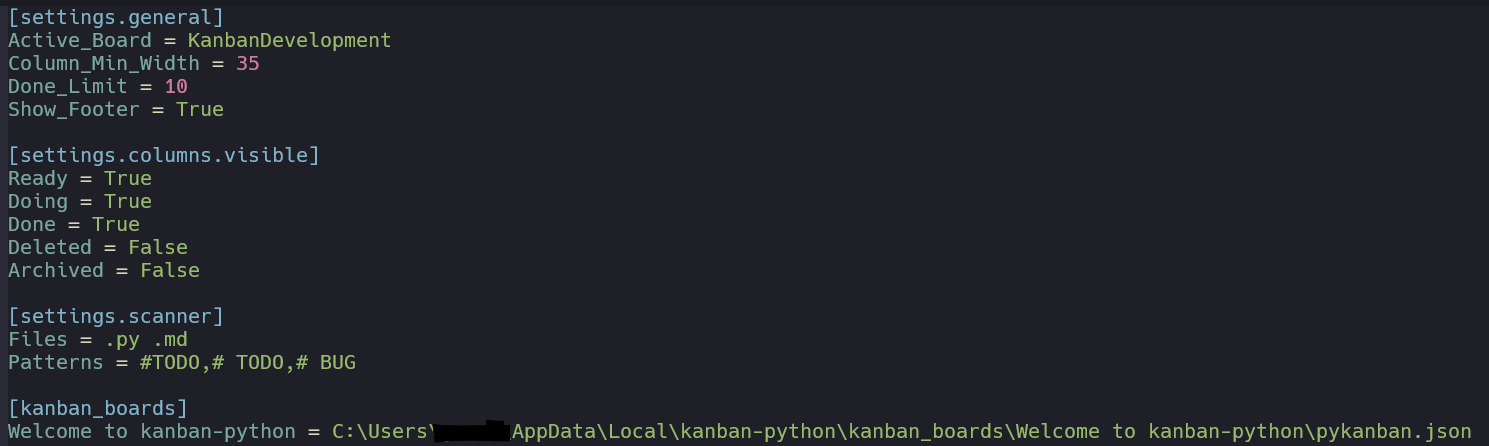
- A `pykanban.ini` file gets created on first initialization in a `kanban-python` folder in your `user_config_dir`-Directory.
|
|
69
86
|
This can be edited manually or within the kanban-python application. It tracks the location for all your created boards. \
|
|
70
87
|
|
|
71
88
|
* `Active_Board`: current board that is shown when using `kanban`-command
|
|
@@ -76,19 +93,34 @@ This can be edited manually or within the kanban-python application. It tracks t
|
|
|
76
93
|
* `Files`: Space seperated filetypes to search for patterns to create tasks. (default: `.py .md`)
|
|
77
94
|
* `Patterns`: Comma seperated patterns to search for start of line to create tasks. <br />(default: `# TODO,#TODO,# BUG`)
|
|
78
95
|
|
|
79
|
-
|
|
96
|
+
</details>
|
|
80
97
|
|
|
81
|
-
|
|
98
|
+
|
|
99
|
+
<details><summary>Task Storage File for each Board</summary>
|
|
100
|
+
|
|
101
|
+
- Each created board comes with its own name and `pykanban.json` file,
|
|
82
102
|
which stores all tasks for that board. The files are stored in board specific folders under `$USER_DATA_DIR/kanban-python/kanban_boards/<BOARDNAME>`
|
|
83
103
|
|
|
84
|
-
|
|
104
|
+
</details>
|
|
105
|
+
|
|
106
|
+
|
|
107
|
+
<details><summary>Customizable Columns</summary>
|
|
108
|
+
|
|
109
|
+
- kanban-python comes with 5 pre-defined colored columns: [Ready, Doing, Done, Archived, Deleted]
|
|
85
110
|
More column can be added manually in the `pykanban.ini`, also the visibility can be configured there.
|
|
86
111
|
|
|
87
|
-
|
|
112
|
+
</details>
|
|
113
|
+
|
|
114
|
+
|
|
115
|
+
<details><summary>Time Tracking of Task duration in Doing</summary>
|
|
116
|
+
|
|
117
|
+
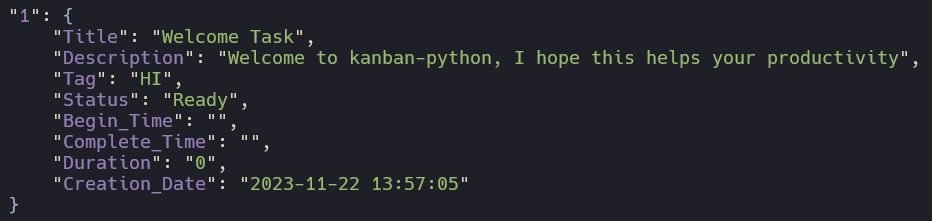
- For each task it is tracked, how long it was in the
|
|
88
118
|
<span style="color:yellow">Doing</span> column, based on the moments when you update the task status.
|
|
89
119
|
The initial Task structure on creation looks as follows:
|
|
90
120
|
|
|
91
121
|
|
|
122
|
+
</details>
|
|
123
|
+
|
|
92
124
|
|
|
93
125
|
## Installation
|
|
94
126
|
You can install kanban-python with:
|
|
@@ -11,7 +11,7 @@
|
|
|
11
11
|
[](https://pyscaffold.org/)
|
|
12
12
|
[](https://pypi.org/project/kanban-python/)
|
|
13
13
|
[](https://pepy.tech/project/kanban-python)
|
|
14
|
-
[](https://coveralls.io/github/Zaloog/kanban-python?branch=main)
|
|
15
15
|
|
|
16
16
|
# kanban-python
|
|
17
17
|
|
|
@@ -32,17 +32,34 @@ and takes over much of the boilerplate for python packaging.
|
|
|
32
32
|
It was a great help for developing my first package and I can highly recommend it.
|
|
33
33
|
|
|
34
34
|
## Features
|
|
35
|
-
|
|
35
|
+
<details><summary>Colorful and Interactive</summary>
|
|
36
|
+
|
|
37
|
+
- kanban-python uses [rich] under the hood to process user input
|
|
36
38
|
and display nice looking tables to the terminal.
|
|
37
39
|
|
|
38
|
-
|
|
40
|
+
</details>
|
|
41
|
+
|
|
42
|
+
|
|
43
|
+
<details><summary>Following the XDG basedir convention</summary>
|
|
44
|
+
|
|
45
|
+
- kanban-python utilizes [platformdirs] `user_config_dir` to save the config file and `user_data_dir` for
|
|
39
46
|
the board specific task files. After creating your first board, you can use `kanban configure` to show the current settings table.
|
|
40
47
|
The config path in the table caption and the path for the task files can be found in the kanban_boards section.
|
|
41
48
|
|
|
42
|
-
|
|
49
|
+
</details>
|
|
50
|
+
|
|
51
|
+
|
|
52
|
+
<details><summary>Scanning of Files for automatic Task Creation</summary>
|
|
53
|
+
|
|
54
|
+
- kanban-python can scan files of defined types for specific patterns at start of line.
|
|
43
55
|
Check [Automatic Task Creation](#automatic-task-creation) for more Infos.
|
|
44
56
|
|
|
45
|
-
|
|
57
|
+
</details>
|
|
58
|
+
|
|
59
|
+
|
|
60
|
+
<details><summary>Customizable Configfile</summary>
|
|
61
|
+
|
|
62
|
+
- A `pykanban.ini` file gets created on first initialization in a `kanban-python` folder in your `user_config_dir`-Directory.
|
|
46
63
|
This can be edited manually or within the kanban-python application. It tracks the location for all your created boards. \
|
|
47
64
|

|
|
48
65
|
* `Active_Board`: current board that is shown when using `kanban`-command
|
|
@@ -53,19 +70,34 @@ This can be edited manually or within the kanban-python application. It tracks t
|
|
|
53
70
|
* `Files`: Space seperated filetypes to search for patterns to create tasks. (default: `.py .md`)
|
|
54
71
|
* `Patterns`: Comma seperated patterns to search for start of line to create tasks. <br />(default: `# TODO,#TODO,# BUG`)
|
|
55
72
|
|
|
56
|
-
|
|
73
|
+
</details>
|
|
57
74
|
|
|
58
|
-
|
|
75
|
+
|
|
76
|
+
<details><summary>Task Storage File for each Board</summary>
|
|
77
|
+
|
|
78
|
+
- Each created board comes with its own name and `pykanban.json` file,
|
|
59
79
|
which stores all tasks for that board. The files are stored in board specific folders under `$USER_DATA_DIR/kanban-python/kanban_boards/<BOARDNAME>`
|
|
60
80
|
|
|
61
|
-
|
|
81
|
+
</details>
|
|
82
|
+
|
|
83
|
+
|
|
84
|
+
<details><summary>Customizable Columns</summary>
|
|
85
|
+
|
|
86
|
+
- kanban-python comes with 5 pre-defined colored columns: [Ready, Doing, Done, Archived, Deleted]
|
|
62
87
|
More column can be added manually in the `pykanban.ini`, also the visibility can be configured there.
|
|
63
88
|
|
|
64
|
-
|
|
89
|
+
</details>
|
|
90
|
+
|
|
91
|
+
|
|
92
|
+
<details><summary>Time Tracking of Task duration in Doing</summary>
|
|
93
|
+
|
|
94
|
+
- For each task it is tracked, how long it was in the
|
|
65
95
|
<span style="color:yellow">Doing</span> column, based on the moments when you update the task status.
|
|
66
96
|
The initial Task structure on creation looks as follows:
|
|
67
97
|

|
|
68
98
|
|
|
99
|
+
</details>
|
|
100
|
+
|
|
69
101
|
|
|
70
102
|
## Installation
|
|
71
103
|
You can install kanban-python with:
|
|
@@ -112,6 +112,12 @@ def read_db(path: str = None) -> dict:
|
|
|
112
112
|
if not path:
|
|
113
113
|
path = cfg.active_board_path
|
|
114
114
|
|
|
115
|
+
if path == "all":
|
|
116
|
+
board_dict = {
|
|
117
|
+
b: read_single_board(b_path) for b, b_path in cfg.kanban_boards_dict.items()
|
|
118
|
+
}
|
|
119
|
+
return board_dict
|
|
120
|
+
|
|
115
121
|
try:
|
|
116
122
|
data = read_single_board(path)
|
|
117
123
|
return data
|
|
@@ -120,6 +126,7 @@ def read_db(path: str = None) -> dict:
|
|
|
120
126
|
console.print(f":warning: No [orange3]{TASK_FILE_NAME}[/] file here anymore.")
|
|
121
127
|
console.print("Please change to another board.")
|
|
122
128
|
change_kanban_board()
|
|
129
|
+
|
|
123
130
|
console.print(f"[red]Seems like the previous {TASK_FILE_NAME} file was deleted[/]")
|
|
124
131
|
console.print(f"Create new [orange3]{TASK_FILE_NAME}[/] file here.")
|
|
125
132
|
create_new_db()
|
|
@@ -163,7 +170,8 @@ def update_task_from_db():
|
|
|
163
170
|
|
|
164
171
|
# Action 3
|
|
165
172
|
def change_kanban_board():
|
|
166
|
-
|
|
173
|
+
boards_dict = read_db(path="all")
|
|
174
|
+
new_active_board = input_ask_for_change_board(boards_dict)
|
|
167
175
|
cfg.active_board = new_active_board
|
|
168
176
|
|
|
169
177
|
|
|
@@ -47,6 +47,7 @@ def create_table(data: dict) -> Table:
|
|
|
47
47
|
return table
|
|
48
48
|
|
|
49
49
|
|
|
50
|
+
# Board Action selection
|
|
50
51
|
def input_ask_for_action():
|
|
51
52
|
console.print(
|
|
52
53
|
"[yellow]Whats up!?[/], how can I help you being productive today :rocket:?"
|
|
@@ -81,6 +82,7 @@ def input_ask_for_action():
|
|
|
81
82
|
return action
|
|
82
83
|
|
|
83
84
|
|
|
85
|
+
# Action 1: New Task
|
|
84
86
|
def input_create_new_task() -> dict:
|
|
85
87
|
title = Prompt.ask(
|
|
86
88
|
prompt="[1/4] Add Task Title",
|
|
@@ -121,6 +123,19 @@ def input_create_new_task() -> dict:
|
|
|
121
123
|
return new_task
|
|
122
124
|
|
|
123
125
|
|
|
126
|
+
# Option 2
|
|
127
|
+
def input_ask_which_task_to_update(data: dict) -> str:
|
|
128
|
+
choice_task_ids = [
|
|
129
|
+
id for id, task in data.items() if task["Status"] in cfg.vis_cols
|
|
130
|
+
]
|
|
131
|
+
task_id_to_update = IntPrompt.ask(
|
|
132
|
+
prompt="Which Task to update? Select an [[cyan]Id[/]]",
|
|
133
|
+
choices=choice_task_ids,
|
|
134
|
+
show_choices=False,
|
|
135
|
+
)
|
|
136
|
+
return str(task_id_to_update)
|
|
137
|
+
|
|
138
|
+
|
|
124
139
|
def input_update_task_title(current_title) -> str:
|
|
125
140
|
return Prompt.ask(
|
|
126
141
|
prompt="[1/4] Update Task Title",
|
|
@@ -185,18 +200,6 @@ def input_update_task(current_task: dict) -> dict:
|
|
|
185
200
|
return current_task
|
|
186
201
|
|
|
187
202
|
|
|
188
|
-
def input_ask_which_task_to_update(data: dict) -> str:
|
|
189
|
-
choice_task_ids = [
|
|
190
|
-
id for id, task in data.items() if task["Status"] in cfg.vis_cols
|
|
191
|
-
]
|
|
192
|
-
task_id_to_update = IntPrompt.ask(
|
|
193
|
-
prompt="Which Task to update? Select an [[cyan]Id[/]]",
|
|
194
|
-
choices=choice_task_ids,
|
|
195
|
-
show_choices=False,
|
|
196
|
-
)
|
|
197
|
-
return str(task_id_to_update)
|
|
198
|
-
|
|
199
|
-
|
|
200
203
|
def input_ask_to_what_status_to_move(task_title):
|
|
201
204
|
possible_status = [cat for cat in cfg.kanban_columns_dict]
|
|
202
205
|
|
|
@@ -227,16 +230,29 @@ def input_ask_for_new_board_name() -> str:
|
|
|
227
230
|
)
|
|
228
231
|
|
|
229
232
|
|
|
230
|
-
|
|
233
|
+
# Action 3 Change Boards
|
|
234
|
+
def input_ask_for_change_board(boards_dict: dict) -> str:
|
|
231
235
|
boards = cfg.kanban_boards
|
|
236
|
+
max_board_len = max([len(b) for b in cfg.kanban_boards])
|
|
237
|
+
|
|
232
238
|
# if active Board is not in Board List dont show default
|
|
233
239
|
try:
|
|
234
240
|
active_board_idx = boards.index(cfg.active_board) + 1
|
|
235
241
|
except ValueError:
|
|
236
242
|
active_board_idx = None
|
|
237
243
|
|
|
238
|
-
for idx, board in enumerate(
|
|
239
|
-
|
|
244
|
+
for idx, (board, board_data) in enumerate(boards_dict.items(), start=1):
|
|
245
|
+
status_dict = create_status_dict_for_rows(board_data, cfg.vis_cols)
|
|
246
|
+
console.print(
|
|
247
|
+
f"[{idx}] {board}"
|
|
248
|
+
+ " " * ((max_board_len - len(board) + 1))
|
|
249
|
+
+ " | ".join(
|
|
250
|
+
[
|
|
251
|
+
f"{COLOR_DICT[col]}: {len(status_dict[col]):02d}"
|
|
252
|
+
for col in cfg.vis_cols
|
|
253
|
+
]
|
|
254
|
+
)
|
|
255
|
+
)
|
|
240
256
|
|
|
241
257
|
answer = IntPrompt.ask(
|
|
242
258
|
prompt="Which board to activate",
|
|
@@ -248,6 +264,18 @@ def input_ask_for_change_board() -> str:
|
|
|
248
264
|
return boards[int(answer) - 1]
|
|
249
265
|
|
|
250
266
|
|
|
267
|
+
# Action 4 Show Tasks
|
|
268
|
+
def input_ask_which_tasks_to_show(choices):
|
|
269
|
+
return Prompt.ask(
|
|
270
|
+
prompt="What Task/s to show? Select an [[cyan]Id[/]] or ([orange3]Tag[/])?",
|
|
271
|
+
default=False,
|
|
272
|
+
show_default=False,
|
|
273
|
+
choices=choices,
|
|
274
|
+
show_choices=False,
|
|
275
|
+
)
|
|
276
|
+
|
|
277
|
+
|
|
278
|
+
# Action 5 Delete Boards
|
|
251
279
|
def input_ask_for_delete_board() -> str:
|
|
252
280
|
boards = [b for b in cfg.kanban_boards]
|
|
253
281
|
for idx, board in enumerate(boards, start=1):
|
|
@@ -267,6 +295,7 @@ def input_confirm_delete_board(name) -> bool:
|
|
|
267
295
|
)
|
|
268
296
|
|
|
269
297
|
|
|
298
|
+
# Scanner options
|
|
270
299
|
def input_confirm_show_all_todos() -> bool:
|
|
271
300
|
return Confirm.ask(
|
|
272
301
|
prompt="Do you want to list all of them?",
|
|
@@ -301,16 +330,6 @@ def input_confirm_add_todos_to_board(todos) -> bool:
|
|
|
301
330
|
)
|
|
302
331
|
|
|
303
332
|
|
|
304
|
-
def input_ask_which_tasks_to_show(choices):
|
|
305
|
-
return Prompt.ask(
|
|
306
|
-
prompt="What Task/s to show? Select an [[cyan]Id[/]] or ([orange3]Tag[/])?",
|
|
307
|
-
default=False,
|
|
308
|
-
show_default=False,
|
|
309
|
-
choices=choices,
|
|
310
|
-
show_choices=False,
|
|
311
|
-
)
|
|
312
|
-
|
|
313
|
-
|
|
314
333
|
# Config Settings
|
|
315
334
|
#####################################################################################
|
|
316
335
|
|
|
@@ -1,6 +1,6 @@
|
|
|
1
1
|
Metadata-Version: 2.1
|
|
2
2
|
Name: kanban-python
|
|
3
|
-
Version: 0.3.
|
|
3
|
+
Version: 0.3.6
|
|
4
4
|
Summary: Terminal Kanban App written in Python
|
|
5
5
|
Home-page: https://github.com/Zaloog/kanban-python
|
|
6
6
|
Author: Zaloog
|
|
@@ -34,7 +34,7 @@ Requires-Dist: pytest-cov; extra == "testing"
|
|
|
34
34
|
[](https://pyscaffold.org/)
|
|
35
35
|
[](https://pypi.org/project/kanban-python/)
|
|
36
36
|
[](https://pepy.tech/project/kanban-python)
|
|
37
|
-
[](https://coveralls.io/github/Zaloog/kanban-python?branch=main)
|
|
38
38
|
|
|
39
39
|
# kanban-python
|
|
40
40
|
|
|
@@ -55,17 +55,34 @@ and takes over much of the boilerplate for python packaging.
|
|
|
55
55
|
It was a great help for developing my first package and I can highly recommend it.
|
|
56
56
|
|
|
57
57
|
## Features
|
|
58
|
-
|
|
58
|
+
<details><summary>Colorful and Interactive</summary>
|
|
59
|
+
|
|
60
|
+
- kanban-python uses [rich] under the hood to process user input
|
|
59
61
|
and display nice looking tables to the terminal.
|
|
60
62
|
|
|
61
|
-
|
|
63
|
+
</details>
|
|
64
|
+
|
|
65
|
+
|
|
66
|
+
<details><summary>Following the XDG basedir convention</summary>
|
|
67
|
+
|
|
68
|
+
- kanban-python utilizes [platformdirs] `user_config_dir` to save the config file and `user_data_dir` for
|
|
62
69
|
the board specific task files. After creating your first board, you can use `kanban configure` to show the current settings table.
|
|
63
70
|
The config path in the table caption and the path for the task files can be found in the kanban_boards section.
|
|
64
71
|
|
|
65
|
-
|
|
72
|
+
</details>
|
|
73
|
+
|
|
74
|
+
|
|
75
|
+
<details><summary>Scanning of Files for automatic Task Creation</summary>
|
|
76
|
+
|
|
77
|
+
- kanban-python can scan files of defined types for specific patterns at start of line.
|
|
66
78
|
Check [Automatic Task Creation](#automatic-task-creation) for more Infos.
|
|
67
79
|
|
|
68
|
-
|
|
80
|
+
</details>
|
|
81
|
+
|
|
82
|
+
|
|
83
|
+
<details><summary>Customizable Configfile</summary>
|
|
84
|
+
|
|
85
|
+
- A `pykanban.ini` file gets created on first initialization in a `kanban-python` folder in your `user_config_dir`-Directory.
|
|
69
86
|
This can be edited manually or within the kanban-python application. It tracks the location for all your created boards. \
|
|
70
87
|

|
|
71
88
|
* `Active_Board`: current board that is shown when using `kanban`-command
|
|
@@ -76,19 +93,34 @@ This can be edited manually or within the kanban-python application. It tracks t
|
|
|
76
93
|
* `Files`: Space seperated filetypes to search for patterns to create tasks. (default: `.py .md`)
|
|
77
94
|
* `Patterns`: Comma seperated patterns to search for start of line to create tasks. <br />(default: `# TODO,#TODO,# BUG`)
|
|
78
95
|
|
|
79
|
-
|
|
96
|
+
</details>
|
|
80
97
|
|
|
81
|
-
|
|
98
|
+
|
|
99
|
+
<details><summary>Task Storage File for each Board</summary>
|
|
100
|
+
|
|
101
|
+
- Each created board comes with its own name and `pykanban.json` file,
|
|
82
102
|
which stores all tasks for that board. The files are stored in board specific folders under `$USER_DATA_DIR/kanban-python/kanban_boards/<BOARDNAME>`
|
|
83
103
|
|
|
84
|
-
|
|
104
|
+
</details>
|
|
105
|
+
|
|
106
|
+
|
|
107
|
+
<details><summary>Customizable Columns</summary>
|
|
108
|
+
|
|
109
|
+
- kanban-python comes with 5 pre-defined colored columns: [Ready, Doing, Done, Archived, Deleted]
|
|
85
110
|
More column can be added manually in the `pykanban.ini`, also the visibility can be configured there.
|
|
86
111
|
|
|
87
|
-
|
|
112
|
+
</details>
|
|
113
|
+
|
|
114
|
+
|
|
115
|
+
<details><summary>Time Tracking of Task duration in Doing</summary>
|
|
116
|
+
|
|
117
|
+
- For each task it is tracked, how long it was in the
|
|
88
118
|
<span style="color:yellow">Doing</span> column, based on the moments when you update the task status.
|
|
89
119
|
The initial Task structure on creation looks as follows:
|
|
90
120
|

|
|
91
121
|
|
|
122
|
+
</details>
|
|
123
|
+
|
|
92
124
|
|
|
93
125
|
## Installation
|
|
94
126
|
You can install kanban-python with:
|
|
File without changes
|
|
File without changes
|
|
File without changes
|
|
File without changes
|
|
File without changes
|
|
File without changes
|
|
File without changes
|
|
File without changes
|
|
File without changes
|
|
File without changes
|
|
File without changes
|
|
File without changes
|
|
File without changes
|
|
File without changes
|
|
File without changes
|
|
File without changes
|
|
File without changes
|
|
File without changes
|
|
File without changes
|
|
File without changes
|
|
File without changes
|
|
File without changes
|
|
File without changes
|
|
File without changes
|
|
File without changes
|
|
File without changes
|
|
File without changes
|
|
File without changes
|
|
File without changes
|
|
File without changes
|
|
File without changes
|
|
File without changes
|
|
File without changes
|
|
File without changes
|
|
File without changes
|
|
File without changes
|
|
File without changes
|
|
File without changes
|
|
File without changes
|
|
File without changes
|
|
File without changes
|
|
File without changes
|
|
File without changes
|
|
File without changes
|
|
File without changes
|
|
File without changes
|