jupyterminal 0.0.1.dev0__tar.gz
This diff represents the content of publicly available package versions that have been released to one of the supported registries. The information contained in this diff is provided for informational purposes only and reflects changes between package versions as they appear in their respective public registries.
- jupyterminal-0.0.1.dev0/LICENSE +201 -0
- jupyterminal-0.0.1.dev0/PKG-INFO +245 -0
- jupyterminal-0.0.1.dev0/README.md +227 -0
- jupyterminal-0.0.1.dev0/pyproject.toml +66 -0
- jupyterminal-0.0.1.dev0/setup.cfg +4 -0
- jupyterminal-0.0.1.dev0/src/jupyterminal/__init__.py +13 -0
- jupyterminal-0.0.1.dev0/src/jupyterminal/__main__.py +7 -0
- jupyterminal-0.0.1.dev0/src/jupyterminal/app.py +111 -0
- jupyterminal-0.0.1.dev0/src/jupyterminal/config.py +253 -0
- jupyterminal-0.0.1.dev0/src/jupyterminal/desktop.py +84 -0
- jupyterminal-0.0.1.dev0/src/jupyterminal/session/__init__.py +13 -0
- jupyterminal-0.0.1.dev0/src/jupyterminal/session/block.py +150 -0
- jupyterminal-0.0.1.dev0/src/jupyterminal/session/session.py +1044 -0
- jupyterminal-0.0.1.dev0/src/jupyterminal/session/text.py +138 -0
- jupyterminal-0.0.1.dev0/src/jupyterminal/shell/__init__.py +7 -0
- jupyterminal-0.0.1.dev0/src/jupyterminal/shell/integration.py +157 -0
- jupyterminal-0.0.1.dev0/src/jupyterminal/shell/pty.py +203 -0
- jupyterminal-0.0.1.dev0/src/jupyterminal/shell/zsh/integration.zsh +433 -0
- jupyterminal-0.0.1.dev0/src/jupyterminal/shell/zsh/zlogin.zsh +13 -0
- jupyterminal-0.0.1.dev0/src/jupyterminal/shell/zsh/zprofile.zsh +12 -0
- jupyterminal-0.0.1.dev0/src/jupyterminal/shell/zsh/zshenv.zsh +87 -0
- jupyterminal-0.0.1.dev0/src/jupyterminal/shell/zsh/zshrc.zsh +19 -0
- jupyterminal-0.0.1.dev0/src/jupyterminal/term/__init__.py +9 -0
- jupyterminal-0.0.1.dev0/src/jupyterminal/term/charwidth.py +69 -0
- jupyterminal-0.0.1.dev0/src/jupyterminal/term/keys.py +113 -0
- jupyterminal-0.0.1.dev0/src/jupyterminal/term/screen.py +1406 -0
- jupyterminal-0.0.1.dev0/src/jupyterminal/term/style.py +226 -0
- jupyterminal-0.0.1.dev0/src/jupyterminal/term/terminal.py +716 -0
- jupyterminal-0.0.1.dev0/src/jupyterminal/ui/__init__.py +6 -0
- jupyterminal-0.0.1.dev0/src/jupyterminal/ui/bars.py +212 -0
- jupyterminal-0.0.1.dev0/src/jupyterminal/ui/cell.py +541 -0
- jupyterminal-0.0.1.dev0/src/jupyterminal/ui/jupyterminal.svg +12 -0
- jupyterminal-0.0.1.dev0/src/jupyterminal/ui/layout.py +358 -0
- jupyterminal-0.0.1.dev0/src/jupyterminal/ui/render.py +315 -0
- jupyterminal-0.0.1.dev0/src/jupyterminal/ui/theme.py +149 -0
- jupyterminal-0.0.1.dev0/src/jupyterminal/ui/view.py +2665 -0
- jupyterminal-0.0.1.dev0/src/jupyterminal/ui/window.py +57 -0
- jupyterminal-0.0.1.dev0/src/jupyterminal.egg-info/PKG-INFO +245 -0
- jupyterminal-0.0.1.dev0/src/jupyterminal.egg-info/SOURCES.txt +75 -0
- jupyterminal-0.0.1.dev0/src/jupyterminal.egg-info/dependency_links.txt +1 -0
- jupyterminal-0.0.1.dev0/src/jupyterminal.egg-info/entry_points.txt +2 -0
- jupyterminal-0.0.1.dev0/src/jupyterminal.egg-info/requires.txt +1 -0
- jupyterminal-0.0.1.dev0/src/jupyterminal.egg-info/top_level.txt +1 -0
- jupyterminal-0.0.1.dev0/tests/test_acceptance.py +399 -0
- jupyterminal-0.0.1.dev0/tests/test_app.py +461 -0
- jupyterminal-0.0.1.dev0/tests/test_bars.py +499 -0
- jupyterminal-0.0.1.dev0/tests/test_block.py +295 -0
- jupyterminal-0.0.1.dev0/tests/test_cell.py +1958 -0
- jupyterminal-0.0.1.dev0/tests/test_charwidth.py +70 -0
- jupyterminal-0.0.1.dev0/tests/test_config.py +330 -0
- jupyterminal-0.0.1.dev0/tests/test_desktop.py +193 -0
- jupyterminal-0.0.1.dev0/tests/test_fuzz.py +126 -0
- jupyterminal-0.0.1.dev0/tests/test_integration.py +324 -0
- jupyterminal-0.0.1.dev0/tests/test_keys.py +215 -0
- jupyterminal-0.0.1.dev0/tests/test_layout.py +718 -0
- jupyterminal-0.0.1.dev0/tests/test_pty.py +680 -0
- jupyterminal-0.0.1.dev0/tests/test_render.py +839 -0
- jupyterminal-0.0.1.dev0/tests/test_screen_cells.py +522 -0
- jupyterminal-0.0.1.dev0/tests/test_screen_motion.py +635 -0
- jupyterminal-0.0.1.dev0/tests/test_session.py +2949 -0
- jupyterminal-0.0.1.dev0/tests/test_style.py +265 -0
- jupyterminal-0.0.1.dev0/tests/test_term.py +2361 -0
- jupyterminal-0.0.1.dev0/tests/test_terminal_sequences.py +502 -0
- jupyterminal-0.0.1.dev0/tests/test_text.py +269 -0
- jupyterminal-0.0.1.dev0/tests/test_theme.py +342 -0
- jupyterminal-0.0.1.dev0/tests/test_ui.py +750 -0
- jupyterminal-0.0.1.dev0/tests/test_view_actions.py +842 -0
- jupyterminal-0.0.1.dev0/tests/test_view_find.py +873 -0
- jupyterminal-0.0.1.dev0/tests/test_view_io.py +574 -0
- jupyterminal-0.0.1.dev0/tests/test_view_keys.py +671 -0
- jupyterminal-0.0.1.dev0/tests/test_view_layout.py +1510 -0
- jupyterminal-0.0.1.dev0/tests/test_view_mouse.py +1494 -0
- jupyterminal-0.0.1.dev0/tests/test_view_paint.py +1512 -0
- jupyterminal-0.0.1.dev0/tests/test_view_selection.py +986 -0
- jupyterminal-0.0.1.dev0/tests/test_window.py +136 -0
- jupyterminal-0.0.1.dev0/tests/test_zsh.py +1004 -0
- jupyterminal-0.0.1.dev0/tests/test_zsh_configs.py +332 -0
|
@@ -0,0 +1,201 @@
|
|
|
1
|
+
Apache License
|
|
2
|
+
Version 2.0, January 2004
|
|
3
|
+
http://www.apache.org/licenses/
|
|
4
|
+
|
|
5
|
+
TERMS AND CONDITIONS FOR USE, REPRODUCTION, AND DISTRIBUTION
|
|
6
|
+
|
|
7
|
+
1. Definitions.
|
|
8
|
+
|
|
9
|
+
"License" shall mean the terms and conditions for use, reproduction,
|
|
10
|
+
and distribution as defined by Sections 1 through 9 of this document.
|
|
11
|
+
|
|
12
|
+
"Licensor" shall mean the copyright owner or entity authorized by
|
|
13
|
+
the copyright owner that is granting the License.
|
|
14
|
+
|
|
15
|
+
"Legal Entity" shall mean the union of the acting entity and all
|
|
16
|
+
other entities that control, are controlled by, or are under common
|
|
17
|
+
control with that entity. For the purposes of this definition,
|
|
18
|
+
"control" means (i) the power, direct or indirect, to cause the
|
|
19
|
+
direction or management of such entity, whether by contract or
|
|
20
|
+
otherwise, or (ii) ownership of fifty percent (50%) or more of the
|
|
21
|
+
outstanding shares, or (iii) beneficial ownership of such entity.
|
|
22
|
+
|
|
23
|
+
"You" (or "Your") shall mean an individual or Legal Entity
|
|
24
|
+
exercising permissions granted by this License.
|
|
25
|
+
|
|
26
|
+
"Source" form shall mean the preferred form for making modifications,
|
|
27
|
+
including but not limited to software source code, documentation
|
|
28
|
+
source, and configuration files.
|
|
29
|
+
|
|
30
|
+
"Object" form shall mean any form resulting from mechanical
|
|
31
|
+
transformation or translation of a Source form, including but
|
|
32
|
+
not limited to compiled object code, generated documentation,
|
|
33
|
+
and conversions to other media types.
|
|
34
|
+
|
|
35
|
+
"Work" shall mean the work of authorship, whether in Source or
|
|
36
|
+
Object form, made available under the License, as indicated by a
|
|
37
|
+
copyright notice that is included in or attached to the work
|
|
38
|
+
(an example is provided in the Appendix below).
|
|
39
|
+
|
|
40
|
+
"Derivative Works" shall mean any work, whether in Source or Object
|
|
41
|
+
form, that is based on (or derived from) the Work and for which the
|
|
42
|
+
editorial revisions, annotations, elaborations, or other modifications
|
|
43
|
+
represent, as a whole, an original work of authorship. For the purposes
|
|
44
|
+
of this License, Derivative Works shall not include works that remain
|
|
45
|
+
separable from, or merely link (or bind by name) to the interfaces of,
|
|
46
|
+
the Work and Derivative Works thereof.
|
|
47
|
+
|
|
48
|
+
"Contribution" shall mean any work of authorship, including
|
|
49
|
+
the original version of the Work and any modifications or additions
|
|
50
|
+
to that Work or Derivative Works thereof, that is intentionally
|
|
51
|
+
submitted to Licensor for inclusion in the Work by the copyright owner
|
|
52
|
+
or by an individual or Legal Entity authorized to submit on behalf of
|
|
53
|
+
the copyright owner. For the purposes of this definition, "submitted"
|
|
54
|
+
means any form of electronic, verbal, or written communication sent
|
|
55
|
+
to the Licensor or its representatives, including but not limited to
|
|
56
|
+
communication on electronic mailing lists, source code control systems,
|
|
57
|
+
and issue tracking systems that are managed by, or on behalf of, the
|
|
58
|
+
Licensor for the purpose of discussing and improving the Work, but
|
|
59
|
+
excluding communication that is conspicuously marked or otherwise
|
|
60
|
+
designated in writing by the copyright owner as "Not a Contribution."
|
|
61
|
+
|
|
62
|
+
"Contributor" shall mean Licensor and any individual or Legal Entity
|
|
63
|
+
on behalf of whom a Contribution has been received by Licensor and
|
|
64
|
+
subsequently incorporated within the Work.
|
|
65
|
+
|
|
66
|
+
2. Grant of Copyright License. Subject to the terms and conditions of
|
|
67
|
+
this License, each Contributor hereby grants to You a perpetual,
|
|
68
|
+
worldwide, non-exclusive, no-charge, royalty-free, irrevocable
|
|
69
|
+
copyright license to reproduce, prepare Derivative Works of,
|
|
70
|
+
publicly display, publicly perform, sublicense, and distribute the
|
|
71
|
+
Work and such Derivative Works in Source or Object form.
|
|
72
|
+
|
|
73
|
+
3. Grant of Patent License. Subject to the terms and conditions of
|
|
74
|
+
this License, each Contributor hereby grants to You a perpetual,
|
|
75
|
+
worldwide, non-exclusive, no-charge, royalty-free, irrevocable
|
|
76
|
+
(except as stated in this section) patent license to make, have made,
|
|
77
|
+
use, offer to sell, sell, import, and otherwise transfer the Work,
|
|
78
|
+
where such license applies only to those patent claims licensable
|
|
79
|
+
by such Contributor that are necessarily infringed by their
|
|
80
|
+
Contribution(s) alone or by combination of their Contribution(s)
|
|
81
|
+
with the Work to which such Contribution(s) was submitted. If You
|
|
82
|
+
institute patent litigation against any entity (including a
|
|
83
|
+
cross-claim or counterclaim in a lawsuit) alleging that the Work
|
|
84
|
+
or a Contribution incorporated within the Work constitutes direct
|
|
85
|
+
or contributory patent infringement, then any patent licenses
|
|
86
|
+
granted to You under this License for that Work shall terminate
|
|
87
|
+
as of the date such litigation is filed.
|
|
88
|
+
|
|
89
|
+
4. Redistribution. You may reproduce and distribute copies of the
|
|
90
|
+
Work or Derivative Works thereof in any medium, with or without
|
|
91
|
+
modifications, and in Source or Object form, provided that You
|
|
92
|
+
meet the following conditions:
|
|
93
|
+
|
|
94
|
+
(a) You must give any other recipients of the Work or
|
|
95
|
+
Derivative Works a copy of this License; and
|
|
96
|
+
|
|
97
|
+
(b) You must cause any modified files to carry prominent notices
|
|
98
|
+
stating that You changed the files; and
|
|
99
|
+
|
|
100
|
+
(c) You must retain, in the Source form of any Derivative Works
|
|
101
|
+
that You distribute, all copyright, patent, trademark, and
|
|
102
|
+
attribution notices from the Source form of the Work,
|
|
103
|
+
excluding those notices that do not pertain to any part of
|
|
104
|
+
the Derivative Works; and
|
|
105
|
+
|
|
106
|
+
(d) If the Work includes a "NOTICE" text file as part of its
|
|
107
|
+
distribution, then any Derivative Works that You distribute must
|
|
108
|
+
include a readable copy of the attribution notices contained
|
|
109
|
+
within such NOTICE file, excluding those notices that do not
|
|
110
|
+
pertain to any part of the Derivative Works, in at least one
|
|
111
|
+
of the following places: within a NOTICE text file distributed
|
|
112
|
+
as part of the Derivative Works; within the Source form or
|
|
113
|
+
documentation, if provided along with the Derivative Works; or,
|
|
114
|
+
within a display generated by the Derivative Works, if and
|
|
115
|
+
wherever such third-party notices normally appear. The contents
|
|
116
|
+
of the NOTICE file are for informational purposes only and
|
|
117
|
+
do not modify the License. You may add Your own attribution
|
|
118
|
+
notices within Derivative Works that You distribute, alongside
|
|
119
|
+
or as an addendum to the NOTICE text from the Work, provided
|
|
120
|
+
that such additional attribution notices cannot be construed
|
|
121
|
+
as modifying the License.
|
|
122
|
+
|
|
123
|
+
You may add Your own copyright statement to Your modifications and
|
|
124
|
+
may provide additional or different license terms and conditions
|
|
125
|
+
for use, reproduction, or distribution of Your modifications, or
|
|
126
|
+
for any such Derivative Works as a whole, provided Your use,
|
|
127
|
+
reproduction, and distribution of the Work otherwise complies with
|
|
128
|
+
the conditions stated in this License.
|
|
129
|
+
|
|
130
|
+
5. Submission of Contributions. Unless You explicitly state otherwise,
|
|
131
|
+
any Contribution intentionally submitted for inclusion in the Work
|
|
132
|
+
by You to the Licensor shall be under the terms and conditions of
|
|
133
|
+
this License, without any additional terms or conditions.
|
|
134
|
+
Notwithstanding the above, nothing herein shall supersede or modify
|
|
135
|
+
the terms of any separate license agreement you may have executed
|
|
136
|
+
with Licensor regarding such Contributions.
|
|
137
|
+
|
|
138
|
+
6. Trademarks. This License does not grant permission to use the trade
|
|
139
|
+
names, trademarks, service marks, or product names of the Licensor,
|
|
140
|
+
except as required for reasonable and customary use in describing the
|
|
141
|
+
origin of the Work and reproducing the content of the NOTICE file.
|
|
142
|
+
|
|
143
|
+
7. Disclaimer of Warranty. Unless required by applicable law or
|
|
144
|
+
agreed to in writing, Licensor provides the Work (and each
|
|
145
|
+
Contributor provides its Contributions) on an "AS IS" BASIS,
|
|
146
|
+
WITHOUT WARRANTIES OR CONDITIONS OF ANY KIND, either express or
|
|
147
|
+
implied, including, without limitation, any warranties or conditions
|
|
148
|
+
of TITLE, NON-INFRINGEMENT, MERCHANTABILITY, or FITNESS FOR A
|
|
149
|
+
PARTICULAR PURPOSE. You are solely responsible for determining the
|
|
150
|
+
appropriateness of using or redistributing the Work and assume any
|
|
151
|
+
risks associated with Your exercise of permissions under this License.
|
|
152
|
+
|
|
153
|
+
8. Limitation of Liability. In no event and under no legal theory,
|
|
154
|
+
whether in tort (including negligence), contract, or otherwise,
|
|
155
|
+
unless required by applicable law (such as deliberate and grossly
|
|
156
|
+
negligent acts) or agreed to in writing, shall any Contributor be
|
|
157
|
+
liable to You for damages, including any direct, indirect, special,
|
|
158
|
+
incidental, or consequential damages of any character arising as a
|
|
159
|
+
result of this License or out of the use or inability to use the
|
|
160
|
+
Work (including but not limited to damages for loss of goodwill,
|
|
161
|
+
work stoppage, computer failure or malfunction, or any and all
|
|
162
|
+
other commercial damages or losses), even if such Contributor
|
|
163
|
+
has been advised of the possibility of such damages.
|
|
164
|
+
|
|
165
|
+
9. Accepting Warranty or Additional Liability. While redistributing
|
|
166
|
+
the Work or Derivative Works thereof, You may choose to offer,
|
|
167
|
+
and charge a fee for, acceptance of support, warranty, indemnity,
|
|
168
|
+
or other liability obligations and/or rights consistent with this
|
|
169
|
+
License. However, in accepting such obligations, You may act only
|
|
170
|
+
on Your own behalf and on Your sole responsibility, not on behalf
|
|
171
|
+
of any other Contributor, and only if You agree to indemnify,
|
|
172
|
+
defend, and hold each Contributor harmless for any liability
|
|
173
|
+
incurred by, or claims asserted against, such Contributor by reason
|
|
174
|
+
of your accepting any such warranty or additional liability.
|
|
175
|
+
|
|
176
|
+
END OF TERMS AND CONDITIONS
|
|
177
|
+
|
|
178
|
+
APPENDIX: How to apply the Apache License to your work.
|
|
179
|
+
|
|
180
|
+
To apply the Apache License to your work, attach the following
|
|
181
|
+
boilerplate notice, with the fields enclosed by brackets "[]"
|
|
182
|
+
replaced with your own identifying information. (Don't include
|
|
183
|
+
the brackets!) The text should be enclosed in the appropriate
|
|
184
|
+
comment syntax for the file format. We also recommend that a
|
|
185
|
+
file or class name and description of purpose be included on the
|
|
186
|
+
same "printed page" as the copyright notice for easier
|
|
187
|
+
identification within third-party archives.
|
|
188
|
+
|
|
189
|
+
Copyright [yyyy] [name of copyright owner]
|
|
190
|
+
|
|
191
|
+
Licensed under the Apache License, Version 2.0 (the "License");
|
|
192
|
+
you may not use this file except in compliance with the License.
|
|
193
|
+
You may obtain a copy of the License at
|
|
194
|
+
|
|
195
|
+
http://www.apache.org/licenses/LICENSE-2.0
|
|
196
|
+
|
|
197
|
+
Unless required by applicable law or agreed to in writing, software
|
|
198
|
+
distributed under the License is distributed on an "AS IS" BASIS,
|
|
199
|
+
WITHOUT WARRANTIES OR CONDITIONS OF ANY KIND, either express or implied.
|
|
200
|
+
See the License for the specific language governing permissions and
|
|
201
|
+
limitations under the License.
|
|
@@ -0,0 +1,245 @@
|
|
|
1
|
+
Metadata-Version: 2.4
|
|
2
|
+
Name: jupyterminal
|
|
3
|
+
Version: 0.0.1.dev0
|
|
4
|
+
Summary: A terminal emulator whose session is a list of command blocks.
|
|
5
|
+
Author: Asger Jon Vistisen
|
|
6
|
+
License-Expression: Apache-2.0
|
|
7
|
+
Project-URL: Repository, https://github.com/AsgerJon/jupyterminal
|
|
8
|
+
Keywords: terminal,terminal-emulator,zsh,blocks
|
|
9
|
+
Classifier: Environment :: X11 Applications :: Qt
|
|
10
|
+
Classifier: Operating System :: POSIX :: Linux
|
|
11
|
+
Classifier: Programming Language :: Python :: 3
|
|
12
|
+
Classifier: Topic :: Terminals :: Terminal Emulators/X Terminals
|
|
13
|
+
Requires-Python: >=3.12
|
|
14
|
+
Description-Content-Type: text/markdown
|
|
15
|
+
License-File: LICENSE
|
|
16
|
+
Requires-Dist: PySide6-Essentials>=6.8
|
|
17
|
+
Dynamic: license-file
|
|
18
|
+
|
|
19
|
+
[](https://claude.com/claude-code)
|
|
20
|
+
[](https://codecov.io/gh/AsgerJon/jupyterminal)
|
|
21
|
+
[](https://pypi.org/project/jupyterminal/)
|
|
22
|
+
[](https://opensource.org/licenses/Apache-2.0)
|
|
23
|
+
|
|
24
|
+
# jupyterminal v0.0.1-dev0 (development build)
|
|
25
|
+
|
|
26
|
+
A terminal emulator in which typing and copying work the way they do
|
|
27
|
+
everywhere else on the desktop.
|
|
28
|
+
|
|
29
|
+
Commands are typed in a **text box**: a click places the cursor, Shift
|
|
30
|
+
and the arrows select, typing replaces the selection, Ctrl+C, Ctrl+X and
|
|
31
|
+
Ctrl+V are the clipboard and Ctrl+Z takes back. The session is a list of
|
|
32
|
+
**blocks** instead of one continuous scroll. A block is one command plus
|
|
33
|
+
everything it printed, kept as a unit you can select, copy and jump to.
|
|
34
|
+
Copying a command's output takes one click and one shortcut — never a
|
|
35
|
+
careful mouse drag.
|
|
36
|
+
|
|
37
|
+
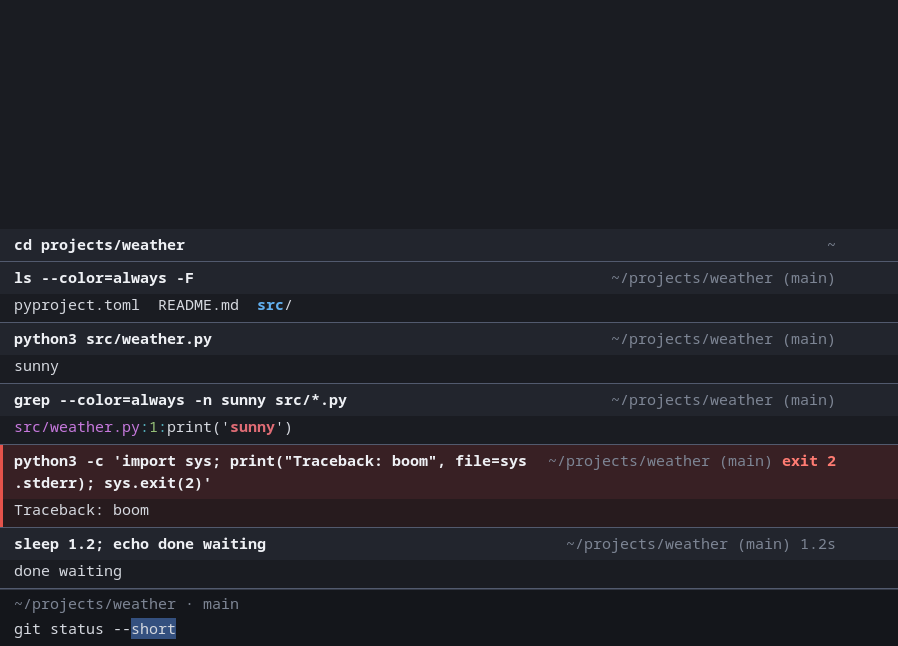
|
|
38
|
+
|
|
39
|
+
Built from `Block Terminal Cleanroom Functional Spec.pdf` and its
|
|
40
|
+
addendum, `docs/cua-input.md`, alone. Linux, zsh, keyboard and mouse.
|
|
41
|
+
|
|
42
|
+
## Install and run
|
|
43
|
+
|
|
44
|
+
```sh
|
|
45
|
+
conda env update -n jupyterminal_env -f environment.yml # or: pip install -e .
|
|
46
|
+
jupyterminal # or: python -m jupyterminal
|
|
47
|
+
```
|
|
48
|
+
|
|
49
|
+
Needs Python ≥ 3.12, PySide6 and zsh. Options: `--shell PROGRAM`,
|
|
50
|
+
`--login`, `-d DIR`, `--config FILE`, `--print-default-config`,
|
|
51
|
+
`--install-desktop-entry`.
|
|
52
|
+
|
|
53
|
+
`jupyterminal --install-desktop-entry` puts the program into the menus of
|
|
54
|
+
your desktop, for you alone, started the way you started it just then.
|
|
55
|
+
That entry is also what gives its windows their own icon in the task bar:
|
|
56
|
+
on Wayland a desktop takes a window's icon from nowhere else.
|
|
57
|
+
|
|
58
|
+
Python 3.11 is left out on purpose. PySide6 6.12.0 ends the interpreter
|
|
59
|
+
there ("deallocating None") after a few thousand calls into Qt
|
|
60
|
+
(PYSIDE-3474); from 3.12 on that kind of mistake in a binding can no
|
|
61
|
+
longer do harm.
|
|
62
|
+
|
|
63
|
+
## Using it
|
|
64
|
+
|
|
65
|
+
The window is a list of blocks with a text box pinned underneath. Type a
|
|
66
|
+
command into the box as into any text field and press Ctrl+Enter: zsh
|
|
67
|
+
runs it, with your aliases and functions, and a block appears; its output
|
|
68
|
+
streams into it; when the command ends the block records the exit code
|
|
69
|
+
and duration. A failed command gets a red bar and a tinted background.
|
|
70
|
+
|
|
71
|
+
In the text box:
|
|
72
|
+
|
|
73
|
+
| Do this | To get this |
|
|
74
|
+
| --- | --- |
|
|
75
|
+
| Click, drag, double-click, triple-click | Place the cursor, select text, a word, a line |
|
|
76
|
+
| Shift with the arrows, `Home`, `End` (and Ctrl for words) | Select |
|
|
77
|
+
| `Ctrl+A` | Select everything in the box |
|
|
78
|
+
| `Ctrl+C` `Ctrl+X` `Ctrl+V` | Copy, cut, paste |
|
|
79
|
+
| `Ctrl+Z` `Ctrl+Y` | Take back, redo |
|
|
80
|
+
| `Ctrl+Enter` | Run the command |
|
|
81
|
+
| `Enter` | Start a new line: several lines run as one command |
|
|
82
|
+
| `Tab` | Complete, the way Tab does in your zsh |
|
|
83
|
+
| `Up` / `Down` on the first / last line | Your shell's history, the way those keys walk it in your zsh |
|
|
84
|
+
| `Right` or `End`, at the end of the text | Take what zsh-autosuggestions suggests |
|
|
85
|
+
| `Ctrl+Right`, at the end of the text | Take one word of it |
|
|
86
|
+
| `Ctrl+D` on an empty box | End the session |
|
|
87
|
+
|
|
88
|
+
`Ctrl+C` copies wherever something is selected, in the box or in the
|
|
89
|
+
output. With nothing selected it interrupts the running command, or
|
|
90
|
+
empties the box when none is running. Only one thing is selected at a
|
|
91
|
+
time: selecting in the box lets go of what is selected in the output, and
|
|
92
|
+
the other way round. A command that is not complete (a
|
|
93
|
+
loop without its end) comes back into the box instead of being run. While
|
|
94
|
+
a command runs, the keys go to that program.
|
|
95
|
+
|
|
96
|
+
Completing and the history stay zsh's own work: the box hands it the
|
|
97
|
+
text, zsh does what the key is bound to there, and the text comes back. A
|
|
98
|
+
list of possible completions shows above the box; a completion menu, or a
|
|
99
|
+
question zsh asks first, gets the keyboard until it is answered.
|
|
100
|
+
|
|
101
|
+
If your zsh loads **zsh-syntax-highlighting** or **zsh-autosuggestions**,
|
|
102
|
+
the box shows what they would show on zsh's own line: the text in the
|
|
103
|
+
plugin's colors, and behind the cursor, dimmed, the line it suggests.
|
|
104
|
+
|
|
105
|
+
To type in zsh's own line editor instead, as in other terminals, set
|
|
106
|
+
`input = "shell"` under `[terminal]` in the configuration.
|
|
107
|
+
|
|
108
|
+
Everywhere in the window:
|
|
109
|
+
|
|
110
|
+
| Do this | To get this |
|
|
111
|
+
| --- | --- |
|
|
112
|
+
| Click a block | Select it (Ctrl+click adds or removes one, Shift+click takes a range) |
|
|
113
|
+
| Click it again, click in the text box, press `Esc`, or just type | Let go of what is selected, blocks or text |
|
|
114
|
+
| Click, with text selected | Let go of the text, and nothing else |
|
|
115
|
+
| `Ctrl+Shift+C` | Copy: the selected text if there is any, otherwise the output of the selected blocks |
|
|
116
|
+
| `Ctrl+Alt+Shift+C` | Copy `$ command` followed by the output |
|
|
117
|
+
| Drag, double-click, triple-click | Select text, a word, a line (also fills the primary selection) |
|
|
118
|
+
| `Ctrl+Shift+V`, `Shift+Ins`, middle click | Paste clipboard / primary selection |
|
|
119
|
+
| `Ctrl+Up` | Select the newest block |
|
|
120
|
+
| `Up` / `Down` | Move the selection (with Shift: extend it) |
|
|
121
|
+
| `Ctrl+Shift+Up` / `Down` | Scroll to the top / bottom of the selected block |
|
|
122
|
+
| Right-click, or the ⋮ button | Block menu: copy output / command / both, find, filter, collapse, re-run, save to file |
|
|
123
|
+
| `Ctrl+Shift+F` / `Ctrl+Shift+L` | Find in block / filter output |
|
|
124
|
+
| `Ctrl+L`, `clear` | Scroll blocks out of view (they stay reachable) |
|
|
125
|
+
| `Ctrl+Shift+K` | Remove all blocks |
|
|
126
|
+
| `Ctrl+=` `Ctrl+-` `Ctrl+0` | Font size |
|
|
127
|
+
|
|
128
|
+
A command scrolled off the top stays pinned while its output is visible
|
|
129
|
+
(click it to go to the block's start); a block taller than the window
|
|
130
|
+
shows a jump-to-end button. Hovering a header shows when it started.
|
|
131
|
+
|
|
132
|
+
### What copying gives you
|
|
133
|
+
|
|
134
|
+
Plain text, exactly what the program printed: no colours or escape codes;
|
|
135
|
+
a line the window wrapped is one line; trailing spaces and the final
|
|
136
|
+
newline are dropped, tabs and blank lines are kept; a progress bar that
|
|
137
|
+
redrew itself copies as its final state; several blocks are joined in
|
|
138
|
+
order with one blank line between; with a filter active, only the lines
|
|
139
|
+
shown.
|
|
140
|
+
|
|
141
|
+
### Programs
|
|
142
|
+
|
|
143
|
+
Inside a block the terminal is an ordinary xterm-compatible one: 24-bit
|
|
144
|
+
colour, cursor movement, in-place progress bars, size queries. A REPL or a
|
|
145
|
+
yes/no question lives in its block until it exits. Full-screen programs
|
|
146
|
+
(vim, htop, less) take over the whole view; afterwards the block keeps its
|
|
147
|
+
command, whatever was printed outside full-screen mode, and a
|
|
148
|
+
"full-screen" marker.
|
|
149
|
+
|
|
150
|
+
## Configuration
|
|
151
|
+
|
|
152
|
+
`~/.config/jupyterminal/config.toml`; `jupyterminal --print-default-config`
|
|
153
|
+
prints every key with its default. Font, shell, history cap
|
|
154
|
+
(`scrollback_lines`, default 2,000,000 — the oldest blocks are dropped
|
|
155
|
+
whole), colours, and every shortcut:
|
|
156
|
+
|
|
157
|
+
```toml
|
|
158
|
+
[keys]
|
|
159
|
+
copy = "Ctrl+Y"
|
|
160
|
+
[keys.blocks] # while a block is selected
|
|
161
|
+
previous = "K"
|
|
162
|
+
next = "J"
|
|
163
|
+
```
|
|
164
|
+
|
|
165
|
+
A setting that cannot be used is reported on standard error when the
|
|
166
|
+
program starts: the file, the setting, what it holds and what it may
|
|
167
|
+
hold. The default stays in effect, and a misspelled colour is answered
|
|
168
|
+
with the name that was probably meant.
|
|
169
|
+
|
|
170
|
+
## How blocks are known
|
|
171
|
+
|
|
172
|
+
Nothing is guessed from what output looks like. The terminal starts zsh
|
|
173
|
+
with `ZDOTDIR` pointing at a private directory of shims that run your own
|
|
174
|
+
startup files unchanged and then load a small integration script
|
|
175
|
+
(`src/jupyterminal/shell/zsh/integration.zsh`). Its hooks emit private
|
|
176
|
+
escape sequences when a command starts (with its exact text and
|
|
177
|
+
directory) and ends (with its exit code), each carrying a per-session
|
|
178
|
+
nonce so printed text cannot fake one. `ZDOTDIR` is restored and nothing
|
|
179
|
+
of this stays in your environment. `exec zsh` (typed, aliased, or at the
|
|
180
|
+
end of a compound line) re-integrates; a nested or remote shell is simply
|
|
181
|
+
one long block.
|
|
182
|
+
|
|
183
|
+
If your system sets `ZDOTDIR` in `/etc/zsh/zshenv`, zsh never reads the
|
|
184
|
+
shims and the whole session shows up as one block. Add this line to your
|
|
185
|
+
own `.zshrc` to load the integration directly:
|
|
186
|
+
|
|
187
|
+
```zsh
|
|
188
|
+
[[ -n $JUPYTERMINAL_DIR ]] && source $JUPYTERMINAL_DIR/integration.zsh
|
|
189
|
+
```
|
|
190
|
+
|
|
191
|
+
Output that arrives while no command runs — shell startup messages, a
|
|
192
|
+
"job done" notice, a background job printing — goes into a
|
|
193
|
+
"background output" block rather than onto your prompt.
|
|
194
|
+
|
|
195
|
+
## Decisions made where the spec left room
|
|
196
|
+
|
|
197
|
+
- **Header**: command in bold on a tinted strip; directory and git branch,
|
|
198
|
+
duration, exit code and controls right-aligned on the same line.
|
|
199
|
+
- **Not run**: a line the shell rejects (a parse error) becomes a block
|
|
200
|
+
marked "not run" holding the shell's message, so the error is not lost.
|
|
201
|
+
- **Save to file** writes the copy text plus a final newline.
|
|
202
|
+
- **One endless block**: the cap drops whole blocks only, but a single
|
|
203
|
+
block larger than the entire cap has nothing older to drop, so its own
|
|
204
|
+
oldest lines go (the header says how many). Otherwise `yes` would eat
|
|
205
|
+
all memory.
|
|
206
|
+
- **Background output at the prompt** goes to its own block only while
|
|
207
|
+
the line editor is provably idle: about half a second after your last
|
|
208
|
+
key, and with no other plugin registered that may redraw the line at
|
|
209
|
+
any time. A "job done" notice from zsh always gets its block.
|
|
210
|
+
- **A pasted single line** loses its trailing newline, so pasting never
|
|
211
|
+
runs anything by itself; several lines ask first.
|
|
212
|
+
- **`clear`** scrolls its own (empty) block out of view too.
|
|
213
|
+
- Typing while a block is selected clears the selection.
|
|
214
|
+
|
|
215
|
+
## Not there yet
|
|
216
|
+
|
|
217
|
+
- Background output that arrives while it cannot be told apart from the
|
|
218
|
+
line editor's own drawing (you are typing, or an async prompt plugin is
|
|
219
|
+
active) lands on the prompt as in any terminal, and is not kept in a
|
|
220
|
+
block.
|
|
221
|
+
- A function that calls `exec zsh` is not recognised; after it the
|
|
222
|
+
session is one block (type `exec zsh` itself, or use an alias).
|
|
223
|
+
- Mouse reporting reaches programs in full-screen mode and at the prompt,
|
|
224
|
+
not ones drawing inside a block.
|
|
225
|
+
- No hyperlinks (OSC 8), images, or extended keyboard protocols.
|
|
226
|
+
- Other shells run, but without integration the session is one block.
|
|
227
|
+
- The interface is tested through Qt's off-screen platform; see below.
|
|
228
|
+
|
|
229
|
+
## Development
|
|
230
|
+
|
|
231
|
+
```
|
|
232
|
+
src/jupyterminal/term terminal emulation: parser, screen model
|
|
233
|
+
src/jupyterminal/shell the pty and the zsh integration
|
|
234
|
+
src/jupyterminal/session blocks, the router that fills them, copy rules
|
|
235
|
+
src/jupyterminal/ui the Qt interface
|
|
236
|
+
```
|
|
237
|
+
|
|
238
|
+
`pytest` runs everything and measures the branch coverage: the emulator,
|
|
239
|
+
the router, a real zsh under the session, the window driven off screen,
|
|
240
|
+
and `tests/test_acceptance.py`, which has one test per acceptance
|
|
241
|
+
criterion of the spec. `pytest -m "not live"` runs the tests that need no
|
|
242
|
+
shell, in a few seconds.
|
|
243
|
+
|
|
244
|
+
[CONTRIBUTING.md](CONTRIBUTING.md) has the rest: the 100% coverage rule,
|
|
245
|
+
mutation testing before a release, and the nine buttons that publish one.
|
|
@@ -0,0 +1,227 @@
|
|
|
1
|
+
[](https://claude.com/claude-code)
|
|
2
|
+
[](https://codecov.io/gh/AsgerJon/jupyterminal)
|
|
3
|
+
[](https://pypi.org/project/jupyterminal/)
|
|
4
|
+
[](https://opensource.org/licenses/Apache-2.0)
|
|
5
|
+
|
|
6
|
+
# jupyterminal v0.0.1-dev0 (development build)
|
|
7
|
+
|
|
8
|
+
A terminal emulator in which typing and copying work the way they do
|
|
9
|
+
everywhere else on the desktop.
|
|
10
|
+
|
|
11
|
+
Commands are typed in a **text box**: a click places the cursor, Shift
|
|
12
|
+
and the arrows select, typing replaces the selection, Ctrl+C, Ctrl+X and
|
|
13
|
+
Ctrl+V are the clipboard and Ctrl+Z takes back. The session is a list of
|
|
14
|
+
**blocks** instead of one continuous scroll. A block is one command plus
|
|
15
|
+
everything it printed, kept as a unit you can select, copy and jump to.
|
|
16
|
+
Copying a command's output takes one click and one shortcut — never a
|
|
17
|
+
careful mouse drag.
|
|
18
|
+
|
|
19
|
+

|
|
20
|
+
|
|
21
|
+
Built from `Block Terminal Cleanroom Functional Spec.pdf` and its
|
|
22
|
+
addendum, `docs/cua-input.md`, alone. Linux, zsh, keyboard and mouse.
|
|
23
|
+
|
|
24
|
+
## Install and run
|
|
25
|
+
|
|
26
|
+
```sh
|
|
27
|
+
conda env update -n jupyterminal_env -f environment.yml # or: pip install -e .
|
|
28
|
+
jupyterminal # or: python -m jupyterminal
|
|
29
|
+
```
|
|
30
|
+
|
|
31
|
+
Needs Python ≥ 3.12, PySide6 and zsh. Options: `--shell PROGRAM`,
|
|
32
|
+
`--login`, `-d DIR`, `--config FILE`, `--print-default-config`,
|
|
33
|
+
`--install-desktop-entry`.
|
|
34
|
+
|
|
35
|
+
`jupyterminal --install-desktop-entry` puts the program into the menus of
|
|
36
|
+
your desktop, for you alone, started the way you started it just then.
|
|
37
|
+
That entry is also what gives its windows their own icon in the task bar:
|
|
38
|
+
on Wayland a desktop takes a window's icon from nowhere else.
|
|
39
|
+
|
|
40
|
+
Python 3.11 is left out on purpose. PySide6 6.12.0 ends the interpreter
|
|
41
|
+
there ("deallocating None") after a few thousand calls into Qt
|
|
42
|
+
(PYSIDE-3474); from 3.12 on that kind of mistake in a binding can no
|
|
43
|
+
longer do harm.
|
|
44
|
+
|
|
45
|
+
## Using it
|
|
46
|
+
|
|
47
|
+
The window is a list of blocks with a text box pinned underneath. Type a
|
|
48
|
+
command into the box as into any text field and press Ctrl+Enter: zsh
|
|
49
|
+
runs it, with your aliases and functions, and a block appears; its output
|
|
50
|
+
streams into it; when the command ends the block records the exit code
|
|
51
|
+
and duration. A failed command gets a red bar and a tinted background.
|
|
52
|
+
|
|
53
|
+
In the text box:
|
|
54
|
+
|
|
55
|
+
| Do this | To get this |
|
|
56
|
+
| --- | --- |
|
|
57
|
+
| Click, drag, double-click, triple-click | Place the cursor, select text, a word, a line |
|
|
58
|
+
| Shift with the arrows, `Home`, `End` (and Ctrl for words) | Select |
|
|
59
|
+
| `Ctrl+A` | Select everything in the box |
|
|
60
|
+
| `Ctrl+C` `Ctrl+X` `Ctrl+V` | Copy, cut, paste |
|
|
61
|
+
| `Ctrl+Z` `Ctrl+Y` | Take back, redo |
|
|
62
|
+
| `Ctrl+Enter` | Run the command |
|
|
63
|
+
| `Enter` | Start a new line: several lines run as one command |
|
|
64
|
+
| `Tab` | Complete, the way Tab does in your zsh |
|
|
65
|
+
| `Up` / `Down` on the first / last line | Your shell's history, the way those keys walk it in your zsh |
|
|
66
|
+
| `Right` or `End`, at the end of the text | Take what zsh-autosuggestions suggests |
|
|
67
|
+
| `Ctrl+Right`, at the end of the text | Take one word of it |
|
|
68
|
+
| `Ctrl+D` on an empty box | End the session |
|
|
69
|
+
|
|
70
|
+
`Ctrl+C` copies wherever something is selected, in the box or in the
|
|
71
|
+
output. With nothing selected it interrupts the running command, or
|
|
72
|
+
empties the box when none is running. Only one thing is selected at a
|
|
73
|
+
time: selecting in the box lets go of what is selected in the output, and
|
|
74
|
+
the other way round. A command that is not complete (a
|
|
75
|
+
loop without its end) comes back into the box instead of being run. While
|
|
76
|
+
a command runs, the keys go to that program.
|
|
77
|
+
|
|
78
|
+
Completing and the history stay zsh's own work: the box hands it the
|
|
79
|
+
text, zsh does what the key is bound to there, and the text comes back. A
|
|
80
|
+
list of possible completions shows above the box; a completion menu, or a
|
|
81
|
+
question zsh asks first, gets the keyboard until it is answered.
|
|
82
|
+
|
|
83
|
+
If your zsh loads **zsh-syntax-highlighting** or **zsh-autosuggestions**,
|
|
84
|
+
the box shows what they would show on zsh's own line: the text in the
|
|
85
|
+
plugin's colors, and behind the cursor, dimmed, the line it suggests.
|
|
86
|
+
|
|
87
|
+
To type in zsh's own line editor instead, as in other terminals, set
|
|
88
|
+
`input = "shell"` under `[terminal]` in the configuration.
|
|
89
|
+
|
|
90
|
+
Everywhere in the window:
|
|
91
|
+
|
|
92
|
+
| Do this | To get this |
|
|
93
|
+
| --- | --- |
|
|
94
|
+
| Click a block | Select it (Ctrl+click adds or removes one, Shift+click takes a range) |
|
|
95
|
+
| Click it again, click in the text box, press `Esc`, or just type | Let go of what is selected, blocks or text |
|
|
96
|
+
| Click, with text selected | Let go of the text, and nothing else |
|
|
97
|
+
| `Ctrl+Shift+C` | Copy: the selected text if there is any, otherwise the output of the selected blocks |
|
|
98
|
+
| `Ctrl+Alt+Shift+C` | Copy `$ command` followed by the output |
|
|
99
|
+
| Drag, double-click, triple-click | Select text, a word, a line (also fills the primary selection) |
|
|
100
|
+
| `Ctrl+Shift+V`, `Shift+Ins`, middle click | Paste clipboard / primary selection |
|
|
101
|
+
| `Ctrl+Up` | Select the newest block |
|
|
102
|
+
| `Up` / `Down` | Move the selection (with Shift: extend it) |
|
|
103
|
+
| `Ctrl+Shift+Up` / `Down` | Scroll to the top / bottom of the selected block |
|
|
104
|
+
| Right-click, or the ⋮ button | Block menu: copy output / command / both, find, filter, collapse, re-run, save to file |
|
|
105
|
+
| `Ctrl+Shift+F` / `Ctrl+Shift+L` | Find in block / filter output |
|
|
106
|
+
| `Ctrl+L`, `clear` | Scroll blocks out of view (they stay reachable) |
|
|
107
|
+
| `Ctrl+Shift+K` | Remove all blocks |
|
|
108
|
+
| `Ctrl+=` `Ctrl+-` `Ctrl+0` | Font size |
|
|
109
|
+
|
|
110
|
+
A command scrolled off the top stays pinned while its output is visible
|
|
111
|
+
(click it to go to the block's start); a block taller than the window
|
|
112
|
+
shows a jump-to-end button. Hovering a header shows when it started.
|
|
113
|
+
|
|
114
|
+
### What copying gives you
|
|
115
|
+
|
|
116
|
+
Plain text, exactly what the program printed: no colours or escape codes;
|
|
117
|
+
a line the window wrapped is one line; trailing spaces and the final
|
|
118
|
+
newline are dropped, tabs and blank lines are kept; a progress bar that
|
|
119
|
+
redrew itself copies as its final state; several blocks are joined in
|
|
120
|
+
order with one blank line between; with a filter active, only the lines
|
|
121
|
+
shown.
|
|
122
|
+
|
|
123
|
+
### Programs
|
|
124
|
+
|
|
125
|
+
Inside a block the terminal is an ordinary xterm-compatible one: 24-bit
|
|
126
|
+
colour, cursor movement, in-place progress bars, size queries. A REPL or a
|
|
127
|
+
yes/no question lives in its block until it exits. Full-screen programs
|
|
128
|
+
(vim, htop, less) take over the whole view; afterwards the block keeps its
|
|
129
|
+
command, whatever was printed outside full-screen mode, and a
|
|
130
|
+
"full-screen" marker.
|
|
131
|
+
|
|
132
|
+
## Configuration
|
|
133
|
+
|
|
134
|
+
`~/.config/jupyterminal/config.toml`; `jupyterminal --print-default-config`
|
|
135
|
+
prints every key with its default. Font, shell, history cap
|
|
136
|
+
(`scrollback_lines`, default 2,000,000 — the oldest blocks are dropped
|
|
137
|
+
whole), colours, and every shortcut:
|
|
138
|
+
|
|
139
|
+
```toml
|
|
140
|
+
[keys]
|
|
141
|
+
copy = "Ctrl+Y"
|
|
142
|
+
[keys.blocks] # while a block is selected
|
|
143
|
+
previous = "K"
|
|
144
|
+
next = "J"
|
|
145
|
+
```
|
|
146
|
+
|
|
147
|
+
A setting that cannot be used is reported on standard error when the
|
|
148
|
+
program starts: the file, the setting, what it holds and what it may
|
|
149
|
+
hold. The default stays in effect, and a misspelled colour is answered
|
|
150
|
+
with the name that was probably meant.
|
|
151
|
+
|
|
152
|
+
## How blocks are known
|
|
153
|
+
|
|
154
|
+
Nothing is guessed from what output looks like. The terminal starts zsh
|
|
155
|
+
with `ZDOTDIR` pointing at a private directory of shims that run your own
|
|
156
|
+
startup files unchanged and then load a small integration script
|
|
157
|
+
(`src/jupyterminal/shell/zsh/integration.zsh`). Its hooks emit private
|
|
158
|
+
escape sequences when a command starts (with its exact text and
|
|
159
|
+
directory) and ends (with its exit code), each carrying a per-session
|
|
160
|
+
nonce so printed text cannot fake one. `ZDOTDIR` is restored and nothing
|
|
161
|
+
of this stays in your environment. `exec zsh` (typed, aliased, or at the
|
|
162
|
+
end of a compound line) re-integrates; a nested or remote shell is simply
|
|
163
|
+
one long block.
|
|
164
|
+
|
|
165
|
+
If your system sets `ZDOTDIR` in `/etc/zsh/zshenv`, zsh never reads the
|
|
166
|
+
shims and the whole session shows up as one block. Add this line to your
|
|
167
|
+
own `.zshrc` to load the integration directly:
|
|
168
|
+
|
|
169
|
+
```zsh
|
|
170
|
+
[[ -n $JUPYTERMINAL_DIR ]] && source $JUPYTERMINAL_DIR/integration.zsh
|
|
171
|
+
```
|
|
172
|
+
|
|
173
|
+
Output that arrives while no command runs — shell startup messages, a
|
|
174
|
+
"job done" notice, a background job printing — goes into a
|
|
175
|
+
"background output" block rather than onto your prompt.
|
|
176
|
+
|
|
177
|
+
## Decisions made where the spec left room
|
|
178
|
+
|
|
179
|
+
- **Header**: command in bold on a tinted strip; directory and git branch,
|
|
180
|
+
duration, exit code and controls right-aligned on the same line.
|
|
181
|
+
- **Not run**: a line the shell rejects (a parse error) becomes a block
|
|
182
|
+
marked "not run" holding the shell's message, so the error is not lost.
|
|
183
|
+
- **Save to file** writes the copy text plus a final newline.
|
|
184
|
+
- **One endless block**: the cap drops whole blocks only, but a single
|
|
185
|
+
block larger than the entire cap has nothing older to drop, so its own
|
|
186
|
+
oldest lines go (the header says how many). Otherwise `yes` would eat
|
|
187
|
+
all memory.
|
|
188
|
+
- **Background output at the prompt** goes to its own block only while
|
|
189
|
+
the line editor is provably idle: about half a second after your last
|
|
190
|
+
key, and with no other plugin registered that may redraw the line at
|
|
191
|
+
any time. A "job done" notice from zsh always gets its block.
|
|
192
|
+
- **A pasted single line** loses its trailing newline, so pasting never
|
|
193
|
+
runs anything by itself; several lines ask first.
|
|
194
|
+
- **`clear`** scrolls its own (empty) block out of view too.
|
|
195
|
+
- Typing while a block is selected clears the selection.
|
|
196
|
+
|
|
197
|
+
## Not there yet
|
|
198
|
+
|
|
199
|
+
- Background output that arrives while it cannot be told apart from the
|
|
200
|
+
line editor's own drawing (you are typing, or an async prompt plugin is
|
|
201
|
+
active) lands on the prompt as in any terminal, and is not kept in a
|
|
202
|
+
block.
|
|
203
|
+
- A function that calls `exec zsh` is not recognised; after it the
|
|
204
|
+
session is one block (type `exec zsh` itself, or use an alias).
|
|
205
|
+
- Mouse reporting reaches programs in full-screen mode and at the prompt,
|
|
206
|
+
not ones drawing inside a block.
|
|
207
|
+
- No hyperlinks (OSC 8), images, or extended keyboard protocols.
|
|
208
|
+
- Other shells run, but without integration the session is one block.
|
|
209
|
+
- The interface is tested through Qt's off-screen platform; see below.
|
|
210
|
+
|
|
211
|
+
## Development
|
|
212
|
+
|
|
213
|
+
```
|
|
214
|
+
src/jupyterminal/term terminal emulation: parser, screen model
|
|
215
|
+
src/jupyterminal/shell the pty and the zsh integration
|
|
216
|
+
src/jupyterminal/session blocks, the router that fills them, copy rules
|
|
217
|
+
src/jupyterminal/ui the Qt interface
|
|
218
|
+
```
|
|
219
|
+
|
|
220
|
+
`pytest` runs everything and measures the branch coverage: the emulator,
|
|
221
|
+
the router, a real zsh under the session, the window driven off screen,
|
|
222
|
+
and `tests/test_acceptance.py`, which has one test per acceptance
|
|
223
|
+
criterion of the spec. `pytest -m "not live"` runs the tests that need no
|
|
224
|
+
shell, in a few seconds.
|
|
225
|
+
|
|
226
|
+
[CONTRIBUTING.md](CONTRIBUTING.md) has the rest: the 100% coverage rule,
|
|
227
|
+
mutation testing before a release, and the nine buttons that publish one.
|