json-logs-viewer 0.2.0__tar.gz
This diff represents the content of publicly available package versions that have been released to one of the supported registries. The information contained in this diff is provided for informational purposes only and reflects changes between package versions as they appear in their respective public registries.
- json_logs_viewer-0.2.0/LICENSE +21 -0
- json_logs_viewer-0.2.0/PKG-INFO +235 -0
- json_logs_viewer-0.2.0/README.md +202 -0
- json_logs_viewer-0.2.0/pyproject.toml +137 -0
- json_logs_viewer-0.2.0/src/json_logs_viewer/__init__.py +3 -0
- json_logs_viewer-0.2.0/src/json_logs_viewer/__main__.py +5 -0
- json_logs_viewer-0.2.0/src/json_logs_viewer/app.py +1210 -0
- json_logs_viewer-0.2.0/src/json_logs_viewer/atomic_file.py +56 -0
- json_logs_viewer-0.2.0/src/json_logs_viewer/clipboard.py +55 -0
- json_logs_viewer-0.2.0/src/json_logs_viewer/constants.py +6 -0
- json_logs_viewer-0.2.0/src/json_logs_viewer/export.py +36 -0
- json_logs_viewer-0.2.0/src/json_logs_viewer/field_paths.py +42 -0
- json_logs_viewer-0.2.0/src/json_logs_viewer/filter_engine.py +643 -0
- json_logs_viewer-0.2.0/src/json_logs_viewer/history_store.py +58 -0
- json_logs_viewer-0.2.0/src/json_logs_viewer/log_reader.py +91 -0
- json_logs_viewer-0.2.0/src/json_logs_viewer/log_watcher.py +193 -0
- json_logs_viewer-0.2.0/src/json_logs_viewer/modals/__init__.py +15 -0
- json_logs_viewer-0.2.0/src/json_logs_viewer/modals/columns_modal.py +115 -0
- json_logs_viewer-0.2.0/src/json_logs_viewer/modals/confirm_modal.py +47 -0
- json_logs_viewer-0.2.0/src/json_logs_viewer/modals/detail_modal.py +200 -0
- json_logs_viewer-0.2.0/src/json_logs_viewer/modals/export_modal.py +94 -0
- json_logs_viewer-0.2.0/src/json_logs_viewer/modals/file_picker_modal.py +156 -0
- json_logs_viewer-0.2.0/src/json_logs_viewer/modals/help_modal.py +138 -0
- json_logs_viewer-0.2.0/src/json_logs_viewer/modals/history_modal.py +99 -0
- json_logs_viewer-0.2.0/src/json_logs_viewer/models.py +236 -0
- json_logs_viewer-0.2.0/src/json_logs_viewer/query_suggester.py +135 -0
- json_logs_viewer-0.2.0/src/json_logs_viewer/selection_copier.py +55 -0
- json_logs_viewer-0.2.0/src/json_logs_viewer/sources.py +164 -0
- json_logs_viewer-0.2.0/src/json_logs_viewer/stdin_pipe.py +92 -0
- json_logs_viewer-0.2.0/src/json_logs_viewer/styles.tcss +69 -0
- json_logs_viewer-0.2.0/src/json_logs_viewer/widgets/__init__.py +0 -0
- json_logs_viewer-0.2.0/src/json_logs_viewer/widgets/column_header.py +54 -0
- json_logs_viewer-0.2.0/src/json_logs_viewer/widgets/log_list.py +925 -0
- json_logs_viewer-0.2.0/src/json_logs_viewer/widgets/new_lines_badge.py +35 -0
- json_logs_viewer-0.2.0/src/json_logs_viewer/widgets/search_bar.py +101 -0
- json_logs_viewer-0.2.0/src/json_logs_viewer/widgets/status_bar.py +223 -0
|
@@ -0,0 +1,21 @@
|
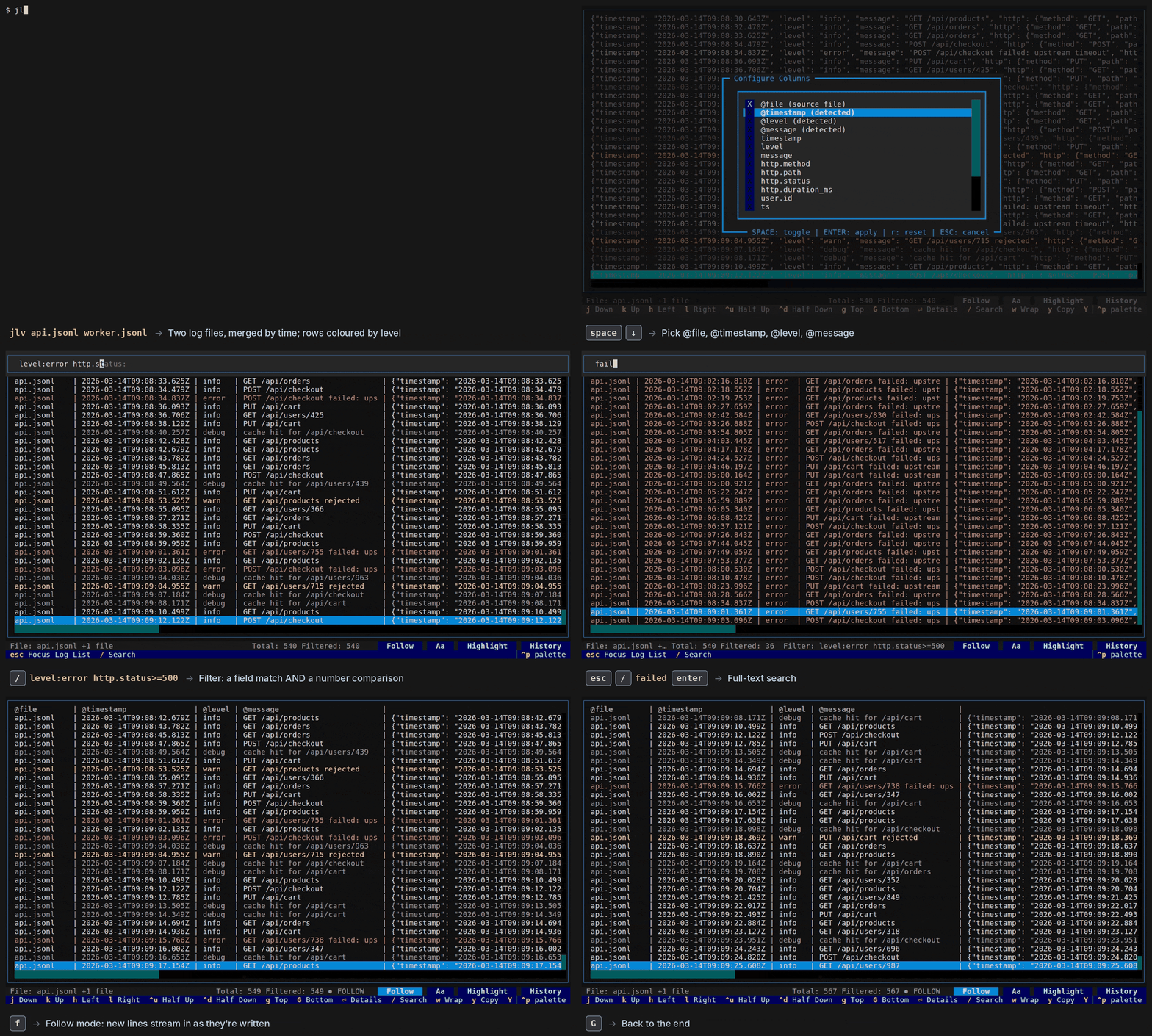
|
|
1
|
+
MIT License
|
|
2
|
+
|
|
3
|
+
Copyright (c) 2026 lukmiik
|
|
4
|
+
|
|
5
|
+
Permission is hereby granted, free of charge, to any person obtaining a copy
|
|
6
|
+
of this software and associated documentation files (the "Software"), to deal
|
|
7
|
+
in the Software without restriction, including without limitation the rights
|
|
8
|
+
to use, copy, modify, merge, publish, distribute, sublicense, and/or sell
|
|
9
|
+
copies of the Software, and to permit persons to whom the Software is
|
|
10
|
+
furnished to do so, subject to the following conditions:
|
|
11
|
+
|
|
12
|
+
The above copyright notice and this permission notice shall be included in all
|
|
13
|
+
copies or substantial portions of the Software.
|
|
14
|
+
|
|
15
|
+
THE SOFTWARE IS PROVIDED "AS IS", WITHOUT WARRANTY OF ANY KIND, EXPRESS OR
|
|
16
|
+
IMPLIED, INCLUDING BUT NOT LIMITED TO THE WARRANTIES OF MERCHANTABILITY,
|
|
17
|
+
FITNESS FOR A PARTICULAR PURPOSE AND NONINFRINGEMENT. IN NO EVENT SHALL THE
|
|
18
|
+
AUTHORS OR COPYRIGHT HOLDERS BE LIABLE FOR ANY CLAIM, DAMAGES OR OTHER
|
|
19
|
+
LIABILITY, WHETHER IN AN ACTION OF CONTRACT, TORT OR OTHERWISE, ARISING FROM,
|
|
20
|
+
OUT OF OR IN CONNECTION WITH THE SOFTWARE OR THE USE OR OTHER DEALINGS IN THE
|
|
21
|
+
SOFTWARE.
|
|
@@ -0,0 +1,235 @@
|
|
|
1
|
+
Metadata-Version: 2.4
|
|
2
|
+
Name: json-logs-viewer
|
|
3
|
+
Version: 0.2.0
|
|
4
|
+
Summary: Interactive terminal JSONL log viewer with filter queries and keyboard-first navigation.
|
|
5
|
+
Keywords: json,jsonl,logs,log-viewer,terminal-ui,textual
|
|
6
|
+
Author: lukmiik
|
|
7
|
+
Author-email: lukmiik <lukaszmlukaszewski@gmail.com>
|
|
8
|
+
License-Expression: MIT
|
|
9
|
+
License-File: LICENSE
|
|
10
|
+
Classifier: Development Status :: 4 - Beta
|
|
11
|
+
Classifier: Environment :: Console
|
|
12
|
+
Classifier: Intended Audience :: Developers
|
|
13
|
+
Classifier: Intended Audience :: System Administrators
|
|
14
|
+
Classifier: Operating System :: POSIX
|
|
15
|
+
Classifier: Programming Language :: Python :: 3
|
|
16
|
+
Classifier: Programming Language :: Python :: 3.11
|
|
17
|
+
Classifier: Programming Language :: Python :: 3.12
|
|
18
|
+
Classifier: Programming Language :: Python :: 3.13
|
|
19
|
+
Classifier: Topic :: System :: Logging
|
|
20
|
+
Requires-Dist: platformdirs>=4.0
|
|
21
|
+
Requires-Dist: pydantic>=2.12.5
|
|
22
|
+
Requires-Dist: rich>=14.3.1
|
|
23
|
+
Requires-Dist: textual>=7.3.0
|
|
24
|
+
Requires-Dist: tree-sitter>=0.25.0,<0.26
|
|
25
|
+
Requires-Dist: tree-sitter-json>=0.24.0
|
|
26
|
+
Requires-Dist: textual-serve>=1.1.3 ; extra == 'serve'
|
|
27
|
+
Requires-Python: >=3.11
|
|
28
|
+
Project-URL: Homepage, https://github.com/lukmiik/json-logs-viewer
|
|
29
|
+
Project-URL: Issues, https://github.com/lukmiik/json-logs-viewer/issues
|
|
30
|
+
Project-URL: Repository, https://github.com/lukmiik/json-logs-viewer
|
|
31
|
+
Provides-Extra: serve
|
|
32
|
+
Description-Content-Type: text/markdown
|
|
33
|
+
|
|
34
|
+
# JSON Logs Viewer (`jlv`)
|
|
35
|
+
|
|
36
|
+
An interactive terminal viewer for JSONL log files, built with
|
|
37
|
+
[Textual](https://textual.textualize.io/).
|
|
38
|
+
|
|
39
|
+
<!-- Absolute URL: this README is also the PyPI page. Re-record with
|
|
40
|
+
`uv run python docs/demo/render.py` (script: docs/demo/demo.tape). -->
|
|
41
|
+
|
|
42
|
+
|
|
43
|
+
## Features
|
|
44
|
+
|
|
45
|
+
- Virtual-scrolling log list that stays fast on 100k+ line files.
|
|
46
|
+
- Vim-style navigation: `j`/`k`, `g`/`G`, `ctrl+d`/`ctrl+u`, `h`/`l`, `0`/`$`.
|
|
47
|
+
- Filter queries with field matching, full-text search and `AND`/`OR`/`NOT`.
|
|
48
|
+
- Inline suggestions while typing a query: field names, values seen in a
|
|
49
|
+
field, `AND`/`OR`/`NOT` and past queries appear in grey; `→` or `Tab`
|
|
50
|
+
accepts.
|
|
51
|
+
- Filter mode (hide non-matches) or highlight mode (dim non-matches, jump
|
|
52
|
+
between matches with `n`/`N`).
|
|
53
|
+
- Rows coloured by log level: errors red, warnings yellow, debug/trace
|
|
54
|
+
dimmed. The level is detected from common field names, including
|
|
55
|
+
nested ones like `attributes.level` and `log.level`.
|
|
56
|
+
- Case-sensitive toggle.
|
|
57
|
+
- Soft-wrap toggle for long lines (horizontal scrolling otherwise).
|
|
58
|
+
- Detail view with pretty-printed, syntax-highlighted JSON. Selected text
|
|
59
|
+
(mouse or shift+arrows) is copied once the selection stays put for half a
|
|
60
|
+
second, in the detail view, the help screen and the search bar.
|
|
61
|
+
- Copy to the clipboard via OSC 52: `y` copies the log as pretty JSON, `Y`
|
|
62
|
+
copies it plus up to 5 entries before and after as raw JSONL.
|
|
63
|
+
- Export (`e`): save the lines the query matches (in filter or highlight
|
|
64
|
+
mode) to a JSONL file, `<name>.filtered.jsonl` by default. An existing
|
|
65
|
+
file is only replaced after confirming.
|
|
66
|
+
- Clear the view (`x`, after a y/n confirmation): hides the loaded
|
|
67
|
+
lines without touching the file. In follow mode only lines written after
|
|
68
|
+
the clear appear; open the file again (`o`) to see everything.
|
|
69
|
+
- Columns: show any of the 20 most common fields as aligned columns in front
|
|
70
|
+
of each line, under a header row with their names. Nested fields are
|
|
71
|
+
offered by their dotted path (`attributes.level`, `http.status_code`).
|
|
72
|
+
`@timestamp`, `@level` and `@message` show the detected field whatever a
|
|
73
|
+
log calls it (`ts`, `severity`, `msg`, `attributes.level`, ...).
|
|
74
|
+
- Several files at once (`jlv a.jsonl b.jsonl`, or `a` in the file picker to
|
|
75
|
+
add one), merged by timestamp. The `@file` column shows each line's file;
|
|
76
|
+
follow mode watches all of them.
|
|
77
|
+
- Compressed logs (gzip, bzip2, xz, detected by content), e.g. rotated
|
|
78
|
+
`app.jsonl.1.gz`; read once, so follow mode skips them. Open them next to
|
|
79
|
+
the live file (`jlv app.jsonl.1.gz app.jsonl`) for one timeline.
|
|
80
|
+
- Piped input (`... | jlv`, or `-` among the files): read and followed like a
|
|
81
|
+
file, shown as `stdin`. POSIX terminals only (not Windows yet).
|
|
82
|
+
- Follow mode (like `tail -F`) for files that are still being written. If
|
|
83
|
+
the file is truncated or rotated (e.g. by logrotate), it is reloaded. The
|
|
84
|
+
cursor follows new lines while it's on the last one; if you've moved up to
|
|
85
|
+
read, a "↓ N new lines" badge counts them instead (`G` or a click jumps to
|
|
86
|
+
the end).
|
|
87
|
+
- File picker to open another file without restarting.
|
|
88
|
+
- Search history (`H`), saved across runs and shared by all files in your
|
|
89
|
+
user data folder (`~/.local/share/json-logs-viewer/history.json` on
|
|
90
|
+
Linux). `--no-history` turns saving off; "Clear search history" in the
|
|
91
|
+
command palette forgets it.
|
|
92
|
+
- Can be served in a browser via `textual-serve` (optional `serve` extra).
|
|
93
|
+
|
|
94
|
+
## Installation
|
|
95
|
+
|
|
96
|
+
```bash
|
|
97
|
+
uv tool install json-logs-viewer
|
|
98
|
+
```
|
|
99
|
+
|
|
100
|
+
This installs two equivalent commands: `jlv` and `json-logs-viewer`
|
|
101
|
+
(`pipx install json-logs-viewer` works too). Python 3.11 or newer.
|
|
102
|
+
|
|
103
|
+
`--serve` (browser mode) needs the optional `serve` extra, which adds a web
|
|
104
|
+
server stack most users don't need:
|
|
105
|
+
|
|
106
|
+
```bash
|
|
107
|
+
uv tool install 'json-logs-viewer[serve]'
|
|
108
|
+
```
|
|
109
|
+
|
|
110
|
+
From a clone: `uv tool install .` (or `'.[serve]'`).
|
|
111
|
+
|
|
112
|
+
## Usage
|
|
113
|
+
|
|
114
|
+
```bash
|
|
115
|
+
jlv app.jsonl # open a file
|
|
116
|
+
jlv api.jsonl worker.jsonl # open several, merged into one timeline
|
|
117
|
+
kubectl logs -f pod | jlv # read piped input (follows it)
|
|
118
|
+
kubectl logs -f api | jlv - worker.jsonl # '-' is stdin, merged with a file
|
|
119
|
+
jlv app.jsonl -f # open and follow new lines
|
|
120
|
+
jlv # start with the file picker
|
|
121
|
+
jlv app.jsonl --serve # serve the app in a browser
|
|
122
|
+
jlv app.jsonl --no-history # don't read or save the search history
|
|
123
|
+
```
|
|
124
|
+
|
|
125
|
+
Each line must be one JSON object. Blank lines and lines that are not valid
|
|
126
|
+
JSON are skipped.
|
|
127
|
+
|
|
128
|
+
## Filter queries
|
|
129
|
+
|
|
130
|
+
Press `/` to open the search bar, type a query and press `enter` to apply it.
|
|
131
|
+
The bar then hides and the status bar shows the active query
|
|
132
|
+
(`Filter: level:error`); `/` reopens it with the query, ready to edit.
|
|
133
|
+
Submit an empty query to clear the filter.
|
|
134
|
+
Full-text terms search the JSON line as shown (`null`, `true`), with
|
|
135
|
+
`\u` escapes decoded, so `łódź` finds `"\u0142\u00f3d\u017a"`.
|
|
136
|
+
|
|
137
|
+
| Query | Matches |
|
|
138
|
+
|------------------------------------------------|--------------------------------------------|
|
|
139
|
+
| `error` | `error` anywhere in the log (full text) |
|
|
140
|
+
| `connection refused` | both words, anywhere in the log |
|
|
141
|
+
| `"connection refused"` | the exact phrase |
|
|
142
|
+
| `level:error` | field `level` contains `error` |
|
|
143
|
+
| `message:"connection refused"` | quoted value with spaces |
|
|
144
|
+
| `level:` | entries that have a `level` field |
|
|
145
|
+
| `level: service:api` | has `level`, and `service` contains `api` |
|
|
146
|
+
| `http.status_code:502` | nested field `{"http": {"status_code": …}}` |
|
|
147
|
+
| `@timestamp:2024-01-15` | names starting with `@` (ECS, Serilog) |
|
|
148
|
+
| `level:error service:api` | both conditions (space means AND) |
|
|
149
|
+
| `level:error AND service:api` | the same, with explicit `AND` |
|
|
150
|
+
| `level:error OR level:warn` | either condition |
|
|
151
|
+
| `NOT level:debug` | negation |
|
|
152
|
+
| `(level:error OR level:warn) AND service:api` | grouping |
|
|
153
|
+
| `http.status_code>=500` | numbers: `<`, `<=`, `>`, `>=` |
|
|
154
|
+
| `timestamp>=2024-01-15T10:00` | times (no zone given: UTC) |
|
|
155
|
+
| `timestamp >= 2024-01-15 timestamp < 2024-01-16` | a day; spaces around the operator are fine |
|
|
156
|
+
| `last:15m` | the 15 min before the newest log (s/m/h/d) |
|
|
157
|
+
|
|
158
|
+
Rules:
|
|
159
|
+
|
|
160
|
+
- Matching is substring-based and case-insensitive by default (`C` toggles).
|
|
161
|
+
- Precedence: `NOT` > `AND` > `OR`. Operators are case-insensitive.
|
|
162
|
+
- A space between terms means `AND`, at the same precedence as `AND`:
|
|
163
|
+
`a OR b c` is `a OR (b AND c)`. Quote words to match them as a phrase.
|
|
164
|
+
- Dotted field names reach into nested objects: `user.id:42` matches
|
|
165
|
+
`{"user": {"id": 42}}`, a top-level key named `user.id`, or a nested key
|
|
166
|
+
with dots like `Resource.service.name` in `{"Resource": {"service.name": …}}`.
|
|
167
|
+
On a list, any element can match: `events.name:retry`.
|
|
168
|
+
- An invalid query shows an error toast and leaves the list unfiltered.
|
|
169
|
+
|
|
170
|
+
## Keybindings
|
|
171
|
+
|
|
172
|
+
Press `?` in the app for the full list.
|
|
173
|
+
|
|
174
|
+
| Key | Action |
|
|
175
|
+
|---------------------|----------------------------------------------|
|
|
176
|
+
| `j`/`k`, `↓`/`↑` | move down/up |
|
|
177
|
+
| `g` / `G` | first / last entry |
|
|
178
|
+
| `ctrl+d` / `ctrl+u` | half page down / up |
|
|
179
|
+
| `h`/`l`, `0`/`$` | scroll left/right, line start/end |
|
|
180
|
+
| `enter` | open detail view |
|
|
181
|
+
| `/` | focus search bar (`esc` returns to the list) |
|
|
182
|
+
| `n` / `N` | next / previous match (highlight mode) |
|
|
183
|
+
| `C` | toggle case-sensitive filtering |
|
|
184
|
+
| `m` | toggle highlight mode |
|
|
185
|
+
| `w` | toggle soft wrap |
|
|
186
|
+
| `y` / `Y` | copy log / copy log with context |
|
|
187
|
+
| `e` | export matching lines to a JSONL file |
|
|
188
|
+
| `x` | clear the view (the file isn't changed) |
|
|
189
|
+
| `c` | configure columns |
|
|
190
|
+
| `H` | search history |
|
|
191
|
+
| `f` | toggle follow mode |
|
|
192
|
+
| `o` | open file picker |
|
|
193
|
+
| `?` | help |
|
|
194
|
+
| `ctrl+p` | command palette |
|
|
195
|
+
| `q` | quit |
|
|
196
|
+
|
|
197
|
+
Detail view: `j`/`k` next/previous log, `y`/`Y` copy, `ctrl+d`/`ctrl+u`
|
|
198
|
+
scroll, `g`/`G` top/bottom, `esc`/`q` close.
|
|
199
|
+
|
|
200
|
+
File picker: `j`/`k` move, `l`/`h` expand/collapse a folder, `enter` open,
|
|
201
|
+
`a` add the file to the open ones, `.` show hidden files, `esc` close.
|
|
202
|
+
|
|
203
|
+
Columns: `j`/`k` move, `space` toggle a field, `enter` apply, `r` remove
|
|
204
|
+
all columns, `esc` cancel.
|
|
205
|
+
|
|
206
|
+
## Development
|
|
207
|
+
|
|
208
|
+
```bash
|
|
209
|
+
uv sync
|
|
210
|
+
uv run jlv test_files/sample.jsonl
|
|
211
|
+
```
|
|
212
|
+
|
|
213
|
+
Run with live CSS reloading and the Textual dev console:
|
|
214
|
+
|
|
215
|
+
```bash
|
|
216
|
+
uv run textual console # in one terminal
|
|
217
|
+
uv run textual run --dev -c jlv test_files/sample.jsonl
|
|
218
|
+
```
|
|
219
|
+
|
|
220
|
+
Checks (also run by pre-commit and CI):
|
|
221
|
+
|
|
222
|
+
```bash
|
|
223
|
+
uv run ruff check --fix .
|
|
224
|
+
uv run ruff format .
|
|
225
|
+
uv run ty check
|
|
226
|
+
uv run pytest
|
|
227
|
+
```
|
|
228
|
+
|
|
229
|
+
See [ARCHITECTURE.md](https://github.com/lukmiik/json-logs-viewer/blob/main/ARCHITECTURE.md) for how the code is
|
|
230
|
+
organised, [TESTING.md](https://github.com/lukmiik/json-logs-viewer/blob/main/TESTING.md) for the test suite, and
|
|
231
|
+
[RELEASING.md](https://github.com/lukmiik/json-logs-viewer/blob/main/RELEASING.md) for publishing.
|
|
232
|
+
|
|
233
|
+
## License
|
|
234
|
+
|
|
235
|
+
MIT
|
|
@@ -0,0 +1,202 @@
|
|
|
1
|
+
# JSON Logs Viewer (`jlv`)
|
|
2
|
+
|
|
3
|
+
An interactive terminal viewer for JSONL log files, built with
|
|
4
|
+
[Textual](https://textual.textualize.io/).
|
|
5
|
+
|
|
6
|
+
<!-- Absolute URL: this README is also the PyPI page. Re-record with
|
|
7
|
+
`uv run python docs/demo/render.py` (script: docs/demo/demo.tape). -->
|
|
8
|
+

|
|
9
|
+
|
|
10
|
+
## Features
|
|
11
|
+
|
|
12
|
+
- Virtual-scrolling log list that stays fast on 100k+ line files.
|
|
13
|
+
- Vim-style navigation: `j`/`k`, `g`/`G`, `ctrl+d`/`ctrl+u`, `h`/`l`, `0`/`$`.
|
|
14
|
+
- Filter queries with field matching, full-text search and `AND`/`OR`/`NOT`.
|
|
15
|
+
- Inline suggestions while typing a query: field names, values seen in a
|
|
16
|
+
field, `AND`/`OR`/`NOT` and past queries appear in grey; `→` or `Tab`
|
|
17
|
+
accepts.
|
|
18
|
+
- Filter mode (hide non-matches) or highlight mode (dim non-matches, jump
|
|
19
|
+
between matches with `n`/`N`).
|
|
20
|
+
- Rows coloured by log level: errors red, warnings yellow, debug/trace
|
|
21
|
+
dimmed. The level is detected from common field names, including
|
|
22
|
+
nested ones like `attributes.level` and `log.level`.
|
|
23
|
+
- Case-sensitive toggle.
|
|
24
|
+
- Soft-wrap toggle for long lines (horizontal scrolling otherwise).
|
|
25
|
+
- Detail view with pretty-printed, syntax-highlighted JSON. Selected text
|
|
26
|
+
(mouse or shift+arrows) is copied once the selection stays put for half a
|
|
27
|
+
second, in the detail view, the help screen and the search bar.
|
|
28
|
+
- Copy to the clipboard via OSC 52: `y` copies the log as pretty JSON, `Y`
|
|
29
|
+
copies it plus up to 5 entries before and after as raw JSONL.
|
|
30
|
+
- Export (`e`): save the lines the query matches (in filter or highlight
|
|
31
|
+
mode) to a JSONL file, `<name>.filtered.jsonl` by default. An existing
|
|
32
|
+
file is only replaced after confirming.
|
|
33
|
+
- Clear the view (`x`, after a y/n confirmation): hides the loaded
|
|
34
|
+
lines without touching the file. In follow mode only lines written after
|
|
35
|
+
the clear appear; open the file again (`o`) to see everything.
|
|
36
|
+
- Columns: show any of the 20 most common fields as aligned columns in front
|
|
37
|
+
of each line, under a header row with their names. Nested fields are
|
|
38
|
+
offered by their dotted path (`attributes.level`, `http.status_code`).
|
|
39
|
+
`@timestamp`, `@level` and `@message` show the detected field whatever a
|
|
40
|
+
log calls it (`ts`, `severity`, `msg`, `attributes.level`, ...).
|
|
41
|
+
- Several files at once (`jlv a.jsonl b.jsonl`, or `a` in the file picker to
|
|
42
|
+
add one), merged by timestamp. The `@file` column shows each line's file;
|
|
43
|
+
follow mode watches all of them.
|
|
44
|
+
- Compressed logs (gzip, bzip2, xz, detected by content), e.g. rotated
|
|
45
|
+
`app.jsonl.1.gz`; read once, so follow mode skips them. Open them next to
|
|
46
|
+
the live file (`jlv app.jsonl.1.gz app.jsonl`) for one timeline.
|
|
47
|
+
- Piped input (`... | jlv`, or `-` among the files): read and followed like a
|
|
48
|
+
file, shown as `stdin`. POSIX terminals only (not Windows yet).
|
|
49
|
+
- Follow mode (like `tail -F`) for files that are still being written. If
|
|
50
|
+
the file is truncated or rotated (e.g. by logrotate), it is reloaded. The
|
|
51
|
+
cursor follows new lines while it's on the last one; if you've moved up to
|
|
52
|
+
read, a "↓ N new lines" badge counts them instead (`G` or a click jumps to
|
|
53
|
+
the end).
|
|
54
|
+
- File picker to open another file without restarting.
|
|
55
|
+
- Search history (`H`), saved across runs and shared by all files in your
|
|
56
|
+
user data folder (`~/.local/share/json-logs-viewer/history.json` on
|
|
57
|
+
Linux). `--no-history` turns saving off; "Clear search history" in the
|
|
58
|
+
command palette forgets it.
|
|
59
|
+
- Can be served in a browser via `textual-serve` (optional `serve` extra).
|
|
60
|
+
|
|
61
|
+
## Installation
|
|
62
|
+
|
|
63
|
+
```bash
|
|
64
|
+
uv tool install json-logs-viewer
|
|
65
|
+
```
|
|
66
|
+
|
|
67
|
+
This installs two equivalent commands: `jlv` and `json-logs-viewer`
|
|
68
|
+
(`pipx install json-logs-viewer` works too). Python 3.11 or newer.
|
|
69
|
+
|
|
70
|
+
`--serve` (browser mode) needs the optional `serve` extra, which adds a web
|
|
71
|
+
server stack most users don't need:
|
|
72
|
+
|
|
73
|
+
```bash
|
|
74
|
+
uv tool install 'json-logs-viewer[serve]'
|
|
75
|
+
```
|
|
76
|
+
|
|
77
|
+
From a clone: `uv tool install .` (or `'.[serve]'`).
|
|
78
|
+
|
|
79
|
+
## Usage
|
|
80
|
+
|
|
81
|
+
```bash
|
|
82
|
+
jlv app.jsonl # open a file
|
|
83
|
+
jlv api.jsonl worker.jsonl # open several, merged into one timeline
|
|
84
|
+
kubectl logs -f pod | jlv # read piped input (follows it)
|
|
85
|
+
kubectl logs -f api | jlv - worker.jsonl # '-' is stdin, merged with a file
|
|
86
|
+
jlv app.jsonl -f # open and follow new lines
|
|
87
|
+
jlv # start with the file picker
|
|
88
|
+
jlv app.jsonl --serve # serve the app in a browser
|
|
89
|
+
jlv app.jsonl --no-history # don't read or save the search history
|
|
90
|
+
```
|
|
91
|
+
|
|
92
|
+
Each line must be one JSON object. Blank lines and lines that are not valid
|
|
93
|
+
JSON are skipped.
|
|
94
|
+
|
|
95
|
+
## Filter queries
|
|
96
|
+
|
|
97
|
+
Press `/` to open the search bar, type a query and press `enter` to apply it.
|
|
98
|
+
The bar then hides and the status bar shows the active query
|
|
99
|
+
(`Filter: level:error`); `/` reopens it with the query, ready to edit.
|
|
100
|
+
Submit an empty query to clear the filter.
|
|
101
|
+
Full-text terms search the JSON line as shown (`null`, `true`), with
|
|
102
|
+
`\u` escapes decoded, so `łódź` finds `"\u0142\u00f3d\u017a"`.
|
|
103
|
+
|
|
104
|
+
| Query | Matches |
|
|
105
|
+
|------------------------------------------------|--------------------------------------------|
|
|
106
|
+
| `error` | `error` anywhere in the log (full text) |
|
|
107
|
+
| `connection refused` | both words, anywhere in the log |
|
|
108
|
+
| `"connection refused"` | the exact phrase |
|
|
109
|
+
| `level:error` | field `level` contains `error` |
|
|
110
|
+
| `message:"connection refused"` | quoted value with spaces |
|
|
111
|
+
| `level:` | entries that have a `level` field |
|
|
112
|
+
| `level: service:api` | has `level`, and `service` contains `api` |
|
|
113
|
+
| `http.status_code:502` | nested field `{"http": {"status_code": …}}` |
|
|
114
|
+
| `@timestamp:2024-01-15` | names starting with `@` (ECS, Serilog) |
|
|
115
|
+
| `level:error service:api` | both conditions (space means AND) |
|
|
116
|
+
| `level:error AND service:api` | the same, with explicit `AND` |
|
|
117
|
+
| `level:error OR level:warn` | either condition |
|
|
118
|
+
| `NOT level:debug` | negation |
|
|
119
|
+
| `(level:error OR level:warn) AND service:api` | grouping |
|
|
120
|
+
| `http.status_code>=500` | numbers: `<`, `<=`, `>`, `>=` |
|
|
121
|
+
| `timestamp>=2024-01-15T10:00` | times (no zone given: UTC) |
|
|
122
|
+
| `timestamp >= 2024-01-15 timestamp < 2024-01-16` | a day; spaces around the operator are fine |
|
|
123
|
+
| `last:15m` | the 15 min before the newest log (s/m/h/d) |
|
|
124
|
+
|
|
125
|
+
Rules:
|
|
126
|
+
|
|
127
|
+
- Matching is substring-based and case-insensitive by default (`C` toggles).
|
|
128
|
+
- Precedence: `NOT` > `AND` > `OR`. Operators are case-insensitive.
|
|
129
|
+
- A space between terms means `AND`, at the same precedence as `AND`:
|
|
130
|
+
`a OR b c` is `a OR (b AND c)`. Quote words to match them as a phrase.
|
|
131
|
+
- Dotted field names reach into nested objects: `user.id:42` matches
|
|
132
|
+
`{"user": {"id": 42}}`, a top-level key named `user.id`, or a nested key
|
|
133
|
+
with dots like `Resource.service.name` in `{"Resource": {"service.name": …}}`.
|
|
134
|
+
On a list, any element can match: `events.name:retry`.
|
|
135
|
+
- An invalid query shows an error toast and leaves the list unfiltered.
|
|
136
|
+
|
|
137
|
+
## Keybindings
|
|
138
|
+
|
|
139
|
+
Press `?` in the app for the full list.
|
|
140
|
+
|
|
141
|
+
| Key | Action |
|
|
142
|
+
|---------------------|----------------------------------------------|
|
|
143
|
+
| `j`/`k`, `↓`/`↑` | move down/up |
|
|
144
|
+
| `g` / `G` | first / last entry |
|
|
145
|
+
| `ctrl+d` / `ctrl+u` | half page down / up |
|
|
146
|
+
| `h`/`l`, `0`/`$` | scroll left/right, line start/end |
|
|
147
|
+
| `enter` | open detail view |
|
|
148
|
+
| `/` | focus search bar (`esc` returns to the list) |
|
|
149
|
+
| `n` / `N` | next / previous match (highlight mode) |
|
|
150
|
+
| `C` | toggle case-sensitive filtering |
|
|
151
|
+
| `m` | toggle highlight mode |
|
|
152
|
+
| `w` | toggle soft wrap |
|
|
153
|
+
| `y` / `Y` | copy log / copy log with context |
|
|
154
|
+
| `e` | export matching lines to a JSONL file |
|
|
155
|
+
| `x` | clear the view (the file isn't changed) |
|
|
156
|
+
| `c` | configure columns |
|
|
157
|
+
| `H` | search history |
|
|
158
|
+
| `f` | toggle follow mode |
|
|
159
|
+
| `o` | open file picker |
|
|
160
|
+
| `?` | help |
|
|
161
|
+
| `ctrl+p` | command palette |
|
|
162
|
+
| `q` | quit |
|
|
163
|
+
|
|
164
|
+
Detail view: `j`/`k` next/previous log, `y`/`Y` copy, `ctrl+d`/`ctrl+u`
|
|
165
|
+
scroll, `g`/`G` top/bottom, `esc`/`q` close.
|
|
166
|
+
|
|
167
|
+
File picker: `j`/`k` move, `l`/`h` expand/collapse a folder, `enter` open,
|
|
168
|
+
`a` add the file to the open ones, `.` show hidden files, `esc` close.
|
|
169
|
+
|
|
170
|
+
Columns: `j`/`k` move, `space` toggle a field, `enter` apply, `r` remove
|
|
171
|
+
all columns, `esc` cancel.
|
|
172
|
+
|
|
173
|
+
## Development
|
|
174
|
+
|
|
175
|
+
```bash
|
|
176
|
+
uv sync
|
|
177
|
+
uv run jlv test_files/sample.jsonl
|
|
178
|
+
```
|
|
179
|
+
|
|
180
|
+
Run with live CSS reloading and the Textual dev console:
|
|
181
|
+
|
|
182
|
+
```bash
|
|
183
|
+
uv run textual console # in one terminal
|
|
184
|
+
uv run textual run --dev -c jlv test_files/sample.jsonl
|
|
185
|
+
```
|
|
186
|
+
|
|
187
|
+
Checks (also run by pre-commit and CI):
|
|
188
|
+
|
|
189
|
+
```bash
|
|
190
|
+
uv run ruff check --fix .
|
|
191
|
+
uv run ruff format .
|
|
192
|
+
uv run ty check
|
|
193
|
+
uv run pytest
|
|
194
|
+
```
|
|
195
|
+
|
|
196
|
+
See [ARCHITECTURE.md](https://github.com/lukmiik/json-logs-viewer/blob/main/ARCHITECTURE.md) for how the code is
|
|
197
|
+
organised, [TESTING.md](https://github.com/lukmiik/json-logs-viewer/blob/main/TESTING.md) for the test suite, and
|
|
198
|
+
[RELEASING.md](https://github.com/lukmiik/json-logs-viewer/blob/main/RELEASING.md) for publishing.
|
|
199
|
+
|
|
200
|
+
## License
|
|
201
|
+
|
|
202
|
+
MIT
|
|
@@ -0,0 +1,137 @@
|
|
|
1
|
+
[project]
|
|
2
|
+
name = "json-logs-viewer"
|
|
3
|
+
version = "0.2.0"
|
|
4
|
+
description = "Interactive terminal JSONL log viewer with filter queries and keyboard-first navigation."
|
|
5
|
+
readme = "README.md"
|
|
6
|
+
license = "MIT"
|
|
7
|
+
license-files = ["LICENSE"]
|
|
8
|
+
keywords = [
|
|
9
|
+
"json",
|
|
10
|
+
"jsonl",
|
|
11
|
+
"logs",
|
|
12
|
+
"log-viewer",
|
|
13
|
+
"terminal-ui",
|
|
14
|
+
"textual",
|
|
15
|
+
]
|
|
16
|
+
classifiers = [
|
|
17
|
+
"Development Status :: 4 - Beta",
|
|
18
|
+
"Environment :: Console",
|
|
19
|
+
"Intended Audience :: Developers",
|
|
20
|
+
"Intended Audience :: System Administrators",
|
|
21
|
+
"Operating System :: POSIX",
|
|
22
|
+
"Programming Language :: Python :: 3",
|
|
23
|
+
"Programming Language :: Python :: 3.11",
|
|
24
|
+
"Programming Language :: Python :: 3.12",
|
|
25
|
+
"Programming Language :: Python :: 3.13",
|
|
26
|
+
"Topic :: System :: Logging",
|
|
27
|
+
]
|
|
28
|
+
authors = [
|
|
29
|
+
{ name = "lukmiik", email = "lukaszmlukaszewski@gmail.com" }
|
|
30
|
+
]
|
|
31
|
+
requires-python = ">=3.11"
|
|
32
|
+
dependencies = [
|
|
33
|
+
"platformdirs>=4.0",
|
|
34
|
+
"pydantic>=2.12.5",
|
|
35
|
+
"rich>=14.3.1",
|
|
36
|
+
"textual>=7.3.0",
|
|
37
|
+
# JSON syntax highlighting in the detail view (TextArea language="json").
|
|
38
|
+
# Only the JSON grammar, instead of textual[syntax]'s 15 languages.
|
|
39
|
+
# <0.26: with tree-sitter 0.26.1 and Textual 7.5 the process segfaulted
|
|
40
|
+
# in most test runs (memory corruption, crash in unrelated code).
|
|
41
|
+
"tree-sitter>=0.25.0,<0.26",
|
|
42
|
+
"tree-sitter-json>=0.24.0",
|
|
43
|
+
]
|
|
44
|
+
|
|
45
|
+
[project.optional-dependencies]
|
|
46
|
+
# `jlv --serve` (browser mode). Optional: it adds an aiohttp web server stack.
|
|
47
|
+
serve = [
|
|
48
|
+
"textual-serve>=1.1.3",
|
|
49
|
+
]
|
|
50
|
+
|
|
51
|
+
[dependency-groups]
|
|
52
|
+
dev = [
|
|
53
|
+
# `textual run --dev` / `textual console` for live CSS and debug logs
|
|
54
|
+
"textual-dev>=1.8.0",
|
|
55
|
+
# so `uv sync` can run the --serve tests without --extra serve
|
|
56
|
+
"textual-serve>=1.1.3",
|
|
57
|
+
"ruff>=0.13.2",
|
|
58
|
+
"ty>=0.0.1a21",
|
|
59
|
+
"pre-commit>=4.3.0",
|
|
60
|
+
"pytest>=8.0.0",
|
|
61
|
+
"pytest-asyncio>=1.3.0",
|
|
62
|
+
"pytest-cov>=7.0.0",
|
|
63
|
+
"pytest-textual-snapshot>=1.0.0",
|
|
64
|
+
# draws the caption bar of the README recording (docs/demo/render.py)
|
|
65
|
+
"pillow>=13.0.0",
|
|
66
|
+
]
|
|
67
|
+
|
|
68
|
+
[tool.ruff]
|
|
69
|
+
line-length = 79
|
|
70
|
+
# Vendored agent skill docs: ruff 0.17 formats code blocks in Markdown.
|
|
71
|
+
extend-exclude = [".agents"]
|
|
72
|
+
|
|
73
|
+
[tool.ruff.lint]
|
|
74
|
+
select = [
|
|
75
|
+
# pycodestyle
|
|
76
|
+
"E",
|
|
77
|
+
# Pyflakes
|
|
78
|
+
"F",
|
|
79
|
+
# pyupgrade
|
|
80
|
+
"UP",
|
|
81
|
+
# flake8-bugbear
|
|
82
|
+
"B",
|
|
83
|
+
# flake8-simplify
|
|
84
|
+
"SIM",
|
|
85
|
+
# isort
|
|
86
|
+
"I",
|
|
87
|
+
# flake8-annotations (Enforces type hinting)
|
|
88
|
+
"ANN",
|
|
89
|
+
# pydocstyle: docstrings that exist must follow Google style
|
|
90
|
+
"D",
|
|
91
|
+
]
|
|
92
|
+
ignore = [
|
|
93
|
+
# Docstrings are optional: only write one when the code needs it
|
|
94
|
+
"D1",
|
|
95
|
+
# Google sections (Args:, Returns:, ...) are optional, so don't demand
|
|
96
|
+
# every parameter be documented
|
|
97
|
+
"D417",
|
|
98
|
+
]
|
|
99
|
+
# Add the `line-too-long` rule to the enforced rule set. By default, Ruff omits rules that
|
|
100
|
+
# overlap with the use of a formatter, like Black, but we can override this behavior by
|
|
101
|
+
# explicitly adding the rule.
|
|
102
|
+
extend-select = ["E501"]
|
|
103
|
+
|
|
104
|
+
[tool.ruff.lint.pydocstyle]
|
|
105
|
+
convention = "google"
|
|
106
|
+
|
|
107
|
+
[project.urls]
|
|
108
|
+
Homepage = "https://github.com/lukmiik/json-logs-viewer"
|
|
109
|
+
Repository = "https://github.com/lukmiik/json-logs-viewer"
|
|
110
|
+
Issues = "https://github.com/lukmiik/json-logs-viewer/issues"
|
|
111
|
+
|
|
112
|
+
[project.scripts]
|
|
113
|
+
json-logs-viewer = "json_logs_viewer:main"
|
|
114
|
+
jlv = "json_logs_viewer:main"
|
|
115
|
+
|
|
116
|
+
[tool.pytest.ini_options]
|
|
117
|
+
testpaths = ["tests"]
|
|
118
|
+
markers = [
|
|
119
|
+
"performance: performance tests (deselected by default, run with -m performance)",
|
|
120
|
+
]
|
|
121
|
+
addopts = "-m 'not performance'"
|
|
122
|
+
# Every test gets its own event loop (pytest-asyncio warns when unset).
|
|
123
|
+
asyncio_default_fixture_loop_scope = "function"
|
|
124
|
+
|
|
125
|
+
[[tool.uv.index]]
|
|
126
|
+
name = "pypi"
|
|
127
|
+
url = "https://pypi.org/simple"
|
|
128
|
+
publish-url = "https://upload.pypi.org/legacy/"
|
|
129
|
+
|
|
130
|
+
[[tool.uv.index]]
|
|
131
|
+
name = "testpypi"
|
|
132
|
+
url = "https://test.pypi.org/simple"
|
|
133
|
+
publish-url = "https://test.pypi.org/legacy/"
|
|
134
|
+
|
|
135
|
+
[build-system]
|
|
136
|
+
requires = ["uv_build>=0.8.22,<0.9.0"]
|
|
137
|
+
build-backend = "uv_build"
|