jinja_partials 0.2.0__tar.gz
This diff represents the content of publicly available package versions that have been released to one of the supported registries. The information contained in this diff is provided for informational purposes only and reflects changes between package versions as they appear in their respective public registries.
- jinja_partials-0.2.0/LICENSE +21 -0
- jinja_partials-0.2.0/PKG-INFO +151 -0
- jinja_partials-0.2.0/README.md +130 -0
- jinja_partials-0.2.0/jinja_partials/__init__.py +84 -0
- jinja_partials-0.2.0/jinja_partials.egg-info/PKG-INFO +151 -0
- jinja_partials-0.2.0/jinja_partials.egg-info/SOURCES.txt +10 -0
- jinja_partials-0.2.0/jinja_partials.egg-info/dependency_links.txt +1 -0
- jinja_partials-0.2.0/jinja_partials.egg-info/requires.txt +1 -0
- jinja_partials-0.2.0/jinja_partials.egg-info/top_level.txt +1 -0
- jinja_partials-0.2.0/setup.cfg +4 -0
- jinja_partials-0.2.0/setup.py +58 -0
- jinja_partials-0.2.0/tests/test_rendering.py +100 -0
|
@@ -0,0 +1,21 @@
|
|
|
1
|
+
MIT License
|
|
2
|
+
|
|
3
|
+
Copyright (c) 2021 Michael Kennedy
|
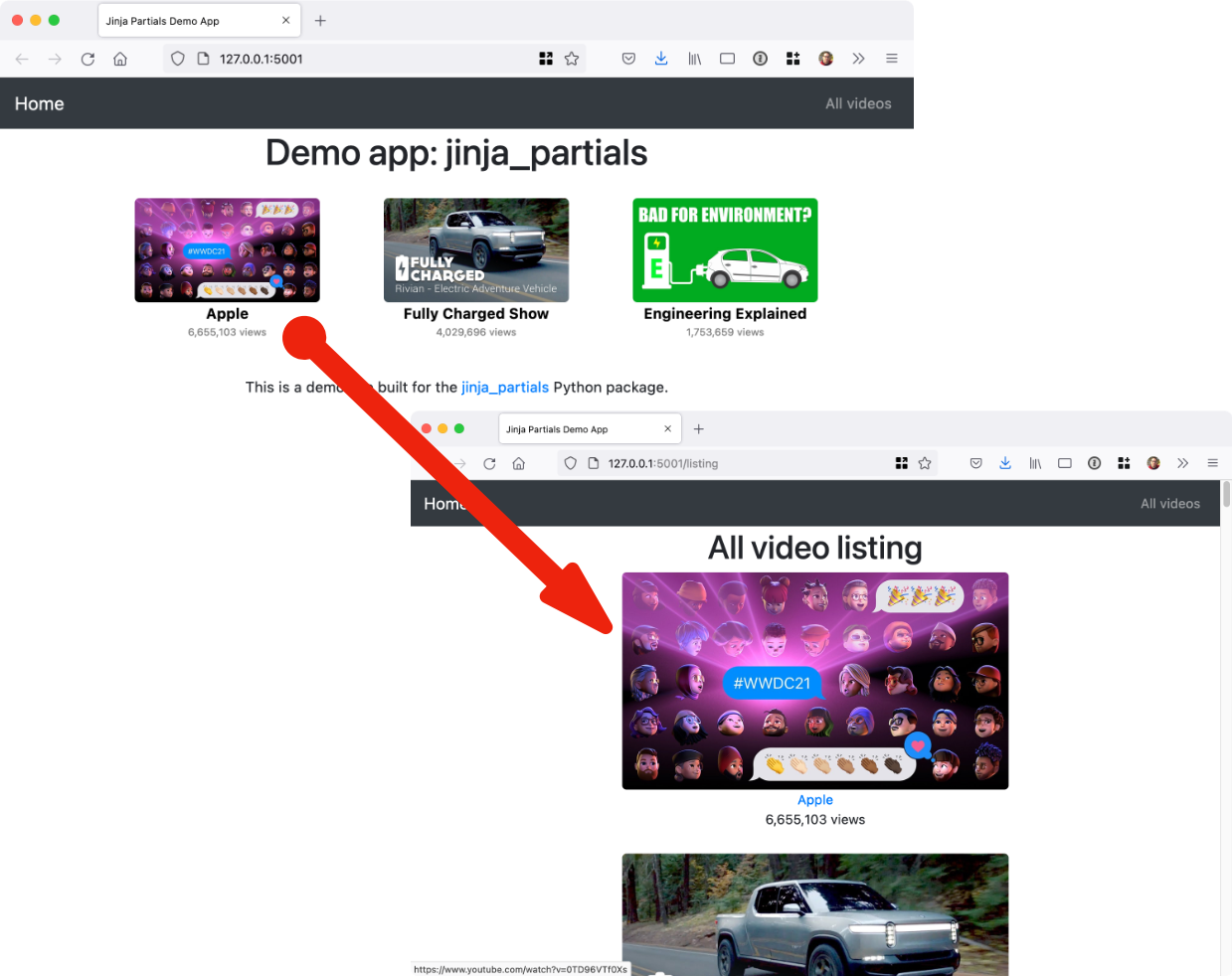
|
4
|
+
|
|
5
|
+
Permission is hereby granted, free of charge, to any person obtaining a copy
|
|
6
|
+
of this software and associated documentation files (the "Software"), to deal
|
|
7
|
+
in the Software without restriction, including without limitation the rights
|
|
8
|
+
to use, copy, modify, merge, publish, distribute, sublicense, and/or sell
|
|
9
|
+
copies of the Software, and to permit persons to whom the Software is
|
|
10
|
+
furnished to do so, subject to the following conditions:
|
|
11
|
+
|
|
12
|
+
The above copyright notice and this permission notice shall be included in all
|
|
13
|
+
copies or substantial portions of the Software.
|
|
14
|
+
|
|
15
|
+
THE SOFTWARE IS PROVIDED "AS IS", WITHOUT WARRANTY OF ANY KIND, EXPRESS OR
|
|
16
|
+
IMPLIED, INCLUDING BUT NOT LIMITED TO THE WARRANTIES OF MERCHANTABILITY,
|
|
17
|
+
FITNESS FOR A PARTICULAR PURPOSE AND NONINFRINGEMENT. IN NO EVENT SHALL THE
|
|
18
|
+
AUTHORS OR COPYRIGHT HOLDERS BE LIABLE FOR ANY CLAIM, DAMAGES OR OTHER
|
|
19
|
+
LIABILITY, WHETHER IN AN ACTION OF CONTRACT, TORT OR OTHERWISE, ARISING FROM,
|
|
20
|
+
OUT OF OR IN CONNECTION WITH THE SOFTWARE OR THE USE OR OTHER DEALINGS IN THE
|
|
21
|
+
SOFTWARE.
|
|
@@ -0,0 +1,151 @@
|
|
|
1
|
+
Metadata-Version: 2.1
|
|
2
|
+
Name: jinja_partials
|
|
3
|
+
Version: 0.2.0
|
|
4
|
+
Summary: Simple reuse of partial HTML page templates in the Jinja template language for Python web frameworks.
|
|
5
|
+
Home-page: https://github.com/mikeckennedy/jinja_partials
|
|
6
|
+
Author: Michael Kennedy
|
|
7
|
+
Author-email: michael@talkpython.fm
|
|
8
|
+
License: MIT
|
|
9
|
+
Classifier: Development Status :: 2 - Pre-Alpha
|
|
10
|
+
Classifier: License :: OSI Approved :: MIT License
|
|
11
|
+
Classifier: Programming Language :: Python
|
|
12
|
+
Classifier: Programming Language :: Python :: 3
|
|
13
|
+
Classifier: Programming Language :: Python :: 3.6
|
|
14
|
+
Classifier: Programming Language :: Python :: 3.7
|
|
15
|
+
Classifier: Programming Language :: Python :: 3.8
|
|
16
|
+
Classifier: Programming Language :: Python :: 3.9
|
|
17
|
+
Classifier: Programming Language :: Python :: 3.10
|
|
18
|
+
Description-Content-Type: text/markdown
|
|
19
|
+
License-File: LICENSE
|
|
20
|
+
Requires-Dist: jinja2
|
|
21
|
+
|
|
22
|
+
# Jinja Partials
|
|
23
|
+
|
|
24
|
+
Simple reuse of partial HTML page templates in the Jinja template language for Python web frameworks.
|
|
25
|
+
(There is also a [Pyramid/Chameleon version here](https://github.com/mikeckennedy/chameleon_partials).)
|
|
26
|
+
|
|
27
|
+
## Overview
|
|
28
|
+
|
|
29
|
+
When building real-world web apps with Flask + Jinja2, it's easy to end up with repeated HTML fragments.
|
|
30
|
+
Just like organizing code for reuse, it would be ideal to reuse smaller sections of HTML template code.
|
|
31
|
+
That's what this library is all about.
|
|
32
|
+
|
|
33
|
+
## Example
|
|
34
|
+
|
|
35
|
+
This project comes with a sample flask application (see the `example` folder). This app displays videos
|
|
36
|
+
that can be played on YouTube. The image, subtitle of author and view count are reused throughout the
|
|
37
|
+
app. Here's a visual:
|
|
38
|
+
|
|
39
|
+
|
|
40
|
+
|
|
41
|
+
Check out the [**demo / example application**](https://github.com/mikeckennedy/jinja_partials/tree/main/example)
|
|
42
|
+
to see it in action.
|
|
43
|
+
|
|
44
|
+
## Installation
|
|
45
|
+
|
|
46
|
+
It's just `pip install jinja-partials` and you're all set with this pure Python package.
|
|
47
|
+
|
|
48
|
+
## Usage
|
|
49
|
+
|
|
50
|
+
Using the library is incredible easy. The first step is to register the partial method with Jinja and Flask.
|
|
51
|
+
Do this once at app startup:
|
|
52
|
+
|
|
53
|
+
```python
|
|
54
|
+
import flask
|
|
55
|
+
import jinja_partials
|
|
56
|
+
|
|
57
|
+
app = flask.Flask(__name__)
|
|
58
|
+
|
|
59
|
+
jinja_partials.register_extensions(app)
|
|
60
|
+
# ...
|
|
61
|
+
```
|
|
62
|
+
|
|
63
|
+
You can also use this library in your FastAPI (or Starlette) project!
|
|
64
|
+
```python
|
|
65
|
+
from fastapi.templating import Jinja2Templates
|
|
66
|
+
# or `from starlette.templating import Jinja2Templates`
|
|
67
|
+
|
|
68
|
+
import jinja_partials
|
|
69
|
+
|
|
70
|
+
templates = Jinja2Templates("tests/test_templates")
|
|
71
|
+
|
|
72
|
+
jinja_partials.register_starlette_extensions(templates)
|
|
73
|
+
# ...
|
|
74
|
+
```
|
|
75
|
+
|
|
76
|
+
Or directly using a jijna environment!
|
|
77
|
+
```python
|
|
78
|
+
import jinja_partials
|
|
79
|
+
from jinja2 import Environment, FileSystemLoader
|
|
80
|
+
|
|
81
|
+
environment = Environment(loader=FileSystemLoader("tests/test_templates"))
|
|
82
|
+
jinja_partials.register_environment(environment)
|
|
83
|
+
# ...
|
|
84
|
+
```
|
|
85
|
+
|
|
86
|
+
Next, you define your main HTML (Jinja2) templates as usual. Then
|
|
87
|
+
define your partial templates. I recommend locating and naming them accordingly:
|
|
88
|
+
|
|
89
|
+
```
|
|
90
|
+
├── templates
|
|
91
|
+
│ ├── home
|
|
92
|
+
│ │ ├── index.html
|
|
93
|
+
│ │ └── listing.html
|
|
94
|
+
│ └── shared
|
|
95
|
+
│ ├── _layout.html
|
|
96
|
+
│ └── partials
|
|
97
|
+
│ ├── video_image.html
|
|
98
|
+
│ └── video_square.html
|
|
99
|
+
```
|
|
100
|
+
|
|
101
|
+
Notice the `partials` subfolder in the `templates/shared` folder.
|
|
102
|
+
|
|
103
|
+
The templates are just HTML fragments. Here is a stand-alone one for the YouTube thumbnail from
|
|
104
|
+
the example app:
|
|
105
|
+
|
|
106
|
+
```html
|
|
107
|
+
<img src="https://img.youtube.com/vi/{{ video.id }}/maxresdefault.jpg"
|
|
108
|
+
class="img img-responsive {{ ' '.join(classes) }}"
|
|
109
|
+
alt="{{ video.title }}"
|
|
110
|
+
title="{{ video.title }}">
|
|
111
|
+
```
|
|
112
|
+
|
|
113
|
+
Notice that an object called `video` and list of classes are passed in as the model.
|
|
114
|
+
|
|
115
|
+
Templates can also be nested. Here is the whole single video fragment with the image as well as other info
|
|
116
|
+
linking out to YouTube:
|
|
117
|
+
|
|
118
|
+
```html
|
|
119
|
+
<div>
|
|
120
|
+
<a href="https://www.youtube.com/watch?v={{ video.id }}" target="_blank">
|
|
121
|
+
{{ render_partial('shared/partials/video_image.html', video=video) }}
|
|
122
|
+
</a>
|
|
123
|
+
<a href="https://www.youtube.com/watch?v={{ video.id }}" target="_blank"
|
|
124
|
+
class="author">{{ video.author }}</a>
|
|
125
|
+
<div class="views">{{ "{:,}".format(video.views) }} views</div>
|
|
126
|
+
</div>
|
|
127
|
+
```
|
|
128
|
+
|
|
129
|
+
Now you see the `render_partial()` method. It takes the subpath into the templates folder and
|
|
130
|
+
any model data passed in as keyword arguments.
|
|
131
|
+
|
|
132
|
+
We can finally generate the list of video blocks as follows:
|
|
133
|
+
|
|
134
|
+
```html
|
|
135
|
+
{% for v in videos %}
|
|
136
|
+
|
|
137
|
+
<div class="col-md-3 video">
|
|
138
|
+
{{ render_partial('shared/partials/video_square.html', video=v) }}
|
|
139
|
+
</div>
|
|
140
|
+
|
|
141
|
+
{% endfor %}
|
|
142
|
+
```
|
|
143
|
+
|
|
144
|
+
This time, we reframe each item in the list from the outer template (called `v`) as the `video` model
|
|
145
|
+
in the inner HTML section.
|
|
146
|
+
|
|
147
|
+
|
|
148
|
+
## Why not just use `include` or `macro` from Jinja?
|
|
149
|
+
|
|
150
|
+
The short answer is they are nearly the same, but both fall short in different ways.
|
|
151
|
+
For a more detailed response, see the discussion on [**issue #1**](https://github.com/mikeckennedy/jinja_partials/issues/1)
|
|
@@ -0,0 +1,130 @@
|
|
|
1
|
+
# Jinja Partials
|
|
2
|
+
|
|
3
|
+
Simple reuse of partial HTML page templates in the Jinja template language for Python web frameworks.
|
|
4
|
+
(There is also a [Pyramid/Chameleon version here](https://github.com/mikeckennedy/chameleon_partials).)
|
|
5
|
+
|
|
6
|
+
## Overview
|
|
7
|
+
|
|
8
|
+
When building real-world web apps with Flask + Jinja2, it's easy to end up with repeated HTML fragments.
|
|
9
|
+
Just like organizing code for reuse, it would be ideal to reuse smaller sections of HTML template code.
|
|
10
|
+
That's what this library is all about.
|
|
11
|
+
|
|
12
|
+
## Example
|
|
13
|
+
|
|
14
|
+
This project comes with a sample flask application (see the `example` folder). This app displays videos
|
|
15
|
+
that can be played on YouTube. The image, subtitle of author and view count are reused throughout the
|
|
16
|
+
app. Here's a visual:
|
|
17
|
+
|
|
18
|
+

|
|
19
|
+
|
|
20
|
+
Check out the [**demo / example application**](https://github.com/mikeckennedy/jinja_partials/tree/main/example)
|
|
21
|
+
to see it in action.
|
|
22
|
+
|
|
23
|
+
## Installation
|
|
24
|
+
|
|
25
|
+
It's just `pip install jinja-partials` and you're all set with this pure Python package.
|
|
26
|
+
|
|
27
|
+
## Usage
|
|
28
|
+
|
|
29
|
+
Using the library is incredible easy. The first step is to register the partial method with Jinja and Flask.
|
|
30
|
+
Do this once at app startup:
|
|
31
|
+
|
|
32
|
+
```python
|
|
33
|
+
import flask
|
|
34
|
+
import jinja_partials
|
|
35
|
+
|
|
36
|
+
app = flask.Flask(__name__)
|
|
37
|
+
|
|
38
|
+
jinja_partials.register_extensions(app)
|
|
39
|
+
# ...
|
|
40
|
+
```
|
|
41
|
+
|
|
42
|
+
You can also use this library in your FastAPI (or Starlette) project!
|
|
43
|
+
```python
|
|
44
|
+
from fastapi.templating import Jinja2Templates
|
|
45
|
+
# or `from starlette.templating import Jinja2Templates`
|
|
46
|
+
|
|
47
|
+
import jinja_partials
|
|
48
|
+
|
|
49
|
+
templates = Jinja2Templates("tests/test_templates")
|
|
50
|
+
|
|
51
|
+
jinja_partials.register_starlette_extensions(templates)
|
|
52
|
+
# ...
|
|
53
|
+
```
|
|
54
|
+
|
|
55
|
+
Or directly using a jijna environment!
|
|
56
|
+
```python
|
|
57
|
+
import jinja_partials
|
|
58
|
+
from jinja2 import Environment, FileSystemLoader
|
|
59
|
+
|
|
60
|
+
environment = Environment(loader=FileSystemLoader("tests/test_templates"))
|
|
61
|
+
jinja_partials.register_environment(environment)
|
|
62
|
+
# ...
|
|
63
|
+
```
|
|
64
|
+
|
|
65
|
+
Next, you define your main HTML (Jinja2) templates as usual. Then
|
|
66
|
+
define your partial templates. I recommend locating and naming them accordingly:
|
|
67
|
+
|
|
68
|
+
```
|
|
69
|
+
├── templates
|
|
70
|
+
│ ├── home
|
|
71
|
+
│ │ ├── index.html
|
|
72
|
+
│ │ └── listing.html
|
|
73
|
+
│ └── shared
|
|
74
|
+
│ ├── _layout.html
|
|
75
|
+
│ └── partials
|
|
76
|
+
│ ├── video_image.html
|
|
77
|
+
│ └── video_square.html
|
|
78
|
+
```
|
|
79
|
+
|
|
80
|
+
Notice the `partials` subfolder in the `templates/shared` folder.
|
|
81
|
+
|
|
82
|
+
The templates are just HTML fragments. Here is a stand-alone one for the YouTube thumbnail from
|
|
83
|
+
the example app:
|
|
84
|
+
|
|
85
|
+
```html
|
|
86
|
+
<img src="https://img.youtube.com/vi/{{ video.id }}/maxresdefault.jpg"
|
|
87
|
+
class="img img-responsive {{ ' '.join(classes) }}"
|
|
88
|
+
alt="{{ video.title }}"
|
|
89
|
+
title="{{ video.title }}">
|
|
90
|
+
```
|
|
91
|
+
|
|
92
|
+
Notice that an object called `video` and list of classes are passed in as the model.
|
|
93
|
+
|
|
94
|
+
Templates can also be nested. Here is the whole single video fragment with the image as well as other info
|
|
95
|
+
linking out to YouTube:
|
|
96
|
+
|
|
97
|
+
```html
|
|
98
|
+
<div>
|
|
99
|
+
<a href="https://www.youtube.com/watch?v={{ video.id }}" target="_blank">
|
|
100
|
+
{{ render_partial('shared/partials/video_image.html', video=video) }}
|
|
101
|
+
</a>
|
|
102
|
+
<a href="https://www.youtube.com/watch?v={{ video.id }}" target="_blank"
|
|
103
|
+
class="author">{{ video.author }}</a>
|
|
104
|
+
<div class="views">{{ "{:,}".format(video.views) }} views</div>
|
|
105
|
+
</div>
|
|
106
|
+
```
|
|
107
|
+
|
|
108
|
+
Now you see the `render_partial()` method. It takes the subpath into the templates folder and
|
|
109
|
+
any model data passed in as keyword arguments.
|
|
110
|
+
|
|
111
|
+
We can finally generate the list of video blocks as follows:
|
|
112
|
+
|
|
113
|
+
```html
|
|
114
|
+
{% for v in videos %}
|
|
115
|
+
|
|
116
|
+
<div class="col-md-3 video">
|
|
117
|
+
{{ render_partial('shared/partials/video_square.html', video=v) }}
|
|
118
|
+
</div>
|
|
119
|
+
|
|
120
|
+
{% endfor %}
|
|
121
|
+
```
|
|
122
|
+
|
|
123
|
+
This time, we reframe each item in the list from the outer template (called `v`) as the `video` model
|
|
124
|
+
in the inner HTML section.
|
|
125
|
+
|
|
126
|
+
|
|
127
|
+
## Why not just use `include` or `macro` from Jinja?
|
|
128
|
+
|
|
129
|
+
The short answer is they are nearly the same, but both fall short in different ways.
|
|
130
|
+
For a more detailed response, see the discussion on [**issue #1**](https://github.com/mikeckennedy/jinja_partials/issues/1)
|
|
@@ -0,0 +1,84 @@
|
|
|
1
|
+
"""
|
|
2
|
+
jinja_partials - Simple reuse of partial HTML page templates in the Jinja template language for Python web frameworks.
|
|
3
|
+
"""
|
|
4
|
+
|
|
5
|
+
__version__ = '0.2.0'
|
|
6
|
+
__author__ = 'Michael Kennedy <michael@talkpython.fm>'
|
|
7
|
+
__all__ = [
|
|
8
|
+
'register_extensions',
|
|
9
|
+
'register_starlette_extensions',
|
|
10
|
+
'register_environment',
|
|
11
|
+
'render_partial',
|
|
12
|
+
'generate_render_partial',
|
|
13
|
+
'PartialsException',
|
|
14
|
+
]
|
|
15
|
+
|
|
16
|
+
from functools import partial
|
|
17
|
+
from typing import TYPE_CHECKING, Any, Callable, Optional, Union
|
|
18
|
+
|
|
19
|
+
from jinja2 import Environment
|
|
20
|
+
from markupsafe import Markup as Markup
|
|
21
|
+
|
|
22
|
+
try:
|
|
23
|
+
import flask
|
|
24
|
+
except ImportError:
|
|
25
|
+
flask = None
|
|
26
|
+
|
|
27
|
+
try:
|
|
28
|
+
import starlette
|
|
29
|
+
except ImportError:
|
|
30
|
+
starlette = None
|
|
31
|
+
|
|
32
|
+
if TYPE_CHECKING:
|
|
33
|
+
from flask import Flask
|
|
34
|
+
from starlette.templating import Jinja2Templates
|
|
35
|
+
|
|
36
|
+
|
|
37
|
+
class PartialsException(Exception):
|
|
38
|
+
pass
|
|
39
|
+
|
|
40
|
+
|
|
41
|
+
def render_partial(
|
|
42
|
+
template_name: str,
|
|
43
|
+
renderer: Optional[Callable[..., Any]] = None,
|
|
44
|
+
markup: bool = True,
|
|
45
|
+
**data: Any,
|
|
46
|
+
) -> Union[Markup, str]:
|
|
47
|
+
if renderer is None:
|
|
48
|
+
if flask is None:
|
|
49
|
+
raise PartialsException('No renderer specified')
|
|
50
|
+
else:
|
|
51
|
+
renderer = flask.render_template
|
|
52
|
+
|
|
53
|
+
if markup:
|
|
54
|
+
return Markup(renderer(template_name, **data))
|
|
55
|
+
|
|
56
|
+
return renderer(template_name, **data)
|
|
57
|
+
|
|
58
|
+
|
|
59
|
+
def generate_render_partial(renderer: Callable[..., Any], markup: bool = True) -> Callable[..., Markup]:
|
|
60
|
+
return partial(render_partial, renderer=renderer, markup=markup)
|
|
61
|
+
|
|
62
|
+
|
|
63
|
+
def register_extensions(app: 'Flask'):
|
|
64
|
+
if flask is None:
|
|
65
|
+
raise PartialsException('Install Flask to use `register_extensions`')
|
|
66
|
+
|
|
67
|
+
app.jinja_env.globals.update(render_partial=generate_render_partial(flask.render_template))
|
|
68
|
+
|
|
69
|
+
|
|
70
|
+
def register_starlette_extensions(templates: 'Jinja2Templates'):
|
|
71
|
+
if starlette is None:
|
|
72
|
+
raise PartialsException('Install Starlette to use `register_starlette_extensions`')
|
|
73
|
+
|
|
74
|
+
def renderer(template_name: str, **data: Any) -> str:
|
|
75
|
+
return templates.get_template(template_name).render(**data)
|
|
76
|
+
|
|
77
|
+
templates.env.globals.update(render_partial=generate_render_partial(renderer))
|
|
78
|
+
|
|
79
|
+
|
|
80
|
+
def register_environment(env: Environment, markup: bool = False):
|
|
81
|
+
def renderer(template_name: str, **data: Any) -> str:
|
|
82
|
+
return env.get_template(template_name).render(**data)
|
|
83
|
+
|
|
84
|
+
env.globals.update(render_partial=generate_render_partial(renderer, markup=markup))
|
|
@@ -0,0 +1,151 @@
|
|
|
1
|
+
Metadata-Version: 2.1
|
|
2
|
+
Name: jinja_partials
|
|
3
|
+
Version: 0.2.0
|
|
4
|
+
Summary: Simple reuse of partial HTML page templates in the Jinja template language for Python web frameworks.
|
|
5
|
+
Home-page: https://github.com/mikeckennedy/jinja_partials
|
|
6
|
+
Author: Michael Kennedy
|
|
7
|
+
Author-email: michael@talkpython.fm
|
|
8
|
+
License: MIT
|
|
9
|
+
Classifier: Development Status :: 2 - Pre-Alpha
|
|
10
|
+
Classifier: License :: OSI Approved :: MIT License
|
|
11
|
+
Classifier: Programming Language :: Python
|
|
12
|
+
Classifier: Programming Language :: Python :: 3
|
|
13
|
+
Classifier: Programming Language :: Python :: 3.6
|
|
14
|
+
Classifier: Programming Language :: Python :: 3.7
|
|
15
|
+
Classifier: Programming Language :: Python :: 3.8
|
|
16
|
+
Classifier: Programming Language :: Python :: 3.9
|
|
17
|
+
Classifier: Programming Language :: Python :: 3.10
|
|
18
|
+
Description-Content-Type: text/markdown
|
|
19
|
+
License-File: LICENSE
|
|
20
|
+
Requires-Dist: jinja2
|
|
21
|
+
|
|
22
|
+
# Jinja Partials
|
|
23
|
+
|
|
24
|
+
Simple reuse of partial HTML page templates in the Jinja template language for Python web frameworks.
|
|
25
|
+
(There is also a [Pyramid/Chameleon version here](https://github.com/mikeckennedy/chameleon_partials).)
|
|
26
|
+
|
|
27
|
+
## Overview
|
|
28
|
+
|
|
29
|
+
When building real-world web apps with Flask + Jinja2, it's easy to end up with repeated HTML fragments.
|
|
30
|
+
Just like organizing code for reuse, it would be ideal to reuse smaller sections of HTML template code.
|
|
31
|
+
That's what this library is all about.
|
|
32
|
+
|
|
33
|
+
## Example
|
|
34
|
+
|
|
35
|
+
This project comes with a sample flask application (see the `example` folder). This app displays videos
|
|
36
|
+
that can be played on YouTube. The image, subtitle of author and view count are reused throughout the
|
|
37
|
+
app. Here's a visual:
|
|
38
|
+
|
|
39
|
+

|
|
40
|
+
|
|
41
|
+
Check out the [**demo / example application**](https://github.com/mikeckennedy/jinja_partials/tree/main/example)
|
|
42
|
+
to see it in action.
|
|
43
|
+
|
|
44
|
+
## Installation
|
|
45
|
+
|
|
46
|
+
It's just `pip install jinja-partials` and you're all set with this pure Python package.
|
|
47
|
+
|
|
48
|
+
## Usage
|
|
49
|
+
|
|
50
|
+
Using the library is incredible easy. The first step is to register the partial method with Jinja and Flask.
|
|
51
|
+
Do this once at app startup:
|
|
52
|
+
|
|
53
|
+
```python
|
|
54
|
+
import flask
|
|
55
|
+
import jinja_partials
|
|
56
|
+
|
|
57
|
+
app = flask.Flask(__name__)
|
|
58
|
+
|
|
59
|
+
jinja_partials.register_extensions(app)
|
|
60
|
+
# ...
|
|
61
|
+
```
|
|
62
|
+
|
|
63
|
+
You can also use this library in your FastAPI (or Starlette) project!
|
|
64
|
+
```python
|
|
65
|
+
from fastapi.templating import Jinja2Templates
|
|
66
|
+
# or `from starlette.templating import Jinja2Templates`
|
|
67
|
+
|
|
68
|
+
import jinja_partials
|
|
69
|
+
|
|
70
|
+
templates = Jinja2Templates("tests/test_templates")
|
|
71
|
+
|
|
72
|
+
jinja_partials.register_starlette_extensions(templates)
|
|
73
|
+
# ...
|
|
74
|
+
```
|
|
75
|
+
|
|
76
|
+
Or directly using a jijna environment!
|
|
77
|
+
```python
|
|
78
|
+
import jinja_partials
|
|
79
|
+
from jinja2 import Environment, FileSystemLoader
|
|
80
|
+
|
|
81
|
+
environment = Environment(loader=FileSystemLoader("tests/test_templates"))
|
|
82
|
+
jinja_partials.register_environment(environment)
|
|
83
|
+
# ...
|
|
84
|
+
```
|
|
85
|
+
|
|
86
|
+
Next, you define your main HTML (Jinja2) templates as usual. Then
|
|
87
|
+
define your partial templates. I recommend locating and naming them accordingly:
|
|
88
|
+
|
|
89
|
+
```
|
|
90
|
+
├── templates
|
|
91
|
+
│ ├── home
|
|
92
|
+
│ │ ├── index.html
|
|
93
|
+
│ │ └── listing.html
|
|
94
|
+
│ └── shared
|
|
95
|
+
│ ├── _layout.html
|
|
96
|
+
│ └── partials
|
|
97
|
+
│ ├── video_image.html
|
|
98
|
+
│ └── video_square.html
|
|
99
|
+
```
|
|
100
|
+
|
|
101
|
+
Notice the `partials` subfolder in the `templates/shared` folder.
|
|
102
|
+
|
|
103
|
+
The templates are just HTML fragments. Here is a stand-alone one for the YouTube thumbnail from
|
|
104
|
+
the example app:
|
|
105
|
+
|
|
106
|
+
```html
|
|
107
|
+
<img src="https://img.youtube.com/vi/{{ video.id }}/maxresdefault.jpg"
|
|
108
|
+
class="img img-responsive {{ ' '.join(classes) }}"
|
|
109
|
+
alt="{{ video.title }}"
|
|
110
|
+
title="{{ video.title }}">
|
|
111
|
+
```
|
|
112
|
+
|
|
113
|
+
Notice that an object called `video` and list of classes are passed in as the model.
|
|
114
|
+
|
|
115
|
+
Templates can also be nested. Here is the whole single video fragment with the image as well as other info
|
|
116
|
+
linking out to YouTube:
|
|
117
|
+
|
|
118
|
+
```html
|
|
119
|
+
<div>
|
|
120
|
+
<a href="https://www.youtube.com/watch?v={{ video.id }}" target="_blank">
|
|
121
|
+
{{ render_partial('shared/partials/video_image.html', video=video) }}
|
|
122
|
+
</a>
|
|
123
|
+
<a href="https://www.youtube.com/watch?v={{ video.id }}" target="_blank"
|
|
124
|
+
class="author">{{ video.author }}</a>
|
|
125
|
+
<div class="views">{{ "{:,}".format(video.views) }} views</div>
|
|
126
|
+
</div>
|
|
127
|
+
```
|
|
128
|
+
|
|
129
|
+
Now you see the `render_partial()` method. It takes the subpath into the templates folder and
|
|
130
|
+
any model data passed in as keyword arguments.
|
|
131
|
+
|
|
132
|
+
We can finally generate the list of video blocks as follows:
|
|
133
|
+
|
|
134
|
+
```html
|
|
135
|
+
{% for v in videos %}
|
|
136
|
+
|
|
137
|
+
<div class="col-md-3 video">
|
|
138
|
+
{{ render_partial('shared/partials/video_square.html', video=v) }}
|
|
139
|
+
</div>
|
|
140
|
+
|
|
141
|
+
{% endfor %}
|
|
142
|
+
```
|
|
143
|
+
|
|
144
|
+
This time, we reframe each item in the list from the outer template (called `v`) as the `video` model
|
|
145
|
+
in the inner HTML section.
|
|
146
|
+
|
|
147
|
+
|
|
148
|
+
## Why not just use `include` or `macro` from Jinja?
|
|
149
|
+
|
|
150
|
+
The short answer is they are nearly the same, but both fall short in different ways.
|
|
151
|
+
For a more detailed response, see the discussion on [**issue #1**](https://github.com/mikeckennedy/jinja_partials/issues/1)
|
|
@@ -0,0 +1,10 @@
|
|
|
1
|
+
LICENSE
|
|
2
|
+
README.md
|
|
3
|
+
setup.py
|
|
4
|
+
jinja_partials/__init__.py
|
|
5
|
+
jinja_partials.egg-info/PKG-INFO
|
|
6
|
+
jinja_partials.egg-info/SOURCES.txt
|
|
7
|
+
jinja_partials.egg-info/dependency_links.txt
|
|
8
|
+
jinja_partials.egg-info/requires.txt
|
|
9
|
+
jinja_partials.egg-info/top_level.txt
|
|
10
|
+
tests/test_rendering.py
|
|
@@ -0,0 +1 @@
|
|
|
1
|
+
|
|
@@ -0,0 +1 @@
|
|
|
1
|
+
jinja2
|
|
@@ -0,0 +1 @@
|
|
|
1
|
+
jinja_partials
|
|
@@ -0,0 +1,58 @@
|
|
|
1
|
+
import io
|
|
2
|
+
import os
|
|
3
|
+
import re
|
|
4
|
+
|
|
5
|
+
from setuptools import find_packages
|
|
6
|
+
from setuptools import setup
|
|
7
|
+
|
|
8
|
+
|
|
9
|
+
def read(filename):
|
|
10
|
+
filename = os.path.join(os.path.dirname(__file__), filename)
|
|
11
|
+
text_type = type(u"")
|
|
12
|
+
with io.open(filename, mode="r", encoding='utf-8') as fd:
|
|
13
|
+
return re.sub(text_type(r':[a-z]+:`~?(.*?)`'), text_type(r'``\1``'), fd.read())
|
|
14
|
+
|
|
15
|
+
|
|
16
|
+
with open('./requirements.txt', 'r', encoding='utf-8') as fin:
|
|
17
|
+
requires_list = [line.strip() for line in fin if line and line.strip()]
|
|
18
|
+
|
|
19
|
+
|
|
20
|
+
def read_version():
|
|
21
|
+
filename = os.path.join(os.path.dirname(__file__), 'jinja_partials', '__init__.py')
|
|
22
|
+
with open(filename, mode="r", encoding='utf-8') as fin2:
|
|
23
|
+
for line in fin2:
|
|
24
|
+
if line and line.strip() and line.startswith('__version__'):
|
|
25
|
+
return line.split('=')[1].strip().strip("'").strip('"')
|
|
26
|
+
|
|
27
|
+
return "0.0.0.0"
|
|
28
|
+
|
|
29
|
+
|
|
30
|
+
setup(
|
|
31
|
+
name="jinja_partials",
|
|
32
|
+
version=read_version(),
|
|
33
|
+
url="https://github.com/mikeckennedy/jinja_partials",
|
|
34
|
+
license='MIT',
|
|
35
|
+
|
|
36
|
+
author="Michael Kennedy",
|
|
37
|
+
author_email="michael@talkpython.fm",
|
|
38
|
+
|
|
39
|
+
description="Simple reuse of partial HTML page templates in the Jinja template language for Python web frameworks.",
|
|
40
|
+
long_description=read("README.md"),
|
|
41
|
+
long_description_content_type="text/markdown",
|
|
42
|
+
|
|
43
|
+
packages=find_packages(exclude=('tests', 'example', 'readme_resources', 'build', 'dist',)),
|
|
44
|
+
|
|
45
|
+
install_requires=requires_list,
|
|
46
|
+
|
|
47
|
+
classifiers=[
|
|
48
|
+
'Development Status :: 2 - Pre-Alpha',
|
|
49
|
+
'License :: OSI Approved :: MIT License',
|
|
50
|
+
'Programming Language :: Python',
|
|
51
|
+
'Programming Language :: Python :: 3',
|
|
52
|
+
'Programming Language :: Python :: 3.6',
|
|
53
|
+
'Programming Language :: Python :: 3.7',
|
|
54
|
+
'Programming Language :: Python :: 3.8',
|
|
55
|
+
'Programming Language :: Python :: 3.9',
|
|
56
|
+
'Programming Language :: Python :: 3.10',
|
|
57
|
+
],
|
|
58
|
+
)
|
|
@@ -0,0 +1,100 @@
|
|
|
1
|
+
import sys
|
|
2
|
+
from types import SimpleNamespace
|
|
3
|
+
from typing import Callable
|
|
4
|
+
|
|
5
|
+
# noinspection PyPackageRequirements
|
|
6
|
+
import pytest as pytest
|
|
7
|
+
from jinja2 import TemplateNotFound
|
|
8
|
+
from markupsafe import Markup
|
|
9
|
+
|
|
10
|
+
import jinja_partials
|
|
11
|
+
|
|
12
|
+
|
|
13
|
+
def test_render_empty(registered_extension):
|
|
14
|
+
html: Markup = jinja_partials.render_partial('render/bare.html')
|
|
15
|
+
assert '<h1>This is bare HTML fragment</h1>' in html
|
|
16
|
+
|
|
17
|
+
|
|
18
|
+
def test_render_with_data(registered_extension):
|
|
19
|
+
name = 'Sarah'
|
|
20
|
+
age = 32
|
|
21
|
+
html: Markup = jinja_partials.render_partial('render/with_data.html', name=name, age=age)
|
|
22
|
+
assert f'<span>Your name is {name} and age is {age}</span>' in html
|
|
23
|
+
|
|
24
|
+
|
|
25
|
+
def test_render_with_layout(registered_extension):
|
|
26
|
+
value_text = "The message is clear"
|
|
27
|
+
html: Markup = jinja_partials.render_partial('render/with_layout.html', message=value_text)
|
|
28
|
+
assert '<title>Jinja Partials Test Template</title>' in html
|
|
29
|
+
assert value_text in html
|
|
30
|
+
|
|
31
|
+
|
|
32
|
+
def test_render_recursive(registered_extension):
|
|
33
|
+
value_text = "The message is clear"
|
|
34
|
+
inner_text = "The message is recursive"
|
|
35
|
+
|
|
36
|
+
html: Markup = jinja_partials.render_partial('render/recursive.html',
|
|
37
|
+
message=value_text,
|
|
38
|
+
inner=inner_text)
|
|
39
|
+
assert value_text in html
|
|
40
|
+
assert inner_text in html
|
|
41
|
+
|
|
42
|
+
|
|
43
|
+
def test_missing_template(registered_extension):
|
|
44
|
+
with pytest.raises(TemplateNotFound):
|
|
45
|
+
jinja_partials.render_partial('no-way.pt', message=7)
|
|
46
|
+
|
|
47
|
+
|
|
48
|
+
def test_not_registered():
|
|
49
|
+
with pytest.raises(Exception):
|
|
50
|
+
jinja_partials.render_partial('doesnt-matter.pt', message=7)
|
|
51
|
+
|
|
52
|
+
|
|
53
|
+
def test_starlette_render_recursive(starlette_render_partial: Callable[..., Markup]):
|
|
54
|
+
value_text = "The message is clear"
|
|
55
|
+
inner_text = "The message is recursive"
|
|
56
|
+
|
|
57
|
+
html = starlette_render_partial(
|
|
58
|
+
'render/recursive.html',
|
|
59
|
+
message=value_text,
|
|
60
|
+
inner=inner_text,
|
|
61
|
+
)
|
|
62
|
+
assert value_text in html
|
|
63
|
+
assert inner_text in html
|
|
64
|
+
|
|
65
|
+
|
|
66
|
+
def test_register_environment(environment_render_partial: Callable[..., Markup]):
|
|
67
|
+
value_text = "The message is clear"
|
|
68
|
+
inner_text = "The message is recursive"
|
|
69
|
+
|
|
70
|
+
html = environment_render_partial(
|
|
71
|
+
'render/recursive.html',
|
|
72
|
+
message=value_text,
|
|
73
|
+
inner=inner_text,
|
|
74
|
+
)
|
|
75
|
+
assert value_text in html
|
|
76
|
+
assert inner_text in html
|
|
77
|
+
|
|
78
|
+
|
|
79
|
+
def test_register_extensions_raises_if_flask_is_not_installed():
|
|
80
|
+
sys.modules['flask'] = None
|
|
81
|
+
del sys.modules['jinja_partials']
|
|
82
|
+
import jinja_partials
|
|
83
|
+
with pytest.raises(
|
|
84
|
+
jinja_partials.PartialsException,
|
|
85
|
+
match='Install Flask to use `register_extensions`',
|
|
86
|
+
):
|
|
87
|
+
jinja_partials.register_extensions(SimpleNamespace())
|
|
88
|
+
del sys.modules['flask']
|
|
89
|
+
|
|
90
|
+
|
|
91
|
+
def test_register_extensions_raises_if_starlette_is_not_installed():
|
|
92
|
+
sys.modules['starlette'] = None
|
|
93
|
+
del sys.modules['jinja_partials']
|
|
94
|
+
import jinja_partials
|
|
95
|
+
with pytest.raises(
|
|
96
|
+
jinja_partials.PartialsException,
|
|
97
|
+
match='Install Starlette to use `register_starlette_extensions`',
|
|
98
|
+
):
|
|
99
|
+
jinja_partials.register_starlette_extensions(SimpleNamespace())
|
|
100
|
+
del sys.modules['starlette']
|