jev-phone 0.1.1__tar.gz
This diff represents the content of publicly available package versions that have been released to one of the supported registries. The information contained in this diff is provided for informational purposes only and reflects changes between package versions as they appear in their respective public registries.
- jev_phone-0.1.1/LICENSE +22 -0
- jev_phone-0.1.1/NOTICE.md +7 -0
- jev_phone-0.1.1/PKG-INFO +161 -0
- jev_phone-0.1.1/README.md +114 -0
- jev_phone-0.1.1/README.pypi.md +114 -0
- jev_phone-0.1.1/jev_phone/__init__.py +4 -0
- jev_phone-0.1.1/jev_phone/adapters/__init__.py +5 -0
- jev_phone-0.1.1/jev_phone/adapters/android.py +53 -0
- jev_phone-0.1.1/jev_phone/adapters/base.py +19 -0
- jev_phone-0.1.1/jev_phone/adapters/harmony.py +110 -0
- jev_phone-0.1.1/jev_phone/adapters/ios.py +148 -0
- jev_phone-0.1.1/jev_phone/core.py +276 -0
- jev_phone-0.1.1/jev_phone/decisions.py +39 -0
- jev_phone-0.1.1/jev_phone/demo.py +8 -0
- jev_phone-0.1.1/jev_phone/stability.py +80 -0
- jev_phone-0.1.1/jev_phone/step_rules.json +3 -0
- jev_phone-0.1.1/jev_phone.egg-info/PKG-INFO +161 -0
- jev_phone-0.1.1/jev_phone.egg-info/SOURCES.txt +38 -0
- jev_phone-0.1.1/jev_phone.egg-info/dependency_links.txt +1 -0
- jev_phone-0.1.1/jev_phone.egg-info/entry_points.txt +2 -0
- jev_phone-0.1.1/jev_phone.egg-info/requires.txt +13 -0
- jev_phone-0.1.1/jev_phone.egg-info/top_level.txt +2 -0
- jev_phone-0.1.1/jev_phone_demo/__init__.py +1 -0
- jev_phone-0.1.1/jev_phone_demo/app.py +187 -0
- jev_phone-0.1.1/jev_phone_demo/mirror.py +124 -0
- jev_phone-0.1.1/jev_phone_demo/web/app.js +95 -0
- jev_phone-0.1.1/jev_phone_demo/web/index.html +63 -0
- jev_phone-0.1.1/jev_phone_demo/web/manual.html +35 -0
- jev_phone-0.1.1/jev_phone_demo/web/media/android.png +0 -0
- jev_phone-0.1.1/jev_phone_demo/web/media/harmony.png +0 -0
- jev_phone-0.1.1/jev_phone_demo/web/media/ios.png +0 -0
- jev_phone-0.1.1/jev_phone_demo/web/step_rules.json +3 -0
- jev_phone-0.1.1/jev_phone_demo/web/style.css +32 -0
- jev_phone-0.1.1/pyproject.toml +33 -0
- jev_phone-0.1.1/setup.cfg +4 -0
- jev_phone-0.1.1/tests/test_adapters.py +240 -0
- jev_phone-0.1.1/tests/test_core.py +23 -0
- jev_phone-0.1.1/tests/test_decisions.py +29 -0
- jev_phone-0.1.1/tests/test_demo.py +89 -0
- jev_phone-0.1.1/tests/test_run.py +86 -0
jev_phone-0.1.1/LICENSE
ADDED
|
@@ -0,0 +1,22 @@
|
|
|
1
|
+
MIT License
|
|
2
|
+
|
|
3
|
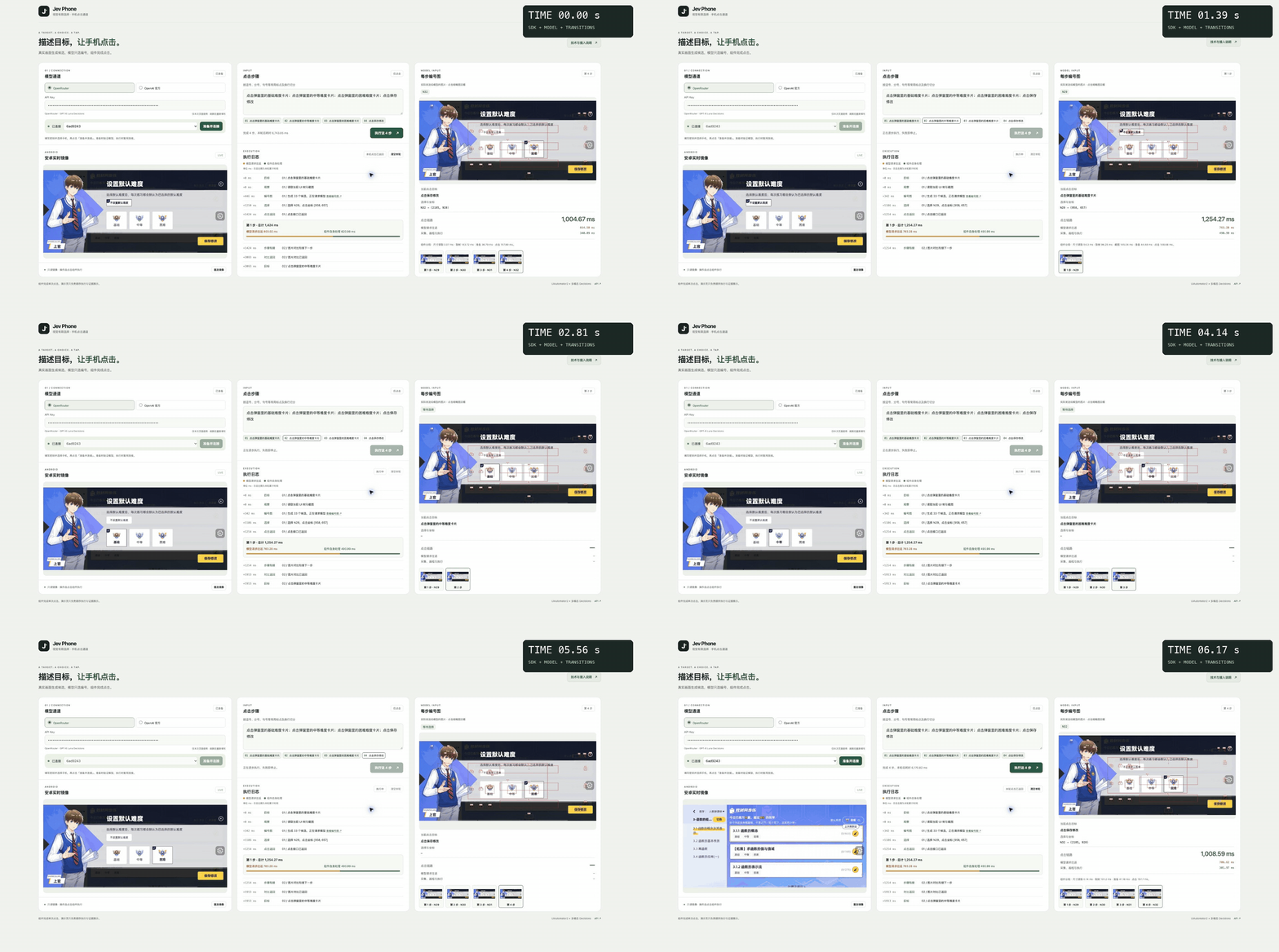
+
Copyright (c) 2026 Dongxin and Jev Phone contributors
|
|
4
|
+
Copyright (c) 2026 Dongxin and ai-phone contributors
|
|
5
|
+
|
|
6
|
+
Permission is hereby granted, free of charge, to any person obtaining a copy
|
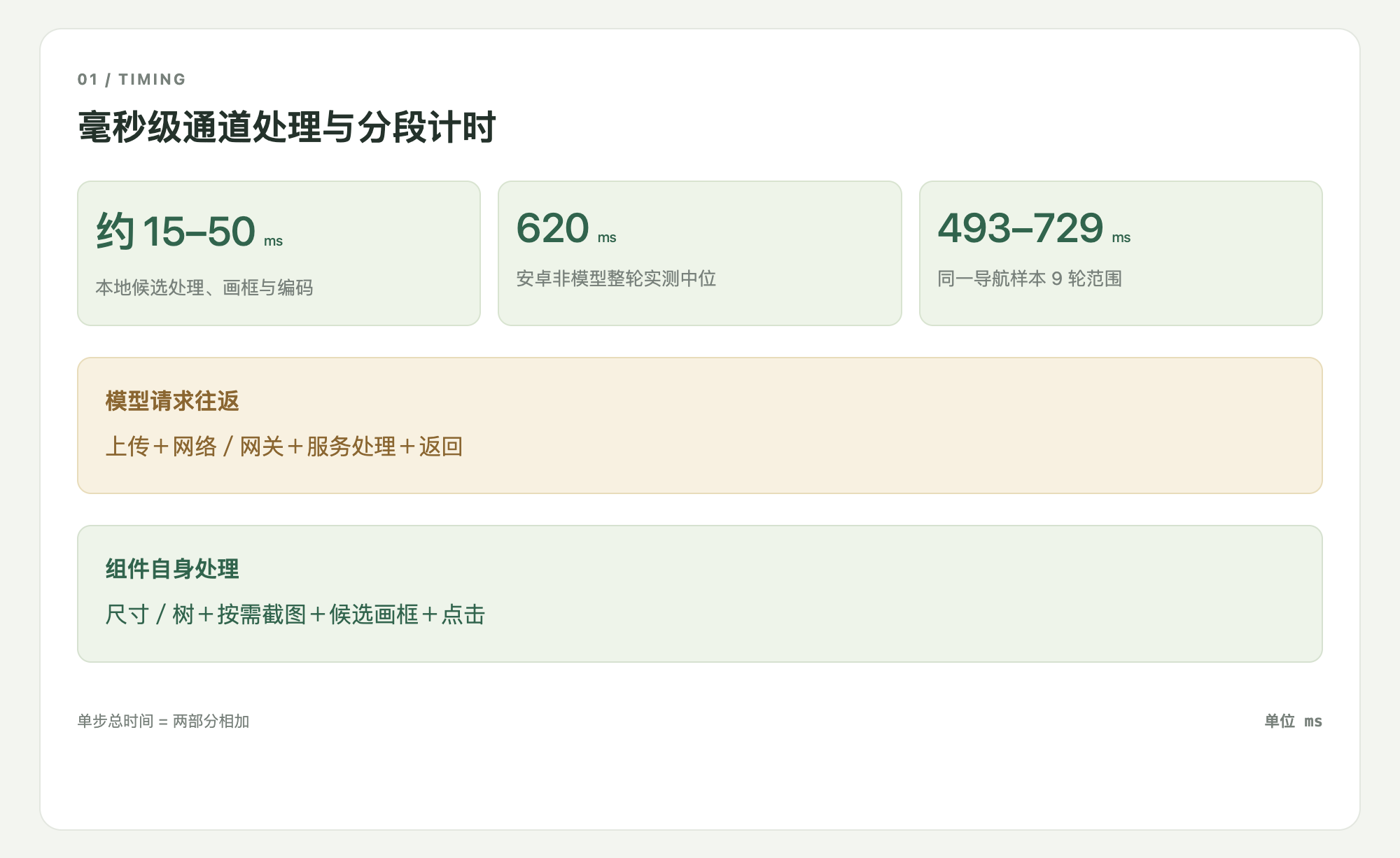
|
7
|
+
of this software and associated documentation files (the "Software"), to deal
|
|
8
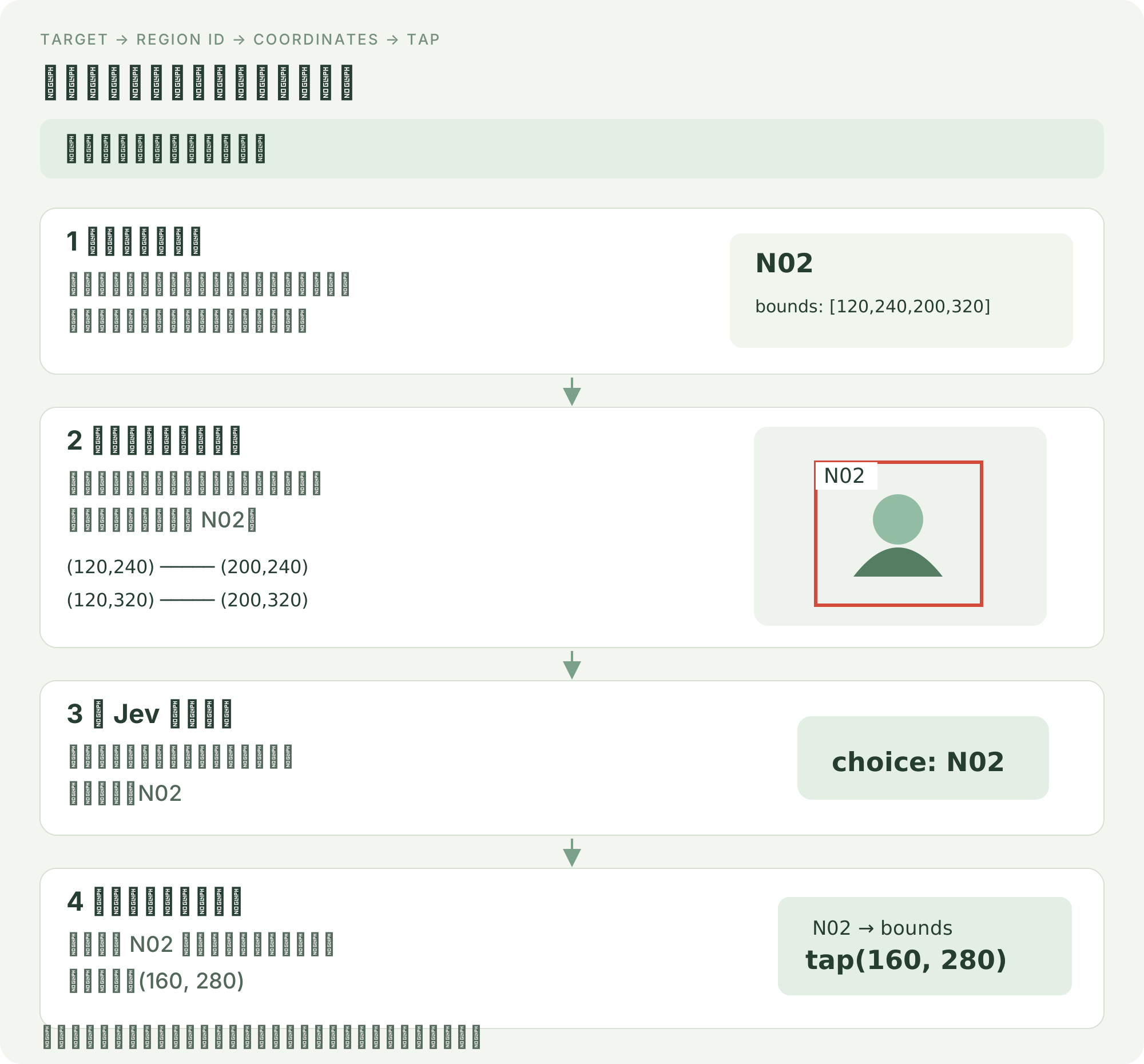
|
+
in the Software without restriction, including without limitation the rights
|
|
9
|
+
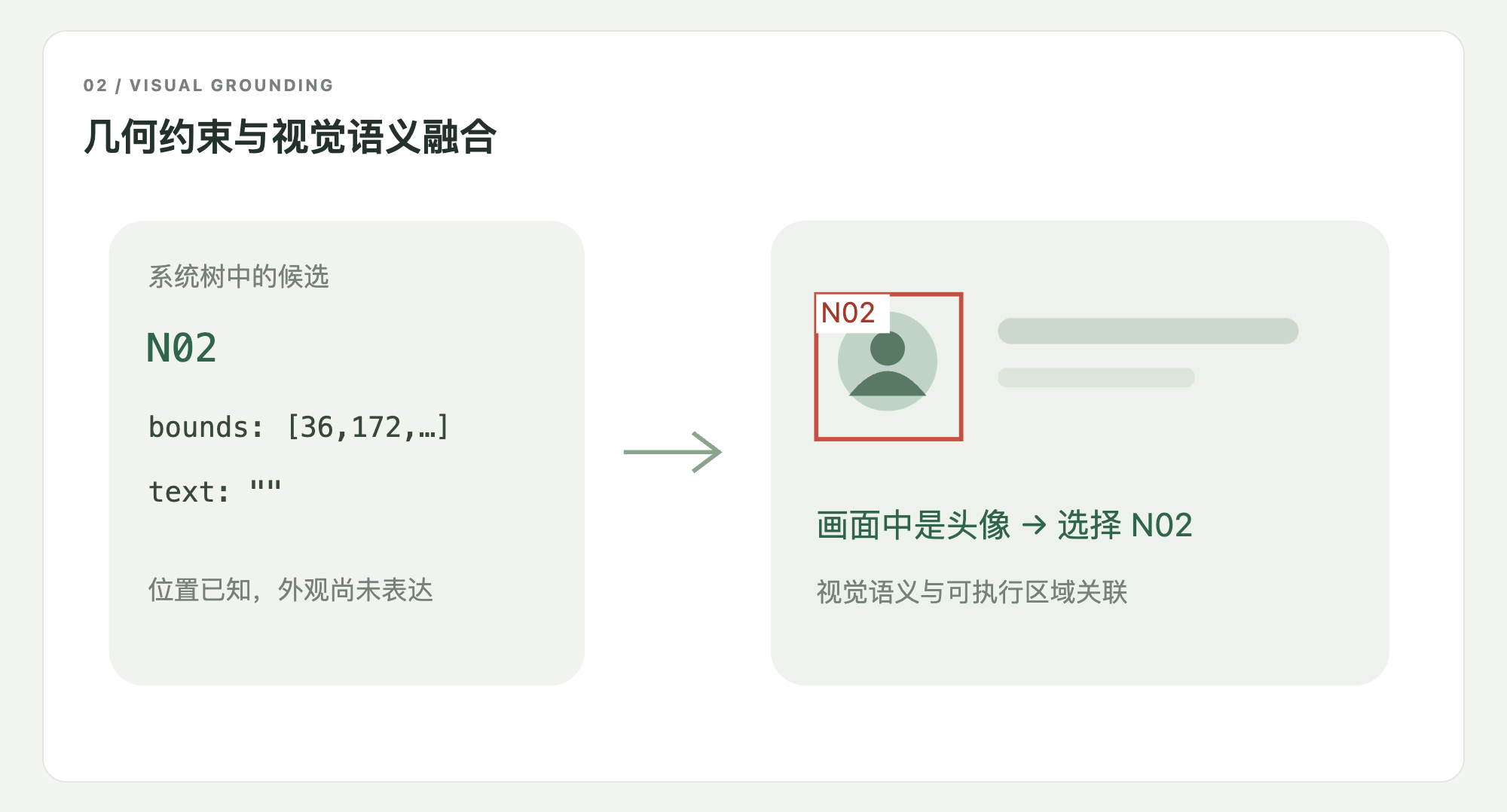
to use, copy, modify, merge, publish, distribute, sublicense, and/or sell
|
|
10
|
+
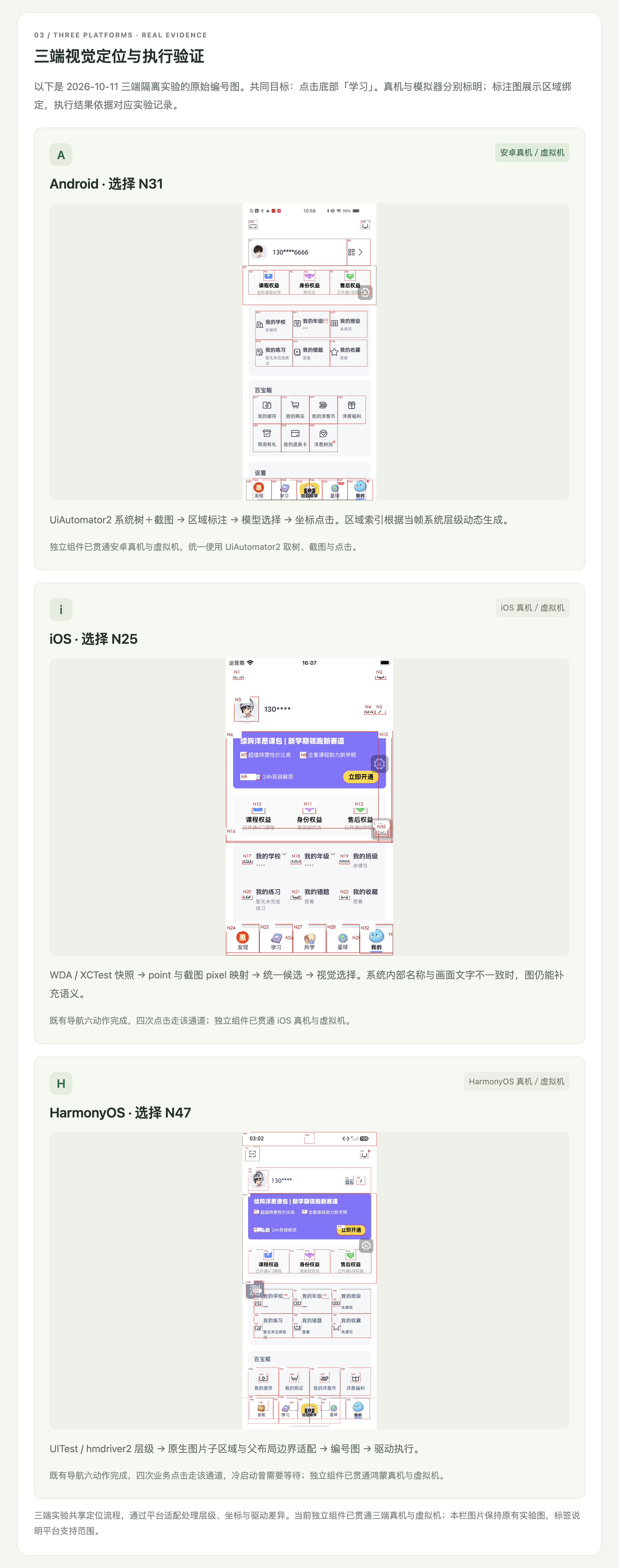
copies of the Software, and to permit persons to whom the Software is
|
|
11
|
+
furnished to do so, subject to the following conditions:
|
|
12
|
+
|
|
13
|
+
The above copyright notice and this permission notice shall be included in all
|
|
14
|
+
copies or substantial portions of the Software.
|
|
15
|
+
|
|
16
|
+
THE SOFTWARE IS PROVIDED "AS IS", WITHOUT WARRANTY OF ANY KIND, EXPRESS OR
|
|
17
|
+
IMPLIED, INCLUDING BUT NOT LIMITED TO THE WARRANTIES OF MERCHANTABILITY,
|
|
18
|
+
FITNESS FOR A PARTICULAR PURPOSE AND NONINFRINGEMENT. IN NO EVENT SHALL THE
|
|
19
|
+
AUTHORS OR COPYRIGHT HOLDERS BE LIABLE FOR ANY CLAIM, DAMAGES OR OTHER
|
|
20
|
+
LIABILITY, WHETHER IN AN ACTION OF CONTRACT, TORT OR OTHERWISE, ARISING FROM,
|
|
21
|
+
OUT OF OR IN CONNECTION WITH THE SOFTWARE OR THE USE OR OTHER DEALINGS IN THE
|
|
22
|
+
SOFTWARE.
|
|
@@ -0,0 +1,7 @@
|
|
|
1
|
+
# Attribution
|
|
2
|
+
|
|
3
|
+
Jev Phone derives selected device-channel and image-comparison implementations from [dongxinsuperman/ai-phone](https://github.com/dongxinsuperman/ai-phone), under the MIT License. Original copyright attribution is retained in LICENSE.
|
|
4
|
+
|
|
5
|
+
The project uses UiAutomator2, hmdriver2, HTTPX and Pillow as installed dependencies; they are not vendored here and retain their respective licenses. iOS connects to user-provided WebDriverAgent; WDA source is not bundled.
|
|
6
|
+
|
|
7
|
+
Demo screenshots and the cropped GIF are supplied project demonstration assets. Their source and experimental context are described in docs/素材说明.md. Jev Phone does not claim affiliation with OpenAI or other platform vendors.
|
jev_phone-0.1.1/PKG-INFO
ADDED
|
@@ -0,0 +1,161 @@
|
|
|
1
|
+
Metadata-Version: 2.4
|
|
2
|
+
Name: jev-phone
|
|
3
|
+
Version: 0.1.1
|
|
4
|
+
Summary: Independent multimodal tap SDK for Android, iOS and HarmonyOS
|
|
5
|
+
Author: Dongxin
|
|
6
|
+
License: MIT License
|
|
7
|
+
|
|
8
|
+
Copyright (c) 2026 Dongxin and Jev Phone contributors
|
|
9
|
+
Copyright (c) 2026 Dongxin and ai-phone contributors
|
|
10
|
+
|
|
11
|
+
Permission is hereby granted, free of charge, to any person obtaining a copy
|
|
12
|
+
of this software and associated documentation files (the "Software"), to deal
|
|
13
|
+
in the Software without restriction, including without limitation the rights
|
|
14
|
+
to use, copy, modify, merge, publish, distribute, sublicense, and/or sell
|
|
15
|
+
copies of the Software, and to permit persons to whom the Software is
|
|
16
|
+
furnished to do so, subject to the following conditions:
|
|
17
|
+
|
|
18
|
+
The above copyright notice and this permission notice shall be included in all
|
|
19
|
+
copies or substantial portions of the Software.
|
|
20
|
+
|
|
21
|
+
THE SOFTWARE IS PROVIDED "AS IS", WITHOUT WARRANTY OF ANY KIND, EXPRESS OR
|
|
22
|
+
IMPLIED, INCLUDING BUT NOT LIMITED TO THE WARRANTIES OF MERCHANTABILITY,
|
|
23
|
+
FITNESS FOR A PARTICULAR PURPOSE AND NONINFRINGEMENT. IN NO EVENT SHALL THE
|
|
24
|
+
AUTHORS OR COPYRIGHT HOLDERS BE LIABLE FOR ANY CLAIM, DAMAGES OR OTHER
|
|
25
|
+
LIABILITY, WHETHER IN AN ACTION OF CONTRACT, TORT OR OTHERWISE, ARISING FROM,
|
|
26
|
+
OUT OF OR IN CONNECTION WITH THE SOFTWARE OR THE USE OR OTHER DEALINGS IN THE
|
|
27
|
+
SOFTWARE.
|
|
28
|
+
|
|
29
|
+
Project-URL: Repository, https://github.com/dongxinsuperman/jev-phone
|
|
30
|
+
Project-URL: Issues, https://github.com/dongxinsuperman/jev-phone/issues
|
|
31
|
+
Keywords: mobile,multimodal,android,ios,harmonyos,automation
|
|
32
|
+
Requires-Python: >=3.10
|
|
33
|
+
Description-Content-Type: text/markdown
|
|
34
|
+
License-File: LICENSE
|
|
35
|
+
License-File: NOTICE.md
|
|
36
|
+
Requires-Dist: httpx>=0.28
|
|
37
|
+
Requires-Dist: Pillow>=10.1
|
|
38
|
+
Provides-Extra: android
|
|
39
|
+
Requires-Dist: uiautomator2==3.7.0; extra == "android"
|
|
40
|
+
Provides-Extra: harmony
|
|
41
|
+
Requires-Dist: hmdriver2==1.4.4; extra == "harmony"
|
|
42
|
+
Provides-Extra: demo
|
|
43
|
+
Requires-Dist: uiautomator2==3.7.0; extra == "demo"
|
|
44
|
+
Requires-Dist: fastapi>=0.115; extra == "demo"
|
|
45
|
+
Requires-Dist: uvicorn>=0.30; extra == "demo"
|
|
46
|
+
Dynamic: license-file
|
|
47
|
+
|
|
48
|
+
<h1 align="center">Jev Phone</h1>
|
|
49
|
+
<p align="center"><strong>毫秒级本地处理的三端多模态点击 SDK</strong></p>
|
|
50
|
+
<p align="center">Android · iOS · HarmonyOS</p>
|
|
51
|
+
<p align="center"><strong>经济、快速、准确</strong></p>
|
|
52
|
+
<p align="center"><a href="https://github.com/dongxinsuperman/jev-phone/blob/main/README.md">中文</a> · <a href="https://github.com/dongxinsuperman/jev-phone/blob/main/README.en.md">English</a></p>
|
|
53
|
+
|
|
54
|
+
Jev Phone 将 Jev 多模态决策接到三端设备上,为已有 Agent、测试平台和脚本提供可独立调用的手机点击能力。**调用方给出点击目标,SDK 完成当前画面的定位和执行。**
|
|
55
|
+
|
|
56
|
+
它承接从“知道要操作什么”到“实际点到设备上”的这一段。你可以继续使用自己的任务规划、缓存和业务判断,不需要引入完整 AI Phone 框架。
|
|
57
|
+
|
|
58
|
+
|
|
59
|
+
|
|
60
|
+
## 实机演示:预览难度并保存
|
|
61
|
+
|
|
62
|
+
安卓真机连续执行四步:基础 → 中等 → 困难 → 保存修改。起始画面已打开难度弹窗,最终保存为困难。秒表按真实时间连续计时,视频未加速。
|
|
63
|
+
|
|
64
|
+
|
|
65
|
+
|
|
66
|
+
<table align="center">
|
|
67
|
+
<thead><tr><th align="center">步骤</th><th align="center">模型往返</th><th align="center">SDK本地处理</th><th align="center">页面稳定等待</th><th align="center">整步合计</th></tr></thead>
|
|
68
|
+
<tbody>
|
|
69
|
+
<tr><td align="center">基础</td><td align="center">763.28 ms</td><td align="center">490.99 ms</td><td align="center">658.00 ms</td><td align="center">1,912.27 ms</td></tr>
|
|
70
|
+
<tr><td align="center">中等</td><td align="center">646.39 ms</td><td align="center">289.80 ms</td><td align="center">665.00 ms</td><td align="center">1,601.19 ms</td></tr>
|
|
71
|
+
<tr><td align="center">困难</td><td align="center">647.78 ms</td><td align="center">296.26 ms</td><td align="center">702.00 ms</td><td align="center">1,646.04 ms</td></tr>
|
|
72
|
+
<tr><td align="center">保存修改</td><td align="center">706.62 ms</td><td align="center">301.97 ms</td><td align="center">0.00 ms</td><td align="center">1,008.59 ms</td></tr>
|
|
73
|
+
</tbody>
|
|
74
|
+
</table>
|
|
75
|
+
|
|
76
|
+
整步合计包含点击后的页面稳定等待,通过连续截图对比判断画面是否稳定;末步没有后续步骤,因此不追加等待。第一步低于2秒,其余三步均低于1.7秒;整轮实际耗时 **6,170.82ms**。本地 SDK 已实现毫秒级处理;模型往返耗时则受你的网络状况与模型服务响应影响,是整步耗时波动的主要来源。
|
|
77
|
+
|
|
78
|
+
[MP4](https://github.com/dongxinsuperman/jev-phone/blob/main/docs/media/demo-default-difficulty-fast.mp4) · [JSON](https://github.com/dongxinsuperman/jev-phone/blob/main/docs/media/demo-default-difficulty-fast.json)
|
|
79
|
+
|
|
80
|
+
## 性能
|
|
81
|
+
|
|
82
|
+
已有安卓实验中,本地候选处理、画框与编码耗时 **15–50ms**;非模型整轮中位为 **620ms**,同一导航样本9轮范围为 **493–729ms**。这些数据不包含模型请求、初始化与页面稳定。
|
|
83
|
+
|
|
84
|
+
每一步整体耗时还包括设备采集、候选处理、模型往返、点击和该步后续衔接。[完整分段记录](https://github.com/dongxinsuperman/jev-phone/blob/main/docs/%E6%BC%94%E7%A4%BA%E8%80%97%E6%97%B6%E6%98%8E%E7%BB%86.md)分别列出这些时间。
|
|
85
|
+
|
|
86
|
+
|
|
87
|
+
|
|
88
|
+
## 工作原理:Jev 选择,组件执行
|
|
89
|
+
|
|
90
|
+
当前接入的多模态 Jev 采用 **有限选项决策接口**:它结合图像选择给定候选,这种接入方式并不直接返回设备操作指令或可执行的点击坐标。因此,从模型选中目标到设备实际点击,还需要组件完成定位与动作绑定。
|
|
91
|
+
|
|
92
|
+
我们先从系统树中提取可操作元素的边界,用四角在截图上勾勒出矩形,并为每个区域标记编号。Jev 接收当前目标和带编号的图像,只需选出对应编号;组件再根据编号找回元素边界,计算中心坐标,交给平台驱动执行点击。代码保存左上角与右下角坐标,由此确定矩形四角。 实际编号图还以中心红点和引线标明点击位置,编号会避让,重叠展示框会围绕原中心缩小;这些绘图处理不会改变候选的原始边界和点击坐标。
|
|
93
|
+
|
|
94
|
+
|
|
95
|
+
|
|
96
|
+
## 为什么结合系统树与截图
|
|
97
|
+
|
|
98
|
+
矩形的位置来自系统树,目标的文字、图标和外观语义来自截图。例如,节点文字为空,但画面中显示的是头像:Jev 可以依据图像识别头像并选择它的编号,组件则用同一编号找回已知边界。这样,多模态选项决策就能对应到真实可操作元素,而不需要模型自己生成坐标。
|
|
99
|
+
|
|
100
|
+
|
|
101
|
+
|
|
102
|
+
## 三端支持与设备准备
|
|
103
|
+
|
|
104
|
+
目前已完成三端适配:安卓使用 UiAutomator2,iOS 使用 WDA / XCTest,鸿蒙使用 UITest / hmdriver2。组件把各端的系统层级、截图、显示尺寸与点击通道接入同一候选定位流程,并处理 iOS 截图像素与 WDA point 的坐标映射。三端均支持真机与虚拟机,使用同一接口完成单步和连续点击。
|
|
105
|
+
|
|
106
|
+
使用前,需要准备已授权、保持解锁的设备及对应平台服务,再提供所选模型通道的 Key:
|
|
107
|
+
|
|
108
|
+
| 平台 | 需要准备 |
|
|
109
|
+
|---|---|
|
|
110
|
+
| Android | ADB 能识别设备,USB 调试已授权,UiAutomator2 服务可运行。 |
|
|
111
|
+
| iOS | 真机已开启开发者模式并完成信任,签名后的 WDA 服务已运行且地址可访问。 |
|
|
112
|
+
| HarmonyOS | HDC 能识别并连接已授权设备,UITest / hmdriver2 服务可用。 |
|
|
113
|
+
|
|
114
|
+
具体操作见[三端设备准备](https://github.com/dongxinsuperman/jev-phone/blob/main/docs/%E4%B8%89%E7%AB%AF%E8%AE%BE%E5%A4%87%E5%87%86%E5%A4%87.md)。下面保留三端原始图例,展示候选编号与可执行区域的绑定。
|
|
115
|
+
|
|
116
|
+
|
|
117
|
+
|
|
118
|
+
## 独立组件接入
|
|
119
|
+
|
|
120
|
+
把手机点击能力接到你已有的程序中:准备好设备服务和模型 Key,创建目标平台的 Clicker。单个点击目标调用 `click(target)`,一组有序目标调用 `run(text)`;组件返回选中区域、坐标、驱动状态和分段耗时,让你的程序继续处理后续流程。
|
|
121
|
+
|
|
122
|
+
接入不需要运行 Demo 网页或数据库。安卓、iOS、鸿蒙分别使用 `AndroidClicker`、`IOSClicker`、`HarmonyClicker`,模型通道配置和异常处理见接入指南。
|
|
123
|
+
|
|
124
|
+
[SDK接入指南](https://github.com/dongxinsuperman/jev-phone/blob/main/docs/%E6%8E%A5%E5%85%A5%E6%8C%87%E5%8D%97.md) · [三端设备准备](https://github.com/dongxinsuperman/jev-phone/blob/main/docs/%E4%B8%89%E7%AB%AF%E8%AE%BE%E5%A4%87%E5%87%86%E5%A4%87.md) · [调用示例](https://github.com/dongxinsuperman/jev-phone/blob/main/examples/click.py) · [多设备并行](https://github.com/dongxinsuperman/jev-phone/blob/main/examples/parallel.py)
|
|
125
|
+
|
|
126
|
+
## 当前能力与后续承接
|
|
127
|
+
|
|
128
|
+
当前支持 Android、iOS、HarmonyOS 真机与虚拟机上的单步和连续点击,完成画面采集、候选生成、模型选择、点击执行,并返回结果与计时。
|
|
129
|
+
|
|
130
|
+
后续可扩展输入、滚动、长按等动作。任务规划、业务断言、应用启动和设备调度由现有系统承接,可以围绕点击组件继续集成。
|
|
131
|
+
|
|
132
|
+
[版本、升级与维护](https://github.com/dongxinsuperman/jev-phone/blob/main/docs/%E5%8D%87%E7%BA%A7%E4%B8%8E%E7%BB%B4%E6%8A%A4.md) · 当前版本 **0.1.1**。
|
|
133
|
+
|
|
134
|
+
## 接入代码
|
|
135
|
+
|
|
136
|
+
需要 **Python 3.10+**(例如 `python3.11`);下面命令适用于 macOS / Linux。克隆前需具备仓库访问权限并完成 GitHub Git 认证;也可使用源码包或 wheel,安装方法见[升级与维护](https://github.com/dongxinsuperman/jev-phone/blob/main/docs/%E5%8D%87%E7%BA%A7%E4%B8%8E%E7%BB%B4%E6%8A%A4.md)。从仓库安装固定版本:
|
|
137
|
+
|
|
138
|
+
```sh
|
|
139
|
+
git clone https://github.com/dongxinsuperman/jev-phone.git
|
|
140
|
+
cd jev-phone
|
|
141
|
+
git checkout v0.1.1
|
|
142
|
+
python3.11 -m venv .venv
|
|
143
|
+
.venv/bin/pip install -e '.[android]'
|
|
144
|
+
```
|
|
145
|
+
|
|
146
|
+
安卓安装 `.[android]`,iOS 安装 `.`,鸿蒙安装 `.[harmony]`;同时接三端使用 `.[android,harmony]`。先按[三端设备准备](https://github.com/dongxinsuperman/jev-phone/blob/main/docs/%E4%B8%89%E7%AB%AF%E8%AE%BE%E5%A4%87%E5%87%86%E5%A4%87.md)启动对应设备服务并解锁设备、打开目标应用。将示例 serial 替换为 `adb devices -l` 中的真实编号;示例步骤要求当前应用中存在对应按钮。默认使用 OpenRouter Decisions,输入该账号的 Key;该账号须能调用所配置的模型接口。SDK 不会启动应用或替你登录。
|
|
147
|
+
|
|
148
|
+
```python
|
|
149
|
+
from getpass import getpass
|
|
150
|
+
from jev_phone import AndroidClicker
|
|
151
|
+
|
|
152
|
+
with AndroidClicker(
|
|
153
|
+
serial="YOUR_DEVICE_SERIAL",
|
|
154
|
+
api_key=getpass("OpenRouter Key: "),
|
|
155
|
+
provider="openrouter",
|
|
156
|
+
) as phone:
|
|
157
|
+
report = phone.run("打开默认难度设置;选择中等难度;保存修改")
|
|
158
|
+
print(report["results"])
|
|
159
|
+
```
|
|
160
|
+
|
|
161
|
+
[SDK接入指南](https://github.com/dongxinsuperman/jev-phone/blob/main/docs/%E6%8E%A5%E5%85%A5%E6%8C%87%E5%8D%97.md) · [三端设备准备](https://github.com/dongxinsuperman/jev-phone/blob/main/docs/%E4%B8%89%E7%AB%AF%E8%AE%BE%E5%A4%87%E5%87%86%E5%A4%87.md) · [验证概览](https://github.com/dongxinsuperman/jev-phone/blob/main/docs/%E9%AA%8C%E8%AF%81%E6%A6%82%E8%A7%88.md) · [完整计时记录](https://github.com/dongxinsuperman/jev-phone/blob/main/docs/%E6%BC%94%E7%A4%BA%E8%80%97%E6%97%B6%E6%98%8E%E7%BB%86.md) · [页面源码](https://github.com/dongxinsuperman/jev-phone/blob/main/docs/readme-site/manual.zh.html) · [MIT](https://github.com/dongxinsuperman/jev-phone/blob/main/LICENSE)
|
|
@@ -0,0 +1,114 @@
|
|
|
1
|
+
<h1 align="center">Jev Phone</h1>
|
|
2
|
+
<p align="center"><strong>毫秒级本地处理的三端多模态点击 SDK</strong></p>
|
|
3
|
+
<p align="center">Android · iOS · HarmonyOS</p>
|
|
4
|
+
<p align="center"><strong>经济、快速、准确</strong></p>
|
|
5
|
+
<p align="center"><a href="README.md">中文</a> · <a href="README.en.md">English</a></p>
|
|
6
|
+
|
|
7
|
+
Jev Phone 将 Jev 多模态决策接到三端设备上,为已有 Agent、测试平台和脚本提供可独立调用的手机点击能力。**调用方给出点击目标,SDK 完成当前画面的定位和执行。**
|
|
8
|
+
|
|
9
|
+
它承接从“知道要操作什么”到“实际点到设备上”的这一段。你可以继续使用自己的任务规划、缓存和业务判断,不需要引入完整 AI Phone 框架。
|
|
10
|
+
|
|
11
|
+

|
|
12
|
+
|
|
13
|
+
## 实机演示:预览难度并保存
|
|
14
|
+
|
|
15
|
+
安卓真机连续执行四步:基础 → 中等 → 困难 → 保存修改。起始画面已打开难度弹窗,最终保存为困难。秒表按真实时间连续计时,视频未加速。
|
|
16
|
+
|
|
17
|
+

|
|
18
|
+
|
|
19
|
+
<table align="center">
|
|
20
|
+
<thead><tr><th align="center">步骤</th><th align="center">模型往返</th><th align="center">SDK本地处理</th><th align="center">页面稳定等待</th><th align="center">整步合计</th></tr></thead>
|
|
21
|
+
<tbody>
|
|
22
|
+
<tr><td align="center">基础</td><td align="center">763.28 ms</td><td align="center">490.99 ms</td><td align="center">658.00 ms</td><td align="center">1,912.27 ms</td></tr>
|
|
23
|
+
<tr><td align="center">中等</td><td align="center">646.39 ms</td><td align="center">289.80 ms</td><td align="center">665.00 ms</td><td align="center">1,601.19 ms</td></tr>
|
|
24
|
+
<tr><td align="center">困难</td><td align="center">647.78 ms</td><td align="center">296.26 ms</td><td align="center">702.00 ms</td><td align="center">1,646.04 ms</td></tr>
|
|
25
|
+
<tr><td align="center">保存修改</td><td align="center">706.62 ms</td><td align="center">301.97 ms</td><td align="center">0.00 ms</td><td align="center">1,008.59 ms</td></tr>
|
|
26
|
+
</tbody>
|
|
27
|
+
</table>
|
|
28
|
+
|
|
29
|
+
整步合计包含点击后的页面稳定等待,通过连续截图对比判断画面是否稳定;末步没有后续步骤,因此不追加等待。第一步低于2秒,其余三步均低于1.7秒;整轮实际耗时 **6,170.82ms**。本地 SDK 已实现毫秒级处理;模型往返耗时则受你的网络状况与模型服务响应影响,是整步耗时波动的主要来源。
|
|
30
|
+
|
|
31
|
+
[MP4](docs/media/demo-default-difficulty-fast.mp4) · [JSON](docs/media/demo-default-difficulty-fast.json)
|
|
32
|
+
|
|
33
|
+
## 性能
|
|
34
|
+
|
|
35
|
+
已有安卓实验中,本地候选处理、画框与编码耗时 **15–50ms**;非模型整轮中位为 **620ms**,同一导航样本9轮范围为 **493–729ms**。这些数据不包含模型请求、初始化与页面稳定。
|
|
36
|
+
|
|
37
|
+
每一步整体耗时还包括设备采集、候选处理、模型往返、点击和该步后续衔接。[完整分段记录](docs/演示耗时明细.md)分别列出这些时间。
|
|
38
|
+
|
|
39
|
+

|
|
40
|
+
|
|
41
|
+
## 工作原理:Jev 选择,组件执行
|
|
42
|
+
|
|
43
|
+
当前接入的多模态 Jev 采用 **有限选项决策接口**:它结合图像选择给定候选,这种接入方式并不直接返回设备操作指令或可执行的点击坐标。因此,从模型选中目标到设备实际点击,还需要组件完成定位与动作绑定。
|
|
44
|
+
|
|
45
|
+
我们先从系统树中提取可操作元素的边界,用四角在截图上勾勒出矩形,并为每个区域标记编号。Jev 接收当前目标和带编号的图像,只需选出对应编号;组件再根据编号找回元素边界,计算中心坐标,交给平台驱动执行点击。代码保存左上角与右下角坐标,由此确定矩形四角。 实际编号图还以中心红点和引线标明点击位置,编号会避让,重叠展示框会围绕原中心缩小;这些绘图处理不会改变候选的原始边界和点击坐标。
|
|
46
|
+
|
|
47
|
+

|
|
48
|
+
|
|
49
|
+
## 为什么结合系统树与截图
|
|
50
|
+
|
|
51
|
+
矩形的位置来自系统树,目标的文字、图标和外观语义来自截图。例如,节点文字为空,但画面中显示的是头像:Jev 可以依据图像识别头像并选择它的编号,组件则用同一编号找回已知边界。这样,多模态选项决策就能对应到真实可操作元素,而不需要模型自己生成坐标。
|
|
52
|
+
|
|
53
|
+

|
|
54
|
+
|
|
55
|
+
## 三端支持与设备准备
|
|
56
|
+
|
|
57
|
+
目前已完成三端适配:安卓使用 UiAutomator2,iOS 使用 WDA / XCTest,鸿蒙使用 UITest / hmdriver2。组件把各端的系统层级、截图、显示尺寸与点击通道接入同一候选定位流程,并处理 iOS 截图像素与 WDA point 的坐标映射。三端均支持真机与虚拟机,使用同一接口完成单步和连续点击。
|
|
58
|
+
|
|
59
|
+
使用前,需要准备已授权、保持解锁的设备及对应平台服务,再提供所选模型通道的 Key:
|
|
60
|
+
|
|
61
|
+
| 平台 | 需要准备 |
|
|
62
|
+
|---|---|
|
|
63
|
+
| Android | ADB 能识别设备,USB 调试已授权,UiAutomator2 服务可运行。 |
|
|
64
|
+
| iOS | 真机已开启开发者模式并完成信任,签名后的 WDA 服务已运行且地址可访问。 |
|
|
65
|
+
| HarmonyOS | HDC 能识别并连接已授权设备,UITest / hmdriver2 服务可用。 |
|
|
66
|
+
|
|
67
|
+
具体操作见[三端设备准备](docs/三端设备准备.md)。下面保留三端原始图例,展示候选编号与可执行区域的绑定。
|
|
68
|
+
|
|
69
|
+

|
|
70
|
+
|
|
71
|
+
## 独立组件接入
|
|
72
|
+
|
|
73
|
+
把手机点击能力接到你已有的程序中:准备好设备服务和模型 Key,创建目标平台的 Clicker。单个点击目标调用 `click(target)`,一组有序目标调用 `run(text)`;组件返回选中区域、坐标、驱动状态和分段耗时,让你的程序继续处理后续流程。
|
|
74
|
+
|
|
75
|
+
接入不需要运行 Demo 网页或数据库。安卓、iOS、鸿蒙分别使用 `AndroidClicker`、`IOSClicker`、`HarmonyClicker`,模型通道配置和异常处理见接入指南。
|
|
76
|
+
|
|
77
|
+
[SDK接入指南](docs/接入指南.md) · [三端设备准备](docs/三端设备准备.md) · [调用示例](examples/click.py) · [多设备并行](examples/parallel.py)
|
|
78
|
+
|
|
79
|
+
## 当前能力与后续承接
|
|
80
|
+
|
|
81
|
+
当前支持 Android、iOS、HarmonyOS 真机与虚拟机上的单步和连续点击,完成画面采集、候选生成、模型选择、点击执行,并返回结果与计时。
|
|
82
|
+
|
|
83
|
+
后续可扩展输入、滚动、长按等动作。任务规划、业务断言、应用启动和设备调度由现有系统承接,可以围绕点击组件继续集成。
|
|
84
|
+
|
|
85
|
+
[版本、升级与维护](docs/升级与维护.md) · 当前版本 **0.1.1**。
|
|
86
|
+
|
|
87
|
+
## 接入代码
|
|
88
|
+
|
|
89
|
+
需要 **Python 3.10+**(例如 `python3.11`);下面命令适用于 macOS / Linux。克隆前需具备仓库访问权限并完成 GitHub Git 认证;也可使用源码包或 wheel,安装方法见[升级与维护](docs/升级与维护.md)。从仓库安装固定版本:
|
|
90
|
+
|
|
91
|
+
```sh
|
|
92
|
+
git clone https://github.com/dongxinsuperman/jev-phone.git
|
|
93
|
+
cd jev-phone
|
|
94
|
+
git checkout v0.1.1
|
|
95
|
+
python3.11 -m venv .venv
|
|
96
|
+
.venv/bin/pip install -e '.[android]'
|
|
97
|
+
```
|
|
98
|
+
|
|
99
|
+
安卓安装 `.[android]`,iOS 安装 `.`,鸿蒙安装 `.[harmony]`;同时接三端使用 `.[android,harmony]`。先按[三端设备准备](docs/三端设备准备.md)启动对应设备服务并解锁设备、打开目标应用。将示例 serial 替换为 `adb devices -l` 中的真实编号;示例步骤要求当前应用中存在对应按钮。默认使用 OpenRouter Decisions,输入该账号的 Key;该账号须能调用所配置的模型接口。SDK 不会启动应用或替你登录。
|
|
100
|
+
|
|
101
|
+
```python
|
|
102
|
+
from getpass import getpass
|
|
103
|
+
from jev_phone import AndroidClicker
|
|
104
|
+
|
|
105
|
+
with AndroidClicker(
|
|
106
|
+
serial="YOUR_DEVICE_SERIAL",
|
|
107
|
+
api_key=getpass("OpenRouter Key: "),
|
|
108
|
+
provider="openrouter",
|
|
109
|
+
) as phone:
|
|
110
|
+
report = phone.run("打开默认难度设置;选择中等难度;保存修改")
|
|
111
|
+
print(report["results"])
|
|
112
|
+
```
|
|
113
|
+
|
|
114
|
+
[SDK接入指南](docs/接入指南.md) · [三端设备准备](docs/三端设备准备.md) · [验证概览](docs/验证概览.md) · [完整计时记录](docs/演示耗时明细.md) · [页面源码](docs/readme-site/manual.zh.html) · [MIT](LICENSE)
|
|
@@ -0,0 +1,114 @@
|
|
|
1
|
+
<h1 align="center">Jev Phone</h1>
|
|
2
|
+
<p align="center"><strong>毫秒级本地处理的三端多模态点击 SDK</strong></p>
|
|
3
|
+
<p align="center">Android · iOS · HarmonyOS</p>
|
|
4
|
+
<p align="center"><strong>经济、快速、准确</strong></p>
|
|
5
|
+
<p align="center"><a href="https://github.com/dongxinsuperman/jev-phone/blob/main/README.md">中文</a> · <a href="https://github.com/dongxinsuperman/jev-phone/blob/main/README.en.md">English</a></p>
|
|
6
|
+
|
|
7
|
+
Jev Phone 将 Jev 多模态决策接到三端设备上,为已有 Agent、测试平台和脚本提供可独立调用的手机点击能力。**调用方给出点击目标,SDK 完成当前画面的定位和执行。**
|
|
8
|
+
|
|
9
|
+
它承接从“知道要操作什么”到“实际点到设备上”的这一段。你可以继续使用自己的任务规划、缓存和业务判断,不需要引入完整 AI Phone 框架。
|
|
10
|
+
|
|
11
|
+

|
|
12
|
+
|
|
13
|
+
## 实机演示:预览难度并保存
|
|
14
|
+
|
|
15
|
+
安卓真机连续执行四步:基础 → 中等 → 困难 → 保存修改。起始画面已打开难度弹窗,最终保存为困难。秒表按真实时间连续计时,视频未加速。
|
|
16
|
+
|
|
17
|
+

|
|
18
|
+
|
|
19
|
+
<table align="center">
|
|
20
|
+
<thead><tr><th align="center">步骤</th><th align="center">模型往返</th><th align="center">SDK本地处理</th><th align="center">页面稳定等待</th><th align="center">整步合计</th></tr></thead>
|
|
21
|
+
<tbody>
|
|
22
|
+
<tr><td align="center">基础</td><td align="center">763.28 ms</td><td align="center">490.99 ms</td><td align="center">658.00 ms</td><td align="center">1,912.27 ms</td></tr>
|
|
23
|
+
<tr><td align="center">中等</td><td align="center">646.39 ms</td><td align="center">289.80 ms</td><td align="center">665.00 ms</td><td align="center">1,601.19 ms</td></tr>
|
|
24
|
+
<tr><td align="center">困难</td><td align="center">647.78 ms</td><td align="center">296.26 ms</td><td align="center">702.00 ms</td><td align="center">1,646.04 ms</td></tr>
|
|
25
|
+
<tr><td align="center">保存修改</td><td align="center">706.62 ms</td><td align="center">301.97 ms</td><td align="center">0.00 ms</td><td align="center">1,008.59 ms</td></tr>
|
|
26
|
+
</tbody>
|
|
27
|
+
</table>
|
|
28
|
+
|
|
29
|
+
整步合计包含点击后的页面稳定等待,通过连续截图对比判断画面是否稳定;末步没有后续步骤,因此不追加等待。第一步低于2秒,其余三步均低于1.7秒;整轮实际耗时 **6,170.82ms**。本地 SDK 已实现毫秒级处理;模型往返耗时则受你的网络状况与模型服务响应影响,是整步耗时波动的主要来源。
|
|
30
|
+
|
|
31
|
+
[MP4](https://github.com/dongxinsuperman/jev-phone/blob/main/docs/media/demo-default-difficulty-fast.mp4) · [JSON](https://github.com/dongxinsuperman/jev-phone/blob/main/docs/media/demo-default-difficulty-fast.json)
|
|
32
|
+
|
|
33
|
+
## 性能
|
|
34
|
+
|
|
35
|
+
已有安卓实验中,本地候选处理、画框与编码耗时 **15–50ms**;非模型整轮中位为 **620ms**,同一导航样本9轮范围为 **493–729ms**。这些数据不包含模型请求、初始化与页面稳定。
|
|
36
|
+
|
|
37
|
+
每一步整体耗时还包括设备采集、候选处理、模型往返、点击和该步后续衔接。[完整分段记录](https://github.com/dongxinsuperman/jev-phone/blob/main/docs/%E6%BC%94%E7%A4%BA%E8%80%97%E6%97%B6%E6%98%8E%E7%BB%86.md)分别列出这些时间。
|
|
38
|
+
|
|
39
|
+

|
|
40
|
+
|
|
41
|
+
## 工作原理:Jev 选择,组件执行
|
|
42
|
+
|
|
43
|
+
当前接入的多模态 Jev 采用 **有限选项决策接口**:它结合图像选择给定候选,这种接入方式并不直接返回设备操作指令或可执行的点击坐标。因此,从模型选中目标到设备实际点击,还需要组件完成定位与动作绑定。
|
|
44
|
+
|
|
45
|
+
我们先从系统树中提取可操作元素的边界,用四角在截图上勾勒出矩形,并为每个区域标记编号。Jev 接收当前目标和带编号的图像,只需选出对应编号;组件再根据编号找回元素边界,计算中心坐标,交给平台驱动执行点击。代码保存左上角与右下角坐标,由此确定矩形四角。 实际编号图还以中心红点和引线标明点击位置,编号会避让,重叠展示框会围绕原中心缩小;这些绘图处理不会改变候选的原始边界和点击坐标。
|
|
46
|
+
|
|
47
|
+

|
|
48
|
+
|
|
49
|
+
## 为什么结合系统树与截图
|
|
50
|
+
|
|
51
|
+
矩形的位置来自系统树,目标的文字、图标和外观语义来自截图。例如,节点文字为空,但画面中显示的是头像:Jev 可以依据图像识别头像并选择它的编号,组件则用同一编号找回已知边界。这样,多模态选项决策就能对应到真实可操作元素,而不需要模型自己生成坐标。
|
|
52
|
+
|
|
53
|
+

|
|
54
|
+
|
|
55
|
+
## 三端支持与设备准备
|
|
56
|
+
|
|
57
|
+
目前已完成三端适配:安卓使用 UiAutomator2,iOS 使用 WDA / XCTest,鸿蒙使用 UITest / hmdriver2。组件把各端的系统层级、截图、显示尺寸与点击通道接入同一候选定位流程,并处理 iOS 截图像素与 WDA point 的坐标映射。三端均支持真机与虚拟机,使用同一接口完成单步和连续点击。
|
|
58
|
+
|
|
59
|
+
使用前,需要准备已授权、保持解锁的设备及对应平台服务,再提供所选模型通道的 Key:
|
|
60
|
+
|
|
61
|
+
| 平台 | 需要准备 |
|
|
62
|
+
|---|---|
|
|
63
|
+
| Android | ADB 能识别设备,USB 调试已授权,UiAutomator2 服务可运行。 |
|
|
64
|
+
| iOS | 真机已开启开发者模式并完成信任,签名后的 WDA 服务已运行且地址可访问。 |
|
|
65
|
+
| HarmonyOS | HDC 能识别并连接已授权设备,UITest / hmdriver2 服务可用。 |
|
|
66
|
+
|
|
67
|
+
具体操作见[三端设备准备](https://github.com/dongxinsuperman/jev-phone/blob/main/docs/%E4%B8%89%E7%AB%AF%E8%AE%BE%E5%A4%87%E5%87%86%E5%A4%87.md)。下面保留三端原始图例,展示候选编号与可执行区域的绑定。
|
|
68
|
+
|
|
69
|
+

|
|
70
|
+
|
|
71
|
+
## 独立组件接入
|
|
72
|
+
|
|
73
|
+
把手机点击能力接到你已有的程序中:准备好设备服务和模型 Key,创建目标平台的 Clicker。单个点击目标调用 `click(target)`,一组有序目标调用 `run(text)`;组件返回选中区域、坐标、驱动状态和分段耗时,让你的程序继续处理后续流程。
|
|
74
|
+
|
|
75
|
+
接入不需要运行 Demo 网页或数据库。安卓、iOS、鸿蒙分别使用 `AndroidClicker`、`IOSClicker`、`HarmonyClicker`,模型通道配置和异常处理见接入指南。
|
|
76
|
+
|
|
77
|
+
[SDK接入指南](https://github.com/dongxinsuperman/jev-phone/blob/main/docs/%E6%8E%A5%E5%85%A5%E6%8C%87%E5%8D%97.md) · [三端设备准备](https://github.com/dongxinsuperman/jev-phone/blob/main/docs/%E4%B8%89%E7%AB%AF%E8%AE%BE%E5%A4%87%E5%87%86%E5%A4%87.md) · [调用示例](https://github.com/dongxinsuperman/jev-phone/blob/main/examples/click.py) · [多设备并行](https://github.com/dongxinsuperman/jev-phone/blob/main/examples/parallel.py)
|
|
78
|
+
|
|
79
|
+
## 当前能力与后续承接
|
|
80
|
+
|
|
81
|
+
当前支持 Android、iOS、HarmonyOS 真机与虚拟机上的单步和连续点击,完成画面采集、候选生成、模型选择、点击执行,并返回结果与计时。
|
|
82
|
+
|
|
83
|
+
后续可扩展输入、滚动、长按等动作。任务规划、业务断言、应用启动和设备调度由现有系统承接,可以围绕点击组件继续集成。
|
|
84
|
+
|
|
85
|
+
[版本、升级与维护](https://github.com/dongxinsuperman/jev-phone/blob/main/docs/%E5%8D%87%E7%BA%A7%E4%B8%8E%E7%BB%B4%E6%8A%A4.md) · 当前版本 **0.1.1**。
|
|
86
|
+
|
|
87
|
+
## 接入代码
|
|
88
|
+
|
|
89
|
+
需要 **Python 3.10+**(例如 `python3.11`);下面命令适用于 macOS / Linux。克隆前需具备仓库访问权限并完成 GitHub Git 认证;也可使用源码包或 wheel,安装方法见[升级与维护](https://github.com/dongxinsuperman/jev-phone/blob/main/docs/%E5%8D%87%E7%BA%A7%E4%B8%8E%E7%BB%B4%E6%8A%A4.md)。从仓库安装固定版本:
|
|
90
|
+
|
|
91
|
+
```sh
|
|
92
|
+
git clone https://github.com/dongxinsuperman/jev-phone.git
|
|
93
|
+
cd jev-phone
|
|
94
|
+
git checkout v0.1.1
|
|
95
|
+
python3.11 -m venv .venv
|
|
96
|
+
.venv/bin/pip install -e '.[android]'
|
|
97
|
+
```
|
|
98
|
+
|
|
99
|
+
安卓安装 `.[android]`,iOS 安装 `.`,鸿蒙安装 `.[harmony]`;同时接三端使用 `.[android,harmony]`。先按[三端设备准备](https://github.com/dongxinsuperman/jev-phone/blob/main/docs/%E4%B8%89%E7%AB%AF%E8%AE%BE%E5%A4%87%E5%87%86%E5%A4%87.md)启动对应设备服务并解锁设备、打开目标应用。将示例 serial 替换为 `adb devices -l` 中的真实编号;示例步骤要求当前应用中存在对应按钮。默认使用 OpenRouter Decisions,输入该账号的 Key;该账号须能调用所配置的模型接口。SDK 不会启动应用或替你登录。
|
|
100
|
+
|
|
101
|
+
```python
|
|
102
|
+
from getpass import getpass
|
|
103
|
+
from jev_phone import AndroidClicker
|
|
104
|
+
|
|
105
|
+
with AndroidClicker(
|
|
106
|
+
serial="YOUR_DEVICE_SERIAL",
|
|
107
|
+
api_key=getpass("OpenRouter Key: "),
|
|
108
|
+
provider="openrouter",
|
|
109
|
+
) as phone:
|
|
110
|
+
report = phone.run("打开默认难度设置;选择中等难度;保存修改")
|
|
111
|
+
print(report["results"])
|
|
112
|
+
```
|
|
113
|
+
|
|
114
|
+
[SDK接入指南](https://github.com/dongxinsuperman/jev-phone/blob/main/docs/%E6%8E%A5%E5%85%A5%E6%8C%87%E5%8D%97.md) · [三端设备准备](https://github.com/dongxinsuperman/jev-phone/blob/main/docs/%E4%B8%89%E7%AB%AF%E8%AE%BE%E5%A4%87%E5%87%86%E5%A4%87.md) · [验证概览](https://github.com/dongxinsuperman/jev-phone/blob/main/docs/%E9%AA%8C%E8%AF%81%E6%A6%82%E8%A7%88.md) · [完整计时记录](https://github.com/dongxinsuperman/jev-phone/blob/main/docs/%E6%BC%94%E7%A4%BA%E8%80%97%E6%97%B6%E6%98%8E%E7%BB%86.md) · [页面源码](https://github.com/dongxinsuperman/jev-phone/blob/main/docs/readme-site/manual.zh.html) · [MIT](https://github.com/dongxinsuperman/jev-phone/blob/main/LICENSE)
|
|
@@ -0,0 +1,4 @@
|
|
|
1
|
+
"""Independent multi-platform visual click component."""
|
|
2
|
+
from .core import PhoneClicker, AndroidClicker, IOSClicker, HarmonyClicker, ClickFailure, RunFailure, split_steps
|
|
3
|
+
from .adapters import DeviceAdapter, Observation, AndroidAdapter, IOSAdapter, HarmonyAdapter
|
|
4
|
+
__all__=['PhoneClicker','AndroidClicker','IOSClicker','HarmonyClicker','ClickFailure','RunFailure','split_steps','DeviceAdapter','Observation','AndroidAdapter','IOSAdapter','HarmonyAdapter']
|
|
@@ -0,0 +1,53 @@
|
|
|
1
|
+
import base64
|
|
2
|
+
import io
|
|
3
|
+
from PIL import Image
|
|
4
|
+
from .base import Observation
|
|
5
|
+
|
|
6
|
+
class AndroidAdapter:
|
|
7
|
+
platform = 'android'
|
|
8
|
+
model_note = ''
|
|
9
|
+
recheck_before_click = False
|
|
10
|
+
def __init__(self, serial=None, device=None):
|
|
11
|
+
if device is None:
|
|
12
|
+
try:import uiautomator2 as u2
|
|
13
|
+
except ImportError as e:raise RuntimeError('Install jev-phone[android].') from e
|
|
14
|
+
device=u2.connect(serial)
|
|
15
|
+
self.device=device
|
|
16
|
+
self.serial=serial or getattr(device,'serial','android-device')
|
|
17
|
+
self.identity='android:'+self.serial
|
|
18
|
+
|
|
19
|
+
def viewport(self):
|
|
20
|
+
# Same live dimensions and exceptional fallback as V3.
|
|
21
|
+
try:
|
|
22
|
+
info = self.device.info
|
|
23
|
+
width, height = info['displayWidth'], info['displayHeight']
|
|
24
|
+
if type(width) is not int or type(height) is not int or min(width, height) <= 0:
|
|
25
|
+
raise ValueError('Invalid UiAutomator display dimensions')
|
|
26
|
+
return width, height
|
|
27
|
+
except Exception:
|
|
28
|
+
return tuple(self.device.window_size())
|
|
29
|
+
|
|
30
|
+
def screenshot(self):
|
|
31
|
+
raw=self.device.jsonrpc.takeScreenshot(1,95)
|
|
32
|
+
if not raw:raise RuntimeError('UiAutomator2 未返回截图。')
|
|
33
|
+
return base64.b64decode(raw)
|
|
34
|
+
|
|
35
|
+
def observe(self,stage,frame=None):
|
|
36
|
+
viewport=stage('capture',self.viewport)
|
|
37
|
+
tree=stage('tree',lambda:self.device.dump_hierarchy(compressed=False,pretty=False,max_depth=100,root_in_active=True))
|
|
38
|
+
frame=frame if frame is not None else stage('screenshot',self.screenshot)
|
|
39
|
+
if Image.open(io.BytesIO(frame)).size!=viewport:
|
|
40
|
+
raise RuntimeError('安卓层级视口与截图尺寸不一致,未执行点击。')
|
|
41
|
+
return Observation(tree,frame,viewport)
|
|
42
|
+
|
|
43
|
+
def observe_with_frame(self,stage,frame):
|
|
44
|
+
# V3 already supplied this exact settled frame; reuse its pixel dimensions.
|
|
45
|
+
viewport=stage('capture',lambda:Image.open(io.BytesIO(frame)).size)
|
|
46
|
+
tree=stage('tree',lambda:self.device.dump_hierarchy(compressed=False,pretty=False,max_depth=100,root_in_active=True))
|
|
47
|
+
return Observation(tree,frame,viewport)
|
|
48
|
+
|
|
49
|
+
def click(self,x,y,observation):
|
|
50
|
+
result=self.device.click(int(x),int(y))
|
|
51
|
+
if result is False:
|
|
52
|
+
raise RuntimeError('UiAutomator2 rejected coordinate click')
|
|
53
|
+
def close(self):pass # Do not stop a shared device-side UiAutomator2 service.
|
|
@@ -0,0 +1,19 @@
|
|
|
1
|
+
from dataclasses import dataclass, field
|
|
2
|
+
from typing import Protocol, Callable, Any
|
|
3
|
+
|
|
4
|
+
@dataclass
|
|
5
|
+
class Observation:
|
|
6
|
+
tree: str
|
|
7
|
+
image: bytes
|
|
8
|
+
viewport: tuple
|
|
9
|
+
metadata: dict = field(default_factory=dict)
|
|
10
|
+
|
|
11
|
+
class DeviceAdapter(Protocol):
|
|
12
|
+
"""Adapters return screenshot pixels and execute clicks in that same frame."""
|
|
13
|
+
identity: str
|
|
14
|
+
platform: str
|
|
15
|
+
def observe(self, stage: Callable[[str, Callable], Any]) -> Observation: ...
|
|
16
|
+
def viewport(self) -> tuple: ...
|
|
17
|
+
def click(self, x: int, y: int, observation: Observation) -> None: ...
|
|
18
|
+
def screenshot(self) -> bytes: ...
|
|
19
|
+
def close(self) -> None: ...
|
|
@@ -0,0 +1,110 @@
|
|
|
1
|
+
import io
|
|
2
|
+
import re
|
|
3
|
+
import tempfile
|
|
4
|
+
import time
|
|
5
|
+
import json
|
|
6
|
+
import types
|
|
7
|
+
import xml.etree.ElementTree as ET
|
|
8
|
+
from pathlib import Path
|
|
9
|
+
from PIL import Image
|
|
10
|
+
from .base import Observation
|
|
11
|
+
|
|
12
|
+
class HarmonyAdapter:
|
|
13
|
+
"""Thin hmdriver2 adapter; no VM, account, or application management."""
|
|
14
|
+
platform='harmony'
|
|
15
|
+
recheck_before_click = False
|
|
16
|
+
model_note='以截图可见控件为准,候选可能包括可点击容器中的独立图片区域。'
|
|
17
|
+
def __init__(self,serial=None,driver=None):
|
|
18
|
+
if driver is None:
|
|
19
|
+
try:from hmdriver2.driver import Driver
|
|
20
|
+
except ImportError as e:raise RuntimeError('Install jev-phone[harmony] and configure HDC.') from e
|
|
21
|
+
driver=Driver(serial)
|
|
22
|
+
self.driver=driver
|
|
23
|
+
self.serial=serial or driver.serial
|
|
24
|
+
self.identity='harmony:'+self.serial
|
|
25
|
+
|
|
26
|
+
def viewport(self):
|
|
27
|
+
# V3 refreshes dimensions once; no rotation probe or delayed retry.
|
|
28
|
+
for name in ('display_size','display_rotation'):
|
|
29
|
+
self.driver.__dict__.pop(name,None)
|
|
30
|
+
return tuple(self.driver.display_size)
|
|
31
|
+
|
|
32
|
+
def screenshot(self):
|
|
33
|
+
with tempfile.TemporaryDirectory(prefix='jev-phone-hm-') as directory:
|
|
34
|
+
path=Path(directory)/'screen.jpeg';self.driver.screenshot(str(path));return path.read_bytes()
|
|
35
|
+
|
|
36
|
+
@staticmethod
|
|
37
|
+
def convert(tree):
|
|
38
|
+
def flag(value):return str(value).lower()=='true'
|
|
39
|
+
def convert_node(item,parent_click=False,parent_bounds=None):
|
|
40
|
+
a=item.get('attributes',{})
|
|
41
|
+
b=list(map(int,re.findall(r'-?\d+',str(a.get('bounds','')))))
|
|
42
|
+
valid=len(b)==4
|
|
43
|
+
if valid and parent_bounds:
|
|
44
|
+
b=[max(b[0],parent_bounds[0]),max(b[1],parent_bounds[1]),min(b[2],parent_bounds[2]),min(b[3],parent_bounds[3])]
|
|
45
|
+
valid=valid and b[2]>b[0] and b[3]>b[1]
|
|
46
|
+
native=flag(a.get('clickable',False));visible=flag(a.get('visible',True))
|
|
47
|
+
active=(native or (parent_click and a.get('type')=='Image')) and visible and valid
|
|
48
|
+
attrs={'text':str(a.get('text','')),'content-desc':str(a.get('description','')),'resource-id':str(a.get('id','')),'class':str(a.get('type','')),
|
|
49
|
+
'clickable':str(active).lower(),'enabled':str(flag(a.get('enabled',False))).lower(),'visible-to-user':str(visible).lower(),
|
|
50
|
+
'bounds':f'[{b[0]},{b[1]}][{b[2]},{b[3]}]' if valid else ''}
|
|
51
|
+
out=ET.Element('node',attrs)
|
|
52
|
+
for child in item.get('children',[]):out.append(convert_node(child,parent_click or native,b if valid else parent_bounds))
|
|
53
|
+
return out
|
|
54
|
+
root=ET.Element('hierarchy');root.append(convert_node(tree));return ET.tostring(root,encoding='unicode')
|
|
55
|
+
|
|
56
|
+
def raw_tree(self):
|
|
57
|
+
# V3's captureLayout reader, adapted to this instance's device lock.
|
|
58
|
+
client = self.driver._client
|
|
59
|
+
original = client._recv_msg
|
|
60
|
+
|
|
61
|
+
def receive(_client, buff_size=4096, decode=False, print=True):
|
|
62
|
+
payload = bytearray()
|
|
63
|
+
sock = _client.sock
|
|
64
|
+
old_timeout = sock.gettimeout()
|
|
65
|
+
deadline = time.monotonic() + 5.0
|
|
66
|
+
try:
|
|
67
|
+
while True:
|
|
68
|
+
remaining = deadline - time.monotonic()
|
|
69
|
+
if remaining <= 0:
|
|
70
|
+
raise TimeoutError('Harmony hierarchy deadline')
|
|
71
|
+
sock.settimeout(remaining)
|
|
72
|
+
chunk = sock.recv(65536)
|
|
73
|
+
if not chunk:
|
|
74
|
+
raise ConnectionError('Harmony hierarchy connection closed')
|
|
75
|
+
payload.extend(chunk)
|
|
76
|
+
if len(payload) > 16 * 1024 * 1024:
|
|
77
|
+
raise ValueError('Harmony hierarchy exceeds size limit')
|
|
78
|
+
try:
|
|
79
|
+
text = payload.decode('utf-8')
|
|
80
|
+
json.loads(text)
|
|
81
|
+
except (UnicodeDecodeError, json.JSONDecodeError):
|
|
82
|
+
continue
|
|
83
|
+
return text if decode else payload
|
|
84
|
+
finally:
|
|
85
|
+
sock.settimeout(old_timeout)
|
|
86
|
+
|
|
87
|
+
client._recv_msg = types.MethodType(receive, client)
|
|
88
|
+
try:
|
|
89
|
+
return client.invoke_captures('captureLayout').result
|
|
90
|
+
finally:
|
|
91
|
+
client._recv_msg = original
|
|
92
|
+
|
|
93
|
+
def source(self):return self.convert(self.raw_tree())
|
|
94
|
+
|
|
95
|
+
def observe(self,stage,frame=None):
|
|
96
|
+
viewport=stage('capture',self.viewport)
|
|
97
|
+
frame=frame if frame is not None else stage('screenshot',self.screenshot)
|
|
98
|
+
tree=stage('tree',self.source)
|
|
99
|
+
if Image.open(io.BytesIO(frame)).size!=viewport:
|
|
100
|
+
raise RuntimeError('Harmony viewport and screenshot dimensions disagree.')
|
|
101
|
+
return Observation(tree,frame,viewport)
|
|
102
|
+
|
|
103
|
+
def observe_with_frame(self,stage,frame):
|
|
104
|
+
return self.observe(stage,frame)
|
|
105
|
+
|
|
106
|
+
def click(self,x,y,observation):
|
|
107
|
+
# V3 direct UITest completion; bypass hmdriver2's @delay (600ms).
|
|
108
|
+
return self.driver._invoke('Driver.click',args=[int(x),int(y)])
|
|
109
|
+
|
|
110
|
+
def close(self):pass # Shared device service remains owned by the caller.
|