j1x0-cardprinter 0.1.0__tar.gz
This diff represents the content of publicly available package versions that have been released to one of the supported registries. The information contained in this diff is provided for informational purposes only and reflects changes between package versions as they appear in their respective public registries.
- j1x0_cardprinter-0.1.0/.gitignore +35 -0
- j1x0_cardprinter-0.1.0/LICENSE +21 -0
- j1x0_cardprinter-0.1.0/PKG-INFO +322 -0
- j1x0_cardprinter-0.1.0/README.md +268 -0
- j1x0_cardprinter-0.1.0/docs/captured-job.md +112 -0
- j1x0_cardprinter-0.1.0/docs/commands.md +97 -0
- j1x0_cardprinter-0.1.0/docs/driver-internals.md +93 -0
- j1x0_cardprinter-0.1.0/docs/image-data.md +146 -0
- j1x0_cardprinter-0.1.0/docs/images/card.png +0 -0
- j1x0_cardprinter-0.1.0/docs/images/test-card.png +0 -0
- j1x0_cardprinter-0.1.0/docs/images/web-ui.png +0 -0
- j1x0_cardprinter-0.1.0/docs/open-questions.md +91 -0
- j1x0_cardprinter-0.1.0/docs/protocol.md +138 -0
- j1x0_cardprinter-0.1.0/docs/rendering.md +94 -0
- j1x0_cardprinter-0.1.0/docs/status-and-transport.md +290 -0
- j1x0_cardprinter-0.1.0/examples/card.svg +17 -0
- j1x0_cardprinter-0.1.0/examples/test-card.svg +2260 -0
- j1x0_cardprinter-0.1.0/j1x0_cardprinter/__init__.py +24 -0
- j1x0_cardprinter-0.1.0/j1x0_cardprinter/cli.py +363 -0
- j1x0_cardprinter-0.1.0/j1x0_cardprinter/encode.py +123 -0
- j1x0_cardprinter-0.1.0/j1x0_cardprinter/jobparse.py +94 -0
- j1x0_cardprinter-0.1.0/j1x0_cardprinter/library.py +57 -0
- j1x0_cardprinter-0.1.0/j1x0_cardprinter/printer.py +48 -0
- j1x0_cardprinter-0.1.0/j1x0_cardprinter/probe.py +186 -0
- j1x0_cardprinter-0.1.0/j1x0_cardprinter/protocol.py +119 -0
- j1x0_cardprinter-0.1.0/j1x0_cardprinter/raster.py +247 -0
- j1x0_cardprinter-0.1.0/j1x0_cardprinter/sender.py +150 -0
- j1x0_cardprinter-0.1.0/j1x0_cardprinter/status.py +151 -0
- j1x0_cardprinter-0.1.0/j1x0_cardprinter/template.py +236 -0
- j1x0_cardprinter-0.1.0/j1x0_cardprinter/usb.py +460 -0
- j1x0_cardprinter-0.1.0/j1x0_cardprinter/web/app.js +300 -0
- j1x0_cardprinter-0.1.0/j1x0_cardprinter/web/index.html +61 -0
- j1x0_cardprinter-0.1.0/j1x0_cardprinter/web/style.css +117 -0
- j1x0_cardprinter-0.1.0/j1x0_cardprinter/webui.py +457 -0
- j1x0_cardprinter-0.1.0/pyproject.toml +92 -0
- j1x0_cardprinter-0.1.0/tests/conftest.py +27 -0
- j1x0_cardprinter-0.1.0/tests/test_capture.py +61 -0
- j1x0_cardprinter-0.1.0/tests/test_cli.py +278 -0
- j1x0_cardprinter-0.1.0/tests/test_cli_ui.py +76 -0
- j1x0_cardprinter-0.1.0/tests/test_encode.py +98 -0
- j1x0_cardprinter-0.1.0/tests/test_examples.py +26 -0
- j1x0_cardprinter-0.1.0/tests/test_jobparse.py +74 -0
- j1x0_cardprinter-0.1.0/tests/test_library.py +45 -0
- j1x0_cardprinter-0.1.0/tests/test_probe.py +156 -0
- j1x0_cardprinter-0.1.0/tests/test_protocol.py +48 -0
- j1x0_cardprinter-0.1.0/tests/test_raster_shell.py +121 -0
- j1x0_cardprinter-0.1.0/tests/test_sender.py +199 -0
- j1x0_cardprinter-0.1.0/tests/test_status.py +131 -0
- j1x0_cardprinter-0.1.0/tests/test_template.py +55 -0
- j1x0_cardprinter-0.1.0/tests/test_template_features.py +50 -0
- j1x0_cardprinter-0.1.0/tests/test_template_layers.py +47 -0
- j1x0_cardprinter-0.1.0/tests/test_usb_device.py +236 -0
- j1x0_cardprinter-0.1.0/tests/test_webui.py +401 -0
|
@@ -0,0 +1,35 @@
|
|
|
1
|
+
# Proprietary material: installer, extracted binaries, help, marketing PDFs
|
|
2
|
+
/javelin_value_class_*.exe
|
|
3
|
+
/blobs/
|
|
4
|
+
/help/
|
|
5
|
+
/*.pdf
|
|
6
|
+
|
|
7
|
+
# Ghidra project (binary databases, locks) built from the blobs
|
|
8
|
+
/ghidra/
|
|
9
|
+
|
|
10
|
+
# Python
|
|
11
|
+
__pycache__/
|
|
12
|
+
*.py[cod]
|
|
13
|
+
*.egg-info/
|
|
14
|
+
/build/
|
|
15
|
+
/dist/
|
|
16
|
+
/.venv/
|
|
17
|
+
/venv*/
|
|
18
|
+
.pytest_cache/
|
|
19
|
+
|
|
20
|
+
# Generated output
|
|
21
|
+
/out/
|
|
22
|
+
*.bin
|
|
23
|
+
|
|
24
|
+
# Local tool state
|
|
25
|
+
.claude/
|
|
26
|
+
.DS_Store
|
|
27
|
+
|
|
28
|
+
# USB captures of the vendor driver (SnoopyPro logs and what was extracted from them)
|
|
29
|
+
captures/
|
|
30
|
+
|
|
31
|
+
# Disc images (e.g. an OS installer used for the capture VM)
|
|
32
|
+
*.iso
|
|
33
|
+
|
|
34
|
+
# Local run logs
|
|
35
|
+
sending.log
|
|
@@ -0,0 +1,21 @@
|
|
|
1
|
+
MIT License
|
|
2
|
+
|
|
3
|
+
Copyright (c) 2026 Chris Shucksmith
|
|
4
|
+
|
|
5
|
+
Permission is hereby granted, free of charge, to any person obtaining a copy
|
|
6
|
+
of this software and associated documentation files (the "Software"), to deal
|
|
7
|
+
in the Software without restriction, including without limitation the rights
|
|
8
|
+
to use, copy, modify, merge, publish, distribute, sublicense, and/or sell
|
|
9
|
+
copies of the Software, and to permit persons to whom the Software is
|
|
10
|
+
furnished to do so, subject to the following conditions:
|
|
11
|
+
|
|
12
|
+
The above copyright notice and this permission notice shall be included in all
|
|
13
|
+
copies or substantial portions of the Software.
|
|
14
|
+
|
|
15
|
+
THE SOFTWARE IS PROVIDED "AS IS", WITHOUT WARRANTY OF ANY KIND, EXPRESS OR
|
|
16
|
+
IMPLIED, INCLUDING BUT NOT LIMITED TO THE WARRANTIES OF MERCHANTABILITY,
|
|
17
|
+
FITNESS FOR A PARTICULAR PURPOSE AND NONINFRINGEMENT. IN NO EVENT SHALL THE
|
|
18
|
+
AUTHORS OR COPYRIGHT HOLDERS BE LIABLE FOR ANY CLAIM, DAMAGES OR OTHER
|
|
19
|
+
LIABILITY, WHETHER IN AN ACTION OF CONTRACT, TORT OR OTHERWISE, ARISING FROM,
|
|
20
|
+
OUT OF OR IN CONNECTION WITH THE SOFTWARE OR THE USE OR OTHER DEALINGS IN THE
|
|
21
|
+
SOFTWARE.
|
|
@@ -0,0 +1,322 @@
|
|
|
1
|
+
Metadata-Version: 2.5
|
|
2
|
+
Name: j1x0-cardprinter
|
|
3
|
+
Version: 0.1.0
|
|
4
|
+
Summary: Print SVG card designs on J1x0-series card printers over raw USB
|
|
5
|
+
Project-URL: Homepage, https://github.com/TeaEngineering/j1x0-cardprinter
|
|
6
|
+
Project-URL: Repository, https://github.com/TeaEngineering/j1x0-cardprinter
|
|
7
|
+
Project-URL: Documentation, https://github.com/TeaEngineering/j1x0-cardprinter/tree/main/docs
|
|
8
|
+
Project-URL: Issues, https://github.com/TeaEngineering/j1x0-cardprinter/issues
|
|
9
|
+
Author-email: Chris Shucksmith <chris@shucksmith.co.uk>
|
|
10
|
+
License: MIT License
|
|
11
|
+
|
|
12
|
+
Copyright (c) 2026 Chris Shucksmith
|
|
13
|
+
|
|
14
|
+
Permission is hereby granted, free of charge, to any person obtaining a copy
|
|
15
|
+
of this software and associated documentation files (the "Software"), to deal
|
|
16
|
+
in the Software without restriction, including without limitation the rights
|
|
17
|
+
to use, copy, modify, merge, publish, distribute, sublicense, and/or sell
|
|
18
|
+
copies of the Software, and to permit persons to whom the Software is
|
|
19
|
+
furnished to do so, subject to the following conditions:
|
|
20
|
+
|
|
21
|
+
The above copyright notice and this permission notice shall be included in all
|
|
22
|
+
copies or substantial portions of the Software.
|
|
23
|
+
|
|
24
|
+
THE SOFTWARE IS PROVIDED "AS IS", WITHOUT WARRANTY OF ANY KIND, EXPRESS OR
|
|
25
|
+
IMPLIED, INCLUDING BUT NOT LIMITED TO THE WARRANTIES OF MERCHANTABILITY,
|
|
26
|
+
FITNESS FOR A PARTICULAR PURPOSE AND NONINFRINGEMENT. IN NO EVENT SHALL THE
|
|
27
|
+
AUTHORS OR COPYRIGHT HOLDERS BE LIABLE FOR ANY CLAIM, DAMAGES OR OTHER
|
|
28
|
+
LIABILITY, WHETHER IN AN ACTION OF CONTRACT, TORT OR OTHERWISE, ARISING FROM,
|
|
29
|
+
OUT OF OR IN CONNECTION WITH THE SOFTWARE OR THE USE OR OTHER DEALINGS IN THE
|
|
30
|
+
SOFTWARE.
|
|
31
|
+
License-File: LICENSE
|
|
32
|
+
Keywords: card printer,dye-sublimation,id card,j110i,libusb,svg,usb
|
|
33
|
+
Classifier: Development Status :: 3 - Alpha
|
|
34
|
+
Classifier: Intended Audience :: Developers
|
|
35
|
+
Classifier: License :: OSI Approved :: MIT License
|
|
36
|
+
Classifier: Operating System :: MacOS
|
|
37
|
+
Classifier: Operating System :: POSIX :: Linux
|
|
38
|
+
Classifier: Programming Language :: Python :: 3
|
|
39
|
+
Classifier: Programming Language :: Python :: 3.10
|
|
40
|
+
Classifier: Programming Language :: Python :: 3.11
|
|
41
|
+
Classifier: Programming Language :: Python :: 3.12
|
|
42
|
+
Classifier: Programming Language :: Python :: 3.13
|
|
43
|
+
Classifier: Topic :: Printing
|
|
44
|
+
Classifier: Topic :: System :: Hardware :: Hardware Drivers
|
|
45
|
+
Requires-Python: >=3.10
|
|
46
|
+
Requires-Dist: numpy>=1.26
|
|
47
|
+
Requires-Dist: pillow>=10
|
|
48
|
+
Requires-Dist: pyusb>=1.2
|
|
49
|
+
Provides-Extra: dev
|
|
50
|
+
Requires-Dist: pytest>=8; extra == 'dev'
|
|
51
|
+
Provides-Extra: svg
|
|
52
|
+
Requires-Dist: cairosvg>=2.7; extra == 'svg'
|
|
53
|
+
Description-Content-Type: text/markdown
|
|
54
|
+
|
|
55
|
+
j1x0-cardprinter
|
|
56
|
+
================
|
|
57
|
+
|
|
58
|
+
Design a card in Inkscape, put `$tokens$` in it, and print it on a J1x0-series
|
|
59
|
+
(J100i / J110i / J120i) card printer over raw USB. No Windows driver required.
|
|
60
|
+
|
|
61
|
+
  [](https://badge.fury.io/py/j1x0-cardprinter)
|
|
62
|
+
|
|
63
|
+
> **Status: alpha. It prints cards on a J110i (firmware V1.18.25, YMCKO ribbon), from the command line and
|
|
64
|
+
> from the web UI.** The print protocol was reverse engineered from the vendor's Windows driver and
|
|
65
|
+
> checked against a USB capture of that driver printing ([docs/captured-job.md](https://github.com/TeaEngineering/j1x0-cardprinter/blob/main/docs/captured-job.md)):
|
|
66
|
+
> the job this tool builds is byte-for-byte what Windows sent. A printed test card matches its Inkscape
|
|
67
|
+
> preview, and a real card with a photo has been printed from the web UI.
|
|
68
|
+
> Not yet tried: other models in the family, other ribbons, duplex, the magnetic stripe and
|
|
69
|
+
> smart-card encoders (see [docs/open-questions.md](https://github.com/TeaEngineering/j1x0-cardprinter/blob/main/docs/open-questions.md)).
|
|
70
|
+
|
|
71
|
+
How it works
|
|
72
|
+
------------
|
|
73
|
+
|
|
74
|
+
```
|
|
75
|
+
card.svg + values -> render (Inkscape) -> Y/M/C planes + K bitmap -> USB
|
|
76
|
+
```
|
|
77
|
+
|
|
78
|
+
1. `$tokens$` in the SVG are replaced with your values.
|
|
79
|
+
2. The card is rendered at the printer's native 1024 x 640 grid, in two passes: colour artwork
|
|
80
|
+
(printed with the yellow / magenta / cyan ribbon panels) and the layer named `K`
|
|
81
|
+
(printed with the black resin panel).
|
|
82
|
+
3. The images are encoded and wrapped in the printer's command language, then written to the
|
|
83
|
+
printer's USB bulk endpoint with libusb.
|
|
84
|
+
|
|
85
|
+
Install
|
|
86
|
+
-------
|
|
87
|
+
|
|
88
|
+
$ pip install j1x0-cardprinter
|
|
89
|
+
|
|
90
|
+
You also need [Inkscape](https://inkscape.org) (the `inkscape` command on your `PATH`) to draw
|
|
91
|
+
the cards. It is the editor the designs are made in, and it renders them faithfully; see
|
|
92
|
+
[docs/rendering.md](https://github.com/TeaEngineering/j1x0-cardprinter/blob/main/docs/rendering.md) for why it is the default and not the faster
|
|
93
|
+
[CairoSVG](https://cairosvg.org), which silently drops filters, masks, wrapped text and more.
|
|
94
|
+
CairoSVG is available with `--renderer cairosvg` if you install it:
|
|
95
|
+
|
|
96
|
+
$ pip install "j1x0-cardprinter[svg]"
|
|
97
|
+
|
|
98
|
+
On macOS and Linux `pyusb` needs the libusb library (`brew install libusb`, or your
|
|
99
|
+
distribution's `libusb-1.0` package).
|
|
100
|
+
|
|
101
|
+
Web UI
|
|
102
|
+
------
|
|
103
|
+
|
|
104
|
+
$ j1x0
|
|
105
|
+
|
|
106
|
+
|
|
107
|
+
|
|
108
|
+
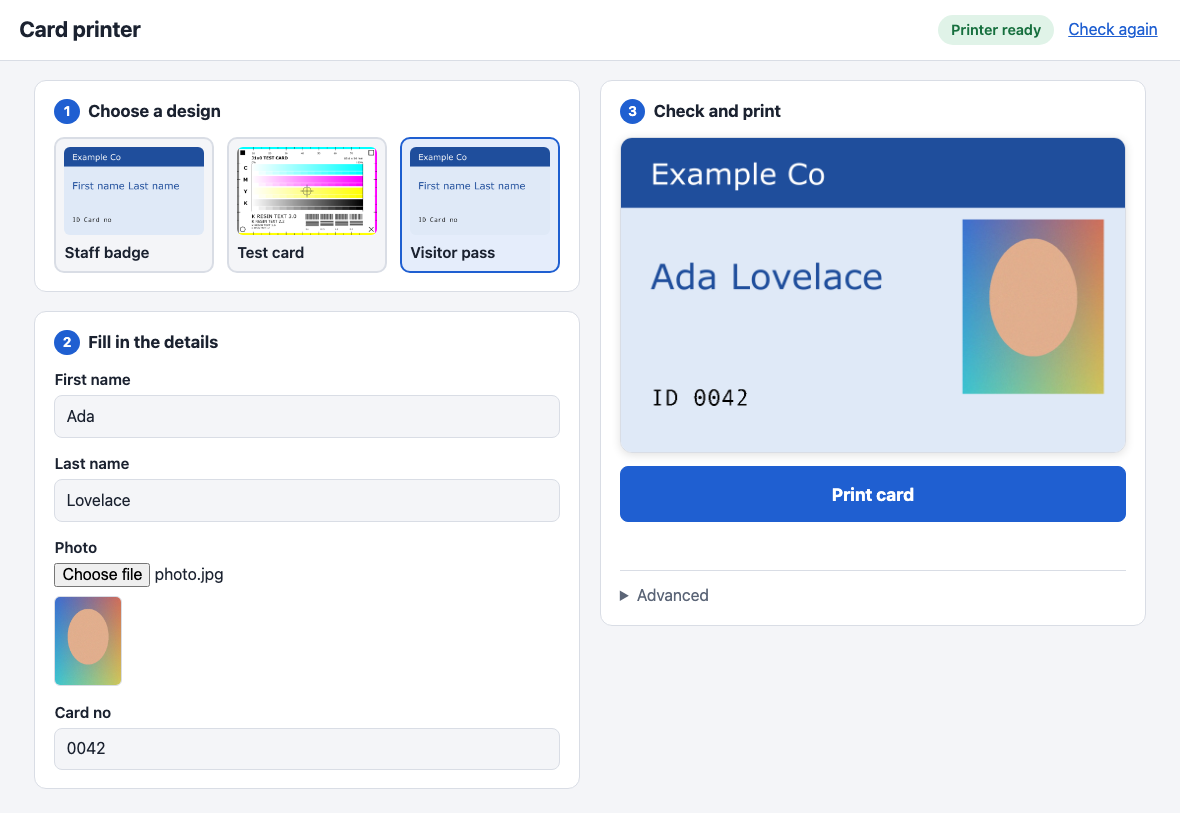
With no arguments `j1x0` starts a small web page on your own computer and opens it in your
|
|
109
|
+
browser. It is meant for someone who just needs to print cards:
|
|
110
|
+
|
|
111
|
+
1. **Choose a design.** Every `.svg` file in `~/.j1x0/` is offered, with a thumbnail. Save your
|
|
112
|
+
Inkscape designs there (or set `J1X0_TEMPLATES`, or start with `j1x0 ui --templates DIR`).
|
|
113
|
+
2. **Fill in the details.** One box per `$field$` in the design, named from the field
|
|
114
|
+
(`firstName` becomes "First name"). A field used as an image link (`xlink:href="$photo$"`)
|
|
115
|
+
becomes a file picker; phone photos are rotated and shrunk automatically.
|
|
116
|
+
3. **Check and print.** The card is redrawn as you type, so the preview is always what will be
|
|
117
|
+
printed. The status badge at the top shows whether the printer is found and ready, and the
|
|
118
|
+
**Print card** button is only enabled when it is. The card sent to the printer is exactly the
|
|
119
|
+
one in the preview.
|
|
120
|
+
|
|
121
|
+
The **Advanced** section has a way to print even when the printer reports a problem, and a button
|
|
122
|
+
that shows the full printer details. With no printer connected you can still choose, fill in and
|
|
123
|
+
preview cards.
|
|
124
|
+
|
|
125
|
+
`j1x0 ui` takes `--port` (default 8730), `--no-browser`, `--templates DIR`, `--vid/--pid` and
|
|
126
|
+
`--renderer`. The page is only reachable from this computer. `--host 0.0.0.0` makes it reachable
|
|
127
|
+
from others (for example a Raspberry Pi next to the printer), but it then has no login, so
|
|
128
|
+
anyone on the network can print.
|
|
129
|
+
|
|
130
|
+
A design is one Inkscape file with two kinds of layers: the colour artwork, and a layer named `K`
|
|
131
|
+
for black resin (text and barcodes). Objects outside every layer count as colour artwork.
|
|
132
|
+
[`examples/`](https://github.com/TeaEngineering/j1x0-cardprinter/blob/main/examples/) has two to start from.
|
|
133
|
+
|
|
134
|
+
Command line
|
|
135
|
+
------------
|
|
136
|
+
|
|
137
|
+
$ j1x0 fields examples/card.svg
|
|
138
|
+
fields: firstName, lastName, cardNo
|
|
139
|
+
layers: Design, K
|
|
140
|
+
|
|
141
|
+
$ j1x0 preview examples/card.svg -s firstName=Ada -s lastName=Lovelace -s cardNo=0042 -o out/
|
|
142
|
+
$ j1x0 render examples/card.svg -s firstName=Ada -s lastName=Lovelace -s cardNo=0042 -o job.bin
|
|
143
|
+
$ j1x0 send # check the printer, then stop
|
|
144
|
+
$ j1x0 send job.bin # check the printer, then send
|
|
145
|
+
$ j1x0 print examples/card.svg -s firstName=Ada -s lastName=Lovelace -s cardNo=0042
|
|
146
|
+
|
|
147
|
+
| Command | Needs | What it does |
|
|
148
|
+
|---|---|---|
|
|
149
|
+
| `ui` | Inkscape | The web UI above. Plain `j1x0` does this. |
|
|
150
|
+
| `fields` | | List the `$token$` fields and layer names in a template. |
|
|
151
|
+
| `preview` | Inkscape | Write `colour.png`, `k.png` and `composite.png` (the two together, as the web UI previews it) so you can check the renders. `--no-composite` skips the last. |
|
|
152
|
+
| `render` | Inkscape | Render a card to a printer job file. No printer needed. (`build` is an alias.) |
|
|
153
|
+
| `send` | printer | Check the printer. With a job file, then send it; without one, stop there. No Inkscape needed. |
|
|
154
|
+
| `print` | both | `render` then `send`, through a temporary job file. `-o job.bin` keeps the file. |
|
|
155
|
+
|
|
156
|
+
`render` and `send` can run on different machines: render where your design tools and fonts
|
|
157
|
+
are, send from the computer the printer is plugged into. Rendering is dithered randomly, so
|
|
158
|
+
add `--seed N` if you want repeated renders to be byte-identical.
|
|
159
|
+
|
|
160
|
+
Every field in the template needs a `-s NAME=VALUE`; the command stops and lists any that are
|
|
161
|
+
missing.
|
|
162
|
+
|
|
163
|
+
### Seeing what is sent (`-v`)
|
|
164
|
+
|
|
165
|
+
`send` and `print` send the job the way the Windows driver and port monitor do: in chunks of up to
|
|
166
|
+
4096 bytes with a short pause after each, asking the printer (`ESC E 2`) for an ACK where the
|
|
167
|
+
monitor does (after each plane's data and the commands that follow), then `ESC MO` to move the
|
|
168
|
+
card out. If the printer
|
|
169
|
+
stops answering or reports an error, the command stops and says how many bytes had gone. `-v` logs
|
|
170
|
+
the protocol; `-vv` logs every transfer. Either flag works before or after the sub-command. The log
|
|
171
|
+
goes to stderr, so to keep it use `--log FILE` (full detail, flushed line by line, with a stack dump
|
|
172
|
+
if a USB call hangs) or redirect with `2>&1`:
|
|
173
|
+
|
|
174
|
+
$ j1x0 send test.bin -v
|
|
175
|
+
1146 ms sending 303900 bytes in chunks of up to 4096, then the end-of-card commands
|
|
176
|
+
1146 ms 0 ESC MASTER
|
|
177
|
+
1146 ms 8 ESC JOB 0
|
|
178
|
+
1146 ms 97 plane 0 (32 levels, 1024x640): 442368 of 442368 B packed
|
|
179
|
+
...
|
|
180
|
+
1980 ms 303900 end of card: <CR><ESC>MO<CR><ESC>!FF 0<CR>
|
|
181
|
+
|
|
182
|
+
### Checking the printer
|
|
183
|
+
|
|
184
|
+
`send` always opens the USB link and checks it before it sends anything, using the same reads
|
|
185
|
+
the Windows driver makes when it starts a document:
|
|
186
|
+
|
|
187
|
+
$ j1x0 send
|
|
188
|
+
device: bus 1 addr 4 0a5f:005c JAVELIN J110i
|
|
189
|
+
port status: unavailable (this printer does not answer GET_PORT_STATUS)
|
|
190
|
+
model/firmware: J110i V1.18.25
|
|
191
|
+
serial number: J11000xxxx
|
|
192
|
+
head resistance: 2890
|
|
193
|
+
magnetic encoder: No
|
|
194
|
+
smart card: No
|
|
195
|
+
ribbon type: 2 (YMCKO)
|
|
196
|
+
remaining count: 132
|
|
197
|
+
panels printed: 12992
|
|
198
|
+
result: READY
|
|
199
|
+
|
|
200
|
+
From `model/firmware` down, the fields are the ones on the Windows driver's "Device Information"
|
|
201
|
+
page. A field the printer does not answer shows as `N/A` and does not stop a job. The `smart card`
|
|
202
|
+
line is worked out from the model/firmware reply (for example HID iCLASS or MIFARE contactless),
|
|
203
|
+
which makes it a quick way to see whether a unit has an RFID encoder.
|
|
204
|
+
|
|
205
|
+
With no job file that is all it does, and it exits 0 if the printer is ready and 1 if not, so
|
|
206
|
+
it works as a health check in scripts. With a job file it refuses to send to a printer that is
|
|
207
|
+
not ready (offline, error, no ribbon, no reply); `--force` overrides that and `--no-check`
|
|
208
|
+
skips the checks. Nothing is printed and no job is started by the check.
|
|
209
|
+
|
|
210
|
+
That output is from a real J110i (serial number masked).
|
|
211
|
+
|
|
212
|
+
### Finding the printer
|
|
213
|
+
|
|
214
|
+
By default the printer is found automatically: every USB printer-class device is listed and the
|
|
215
|
+
one that is a known model (`0a5f:005c` is the J110i) or whose USB strings or IEEE-1284 id mention
|
|
216
|
+
Javelin or a J1x0 model is used. If that finds nothing, or several, `send` prints what it saw and
|
|
217
|
+
you can pick one with the IDs from `system_profiler SPUSBDataType` (macOS) or `lsusb` (Linux):
|
|
218
|
+
|
|
219
|
+
$ j1x0 send --vid 0x0a5f --pid 0x005c
|
|
220
|
+
|
|
221
|
+
If your J100i, J110m or J120i is not found, please open an issue with its vid:pid and what
|
|
222
|
+
`send --vid ... --pid ...` prints so it can be added to the known models.
|
|
223
|
+
|
|
224
|
+
First test print
|
|
225
|
+
----------------
|
|
226
|
+
|
|
227
|
+
Start with [`examples/test-card.svg`](https://github.com/TeaEngineering/j1x0-cardprinter/blob/main/examples/test-card.svg). It has no fields:
|
|
228
|
+
|
|
229
|
+
$ j1x0 preview examples/test-card.svg -o out/ # check out/composite.png (and colour.png, k.png)
|
|
230
|
+
$ j1x0 render examples/test-card.svg -o test.bin
|
|
231
|
+
$ j1x0 send # first, just check the link
|
|
232
|
+
$ j1x0 send test.bin
|
|
233
|
+
|
|
234
|
+
<img src="https://raw.githubusercontent.com/TeaEngineering/j1x0-cardprinter/main/docs/images/test-card.png" width="50%" alt="The test card as the web UI previews it: colour bars and edge bands, resin text and markers">
|
|
235
|
+
|
|
236
|
+
It is designed to answer the open questions about a new printer:
|
|
237
|
+
|
|
238
|
+
* **Edge bands**, one per plane (top cyan, right magenta, bottom yellow, left grey), with mm
|
|
239
|
+
ticks starting at the card edge. A white gap means that plane is missing or shifted; the
|
|
240
|
+
last visible tick shows how much of the image is clipped.
|
|
241
|
+
* **Corner markers** that are all different (filled square, hollow square, X, circle), so a
|
|
242
|
+
rotated or mirrored card is obvious.
|
|
243
|
+
* **Gradients** for cyan, magenta, yellow and composite black, each driving its own plane,
|
|
244
|
+
with a 16-step strip beneath. Banding or a plane that prints too light shows up here.
|
|
245
|
+
* **Registration**: black resin lines and a crosshair run across the colour bars, so any
|
|
246
|
+
offset between the resin panel and the dye panels is visible.
|
|
247
|
+
* **Resin detail**: text at four sizes and blocks of 0.1 to 0.3 mm lines.
|
|
248
|
+
|
|
249
|
+
Writing a template
|
|
250
|
+
------------------
|
|
251
|
+
|
|
252
|
+
* Draw the card at CR80 size (85.6 x 54 mm). It is rendered to 1024 x 640 pixels, which
|
|
253
|
+
stretches it by under 1%, as the vendor driver does.
|
|
254
|
+
* Put `$name$` anywhere in a text object or an attribute. Names are letters, digits and
|
|
255
|
+
underscores. A token may be split across several `<tspan>`s by Inkscape; that works.
|
|
256
|
+
* For a photo, set an image's `xlink:href` to `$photo$` and pass a file path as the value.
|
|
257
|
+
The file is embedded in the render.
|
|
258
|
+
* Put black resin artwork (text, barcodes) in a layer named exactly **`K`**. It is printed with
|
|
259
|
+
the black resin panel, which is sharper and more durable than black built from Y/M/C.
|
|
260
|
+
Without a `K` layer the card is printed from the colour panels only.
|
|
261
|
+
* If you write SVG by hand, add `xml:space="preserve"` to text elements that contain spaces
|
|
262
|
+
between tspans. Inkscape adds it automatically when it saves.
|
|
263
|
+
|
|
264
|
+
See [`examples/card.svg`](https://github.com/TeaEngineering/j1x0-cardprinter/blob/main/examples/card.svg), rendered here with `firstName=Ada`, `lastName=Lovelace`
|
|
265
|
+
and `cardNo=0042`:
|
|
266
|
+
|
|
267
|
+
<img src="https://raw.githubusercontent.com/TeaEngineering/j1x0-cardprinter/main/docs/images/card.png" width="50%" alt="examples/card.svg filled in as in the web UI preview">
|
|
268
|
+
|
|
269
|
+
Python API
|
|
270
|
+
----------
|
|
271
|
+
|
|
272
|
+
```python
|
|
273
|
+
from j1x0_cardprinter import J1x0USB, Printer, Template
|
|
274
|
+
from j1x0_cardprinter.probe import check_link
|
|
275
|
+
|
|
276
|
+
template = Template.from_file("examples/card.svg")
|
|
277
|
+
values = {"firstName": "Ada", "lastName": "Lovelace", "cardNo": "0042"}
|
|
278
|
+
|
|
279
|
+
printer = Printer()
|
|
280
|
+
job = printer.build(template, values) # bytes; no hardware needed
|
|
281
|
+
|
|
282
|
+
with J1x0USB.discover() as link: # or discover(vid=..., pid=...)
|
|
283
|
+
report = check_link(link) # USB status, model, ribbon
|
|
284
|
+
print("\n".join(report.lines()))
|
|
285
|
+
if report.ready:
|
|
286
|
+
link.write(job)
|
|
287
|
+
```
|
|
288
|
+
|
|
289
|
+
`J1x0MockUSB` records writes (`.sent`) and queries (`.queries`) instead of using USB, and lets
|
|
290
|
+
you set the status byte and replies, which is handy for tests.
|
|
291
|
+
|
|
292
|
+
Documentation
|
|
293
|
+
-------------
|
|
294
|
+
|
|
295
|
+
The print protocol is documented in [docs/](https://github.com/TeaEngineering/j1x0-cardprinter/blob/main/docs/), starting with
|
|
296
|
+
[docs/protocol.md](https://github.com/TeaEngineering/j1x0-cardprinter/blob/main/docs/protocol.md). Each statement there is marked as read from the
|
|
297
|
+
decompiled code, inferred, or guessed, and [docs/open-questions.md](https://github.com/TeaEngineering/j1x0-cardprinter/blob/main/docs/open-questions.md)
|
|
298
|
+
lists what needs checking on hardware. [docs/rendering.md](https://github.com/TeaEngineering/j1x0-cardprinter/blob/main/docs/rendering.md) has the Inkscape
|
|
299
|
+
versus CairoSVG benchmark behind the choice of renderer.
|
|
300
|
+
|
|
301
|
+
Development
|
|
302
|
+
-----------
|
|
303
|
+
|
|
304
|
+
$ git clone git@github.com:TeaEngineering/j1x0-cardprinter.git
|
|
305
|
+
$ cd j1x0-cardprinter
|
|
306
|
+
$ pip install -e ".[dev]"
|
|
307
|
+
$ python -m pytest
|
|
308
|
+
|
|
309
|
+
The tests need no printer and no Inkscape. CI runs them on Python 3.10 to 3.13.
|
|
310
|
+
|
|
311
|
+
Licence
|
|
312
|
+
-------
|
|
313
|
+
|
|
314
|
+
MIT; see [LICENSE](https://github.com/TeaEngineering/j1x0-cardprinter/blob/main/LICENSE).
|
|
315
|
+
|
|
316
|
+
Disclaimer
|
|
317
|
+
----------
|
|
318
|
+
|
|
319
|
+
This is an independent project. It is not affiliated with, authorised or approved by NBS
|
|
320
|
+
Technologies, the maker of the Javelin printers. Product names are used only to say which
|
|
321
|
+
printers the software is intended for. The protocol was worked out by analysing the
|
|
322
|
+
vendor's Windows driver; none of the vendor's code or files is included in this repository.
|
|
@@ -0,0 +1,268 @@
|
|
|
1
|
+
j1x0-cardprinter
|
|
2
|
+
================
|
|
3
|
+
|
|
4
|
+
Design a card in Inkscape, put `$tokens$` in it, and print it on a J1x0-series
|
|
5
|
+
(J100i / J110i / J120i) card printer over raw USB. No Windows driver required.
|
|
6
|
+
|
|
7
|
+
  [](https://badge.fury.io/py/j1x0-cardprinter)
|
|
8
|
+
|
|
9
|
+
> **Status: alpha. It prints cards on a J110i (firmware V1.18.25, YMCKO ribbon), from the command line and
|
|
10
|
+
> from the web UI.** The print protocol was reverse engineered from the vendor's Windows driver and
|
|
11
|
+
> checked against a USB capture of that driver printing ([docs/captured-job.md](docs/captured-job.md)):
|
|
12
|
+
> the job this tool builds is byte-for-byte what Windows sent. A printed test card matches its Inkscape
|
|
13
|
+
> preview, and a real card with a photo has been printed from the web UI.
|
|
14
|
+
> Not yet tried: other models in the family, other ribbons, duplex, the magnetic stripe and
|
|
15
|
+
> smart-card encoders (see [docs/open-questions.md](docs/open-questions.md)).
|
|
16
|
+
|
|
17
|
+
How it works
|
|
18
|
+
------------
|
|
19
|
+
|
|
20
|
+
```
|
|
21
|
+
card.svg + values -> render (Inkscape) -> Y/M/C planes + K bitmap -> USB
|
|
22
|
+
```
|
|
23
|
+
|
|
24
|
+
1. `$tokens$` in the SVG are replaced with your values.
|
|
25
|
+
2. The card is rendered at the printer's native 1024 x 640 grid, in two passes: colour artwork
|
|
26
|
+
(printed with the yellow / magenta / cyan ribbon panels) and the layer named `K`
|
|
27
|
+
(printed with the black resin panel).
|
|
28
|
+
3. The images are encoded and wrapped in the printer's command language, then written to the
|
|
29
|
+
printer's USB bulk endpoint with libusb.
|
|
30
|
+
|
|
31
|
+
Install
|
|
32
|
+
-------
|
|
33
|
+
|
|
34
|
+
$ pip install j1x0-cardprinter
|
|
35
|
+
|
|
36
|
+
You also need [Inkscape](https://inkscape.org) (the `inkscape` command on your `PATH`) to draw
|
|
37
|
+
the cards. It is the editor the designs are made in, and it renders them faithfully; see
|
|
38
|
+
[docs/rendering.md](docs/rendering.md) for why it is the default and not the faster
|
|
39
|
+
[CairoSVG](https://cairosvg.org), which silently drops filters, masks, wrapped text and more.
|
|
40
|
+
CairoSVG is available with `--renderer cairosvg` if you install it:
|
|
41
|
+
|
|
42
|
+
$ pip install "j1x0-cardprinter[svg]"
|
|
43
|
+
|
|
44
|
+
On macOS and Linux `pyusb` needs the libusb library (`brew install libusb`, or your
|
|
45
|
+
distribution's `libusb-1.0` package).
|
|
46
|
+
|
|
47
|
+
Web UI
|
|
48
|
+
------
|
|
49
|
+
|
|
50
|
+
$ j1x0
|
|
51
|
+
|
|
52
|
+

|
|
53
|
+
|
|
54
|
+
With no arguments `j1x0` starts a small web page on your own computer and opens it in your
|
|
55
|
+
browser. It is meant for someone who just needs to print cards:
|
|
56
|
+
|
|
57
|
+
1. **Choose a design.** Every `.svg` file in `~/.j1x0/` is offered, with a thumbnail. Save your
|
|
58
|
+
Inkscape designs there (or set `J1X0_TEMPLATES`, or start with `j1x0 ui --templates DIR`).
|
|
59
|
+
2. **Fill in the details.** One box per `$field$` in the design, named from the field
|
|
60
|
+
(`firstName` becomes "First name"). A field used as an image link (`xlink:href="$photo$"`)
|
|
61
|
+
becomes a file picker; phone photos are rotated and shrunk automatically.
|
|
62
|
+
3. **Check and print.** The card is redrawn as you type, so the preview is always what will be
|
|
63
|
+
printed. The status badge at the top shows whether the printer is found and ready, and the
|
|
64
|
+
**Print card** button is only enabled when it is. The card sent to the printer is exactly the
|
|
65
|
+
one in the preview.
|
|
66
|
+
|
|
67
|
+
The **Advanced** section has a way to print even when the printer reports a problem, and a button
|
|
68
|
+
that shows the full printer details. With no printer connected you can still choose, fill in and
|
|
69
|
+
preview cards.
|
|
70
|
+
|
|
71
|
+
`j1x0 ui` takes `--port` (default 8730), `--no-browser`, `--templates DIR`, `--vid/--pid` and
|
|
72
|
+
`--renderer`. The page is only reachable from this computer. `--host 0.0.0.0` makes it reachable
|
|
73
|
+
from others (for example a Raspberry Pi next to the printer), but it then has no login, so
|
|
74
|
+
anyone on the network can print.
|
|
75
|
+
|
|
76
|
+
A design is one Inkscape file with two kinds of layers: the colour artwork, and a layer named `K`
|
|
77
|
+
for black resin (text and barcodes). Objects outside every layer count as colour artwork.
|
|
78
|
+
[`examples/`](examples/) has two to start from.
|
|
79
|
+
|
|
80
|
+
Command line
|
|
81
|
+
------------
|
|
82
|
+
|
|
83
|
+
$ j1x0 fields examples/card.svg
|
|
84
|
+
fields: firstName, lastName, cardNo
|
|
85
|
+
layers: Design, K
|
|
86
|
+
|
|
87
|
+
$ j1x0 preview examples/card.svg -s firstName=Ada -s lastName=Lovelace -s cardNo=0042 -o out/
|
|
88
|
+
$ j1x0 render examples/card.svg -s firstName=Ada -s lastName=Lovelace -s cardNo=0042 -o job.bin
|
|
89
|
+
$ j1x0 send # check the printer, then stop
|
|
90
|
+
$ j1x0 send job.bin # check the printer, then send
|
|
91
|
+
$ j1x0 print examples/card.svg -s firstName=Ada -s lastName=Lovelace -s cardNo=0042
|
|
92
|
+
|
|
93
|
+
| Command | Needs | What it does |
|
|
94
|
+
|---|---|---|
|
|
95
|
+
| `ui` | Inkscape | The web UI above. Plain `j1x0` does this. |
|
|
96
|
+
| `fields` | | List the `$token$` fields and layer names in a template. |
|
|
97
|
+
| `preview` | Inkscape | Write `colour.png`, `k.png` and `composite.png` (the two together, as the web UI previews it) so you can check the renders. `--no-composite` skips the last. |
|
|
98
|
+
| `render` | Inkscape | Render a card to a printer job file. No printer needed. (`build` is an alias.) |
|
|
99
|
+
| `send` | printer | Check the printer. With a job file, then send it; without one, stop there. No Inkscape needed. |
|
|
100
|
+
| `print` | both | `render` then `send`, through a temporary job file. `-o job.bin` keeps the file. |
|
|
101
|
+
|
|
102
|
+
`render` and `send` can run on different machines: render where your design tools and fonts
|
|
103
|
+
are, send from the computer the printer is plugged into. Rendering is dithered randomly, so
|
|
104
|
+
add `--seed N` if you want repeated renders to be byte-identical.
|
|
105
|
+
|
|
106
|
+
Every field in the template needs a `-s NAME=VALUE`; the command stops and lists any that are
|
|
107
|
+
missing.
|
|
108
|
+
|
|
109
|
+
### Seeing what is sent (`-v`)
|
|
110
|
+
|
|
111
|
+
`send` and `print` send the job the way the Windows driver and port monitor do: in chunks of up to
|
|
112
|
+
4096 bytes with a short pause after each, asking the printer (`ESC E 2`) for an ACK where the
|
|
113
|
+
monitor does (after each plane's data and the commands that follow), then `ESC MO` to move the
|
|
114
|
+
card out. If the printer
|
|
115
|
+
stops answering or reports an error, the command stops and says how many bytes had gone. `-v` logs
|
|
116
|
+
the protocol; `-vv` logs every transfer. Either flag works before or after the sub-command. The log
|
|
117
|
+
goes to stderr, so to keep it use `--log FILE` (full detail, flushed line by line, with a stack dump
|
|
118
|
+
if a USB call hangs) or redirect with `2>&1`:
|
|
119
|
+
|
|
120
|
+
$ j1x0 send test.bin -v
|
|
121
|
+
1146 ms sending 303900 bytes in chunks of up to 4096, then the end-of-card commands
|
|
122
|
+
1146 ms 0 ESC MASTER
|
|
123
|
+
1146 ms 8 ESC JOB 0
|
|
124
|
+
1146 ms 97 plane 0 (32 levels, 1024x640): 442368 of 442368 B packed
|
|
125
|
+
...
|
|
126
|
+
1980 ms 303900 end of card: <CR><ESC>MO<CR><ESC>!FF 0<CR>
|
|
127
|
+
|
|
128
|
+
### Checking the printer
|
|
129
|
+
|
|
130
|
+
`send` always opens the USB link and checks it before it sends anything, using the same reads
|
|
131
|
+
the Windows driver makes when it starts a document:
|
|
132
|
+
|
|
133
|
+
$ j1x0 send
|
|
134
|
+
device: bus 1 addr 4 0a5f:005c JAVELIN J110i
|
|
135
|
+
port status: unavailable (this printer does not answer GET_PORT_STATUS)
|
|
136
|
+
model/firmware: J110i V1.18.25
|
|
137
|
+
serial number: J11000xxxx
|
|
138
|
+
head resistance: 2890
|
|
139
|
+
magnetic encoder: No
|
|
140
|
+
smart card: No
|
|
141
|
+
ribbon type: 2 (YMCKO)
|
|
142
|
+
remaining count: 132
|
|
143
|
+
panels printed: 12992
|
|
144
|
+
result: READY
|
|
145
|
+
|
|
146
|
+
From `model/firmware` down, the fields are the ones on the Windows driver's "Device Information"
|
|
147
|
+
page. A field the printer does not answer shows as `N/A` and does not stop a job. The `smart card`
|
|
148
|
+
line is worked out from the model/firmware reply (for example HID iCLASS or MIFARE contactless),
|
|
149
|
+
which makes it a quick way to see whether a unit has an RFID encoder.
|
|
150
|
+
|
|
151
|
+
With no job file that is all it does, and it exits 0 if the printer is ready and 1 if not, so
|
|
152
|
+
it works as a health check in scripts. With a job file it refuses to send to a printer that is
|
|
153
|
+
not ready (offline, error, no ribbon, no reply); `--force` overrides that and `--no-check`
|
|
154
|
+
skips the checks. Nothing is printed and no job is started by the check.
|
|
155
|
+
|
|
156
|
+
That output is from a real J110i (serial number masked).
|
|
157
|
+
|
|
158
|
+
### Finding the printer
|
|
159
|
+
|
|
160
|
+
By default the printer is found automatically: every USB printer-class device is listed and the
|
|
161
|
+
one that is a known model (`0a5f:005c` is the J110i) or whose USB strings or IEEE-1284 id mention
|
|
162
|
+
Javelin or a J1x0 model is used. If that finds nothing, or several, `send` prints what it saw and
|
|
163
|
+
you can pick one with the IDs from `system_profiler SPUSBDataType` (macOS) or `lsusb` (Linux):
|
|
164
|
+
|
|
165
|
+
$ j1x0 send --vid 0x0a5f --pid 0x005c
|
|
166
|
+
|
|
167
|
+
If your J100i, J110m or J120i is not found, please open an issue with its vid:pid and what
|
|
168
|
+
`send --vid ... --pid ...` prints so it can be added to the known models.
|
|
169
|
+
|
|
170
|
+
First test print
|
|
171
|
+
----------------
|
|
172
|
+
|
|
173
|
+
Start with [`examples/test-card.svg`](examples/test-card.svg). It has no fields:
|
|
174
|
+
|
|
175
|
+
$ j1x0 preview examples/test-card.svg -o out/ # check out/composite.png (and colour.png, k.png)
|
|
176
|
+
$ j1x0 render examples/test-card.svg -o test.bin
|
|
177
|
+
$ j1x0 send # first, just check the link
|
|
178
|
+
$ j1x0 send test.bin
|
|
179
|
+
|
|
180
|
+
<img src="docs/images/test-card.png" width="50%" alt="The test card as the web UI previews it: colour bars and edge bands, resin text and markers">
|
|
181
|
+
|
|
182
|
+
It is designed to answer the open questions about a new printer:
|
|
183
|
+
|
|
184
|
+
* **Edge bands**, one per plane (top cyan, right magenta, bottom yellow, left grey), with mm
|
|
185
|
+
ticks starting at the card edge. A white gap means that plane is missing or shifted; the
|
|
186
|
+
last visible tick shows how much of the image is clipped.
|
|
187
|
+
* **Corner markers** that are all different (filled square, hollow square, X, circle), so a
|
|
188
|
+
rotated or mirrored card is obvious.
|
|
189
|
+
* **Gradients** for cyan, magenta, yellow and composite black, each driving its own plane,
|
|
190
|
+
with a 16-step strip beneath. Banding or a plane that prints too light shows up here.
|
|
191
|
+
* **Registration**: black resin lines and a crosshair run across the colour bars, so any
|
|
192
|
+
offset between the resin panel and the dye panels is visible.
|
|
193
|
+
* **Resin detail**: text at four sizes and blocks of 0.1 to 0.3 mm lines.
|
|
194
|
+
|
|
195
|
+
Writing a template
|
|
196
|
+
------------------
|
|
197
|
+
|
|
198
|
+
* Draw the card at CR80 size (85.6 x 54 mm). It is rendered to 1024 x 640 pixels, which
|
|
199
|
+
stretches it by under 1%, as the vendor driver does.
|
|
200
|
+
* Put `$name$` anywhere in a text object or an attribute. Names are letters, digits and
|
|
201
|
+
underscores. A token may be split across several `<tspan>`s by Inkscape; that works.
|
|
202
|
+
* For a photo, set an image's `xlink:href` to `$photo$` and pass a file path as the value.
|
|
203
|
+
The file is embedded in the render.
|
|
204
|
+
* Put black resin artwork (text, barcodes) in a layer named exactly **`K`**. It is printed with
|
|
205
|
+
the black resin panel, which is sharper and more durable than black built from Y/M/C.
|
|
206
|
+
Without a `K` layer the card is printed from the colour panels only.
|
|
207
|
+
* If you write SVG by hand, add `xml:space="preserve"` to text elements that contain spaces
|
|
208
|
+
between tspans. Inkscape adds it automatically when it saves.
|
|
209
|
+
|
|
210
|
+
See [`examples/card.svg`](examples/card.svg), rendered here with `firstName=Ada`, `lastName=Lovelace`
|
|
211
|
+
and `cardNo=0042`:
|
|
212
|
+
|
|
213
|
+
<img src="docs/images/card.png" width="50%" alt="examples/card.svg filled in as in the web UI preview">
|
|
214
|
+
|
|
215
|
+
Python API
|
|
216
|
+
----------
|
|
217
|
+
|
|
218
|
+
```python
|
|
219
|
+
from j1x0_cardprinter import J1x0USB, Printer, Template
|
|
220
|
+
from j1x0_cardprinter.probe import check_link
|
|
221
|
+
|
|
222
|
+
template = Template.from_file("examples/card.svg")
|
|
223
|
+
values = {"firstName": "Ada", "lastName": "Lovelace", "cardNo": "0042"}
|
|
224
|
+
|
|
225
|
+
printer = Printer()
|
|
226
|
+
job = printer.build(template, values) # bytes; no hardware needed
|
|
227
|
+
|
|
228
|
+
with J1x0USB.discover() as link: # or discover(vid=..., pid=...)
|
|
229
|
+
report = check_link(link) # USB status, model, ribbon
|
|
230
|
+
print("\n".join(report.lines()))
|
|
231
|
+
if report.ready:
|
|
232
|
+
link.write(job)
|
|
233
|
+
```
|
|
234
|
+
|
|
235
|
+
`J1x0MockUSB` records writes (`.sent`) and queries (`.queries`) instead of using USB, and lets
|
|
236
|
+
you set the status byte and replies, which is handy for tests.
|
|
237
|
+
|
|
238
|
+
Documentation
|
|
239
|
+
-------------
|
|
240
|
+
|
|
241
|
+
The print protocol is documented in [docs/](docs/), starting with
|
|
242
|
+
[docs/protocol.md](docs/protocol.md). Each statement there is marked as read from the
|
|
243
|
+
decompiled code, inferred, or guessed, and [docs/open-questions.md](docs/open-questions.md)
|
|
244
|
+
lists what needs checking on hardware. [docs/rendering.md](docs/rendering.md) has the Inkscape
|
|
245
|
+
versus CairoSVG benchmark behind the choice of renderer.
|
|
246
|
+
|
|
247
|
+
Development
|
|
248
|
+
-----------
|
|
249
|
+
|
|
250
|
+
$ git clone git@github.com:TeaEngineering/j1x0-cardprinter.git
|
|
251
|
+
$ cd j1x0-cardprinter
|
|
252
|
+
$ pip install -e ".[dev]"
|
|
253
|
+
$ python -m pytest
|
|
254
|
+
|
|
255
|
+
The tests need no printer and no Inkscape. CI runs them on Python 3.10 to 3.13.
|
|
256
|
+
|
|
257
|
+
Licence
|
|
258
|
+
-------
|
|
259
|
+
|
|
260
|
+
MIT; see [LICENSE](LICENSE).
|
|
261
|
+
|
|
262
|
+
Disclaimer
|
|
263
|
+
----------
|
|
264
|
+
|
|
265
|
+
This is an independent project. It is not affiliated with, authorised or approved by NBS
|
|
266
|
+
Technologies, the maker of the Javelin printers. Product names are used only to say which
|
|
267
|
+
printers the software is intended for. The protocol was worked out by analysing the
|
|
268
|
+
vendor's Windows driver; none of the vendor's code or files is included in this repository.
|