invocation-tree 0.0.4__tar.gz → 0.0.5__tar.gz
This diff represents the content of publicly available package versions that have been released to one of the supported registries. The information contained in this diff is provided for informational purposes only and reflects changes between package versions as they appear in their respective public registries.
- {invocation_tree-0.0.4/invocation_tree.egg-info → invocation_tree-0.0.5}/PKG-INFO +20 -11
- {invocation_tree-0.0.4 → invocation_tree-0.0.5}/README.md +19 -10
- invocation_tree-0.0.5/images/factorial0.png +0 -0
- {invocation_tree-0.0.4 → invocation_tree-0.0.5}/images/factorial1.png +0 -0
- {invocation_tree-0.0.4 → invocation_tree-0.0.5}/images/factorial2.png +0 -0
- {invocation_tree-0.0.4 → invocation_tree-0.0.5}/images/factorial3.png +0 -0
- {invocation_tree-0.0.4 → invocation_tree-0.0.5}/images/factorial4.png +0 -0
- {invocation_tree-0.0.4 → invocation_tree-0.0.5}/images/factorial5.png +0 -0
- {invocation_tree-0.0.4 → invocation_tree-0.0.5}/images/factorial6.png +0 -0
- {invocation_tree-0.0.4 → invocation_tree-0.0.5}/images/factorial7.png +0 -0
- invocation_tree-0.0.5/images/permutations0.png +0 -0
- {invocation_tree-0.0.4 → invocation_tree-0.0.5}/images/permutations1.png +0 -0
- {invocation_tree-0.0.4 → invocation_tree-0.0.5}/images/permutations10.png +0 -0
- {invocation_tree-0.0.4 → invocation_tree-0.0.5}/images/permutations11.png +0 -0
- {invocation_tree-0.0.4 → invocation_tree-0.0.5}/images/permutations12.png +0 -0
- {invocation_tree-0.0.4 → invocation_tree-0.0.5}/images/permutations13.png +0 -0
- {invocation_tree-0.0.4 → invocation_tree-0.0.5}/images/permutations2.png +0 -0
- {invocation_tree-0.0.4 → invocation_tree-0.0.5}/images/permutations3.png +0 -0
- {invocation_tree-0.0.4 → invocation_tree-0.0.5}/images/permutations4.png +0 -0
- {invocation_tree-0.0.4 → invocation_tree-0.0.5}/images/permutations5.png +0 -0
- {invocation_tree-0.0.4 → invocation_tree-0.0.5}/images/permutations6.png +0 -0
- {invocation_tree-0.0.4 → invocation_tree-0.0.5}/images/permutations7.png +0 -0
- {invocation_tree-0.0.4 → invocation_tree-0.0.5}/images/permutations8.png +0 -0
- {invocation_tree-0.0.4 → invocation_tree-0.0.5}/images/permutations9.png +0 -0
- invocation_tree-0.0.5/images/students0.png +0 -0
- {invocation_tree-0.0.4 → invocation_tree-0.0.5}/images/students1.png +0 -0
- {invocation_tree-0.0.4 → invocation_tree-0.0.5}/images/students10.png +0 -0
- {invocation_tree-0.0.4 → invocation_tree-0.0.5}/images/students11.png +0 -0
- {invocation_tree-0.0.4 → invocation_tree-0.0.5}/images/students12.png +0 -0
- {invocation_tree-0.0.4 → invocation_tree-0.0.5}/images/students13.png +0 -0
- {invocation_tree-0.0.4 → invocation_tree-0.0.5}/images/students14.png +0 -0
- {invocation_tree-0.0.4 → invocation_tree-0.0.5}/images/students15.png +0 -0
- {invocation_tree-0.0.4 → invocation_tree-0.0.5}/images/students2.png +0 -0
- {invocation_tree-0.0.4 → invocation_tree-0.0.5}/images/students3.png +0 -0
- {invocation_tree-0.0.4 → invocation_tree-0.0.5}/images/students4.png +0 -0
- {invocation_tree-0.0.4 → invocation_tree-0.0.5}/images/students5.png +0 -0
- {invocation_tree-0.0.4 → invocation_tree-0.0.5}/images/students6.png +0 -0
- {invocation_tree-0.0.4 → invocation_tree-0.0.5}/images/students7.png +0 -0
- {invocation_tree-0.0.4 → invocation_tree-0.0.5}/images/students8.png +0 -0
- {invocation_tree-0.0.4 → invocation_tree-0.0.5}/images/students9.png +0 -0
- {invocation_tree-0.0.4 → invocation_tree-0.0.5}/invocation_tree/__init__.py +6 -6
- {invocation_tree-0.0.4 → invocation_tree-0.0.5/invocation_tree.egg-info}/PKG-INFO +20 -11
- {invocation_tree-0.0.4 → invocation_tree-0.0.5}/invocation_tree.egg-info/SOURCES.txt +3 -0
- {invocation_tree-0.0.4 → invocation_tree-0.0.5}/setup.py +1 -1
- {invocation_tree-0.0.4 → invocation_tree-0.0.5}/LICENSE.txt +0 -0
- {invocation_tree-0.0.4 → invocation_tree-0.0.5}/MANIFEST.in +0 -0
- {invocation_tree-0.0.4 → invocation_tree-0.0.5}/images/create_gif.sh +0 -0
- {invocation_tree-0.0.4 → invocation_tree-0.0.5}/images/create_images.sh +0 -0
- {invocation_tree-0.0.4 → invocation_tree-0.0.5}/images/create_images.sh~ +0 -0
- {invocation_tree-0.0.4 → invocation_tree-0.0.5}/images/factorial.gif +0 -0
- {invocation_tree-0.0.4 → invocation_tree-0.0.5}/images/factorial.py +0 -0
- {invocation_tree-0.0.4 → invocation_tree-0.0.5}/images/factorial.py~ +0 -0
- {invocation_tree-0.0.4 → invocation_tree-0.0.5}/images/factorial8.gv +0 -0
- {invocation_tree-0.0.4 → invocation_tree-0.0.5}/images/factorial9.gv +0 -0
- {invocation_tree-0.0.4 → invocation_tree-0.0.5}/images/invocation_tree.pdf +0 -0
- {invocation_tree-0.0.4 → invocation_tree-0.0.5}/images/invocation_tree0.pdf +0 -0
- {invocation_tree-0.0.4 → invocation_tree-0.0.5}/images/permutations.gif +0 -0
- {invocation_tree-0.0.4 → invocation_tree-0.0.5}/images/permutations.py +0 -0
- {invocation_tree-0.0.4 → invocation_tree-0.0.5}/images/permutations.py~ +0 -0
- {invocation_tree-0.0.4 → invocation_tree-0.0.5}/images/permutations22.png~ +0 -0
- {invocation_tree-0.0.4 → invocation_tree-0.0.5}/images/student.gif +0 -0
- {invocation_tree-0.0.4 → invocation_tree-0.0.5}/images/students.gif +0 -0
- {invocation_tree-0.0.4 → invocation_tree-0.0.5}/images/students.py +0 -0
- {invocation_tree-0.0.4 → invocation_tree-0.0.5}/images/students.py~ +0 -0
- {invocation_tree-0.0.4 → invocation_tree-0.0.5}/images/students16.gv +0 -0
- {invocation_tree-0.0.4 → invocation_tree-0.0.5}/images/students17.gv +0 -0
- {invocation_tree-0.0.4 → invocation_tree-0.0.5}/images/students18.gv +0 -0
- {invocation_tree-0.0.4 → invocation_tree-0.0.5}/images/students19.gv +0 -0
- {invocation_tree-0.0.4 → invocation_tree-0.0.5}/images/students20.gv +0 -0
- {invocation_tree-0.0.4 → invocation_tree-0.0.5}/images/students21.gv +0 -0
- {invocation_tree-0.0.4 → invocation_tree-0.0.5}/images/students22.gv +0 -0
- {invocation_tree-0.0.4 → invocation_tree-0.0.5}/images/students23.gv +0 -0
- {invocation_tree-0.0.4 → invocation_tree-0.0.5}/images/students24.gv +0 -0
- {invocation_tree-0.0.4 → invocation_tree-0.0.5}/images/students25.gv +0 -0
- {invocation_tree-0.0.4 → invocation_tree-0.0.5}/images/students26.gv +0 -0
- {invocation_tree-0.0.4 → invocation_tree-0.0.5}/images/students27.gv +0 -0
- {invocation_tree-0.0.4 → invocation_tree-0.0.5}/images/students28.gv +0 -0
- {invocation_tree-0.0.4 → invocation_tree-0.0.5}/images/students29.gv +0 -0
- {invocation_tree-0.0.4 → invocation_tree-0.0.5}/images/students30.gv +0 -0
- {invocation_tree-0.0.4 → invocation_tree-0.0.5}/images/test.py +0 -0
- {invocation_tree-0.0.4 → invocation_tree-0.0.5}/images/tree0.gv +0 -0
- {invocation_tree-0.0.4 → invocation_tree-0.0.5}/images/tree1.gv +0 -0
- {invocation_tree-0.0.4 → invocation_tree-0.0.5}/images/tree10.gv +0 -0
- {invocation_tree-0.0.4 → invocation_tree-0.0.5}/images/tree11.gv +0 -0
- {invocation_tree-0.0.4 → invocation_tree-0.0.5}/images/tree12.gv +0 -0
- {invocation_tree-0.0.4 → invocation_tree-0.0.5}/images/tree13.gv +0 -0
- {invocation_tree-0.0.4 → invocation_tree-0.0.5}/images/tree14.gv +0 -0
- {invocation_tree-0.0.4 → invocation_tree-0.0.5}/images/tree15.gv +0 -0
- {invocation_tree-0.0.4 → invocation_tree-0.0.5}/images/tree16.gv +0 -0
- {invocation_tree-0.0.4 → invocation_tree-0.0.5}/images/tree17.gv +0 -0
- {invocation_tree-0.0.4 → invocation_tree-0.0.5}/images/tree2.gv +0 -0
- {invocation_tree-0.0.4 → invocation_tree-0.0.5}/images/tree3.gv +0 -0
- {invocation_tree-0.0.4 → invocation_tree-0.0.5}/images/tree4.gv +0 -0
- {invocation_tree-0.0.4 → invocation_tree-0.0.5}/images/tree5.gv +0 -0
- {invocation_tree-0.0.4 → invocation_tree-0.0.5}/images/tree6.gv +0 -0
- {invocation_tree-0.0.4 → invocation_tree-0.0.5}/images/tree7.gv +0 -0
- {invocation_tree-0.0.4 → invocation_tree-0.0.5}/images/tree8.gv +0 -0
- {invocation_tree-0.0.4 → invocation_tree-0.0.5}/images/tree9.gv +0 -0
- {invocation_tree-0.0.4 → invocation_tree-0.0.5}/images/vscode.png +0 -0
- {invocation_tree-0.0.4 → invocation_tree-0.0.5}/install.txt +0 -0
- {invocation_tree-0.0.4 → invocation_tree-0.0.5}/invocation_tree.egg-info/dependency_links.txt +0 -0
- {invocation_tree-0.0.4 → invocation_tree-0.0.5}/invocation_tree.egg-info/requires.txt +0 -0
- {invocation_tree-0.0.4 → invocation_tree-0.0.5}/invocation_tree.egg-info/top_level.txt +0 -0
- {invocation_tree-0.0.4 → invocation_tree-0.0.5}/setup.cfg +0 -0
|
@@ -1,6 +1,6 @@
|
|
|
1
1
|
Metadata-Version: 2.1
|
|
2
2
|
Name: invocation_tree
|
|
3
|
-
Version: 0.0.
|
|
3
|
+
Version: 0.0.5
|
|
4
4
|
Summary: Generate an invocation tree of functions calls.
|
|
5
5
|
Home-page: https://github.com/bterwijn/invocation_tree
|
|
6
6
|
Author: Bas Terwijn
|
|
@@ -48,9 +48,9 @@ def my_round(value, digits=0):
|
|
|
48
48
|
shift = 10 ** digits
|
|
49
49
|
return math.floor(value * shift + 0.5) / shift
|
|
50
50
|
|
|
51
|
-
def passing_students(
|
|
51
|
+
def passing_students(averages):
|
|
52
52
|
return [student
|
|
53
|
-
for student, average in
|
|
53
|
+
for student, average in averages.items()
|
|
54
54
|
if average >= 5.5]
|
|
55
55
|
|
|
56
56
|
if __name__ == '__main__':
|
|
@@ -59,7 +59,7 @@ if __name__ == '__main__':
|
|
|
59
59
|
```
|
|
60
60
|
|
|
61
61
|
|
|
62
|
-
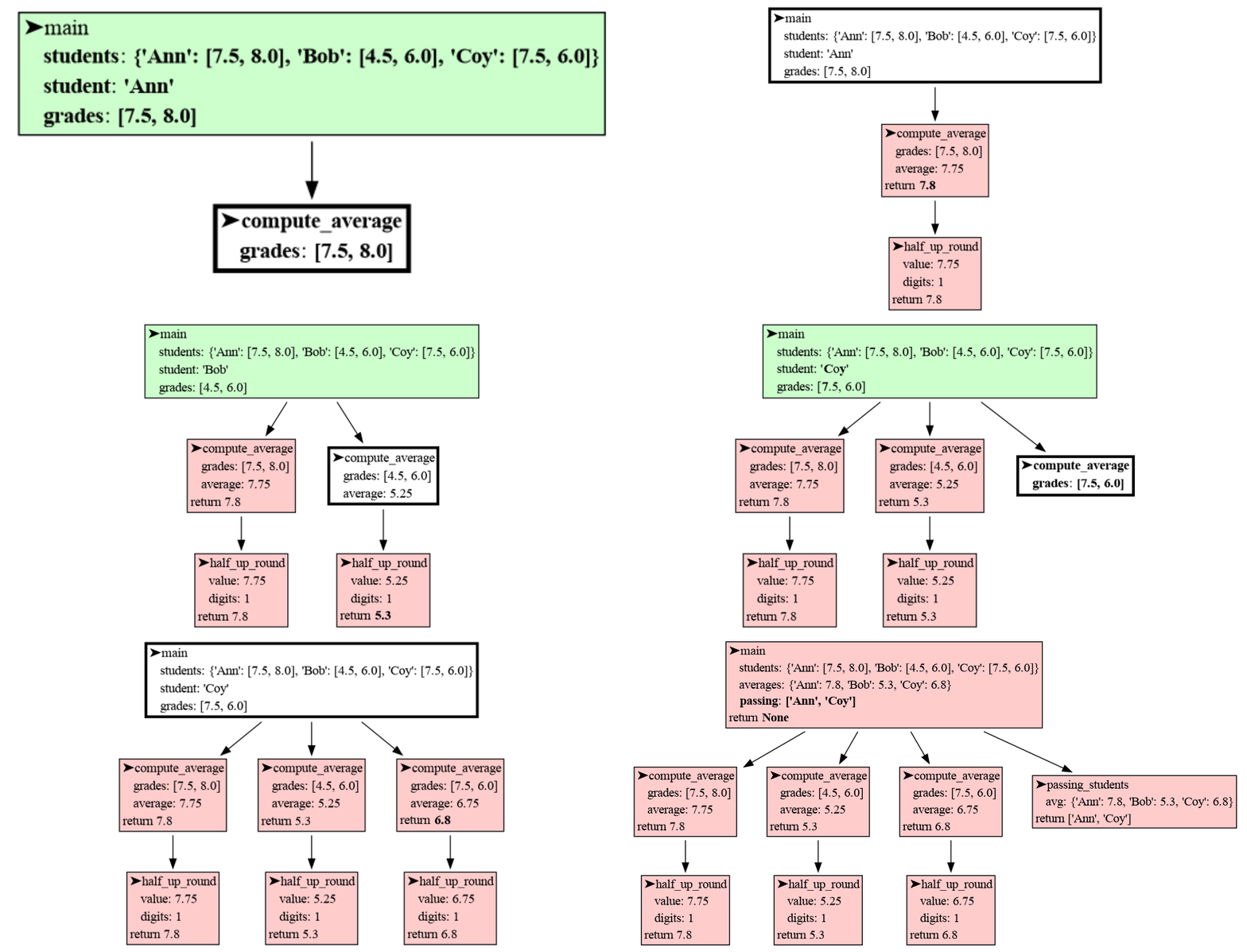
Each node in the tree represents a function call, and node's color indicates its state:
|
|
62
|
+
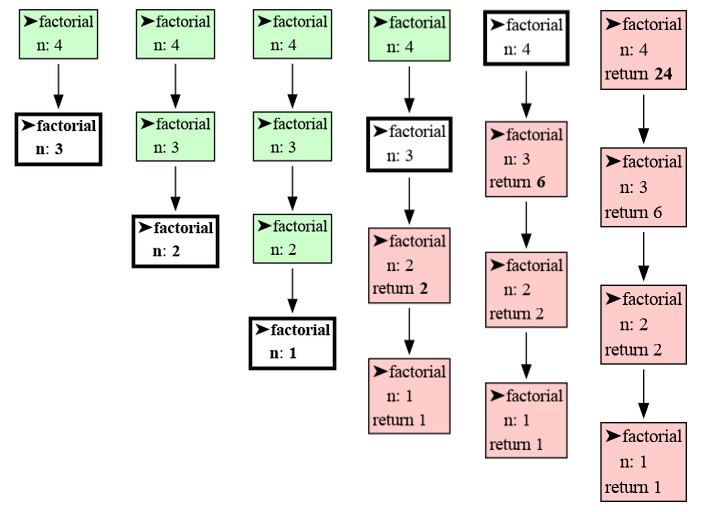
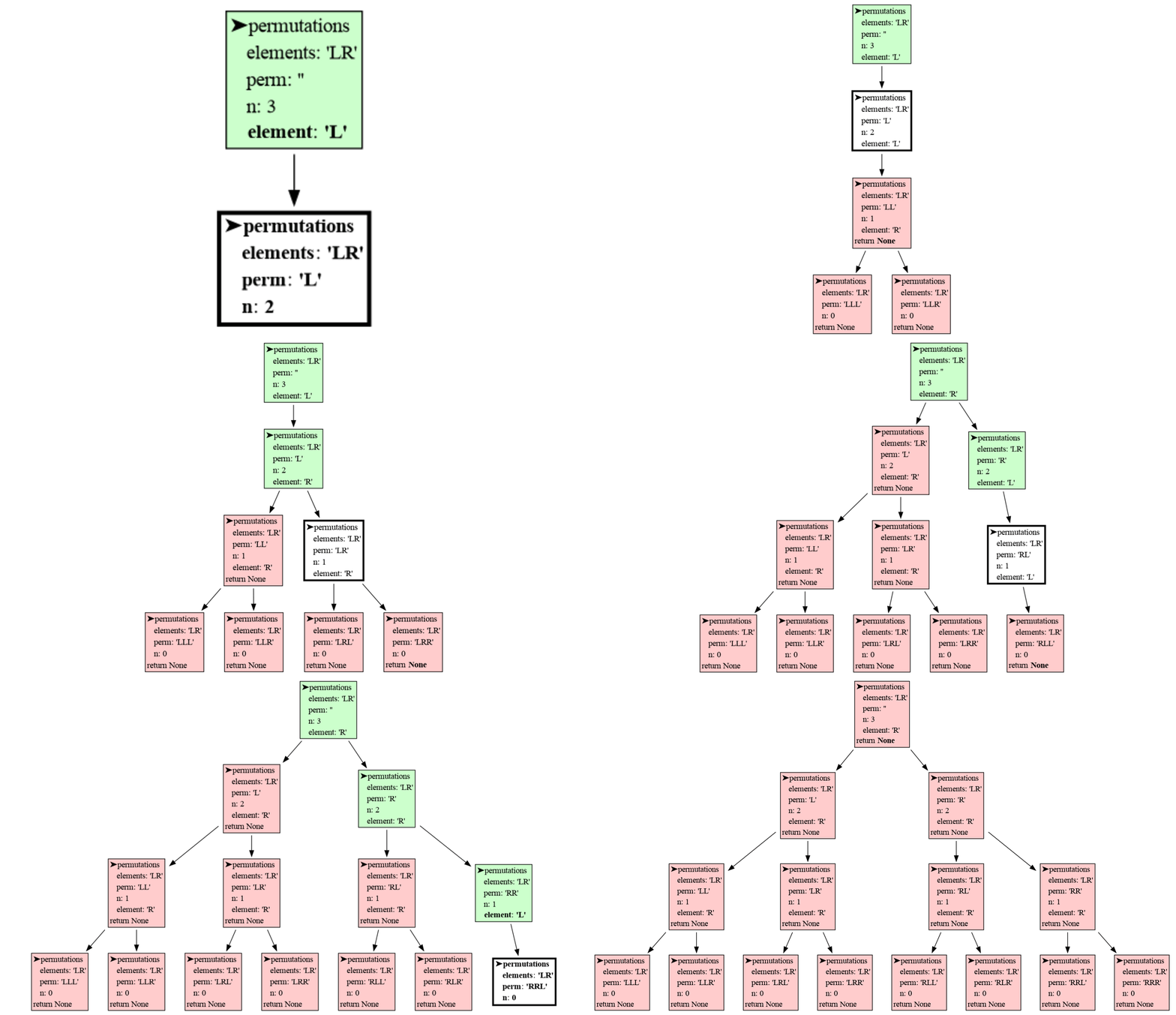
Each node in the tree represents a function call, and the node's color indicates its state:
|
|
63
63
|
|
|
64
64
|
- White: The function is currently being executed (it is at the top of the call stack).
|
|
65
65
|
- Green: The function is paused and will resume execution later (it is lower down on the call stack).
|
|
@@ -67,10 +67,10 @@ Each node in the tree represents a function call, and node's color indicates its
|
|
|
67
67
|
|
|
68
68
|
For every function, the package displays its **local variables** and **return value**. Changes to these values over time are highlighted using bold text and gray shading to make them easy to track.
|
|
69
69
|
|
|
70
|
-
The [invocation_tree](https://pypi.org/project/invocation-tree/) package visualizes function calls at different moments in time
|
|
70
|
+
The [invocation_tree](https://pypi.org/project/invocation-tree/) package visualizes function calls at **different moments in time**. If you want a more detailed visualization of your data at the current time, check out the [memory_graph](https://pypi.org/project/memory-graph/) package.
|
|
71
71
|
|
|
72
72
|
## Blocking ##
|
|
73
|
-
The program blocks execution at every function call and return statement, printing the current location in the source code. Press the <Enter> key to continue execution. To block at every line of the program (like in a debugger tool) where a change of value occured, use instead:
|
|
73
|
+
The program blocks execution at every function call and return statement, printing the current location in the source code. Press the <Enter> key to continue execution. To block at every line of the program (like in a debugger tool) and only where a change of value occured, use instead:
|
|
74
74
|
|
|
75
75
|
```python
|
|
76
76
|
tree = invo_tree.blocking_each_line()
|
|
@@ -98,7 +98,7 @@ def factorial(n):
|
|
|
98
98
|
return n * factorial(n - 1)
|
|
99
99
|
|
|
100
100
|
tree = invo_tree.blocking()
|
|
101
|
-
tree(factorial, 4) # show invocation tree of calling factorial(4)
|
|
101
|
+
print( tree(factorial, 4) ) # show invocation tree of calling factorial(4)
|
|
102
102
|
```
|
|
103
103
|
|
|
104
104
|
|
|
@@ -121,7 +121,7 @@ print(result) # all permutations of going Left and Right of length 2
|
|
|
121
121
|
```
|
|
122
122
|
|
|
123
123
|
|
|
124
|
-
## Hide
|
|
124
|
+
## Hide Variables ##
|
|
125
125
|
In an educational context it can be useful to hide certian variables to avoid unnecessary complexity. This can for example be done with:
|
|
126
126
|
|
|
127
127
|
```python
|
|
@@ -167,12 +167,21 @@ tree = invo_tree.Invocation_Tree()
|
|
|
167
167
|
|
|
168
168
|
For convenience we provide these functions to set common configurations:
|
|
169
169
|
|
|
170
|
-
- **invo_tree.blocking()**, for blocking on function call and return
|
|
171
|
-
- **invo_tree.blocking_each_line()**, for blocking on each line of the program
|
|
172
|
-
- **invo_tree.debugger()**, for use in debugger tool (open
|
|
170
|
+
- **invo_tree.blocking(filename)**, for blocking on function call and return
|
|
171
|
+
- **invo_tree.blocking_each_line(filename)**, for blocking on each line of the program
|
|
172
|
+
- **invo_tree.debugger(filename)**, for use in debugger tool (open <filename> manually)
|
|
173
173
|
- **invo_tree.gif(filename)**, for generating many output files on function call and return for gif creation
|
|
174
174
|
- **invo_tree.gif_each_line(filename)**, for generating many output files on each line for gif creation
|
|
175
175
|
|
|
176
176
|
# Troubleshooting #
|
|
177
177
|
|
|
178
178
|
- Adobe Acrobat Reader [doesn't refresh a PDF file](https://superuser.com/questions/337011/windows-pdf-viewer-that-auto-refreshes-pdf-when-compiling-with-pdflatex) when it changes on disk and blocks updates which results in an `Could not open 'somefile.pdf' for writing : Permission denied` error. One solution is to install a PDF reader that does refresh ([Evince](https://www.fosshub.com/Evince.html), [Okular](https://okular.kde.org/), [SumatraPDF](https://www.sumatrapdfreader.org/), ...) and set it as the default PDF reader. Another solution is to save the tree to a different [Graphviz Output Format](https://graphviz.org/docs/outputs/).
|
|
179
|
+
|
|
180
|
+
## Author ##
|
|
181
|
+
Bas Terwijn
|
|
182
|
+
|
|
183
|
+
## Inspiration ##
|
|
184
|
+
Inspired by [rcviz](https://github.com/carlsborg/rcviz).
|
|
185
|
+
|
|
186
|
+
## Supported by ##
|
|
187
|
+
<img src="https://raw.githubusercontent.com/bterwijn/memory_graph/main/images/uva.png" alt="University of Amsterdam" width="600">
|
|
@@ -29,9 +29,9 @@ def my_round(value, digits=0):
|
|
|
29
29
|
shift = 10 ** digits
|
|
30
30
|
return math.floor(value * shift + 0.5) / shift
|
|
31
31
|
|
|
32
|
-
def passing_students(
|
|
32
|
+
def passing_students(averages):
|
|
33
33
|
return [student
|
|
34
|
-
for student, average in
|
|
34
|
+
for student, average in averages.items()
|
|
35
35
|
if average >= 5.5]
|
|
36
36
|
|
|
37
37
|
if __name__ == '__main__':
|
|
@@ -40,7 +40,7 @@ if __name__ == '__main__':
|
|
|
40
40
|
```
|
|
41
41
|

|
|
42
42
|
|
|
43
|
-
Each node in the tree represents a function call, and node's color indicates its state:
|
|
43
|
+
Each node in the tree represents a function call, and the node's color indicates its state:
|
|
44
44
|
|
|
45
45
|
- White: The function is currently being executed (it is at the top of the call stack).
|
|
46
46
|
- Green: The function is paused and will resume execution later (it is lower down on the call stack).
|
|
@@ -48,10 +48,10 @@ Each node in the tree represents a function call, and node's color indicates its
|
|
|
48
48
|
|
|
49
49
|
For every function, the package displays its **local variables** and **return value**. Changes to these values over time are highlighted using bold text and gray shading to make them easy to track.
|
|
50
50
|
|
|
51
|
-
The [invocation_tree](https://pypi.org/project/invocation-tree/) package visualizes function calls at different moments in time
|
|
51
|
+
The [invocation_tree](https://pypi.org/project/invocation-tree/) package visualizes function calls at **different moments in time**. If you want a more detailed visualization of your data at the current time, check out the [memory_graph](https://pypi.org/project/memory-graph/) package.
|
|
52
52
|
|
|
53
53
|
## Blocking ##
|
|
54
|
-
The program blocks execution at every function call and return statement, printing the current location in the source code. Press the <Enter> key to continue execution. To block at every line of the program (like in a debugger tool) where a change of value occured, use instead:
|
|
54
|
+
The program blocks execution at every function call and return statement, printing the current location in the source code. Press the <Enter> key to continue execution. To block at every line of the program (like in a debugger tool) and only where a change of value occured, use instead:
|
|
55
55
|
|
|
56
56
|
```python
|
|
57
57
|
tree = invo_tree.blocking_each_line()
|
|
@@ -79,7 +79,7 @@ def factorial(n):
|
|
|
79
79
|
return n * factorial(n - 1)
|
|
80
80
|
|
|
81
81
|
tree = invo_tree.blocking()
|
|
82
|
-
tree(factorial, 4) # show invocation tree of calling factorial(4)
|
|
82
|
+
print( tree(factorial, 4) ) # show invocation tree of calling factorial(4)
|
|
83
83
|
```
|
|
84
84
|

|
|
85
85
|
|
|
@@ -102,7 +102,7 @@ print(result) # all permutations of going Left and Right of length 2
|
|
|
102
102
|
```
|
|
103
103
|

|
|
104
104
|
|
|
105
|
-
## Hide
|
|
105
|
+
## Hide Variables ##
|
|
106
106
|
In an educational context it can be useful to hide certian variables to avoid unnecessary complexity. This can for example be done with:
|
|
107
107
|
|
|
108
108
|
```python
|
|
@@ -148,12 +148,21 @@ tree = invo_tree.Invocation_Tree()
|
|
|
148
148
|
|
|
149
149
|
For convenience we provide these functions to set common configurations:
|
|
150
150
|
|
|
151
|
-
- **invo_tree.blocking()**, for blocking on function call and return
|
|
152
|
-
- **invo_tree.blocking_each_line()**, for blocking on each line of the program
|
|
153
|
-
- **invo_tree.debugger()**, for use in debugger tool (open
|
|
151
|
+
- **invo_tree.blocking(filename)**, for blocking on function call and return
|
|
152
|
+
- **invo_tree.blocking_each_line(filename)**, for blocking on each line of the program
|
|
153
|
+
- **invo_tree.debugger(filename)**, for use in debugger tool (open <filename> manually)
|
|
154
154
|
- **invo_tree.gif(filename)**, for generating many output files on function call and return for gif creation
|
|
155
155
|
- **invo_tree.gif_each_line(filename)**, for generating many output files on each line for gif creation
|
|
156
156
|
|
|
157
157
|
# Troubleshooting #
|
|
158
158
|
|
|
159
159
|
- Adobe Acrobat Reader [doesn't refresh a PDF file](https://superuser.com/questions/337011/windows-pdf-viewer-that-auto-refreshes-pdf-when-compiling-with-pdflatex) when it changes on disk and blocks updates which results in an `Could not open 'somefile.pdf' for writing : Permission denied` error. One solution is to install a PDF reader that does refresh ([Evince](https://www.fosshub.com/Evince.html), [Okular](https://okular.kde.org/), [SumatraPDF](https://www.sumatrapdfreader.org/), ...) and set it as the default PDF reader. Another solution is to save the tree to a different [Graphviz Output Format](https://graphviz.org/docs/outputs/).
|
|
160
|
+
|
|
161
|
+
## Author ##
|
|
162
|
+
Bas Terwijn
|
|
163
|
+
|
|
164
|
+
## Inspiration ##
|
|
165
|
+
Inspired by [rcviz](https://github.com/carlsborg/rcviz).
|
|
166
|
+
|
|
167
|
+
## Supported by ##
|
|
168
|
+
<img src="https://raw.githubusercontent.com/bterwijn/memory_graph/main/images/uva.png" alt="University of Amsterdam" width="600">
|
|
Binary file
|
|
Binary file
|
|
Binary file
|
|
Binary file
|
|
Binary file
|
|
Binary file
|
|
Binary file
|
|
Binary file
|
|
Binary file
|
|
Binary file
|
|
Binary file
|
|
Binary file
|
|
Binary file
|
|
Binary file
|
|
Binary file
|
|
Binary file
|
|
Binary file
|
|
Binary file
|
|
Binary file
|
|
Binary file
|
|
Binary file
|
|
Binary file
|
|
Binary file
|
|
Binary file
|
|
Binary file
|
|
Binary file
|
|
Binary file
|
|
Binary file
|
|
Binary file
|
|
Binary file
|
|
Binary file
|
|
Binary file
|
|
Binary file
|
|
Binary file
|
|
Binary file
|
|
Binary file
|
|
Binary file
|
|
Binary file
|
|
@@ -7,7 +7,7 @@ import html
|
|
|
7
7
|
import sys
|
|
8
8
|
import difflib
|
|
9
9
|
|
|
10
|
-
__version__ = "0.0.
|
|
10
|
+
__version__ = "0.0.5"
|
|
11
11
|
__author__ = 'Bas Terwijn'
|
|
12
12
|
|
|
13
13
|
def highlight_diff(str1, str2):
|
|
@@ -261,13 +261,13 @@ class Invocation_Tree:
|
|
|
261
261
|
self.output_graph(frame, event)
|
|
262
262
|
return self.trace_calls
|
|
263
263
|
|
|
264
|
-
def blocking():
|
|
265
|
-
return Invocation_Tree()
|
|
264
|
+
def blocking(filename='tree.pdf'):
|
|
265
|
+
return Invocation_Tree(filename=filename)
|
|
266
266
|
|
|
267
|
-
def blocking_each_line():
|
|
268
|
-
return Invocation_Tree(each_line=True)
|
|
267
|
+
def blocking_each_line(filename='tree.pdf'):
|
|
268
|
+
return Invocation_Tree(filename=filename, each_line=True)
|
|
269
269
|
|
|
270
|
-
def debugger():
|
|
270
|
+
def debugger(filename='tree.pdf'):
|
|
271
271
|
return Invocation_Tree(show=False, block=False, each_line=True)
|
|
272
272
|
|
|
273
273
|
def gif(filename='tree.png'):
|
|
@@ -1,6 +1,6 @@
|
|
|
1
1
|
Metadata-Version: 2.1
|
|
2
2
|
Name: invocation_tree
|
|
3
|
-
Version: 0.0.
|
|
3
|
+
Version: 0.0.5
|
|
4
4
|
Summary: Generate an invocation tree of functions calls.
|
|
5
5
|
Home-page: https://github.com/bterwijn/invocation_tree
|
|
6
6
|
Author: Bas Terwijn
|
|
@@ -48,9 +48,9 @@ def my_round(value, digits=0):
|
|
|
48
48
|
shift = 10 ** digits
|
|
49
49
|
return math.floor(value * shift + 0.5) / shift
|
|
50
50
|
|
|
51
|
-
def passing_students(
|
|
51
|
+
def passing_students(averages):
|
|
52
52
|
return [student
|
|
53
|
-
for student, average in
|
|
53
|
+
for student, average in averages.items()
|
|
54
54
|
if average >= 5.5]
|
|
55
55
|
|
|
56
56
|
if __name__ == '__main__':
|
|
@@ -59,7 +59,7 @@ if __name__ == '__main__':
|
|
|
59
59
|
```
|
|
60
60
|

|
|
61
61
|
|
|
62
|
-
Each node in the tree represents a function call, and node's color indicates its state:
|
|
62
|
+
Each node in the tree represents a function call, and the node's color indicates its state:
|
|
63
63
|
|
|
64
64
|
- White: The function is currently being executed (it is at the top of the call stack).
|
|
65
65
|
- Green: The function is paused and will resume execution later (it is lower down on the call stack).
|
|
@@ -67,10 +67,10 @@ Each node in the tree represents a function call, and node's color indicates its
|
|
|
67
67
|
|
|
68
68
|
For every function, the package displays its **local variables** and **return value**. Changes to these values over time are highlighted using bold text and gray shading to make them easy to track.
|
|
69
69
|
|
|
70
|
-
The [invocation_tree](https://pypi.org/project/invocation-tree/) package visualizes function calls at different moments in time
|
|
70
|
+
The [invocation_tree](https://pypi.org/project/invocation-tree/) package visualizes function calls at **different moments in time**. If you want a more detailed visualization of your data at the current time, check out the [memory_graph](https://pypi.org/project/memory-graph/) package.
|
|
71
71
|
|
|
72
72
|
## Blocking ##
|
|
73
|
-
The program blocks execution at every function call and return statement, printing the current location in the source code. Press the <Enter> key to continue execution. To block at every line of the program (like in a debugger tool) where a change of value occured, use instead:
|
|
73
|
+
The program blocks execution at every function call and return statement, printing the current location in the source code. Press the <Enter> key to continue execution. To block at every line of the program (like in a debugger tool) and only where a change of value occured, use instead:
|
|
74
74
|
|
|
75
75
|
```python
|
|
76
76
|
tree = invo_tree.blocking_each_line()
|
|
@@ -98,7 +98,7 @@ def factorial(n):
|
|
|
98
98
|
return n * factorial(n - 1)
|
|
99
99
|
|
|
100
100
|
tree = invo_tree.blocking()
|
|
101
|
-
tree(factorial, 4) # show invocation tree of calling factorial(4)
|
|
101
|
+
print( tree(factorial, 4) ) # show invocation tree of calling factorial(4)
|
|
102
102
|
```
|
|
103
103
|

|
|
104
104
|
|
|
@@ -121,7 +121,7 @@ print(result) # all permutations of going Left and Right of length 2
|
|
|
121
121
|
```
|
|
122
122
|

|
|
123
123
|
|
|
124
|
-
## Hide
|
|
124
|
+
## Hide Variables ##
|
|
125
125
|
In an educational context it can be useful to hide certian variables to avoid unnecessary complexity. This can for example be done with:
|
|
126
126
|
|
|
127
127
|
```python
|
|
@@ -167,12 +167,21 @@ tree = invo_tree.Invocation_Tree()
|
|
|
167
167
|
|
|
168
168
|
For convenience we provide these functions to set common configurations:
|
|
169
169
|
|
|
170
|
-
- **invo_tree.blocking()**, for blocking on function call and return
|
|
171
|
-
- **invo_tree.blocking_each_line()**, for blocking on each line of the program
|
|
172
|
-
- **invo_tree.debugger()**, for use in debugger tool (open
|
|
170
|
+
- **invo_tree.blocking(filename)**, for blocking on function call and return
|
|
171
|
+
- **invo_tree.blocking_each_line(filename)**, for blocking on each line of the program
|
|
172
|
+
- **invo_tree.debugger(filename)**, for use in debugger tool (open <filename> manually)
|
|
173
173
|
- **invo_tree.gif(filename)**, for generating many output files on function call and return for gif creation
|
|
174
174
|
- **invo_tree.gif_each_line(filename)**, for generating many output files on each line for gif creation
|
|
175
175
|
|
|
176
176
|
# Troubleshooting #
|
|
177
177
|
|
|
178
178
|
- Adobe Acrobat Reader [doesn't refresh a PDF file](https://superuser.com/questions/337011/windows-pdf-viewer-that-auto-refreshes-pdf-when-compiling-with-pdflatex) when it changes on disk and blocks updates which results in an `Could not open 'somefile.pdf' for writing : Permission denied` error. One solution is to install a PDF reader that does refresh ([Evince](https://www.fosshub.com/Evince.html), [Okular](https://okular.kde.org/), [SumatraPDF](https://www.sumatrapdfreader.org/), ...) and set it as the default PDF reader. Another solution is to save the tree to a different [Graphviz Output Format](https://graphviz.org/docs/outputs/).
|
|
179
|
+
|
|
180
|
+
## Author ##
|
|
181
|
+
Bas Terwijn
|
|
182
|
+
|
|
183
|
+
## Inspiration ##
|
|
184
|
+
Inspired by [rcviz](https://github.com/carlsborg/rcviz).
|
|
185
|
+
|
|
186
|
+
## Supported by ##
|
|
187
|
+
<img src="https://raw.githubusercontent.com/bterwijn/memory_graph/main/images/uva.png" alt="University of Amsterdam" width="600">
|
|
@@ -9,6 +9,7 @@ images/create_images.sh~
|
|
|
9
9
|
images/factorial.gif
|
|
10
10
|
images/factorial.py
|
|
11
11
|
images/factorial.py~
|
|
12
|
+
images/factorial0.png
|
|
12
13
|
images/factorial1.png
|
|
13
14
|
images/factorial2.png
|
|
14
15
|
images/factorial3.png
|
|
@@ -23,6 +24,7 @@ images/invocation_tree0.pdf
|
|
|
23
24
|
images/permutations.gif
|
|
24
25
|
images/permutations.py
|
|
25
26
|
images/permutations.py~
|
|
27
|
+
images/permutations0.png
|
|
26
28
|
images/permutations1.png
|
|
27
29
|
images/permutations10.png
|
|
28
30
|
images/permutations11.png
|
|
@@ -41,6 +43,7 @@ images/student.gif
|
|
|
41
43
|
images/students.gif
|
|
42
44
|
images/students.py
|
|
43
45
|
images/students.py~
|
|
46
|
+
images/students0.png
|
|
44
47
|
images/students1.png
|
|
45
48
|
images/students10.png
|
|
46
49
|
images/students11.png
|
|
@@ -11,7 +11,7 @@ long_description_from_readme = (this_directory / "README.md").read_text()
|
|
|
11
11
|
|
|
12
12
|
setup(
|
|
13
13
|
name = 'invocation_tree',
|
|
14
|
-
version = '0.0.
|
|
14
|
+
version = '0.0.5',
|
|
15
15
|
description = 'Generate an invocation tree of functions calls.',
|
|
16
16
|
long_description = long_description_from_readme,
|
|
17
17
|
long_description_content_type = 'text/markdown',
|
|
File without changes
|
|
File without changes
|
|
File without changes
|
|
File without changes
|
|
File without changes
|
|
File without changes
|
|
File without changes
|
|
File without changes
|
|
File without changes
|
|
File without changes
|
|
File without changes
|
|
File without changes
|
|
File without changes
|
|
File without changes
|
|
File without changes
|
|
File without changes
|
|
File without changes
|
|
File without changes
|
|
File without changes
|
|
File without changes
|
|
File without changes
|
|
File without changes
|
|
File without changes
|
|
File without changes
|
|
File without changes
|
|
File without changes
|
|
File without changes
|
|
File without changes
|
|
File without changes
|
|
File without changes
|
|
File without changes
|
|
File without changes
|
|
File without changes
|
|
File without changes
|
|
File without changes
|
|
File without changes
|
|
File without changes
|
|
File without changes
|
|
File without changes
|
|
File without changes
|
|
File without changes
|
|
File without changes
|
|
File without changes
|
|
File without changes
|
|
File without changes
|
|
File without changes
|
|
File without changes
|
|
File without changes
|
|
File without changes
|
|
File without changes
|
|
File without changes
|
|
File without changes
|
|
File without changes
|
|
File without changes
|
|
File without changes
|
|
File without changes
|
{invocation_tree-0.0.4 → invocation_tree-0.0.5}/invocation_tree.egg-info/dependency_links.txt
RENAMED
|
File without changes
|
|
File without changes
|
|
File without changes
|
|
File without changes
|