invocation-tree 0.0.34__tar.gz → 0.0.36__tar.gz
This diff represents the content of publicly available package versions that have been released to one of the supported registries. The information contained in this diff is provided for informational purposes only and reflects changes between package versions as they appear in their respective public registries.
- {invocation_tree-0.0.34 → invocation_tree-0.0.36}/PKG-INFO +158 -32
- {invocation_tree-0.0.34 → invocation_tree-0.0.36}/README.md +157 -31
- {invocation_tree-0.0.34 → invocation_tree-0.0.36}/invocation_tree/__init__.py +91 -21
- {invocation_tree-0.0.34 → invocation_tree-0.0.36}/invocation_tree.egg-info/PKG-INFO +158 -32
- {invocation_tree-0.0.34 → invocation_tree-0.0.36}/pyproject.toml +1 -1
- {invocation_tree-0.0.34 → invocation_tree-0.0.36}/LICENSE.txt +0 -0
- {invocation_tree-0.0.34 → invocation_tree-0.0.36}/invocation_tree/regex_set.py +0 -0
- {invocation_tree-0.0.34 → invocation_tree-0.0.36}/invocation_tree.egg-info/SOURCES.txt +0 -0
- {invocation_tree-0.0.34 → invocation_tree-0.0.36}/invocation_tree.egg-info/dependency_links.txt +0 -0
- {invocation_tree-0.0.34 → invocation_tree-0.0.36}/invocation_tree.egg-info/requires.txt +0 -0
- {invocation_tree-0.0.34 → invocation_tree-0.0.36}/invocation_tree.egg-info/top_level.txt +0 -0
- {invocation_tree-0.0.34 → invocation_tree-0.0.36}/setup.cfg +0 -0
|
@@ -1,6 +1,6 @@
|
|
|
1
1
|
Metadata-Version: 2.4
|
|
2
2
|
Name: invocation_tree
|
|
3
|
-
Version: 0.0.
|
|
3
|
+
Version: 0.0.36
|
|
4
4
|
Summary: Generates an invocation tree of functions calls.
|
|
5
5
|
Author-email: Bas Terwijn <bterwijn@gmail.com>
|
|
6
6
|
License-Expression: BSD-2-Clause
|
|
@@ -32,10 +32,14 @@ Run a live demo in the 👉 [**Invocation Tree Web Debugger**](https://invocatio
|
|
|
32
32
|
- shows the invocation tree (call tree) of a program **in real time**
|
|
33
33
|
- helps to **understand recursion** and its depth-first nature
|
|
34
34
|
|
|
35
|
+
The new `@ivt.show` [decorator interface](#decorator) now allows for **scaling** to larger code bases.
|
|
36
|
+
|
|
35
37
|
# Topics #
|
|
36
38
|
|
|
37
39
|
[Iteration and Recursion](#iteration-and-recursion)
|
|
38
40
|
|
|
41
|
+
[Divide and Conquer](#divide-and-conquer)
|
|
42
|
+
|
|
39
43
|
[Permutations](#permutations)
|
|
40
44
|
|
|
41
45
|
[Recursion Benefits](#recursion-benefits)
|
|
@@ -46,6 +50,8 @@ Run a live demo in the 👉 [**Invocation Tree Web Debugger**](https://invocatio
|
|
|
46
50
|
|
|
47
51
|
[Quick Sort](#quick-sort)
|
|
48
52
|
|
|
53
|
+
[Mutability](#mutability)
|
|
54
|
+
|
|
49
55
|
[Jugs Puzzle](#jugs-puzzle)
|
|
50
56
|
|
|
51
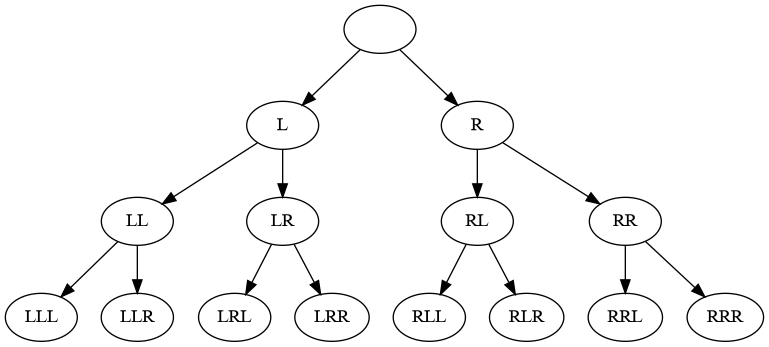
57
|
[Configuration](#Configuration)
|
|
@@ -147,17 +153,27 @@ Each node in the invocation tree represents a function call, and the node's colo
|
|
|
147
153
|
|
|
148
154
|
For every function call, the package displays its **local variables** and **return value**. Changes to the values of these variables over time are highlighted using bold text and gray shading to make them easier to track.
|
|
149
155
|
|
|
156
|
+
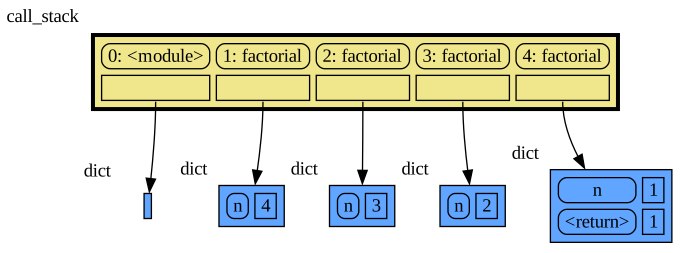
We can also visualize the execution of this program in the [Memory Graph Web Debugger](https://memory-graph.com/#codeurl=https://raw.githubusercontent.com/bterwijn/memory_graph/refs/heads/main/src/factorial.py×tep=1.0&play):
|
|
157
|
+
|
|
158
|
+
[](https://memory-graph.com/#codeurl=https://raw.githubusercontent.com/bterwijn/memory_graph/refs/heads/main/src/factorial.py×tep=1.0&play)
|
|
159
|
+
|
|
160
|
+
where the **call stack** is explicit. Each function call adds a stack frame to the call stack with a reference to its local variables and when a function returns it's stack frame is removed from the call stack. But when later a function calls itself multiple times the [invocation_tree](https://github.com/bterwijn/invocation_tree?tab=readme-ov-file#installation) will give us a better visualization than [memory_graph](https://github.com/bterwijn/memory_graph?tab=readme-ov-file#installation), so we will use that here mostly.
|
|
161
|
+
|
|
162
|
+
# Divide and Conquer #
|
|
163
|
+
|
|
150
164
|
With recursion we often use a divide and conquer strategy, splitting the problem in subproblems that are easier to solve. With factorial we split `factorial(4)` in a `4` and `factorial(3)` subproblem.
|
|
151
165
|
|
|
152
|
-
|
|
166
|
+
### exercise1
|
|
167
|
+
Use recursions to compute the sum of all the values in a list (hint: split for example the list `[1, 2, 3, ...]` in head `1` and tail `[2, 3, ...]`).
|
|
153
168
|
```python
|
|
154
|
-
def
|
|
169
|
+
def sum_list(values):
|
|
155
170
|
# <your recursive implementation>
|
|
156
171
|
|
|
157
|
-
print(
|
|
172
|
+
print(sum_list([3, 7, 4, 9, 2])) # 25
|
|
158
173
|
```
|
|
159
174
|
|
|
160
|
-
|
|
175
|
+
### exercise2
|
|
176
|
+
Rewrite this iterative implementation of decimal to binary conversion to a recursive implementation.
|
|
161
177
|
|
|
162
178
|
```python
|
|
163
179
|
def binary(decimal):
|
|
@@ -187,7 +203,7 @@ We can use recursion to compute all permutation of a number of elements with rep
|
|
|
187
203
|
|
|
188
204
|
|
|
189
205
|
|
|
190
|
-
This can be implemented recursively, using a divide and conquer strategy, like:
|
|
206
|
+
This can be implemented recursively, using a divide and conquer strategy, with a function calling itself multiple times, like:
|
|
191
207
|
|
|
192
208
|
```python
|
|
193
209
|
import invocation_tree as ivt
|
|
@@ -215,7 +231,7 @@ RRR
|
|
|
215
231
|
|
|
216
232
|
Or see it in the [Invocation Tree Web Debugger](https://invocation-tree.com/#timestep=1.0&play)
|
|
217
233
|
|
|
218
|
-
The visualization shows the depth-first nature of recursion. In each step the first
|
|
234
|
+
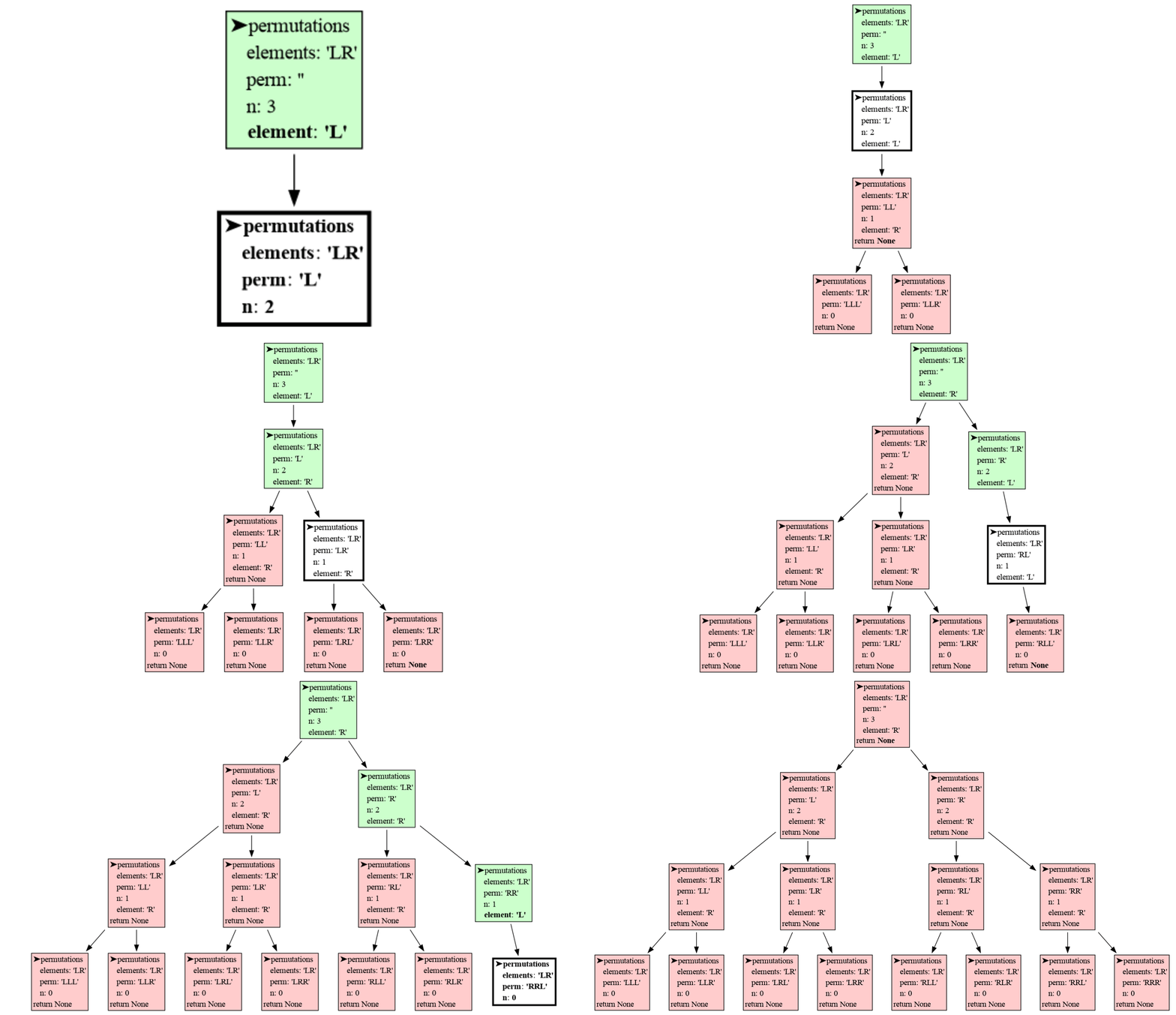
The visualization shows the depth-first nature of recursion. In each step the first element is chosen first, and quickly the bottom of the tree is reached. Then the permutation is printed, the function returns, one step back is made, and the next element is chosen. When each element had it's turn the function returns and another step back is made. This pattern repeats until all permutations are printed.
|
|
219
235
|
|
|
220
236
|
We can also iterate over all permutations with replacement using the `product()` function of `iterools` to get the same result:
|
|
221
237
|
|
|
@@ -264,7 +280,19 @@ Or see it in the [Invocation Tree Web Debugger](https://www.invocation-tree.com/
|
|
|
264
280
|
|
|
265
281
|
With recursion we can stop neighbors from being equal early, in contrast to iteration, where we would have had to filter out a permutation with equal neighbors after it was fully generated, which could be much slower and would require a more complex program.
|
|
266
282
|
|
|
267
|
-
|
|
283
|
+
### exercise3
|
|
284
|
+
Write function `palindromes(elems, perm, n)` that print all permutations with replacements of elements in `elems` of length `n` that are palindrome ('ABABA' is palindrome because if you read it backwards it's the same). The function call `palindromes('ABC', '', 3)` should result in these lines in any order:
|
|
285
|
+
```
|
|
286
|
+
AAA
|
|
287
|
+
ABA
|
|
288
|
+
ACA
|
|
289
|
+
BAB
|
|
290
|
+
BBB
|
|
291
|
+
BCB
|
|
292
|
+
CAC
|
|
293
|
+
CBC
|
|
294
|
+
CCC
|
|
295
|
+
```
|
|
268
296
|
|
|
269
297
|
# Path Planning #
|
|
270
298
|
|
|
@@ -330,7 +358,8 @@ See it in the [Invocation Tree Web Debugger](https://www.invocation-tree.com/#co
|
|
|
330
358
|
|
|
331
359
|
Add temporary debug prints wherever behavior isn’t clear. Experiment with what and how you print to maximize clarity.
|
|
332
360
|
|
|
333
|
-
|
|
361
|
+
### exercise4
|
|
362
|
+
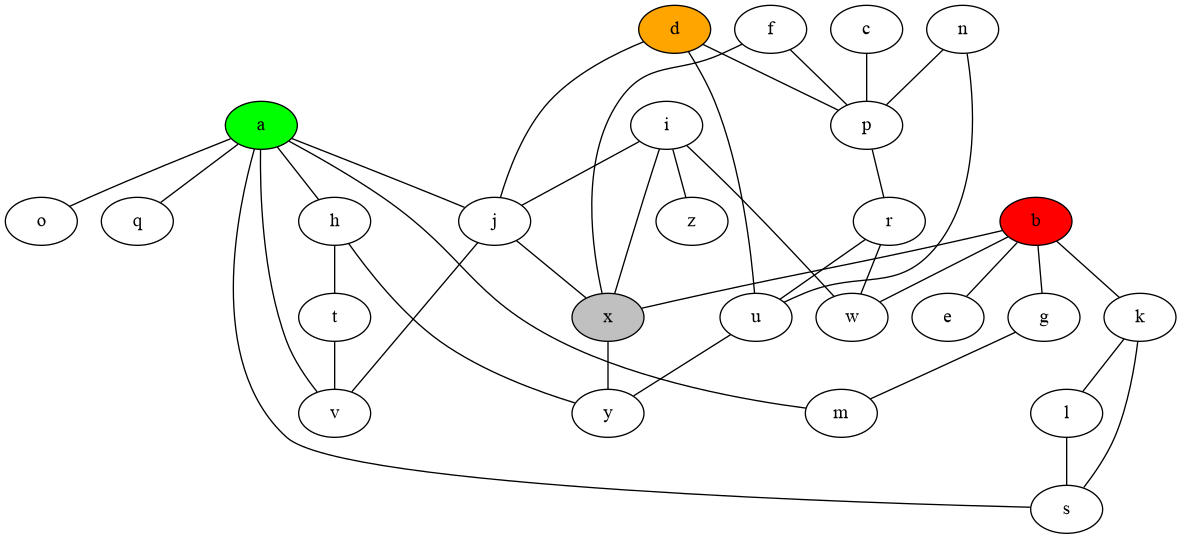
In this larger bidirectional graph, print all the paths of length 7 that connect node `a` to node `b` where going over the same node multiple times is allowed (`avjxbxb` is one such path, there are 114 such paths in total).
|
|
334
363
|
|
|
335
364
|
```python
|
|
336
365
|
edges = [('a', 's'), ('i', 'z'), ('c', 'p'), ('d', 'p'), ('d', 'u'), ('b', 'e'), ('b', 'g'),
|
|
@@ -391,7 +420,8 @@ print(results)
|
|
|
391
420
|
<!--  -->
|
|
392
421
|
See it in the [Invocation Tree Web Debugger](https://www.invocation-tree.com/#codeurl=https://raw.githubusercontent.com/bterwijn/invocation_tree/refs/heads/main/src/permutations_collect.py×tep=0.5&play)
|
|
393
422
|
|
|
394
|
-
|
|
423
|
+
### exercise5
|
|
424
|
+
Create a list with all paths of length 10 in the larger bidirectional graph that go from `a` to `b`, and that do go via `d` but do **not** go via `x` (`amajdjaskb` is one such path, there are 145 such paths in total).
|
|
395
425
|
|
|
396
426
|
Where is the best place in the code to test for `x` to make the program run fast?
|
|
397
427
|
|
|
@@ -405,9 +435,75 @@ edges = [('a', 's'), ('i', 'z'), ('c', 'p'), ('d', 'p'), ('d', 'u'), ('b', 'e')
|
|
|
405
435
|
```
|
|
406
436
|
|
|
407
437
|
|
|
438
|
+
|
|
439
|
+
# Mutability #
|
|
440
|
+
|
|
441
|
+
In the permutation problem we could choose to use mutable type `list` to represent a permutation instead of the immutable type `str` we used before. This can be done in two ways. One way is to use the `+` list concatenation operator to add elements to the permutation, but this is slow because this creates a whole new list each time:
|
|
442
|
+
|
|
443
|
+
```python
|
|
444
|
+
def permutations(elements, perm, n):
|
|
445
|
+
if n == 0:
|
|
446
|
+
print(perm)
|
|
447
|
+
else:
|
|
448
|
+
for element in elements:
|
|
449
|
+
permutations(elements, perm + [element], n-1) # creates new list, SLOW!
|
|
450
|
+
|
|
451
|
+
permutations('LR', [], 3)
|
|
452
|
+
```
|
|
453
|
+
|
|
454
|
+
The [Memory Graph Web Debugger](https://memory-graph.com/#codeurl=https://raw.githubusercontent.com/bterwijn/invocation_tree/refs/heads/main/src/perm_mutable_copy.py×tep=1&play) shows that each recursive function call has it's own list copy.
|
|
455
|
+
|
|
456
|
+
The [Invocation Tree Web Debugger](https://invocation-tree.com/#codeurl=https://raw.githubusercontent.com/bterwijn/invocation_tree/refs/heads/main/src/perm_mutable_copy.py×tep=1&play) shows that all permutation are generated in the same way as when we used immutable type `str` to represent each permutation.
|
|
457
|
+
|
|
458
|
+
A second way is to mutate the `list` value with the `+=` operator or `append()` function and then after the recursive call to undo this action to restore its original value. This way we avoid creating new lists so this is much faster. We now use the same list in each recursive function call. We couldn't do this before with immutable type `str` because a value of immutable type is always automatically copied when we change it. However, now we have to take care to correctly undo each action we take so the code can get it a bit more complex, but this generally is worth it for faster execution. This style of recursion is often called **backtracking with in-place mutation**.
|
|
459
|
+
|
|
460
|
+
```python
|
|
461
|
+
def permutations(elements, perm, n):
|
|
462
|
+
if n == 0:
|
|
463
|
+
print(perm)
|
|
464
|
+
else:
|
|
465
|
+
for element in elements:
|
|
466
|
+
perm.append(element) # do action that mutates, FAST!
|
|
467
|
+
permutations(elements, perm, n-1)
|
|
468
|
+
perm.pop() # undo action
|
|
469
|
+
|
|
470
|
+
permutations('LR', [], 3)
|
|
471
|
+
```
|
|
472
|
+
|
|
473
|
+
The [Memory Graph Web Debugger](https://memory-graph.com/#codeurl=https://raw.githubusercontent.com/bterwijn/invocation_tree/refs/heads/main/src/perm_mutable_undo.py×tep=1&play) now shows that all function calls use the same list.
|
|
474
|
+
|
|
475
|
+
The [Invocation Tree Web Debugger](https://invocation-tree.com/#codeurl=https://raw.githubusercontent.com/bterwijn/invocation_tree/refs/heads/main/src/perm_mutable_undo.py×tep=1&play) shows that all permutation are generated but with each action being undone so that in the end the list is empty again.
|
|
476
|
+
|
|
477
|
+
### exercise6
|
|
478
|
+
Rewrite your code of **exercise5** so that it uses a list to represent each path and uses backtracking with in-place mutation so that a single list is used in each recursive function call for faster execution. For example the path `'amajdjaskb'` should now be represented as `['a', 'm', 'a', 'j', 'd', 'j', 'a', 's', 'k', 'b']`.
|
|
479
|
+
|
|
480
|
+
# Lazy Evaluation #
|
|
481
|
+
|
|
482
|
+
We can combine recursion and lazy evaluation using the `yield` and `yield from` keywords. We use `yield` to produce a value, and we use `yield from` when calling each function that (indirectly) produces a value using `yield`. Here we see an example with the `permutations()` function:
|
|
483
|
+
|
|
484
|
+
```python
|
|
485
|
+
def permutations(elements, perm, n):
|
|
486
|
+
if n == 0:
|
|
487
|
+
yield perm
|
|
488
|
+
else:
|
|
489
|
+
for element in elements:
|
|
490
|
+
yield from permutations(elements, perm + element, n-1)
|
|
491
|
+
|
|
492
|
+
generator_function = permutations('LR', '', 3)
|
|
493
|
+
for perm in generator_function:
|
|
494
|
+
print(perm)
|
|
495
|
+
```
|
|
496
|
+
|
|
497
|
+
The first call to the `permutations()` function now results in a generator_function where we can iterate over to get all permutations that are yielded.
|
|
498
|
+
|
|
499
|
+
The [Invocation Tree Web Debugger](https://invocation-tree.com/#codeurl=https://raw.githubusercontent.com/bterwijn/invocation_tree/refs/heads/main/src/perm_lazy.py×tep=1&play) gives an idea about how lazy evaluation is implemented. When we read a value from the generator_function the `permutations()` functions get called recursively until a permutation is yielded and then all `permutations()` calls return. When we read the next value the previous state of the recursion is restored and execution continues until the next permutation is yielded. This patterns repeats until all the recursive calls are completed and the generator is used up. Unfortunately this process makes the tree difficult to read, something we might improve in the future. At least it now gives an idea about the overhead of the lazy evaluation of recursive functions, the price we pay for not having to use memory for the `results` list.
|
|
500
|
+
|
|
501
|
+
### exercise7
|
|
502
|
+
Rewrite your code of **exercise6** so that `get_all_paths()` recursion is evaluated lazily.
|
|
503
|
+
|
|
408
504
|
# Quick Sort #
|
|
409
505
|
|
|
410
|
-
Another nice example of divide-and-conquer is the recursive quicksort algorithm. It works by choosing a pivot element and
|
|
506
|
+
Another nice example of divide-and-conquer is the recursive quicksort algorithm. It works by choosing a pivot element and splitting the list into elements smaller than the pivot, equal to the pivot, and larger than the pivot. The smaller and larger sublists are then quicksorted recursively. When we get to the point a sublist has zero or one element, then it is sorted. When returning, these sorted sublists are then combined with the elements equal to the pivot to produce a larger sorted lists.
|
|
411
507
|
|
|
412
508
|
```python
|
|
413
509
|
import invocation_tree as ivt
|
|
@@ -415,7 +511,7 @@ import invocation_tree as ivt
|
|
|
415
511
|
def quick_sort(values):
|
|
416
512
|
if len(values) <= 1:
|
|
417
513
|
return values
|
|
418
|
-
pivot = values[0] # choose
|
|
514
|
+
pivot = values[0] # choose arbitrarily the first as pivot
|
|
419
515
|
smaller = [x for x in values if x < pivot]
|
|
420
516
|
equal = [x for x in values if x == pivot]
|
|
421
517
|
larger = [x for x in values if x > pivot]
|
|
@@ -431,10 +527,16 @@ print(' sorted values:',values)
|
|
|
431
527
|
unsorted values: [7, 4, 10, 11, 2, 6, 9, 1, 5, 3, 8, 12]
|
|
432
528
|
sorted values: [1, 2, 3, 4, 5, 6, 7, 8, 9, 10, 11, 12]
|
|
433
529
|
```
|
|
434
|
-
|
|
530
|
+
|
|
435
531
|
See it in the [Invocation Tree Web Debugger](https://www.invocation-tree.com/#codeurl=https://raw.githubusercontent.com/bterwijn/invocation_tree/refs/heads/main/src/quick_sort.py×tep=0.5&play)
|
|
436
532
|
|
|
437
|
-
|
|
533
|
+
### exercise8
|
|
534
|
+
Add a `key` argument so that we can use the `quick_sort(values, key=None)` function to sort each value `x` in `values` as if it was value `key(x)`, in exactly the same way as how the `sorted(iterable, key=None)` function works. For example:
|
|
535
|
+
|
|
536
|
+
- The call `quick_sort([1, 3, 4, 2], key = lambda x : -x)` should return `[4, 3, 2, 1]` because then each value is sorted by its negative value [-4, -3, -2, -1].
|
|
537
|
+
- The call `quick_sort(['aaa', 'bb', 'c'], key = lambda x : len(x))` should return `['c', 'bb', 'aaa']` because then each value is sorted by its length [1, 2, 3].
|
|
538
|
+
|
|
539
|
+
Sort the values as normal when `key` is `None`.
|
|
438
540
|
|
|
439
541
|
# Jugs Puzzle #
|
|
440
542
|
|
|
@@ -492,14 +594,15 @@ Where:
|
|
|
492
594
|
|
|
493
595
|
The breadth-first algorithm works and gives us the shortest path to a goal state, but to do that it uses a lot of memory to store each generation and all jugs states it has seen. Now we also want an algorithm that uses much less memory.
|
|
494
596
|
|
|
495
|
-
|
|
597
|
+
### exercise9
|
|
598
|
+
Write a recursive solver for the Jugs Puzzle that uses less memory by searching for the solution in a depth-first manner.
|
|
496
599
|
|
|
497
600
|
- A solution may not have the same jugs state multiple times (this also avoids infinite loops).
|
|
498
601
|
- It is not necessary to find the shortest path to a goal state (like breadth-first does).
|
|
499
602
|
|
|
500
|
-
|
|
603
|
+
Use the [decorator interface](#decorator) to visualize the execution on your system (not the Invocation Tree Web Debugger) because that allows you to easily choose which functions show up in the tree.
|
|
501
604
|
|
|
502
|
-
**solution
|
|
605
|
+
**solution exercise8:** First try it yourself, we give the [solution](https://www.invocation-tree.com/#codeurl=https://raw.githubusercontent.com/bterwijn/invocation_tree/refs/heads/main/src/jugs_depth_first.py&breakpoints=136&continues=1) here for comparison.
|
|
503
606
|
|
|
504
607
|
A harder more fun instance of this puzzle is with jugs with capacity 3, 5, 34 and 107 liter and the goal of getting to a jug with 51 liters.
|
|
505
608
|
|
|
@@ -512,7 +615,7 @@ The Invocation Tree Web Debugger gives examples of the [most important configura
|
|
|
512
615
|
|
|
513
616
|
|
|
514
617
|
## Hidding ##
|
|
515
|
-
It can be useful to hide certian variables
|
|
618
|
+
It can be useful to hide certian variables to avoid unnecessary complexity. This can be done with:
|
|
516
619
|
|
|
517
620
|
```python
|
|
518
621
|
tree = ivt.blocking()
|
|
@@ -542,26 +645,29 @@ tree = ivt.blocking()
|
|
|
542
645
|
tree.ignore_calls.add(r're:namespace\..*')
|
|
543
646
|
```
|
|
544
647
|
|
|
545
|
-
ignores all
|
|
648
|
+
ignores all functions starting with `namespace.`.
|
|
546
649
|
|
|
547
650
|
## Decorator ##
|
|
548
651
|
|
|
549
|
-
A better way to hide functions is to use the `@ivt.show` decorator on only the functions you want to graph. The decorator uses the global `ivt.decorator_tree
|
|
652
|
+
A better way to hide functions is to use the `@ivt.show` decorator on only the functions you want to graph but this can only be used when running the code locally and not in the Invocation Tree Web Debugger. The decorator uses the global `ivt.decorator_tree` tree.
|
|
550
653
|
|
|
551
654
|
```python
|
|
552
655
|
import invocation_tree as ivt
|
|
656
|
+
ivt.decorator_tree = ivt.blocking() # set tree used by decorator
|
|
657
|
+
#ivt.decorator_tree = ivt.blocking_each_change() # block at each change, much slower
|
|
658
|
+
#ivt.decorator_tree = ivt.debugger() # for VS Code or PyCharm debugger
|
|
553
659
|
|
|
554
|
-
ivt.
|
|
555
|
-
|
|
556
|
-
@ivt.show # use decorator to select which functions to graph
|
|
660
|
+
@ivt.show # use this decorator to select which functions to graph
|
|
557
661
|
def permutations(elements, perm, n):
|
|
558
662
|
if n == 0:
|
|
559
663
|
print(perm)
|
|
560
664
|
else:
|
|
561
665
|
for element in elements:
|
|
562
|
-
|
|
563
|
-
|
|
564
|
-
|
|
666
|
+
perm.append(element) # do action that mutates
|
|
667
|
+
permutations(elements, perm, n-1)
|
|
668
|
+
perm.pop() # undo action
|
|
669
|
+
|
|
670
|
+
permutations('LR', [], 3) # all permutations of L and R of length 3
|
|
565
671
|
```
|
|
566
672
|
|
|
567
673
|
## Blocking ##
|
|
@@ -608,12 +714,6 @@ tree = ivt.Invocation_Tree()
|
|
|
608
714
|
- if `>=0` the out filename is numbered for animated gif making
|
|
609
715
|
- **tree.indent** : string
|
|
610
716
|
- the string used for identing the local variables
|
|
611
|
-
- **tree.color_active** : string
|
|
612
|
-
- HTML color for active function
|
|
613
|
-
- **tree.color_paused*** : string
|
|
614
|
-
- HTML color for paused functions
|
|
615
|
-
- **tree.color_returned***: string
|
|
616
|
-
- HTML color for returned functions
|
|
617
717
|
- **tree.to_string** : dict[str, fun]
|
|
618
718
|
- mapping from type/name/id to a to_string() function for custom printing of values
|
|
619
719
|
- **tree.hide_vars** : set()
|
|
@@ -627,6 +727,32 @@ tree = ivt.Invocation_Tree()
|
|
|
627
727
|
- **tree.fontsize** : str
|
|
628
728
|
- the font size used in the graph, default '14'
|
|
629
729
|
|
|
730
|
+
## Functions ##
|
|
731
|
+
|
|
732
|
+
- **tree.dark_mode(b: bool = None)**
|
|
733
|
+
- set dark mode to 'True' or 'False', or 'None' to toggle.
|
|
734
|
+
- **tree.transparent_background(b: bool = None)**
|
|
735
|
+
- set transparent background to 'True' or 'False', or 'None' to toggle.
|
|
736
|
+
|
|
737
|
+
## Colors ##
|
|
738
|
+
|
|
739
|
+
For light mode the colors are:
|
|
740
|
+
|
|
741
|
+
- ivt.foreground_color_light
|
|
742
|
+
- ivt.background_color_light
|
|
743
|
+
- ivt.color_paused_light
|
|
744
|
+
- ivt.color_active_light
|
|
745
|
+
- ivt.color_returned_light
|
|
746
|
+
|
|
747
|
+
For dark mode the colors are:
|
|
748
|
+
|
|
749
|
+
- ivt.foreground_color_dark
|
|
750
|
+
- ivt.background_color_dark
|
|
751
|
+
- ivt.color_paused_dark
|
|
752
|
+
- ivt.color_active_dark
|
|
753
|
+
- ivt.color_returned_dark
|
|
754
|
+
|
|
755
|
+
|
|
630
756
|
# Troubleshooting #
|
|
631
757
|
- Adobe Acrobat Reader [doesn't refresh a PDF file](https://community.adobe.com/t5/acrobat-reader-discussions/reload-refresh-pdfs/td-p/9632292) when it changes on disk and blocks updates which results in an `Could not open 'tree.pdf' for writing : Permission denied` error. One solution is to install a PDF reader that does refresh ([SumatraPDF](https://www.sumatrapdfreader.org/), [Okular](https://okular.kde.org/), ...) and set it as the default PDF reader. Another solution is to `render()` the graph to a different output format.
|
|
632
758
|
|
|
@@ -12,10 +12,14 @@ Run a live demo in the 👉 [**Invocation Tree Web Debugger**](https://invocatio
|
|
|
12
12
|
- shows the invocation tree (call tree) of a program **in real time**
|
|
13
13
|
- helps to **understand recursion** and its depth-first nature
|
|
14
14
|
|
|
15
|
+
The new `@ivt.show` [decorator interface](#decorator) now allows for **scaling** to larger code bases.
|
|
16
|
+
|
|
15
17
|
# Topics #
|
|
16
18
|
|
|
17
19
|
[Iteration and Recursion](#iteration-and-recursion)
|
|
18
20
|
|
|
21
|
+
[Divide and Conquer](#divide-and-conquer)
|
|
22
|
+
|
|
19
23
|
[Permutations](#permutations)
|
|
20
24
|
|
|
21
25
|
[Recursion Benefits](#recursion-benefits)
|
|
@@ -26,6 +30,8 @@ Run a live demo in the 👉 [**Invocation Tree Web Debugger**](https://invocatio
|
|
|
26
30
|
|
|
27
31
|
[Quick Sort](#quick-sort)
|
|
28
32
|
|
|
33
|
+
[Mutability](#mutability)
|
|
34
|
+
|
|
29
35
|
[Jugs Puzzle](#jugs-puzzle)
|
|
30
36
|
|
|
31
37
|
[Configuration](#Configuration)
|
|
@@ -127,17 +133,27 @@ Each node in the invocation tree represents a function call, and the node's colo
|
|
|
127
133
|
|
|
128
134
|
For every function call, the package displays its **local variables** and **return value**. Changes to the values of these variables over time are highlighted using bold text and gray shading to make them easier to track.
|
|
129
135
|
|
|
136
|
+
We can also visualize the execution of this program in the [Memory Graph Web Debugger](https://memory-graph.com/#codeurl=https://raw.githubusercontent.com/bterwijn/memory_graph/refs/heads/main/src/factorial.py×tep=1.0&play):
|
|
137
|
+
|
|
138
|
+
[](https://memory-graph.com/#codeurl=https://raw.githubusercontent.com/bterwijn/memory_graph/refs/heads/main/src/factorial.py×tep=1.0&play)
|
|
139
|
+
|
|
140
|
+
where the **call stack** is explicit. Each function call adds a stack frame to the call stack with a reference to its local variables and when a function returns it's stack frame is removed from the call stack. But when later a function calls itself multiple times the [invocation_tree](https://github.com/bterwijn/invocation_tree?tab=readme-ov-file#installation) will give us a better visualization than [memory_graph](https://github.com/bterwijn/memory_graph?tab=readme-ov-file#installation), so we will use that here mostly.
|
|
141
|
+
|
|
142
|
+
# Divide and Conquer #
|
|
143
|
+
|
|
130
144
|
With recursion we often use a divide and conquer strategy, splitting the problem in subproblems that are easier to solve. With factorial we split `factorial(4)` in a `4` and `factorial(3)` subproblem.
|
|
131
145
|
|
|
132
|
-
|
|
146
|
+
### exercise1
|
|
147
|
+
Use recursions to compute the sum of all the values in a list (hint: split for example the list `[1, 2, 3, ...]` in head `1` and tail `[2, 3, ...]`).
|
|
133
148
|
```python
|
|
134
|
-
def
|
|
149
|
+
def sum_list(values):
|
|
135
150
|
# <your recursive implementation>
|
|
136
151
|
|
|
137
|
-
print(
|
|
152
|
+
print(sum_list([3, 7, 4, 9, 2])) # 25
|
|
138
153
|
```
|
|
139
154
|
|
|
140
|
-
|
|
155
|
+
### exercise2
|
|
156
|
+
Rewrite this iterative implementation of decimal to binary conversion to a recursive implementation.
|
|
141
157
|
|
|
142
158
|
```python
|
|
143
159
|
def binary(decimal):
|
|
@@ -167,7 +183,7 @@ We can use recursion to compute all permutation of a number of elements with rep
|
|
|
167
183
|
|
|
168
184
|

|
|
169
185
|
|
|
170
|
-
This can be implemented recursively, using a divide and conquer strategy, like:
|
|
186
|
+
This can be implemented recursively, using a divide and conquer strategy, with a function calling itself multiple times, like:
|
|
171
187
|
|
|
172
188
|
```python
|
|
173
189
|
import invocation_tree as ivt
|
|
@@ -195,7 +211,7 @@ RRR
|
|
|
195
211
|

|
|
196
212
|
Or see it in the [Invocation Tree Web Debugger](https://invocation-tree.com/#timestep=1.0&play)
|
|
197
213
|
|
|
198
|
-
The visualization shows the depth-first nature of recursion. In each step the first
|
|
214
|
+
The visualization shows the depth-first nature of recursion. In each step the first element is chosen first, and quickly the bottom of the tree is reached. Then the permutation is printed, the function returns, one step back is made, and the next element is chosen. When each element had it's turn the function returns and another step back is made. This pattern repeats until all permutations are printed.
|
|
199
215
|
|
|
200
216
|
We can also iterate over all permutations with replacement using the `product()` function of `iterools` to get the same result:
|
|
201
217
|
|
|
@@ -244,7 +260,19 @@ Or see it in the [Invocation Tree Web Debugger](https://www.invocation-tree.com/
|
|
|
244
260
|
|
|
245
261
|
With recursion we can stop neighbors from being equal early, in contrast to iteration, where we would have had to filter out a permutation with equal neighbors after it was fully generated, which could be much slower and would require a more complex program.
|
|
246
262
|
|
|
247
|
-
|
|
263
|
+
### exercise3
|
|
264
|
+
Write function `palindromes(elems, perm, n)` that print all permutations with replacements of elements in `elems` of length `n` that are palindrome ('ABABA' is palindrome because if you read it backwards it's the same). The function call `palindromes('ABC', '', 3)` should result in these lines in any order:
|
|
265
|
+
```
|
|
266
|
+
AAA
|
|
267
|
+
ABA
|
|
268
|
+
ACA
|
|
269
|
+
BAB
|
|
270
|
+
BBB
|
|
271
|
+
BCB
|
|
272
|
+
CAC
|
|
273
|
+
CBC
|
|
274
|
+
CCC
|
|
275
|
+
```
|
|
248
276
|
|
|
249
277
|
# Path Planning #
|
|
250
278
|
|
|
@@ -310,7 +338,8 @@ See it in the [Invocation Tree Web Debugger](https://www.invocation-tree.com/#co
|
|
|
310
338
|
|
|
311
339
|
Add temporary debug prints wherever behavior isn’t clear. Experiment with what and how you print to maximize clarity.
|
|
312
340
|
|
|
313
|
-
|
|
341
|
+
### exercise4
|
|
342
|
+
In this larger bidirectional graph, print all the paths of length 7 that connect node `a` to node `b` where going over the same node multiple times is allowed (`avjxbxb` is one such path, there are 114 such paths in total).
|
|
314
343
|
|
|
315
344
|
```python
|
|
316
345
|
edges = [('a', 's'), ('i', 'z'), ('c', 'p'), ('d', 'p'), ('d', 'u'), ('b', 'e'), ('b', 'g'),
|
|
@@ -371,7 +400,8 @@ print(results)
|
|
|
371
400
|
<!--  -->
|
|
372
401
|
See it in the [Invocation Tree Web Debugger](https://www.invocation-tree.com/#codeurl=https://raw.githubusercontent.com/bterwijn/invocation_tree/refs/heads/main/src/permutations_collect.py×tep=0.5&play)
|
|
373
402
|
|
|
374
|
-
|
|
403
|
+
### exercise5
|
|
404
|
+
Create a list with all paths of length 10 in the larger bidirectional graph that go from `a` to `b`, and that do go via `d` but do **not** go via `x` (`amajdjaskb` is one such path, there are 145 such paths in total).
|
|
375
405
|
|
|
376
406
|
Where is the best place in the code to test for `x` to make the program run fast?
|
|
377
407
|
|
|
@@ -385,9 +415,75 @@ edges = [('a', 's'), ('i', 'z'), ('c', 'p'), ('d', 'p'), ('d', 'u'), ('b', 'e')
|
|
|
385
415
|
```
|
|
386
416
|

|
|
387
417
|
|
|
418
|
+
|
|
419
|
+
# Mutability #
|
|
420
|
+
|
|
421
|
+
In the permutation problem we could choose to use mutable type `list` to represent a permutation instead of the immutable type `str` we used before. This can be done in two ways. One way is to use the `+` list concatenation operator to add elements to the permutation, but this is slow because this creates a whole new list each time:
|
|
422
|
+
|
|
423
|
+
```python
|
|
424
|
+
def permutations(elements, perm, n):
|
|
425
|
+
if n == 0:
|
|
426
|
+
print(perm)
|
|
427
|
+
else:
|
|
428
|
+
for element in elements:
|
|
429
|
+
permutations(elements, perm + [element], n-1) # creates new list, SLOW!
|
|
430
|
+
|
|
431
|
+
permutations('LR', [], 3)
|
|
432
|
+
```
|
|
433
|
+
|
|
434
|
+
The [Memory Graph Web Debugger](https://memory-graph.com/#codeurl=https://raw.githubusercontent.com/bterwijn/invocation_tree/refs/heads/main/src/perm_mutable_copy.py×tep=1&play) shows that each recursive function call has it's own list copy.
|
|
435
|
+
|
|
436
|
+
The [Invocation Tree Web Debugger](https://invocation-tree.com/#codeurl=https://raw.githubusercontent.com/bterwijn/invocation_tree/refs/heads/main/src/perm_mutable_copy.py×tep=1&play) shows that all permutation are generated in the same way as when we used immutable type `str` to represent each permutation.
|
|
437
|
+
|
|
438
|
+
A second way is to mutate the `list` value with the `+=` operator or `append()` function and then after the recursive call to undo this action to restore its original value. This way we avoid creating new lists so this is much faster. We now use the same list in each recursive function call. We couldn't do this before with immutable type `str` because a value of immutable type is always automatically copied when we change it. However, now we have to take care to correctly undo each action we take so the code can get it a bit more complex, but this generally is worth it for faster execution. This style of recursion is often called **backtracking with in-place mutation**.
|
|
439
|
+
|
|
440
|
+
```python
|
|
441
|
+
def permutations(elements, perm, n):
|
|
442
|
+
if n == 0:
|
|
443
|
+
print(perm)
|
|
444
|
+
else:
|
|
445
|
+
for element in elements:
|
|
446
|
+
perm.append(element) # do action that mutates, FAST!
|
|
447
|
+
permutations(elements, perm, n-1)
|
|
448
|
+
perm.pop() # undo action
|
|
449
|
+
|
|
450
|
+
permutations('LR', [], 3)
|
|
451
|
+
```
|
|
452
|
+
|
|
453
|
+
The [Memory Graph Web Debugger](https://memory-graph.com/#codeurl=https://raw.githubusercontent.com/bterwijn/invocation_tree/refs/heads/main/src/perm_mutable_undo.py×tep=1&play) now shows that all function calls use the same list.
|
|
454
|
+
|
|
455
|
+
The [Invocation Tree Web Debugger](https://invocation-tree.com/#codeurl=https://raw.githubusercontent.com/bterwijn/invocation_tree/refs/heads/main/src/perm_mutable_undo.py×tep=1&play) shows that all permutation are generated but with each action being undone so that in the end the list is empty again.
|
|
456
|
+
|
|
457
|
+
### exercise6
|
|
458
|
+
Rewrite your code of **exercise5** so that it uses a list to represent each path and uses backtracking with in-place mutation so that a single list is used in each recursive function call for faster execution. For example the path `'amajdjaskb'` should now be represented as `['a', 'm', 'a', 'j', 'd', 'j', 'a', 's', 'k', 'b']`.
|
|
459
|
+
|
|
460
|
+
# Lazy Evaluation #
|
|
461
|
+
|
|
462
|
+
We can combine recursion and lazy evaluation using the `yield` and `yield from` keywords. We use `yield` to produce a value, and we use `yield from` when calling each function that (indirectly) produces a value using `yield`. Here we see an example with the `permutations()` function:
|
|
463
|
+
|
|
464
|
+
```python
|
|
465
|
+
def permutations(elements, perm, n):
|
|
466
|
+
if n == 0:
|
|
467
|
+
yield perm
|
|
468
|
+
else:
|
|
469
|
+
for element in elements:
|
|
470
|
+
yield from permutations(elements, perm + element, n-1)
|
|
471
|
+
|
|
472
|
+
generator_function = permutations('LR', '', 3)
|
|
473
|
+
for perm in generator_function:
|
|
474
|
+
print(perm)
|
|
475
|
+
```
|
|
476
|
+
|
|
477
|
+
The first call to the `permutations()` function now results in a generator_function where we can iterate over to get all permutations that are yielded.
|
|
478
|
+
|
|
479
|
+
The [Invocation Tree Web Debugger](https://invocation-tree.com/#codeurl=https://raw.githubusercontent.com/bterwijn/invocation_tree/refs/heads/main/src/perm_lazy.py×tep=1&play) gives an idea about how lazy evaluation is implemented. When we read a value from the generator_function the `permutations()` functions get called recursively until a permutation is yielded and then all `permutations()` calls return. When we read the next value the previous state of the recursion is restored and execution continues until the next permutation is yielded. This patterns repeats until all the recursive calls are completed and the generator is used up. Unfortunately this process makes the tree difficult to read, something we might improve in the future. At least it now gives an idea about the overhead of the lazy evaluation of recursive functions, the price we pay for not having to use memory for the `results` list.
|
|
480
|
+
|
|
481
|
+
### exercise7
|
|
482
|
+
Rewrite your code of **exercise6** so that `get_all_paths()` recursion is evaluated lazily.
|
|
483
|
+
|
|
388
484
|
# Quick Sort #
|
|
389
485
|
|
|
390
|
-
Another nice example of divide-and-conquer is the recursive quicksort algorithm. It works by choosing a pivot element and
|
|
486
|
+
Another nice example of divide-and-conquer is the recursive quicksort algorithm. It works by choosing a pivot element and splitting the list into elements smaller than the pivot, equal to the pivot, and larger than the pivot. The smaller and larger sublists are then quicksorted recursively. When we get to the point a sublist has zero or one element, then it is sorted. When returning, these sorted sublists are then combined with the elements equal to the pivot to produce a larger sorted lists.
|
|
391
487
|
|
|
392
488
|
```python
|
|
393
489
|
import invocation_tree as ivt
|
|
@@ -395,7 +491,7 @@ import invocation_tree as ivt
|
|
|
395
491
|
def quick_sort(values):
|
|
396
492
|
if len(values) <= 1:
|
|
397
493
|
return values
|
|
398
|
-
pivot = values[0] # choose
|
|
494
|
+
pivot = values[0] # choose arbitrarily the first as pivot
|
|
399
495
|
smaller = [x for x in values if x < pivot]
|
|
400
496
|
equal = [x for x in values if x == pivot]
|
|
401
497
|
larger = [x for x in values if x > pivot]
|
|
@@ -411,10 +507,16 @@ print(' sorted values:',values)
|
|
|
411
507
|
unsorted values: [7, 4, 10, 11, 2, 6, 9, 1, 5, 3, 8, 12]
|
|
412
508
|
sorted values: [1, 2, 3, 4, 5, 6, 7, 8, 9, 10, 11, 12]
|
|
413
509
|
```
|
|
414
|
-
|
|
510
|
+
|
|
415
511
|
See it in the [Invocation Tree Web Debugger](https://www.invocation-tree.com/#codeurl=https://raw.githubusercontent.com/bterwijn/invocation_tree/refs/heads/main/src/quick_sort.py×tep=0.5&play)
|
|
416
512
|
|
|
417
|
-
|
|
513
|
+
### exercise8
|
|
514
|
+
Add a `key` argument so that we can use the `quick_sort(values, key=None)` function to sort each value `x` in `values` as if it was value `key(x)`, in exactly the same way as how the `sorted(iterable, key=None)` function works. For example:
|
|
515
|
+
|
|
516
|
+
- The call `quick_sort([1, 3, 4, 2], key = lambda x : -x)` should return `[4, 3, 2, 1]` because then each value is sorted by its negative value [-4, -3, -2, -1].
|
|
517
|
+
- The call `quick_sort(['aaa', 'bb', 'c'], key = lambda x : len(x))` should return `['c', 'bb', 'aaa']` because then each value is sorted by its length [1, 2, 3].
|
|
518
|
+
|
|
519
|
+
Sort the values as normal when `key` is `None`.
|
|
418
520
|
|
|
419
521
|
# Jugs Puzzle #
|
|
420
522
|
|
|
@@ -472,14 +574,15 @@ Where:
|
|
|
472
574
|
|
|
473
575
|
The breadth-first algorithm works and gives us the shortest path to a goal state, but to do that it uses a lot of memory to store each generation and all jugs states it has seen. Now we also want an algorithm that uses much less memory.
|
|
474
576
|
|
|
475
|
-
|
|
577
|
+
### exercise9
|
|
578
|
+
Write a recursive solver for the Jugs Puzzle that uses less memory by searching for the solution in a depth-first manner.
|
|
476
579
|
|
|
477
580
|
- A solution may not have the same jugs state multiple times (this also avoids infinite loops).
|
|
478
581
|
- It is not necessary to find the shortest path to a goal state (like breadth-first does).
|
|
479
582
|
|
|
480
|
-
|
|
583
|
+
Use the [decorator interface](#decorator) to visualize the execution on your system (not the Invocation Tree Web Debugger) because that allows you to easily choose which functions show up in the tree.
|
|
481
584
|
|
|
482
|
-
**solution
|
|
585
|
+
**solution exercise8:** First try it yourself, we give the [solution](https://www.invocation-tree.com/#codeurl=https://raw.githubusercontent.com/bterwijn/invocation_tree/refs/heads/main/src/jugs_depth_first.py&breakpoints=136&continues=1) here for comparison.
|
|
483
586
|
|
|
484
587
|
A harder more fun instance of this puzzle is with jugs with capacity 3, 5, 34 and 107 liter and the goal of getting to a jug with 51 liters.
|
|
485
588
|
|
|
@@ -492,7 +595,7 @@ The Invocation Tree Web Debugger gives examples of the [most important configura
|
|
|
492
595
|
|
|
493
596
|
|
|
494
597
|
## Hidding ##
|
|
495
|
-
It can be useful to hide certian variables
|
|
598
|
+
It can be useful to hide certian variables to avoid unnecessary complexity. This can be done with:
|
|
496
599
|
|
|
497
600
|
```python
|
|
498
601
|
tree = ivt.blocking()
|
|
@@ -522,26 +625,29 @@ tree = ivt.blocking()
|
|
|
522
625
|
tree.ignore_calls.add(r're:namespace\..*')
|
|
523
626
|
```
|
|
524
627
|
|
|
525
|
-
ignores all
|
|
628
|
+
ignores all functions starting with `namespace.`.
|
|
526
629
|
|
|
527
630
|
## Decorator ##
|
|
528
631
|
|
|
529
|
-
A better way to hide functions is to use the `@ivt.show` decorator on only the functions you want to graph. The decorator uses the global `ivt.decorator_tree
|
|
632
|
+
A better way to hide functions is to use the `@ivt.show` decorator on only the functions you want to graph but this can only be used when running the code locally and not in the Invocation Tree Web Debugger. The decorator uses the global `ivt.decorator_tree` tree.
|
|
530
633
|
|
|
531
634
|
```python
|
|
532
635
|
import invocation_tree as ivt
|
|
636
|
+
ivt.decorator_tree = ivt.blocking() # set tree used by decorator
|
|
637
|
+
#ivt.decorator_tree = ivt.blocking_each_change() # block at each change, much slower
|
|
638
|
+
#ivt.decorator_tree = ivt.debugger() # for VS Code or PyCharm debugger
|
|
533
639
|
|
|
534
|
-
ivt.
|
|
535
|
-
|
|
536
|
-
@ivt.show # use decorator to select which functions to graph
|
|
640
|
+
@ivt.show # use this decorator to select which functions to graph
|
|
537
641
|
def permutations(elements, perm, n):
|
|
538
642
|
if n == 0:
|
|
539
643
|
print(perm)
|
|
540
644
|
else:
|
|
541
645
|
for element in elements:
|
|
542
|
-
|
|
543
|
-
|
|
544
|
-
|
|
646
|
+
perm.append(element) # do action that mutates
|
|
647
|
+
permutations(elements, perm, n-1)
|
|
648
|
+
perm.pop() # undo action
|
|
649
|
+
|
|
650
|
+
permutations('LR', [], 3) # all permutations of L and R of length 3
|
|
545
651
|
```
|
|
546
652
|
|
|
547
653
|
## Blocking ##
|
|
@@ -588,12 +694,6 @@ tree = ivt.Invocation_Tree()
|
|
|
588
694
|
- if `>=0` the out filename is numbered for animated gif making
|
|
589
695
|
- **tree.indent** : string
|
|
590
696
|
- the string used for identing the local variables
|
|
591
|
-
- **tree.color_active** : string
|
|
592
|
-
- HTML color for active function
|
|
593
|
-
- **tree.color_paused*** : string
|
|
594
|
-
- HTML color for paused functions
|
|
595
|
-
- **tree.color_returned***: string
|
|
596
|
-
- HTML color for returned functions
|
|
597
697
|
- **tree.to_string** : dict[str, fun]
|
|
598
698
|
- mapping from type/name/id to a to_string() function for custom printing of values
|
|
599
699
|
- **tree.hide_vars** : set()
|
|
@@ -607,6 +707,32 @@ tree = ivt.Invocation_Tree()
|
|
|
607
707
|
- **tree.fontsize** : str
|
|
608
708
|
- the font size used in the graph, default '14'
|
|
609
709
|
|
|
710
|
+
## Functions ##
|
|
711
|
+
|
|
712
|
+
- **tree.dark_mode(b: bool = None)**
|
|
713
|
+
- set dark mode to 'True' or 'False', or 'None' to toggle.
|
|
714
|
+
- **tree.transparent_background(b: bool = None)**
|
|
715
|
+
- set transparent background to 'True' or 'False', or 'None' to toggle.
|
|
716
|
+
|
|
717
|
+
## Colors ##
|
|
718
|
+
|
|
719
|
+
For light mode the colors are:
|
|
720
|
+
|
|
721
|
+
- ivt.foreground_color_light
|
|
722
|
+
- ivt.background_color_light
|
|
723
|
+
- ivt.color_paused_light
|
|
724
|
+
- ivt.color_active_light
|
|
725
|
+
- ivt.color_returned_light
|
|
726
|
+
|
|
727
|
+
For dark mode the colors are:
|
|
728
|
+
|
|
729
|
+
- ivt.foreground_color_dark
|
|
730
|
+
- ivt.background_color_dark
|
|
731
|
+
- ivt.color_paused_dark
|
|
732
|
+
- ivt.color_active_dark
|
|
733
|
+
- ivt.color_returned_dark
|
|
734
|
+
|
|
735
|
+
|
|
610
736
|
# Troubleshooting #
|
|
611
737
|
- Adobe Acrobat Reader [doesn't refresh a PDF file](https://community.adobe.com/t5/acrobat-reader-discussions/reload-refresh-pdfs/td-p/9632292) when it changes on disk and blocks updates which results in an `Could not open 'tree.pdf' for writing : Permission denied` error. One solution is to install a PDF reader that does refresh ([SumatraPDF](https://www.sumatrapdfreader.org/), [Okular](https://okular.kde.org/), ...) and set it as the default PDF reader. Another solution is to `render()` the graph to a different output format.
|
|
612
738
|
|
|
@@ -10,9 +10,24 @@ import functools
|
|
|
10
10
|
|
|
11
11
|
import invocation_tree.regex_set as regset
|
|
12
12
|
|
|
13
|
-
__version__ = "0.0.
|
|
13
|
+
__version__ = "0.0.36"
|
|
14
14
|
__author__ = 'Bas Terwijn'
|
|
15
15
|
|
|
16
|
+
# colors dark
|
|
17
|
+
foreground_color_light = '#000000'
|
|
18
|
+
background_color_light = '#ffffff'
|
|
19
|
+
color_paused_light = '#ccffcc'
|
|
20
|
+
color_active_light = '#ffffff'
|
|
21
|
+
color_returned_light = '#ffcccc'
|
|
22
|
+
|
|
23
|
+
# colors light
|
|
24
|
+
foreground_color_dark = '#dddddd'
|
|
25
|
+
background_color_dark = '#1d1d1d'
|
|
26
|
+
color_paused_dark = '#779977'
|
|
27
|
+
color_active_dark = '#1d1d1d'
|
|
28
|
+
color_returned_dark = '#997777'
|
|
29
|
+
|
|
30
|
+
|
|
16
31
|
def highlight_diff(str1, str2):
|
|
17
32
|
matcher = difflib.SequenceMatcher(None, str1, str2)
|
|
18
33
|
result = []
|
|
@@ -72,9 +87,6 @@ class Invocation_Tree:
|
|
|
72
87
|
gifcount=-1,
|
|
73
88
|
max_string_len=150,
|
|
74
89
|
indent=' ',
|
|
75
|
-
color_paused = '#ccffcc',
|
|
76
|
-
color_active = '#ffffff',
|
|
77
|
-
color_returned = '#ffcccc',
|
|
78
90
|
to_string=None,
|
|
79
91
|
hide_vars=None,
|
|
80
92
|
cleanup=True,
|
|
@@ -89,9 +101,6 @@ class Invocation_Tree:
|
|
|
89
101
|
self.max_string_len = max_string_len
|
|
90
102
|
self.gifcount = gifcount
|
|
91
103
|
self.indent = indent
|
|
92
|
-
self.color_paused = color_paused
|
|
93
|
-
self.color_active = color_active
|
|
94
|
-
self.color_returned = color_returned
|
|
95
104
|
self.each_line = each_line
|
|
96
105
|
self.to_string = {}
|
|
97
106
|
if not to_string is None:
|
|
@@ -109,6 +118,9 @@ class Invocation_Tree:
|
|
|
109
118
|
self.regset_ignore_calls = regset.Regex_Set(self.ignore_calls)
|
|
110
119
|
self.fontname = 'Times-Roman'
|
|
111
120
|
self.fontsize = '14'
|
|
121
|
+
self.in_dark_mode = False
|
|
122
|
+
self.in_transparent_background = False
|
|
123
|
+
self.set_colors()
|
|
112
124
|
# --- core
|
|
113
125
|
self.stack = []
|
|
114
126
|
self.returned = []
|
|
@@ -122,9 +134,39 @@ class Invocation_Tree:
|
|
|
122
134
|
self.graph = None
|
|
123
135
|
self.prev_global_tracer = None
|
|
124
136
|
|
|
125
|
-
|
|
126
137
|
def __repr__(self):
|
|
127
138
|
return f'Invocation_Tree(filename={repr(self.filename)}, show={self.show}, block={self.block}, each_line={self.each_line}, gifcount={self.gifcount})'
|
|
139
|
+
|
|
140
|
+
def set_colors(self):
|
|
141
|
+
if self.in_dark_mode:
|
|
142
|
+
self.foreground_color = foreground_color_dark
|
|
143
|
+
self.background_color = background_color_dark
|
|
144
|
+
self.color_paused = color_paused_dark
|
|
145
|
+
self.color_active = color_active_dark
|
|
146
|
+
self.color_returned = color_returned_dark
|
|
147
|
+
else:
|
|
148
|
+
self.foreground_color = foreground_color_light
|
|
149
|
+
self.background_color = background_color_light
|
|
150
|
+
self.color_paused = color_paused_light
|
|
151
|
+
self.color_active = color_active_light
|
|
152
|
+
self.color_returned = color_returned_light
|
|
153
|
+
if self.in_transparent_background:
|
|
154
|
+
self.background_color = 'transparent'
|
|
155
|
+
self.color_active = 'transparent'
|
|
156
|
+
|
|
157
|
+
def dark_mode(self, dark = None):
|
|
158
|
+
if dark is None:
|
|
159
|
+
self.in_dark_mode = not self.in_dark_mode
|
|
160
|
+
else:
|
|
161
|
+
self.in_dark_mode = dark
|
|
162
|
+
self.set_colors()
|
|
163
|
+
|
|
164
|
+
def transparent_background(self, transparent = None):
|
|
165
|
+
if transparent is None:
|
|
166
|
+
self.in_transparent_background = not self.in_transparent_background
|
|
167
|
+
else:
|
|
168
|
+
self.in_transparent_background = transparent
|
|
169
|
+
self.set_colors()
|
|
128
170
|
|
|
129
171
|
def __call__(self, fun, *args, **kwargs):
|
|
130
172
|
try:
|
|
@@ -135,7 +177,7 @@ class Invocation_Tree:
|
|
|
135
177
|
sys.settrace(self.prev_global_tracer)
|
|
136
178
|
return result
|
|
137
179
|
|
|
138
|
-
def value_to_string(self, key, value):
|
|
180
|
+
def value_to_string(self, key, value, is_value):
|
|
139
181
|
try:
|
|
140
182
|
if id(value) in self.to_string:
|
|
141
183
|
val_str = self.to_string[id(value)](value)
|
|
@@ -150,14 +192,18 @@ class Invocation_Tree:
|
|
|
150
192
|
if len(val_str) > self.max_string_len:
|
|
151
193
|
val_str = '...'+val_str[-self.max_string_len:]
|
|
152
194
|
result = html.escape(val_str)
|
|
153
|
-
|
|
195
|
+
if '\n' in result:
|
|
196
|
+
lines = result.split('\n')
|
|
197
|
+
result = '<BR/>' + '<BR/>'.join([line + ' ' for line in lines]) # use HTML line breaks
|
|
198
|
+
elif is_value and isinstance(value, str):
|
|
199
|
+
result = "'" + result + "'" # add quotes around single line strings
|
|
154
200
|
return result
|
|
155
201
|
|
|
156
|
-
def get_hightlighted_content(self, tree_node, key, value, use_old_content=False):
|
|
202
|
+
def get_hightlighted_content(self, tree_node, key, value, use_old_content=False, is_value=False):
|
|
157
203
|
if use_old_content and key in tree_node.strings:
|
|
158
204
|
return tree_node.strings[key]
|
|
159
205
|
is_highlighted = False
|
|
160
|
-
content = self.value_to_string(key, value)
|
|
206
|
+
content = self.value_to_string(key, value, is_value)
|
|
161
207
|
if key in tree_node.strings:
|
|
162
208
|
use_old_content = tree_node.strings[key]
|
|
163
209
|
hightlighted_content, is_highlighted = highlight_diff(use_old_content, content)
|
|
@@ -184,26 +230,27 @@ class Invocation_Tree:
|
|
|
184
230
|
border = 3
|
|
185
231
|
if is_returned:
|
|
186
232
|
color = self.color_returned
|
|
187
|
-
|
|
233
|
+
alignment = 'ALIGN="left" BALIGN="LEFT"'
|
|
234
|
+
table = f'<\n<TABLE BORDER="{str(border)}" COLOR="{self.foreground_color}" CELLBORDER="0" CELLSPACING="0" BGCOLOR="{color}">\n <TR>'
|
|
188
235
|
class_fun_name = get_class_function_name(tree_node.frame)
|
|
189
236
|
local_vars = tree_node.frame.f_locals
|
|
190
237
|
hightlighted_content = self.get_hightlighted_content(tree_node, class_fun_name, class_fun_name, use_old_content)
|
|
191
|
-
table += '<TD
|
|
238
|
+
table += '<TD '+alignment+'>'+ '➤'+ hightlighted_content +'</TD>'
|
|
192
239
|
for var,val in local_vars.items():
|
|
193
240
|
var_name = class_fun_name+'..'+var
|
|
194
241
|
val_name = class_fun_name+'.'+var
|
|
195
242
|
if filter_variables(var,val) and not self.regset_hide_vars.match(val_name, self.hide_vars):
|
|
196
243
|
table += '</TR>\n <TR>'
|
|
197
244
|
hightlighted_var = self.get_hightlighted_content(tree_node, var_name, var, use_old_content)
|
|
198
|
-
hightlighted_val = self.get_hightlighted_content(tree_node, val_name, val, use_old_content)
|
|
245
|
+
hightlighted_val = self.get_hightlighted_content(tree_node, val_name, val, use_old_content, is_value=True)
|
|
199
246
|
hightlighted_content = self.indent + hightlighted_var + ': ' + hightlighted_val
|
|
200
|
-
table += '<TD
|
|
247
|
+
table += '<TD '+alignment+'>'+ hightlighted_content +'</TD>'
|
|
201
248
|
if is_returned:
|
|
202
249
|
return_name = class_fun_name+'.return'
|
|
203
250
|
if not self.regset_hide_vars.match(return_name, self.hide_vars):
|
|
204
251
|
table += '</TR>\n <TR>'
|
|
205
|
-
hightlighted_content = self.get_hightlighted_content(tree_node, return_name, return_value, use_old_content)
|
|
206
|
-
table += '<TD
|
|
252
|
+
hightlighted_content = self.get_hightlighted_content(tree_node, return_name, return_value, use_old_content, is_value=True)
|
|
253
|
+
table += '<TD '+alignment+'>'+ 'return ' + hightlighted_content +'</TD>'
|
|
207
254
|
table += '</TR>\n</TABLE>>'
|
|
208
255
|
return table
|
|
209
256
|
|
|
@@ -224,9 +271,24 @@ class Invocation_Tree:
|
|
|
224
271
|
return self.filename
|
|
225
272
|
|
|
226
273
|
def create_graph(self):
|
|
227
|
-
graphviz_graph_attr = {
|
|
228
|
-
|
|
229
|
-
|
|
274
|
+
graphviz_graph_attr = {
|
|
275
|
+
'fontname': self.fontname,
|
|
276
|
+
'fontsize': str(self.fontsize),
|
|
277
|
+
'fontcolor': self.foreground_color,
|
|
278
|
+
'bgcolor': self.background_color,
|
|
279
|
+
}
|
|
280
|
+
graphviz_node_attr = {
|
|
281
|
+
'fontname': self.fontname,
|
|
282
|
+
'fontsize': str(self.fontsize),
|
|
283
|
+
'shape':'plaintext',
|
|
284
|
+
'fontcolor': self.foreground_color
|
|
285
|
+
}
|
|
286
|
+
graphviz_edge_attr = {
|
|
287
|
+
'fontname': self.fontname,
|
|
288
|
+
'fontsize': str(self.fontsize),
|
|
289
|
+
'fontcolor': self.foreground_color,
|
|
290
|
+
'color': self.foreground_color
|
|
291
|
+
}
|
|
230
292
|
graph = Digraph('invocation_tree',
|
|
231
293
|
graph_attr=graphviz_graph_attr,
|
|
232
294
|
node_attr=graphviz_node_attr,
|
|
@@ -399,6 +461,14 @@ def show(fun):
|
|
|
399
461
|
|
|
400
462
|
def tracer(frame, event, arg):
|
|
401
463
|
nonlocal active_depth
|
|
464
|
+
|
|
465
|
+
if event == "exception":
|
|
466
|
+
exc_type, exc, tb = arg
|
|
467
|
+
if exc_type is KeyboardInterrupt:
|
|
468
|
+
# ensure we stop tracing before bailing out
|
|
469
|
+
sys.settrace(prev_tracer)
|
|
470
|
+
raise exc.with_traceback(tb)
|
|
471
|
+
|
|
402
472
|
# Check if this is our target function
|
|
403
473
|
if frame.f_code is target_code:
|
|
404
474
|
if event == "call":
|
|
@@ -1,6 +1,6 @@
|
|
|
1
1
|
Metadata-Version: 2.4
|
|
2
2
|
Name: invocation_tree
|
|
3
|
-
Version: 0.0.
|
|
3
|
+
Version: 0.0.36
|
|
4
4
|
Summary: Generates an invocation tree of functions calls.
|
|
5
5
|
Author-email: Bas Terwijn <bterwijn@gmail.com>
|
|
6
6
|
License-Expression: BSD-2-Clause
|
|
@@ -32,10 +32,14 @@ Run a live demo in the 👉 [**Invocation Tree Web Debugger**](https://invocatio
|
|
|
32
32
|
- shows the invocation tree (call tree) of a program **in real time**
|
|
33
33
|
- helps to **understand recursion** and its depth-first nature
|
|
34
34
|
|
|
35
|
+
The new `@ivt.show` [decorator interface](#decorator) now allows for **scaling** to larger code bases.
|
|
36
|
+
|
|
35
37
|
# Topics #
|
|
36
38
|
|
|
37
39
|
[Iteration and Recursion](#iteration-and-recursion)
|
|
38
40
|
|
|
41
|
+
[Divide and Conquer](#divide-and-conquer)
|
|
42
|
+
|
|
39
43
|
[Permutations](#permutations)
|
|
40
44
|
|
|
41
45
|
[Recursion Benefits](#recursion-benefits)
|
|
@@ -46,6 +50,8 @@ Run a live demo in the 👉 [**Invocation Tree Web Debugger**](https://invocatio
|
|
|
46
50
|
|
|
47
51
|
[Quick Sort](#quick-sort)
|
|
48
52
|
|
|
53
|
+
[Mutability](#mutability)
|
|
54
|
+
|
|
49
55
|
[Jugs Puzzle](#jugs-puzzle)
|
|
50
56
|
|
|
51
57
|
[Configuration](#Configuration)
|
|
@@ -147,17 +153,27 @@ Each node in the invocation tree represents a function call, and the node's colo
|
|
|
147
153
|
|
|
148
154
|
For every function call, the package displays its **local variables** and **return value**. Changes to the values of these variables over time are highlighted using bold text and gray shading to make them easier to track.
|
|
149
155
|
|
|
156
|
+
We can also visualize the execution of this program in the [Memory Graph Web Debugger](https://memory-graph.com/#codeurl=https://raw.githubusercontent.com/bterwijn/memory_graph/refs/heads/main/src/factorial.py×tep=1.0&play):
|
|
157
|
+
|
|
158
|
+
[](https://memory-graph.com/#codeurl=https://raw.githubusercontent.com/bterwijn/memory_graph/refs/heads/main/src/factorial.py×tep=1.0&play)
|
|
159
|
+
|
|
160
|
+
where the **call stack** is explicit. Each function call adds a stack frame to the call stack with a reference to its local variables and when a function returns it's stack frame is removed from the call stack. But when later a function calls itself multiple times the [invocation_tree](https://github.com/bterwijn/invocation_tree?tab=readme-ov-file#installation) will give us a better visualization than [memory_graph](https://github.com/bterwijn/memory_graph?tab=readme-ov-file#installation), so we will use that here mostly.
|
|
161
|
+
|
|
162
|
+
# Divide and Conquer #
|
|
163
|
+
|
|
150
164
|
With recursion we often use a divide and conquer strategy, splitting the problem in subproblems that are easier to solve. With factorial we split `factorial(4)` in a `4` and `factorial(3)` subproblem.
|
|
151
165
|
|
|
152
|
-
|
|
166
|
+
### exercise1
|
|
167
|
+
Use recursions to compute the sum of all the values in a list (hint: split for example the list `[1, 2, 3, ...]` in head `1` and tail `[2, 3, ...]`).
|
|
153
168
|
```python
|
|
154
|
-
def
|
|
169
|
+
def sum_list(values):
|
|
155
170
|
# <your recursive implementation>
|
|
156
171
|
|
|
157
|
-
print(
|
|
172
|
+
print(sum_list([3, 7, 4, 9, 2])) # 25
|
|
158
173
|
```
|
|
159
174
|
|
|
160
|
-
|
|
175
|
+
### exercise2
|
|
176
|
+
Rewrite this iterative implementation of decimal to binary conversion to a recursive implementation.
|
|
161
177
|
|
|
162
178
|
```python
|
|
163
179
|
def binary(decimal):
|
|
@@ -187,7 +203,7 @@ We can use recursion to compute all permutation of a number of elements with rep
|
|
|
187
203
|
|
|
188
204
|

|
|
189
205
|
|
|
190
|
-
This can be implemented recursively, using a divide and conquer strategy, like:
|
|
206
|
+
This can be implemented recursively, using a divide and conquer strategy, with a function calling itself multiple times, like:
|
|
191
207
|
|
|
192
208
|
```python
|
|
193
209
|
import invocation_tree as ivt
|
|
@@ -215,7 +231,7 @@ RRR
|
|
|
215
231
|

|
|
216
232
|
Or see it in the [Invocation Tree Web Debugger](https://invocation-tree.com/#timestep=1.0&play)
|
|
217
233
|
|
|
218
|
-
The visualization shows the depth-first nature of recursion. In each step the first
|
|
234
|
+
The visualization shows the depth-first nature of recursion. In each step the first element is chosen first, and quickly the bottom of the tree is reached. Then the permutation is printed, the function returns, one step back is made, and the next element is chosen. When each element had it's turn the function returns and another step back is made. This pattern repeats until all permutations are printed.
|
|
219
235
|
|
|
220
236
|
We can also iterate over all permutations with replacement using the `product()` function of `iterools` to get the same result:
|
|
221
237
|
|
|
@@ -264,7 +280,19 @@ Or see it in the [Invocation Tree Web Debugger](https://www.invocation-tree.com/
|
|
|
264
280
|
|
|
265
281
|
With recursion we can stop neighbors from being equal early, in contrast to iteration, where we would have had to filter out a permutation with equal neighbors after it was fully generated, which could be much slower and would require a more complex program.
|
|
266
282
|
|
|
267
|
-
|
|
283
|
+
### exercise3
|
|
284
|
+
Write function `palindromes(elems, perm, n)` that print all permutations with replacements of elements in `elems` of length `n` that are palindrome ('ABABA' is palindrome because if you read it backwards it's the same). The function call `palindromes('ABC', '', 3)` should result in these lines in any order:
|
|
285
|
+
```
|
|
286
|
+
AAA
|
|
287
|
+
ABA
|
|
288
|
+
ACA
|
|
289
|
+
BAB
|
|
290
|
+
BBB
|
|
291
|
+
BCB
|
|
292
|
+
CAC
|
|
293
|
+
CBC
|
|
294
|
+
CCC
|
|
295
|
+
```
|
|
268
296
|
|
|
269
297
|
# Path Planning #
|
|
270
298
|
|
|
@@ -330,7 +358,8 @@ See it in the [Invocation Tree Web Debugger](https://www.invocation-tree.com/#co
|
|
|
330
358
|
|
|
331
359
|
Add temporary debug prints wherever behavior isn’t clear. Experiment with what and how you print to maximize clarity.
|
|
332
360
|
|
|
333
|
-
|
|
361
|
+
### exercise4
|
|
362
|
+
In this larger bidirectional graph, print all the paths of length 7 that connect node `a` to node `b` where going over the same node multiple times is allowed (`avjxbxb` is one such path, there are 114 such paths in total).
|
|
334
363
|
|
|
335
364
|
```python
|
|
336
365
|
edges = [('a', 's'), ('i', 'z'), ('c', 'p'), ('d', 'p'), ('d', 'u'), ('b', 'e'), ('b', 'g'),
|
|
@@ -391,7 +420,8 @@ print(results)
|
|
|
391
420
|
<!--  -->
|
|
392
421
|
See it in the [Invocation Tree Web Debugger](https://www.invocation-tree.com/#codeurl=https://raw.githubusercontent.com/bterwijn/invocation_tree/refs/heads/main/src/permutations_collect.py×tep=0.5&play)
|
|
393
422
|
|
|
394
|
-
|
|
423
|
+
### exercise5
|
|
424
|
+
Create a list with all paths of length 10 in the larger bidirectional graph that go from `a` to `b`, and that do go via `d` but do **not** go via `x` (`amajdjaskb` is one such path, there are 145 such paths in total).
|
|
395
425
|
|
|
396
426
|
Where is the best place in the code to test for `x` to make the program run fast?
|
|
397
427
|
|
|
@@ -405,9 +435,75 @@ edges = [('a', 's'), ('i', 'z'), ('c', 'p'), ('d', 'p'), ('d', 'u'), ('b', 'e')
|
|
|
405
435
|
```
|
|
406
436
|

|
|
407
437
|
|
|
438
|
+
|
|
439
|
+
# Mutability #
|
|
440
|
+
|
|
441
|
+
In the permutation problem we could choose to use mutable type `list` to represent a permutation instead of the immutable type `str` we used before. This can be done in two ways. One way is to use the `+` list concatenation operator to add elements to the permutation, but this is slow because this creates a whole new list each time:
|
|
442
|
+
|
|
443
|
+
```python
|
|
444
|
+
def permutations(elements, perm, n):
|
|
445
|
+
if n == 0:
|
|
446
|
+
print(perm)
|
|
447
|
+
else:
|
|
448
|
+
for element in elements:
|
|
449
|
+
permutations(elements, perm + [element], n-1) # creates new list, SLOW!
|
|
450
|
+
|
|
451
|
+
permutations('LR', [], 3)
|
|
452
|
+
```
|
|
453
|
+
|
|
454
|
+
The [Memory Graph Web Debugger](https://memory-graph.com/#codeurl=https://raw.githubusercontent.com/bterwijn/invocation_tree/refs/heads/main/src/perm_mutable_copy.py×tep=1&play) shows that each recursive function call has it's own list copy.
|
|
455
|
+
|
|
456
|
+
The [Invocation Tree Web Debugger](https://invocation-tree.com/#codeurl=https://raw.githubusercontent.com/bterwijn/invocation_tree/refs/heads/main/src/perm_mutable_copy.py×tep=1&play) shows that all permutation are generated in the same way as when we used immutable type `str` to represent each permutation.
|
|
457
|
+
|
|
458
|
+
A second way is to mutate the `list` value with the `+=` operator or `append()` function and then after the recursive call to undo this action to restore its original value. This way we avoid creating new lists so this is much faster. We now use the same list in each recursive function call. We couldn't do this before with immutable type `str` because a value of immutable type is always automatically copied when we change it. However, now we have to take care to correctly undo each action we take so the code can get it a bit more complex, but this generally is worth it for faster execution. This style of recursion is often called **backtracking with in-place mutation**.
|
|
459
|
+
|
|
460
|
+
```python
|
|
461
|
+
def permutations(elements, perm, n):
|
|
462
|
+
if n == 0:
|
|
463
|
+
print(perm)
|
|
464
|
+
else:
|
|
465
|
+
for element in elements:
|
|
466
|
+
perm.append(element) # do action that mutates, FAST!
|
|
467
|
+
permutations(elements, perm, n-1)
|
|
468
|
+
perm.pop() # undo action
|
|
469
|
+
|
|
470
|
+
permutations('LR', [], 3)
|
|
471
|
+
```
|
|
472
|
+
|
|
473
|
+
The [Memory Graph Web Debugger](https://memory-graph.com/#codeurl=https://raw.githubusercontent.com/bterwijn/invocation_tree/refs/heads/main/src/perm_mutable_undo.py×tep=1&play) now shows that all function calls use the same list.
|
|
474
|
+
|
|
475
|
+
The [Invocation Tree Web Debugger](https://invocation-tree.com/#codeurl=https://raw.githubusercontent.com/bterwijn/invocation_tree/refs/heads/main/src/perm_mutable_undo.py×tep=1&play) shows that all permutation are generated but with each action being undone so that in the end the list is empty again.
|
|
476
|
+
|
|
477
|
+
### exercise6
|
|
478
|
+
Rewrite your code of **exercise5** so that it uses a list to represent each path and uses backtracking with in-place mutation so that a single list is used in each recursive function call for faster execution. For example the path `'amajdjaskb'` should now be represented as `['a', 'm', 'a', 'j', 'd', 'j', 'a', 's', 'k', 'b']`.
|
|
479
|
+
|
|
480
|
+
# Lazy Evaluation #
|
|
481
|
+
|
|
482
|
+
We can combine recursion and lazy evaluation using the `yield` and `yield from` keywords. We use `yield` to produce a value, and we use `yield from` when calling each function that (indirectly) produces a value using `yield`. Here we see an example with the `permutations()` function:
|
|
483
|
+
|
|
484
|
+
```python
|
|
485
|
+
def permutations(elements, perm, n):
|
|
486
|
+
if n == 0:
|
|
487
|
+
yield perm
|
|
488
|
+
else:
|
|
489
|
+
for element in elements:
|
|
490
|
+
yield from permutations(elements, perm + element, n-1)
|
|
491
|
+
|
|
492
|
+
generator_function = permutations('LR', '', 3)
|
|
493
|
+
for perm in generator_function:
|
|
494
|
+
print(perm)
|
|
495
|
+
```
|
|
496
|
+
|
|
497
|
+
The first call to the `permutations()` function now results in a generator_function where we can iterate over to get all permutations that are yielded.
|
|
498
|
+
|
|
499
|
+
The [Invocation Tree Web Debugger](https://invocation-tree.com/#codeurl=https://raw.githubusercontent.com/bterwijn/invocation_tree/refs/heads/main/src/perm_lazy.py×tep=1&play) gives an idea about how lazy evaluation is implemented. When we read a value from the generator_function the `permutations()` functions get called recursively until a permutation is yielded and then all `permutations()` calls return. When we read the next value the previous state of the recursion is restored and execution continues until the next permutation is yielded. This patterns repeats until all the recursive calls are completed and the generator is used up. Unfortunately this process makes the tree difficult to read, something we might improve in the future. At least it now gives an idea about the overhead of the lazy evaluation of recursive functions, the price we pay for not having to use memory for the `results` list.
|
|
500
|
+
|
|
501
|
+
### exercise7
|
|
502
|
+
Rewrite your code of **exercise6** so that `get_all_paths()` recursion is evaluated lazily.
|
|
503
|
+
|
|
408
504
|
# Quick Sort #
|
|
409
505
|
|
|
410
|
-
Another nice example of divide-and-conquer is the recursive quicksort algorithm. It works by choosing a pivot element and
|
|
506
|
+
Another nice example of divide-and-conquer is the recursive quicksort algorithm. It works by choosing a pivot element and splitting the list into elements smaller than the pivot, equal to the pivot, and larger than the pivot. The smaller and larger sublists are then quicksorted recursively. When we get to the point a sublist has zero or one element, then it is sorted. When returning, these sorted sublists are then combined with the elements equal to the pivot to produce a larger sorted lists.
|
|
411
507
|
|
|
412
508
|
```python
|
|
413
509
|
import invocation_tree as ivt
|
|
@@ -415,7 +511,7 @@ import invocation_tree as ivt
|
|
|
415
511
|
def quick_sort(values):
|
|
416
512
|
if len(values) <= 1:
|
|
417
513
|
return values
|
|
418
|
-
pivot = values[0] # choose
|
|
514
|
+
pivot = values[0] # choose arbitrarily the first as pivot
|
|
419
515
|
smaller = [x for x in values if x < pivot]
|
|
420
516
|
equal = [x for x in values if x == pivot]
|
|
421
517
|
larger = [x for x in values if x > pivot]
|
|
@@ -431,10 +527,16 @@ print(' sorted values:',values)
|
|
|
431
527
|
unsorted values: [7, 4, 10, 11, 2, 6, 9, 1, 5, 3, 8, 12]
|
|
432
528
|
sorted values: [1, 2, 3, 4, 5, 6, 7, 8, 9, 10, 11, 12]
|
|
433
529
|
```
|
|
434
|
-
|
|
530
|
+
|
|
435
531
|
See it in the [Invocation Tree Web Debugger](https://www.invocation-tree.com/#codeurl=https://raw.githubusercontent.com/bterwijn/invocation_tree/refs/heads/main/src/quick_sort.py×tep=0.5&play)
|
|
436
532
|
|
|
437
|
-
|
|
533
|
+
### exercise8
|
|
534
|
+
Add a `key` argument so that we can use the `quick_sort(values, key=None)` function to sort each value `x` in `values` as if it was value `key(x)`, in exactly the same way as how the `sorted(iterable, key=None)` function works. For example:
|
|
535
|
+
|
|
536
|
+
- The call `quick_sort([1, 3, 4, 2], key = lambda x : -x)` should return `[4, 3, 2, 1]` because then each value is sorted by its negative value [-4, -3, -2, -1].
|
|
537
|
+
- The call `quick_sort(['aaa', 'bb', 'c'], key = lambda x : len(x))` should return `['c', 'bb', 'aaa']` because then each value is sorted by its length [1, 2, 3].
|
|
538
|
+
|
|
539
|
+
Sort the values as normal when `key` is `None`.
|
|
438
540
|
|
|
439
541
|
# Jugs Puzzle #
|
|
440
542
|
|
|
@@ -492,14 +594,15 @@ Where:
|
|
|
492
594
|
|
|
493
595
|
The breadth-first algorithm works and gives us the shortest path to a goal state, but to do that it uses a lot of memory to store each generation and all jugs states it has seen. Now we also want an algorithm that uses much less memory.
|
|
494
596
|
|
|
495
|
-
|
|
597
|
+
### exercise9
|
|
598
|
+
Write a recursive solver for the Jugs Puzzle that uses less memory by searching for the solution in a depth-first manner.
|
|
496
599
|
|
|
497
600
|
- A solution may not have the same jugs state multiple times (this also avoids infinite loops).
|
|
498
601
|
- It is not necessary to find the shortest path to a goal state (like breadth-first does).
|
|
499
602
|
|
|
500
|
-
|
|
603
|
+
Use the [decorator interface](#decorator) to visualize the execution on your system (not the Invocation Tree Web Debugger) because that allows you to easily choose which functions show up in the tree.
|
|
501
604
|
|
|
502
|
-
**solution
|
|
605
|
+
**solution exercise8:** First try it yourself, we give the [solution](https://www.invocation-tree.com/#codeurl=https://raw.githubusercontent.com/bterwijn/invocation_tree/refs/heads/main/src/jugs_depth_first.py&breakpoints=136&continues=1) here for comparison.
|
|
503
606
|
|
|
504
607
|
A harder more fun instance of this puzzle is with jugs with capacity 3, 5, 34 and 107 liter and the goal of getting to a jug with 51 liters.
|
|
505
608
|
|
|
@@ -512,7 +615,7 @@ The Invocation Tree Web Debugger gives examples of the [most important configura
|
|
|
512
615
|
|
|
513
616
|
|
|
514
617
|
## Hidding ##
|
|
515
|
-
It can be useful to hide certian variables
|
|
618
|
+
It can be useful to hide certian variables to avoid unnecessary complexity. This can be done with:
|
|
516
619
|
|
|
517
620
|
```python
|
|
518
621
|
tree = ivt.blocking()
|
|
@@ -542,26 +645,29 @@ tree = ivt.blocking()
|
|
|
542
645
|
tree.ignore_calls.add(r're:namespace\..*')
|
|
543
646
|
```
|
|
544
647
|
|
|
545
|
-
ignores all
|
|
648
|
+
ignores all functions starting with `namespace.`.
|
|
546
649
|
|
|
547
650
|
## Decorator ##
|
|
548
651
|
|
|
549
|
-
A better way to hide functions is to use the `@ivt.show` decorator on only the functions you want to graph. The decorator uses the global `ivt.decorator_tree
|
|
652
|
+
A better way to hide functions is to use the `@ivt.show` decorator on only the functions you want to graph but this can only be used when running the code locally and not in the Invocation Tree Web Debugger. The decorator uses the global `ivt.decorator_tree` tree.
|
|
550
653
|
|
|
551
654
|
```python
|
|
552
655
|
import invocation_tree as ivt
|
|
656
|
+
ivt.decorator_tree = ivt.blocking() # set tree used by decorator
|
|
657
|
+
#ivt.decorator_tree = ivt.blocking_each_change() # block at each change, much slower
|
|
658
|
+
#ivt.decorator_tree = ivt.debugger() # for VS Code or PyCharm debugger
|
|
553
659
|
|
|
554
|
-
ivt.
|
|
555
|
-
|
|
556
|
-
@ivt.show # use decorator to select which functions to graph
|
|
660
|
+
@ivt.show # use this decorator to select which functions to graph
|
|
557
661
|
def permutations(elements, perm, n):
|
|
558
662
|
if n == 0:
|
|
559
663
|
print(perm)
|
|
560
664
|
else:
|
|
561
665
|
for element in elements:
|
|
562
|
-
|
|
563
|
-
|
|
564
|
-
|
|
666
|
+
perm.append(element) # do action that mutates
|
|
667
|
+
permutations(elements, perm, n-1)
|
|
668
|
+
perm.pop() # undo action
|
|
669
|
+
|
|
670
|
+
permutations('LR', [], 3) # all permutations of L and R of length 3
|
|
565
671
|
```
|
|
566
672
|
|
|
567
673
|
## Blocking ##
|
|
@@ -608,12 +714,6 @@ tree = ivt.Invocation_Tree()
|
|
|
608
714
|
- if `>=0` the out filename is numbered for animated gif making
|
|
609
715
|
- **tree.indent** : string
|
|
610
716
|
- the string used for identing the local variables
|
|
611
|
-
- **tree.color_active** : string
|
|
612
|
-
- HTML color for active function
|
|
613
|
-
- **tree.color_paused*** : string
|
|
614
|
-
- HTML color for paused functions
|
|
615
|
-
- **tree.color_returned***: string
|
|
616
|
-
- HTML color for returned functions
|
|
617
717
|
- **tree.to_string** : dict[str, fun]
|
|
618
718
|
- mapping from type/name/id to a to_string() function for custom printing of values
|
|
619
719
|
- **tree.hide_vars** : set()
|
|
@@ -627,6 +727,32 @@ tree = ivt.Invocation_Tree()
|
|
|
627
727
|
- **tree.fontsize** : str
|
|
628
728
|
- the font size used in the graph, default '14'
|
|
629
729
|
|
|
730
|
+
## Functions ##
|
|
731
|
+
|
|
732
|
+
- **tree.dark_mode(b: bool = None)**
|
|
733
|
+
- set dark mode to 'True' or 'False', or 'None' to toggle.
|
|
734
|
+
- **tree.transparent_background(b: bool = None)**
|
|
735
|
+
- set transparent background to 'True' or 'False', or 'None' to toggle.
|
|
736
|
+
|
|
737
|
+
## Colors ##
|
|
738
|
+
|
|
739
|
+
For light mode the colors are:
|
|
740
|
+
|
|
741
|
+
- ivt.foreground_color_light
|
|
742
|
+
- ivt.background_color_light
|
|
743
|
+
- ivt.color_paused_light
|
|
744
|
+
- ivt.color_active_light
|
|
745
|
+
- ivt.color_returned_light
|
|
746
|
+
|
|
747
|
+
For dark mode the colors are:
|
|
748
|
+
|
|
749
|
+
- ivt.foreground_color_dark
|
|
750
|
+
- ivt.background_color_dark
|
|
751
|
+
- ivt.color_paused_dark
|
|
752
|
+
- ivt.color_active_dark
|
|
753
|
+
- ivt.color_returned_dark
|
|
754
|
+
|
|
755
|
+
|
|
630
756
|
# Troubleshooting #
|
|
631
757
|
- Adobe Acrobat Reader [doesn't refresh a PDF file](https://community.adobe.com/t5/acrobat-reader-discussions/reload-refresh-pdfs/td-p/9632292) when it changes on disk and blocks updates which results in an `Could not open 'tree.pdf' for writing : Permission denied` error. One solution is to install a PDF reader that does refresh ([SumatraPDF](https://www.sumatrapdfreader.org/), [Okular](https://okular.kde.org/), ...) and set it as the default PDF reader. Another solution is to `render()` the graph to a different output format.
|
|
632
758
|
|
|
File without changes
|
|
File without changes
|
|
File without changes
|
{invocation_tree-0.0.34 → invocation_tree-0.0.36}/invocation_tree.egg-info/dependency_links.txt
RENAMED
|
File without changes
|
|
File without changes
|
|
File without changes
|
|
File without changes
|