invocation-tree 0.0.25__tar.gz → 0.0.26__tar.gz
This diff represents the content of publicly available package versions that have been released to one of the supported registries. The information contained in this diff is provided for informational purposes only and reflects changes between package versions as they appear in their respective public registries.
- invocation_tree-0.0.26/PKG-INFO +485 -0
- invocation_tree-0.0.26/README.md +440 -0
- invocation_tree-0.0.26/images/__pycache__/graph.cpython-313.pyc +0 -0
- invocation_tree-0.0.26/images/create_images.sh +41 -0
- invocation_tree-0.0.26/images/draw_graph.py +32 -0
- invocation_tree-0.0.26/images/edges_big.out +1 -0
- invocation_tree-0.0.26/images/edges_small.out +1 -0
- invocation_tree-0.0.26/images/edges_to_dict.py +26 -0
- invocation_tree-0.0.26/images/edges_to_dict.py~ +9 -0
- invocation_tree-0.0.26/images/factorial.gif +0 -0
- {invocation_tree-0.0.25 → invocation_tree-0.0.26}/images/factorial.py +2 -3
- invocation_tree-0.0.26/images/graph.png.png +0 -0
- invocation_tree-0.0.26/images/graph.py +35 -0
- invocation_tree-0.0.26/images/graph_big.png +0 -0
- invocation_tree-0.0.26/images/graph_small.png +0 -0
- invocation_tree-0.0.26/images/perms_LR3.png +0 -0
- invocation_tree-0.0.26/images/permutations.gif +0 -0
- invocation_tree-0.0.26/images/permutations.py +11 -0
- invocation_tree-0.0.26/images/permutations_collect.gif +0 -0
- invocation_tree-0.0.26/images/permutations_collect.py +13 -0
- invocation_tree-0.0.26/images/permutations_collect.py~ +13 -0
- invocation_tree-0.0.26/images/permutations_dot.py +30 -0
- invocation_tree-0.0.26/images/permutations_neighbor.gif +0 -0
- invocation_tree-0.0.26/images/permutations_neighbor.py +12 -0
- invocation_tree-0.0.26/images/permutations_return.gif +0 -0
- invocation_tree-0.0.26/images/permutations_return.py +13 -0
- invocation_tree-0.0.26/images/print_all_paths.py +26 -0
- invocation_tree-0.0.26/images/print_all_paths_of_length.py +27 -0
- invocation_tree-0.0.26/images/print_all_paths_of_length.py~ +26 -0
- invocation_tree-0.0.26/images/tree.pdf +0 -0
- {invocation_tree-0.0.25 → invocation_tree-0.0.26}/invocation_tree/__init__.py +18 -6
- invocation_tree-0.0.26/invocation_tree.egg-info/PKG-INFO +485 -0
- invocation_tree-0.0.26/invocation_tree.egg-info/SOURCES.txt +44 -0
- {invocation_tree-0.0.25 → invocation_tree-0.0.26}/pyproject.toml +1 -1
- invocation_tree-0.0.25/PKG-INFO +0 -291
- invocation_tree-0.0.25/README.md +0 -246
- invocation_tree-0.0.25/images/create_images.sh +0 -21
- invocation_tree-0.0.25/images/factorial.gif +0 -0
- invocation_tree-0.0.25/images/permutations.gif +0 -0
- invocation_tree-0.0.25/images/permutations.py +0 -13
- invocation_tree-0.0.25/invocation_tree.egg-info/PKG-INFO +0 -291
- invocation_tree-0.0.25/invocation_tree.egg-info/SOURCES.txt +0 -21
- {invocation_tree-0.0.25 → invocation_tree-0.0.26}/LICENSE.txt +0 -0
- {invocation_tree-0.0.25 → invocation_tree-0.0.26}/MANIFEST.in +0 -0
- {invocation_tree-0.0.25 → invocation_tree-0.0.26}/images/compute.gif +0 -0
- {invocation_tree-0.0.25 → invocation_tree-0.0.26}/images/compute.py +0 -0
- {invocation_tree-0.0.25 → invocation_tree-0.0.26}/images/create_gif.sh +0 -0
- {invocation_tree-0.0.25 → invocation_tree-0.0.26}/images/students.gif +0 -0
- {invocation_tree-0.0.25 → invocation_tree-0.0.26}/images/students.py +0 -0
- {invocation_tree-0.0.25 → invocation_tree-0.0.26}/images/vscode.png +0 -0
- {invocation_tree-0.0.25 → invocation_tree-0.0.26}/invocation_tree.egg-info/dependency_links.txt +0 -0
- {invocation_tree-0.0.25 → invocation_tree-0.0.26}/invocation_tree.egg-info/requires.txt +0 -0
- {invocation_tree-0.0.25 → invocation_tree-0.0.26}/invocation_tree.egg-info/top_level.txt +0 -0
- {invocation_tree-0.0.25 → invocation_tree-0.0.26}/setup.cfg +0 -0
|
@@ -0,0 +1,485 @@
|
|
|
1
|
+
Metadata-Version: 2.4
|
|
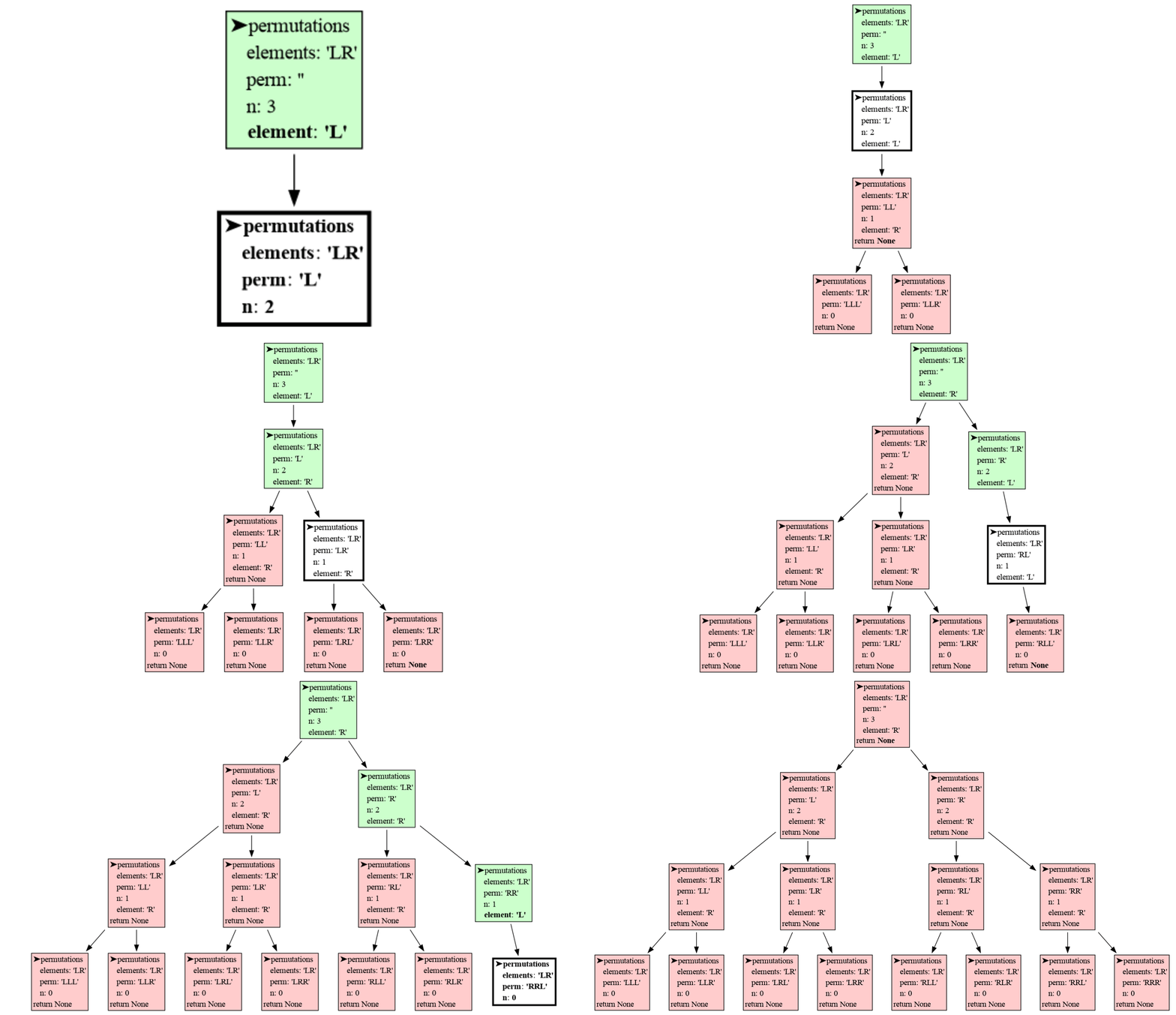
2
|
+
Name: invocation_tree
|
|
3
|
+
Version: 0.0.26
|
|
4
|
+
Summary: Generates an invocation tree of functions calls.
|
|
5
|
+
Author-email: Bas Terwijn <bterwijn@gmail.com>
|
|
6
|
+
License: BSD 2-Clause License
|
|
7
|
+
|
|
8
|
+
Copyright (c) 2017, pyexample
|
|
9
|
+
All rights reserved.
|
|
10
|
+
|
|
11
|
+
Redistribution and use in source and binary forms, with or without
|
|
12
|
+
modification, are permitted provided that the following conditions are met:
|
|
13
|
+
|
|
14
|
+
* Redistributions of source code must retain the above copyright notice, this
|
|
15
|
+
list of conditions and the following disclaimer.
|
|
16
|
+
|
|
17
|
+
* Redistributions in binary form must reproduce the above copyright notice,
|
|
18
|
+
this list of conditions and the following disclaimer in the documentation
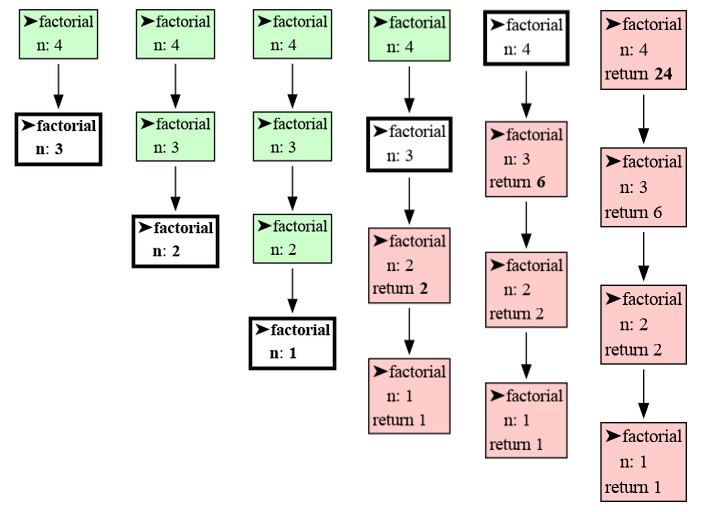
|
|
19
|
+
and/or other materials provided with the distribution.
|
|
20
|
+
|
|
21
|
+
THIS SOFTWARE IS PROVIDED BY THE COPYRIGHT HOLDERS AND CONTRIBUTORS "AS IS"
|
|
22
|
+
AND ANY EXPRESS OR IMPLIED WARRANTIES, INCLUDING, BUT NOT LIMITED TO, THE
|
|
23
|
+
IMPLIED WARRANTIES OF MERCHANTABILITY AND FITNESS FOR A PARTICULAR PURPOSE ARE
|
|
24
|
+
DISCLAIMED. IN NO EVENT SHALL THE COPYRIGHT HOLDER OR CONTRIBUTORS BE LIABLE
|
|
25
|
+
FOR ANY DIRECT, INDIRECT, INCIDENTAL, SPECIAL, EXEMPLARY, OR CONSEQUENTIAL
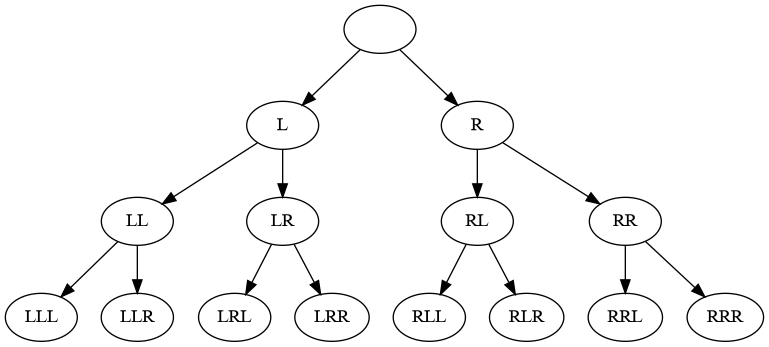
|
|
26
|
+
DAMAGES (INCLUDING, BUT NOT LIMITED TO, PROCUREMENT OF SUBSTITUTE GOODS OR
|
|
27
|
+
SERVICES; LOSS OF USE, DATA, OR PROFITS; OR BUSINESS INTERRUPTION) HOWEVER
|
|
28
|
+
CAUSED AND ON ANY THEORY OF LIABILITY, WHETHER IN CONTRACT, STRICT LIABILITY,
|
|
29
|
+
OR TORT (INCLUDING NEGLIGENCE OR OTHERWISE) ARISING IN ANY WAY OUT OF THE USE
|
|
30
|
+
OF THIS SOFTWARE, EVEN IF ADVISED OF THE POSSIBILITY OF SUCH DAMAGE.
|
|
31
|
+
|
|
32
|
+
Project-URL: Homepage, https://github.com/bterwijn/invocation_tree
|
|
33
|
+
Project-URL: Repository, https://github.com/bterwijn/invocation_tree.git
|
|
34
|
+
Classifier: Development Status :: 4 - Beta
|
|
35
|
+
Classifier: Intended Audience :: Education
|
|
36
|
+
Classifier: Intended Audience :: Developers
|
|
37
|
+
Classifier: Programming Language :: Python :: 3
|
|
38
|
+
Classifier: Topic :: Education
|
|
39
|
+
Classifier: Topic :: Software Development :: Debuggers
|
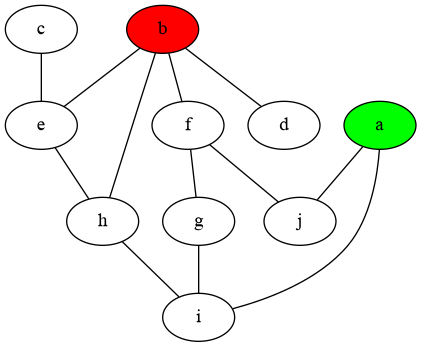
|
40
|
+
Requires-Python: >=3.7
|
|
41
|
+
Description-Content-Type: text/markdown
|
|
42
|
+
License-File: LICENSE.txt
|
|
43
|
+
Requires-Dist: graphviz
|
|
44
|
+
Dynamic: license-file
|
|
45
|
+
|
|
46
|
+
this page is under constructions, there may be inconsistencies or things missing
|
|
47
|
+
|
|
48
|
+
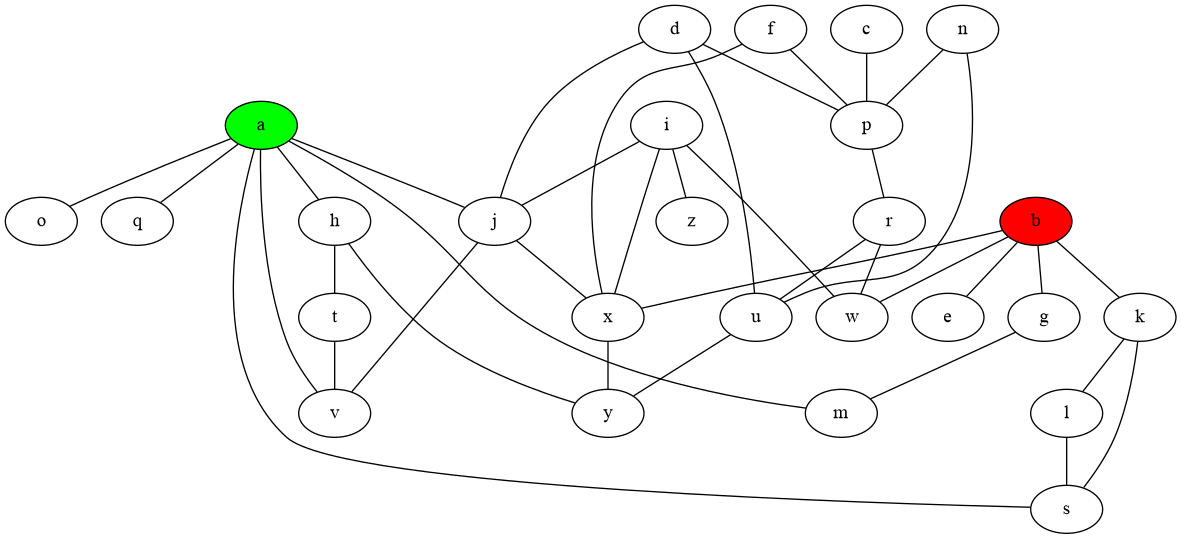
# Installation #
|
|
49
|
+
Install (or upgrade) `invocation_tree` using pip:
|
|
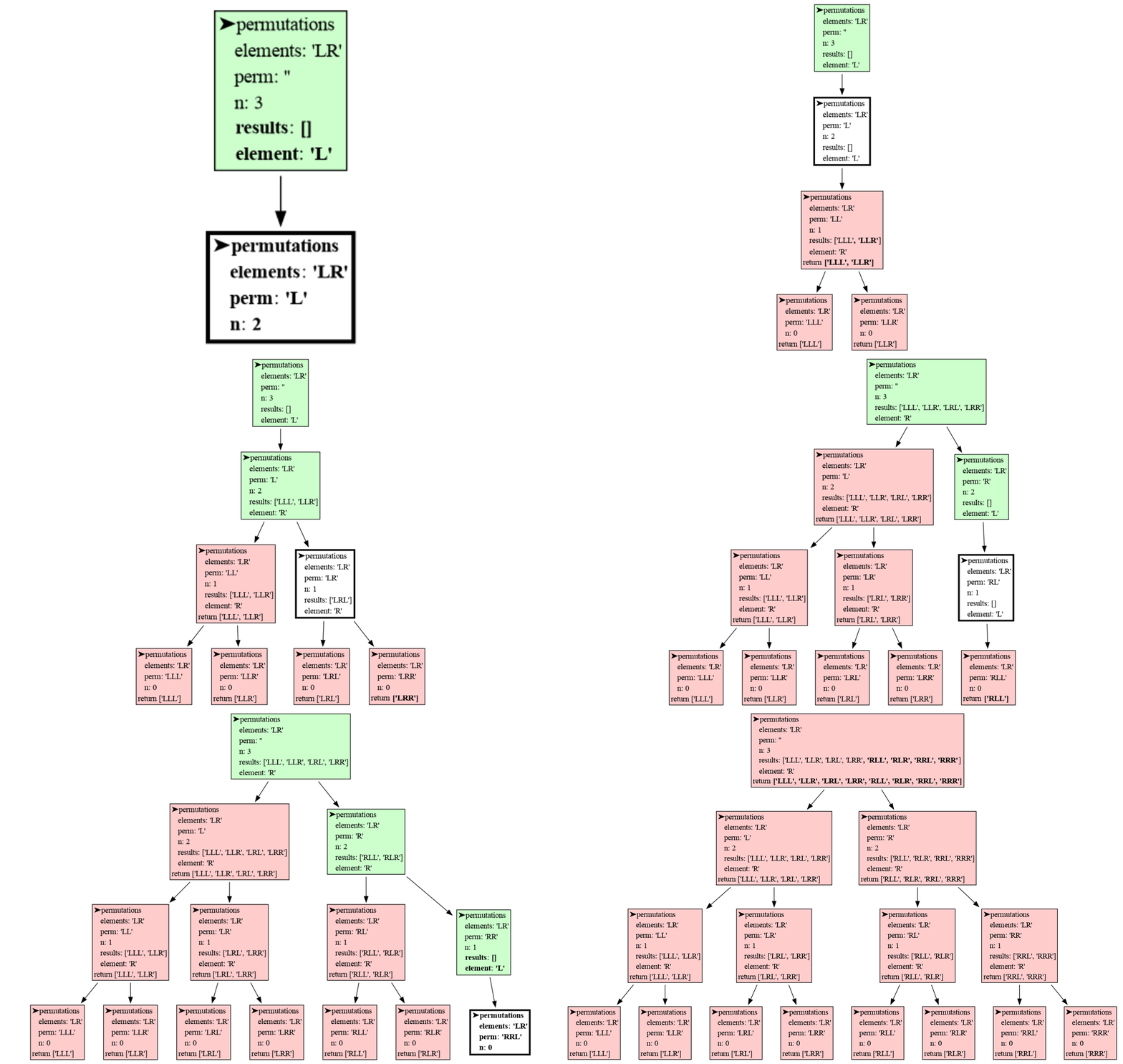
50
|
+
```
|
|
51
|
+
pip install --upgrade invocation_tree
|
|
52
|
+
```
|
|
53
|
+
Additionally [Graphviz](https://graphviz.org/download/) needs to be installed.
|
|
54
|
+
|
|
55
|
+
# Highlights #
|
|
56
|
+
|
|
57
|
+
```python
|
|
58
|
+
def permutations(elements, perm, n):
|
|
59
|
+
if n == 0:
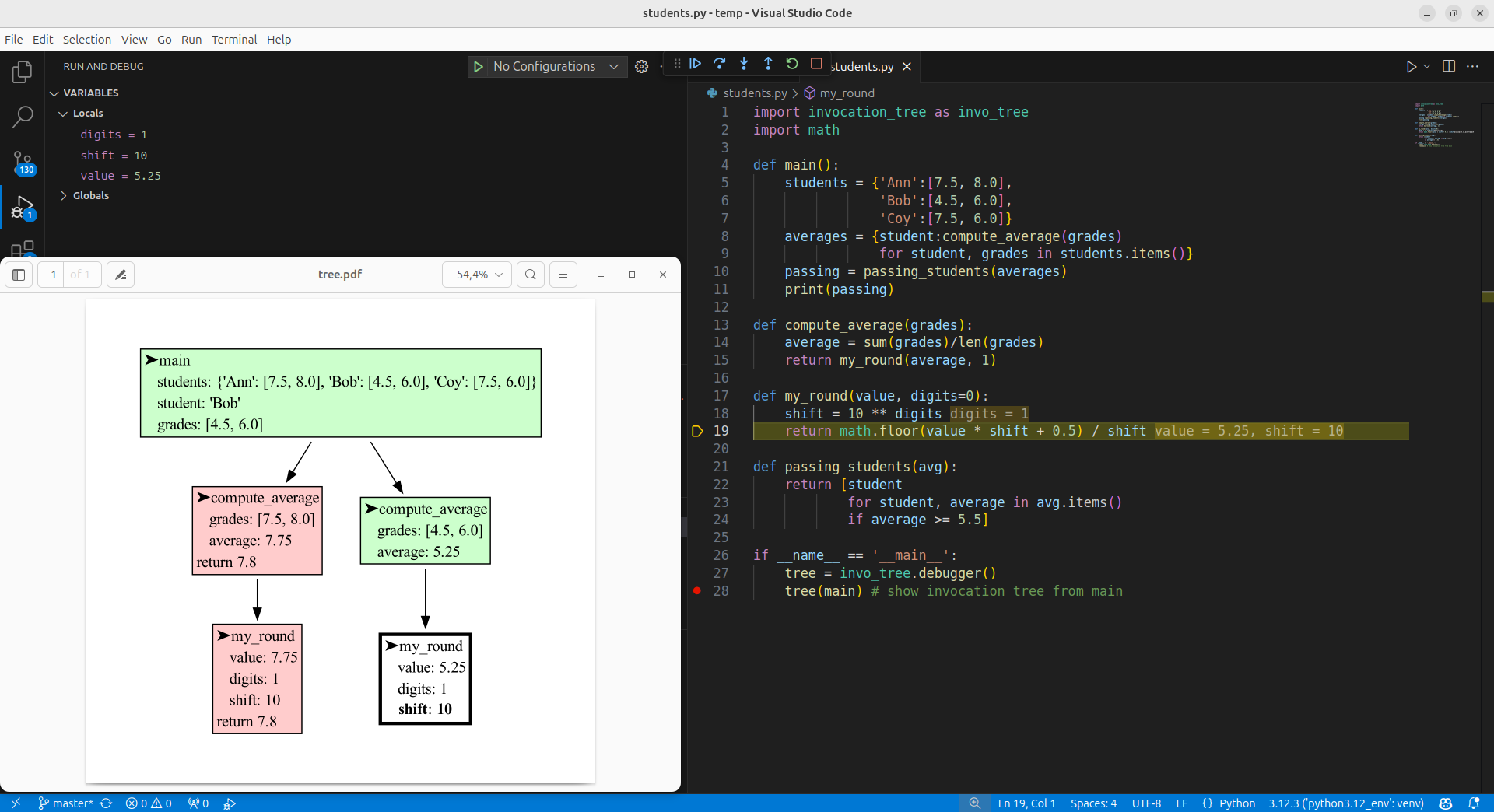
|
|
60
|
+
print(perm)
|
|
61
|
+
else:
|
|
62
|
+
for element in elements:
|
|
63
|
+
permutations(elements, perm + element, n-1)
|
|
64
|
+
|
|
65
|
+
permutations('LR', '', 3)
|
|
66
|
+
```
|
|
67
|
+
|
|
68
|
+
Run a live demo in the 👉 [**Invocation Tree Web Debugger**](https://invocation-tree.com/#timestep=1.0&play) 👈 now, no installation required!
|
|
69
|
+
|
|
70
|
+
- shows the invocation tree (call tree) of a program **in real time**
|
|
71
|
+
- helps to **understand recursion** and its depth-first nature
|
|
72
|
+
|
|
73
|
+
# Chapters #
|
|
74
|
+
|
|
75
|
+
[Recursion and Iteration](#recursion-and-iteration)
|
|
76
|
+
|
|
77
|
+
[Permutations](#permutations)
|
|
78
|
+
|
|
79
|
+
[Permutations Benefits](#recursion-benefits)
|
|
80
|
+
|
|
81
|
+
[Configuration](#Configuration)
|
|
82
|
+
|
|
83
|
+
[Troubleshooting](#Troubleshooting)
|
|
84
|
+
|
|
85
|
+
# Author #
|
|
86
|
+
Bas Terwijn
|
|
87
|
+
|
|
88
|
+
# Inspiration #
|
|
89
|
+
Inspired by [rcviz](https://github.com/carlsborg/rcviz).
|
|
90
|
+
|
|
91
|
+
# Supported by #
|
|
92
|
+
<img src="https://raw.githubusercontent.com/bterwijn/memory_graph/main/images/uva.png" alt="University of Amsterdam" width="600">
|
|
93
|
+
|
|
94
|
+
___
|
|
95
|
+
___
|
|
96
|
+
|
|
97
|
+
|
|
98
|
+
# Recursion and Iteration #
|
|
99
|
+
|
|
100
|
+
Repetion can be implemented with recursion and iteration. Lets first look at simply computing the factorial of 4.
|
|
101
|
+
|
|
102
|
+
``` python
|
|
103
|
+
import math
|
|
104
|
+
|
|
105
|
+
print(math.factorial(4))
|
|
106
|
+
```
|
|
107
|
+
```
|
|
108
|
+
24
|
|
109
|
+
```
|
|
110
|
+
The result is `1 * 2 * 3 * 4 = 24`.
|
|
111
|
+
|
|
112
|
+
To implement our own factorial function we can use iteration, a for-loop or while-loop, like so:
|
|
113
|
+
|
|
114
|
+
```python
|
|
115
|
+
def factorial(n):
|
|
116
|
+
result = 1
|
|
117
|
+
for i in range(1, n+1):
|
|
118
|
+
result *= i
|
|
119
|
+
return result
|
|
120
|
+
|
|
121
|
+
print(factorial(4))
|
|
122
|
+
```
|
|
123
|
+
```
|
|
124
|
+
24
|
|
125
|
+
```
|
|
126
|
+
|
|
127
|
+
or we can use recursion, a function that calls itself. Then we also need a stop condition to prevent the function from calling itself indefinitely, like so:
|
|
128
|
+
|
|
129
|
+
```python
|
|
130
|
+
def factorial(n):
|
|
131
|
+
if n <= 1: # stop condition
|
|
132
|
+
return 1
|
|
133
|
+
return n * factorial(n - 1) # function calling itself
|
|
134
|
+
print(factorial(4))
|
|
135
|
+
```
|
|
136
|
+
```
|
|
137
|
+
24
|
|
138
|
+
```
|
|
139
|
+
|
|
140
|
+
We can evaluate this as:
|
|
141
|
+
```
|
|
142
|
+
factorial(4) = 4 * factorial(3)
|
|
143
|
+
= 4 * 3 * factorial(2)
|
|
144
|
+
= 4 * 3 * 2 * factorial(1)
|
|
145
|
+
= 4 * 3 * 2 * 1
|
|
146
|
+
= 24
|
|
147
|
+
```
|
|
148
|
+
|
|
149
|
+
To better understand what is going on when we run the program we can use invocation_tree:
|
|
150
|
+
|
|
151
|
+
```python
|
|
152
|
+
import invocation_tree as ivt
|
|
153
|
+
|
|
154
|
+
def factorial(n):
|
|
155
|
+
if n <= 1:
|
|
156
|
+
return 1
|
|
157
|
+
return n * factorial(n - 1)
|
|
158
|
+
|
|
159
|
+
tree = ivt.blocking() # block and wait for <Enter> key press
|
|
160
|
+
tree(factorial, 4) # call function 'factorial' with argument '4'
|
|
161
|
+
```
|
|
162
|
+
|
|
163
|
+
to graph the function invocations. Press <Enter> to walk through each step of the repetition until the stop condition is met.
|
|
164
|
+
|
|
165
|
+
|
|
166
|
+
|
|
167
|
+
Or see it in the [Invocation Tree Web Debugger](https://www.invocation-tree.com/#codeurl=https://raw.githubusercontent.com/bterwijn/invocation_tree/refs/heads/main/src/factorial.py).
|
|
168
|
+
|
|
169
|
+
Each node in the invocation tree represents a function call, and the node's color indicates its state:
|
|
170
|
+
|
|
171
|
+
- White: The function is currently being executed.
|
|
172
|
+
- Green: The function is paused and will resume execution later.
|
|
173
|
+
- Red: The function has completed execution and has returned.
|
|
174
|
+
|
|
175
|
+
For every function call, the package displays its **local variables** and **return value**. Changes to the values of these variables over time are highlighted using bold text and gray shading to make them easier to track.
|
|
176
|
+
|
|
177
|
+
With recursion we often use a divide and conquer strategy, spliting the problem in subproblems that are easier to solve. With factorial we split `factorial(4)` in a `4` and `factorial(3)` subproblem.
|
|
178
|
+
|
|
179
|
+
**exerise1:** Use recursions to compute the sum of all the values in a list (hint: split for example the list `[1,2,3,...]` in head `1` and tail `[2,3,...]`).
|
|
180
|
+
```python
|
|
181
|
+
def sum(values):
|
|
182
|
+
# <your recursive implementation>
|
|
183
|
+
|
|
184
|
+
print(sum([3,7,4,9,2])) # 25
|
|
185
|
+
```
|
|
186
|
+
|
|
187
|
+
**exerise2:** Rewrite this iterative implementation of a decimal to binary conversion to a recursive implementation.
|
|
188
|
+
|
|
189
|
+
```python
|
|
190
|
+
def binary(decimal):
|
|
191
|
+
bin = []
|
|
192
|
+
while decimal > 0:
|
|
193
|
+
decimal, remainder = divmod(decimal, 2)
|
|
194
|
+
bin = [remainder] + bin
|
|
195
|
+
return bin
|
|
196
|
+
|
|
197
|
+
print( binary(22) ) # [1, 0, 1, 1, 0]
|
|
198
|
+
```
|
|
199
|
+
|
|
200
|
+
In some functional and logical programming languages (e.g. Haskell, Prolog) there are not loops so there is only recursion to implement repetition, but in Python we have a choice between recursion and iteration. Generally iteration is chosen in Python as it is often faster and many find it easier to understand. However, in some situation recursion comes with great benefits so it's important to master both ways.
|
|
201
|
+
|
|
202
|
+
# Permutations #
|
|
203
|
+
|
|
204
|
+
We can use recursion to compute all permutation of a number of elements with replacement (each element can be used any number of times). All permutations of length 3 of elements 'L' and 'R' can be made by moving down a tree for 3 steps and going Left and Right at each step:
|
|
205
|
+
|
|
206
|
+
|
|
207
|
+
|
|
208
|
+
This can be implemented recursively like:
|
|
209
|
+
|
|
210
|
+
```python
|
|
211
|
+
import invocation_tree as ivt
|
|
212
|
+
|
|
213
|
+
def permutations(elements, perm, n):
|
|
214
|
+
if n == 0: # stop condition, check if all steps are used up
|
|
215
|
+
print(perm)
|
|
216
|
+
else:
|
|
217
|
+
for element in elements: # for each element
|
|
218
|
+
permutations(elements, perm + element, n-1) # add it and do next step
|
|
219
|
+
|
|
220
|
+
tree = ivt.blocking()
|
|
221
|
+
tree(permutations, 'LR', '', 3) # permutations of L and R of length 3
|
|
222
|
+
```
|
|
223
|
+
```
|
|
224
|
+
LLL
|
|
225
|
+
LLR
|
|
226
|
+
LRL
|
|
227
|
+
LRR
|
|
228
|
+
RLL
|
|
229
|
+
RLR
|
|
230
|
+
RRL
|
|
231
|
+
RRR
|
|
232
|
+
```
|
|
233
|
+

|
|
234
|
+
Or see it in the [Invocation Tree Web Debugger](https://invocation-tree.com/#timestep=1.0&play)
|
|
235
|
+
|
|
236
|
+
The visualization shows the depth-first nature of recursion. In each step the first elements is chosen first, and quickly the bottom of the tree is reached. Then the permutation is printed, the function returns, one step back is made, and the next element is chosen. When each element had it's turn the function returns and another step back is made. This pattern repeats until all permutations are printed.
|
|
237
|
+
|
|
238
|
+
We can also iterate over all permutations with replacement using the `product()` function of `iterools` to get the same result:
|
|
239
|
+
|
|
240
|
+
```python
|
|
241
|
+
import itertools as it
|
|
242
|
+
|
|
243
|
+
for perm in it.product('LR', repeat = 3):
|
|
244
|
+
print(perm)
|
|
245
|
+
```
|
|
246
|
+
|
|
247
|
+
# Recursion Benefit #
|
|
248
|
+
|
|
249
|
+
The benefit recursion brings is that it gives more control over which permutations are generated. For example, if we don't want neighboring elements to be equal in all permutatations of 'A', 'B' and 'C' then we could simply write:
|
|
250
|
+
|
|
251
|
+
```python
|
|
252
|
+
import invocation_tree as ivt
|
|
253
|
+
|
|
254
|
+
def permutations(elems, perm, n):
|
|
255
|
+
if n == 0:
|
|
256
|
+
print(perm)
|
|
257
|
+
else:
|
|
258
|
+
for element in elems:
|
|
259
|
+
if len(perm) == 0 or not perm[-1] == element: # test neighbor
|
|
260
|
+
permutations(elems, perm + element, n-1)
|
|
261
|
+
|
|
262
|
+
tree = ivt.blocking()
|
|
263
|
+
tree(permutations, 'ABC', '', 3) # permutations of A, B, C of length 3
|
|
264
|
+
```
|
|
265
|
+
```
|
|
266
|
+
ABA
|
|
267
|
+
ABC
|
|
268
|
+
ACA
|
|
269
|
+
ACB
|
|
270
|
+
BAB
|
|
271
|
+
BAC
|
|
272
|
+
BCA
|
|
273
|
+
BCB
|
|
274
|
+
CAB
|
|
275
|
+
CAC
|
|
276
|
+
CBA
|
|
277
|
+
CBC
|
|
278
|
+
```
|
|
279
|
+

|
|
280
|
+
Or see it in the [Invocation Tree Web Debugger](https://www.invocation-tree.com/#codeurl=https://raw.githubusercontent.com/bterwijn/invocation_tree/refs/heads/main/src/permutations_neighbor.py)
|
|
281
|
+
|
|
282
|
+
This stops neighbors from being equal early, in contrast to iteration, where we would have had to filter permutation with equal neighbors out after the fact which could be much slower.
|
|
283
|
+
|
|
284
|
+
**exercise3:** Print all permutations with replacements of elements 'A', 'B', and 'C' of length 5 that are palindrome ('ABABA' is palindrome because if you read it backwards it's the same).
|
|
285
|
+
|
|
286
|
+
# Path Planning #
|
|
287
|
+
|
|
288
|
+
A graph is defined by nodes which we name with letters, and edges which define the connections between nodes. For example edge `('a', 'j')` defines tat there is a connection between node `a` and node `j`. In a bidirectional graph a connection betweeen two nodes can be used in both directions, from `a` to `j` and from `j` to `a`.
|
|
289
|
+
|
|
290
|
+
We define a bidirectional graph by a list of edges:
|
|
291
|
+
```
|
|
292
|
+
edges = [('a', 'j'), ('f', 'j'), ('c', 'e'), ('b', 'd'), ('b', 'e'), ('f', 'g'), ('g', 'i'), ('h', 'i'), ('e', 'h'), ('a', 'i'), ('b', 'h'), ('b', 'f')]
|
|
293
|
+
```
|
|
294
|
+
that can be visualized as:
|
|
295
|
+
|
|
296
|
+
|
|
297
|
+
|
|
298
|
+
To print all the paths from `a` to `b` without going over the same node twice, we can use this recursive implementation:
|
|
299
|
+
|
|
300
|
+
```python
|
|
301
|
+
edges = [('a', 'j'), ('f', 'j'), ('c', 'e'), ('b', 'd'), ('b', 'e'), ('f', 'g'), ('g', 'i'), ('h', 'i'), ('e', 'h'), ('a', 'i'), ('b', 'h'), ('b', 'f')]
|
|
302
|
+
|
|
303
|
+
def edges_to_steps(edges: list[tuple[str, str]]) -> dict[str,list[str]]:
|
|
304
|
+
""" Returns a dict with for each node the nodes it is connected with. """
|
|
305
|
+
steps = {}
|
|
306
|
+
for n1, n2 in edges:
|
|
307
|
+
if not n1 in steps:
|
|
308
|
+
steps[n1] = []
|
|
309
|
+
steps[n1].append(n2)
|
|
310
|
+
if not n2 in steps:
|
|
311
|
+
steps[n2] = []
|
|
312
|
+
steps[n2].append(n1)
|
|
313
|
+
return steps
|
|
314
|
+
|
|
315
|
+
def print_all_paths(steps, path, goal):
|
|
316
|
+
current = path[-1]
|
|
317
|
+
if current == goal:
|
|
318
|
+
print(path)
|
|
319
|
+
else:
|
|
320
|
+
valid_steps = steps[current]
|
|
321
|
+
for s in valid_steps:
|
|
322
|
+
if s not in path: # don't use twice
|
|
323
|
+
print_all_paths(steps, path+s, goal)
|
|
324
|
+
|
|
325
|
+
steps = edges_to_steps(edges)
|
|
326
|
+
print_all_paths(steps, 'a', 'b')
|
|
327
|
+
```
|
|
328
|
+
```
|
|
329
|
+
ajfgiheb
|
|
330
|
+
ajfgihb
|
|
331
|
+
ajfb
|
|
332
|
+
aigfb
|
|
333
|
+
aiheb
|
|
334
|
+
aihb
|
|
335
|
+
```
|
|
336
|
+
This would be much harder to implement with iteration and shows the power of recursion.
|
|
337
|
+
|
|
338
|
+
**exercise4:** In this larger bidirectional graph, print all the paths of length 7 that connect node `a` to node `b` where going over the same node multiple times is allowed (`avjxbxb` is one such path, there are 114 such paths in total).
|
|
339
|
+
|
|
340
|
+
```python
|
|
341
|
+
edges = [('a', 's'), ('i', 'z'), ('c', 'p'), ('d', 'p'), ('d', 'u'), ('b', 'e'), ('b', 'g'), ('f', 'p'), ('g', 'm'), ('h', 't'), ('h', 'y'), ('i', 'w'), ('i', 'j'), ('i', 'x'), ('k', 's'), ('k', 'l'), ('a', 'm'), ('n', 'u'), ('a', 'o'), ('a', 'v'), ('n', 'p'), ('a', 'q'), ('a', 'h'), ('p', 'r'), ('l', 's'), ('t', 'v'), ('u', 'y'), ('j', 'v'), ('a', 'j'), ('r', 'w'), ('r', 'u'), ('f', 'x'), ('x', 'y'), ('j', 'x'), ('d', 'j'), ('b', 'k'), ('b', 'x'), ('b', 'w')]
|
|
342
|
+
```
|
|
343
|
+
|
|
344
|
+
|
|
345
|
+
# Collecting Results #
|
|
346
|
+
|
|
347
|
+
If instead of printing we want to collect each result in a list for later use, we can use the return value of our recursive function, like in this example for our earlier permutation problem.
|
|
348
|
+
|
|
349
|
+
```python
|
|
350
|
+
import invocation_tree as ivt
|
|
351
|
+
|
|
352
|
+
def permutations(elements, perm, n):
|
|
353
|
+
if n == 0:
|
|
354
|
+
return [perm]
|
|
355
|
+
else:
|
|
356
|
+
results = []
|
|
357
|
+
for element in elements:
|
|
358
|
+
results += permutations(elements, perm + element, n-1)
|
|
359
|
+
return results
|
|
360
|
+
|
|
361
|
+
tree = ivt.blocking()
|
|
362
|
+
print(tree(permutations, 'LR', '', 3))
|
|
363
|
+
```
|
|
364
|
+
```
|
|
365
|
+
['LLL', 'LLR', 'LRL', 'LRR', 'RLL', 'RLR', 'RRL', 'RRR']
|
|
366
|
+
```
|
|
367
|
+
|
|
368
|
+
Or see it in the [Invocation Tree Web Debugger](https://www.invocation-tree.com/#codeurl=https://raw.githubusercontent.com/bterwijn/invocation_tree/refs/heads/main/src/permutations_return.py)
|
|
369
|
+
|
|
370
|
+
But often it is easier to pass a list (or other mutable container type) as an extra argument in the recursion to collect the results in. This can also be faster as it avoids many list copies as a result of the '+=' list concatenation.
|
|
371
|
+
|
|
372
|
+
```python
|
|
373
|
+
import invocation_tree as ivt
|
|
374
|
+
|
|
375
|
+
def permutations(elements, perm, n, results):
|
|
376
|
+
if n == 0:
|
|
377
|
+
results.append(perm)
|
|
378
|
+
else:
|
|
379
|
+
for element in elements:
|
|
380
|
+
permutations(elements, perm + element, n-1, results)
|
|
381
|
+
|
|
382
|
+
tree = ivt.blocking()
|
|
383
|
+
results = []
|
|
384
|
+
tree(permutations, 'LR', '', 3, results)
|
|
385
|
+
print(results)
|
|
386
|
+
```
|
|
387
|
+
```
|
|
388
|
+
['LLL', 'LLR', 'LRL', 'LRR', 'RLL', 'RLR', 'RRL', 'RRR']
|
|
389
|
+
```
|
|
390
|
+
|
|
391
|
+

|
|
392
|
+
Or see it in the [Invocation Tree Web Debugger](https://www.invocation-tree.com/#codeurl=https://raw.githubusercontent.com/bterwijn/invocation_tree/refs/heads/main/src/permutations_collect.py)
|
|
393
|
+
|
|
394
|
+
|
|
395
|
+
## Blocking ##
|
|
396
|
+
The program blocks execution at every function call and return statement, printing the current location in the source code. Press the <Enter> key to continue execution. To block at every line of the program (like in a debugger tool) and only where a change of value occured, use instead:
|
|
397
|
+
|
|
398
|
+
```python
|
|
399
|
+
tree = ivt.blocking_each_change()
|
|
400
|
+
```
|
|
401
|
+
|
|
402
|
+
# Debugger #
|
|
403
|
+
To visualize the invocation tree in a debugger tool, such as the integrated debugger in Visual Studio Code, use instead:
|
|
404
|
+
|
|
405
|
+
```python
|
|
406
|
+
tree = ivt.debugger()
|
|
407
|
+
```
|
|
408
|
+
|
|
409
|
+
and open the 'tree.pdf' file manually.
|
|
410
|
+
|
|
411
|
+
|
|
412
|
+
|
|
413
|
+
|
|
414
|
+
## Hidding ##
|
|
415
|
+
It can be useful to hide certian variables or functions to avoid unnecessary complexity. This can for example be done with:
|
|
416
|
+
|
|
417
|
+
```python
|
|
418
|
+
tree = ivt.blocking()
|
|
419
|
+
tree.hide_vars.add('permutations.elements')
|
|
420
|
+
tree.hide_vars.add('permutations.element')
|
|
421
|
+
tree.hide_vars.add('permutations.all_perms')
|
|
422
|
+
```
|
|
423
|
+
|
|
424
|
+
Or hide certain function calls:
|
|
425
|
+
|
|
426
|
+
```python
|
|
427
|
+
tree = ivt.blocking()
|
|
428
|
+
tree.hide_calls.add('namespace.functionname')
|
|
429
|
+
```
|
|
430
|
+
|
|
431
|
+
Or ignore certain function calls so that all it's children are hidden too:
|
|
432
|
+
|
|
433
|
+
```python
|
|
434
|
+
tree = ivt.blocking()
|
|
435
|
+
tree.ignore_calls.add('namespace.functionname')
|
|
436
|
+
```
|
|
437
|
+
|
|
438
|
+
# Configuration #
|
|
439
|
+
These invocation_tree configurations are available for an `Invocation_Tree` objects:
|
|
440
|
+
|
|
441
|
+
```python
|
|
442
|
+
tree = ivt.Invocation_Tree()
|
|
443
|
+
```
|
|
444
|
+
|
|
445
|
+
- **tree.filename** : str
|
|
446
|
+
- filename to save the tree to, defaults to 'tree.pdf'
|
|
447
|
+
- **tree.show** : bool
|
|
448
|
+
- if `True` the default application is open to view 'tree.filename'
|
|
449
|
+
- **tree.block** : bool
|
|
450
|
+
- if `True` program execution is blocked after the tree is saved
|
|
451
|
+
- **tree.src_loc** : bool
|
|
452
|
+
- if `True` the source location is printed when blocking
|
|
453
|
+
- **tree.each_line** : bool
|
|
454
|
+
- if `True` each line of the program is stepped through
|
|
455
|
+
- **tree.max_string_len** : int
|
|
456
|
+
- the maximum string length, only the end is shown of longer strings
|
|
457
|
+
- **tree.gifcount** : int
|
|
458
|
+
- if `>=0` the out filename is numbered for animated gif making
|
|
459
|
+
- **tree.indent** : string
|
|
460
|
+
- the string used for identing the local variables
|
|
461
|
+
- **tree.color_active** : string
|
|
462
|
+
- HTML color for active function
|
|
463
|
+
- **tree.color_paused*** : string
|
|
464
|
+
- HTML color for paused functions
|
|
465
|
+
- **tree.color_returned***: string
|
|
466
|
+
- HTML color for returned functions
|
|
467
|
+
- **tree.hide** : set()
|
|
468
|
+
- set of all variables names that are not shown in the tree
|
|
469
|
+
- **tree.to_string** : dict[str, fun]
|
|
470
|
+
- mapping from type/name to a to_string() function for custom printing of values
|
|
471
|
+
|
|
472
|
+
For convenience we provide these functions to set common configurations:
|
|
473
|
+
|
|
474
|
+
- **ivt.blocking(filename)**, blocks on function call and return
|
|
475
|
+
- **ivt.blocking_each_change(filename)**, blocks on each change of value
|
|
476
|
+
- **ivt.debugger(filename)**, non-blocking for use in debugger tool (open <filename> manually)
|
|
477
|
+
- **ivt.gif(filename)**, generates many output files on function call and return for gif creation
|
|
478
|
+
- **ivt.gif_each_change(filename)**, generates many output files on each change of value for gif creation
|
|
479
|
+
- **ivt.non_blocking(filename)**, non-blocking on each function call and return
|
|
480
|
+
|
|
481
|
+
# Troubleshooting #
|
|
482
|
+
- Adobe Acrobat Reader [doesn't refresh a PDF file](https://community.adobe.com/t5/acrobat-reader-discussions/reload-refresh-pdfs/td-p/9632292) when it changes on disk and blocks updates which results in an `Could not open 'somefile.pdf' for writing : Permission denied` error. One solution is to install a PDF reader that does refresh ([SumatraPDF](https://www.sumatrapdfreader.org/), [Okular](https://okular.kde.org/), ...) and set it as the default PDF reader. Another solution is to `render()` the graph to a different output format and to open it manually.
|
|
483
|
+
|
|
484
|
+
## Memory_Graph Package ##
|
|
485
|
+
The [invocation_tree](https://pypi.org/project/invocation-tree/) package visualizes function calls at different moments in time. If instead you want a detailed visualization of your data at the current time, check out the [memory_graph](https://pypi.org/project/memory-graph/) package.
|