invocation-tree 0.0.10__tar.gz → 0.0.11__tar.gz
This diff represents the content of publicly available package versions that have been released to one of the supported registries. The information contained in this diff is provided for informational purposes only and reflects changes between package versions as they appear in their respective public registries.
- invocation_tree-0.0.11/PKG-INFO +249 -0
- invocation_tree-0.0.11/README.md +230 -0
- {invocation_tree-0.0.10 → invocation_tree-0.0.11}/images/compute1.png +0 -0
- {invocation_tree-0.0.10 → invocation_tree-0.0.11}/images/compute2.png +0 -0
- {invocation_tree-0.0.10 → invocation_tree-0.0.11}/images/compute3.png +0 -0
- {invocation_tree-0.0.10 → invocation_tree-0.0.11}/images/compute4.png +0 -0
- {invocation_tree-0.0.10 → invocation_tree-0.0.11}/images/compute5.png +0 -0
- {invocation_tree-0.0.10 → invocation_tree-0.0.11}/images/compute6.png +0 -0
- {invocation_tree-0.0.10 → invocation_tree-0.0.11}/images/compute7.png +0 -0
- {invocation_tree-0.0.10 → invocation_tree-0.0.11}/images/compute8.png +0 -0
- {invocation_tree-0.0.10 → invocation_tree-0.0.11}/images/compute9.png +0 -0
- invocation_tree-0.0.11/images/create_images.sh +21 -0
- {invocation_tree-0.0.10 → invocation_tree-0.0.11}/images/factorial1.png +0 -0
- {invocation_tree-0.0.10 → invocation_tree-0.0.11}/images/factorial2.png +0 -0
- {invocation_tree-0.0.10 → invocation_tree-0.0.11}/images/factorial3.png +0 -0
- {invocation_tree-0.0.10 → invocation_tree-0.0.11}/images/factorial4.png +0 -0
- {invocation_tree-0.0.10 → invocation_tree-0.0.11}/images/factorial5.png +0 -0
- {invocation_tree-0.0.10 → invocation_tree-0.0.11}/images/factorial6.png +0 -0
- {invocation_tree-0.0.10 → invocation_tree-0.0.11}/images/factorial7.png +0 -0
- invocation_tree-0.0.11/images/permutations1.png +0 -0
- invocation_tree-0.0.11/images/permutations10.png +0 -0
- invocation_tree-0.0.11/images/permutations11.png +0 -0
- invocation_tree-0.0.11/images/permutations12.png +0 -0
- invocation_tree-0.0.11/images/permutations13.png +0 -0
- invocation_tree-0.0.11/images/permutations2.png +0 -0
- invocation_tree-0.0.11/images/permutations3.png +0 -0
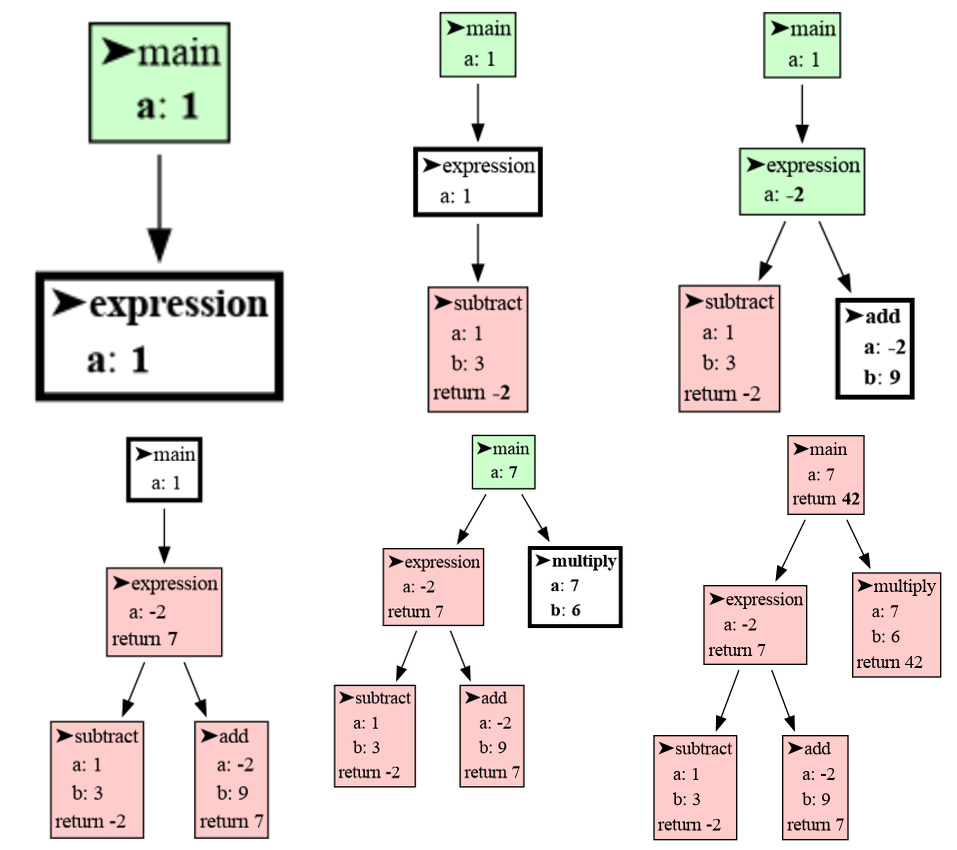
- invocation_tree-0.0.11/images/permutations4.png +0 -0
- invocation_tree-0.0.11/images/permutations5.png +0 -0
- invocation_tree-0.0.11/images/permutations6.png +0 -0
- invocation_tree-0.0.11/images/permutations7.png +0 -0
- invocation_tree-0.0.11/images/permutations8.png +0 -0
- invocation_tree-0.0.11/images/permutations9.png +0 -0
- {invocation_tree-0.0.10 → invocation_tree-0.0.11}/images/students1.png +0 -0
- {invocation_tree-0.0.10 → invocation_tree-0.0.11}/images/students10.png +0 -0
- {invocation_tree-0.0.10 → invocation_tree-0.0.11}/images/students11.png +0 -0
- {invocation_tree-0.0.10 → invocation_tree-0.0.11}/images/students12.png +0 -0
- {invocation_tree-0.0.10 → invocation_tree-0.0.11}/images/students13.png +0 -0
- {invocation_tree-0.0.10 → invocation_tree-0.0.11}/images/students14.png +0 -0
- {invocation_tree-0.0.10 → invocation_tree-0.0.11}/images/students15.png +0 -0
- {invocation_tree-0.0.10 → invocation_tree-0.0.11}/images/students2.png +0 -0
- {invocation_tree-0.0.10 → invocation_tree-0.0.11}/images/students3.png +0 -0
- {invocation_tree-0.0.10 → invocation_tree-0.0.11}/images/students4.png +0 -0
- {invocation_tree-0.0.10 → invocation_tree-0.0.11}/images/students5.png +0 -0
- {invocation_tree-0.0.10 → invocation_tree-0.0.11}/images/students6.png +0 -0
- {invocation_tree-0.0.10 → invocation_tree-0.0.11}/images/students7.png +0 -0
- {invocation_tree-0.0.10 → invocation_tree-0.0.11}/images/students8.png +0 -0
- {invocation_tree-0.0.10 → invocation_tree-0.0.11}/images/students9.png +0 -0
- {invocation_tree-0.0.10 → invocation_tree-0.0.11}/invocation_tree/__init__.py +1 -1
- invocation_tree-0.0.11/invocation_tree.egg-info/PKG-INFO +249 -0
- invocation_tree-0.0.11/invocation_tree.egg-info/SOURCES.txt +65 -0
- {invocation_tree-0.0.10 → invocation_tree-0.0.11}/setup.py +1 -1
- invocation_tree-0.0.10/PKG-INFO +0 -558
- invocation_tree-0.0.10/README.md +0 -539
- invocation_tree-0.0.10/images/#generator_function.py# +0 -13
- invocation_tree-0.0.10/images/compute.py~ +0 -22
- invocation_tree-0.0.10/images/create_images.sh +0 -41
- invocation_tree-0.0.10/images/create_images.sh~ +0 -4
- invocation_tree-0.0.10/images/factorial.py~ +0 -11
- invocation_tree-0.0.10/images/generator_expression.gif +0 -0
- invocation_tree-0.0.10/images/generator_expression.py +0 -11
- invocation_tree-0.0.10/images/generator_expression.py~ +0 -9
- invocation_tree-0.0.10/images/generator_expression1.png +0 -0
- invocation_tree-0.0.10/images/generator_expression2.png +0 -0
- invocation_tree-0.0.10/images/generator_expression3.png +0 -0
- invocation_tree-0.0.10/images/generator_expression4.png +0 -0
- invocation_tree-0.0.10/images/generator_expression5.png +0 -0
- invocation_tree-0.0.10/images/generator_expression6.png +0 -0
- invocation_tree-0.0.10/images/generator_expression7.png +0 -0
- invocation_tree-0.0.10/images/generator_expression8.png +0 -0
- invocation_tree-0.0.10/images/generator_expression9.png +0 -0
- invocation_tree-0.0.10/images/generator_function.gif +0 -0
- invocation_tree-0.0.10/images/generator_function.py +0 -12
- invocation_tree-0.0.10/images/generator_function1.png +0 -0
- invocation_tree-0.0.10/images/generator_function2.png +0 -0
- invocation_tree-0.0.10/images/generator_function3.png +0 -0
- invocation_tree-0.0.10/images/generator_function4.png +0 -0
- invocation_tree-0.0.10/images/generator_function5.png +0 -0
- invocation_tree-0.0.10/images/generator_function6.png +0 -0
- invocation_tree-0.0.10/images/generator_function7.png +0 -0
- invocation_tree-0.0.10/images/generator_function8.png +0 -0
- invocation_tree-0.0.10/images/generator_function9.png +0 -0
- invocation_tree-0.0.10/images/generator_pipeline.gif +0 -0
- invocation_tree-0.0.10/images/generator_pipeline.py +0 -28
- invocation_tree-0.0.10/images/generator_pipeline.py~ +0 -26
- invocation_tree-0.0.10/images/generator_pipeline1.png +0 -0
- invocation_tree-0.0.10/images/generator_pipeline10.png +0 -0
- invocation_tree-0.0.10/images/generator_pipeline11.png +0 -0
- invocation_tree-0.0.10/images/generator_pipeline12.png +0 -0
- invocation_tree-0.0.10/images/generator_pipeline13.png +0 -0
- invocation_tree-0.0.10/images/generator_pipeline14.png +0 -0
- invocation_tree-0.0.10/images/generator_pipeline15.png +0 -0
- invocation_tree-0.0.10/images/generator_pipeline16.png +0 -0
- invocation_tree-0.0.10/images/generator_pipeline17.png +0 -0
- invocation_tree-0.0.10/images/generator_pipeline18.png +0 -0
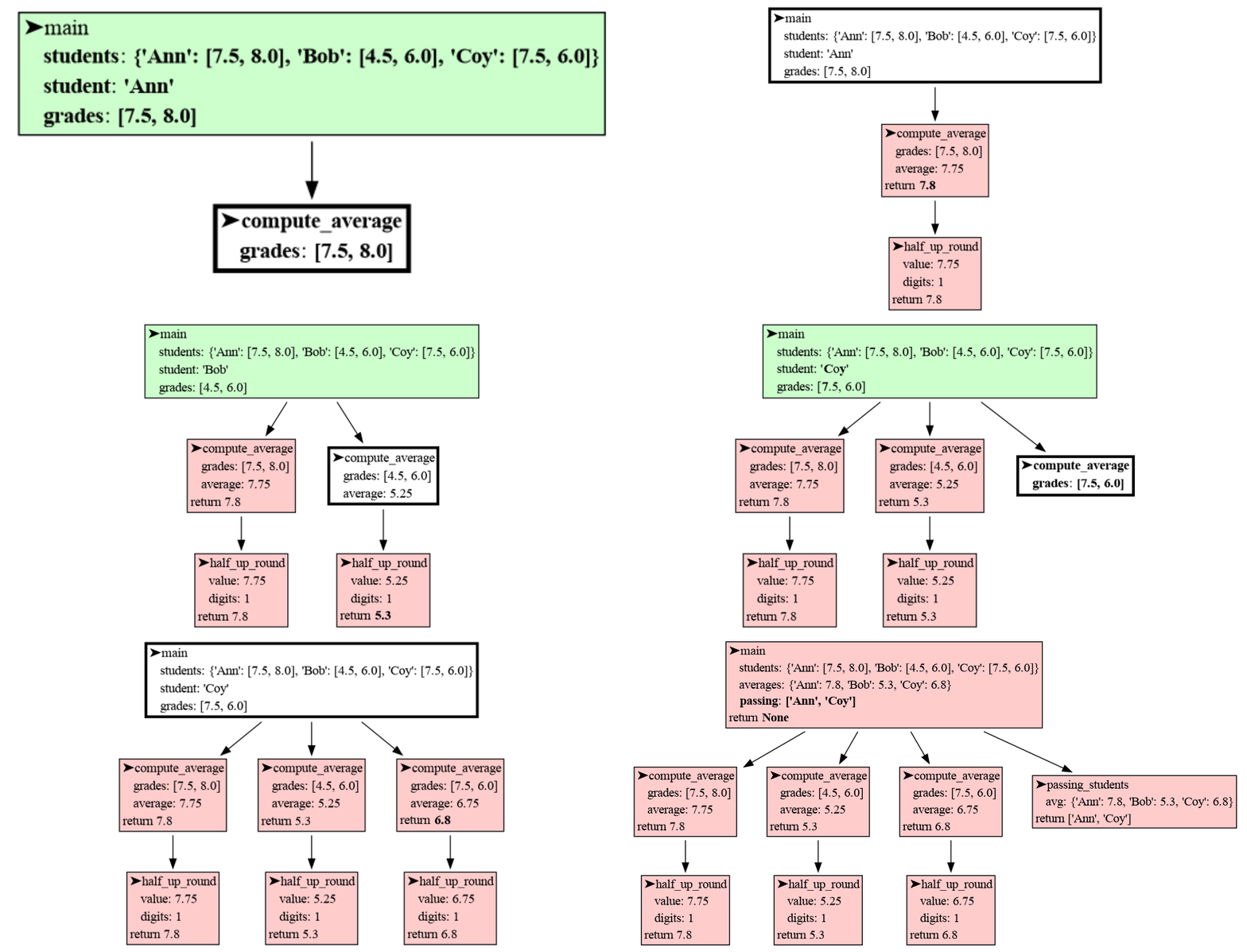
- invocation_tree-0.0.10/images/generator_pipeline19.png +0 -0
- invocation_tree-0.0.10/images/generator_pipeline2.png +0 -0
- invocation_tree-0.0.10/images/generator_pipeline20.png +0 -0
- invocation_tree-0.0.10/images/generator_pipeline21.png +0 -0
- invocation_tree-0.0.10/images/generator_pipeline22.png +0 -0
- invocation_tree-0.0.10/images/generator_pipeline23.png +0 -0
- invocation_tree-0.0.10/images/generator_pipeline24.png +0 -0
- invocation_tree-0.0.10/images/generator_pipeline25.png +0 -0
- invocation_tree-0.0.10/images/generator_pipeline26.png +0 -0
- invocation_tree-0.0.10/images/generator_pipeline27.png +0 -0
- invocation_tree-0.0.10/images/generator_pipeline3.png +0 -0
- invocation_tree-0.0.10/images/generator_pipeline4.png +0 -0
- invocation_tree-0.0.10/images/generator_pipeline5.png +0 -0
- invocation_tree-0.0.10/images/generator_pipeline6.png +0 -0
- invocation_tree-0.0.10/images/generator_pipeline7.png +0 -0
- invocation_tree-0.0.10/images/generator_pipeline8.png +0 -0
- invocation_tree-0.0.10/images/generator_pipeline9.png +0 -0
- invocation_tree-0.0.10/images/invocation_tree.pdf +0 -0
- invocation_tree-0.0.10/images/invocation_tree0.pdf +0 -0
- invocation_tree-0.0.10/images/iterable.py +0 -44
- invocation_tree-0.0.10/images/iterable.py~ +0 -31
- invocation_tree-0.0.10/images/my_list.py +0 -20
- invocation_tree-0.0.10/images/my_list.py~ +0 -4
- invocation_tree-0.0.10/images/my_range.gif +0 -0
- invocation_tree-0.0.10/images/my_range.py +0 -41
- invocation_tree-0.0.10/images/my_range.py~ +0 -14
- invocation_tree-0.0.10/images/my_range1.png +0 -0
- invocation_tree-0.0.10/images/my_range10.png +0 -0
- invocation_tree-0.0.10/images/my_range11.png +0 -0
- invocation_tree-0.0.10/images/my_range12.png +0 -0
- invocation_tree-0.0.10/images/my_range13.png +0 -0
- invocation_tree-0.0.10/images/my_range14.png +0 -0
- invocation_tree-0.0.10/images/my_range15.png +0 -0
- invocation_tree-0.0.10/images/my_range2.png +0 -0
- invocation_tree-0.0.10/images/my_range3.png +0 -0
- invocation_tree-0.0.10/images/my_range4.png +0 -0
- invocation_tree-0.0.10/images/my_range5.png +0 -0
- invocation_tree-0.0.10/images/my_range6.png +0 -0
- invocation_tree-0.0.10/images/my_range7.png +0 -0
- invocation_tree-0.0.10/images/my_range8.png +0 -0
- invocation_tree-0.0.10/images/my_range9.png +0 -0
- invocation_tree-0.0.10/images/out.txt +0 -8
- invocation_tree-0.0.10/images/permutations.py~ +0 -8
- invocation_tree-0.0.10/images/permutations0.png +0 -0
- invocation_tree-0.0.10/images/permutations1.png +0 -0
- invocation_tree-0.0.10/images/permutations10.png +0 -0
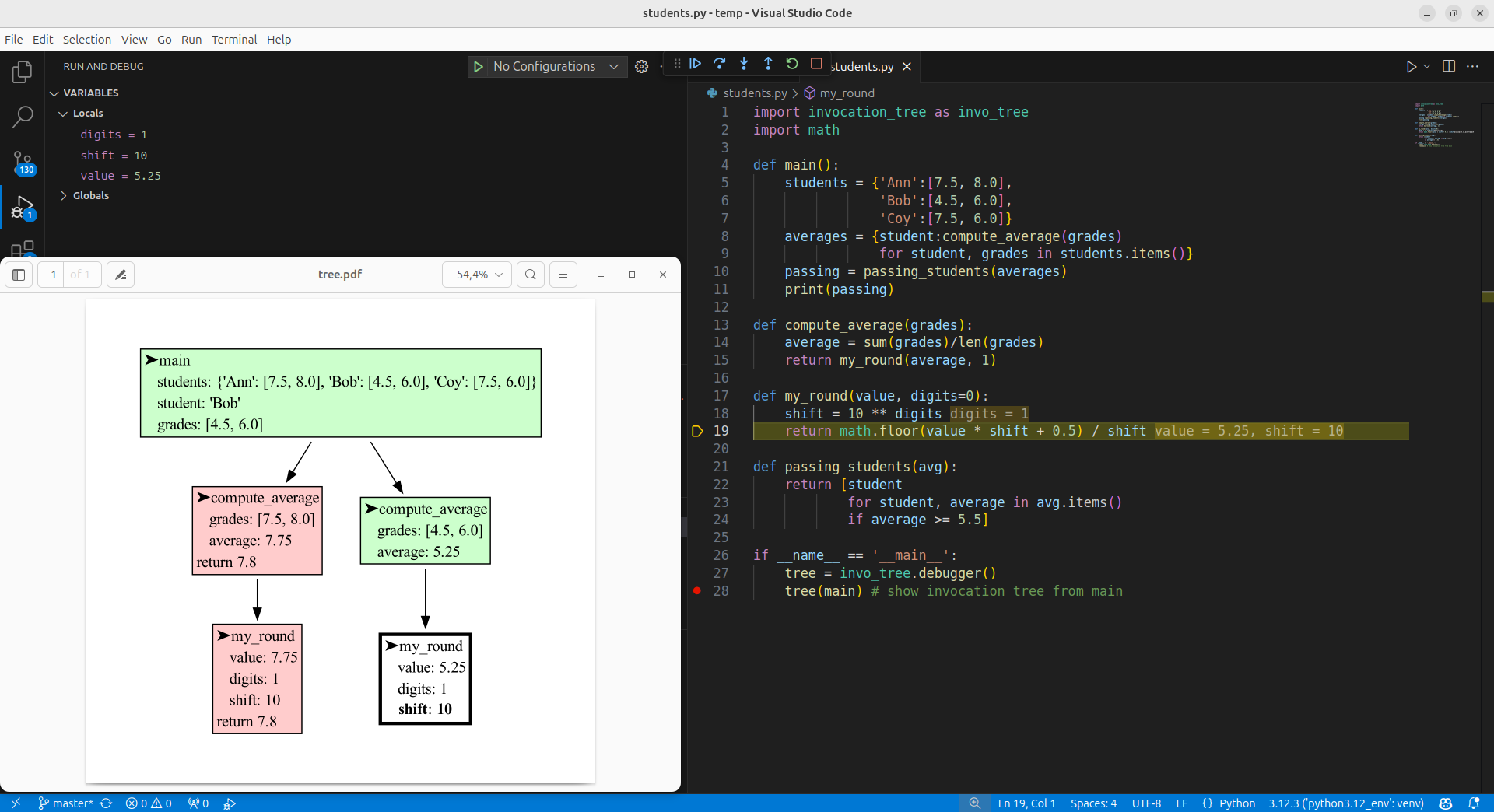
- invocation_tree-0.0.10/images/permutations11.png +0 -0
- invocation_tree-0.0.10/images/permutations12.png +0 -0
- invocation_tree-0.0.10/images/permutations13.png +0 -0
- invocation_tree-0.0.10/images/permutations2.png +0 -0
- invocation_tree-0.0.10/images/permutations22.png~ +0 -0
- invocation_tree-0.0.10/images/permutations3.png +0 -0
- invocation_tree-0.0.10/images/permutations4.png +0 -0
- invocation_tree-0.0.10/images/permutations5.png +0 -0
- invocation_tree-0.0.10/images/permutations6.png +0 -0
- invocation_tree-0.0.10/images/permutations7.png +0 -0
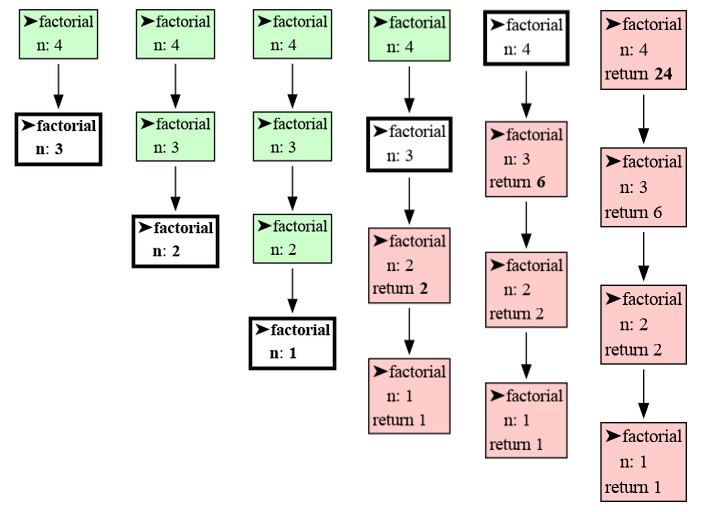
- invocation_tree-0.0.10/images/permutations8.png +0 -0
- invocation_tree-0.0.10/images/permutations9.png +0 -0
- invocation_tree-0.0.10/images/student.gif +0 -0
- invocation_tree-0.0.10/images/students.py~ +0 -30
- invocation_tree-0.0.10/images/test.py +0 -15
- invocation_tree-0.0.10/images/tree.gv~ +0 -22
- invocation_tree-0.0.10/images/tree.pdf +0 -0
- invocation_tree-0.0.10/install.txt +0 -31
- invocation_tree-0.0.10/invocation_tree.egg-info/PKG-INFO +0 -558
- invocation_tree-0.0.10/invocation_tree.egg-info/SOURCES.txt +0 -156
- {invocation_tree-0.0.10 → invocation_tree-0.0.11}/LICENSE.txt +0 -0
- {invocation_tree-0.0.10 → invocation_tree-0.0.11}/MANIFEST.in +0 -0
- {invocation_tree-0.0.10 → invocation_tree-0.0.11}/images/compute.gif +0 -0
- {invocation_tree-0.0.10 → invocation_tree-0.0.11}/images/compute.py +0 -0
- {invocation_tree-0.0.10 → invocation_tree-0.0.11}/images/create_gif.sh +0 -0
- {invocation_tree-0.0.10 → invocation_tree-0.0.11}/images/factorial.gif +0 -0
- {invocation_tree-0.0.10 → invocation_tree-0.0.11}/images/factorial.py +0 -0
- {invocation_tree-0.0.10 → invocation_tree-0.0.11}/images/permutations.gif +0 -0
- {invocation_tree-0.0.10 → invocation_tree-0.0.11}/images/permutations.py +0 -0
- {invocation_tree-0.0.10 → invocation_tree-0.0.11}/images/students.gif +0 -0
- {invocation_tree-0.0.10 → invocation_tree-0.0.11}/images/students.py +0 -0
- {invocation_tree-0.0.10 → invocation_tree-0.0.11}/images/vscode.png +0 -0
- {invocation_tree-0.0.10 → invocation_tree-0.0.11}/invocation_tree.egg-info/dependency_links.txt +0 -0
- {invocation_tree-0.0.10 → invocation_tree-0.0.11}/invocation_tree.egg-info/requires.txt +0 -0
- {invocation_tree-0.0.10 → invocation_tree-0.0.11}/invocation_tree.egg-info/top_level.txt +0 -0
- {invocation_tree-0.0.10 → invocation_tree-0.0.11}/setup.cfg +0 -0
|
@@ -0,0 +1,249 @@
|
|
|
1
|
+
Metadata-Version: 2.1
|
|
2
|
+
Name: invocation_tree
|
|
3
|
+
Version: 0.0.11
|
|
4
|
+
Summary: Generate an invocation tree of functions calls.
|
|
5
|
+
Home-page: https://github.com/bterwijn/invocation_tree
|
|
6
|
+
Author: Bas Terwijn
|
|
7
|
+
Author-email: bterwijn@gmail.com
|
|
8
|
+
License: BSD 2-clause
|
|
9
|
+
Classifier: Development Status :: 4 - Beta
|
|
10
|
+
Classifier: Intended Audience :: Education
|
|
11
|
+
Classifier: Intended Audience :: Developers
|
|
12
|
+
Classifier: License :: OSI Approved :: BSD License
|
|
13
|
+
Classifier: Programming Language :: Python :: 3
|
|
14
|
+
Classifier: Topic :: Education
|
|
15
|
+
Classifier: Topic :: Software Development :: Debuggers
|
|
16
|
+
Description-Content-Type: text/markdown
|
|
17
|
+
License-File: LICENSE.txt
|
|
18
|
+
Requires-Dist: graphviz
|
|
19
|
+
|
|
20
|
+
# Installation #
|
|
21
|
+
Install (or upgrade) `invocation_tree` using pip:
|
|
22
|
+
```
|
|
23
|
+
pip install --upgrade invocation_tree
|
|
24
|
+
```
|
|
25
|
+
Additionally [Graphviz](https://graphviz.org/download/) needs to be installed.
|
|
26
|
+
|
|
27
|
+
# Invocation Tree #
|
|
28
|
+
The [invocation_tree](https://pypi.org/project/invocation-tree/) package is designed to help with **program understanding and debugging** by visualizing the **tree of function invocations** that occur during program execution. Here’s a simple example of how it works, we start with `a = 1` and compute:
|
|
29
|
+
|
|
30
|
+
```
|
|
31
|
+
(a - 3 + 9) * 6
|
|
32
|
+
```
|
|
33
|
+
|
|
34
|
+
```python
|
|
35
|
+
import invocation_tree as invo_tree
|
|
36
|
+
|
|
37
|
+
def main():
|
|
38
|
+
a = 1
|
|
39
|
+
a = expression(a)
|
|
40
|
+
return multiply(a, 6)
|
|
41
|
+
|
|
42
|
+
def expression(a):
|
|
43
|
+
a = subtract(a, 3)
|
|
44
|
+
return add(a, 9)
|
|
45
|
+
|
|
46
|
+
def subtract(a, b):
|
|
47
|
+
return a - b
|
|
48
|
+
|
|
49
|
+
def add(a, b):
|
|
50
|
+
return a + b
|
|
51
|
+
|
|
52
|
+
def multiply(a, b):
|
|
53
|
+
return a * b
|
|
54
|
+
|
|
55
|
+
tree = invo_tree.blocking()
|
|
56
|
+
print( tree(main) ) # show invocation tree starting at main
|
|
57
|
+
```
|
|
58
|
+
Running the program and pressing <Enter> a number of times results in:
|
|
59
|
+
|
|
60
|
+
```
|
|
61
|
+
42
|
|
62
|
+
```
|
|
63
|
+
Each node in the tree represents a function call, and the node's color indicates its state:
|
|
64
|
+
|
|
65
|
+
- White: The function is currently being executed (it is at the top of the call stack).
|
|
66
|
+
- Green: The function is paused and will resume execution later (it is lower down on the call stack).
|
|
67
|
+
- Red: The function has completed execution and returned (it has been removed from the call stack).
|
|
68
|
+
|
|
69
|
+
For every function, the package displays its **local variables** and **return value**. Changes to these values over time are highlighted using bold text and gray shading to make them easy to track.
|
|
70
|
+
|
|
71
|
+
# Chapters #
|
|
72
|
+
|
|
73
|
+
[Comprehensions](#Comprehensions)
|
|
74
|
+
|
|
75
|
+
[Debugger](#Debugger)
|
|
76
|
+
|
|
77
|
+
[Recursion](#Recursion)
|
|
78
|
+
|
|
79
|
+
[Configuration](#Configuration)
|
|
80
|
+
|
|
81
|
+
[Troubleshooting](#Troubleshooting)
|
|
82
|
+
|
|
83
|
+
# Author #
|
|
84
|
+
Bas Terwijn
|
|
85
|
+
|
|
86
|
+
# Inspiration #
|
|
87
|
+
Inspired by [rcviz](https://github.com/carlsborg/rcviz).
|
|
88
|
+
|
|
89
|
+
# Supported by #
|
|
90
|
+
<img src="https://raw.githubusercontent.com/bterwijn/memory_graph/main/images/uva.png" alt="University of Amsterdam" width="600">
|
|
91
|
+
|
|
92
|
+
___
|
|
93
|
+
___
|
|
94
|
+
|
|
95
|
+
# Comprehensions #
|
|
96
|
+
In this more interesting example we compute which students pass a course by using list and dictionary comprehensions.
|
|
97
|
+
|
|
98
|
+
```python
|
|
99
|
+
import invocation_tree as invo_tree
|
|
100
|
+
from decimal import Decimal, ROUND_HALF_UP
|
|
101
|
+
|
|
102
|
+
def main():
|
|
103
|
+
students = {'Ann':[7.5, 8.0],
|
|
104
|
+
'Bob':[4.5, 6.0],
|
|
105
|
+
'Coy':[7.5, 6.0]}
|
|
106
|
+
averages = {student:compute_average(grades)
|
|
107
|
+
for student, grades in students.items()}
|
|
108
|
+
passing = passing_students(averages)
|
|
109
|
+
print(passing)
|
|
110
|
+
|
|
111
|
+
def compute_average(grades):
|
|
112
|
+
average = sum(grades)/len(grades)
|
|
113
|
+
return half_up_round(average, 1)
|
|
114
|
+
|
|
115
|
+
def half_up_round(value, digits=0):
|
|
116
|
+
""" High-precision half-up rounding of 'value' to a specified number of 'digits'. """
|
|
117
|
+
return float(Decimal(str(value)).quantize(Decimal(f"1e-{digits}"),
|
|
118
|
+
rounding=ROUND_HALF_UP))
|
|
119
|
+
|
|
120
|
+
def passing_students(averages):
|
|
121
|
+
return [student
|
|
122
|
+
for student, average in averages.items()
|
|
123
|
+
if average >= 5.5]
|
|
124
|
+
|
|
125
|
+
if __name__ == '__main__':
|
|
126
|
+
tree = invo_tree.blocking()
|
|
127
|
+
tree(main)
|
|
128
|
+
```
|
|
129
|
+
|
|
130
|
+
```
|
|
131
|
+
['Ann', 'Coy']
|
|
132
|
+
```
|
|
133
|
+
|
|
134
|
+
## Blocking ##
|
|
135
|
+
The program blocks execution at every function call and return statement, printing the current location in the source code. Press the <Enter> key to continue execution. To block at every line of the program (like in a debugger tool) and only where a change of value occured, use instead:
|
|
136
|
+
|
|
137
|
+
```python
|
|
138
|
+
tree = invo_tree.blocking_each_change()
|
|
139
|
+
```
|
|
140
|
+
|
|
141
|
+
# Debugger #
|
|
142
|
+
To visualize the invocation tree in a debugger tool, such as the integrated debugger in Visual Studio Code, use instead:
|
|
143
|
+
|
|
144
|
+
```python
|
|
145
|
+
tree = invo_tree.debugger()
|
|
146
|
+
```
|
|
147
|
+
|
|
148
|
+
and open the 'tree.pdf' file manually.
|
|
149
|
+
|
|
150
|
+
|
|
151
|
+
# Recursion #
|
|
152
|
+
An invocation tree is particularly helpful to better understand recursion. A simple `factorial()` example:
|
|
153
|
+
|
|
154
|
+
```python
|
|
155
|
+
import invocation_tree as invo_tree
|
|
156
|
+
|
|
157
|
+
def factorial(n):
|
|
158
|
+
if n <= 1:
|
|
159
|
+
return 1
|
|
160
|
+
return n * factorial(n - 1)
|
|
161
|
+
|
|
162
|
+
tree = invo_tree.blocking()
|
|
163
|
+
print( tree(factorial, 4) ) # show invocation tree of calling factorial(4)
|
|
164
|
+
```
|
|
165
|
+
|
|
166
|
+
```
|
|
167
|
+
24
|
|
168
|
+
```
|
|
169
|
+
|
|
170
|
+
This `permutations()` example shows the depth-first nature of recursive execution:
|
|
171
|
+
|
|
172
|
+
```python
|
|
173
|
+
import invocation_tree as invo_tree
|
|
174
|
+
|
|
175
|
+
def permutations(elements, perm, n):
|
|
176
|
+
if n==0:
|
|
177
|
+
return [perm]
|
|
178
|
+
all_perms = []
|
|
179
|
+
for element in elements:
|
|
180
|
+
all_perms.extend(permutations(elements, perm + element, n-1))
|
|
181
|
+
return all_perms
|
|
182
|
+
|
|
183
|
+
tree = invo_tree.blocking()
|
|
184
|
+
result = tree(permutations, ['L','R'], '', 2)
|
|
185
|
+
print(result) # all permutations of going Left or Right of length 2
|
|
186
|
+
```
|
|
187
|
+
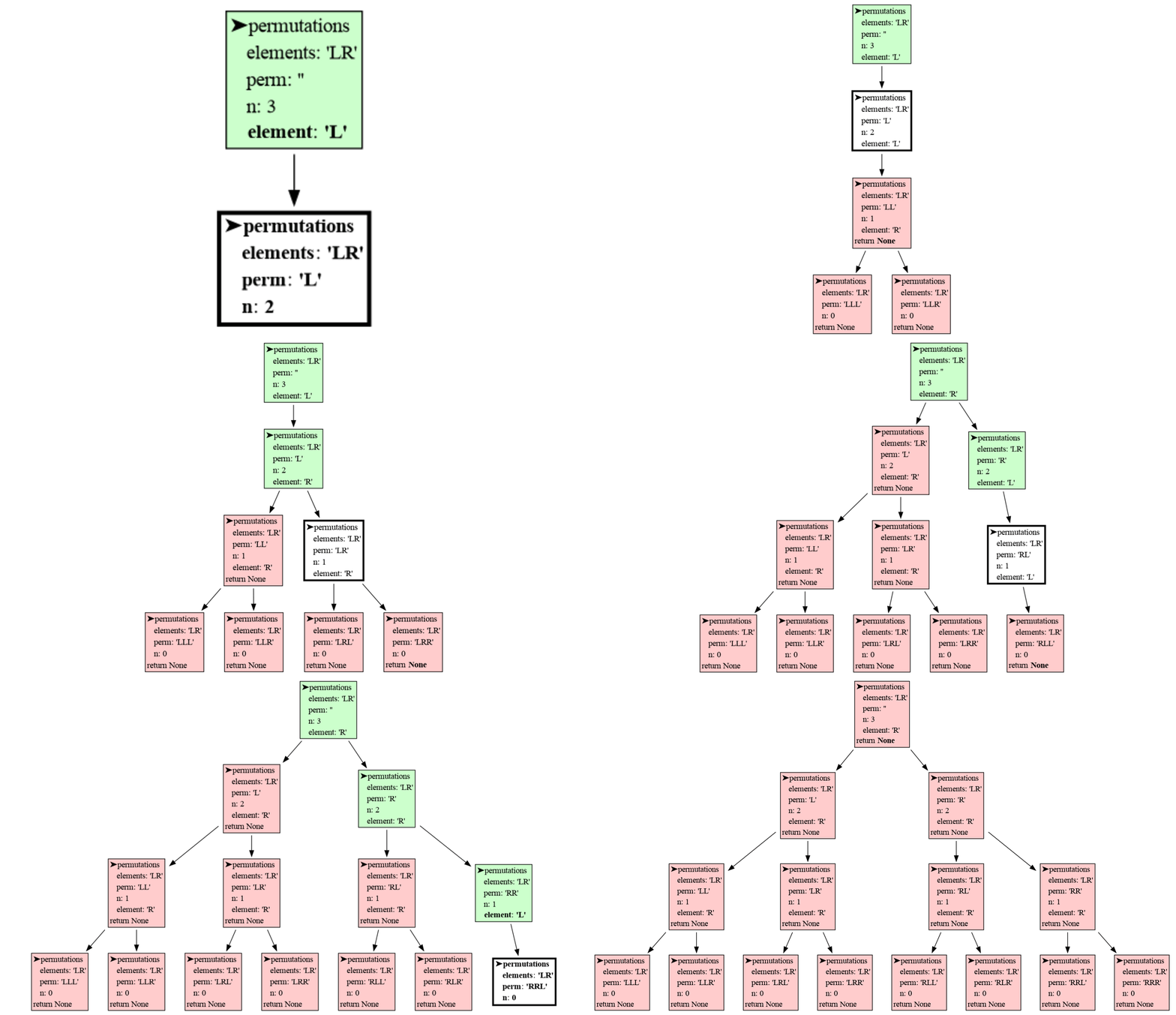
|
|
188
|
+
```
|
|
189
|
+
['LL', 'LR', 'RL', 'RR']
|
|
190
|
+
```
|
|
191
|
+
|
|
192
|
+
## Hide Variables ##
|
|
193
|
+
In an educational context it can be useful to hide certian variables to avoid unnecessary complexity. This can for example be done with:
|
|
194
|
+
|
|
195
|
+
```python
|
|
196
|
+
tree = invo_tree.blocking()
|
|
197
|
+
tree.hide.add('permutations.elements')
|
|
198
|
+
tree.hide.add('permutations.element')
|
|
199
|
+
tree.hide.add('permutations.all_perms')
|
|
200
|
+
```
|
|
201
|
+
|
|
202
|
+
# Configuration #
|
|
203
|
+
These invocation_tree configurations are available for an `Invocation_Tree` objects:
|
|
204
|
+
|
|
205
|
+
```python
|
|
206
|
+
tree = invo_tree.Invocation_Tree()
|
|
207
|
+
```
|
|
208
|
+
|
|
209
|
+
- **tree.filename** : str
|
|
210
|
+
- filename to save the tree to, defaults to 'tree.pdf'
|
|
211
|
+
- **tree.show** : bool
|
|
212
|
+
- if `True` the default application is open to view 'tree.filename'
|
|
213
|
+
- **tree.block** : bool
|
|
214
|
+
- if `True` program execution is blocked after the tree is saved
|
|
215
|
+
- **tree.src_loc** : bool
|
|
216
|
+
- if `True` the source location is printed when blocking
|
|
217
|
+
- **tree.each_line** : bool
|
|
218
|
+
- if `True` each line of the program is stepped through
|
|
219
|
+
- **tree.max_string_len** : int
|
|
220
|
+
- the maximum string length, only the end is shown of longer strings
|
|
221
|
+
- **tree.gifcount** : int
|
|
222
|
+
- if `>=0` the out filename is numbered for animated gif making
|
|
223
|
+
- **tree.indent** : string
|
|
224
|
+
- the string used for identing the local variables
|
|
225
|
+
- **tree.color_active** : string
|
|
226
|
+
- HTML color for active function
|
|
227
|
+
- **tree.color_paused*** : string
|
|
228
|
+
- HTML color for paused functions
|
|
229
|
+
- **tree.color_returned***: string
|
|
230
|
+
- HTML color for returned functions
|
|
231
|
+
- **tree.hide** : set()
|
|
232
|
+
- set of all variables names that are not shown in the tree
|
|
233
|
+
- **tree.to_string** : dict[str, fun]
|
|
234
|
+
- mapping from type/name to a to_string() function for custom printing of values
|
|
235
|
+
|
|
236
|
+
For convenience we provide these functions to set common configurations:
|
|
237
|
+
|
|
238
|
+
- **invo_tree.blocking(filename)**, blocks on function call and return
|
|
239
|
+
- **invo_tree.blocking_each_change(filename)**, blocks on each change of value
|
|
240
|
+
- **invo_tree.debugger(filename)**, non-blocking for use in debugger tool (open <filename> manually)
|
|
241
|
+
- **invo_tree.gif(filename)**, generates many output files on function call and return for gif creation
|
|
242
|
+
- **invo_tree.gif_each_change(filename)**, generates many output files on each change of value for gif creation
|
|
243
|
+
- **invo_tree.non_blocking(filename)**, non-blocking on each function call and return
|
|
244
|
+
|
|
245
|
+
# Troubleshooting #
|
|
246
|
+
- Adobe Acrobat Reader [doesn't refresh a PDF file](https://superuser.com/questions/337011/windows-pdf-viewer-that-auto-refreshes-pdf-when-compiling-with-pdflatex) when it changes on disk and blocks updates which results in an `Could not open 'somefile.pdf' for writing : Permission denied` error. One solution is to install a PDF reader that does refresh ([Evince](https://www.fosshub.com/Evince.html), [Okular](https://okular.kde.org/), [SumatraPDF](https://www.sumatrapdfreader.org/), ...) and set it as the default PDF reader. Another solution is to save the tree to a different [Graphviz Output Format](https://graphviz.org/docs/outputs/).
|
|
247
|
+
|
|
248
|
+
## Memory_Graph Package ##
|
|
249
|
+
The [invocation_tree](https://pypi.org/project/invocation-tree/) package visualizes function calls at different moments in time. If instead you want a detailed visualization of your data at the current time, check out the [memory_graph](https://pypi.org/project/memory-graph/) package.
|
|
@@ -0,0 +1,230 @@
|
|
|
1
|
+
# Installation #
|
|
2
|
+
Install (or upgrade) `invocation_tree` using pip:
|
|
3
|
+
```
|
|
4
|
+
pip install --upgrade invocation_tree
|
|
5
|
+
```
|
|
6
|
+
Additionally [Graphviz](https://graphviz.org/download/) needs to be installed.
|
|
7
|
+
|
|
8
|
+
# Invocation Tree #
|
|
9
|
+
The [invocation_tree](https://pypi.org/project/invocation-tree/) package is designed to help with **program understanding and debugging** by visualizing the **tree of function invocations** that occur during program execution. Here’s a simple example of how it works, we start with `a = 1` and compute:
|
|
10
|
+
|
|
11
|
+
```
|
|
12
|
+
(a - 3 + 9) * 6
|
|
13
|
+
```
|
|
14
|
+
|
|
15
|
+
```python
|
|
16
|
+
import invocation_tree as invo_tree
|
|
17
|
+
|
|
18
|
+
def main():
|
|
19
|
+
a = 1
|
|
20
|
+
a = expression(a)
|
|
21
|
+
return multiply(a, 6)
|
|
22
|
+
|
|
23
|
+
def expression(a):
|
|
24
|
+
a = subtract(a, 3)
|
|
25
|
+
return add(a, 9)
|
|
26
|
+
|
|
27
|
+
def subtract(a, b):
|
|
28
|
+
return a - b
|
|
29
|
+
|
|
30
|
+
def add(a, b):
|
|
31
|
+
return a + b
|
|
32
|
+
|
|
33
|
+
def multiply(a, b):
|
|
34
|
+
return a * b
|
|
35
|
+
|
|
36
|
+
tree = invo_tree.blocking()
|
|
37
|
+
print( tree(main) ) # show invocation tree starting at main
|
|
38
|
+
```
|
|
39
|
+
Running the program and pressing <Enter> a number of times results in:
|
|
40
|
+

|
|
41
|
+
```
|
|
42
|
+
42
|
|
43
|
+
```
|
|
44
|
+
Each node in the tree represents a function call, and the node's color indicates its state:
|
|
45
|
+
|
|
46
|
+
- White: The function is currently being executed (it is at the top of the call stack).
|
|
47
|
+
- Green: The function is paused and will resume execution later (it is lower down on the call stack).
|
|
48
|
+
- Red: The function has completed execution and returned (it has been removed from the call stack).
|
|
49
|
+
|
|
50
|
+
For every function, the package displays its **local variables** and **return value**. Changes to these values over time are highlighted using bold text and gray shading to make them easy to track.
|
|
51
|
+
|
|
52
|
+
# Chapters #
|
|
53
|
+
|
|
54
|
+
[Comprehensions](#Comprehensions)
|
|
55
|
+
|
|
56
|
+
[Debugger](#Debugger)
|
|
57
|
+
|
|
58
|
+
[Recursion](#Recursion)
|
|
59
|
+
|
|
60
|
+
[Configuration](#Configuration)
|
|
61
|
+
|
|
62
|
+
[Troubleshooting](#Troubleshooting)
|
|
63
|
+
|
|
64
|
+
# Author #
|
|
65
|
+
Bas Terwijn
|
|
66
|
+
|
|
67
|
+
# Inspiration #
|
|
68
|
+
Inspired by [rcviz](https://github.com/carlsborg/rcviz).
|
|
69
|
+
|
|
70
|
+
# Supported by #
|
|
71
|
+
<img src="https://raw.githubusercontent.com/bterwijn/memory_graph/main/images/uva.png" alt="University of Amsterdam" width="600">
|
|
72
|
+
|
|
73
|
+
___
|
|
74
|
+
___
|
|
75
|
+
|
|
76
|
+
# Comprehensions #
|
|
77
|
+
In this more interesting example we compute which students pass a course by using list and dictionary comprehensions.
|
|
78
|
+
|
|
79
|
+
```python
|
|
80
|
+
import invocation_tree as invo_tree
|
|
81
|
+
from decimal import Decimal, ROUND_HALF_UP
|
|
82
|
+
|
|
83
|
+
def main():
|
|
84
|
+
students = {'Ann':[7.5, 8.0],
|
|
85
|
+
'Bob':[4.5, 6.0],
|
|
86
|
+
'Coy':[7.5, 6.0]}
|
|
87
|
+
averages = {student:compute_average(grades)
|
|
88
|
+
for student, grades in students.items()}
|
|
89
|
+
passing = passing_students(averages)
|
|
90
|
+
print(passing)
|
|
91
|
+
|
|
92
|
+
def compute_average(grades):
|
|
93
|
+
average = sum(grades)/len(grades)
|
|
94
|
+
return half_up_round(average, 1)
|
|
95
|
+
|
|
96
|
+
def half_up_round(value, digits=0):
|
|
97
|
+
""" High-precision half-up rounding of 'value' to a specified number of 'digits'. """
|
|
98
|
+
return float(Decimal(str(value)).quantize(Decimal(f"1e-{digits}"),
|
|
99
|
+
rounding=ROUND_HALF_UP))
|
|
100
|
+
|
|
101
|
+
def passing_students(averages):
|
|
102
|
+
return [student
|
|
103
|
+
for student, average in averages.items()
|
|
104
|
+
if average >= 5.5]
|
|
105
|
+
|
|
106
|
+
if __name__ == '__main__':
|
|
107
|
+
tree = invo_tree.blocking()
|
|
108
|
+
tree(main)
|
|
109
|
+
```
|
|
110
|
+

|
|
111
|
+
```
|
|
112
|
+
['Ann', 'Coy']
|
|
113
|
+
```
|
|
114
|
+
|
|
115
|
+
## Blocking ##
|
|
116
|
+
The program blocks execution at every function call and return statement, printing the current location in the source code. Press the <Enter> key to continue execution. To block at every line of the program (like in a debugger tool) and only where a change of value occured, use instead:
|
|
117
|
+
|
|
118
|
+
```python
|
|
119
|
+
tree = invo_tree.blocking_each_change()
|
|
120
|
+
```
|
|
121
|
+
|
|
122
|
+
# Debugger #
|
|
123
|
+
To visualize the invocation tree in a debugger tool, such as the integrated debugger in Visual Studio Code, use instead:
|
|
124
|
+
|
|
125
|
+
```python
|
|
126
|
+
tree = invo_tree.debugger()
|
|
127
|
+
```
|
|
128
|
+
|
|
129
|
+
and open the 'tree.pdf' file manually.
|
|
130
|
+

|
|
131
|
+
|
|
132
|
+
# Recursion #
|
|
133
|
+
An invocation tree is particularly helpful to better understand recursion. A simple `factorial()` example:
|
|
134
|
+
|
|
135
|
+
```python
|
|
136
|
+
import invocation_tree as invo_tree
|
|
137
|
+
|
|
138
|
+
def factorial(n):
|
|
139
|
+
if n <= 1:
|
|
140
|
+
return 1
|
|
141
|
+
return n * factorial(n - 1)
|
|
142
|
+
|
|
143
|
+
tree = invo_tree.blocking()
|
|
144
|
+
print( tree(factorial, 4) ) # show invocation tree of calling factorial(4)
|
|
145
|
+
```
|
|
146
|
+

|
|
147
|
+
```
|
|
148
|
+
24
|
|
149
|
+
```
|
|
150
|
+
|
|
151
|
+
This `permutations()` example shows the depth-first nature of recursive execution:
|
|
152
|
+
|
|
153
|
+
```python
|
|
154
|
+
import invocation_tree as invo_tree
|
|
155
|
+
|
|
156
|
+
def permutations(elements, perm, n):
|
|
157
|
+
if n==0:
|
|
158
|
+
return [perm]
|
|
159
|
+
all_perms = []
|
|
160
|
+
for element in elements:
|
|
161
|
+
all_perms.extend(permutations(elements, perm + element, n-1))
|
|
162
|
+
return all_perms
|
|
163
|
+
|
|
164
|
+
tree = invo_tree.blocking()
|
|
165
|
+
result = tree(permutations, ['L','R'], '', 2)
|
|
166
|
+
print(result) # all permutations of going Left or Right of length 2
|
|
167
|
+
```
|
|
168
|
+

|
|
169
|
+
```
|
|
170
|
+
['LL', 'LR', 'RL', 'RR']
|
|
171
|
+
```
|
|
172
|
+
|
|
173
|
+
## Hide Variables ##
|
|
174
|
+
In an educational context it can be useful to hide certian variables to avoid unnecessary complexity. This can for example be done with:
|
|
175
|
+
|
|
176
|
+
```python
|
|
177
|
+
tree = invo_tree.blocking()
|
|
178
|
+
tree.hide.add('permutations.elements')
|
|
179
|
+
tree.hide.add('permutations.element')
|
|
180
|
+
tree.hide.add('permutations.all_perms')
|
|
181
|
+
```
|
|
182
|
+
|
|
183
|
+
# Configuration #
|
|
184
|
+
These invocation_tree configurations are available for an `Invocation_Tree` objects:
|
|
185
|
+
|
|
186
|
+
```python
|
|
187
|
+
tree = invo_tree.Invocation_Tree()
|
|
188
|
+
```
|
|
189
|
+
|
|
190
|
+
- **tree.filename** : str
|
|
191
|
+
- filename to save the tree to, defaults to 'tree.pdf'
|
|
192
|
+
- **tree.show** : bool
|
|
193
|
+
- if `True` the default application is open to view 'tree.filename'
|
|
194
|
+
- **tree.block** : bool
|
|
195
|
+
- if `True` program execution is blocked after the tree is saved
|
|
196
|
+
- **tree.src_loc** : bool
|
|
197
|
+
- if `True` the source location is printed when blocking
|
|
198
|
+
- **tree.each_line** : bool
|
|
199
|
+
- if `True` each line of the program is stepped through
|
|
200
|
+
- **tree.max_string_len** : int
|
|
201
|
+
- the maximum string length, only the end is shown of longer strings
|
|
202
|
+
- **tree.gifcount** : int
|
|
203
|
+
- if `>=0` the out filename is numbered for animated gif making
|
|
204
|
+
- **tree.indent** : string
|
|
205
|
+
- the string used for identing the local variables
|
|
206
|
+
- **tree.color_active** : string
|
|
207
|
+
- HTML color for active function
|
|
208
|
+
- **tree.color_paused*** : string
|
|
209
|
+
- HTML color for paused functions
|
|
210
|
+
- **tree.color_returned***: string
|
|
211
|
+
- HTML color for returned functions
|
|
212
|
+
- **tree.hide** : set()
|
|
213
|
+
- set of all variables names that are not shown in the tree
|
|
214
|
+
- **tree.to_string** : dict[str, fun]
|
|
215
|
+
- mapping from type/name to a to_string() function for custom printing of values
|
|
216
|
+
|
|
217
|
+
For convenience we provide these functions to set common configurations:
|
|
218
|
+
|
|
219
|
+
- **invo_tree.blocking(filename)**, blocks on function call and return
|
|
220
|
+
- **invo_tree.blocking_each_change(filename)**, blocks on each change of value
|
|
221
|
+
- **invo_tree.debugger(filename)**, non-blocking for use in debugger tool (open <filename> manually)
|
|
222
|
+
- **invo_tree.gif(filename)**, generates many output files on function call and return for gif creation
|
|
223
|
+
- **invo_tree.gif_each_change(filename)**, generates many output files on each change of value for gif creation
|
|
224
|
+
- **invo_tree.non_blocking(filename)**, non-blocking on each function call and return
|
|
225
|
+
|
|
226
|
+
# Troubleshooting #
|
|
227
|
+
- Adobe Acrobat Reader [doesn't refresh a PDF file](https://superuser.com/questions/337011/windows-pdf-viewer-that-auto-refreshes-pdf-when-compiling-with-pdflatex) when it changes on disk and blocks updates which results in an `Could not open 'somefile.pdf' for writing : Permission denied` error. One solution is to install a PDF reader that does refresh ([Evince](https://www.fosshub.com/Evince.html), [Okular](https://okular.kde.org/), [SumatraPDF](https://www.sumatrapdfreader.org/), ...) and set it as the default PDF reader. Another solution is to save the tree to a different [Graphviz Output Format](https://graphviz.org/docs/outputs/).
|
|
228
|
+
|
|
229
|
+
## Memory_Graph Package ##
|
|
230
|
+
The [invocation_tree](https://pypi.org/project/invocation-tree/) package visualizes function calls at different moments in time. If instead you want a detailed visualization of your data at the current time, check out the [memory_graph](https://pypi.org/project/memory-graph/) package.
|
|
Binary file
|
|
Binary file
|
|
Binary file
|
|
Binary file
|
|
Binary file
|
|
Binary file
|
|
Binary file
|
|
Binary file
|
|
Binary file
|
|
@@ -0,0 +1,21 @@
|
|
|
1
|
+
|
|
2
|
+
rm -f compute*.png
|
|
3
|
+
python compute.py
|
|
4
|
+
rm -f compute0.png
|
|
5
|
+
bash create_gif.sh compute
|
|
6
|
+
|
|
7
|
+
rm -f students*.png
|
|
8
|
+
python students.py
|
|
9
|
+
rm -f students0.png
|
|
10
|
+
bash create_gif.sh students
|
|
11
|
+
|
|
12
|
+
rm -f factorial*.png
|
|
13
|
+
python factorial.py
|
|
14
|
+
rm -f factorial0.png
|
|
15
|
+
bash create_gif.sh factorial
|
|
16
|
+
|
|
17
|
+
rm -f permutations*.png
|
|
18
|
+
python permutations.py
|
|
19
|
+
rm -f permutations0.png
|
|
20
|
+
bash create_gif.sh permutations
|
|
21
|
+
|
|
Binary file
|
|
Binary file
|
|
Binary file
|
|
Binary file
|
|
Binary file
|
|
Binary file
|
|
Binary file
|
|
Binary file
|
|
Binary file
|
|
Binary file
|
|
Binary file
|
|
Binary file
|
|
Binary file
|
|
Binary file
|
|
Binary file
|
|
Binary file
|
|
Binary file
|
|
Binary file
|
|
Binary file
|
|
Binary file
|
|
Binary file
|
|
Binary file
|
|
Binary file
|
|
Binary file
|
|
Binary file
|
|
Binary file
|
|
Binary file
|
|
Binary file
|
|
Binary file
|
|
Binary file
|
|
Binary file
|
|
Binary file
|
|
Binary file
|
|
Binary file
|
|
Binary file
|