hypie 0.1.1.dev2__tar.gz → 0.1.1.dev4__tar.gz
This diff represents the content of publicly available package versions that have been released to one of the supported registries. The information contained in this diff is provided for informational purposes only and reflects changes between package versions as they appear in their respective public registries.
- {hypie-0.1.1.dev2 → hypie-0.1.1.dev4}/PKG-INFO +106 -7
- {hypie-0.1.1.dev2 → hypie-0.1.1.dev4}/README.md +105 -6
- {hypie-0.1.1.dev2 → hypie-0.1.1.dev4}/pyproject.toml +1 -1
- {hypie-0.1.1.dev2 → hypie-0.1.1.dev4}/src/hypie/cli/build_components.py +1 -1
- {hypie-0.1.1.dev2 → hypie-0.1.1.dev4}/LICENSE +0 -0
- {hypie-0.1.1.dev2 → hypie-0.1.1.dev4}/src/hypie/__init__.py +0 -0
- {hypie-0.1.1.dev2 → hypie-0.1.1.dev4}/src/hypie/commands.py +0 -0
- {hypie-0.1.1.dev2 → hypie-0.1.1.dev4}/src/hypie/dom_position.py +0 -0
- {hypie-0.1.1.dev2 → hypie-0.1.1.dev4}/src/hypie/events.py +0 -0
- {hypie-0.1.1.dev2 → hypie-0.1.1.dev4}/src/hypie/experimental/client_components.py +0 -0
- {hypie-0.1.1.dev2 → hypie-0.1.1.dev4}/src/hypie/experimental/components.py +0 -0
- {hypie-0.1.1.dev2 → hypie-0.1.1.dev4}/src/hypie/experimental/hyperscript.py +0 -0
- {hypie-0.1.1.dev2 → hypie-0.1.1.dev4}/src/hypie/experimental/templates.py +0 -0
- {hypie-0.1.1.dev2 → hypie-0.1.1.dev4}/src/hypie/features.py +0 -0
- {hypie-0.1.1.dev2 → hypie-0.1.1.dev4}/src/hypie/hs_ast/commands.py +0 -0
- {hypie-0.1.1.dev2 → hypie-0.1.1.dev4}/src/hypie/hs_ast/constants.py +0 -0
- {hypie-0.1.1.dev2 → hypie-0.1.1.dev4}/src/hypie/hs_ast/contexts.py +0 -0
- {hypie-0.1.1.dev2 → hypie-0.1.1.dev4}/src/hypie/hs_ast/expressions.py +0 -0
- {hypie-0.1.1.dev2 → hypie-0.1.1.dev4}/src/hypie/hs_ast/features.py +0 -0
- {hypie-0.1.1.dev2 → hypie-0.1.1.dev4}/src/hypie/hs_ast/helpers.py +0 -0
- {hypie-0.1.1.dev2 → hypie-0.1.1.dev4}/src/hypie/literals.py +0 -0
|
@@ -1,6 +1,6 @@
|
|
|
1
1
|
Metadata-Version: 2.4
|
|
2
2
|
Name: hypie
|
|
3
|
-
Version: 0.1.1.
|
|
3
|
+
Version: 0.1.1.dev4
|
|
4
4
|
Summary: Add your description here
|
|
5
5
|
Author: Yasser Ahmed
|
|
6
6
|
Author-email: Yasser Ahmed <yasserfawzi1029@gmail.com>
|
|
@@ -16,6 +16,21 @@ Description-Content-Type: text/markdown
|
|
|
16
16
|
<img src="https://raw.githubusercontent.com/Infrared1029/hypie/main/assets/hypie_logo.jpg" alt="Logo" width="400">
|
|
17
17
|
</p>
|
|
18
18
|
|
|
19
|
+
## Table of Contents
|
|
20
|
+
- [Intro](#intro)
|
|
21
|
+
- [Quick Start](#quick-start)
|
|
22
|
+
- [Installation](#installation)
|
|
23
|
+
- [Motivation](#motivation)
|
|
24
|
+
- [Htpy and _Hyperscript Primers](#htpy-and-hyperscript-primers)
|
|
25
|
+
- [Htpy](#htpy)
|
|
26
|
+
- [_Hyperscript](#_hyperscript)
|
|
27
|
+
- [Htpy + _Hyperscript](#htpy--_hyperscript)
|
|
28
|
+
- [Hypie](#hypie)
|
|
29
|
+
- [Simple Counter Example Using Hypie](#simple-counter-example-using-hypie)
|
|
30
|
+
- [Todo App Example Using Hypie](#todo-app-example-using-hypie)
|
|
31
|
+
- [Pass One: Working App](#pass-one-working-app)
|
|
32
|
+
- [Pass Two: Refactor Towards Purer Components And An Event Driven System](#pass-two-refactor-towards-purer-components-and-an-event-driven-system)
|
|
33
|
+
|
|
19
34
|
<!-- # Hypie -->
|
|
20
35
|
## Intro
|
|
21
36
|
Hypie, pronounced "high-pie", is a python library for building web frontends, built on top of [_hyperscript](https://github.com/bigskysoftware/_hyperscript), a scripting language for the web made by the [htmx](https://github.com/bigskysoftware/htmx) folks, and [htpy](https://github.com/pelme/htpy), a library for generating HTML in python.
|
|
@@ -24,6 +39,90 @@ Right now Hypie is a personal passion side project that is still very experiment
|
|
|
24
39
|
|
|
25
40
|
There is no official docs website for hypie (yet), so this README is the closest thing to a documentation for now, if you are interested, I would advise reading through the whole thing, hopefully its not too long.
|
|
26
41
|
|
|
42
|
+
## Quick Start
|
|
43
|
+
Hypie code looks like this:
|
|
44
|
+
```python
|
|
45
|
+
import htpy
|
|
46
|
+
from hypie import hs
|
|
47
|
+
from hypie.experimental.components import Component
|
|
48
|
+
from hypie.literals import var
|
|
49
|
+
from hypie.features import On
|
|
50
|
+
from hypie.commands import set_
|
|
51
|
+
|
|
52
|
+
class Counter(Component):
|
|
53
|
+
initial_count: int = 0
|
|
54
|
+
|
|
55
|
+
def template(self):
|
|
56
|
+
count_var = var(":count")
|
|
57
|
+
|
|
58
|
+
return htpy.div[
|
|
59
|
+
htpy.button(
|
|
60
|
+
_=hs(
|
|
61
|
+
set_(count_var, to=self.initial_count),
|
|
62
|
+
On("click")[
|
|
63
|
+
set_(count_var, to=count_var + 1),
|
|
64
|
+
set_(var("me").textContent, to=f"Count is: {count_var}"),
|
|
65
|
+
],
|
|
66
|
+
)
|
|
67
|
+
)[f"Count is: {self.initial_count}"]
|
|
68
|
+
]
|
|
69
|
+
|
|
70
|
+
@staticmethod
|
|
71
|
+
def style():
|
|
72
|
+
return {
|
|
73
|
+
"button": {
|
|
74
|
+
"background-color": "#4A90D9",
|
|
75
|
+
"color": "#ffffff",
|
|
76
|
+
"border": "none",
|
|
77
|
+
"border-radius": "6px",
|
|
78
|
+
"padding": "10px 20px",
|
|
79
|
+
"font-size": "16px",
|
|
80
|
+
"font-weight": "600",
|
|
81
|
+
"cursor": "pointer",
|
|
82
|
+
"transition": "background-color 0.2s ease",
|
|
83
|
+
},
|
|
84
|
+
"button:hover": {"background-color": "#3A7BC8"},
|
|
85
|
+
}
|
|
86
|
+
```
|
|
87
|
+
After that, you build the css of the components:
|
|
88
|
+
```sh
|
|
89
|
+
hypie build -i <path/to/components/dir> -o <path/to/static_or_dist/dir> --watch
|
|
90
|
+
```
|
|
91
|
+
And return your components from your preferred python backend framework:
|
|
92
|
+
|
|
93
|
+
```python
|
|
94
|
+
import pathlib
|
|
95
|
+
|
|
96
|
+
import htpy
|
|
97
|
+
from fastapi import FastAPI
|
|
98
|
+
from fastapi.staticfiles import StaticFiles
|
|
99
|
+
from fastapi.responses import HTMLResponse
|
|
100
|
+
from .ui.components import Counter
|
|
101
|
+
|
|
102
|
+
app = FastAPI()
|
|
103
|
+
|
|
104
|
+
app.mount(
|
|
105
|
+
"/static", StaticFiles(directory=pathlib.Path(__file__).parent.resolve() / "static")
|
|
106
|
+
)
|
|
107
|
+
|
|
108
|
+
|
|
109
|
+
@app.get("/")
|
|
110
|
+
def counter_example():
|
|
111
|
+
return HTMLResponse(htpy.html[
|
|
112
|
+
htpy.head[
|
|
113
|
+
htpy.title["Counter"],
|
|
114
|
+
# this was generated with hypie build
|
|
115
|
+
htpy.link(rel="stylesheet", href="/static/_hypie_styles.css"),
|
|
116
|
+
|
|
117
|
+
# we need to load _hyperscript
|
|
118
|
+
htpy.script(src="https://cdn.jsdelivr.net/npm/hyperscript.org@0.9.93"),
|
|
119
|
+
],
|
|
120
|
+
htpy.body[
|
|
121
|
+
Counter(5)
|
|
122
|
+
]
|
|
123
|
+
])
|
|
124
|
+
```
|
|
125
|
+
|
|
27
126
|
## Installation
|
|
28
127
|
```sh
|
|
29
128
|
uv add hypie
|
|
@@ -45,7 +144,7 @@ The way Hypie pushes you to think about frontend system is as follows:
|
|
|
45
144
|
- If you need to generate HTML from the client that does not need a server trip (i.e. a visual component that does not rely on any kind of data from the server), like a Modal, you can define a "Template" that you can render anywhere, client side, no server roundtrips.
|
|
46
145
|
|
|
47
146
|
Before diving into hypie, it is useful to take a very quick look at the two main technologies hypie relies on, htpy and _hyperscript, all examples will assume a fastapi backend, but it should work with **any** python backend framework.
|
|
48
|
-
## Htpy and
|
|
147
|
+
## Htpy and _Hyperscript Primers
|
|
49
148
|
### Htpy
|
|
50
149
|
[htpy](https://github.com/pelme/htpy) is a python library for writing html, it is essentially a pythonic answer to templating languages.
|
|
51
150
|
```python
|
|
@@ -178,7 +277,7 @@ htpy.button(_=On("click")[
|
|
|
178
277
|
```
|
|
179
278
|
That way you get IDE support for the arguments the different commands support, you do not deal with messy strings anymore, and the English issue is gone. Again, this is already helpful, but we can take it a step further, taking inspiration from how components look in frameworks like [Vue](https://github.com/vuejs/core) and [Svelte](https://github.com/sveltejs/svelte), a hypie component is as follows:
|
|
180
279
|
|
|
181
|
-
|
|
280
|
+
## Hypie
|
|
182
281
|
```python
|
|
183
282
|
from hypie.literals import var, cls
|
|
184
283
|
from hypie.commands import log, toggle
|
|
@@ -232,7 +331,7 @@ Behind the scenes, hypie adds a `data-hypie-component=<kebab-case-component_name
|
|
|
232
331
|
|
|
233
332
|
Let's move on to other examples and introduce more capabilities and abstractions as we go.
|
|
234
333
|
|
|
235
|
-
|
|
334
|
+
### Simple Counter Example using Hypie
|
|
236
335
|
Let's create a very basic Counter Component using hypie.
|
|
237
336
|
```python
|
|
238
337
|
# ui/components.py
|
|
@@ -351,7 +450,7 @@ def counter_example():
|
|
|
351
450
|
|
|
352
451
|
You can now run the app and see the blue counter button.
|
|
353
452
|
Reminder: We are using FastAPI here but this works with any backend framework! just adjust the code based on your framework's abstractions.
|
|
354
|
-
|
|
453
|
+
### Todo app Example using Hypie
|
|
355
454
|
Let's move on to a more interesting example, a classic Todo app, inspired by the Todo app done in this [FastHTML tutorial](https://www.youtube.com/watch?v=Auqrm7WFc0I).
|
|
356
455
|
|
|
357
456
|
Our end result should look like this:
|
|
@@ -359,7 +458,7 @@ Our end result should look like this:
|
|
|
359
458
|
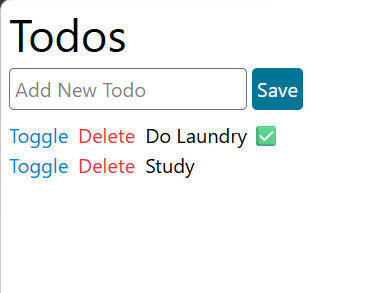
|
|
360
459
|
We are going to do two passes in this example, the first pass will give us a working app, the second pass will introduce new abstractions that allows us to refactor the code to reduce dependencies between components, both apps will be identical functionality wise, just one will be much easier to maintain and extend, let's start with the first pass.
|
|
361
460
|
|
|
362
|
-
|
|
461
|
+
#### Pass One: Working App
|
|
363
462
|
We can see 5 major UI components:
|
|
364
463
|
- Layout
|
|
365
464
|
- Header
|
|
@@ -624,7 +723,7 @@ def create_todo_(title: Annotated[str, Body(embed=True)]):
|
|
|
624
723
|
```
|
|
625
724
|
That's it, now we have a very basic todo app!
|
|
626
725
|
|
|
627
|
-
|
|
726
|
+
#### Pass Two: Refactor Towards Purer Components and an Event Driven System
|
|
628
727
|
Even though our app works, there is an issue, our components/template are not... **pure**. What does that mean, you might ask? It means, our components are dependent on things outside of their scope, for example, they are performing fetch requests, this depends on what the server returns, whether the network fails, and other variables, that are outside the scope of the component, other components like `AddTodoForm`, beside doing fetch requests as well, is also modifying other parts of the DOM, this creates a dependency between `AddTodoForm` and the parts its trying to modify, if those bits change, we will have to update `AddTodoForm`, not good.
|
|
629
728
|
|
|
630
729
|
Now a valid objection might be: "We still need to make those fetch requests and DOM modifications, the app would not work otherwise!"
|
|
@@ -2,6 +2,21 @@
|
|
|
2
2
|
<img src="https://raw.githubusercontent.com/Infrared1029/hypie/main/assets/hypie_logo.jpg" alt="Logo" width="400">
|
|
3
3
|
</p>
|
|
4
4
|
|
|
5
|
+
## Table of Contents
|
|
6
|
+
- [Intro](#intro)
|
|
7
|
+
- [Quick Start](#quick-start)
|
|
8
|
+
- [Installation](#installation)
|
|
9
|
+
- [Motivation](#motivation)
|
|
10
|
+
- [Htpy and _Hyperscript Primers](#htpy-and-hyperscript-primers)
|
|
11
|
+
- [Htpy](#htpy)
|
|
12
|
+
- [_Hyperscript](#_hyperscript)
|
|
13
|
+
- [Htpy + _Hyperscript](#htpy--_hyperscript)
|
|
14
|
+
- [Hypie](#hypie)
|
|
15
|
+
- [Simple Counter Example Using Hypie](#simple-counter-example-using-hypie)
|
|
16
|
+
- [Todo App Example Using Hypie](#todo-app-example-using-hypie)
|
|
17
|
+
- [Pass One: Working App](#pass-one-working-app)
|
|
18
|
+
- [Pass Two: Refactor Towards Purer Components And An Event Driven System](#pass-two-refactor-towards-purer-components-and-an-event-driven-system)
|
|
19
|
+
|
|
5
20
|
<!-- # Hypie -->
|
|
6
21
|
## Intro
|
|
7
22
|
Hypie, pronounced "high-pie", is a python library for building web frontends, built on top of [_hyperscript](https://github.com/bigskysoftware/_hyperscript), a scripting language for the web made by the [htmx](https://github.com/bigskysoftware/htmx) folks, and [htpy](https://github.com/pelme/htpy), a library for generating HTML in python.
|
|
@@ -10,6 +25,90 @@ Right now Hypie is a personal passion side project that is still very experiment
|
|
|
10
25
|
|
|
11
26
|
There is no official docs website for hypie (yet), so this README is the closest thing to a documentation for now, if you are interested, I would advise reading through the whole thing, hopefully its not too long.
|
|
12
27
|
|
|
28
|
+
## Quick Start
|
|
29
|
+
Hypie code looks like this:
|
|
30
|
+
```python
|
|
31
|
+
import htpy
|
|
32
|
+
from hypie import hs
|
|
33
|
+
from hypie.experimental.components import Component
|
|
34
|
+
from hypie.literals import var
|
|
35
|
+
from hypie.features import On
|
|
36
|
+
from hypie.commands import set_
|
|
37
|
+
|
|
38
|
+
class Counter(Component):
|
|
39
|
+
initial_count: int = 0
|
|
40
|
+
|
|
41
|
+
def template(self):
|
|
42
|
+
count_var = var(":count")
|
|
43
|
+
|
|
44
|
+
return htpy.div[
|
|
45
|
+
htpy.button(
|
|
46
|
+
_=hs(
|
|
47
|
+
set_(count_var, to=self.initial_count),
|
|
48
|
+
On("click")[
|
|
49
|
+
set_(count_var, to=count_var + 1),
|
|
50
|
+
set_(var("me").textContent, to=f"Count is: {count_var}"),
|
|
51
|
+
],
|
|
52
|
+
)
|
|
53
|
+
)[f"Count is: {self.initial_count}"]
|
|
54
|
+
]
|
|
55
|
+
|
|
56
|
+
@staticmethod
|
|
57
|
+
def style():
|
|
58
|
+
return {
|
|
59
|
+
"button": {
|
|
60
|
+
"background-color": "#4A90D9",
|
|
61
|
+
"color": "#ffffff",
|
|
62
|
+
"border": "none",
|
|
63
|
+
"border-radius": "6px",
|
|
64
|
+
"padding": "10px 20px",
|
|
65
|
+
"font-size": "16px",
|
|
66
|
+
"font-weight": "600",
|
|
67
|
+
"cursor": "pointer",
|
|
68
|
+
"transition": "background-color 0.2s ease",
|
|
69
|
+
},
|
|
70
|
+
"button:hover": {"background-color": "#3A7BC8"},
|
|
71
|
+
}
|
|
72
|
+
```
|
|
73
|
+
After that, you build the css of the components:
|
|
74
|
+
```sh
|
|
75
|
+
hypie build -i <path/to/components/dir> -o <path/to/static_or_dist/dir> --watch
|
|
76
|
+
```
|
|
77
|
+
And return your components from your preferred python backend framework:
|
|
78
|
+
|
|
79
|
+
```python
|
|
80
|
+
import pathlib
|
|
81
|
+
|
|
82
|
+
import htpy
|
|
83
|
+
from fastapi import FastAPI
|
|
84
|
+
from fastapi.staticfiles import StaticFiles
|
|
85
|
+
from fastapi.responses import HTMLResponse
|
|
86
|
+
from .ui.components import Counter
|
|
87
|
+
|
|
88
|
+
app = FastAPI()
|
|
89
|
+
|
|
90
|
+
app.mount(
|
|
91
|
+
"/static", StaticFiles(directory=pathlib.Path(__file__).parent.resolve() / "static")
|
|
92
|
+
)
|
|
93
|
+
|
|
94
|
+
|
|
95
|
+
@app.get("/")
|
|
96
|
+
def counter_example():
|
|
97
|
+
return HTMLResponse(htpy.html[
|
|
98
|
+
htpy.head[
|
|
99
|
+
htpy.title["Counter"],
|
|
100
|
+
# this was generated with hypie build
|
|
101
|
+
htpy.link(rel="stylesheet", href="/static/_hypie_styles.css"),
|
|
102
|
+
|
|
103
|
+
# we need to load _hyperscript
|
|
104
|
+
htpy.script(src="https://cdn.jsdelivr.net/npm/hyperscript.org@0.9.93"),
|
|
105
|
+
],
|
|
106
|
+
htpy.body[
|
|
107
|
+
Counter(5)
|
|
108
|
+
]
|
|
109
|
+
])
|
|
110
|
+
```
|
|
111
|
+
|
|
13
112
|
## Installation
|
|
14
113
|
```sh
|
|
15
114
|
uv add hypie
|
|
@@ -31,7 +130,7 @@ The way Hypie pushes you to think about frontend system is as follows:
|
|
|
31
130
|
- If you need to generate HTML from the client that does not need a server trip (i.e. a visual component that does not rely on any kind of data from the server), like a Modal, you can define a "Template" that you can render anywhere, client side, no server roundtrips.
|
|
32
131
|
|
|
33
132
|
Before diving into hypie, it is useful to take a very quick look at the two main technologies hypie relies on, htpy and _hyperscript, all examples will assume a fastapi backend, but it should work with **any** python backend framework.
|
|
34
|
-
## Htpy and
|
|
133
|
+
## Htpy and _Hyperscript Primers
|
|
35
134
|
### Htpy
|
|
36
135
|
[htpy](https://github.com/pelme/htpy) is a python library for writing html, it is essentially a pythonic answer to templating languages.
|
|
37
136
|
```python
|
|
@@ -164,7 +263,7 @@ htpy.button(_=On("click")[
|
|
|
164
263
|
```
|
|
165
264
|
That way you get IDE support for the arguments the different commands support, you do not deal with messy strings anymore, and the English issue is gone. Again, this is already helpful, but we can take it a step further, taking inspiration from how components look in frameworks like [Vue](https://github.com/vuejs/core) and [Svelte](https://github.com/sveltejs/svelte), a hypie component is as follows:
|
|
166
265
|
|
|
167
|
-
|
|
266
|
+
## Hypie
|
|
168
267
|
```python
|
|
169
268
|
from hypie.literals import var, cls
|
|
170
269
|
from hypie.commands import log, toggle
|
|
@@ -218,7 +317,7 @@ Behind the scenes, hypie adds a `data-hypie-component=<kebab-case-component_name
|
|
|
218
317
|
|
|
219
318
|
Let's move on to other examples and introduce more capabilities and abstractions as we go.
|
|
220
319
|
|
|
221
|
-
|
|
320
|
+
### Simple Counter Example using Hypie
|
|
222
321
|
Let's create a very basic Counter Component using hypie.
|
|
223
322
|
```python
|
|
224
323
|
# ui/components.py
|
|
@@ -337,7 +436,7 @@ def counter_example():
|
|
|
337
436
|
|
|
338
437
|
You can now run the app and see the blue counter button.
|
|
339
438
|
Reminder: We are using FastAPI here but this works with any backend framework! just adjust the code based on your framework's abstractions.
|
|
340
|
-
|
|
439
|
+
### Todo app Example using Hypie
|
|
341
440
|
Let's move on to a more interesting example, a classic Todo app, inspired by the Todo app done in this [FastHTML tutorial](https://www.youtube.com/watch?v=Auqrm7WFc0I).
|
|
342
441
|
|
|
343
442
|
Our end result should look like this:
|
|
@@ -345,7 +444,7 @@ Our end result should look like this:
|
|
|
345
444
|

|
|
346
445
|
We are going to do two passes in this example, the first pass will give us a working app, the second pass will introduce new abstractions that allows us to refactor the code to reduce dependencies between components, both apps will be identical functionality wise, just one will be much easier to maintain and extend, let's start with the first pass.
|
|
347
446
|
|
|
348
|
-
|
|
447
|
+
#### Pass One: Working App
|
|
349
448
|
We can see 5 major UI components:
|
|
350
449
|
- Layout
|
|
351
450
|
- Header
|
|
@@ -610,7 +709,7 @@ def create_todo_(title: Annotated[str, Body(embed=True)]):
|
|
|
610
709
|
```
|
|
611
710
|
That's it, now we have a very basic todo app!
|
|
612
711
|
|
|
613
|
-
|
|
712
|
+
#### Pass Two: Refactor Towards Purer Components and an Event Driven System
|
|
614
713
|
Even though our app works, there is an issue, our components/template are not... **pure**. What does that mean, you might ask? It means, our components are dependent on things outside of their scope, for example, they are performing fetch requests, this depends on what the server returns, whether the network fails, and other variables, that are outside the scope of the component, other components like `AddTodoForm`, beside doing fetch requests as well, is also modifying other parts of the DOM, this creates a dependency between `AddTodoForm` and the parts its trying to modify, if those bits change, we will have to update `AddTodoForm`, not good.
|
|
615
714
|
|
|
616
715
|
Now a valid objection might be: "We still need to make those fetch requests and DOM modifications, the app would not work otherwise!"
|
|
@@ -65,7 +65,7 @@ def find_components_register_artifacts(in_path, out_path, out_files_prefix=""):
|
|
|
65
65
|
hs_files = []
|
|
66
66
|
html = []
|
|
67
67
|
print(
|
|
68
|
-
f"Done Proccessing: {len(COMPONENTS)} Component, {len(
|
|
68
|
+
f"Done Proccessing: {len(COMPONENTS)} Component, {len(HYPERSCRIPT)} HS Scripts"
|
|
69
69
|
)
|
|
70
70
|
for c in COMPONENTS:
|
|
71
71
|
style = c.generate_style(with_style_tags=False)
|
|
File without changes
|
|
File without changes
|
|
File without changes
|
|
File without changes
|
|
File without changes
|
|
File without changes
|
|
File without changes
|
|
File without changes
|
|
File without changes
|
|
File without changes
|
|
File without changes
|
|
File without changes
|
|
File without changes
|
|
File without changes
|
|
File without changes
|
|
File without changes
|
|
File without changes
|