hspylib-clitt 0.9.122__tar.gz → 0.9.123__tar.gz
This diff represents the content of publicly available package versions that have been released to one of the supported registries. The information contained in this diff is provided for informational purposes only and reflects changes between package versions as they appear in their respective public registries.
Potentially problematic release.
This version of hspylib-clitt might be problematic. Click here for more details.
- hspylib_clitt-0.9.123/PKG-INFO +353 -0
- hspylib_clitt-0.9.123/README.md +321 -0
- hspylib_clitt-0.9.123/clitt/.version +1 -0
- {hspylib_clitt-0.9.122 → hspylib_clitt-0.9.123}/clitt/__init__.py +2 -2
- {hspylib_clitt-0.9.122 → hspylib_clitt-0.9.123}/clitt/addons/__init__.py +2 -2
- {hspylib_clitt-0.9.122 → hspylib_clitt-0.9.123}/clitt/addons/appman/__init__.py +2 -2
- {hspylib_clitt-0.9.122 → hspylib_clitt-0.9.123}/clitt/addons/appman/templates/__init__.py +2 -2
- {hspylib_clitt-0.9.122 → hspylib_clitt-0.9.123}/clitt/addons/widman/__init__.py +2 -2
- {hspylib_clitt-0.9.122 → hspylib_clitt-0.9.123}/clitt/addons/widman/widgets/__init__.py +2 -2
- {hspylib_clitt-0.9.122 → hspylib_clitt-0.9.123}/clitt/core/__init__.py +2 -2
- {hspylib_clitt-0.9.122 → hspylib_clitt-0.9.123}/clitt/core/exception/__init__.py +2 -2
- {hspylib_clitt-0.9.122 → hspylib_clitt-0.9.123}/clitt/core/icons/__init__.py +2 -2
- {hspylib_clitt-0.9.122 → hspylib_clitt-0.9.123}/clitt/core/icons/emojis/__init__.py +2 -2
- {hspylib_clitt-0.9.122 → hspylib_clitt-0.9.123}/clitt/core/icons/font_awesome/__init__.py +2 -2
- {hspylib_clitt-0.9.122 → hspylib_clitt-0.9.123}/clitt/core/term/__init__.py +2 -2
- {hspylib_clitt-0.9.122 → hspylib_clitt-0.9.123}/clitt/core/tui/__init__.py +2 -2
- {hspylib_clitt-0.9.122 → hspylib_clitt-0.9.123}/clitt/core/tui/line_input/__init__.py +2 -2
- {hspylib_clitt-0.9.122 → hspylib_clitt-0.9.123}/clitt/core/tui/line_input/keyboard_input.py +22 -12
- {hspylib_clitt-0.9.122 → hspylib_clitt-0.9.123}/clitt/core/tui/line_input/line_input.py +7 -2
- {hspylib_clitt-0.9.122 → hspylib_clitt-0.9.123}/clitt/core/tui/mchoose/__init__.py +2 -2
- {hspylib_clitt-0.9.122 → hspylib_clitt-0.9.123}/clitt/core/tui/mdashboard/__init__.py +2 -2
- {hspylib_clitt-0.9.122 → hspylib_clitt-0.9.123}/clitt/core/tui/menu/__init__.py +2 -2
- {hspylib_clitt-0.9.122 → hspylib_clitt-0.9.123}/clitt/core/tui/minput/__init__.py +2 -2
- {hspylib_clitt-0.9.122 → hspylib_clitt-0.9.123}/clitt/core/tui/mselect/__init__.py +2 -2
- {hspylib_clitt-0.9.122 → hspylib_clitt-0.9.123}/clitt/core/tui/table/__init__.py +2 -2
- {hspylib_clitt-0.9.122 → hspylib_clitt-0.9.123}/clitt/utils/__init__.py +2 -2
- hspylib_clitt-0.9.123/hspylib_clitt.egg-info/PKG-INFO +353 -0
- hspylib_clitt-0.9.122/PKG-INFO +0 -42
- hspylib_clitt-0.9.122/README.md +0 -10
- hspylib_clitt-0.9.122/clitt/.version +0 -1
- hspylib_clitt-0.9.122/hspylib_clitt.egg-info/PKG-INFO +0 -42
- {hspylib_clitt-0.9.122 → hspylib_clitt-0.9.123}/MANIFEST.in +0 -0
- {hspylib_clitt-0.9.122 → hspylib_clitt-0.9.123}/clitt/__classpath__.py +0 -0
- {hspylib_clitt-0.9.122 → hspylib_clitt-0.9.123}/clitt/__main__.py +0 -0
- {hspylib_clitt-0.9.122 → hspylib_clitt-0.9.123}/clitt/addons/appman/appman.py +0 -0
- {hspylib_clitt-0.9.122 → hspylib_clitt-0.9.123}/clitt/addons/appman/appman_enums.py +0 -0
- {hspylib_clitt-0.9.122 → hspylib_clitt-0.9.123}/clitt/addons/appman/templates/build.gradle.tpl +0 -0
- {hspylib_clitt-0.9.122 → hspylib_clitt-0.9.123}/clitt/addons/appman/templates/classpath.py.tpl +0 -0
- {hspylib_clitt-0.9.122 → hspylib_clitt-0.9.123}/clitt/addons/appman/templates/dependencies.hspd.tpl +0 -0
- {hspylib_clitt-0.9.122 → hspylib_clitt-0.9.123}/clitt/addons/appman/templates/gitignore.tpl +0 -0
- {hspylib_clitt-0.9.122 → hspylib_clitt-0.9.123}/clitt/addons/appman/templates/main.py.tpl +0 -0
- {hspylib_clitt-0.9.122 → hspylib_clitt-0.9.123}/clitt/addons/appman/templates/main_qt.py.tpl +0 -0
- {hspylib_clitt-0.9.122 → hspylib_clitt-0.9.123}/clitt/addons/appman/templates/main_qt_view.py.tpl +0 -0
- {hspylib_clitt-0.9.122 → hspylib_clitt-0.9.123}/clitt/addons/appman/templates/main_qt_view.ui.tpl +0 -0
- {hspylib_clitt-0.9.122 → hspylib_clitt-0.9.123}/clitt/addons/appman/templates/run.sh.tpl +0 -0
- {hspylib_clitt-0.9.122 → hspylib_clitt-0.9.123}/clitt/addons/appman/templates/test_main.py.tpl +0 -0
- {hspylib_clitt-0.9.122 → hspylib_clitt-0.9.123}/clitt/addons/appman/templates/usage.txt.tpl +0 -0
- {hspylib_clitt-0.9.122 → hspylib_clitt-0.9.123}/clitt/addons/appman/templates/widget.py.tpl +0 -0
- {hspylib_clitt-0.9.122 → hspylib_clitt-0.9.123}/clitt/addons/widman/widget.py +0 -0
- {hspylib_clitt-0.9.122 → hspylib_clitt-0.9.123}/clitt/addons/widman/widget_entry.py +0 -0
- {hspylib_clitt-0.9.122 → hspylib_clitt-0.9.123}/clitt/addons/widman/widgets/widget_free.py +0 -0
- {hspylib_clitt-0.9.122 → hspylib_clitt-0.9.123}/clitt/addons/widman/widgets/widget_punch.py +0 -0
- {hspylib_clitt-0.9.122 → hspylib_clitt-0.9.123}/clitt/addons/widman/widgets/widget_send_msg.py +0 -0
- {hspylib_clitt-0.9.122 → hspylib_clitt-0.9.123}/clitt/addons/widman/widgets/widget_time_calc.py +0 -0
- {hspylib_clitt-0.9.122 → hspylib_clitt-0.9.123}/clitt/addons/widman/widman.py +0 -0
- {hspylib_clitt-0.9.122 → hspylib_clitt-0.9.123}/clitt/core/exception/exceptions.py +0 -0
- {hspylib_clitt-0.9.122 → hspylib_clitt-0.9.123}/clitt/core/icons/emojis/emojis.py +0 -0
- {hspylib_clitt-0.9.122 → hspylib_clitt-0.9.123}/clitt/core/icons/emojis/face_smiling.py +0 -0
- {hspylib_clitt-0.9.122 → hspylib_clitt-0.9.123}/clitt/core/icons/font_awesome/app_icons.py +0 -0
- {hspylib_clitt-0.9.122 → hspylib_clitt-0.9.123}/clitt/core/icons/font_awesome/awesome.py +0 -0
- {hspylib_clitt-0.9.122 → hspylib_clitt-0.9.123}/clitt/core/icons/font_awesome/dashboard_icons.py +0 -0
- {hspylib_clitt-0.9.122 → hspylib_clitt-0.9.123}/clitt/core/icons/font_awesome/form_icons.py +0 -0
- {hspylib_clitt-0.9.122 → hspylib_clitt-0.9.123}/clitt/core/icons/font_awesome/game_icons.py +0 -0
- {hspylib_clitt-0.9.122 → hspylib_clitt-0.9.123}/clitt/core/icons/font_awesome/nav_icons.py +0 -0
- {hspylib_clitt-0.9.122 → hspylib_clitt-0.9.123}/clitt/core/icons/font_awesome/trickplay_icons.py +0 -0
- {hspylib_clitt-0.9.122 → hspylib_clitt-0.9.123}/clitt/core/icons/font_awesome/widget_icons.py +0 -0
- {hspylib_clitt-0.9.122 → hspylib_clitt-0.9.123}/clitt/core/preferences.py +0 -0
- {hspylib_clitt-0.9.122 → hspylib_clitt-0.9.123}/clitt/core/term/commons.py +0 -0
- {hspylib_clitt-0.9.122 → hspylib_clitt-0.9.123}/clitt/core/term/cursor.py +0 -0
- {hspylib_clitt-0.9.122 → hspylib_clitt-0.9.123}/clitt/core/term/screen.py +0 -0
- {hspylib_clitt-0.9.122 → hspylib_clitt-0.9.123}/clitt/core/term/terminal.py +0 -0
- {hspylib_clitt-0.9.122 → hspylib_clitt-0.9.123}/clitt/core/tui/mchoose/mchoose.py +0 -0
- {hspylib_clitt-0.9.122 → hspylib_clitt-0.9.123}/clitt/core/tui/mchoose/menu_choose.py +0 -0
- {hspylib_clitt-0.9.122 → hspylib_clitt-0.9.123}/clitt/core/tui/mdashboard/dashboard_builder.py +0 -0
- {hspylib_clitt-0.9.122 → hspylib_clitt-0.9.123}/clitt/core/tui/mdashboard/dashboard_item.py +0 -0
- {hspylib_clitt-0.9.122 → hspylib_clitt-0.9.123}/clitt/core/tui/mdashboard/mdashboard.py +0 -0
- {hspylib_clitt-0.9.122 → hspylib_clitt-0.9.123}/clitt/core/tui/mdashboard/menu_dashboard.py +0 -0
- {hspylib_clitt-0.9.122 → hspylib_clitt-0.9.123}/clitt/core/tui/menu/tui_menu.py +0 -0
- {hspylib_clitt-0.9.122 → hspylib_clitt-0.9.123}/clitt/core/tui/menu/tui_menu_action.py +0 -0
- {hspylib_clitt-0.9.122 → hspylib_clitt-0.9.123}/clitt/core/tui/menu/tui_menu_factory.py +0 -0
- {hspylib_clitt-0.9.122 → hspylib_clitt-0.9.123}/clitt/core/tui/menu/tui_menu_item.py +0 -0
- {hspylib_clitt-0.9.122 → hspylib_clitt-0.9.123}/clitt/core/tui/menu/tui_menu_ui.py +0 -0
- {hspylib_clitt-0.9.122 → hspylib_clitt-0.9.123}/clitt/core/tui/menu/tui_menu_view.py +0 -0
- {hspylib_clitt-0.9.122 → hspylib_clitt-0.9.123}/clitt/core/tui/minput/access_type.py +0 -0
- {hspylib_clitt-0.9.122 → hspylib_clitt-0.9.123}/clitt/core/tui/minput/field_builder.py +0 -0
- {hspylib_clitt-0.9.122 → hspylib_clitt-0.9.123}/clitt/core/tui/minput/form_builder.py +0 -0
- {hspylib_clitt-0.9.122 → hspylib_clitt-0.9.123}/clitt/core/tui/minput/form_field.py +0 -0
- {hspylib_clitt-0.9.122 → hspylib_clitt-0.9.123}/clitt/core/tui/minput/input_type.py +0 -0
- {hspylib_clitt-0.9.122 → hspylib_clitt-0.9.123}/clitt/core/tui/minput/input_validator.py +0 -0
- {hspylib_clitt-0.9.122 → hspylib_clitt-0.9.123}/clitt/core/tui/minput/menu_input.py +0 -0
- {hspylib_clitt-0.9.122 → hspylib_clitt-0.9.123}/clitt/core/tui/minput/minput.py +0 -0
- {hspylib_clitt-0.9.122 → hspylib_clitt-0.9.123}/clitt/core/tui/minput/minput_utils.py +0 -0
- {hspylib_clitt-0.9.122 → hspylib_clitt-0.9.123}/clitt/core/tui/mselect/menu_select.py +0 -0
- {hspylib_clitt-0.9.122 → hspylib_clitt-0.9.123}/clitt/core/tui/mselect/mselect.py +0 -0
- {hspylib_clitt-0.9.122 → hspylib_clitt-0.9.123}/clitt/core/tui/table/table_enums.py +0 -0
- {hspylib_clitt-0.9.122 → hspylib_clitt-0.9.123}/clitt/core/tui/table/table_renderer.py +0 -0
- {hspylib_clitt-0.9.122 → hspylib_clitt-0.9.123}/clitt/core/tui/tui_application.py +0 -0
- {hspylib_clitt-0.9.122 → hspylib_clitt-0.9.123}/clitt/core/tui/tui_component.py +0 -0
- {hspylib_clitt-0.9.122 → hspylib_clitt-0.9.123}/clitt/core/tui/tui_preferences.py +0 -0
- {hspylib_clitt-0.9.122 → hspylib_clitt-0.9.123}/clitt/utils/git_utils.py +0 -0
- {hspylib_clitt-0.9.122 → hspylib_clitt-0.9.123}/clitt/welcome.txt +0 -0
- {hspylib_clitt-0.9.122 → hspylib_clitt-0.9.123}/hspylib_clitt.egg-info/SOURCES.txt +0 -0
- {hspylib_clitt-0.9.122 → hspylib_clitt-0.9.123}/hspylib_clitt.egg-info/dependency_links.txt +0 -0
- {hspylib_clitt-0.9.122 → hspylib_clitt-0.9.123}/hspylib_clitt.egg-info/requires.txt +0 -0
- {hspylib_clitt-0.9.122 → hspylib_clitt-0.9.123}/hspylib_clitt.egg-info/top_level.txt +0 -0
- {hspylib_clitt-0.9.122 → hspylib_clitt-0.9.123}/setup.cfg +0 -0
- {hspylib_clitt-0.9.122 → hspylib_clitt-0.9.123}/setup.py +0 -0
|
@@ -0,0 +1,353 @@
|
|
|
1
|
+
Metadata-Version: 2.1
|
|
2
|
+
Name: hspylib-clitt
|
|
3
|
+
Version: 0.9.123
|
|
4
|
+
Summary: HsPyLib - CLI Terminal Tools
|
|
5
|
+
Home-page: https://github.com/yorevs/hspylib
|
|
6
|
+
Author: Hugo Saporetti Junior
|
|
7
|
+
Author-email: yorevs@hotmail.com
|
|
8
|
+
License: MIT
|
|
9
|
+
Project-URL: GitHub, https://github.com/yorevs/hspylib
|
|
10
|
+
Project-URL: PyPi, https://pypi.org/project/hspylib-clitt/
|
|
11
|
+
Keywords: cli,clitt,terminal,tui,manager,application,widgets
|
|
12
|
+
Platform: Darwin
|
|
13
|
+
Platform: Linux
|
|
14
|
+
Classifier: License :: OSI Approved :: MIT License
|
|
15
|
+
Classifier: Programming Language :: Python :: 3.10
|
|
16
|
+
Classifier: Operating System :: MacOS :: MacOS X
|
|
17
|
+
Classifier: Operating System :: POSIX :: Linux
|
|
18
|
+
Classifier: Operating System :: Unix
|
|
19
|
+
Classifier: Development Status :: 3 - Alpha
|
|
20
|
+
Classifier: Environment :: Console
|
|
21
|
+
Classifier: Natural Language :: English
|
|
22
|
+
Classifier: Topic :: Terminals
|
|
23
|
+
Classifier: Topic :: Software Development :: Libraries :: Python Modules
|
|
24
|
+
Classifier: Topic :: Software Development :: Libraries :: Application Frameworks
|
|
25
|
+
Classifier: Intended Audience :: Developers
|
|
26
|
+
Requires-Python: >=3.10
|
|
27
|
+
Description-Content-Type: text/markdown
|
|
28
|
+
Requires-Dist: hspylib
|
|
29
|
+
Requires-Dist: pyperclip
|
|
30
|
+
Requires-Dist: emoji
|
|
31
|
+
Requires-Dist: urllib3<2.0.0
|
|
32
|
+
|
|
33
|
+
<img src="https://iili.io/HYBJFA7.png" width="64" height="64" align="right" />
|
|
34
|
+
|
|
35
|
+
# HomeSetup Python Library
|
|
36
|
+
>
|
|
37
|
+
> Because your Python code is not JUST a script !
|
|
38
|
+
|
|
39
|
+
[](https://pypi.org/project/hspylib)
|
|
40
|
+
[](https://gitter.im/hspylib/community)
|
|
41
|
+
[](https://www.paypal.com/cgi-bin/webscr?cmd=_s-xclick&hosted_button_id=J5CDEFLF6M3H4)
|
|
42
|
+
[](LICENSE.md)
|
|
43
|
+
[](docs/CHANGELOG.md#unreleased)
|
|
44
|
+
[](https://github.com/yorevs/hspylib/actions/workflows/build-and-test.yml)
|
|
45
|
+
|
|
46
|
+
HsPyLib is not just a Python library; it's a gateway to elevating your programming experience to new heights. Built on
|
|
47
|
+
established principles like **SOLID**, **DRY** (Don't Repeat Yourself), **KISS** (Keep It Simple, Stupid), and **YAGNI**
|
|
48
|
+
(You Ain’t Gonna Need It), HsPyLib offers a wealth of frameworks and features. It empowers you to craft sophisticated
|
|
49
|
+
Python3 applications, adhering to the philosophy that code should not merely be a simple script - it should be a part
|
|
50
|
+
of the 'PYCSNBASS' (Python Code Should Not Be A Simple Script) mindset.
|
|
51
|
+
|
|
52
|
+
> This project is a part of the [HomeSetup](https://github.com/yorevs/homesetup) project.
|
|
53
|
+
|
|
54
|
+
## Key Features
|
|
55
|
+
|
|
56
|
+
- Seamless installation process.
|
|
57
|
+
- Application manager offering a helpful scaffold for Python applications.
|
|
58
|
+
- Widgets manager for running both 'built-in' and custom Python widgets.
|
|
59
|
+
- Improved TUI (Text User Interface) helpers and input methods to enhance your User Experience with terminal applications.
|
|
60
|
+
- CRUD (Create, Read, Update, Delete) framework aiding with databases, repositories, and services.
|
|
61
|
+
- HTTP request helpers for simplified communication.
|
|
62
|
+
- Support for enabling Properties and AppConfigs using popular extensions like .properties, toml, yml, and more.
|
|
63
|
+
- Code rigorously tested and consistently adhering to Pylint standards.
|
|
64
|
+
- Utilizes the Gradle build system with numerous extensions.
|
|
65
|
+
- Diverse set of demos to facilitate a deeper understanding of the library.
|
|
66
|
+
- AI model integrations (currently supporting OpenAI).
|
|
67
|
+
|
|
68
|
+
> Create beautiful menu-select inputs
|
|
69
|
+
|
|
70
|
+
```python
|
|
71
|
+
class SelectableItem:
|
|
72
|
+
def __init__(self, name: str, value: str):
|
|
73
|
+
self.name = name
|
|
74
|
+
self.value = value
|
|
75
|
+
|
|
76
|
+
def __str__(self):
|
|
77
|
+
return f"Name: {self.name} Value: {self.value}"
|
|
78
|
+
|
|
79
|
+
def __repr__(self):
|
|
80
|
+
return str(self)
|
|
81
|
+
|
|
82
|
+
|
|
83
|
+
if __name__ == "__main__":
|
|
84
|
+
quantity = 22
|
|
85
|
+
digits = len(str(quantity))
|
|
86
|
+
it = [SelectableItem(f"Item-{n:>0{digits}}", f"Value-{n:>0{digits}}") for n in range(1, quantity)]
|
|
87
|
+
sel = mselect(it)
|
|
88
|
+
print(str(sel))
|
|
89
|
+
```
|
|
90
|
+
|
|
91
|
+
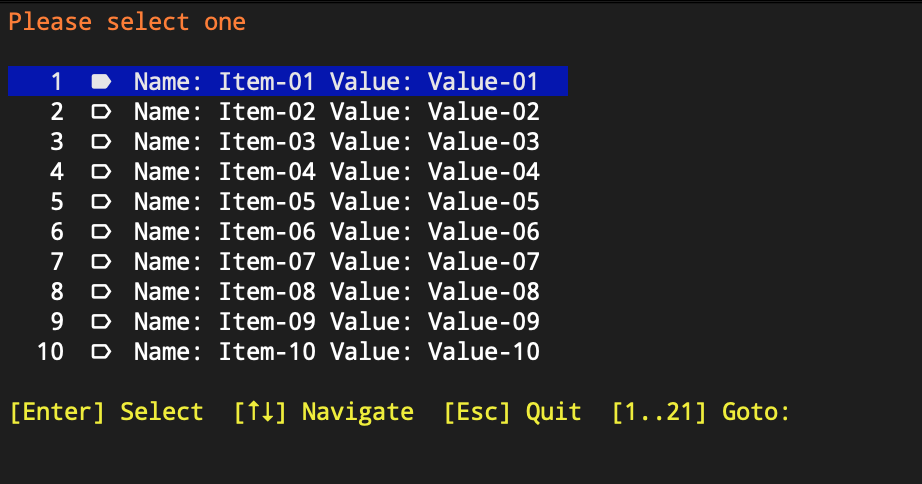
|
|
92
|
+
|
|
93
|
+
> And create beautiful menu-choose inputs
|
|
94
|
+
|
|
95
|
+
```python
|
|
96
|
+
class ChooseableItem:
|
|
97
|
+
def __init__(self, name: str, value: str):
|
|
98
|
+
self.name = name
|
|
99
|
+
self.value = value
|
|
100
|
+
|
|
101
|
+
def __str__(self):
|
|
102
|
+
return f"Name: {self.name} Value: {self.value}"
|
|
103
|
+
|
|
104
|
+
def __repr__(self):
|
|
105
|
+
return str(self)
|
|
106
|
+
|
|
107
|
+
|
|
108
|
+
if __name__ == "__main__":
|
|
109
|
+
quantity = 22
|
|
110
|
+
digits = len(str(quantity))
|
|
111
|
+
it = [ChooseableItem(f"Item-{n:>0{digits}}", f"Value-{n:>0{digits}}") for n in range(1, quantity)]
|
|
112
|
+
sel = mchoose(it, [n % 2 == 0 for n in range(1, quantity)])
|
|
113
|
+
print(str(sel))
|
|
114
|
+
```
|
|
115
|
+
|
|
116
|
+
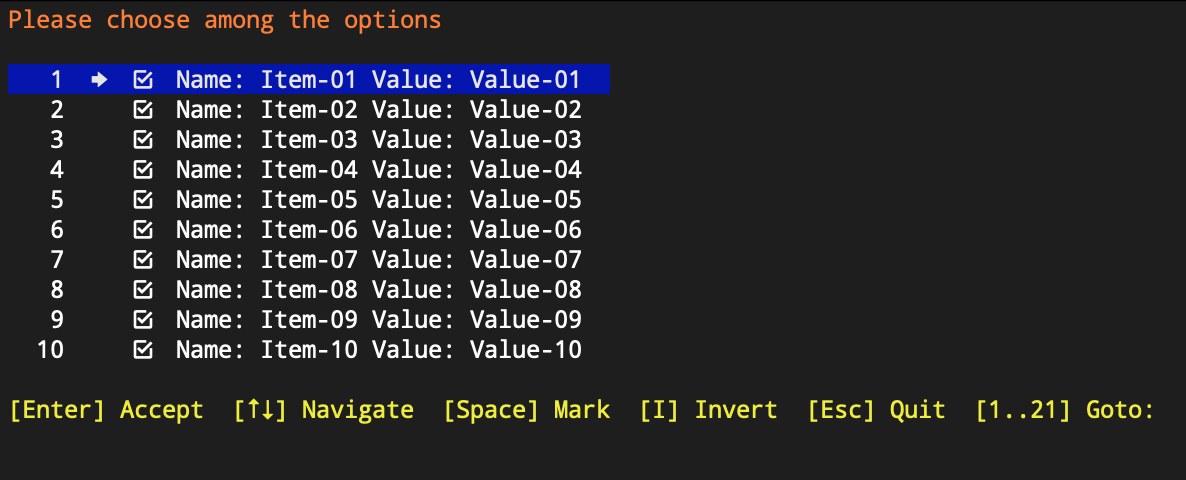
|
|
117
|
+
|
|
118
|
+
> And also, create beautiful form inputs
|
|
119
|
+
|
|
120
|
+
```python
|
|
121
|
+
from clitt.core.tui.minput.input_validator import InputValidator
|
|
122
|
+
from clitt.core.tui.minput.minput import MenuInput, minput
|
|
123
|
+
|
|
124
|
+
if __name__ == "__main__":
|
|
125
|
+
# fmt: off
|
|
126
|
+
form_fields = MenuInput.builder() \
|
|
127
|
+
.field() \
|
|
128
|
+
.label('letters') \
|
|
129
|
+
.validator(InputValidator.letters()) \
|
|
130
|
+
.build() \
|
|
131
|
+
.field() \
|
|
132
|
+
.label('word') \
|
|
133
|
+
.validator(InputValidator.words()) \
|
|
134
|
+
.build() \
|
|
135
|
+
.field() \
|
|
136
|
+
.label('number') \
|
|
137
|
+
.validator(InputValidator.numbers()) \
|
|
138
|
+
.min_max_length(1, 4) \
|
|
139
|
+
.build() \
|
|
140
|
+
.field() \
|
|
141
|
+
.label('masked') \
|
|
142
|
+
.itype('masked') \
|
|
143
|
+
.value('|##::##::## @@') \
|
|
144
|
+
.build() \
|
|
145
|
+
.field() \
|
|
146
|
+
.label('selectable') \
|
|
147
|
+
.itype('select') \
|
|
148
|
+
.value('one|two|three') \
|
|
149
|
+
.build() \
|
|
150
|
+
.field() \
|
|
151
|
+
.label('checkbox') \
|
|
152
|
+
.itype('checkbox') \
|
|
153
|
+
.build() \
|
|
154
|
+
.field() \
|
|
155
|
+
.label('password') \
|
|
156
|
+
.itype('password') \
|
|
157
|
+
.validator(InputValidator.anything()) \
|
|
158
|
+
.min_max_length(4, 8) \
|
|
159
|
+
.build() \
|
|
160
|
+
.field() \
|
|
161
|
+
.label('read-only') \
|
|
162
|
+
.access_type('read-only') \
|
|
163
|
+
.value('READ-ONLY') \
|
|
164
|
+
.build() \
|
|
165
|
+
.build()
|
|
166
|
+
# fmt: on
|
|
167
|
+
|
|
168
|
+
result = minput(form_fields)
|
|
169
|
+
print(result.__dict__ if result else "None")
|
|
170
|
+
```
|
|
171
|
+
|
|
172
|
+
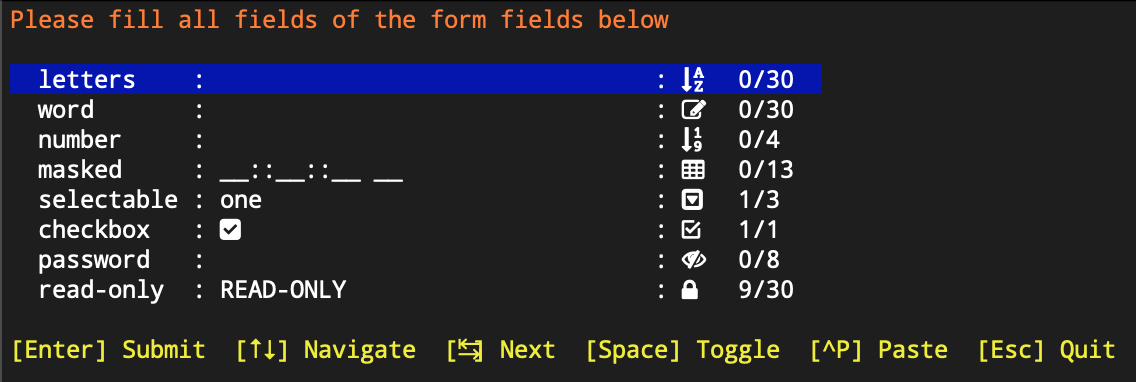
|
|
173
|
+
|
|
174
|
+
> Or even, create nice dashboards:
|
|
175
|
+
|
|
176
|
+
```python
|
|
177
|
+
if __name__ == "__main__":
|
|
178
|
+
# fmt: off
|
|
179
|
+
dashboard_items = MenuDashBoard.builder() \
|
|
180
|
+
.item() \
|
|
181
|
+
.icon(DashboardIcons.POWER) \
|
|
182
|
+
.tooltip('Do something') \
|
|
183
|
+
.on_trigger(lambda: print('Something')) \
|
|
184
|
+
.build() \
|
|
185
|
+
.item() \
|
|
186
|
+
.icon(DashboardIcons.MOVIE) \
|
|
187
|
+
.tooltip('Another something') \
|
|
188
|
+
.on_trigger(lambda: print('Another')) \
|
|
189
|
+
.build() \
|
|
190
|
+
.item() \
|
|
191
|
+
.icon(DashboardIcons.NOTIFICATION) \
|
|
192
|
+
.tooltip('Notify something') \
|
|
193
|
+
.on_trigger(lambda: print('Notification')) \
|
|
194
|
+
.build() \
|
|
195
|
+
.item() \
|
|
196
|
+
.icon(DashboardIcons.LIST) \
|
|
197
|
+
.tooltip('List everything') \
|
|
198
|
+
.on_trigger(lambda: print('List')) \
|
|
199
|
+
.build() \
|
|
200
|
+
.item() \
|
|
201
|
+
.icon(DashboardIcons.DATABASE) \
|
|
202
|
+
.tooltip('Database console') \
|
|
203
|
+
.on_trigger(lambda: print('Database')) \
|
|
204
|
+
.build() \
|
|
205
|
+
.item() \
|
|
206
|
+
.icon(DashboardIcons.EXIT) \
|
|
207
|
+
.tooltip('Exit application') \
|
|
208
|
+
.on_trigger(lambda: print('Exit')) \
|
|
209
|
+
.build() \
|
|
210
|
+
.build()
|
|
211
|
+
# fmt: on
|
|
212
|
+
|
|
213
|
+
result = mdashboard(dashboard_items)
|
|
214
|
+
```
|
|
215
|
+
|
|
216
|
+
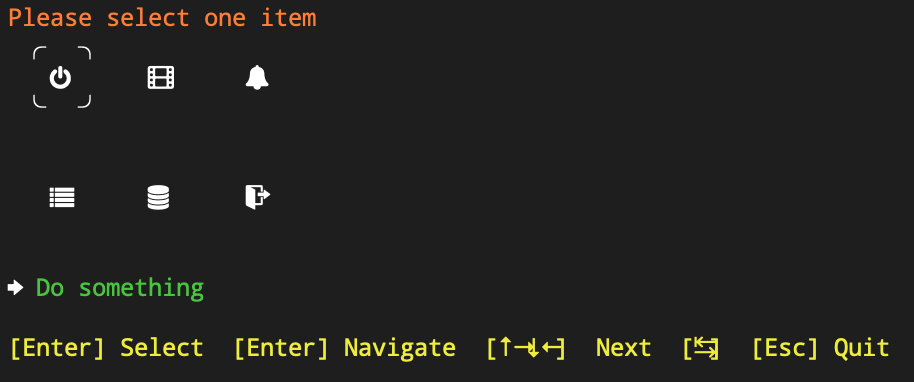
|
|
217
|
+
|
|
218
|
+
> And even more, create beautiful menus !
|
|
219
|
+
|
|
220
|
+
```bash
|
|
221
|
+
if __name__ == "__main__":
|
|
222
|
+
# fmt: off
|
|
223
|
+
main_menu = TUIMenuFactory \
|
|
224
|
+
.create_main_menu('TUI Main Menu', tooltip='Test Terminal UI Menus') \
|
|
225
|
+
.with_item('Sub-Menu-1') \
|
|
226
|
+
.with_action("DO IT 1", "Let's do it") \
|
|
227
|
+
.on_trigger(lambda x: print("ACTION 1", x)) \
|
|
228
|
+
.with_view("Just a View 1", "Show the view 1") \
|
|
229
|
+
.on_render("MY BEAUTIFUL VIEW 1") \
|
|
230
|
+
.with_action("Back", "Back to the previous menu") \
|
|
231
|
+
.on_trigger(TUIMenuUi.back) \
|
|
232
|
+
.then() \
|
|
233
|
+
.with_item('Sub-Menu-2') \
|
|
234
|
+
.with_action("DO IT 2", "Let's do it too") \
|
|
235
|
+
.on_trigger(lambda x: print("ACTION 2", x)) \
|
|
236
|
+
.with_view("Just a View 2", "Show the view 2") \
|
|
237
|
+
.on_render("MY BEAUTIFUL VIEW 2") \
|
|
238
|
+
.with_action("Back", "Back to the previous menu") \
|
|
239
|
+
.on_trigger(TUIMenuUi.back) \
|
|
240
|
+
.then() \
|
|
241
|
+
.then() \
|
|
242
|
+
.build()
|
|
243
|
+
# fmt: on
|
|
244
|
+
|
|
245
|
+
TUIMenuUi(main_menu, "TUI Main Menu").execute()
|
|
246
|
+
```
|
|
247
|
+
|
|
248
|
+
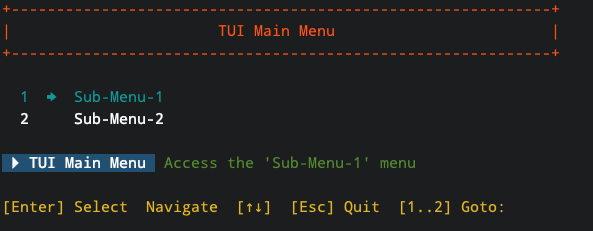
|
|
249
|
+
|
|
250
|
+
## PyPi Modules
|
|
251
|
+
|
|
252
|
+
- [A Pivotal Cloud Foundry](https://pypi.org/project/hspylib-cfman) application tool.
|
|
253
|
+
- [A CLI Terminal](https://pypi.org/project/hspylib-clitt) tools.
|
|
254
|
+
- [Datasource](https://pypi.org/project/hspylib-datasource) framework.
|
|
255
|
+
- [A Firebase](https://pypi.org/project/hspylib-firebase) integration tool.
|
|
256
|
+
- [A PyQt](https://pypi.org/project/hspylib-hqt) application framework.
|
|
257
|
+
- [Core](https://pypi.org/project/hspylib) HomeSetup library.
|
|
258
|
+
- [A Kafka manager](https://pypi.org/project/hspylib-kafman) application tool.
|
|
259
|
+
- [A System Settings](https://pypi.org/project/hspylib-kafman) application tool.
|
|
260
|
+
- [A Vault](https://pypi.org/project/hspylib-vault) application tool.
|
|
261
|
+
|
|
262
|
+
## Installation
|
|
263
|
+
|
|
264
|
+
### Requirements
|
|
265
|
+
|
|
266
|
+
#### Python
|
|
267
|
+
|
|
268
|
+
- Python 3.10 and higher
|
|
269
|
+
|
|
270
|
+
#### Operating Systems
|
|
271
|
+
|
|
272
|
+
- Darwin
|
|
273
|
+
+ High Sierra and higher
|
|
274
|
+
- Linux
|
|
275
|
+
+ Ubuntu 16 and higher
|
|
276
|
+
+ CentOS 7 and higher
|
|
277
|
+
+ Fedora 31 and higher
|
|
278
|
+
|
|
279
|
+
You may want to install HsPyLib on other OS's and it will probably work, but there are no guarantees that it
|
|
280
|
+
**WILL ACTUALLY WORK**.
|
|
281
|
+
|
|
282
|
+
#### Required software
|
|
283
|
+
|
|
284
|
+
The following software are required:
|
|
285
|
+
|
|
286
|
+
- Git (To clone the github repository)
|
|
287
|
+
- Gradle (To build the HsPyLib project)
|
|
288
|
+
|
|
289
|
+
There are some python dependencies, but they will be automatically downloaded when the build runs.
|
|
290
|
+
|
|
291
|
+
### PyPi
|
|
292
|
+
|
|
293
|
+
To install HsPyLib from PyPi issue the command:
|
|
294
|
+
|
|
295
|
+
`# python3 -m pip install hspylib`
|
|
296
|
+
|
|
297
|
+
To upgrade HsPyLib use the command:
|
|
298
|
+
|
|
299
|
+
`# python3 -m pip install hspylib --upgrade`
|
|
300
|
+
|
|
301
|
+
Additional modules that can also be installed:
|
|
302
|
+
|
|
303
|
+
- [CLItt](https://pypi.org/project/hspylib-clitt) : `# python3 -m pip install hspylib-clitt` to install HsPyLib CLI terminal tools.
|
|
304
|
+
- [Firebase](https://pypi.org/project/hspylib-firebase) : `# python3 -m pip install hspylib-firebase` to install HsPyLib Firebase application.
|
|
305
|
+
- [Vault](https://pypi.org/project/hspylib-vault) : `# python3 -m pip install hspylib-vault` to install HsPyLib Vault application.
|
|
306
|
+
- [CFMan](https://pypi.org/project/hspylib-cfman) : `# python3 -m pip install hspylib-cfman` to install CloudFoundry manager.
|
|
307
|
+
- [Kafman](https://pypi.org/project/hspylib-kafman) : `# python3 -m pip install hspylib-kafman` to install Kafka manager.
|
|
308
|
+
- [Datasource](https://pypi.org/project/hspylib-datasource) : `# python3 -m pip install hspylib-datasource` to install datasource helpers.
|
|
309
|
+
- [HQT](https://pypi.org/project/hspylib-hqt) : `# python3 -m pip install hspylib-hqt` to install HsPyLib PyQt framework.
|
|
310
|
+
|
|
311
|
+
### GitHub
|
|
312
|
+
|
|
313
|
+
To clone HsPyLib into your local machine type the command:
|
|
314
|
+
|
|
315
|
+
`# git clone https://github.com/yorevs/hspylib.git`
|
|
316
|
+
|
|
317
|
+
## Documentation
|
|
318
|
+
|
|
319
|
+
The API documentation can be found [here](docs/api/index.html)
|
|
320
|
+
|
|
321
|
+
## Support
|
|
322
|
+
|
|
323
|
+
> Your support and contributions are greatly appreciated in helping us improve and enhance HomeSetup. Together, we can
|
|
324
|
+
make it even better!
|
|
325
|
+
|
|
326
|
+
You can support HomeSetup by [donating](https://www.paypal.com/cgi-bin/webscr?cmd=_s-xclick&hosted_button_id=J5CDEFLF6M3H4)
|
|
327
|
+
or contributing code. Feel free to contact me for further details. When making code contributions, please make sure to
|
|
328
|
+
review our [guidelines](docs/CONTRIBUTING.md) and adhere to our [code of conduct](docs/CODE_OF_CONDUCT.md).
|
|
329
|
+
|
|
330
|
+
[](https://www.buymeacoffee.com/yorevs)
|
|
331
|
+
|
|
332
|
+
You can also sponsor it by using our [GitHub Sponsors](https://github.com/sponsors/yorevs) page.
|
|
333
|
+
|
|
334
|
+
This project is already supported by:
|
|
335
|
+
|
|
336
|
+
<a href="https://www.jetbrains.com/community/opensource/?utm_campaign=opensource&utm_content=approved&utm_medium=email&utm_source=newsletter&utm_term=jblogo#support">
|
|
337
|
+
<img src="https://resources.jetbrains.com/storage/products/company/brand/logos/jb_beam.png" width="120" height="120">
|
|
338
|
+
</a>
|
|
339
|
+
|
|
340
|
+
Thank you <3 !!
|
|
341
|
+
|
|
342
|
+
## Known Issues
|
|
343
|
+
|
|
344
|
+
- [In-Progress] We are aware that there is a problems when using python@3.12 and we are already working on a fix.
|
|
345
|
+
|
|
346
|
+
## Contacts
|
|
347
|
+
|
|
348
|
+
- Documentation: [API](docs/api/index.html)
|
|
349
|
+
- License: [MIT](LICENSE.md)
|
|
350
|
+
- Issue tracker: [HSPyLib-Issues](https://github.com/yorevs/hspylib/issues)
|
|
351
|
+
- Official chat: [HSPyLib](https://gitter.im/hspylib/community)
|
|
352
|
+
- Contact: [yorevs](https://www.reddit.com/user/yorevs)
|
|
353
|
+
- Mailto: [yorevs](mailto:yorevs@hotmail.com)
|
|
@@ -0,0 +1,321 @@
|
|
|
1
|
+
<img src="https://iili.io/HYBJFA7.png" width="64" height="64" align="right" />
|
|
2
|
+
|
|
3
|
+
# HomeSetup Python Library
|
|
4
|
+
>
|
|
5
|
+
> Because your Python code is not JUST a script !
|
|
6
|
+
|
|
7
|
+
[](https://pypi.org/project/hspylib)
|
|
8
|
+
[](https://gitter.im/hspylib/community)
|
|
9
|
+
[](https://www.paypal.com/cgi-bin/webscr?cmd=_s-xclick&hosted_button_id=J5CDEFLF6M3H4)
|
|
10
|
+
[](LICENSE.md)
|
|
11
|
+
[](docs/CHANGELOG.md#unreleased)
|
|
12
|
+
[](https://github.com/yorevs/hspylib/actions/workflows/build-and-test.yml)
|
|
13
|
+
|
|
14
|
+
HsPyLib is not just a Python library; it's a gateway to elevating your programming experience to new heights. Built on
|
|
15
|
+
established principles like **SOLID**, **DRY** (Don't Repeat Yourself), **KISS** (Keep It Simple, Stupid), and **YAGNI**
|
|
16
|
+
(You Ain’t Gonna Need It), HsPyLib offers a wealth of frameworks and features. It empowers you to craft sophisticated
|
|
17
|
+
Python3 applications, adhering to the philosophy that code should not merely be a simple script - it should be a part
|
|
18
|
+
of the 'PYCSNBASS' (Python Code Should Not Be A Simple Script) mindset.
|
|
19
|
+
|
|
20
|
+
> This project is a part of the [HomeSetup](https://github.com/yorevs/homesetup) project.
|
|
21
|
+
|
|
22
|
+
## Key Features
|
|
23
|
+
|
|
24
|
+
- Seamless installation process.
|
|
25
|
+
- Application manager offering a helpful scaffold for Python applications.
|
|
26
|
+
- Widgets manager for running both 'built-in' and custom Python widgets.
|
|
27
|
+
- Improved TUI (Text User Interface) helpers and input methods to enhance your User Experience with terminal applications.
|
|
28
|
+
- CRUD (Create, Read, Update, Delete) framework aiding with databases, repositories, and services.
|
|
29
|
+
- HTTP request helpers for simplified communication.
|
|
30
|
+
- Support for enabling Properties and AppConfigs using popular extensions like .properties, toml, yml, and more.
|
|
31
|
+
- Code rigorously tested and consistently adhering to Pylint standards.
|
|
32
|
+
- Utilizes the Gradle build system with numerous extensions.
|
|
33
|
+
- Diverse set of demos to facilitate a deeper understanding of the library.
|
|
34
|
+
- AI model integrations (currently supporting OpenAI).
|
|
35
|
+
|
|
36
|
+
> Create beautiful menu-select inputs
|
|
37
|
+
|
|
38
|
+
```python
|
|
39
|
+
class SelectableItem:
|
|
40
|
+
def __init__(self, name: str, value: str):
|
|
41
|
+
self.name = name
|
|
42
|
+
self.value = value
|
|
43
|
+
|
|
44
|
+
def __str__(self):
|
|
45
|
+
return f"Name: {self.name} Value: {self.value}"
|
|
46
|
+
|
|
47
|
+
def __repr__(self):
|
|
48
|
+
return str(self)
|
|
49
|
+
|
|
50
|
+
|
|
51
|
+
if __name__ == "__main__":
|
|
52
|
+
quantity = 22
|
|
53
|
+
digits = len(str(quantity))
|
|
54
|
+
it = [SelectableItem(f"Item-{n:>0{digits}}", f"Value-{n:>0{digits}}") for n in range(1, quantity)]
|
|
55
|
+
sel = mselect(it)
|
|
56
|
+
print(str(sel))
|
|
57
|
+
```
|
|
58
|
+
|
|
59
|
+

|
|
60
|
+
|
|
61
|
+
> And create beautiful menu-choose inputs
|
|
62
|
+
|
|
63
|
+
```python
|
|
64
|
+
class ChooseableItem:
|
|
65
|
+
def __init__(self, name: str, value: str):
|
|
66
|
+
self.name = name
|
|
67
|
+
self.value = value
|
|
68
|
+
|
|
69
|
+
def __str__(self):
|
|
70
|
+
return f"Name: {self.name} Value: {self.value}"
|
|
71
|
+
|
|
72
|
+
def __repr__(self):
|
|
73
|
+
return str(self)
|
|
74
|
+
|
|
75
|
+
|
|
76
|
+
if __name__ == "__main__":
|
|
77
|
+
quantity = 22
|
|
78
|
+
digits = len(str(quantity))
|
|
79
|
+
it = [ChooseableItem(f"Item-{n:>0{digits}}", f"Value-{n:>0{digits}}") for n in range(1, quantity)]
|
|
80
|
+
sel = mchoose(it, [n % 2 == 0 for n in range(1, quantity)])
|
|
81
|
+
print(str(sel))
|
|
82
|
+
```
|
|
83
|
+
|
|
84
|
+

|
|
85
|
+
|
|
86
|
+
> And also, create beautiful form inputs
|
|
87
|
+
|
|
88
|
+
```python
|
|
89
|
+
from clitt.core.tui.minput.input_validator import InputValidator
|
|
90
|
+
from clitt.core.tui.minput.minput import MenuInput, minput
|
|
91
|
+
|
|
92
|
+
if __name__ == "__main__":
|
|
93
|
+
# fmt: off
|
|
94
|
+
form_fields = MenuInput.builder() \
|
|
95
|
+
.field() \
|
|
96
|
+
.label('letters') \
|
|
97
|
+
.validator(InputValidator.letters()) \
|
|
98
|
+
.build() \
|
|
99
|
+
.field() \
|
|
100
|
+
.label('word') \
|
|
101
|
+
.validator(InputValidator.words()) \
|
|
102
|
+
.build() \
|
|
103
|
+
.field() \
|
|
104
|
+
.label('number') \
|
|
105
|
+
.validator(InputValidator.numbers()) \
|
|
106
|
+
.min_max_length(1, 4) \
|
|
107
|
+
.build() \
|
|
108
|
+
.field() \
|
|
109
|
+
.label('masked') \
|
|
110
|
+
.itype('masked') \
|
|
111
|
+
.value('|##::##::## @@') \
|
|
112
|
+
.build() \
|
|
113
|
+
.field() \
|
|
114
|
+
.label('selectable') \
|
|
115
|
+
.itype('select') \
|
|
116
|
+
.value('one|two|three') \
|
|
117
|
+
.build() \
|
|
118
|
+
.field() \
|
|
119
|
+
.label('checkbox') \
|
|
120
|
+
.itype('checkbox') \
|
|
121
|
+
.build() \
|
|
122
|
+
.field() \
|
|
123
|
+
.label('password') \
|
|
124
|
+
.itype('password') \
|
|
125
|
+
.validator(InputValidator.anything()) \
|
|
126
|
+
.min_max_length(4, 8) \
|
|
127
|
+
.build() \
|
|
128
|
+
.field() \
|
|
129
|
+
.label('read-only') \
|
|
130
|
+
.access_type('read-only') \
|
|
131
|
+
.value('READ-ONLY') \
|
|
132
|
+
.build() \
|
|
133
|
+
.build()
|
|
134
|
+
# fmt: on
|
|
135
|
+
|
|
136
|
+
result = minput(form_fields)
|
|
137
|
+
print(result.__dict__ if result else "None")
|
|
138
|
+
```
|
|
139
|
+
|
|
140
|
+

|
|
141
|
+
|
|
142
|
+
> Or even, create nice dashboards:
|
|
143
|
+
|
|
144
|
+
```python
|
|
145
|
+
if __name__ == "__main__":
|
|
146
|
+
# fmt: off
|
|
147
|
+
dashboard_items = MenuDashBoard.builder() \
|
|
148
|
+
.item() \
|
|
149
|
+
.icon(DashboardIcons.POWER) \
|
|
150
|
+
.tooltip('Do something') \
|
|
151
|
+
.on_trigger(lambda: print('Something')) \
|
|
152
|
+
.build() \
|
|
153
|
+
.item() \
|
|
154
|
+
.icon(DashboardIcons.MOVIE) \
|
|
155
|
+
.tooltip('Another something') \
|
|
156
|
+
.on_trigger(lambda: print('Another')) \
|
|
157
|
+
.build() \
|
|
158
|
+
.item() \
|
|
159
|
+
.icon(DashboardIcons.NOTIFICATION) \
|
|
160
|
+
.tooltip('Notify something') \
|
|
161
|
+
.on_trigger(lambda: print('Notification')) \
|
|
162
|
+
.build() \
|
|
163
|
+
.item() \
|
|
164
|
+
.icon(DashboardIcons.LIST) \
|
|
165
|
+
.tooltip('List everything') \
|
|
166
|
+
.on_trigger(lambda: print('List')) \
|
|
167
|
+
.build() \
|
|
168
|
+
.item() \
|
|
169
|
+
.icon(DashboardIcons.DATABASE) \
|
|
170
|
+
.tooltip('Database console') \
|
|
171
|
+
.on_trigger(lambda: print('Database')) \
|
|
172
|
+
.build() \
|
|
173
|
+
.item() \
|
|
174
|
+
.icon(DashboardIcons.EXIT) \
|
|
175
|
+
.tooltip('Exit application') \
|
|
176
|
+
.on_trigger(lambda: print('Exit')) \
|
|
177
|
+
.build() \
|
|
178
|
+
.build()
|
|
179
|
+
# fmt: on
|
|
180
|
+
|
|
181
|
+
result = mdashboard(dashboard_items)
|
|
182
|
+
```
|
|
183
|
+
|
|
184
|
+

|
|
185
|
+
|
|
186
|
+
> And even more, create beautiful menus !
|
|
187
|
+
|
|
188
|
+
```bash
|
|
189
|
+
if __name__ == "__main__":
|
|
190
|
+
# fmt: off
|
|
191
|
+
main_menu = TUIMenuFactory \
|
|
192
|
+
.create_main_menu('TUI Main Menu', tooltip='Test Terminal UI Menus') \
|
|
193
|
+
.with_item('Sub-Menu-1') \
|
|
194
|
+
.with_action("DO IT 1", "Let's do it") \
|
|
195
|
+
.on_trigger(lambda x: print("ACTION 1", x)) \
|
|
196
|
+
.with_view("Just a View 1", "Show the view 1") \
|
|
197
|
+
.on_render("MY BEAUTIFUL VIEW 1") \
|
|
198
|
+
.with_action("Back", "Back to the previous menu") \
|
|
199
|
+
.on_trigger(TUIMenuUi.back) \
|
|
200
|
+
.then() \
|
|
201
|
+
.with_item('Sub-Menu-2') \
|
|
202
|
+
.with_action("DO IT 2", "Let's do it too") \
|
|
203
|
+
.on_trigger(lambda x: print("ACTION 2", x)) \
|
|
204
|
+
.with_view("Just a View 2", "Show the view 2") \
|
|
205
|
+
.on_render("MY BEAUTIFUL VIEW 2") \
|
|
206
|
+
.with_action("Back", "Back to the previous menu") \
|
|
207
|
+
.on_trigger(TUIMenuUi.back) \
|
|
208
|
+
.then() \
|
|
209
|
+
.then() \
|
|
210
|
+
.build()
|
|
211
|
+
# fmt: on
|
|
212
|
+
|
|
213
|
+
TUIMenuUi(main_menu, "TUI Main Menu").execute()
|
|
214
|
+
```
|
|
215
|
+
|
|
216
|
+

|
|
217
|
+
|
|
218
|
+
## PyPi Modules
|
|
219
|
+
|
|
220
|
+
- [A Pivotal Cloud Foundry](https://pypi.org/project/hspylib-cfman) application tool.
|
|
221
|
+
- [A CLI Terminal](https://pypi.org/project/hspylib-clitt) tools.
|
|
222
|
+
- [Datasource](https://pypi.org/project/hspylib-datasource) framework.
|
|
223
|
+
- [A Firebase](https://pypi.org/project/hspylib-firebase) integration tool.
|
|
224
|
+
- [A PyQt](https://pypi.org/project/hspylib-hqt) application framework.
|
|
225
|
+
- [Core](https://pypi.org/project/hspylib) HomeSetup library.
|
|
226
|
+
- [A Kafka manager](https://pypi.org/project/hspylib-kafman) application tool.
|
|
227
|
+
- [A System Settings](https://pypi.org/project/hspylib-kafman) application tool.
|
|
228
|
+
- [A Vault](https://pypi.org/project/hspylib-vault) application tool.
|
|
229
|
+
|
|
230
|
+
## Installation
|
|
231
|
+
|
|
232
|
+
### Requirements
|
|
233
|
+
|
|
234
|
+
#### Python
|
|
235
|
+
|
|
236
|
+
- Python 3.10 and higher
|
|
237
|
+
|
|
238
|
+
#### Operating Systems
|
|
239
|
+
|
|
240
|
+
- Darwin
|
|
241
|
+
+ High Sierra and higher
|
|
242
|
+
- Linux
|
|
243
|
+
+ Ubuntu 16 and higher
|
|
244
|
+
+ CentOS 7 and higher
|
|
245
|
+
+ Fedora 31 and higher
|
|
246
|
+
|
|
247
|
+
You may want to install HsPyLib on other OS's and it will probably work, but there are no guarantees that it
|
|
248
|
+
**WILL ACTUALLY WORK**.
|
|
249
|
+
|
|
250
|
+
#### Required software
|
|
251
|
+
|
|
252
|
+
The following software are required:
|
|
253
|
+
|
|
254
|
+
- Git (To clone the github repository)
|
|
255
|
+
- Gradle (To build the HsPyLib project)
|
|
256
|
+
|
|
257
|
+
There are some python dependencies, but they will be automatically downloaded when the build runs.
|
|
258
|
+
|
|
259
|
+
### PyPi
|
|
260
|
+
|
|
261
|
+
To install HsPyLib from PyPi issue the command:
|
|
262
|
+
|
|
263
|
+
`# python3 -m pip install hspylib`
|
|
264
|
+
|
|
265
|
+
To upgrade HsPyLib use the command:
|
|
266
|
+
|
|
267
|
+
`# python3 -m pip install hspylib --upgrade`
|
|
268
|
+
|
|
269
|
+
Additional modules that can also be installed:
|
|
270
|
+
|
|
271
|
+
- [CLItt](https://pypi.org/project/hspylib-clitt) : `# python3 -m pip install hspylib-clitt` to install HsPyLib CLI terminal tools.
|
|
272
|
+
- [Firebase](https://pypi.org/project/hspylib-firebase) : `# python3 -m pip install hspylib-firebase` to install HsPyLib Firebase application.
|
|
273
|
+
- [Vault](https://pypi.org/project/hspylib-vault) : `# python3 -m pip install hspylib-vault` to install HsPyLib Vault application.
|
|
274
|
+
- [CFMan](https://pypi.org/project/hspylib-cfman) : `# python3 -m pip install hspylib-cfman` to install CloudFoundry manager.
|
|
275
|
+
- [Kafman](https://pypi.org/project/hspylib-kafman) : `# python3 -m pip install hspylib-kafman` to install Kafka manager.
|
|
276
|
+
- [Datasource](https://pypi.org/project/hspylib-datasource) : `# python3 -m pip install hspylib-datasource` to install datasource helpers.
|
|
277
|
+
- [HQT](https://pypi.org/project/hspylib-hqt) : `# python3 -m pip install hspylib-hqt` to install HsPyLib PyQt framework.
|
|
278
|
+
|
|
279
|
+
### GitHub
|
|
280
|
+
|
|
281
|
+
To clone HsPyLib into your local machine type the command:
|
|
282
|
+
|
|
283
|
+
`# git clone https://github.com/yorevs/hspylib.git`
|
|
284
|
+
|
|
285
|
+
## Documentation
|
|
286
|
+
|
|
287
|
+
The API documentation can be found [here](docs/api/index.html)
|
|
288
|
+
|
|
289
|
+
## Support
|
|
290
|
+
|
|
291
|
+
> Your support and contributions are greatly appreciated in helping us improve and enhance HomeSetup. Together, we can
|
|
292
|
+
make it even better!
|
|
293
|
+
|
|
294
|
+
You can support HomeSetup by [donating](https://www.paypal.com/cgi-bin/webscr?cmd=_s-xclick&hosted_button_id=J5CDEFLF6M3H4)
|
|
295
|
+
or contributing code. Feel free to contact me for further details. When making code contributions, please make sure to
|
|
296
|
+
review our [guidelines](docs/CONTRIBUTING.md) and adhere to our [code of conduct](docs/CODE_OF_CONDUCT.md).
|
|
297
|
+
|
|
298
|
+
[](https://www.buymeacoffee.com/yorevs)
|
|
299
|
+
|
|
300
|
+
You can also sponsor it by using our [GitHub Sponsors](https://github.com/sponsors/yorevs) page.
|
|
301
|
+
|
|
302
|
+
This project is already supported by:
|
|
303
|
+
|
|
304
|
+
<a href="https://www.jetbrains.com/community/opensource/?utm_campaign=opensource&utm_content=approved&utm_medium=email&utm_source=newsletter&utm_term=jblogo#support">
|
|
305
|
+
<img src="https://resources.jetbrains.com/storage/products/company/brand/logos/jb_beam.png" width="120" height="120">
|
|
306
|
+
</a>
|
|
307
|
+
|
|
308
|
+
Thank you <3 !!
|
|
309
|
+
|
|
310
|
+
## Known Issues
|
|
311
|
+
|
|
312
|
+
- [In-Progress] We are aware that there is a problems when using python@3.12 and we are already working on a fix.
|
|
313
|
+
|
|
314
|
+
## Contacts
|
|
315
|
+
|
|
316
|
+
- Documentation: [API](docs/api/index.html)
|
|
317
|
+
- License: [MIT](LICENSE.md)
|
|
318
|
+
- Issue tracker: [HSPyLib-Issues](https://github.com/yorevs/hspylib/issues)
|
|
319
|
+
- Official chat: [HSPyLib](https://gitter.im/hspylib/community)
|
|
320
|
+
- Contact: [yorevs](https://www.reddit.com/user/yorevs)
|
|
321
|
+
- Mailto: [yorevs](mailto:yorevs@hotmail.com)
|
|
@@ -0,0 +1 @@
|
|
|
1
|
+
0.9.123
|