homebuddy 0.1.0__tar.gz
This diff represents the content of publicly available package versions that have been released to one of the supported registries. The information contained in this diff is provided for informational purposes only and reflects changes between package versions as they appear in their respective public registries.
- homebuddy-0.1.0/.gitignore +137 -0
- homebuddy-0.1.0/LICENSE +21 -0
- homebuddy-0.1.0/PKG-INFO +253 -0
- homebuddy-0.1.0/README.md +221 -0
- homebuddy-0.1.0/homebuddy/__init__.py +5 -0
- homebuddy-0.1.0/homebuddy/__main__.py +4 -0
- homebuddy-0.1.0/homebuddy/config.py +207 -0
- homebuddy-0.1.0/homebuddy/conflicts.py +43 -0
- homebuddy-0.1.0/homebuddy/detector.py +68 -0
- homebuddy-0.1.0/homebuddy/detectors/__init__.py +59 -0
- homebuddy-0.1.0/homebuddy/detectors/level.py +201 -0
- homebuddy-0.1.0/homebuddy/detectors/pulse.py +130 -0
- homebuddy-0.1.0/homebuddy/detectors/ramp.py +57 -0
- homebuddy-0.1.0/homebuddy/detectors/state.py +75 -0
- homebuddy-0.1.0/homebuddy/detectors/threshold.py +53 -0
- homebuddy-0.1.0/homebuddy/fields.py +74 -0
- homebuddy-0.1.0/homebuddy/homeassistant.py +82 -0
- homebuddy-0.1.0/homebuddy/model.py +76 -0
- homebuddy-0.1.0/homebuddy/result.py +147 -0
- homebuddy-0.1.0/homebuddy/search.py +155 -0
- homebuddy-0.1.0/homebuddy/ui/__init__.py +25 -0
- homebuddy-0.1.0/homebuddy/ui/app.py +301 -0
- homebuddy-0.1.0/homebuddy/ui/card.py +117 -0
- homebuddy-0.1.0/homebuddy/ui/chart.py +332 -0
- homebuddy-0.1.0/homebuddy/ui/debug.py +22 -0
- homebuddy-0.1.0/homebuddy/ui/events.py +113 -0
- homebuddy-0.1.0/homebuddy/ui/names.py +18 -0
- homebuddy-0.1.0/homebuddy/ui/static/icon-192.png +0 -0
- homebuddy-0.1.0/homebuddy/ui/static/icon-512.png +0 -0
- homebuddy-0.1.0/homebuddy/ui/static/manifest.webmanifest +13 -0
- homebuddy-0.1.0/homebuddy/ui/theme.py +109 -0
- homebuddy-0.1.0/pyproject.toml +103 -0
- homebuddy-0.1.0/scripts/test.sh +8 -0
- homebuddy-0.1.0/tests/__init__.py +1 -0
- homebuddy-0.1.0/tests/conftest.py +157 -0
- homebuddy-0.1.0/tests/test_config.py +420 -0
- homebuddy-0.1.0/tests/test_detectors.py +196 -0
- homebuddy-0.1.0/tests/test_homeassistant.py +134 -0
- homebuddy-0.1.0/tests/test_layers.py +140 -0
- homebuddy-0.1.0/tests/test_level.py +186 -0
- homebuddy-0.1.0/tests/test_pulse.py +110 -0
- homebuddy-0.1.0/tests/test_ramp.py +74 -0
- homebuddy-0.1.0/tests/test_search.py +416 -0
- homebuddy-0.1.0/tests/test_state.py +154 -0
- homebuddy-0.1.0/tests/test_threshold.py +122 -0
- homebuddy-0.1.0/tests/test_ui.py +948 -0
|
@@ -0,0 +1,137 @@
|
|
|
1
|
+
# Byte-compiled / optimized / DLL files
|
|
2
|
+
__pycache__/
|
|
3
|
+
*.py[cod]
|
|
4
|
+
*$py.class
|
|
5
|
+
|
|
6
|
+
# C extensions
|
|
7
|
+
*.so
|
|
8
|
+
|
|
9
|
+
# Distribution / packaging
|
|
10
|
+
.Python
|
|
11
|
+
build/
|
|
12
|
+
develop-eggs/
|
|
13
|
+
dist/
|
|
14
|
+
downloads/
|
|
15
|
+
eggs/
|
|
16
|
+
.eggs/
|
|
17
|
+
lib/
|
|
18
|
+
lib64/
|
|
19
|
+
parts/
|
|
20
|
+
sdist/
|
|
21
|
+
var/
|
|
22
|
+
wheels/
|
|
23
|
+
pip-wheel-metadata/
|
|
24
|
+
share/python-wheels/
|
|
25
|
+
*.egg-info/
|
|
26
|
+
.installed.cfg
|
|
27
|
+
*.egg
|
|
28
|
+
MANIFEST
|
|
29
|
+
|
|
30
|
+
# PyInstaller
|
|
31
|
+
*.manifest
|
|
32
|
+
*.spec
|
|
33
|
+
|
|
34
|
+
# Installer logs
|
|
35
|
+
pip-log.txt
|
|
36
|
+
pip-delete-this-directory.txt
|
|
37
|
+
|
|
38
|
+
# Unit test / coverage reports
|
|
39
|
+
htmlcov/
|
|
40
|
+
.tox/
|
|
41
|
+
.nox/
|
|
42
|
+
.coverage
|
|
43
|
+
.coverage.*
|
|
44
|
+
.cache
|
|
45
|
+
nosetests.xml
|
|
46
|
+
coverage.xml
|
|
47
|
+
*.cover
|
|
48
|
+
*.py,cover
|
|
49
|
+
.hypothesis/
|
|
50
|
+
.pytest_cache/
|
|
51
|
+
|
|
52
|
+
# Translations
|
|
53
|
+
*.mo
|
|
54
|
+
*.pot
|
|
55
|
+
|
|
56
|
+
# Django stuff:
|
|
57
|
+
*.log
|
|
58
|
+
local_settings.py
|
|
59
|
+
db.sqlite3
|
|
60
|
+
db.sqlite3-journal
|
|
61
|
+
|
|
62
|
+
# Flask stuff:
|
|
63
|
+
instance/
|
|
64
|
+
.webassets-cache
|
|
65
|
+
|
|
66
|
+
# Scrapy stuff:
|
|
67
|
+
.scrapy
|
|
68
|
+
|
|
69
|
+
# Sphinx documentation
|
|
70
|
+
docs/_build/
|
|
71
|
+
|
|
72
|
+
# PyBuilder
|
|
73
|
+
target/
|
|
74
|
+
|
|
75
|
+
# Jupyter Notebook
|
|
76
|
+
.ipynb_checkpoints
|
|
77
|
+
|
|
78
|
+
# IPython
|
|
79
|
+
profile_default/
|
|
80
|
+
ipython_config.py
|
|
81
|
+
|
|
82
|
+
# pipenv
|
|
83
|
+
Pipfile.lock
|
|
84
|
+
|
|
85
|
+
# PEP 582
|
|
86
|
+
__pypackages__/
|
|
87
|
+
|
|
88
|
+
# Celery stuff
|
|
89
|
+
celerybeat-schedule
|
|
90
|
+
celerybeat.pid
|
|
91
|
+
|
|
92
|
+
# SageMath parsed files
|
|
93
|
+
*.sage.py
|
|
94
|
+
|
|
95
|
+
# Environments
|
|
96
|
+
.env
|
|
97
|
+
.venv
|
|
98
|
+
env/
|
|
99
|
+
venv/
|
|
100
|
+
ENV/
|
|
101
|
+
env.bak/
|
|
102
|
+
venv.bak/
|
|
103
|
+
|
|
104
|
+
# Spyder project settings
|
|
105
|
+
.spyderproject
|
|
106
|
+
.spyproject
|
|
107
|
+
|
|
108
|
+
# Rope project settings
|
|
109
|
+
.ropeproject
|
|
110
|
+
|
|
111
|
+
# mkdocs documentation
|
|
112
|
+
/site
|
|
113
|
+
|
|
114
|
+
# mypy
|
|
115
|
+
.mypy_cache/
|
|
116
|
+
.dmypy.json
|
|
117
|
+
dmypy.json
|
|
118
|
+
|
|
119
|
+
# Pyre type checker
|
|
120
|
+
.pyre/
|
|
121
|
+
|
|
122
|
+
# IDEs
|
|
123
|
+
.idea/
|
|
124
|
+
.vscode/
|
|
125
|
+
*.swp
|
|
126
|
+
*.swo
|
|
127
|
+
*~
|
|
128
|
+
.DS_Store
|
|
129
|
+
|
|
130
|
+
# Local configuration
|
|
131
|
+
homebuddy.yml
|
|
132
|
+
|
|
133
|
+
# Local work items
|
|
134
|
+
plans/*
|
|
135
|
+
|
|
136
|
+
# Local settings of Claude Code
|
|
137
|
+
.claude/settings.local.json
|
homebuddy-0.1.0/LICENSE
ADDED
|
@@ -0,0 +1,21 @@
|
|
|
1
|
+
MIT License
|
|
2
|
+
|
|
3
|
+
Copyright (c) 2026 Rato
|
|
4
|
+
|
|
5
|
+
Permission is hereby granted, free of charge, to any person obtaining a copy
|
|
6
|
+
of this software and associated documentation files (the "Software"), to deal
|
|
7
|
+
in the Software without restriction, including without limitation the rights
|
|
8
|
+
to use, copy, modify, merge, publish, distribute, sublicense, and/or sell
|
|
9
|
+
copies of the Software, and to permit persons to whom the Software is
|
|
10
|
+
furnished to do so, subject to the following conditions:
|
|
11
|
+
|
|
12
|
+
The above copyright notice and this permission notice shall be included in all
|
|
13
|
+
copies or substantial portions of the Software.
|
|
14
|
+
|
|
15
|
+
THE SOFTWARE IS PROVIDED "AS IS", WITHOUT WARRANTY OF ANY KIND, EXPRESS OR
|
|
16
|
+
IMPLIED, INCLUDING BUT NOT LIMITED TO THE WARRANTIES OF MERCHANTABILITY,
|
|
17
|
+
FITNESS FOR A PARTICULAR PURPOSE AND NONINFRINGEMENT. IN NO EVENT SHALL THE
|
|
18
|
+
AUTHORS OR COPYRIGHT HOLDERS BE LIABLE FOR ANY CLAIM, DAMAGES OR OTHER
|
|
19
|
+
LIABILITY, WHETHER IN AN ACTION OF CONTRACT, TORT OR OTHERWISE, ARISING FROM,
|
|
20
|
+
OUT OF OR IN CONNECTION WITH THE SOFTWARE OR THE USE OR OTHER DEALINGS IN THE
|
|
21
|
+
SOFTWARE.
|
homebuddy-0.1.0/PKG-INFO
ADDED
|
@@ -0,0 +1,253 @@
|
|
|
1
|
+
Metadata-Version: 2.5
|
|
2
|
+
Name: homebuddy
|
|
3
|
+
Version: 0.1.0
|
|
4
|
+
Summary: A companion for Home Assistant: finds device events in the sensor history
|
|
5
|
+
Project-URL: Repository, https://github.com/ratoaq2/homebuddy
|
|
6
|
+
Author: Rato
|
|
7
|
+
License-Expression: MIT
|
|
8
|
+
License-File: LICENSE
|
|
9
|
+
Keywords: charging,energy,ev,home-assistant,power,session
|
|
10
|
+
Classifier: Development Status :: 3 - Alpha
|
|
11
|
+
Classifier: Environment :: Web Environment
|
|
12
|
+
Classifier: Intended Audience :: End Users/Desktop
|
|
13
|
+
Classifier: Operating System :: OS Independent
|
|
14
|
+
Classifier: Programming Language :: Python
|
|
15
|
+
Classifier: Programming Language :: Python :: 3
|
|
16
|
+
Classifier: Programming Language :: Python :: 3 :: Only
|
|
17
|
+
Classifier: Programming Language :: Python :: 3.10
|
|
18
|
+
Classifier: Programming Language :: Python :: 3.11
|
|
19
|
+
Classifier: Programming Language :: Python :: 3.12
|
|
20
|
+
Classifier: Programming Language :: Python :: 3.13
|
|
21
|
+
Classifier: Programming Language :: Python :: 3.14
|
|
22
|
+
Classifier: Topic :: Home Automation
|
|
23
|
+
Requires-Python: >=3.10
|
|
24
|
+
Requires-Dist: nicegui>=3.17.1
|
|
25
|
+
Requires-Dist: platformdirs>=4.12.0
|
|
26
|
+
Requires-Dist: python-dotenv>=1.2.3
|
|
27
|
+
Requires-Dist: pyyaml>=6.0.3
|
|
28
|
+
Requires-Dist: tzdata>=2026.4
|
|
29
|
+
Provides-Extra: desktop
|
|
30
|
+
Requires-Dist: pywebview>=6.2.1; extra == 'desktop'
|
|
31
|
+
Description-Content-Type: text/markdown
|
|
32
|
+
|
|
33
|
+
<h2 align="center">
|
|
34
|
+
<picture>
|
|
35
|
+
<source media="(prefers-color-scheme: dark)" srcset="https://raw.githubusercontent.com/ratoaq2/homebuddy/main/docs/images/logo-dark.png">
|
|
36
|
+
<img alt="homebuddy" src="https://raw.githubusercontent.com/ratoaq2/homebuddy/main/docs/images/logo-light.png" width="440">
|
|
37
|
+
</picture>
|
|
38
|
+
<br>
|
|
39
|
+
See what your devices did
|
|
40
|
+
</h2>
|
|
41
|
+
|
|
42
|
+
A web page for Home Assistant. It reads the history of your sensors and finds the events of your devices: a
|
|
43
|
+
charge of a car, a run of a pump, a program of a washing machine.
|
|
44
|
+
|
|
45
|
+
[](https://pypi.org/project/homebuddy/)
|
|
46
|
+
[](https://pypi.org/project/homebuddy/)
|
|
47
|
+
[](https://github.com/ratoaq2/homebuddy/actions/workflows/test.yml)
|
|
48
|
+
[](https://github.com/ratoaq2/homebuddy/blob/main/LICENSE)
|
|
49
|
+
|
|
50
|
+
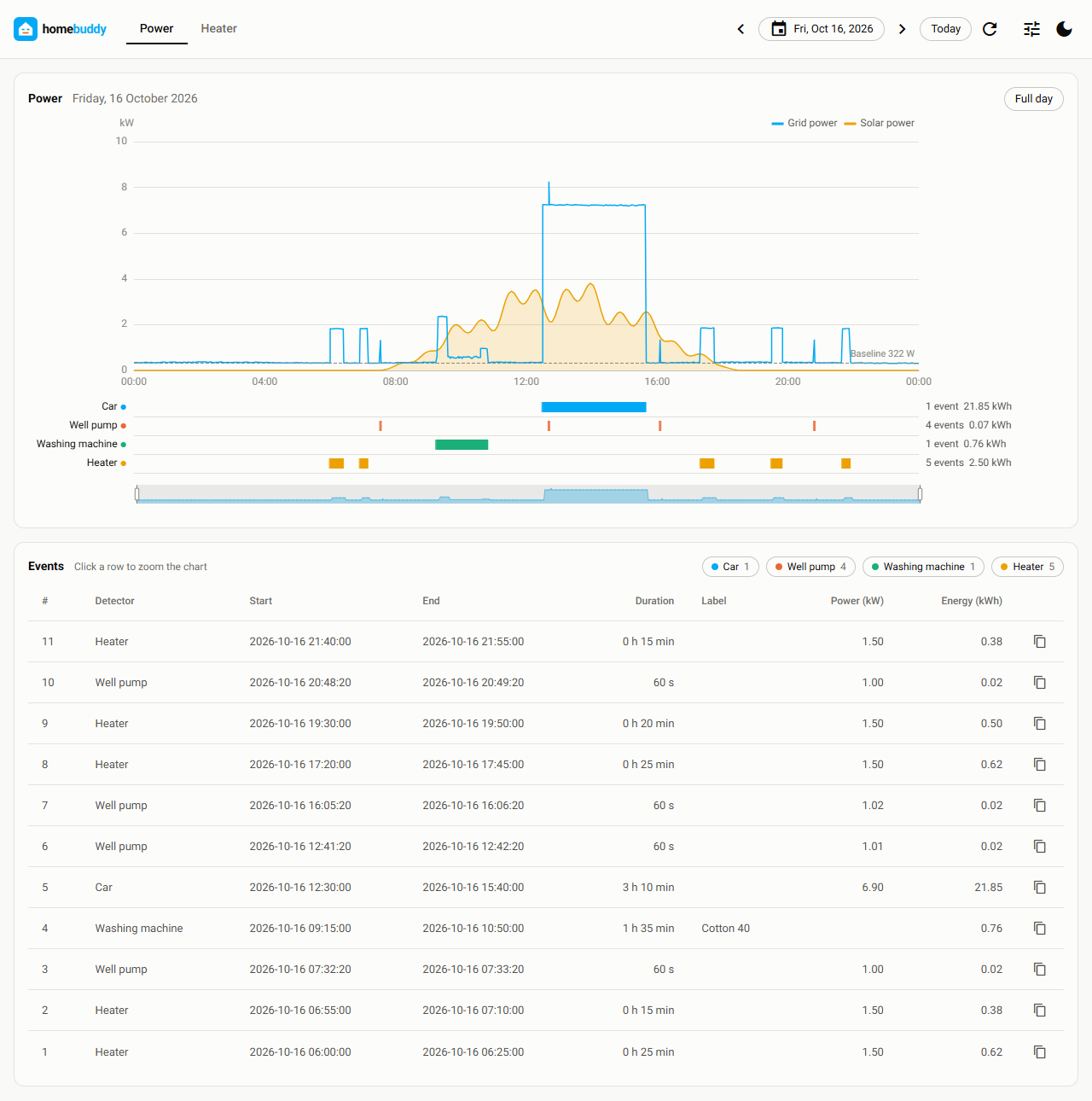
|
|
51
|
+
|
|
52
|
+
## Why homebuddy
|
|
53
|
+
|
|
54
|
+
Home Assistant shows the power of your house as one line. The line does not tell you which device ran, when it
|
|
55
|
+
ran, and how much energy it used. Most devices have no sensor of their own.
|
|
56
|
+
|
|
57
|
+
homebuddy has detectors. A detector reads the history of a sensor and finds one type of event. You give the
|
|
58
|
+
values of your device in a configuration file. The page then shows each event on the chart of the day and in a
|
|
59
|
+
table.
|
|
60
|
+
|
|
61
|
+
| Detector type | Event |
|
|
62
|
+
| --- | --- |
|
|
63
|
+
| [`level`](docs/detectors.md#level) | A long run of a device with a known, constant power, for example a car at a charger that has no sensor |
|
|
64
|
+
| [`pulse`](docs/detectors.md#pulse) | A short run of a load with a constant power, for example a well pump |
|
|
65
|
+
| [`ramp`](docs/detectors.md#ramp) | A run of a device that makes a value rise fast and then fall fast, for example an air conditioner from its discharge temperature |
|
|
66
|
+
| [`state`](docs/detectors.md#state) | A run of a device that shows its state as a text, for example a washing machine |
|
|
67
|
+
| [`threshold`](docs/detectors.md#threshold) | A run of a device that has its own power sensor, for example a heater on a smart plug |
|
|
68
|
+
|
|
69
|
+
homebuddy only reads from Home Assistant. It does not write to it. It has no database: each load of the page
|
|
70
|
+
reads the history from Home Assistant.
|
|
71
|
+
|
|
72
|
+
## Quick start
|
|
73
|
+
|
|
74
|
+
1. Install homebuddy:
|
|
75
|
+
|
|
76
|
+
```bash
|
|
77
|
+
uv tool install homebuddy
|
|
78
|
+
```
|
|
79
|
+
|
|
80
|
+
2. Make a token in Home Assistant: Profile > Security > Long-lived access tokens > Create token. Put it in a
|
|
81
|
+
file with the name `.env`:
|
|
82
|
+
|
|
83
|
+
```
|
|
84
|
+
HA_TOKEN=your-long-lived-access-token
|
|
85
|
+
```
|
|
86
|
+
|
|
87
|
+
3. In the same folder, write the file `homebuddy.yml` with your sensors:
|
|
88
|
+
|
|
89
|
+
```yaml
|
|
90
|
+
home_assistant:
|
|
91
|
+
url: http://homeassistant.local:8123
|
|
92
|
+
|
|
93
|
+
tabs:
|
|
94
|
+
power:
|
|
95
|
+
sensors: [sensor.grid_power]
|
|
96
|
+
|
|
97
|
+
detectors:
|
|
98
|
+
heater:
|
|
99
|
+
type: threshold
|
|
100
|
+
sensor: sensor.heater_plug_power
|
|
101
|
+
min_w: 10
|
|
102
|
+
```
|
|
103
|
+
|
|
104
|
+
4. Start the page:
|
|
105
|
+
|
|
106
|
+
```bash
|
|
107
|
+
homebuddy
|
|
108
|
+
```
|
|
109
|
+
|
|
110
|
+
The browser opens `http://127.0.0.1:8080`.
|
|
111
|
+
|
|
112
|
+
To try homebuddy without installing it, use `uvx homebuddy`.
|
|
113
|
+
|
|
114
|
+
## Installation
|
|
115
|
+
|
|
116
|
+
Use one of these commands:
|
|
117
|
+
|
|
118
|
+
| Command | When to use it |
|
|
119
|
+
| --- | --- |
|
|
120
|
+
| `uv tool install homebuddy` | Recommended. [uv](https://docs.astral.sh/uv/getting-started/installation/) also installs Python if necessary. |
|
|
121
|
+
| `pipx install homebuddy` | You already use [pipx](https://pipx.pypa.io/). |
|
|
122
|
+
| `pip install homebuddy` | You want homebuddy in your own environment. Python 3.10 or later. |
|
|
123
|
+
|
|
124
|
+
`homebuddy[desktop]` also installs the desktop window: `uv tool install "homebuddy[desktop]"`, then
|
|
125
|
+
`homebuddy --native`.
|
|
126
|
+
|
|
127
|
+
To upgrade, use `uv tool upgrade homebuddy` or `pipx upgrade homebuddy`.
|
|
128
|
+
|
|
129
|
+
homebuddy must run on a computer that can connect to Home Assistant.
|
|
130
|
+
|
|
131
|
+
### Docker
|
|
132
|
+
|
|
133
|
+
```bash
|
|
134
|
+
docker run --rm -p 127.0.0.1:8080:8080 --env-file .env \
|
|
135
|
+
-v ./homebuddy.yml:/home/homebuddy/homebuddy.yml:ro ghcr.io/ratoaq2/homebuddy
|
|
136
|
+
```
|
|
137
|
+
|
|
138
|
+
See [docs/docker.md](docs/docker.md) for Docker Compose and for a reverse proxy with a login and HTTPS.
|
|
139
|
+
|
|
140
|
+
## Configuration
|
|
141
|
+
|
|
142
|
+
homebuddy reads the token from the `HA_TOKEN` environment variable or from `.env`. It reads all other settings
|
|
143
|
+
from one YAML file: `homebuddy.yml` in the current folder, or the file of `--config`.
|
|
144
|
+
|
|
145
|
+
The file has the tabs of the page and the detectors:
|
|
146
|
+
|
|
147
|
+
```yaml
|
|
148
|
+
home_assistant:
|
|
149
|
+
url: http://homeassistant.local:8123
|
|
150
|
+
|
|
151
|
+
tabs:
|
|
152
|
+
power:
|
|
153
|
+
sensors: [sensor.grid_power, sensor.solar_power] # one line for each sensor
|
|
154
|
+
hidden_detectors: [heater] # the events table hides these rows when the page opens
|
|
155
|
+
|
|
156
|
+
detectors:
|
|
157
|
+
car:
|
|
158
|
+
type: level
|
|
159
|
+
sensor: sensor.grid_power
|
|
160
|
+
levels_w: [4140, 6900, 11040] # the power of the charger at 6 A, 10 A and 16 A
|
|
161
|
+
well_pump:
|
|
162
|
+
type: pulse
|
|
163
|
+
name: Well pump
|
|
164
|
+
sensor: sensor.grid_power
|
|
165
|
+
step_w: [900, 1100] # the step up or the step down, in watts
|
|
166
|
+
duration: [30, 90] # the duration of a run, in seconds
|
|
167
|
+
max_ripple_w: 50
|
|
168
|
+
heater:
|
|
169
|
+
type: threshold
|
|
170
|
+
sensor: sensor.heater_plug_power
|
|
171
|
+
min_w: 10
|
|
172
|
+
```
|
|
173
|
+
|
|
174
|
+
When the file has errors, the page shows each error, with the path of its key:
|
|
175
|
+
|
|
176
|
+
```
|
|
177
|
+
2 errors in homebuddy.yml:
|
|
178
|
+
detectors.well_pump.step_w: the low value must be first
|
|
179
|
+
detectors.well_pump.max_riple_w: Extra inputs are not permitted
|
|
180
|
+
```
|
|
181
|
+
|
|
182
|
+
Change a value, click "Load again" on the page, and see the result.
|
|
183
|
+
|
|
184
|
+
| To learn about | Read |
|
|
185
|
+
| --- | --- |
|
|
186
|
+
| Each key of the file, the tabs, and the values | [docs/configuration.md](docs/configuration.md) |
|
|
187
|
+
| The keys of each detector type, and how each type works | [docs/detectors.md](docs/detectors.md) |
|
|
188
|
+
| A full file with comments | [homebuddy.example.yml](homebuddy.example.yml) |
|
|
189
|
+
|
|
190
|
+
## The page
|
|
191
|
+
|
|
192
|
+
```bash
|
|
193
|
+
homebuddy # opens http://127.0.0.1:8080 in the browser
|
|
194
|
+
homebuddy --native # opens a desktop window (needs the "desktop" extra)
|
|
195
|
+
homebuddy --host 0.0.0.0 # other devices on your network can connect
|
|
196
|
+
homebuddy --config my.yml # use this configuration file
|
|
197
|
+
```
|
|
198
|
+
|
|
199
|
+
The page opens on today. For each tab of the configuration file, it shows:
|
|
200
|
+
|
|
201
|
+
- The chart of the sensor for the day, with one line for each sensor of the tab.
|
|
202
|
+
- One lane below the chart for each detector. Each event is a bar in the lane.
|
|
203
|
+
- The events table: detector, start, end, duration, label, power and energy. Click a row to zoom the chart to
|
|
204
|
+
that event.
|
|
205
|
+
- A copy button on each row. It copies the values of the row for a spreadsheet.
|
|
206
|
+
|
|
207
|
+
"Show debug data" in the settings shows why a detector accepted or refused each candidate. Use it to set the
|
|
208
|
+
values of a detector.
|
|
209
|
+
|
|
210
|
+
See [docs/page.md](docs/page.md) for the details.
|
|
211
|
+
|
|
212
|
+
## Security
|
|
213
|
+
|
|
214
|
+
- The token stays on the server. It does not go to the browser. Make the token for a user of Home Assistant
|
|
215
|
+
that is not an administrator.
|
|
216
|
+
- The page has no login. Anyone who can open the page can see the data. The power data of a house shows when
|
|
217
|
+
people are at home.
|
|
218
|
+
- The default address is `127.0.0.1`: only your computer can open the page. Use `--host 0.0.0.0` only on a
|
|
219
|
+
network you trust. For a different network, [put homebuddy behind a reverse
|
|
220
|
+
proxy](docs/docker.md#put-homebuddy-behind-a-reverse-proxy).
|
|
221
|
+
|
|
222
|
+
## FAQ
|
|
223
|
+
|
|
224
|
+
**Does homebuddy change something in Home Assistant?**
|
|
225
|
+
No. homebuddy only reads the history and the attributes of the sensors that you name.
|
|
226
|
+
|
|
227
|
+
**Is homebuddy an integration or an add-on of Home Assistant?**
|
|
228
|
+
No. It is a separate program. It connects to Home Assistant with a token.
|
|
229
|
+
|
|
230
|
+
**Why does an old day show "No data"?**
|
|
231
|
+
Home Assistant keeps the detailed history for about 10 days by default. homebuddy has no store of its own.
|
|
232
|
+
|
|
233
|
+
**Which sensor is a power sensor?**
|
|
234
|
+
A sensor with the device class `power` in Home Assistant. Its unit can be W or kW.
|
|
235
|
+
|
|
236
|
+
**Two detectors find the same event. What can I do?**
|
|
237
|
+
Tell homebuddy which detector wins, with `overrides`. See
|
|
238
|
+
[Conflicts between detectors](docs/detectors.md#conflicts-between-detectors).
|
|
239
|
+
|
|
240
|
+
**Can I add a detector type for my device?**
|
|
241
|
+
Yes. A detector type is one Python class. A different package can add it. See
|
|
242
|
+
[docs/detector-types.md](docs/detector-types.md).
|
|
243
|
+
|
|
244
|
+
## Contributing
|
|
245
|
+
|
|
246
|
+
See [CONTRIBUTING.md](CONTRIBUTING.md). The design is in [docs/architecture.md](docs/architecture.md).
|
|
247
|
+
|
|
248
|
+
homebuddy is developed with AI assistants. [AGENTS.md](AGENTS.md) has the rules of the project. An assistant
|
|
249
|
+
loads it in each session.
|
|
250
|
+
|
|
251
|
+
## License
|
|
252
|
+
|
|
253
|
+
[MIT](LICENSE)
|
|
@@ -0,0 +1,221 @@
|
|
|
1
|
+
<h2 align="center">
|
|
2
|
+
<picture>
|
|
3
|
+
<source media="(prefers-color-scheme: dark)" srcset="https://raw.githubusercontent.com/ratoaq2/homebuddy/main/docs/images/logo-dark.png">
|
|
4
|
+
<img alt="homebuddy" src="https://raw.githubusercontent.com/ratoaq2/homebuddy/main/docs/images/logo-light.png" width="440">
|
|
5
|
+
</picture>
|
|
6
|
+
<br>
|
|
7
|
+
See what your devices did
|
|
8
|
+
</h2>
|
|
9
|
+
|
|
10
|
+
A web page for Home Assistant. It reads the history of your sensors and finds the events of your devices: a
|
|
11
|
+
charge of a car, a run of a pump, a program of a washing machine.
|
|
12
|
+
|
|
13
|
+
[](https://pypi.org/project/homebuddy/)
|
|
14
|
+
[](https://pypi.org/project/homebuddy/)
|
|
15
|
+
[](https://github.com/ratoaq2/homebuddy/actions/workflows/test.yml)
|
|
16
|
+
[](https://github.com/ratoaq2/homebuddy/blob/main/LICENSE)
|
|
17
|
+
|
|
18
|
+

|
|
19
|
+
|
|
20
|
+
## Why homebuddy
|
|
21
|
+
|
|
22
|
+
Home Assistant shows the power of your house as one line. The line does not tell you which device ran, when it
|
|
23
|
+
ran, and how much energy it used. Most devices have no sensor of their own.
|
|
24
|
+
|
|
25
|
+
homebuddy has detectors. A detector reads the history of a sensor and finds one type of event. You give the
|
|
26
|
+
values of your device in a configuration file. The page then shows each event on the chart of the day and in a
|
|
27
|
+
table.
|
|
28
|
+
|
|
29
|
+
| Detector type | Event |
|
|
30
|
+
| --- | --- |
|
|
31
|
+
| [`level`](docs/detectors.md#level) | A long run of a device with a known, constant power, for example a car at a charger that has no sensor |
|
|
32
|
+
| [`pulse`](docs/detectors.md#pulse) | A short run of a load with a constant power, for example a well pump |
|
|
33
|
+
| [`ramp`](docs/detectors.md#ramp) | A run of a device that makes a value rise fast and then fall fast, for example an air conditioner from its discharge temperature |
|
|
34
|
+
| [`state`](docs/detectors.md#state) | A run of a device that shows its state as a text, for example a washing machine |
|
|
35
|
+
| [`threshold`](docs/detectors.md#threshold) | A run of a device that has its own power sensor, for example a heater on a smart plug |
|
|
36
|
+
|
|
37
|
+
homebuddy only reads from Home Assistant. It does not write to it. It has no database: each load of the page
|
|
38
|
+
reads the history from Home Assistant.
|
|
39
|
+
|
|
40
|
+
## Quick start
|
|
41
|
+
|
|
42
|
+
1. Install homebuddy:
|
|
43
|
+
|
|
44
|
+
```bash
|
|
45
|
+
uv tool install homebuddy
|
|
46
|
+
```
|
|
47
|
+
|
|
48
|
+
2. Make a token in Home Assistant: Profile > Security > Long-lived access tokens > Create token. Put it in a
|
|
49
|
+
file with the name `.env`:
|
|
50
|
+
|
|
51
|
+
```
|
|
52
|
+
HA_TOKEN=your-long-lived-access-token
|
|
53
|
+
```
|
|
54
|
+
|
|
55
|
+
3. In the same folder, write the file `homebuddy.yml` with your sensors:
|
|
56
|
+
|
|
57
|
+
```yaml
|
|
58
|
+
home_assistant:
|
|
59
|
+
url: http://homeassistant.local:8123
|
|
60
|
+
|
|
61
|
+
tabs:
|
|
62
|
+
power:
|
|
63
|
+
sensors: [sensor.grid_power]
|
|
64
|
+
|
|
65
|
+
detectors:
|
|
66
|
+
heater:
|
|
67
|
+
type: threshold
|
|
68
|
+
sensor: sensor.heater_plug_power
|
|
69
|
+
min_w: 10
|
|
70
|
+
```
|
|
71
|
+
|
|
72
|
+
4. Start the page:
|
|
73
|
+
|
|
74
|
+
```bash
|
|
75
|
+
homebuddy
|
|
76
|
+
```
|
|
77
|
+
|
|
78
|
+
The browser opens `http://127.0.0.1:8080`.
|
|
79
|
+
|
|
80
|
+
To try homebuddy without installing it, use `uvx homebuddy`.
|
|
81
|
+
|
|
82
|
+
## Installation
|
|
83
|
+
|
|
84
|
+
Use one of these commands:
|
|
85
|
+
|
|
86
|
+
| Command | When to use it |
|
|
87
|
+
| --- | --- |
|
|
88
|
+
| `uv tool install homebuddy` | Recommended. [uv](https://docs.astral.sh/uv/getting-started/installation/) also installs Python if necessary. |
|
|
89
|
+
| `pipx install homebuddy` | You already use [pipx](https://pipx.pypa.io/). |
|
|
90
|
+
| `pip install homebuddy` | You want homebuddy in your own environment. Python 3.10 or later. |
|
|
91
|
+
|
|
92
|
+
`homebuddy[desktop]` also installs the desktop window: `uv tool install "homebuddy[desktop]"`, then
|
|
93
|
+
`homebuddy --native`.
|
|
94
|
+
|
|
95
|
+
To upgrade, use `uv tool upgrade homebuddy` or `pipx upgrade homebuddy`.
|
|
96
|
+
|
|
97
|
+
homebuddy must run on a computer that can connect to Home Assistant.
|
|
98
|
+
|
|
99
|
+
### Docker
|
|
100
|
+
|
|
101
|
+
```bash
|
|
102
|
+
docker run --rm -p 127.0.0.1:8080:8080 --env-file .env \
|
|
103
|
+
-v ./homebuddy.yml:/home/homebuddy/homebuddy.yml:ro ghcr.io/ratoaq2/homebuddy
|
|
104
|
+
```
|
|
105
|
+
|
|
106
|
+
See [docs/docker.md](docs/docker.md) for Docker Compose and for a reverse proxy with a login and HTTPS.
|
|
107
|
+
|
|
108
|
+
## Configuration
|
|
109
|
+
|
|
110
|
+
homebuddy reads the token from the `HA_TOKEN` environment variable or from `.env`. It reads all other settings
|
|
111
|
+
from one YAML file: `homebuddy.yml` in the current folder, or the file of `--config`.
|
|
112
|
+
|
|
113
|
+
The file has the tabs of the page and the detectors:
|
|
114
|
+
|
|
115
|
+
```yaml
|
|
116
|
+
home_assistant:
|
|
117
|
+
url: http://homeassistant.local:8123
|
|
118
|
+
|
|
119
|
+
tabs:
|
|
120
|
+
power:
|
|
121
|
+
sensors: [sensor.grid_power, sensor.solar_power] # one line for each sensor
|
|
122
|
+
hidden_detectors: [heater] # the events table hides these rows when the page opens
|
|
123
|
+
|
|
124
|
+
detectors:
|
|
125
|
+
car:
|
|
126
|
+
type: level
|
|
127
|
+
sensor: sensor.grid_power
|
|
128
|
+
levels_w: [4140, 6900, 11040] # the power of the charger at 6 A, 10 A and 16 A
|
|
129
|
+
well_pump:
|
|
130
|
+
type: pulse
|
|
131
|
+
name: Well pump
|
|
132
|
+
sensor: sensor.grid_power
|
|
133
|
+
step_w: [900, 1100] # the step up or the step down, in watts
|
|
134
|
+
duration: [30, 90] # the duration of a run, in seconds
|
|
135
|
+
max_ripple_w: 50
|
|
136
|
+
heater:
|
|
137
|
+
type: threshold
|
|
138
|
+
sensor: sensor.heater_plug_power
|
|
139
|
+
min_w: 10
|
|
140
|
+
```
|
|
141
|
+
|
|
142
|
+
When the file has errors, the page shows each error, with the path of its key:
|
|
143
|
+
|
|
144
|
+
```
|
|
145
|
+
2 errors in homebuddy.yml:
|
|
146
|
+
detectors.well_pump.step_w: the low value must be first
|
|
147
|
+
detectors.well_pump.max_riple_w: Extra inputs are not permitted
|
|
148
|
+
```
|
|
149
|
+
|
|
150
|
+
Change a value, click "Load again" on the page, and see the result.
|
|
151
|
+
|
|
152
|
+
| To learn about | Read |
|
|
153
|
+
| --- | --- |
|
|
154
|
+
| Each key of the file, the tabs, and the values | [docs/configuration.md](docs/configuration.md) |
|
|
155
|
+
| The keys of each detector type, and how each type works | [docs/detectors.md](docs/detectors.md) |
|
|
156
|
+
| A full file with comments | [homebuddy.example.yml](homebuddy.example.yml) |
|
|
157
|
+
|
|
158
|
+
## The page
|
|
159
|
+
|
|
160
|
+
```bash
|
|
161
|
+
homebuddy # opens http://127.0.0.1:8080 in the browser
|
|
162
|
+
homebuddy --native # opens a desktop window (needs the "desktop" extra)
|
|
163
|
+
homebuddy --host 0.0.0.0 # other devices on your network can connect
|
|
164
|
+
homebuddy --config my.yml # use this configuration file
|
|
165
|
+
```
|
|
166
|
+
|
|
167
|
+
The page opens on today. For each tab of the configuration file, it shows:
|
|
168
|
+
|
|
169
|
+
- The chart of the sensor for the day, with one line for each sensor of the tab.
|
|
170
|
+
- One lane below the chart for each detector. Each event is a bar in the lane.
|
|
171
|
+
- The events table: detector, start, end, duration, label, power and energy. Click a row to zoom the chart to
|
|
172
|
+
that event.
|
|
173
|
+
- A copy button on each row. It copies the values of the row for a spreadsheet.
|
|
174
|
+
|
|
175
|
+
"Show debug data" in the settings shows why a detector accepted or refused each candidate. Use it to set the
|
|
176
|
+
values of a detector.
|
|
177
|
+
|
|
178
|
+
See [docs/page.md](docs/page.md) for the details.
|
|
179
|
+
|
|
180
|
+
## Security
|
|
181
|
+
|
|
182
|
+
- The token stays on the server. It does not go to the browser. Make the token for a user of Home Assistant
|
|
183
|
+
that is not an administrator.
|
|
184
|
+
- The page has no login. Anyone who can open the page can see the data. The power data of a house shows when
|
|
185
|
+
people are at home.
|
|
186
|
+
- The default address is `127.0.0.1`: only your computer can open the page. Use `--host 0.0.0.0` only on a
|
|
187
|
+
network you trust. For a different network, [put homebuddy behind a reverse
|
|
188
|
+
proxy](docs/docker.md#put-homebuddy-behind-a-reverse-proxy).
|
|
189
|
+
|
|
190
|
+
## FAQ
|
|
191
|
+
|
|
192
|
+
**Does homebuddy change something in Home Assistant?**
|
|
193
|
+
No. homebuddy only reads the history and the attributes of the sensors that you name.
|
|
194
|
+
|
|
195
|
+
**Is homebuddy an integration or an add-on of Home Assistant?**
|
|
196
|
+
No. It is a separate program. It connects to Home Assistant with a token.
|
|
197
|
+
|
|
198
|
+
**Why does an old day show "No data"?**
|
|
199
|
+
Home Assistant keeps the detailed history for about 10 days by default. homebuddy has no store of its own.
|
|
200
|
+
|
|
201
|
+
**Which sensor is a power sensor?**
|
|
202
|
+
A sensor with the device class `power` in Home Assistant. Its unit can be W or kW.
|
|
203
|
+
|
|
204
|
+
**Two detectors find the same event. What can I do?**
|
|
205
|
+
Tell homebuddy which detector wins, with `overrides`. See
|
|
206
|
+
[Conflicts between detectors](docs/detectors.md#conflicts-between-detectors).
|
|
207
|
+
|
|
208
|
+
**Can I add a detector type for my device?**
|
|
209
|
+
Yes. A detector type is one Python class. A different package can add it. See
|
|
210
|
+
[docs/detector-types.md](docs/detector-types.md).
|
|
211
|
+
|
|
212
|
+
## Contributing
|
|
213
|
+
|
|
214
|
+
See [CONTRIBUTING.md](CONTRIBUTING.md). The design is in [docs/architecture.md](docs/architecture.md).
|
|
215
|
+
|
|
216
|
+
homebuddy is developed with AI assistants. [AGENTS.md](AGENTS.md) has the rules of the project. An assistant
|
|
217
|
+
loads it in each session.
|
|
218
|
+
|
|
219
|
+
## License
|
|
220
|
+
|
|
221
|
+
[MIT](LICENSE)
|