hiew 1.0.0__tar.gz
This diff represents the content of publicly available package versions that have been released to one of the supported registries. The information contained in this diff is provided for informational purposes only and reflects changes between package versions as they appear in their respective public registries.
- hiew-1.0.0/LICENSE +21 -0
- hiew-1.0.0/PKG-INFO +244 -0
- hiew-1.0.0/README.md +207 -0
- hiew-1.0.0/hiew/__init__.py +2 -0
- hiew-1.0.0/hiew/__main__.py +83 -0
- hiew-1.0.0/hiew/app.py +1828 -0
- hiew-1.0.0/hiew/buffer.py +237 -0
- hiew-1.0.0/hiew/disasm.py +315 -0
- hiew-1.0.0/hiew/extra.py +910 -0
- hiew-1.0.0/hiew/formats.py +640 -0
- hiew-1.0.0/hiew/keys.py +287 -0
- hiew-1.0.0/hiew/mods.py +230 -0
- hiew-1.0.0/hiew/spec.py +1807 -0
- hiew-1.0.0/hiew/themes.py +132 -0
- hiew-1.0.0/hiew/xrefs.py +321 -0
- hiew-1.0.0/hiew.egg-info/PKG-INFO +244 -0
- hiew-1.0.0/hiew.egg-info/SOURCES.txt +21 -0
- hiew-1.0.0/hiew.egg-info/dependency_links.txt +1 -0
- hiew-1.0.0/hiew.egg-info/entry_points.txt +2 -0
- hiew-1.0.0/hiew.egg-info/requires.txt +7 -0
- hiew-1.0.0/hiew.egg-info/top_level.txt +1 -0
- hiew-1.0.0/pyproject.toml +56 -0
- hiew-1.0.0/setup.cfg +4 -0
hiew-1.0.0/LICENSE
ADDED
|
@@ -0,0 +1,21 @@
|
|
|
1
|
+
MIT License
|
|
2
|
+
|
|
3
|
+
Copyright (c) 2026 s1ngs0ng
|
|
4
|
+
|
|
5
|
+
Permission is hereby granted, free of charge, to any person obtaining a copy
|
|
6
|
+
of this software and associated documentation files (the "Software"), to deal
|
|
7
|
+
in the Software without restriction, including without limitation the rights
|
|
8
|
+
to use, copy, modify, merge, publish, distribute, sublicense, and/or sell
|
|
9
|
+
copies of the Software, and to permit persons to whom the Software is
|
|
10
|
+
furnished to do so, subject to the following conditions:
|
|
11
|
+
|
|
12
|
+
The above copyright notice and this permission notice shall be included in all
|
|
13
|
+
copies or substantial portions of the Software.
|
|
14
|
+
|
|
15
|
+
THE SOFTWARE IS PROVIDED "AS IS", WITHOUT WARRANTY OF ANY KIND, EXPRESS OR
|
|
16
|
+
IMPLIED, INCLUDING BUT NOT LIMITED TO THE WARRANTIES OF MERCHANTABILITY,
|
|
17
|
+
FITNESS FOR A PARTICULAR PURPOSE AND NONINFRINGEMENT. IN NO EVENT SHALL THE
|
|
18
|
+
AUTHORS OR COPYRIGHT HOLDERS BE LIABLE FOR ANY CLAIM, DAMAGES OR OTHER
|
|
19
|
+
LIABILITY, WHETHER IN AN ACTION OF CONTRACT, TORT OR OTHERWISE, ARISING FROM,
|
|
20
|
+
OUT OF OR IN CONNECTION WITH THE SOFTWARE OR THE USE OR OTHER DEALINGS IN THE
|
|
21
|
+
SOFTWARE.
|
hiew-1.0.0/PKG-INFO
ADDED
|
@@ -0,0 +1,244 @@
|
|
|
1
|
+
Metadata-Version: 2.4
|
|
2
|
+
Name: hiew
|
|
3
|
+
Version: 1.0.0
|
|
4
|
+
Summary: Hiew - cross-platform Hacker's View: hex viewer, editor and disassembler for the terminal
|
|
5
|
+
Author-email: s1ngs0ng <7ingsong@gmail.com>
|
|
6
|
+
License-Expression: MIT
|
|
7
|
+
Project-URL: Homepage, https://github.com/7ingsong/hiew
|
|
8
|
+
Project-URL: Source, https://github.com/7ingsong/hiew
|
|
9
|
+
Project-URL: Issues, https://github.com/7ingsong/hiew/issues
|
|
10
|
+
Project-URL: Documentation, https://github.com/7ingsong/hiew#readme
|
|
11
|
+
Keywords: hiew,hex,hex-editor,hex-viewer,disassembler,reverse-engineering,pe,elf,mach-o,curses,tui
|
|
12
|
+
Classifier: Development Status :: 4 - Beta
|
|
13
|
+
Classifier: Environment :: Console :: Curses
|
|
14
|
+
Classifier: Intended Audience :: Developers
|
|
15
|
+
Classifier: Intended Audience :: Information Technology
|
|
16
|
+
Classifier: Operating System :: MacOS
|
|
17
|
+
Classifier: Operating System :: Microsoft :: Windows
|
|
18
|
+
Classifier: Operating System :: POSIX :: Linux
|
|
19
|
+
Classifier: Programming Language :: Python :: 3
|
|
20
|
+
Classifier: Programming Language :: Python :: 3 :: Only
|
|
21
|
+
Classifier: Programming Language :: Python :: 3.9
|
|
22
|
+
Classifier: Programming Language :: Python :: 3.10
|
|
23
|
+
Classifier: Programming Language :: Python :: 3.11
|
|
24
|
+
Classifier: Programming Language :: Python :: 3.12
|
|
25
|
+
Classifier: Programming Language :: Python :: 3.13
|
|
26
|
+
Classifier: Topic :: Security
|
|
27
|
+
Classifier: Topic :: Software Development :: Disassemblers
|
|
28
|
+
Classifier: Topic :: Utilities
|
|
29
|
+
Requires-Python: >=3.9
|
|
30
|
+
Description-Content-Type: text/markdown
|
|
31
|
+
License-File: LICENSE
|
|
32
|
+
Requires-Dist: capstone>=5
|
|
33
|
+
Requires-Dist: windows-curses>=2.3; sys_platform == "win32"
|
|
34
|
+
Provides-Extra: asm
|
|
35
|
+
Requires-Dist: keystone-engine; extra == "asm"
|
|
36
|
+
Dynamic: license-file
|
|
37
|
+
|
|
38
|
+
# Hiew — cross-platform Hacker's View
|
|
39
|
+
|
|
40
|
+
A console hex viewer, hex editor and disassembler with the modes, hotkeys and blue screen of **Hiew (Hacker's View)**.
|
|
41
|
+
Runs on macOS, Linux and Windows.
|
|
42
|
+
|
|
43
|
+
|
|
44
|
+
|
|
45
|
+
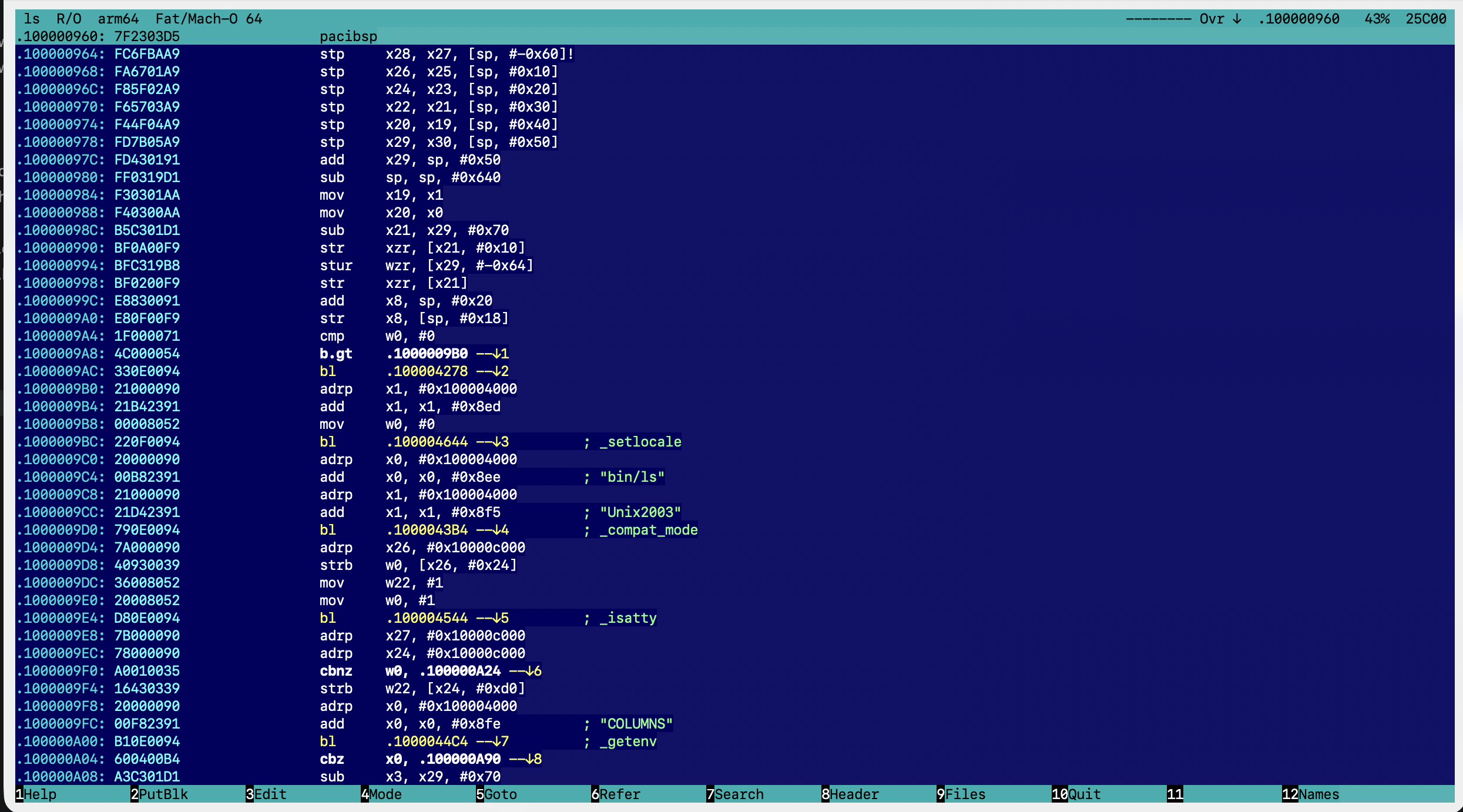
*Decode mode on `/bin/ls` (arm64 slice of a universal Mach-O), at the entry point.*
|
|
46
|
+
|
|
47
|
+
|
|
48
|
+
|
|
49
|
+
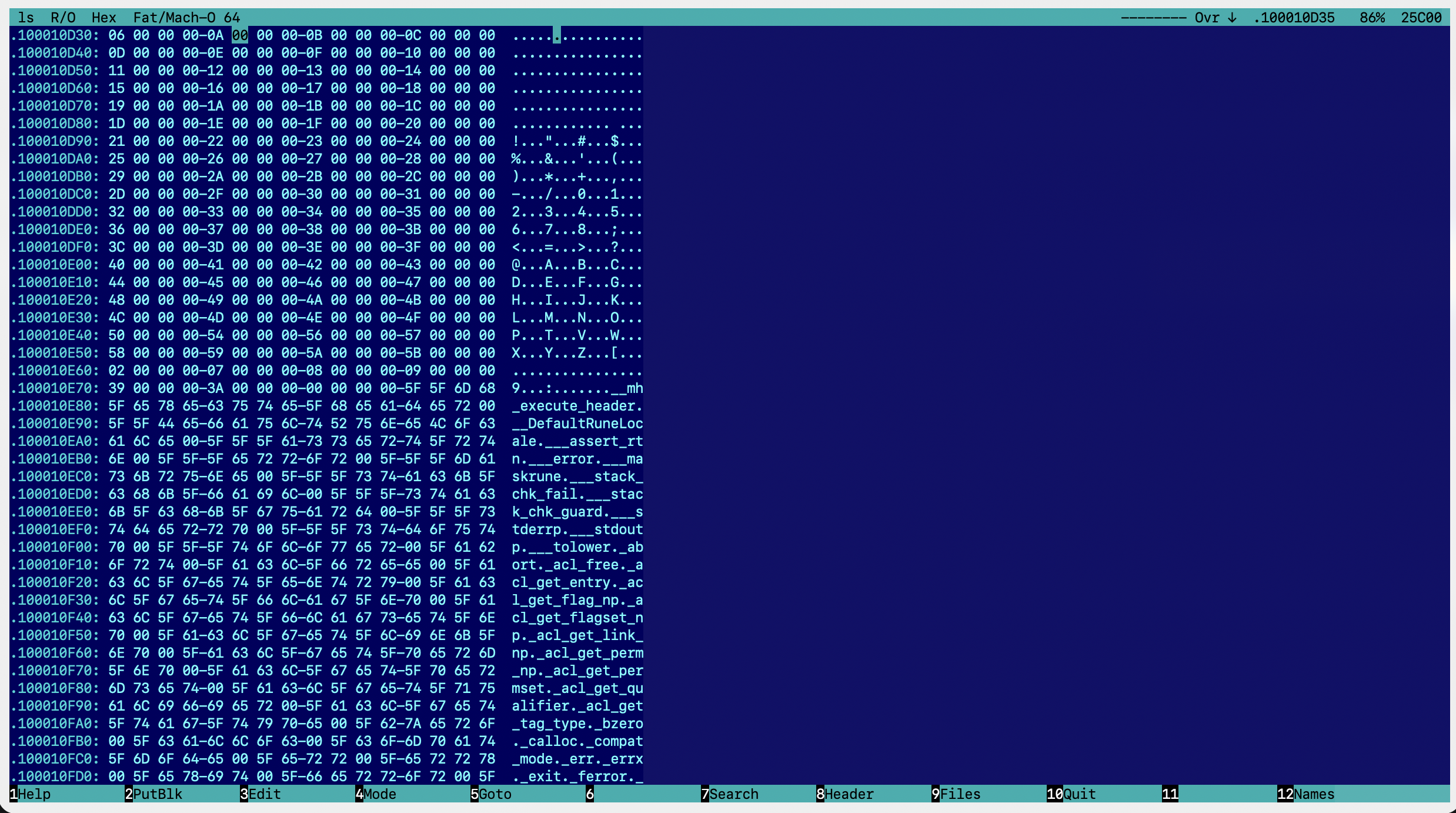
*Hex mode on the same file: address, 16 bytes in hex, the same bytes as characters.*
|
|
50
|
+
|
|
51
|
+
## Installation
|
|
52
|
+
|
|
53
|
+
Requires Python 3.9+.
|
|
54
|
+
|
|
55
|
+
```sh
|
|
56
|
+
pip install hiew # macOS / Linux / Windows (windows-curses is pulled in on Windows)
|
|
57
|
+
hiew file.exe
|
|
58
|
+
```
|
|
59
|
+
|
|
60
|
+
The built-in assembler (F3 → F2) needs the keystone library:
|
|
61
|
+
|
|
62
|
+
| System | Command |
|
|
63
|
+
|---|---|
|
|
64
|
+
| macOS | `brew install keystone` |
|
|
65
|
+
| Linux | `apt install libkeystone0` (or your distribution's keystone package) |
|
|
66
|
+
| Windows | `pip install "hiew[asm]"` (installs `keystone-engine`) |
|
|
67
|
+
|
|
68
|
+
Everything else works without it. From a source checkout: `pip install .`, or `python -m hiew file`.
|
|
69
|
+
|
|
70
|
+
Command-line options:
|
|
71
|
+
|
|
72
|
+
| Option | What it does |
|
|
73
|
+
|---|---|
|
|
74
|
+
| `-m text\|hex\|decode` | start mode |
|
|
75
|
+
| `-o 1234` / `-o .401000` / `-o main` | start position: file offset, virtual address or symbol name |
|
|
76
|
+
| `-e` | open the entry point in Decode mode |
|
|
77
|
+
| `-s x86_64` / `--slice 1` | universal (fat) Mach-O: which slice to open, by CPU name or number. Inside the program use F4, or Enter on a slice line in F8 |
|
|
78
|
+
| `-a x86-64` | disassembler architecture (x86-16/32/64, arm, thumb, arm64, mips32/64, ppc32/64, riscv32/64) |
|
|
79
|
+
| `-t hiew\|blue\|dark\|light` | colour theme: `hiew` deep navy (default), `blue` DOS blue, `dark`, `light`. F4 switches it live; the choice is remembered in `~/.config/hiew/settings.json` |
|
|
80
|
+
| `--colors 8` | 8-colour variant of the theme, for terminals without 256 colours |
|
|
81
|
+
| `--no-mouse` | don't capture the mouse, so the terminal can select text |
|
|
82
|
+
| `--no-modpoll` / `--no-kitty` | don't read modifier keys from the OS / don't enable the kitty keyboard protocol |
|
|
83
|
+
| `--keys` | keyboard test: shows the raw bytes of every key press and how hiew reads them |
|
|
84
|
+
| several files / a wildcard | `hiew a.exe b.dll` or `hiew *.exe`: Ctrl+F11 / Ctrl+F12 switch between them |
|
|
85
|
+
|
|
86
|
+
## Hotkeys
|
|
87
|
+
|
|
88
|
+
The key map follows the [Hiew Documentation Project](https://taviso.github.io/hiewdocs/). The same reference is
|
|
89
|
+
available in the program with `F1`.
|
|
90
|
+
|
|
91
|
+
### Modes
|
|
92
|
+
|
|
93
|
+
| Key | Action |
|
|
94
|
+
|---|---|
|
|
95
|
+
| `Enter` | Text → Hex → Code → Text (the address is kept) |
|
|
96
|
+
| `F4` | menu: modes, architectures, codepages, themes; slices of a universal (fat) Mach-O |
|
|
97
|
+
| `F3` | edit mode (EDITMODE): Esc leaves without writing, F9 writes |
|
|
98
|
+
| `Ctrl+F1` | code size: 16 / 32 / 64 bit |
|
|
99
|
+
| `Shift+F1` | architecture (x86, ARM, ARM64, MIPS, PPC, RISC-V) |
|
|
100
|
+
| `Alt+F1` | addresses: file offset ↔ virtual address (.VA) |
|
|
101
|
+
|
|
102
|
+
### Navigation
|
|
103
|
+
|
|
104
|
+
| Key | Action |
|
|
105
|
+
|---|---|
|
|
106
|
+
| `Ctrl+Home` / `Ctrl+End` | start / end of file |
|
|
107
|
+
| `F5` | goto: `1234` (hex), `123t` (decimal), `.401000` (VA), `+100`, `-10t`, a name; PgDn in the dialog shows the history |
|
|
108
|
+
| `F6` / `Ctrl+F6` | (Code) first / next reference to the current address |
|
|
109
|
+
| `1..9`, `A..Z` | (Code) follow the jump marked on screen (`--↓1`) |
|
|
110
|
+
| `/` | (Code) resynchronise the disassembly at the cursor |
|
|
111
|
+
| `BkSp` | go back |
|
|
112
|
+
| `Shift+F9/F10/F11` | follow the dword / qword / word under the cursor |
|
|
113
|
+
| `Alt+F11` / `Alt+F12` | follow the word / dword under the cursor |
|
|
114
|
+
|
|
115
|
+
### Bookmarks (8 per mode, shown in the status bar)
|
|
116
|
+
|
|
117
|
+
| Key | Action |
|
|
118
|
+
|---|---|
|
|
119
|
+
| `+` | save the position |
|
|
120
|
+
| `-` | return to the current bookmark (marked ♦) |
|
|
121
|
+
| `Alt+1..Alt+8` | go to a bookmark by number |
|
|
122
|
+
| `Alt+-` | delete the current bookmark |
|
|
123
|
+
| `Alt+0` | delete all bookmarks |
|
|
124
|
+
|
|
125
|
+
### Blocks
|
|
126
|
+
|
|
127
|
+
| Key | Action |
|
|
128
|
+
|---|---|
|
|
129
|
+
| `*` | start a block, move the cursor (F5, F7, Ctrl+End … work too), `*` ends it; `*` on a finished block clears it. From Text mode it switches to Hex |
|
|
130
|
+
| `Shift+arrows`, `PgUp`/`PgDn`, `Home`/`End` | select a block from the cursor (Hex/Code) |
|
|
131
|
+
| `Ctrl+*` | the whole file becomes the block |
|
|
132
|
+
| `Alt+*` | move the start of the block to the cursor |
|
|
133
|
+
| `[` / `]` | go to the start / end of the block |
|
|
134
|
+
| `Ins` | block operations insert (the file grows) or overwrite |
|
|
135
|
+
| `F2` | write the block to a file (PutBlk) |
|
|
136
|
+
| `Ctrl+F2` | read a file into the current position (insert or overwrite) |
|
|
137
|
+
| `Alt+F2` | fill the block with a pattern; in Code view without a block, NOP the current instruction |
|
|
138
|
+
| `Alt+F3` | Crypt: run a routine in a small x86 subset over the block |
|
|
139
|
+
| `Shift+F2` | delete the block from the file |
|
|
140
|
+
| `Shift+F3` | insert N zero bytes |
|
|
141
|
+
| `Shift+F4` | print the block (hex dump) to a file or the clipboard |
|
|
142
|
+
| `Shift+F5` / `Shift+F6` | copy / move the block to the cursor |
|
|
143
|
+
| `Alt+M` / `Shift+Alt+M` | colour the block (pick a colour / random), saved to `<file>.cmarkers` |
|
|
144
|
+
| `Alt+N` / `Shift+Alt+N` | go to the next / previous coloured block |
|
|
145
|
+
|
|
146
|
+
### Search
|
|
147
|
+
|
|
148
|
+
| Key | Action |
|
|
149
|
+
|---|---|
|
|
150
|
+
| `F7` | search. In the dialog: Tab Hex/ASCII, F2 direction, F3 case, F4 file/block, F6 UTF-16 even/odd, F7 search for an instruction (assembler), Alt+? any character; `??` in Hex is any byte; typing more than 3 non-hex characters into Hex switches to ASCII |
|
|
151
|
+
| `Ctrl+Enter`, `Shift+F7` | next match (without a previous search the dialog opens) |
|
|
152
|
+
| `Alt+F7` | change the direction (arrow in the status bar) |
|
|
153
|
+
| `Alt+F8` | character table: codepage, UTF-16 (unicode) |
|
|
154
|
+
| `Alt+F6` | strings: `+`/`-` minimum length, F6 type (ASCII, UTF-16 even/odd), F2 offsets, F9 filter, typing filters too |
|
|
155
|
+
| `Ctrl+F3` | search and replace: Y / N / A (all). "All" scans the file once with progress (Esc stops), asks for confirmation with the number of matches and is undone by one Ctrl+Z |
|
|
156
|
+
|
|
157
|
+
### Editing (F3)
|
|
158
|
+
|
|
159
|
+
| Key | Action |
|
|
160
|
+
|---|---|
|
|
161
|
+
| `0-9 A-F` | hex digits (in Hex and directly in Code, which re-disassembles live); Tab switches Hex ↔ characters (Hex) or line-by-line assembler (Code) |
|
|
162
|
+
| `F2`, `Enter` (Code) | assembler (numbers are hex, `10t` is decimal); in Code you can start typing an instruction beginning with g–z (`nop`, `mov`, `jmp`); a–f are hex digits there |
|
|
163
|
+
| `F3` | restore the original byte under the cursor; `Ctrl+Z` undoes the last change |
|
|
164
|
+
| `F4` / `F5` / `F6` | bit editor for byte / word / dword |
|
|
165
|
+
| `F7`, `Ctrl+F7` | Crypt at the cursor / set the routine, e.g. `mov al, cl ; add cl, 1` |
|
|
166
|
+
| `F8`, `Ctrl+F8` | XOR / set the key |
|
|
167
|
+
| `Alt+F2` | NOP the current instruction, or fill the block |
|
|
168
|
+
| `F10` | truncate the file at the cursor |
|
|
169
|
+
| `F9` / `Esc` | write / discard |
|
|
170
|
+
|
|
171
|
+
Edits live in memory until F9; the file is not touched before that.
|
|
172
|
+
|
|
173
|
+
### Files and names
|
|
174
|
+
|
|
175
|
+
| Key | Action |
|
|
176
|
+
|---|---|
|
|
177
|
+
| `F9` | open a file; `Tab` switches to the next open file |
|
|
178
|
+
| `Ctrl+F11` / `Ctrl+F12` | previous / next file from the command line |
|
|
179
|
+
| `Ctrl+BkSp` | list of open files (Enter, Del) |
|
|
180
|
+
| `Alt+F10` | close the file and return to the previous one |
|
|
181
|
+
| `Alt+F4`, `Ctrl+F4` | reload the file |
|
|
182
|
+
| `F8` | header; inside it F5 entry point, F6 sections, F7 imports (Enter finds the calls, Ctrl+Enter the next one), F9 exports, Enter on a slice line switches the slice |
|
|
183
|
+
| `F12` | names and comments; inside the window F12 imports, Shift+F12 exports a text file |
|
|
184
|
+
| `Shift+F12` | name the current location; `;` adds a comment (both are saved to `<file>.hnames`) |
|
|
185
|
+
|
|
186
|
+
### Miscellaneous
|
|
187
|
+
|
|
188
|
+
| Key | Action |
|
|
189
|
+
|---|---|
|
|
190
|
+
| `Alt+=` | calculator: hex by default, `10t`, `17o`, `101i`; `@b @w @d @q` (`@B` … unsigned) read data at the cursor, `@o` / `@O` address / offset; Up/Down move the window |
|
|
191
|
+
| `Alt+P` | screenshot to a file or the clipboard |
|
|
192
|
+
| `Alt+B` | beeps on / off |
|
|
193
|
+
| `Ctrl+Alt` (hold) | information about the file and the system (`Alt+I` shows it in a window) |
|
|
194
|
+
| `Ctrl+.` / `Ctrl+0..8` | record / play a macro; `Ctrl+-` lists the macros |
|
|
195
|
+
| `Esc` | quit without changing the file timestamp; `F10` quits and updates it |
|
|
196
|
+
| `F11` | HEM modules are not supported |
|
|
197
|
+
|
|
198
|
+
### When the terminal doesn't send a key combination
|
|
199
|
+
|
|
200
|
+
| Key | Action |
|
|
201
|
+
|---|---|
|
|
202
|
+
| `Ctrl+X`, then a key | sticky modifier: each Ctrl+X cycles Alt → Ctrl → Shift; the bottom bar shows that layer's labels |
|
|
203
|
+
| `Esc`, then a key | within 0.5 s, the same as Alt+key |
|
|
204
|
+
| bottom bar | while Alt / Ctrl / Shift is held it shows that layer's labels (kitty keyboard protocol, or the modifier state read from macOS / Windows / X11) |
|
|
205
|
+
|
|
206
|
+
### macOS: Ctrl+F1…F8 and function keys
|
|
207
|
+
|
|
208
|
+
macOS reserves Ctrl+F1…F8 for keyboard navigation (System Settings → Keyboard → Keyboard Shortcuts → Keyboard:
|
|
209
|
+
"Turn keyboard access on or off", "Move focus to the menu bar / Dock / window …"). Turn those shortcuts off and
|
|
210
|
+
Ctrl+F1 (code size), Ctrl+F2 (GetBlk), Ctrl+F3 (replace), Ctrl+F6 (next reference) and Ctrl+F7 (find next) reach hiew.
|
|
211
|
+
|
|
212
|
+
Terminal.app sends nothing for Ctrl+F-keys in its default keyboard profile; add the xterm sequences
|
|
213
|
+
(`\033[1;5P` … `\033[24;5~`) under Profiles → Keyboard. Without Fn the Mac function keys act as media keys: press Fn
|
|
214
|
+
or enable "Use F1, F2, etc. keys as standard function keys". In Terminal.app also enable "Use Option as Meta key".
|
|
215
|
+
|
|
216
|
+
## What is supported
|
|
217
|
+
|
|
218
|
+
- **Formats:** PE32/PE32+ (x86, x64, ARM, ARM64) with imports and exports; ELF32/64 (LE/BE) with symtab/dynsym,
|
|
219
|
+
GOT slot names, PLT stubs and DT_NEEDED libraries; Mach-O 32/64 and universal (fat) binaries with imports
|
|
220
|
+
(stubs / GOT via the indirect symbol table), exports and libraries; DOS MZ. Other files open as raw data.
|
|
221
|
+
- **Disassembler:** capstone — x86-16/32/64, ARM/Thumb, ARM64, MIPS, PowerPC, RISC-V. Branch targets are shown as
|
|
222
|
+
Hiew addresses (`.00401234`), `[rip+X]` is resolved to an absolute address, ARM64 `adrp` + `add`/`ldr` pairs
|
|
223
|
+
are resolved too. Comments show import and symbol names, `@plt` stubs and the strings (ASCII and UTF-16) the code
|
|
224
|
+
refers to.
|
|
225
|
+
- **Reference search (F6, imports):** byte-pattern scanning confirmed by the disassembler instead of disassembling the
|
|
226
|
+
whole file — x86 `call`/`jmp`/`jcc`, `[rip+X]`, absolute addresses and jump tables; ARM64 B/BL, B.cond, CBZ/TBZ,
|
|
227
|
+
ADR, literal loads and ADRP pairs. Counts match `otool` on large libraries; about 3 s on a 285 MB `libclang.dylib`.
|
|
228
|
+
- **Large files** are memory-mapped and never read into memory as a whole; edits are kept as patches.
|
|
229
|
+
|
|
230
|
+
## Code layout
|
|
231
|
+
|
|
232
|
+
| File | Contents |
|
|
233
|
+
|---|---|
|
|
234
|
+
| `hiew/app.py` | user interface: modes, drawing, dialogs, keys |
|
|
235
|
+
| `hiew/spec.py` | the hiewdocs key map: bookmarks, macros, block colours, insert mode, search, references, files, names, calculator |
|
|
236
|
+
| `hiew/extra.py` | Hiew 7 commands: blocks, Crypt, bit editor, XOR, replace |
|
|
237
|
+
| `hiew/keys.py` | key decoding for xterm, kitty, macOS and Windows (PDCurses) |
|
|
238
|
+
| `hiew/mods.py` | Alt/Ctrl/Shift state: kitty protocol, OS polling, macOS Option and Terminal.app keys |
|
|
239
|
+
| `hiew/buffer.py` | file access: mmap, patches, undo, search |
|
|
240
|
+
| `hiew/formats.py` | PE / ELF / Mach-O parsing |
|
|
241
|
+
| `hiew/disasm.py` | capstone and keystone wrappers |
|
|
242
|
+
| `hiew/xrefs.py` | fast code-reference search |
|
|
243
|
+
| `hiew/themes.py` | colour themes |
|
|
244
|
+
| `tests/drive.py` | test harness: runs hiew in a pseudo-terminal and prints the screen |
|
hiew-1.0.0/README.md
ADDED
|
@@ -0,0 +1,207 @@
|
|
|
1
|
+
# Hiew — cross-platform Hacker's View
|
|
2
|
+
|
|
3
|
+
A console hex viewer, hex editor and disassembler with the modes, hotkeys and blue screen of **Hiew (Hacker's View)**.
|
|
4
|
+
Runs on macOS, Linux and Windows.
|
|
5
|
+
|
|
6
|
+

|
|
7
|
+
|
|
8
|
+
*Decode mode on `/bin/ls` (arm64 slice of a universal Mach-O), at the entry point.*
|
|
9
|
+
|
|
10
|
+

|
|
11
|
+
|
|
12
|
+
*Hex mode on the same file: address, 16 bytes in hex, the same bytes as characters.*
|
|
13
|
+
|
|
14
|
+
## Installation
|
|
15
|
+
|
|
16
|
+
Requires Python 3.9+.
|
|
17
|
+
|
|
18
|
+
```sh
|
|
19
|
+
pip install hiew # macOS / Linux / Windows (windows-curses is pulled in on Windows)
|
|
20
|
+
hiew file.exe
|
|
21
|
+
```
|
|
22
|
+
|
|
23
|
+
The built-in assembler (F3 → F2) needs the keystone library:
|
|
24
|
+
|
|
25
|
+
| System | Command |
|
|
26
|
+
|---|---|
|
|
27
|
+
| macOS | `brew install keystone` |
|
|
28
|
+
| Linux | `apt install libkeystone0` (or your distribution's keystone package) |
|
|
29
|
+
| Windows | `pip install "hiew[asm]"` (installs `keystone-engine`) |
|
|
30
|
+
|
|
31
|
+
Everything else works without it. From a source checkout: `pip install .`, or `python -m hiew file`.
|
|
32
|
+
|
|
33
|
+
Command-line options:
|
|
34
|
+
|
|
35
|
+
| Option | What it does |
|
|
36
|
+
|---|---|
|
|
37
|
+
| `-m text\|hex\|decode` | start mode |
|
|
38
|
+
| `-o 1234` / `-o .401000` / `-o main` | start position: file offset, virtual address or symbol name |
|
|
39
|
+
| `-e` | open the entry point in Decode mode |
|
|
40
|
+
| `-s x86_64` / `--slice 1` | universal (fat) Mach-O: which slice to open, by CPU name or number. Inside the program use F4, or Enter on a slice line in F8 |
|
|
41
|
+
| `-a x86-64` | disassembler architecture (x86-16/32/64, arm, thumb, arm64, mips32/64, ppc32/64, riscv32/64) |
|
|
42
|
+
| `-t hiew\|blue\|dark\|light` | colour theme: `hiew` deep navy (default), `blue` DOS blue, `dark`, `light`. F4 switches it live; the choice is remembered in `~/.config/hiew/settings.json` |
|
|
43
|
+
| `--colors 8` | 8-colour variant of the theme, for terminals without 256 colours |
|
|
44
|
+
| `--no-mouse` | don't capture the mouse, so the terminal can select text |
|
|
45
|
+
| `--no-modpoll` / `--no-kitty` | don't read modifier keys from the OS / don't enable the kitty keyboard protocol |
|
|
46
|
+
| `--keys` | keyboard test: shows the raw bytes of every key press and how hiew reads them |
|
|
47
|
+
| several files / a wildcard | `hiew a.exe b.dll` or `hiew *.exe`: Ctrl+F11 / Ctrl+F12 switch between them |
|
|
48
|
+
|
|
49
|
+
## Hotkeys
|
|
50
|
+
|
|
51
|
+
The key map follows the [Hiew Documentation Project](https://taviso.github.io/hiewdocs/). The same reference is
|
|
52
|
+
available in the program with `F1`.
|
|
53
|
+
|
|
54
|
+
### Modes
|
|
55
|
+
|
|
56
|
+
| Key | Action |
|
|
57
|
+
|---|---|
|
|
58
|
+
| `Enter` | Text → Hex → Code → Text (the address is kept) |
|
|
59
|
+
| `F4` | menu: modes, architectures, codepages, themes; slices of a universal (fat) Mach-O |
|
|
60
|
+
| `F3` | edit mode (EDITMODE): Esc leaves without writing, F9 writes |
|
|
61
|
+
| `Ctrl+F1` | code size: 16 / 32 / 64 bit |
|
|
62
|
+
| `Shift+F1` | architecture (x86, ARM, ARM64, MIPS, PPC, RISC-V) |
|
|
63
|
+
| `Alt+F1` | addresses: file offset ↔ virtual address (.VA) |
|
|
64
|
+
|
|
65
|
+
### Navigation
|
|
66
|
+
|
|
67
|
+
| Key | Action |
|
|
68
|
+
|---|---|
|
|
69
|
+
| `Ctrl+Home` / `Ctrl+End` | start / end of file |
|
|
70
|
+
| `F5` | goto: `1234` (hex), `123t` (decimal), `.401000` (VA), `+100`, `-10t`, a name; PgDn in the dialog shows the history |
|
|
71
|
+
| `F6` / `Ctrl+F6` | (Code) first / next reference to the current address |
|
|
72
|
+
| `1..9`, `A..Z` | (Code) follow the jump marked on screen (`--↓1`) |
|
|
73
|
+
| `/` | (Code) resynchronise the disassembly at the cursor |
|
|
74
|
+
| `BkSp` | go back |
|
|
75
|
+
| `Shift+F9/F10/F11` | follow the dword / qword / word under the cursor |
|
|
76
|
+
| `Alt+F11` / `Alt+F12` | follow the word / dword under the cursor |
|
|
77
|
+
|
|
78
|
+
### Bookmarks (8 per mode, shown in the status bar)
|
|
79
|
+
|
|
80
|
+
| Key | Action |
|
|
81
|
+
|---|---|
|
|
82
|
+
| `+` | save the position |
|
|
83
|
+
| `-` | return to the current bookmark (marked ♦) |
|
|
84
|
+
| `Alt+1..Alt+8` | go to a bookmark by number |
|
|
85
|
+
| `Alt+-` | delete the current bookmark |
|
|
86
|
+
| `Alt+0` | delete all bookmarks |
|
|
87
|
+
|
|
88
|
+
### Blocks
|
|
89
|
+
|
|
90
|
+
| Key | Action |
|
|
91
|
+
|---|---|
|
|
92
|
+
| `*` | start a block, move the cursor (F5, F7, Ctrl+End … work too), `*` ends it; `*` on a finished block clears it. From Text mode it switches to Hex |
|
|
93
|
+
| `Shift+arrows`, `PgUp`/`PgDn`, `Home`/`End` | select a block from the cursor (Hex/Code) |
|
|
94
|
+
| `Ctrl+*` | the whole file becomes the block |
|
|
95
|
+
| `Alt+*` | move the start of the block to the cursor |
|
|
96
|
+
| `[` / `]` | go to the start / end of the block |
|
|
97
|
+
| `Ins` | block operations insert (the file grows) or overwrite |
|
|
98
|
+
| `F2` | write the block to a file (PutBlk) |
|
|
99
|
+
| `Ctrl+F2` | read a file into the current position (insert or overwrite) |
|
|
100
|
+
| `Alt+F2` | fill the block with a pattern; in Code view without a block, NOP the current instruction |
|
|
101
|
+
| `Alt+F3` | Crypt: run a routine in a small x86 subset over the block |
|
|
102
|
+
| `Shift+F2` | delete the block from the file |
|
|
103
|
+
| `Shift+F3` | insert N zero bytes |
|
|
104
|
+
| `Shift+F4` | print the block (hex dump) to a file or the clipboard |
|
|
105
|
+
| `Shift+F5` / `Shift+F6` | copy / move the block to the cursor |
|
|
106
|
+
| `Alt+M` / `Shift+Alt+M` | colour the block (pick a colour / random), saved to `<file>.cmarkers` |
|
|
107
|
+
| `Alt+N` / `Shift+Alt+N` | go to the next / previous coloured block |
|
|
108
|
+
|
|
109
|
+
### Search
|
|
110
|
+
|
|
111
|
+
| Key | Action |
|
|
112
|
+
|---|---|
|
|
113
|
+
| `F7` | search. In the dialog: Tab Hex/ASCII, F2 direction, F3 case, F4 file/block, F6 UTF-16 even/odd, F7 search for an instruction (assembler), Alt+? any character; `??` in Hex is any byte; typing more than 3 non-hex characters into Hex switches to ASCII |
|
|
114
|
+
| `Ctrl+Enter`, `Shift+F7` | next match (without a previous search the dialog opens) |
|
|
115
|
+
| `Alt+F7` | change the direction (arrow in the status bar) |
|
|
116
|
+
| `Alt+F8` | character table: codepage, UTF-16 (unicode) |
|
|
117
|
+
| `Alt+F6` | strings: `+`/`-` minimum length, F6 type (ASCII, UTF-16 even/odd), F2 offsets, F9 filter, typing filters too |
|
|
118
|
+
| `Ctrl+F3` | search and replace: Y / N / A (all). "All" scans the file once with progress (Esc stops), asks for confirmation with the number of matches and is undone by one Ctrl+Z |
|
|
119
|
+
|
|
120
|
+
### Editing (F3)
|
|
121
|
+
|
|
122
|
+
| Key | Action |
|
|
123
|
+
|---|---|
|
|
124
|
+
| `0-9 A-F` | hex digits (in Hex and directly in Code, which re-disassembles live); Tab switches Hex ↔ characters (Hex) or line-by-line assembler (Code) |
|
|
125
|
+
| `F2`, `Enter` (Code) | assembler (numbers are hex, `10t` is decimal); in Code you can start typing an instruction beginning with g–z (`nop`, `mov`, `jmp`); a–f are hex digits there |
|
|
126
|
+
| `F3` | restore the original byte under the cursor; `Ctrl+Z` undoes the last change |
|
|
127
|
+
| `F4` / `F5` / `F6` | bit editor for byte / word / dword |
|
|
128
|
+
| `F7`, `Ctrl+F7` | Crypt at the cursor / set the routine, e.g. `mov al, cl ; add cl, 1` |
|
|
129
|
+
| `F8`, `Ctrl+F8` | XOR / set the key |
|
|
130
|
+
| `Alt+F2` | NOP the current instruction, or fill the block |
|
|
131
|
+
| `F10` | truncate the file at the cursor |
|
|
132
|
+
| `F9` / `Esc` | write / discard |
|
|
133
|
+
|
|
134
|
+
Edits live in memory until F9; the file is not touched before that.
|
|
135
|
+
|
|
136
|
+
### Files and names
|
|
137
|
+
|
|
138
|
+
| Key | Action |
|
|
139
|
+
|---|---|
|
|
140
|
+
| `F9` | open a file; `Tab` switches to the next open file |
|
|
141
|
+
| `Ctrl+F11` / `Ctrl+F12` | previous / next file from the command line |
|
|
142
|
+
| `Ctrl+BkSp` | list of open files (Enter, Del) |
|
|
143
|
+
| `Alt+F10` | close the file and return to the previous one |
|
|
144
|
+
| `Alt+F4`, `Ctrl+F4` | reload the file |
|
|
145
|
+
| `F8` | header; inside it F5 entry point, F6 sections, F7 imports (Enter finds the calls, Ctrl+Enter the next one), F9 exports, Enter on a slice line switches the slice |
|
|
146
|
+
| `F12` | names and comments; inside the window F12 imports, Shift+F12 exports a text file |
|
|
147
|
+
| `Shift+F12` | name the current location; `;` adds a comment (both are saved to `<file>.hnames`) |
|
|
148
|
+
|
|
149
|
+
### Miscellaneous
|
|
150
|
+
|
|
151
|
+
| Key | Action |
|
|
152
|
+
|---|---|
|
|
153
|
+
| `Alt+=` | calculator: hex by default, `10t`, `17o`, `101i`; `@b @w @d @q` (`@B` … unsigned) read data at the cursor, `@o` / `@O` address / offset; Up/Down move the window |
|
|
154
|
+
| `Alt+P` | screenshot to a file or the clipboard |
|
|
155
|
+
| `Alt+B` | beeps on / off |
|
|
156
|
+
| `Ctrl+Alt` (hold) | information about the file and the system (`Alt+I` shows it in a window) |
|
|
157
|
+
| `Ctrl+.` / `Ctrl+0..8` | record / play a macro; `Ctrl+-` lists the macros |
|
|
158
|
+
| `Esc` | quit without changing the file timestamp; `F10` quits and updates it |
|
|
159
|
+
| `F11` | HEM modules are not supported |
|
|
160
|
+
|
|
161
|
+
### When the terminal doesn't send a key combination
|
|
162
|
+
|
|
163
|
+
| Key | Action |
|
|
164
|
+
|---|---|
|
|
165
|
+
| `Ctrl+X`, then a key | sticky modifier: each Ctrl+X cycles Alt → Ctrl → Shift; the bottom bar shows that layer's labels |
|
|
166
|
+
| `Esc`, then a key | within 0.5 s, the same as Alt+key |
|
|
167
|
+
| bottom bar | while Alt / Ctrl / Shift is held it shows that layer's labels (kitty keyboard protocol, or the modifier state read from macOS / Windows / X11) |
|
|
168
|
+
|
|
169
|
+
### macOS: Ctrl+F1…F8 and function keys
|
|
170
|
+
|
|
171
|
+
macOS reserves Ctrl+F1…F8 for keyboard navigation (System Settings → Keyboard → Keyboard Shortcuts → Keyboard:
|
|
172
|
+
"Turn keyboard access on or off", "Move focus to the menu bar / Dock / window …"). Turn those shortcuts off and
|
|
173
|
+
Ctrl+F1 (code size), Ctrl+F2 (GetBlk), Ctrl+F3 (replace), Ctrl+F6 (next reference) and Ctrl+F7 (find next) reach hiew.
|
|
174
|
+
|
|
175
|
+
Terminal.app sends nothing for Ctrl+F-keys in its default keyboard profile; add the xterm sequences
|
|
176
|
+
(`\033[1;5P` … `\033[24;5~`) under Profiles → Keyboard. Without Fn the Mac function keys act as media keys: press Fn
|
|
177
|
+
or enable "Use F1, F2, etc. keys as standard function keys". In Terminal.app also enable "Use Option as Meta key".
|
|
178
|
+
|
|
179
|
+
## What is supported
|
|
180
|
+
|
|
181
|
+
- **Formats:** PE32/PE32+ (x86, x64, ARM, ARM64) with imports and exports; ELF32/64 (LE/BE) with symtab/dynsym,
|
|
182
|
+
GOT slot names, PLT stubs and DT_NEEDED libraries; Mach-O 32/64 and universal (fat) binaries with imports
|
|
183
|
+
(stubs / GOT via the indirect symbol table), exports and libraries; DOS MZ. Other files open as raw data.
|
|
184
|
+
- **Disassembler:** capstone — x86-16/32/64, ARM/Thumb, ARM64, MIPS, PowerPC, RISC-V. Branch targets are shown as
|
|
185
|
+
Hiew addresses (`.00401234`), `[rip+X]` is resolved to an absolute address, ARM64 `adrp` + `add`/`ldr` pairs
|
|
186
|
+
are resolved too. Comments show import and symbol names, `@plt` stubs and the strings (ASCII and UTF-16) the code
|
|
187
|
+
refers to.
|
|
188
|
+
- **Reference search (F6, imports):** byte-pattern scanning confirmed by the disassembler instead of disassembling the
|
|
189
|
+
whole file — x86 `call`/`jmp`/`jcc`, `[rip+X]`, absolute addresses and jump tables; ARM64 B/BL, B.cond, CBZ/TBZ,
|
|
190
|
+
ADR, literal loads and ADRP pairs. Counts match `otool` on large libraries; about 3 s on a 285 MB `libclang.dylib`.
|
|
191
|
+
- **Large files** are memory-mapped and never read into memory as a whole; edits are kept as patches.
|
|
192
|
+
|
|
193
|
+
## Code layout
|
|
194
|
+
|
|
195
|
+
| File | Contents |
|
|
196
|
+
|---|---|
|
|
197
|
+
| `hiew/app.py` | user interface: modes, drawing, dialogs, keys |
|
|
198
|
+
| `hiew/spec.py` | the hiewdocs key map: bookmarks, macros, block colours, insert mode, search, references, files, names, calculator |
|
|
199
|
+
| `hiew/extra.py` | Hiew 7 commands: blocks, Crypt, bit editor, XOR, replace |
|
|
200
|
+
| `hiew/keys.py` | key decoding for xterm, kitty, macOS and Windows (PDCurses) |
|
|
201
|
+
| `hiew/mods.py` | Alt/Ctrl/Shift state: kitty protocol, OS polling, macOS Option and Terminal.app keys |
|
|
202
|
+
| `hiew/buffer.py` | file access: mmap, patches, undo, search |
|
|
203
|
+
| `hiew/formats.py` | PE / ELF / Mach-O parsing |
|
|
204
|
+
| `hiew/disasm.py` | capstone and keystone wrappers |
|
|
205
|
+
| `hiew/xrefs.py` | fast code-reference search |
|
|
206
|
+
| `hiew/themes.py` | colour themes |
|
|
207
|
+
| `tests/drive.py` | test harness: runs hiew in a pseudo-terminal and prints the screen |
|
|
@@ -0,0 +1,83 @@
|
|
|
1
|
+
import argparse
|
|
2
|
+
import glob
|
|
3
|
+
import locale
|
|
4
|
+
import os
|
|
5
|
+
import sys
|
|
6
|
+
|
|
7
|
+
|
|
8
|
+
def main(argv=None):
|
|
9
|
+
p = argparse.ArgumentParser(prog='hiew', description="Hiew - cross-platform Hacker's View: hex viewer, editor and disassembler")
|
|
10
|
+
from . import __version__
|
|
11
|
+
p.add_argument('-V', '--version', action='version', version='%(prog)s ' + __version__)
|
|
12
|
+
p.add_argument('files', nargs='*', help='file(s) to open; Ctrl+F11 / Ctrl+F12 switch between them')
|
|
13
|
+
p.add_argument('--keys', action='store_true', help='key test: show how key presses are recognised')
|
|
14
|
+
p.add_argument('-m', '--mode', choices=('text', 'hex', 'decode'), help='start mode')
|
|
15
|
+
p.add_argument('-o', '--offset', help='start position: hex offset, .VA or symbol name')
|
|
16
|
+
p.add_argument('-e', '--entry', action='store_true', help='start at the entry point in decode mode')
|
|
17
|
+
p.add_argument('-a', '--arch', help='disassembler architecture (x86-16/32/64, arm, thumb, arm64, mips32, ...)')
|
|
18
|
+
p.add_argument('-s', '--slice', help='universal (fat) Mach-O: slice to open, by cpu name (x86_64, arm64) or number')
|
|
19
|
+
p.add_argument('--no-mouse', dest='mouse', action='store_false', help='do not capture the mouse')
|
|
20
|
+
p.add_argument('-t', '--theme', choices=('hiew', 'blue', 'dark', 'light'),
|
|
21
|
+
help='colour theme (default: the last one chosen in F4, else hiew); F4 switches it live')
|
|
22
|
+
p.add_argument('--colors', choices=('auto', 'classic', '8'), default='auto',
|
|
23
|
+
help='auto: 256-colour palette; classic: DOS blue; 8: 8-colour variant of the theme')
|
|
24
|
+
p.add_argument('--no-modpoll', dest='modpoll', action='store_false',
|
|
25
|
+
help='do not read Alt/Ctrl/Shift state from the OS (live keybar)')
|
|
26
|
+
p.add_argument('--no-kitty', dest='kitty', action='store_false',
|
|
27
|
+
help='do not enable the kitty keyboard protocol (live Alt/Ctrl keybar over ssh)')
|
|
28
|
+
opts = p.parse_args(argv)
|
|
29
|
+
|
|
30
|
+
files = []
|
|
31
|
+
for f in opts.files:
|
|
32
|
+
files += sorted(glob.glob(f)) if any(c in f for c in '*?[') else [f]
|
|
33
|
+
opts.files = files
|
|
34
|
+
if not opts.keys and not files:
|
|
35
|
+
p.error('a file is required')
|
|
36
|
+
for f in files if not opts.keys else []:
|
|
37
|
+
if not os.path.isfile(f):
|
|
38
|
+
p.error('not a file: %s' % f)
|
|
39
|
+
opts.file = files[0] if files else None
|
|
40
|
+
from .disasm import ARCHS
|
|
41
|
+
if opts.arch and opts.arch not in ARCHS:
|
|
42
|
+
p.error('unknown arch %s, choose from: %s' % (opts.arch, ', '.join(ARCHS)))
|
|
43
|
+
|
|
44
|
+
if not opts.modpoll:
|
|
45
|
+
os.environ['HIEW_NO_MODPOLL'] = '1'
|
|
46
|
+
try: # Backspace sends DEL -> a ^H can only be Ctrl+Backspace
|
|
47
|
+
import termios
|
|
48
|
+
from . import keys as K
|
|
49
|
+
K.CTRL_H_IS_CBS = termios.tcgetattr(sys.stdin.fileno())[6][termios.VERASE] in (b'\x7f', 127)
|
|
50
|
+
except Exception:
|
|
51
|
+
pass
|
|
52
|
+
locale.setlocale(locale.LC_ALL, '')
|
|
53
|
+
os.environ.setdefault('ESCDELAY', '25')
|
|
54
|
+
try:
|
|
55
|
+
import curses
|
|
56
|
+
except ImportError:
|
|
57
|
+
sys.exit('curses is missing. On Windows run: pip install windows-curses')
|
|
58
|
+
from .spec import Hiew
|
|
59
|
+
|
|
60
|
+
def run(scr):
|
|
61
|
+
try:
|
|
62
|
+
curses.set_escdelay(25) # novermin (Python 3.9+, guarded)
|
|
63
|
+
except Exception:
|
|
64
|
+
pass
|
|
65
|
+
try:
|
|
66
|
+
curses.raw()
|
|
67
|
+
curses.nonl() # keep Enter (\r) and Ctrl+Enter / Ctrl+J (\n) apart
|
|
68
|
+
except curses.error:
|
|
69
|
+
pass
|
|
70
|
+
if opts.keys:
|
|
71
|
+
from .mods import keytest
|
|
72
|
+
keytest(scr, opts)
|
|
73
|
+
else:
|
|
74
|
+
Hiew(scr, opts.file, opts).run()
|
|
75
|
+
|
|
76
|
+
try:
|
|
77
|
+
curses.wrapper(run)
|
|
78
|
+
except KeyboardInterrupt:
|
|
79
|
+
pass
|
|
80
|
+
|
|
81
|
+
|
|
82
|
+
if __name__ == '__main__':
|
|
83
|
+
main()
|