h2orb 0.1.1__tar.gz
This diff represents the content of publicly available package versions that have been released to one of the supported registries. The information contained in this diff is provided for informational purposes only and reflects changes between package versions as they appear in their respective public registries.
- h2orb-0.1.1/.dockerignore +14 -0
- h2orb-0.1.1/.env.example +16 -0
- h2orb-0.1.1/.gitea/workflows/docker-publish.yaml +108 -0
- h2orb-0.1.1/.gitea/workflows/pypi.yaml +41 -0
- h2orb-0.1.1/.gitea/workflows/testpypi.yaml +43 -0
- h2orb-0.1.1/.gitignore +15 -0
- h2orb-0.1.1/Dockerfile +48 -0
- h2orb-0.1.1/LICENSE +77 -0
- h2orb-0.1.1/PKG-INFO +324 -0
- h2orb-0.1.1/README.md +224 -0
- h2orb-0.1.1/compose.yaml +25 -0
- h2orb-0.1.1/docs/aqua-api/.gitkeep +1 -0
- h2orb-0.1.1/docs/aqua-api/endpoint-mapping.md +64 -0
- h2orb-0.1.1/docs/images/failure-filter.png +0 -0
- h2orb-0.1.1/docs/images/report-preview.png +0 -0
- h2orb-0.1.1/docs/images/result-tree.png +0 -0
- h2orb-0.1.1/docs/images/summary-selection.png +0 -0
- h2orb-0.1.1/docs/report-contract.md +90 -0
- h2orb-0.1.1/docs/result-tree.md +120 -0
- h2orb-0.1.1/pyproject.toml +56 -0
- h2orb-0.1.1/src/h2orb/__init__.py +4 -0
- h2orb-0.1.1/src/h2orb/__main__.py +21 -0
- h2orb-0.1.1/src/h2orb/api/__init__.py +2 -0
- h2orb-0.1.1/src/h2orb/api/dependencies.py +10 -0
- h2orb-0.1.1/src/h2orb/api/routes.py +133 -0
- h2orb-0.1.1/src/h2orb/aqua/__init__.py +2 -0
- h2orb-0.1.1/src/h2orb/aqua/client.py +247 -0
- h2orb-0.1.1/src/h2orb/check_connection.py +25 -0
- h2orb-0.1.1/src/h2orb/config.py +38 -0
- h2orb-0.1.1/src/h2orb/domain/__init__.py +2 -0
- h2orb-0.1.1/src/h2orb/domain/models.py +80 -0
- h2orb-0.1.1/src/h2orb/main.py +43 -0
- h2orb-0.1.1/src/h2orb/services/__init__.py +2 -0
- h2orb-0.1.1/src/h2orb/services/aggregation.py +66 -0
- h2orb-0.1.1/src/h2orb/services/navigation.py +57 -0
- h2orb-0.1.1/src/h2orb/services/report.py +566 -0
- h2orb-0.1.1/src/h2orb/static/app.css +117 -0
- h2orb-0.1.1/src/h2orb/static/app.js +706 -0
- h2orb-0.1.1/src/h2orb/templates/index.html +105 -0
- h2orb-0.1.1/tests/test_aggregation.py +114 -0
- h2orb-0.1.1/tests/test_app.py +20 -0
- h2orb-0.1.1/tests/test_navigation.py +76 -0
- h2orb-0.1.1/tests/test_report.py +309 -0
h2orb-0.1.1/.env.example
ADDED
|
@@ -0,0 +1,16 @@
|
|
|
1
|
+
ARB_APP_NAME=H2ORB – H2O Result Browser
|
|
2
|
+
ARB_ENVIRONMENT=development
|
|
3
|
+
ARB_HOST=127.0.0.1
|
|
4
|
+
ARB_PORT=8000
|
|
5
|
+
ARB_LOG_LEVEL=INFO
|
|
6
|
+
|
|
7
|
+
ARB_AQUA_BASE_URL=https://aqua.example.invalid
|
|
8
|
+
ARB_AQUA_WEB_BASE_URL=https://app.aqua-cloud.io/aquaWebNG
|
|
9
|
+
ARB_NOISE_MARKER=[NOISE]
|
|
10
|
+
ARB_AQUA_USERNAME=
|
|
11
|
+
ARB_AQUA_PASSWORD=
|
|
12
|
+
ARB_AQUA_VERIFY_TLS=true
|
|
13
|
+
# Optional inside a container, for example: /certificates/company-ca.pem
|
|
14
|
+
# ARB_AQUA_CA_BUNDLE=/certificates/company-ca.pem
|
|
15
|
+
ARB_AQUA_TIMEOUT_SECONDS=30
|
|
16
|
+
ARB_AQUA_MAX_CONNECTIONS=20
|
|
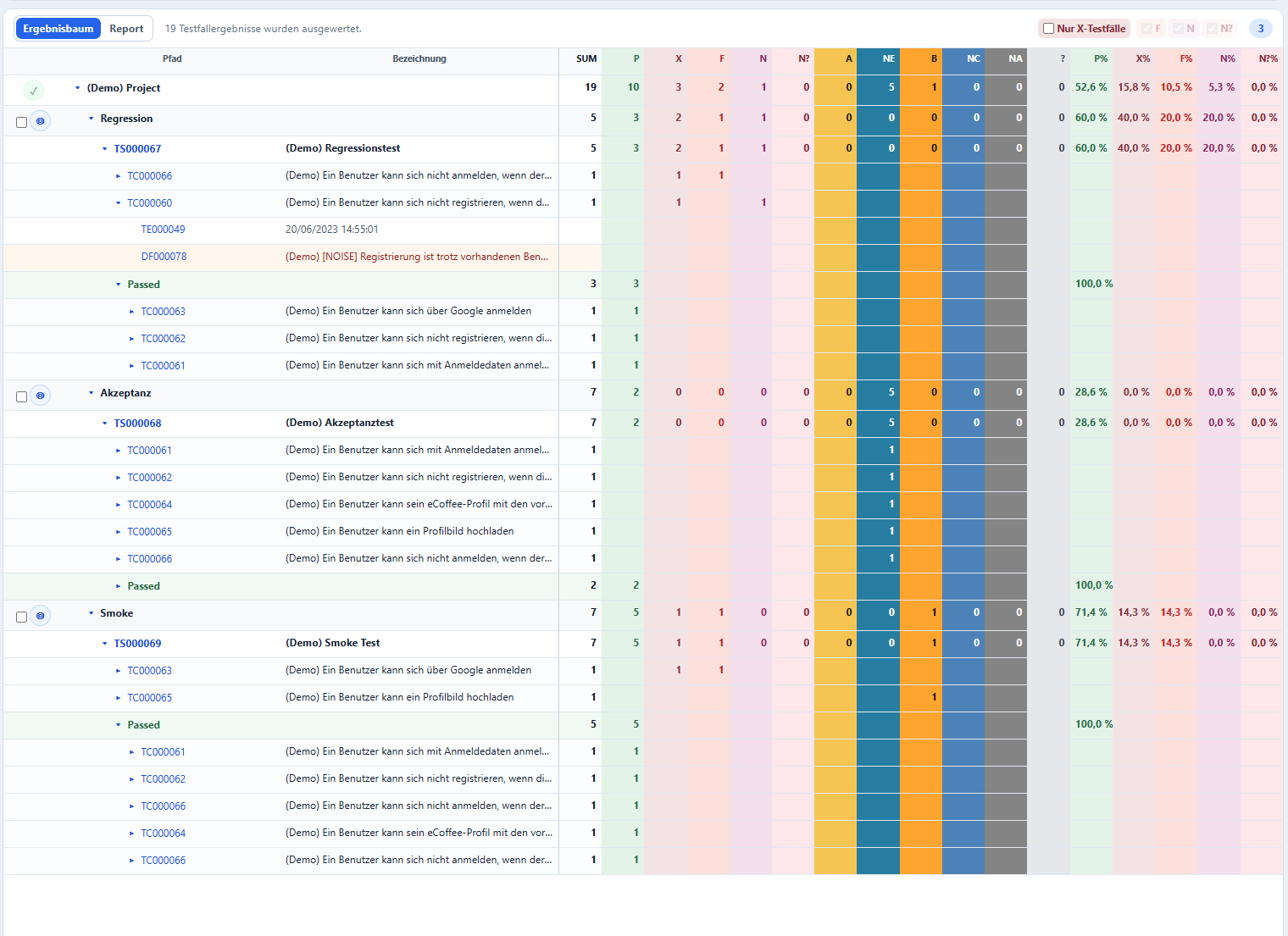
@@ -0,0 +1,108 @@
|
|
|
1
|
+
name: Verify and publish Docker image
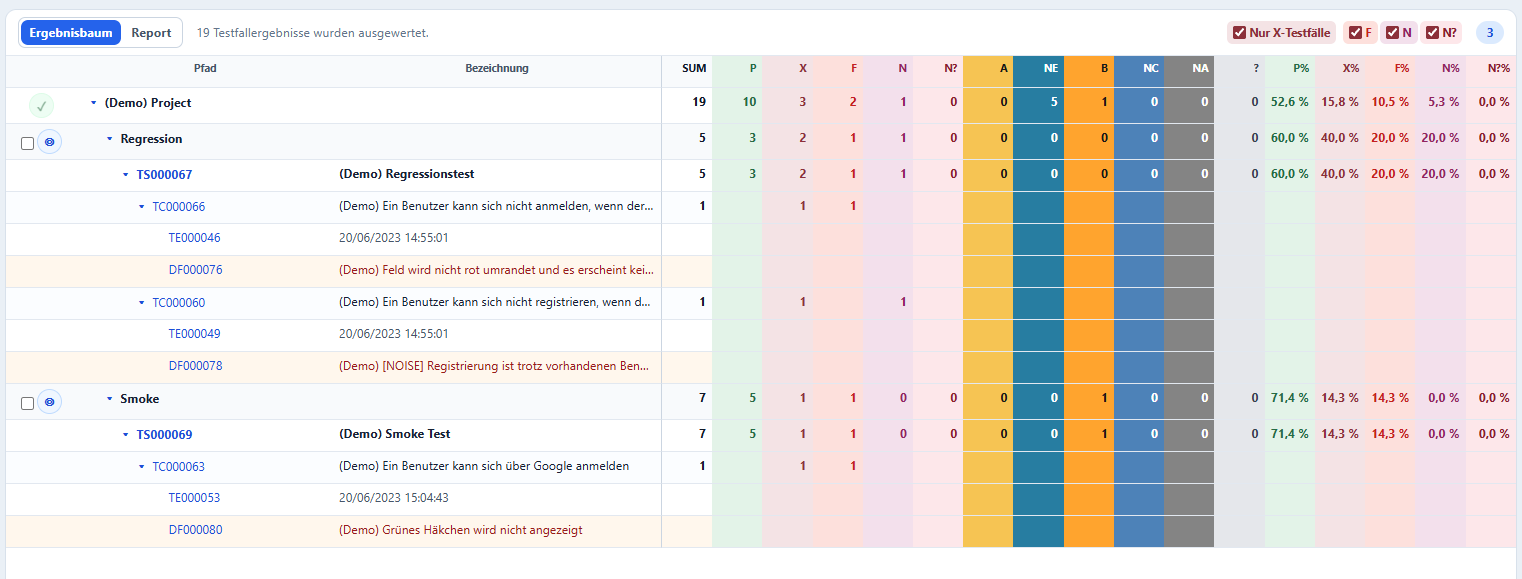
|
|
2
|
+
|
|
3
|
+
on:
|
|
4
|
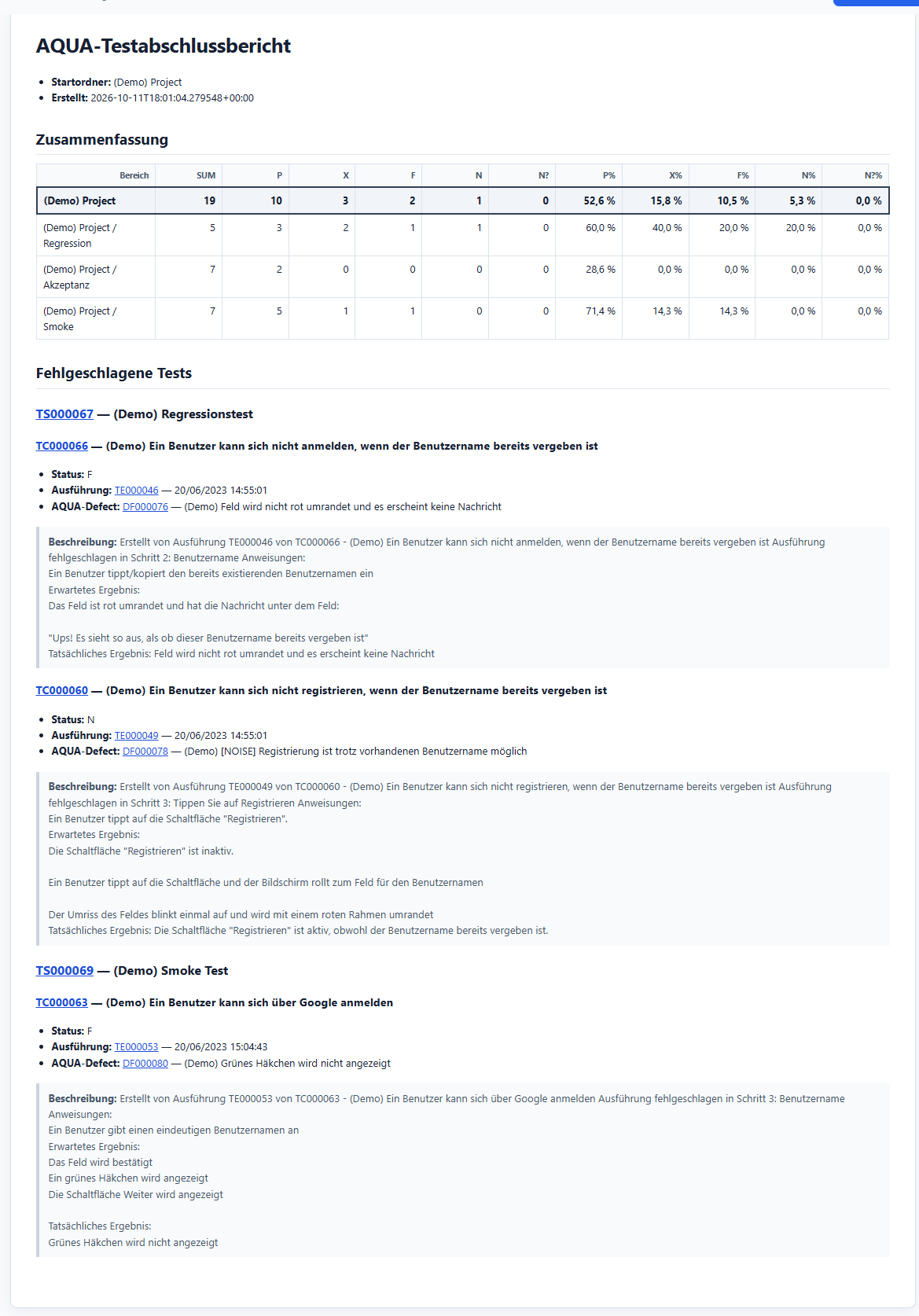
+
push:
|
|
5
|
+
branches:
|
|
6
|
+
- main
|
|
7
|
+
tags:
|
|
8
|
+
- "v*.*.*"
|
|
9
|
+
workflow_dispatch:
|
|
10
|
+
|
|
11
|
+
permissions:
|
|
12
|
+
contents: read
|
|
13
|
+
|
|
14
|
+
concurrency:
|
|
15
|
+
group: docker-publish-${{ github.ref }}
|
|
16
|
+
cancel-in-progress: true
|
|
17
|
+
|
|
18
|
+
env:
|
|
19
|
+
IMAGE_NAME: hrabovszki/h2orb
|
|
20
|
+
DOCKER_HOST: tcp://192.168.1.123:2375
|
|
21
|
+
DOCKER_CLI_VERSION: 28.3.3
|
|
22
|
+
|
|
23
|
+
jobs:
|
|
24
|
+
verify:
|
|
25
|
+
name: Verify Python project
|
|
26
|
+
runs-on: ubuntu-latest
|
|
27
|
+
steps:
|
|
28
|
+
- name: Check out repository
|
|
29
|
+
uses: actions/checkout@v4
|
|
30
|
+
|
|
31
|
+
- name: Install Docker CLI
|
|
32
|
+
shell: bash
|
|
33
|
+
run: |
|
|
34
|
+
mkdir -p "$RUNNER_TEMP/docker-cli"
|
|
35
|
+
curl --fail --silent --show-error --location \
|
|
36
|
+
"https://download.docker.com/linux/static/stable/x86_64/docker-${DOCKER_CLI_VERSION}.tgz" \
|
|
37
|
+
| tar --extract --gzip --strip-components=1 --directory "$RUNNER_TEMP/docker-cli"
|
|
38
|
+
echo "$RUNNER_TEMP/docker-cli" >> "$GITHUB_PATH"
|
|
39
|
+
"$RUNNER_TEMP/docker-cli/docker" version
|
|
40
|
+
|
|
41
|
+
- name: Run tests and Ruff with Python 3.12
|
|
42
|
+
run: docker build --target verify --tag h2orb:verify .
|
|
43
|
+
|
|
44
|
+
image:
|
|
45
|
+
name: Build and publish linux/amd64 image
|
|
46
|
+
needs: verify
|
|
47
|
+
runs-on: ubuntu-latest
|
|
48
|
+
steps:
|
|
49
|
+
- name: Check out repository
|
|
50
|
+
uses: actions/checkout@v4
|
|
51
|
+
|
|
52
|
+
- name: Install Docker CLI
|
|
53
|
+
shell: bash
|
|
54
|
+
run: |
|
|
55
|
+
mkdir -p "$RUNNER_TEMP/docker-cli"
|
|
56
|
+
curl --fail --silent --show-error --location \
|
|
57
|
+
"https://download.docker.com/linux/static/stable/x86_64/docker-${DOCKER_CLI_VERSION}.tgz" \
|
|
58
|
+
| tar --extract --gzip --strip-components=1 --directory "$RUNNER_TEMP/docker-cli"
|
|
59
|
+
echo "$RUNNER_TEMP/docker-cli" >> "$GITHUB_PATH"
|
|
60
|
+
"$RUNNER_TEMP/docker-cli/docker" version
|
|
61
|
+
|
|
62
|
+
- name: Set up Docker Buildx
|
|
63
|
+
uses: docker/setup-buildx-action@v3
|
|
64
|
+
|
|
65
|
+
- name: Log in to Docker Hub
|
|
66
|
+
uses: docker/login-action@v3
|
|
67
|
+
with:
|
|
68
|
+
username: ${{ secrets.DOCKERHUB_USERNAME }}
|
|
69
|
+
password: ${{ secrets.DOCKERHUB_TOKEN }}
|
|
70
|
+
|
|
71
|
+
- name: Generate image metadata
|
|
72
|
+
id: meta
|
|
73
|
+
uses: docker/metadata-action@v5
|
|
74
|
+
with:
|
|
75
|
+
images: ${{ env.IMAGE_NAME }}
|
|
76
|
+
tags: |
|
|
77
|
+
type=raw,value=main,enable=${{ github.ref == 'refs/heads/main' }}
|
|
78
|
+
type=sha,prefix=sha-,format=short,enable=${{ github.ref == 'refs/heads/main' }}
|
|
79
|
+
type=semver,pattern={{version}},enable=${{ startsWith(github.ref, 'refs/tags/v') }}
|
|
80
|
+
type=semver,pattern={{major}}.{{minor}},enable=${{ startsWith(github.ref, 'refs/tags/v') && !contains(github.ref, '-') }}
|
|
81
|
+
type=semver,pattern={{major}},enable=${{ startsWith(github.ref, 'refs/tags/v') && !contains(github.ref, '-') }}
|
|
82
|
+
type=raw,value=latest,enable=${{ startsWith(github.ref, 'refs/tags/v') && !contains(github.ref, '-') }}
|
|
83
|
+
labels: |
|
|
84
|
+
org.opencontainers.image.title=H2ORB
|
|
85
|
+
org.opencontainers.image.description=Result browser and reporting tool for test-management data
|
|
86
|
+
org.opencontainers.image.licenses=LicenseRef-H2ORB-Community
|
|
87
|
+
org.opencontainers.image.revision=${{ github.sha }}
|
|
88
|
+
|
|
89
|
+
- name: Build and publish image
|
|
90
|
+
uses: docker/build-push-action@v6
|
|
91
|
+
with:
|
|
92
|
+
context: .
|
|
93
|
+
file: ./Dockerfile
|
|
94
|
+
platforms: linux/amd64
|
|
95
|
+
push: true
|
|
96
|
+
tags: ${{ steps.meta.outputs.tags }}
|
|
97
|
+
labels: ${{ steps.meta.outputs.labels }}
|
|
98
|
+
cache-from: type=gha
|
|
99
|
+
cache-to: type=gha,mode=max
|
|
100
|
+
|
|
101
|
+
- name: Update Docker Hub overview
|
|
102
|
+
uses: peter-evans/dockerhub-description@1b9a80c056b620d92cedb9d9b5a223409c68ddfa # v5.0.0
|
|
103
|
+
with:
|
|
104
|
+
username: ${{ secrets.DOCKERHUB_USERNAME }}
|
|
105
|
+
password: ${{ secrets.DOCKERHUB_TOKEN }}
|
|
106
|
+
repository: ${{ env.IMAGE_NAME }}
|
|
107
|
+
short-description: A result browser and reporting tool for test-management data.
|
|
108
|
+
readme-filepath: ./README.md
|
|
@@ -0,0 +1,41 @@
|
|
|
1
|
+
name: "Publish H2ORB to PyPI"
|
|
2
|
+
|
|
3
|
+
on:
|
|
4
|
+
push:
|
|
5
|
+
tags:
|
|
6
|
+
- "v*"
|
|
7
|
+
|
|
8
|
+
jobs:
|
|
9
|
+
build-and-publish:
|
|
10
|
+
runs-on: ubuntu-latest
|
|
11
|
+
steps:
|
|
12
|
+
- name: Check out repository
|
|
13
|
+
uses: actions/checkout@v4
|
|
14
|
+
|
|
15
|
+
- name: Create build environment
|
|
16
|
+
shell: bash
|
|
17
|
+
run: |
|
|
18
|
+
python3 -m venv "$RUNNER_TEMP/h2orb-build-venv"
|
|
19
|
+
. "$RUNNER_TEMP/h2orb-build-venv/bin/activate"
|
|
20
|
+
python -m pip install --upgrade build twine
|
|
21
|
+
|
|
22
|
+
- name: Build distributions
|
|
23
|
+
shell: bash
|
|
24
|
+
run: |
|
|
25
|
+
. "$RUNNER_TEMP/h2orb-build-venv/bin/activate"
|
|
26
|
+
python -m build
|
|
27
|
+
|
|
28
|
+
- name: Validate distributions
|
|
29
|
+
shell: bash
|
|
30
|
+
run: |
|
|
31
|
+
. "$RUNNER_TEMP/h2orb-build-venv/bin/activate"
|
|
32
|
+
python -m twine check dist/*
|
|
33
|
+
|
|
34
|
+
- name: Upload to PyPI
|
|
35
|
+
shell: bash
|
|
36
|
+
run: |
|
|
37
|
+
. "$RUNNER_TEMP/h2orb-build-venv/bin/activate"
|
|
38
|
+
python -m twine upload dist/*
|
|
39
|
+
env:
|
|
40
|
+
TWINE_USERNAME: __token__
|
|
41
|
+
TWINE_PASSWORD: ${{ secrets.PYPI_TOKEN }}
|
|
@@ -0,0 +1,43 @@
|
|
|
1
|
+
name: "Publish H2ORB to TestPyPI"
|
|
2
|
+
|
|
3
|
+
on:
|
|
4
|
+
push:
|
|
5
|
+
tags:
|
|
6
|
+
- "test-v*"
|
|
7
|
+
|
|
8
|
+
jobs:
|
|
9
|
+
build-and-publish:
|
|
10
|
+
runs-on: ubuntu-latest
|
|
11
|
+
steps:
|
|
12
|
+
- name: Check out repository
|
|
13
|
+
uses: actions/checkout@v4
|
|
14
|
+
|
|
15
|
+
- name: Create build environment
|
|
16
|
+
shell: bash
|
|
17
|
+
run: |
|
|
18
|
+
python3 -m venv "$RUNNER_TEMP/h2orb-build-venv"
|
|
19
|
+
. "$RUNNER_TEMP/h2orb-build-venv/bin/activate"
|
|
20
|
+
python -m pip install --upgrade build twine
|
|
21
|
+
|
|
22
|
+
- name: Build distributions
|
|
23
|
+
shell: bash
|
|
24
|
+
run: |
|
|
25
|
+
. "$RUNNER_TEMP/h2orb-build-venv/bin/activate"
|
|
26
|
+
python -m build
|
|
27
|
+
|
|
28
|
+
- name: Validate distributions
|
|
29
|
+
shell: bash
|
|
30
|
+
run: |
|
|
31
|
+
. "$RUNNER_TEMP/h2orb-build-venv/bin/activate"
|
|
32
|
+
python -m twine check dist/*
|
|
33
|
+
|
|
34
|
+
- name: Upload to TestPyPI
|
|
35
|
+
shell: bash
|
|
36
|
+
run: |
|
|
37
|
+
. "$RUNNER_TEMP/h2orb-build-venv/bin/activate"
|
|
38
|
+
python -m twine upload \
|
|
39
|
+
--repository-url https://test.pypi.org/legacy/ \
|
|
40
|
+
dist/*
|
|
41
|
+
env:
|
|
42
|
+
TWINE_USERNAME: __token__
|
|
43
|
+
TWINE_PASSWORD: ${{ secrets.TESTPYPI_TOKEN }}
|
h2orb-0.1.1/.gitignore
ADDED
h2orb-0.1.1/Dockerfile
ADDED
|
@@ -0,0 +1,48 @@
|
|
|
1
|
+
FROM python:3.12-slim AS builder
|
|
2
|
+
|
|
3
|
+
ENV PIP_DISABLE_PIP_VERSION_CHECK=1 \
|
|
4
|
+
PIP_NO_CACHE_DIR=1
|
|
5
|
+
|
|
6
|
+
WORKDIR /build
|
|
7
|
+
|
|
8
|
+
COPY pyproject.toml README.md LICENSE ./
|
|
9
|
+
COPY src ./src
|
|
10
|
+
|
|
11
|
+
RUN python -m pip wheel --wheel-dir /wheels .
|
|
12
|
+
|
|
13
|
+
|
|
14
|
+
FROM builder AS verify
|
|
15
|
+
|
|
16
|
+
COPY tests ./tests
|
|
17
|
+
|
|
18
|
+
RUN python -m pip install ".[dev]" \
|
|
19
|
+
&& python -m pytest -p no:asyncio \
|
|
20
|
+
&& python -m ruff check .
|
|
21
|
+
|
|
22
|
+
|
|
23
|
+
FROM python:3.12-slim AS runtime
|
|
24
|
+
|
|
25
|
+
ENV PYTHONDONTWRITEBYTECODE=1 \
|
|
26
|
+
PYTHONUNBUFFERED=1 \
|
|
27
|
+
PIP_DISABLE_PIP_VERSION_CHECK=1 \
|
|
28
|
+
PIP_NO_CACHE_DIR=1 \
|
|
29
|
+
ARB_HOST=0.0.0.0 \
|
|
30
|
+
ARB_PORT=8000
|
|
31
|
+
|
|
32
|
+
RUN groupadd --system h2orb \
|
|
33
|
+
&& useradd --system --gid h2orb --create-home --home-dir /home/h2orb h2orb
|
|
34
|
+
|
|
35
|
+
WORKDIR /app
|
|
36
|
+
|
|
37
|
+
COPY --from=builder /wheels /wheels
|
|
38
|
+
RUN python -m pip install /wheels/*.whl \
|
|
39
|
+
&& rm -rf /wheels
|
|
40
|
+
|
|
41
|
+
USER h2orb
|
|
42
|
+
|
|
43
|
+
EXPOSE 8000
|
|
44
|
+
|
|
45
|
+
HEALTHCHECK --interval=30s --timeout=5s --start-period=10s --retries=3 \
|
|
46
|
+
CMD ["python", "-c", "import urllib.request; urllib.request.urlopen('http://127.0.0.1:8000/health', timeout=3).read()"]
|
|
47
|
+
|
|
48
|
+
CMD ["python", "-m", "h2orb"]
|
h2orb-0.1.1/LICENSE
ADDED
|
@@ -0,0 +1,77 @@
|
|
|
1
|
+
H2ORB Community License (Nicht-kommerzielle Nutzung)
|
|
2
|
+
|
|
3
|
+
Copyright (c) 2026 Zoltán Hrabovszki
|
|
4
|
+
|
|
5
|
+
1. Begriffe
|
|
6
|
+
|
|
7
|
+
- "Software": das Projekt "H2ORB – H2O Result Browser" samt zugehöriger Quell- und
|
|
8
|
+
Binärdateien, Dokumentation und ausgelieferter Container-Images.
|
|
9
|
+
- "Nicht-kommerzielle Nutzung": jede Nutzung zu privaten, akademischen oder
|
|
10
|
+
öffentlich zugänglichen, nicht-kommerziellen Zwecken ohne direkten oder
|
|
11
|
+
indirekten Umsatzbezug sowie die reine Evaluierung oder ein Proof of Concept.
|
|
12
|
+
- "Kommerzielle Nutzung": jede Nutzung in oder für ein Produkt, einen Service
|
|
13
|
+
oder einen Prozess, der direkt oder indirekt Einnahmen generiert oder einer
|
|
14
|
+
geschäftlichen Tätigkeit dient. Dazu gehören insbesondere bezahlte Projekte,
|
|
15
|
+
Installationen oder Supportleistungen, Firmenbetrieb für kommerzielle Zwecke,
|
|
16
|
+
SaaS, Resale sowie kommerziell verwendete Originale, Änderungen, Forks und
|
|
17
|
+
abgeleitete Werke. Für kommerzielle Nutzung ist eine gesonderte kommerzielle
|
|
18
|
+
Lizenz erforderlich.
|
|
19
|
+
|
|
20
|
+
2. Lizenzgewährung (nicht-kommerziell)
|
|
21
|
+
|
|
22
|
+
Der Rechteinhaber gewährt eine weltweite, nicht-exklusive, nicht übertragbare,
|
|
23
|
+
unentgeltliche Lizenz zur Nutzung, Vervielfältigung, Änderung und Weitergabe
|
|
24
|
+
der Software ausschließlich für nicht-kommerzielle Zwecke, vorausgesetzt, dass
|
|
25
|
+
(a) dieser Lizenztext in Kopien und abgeleiteten Werken enthalten bleibt und
|
|
26
|
+
(b) Urheber- und Hinweistexte nicht entfernt werden.
|
|
27
|
+
|
|
28
|
+
3. Einschränkungen
|
|
29
|
+
|
|
30
|
+
- Kommerzielle Nutzung ist ohne kommerzielle Lizenz untersagt.
|
|
31
|
+
- Marken- und Namensrechte werden nicht gewährt.
|
|
32
|
+
- Unterlizenzierung ist nur unter Beibehaltung dieser Bedingungen zulässig.
|
|
33
|
+
- Die Nutzung eines Forks, einer Änderung oder eines abgeleiteten Werks zu
|
|
34
|
+
kommerziellen Zwecken erfordert ebenfalls eine gesonderte kommerzielle
|
|
35
|
+
Lizenz des Rechteinhabers.
|
|
36
|
+
|
|
37
|
+
4. Support
|
|
38
|
+
|
|
39
|
+
Es besteht kein Anspruch auf Wartung, Support oder Updates.
|
|
40
|
+
|
|
41
|
+
5. Gewährleistungsausschluss
|
|
42
|
+
|
|
43
|
+
Die Software wird "wie besehen" ("AS IS") bereitgestellt, ohne ausdrückliche
|
|
44
|
+
oder stillschweigende Gewährleistung. Insbesondere wird keine Gewähr für
|
|
45
|
+
Marktgängigkeit, Eignung für einen bestimmten Zweck, Nichtverletzung von
|
|
46
|
+
Rechten Dritter, Fehlerfreiheit, Richtigkeit oder Verfügbarkeit übernommen.
|
|
47
|
+
|
|
48
|
+
6. Haftungsbeschränkung
|
|
49
|
+
|
|
50
|
+
Soweit gesetzlich zulässig, haften der Rechteinhaber und Mitwirkende in keinem
|
|
51
|
+
Fall für Schäden jedweder Art (einschließlich, aber nicht beschränkt auf
|
|
52
|
+
direkte, indirekte, zufällige, besondere, exemplarische oder Folgeschäden,
|
|
53
|
+
entgangenen Gewinn, Produktions- oder Betriebsunterbrechung, Datenverlust oder
|
|
54
|
+
Rechtsverfolgungskosten), die aus der Nutzung, Unmöglichkeit der Nutzung oder
|
|
55
|
+
Leistung der Software entstehen, selbst wenn auf die Möglichkeit solcher
|
|
56
|
+
Schäden hingewiesen wurde.
|
|
57
|
+
|
|
58
|
+
Unberührt bleiben zwingende Haftungstatbestände (z. B. nach dem
|
|
59
|
+
Produkthaftungsgesetz) sowie die Haftung für Vorsatz, grobe Fahrlässigkeit oder
|
|
60
|
+
für Verletzungen von Leben, Körper oder Gesundheit nach geltendem Recht.
|
|
61
|
+
|
|
62
|
+
7. Laufzeit und Beendigung
|
|
63
|
+
|
|
64
|
+
Diese Lizenz gilt bis zu ihrer Beendigung. Bei Verstoß erlischt das
|
|
65
|
+
Nutzungsrecht automatisch; die Nutzung ist einzustellen. Rechte an bereits
|
|
66
|
+
rechtmäßig weitergegebenen Kopien bleiben unberührt.
|
|
67
|
+
|
|
68
|
+
8. Sonstiges
|
|
69
|
+
|
|
70
|
+
Es gilt materielles Recht des Sitzstaats des Rechteinhabers unter Ausschluss
|
|
71
|
+
des Kollisionsrechts. Sollte eine Bestimmung unwirksam sein, bleibt der Rest
|
|
72
|
+
wirksam (Salvatorische Klausel).
|
|
73
|
+
|
|
74
|
+
Kommerzielle Lizenz
|
|
75
|
+
|
|
76
|
+
Für eine kommerzielle Nutzung (siehe Abschnitt 1) wenden Sie sich bitte an den
|
|
77
|
+
Rechteinhaber, um Konditionen und Lizenzgebühren zu vereinbaren.
|
h2orb-0.1.1/PKG-INFO
ADDED
|
@@ -0,0 +1,324 @@
|
|
|
1
|
+
Metadata-Version: 2.5
|
|
2
|
+
Name: h2orb
|
|
3
|
+
Version: 0.1.1
|
|
4
|
+
Summary: A result browser and reporting tool for test-management data.
|
|
5
|
+
Project-URL: Homepage, https://github.com/Hrabovszki1023/H2ORB
|
|
6
|
+
Project-URL: Repository, https://github.com/Hrabovszki1023/H2ORB.git
|
|
7
|
+
Project-URL: Issues, https://github.com/Hrabovszki1023/H2ORB/issues
|
|
8
|
+
Author: Zoltán Hrabovszki
|
|
9
|
+
License: H2ORB Community License (Nicht-kommerzielle Nutzung)
|
|
10
|
+
|
|
11
|
+
Copyright (c) 2026 Zoltán Hrabovszki
|
|
12
|
+
|
|
13
|
+
1. Begriffe
|
|
14
|
+
|
|
15
|
+
- "Software": das Projekt "H2ORB – H2O Result Browser" samt zugehöriger Quell- und
|
|
16
|
+
Binärdateien, Dokumentation und ausgelieferter Container-Images.
|
|
17
|
+
- "Nicht-kommerzielle Nutzung": jede Nutzung zu privaten, akademischen oder
|
|
18
|
+
öffentlich zugänglichen, nicht-kommerziellen Zwecken ohne direkten oder
|
|
19
|
+
indirekten Umsatzbezug sowie die reine Evaluierung oder ein Proof of Concept.
|
|
20
|
+
- "Kommerzielle Nutzung": jede Nutzung in oder für ein Produkt, einen Service
|
|
21
|
+
oder einen Prozess, der direkt oder indirekt Einnahmen generiert oder einer
|
|
22
|
+
geschäftlichen Tätigkeit dient. Dazu gehören insbesondere bezahlte Projekte,
|
|
23
|
+
Installationen oder Supportleistungen, Firmenbetrieb für kommerzielle Zwecke,
|
|
24
|
+
SaaS, Resale sowie kommerziell verwendete Originale, Änderungen, Forks und
|
|
25
|
+
abgeleitete Werke. Für kommerzielle Nutzung ist eine gesonderte kommerzielle
|
|
26
|
+
Lizenz erforderlich.
|
|
27
|
+
|
|
28
|
+
2. Lizenzgewährung (nicht-kommerziell)
|
|
29
|
+
|
|
30
|
+
Der Rechteinhaber gewährt eine weltweite, nicht-exklusive, nicht übertragbare,
|
|
31
|
+
unentgeltliche Lizenz zur Nutzung, Vervielfältigung, Änderung und Weitergabe
|
|
32
|
+
der Software ausschließlich für nicht-kommerzielle Zwecke, vorausgesetzt, dass
|
|
33
|
+
(a) dieser Lizenztext in Kopien und abgeleiteten Werken enthalten bleibt und
|
|
34
|
+
(b) Urheber- und Hinweistexte nicht entfernt werden.
|
|
35
|
+
|
|
36
|
+
3. Einschränkungen
|
|
37
|
+
|
|
38
|
+
- Kommerzielle Nutzung ist ohne kommerzielle Lizenz untersagt.
|
|
39
|
+
- Marken- und Namensrechte werden nicht gewährt.
|
|
40
|
+
- Unterlizenzierung ist nur unter Beibehaltung dieser Bedingungen zulässig.
|
|
41
|
+
- Die Nutzung eines Forks, einer Änderung oder eines abgeleiteten Werks zu
|
|
42
|
+
kommerziellen Zwecken erfordert ebenfalls eine gesonderte kommerzielle
|
|
43
|
+
Lizenz des Rechteinhabers.
|
|
44
|
+
|
|
45
|
+
4. Support
|
|
46
|
+
|
|
47
|
+
Es besteht kein Anspruch auf Wartung, Support oder Updates.
|
|
48
|
+
|
|
49
|
+
5. Gewährleistungsausschluss
|
|
50
|
+
|
|
51
|
+
Die Software wird "wie besehen" ("AS IS") bereitgestellt, ohne ausdrückliche
|
|
52
|
+
oder stillschweigende Gewährleistung. Insbesondere wird keine Gewähr für
|
|
53
|
+
Marktgängigkeit, Eignung für einen bestimmten Zweck, Nichtverletzung von
|
|
54
|
+
Rechten Dritter, Fehlerfreiheit, Richtigkeit oder Verfügbarkeit übernommen.
|
|
55
|
+
|
|
56
|
+
6. Haftungsbeschränkung
|
|
57
|
+
|
|
58
|
+
Soweit gesetzlich zulässig, haften der Rechteinhaber und Mitwirkende in keinem
|
|
59
|
+
Fall für Schäden jedweder Art (einschließlich, aber nicht beschränkt auf
|
|
60
|
+
direkte, indirekte, zufällige, besondere, exemplarische oder Folgeschäden,
|
|
61
|
+
entgangenen Gewinn, Produktions- oder Betriebsunterbrechung, Datenverlust oder
|
|
62
|
+
Rechtsverfolgungskosten), die aus der Nutzung, Unmöglichkeit der Nutzung oder
|
|
63
|
+
Leistung der Software entstehen, selbst wenn auf die Möglichkeit solcher
|
|
64
|
+
Schäden hingewiesen wurde.
|
|
65
|
+
|
|
66
|
+
Unberührt bleiben zwingende Haftungstatbestände (z. B. nach dem
|
|
67
|
+
Produkthaftungsgesetz) sowie die Haftung für Vorsatz, grobe Fahrlässigkeit oder
|
|
68
|
+
für Verletzungen von Leben, Körper oder Gesundheit nach geltendem Recht.
|
|
69
|
+
|
|
70
|
+
7. Laufzeit und Beendigung
|
|
71
|
+
|
|
72
|
+
Diese Lizenz gilt bis zu ihrer Beendigung. Bei Verstoß erlischt das
|
|
73
|
+
Nutzungsrecht automatisch; die Nutzung ist einzustellen. Rechte an bereits
|
|
74
|
+
rechtmäßig weitergegebenen Kopien bleiben unberührt.
|
|
75
|
+
|
|
76
|
+
8. Sonstiges
|
|
77
|
+
|
|
78
|
+
Es gilt materielles Recht des Sitzstaats des Rechteinhabers unter Ausschluss
|
|
79
|
+
des Kollisionsrechts. Sollte eine Bestimmung unwirksam sein, bleibt der Rest
|
|
80
|
+
wirksam (Salvatorische Klausel).
|
|
81
|
+
|
|
82
|
+
Kommerzielle Lizenz
|
|
83
|
+
|
|
84
|
+
Für eine kommerzielle Nutzung (siehe Abschnitt 1) wenden Sie sich bitte an den
|
|
85
|
+
Rechteinhaber, um Konditionen und Lizenzgebühren zu vereinbaren.
|
|
86
|
+
License-File: LICENSE
|
|
87
|
+
Requires-Python: >=3.12
|
|
88
|
+
Requires-Dist: fastapi<1.0,>=0.115
|
|
89
|
+
Requires-Dist: httpx<1.0,>=0.27
|
|
90
|
+
Requires-Dist: jinja2<4.0,>=3.1
|
|
91
|
+
Requires-Dist: pydantic-settings<3.0,>=2.6
|
|
92
|
+
Requires-Dist: python-multipart<1.0,>=0.0.12
|
|
93
|
+
Requires-Dist: uvicorn[standard]<1.0,>=0.32
|
|
94
|
+
Provides-Extra: dev
|
|
95
|
+
Requires-Dist: pytest-cov<7.0,>=6.0; extra == 'dev'
|
|
96
|
+
Requires-Dist: pytest<9.0,>=8.3; extra == 'dev'
|
|
97
|
+
Requires-Dist: respx<1.0,>=0.22; extra == 'dev'
|
|
98
|
+
Requires-Dist: ruff<1.0,>=0.8; extra == 'dev'
|
|
99
|
+
Description-Content-Type: text/markdown
|
|
100
|
+
|
|
101
|
+
# H2ORB – H₂O Result Browser
|
|
102
|
+
|
|
103
|
+
A result browser and reporting tool for test-management data. The current integration analyses
|
|
104
|
+
AQUA test results through a server-side REST API proxy: credentials and direct communication with
|
|
105
|
+
AQUA remain on the server, while users work through a browser interface.
|
|
106
|
+
|
|
107
|
+
H2ORB is an independent project and is not affiliated with or endorsed by any
|
|
108
|
+
test-management vendor.
|
|
109
|
+
|
|
110
|
+
## Current state
|
|
111
|
+
|
|
112
|
+
This repository contains a locally runnable FastAPI application with an asynchronous AQUA
|
|
113
|
+
v26.30.0.0 REST client. Projects and folders can be selected in the browser and the application
|
|
114
|
+
loads the corresponding scenarios, test cases, latest executions, and AQUA defects through its
|
|
115
|
+
server-side proxy.
|
|
116
|
+
|
|
117
|
+
The domain layer already implements the central aggregation rules:
|
|
118
|
+
|
|
119
|
+
- every test case occurrence is evaluated in its own test scenario;
|
|
120
|
+
- only the latest execution within that scenario is considered;
|
|
121
|
+
- failed executions are classified as `F` (regular defect), `N` (defect marked as noise), or
|
|
122
|
+
`N?` (not yet linked to a defect);
|
|
123
|
+
- `X` is the derived total of all failed results: `X = F + N + N?`;
|
|
124
|
+
- compact rates and aggregate totals are calculated bottom-up for every tree level.
|
|
125
|
+
|
|
126
|
+
Results are displayed in a compact German/English desktop interface as an expandable explorer tree.
|
|
127
|
+
Project and folder rows are followed by test
|
|
128
|
+
scenario (`TS`), test case (`TC`), execution (`TE`), and defect (`DF`) nodes. A test case contributes
|
|
129
|
+
exactly one result. Execution and defect detail rows do not contribute additional results. Counts
|
|
130
|
+
are aggregated bottom-up to scenarios, folders, and the selected project. See
|
|
131
|
+
[`docs/result-tree.md`](docs/result-tree.md) for the complete presentation and aggregation rules.
|
|
132
|
+
Passed test cases are grouped below each scenario, while an optional failure-focused view shows
|
|
133
|
+
only `F`, `N`, and `N?` results and automatically opens their containing paths.
|
|
134
|
+
|
|
135
|
+
The in-page report preview includes AQUA defect descriptions and links to scenarios, test cases,
|
|
136
|
+
executions, and defects. The same report can be downloaded as Markdown. Its complete contract is
|
|
137
|
+
specified in [`docs/report-contract.md`](docs/report-contract.md).
|
|
138
|
+
|
|
139
|
+
The manual/automated distinction uses AQUA's standard `TestExecutionType` values (`Manual` and
|
|
140
|
+
`Automated`). The application deliberately does not depend on company-specific fields, labels, or
|
|
141
|
+
workflow terminology.
|
|
142
|
+
|
|
143
|
+
## Screenshots
|
|
144
|
+
|
|
145
|
+
### Expandable result tree
|
|
146
|
+
|
|
147
|
+
The desktop-oriented result tree keeps paths, scenarios, test cases, executions, defects, status
|
|
148
|
+
counts, and rates visible in one compact view. Passed test cases are grouped separately below each
|
|
149
|
+
scenario.
|
|
150
|
+
|
|
151
|
+
|
|
152
|
+
|
|
153
|
+
### Failure-focused analysis
|
|
154
|
+
|
|
155
|
+
The `Nur X-Testfälle` filter hides successful and otherwise irrelevant results. The remaining
|
|
156
|
+
failures can be narrowed further to regular defects (`F`), confirmed noise (`N`), and unclassified
|
|
157
|
+
failure candidates (`N?`).
|
|
158
|
+
|
|
159
|
+
|
|
160
|
+
|
|
161
|
+
### Select report summary sections
|
|
162
|
+
|
|
163
|
+
Folder checkboxes select additional summary rows. The selected root folder is always included as
|
|
164
|
+
the highlighted overall result.
|
|
165
|
+
|
|
166
|
+

|
|
167
|
+
|
|
168
|
+
### Test completion report
|
|
169
|
+
|
|
170
|
+
The report combines the selected summary rows with failed test details, latest executions, AQUA
|
|
171
|
+
defects, defect descriptions, and direct links back to AQUA. It can also be downloaded as Markdown.
|
|
172
|
+
|
|
173
|
+
|
|
174
|
+
|
|
175
|
+
## Install from PyPI
|
|
176
|
+
|
|
177
|
+
Python 3.12 or newer is required:
|
|
178
|
+
|
|
179
|
+
```powershell
|
|
180
|
+
py -m pip install h2orb
|
|
181
|
+
h2orb
|
|
182
|
+
```
|
|
183
|
+
|
|
184
|
+
Open <http://127.0.0.1:8000> after configuring the required `ARB_` environment variables.
|
|
185
|
+
|
|
186
|
+
## Local setup
|
|
187
|
+
|
|
188
|
+
Python 3.12 or newer is required.
|
|
189
|
+
|
|
190
|
+
```powershell
|
|
191
|
+
py -3.12 -m venv .venv
|
|
192
|
+
.venv\Scripts\Activate.ps1
|
|
193
|
+
python -m pip install -e ".[dev]"
|
|
194
|
+
Copy-Item .env.example .env
|
|
195
|
+
python -m h2orb
|
|
196
|
+
```
|
|
197
|
+
|
|
198
|
+
Open <http://127.0.0.1:8000>. API documentation is available at
|
|
199
|
+
<http://127.0.0.1:8000/docs>.
|
|
200
|
+
|
|
201
|
+
Configuration uses environment variables prefixed with `ARB_`. Do not commit `.env` or real AQUA
|
|
202
|
+
credentials.
|
|
203
|
+
|
|
204
|
+
## Security notice for the current version
|
|
205
|
+
|
|
206
|
+
The current version uses the AQUA credentials configured centrally through environment variables.
|
|
207
|
+
Consequently, every person who can reach the H2ORB web interface can read the AQUA projects and test
|
|
208
|
+
data available to that account.
|
|
209
|
+
|
|
210
|
+
- Run H2ORB only in a trusted internal network.
|
|
211
|
+
- Do not publish port `8000` directly on the Internet.
|
|
212
|
+
- Restrict access with firewall rules; a reverse proxy with HTTPS and access control is recommended.
|
|
213
|
+
- Use a dedicated, read-only AQUA account with only the projects H2ORB is intended to display.
|
|
214
|
+
- Keep `.env`, passwords, certificate keys, and access tokens outside the image and repository.
|
|
215
|
+
- Treat generated reports as potentially confidential test data.
|
|
216
|
+
|
|
217
|
+
The next version is planned to request personal AQUA credentials and keep separate server-side
|
|
218
|
+
sessions for individual users. Until that authentication is implemented, network-level access
|
|
219
|
+
control is mandatory.
|
|
220
|
+
|
|
221
|
+
## Docker
|
|
222
|
+
|
|
223
|
+
### Run the published image
|
|
224
|
+
|
|
225
|
+
After creating a local `.env` from `.env.example`, pull and run the public `linux/amd64` image:
|
|
226
|
+
|
|
227
|
+
```powershell
|
|
228
|
+
docker pull hrabovszki/h2orb:main
|
|
229
|
+
docker run --detach --name h2orb `
|
|
230
|
+
--restart unless-stopped `
|
|
231
|
+
--env-file .env `
|
|
232
|
+
--env ARB_HOST=0.0.0.0 `
|
|
233
|
+
--publish 8000:8000 `
|
|
234
|
+
hrabovszki/h2orb:main
|
|
235
|
+
```
|
|
236
|
+
|
|
237
|
+
Use an immutable version or `sha-*` tag for reproducible deployments. The `main` tag tracks the
|
|
238
|
+
latest successful build from the main branch.
|
|
239
|
+
|
|
240
|
+
### Build locally
|
|
241
|
+
|
|
242
|
+
Build and start the local container with the existing `.env` configuration:
|
|
243
|
+
|
|
244
|
+
```powershell
|
|
245
|
+
docker compose up --build -d
|
|
246
|
+
docker compose ps
|
|
247
|
+
```
|
|
248
|
+
|
|
249
|
+
Open <http://127.0.0.1:8000>. Stop and remove the container with:
|
|
250
|
+
|
|
251
|
+
```powershell
|
|
252
|
+
docker compose down
|
|
253
|
+
```
|
|
254
|
+
|
|
255
|
+
The image runs as an unprivileged `h2orb` user, exposes port `8000`, and checks `/health`. The `.env`
|
|
256
|
+
file is excluded from the build context and is injected only when the container starts.
|
|
257
|
+
|
|
258
|
+
To test the AQUA connection from the built Linux image:
|
|
259
|
+
|
|
260
|
+
```powershell
|
|
261
|
+
docker compose run --rm h2orb python -m h2orb.check_connection
|
|
262
|
+
```
|
|
263
|
+
|
|
264
|
+
If AQUA uses an internal certificate authority, mount its PEM bundle read-only and configure the
|
|
265
|
+
path inside the container:
|
|
266
|
+
|
|
267
|
+
```yaml
|
|
268
|
+
services:
|
|
269
|
+
h2orb:
|
|
270
|
+
environment:
|
|
271
|
+
ARB_AQUA_CA_BUNDLE: /certificates/company-ca.pem
|
|
272
|
+
volumes:
|
|
273
|
+
- ./certificates/company-ca.pem:/certificates/company-ca.pem:ro
|
|
274
|
+
```
|
|
275
|
+
|
|
276
|
+
TLS verification remains enabled. Do not add certificates, `.env`, passwords, or access tokens to
|
|
277
|
+
the image.
|
|
278
|
+
|
|
279
|
+
### Publish from Gitea to Docker Hub
|
|
280
|
+
|
|
281
|
+
Gitea Actions verifies the Python project inside a Python 3.12 Docker build stage, then publishes the tested
|
|
282
|
+
`linux/amd64` image as `hrabovszki/h2orb`. Configure these repository secrets in
|
|
283
|
+
Gitea before running `.gitea/workflows/docker-publish.yaml`:
|
|
284
|
+
|
|
285
|
+
- `DOCKERHUB_USERNAME`: Docker Hub account name
|
|
286
|
+
- `DOCKERHUB_TOKEN`: Docker Hub personal access token with read, write, and delete permissions
|
|
287
|
+
|
|
288
|
+
A push to `main` publishes the moving `main` tag and an immutable `sha-*` tag. A tag such as
|
|
289
|
+
`v0.1.0` publishes `0.1.0`, `0.1`, `0`, and `latest`. Prerelease tags never move `latest`.
|
|
290
|
+
After a successful image push, the workflow also synchronizes this README and the short description
|
|
291
|
+
to the Docker Hub overview page.
|
|
292
|
+
|
|
293
|
+
Never store the Docker Hub password or token in Git. Use a scoped access token instead of the
|
|
294
|
+
account password.
|
|
295
|
+
|
|
296
|
+
## License
|
|
297
|
+
|
|
298
|
+
H2ORB is source-available under the
|
|
299
|
+
[H2ORB Community License](LICENSE). Non-commercial use is permitted; commercial use
|
|
300
|
+
requires a separate commercial license. This is not an OSI-approved open-source license.
|
|
301
|
+
|
|
302
|
+
## Development checks
|
|
303
|
+
|
|
304
|
+
```powershell
|
|
305
|
+
ruff check .
|
|
306
|
+
pytest
|
|
307
|
+
```
|
|
308
|
+
|
|
309
|
+
## Project structure
|
|
310
|
+
|
|
311
|
+
```text
|
|
312
|
+
src/h2orb/
|
|
313
|
+
├── api/ # HTTP routes exposed to the browser
|
|
314
|
+
├── aqua/ # AQUA REST API adapter
|
|
315
|
+
├── domain/ # framework-independent models and rules
|
|
316
|
+
├── services/ # application use cases
|
|
317
|
+
├── static/ # browser assets
|
|
318
|
+
└── templates/ # server-rendered HTML
|
|
319
|
+
```
|
|
320
|
+
|
|
321
|
+
Place the reviewed Swagger reference under `docs/aqua-api/`. Check it for internal host names,
|
|
322
|
+
credentials, tokens, or other sensitive information before committing it.
|
|
323
|
+
|
|
324
|
+
The current endpoint mapping is documented in `docs/aqua-api/endpoint-mapping.md`.
|