grstbx 2.4.0__tar.gz → 2.6.0__tar.gz
This diff represents the content of publicly available package versions that have been released to one of the supported registries. The information contained in this diff is provided for informational purposes only and reflects changes between package versions as they appear in their respective public registries.
- grstbx-2.6.0/CHANGELOG.md +242 -0
- {grstbx-2.4.0 → grstbx-2.6.0}/MANIFEST.in +3 -1
- grstbx-2.6.0/PKG-INFO +201 -0
- grstbx-2.6.0/README.md +127 -0
- {grstbx-2.4.0 → grstbx-2.6.0}/grstbx/__init__.py +6 -1
- grstbx-2.6.0/grstbx/app.py +1243 -0
- {grstbx-2.4.0 → grstbx-2.6.0}/grstbx/datalake.py +50 -0
- {grstbx-2.4.0 → grstbx-2.6.0}/grstbx/driver.py +9 -1
- {grstbx-2.4.0 → grstbx-2.6.0}/grstbx/visual.py +118 -41
- grstbx-2.6.0/grstbx.egg-info/PKG-INFO +201 -0
- {grstbx-2.4.0 → grstbx-2.6.0}/grstbx.egg-info/SOURCES.txt +1 -0
- {grstbx-2.4.0 → grstbx-2.6.0}/grstbx.egg-info/requires.txt +12 -1
- {grstbx-2.4.0 → grstbx-2.6.0}/pyproject.toml +12 -1
- grstbx-2.4.0/PKG-INFO +0 -136
- grstbx-2.4.0/README.md +0 -72
- grstbx-2.4.0/grstbx/app.py +0 -580
- grstbx-2.4.0/grstbx.egg-info/PKG-INFO +0 -136
- {grstbx-2.4.0 → grstbx-2.6.0}/LICENSE +0 -0
- {grstbx-2.4.0 → grstbx-2.6.0}/grstbx/data/OWT_centroids.nc +0 -0
- {grstbx-2.4.0 → grstbx-2.6.0}/grstbx/data/OWT_mean_spec.csv +0 -0
- {grstbx-2.4.0 → grstbx-2.6.0}/grstbx/data/OWT_mean_spec_v01.csv +0 -0
- {grstbx-2.4.0 → grstbx-2.6.0}/grstbx/data/Thuillier_2003_0.3nm.dat +0 -0
- {grstbx-2.4.0 → grstbx-2.6.0}/grstbx/data/__init__.py +0 -0
- {grstbx-2.4.0 → grstbx-2.6.0}/grstbx/masking.py +0 -0
- {grstbx-2.4.0 → grstbx-2.6.0}/grstbx/matchup.py +0 -0
- {grstbx-2.4.0 → grstbx-2.6.0}/grstbx/subset.py +0 -0
- {grstbx-2.4.0 → grstbx-2.6.0}/grstbx/utils.py +0 -0
- {grstbx-2.4.0 → grstbx-2.6.0}/grstbx.egg-info/dependency_links.txt +0 -0
- {grstbx-2.4.0 → grstbx-2.6.0}/grstbx.egg-info/entry_points.txt +0 -0
- {grstbx-2.4.0 → grstbx-2.6.0}/grstbx.egg-info/top_level.txt +0 -0
- {grstbx-2.4.0 → grstbx-2.6.0}/setup.cfg +0 -0
|
@@ -0,0 +1,242 @@
|
|
|
1
|
+
# Changelog
|
|
2
|
+
|
|
3
|
+
All notable changes of grstbx. The format follows [Keep a Changelog](https://keepachangelog.com) and
|
|
4
|
+
the versions follow [Semantic Versioning](https://semver.org); each version is published on
|
|
5
|
+
[PyPI](https://pypi.org/project/grstbx/) from the git tag `vX.Y.Z`.
|
|
6
|
+
|
|
7
|
+
## [Unreleased]
|
|
8
|
+
|
|
9
|
+
## [2.6.0] - 2026-10-22
|
|
10
|
+
|
|
11
|
+
STAC Items and STAC search in the dashboard, remote products over https / s3, GRSl2bgen L2B product
|
|
12
|
+
folders, and the dashboard inline in Jupyter notebooks and JupyterHub sessions.
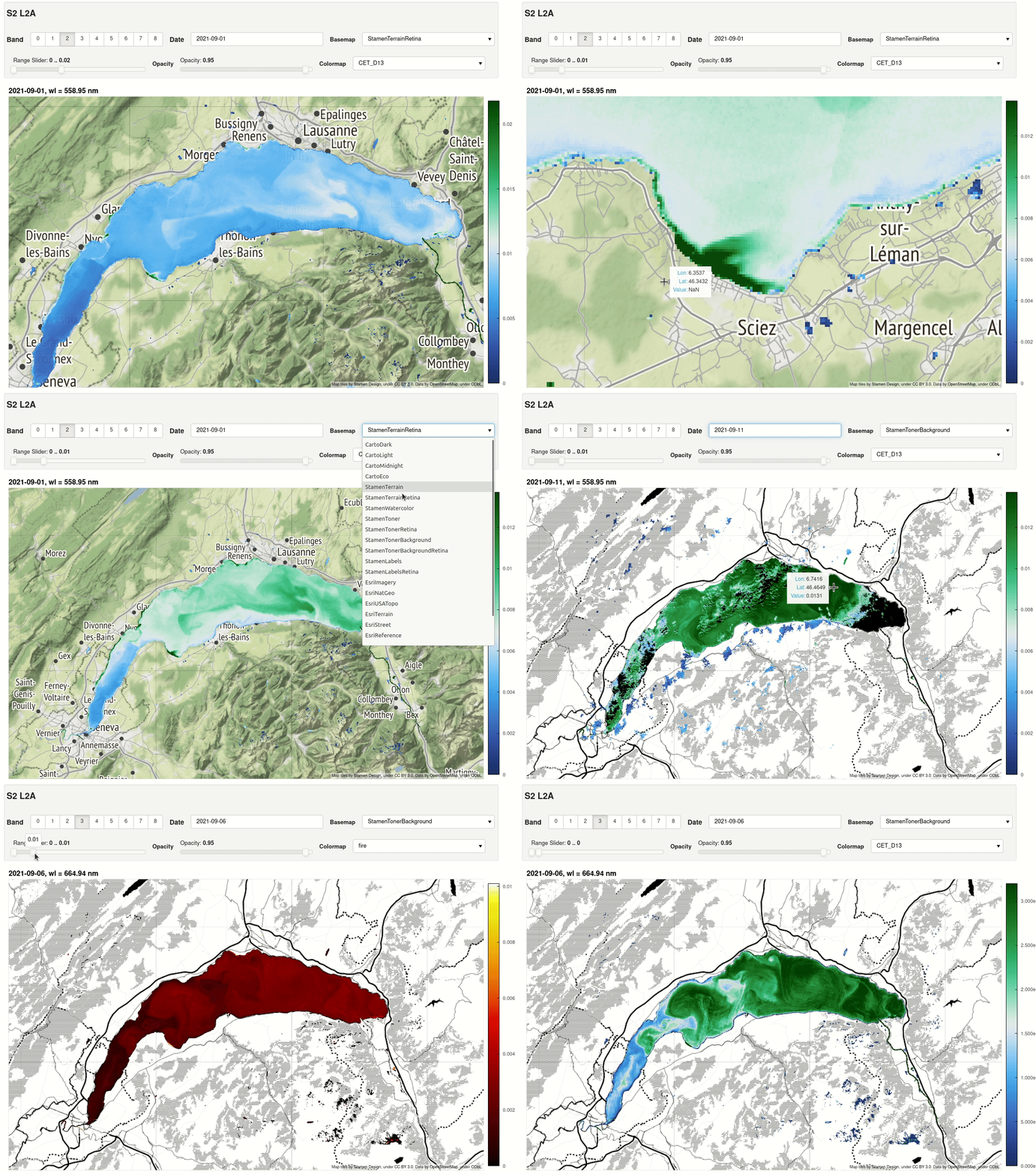
|
|
13
|
+
|
|
14
|
+
### Added
|
|
15
|
+
|
|
16
|
+
- L2B product folders of GRSl2bgen (`--product_dir`): `<name>/` holding `<name>.nc` (or `<name>.zarr`),
|
|
17
|
+
its log `<name>.log` and its STAC Item `<name>.json`, in the tree `<tile>/YYYY/MM/DD/<name>/`. They
|
|
18
|
+
are found by `find_products` and the file browser, and opened from their NetCDF file (`grstbx-viewer
|
|
19
|
+
/data/L2B --tile 31TFJ`), instead of being taken for GRS 2 L2A folders (which hold `<name>_anc.nc`).
|
|
20
|
+
- STAC Items of the products: a product with an Item (`<name>/<name>.json`, or `<name>.json` next to the
|
|
21
|
+
product) is described from it rather than from its name (`product_info`, `item_info`): acquisition
|
|
22
|
+
time (`datetime`), tile (`grid:code`), level (`processing:level`), GRS version (`processing:software`),
|
|
23
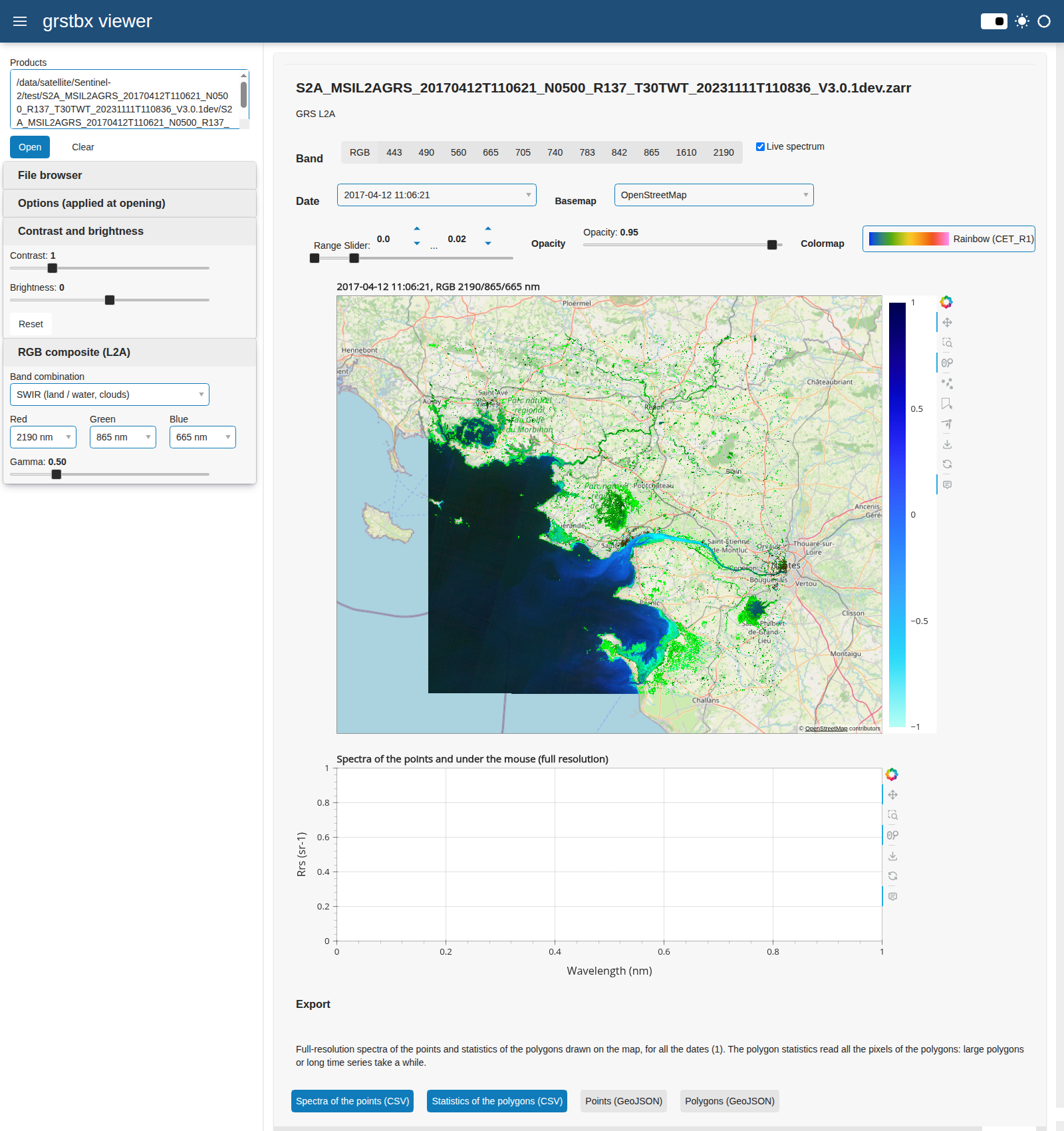
|
+
and the new columns `cloud_cover` (`eo:cloud_cover`), `crs` (`proj:code`) and `item`. Items can be
|
|
24
|
+
given directly, e.g. a glob pattern `.../*/*/*/*/*.json` (`is_stac_item`: the data asset, a relative
|
|
25
|
+
`href`, must exist). Plain JSON reading, no new dependency.
|
|
26
|
+
- Maximum cloud cover of the products with a STAC Item: `select_products(max_cloud_cover=)`,
|
|
27
|
+
`open_products(max_cloud_cover=)`, *Time series* card of the dashboard, `grstbx-viewer
|
|
28
|
+
--max-cloud-cover`; the products without Item are kept.
|
|
29
|
+
- *STAC search* card of the dashboard (`grstbx-viewer --stac <catalogue>`): catalogue (STAC API URL, or
|
|
30
|
+
folder / glob pattern of local Items), collections, area (everywhere, last polygon drawn on the map,
|
|
31
|
+
or bounding box), period and maximum cloud cover; lists the matching products and opens them as a time
|
|
32
|
+
series. `search_items` does the search: STAC API Item Search (`POST /search`, `next` links followed,
|
|
33
|
+
cloud cover through the query extension), or local Items filtered by bbox, period, tile and cloud
|
|
34
|
+
cover; plain HTTP (`urllib`), no new dependency. Remote data assets of a STAC API go to the *Products*
|
|
35
|
+
field as their Item URLs (`expand_paths` and `catalogue` accept URLs).
|
|
36
|
+
- Remote products: Zarr stores over `https` (and `s3`) and remote STAC Items (`https://.../item.json`
|
|
37
|
+
or the `.../items/<id>` of a STAC API), fetched and described from the Item, their relative data
|
|
38
|
+
asset resolved from the Item URL. Tested with GRS L2A (sharded, read with byte ranges) and L2B
|
|
39
|
+
(pyramid) full tiles served over HTTP: a tile opens in about 2 s (7 to 9 requests, about 1 MB) and a
|
|
40
|
+
window at full resolution is read in 0.3 s, with the same values as the local files. Optional
|
|
41
|
+
dependencies `grstbx[remote]` (fsspec, aiohttp, s3fs).
|
|
42
|
+
- `SelectFiles.search_stac`: selection of the products from their STAC Items (local Items below the root
|
|
43
|
+
or a folder, Item files or glob patterns, or a STAC API) by tile, area, period, cloud cover, GRS version
|
|
44
|
+
and collections, into the usual `file_list` table (plus an `item` column), then `list_file_path`.
|
|
45
|
+
- `search_items(version=)`: GRS version(s) to keep (`processing:software`, or the name).
|
|
46
|
+
- `app.panel`: the dashboard displayed inline in a Jupyter notebook cell (sidebar and map of
|
|
47
|
+
`create_app` in a row), served by the kernel; it takes the arguments of `grstbx-viewer`. Documentation
|
|
48
|
+
of the notebook usage, with a tutorial notebook for JupyterHub sessions: inline, or in a browser tab
|
|
49
|
+
through `jupyter-server-proxy` started from the notebook or a terminal, and troubleshooting.
|
|
50
|
+
|
|
51
|
+
## [2.5.0] - 2026-10-20
|
|
52
|
+
|
|
53
|
+
Time series of folders in the dashboard, faster viewers with bounded caches, tests and continuous
|
|
54
|
+
integration.
|
|
55
|
+
|
|
56
|
+
### Added
|
|
57
|
+
|
|
58
|
+
- `grstbx-viewer`: time series from folders, e.g. the tree `<tile>/YYYY/MM/DD/<product>` of the GRS
|
|
59
|
+
batches (`find_products`), with the GRS >= 3 product folders `<name>/<name>.zarr`. The *Time series*
|
|
60
|
+
card (and `--tile`, `--start`, `--end`, `--all-processings`) selects the tile (required when the
|
|
61
|
+
folders hold several UTM zones), the period and the last processing of each acquisition
|
|
62
|
+
(`select_products`). The products of a series are opened when they are displayed, so that hundreds of
|
|
63
|
+
products open in a second; for more than 30 dates the live time series of L2B is off at opening.
|
|
64
|
+
- `grstbx-viewer`: the invalid pixels (`mask != 0`) of the L2A products are hidden too, by default
|
|
65
|
+
(option of the *Options* card, `--show-invalid-l2a`; `--show-invalid-l2b` for the L2B products;
|
|
66
|
+
`open_products(mask_l2a=)`).
|
|
67
|
+
- `ViewSpectral` and `ViewParam`: `live=` option (initial state of the live spectrum / time series).
|
|
68
|
+
- `L2grs.get_l2b_datacube`: `variables=` option to read only the variables needed from the large L2B
|
|
69
|
+
products.
|
|
70
|
+
- Tests on synthetic data (`tests/`, `pip install "grstbx[test]"`, `pytest`) and continuous integration
|
|
71
|
+
(`.github/workflows/ci.yml`): build, tests and command line of the installed wheel on Python 3.11 to
|
|
72
|
+
3.13, and build of the documentation, for each push and pull request.
|
|
73
|
+
- Documentation: case study of the L2B time series of the Lac de Sainte-Croix (tile 31TGJ), replacing
|
|
74
|
+
the Lac de Saint-Cassien notebook; tutorial pages on the template of the GRS examples, processing
|
|
75
|
+
chain description, utilities tutorial illustrated with figures, roadmap for S3 object storage and STAC
|
|
76
|
+
catalogues; this changelog.
|
|
77
|
+
|
|
78
|
+
### Changed
|
|
79
|
+
|
|
80
|
+
- `Multiscale`: the windows of the map are read with a margin of 25 % and kept, so that panning and
|
|
81
|
+
zooming inside it read no data (about 3 times faster). The caches (windows, coarser levels computed
|
|
82
|
+
for the images without pyramid, blocks of the spectra and time series) are bounded in memory
|
|
83
|
+
(`cache_size`, 2 GB by default, least recently used data dropped first); they were unbounded or
|
|
84
|
+
bounded in number only. `grstbx-viewer --cache-size` (GB per session).
|
|
85
|
+
- Viewers: widgets on four rows.
|
|
86
|
+
- Documentation: the notebooks of the tutorials are kept (and tracked) in `docs/source/tutorials/`, they
|
|
87
|
+
are no longer copied from `notebook/` at each build. Read the Docs builds the HTML and PDF
|
|
88
|
+
documentation only (no EPUB).
|
|
89
|
+
|
|
90
|
+
### Fixed
|
|
91
|
+
|
|
92
|
+
- Viewers: the colorbar is hidden when the RGB composite is displayed (it showed a meaningless -1 to 1
|
|
93
|
+
scale, or the range of the band displayed before) and shown again for the single bands and parameters
|
|
94
|
+
(`colorbar_visibility_hook`).
|
|
95
|
+
- Viewers: the *Live*, *Reverse* and *Log scale* checkboxes were cut at the right of the map.
|
|
96
|
+
- `L2grs.get_l2b_datacube`: the scalar coordinates of the ancillary data (e.g. `forecast_period` of
|
|
97
|
+
CAMS, stored as a float or a timedelta depending on the products) are no longer concatenated along
|
|
98
|
+
time, which failed for such mixed series.
|
|
99
|
+
- `grstbx-viewer`: the level of the products (L2A, L2B) is checked on their content when their names
|
|
100
|
+
disagree.
|
|
101
|
+
|
|
102
|
+
## [2.4.0] - 2026-10-16
|
|
103
|
+
|
|
104
|
+
First release published on PyPI (`pip install grstbx`).
|
|
105
|
+
|
|
106
|
+
### Added
|
|
107
|
+
|
|
108
|
+
- Web dashboard `grstbx-viewer` (`grstbx.app`): opens GRS L2A and L2B products (Zarr stores, NetCDF
|
|
109
|
+
products, hGRS L2A files), one image, a time series of products (paths or glob patterns, possibly on
|
|
110
|
+
different grids) or a NetCDF datacube, chosen in a file browser of the server; the L2A products are
|
|
111
|
+
displayed with `ViewSpectral`, the L2B products with `ViewParam` (invalid pixels hidden); exports of
|
|
112
|
+
the full-resolution values of the drawn points and of the statistics of the drawn polygons for all the
|
|
113
|
+
dates (CSV) and of the geometries (GeoJSON); it can be served on a network (`--address`).
|
|
114
|
+
- `ViewSpectral` and `ViewParam`: contrast and brightness sliders (RGB composite and colour range of the
|
|
115
|
+
single bands or parameters); `ViewSpectral`: bands of the RGB composite (presets: true colour, false
|
|
116
|
+
colour, red edge, SWIR, or any band for each channel) and gamma. The widgets are shown in the viewer,
|
|
117
|
+
or placed elsewhere with `display_controls()` and `rgb_controls()` (`visu(controls=False)`), as in the
|
|
118
|
+
sidebar of `grstbx-viewer`. `title=` option to name the viewer after the sensor (e.g.
|
|
119
|
+
`'## PRISMA L2A'`; default `'## S2 L2A'` and `'## S2 L2B'`).
|
|
120
|
+
- hGRS products (hyperspectral GRS, EnMAP and PRISMA): `open_hgrs_l2a` opens an hGRS L2A NetCDF file as
|
|
121
|
+
a product (full-resolution `Rrs` and `brdfg_full`) and its ancillary data (aerosol, water vapor and
|
|
122
|
+
sunglint on the coarse grid `xc`, `yc`), like the GRS products, so that it can be cropped with
|
|
123
|
+
`crop_l2a` and displayed with the viewers; the SNAP-compliant hGRS products (one `Rrs_<wl>` variable
|
|
124
|
+
per band) are reshaped into `Rrs`. `open_l2a` opens GRS and hGRS products (`is_hgrs`).
|
|
125
|
+
- Documentation: tutorial pages on the web dashboard and on the hGRS products, with the PRISMA
|
|
126
|
+
L1-to-L2A notebook (L1 and L2C inputs interpolated onto the L2A grid, composites, retrieved
|
|
127
|
+
parameters, spectra, transect) and a link to the EnMAP tutorial of hGRS.
|
|
128
|
+
- Packaging: GitHub Actions workflow publishing to PyPI on `v*` tags (Trusted Publishing) and creating
|
|
129
|
+
the GitHub release.
|
|
130
|
+
|
|
131
|
+
### Changed
|
|
132
|
+
|
|
133
|
+
- Documentation: harmonized titles, sections and captions of the tutorial notebooks.
|
|
134
|
+
- Packaging: source distribution without tests, notebooks, docs and illustrations.
|
|
135
|
+
|
|
136
|
+
### Fixed
|
|
137
|
+
|
|
138
|
+
- `SpatioTemp.clip_raster` clipped a square of side 1.41 `extent_m` instead of `extent_m`; the clipped
|
|
139
|
+
areas of former runs are 2 times larger (`SpatioTemp.wktbox` has had the same correction since
|
|
140
|
+
v2.2.0: it returned a box twice the requested `width` and `height` before).
|
|
141
|
+
- `utm_projection` returns the plate carrée projection for longitude-latitude grids (e.g. EPSG 4326 of
|
|
142
|
+
the hGRS PRISMA products), which `plot_rgb` drew as web Mercator coordinates.
|
|
143
|
+
- The drop-down menus of `ViewSpectral` and `ViewParam` (colormap picker) were clipped by the widget
|
|
144
|
+
box: they are now drawn above the map.
|
|
145
|
+
|
|
146
|
+
## 2.3.2
|
|
147
|
+
|
|
148
|
+
Matchups between satellite and in situ data (`grstbx.matchup`): `get_matchups` pairs each in situ sample
|
|
149
|
+
with the closest image within a maximum time lag, `matchup_metrics` computes the agreement statistics
|
|
150
|
+
(regression, rmse, bias, mape, median symmetric accuracy and signed symmetric percentage bias) and
|
|
151
|
+
`plot_matchup` draws the scatter plot with these statistics. They replace the functions defined in the
|
|
152
|
+
L2B validation tutorial.
|
|
153
|
+
|
|
154
|
+
## 2.3.1
|
|
155
|
+
|
|
156
|
+
`ViewSpectral`: live full-resolution spectrum of the pixel under the mouse (*Live spectrum* checkbox),
|
|
157
|
+
plotted with the spectra of the drawn points; the pixels are read by blocks aligned on the Zarr chunks,
|
|
158
|
+
with all the bands, and the last blocks are kept in memory (`Multiscale.pixel`). `ViewParam`: same
|
|
159
|
+
colormaps as `ViewSpectral` (`RRS_COLORMAPS`, previews, reverse toggle) and `cmap=` option; the former
|
|
160
|
+
list `COLORMAPS` is removed. `ViewParam`: time series of the parameter at the drawn points and live time
|
|
161
|
+
series of the pixel under the mouse (`Multiscale.timeseries`). Both viewers: `aoi=` and `poi=` options to
|
|
162
|
+
draw initial polygons and points (GeoDataFrame, shapely geometry, WKT or (lon, lat)); the points keep the
|
|
163
|
+
same colour as their spectra and time series; plots are placed beneath the map. Default basemap:
|
|
164
|
+
OpenStreetMap, which needs no API key (the Stadia Maps tiles return error 401 outside `localhost`, e.g.
|
|
165
|
+
on Read the Docs). New tutorial: GRS L2B datacube (Berre lagoon).
|
|
166
|
+
|
|
167
|
+
## [2.3.0] - 2026-10-09
|
|
168
|
+
|
|
169
|
+
Multiscale interactive viewers: `ViewSpectral` and `ViewParam` read only the pixels visible on the
|
|
170
|
+
screen, at the screen resolution, from the pyramids of the Zarr products (or from coarser levels computed
|
|
171
|
+
on demand, `Multiscale`); only the visible window is reprojected to web Mercator. They open Zarr stores
|
|
172
|
+
directly (path or list of paths). `ViewSpectral` adds a true-colour composite and the full-resolution
|
|
173
|
+
spectra of the drawn points. Free basemaps: CARTO, OpenStreetMap, OpenTopoMap, Esri and the Stamen styles
|
|
174
|
+
of Stadia Maps (`BASEMAPS`). Drawn geometries are returned in the right CRS when the map is not
|
|
175
|
+
reprojected. `basemap=` sets the initial basemap. `ViewSpectral` colormaps: sequential, perceptually
|
|
176
|
+
uniform maps named after the water feature they enhance (`RRS_COLORMAPS`, colorcet and cmocean), with
|
|
177
|
+
previews, a reverse toggle and `cmap=`; fix of the crash when switching between the RGB composite and a
|
|
178
|
+
single band. Faster datacubes (`L2grs`): images opened with the chunks of the files, flag statistics and
|
|
179
|
+
subsets of all the images computed in a single dask call (one task per image), ancillary files skipped,
|
|
180
|
+
`scheduler` option (single thread by default for netCDF, whose HDF5 reads are serialized); about 4x
|
|
181
|
+
faster to build and 5x faster to read.
|
|
182
|
+
|
|
183
|
+
## [2.2.0] - 2026-10-09
|
|
184
|
+
|
|
185
|
+
Crop L2A products to an area of interest and export the subsets as GRS products (NetCDF or Zarr) or
|
|
186
|
+
GeoTIFF (`grstbx.subset`); the ancillary group of Zarr products is opened with the image. Map helpers
|
|
187
|
+
`utm_projection` (fixes the UTM zone / hemisphere detection) and `plot_rgb` (true-colour composite,
|
|
188
|
+
decimated for large images, AOI outline). Packaging: dependencies with lower bounds, unused ones removed
|
|
189
|
+
(`docopt`, `pandas-bokeh`), `netCDF4` added, Jupyter moved to the `notebook` extra; `environment.yml` and
|
|
190
|
+
`requirements.txt`.
|
|
191
|
+
|
|
192
|
+
## [2.1.1] - 2026-10-08
|
|
193
|
+
|
|
194
|
+
Open Zarr v3 multiscale (pyramid) images, groups `'0'`, `'1'`, `'2'`, ...
|
|
195
|
+
|
|
196
|
+
## 2.1.0
|
|
197
|
+
|
|
198
|
+
Code optimization and packaging with `pyproject.toml`.
|
|
199
|
+
|
|
200
|
+
## 2.0.4
|
|
201
|
+
|
|
202
|
+
Code optimization and documentation; lazy loading of the `visual` module.
|
|
203
|
+
|
|
204
|
+
## [2.0.3] - 2026-04-08
|
|
205
|
+
|
|
206
|
+
Tool option for masking / bitmask flagging.
|
|
207
|
+
|
|
208
|
+
## 2.0.2
|
|
209
|
+
|
|
210
|
+
Small changes for the visualization devices.
|
|
211
|
+
|
|
212
|
+
## 2.0.1
|
|
213
|
+
|
|
214
|
+
Fix for GDAL projection for accepted dtype, fix for dashboard visualization.
|
|
215
|
+
|
|
216
|
+
## 2.0.0
|
|
217
|
+
|
|
218
|
+
Transition to GRS v2.
|
|
219
|
+
|
|
220
|
+
## 1.0.5
|
|
221
|
+
|
|
222
|
+
Revisit datacube and raster objects for multi-tile access.
|
|
223
|
+
|
|
224
|
+
## [1.0.4] - 2023-01-27
|
|
225
|
+
|
|
226
|
+
Tools for L2B handling.
|
|
227
|
+
|
|
228
|
+
## [1.0.3] - 2023-01-02
|
|
229
|
+
|
|
230
|
+
Fix for reprojection in any system, especially useful for reprojection in pseudo-Mercator (EPSG:3857) for
|
|
231
|
+
visualization with web mapping tools (e.g. OpenStreetMap, Google Maps).
|
|
232
|
+
|
|
233
|
+
[Unreleased]: https://github.com/Tristanovsk/grstbx/compare/v2.6.0...HEAD
|
|
234
|
+
[2.6.0]: https://github.com/Tristanovsk/grstbx/compare/v2.5.0...v2.6.0
|
|
235
|
+
[2.5.0]: https://github.com/Tristanovsk/grstbx/compare/v2.4.0...v2.5.0
|
|
236
|
+
[2.4.0]: https://github.com/Tristanovsk/grstbx/compare/v2.3.0...v2.4.0
|
|
237
|
+
[2.3.0]: https://github.com/Tristanovsk/grstbx/tree/v2.3.0
|
|
238
|
+
[2.2.0]: https://github.com/Tristanovsk/grstbx/tree/v2.2.0
|
|
239
|
+
[2.1.1]: https://github.com/Tristanovsk/grstbx/tree/v2.1.1
|
|
240
|
+
[2.0.3]: https://github.com/Tristanovsk/grstbx/tree/v2.0.3
|
|
241
|
+
[1.0.4]: https://github.com/Tristanovsk/grstbx/tree/v1.0.4
|
|
242
|
+
[1.0.3]: https://github.com/Tristanovsk/grstbx/tree/v1.0.3
|
|
@@ -1,8 +1,10 @@
|
|
|
1
|
-
# Source distribution: the package, its data, README, LICENSE and pyproject.toml only
|
|
1
|
+
# Source distribution: the package, its data, README, CHANGELOG, LICENSE and pyproject.toml only
|
|
2
2
|
# (no tests, notebooks, docs or illustrations, which hold large data files).
|
|
3
3
|
prune test
|
|
4
|
+
prune tests
|
|
4
5
|
prune notebook
|
|
5
6
|
prune docs
|
|
6
7
|
prune illustration
|
|
7
8
|
prune dask-worker-space
|
|
8
9
|
global-exclude __pycache__ *.py[cod]
|
|
10
|
+
include CHANGELOG.md
|
grstbx-2.6.0/PKG-INFO
ADDED
|
@@ -0,0 +1,201 @@
|
|
|
1
|
+
Metadata-Version: 2.4
|
|
2
|
+
Name: grstbx
|
|
3
|
+
Version: 2.6.0
|
|
4
|
+
Summary: Visualization and post-processing of GRS (Glint Removal for Sentinel-2-like sensors) L2A and L2B images
|
|
5
|
+
Author-email: "T. Harmel" <tristan.harmel@gmail.com>
|
|
6
|
+
Project-URL: Repository, https://github.com/Tristanovsk/grstbx
|
|
7
|
+
Project-URL: Documentation, https://grstbx.readthedocs.io
|
|
8
|
+
Project-URL: Issues, https://github.com/Tristanovsk/grstbx/issues
|
|
9
|
+
Project-URL: Changelog, https://github.com/Tristanovsk/grstbx/blob/main/CHANGELOG.md
|
|
10
|
+
Project-URL: GRS, https://github.com/Tristanovsk/grs
|
|
11
|
+
Keywords: Sentinel-2,Landsat,ocean color,remote sensing reflectance,water quality,sunglint,xarray,datacube
|
|
12
|
+
Classifier: License :: OSI Approved :: GNU General Public License v3 (GPLv3)
|
|
13
|
+
Classifier: Programming Language :: Python :: 3
|
|
14
|
+
Classifier: Programming Language :: Python :: 3.11
|
|
15
|
+
Classifier: Programming Language :: Python :: 3.12
|
|
16
|
+
Classifier: Programming Language :: Python :: 3.13
|
|
17
|
+
Classifier: Operating System :: OS Independent
|
|
18
|
+
Classifier: Intended Audience :: Science/Research
|
|
19
|
+
Classifier: Topic :: Scientific/Engineering :: GIS
|
|
20
|
+
Classifier: Topic :: Scientific/Engineering :: Image Processing
|
|
21
|
+
Classifier: Framework :: Jupyter
|
|
22
|
+
Requires-Python: >=3.11
|
|
23
|
+
Description-Content-Type: text/markdown
|
|
24
|
+
License-File: LICENSE
|
|
25
|
+
Requires-Dist: numpy>=1.24
|
|
26
|
+
Requires-Dist: scipy>=1.10
|
|
27
|
+
Requires-Dist: pandas>=2.0
|
|
28
|
+
Requires-Dist: xarray>=2025.6.1
|
|
29
|
+
Requires-Dist: dask[array]>=2024.1
|
|
30
|
+
Requires-Dist: zarr>=3
|
|
31
|
+
Requires-Dist: netCDF4>=1.6
|
|
32
|
+
Requires-Dist: importlib_resources>=5.10
|
|
33
|
+
Requires-Dist: affine>=2.4
|
|
34
|
+
Requires-Dist: pyproj>=3.6
|
|
35
|
+
Requires-Dist: shapely>=2.0
|
|
36
|
+
Requires-Dist: geopandas>=0.14
|
|
37
|
+
Requires-Dist: rasterio>=1.3
|
|
38
|
+
Requires-Dist: rioxarray>=0.15
|
|
39
|
+
Requires-Dist: matplotlib>=3.7
|
|
40
|
+
Requires-Dist: cartopy>=0.22
|
|
41
|
+
Requires-Dist: bokeh>=3.3
|
|
42
|
+
Requires-Dist: holoviews>=1.18
|
|
43
|
+
Requires-Dist: datashader>=0.16
|
|
44
|
+
Requires-Dist: colorcet>=3.0
|
|
45
|
+
Requires-Dist: cmocean>=3.0
|
|
46
|
+
Requires-Dist: param>=2.0
|
|
47
|
+
Requires-Dist: panel>=1.3
|
|
48
|
+
Requires-Dist: scikit-learn>=1.3
|
|
49
|
+
Provides-Extra: notebook
|
|
50
|
+
Requires-Dist: jupyterlab>=4; extra == "notebook"
|
|
51
|
+
Requires-Dist: ipykernel>=6; extra == "notebook"
|
|
52
|
+
Requires-Dist: jupyter_bokeh>=4; extra == "notebook"
|
|
53
|
+
Provides-Extra: regrid
|
|
54
|
+
Requires-Dist: xesmf>=0.8; extra == "regrid"
|
|
55
|
+
Provides-Extra: remote
|
|
56
|
+
Requires-Dist: fsspec>=2023.1; extra == "remote"
|
|
57
|
+
Requires-Dist: aiohttp>=3.8; extra == "remote"
|
|
58
|
+
Requires-Dist: s3fs>=2023.1; extra == "remote"
|
|
59
|
+
Provides-Extra: docs
|
|
60
|
+
Requires-Dist: sphinx>=7; extra == "docs"
|
|
61
|
+
Requires-Dist: sphinx-book-theme>=1.1; extra == "docs"
|
|
62
|
+
Requires-Dist: sphinx-copybutton; extra == "docs"
|
|
63
|
+
Requires-Dist: myst-nb>=1.0; extra == "docs"
|
|
64
|
+
Requires-Dist: linkify-it-py; extra == "docs"
|
|
65
|
+
Requires-Dist: ipython; extra == "docs"
|
|
66
|
+
Requires-Dist: sphinxcontrib-mermaid; extra == "docs"
|
|
67
|
+
Provides-Extra: test
|
|
68
|
+
Requires-Dist: pytest>=7; extra == "test"
|
|
69
|
+
Requires-Dist: fsspec>=2023.1; extra == "test"
|
|
70
|
+
Requires-Dist: aiohttp>=3.8; extra == "test"
|
|
71
|
+
Provides-Extra: all
|
|
72
|
+
Requires-Dist: grstbx[docs,notebook,remote,test]; extra == "all"
|
|
73
|
+
Dynamic: license-file
|
|
74
|
+
|
|
75
|
+
# grstbx
|
|
76
|
+
|
|
77
|
+
[](https://pypi.org/project/grstbx/)
|
|
78
|
+
[](https://pypi.org/project/grstbx/)
|
|
79
|
+
[](https://grstbx.readthedocs.io)
|
|
80
|
+
[](https://github.com/Tristanovsk/grstbx/blob/main/LICENSE)
|
|
81
|
+
|
|
82
|
+
**grstbx** gathers the scientific code used to visualize and post-process the images produced by the
|
|
83
|
+
[GRS processor](https://github.com/Tristanovsk/grs) (Glint Removal for Sentinel-2-like sensors):
|
|
84
|
+
|
|
85
|
+
- **L2A** products: remote-sensing reflectance R<sub>rs</sub>(λ) corrected for the atmosphere and the
|
|
86
|
+
sunglint (GRS multispectral, hGRS hyperspectral for EnMAP and PRISMA),
|
|
87
|
+
- **L2B** products: water-quality parameters (chlorophyll-a, suspended matter, ...) retrieved from
|
|
88
|
+
R<sub>rs</sub>.
|
|
89
|
+
|
|
90
|
+
It provides:
|
|
91
|
+
|
|
92
|
+
- the selection of the products stored in a data lake by tile, date and cloud coverage,
|
|
93
|
+
- the loading of image series as lazy, dask-backed multi-temporal xarray datacubes, from NetCDF files
|
|
94
|
+
or single-resolution / multiscale (pyramid) Zarr stores,
|
|
95
|
+
- the decoding of the GRS bitmask `flags` into boolean masks,
|
|
96
|
+
- the cropping of L2A products to an area of interest and the export of the subsets as GRS products
|
|
97
|
+
(NetCDF, Zarr) or GeoTIFF,
|
|
98
|
+
- interactive viewers for Jupyter notebooks, based on holoviews, datashader and panel, to browse the
|
|
99
|
+
images by date and band and to draw areas or points of interest, and a web dashboard to explore L2A
|
|
100
|
+
and L2B products and time series without notebook (`grstbx-viewer`),
|
|
101
|
+
- matchups between satellite and in situ data, and miscellaneous helpers: bounding boxes, AERONET-OC
|
|
102
|
+
readers, solar irradiance, DEM-based illumination, plotting.
|
|
103
|
+
|
|
104
|
+
|
|
105
|
+
|
|
106
|
+
## Installation
|
|
107
|
+
|
|
108
|
+
grstbx requires Python >= 3.11. Install it from [PyPI](https://pypi.org/project/grstbx/):
|
|
109
|
+
|
|
110
|
+
```
|
|
111
|
+
pip install grstbx # library, viewers and web dashboard (grstbx-viewer)
|
|
112
|
+
pip install "grstbx[notebook]" # + JupyterLab environment to use the viewers in notebooks
|
|
113
|
+
```
|
|
114
|
+
|
|
115
|
+
The geospatial libraries (GDAL, PROJ, GEOS) are compiled libraries: in a conda environment, install
|
|
116
|
+
them from conda-forge first, then grstbx with pip:
|
|
117
|
+
|
|
118
|
+
```
|
|
119
|
+
conda create -n grstbx -c conda-forge python=3.12 gdal rasterio pyproj cartopy netcdf4
|
|
120
|
+
conda activate grstbx
|
|
121
|
+
pip install "grstbx[notebook]"
|
|
122
|
+
```
|
|
123
|
+
|
|
124
|
+
To run the notebooks of the repository or to develop grstbx, clone it and create the conda environment
|
|
125
|
+
of `environment.yml`, which installs all the dependencies (including Jupyter and xesmf) and grstbx in
|
|
126
|
+
editable mode:
|
|
127
|
+
|
|
128
|
+
```
|
|
129
|
+
git clone https://github.com/Tristanovsk/grstbx.git
|
|
130
|
+
cd grstbx
|
|
131
|
+
conda env create -f environment.yml
|
|
132
|
+
conda activate grstbx
|
|
133
|
+
```
|
|
134
|
+
|
|
135
|
+
| extra | content | usage |
|
|
136
|
+
|---|---|---|
|
|
137
|
+
| `notebook` | JupyterLab, ipykernel, jupyter_bokeh | run the notebooks and the viewers |
|
|
138
|
+
| `regrid` | xesmf | `grstbx.utils.Reproj.regridding`; xesmf needs ESMF: `conda install -c conda-forge xesmf` |
|
|
139
|
+
| `docs` | Sphinx, sphinx-book-theme, myst-nb... | build the documentation |
|
|
140
|
+
| `all` | `notebook` and `docs` | |
|
|
141
|
+
|
|
142
|
+
The export of subsets (`grstbx.export_l2a`, `grstbx.crop_and_export`) uses the writers of
|
|
143
|
+
[GRS](https://github.com/Tristanovsk/grs): it needs `grs >= 3.0.1` in the same environment. To use the
|
|
144
|
+
environment in Jupyter, register it as a kernel: `python -m ipykernel install --user --name=grstbx`.
|
|
145
|
+
|
|
146
|
+
See the [installation page](https://grstbx.readthedocs.io/en/latest/installation.html) for the details
|
|
147
|
+
and troubleshooting.
|
|
148
|
+
|
|
149
|
+
## Quick start
|
|
150
|
+
|
|
151
|
+
```python
|
|
152
|
+
import grstbx
|
|
153
|
+
|
|
154
|
+
dc = grstbx.L2grs(files) # list of GRS L2A products
|
|
155
|
+
dc.get_l2a_datacube(subset=aoi) # aoi: geopandas.GeoDataFrame
|
|
156
|
+
water = grstbx.Masking(dc.datacube).get_mask(ndwi=False)
|
|
157
|
+
Rrs = dc.datacube.Rrs.where(water)
|
|
158
|
+
|
|
159
|
+
viewer = grstbx.visual.ViewSpectral(Rrs, reproject=True) # interactive viewer, in Jupyter
|
|
160
|
+
viewer.visu()
|
|
161
|
+
```
|
|
162
|
+
|
|
163
|
+
## Web dashboard
|
|
164
|
+
|
|
165
|
+
`grstbx-viewer` explores GRS L2A and L2B products (Zarr or NetCDF, hGRS NetCDF), single images, time
|
|
166
|
+
series or datacubes, in the web browser, without notebook:
|
|
167
|
+
|
|
168
|
+
```
|
|
169
|
+
grstbx-viewer /path/to/product.zarr # or: grstbx-viewer --root /data/satellite
|
|
170
|
+
grstbx-viewer "/data/L2B/BEFR/2024/*/*/*.nc" # time series of L2B products
|
|
171
|
+
grstbx-viewer /data/L2A_zarr --tile 31TEJ # time series of a tile, folders <tile>/YYYY/MM/DD/<product>
|
|
172
|
+
grstbx-viewer "/data/L2B/31TFJ/*/*/*/*/*.json" --max-cloud-cover 20 # STAC Items of GRSl2bgen products
|
|
173
|
+
grstbx-viewer --stac /data/L2B # STAC search card: area, period, cloud cover (or a STAC API URL)
|
|
174
|
+
```
|
|
175
|
+
|
|
176
|
+
Pan and zoom the images over a basemap, hover them to plot the spectrum (L2A) or the time series (L2B)
|
|
177
|
+
under the mouse, change the RGB bands, contrast and brightness, draw points and polygons, and download
|
|
178
|
+
their values and statistics. See the
|
|
179
|
+
[dashboard tutorial](https://grstbx.readthedocs.io/en/latest/tutorials/dashboard.html).
|
|
180
|
+
|
|
181
|
+
|
|
182
|
+
|
|
183
|
+
## Documentation
|
|
184
|
+
|
|
185
|
+
https://grstbx.readthedocs.io: [installation](https://grstbx.readthedocs.io/en/latest/installation.html),
|
|
186
|
+
[GRS products](https://grstbx.readthedocs.io/en/latest/products.html), tutorials (L2A image, web
|
|
187
|
+
dashboard, L2B datacube, cropping and export, validation with in situ data, case studies, hGRS
|
|
188
|
+
products), [API reference](https://grstbx.readthedocs.io/en/latest/api.html) and
|
|
189
|
+
[history](https://grstbx.readthedocs.io/en/latest/history.html). Changes of each version:
|
|
190
|
+
[CHANGELOG.md](https://github.com/Tristanovsk/grstbx/blob/main/CHANGELOG.md).
|
|
191
|
+
|
|
192
|
+
## Related projects
|
|
193
|
+
|
|
194
|
+
- [GRS](https://github.com/Tristanovsk/grs): atmospheric and sunglint correction producing the L2A
|
|
195
|
+
images,
|
|
196
|
+
- [hGRS](https://github.com/Tristanovsk/hgrs): hyperspectral version of GRS for EnMAP and PRISMA,
|
|
197
|
+
- [GRSdriver](https://github.com/Tristanovsk/GRSdriver): readers of the L1C images used by GRS.
|
|
198
|
+
|
|
199
|
+
## License
|
|
200
|
+
|
|
201
|
+
GNU General Public License v3, see [LICENSE](https://github.com/Tristanovsk/grstbx/blob/main/LICENSE).
|
grstbx-2.6.0/README.md
ADDED
|
@@ -0,0 +1,127 @@
|
|
|
1
|
+
# grstbx
|
|
2
|
+
|
|
3
|
+
[](https://pypi.org/project/grstbx/)
|
|
4
|
+
[](https://pypi.org/project/grstbx/)
|
|
5
|
+
[](https://grstbx.readthedocs.io)
|
|
6
|
+
[](https://github.com/Tristanovsk/grstbx/blob/main/LICENSE)
|
|
7
|
+
|
|
8
|
+
**grstbx** gathers the scientific code used to visualize and post-process the images produced by the
|
|
9
|
+
[GRS processor](https://github.com/Tristanovsk/grs) (Glint Removal for Sentinel-2-like sensors):
|
|
10
|
+
|
|
11
|
+
- **L2A** products: remote-sensing reflectance R<sub>rs</sub>(λ) corrected for the atmosphere and the
|
|
12
|
+
sunglint (GRS multispectral, hGRS hyperspectral for EnMAP and PRISMA),
|
|
13
|
+
- **L2B** products: water-quality parameters (chlorophyll-a, suspended matter, ...) retrieved from
|
|
14
|
+
R<sub>rs</sub>.
|
|
15
|
+
|
|
16
|
+
It provides:
|
|
17
|
+
|
|
18
|
+
- the selection of the products stored in a data lake by tile, date and cloud coverage,
|
|
19
|
+
- the loading of image series as lazy, dask-backed multi-temporal xarray datacubes, from NetCDF files
|
|
20
|
+
or single-resolution / multiscale (pyramid) Zarr stores,
|
|
21
|
+
- the decoding of the GRS bitmask `flags` into boolean masks,
|
|
22
|
+
- the cropping of L2A products to an area of interest and the export of the subsets as GRS products
|
|
23
|
+
(NetCDF, Zarr) or GeoTIFF,
|
|
24
|
+
- interactive viewers for Jupyter notebooks, based on holoviews, datashader and panel, to browse the
|
|
25
|
+
images by date and band and to draw areas or points of interest, and a web dashboard to explore L2A
|
|
26
|
+
and L2B products and time series without notebook (`grstbx-viewer`),
|
|
27
|
+
- matchups between satellite and in situ data, and miscellaneous helpers: bounding boxes, AERONET-OC
|
|
28
|
+
readers, solar irradiance, DEM-based illumination, plotting.
|
|
29
|
+
|
|
30
|
+

|
|
31
|
+
|
|
32
|
+
## Installation
|
|
33
|
+
|
|
34
|
+
grstbx requires Python >= 3.11. Install it from [PyPI](https://pypi.org/project/grstbx/):
|
|
35
|
+
|
|
36
|
+
```
|
|
37
|
+
pip install grstbx # library, viewers and web dashboard (grstbx-viewer)
|
|
38
|
+
pip install "grstbx[notebook]" # + JupyterLab environment to use the viewers in notebooks
|
|
39
|
+
```
|
|
40
|
+
|
|
41
|
+
The geospatial libraries (GDAL, PROJ, GEOS) are compiled libraries: in a conda environment, install
|
|
42
|
+
them from conda-forge first, then grstbx with pip:
|
|
43
|
+
|
|
44
|
+
```
|
|
45
|
+
conda create -n grstbx -c conda-forge python=3.12 gdal rasterio pyproj cartopy netcdf4
|
|
46
|
+
conda activate grstbx
|
|
47
|
+
pip install "grstbx[notebook]"
|
|
48
|
+
```
|
|
49
|
+
|
|
50
|
+
To run the notebooks of the repository or to develop grstbx, clone it and create the conda environment
|
|
51
|
+
of `environment.yml`, which installs all the dependencies (including Jupyter and xesmf) and grstbx in
|
|
52
|
+
editable mode:
|
|
53
|
+
|
|
54
|
+
```
|
|
55
|
+
git clone https://github.com/Tristanovsk/grstbx.git
|
|
56
|
+
cd grstbx
|
|
57
|
+
conda env create -f environment.yml
|
|
58
|
+
conda activate grstbx
|
|
59
|
+
```
|
|
60
|
+
|
|
61
|
+
| extra | content | usage |
|
|
62
|
+
|---|---|---|
|
|
63
|
+
| `notebook` | JupyterLab, ipykernel, jupyter_bokeh | run the notebooks and the viewers |
|
|
64
|
+
| `regrid` | xesmf | `grstbx.utils.Reproj.regridding`; xesmf needs ESMF: `conda install -c conda-forge xesmf` |
|
|
65
|
+
| `docs` | Sphinx, sphinx-book-theme, myst-nb... | build the documentation |
|
|
66
|
+
| `all` | `notebook` and `docs` | |
|
|
67
|
+
|
|
68
|
+
The export of subsets (`grstbx.export_l2a`, `grstbx.crop_and_export`) uses the writers of
|
|
69
|
+
[GRS](https://github.com/Tristanovsk/grs): it needs `grs >= 3.0.1` in the same environment. To use the
|
|
70
|
+
environment in Jupyter, register it as a kernel: `python -m ipykernel install --user --name=grstbx`.
|
|
71
|
+
|
|
72
|
+
See the [installation page](https://grstbx.readthedocs.io/en/latest/installation.html) for the details
|
|
73
|
+
and troubleshooting.
|
|
74
|
+
|
|
75
|
+
## Quick start
|
|
76
|
+
|
|
77
|
+
```python
|
|
78
|
+
import grstbx
|
|
79
|
+
|
|
80
|
+
dc = grstbx.L2grs(files) # list of GRS L2A products
|
|
81
|
+
dc.get_l2a_datacube(subset=aoi) # aoi: geopandas.GeoDataFrame
|
|
82
|
+
water = grstbx.Masking(dc.datacube).get_mask(ndwi=False)
|
|
83
|
+
Rrs = dc.datacube.Rrs.where(water)
|
|
84
|
+
|
|
85
|
+
viewer = grstbx.visual.ViewSpectral(Rrs, reproject=True) # interactive viewer, in Jupyter
|
|
86
|
+
viewer.visu()
|
|
87
|
+
```
|
|
88
|
+
|
|
89
|
+
## Web dashboard
|
|
90
|
+
|
|
91
|
+
`grstbx-viewer` explores GRS L2A and L2B products (Zarr or NetCDF, hGRS NetCDF), single images, time
|
|
92
|
+
series or datacubes, in the web browser, without notebook:
|
|
93
|
+
|
|
94
|
+
```
|
|
95
|
+
grstbx-viewer /path/to/product.zarr # or: grstbx-viewer --root /data/satellite
|
|
96
|
+
grstbx-viewer "/data/L2B/BEFR/2024/*/*/*.nc" # time series of L2B products
|
|
97
|
+
grstbx-viewer /data/L2A_zarr --tile 31TEJ # time series of a tile, folders <tile>/YYYY/MM/DD/<product>
|
|
98
|
+
grstbx-viewer "/data/L2B/31TFJ/*/*/*/*/*.json" --max-cloud-cover 20 # STAC Items of GRSl2bgen products
|
|
99
|
+
grstbx-viewer --stac /data/L2B # STAC search card: area, period, cloud cover (or a STAC API URL)
|
|
100
|
+
```
|
|
101
|
+
|
|
102
|
+
Pan and zoom the images over a basemap, hover them to plot the spectrum (L2A) or the time series (L2B)
|
|
103
|
+
under the mouse, change the RGB bands, contrast and brightness, draw points and polygons, and download
|
|
104
|
+
their values and statistics. See the
|
|
105
|
+
[dashboard tutorial](https://grstbx.readthedocs.io/en/latest/tutorials/dashboard.html).
|
|
106
|
+
|
|
107
|
+

|
|
108
|
+
|
|
109
|
+
## Documentation
|
|
110
|
+
|
|
111
|
+
https://grstbx.readthedocs.io: [installation](https://grstbx.readthedocs.io/en/latest/installation.html),
|
|
112
|
+
[GRS products](https://grstbx.readthedocs.io/en/latest/products.html), tutorials (L2A image, web
|
|
113
|
+
dashboard, L2B datacube, cropping and export, validation with in situ data, case studies, hGRS
|
|
114
|
+
products), [API reference](https://grstbx.readthedocs.io/en/latest/api.html) and
|
|
115
|
+
[history](https://grstbx.readthedocs.io/en/latest/history.html). Changes of each version:
|
|
116
|
+
[CHANGELOG.md](https://github.com/Tristanovsk/grstbx/blob/main/CHANGELOG.md).
|
|
117
|
+
|
|
118
|
+
## Related projects
|
|
119
|
+
|
|
120
|
+
- [GRS](https://github.com/Tristanovsk/grs): atmospheric and sunglint correction producing the L2A
|
|
121
|
+
images,
|
|
122
|
+
- [hGRS](https://github.com/Tristanovsk/hgrs): hyperspectral version of GRS for EnMAP and PRISMA,
|
|
123
|
+
- [GRSdriver](https://github.com/Tristanovsk/GRSdriver): readers of the L1C images used by GRS.
|
|
124
|
+
|
|
125
|
+
## License
|
|
126
|
+
|
|
127
|
+
GNU General Public License v3, see [LICENSE](https://github.com/Tristanovsk/grstbx/blob/main/LICENSE).
|
|
@@ -20,10 +20,15 @@ v2.3.0: multiscale viewers (grstbx.visual): ViewSpectral / ViewParam read only t
|
|
|
20
20
|
points, free basemaps (CARTO, OSM, OpenTopoMap, Esri, Stamen via Stadia Maps)
|
|
21
21
|
v2.3.1: add live stream to visualize L2A data and reflectance spectra interactively
|
|
22
22
|
v2.3.2: matchups between satellite and in situ data (grstbx.matchup): get_matchups, matchup_metrics, plot_matchup
|
|
23
|
+
v2.4.0: first release on PyPI; web dashboard grstbx-viewer (grstbx.app), viewer controls, hGRS products
|
|
24
|
+
v2.5.0: time series of folders in grstbx-viewer, bounded caches of the viewers, tests and continuous integration
|
|
25
|
+
v2.6.0: STAC Items and STAC search in grstbx-viewer, remote products (https, s3), GRSl2bgen L2B product folders,
|
|
26
|
+
dashboard inline in Jupyter notebooks (app.panel) and JupyterHub sessions
|
|
27
|
+
(full history: CHANGELOG.md)
|
|
23
28
|
|
|
24
29
|
'''
|
|
25
30
|
|
|
26
|
-
__version__ = '2.
|
|
31
|
+
__version__ = '2.6.0'
|
|
27
32
|
|
|
28
33
|
from .driver import L2grs, open_zarr_image, open_zarr_ancillary, zarr_levels, open_hgrs_l2a, is_hgrs
|
|
29
34
|
#from .driver_v1 import l2grs_v1
|