google-ecommerce-mcp 0.1.0__tar.gz
This diff represents the content of publicly available package versions that have been released to one of the supported registries. The information contained in this diff is provided for informational purposes only and reflects changes between package versions as they appear in their respective public registries.
- google_ecommerce_mcp-0.1.0/.gitignore +9 -0
- google_ecommerce_mcp-0.1.0/CHANGELOG.md +18 -0
- google_ecommerce_mcp-0.1.0/CONTRIBUTING.md +46 -0
- google_ecommerce_mcp-0.1.0/LICENSE +21 -0
- google_ecommerce_mcp-0.1.0/PKG-INFO +202 -0
- google_ecommerce_mcp-0.1.0/README.md +175 -0
- google_ecommerce_mcp-0.1.0/SECURITY.md +13 -0
- google_ecommerce_mcp-0.1.0/docs/ARCHITECTURE.md +61 -0
- google_ecommerce_mcp-0.1.0/docs/SECURITY.md +53 -0
- google_ecommerce_mcp-0.1.0/docs/SETUP-GOOGLE-CLOUD.md +81 -0
- google_ecommerce_mcp-0.1.0/docs/TOOLS.md +226 -0
- google_ecommerce_mcp-0.1.0/docs/TROUBLESHOOTING.md +72 -0
- google_ecommerce_mcp-0.1.0/docs/diagrams/architecture-overview.json +46 -0
- google_ecommerce_mcp-0.1.0/docs/diagrams/sequence-setup.json +49 -0
- google_ecommerce_mcp-0.1.0/docs/diagrams/sequence-tool-call.json +49 -0
- google_ecommerce_mcp-0.1.0/docs/social-preview.png +0 -0
- google_ecommerce_mcp-0.1.0/examples/PROMPTS.md +39 -0
- google_ecommerce_mcp-0.1.0/examples/claude-code.sh +8 -0
- google_ecommerce_mcp-0.1.0/examples/claude_desktop_config.json +15 -0
- google_ecommerce_mcp-0.1.0/examples/two-shops.claude_desktop_config.json +23 -0
- google_ecommerce_mcp-0.1.0/install.ps1 +28 -0
- google_ecommerce_mcp-0.1.0/install.sh +33 -0
- google_ecommerce_mcp-0.1.0/pyproject.toml +50 -0
- google_ecommerce_mcp-0.1.0/server.json +32 -0
- google_ecommerce_mcp-0.1.0/src/google_ecommerce_mcp/__init__.py +3 -0
- google_ecommerce_mcp-0.1.0/src/google_ecommerce_mcp/__main__.py +65 -0
- google_ecommerce_mcp-0.1.0/src/google_ecommerce_mcp/auth.py +74 -0
- google_ecommerce_mcp-0.1.0/src/google_ecommerce_mcp/config.py +63 -0
- google_ecommerce_mcp-0.1.0/src/google_ecommerce_mcp/installer.py +156 -0
- google_ecommerce_mcp-0.1.0/src/google_ecommerce_mcp/server.py +297 -0
- google_ecommerce_mcp-0.1.0/tests/test_installer.py +96 -0
- google_ecommerce_mcp-0.1.0/tests/test_server.py +120 -0
|
@@ -0,0 +1,18 @@
|
|
|
1
|
+
# Changelog
|
|
2
|
+
|
|
3
|
+
## 0.1.0 (2026-10-04)
|
|
4
|
+
|
|
5
|
+
First public release.
|
|
6
|
+
|
|
7
|
+
- 12 read-only tools: GA4 (report, realtime), Search Console (performance, URL inspection, sitemaps),
|
|
8
|
+
Merchant Center (data sources, product issues with pagination, MCQL reports), Tag Manager inventory,
|
|
9
|
+
Indexing API status, PageSpeed Insights.
|
|
10
|
+
- `setup` command (OAuth consent in the browser) and `check` command.
|
|
11
|
+
- `install` command and one-line installers (`install.ps1`, `install.sh`): install uv if needed, ask the ids,
|
|
12
|
+
authorize, register the server in Claude Desktop with a timestamped backup. Handles UTF-8 BOM configs,
|
|
13
|
+
refuses to overwrite an existing entry without `--force`, never touches an unparsable config.
|
|
14
|
+
- OAuth token stored in the OS keyring by default, or in a file with `GOOGLE_TOKEN_FILE`.
|
|
15
|
+
- Offline test suite, including a guard that every outgoing call is read-only.
|
|
16
|
+
- Documentation: architecture, tool reference, Google Cloud setup, security model, troubleshooting,
|
|
17
|
+
example prompts and client configs, Archify diagrams (architecture, tool call, setup), CI on 3 OSes.
|
|
18
|
+
- Release pipeline: PyPI trusted publishing and the official MCP Registry (`io.github.MoonEyes/google-ecommerce-mcp`).
|
|
@@ -0,0 +1,46 @@
|
|
|
1
|
+
# Contributing
|
|
2
|
+
|
|
3
|
+
Thanks for helping. Issues and pull requests are welcome, in English or French.
|
|
4
|
+
|
|
5
|
+
## Ground rules
|
|
6
|
+
|
|
7
|
+
1. **Read-only stays read-only.** A tool must never call an endpoint that creates, updates, publishes, submits or deletes. If a new tool needs a query `POST`, add its URL suffix to `allowed_posts` in `tests/test_server.py::test_every_call_is_read_only` and explain why in the PR.
|
|
8
|
+
2. **Errors are results.** Use `_call` and `@_guard` so failures come back as `{"error": ...}` objects.
|
|
9
|
+
3. **No hard-coded accounts.** Every id comes from an environment variable read in `config.py`.
|
|
10
|
+
4. **Keep answers small.** Flatten Google responses to what a model needs and cap row counts.
|
|
11
|
+
|
|
12
|
+
## Development
|
|
13
|
+
|
|
14
|
+
```bash
|
|
15
|
+
git clone https://github.com/MoonEyes/google-ecommerce-mcp
|
|
16
|
+
cd google-ecommerce-mcp
|
|
17
|
+
python -m venv .venv && . .venv/bin/activate # Windows: .venv\Scripts\activate
|
|
18
|
+
pip install -e ".[dev]"
|
|
19
|
+
pytest
|
|
20
|
+
```
|
|
21
|
+
|
|
22
|
+
Tests run offline against a fake HTTP session; no Google account is needed. Every new tool needs at least one test, and `test_tools_are_registered_with_real_signatures` must be updated with the new tool count.
|
|
23
|
+
|
|
24
|
+
To try a change against real data, run `google-ecommerce-mcp setup` with your own OAuth client, then:
|
|
25
|
+
|
|
26
|
+
```bash
|
|
27
|
+
npx @modelcontextprotocol/inspector google-ecommerce-mcp
|
|
28
|
+
```
|
|
29
|
+
|
|
30
|
+
## Adding a tool
|
|
31
|
+
|
|
32
|
+
1. Write the function in `server.py` under the right section, decorated with `@mcp.tool()` then `@_guard`.
|
|
33
|
+
2. Its docstring is what the model reads: say what it answers, the parameter formats and one example value.
|
|
34
|
+
3. Document it in `docs/TOOLS.md` and the table in `README.md`.
|
|
35
|
+
4. Add a line to `CHANGELOG.md`.
|
|
36
|
+
|
|
37
|
+
## Diagrams
|
|
38
|
+
|
|
39
|
+
Diagram sources are JSON files in `docs/diagrams/`, rendered with Archify (see `docs/ARCHITECTURE.md`). Update the JSON, rerender, and commit both the JSON, the HTML and the PNG.
|
|
40
|
+
|
|
41
|
+
## Releasing (maintainers)
|
|
42
|
+
|
|
43
|
+
1. Bump the version in `pyproject.toml`, `server.json` (`version` and `packages[0].version`) and `src/google_ecommerce_mcp/__init__.py`, and add a `CHANGELOG.md` entry.
|
|
44
|
+
2. Commit, then `git tag vX.Y.Z && git push origin vX.Y.Z`.
|
|
45
|
+
3. `.github/workflows/release.yml` checks the versions match, runs the tests, publishes to PyPI (trusted publishing) and to the official MCP Registry (GitHub OIDC). No token is stored anywhere.
|
|
46
|
+
4. Create the GitHub release from the tag with the changelog entry as notes.
|
|
@@ -0,0 +1,21 @@
|
|
|
1
|
+
MIT License
|
|
2
|
+
|
|
3
|
+
Copyright (c) 2026 MoonEyes
|
|
4
|
+
|
|
5
|
+
Permission is hereby granted, free of charge, to any person obtaining a copy
|
|
6
|
+
of this software and associated documentation files (the "Software"), to deal
|
|
7
|
+
in the Software without restriction, including without limitation the rights
|
|
8
|
+
to use, copy, modify, merge, publish, distribute, sublicense, and/or sell
|
|
9
|
+
copies of the Software, and to permit persons to whom the Software is
|
|
10
|
+
furnished to do so, subject to the following conditions:
|
|
11
|
+
|
|
12
|
+
The above copyright notice and this permission notice shall be included in all
|
|
13
|
+
copies or substantial portions of the Software.
|
|
14
|
+
|
|
15
|
+
THE SOFTWARE IS PROVIDED "AS IS", WITHOUT WARRANTY OF ANY KIND, EXPRESS OR
|
|
16
|
+
IMPLIED, INCLUDING BUT NOT LIMITED TO THE WARRANTIES OF MERCHANTABILITY,
|
|
17
|
+
FITNESS FOR A PARTICULAR PURPOSE AND NONINFRINGEMENT. IN NO EVENT SHALL THE
|
|
18
|
+
AUTHORS OR COPYRIGHT HOLDERS BE LIABLE FOR ANY CLAIM, DAMAGES OR OTHER
|
|
19
|
+
LIABILITY, WHETHER IN AN ACTION OF CONTRACT, TORT OR OTHERWISE, ARISING FROM,
|
|
20
|
+
OUT OF OR IN CONNECTION WITH THE SOFTWARE OR THE USE OR OTHER DEALINGS IN THE
|
|
21
|
+
SOFTWARE.
|
|
@@ -0,0 +1,202 @@
|
|
|
1
|
+
Metadata-Version: 2.5
|
|
2
|
+
Name: google-ecommerce-mcp
|
|
3
|
+
Version: 0.1.0
|
|
4
|
+
Summary: Read-only MCP server giving AI assistants one door to the Google services an online shop lives on: GA4, Search Console, Merchant Center, Tag Manager, Indexing API and PageSpeed.
|
|
5
|
+
Project-URL: Homepage, https://github.com/MoonEyes/google-ecommerce-mcp
|
|
6
|
+
Project-URL: Issues, https://github.com/MoonEyes/google-ecommerce-mcp/issues
|
|
7
|
+
Project-URL: Documentation, https://github.com/MoonEyes/google-ecommerce-mcp/tree/main/docs
|
|
8
|
+
Project-URL: Changelog, https://github.com/MoonEyes/google-ecommerce-mcp/blob/main/CHANGELOG.md
|
|
9
|
+
Author-email: MoonEyes <contact@mooneyeswargame.com>
|
|
10
|
+
License-Expression: MIT
|
|
11
|
+
License-File: LICENSE
|
|
12
|
+
Keywords: claude,ecommerce,ga4,google-analytics,google-tag-manager,mcp,merchant-center,model-context-protocol,search-console,seo
|
|
13
|
+
Classifier: Development Status :: 3 - Alpha
|
|
14
|
+
Classifier: Intended Audience :: Developers
|
|
15
|
+
Classifier: Operating System :: OS Independent
|
|
16
|
+
Classifier: Programming Language :: Python :: 3
|
|
17
|
+
Classifier: Topic :: Internet :: WWW/HTTP :: Site Management
|
|
18
|
+
Requires-Python: >=3.10
|
|
19
|
+
Requires-Dist: google-auth-oauthlib>=1.0
|
|
20
|
+
Requires-Dist: google-auth>=2.20
|
|
21
|
+
Requires-Dist: keyring>=24
|
|
22
|
+
Requires-Dist: mcp<2,>=1.2
|
|
23
|
+
Requires-Dist: requests>=2.31
|
|
24
|
+
Provides-Extra: dev
|
|
25
|
+
Requires-Dist: pytest>=8; extra == 'dev'
|
|
26
|
+
Description-Content-Type: text/markdown
|
|
27
|
+
|
|
28
|
+
# google-ecommerce-mcp
|
|
29
|
+
|
|
30
|
+
<!-- mcp-name: io.github.MoonEyes/google-ecommerce-mcp -->
|
|
31
|
+
|
|
32
|
+
One read-only MCP server for the Google services an online shop lives on: **GA4, Search Console, Merchant Center, Tag Manager, Indexing API and PageSpeed**.
|
|
33
|
+
|
|
34
|
+
Ask your AI assistant "how much organic traffic did we get this month?", "which products are disapproved in Merchant Center?" or "is GA4 loaded twice on my site?" and it answers from your own Google accounts.
|
|
35
|
+
|
|
36
|
+
Built by [MoonEyes](https://www.mooneyeswargame.com), a small French shop selling 3D-printed tabletop terrain, because no existing MCP server covered GA4, Search Console and Merchant Center together.
|
|
37
|
+
|
|
38
|
+

|
|
39
|
+

|
|
40
|
+

|
|
41
|
+
|
|
42
|
+
|
|
43
|
+
|
|
44
|
+
## Documentation
|
|
45
|
+
|
|
46
|
+
| Page | What is in it |
|
|
47
|
+
|---|---|
|
|
48
|
+
| [Architecture](https://github.com/MoonEyes/google-ecommerce-mcp/blob/main/docs/ARCHITECTURE.md) | Components, a tool call step by step, design choices, sequence diagrams |
|
|
49
|
+
| [Tool reference](https://github.com/MoonEyes/google-ecommerce-mcp/blob/main/docs/TOOLS.md) | Every tool: parameters, output, example questions |
|
|
50
|
+
| [Google Cloud setup](https://github.com/MoonEyes/google-ecommerce-mcp/blob/main/docs/SETUP-GOOGLE-CLOUD.md) | OAuth client, APIs to enable, where to find each id |
|
|
51
|
+
| [Security model](https://github.com/MoonEyes/google-ecommerce-mcp/blob/main/docs/SECURITY.md) | Scopes, token storage, threats, how to revoke |
|
|
52
|
+
| [Troubleshooting](https://github.com/MoonEyes/google-ecommerce-mcp/blob/main/docs/TROUBLESHOOTING.md) | Every error we have met and its fix |
|
|
53
|
+
| [Example prompts](https://github.com/MoonEyes/google-ecommerce-mcp/blob/main/examples/PROMPTS.md) | Questions that work well, by use case |
|
|
54
|
+
| [Client configs](https://github.com/MoonEyes/google-ecommerce-mcp/tree/main/examples) | Claude Desktop (one or two shops), Claude Code |
|
|
55
|
+
|
|
56
|
+
## Why this one
|
|
57
|
+
|
|
58
|
+
- **All-in-one for e-commerce.** Other MCP servers cover one or two of these services. This one covers the six a shop owner checks every week.
|
|
59
|
+
- **Read-only by design.** No tool creates, updates, publishes or deletes anything. A test enforces it.
|
|
60
|
+
- **Token in your OS keyring.** The OAuth token goes to Windows Credential Manager, macOS Keychain or Secret Service, not to a plain file (a file is still possible if you prefer).
|
|
61
|
+
- **No third party.** Requests go straight from your machine to Google.
|
|
62
|
+
|
|
63
|
+
## Tools
|
|
64
|
+
|
|
65
|
+
| Tool | Service | What it answers |
|
|
66
|
+
|---|---|---|
|
|
67
|
+
| `server_status` | All | Which services are configured, does the token work |
|
|
68
|
+
| `ga4_report` | GA4 | Any report: channels, landing pages, purchases, revenue, by period |
|
|
69
|
+
| `ga4_realtime` | GA4 | Last 30 minutes, e.g. to check a page view is counted once |
|
|
70
|
+
| `gsc_performance` | Search Console | Clicks, impressions, CTR, position by query, page, country, device, date |
|
|
71
|
+
| `gsc_inspect_url` | Search Console | Is this URL indexed, which canonical did Google pick, last crawl |
|
|
72
|
+
| `gsc_sitemaps` | Search Console | Declared sitemaps, last download, errors |
|
|
73
|
+
| `merchant_data_sources` | Merchant Center | Feeds, labels, countries, fetch URLs |
|
|
74
|
+
| `merchant_product_issues` | Merchant Center | Products with disapprovals or warnings, all pages |
|
|
75
|
+
| `merchant_report_query` | Merchant Center | Any Merchant Query Language report |
|
|
76
|
+
| `gtm_inventory` | Tag Manager | Tags, triggers, variables, live version |
|
|
77
|
+
| `indexing_status` | Indexing API | What Google knows about a submitted URL |
|
|
78
|
+
| `pagespeed` | PageSpeed Insights | Lighthouse performance and SEO scores, Core Web Vitals |
|
|
79
|
+
|
|
80
|
+
## Quick install
|
|
81
|
+
|
|
82
|
+
Create your Google OAuth client first ([step 1 below](#1-google-cloud-once-about-10-minutes)), then run one line. The installer installs [uv](https://docs.astral.sh/uv/) if needed, asks your ids, opens the Google consent screen and adds the server to Claude Desktop (your previous config is backed up).
|
|
83
|
+
|
|
84
|
+
**Windows** (PowerShell):
|
|
85
|
+
|
|
86
|
+
```powershell
|
|
87
|
+
irm https://raw.githubusercontent.com/MoonEyes/google-ecommerce-mcp/main/install.ps1 | iex
|
|
88
|
+
```
|
|
89
|
+
|
|
90
|
+
**macOS / Linux**:
|
|
91
|
+
|
|
92
|
+
```bash
|
|
93
|
+
curl -LsSf https://raw.githubusercontent.com/MoonEyes/google-ecommerce-mcp/main/install.sh | sh
|
|
94
|
+
```
|
|
95
|
+
|
|
96
|
+
Then quit Claude Desktop completely and reopen it. Prefer to read a script before running it? Download it, read it, then run it with options, for example `.\install.ps1 --ga4 123456789 --gsc sc-domain:example.com --client-secret client_secret.json`. Run `google-ecommerce-mcp install --help` for every option.
|
|
97
|
+
|
|
98
|
+
## Setup, step by step
|
|
99
|
+
|
|
100
|
+
If you used the quick install, you only need step 1. The steps below are the manual path.
|
|
101
|
+
|
|
102
|
+
### 1. Google Cloud (once, about 10 minutes)
|
|
103
|
+
|
|
104
|
+
Full walkthrough with every click explained: [docs/SETUP-GOOGLE-CLOUD.md](https://github.com/MoonEyes/google-ecommerce-mcp/blob/main/docs/SETUP-GOOGLE-CLOUD.md). Short version:
|
|
105
|
+
|
|
106
|
+
1. In [Google Cloud Console](https://console.cloud.google.com/), create or pick a project.
|
|
107
|
+
2. Enable the APIs you need: *Google Analytics Data API*, *Google Search Console API*, *Merchant API*, *Tag Manager API*, *Web Search Indexing API*, *PageSpeed Insights API*.
|
|
108
|
+
3. Configure the OAuth consent screen (External, add yourself as a test user).
|
|
109
|
+
4. Create an OAuth client of type **Desktop app** and download its JSON file.
|
|
110
|
+
5. Merchant API only: [register your Cloud project](https://developers.google.com/merchant/api/guides/quickstart) with your Merchant Center account.
|
|
111
|
+
6. Optional: create an API key restricted to PageSpeed Insights (the anonymous quota is shared and often exhausted).
|
|
112
|
+
|
|
113
|
+
### 2. Install and authorize
|
|
114
|
+
|
|
115
|
+
```bash
|
|
116
|
+
# with uv, straight from GitHub (recommended)
|
|
117
|
+
uvx --from git+https://github.com/MoonEyes/google-ecommerce-mcp google-ecommerce-mcp setup --client-secret path/to/client_secret.json
|
|
118
|
+
|
|
119
|
+
# or with pip
|
|
120
|
+
pip install git+https://github.com/MoonEyes/google-ecommerce-mcp
|
|
121
|
+
google-ecommerce-mcp setup --client-secret path/to/client_secret.json
|
|
122
|
+
```
|
|
123
|
+
|
|
124
|
+
A PyPI release (`uvx google-ecommerce-mcp`) will follow; until then, install from GitHub as above.
|
|
125
|
+
|
|
126
|
+
Your browser opens the Google consent screen. The token is then stored in your OS keyring. Check everything with `google-ecommerce-mcp check`.
|
|
127
|
+
|
|
128
|
+
### 3. Add it to your MCP client
|
|
129
|
+
|
|
130
|
+
**Claude Desktop** (`claude_desktop_config.json`):
|
|
131
|
+
|
|
132
|
+
```json
|
|
133
|
+
{
|
|
134
|
+
"mcpServers": {
|
|
135
|
+
"google-ecommerce": {
|
|
136
|
+
"command": "uvx",
|
|
137
|
+
"args": ["--from", "git+https://github.com/MoonEyes/google-ecommerce-mcp", "google-ecommerce-mcp"],
|
|
138
|
+
"env": {
|
|
139
|
+
"GA4_PROPERTY_ID": "123456789",
|
|
140
|
+
"GSC_SITE_URL": "sc-domain:example.com",
|
|
141
|
+
"MERCHANT_ACCOUNT_ID": "1234567890",
|
|
142
|
+
"GTM_CONTAINER_ID": "GTM-XXXXXXX",
|
|
143
|
+
"PAGESPEED_API_KEY": ""
|
|
144
|
+
}
|
|
145
|
+
}
|
|
146
|
+
}
|
|
147
|
+
}
|
|
148
|
+
```
|
|
149
|
+
|
|
150
|
+
**Claude Code**:
|
|
151
|
+
|
|
152
|
+
```bash
|
|
153
|
+
claude mcp add google-ecommerce -e GA4_PROPERTY_ID=123456789 -e GSC_SITE_URL=sc-domain:example.com \
|
|
154
|
+
-e MERCHANT_ACCOUNT_ID=1234567890 -e GTM_CONTAINER_ID=GTM-XXXXXXX \
|
|
155
|
+
-- uvx --from git+https://github.com/MoonEyes/google-ecommerce-mcp google-ecommerce-mcp
|
|
156
|
+
```
|
|
157
|
+
|
|
158
|
+
Every variable is optional: a tool for a service you did not configure simply answers `not_configured`.
|
|
159
|
+
|
|
160
|
+
| Variable | Example | Used by |
|
|
161
|
+
|---|---|---|
|
|
162
|
+
| `GA4_PROPERTY_ID` | `123456789` (numeric property id) | GA4 tools |
|
|
163
|
+
| `GSC_SITE_URL` | `sc-domain:example.com` or `https://www.example.com/` | Search Console tools |
|
|
164
|
+
| `MERCHANT_ACCOUNT_ID` | `1234567890` | Merchant tools |
|
|
165
|
+
| `GTM_CONTAINER_ID` | `GTM-XXXXXXX` | `gtm_inventory` |
|
|
166
|
+
| `PAGESPEED_API_KEY` | API key | `pagespeed` |
|
|
167
|
+
| `GOOGLE_TOKEN_FILE` | `~/.config/google-ecommerce-mcp/token.json` | store the token in a file instead of the keyring |
|
|
168
|
+
|
|
169
|
+
## How a call works
|
|
170
|
+
|
|
171
|
+
|
|
172
|
+
|
|
173
|
+
## Security notes
|
|
174
|
+
|
|
175
|
+
Details: [docs/SECURITY.md](https://github.com/MoonEyes/google-ecommerce-mcp/blob/main/docs/SECURITY.md).
|
|
176
|
+
|
|
177
|
+
- The server never calls a write endpoint (no Tag Manager publish, no feed upload, no sitemap submission). `tests/test_server.py::test_every_call_is_read_only` checks every outgoing call.
|
|
178
|
+
- Scopes are read-only except **Merchant Center** (`content`) and **Indexing API** (`indexing`): Google has no read-only scope for these. The server does not use them to write, but treat the token as sensitive, or remove those scopes if you do not need the services.
|
|
179
|
+
- Revoke access at any time from your [Google account permissions](https://myaccount.google.com/permissions).
|
|
180
|
+
|
|
181
|
+
## Limitations
|
|
182
|
+
|
|
183
|
+
- The Merchant API is recent and Google keeps changing it; the older Content API for Shopping is being shut down. Open an issue if a call breaks.
|
|
184
|
+
- One property, site, Merchant account and container per server instance. Run several instances for several shops.
|
|
185
|
+
- GA4 Data API quotas apply to `ga4_report`.
|
|
186
|
+
|
|
187
|
+
## Contributing
|
|
188
|
+
|
|
189
|
+
See [CONTRIBUTING.md](https://github.com/MoonEyes/google-ecommerce-mcp/blob/main/CONTRIBUTING.md). Security reports: [SECURITY.md](https://github.com/MoonEyes/google-ecommerce-mcp/blob/main/SECURITY.md).
|
|
190
|
+
|
|
191
|
+
## Development
|
|
192
|
+
|
|
193
|
+
```bash
|
|
194
|
+
pip install -e ".[dev]"
|
|
195
|
+
pytest
|
|
196
|
+
```
|
|
197
|
+
|
|
198
|
+
Tests run offline with a fake HTTP session; no Google account needed.
|
|
199
|
+
|
|
200
|
+
## License
|
|
201
|
+
|
|
202
|
+
MIT, see [LICENSE](https://github.com/MoonEyes/google-ecommerce-mcp/blob/main/LICENSE).
|
|
@@ -0,0 +1,175 @@
|
|
|
1
|
+
# google-ecommerce-mcp
|
|
2
|
+
|
|
3
|
+
<!-- mcp-name: io.github.MoonEyes/google-ecommerce-mcp -->
|
|
4
|
+
|
|
5
|
+
One read-only MCP server for the Google services an online shop lives on: **GA4, Search Console, Merchant Center, Tag Manager, Indexing API and PageSpeed**.
|
|
6
|
+
|
|
7
|
+
Ask your AI assistant "how much organic traffic did we get this month?", "which products are disapproved in Merchant Center?" or "is GA4 loaded twice on my site?" and it answers from your own Google accounts.
|
|
8
|
+
|
|
9
|
+
Built by [MoonEyes](https://www.mooneyeswargame.com), a small French shop selling 3D-printed tabletop terrain, because no existing MCP server covered GA4, Search Console and Merchant Center together.
|
|
10
|
+
|
|
11
|
+

|
|
12
|
+

|
|
13
|
+

|
|
14
|
+
|
|
15
|
+

|
|
16
|
+
|
|
17
|
+
## Documentation
|
|
18
|
+
|
|
19
|
+
| Page | What is in it |
|
|
20
|
+
|---|---|
|
|
21
|
+
| [Architecture](https://github.com/MoonEyes/google-ecommerce-mcp/blob/main/docs/ARCHITECTURE.md) | Components, a tool call step by step, design choices, sequence diagrams |
|
|
22
|
+
| [Tool reference](https://github.com/MoonEyes/google-ecommerce-mcp/blob/main/docs/TOOLS.md) | Every tool: parameters, output, example questions |
|
|
23
|
+
| [Google Cloud setup](https://github.com/MoonEyes/google-ecommerce-mcp/blob/main/docs/SETUP-GOOGLE-CLOUD.md) | OAuth client, APIs to enable, where to find each id |
|
|
24
|
+
| [Security model](https://github.com/MoonEyes/google-ecommerce-mcp/blob/main/docs/SECURITY.md) | Scopes, token storage, threats, how to revoke |
|
|
25
|
+
| [Troubleshooting](https://github.com/MoonEyes/google-ecommerce-mcp/blob/main/docs/TROUBLESHOOTING.md) | Every error we have met and its fix |
|
|
26
|
+
| [Example prompts](https://github.com/MoonEyes/google-ecommerce-mcp/blob/main/examples/PROMPTS.md) | Questions that work well, by use case |
|
|
27
|
+
| [Client configs](https://github.com/MoonEyes/google-ecommerce-mcp/tree/main/examples) | Claude Desktop (one or two shops), Claude Code |
|
|
28
|
+
|
|
29
|
+
## Why this one
|
|
30
|
+
|
|
31
|
+
- **All-in-one for e-commerce.** Other MCP servers cover one or two of these services. This one covers the six a shop owner checks every week.
|
|
32
|
+
- **Read-only by design.** No tool creates, updates, publishes or deletes anything. A test enforces it.
|
|
33
|
+
- **Token in your OS keyring.** The OAuth token goes to Windows Credential Manager, macOS Keychain or Secret Service, not to a plain file (a file is still possible if you prefer).
|
|
34
|
+
- **No third party.** Requests go straight from your machine to Google.
|
|
35
|
+
|
|
36
|
+
## Tools
|
|
37
|
+
|
|
38
|
+
| Tool | Service | What it answers |
|
|
39
|
+
|---|---|---|
|
|
40
|
+
| `server_status` | All | Which services are configured, does the token work |
|
|
41
|
+
| `ga4_report` | GA4 | Any report: channels, landing pages, purchases, revenue, by period |
|
|
42
|
+
| `ga4_realtime` | GA4 | Last 30 minutes, e.g. to check a page view is counted once |
|
|
43
|
+
| `gsc_performance` | Search Console | Clicks, impressions, CTR, position by query, page, country, device, date |
|
|
44
|
+
| `gsc_inspect_url` | Search Console | Is this URL indexed, which canonical did Google pick, last crawl |
|
|
45
|
+
| `gsc_sitemaps` | Search Console | Declared sitemaps, last download, errors |
|
|
46
|
+
| `merchant_data_sources` | Merchant Center | Feeds, labels, countries, fetch URLs |
|
|
47
|
+
| `merchant_product_issues` | Merchant Center | Products with disapprovals or warnings, all pages |
|
|
48
|
+
| `merchant_report_query` | Merchant Center | Any Merchant Query Language report |
|
|
49
|
+
| `gtm_inventory` | Tag Manager | Tags, triggers, variables, live version |
|
|
50
|
+
| `indexing_status` | Indexing API | What Google knows about a submitted URL |
|
|
51
|
+
| `pagespeed` | PageSpeed Insights | Lighthouse performance and SEO scores, Core Web Vitals |
|
|
52
|
+
|
|
53
|
+
## Quick install
|
|
54
|
+
|
|
55
|
+
Create your Google OAuth client first ([step 1 below](#1-google-cloud-once-about-10-minutes)), then run one line. The installer installs [uv](https://docs.astral.sh/uv/) if needed, asks your ids, opens the Google consent screen and adds the server to Claude Desktop (your previous config is backed up).
|
|
56
|
+
|
|
57
|
+
**Windows** (PowerShell):
|
|
58
|
+
|
|
59
|
+
```powershell
|
|
60
|
+
irm https://raw.githubusercontent.com/MoonEyes/google-ecommerce-mcp/main/install.ps1 | iex
|
|
61
|
+
```
|
|
62
|
+
|
|
63
|
+
**macOS / Linux**:
|
|
64
|
+
|
|
65
|
+
```bash
|
|
66
|
+
curl -LsSf https://raw.githubusercontent.com/MoonEyes/google-ecommerce-mcp/main/install.sh | sh
|
|
67
|
+
```
|
|
68
|
+
|
|
69
|
+
Then quit Claude Desktop completely and reopen it. Prefer to read a script before running it? Download it, read it, then run it with options, for example `.\install.ps1 --ga4 123456789 --gsc sc-domain:example.com --client-secret client_secret.json`. Run `google-ecommerce-mcp install --help` for every option.
|
|
70
|
+
|
|
71
|
+
## Setup, step by step
|
|
72
|
+
|
|
73
|
+
If you used the quick install, you only need step 1. The steps below are the manual path.
|
|
74
|
+
|
|
75
|
+
### 1. Google Cloud (once, about 10 minutes)
|
|
76
|
+
|
|
77
|
+
Full walkthrough with every click explained: [docs/SETUP-GOOGLE-CLOUD.md](https://github.com/MoonEyes/google-ecommerce-mcp/blob/main/docs/SETUP-GOOGLE-CLOUD.md). Short version:
|
|
78
|
+
|
|
79
|
+
1. In [Google Cloud Console](https://console.cloud.google.com/), create or pick a project.
|
|
80
|
+
2. Enable the APIs you need: *Google Analytics Data API*, *Google Search Console API*, *Merchant API*, *Tag Manager API*, *Web Search Indexing API*, *PageSpeed Insights API*.
|
|
81
|
+
3. Configure the OAuth consent screen (External, add yourself as a test user).
|
|
82
|
+
4. Create an OAuth client of type **Desktop app** and download its JSON file.
|
|
83
|
+
5. Merchant API only: [register your Cloud project](https://developers.google.com/merchant/api/guides/quickstart) with your Merchant Center account.
|
|
84
|
+
6. Optional: create an API key restricted to PageSpeed Insights (the anonymous quota is shared and often exhausted).
|
|
85
|
+
|
|
86
|
+
### 2. Install and authorize
|
|
87
|
+
|
|
88
|
+
```bash
|
|
89
|
+
# with uv, straight from GitHub (recommended)
|
|
90
|
+
uvx --from git+https://github.com/MoonEyes/google-ecommerce-mcp google-ecommerce-mcp setup --client-secret path/to/client_secret.json
|
|
91
|
+
|
|
92
|
+
# or with pip
|
|
93
|
+
pip install git+https://github.com/MoonEyes/google-ecommerce-mcp
|
|
94
|
+
google-ecommerce-mcp setup --client-secret path/to/client_secret.json
|
|
95
|
+
```
|
|
96
|
+
|
|
97
|
+
A PyPI release (`uvx google-ecommerce-mcp`) will follow; until then, install from GitHub as above.
|
|
98
|
+
|
|
99
|
+
Your browser opens the Google consent screen. The token is then stored in your OS keyring. Check everything with `google-ecommerce-mcp check`.
|
|
100
|
+
|
|
101
|
+
### 3. Add it to your MCP client
|
|
102
|
+
|
|
103
|
+
**Claude Desktop** (`claude_desktop_config.json`):
|
|
104
|
+
|
|
105
|
+
```json
|
|
106
|
+
{
|
|
107
|
+
"mcpServers": {
|
|
108
|
+
"google-ecommerce": {
|
|
109
|
+
"command": "uvx",
|
|
110
|
+
"args": ["--from", "git+https://github.com/MoonEyes/google-ecommerce-mcp", "google-ecommerce-mcp"],
|
|
111
|
+
"env": {
|
|
112
|
+
"GA4_PROPERTY_ID": "123456789",
|
|
113
|
+
"GSC_SITE_URL": "sc-domain:example.com",
|
|
114
|
+
"MERCHANT_ACCOUNT_ID": "1234567890",
|
|
115
|
+
"GTM_CONTAINER_ID": "GTM-XXXXXXX",
|
|
116
|
+
"PAGESPEED_API_KEY": ""
|
|
117
|
+
}
|
|
118
|
+
}
|
|
119
|
+
}
|
|
120
|
+
}
|
|
121
|
+
```
|
|
122
|
+
|
|
123
|
+
**Claude Code**:
|
|
124
|
+
|
|
125
|
+
```bash
|
|
126
|
+
claude mcp add google-ecommerce -e GA4_PROPERTY_ID=123456789 -e GSC_SITE_URL=sc-domain:example.com \
|
|
127
|
+
-e MERCHANT_ACCOUNT_ID=1234567890 -e GTM_CONTAINER_ID=GTM-XXXXXXX \
|
|
128
|
+
-- uvx --from git+https://github.com/MoonEyes/google-ecommerce-mcp google-ecommerce-mcp
|
|
129
|
+
```
|
|
130
|
+
|
|
131
|
+
Every variable is optional: a tool for a service you did not configure simply answers `not_configured`.
|
|
132
|
+
|
|
133
|
+
| Variable | Example | Used by |
|
|
134
|
+
|---|---|---|
|
|
135
|
+
| `GA4_PROPERTY_ID` | `123456789` (numeric property id) | GA4 tools |
|
|
136
|
+
| `GSC_SITE_URL` | `sc-domain:example.com` or `https://www.example.com/` | Search Console tools |
|
|
137
|
+
| `MERCHANT_ACCOUNT_ID` | `1234567890` | Merchant tools |
|
|
138
|
+
| `GTM_CONTAINER_ID` | `GTM-XXXXXXX` | `gtm_inventory` |
|
|
139
|
+
| `PAGESPEED_API_KEY` | API key | `pagespeed` |
|
|
140
|
+
| `GOOGLE_TOKEN_FILE` | `~/.config/google-ecommerce-mcp/token.json` | store the token in a file instead of the keyring |
|
|
141
|
+
|
|
142
|
+
## How a call works
|
|
143
|
+
|
|
144
|
+

|
|
145
|
+
|
|
146
|
+
## Security notes
|
|
147
|
+
|
|
148
|
+
Details: [docs/SECURITY.md](https://github.com/MoonEyes/google-ecommerce-mcp/blob/main/docs/SECURITY.md).
|
|
149
|
+
|
|
150
|
+
- The server never calls a write endpoint (no Tag Manager publish, no feed upload, no sitemap submission). `tests/test_server.py::test_every_call_is_read_only` checks every outgoing call.
|
|
151
|
+
- Scopes are read-only except **Merchant Center** (`content`) and **Indexing API** (`indexing`): Google has no read-only scope for these. The server does not use them to write, but treat the token as sensitive, or remove those scopes if you do not need the services.
|
|
152
|
+
- Revoke access at any time from your [Google account permissions](https://myaccount.google.com/permissions).
|
|
153
|
+
|
|
154
|
+
## Limitations
|
|
155
|
+
|
|
156
|
+
- The Merchant API is recent and Google keeps changing it; the older Content API for Shopping is being shut down. Open an issue if a call breaks.
|
|
157
|
+
- One property, site, Merchant account and container per server instance. Run several instances for several shops.
|
|
158
|
+
- GA4 Data API quotas apply to `ga4_report`.
|
|
159
|
+
|
|
160
|
+
## Contributing
|
|
161
|
+
|
|
162
|
+
See [CONTRIBUTING.md](https://github.com/MoonEyes/google-ecommerce-mcp/blob/main/CONTRIBUTING.md). Security reports: [SECURITY.md](https://github.com/MoonEyes/google-ecommerce-mcp/blob/main/SECURITY.md).
|
|
163
|
+
|
|
164
|
+
## Development
|
|
165
|
+
|
|
166
|
+
```bash
|
|
167
|
+
pip install -e ".[dev]"
|
|
168
|
+
pytest
|
|
169
|
+
```
|
|
170
|
+
|
|
171
|
+
Tests run offline with a fake HTTP session; no Google account needed.
|
|
172
|
+
|
|
173
|
+
## License
|
|
174
|
+
|
|
175
|
+
MIT, see [LICENSE](https://github.com/MoonEyes/google-ecommerce-mcp/blob/main/LICENSE).
|
|
@@ -0,0 +1,13 @@
|
|
|
1
|
+
# Security policy
|
|
2
|
+
|
|
3
|
+
## Supported versions
|
|
4
|
+
|
|
5
|
+
Only the latest release receives fixes.
|
|
6
|
+
|
|
7
|
+
## Reporting a vulnerability
|
|
8
|
+
|
|
9
|
+
Please do not open a public issue. Use GitHub's **Report a vulnerability** button (Security tab of this repository) or write to contact@mooneyeswargame.com. Expect an answer within 7 days.
|
|
10
|
+
|
|
11
|
+
Never include a real OAuth token, client secret or account data in a report.
|
|
12
|
+
|
|
13
|
+
The threat model, scopes and token storage are described in [docs/SECURITY.md](docs/SECURITY.md).
|
|
@@ -0,0 +1,61 @@
|
|
|
1
|
+
# Architecture
|
|
2
|
+
|
|
3
|
+
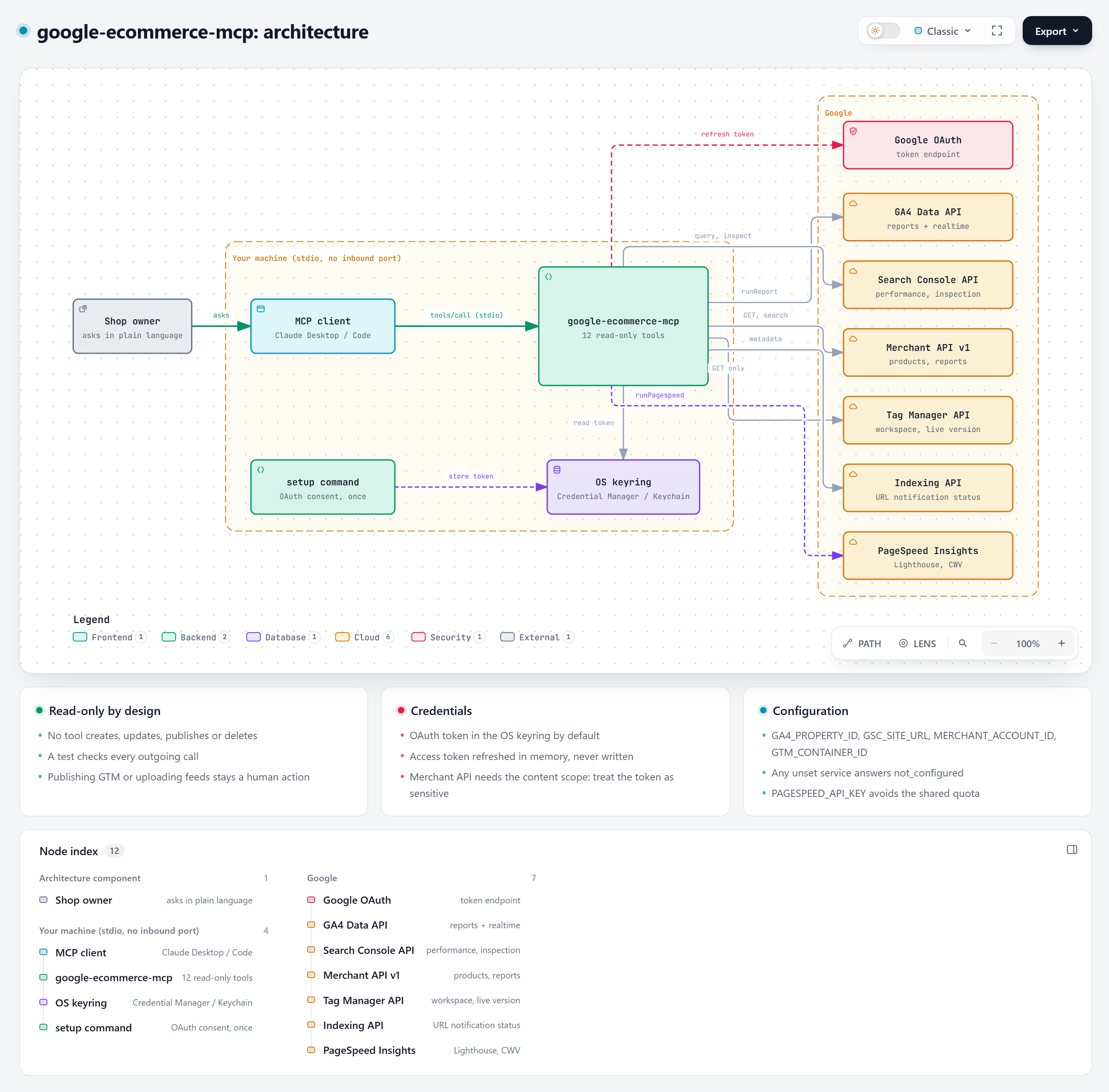
google-ecommerce-mcp is a small, local, read-only bridge between an MCP client (Claude Desktop, Claude Code, or any other MCP host) and six Google APIs.
|
|
4
|
+
|
|
5
|
+

|
|
6
|
+
|
|
7
|
+
Interactive version: [`diagrams/architecture-overview.html`](diagrams/architecture-overview.html) (open it locally in a browser; it is self-contained).
|
|
8
|
+
|
|
9
|
+
## Components
|
|
10
|
+
|
|
11
|
+
| Component | File | Role |
|
|
12
|
+
|---|---|---|
|
|
13
|
+
| Entry point | `src/google_ecommerce_mcp/__main__.py` | `setup`, `check`, or (default) run the MCP server over stdio |
|
|
14
|
+
| Configuration | `config.py` | Reads account ids from environment variables, defines the OAuth scopes |
|
|
15
|
+
| Credentials | `auth.py` | Stores the refresh token in the OS keyring (or a file), refreshes access tokens in memory |
|
|
16
|
+
| Installer | `installer.py` | `install` command: prompts, OAuth setup, Claude Desktop config merge with backup |
|
|
17
|
+
| Tools | `server.py` | 12 FastMCP tools, one HTTP session, every call wrapped so errors come back as data |
|
|
18
|
+
|
|
19
|
+
There is no database, no cache on disk, no background job and no network listener.
|
|
20
|
+
|
|
21
|
+
## Transport
|
|
22
|
+
|
|
23
|
+
The MCP client launches the server as a child process and talks to it over **stdio** (JSON-RPC on stdin/stdout). Nothing listens on a port, so nothing on your network can reach the server. The process lives as long as the client keeps it open.
|
|
24
|
+
|
|
25
|
+
## A tool call, step by step
|
|
26
|
+
|
|
27
|
+

|
|
28
|
+
|
|
29
|
+
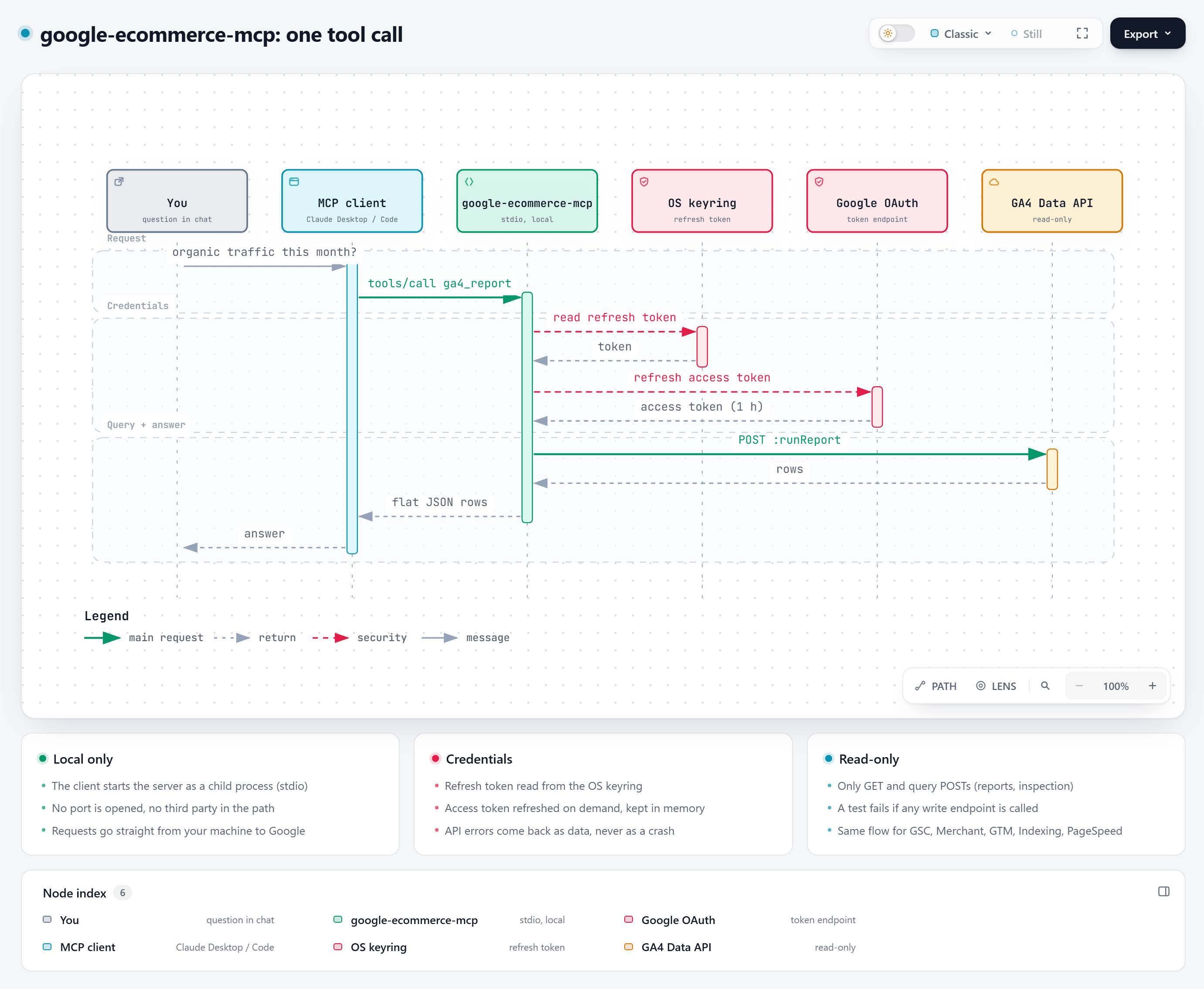
1. You ask a question in the chat. The model picks a tool, for example `ga4_report`, and the client sends `tools/call`.
|
|
30
|
+
2. On the first call only, the server reads the refresh token from the OS keyring.
|
|
31
|
+
3. If the in-memory access token is missing or expired, `google-auth` refreshes it against Google's token endpoint. Access tokens live about one hour and are never written to disk.
|
|
32
|
+
4. The server calls the Google API with `Authorization: Bearer ...`.
|
|
33
|
+
5. The raw response is flattened into compact JSON (for example GA4 rows become `{"dimension": value, "metric": value}` objects) and returned to the client.
|
|
34
|
+
|
|
35
|
+
## One-time setup
|
|
36
|
+
|
|
37
|
+

|
|
38
|
+
|
|
39
|
+
`google-ecommerce-mcp setup --client-secret client_secret.json` runs Google's installed-app OAuth flow: a temporary localhost redirect catches the authorization code, the code is exchanged for a refresh token, and the token is stored. The setup command is the only code path that writes the token.
|
|
40
|
+
|
|
41
|
+
## Design choices
|
|
42
|
+
|
|
43
|
+
**Read-only by construction.** The server only issues `GET` requests and the `POST` requests Google uses for queries (`:runReport`, `:runRealtimeReport`, `searchAnalytics/query`, `index:inspect`, `reports:search`). `tests/test_server.py::test_every_call_is_read_only` calls every tool against a fake HTTP session and fails if any other method or URL appears.
|
|
44
|
+
|
|
45
|
+
**Errors are results, not exceptions.** A missing variable returns `{"error": "not_configured", ...}`, an HTTP error returns `{"error": <status>, "detail": ...}`, a network failure returns `{"error": "network", ...}`. The model can read and explain the problem instead of seeing a crashed tool.
|
|
46
|
+
|
|
47
|
+
**Configuration per service.** Every environment variable is optional. Configure only what you use; the other tools answer `not_configured`.
|
|
48
|
+
|
|
49
|
+
**Plain HTTP instead of Google client libraries.** The REST endpoints are called with `requests`. That keeps the install small (no `google-api-python-client` discovery documents) and makes each call visible in the source.
|
|
50
|
+
|
|
51
|
+
**Result caps.** Row-returning tools cap `limit` at 1,000 to keep answers within a model's context window. Merchant product scanning is paginated (250 per page, `max_pages` bound).
|
|
52
|
+
|
|
53
|
+
## Diagram sources
|
|
54
|
+
|
|
55
|
+
The diagrams are generated with Archify (MIT-licensed diagram renderer) from the JSON specifications next to them in [`docs/diagrams/`](diagrams/). Each one passed Archify's validate, deliver, check and browser-check gates at showcase quality. To change a diagram, edit the JSON and run:
|
|
56
|
+
|
|
57
|
+
```bash
|
|
58
|
+
archify finalize architecture docs/diagrams/architecture-overview.json docs/diagrams/architecture-overview.html --quality showcase
|
|
59
|
+
archify finalize sequence docs/diagrams/sequence-tool-call.json docs/diagrams/sequence-tool-call.html --quality showcase
|
|
60
|
+
archify finalize sequence docs/diagrams/sequence-setup.json docs/diagrams/sequence-setup.html --quality showcase
|
|
61
|
+
```
|
|
@@ -0,0 +1,53 @@
|
|
|
1
|
+
# Security model
|
|
2
|
+
|
|
3
|
+
This page explains what the server can access, what it does with it, and how to limit the damage if something goes wrong. To report a vulnerability, see [SECURITY.md](../SECURITY.md) at the repository root.
|
|
4
|
+
|
|
5
|
+
## What is protected
|
|
6
|
+
|
|
7
|
+
The asset is the **OAuth refresh token**. Whoever holds it, together with your OAuth client, can call the granted Google APIs as you until you revoke it.
|
|
8
|
+
|
|
9
|
+
## Where the token lives
|
|
10
|
+
|
|
11
|
+
| Storage | When | Protection |
|
|
12
|
+
|---|---|---|
|
|
13
|
+
| OS keyring (default) | Always, unless `GOOGLE_TOKEN_FILE` is set | Windows Credential Manager, macOS Keychain, Secret Service: encrypted at rest, scoped to your OS user |
|
|
14
|
+
| File | `GOOGLE_TOKEN_FILE` set | Written with permissions `0600` on POSIX systems; on Windows rely on your profile ACLs |
|
|
15
|
+
|
|
16
|
+
Access tokens (valid about one hour) stay in process memory and are never written. The refresh token is written only by the `setup` command.
|
|
17
|
+
|
|
18
|
+
## Scopes and what they could do
|
|
19
|
+
|
|
20
|
+
| Scope | Read-only? | Used for | What the token could do if stolen |
|
|
21
|
+
|---|---|---|---|
|
|
22
|
+
| `analytics.readonly` | yes | GA4 reports | Read analytics data |
|
|
23
|
+
| `webmasters.readonly` | yes | Search Console | Read search data and inspect URLs |
|
|
24
|
+
| `tagmanager.readonly` | yes | GTM inventory | Read container configuration |
|
|
25
|
+
| `content` | **no** | Merchant API | Read **and modify** Merchant Center products, feeds and settings |
|
|
26
|
+
| `indexing` | **no** | Indexing status | Read notification metadata **and submit** URL notifications |
|
|
27
|
+
|
|
28
|
+
Google offers no read-only scope for the Merchant API or the Indexing API. The server never calls their write endpoints, but the token itself carries the permission. Treat it like a password.
|
|
29
|
+
|
|
30
|
+
**Reduce the scopes** if you do not need a service: edit `SCOPES` in `src/google_ecommerce_mcp/config.py` (for example remove `content` if you do not use Merchant Center) and rerun `setup`.
|
|
31
|
+
|
|
32
|
+
## Guarantees enforced by code
|
|
33
|
+
|
|
34
|
+
- Only `GET` and query `POST`s are sent. `tests/test_server.py::test_every_call_is_read_only` runs every tool against a recording fake session and fails on any other method or on URLs containing `:publish`, `:create_version`, `fetchNow` or `/delete`.
|
|
35
|
+
- No listener: stdio transport only, no open port.
|
|
36
|
+
- No telemetry, no third-party endpoint: the only hosts contacted are `*.googleapis.com` and Google's OAuth endpoint.
|
|
37
|
+
- No account id is hard-coded; everything comes from your environment.
|
|
38
|
+
|
|
39
|
+
## Threats and mitigations
|
|
40
|
+
|
|
41
|
+
| Threat | Mitigation |
|
|
42
|
+
|---|---|
|
|
43
|
+
| Malware running as your OS user reads the keyring | Out of scope for any local tool; revoke the token if your machine is compromised |
|
|
44
|
+
| Token file committed to git | Use the keyring (default). `.gitignore` excludes `token*.json` and `client_secret*.json` |
|
|
45
|
+
| Prompt injection makes the model call tools with odd arguments | Tools cannot write, so the worst case is reading your own data into the conversation. Review what you paste into the chat |
|
|
46
|
+
| Data leaves your machine through the model | Tool results go to your MCP client and therefore to the model provider you use. Do not connect accounts whose data you may not share with that provider |
|
|
47
|
+
| Supply-chain change in a dependency | Dependencies are few and pinned by range (`mcp<2`); install from a tagged release and review updates |
|
|
48
|
+
|
|
49
|
+
## Revoke access
|
|
50
|
+
|
|
51
|
+
- One click: [Google account > Security > Third-party connections](https://myaccount.google.com/permissions), remove your app.
|
|
52
|
+
- Or delete the OAuth client in Google Cloud Console: every token issued to it stops working.
|
|
53
|
+
- Then delete the local copy: `keyring del google-ecommerce-mcp oauth-token`, or delete the token file.
|