git-visual-timeline 0.2.2__tar.gz → 0.2.3__tar.gz
This diff represents the content of publicly available package versions that have been released to one of the supported registries. The information contained in this diff is provided for informational purposes only and reflects changes between package versions as they appear in their respective public registries.
- {git_visual_timeline-0.2.2/src/git_visual_timeline.egg-info → git_visual_timeline-0.2.3}/PKG-INFO +18 -10
- {git_visual_timeline-0.2.2 → git_visual_timeline-0.2.3}/README.md +17 -9
- {git_visual_timeline-0.2.2 → git_visual_timeline-0.2.3}/pyproject.toml +1 -1
- {git_visual_timeline-0.2.2 → git_visual_timeline-0.2.3/src/git_visual_timeline.egg-info}/PKG-INFO +18 -10
- git_visual_timeline-0.2.3/src/gvt/__init__.py +1 -0
- {git_visual_timeline-0.2.2 → git_visual_timeline-0.2.3}/src/gvt/widgets/diff_view.py +38 -10
- git_visual_timeline-0.2.2/src/gvt/__init__.py +0 -1
- {git_visual_timeline-0.2.2 → git_visual_timeline-0.2.3}/LICENSE +0 -0
- {git_visual_timeline-0.2.2 → git_visual_timeline-0.2.3}/setup.cfg +0 -0
- {git_visual_timeline-0.2.2 → git_visual_timeline-0.2.3}/src/git_visual_timeline.egg-info/SOURCES.txt +0 -0
- {git_visual_timeline-0.2.2 → git_visual_timeline-0.2.3}/src/git_visual_timeline.egg-info/dependency_links.txt +0 -0
- {git_visual_timeline-0.2.2 → git_visual_timeline-0.2.3}/src/git_visual_timeline.egg-info/entry_points.txt +0 -0
- {git_visual_timeline-0.2.2 → git_visual_timeline-0.2.3}/src/git_visual_timeline.egg-info/requires.txt +0 -0
- {git_visual_timeline-0.2.2 → git_visual_timeline-0.2.3}/src/git_visual_timeline.egg-info/top_level.txt +0 -0
- {git_visual_timeline-0.2.2 → git_visual_timeline-0.2.3}/src/gvt/app.py +0 -0
- {git_visual_timeline-0.2.2 → git_visual_timeline-0.2.3}/src/gvt/cli.py +0 -0
- {git_visual_timeline-0.2.2 → git_visual_timeline-0.2.3}/src/gvt/git/__init__.py +0 -0
- {git_visual_timeline-0.2.2 → git_visual_timeline-0.2.3}/src/gvt/git/cache.py +0 -0
- {git_visual_timeline-0.2.2 → git_visual_timeline-0.2.3}/src/gvt/git/repo.py +0 -0
- {git_visual_timeline-0.2.2 → git_visual_timeline-0.2.3}/src/gvt/logging_setup.py +0 -0
- {git_visual_timeline-0.2.2 → git_visual_timeline-0.2.3}/src/gvt/styles/app.tcss +0 -0
- {git_visual_timeline-0.2.2 → git_visual_timeline-0.2.3}/src/gvt/widgets/__init__.py +0 -0
- {git_visual_timeline-0.2.2 → git_visual_timeline-0.2.3}/src/gvt/widgets/changed_files.py +0 -0
- {git_visual_timeline-0.2.2 → git_visual_timeline-0.2.3}/src/gvt/widgets/commit_bar.py +0 -0
- {git_visual_timeline-0.2.2 → git_visual_timeline-0.2.3}/src/gvt/widgets/commit_toast.py +0 -0
- {git_visual_timeline-0.2.2 → git_visual_timeline-0.2.3}/src/gvt/widgets/file_tree.py +0 -0
- {git_visual_timeline-0.2.2 → git_visual_timeline-0.2.3}/src/gvt/widgets/modals.py +0 -0
- {git_visual_timeline-0.2.2 → git_visual_timeline-0.2.3}/src/gvt/widgets/status_bar.py +0 -0
- {git_visual_timeline-0.2.2 → git_visual_timeline-0.2.3}/src/gvt/widgets/timeline.py +0 -0
- {git_visual_timeline-0.2.2 → git_visual_timeline-0.2.3}/tests/test_app_actions.py +0 -0
- {git_visual_timeline-0.2.2 → git_visual_timeline-0.2.3}/tests/test_app_integration.py +0 -0
- {git_visual_timeline-0.2.2 → git_visual_timeline-0.2.3}/tests/test_cache.py +0 -0
- {git_visual_timeline-0.2.2 → git_visual_timeline-0.2.3}/tests/test_changed_files.py +0 -0
- {git_visual_timeline-0.2.2 → git_visual_timeline-0.2.3}/tests/test_diff_view_logic.py +0 -0
- {git_visual_timeline-0.2.2 → git_visual_timeline-0.2.3}/tests/test_git_repo.py +0 -0
- {git_visual_timeline-0.2.2 → git_visual_timeline-0.2.3}/tests/test_git_repo_extended.py +0 -0
- {git_visual_timeline-0.2.2 → git_visual_timeline-0.2.3}/tests/test_logging_setup.py +0 -0
- {git_visual_timeline-0.2.2 → git_visual_timeline-0.2.3}/tests/test_repo_resilience.py +0 -0
- {git_visual_timeline-0.2.2 → git_visual_timeline-0.2.3}/tests/test_timeline_logic.py +0 -0
- {git_visual_timeline-0.2.2 → git_visual_timeline-0.2.3}/tests/test_widgets.py +0 -0
{git_visual_timeline-0.2.2/src/git_visual_timeline.egg-info → git_visual_timeline-0.2.3}/PKG-INFO
RENAMED
|
@@ -1,6 +1,6 @@
|
|
|
1
1
|
Metadata-Version: 2.4
|
|
2
2
|
Name: git-visual-timeline
|
|
3
|
-
Version: 0.2.
|
|
3
|
+
Version: 0.2.3
|
|
4
4
|
Summary: Git Visual Timeline — a keyboard-driven TUI for exploring file commit history
|
|
5
5
|
Author-email: Adam Reese <areese801@gmail.com>
|
|
6
6
|
License: MIT
|
|
@@ -39,16 +39,18 @@ Dynamic: license-file
|
|
|
39
39
|
|
|
40
40
|
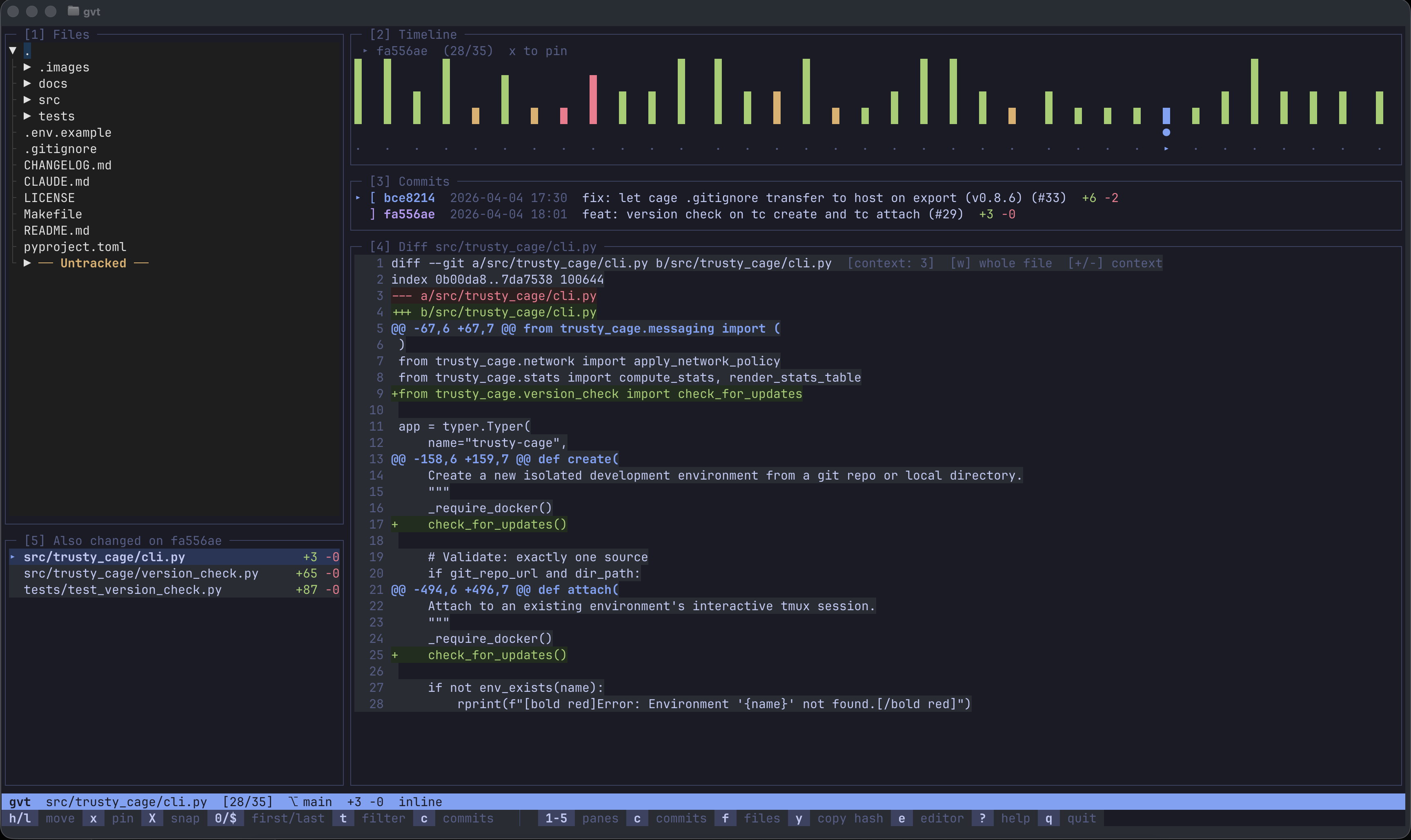
A keyboard-driven TUI for exploring the commit history of any file in a git repo. Think lazygit meets a video timeline scrubber, focused on per-file history.
|
|
41
41
|
|
|
42
|
-

|
|
42
|
+
|
|
43
43
|
|
|
44
44
|
**gvt is a read-only history explorer, not a git UI.** It doesn't stage, commit, push, or manage branches — lazygit is great for that. gvt does one thing: lets you scrub through a file's commit timeline, see what changed and when, and understand how code evolved over time. It's the tool you reach for when you're staring at a file and asking "how did this get here?"
|
|
45
45
|
|
|
46
46
|
## Install
|
|
47
47
|
|
|
48
48
|
```bash
|
|
49
|
-
|
|
49
|
+
pipx install git-visual-timeline
|
|
50
50
|
```
|
|
51
51
|
|
|
52
|
+
[pipx](https://pipx.pypa.io/) installs `gvt` in an isolated environment and puts it on your PATH — the recommended way to install Python CLI tools. Install pipx itself with `brew install pipx` (macOS) or `apt install pipx` (Debian/Ubuntu).
|
|
53
|
+
|
|
52
54
|
## Usage
|
|
53
55
|
|
|
54
56
|
```bash
|
|
@@ -77,25 +79,31 @@ gvt uses a 5-pane layout, each accessible by number key:
|
|
|
77
79
|
|
|
78
80
|
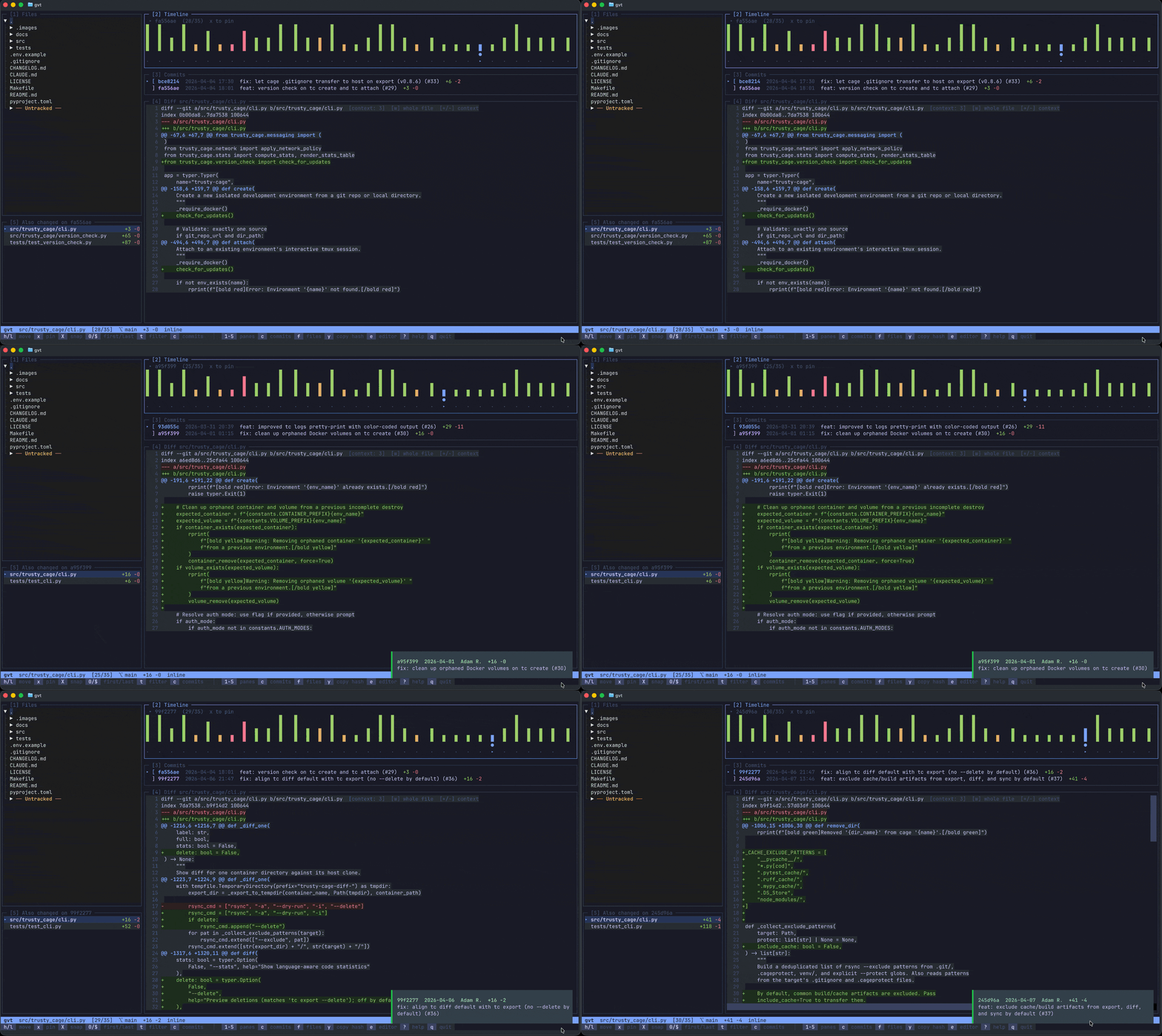
Scrub through a file's commit history one tick at a time. Each tick is colored by change type — green for additions, red for deletions, amber for mixed.
|
|
79
81
|
|
|
80
|
-

|
|
82
|
+
|
|
81
83
|
|
|
82
84
|
### Pin Mode
|
|
83
85
|
|
|
84
86
|
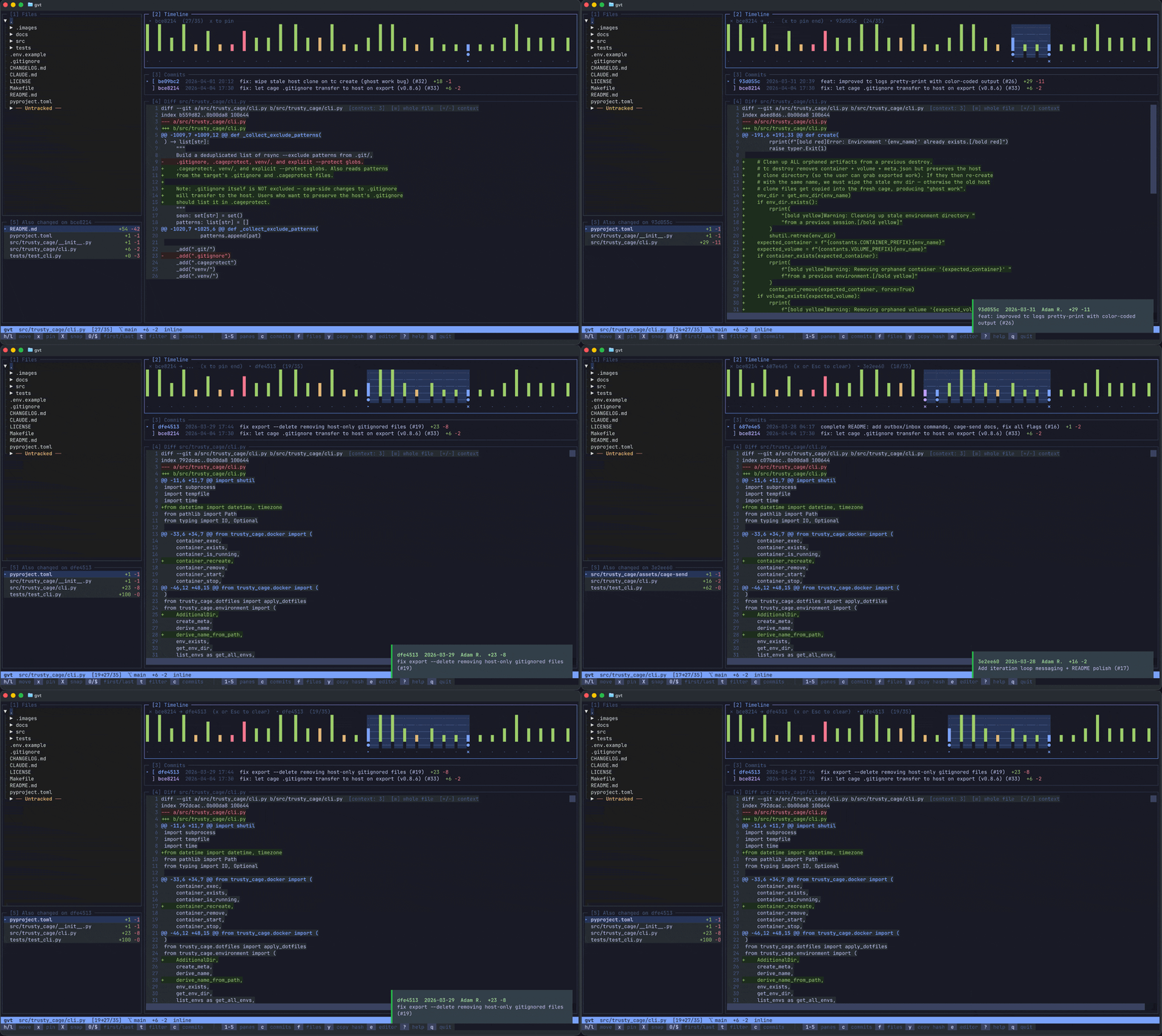
Press `x` to pin a commit, then move to another and press `x` again to diff any two commits. Press `x` a third time to clear. Use `X` to snap the nearest pin to your cursor.
|
|
85
87
|
|
|
86
|
-

|
|
88
|
+
|
|
87
89
|
|
|
88
90
|
### Inline Blame
|
|
89
91
|
|
|
90
92
|
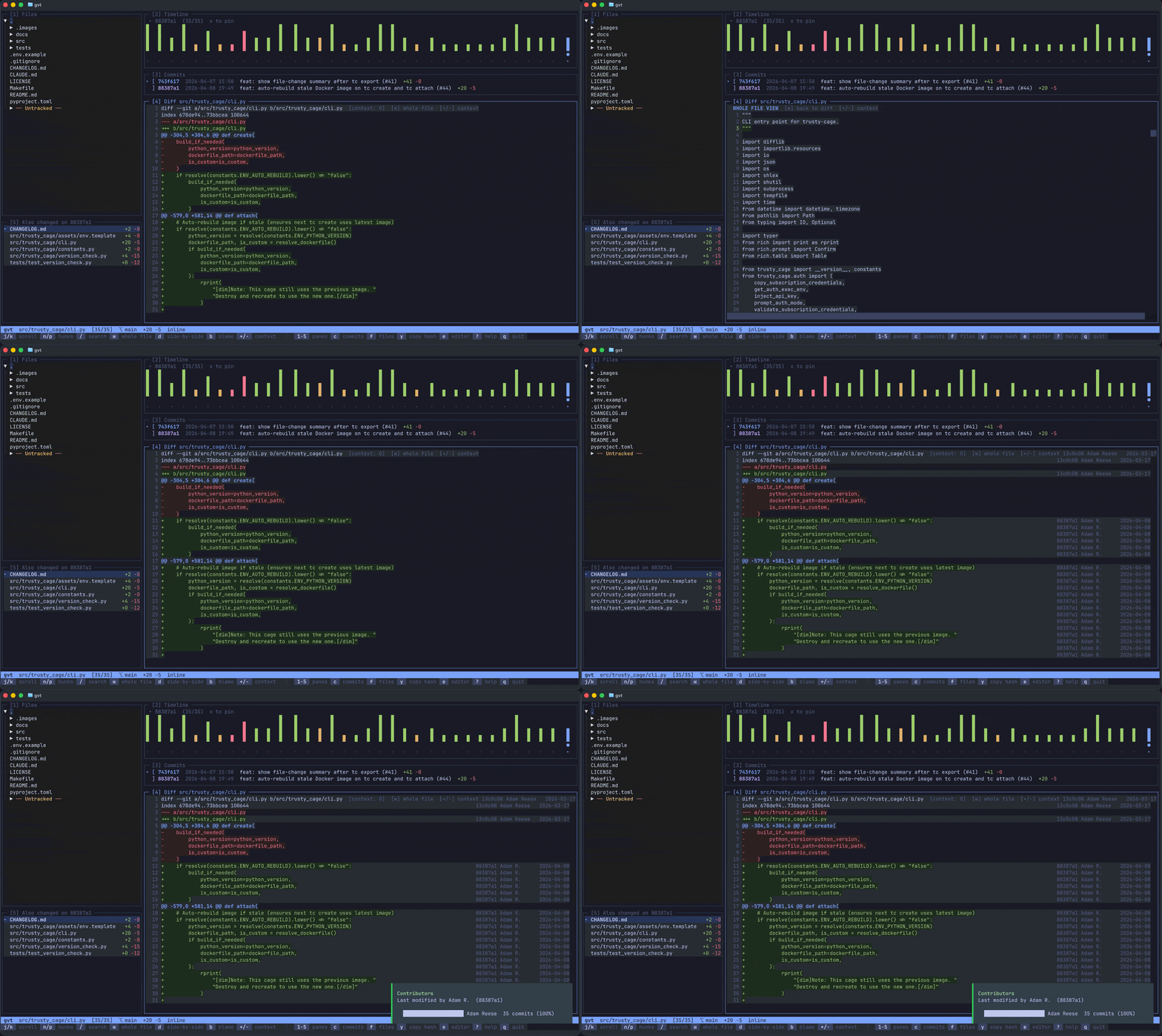
Toggle blame annotations with `b` to see who last modified each line, right-aligned alongside the diff.
|
|
91
93
|
|
|
92
|
-

|
|
94
|
+
|
|
93
95
|
|
|
94
96
|
### File Search
|
|
95
97
|
|
|
96
98
|
Press `f` for an fzf-style fuzzy file picker that filters as you type.
|
|
97
99
|
|
|
98
|
-

|
|
100
|
+
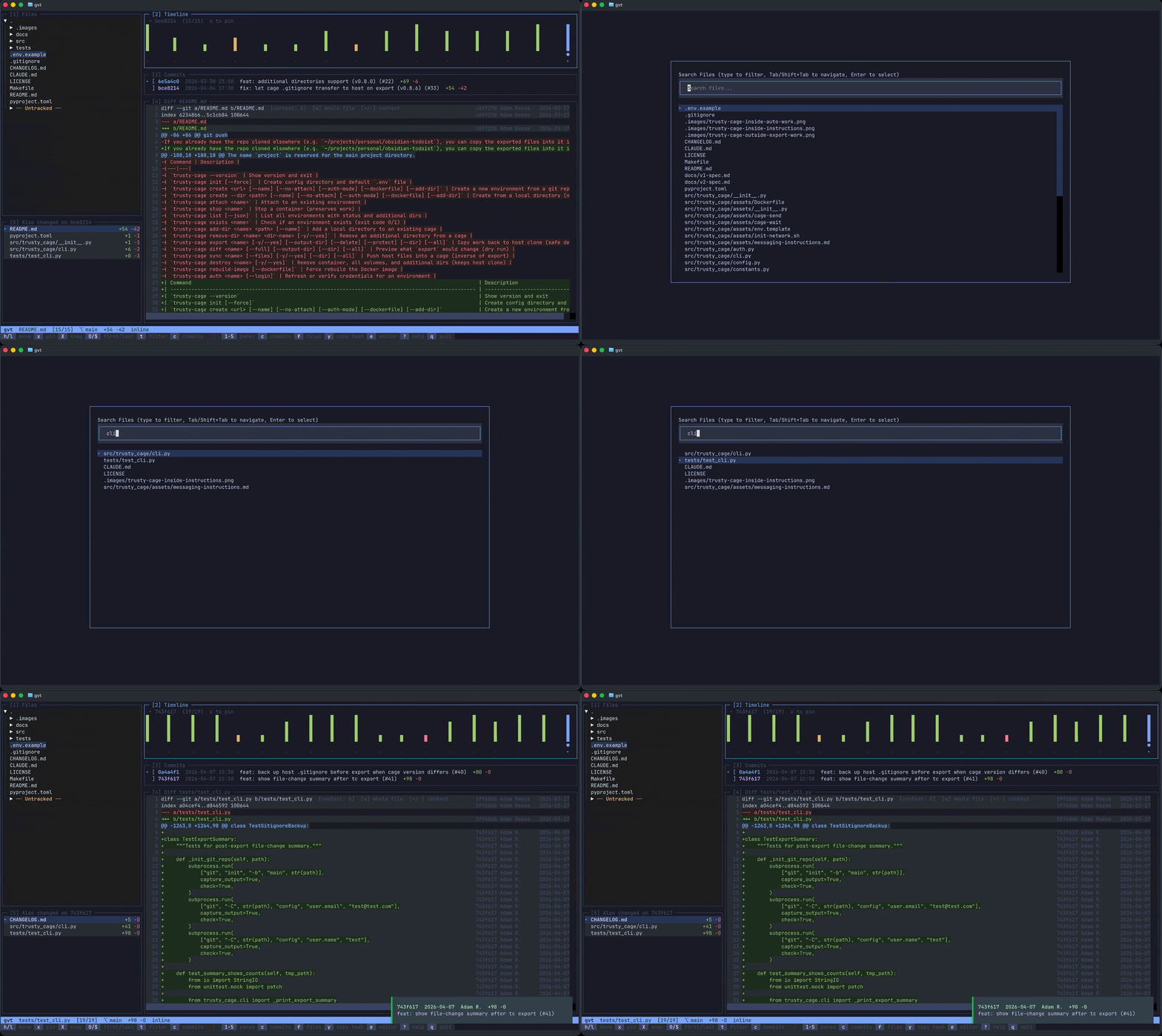
|
|
101
|
+
|
|
102
|
+
### Commit Search
|
|
103
|
+
|
|
104
|
+
Press `c` to fuzzy search all repo commits by message, branch, or author.
|
|
105
|
+
|
|
106
|
+
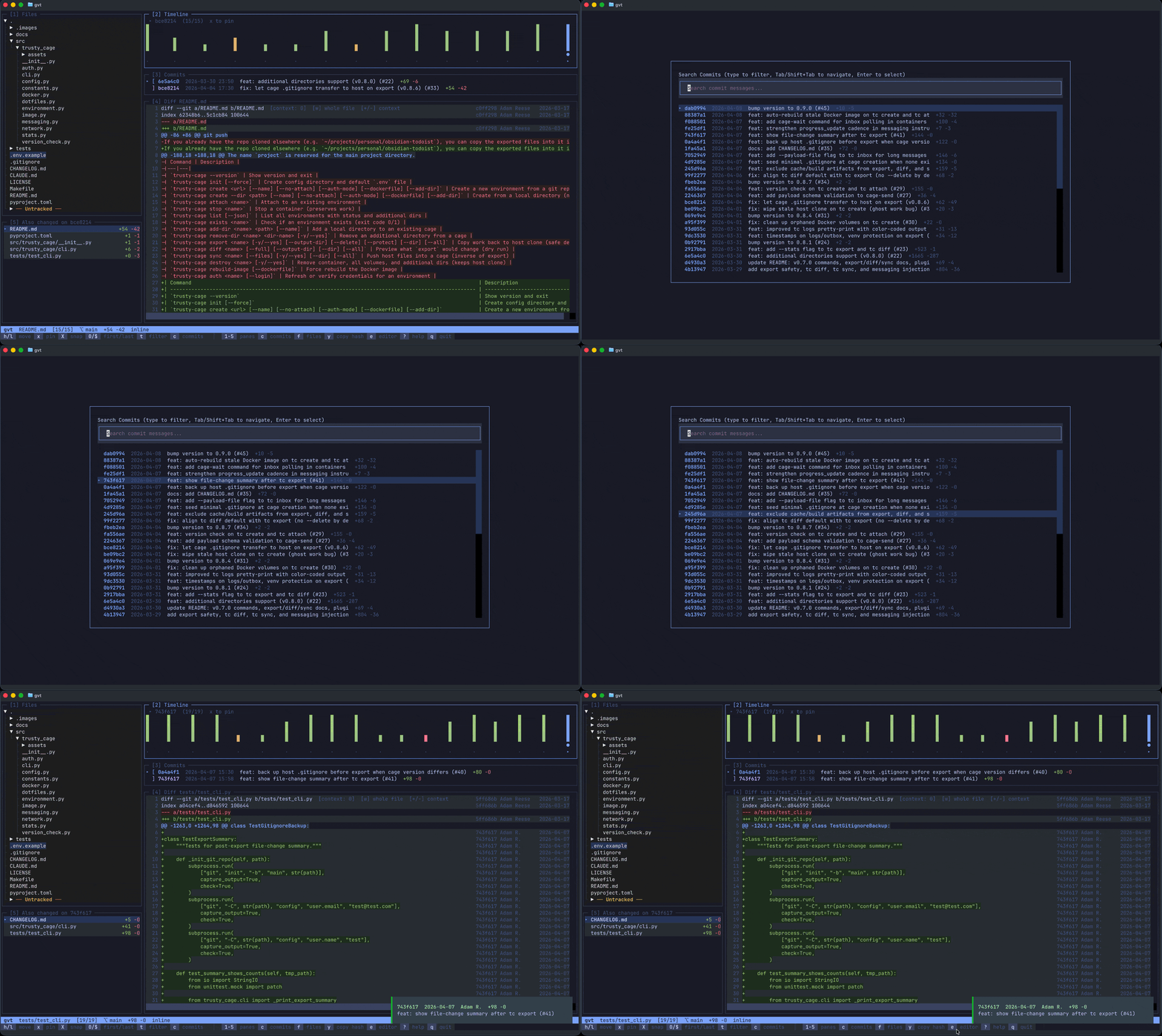
|
|
99
107
|
|
|
100
108
|
### All Features
|
|
101
109
|
|
|
@@ -148,10 +156,10 @@ Press `f` for an fzf-style fuzzy file picker that filters as you type.
|
|
|
148
156
|
|
|
149
157
|
| Key | Action |
|
|
150
158
|
|-----|--------|
|
|
151
|
-
| `j`/`k` | Scroll |
|
|
159
|
+
| `j`/`k` | Scroll vertically |
|
|
160
|
+
| `h`/`l` | Scroll horizontally |
|
|
152
161
|
| `g`/`G` | Top/bottom |
|
|
153
|
-
| `+`/`-`
|
|
154
|
-
| `Shift+Left/Right` | Horizontal scroll |
|
|
162
|
+
| `+`/`-` | More/less context lines |
|
|
155
163
|
|
|
156
164
|
### Search Modals
|
|
157
165
|
|
|
@@ -2,16 +2,18 @@
|
|
|
2
2
|
|
|
3
3
|
A keyboard-driven TUI for exploring the commit history of any file in a git repo. Think lazygit meets a video timeline scrubber, focused on per-file history.
|
|
4
4
|
|
|
5
|
-

|
|
5
|
+

|
|
6
6
|
|
|
7
7
|
**gvt is a read-only history explorer, not a git UI.** It doesn't stage, commit, push, or manage branches — lazygit is great for that. gvt does one thing: lets you scrub through a file's commit timeline, see what changed and when, and understand how code evolved over time. It's the tool you reach for when you're staring at a file and asking "how did this get here?"
|
|
8
8
|
|
|
9
9
|
## Install
|
|
10
10
|
|
|
11
11
|
```bash
|
|
12
|
-
|
|
12
|
+
pipx install git-visual-timeline
|
|
13
13
|
```
|
|
14
14
|
|
|
15
|
+
[pipx](https://pipx.pypa.io/) installs `gvt` in an isolated environment and puts it on your PATH — the recommended way to install Python CLI tools. Install pipx itself with `brew install pipx` (macOS) or `apt install pipx` (Debian/Ubuntu).
|
|
16
|
+
|
|
15
17
|
## Usage
|
|
16
18
|
|
|
17
19
|
```bash
|
|
@@ -40,25 +42,31 @@ gvt uses a 5-pane layout, each accessible by number key:
|
|
|
40
42
|
|
|
41
43
|
Scrub through a file's commit history one tick at a time. Each tick is colored by change type — green for additions, red for deletions, amber for mixed.
|
|
42
44
|
|
|
43
|
-

|
|
45
|
+

|
|
44
46
|
|
|
45
47
|
### Pin Mode
|
|
46
48
|
|
|
47
49
|
Press `x` to pin a commit, then move to another and press `x` again to diff any two commits. Press `x` a third time to clear. Use `X` to snap the nearest pin to your cursor.
|
|
48
50
|
|
|
49
|
-

|
|
51
|
+

|
|
50
52
|
|
|
51
53
|
### Inline Blame
|
|
52
54
|
|
|
53
55
|
Toggle blame annotations with `b` to see who last modified each line, right-aligned alongside the diff.
|
|
54
56
|
|
|
55
|
-

|
|
57
|
+

|
|
56
58
|
|
|
57
59
|
### File Search
|
|
58
60
|
|
|
59
61
|
Press `f` for an fzf-style fuzzy file picker that filters as you type.
|
|
60
62
|
|
|
61
|
-

|
|
63
|
+

|
|
64
|
+
|
|
65
|
+
### Commit Search
|
|
66
|
+
|
|
67
|
+
Press `c` to fuzzy search all repo commits by message, branch, or author.
|
|
68
|
+
|
|
69
|
+

|
|
62
70
|
|
|
63
71
|
### All Features
|
|
64
72
|
|
|
@@ -111,10 +119,10 @@ Press `f` for an fzf-style fuzzy file picker that filters as you type.
|
|
|
111
119
|
|
|
112
120
|
| Key | Action |
|
|
113
121
|
|-----|--------|
|
|
114
|
-
| `j`/`k` | Scroll |
|
|
122
|
+
| `j`/`k` | Scroll vertically |
|
|
123
|
+
| `h`/`l` | Scroll horizontally |
|
|
115
124
|
| `g`/`G` | Top/bottom |
|
|
116
|
-
| `+`/`-`
|
|
117
|
-
| `Shift+Left/Right` | Horizontal scroll |
|
|
125
|
+
| `+`/`-` | More/less context lines |
|
|
118
126
|
|
|
119
127
|
### Search Modals
|
|
120
128
|
|
|
@@ -4,7 +4,7 @@ build-backend = "setuptools.build_meta"
|
|
|
4
4
|
|
|
5
5
|
[project]
|
|
6
6
|
name = "git-visual-timeline"
|
|
7
|
-
version = "0.2.
|
|
7
|
+
version = "0.2.3"
|
|
8
8
|
description = "Git Visual Timeline — a keyboard-driven TUI for exploring file commit history"
|
|
9
9
|
readme = "README.md"
|
|
10
10
|
license = {text = "MIT"}
|
{git_visual_timeline-0.2.2 → git_visual_timeline-0.2.3/src/git_visual_timeline.egg-info}/PKG-INFO
RENAMED
|
@@ -1,6 +1,6 @@
|
|
|
1
1
|
Metadata-Version: 2.4
|
|
2
2
|
Name: git-visual-timeline
|
|
3
|
-
Version: 0.2.
|
|
3
|
+
Version: 0.2.3
|
|
4
4
|
Summary: Git Visual Timeline — a keyboard-driven TUI for exploring file commit history
|
|
5
5
|
Author-email: Adam Reese <areese801@gmail.com>
|
|
6
6
|
License: MIT
|
|
@@ -39,16 +39,18 @@ Dynamic: license-file
|
|
|
39
39
|
|
|
40
40
|
A keyboard-driven TUI for exploring the commit history of any file in a git repo. Think lazygit meets a video timeline scrubber, focused on per-file history.
|
|
41
41
|
|
|
42
|
-

|
|
42
|
+

|
|
43
43
|
|
|
44
44
|
**gvt is a read-only history explorer, not a git UI.** It doesn't stage, commit, push, or manage branches — lazygit is great for that. gvt does one thing: lets you scrub through a file's commit timeline, see what changed and when, and understand how code evolved over time. It's the tool you reach for when you're staring at a file and asking "how did this get here?"
|
|
45
45
|
|
|
46
46
|
## Install
|
|
47
47
|
|
|
48
48
|
```bash
|
|
49
|
-
|
|
49
|
+
pipx install git-visual-timeline
|
|
50
50
|
```
|
|
51
51
|
|
|
52
|
+
[pipx](https://pipx.pypa.io/) installs `gvt` in an isolated environment and puts it on your PATH — the recommended way to install Python CLI tools. Install pipx itself with `brew install pipx` (macOS) or `apt install pipx` (Debian/Ubuntu).
|
|
53
|
+
|
|
52
54
|
## Usage
|
|
53
55
|
|
|
54
56
|
```bash
|
|
@@ -77,25 +79,31 @@ gvt uses a 5-pane layout, each accessible by number key:
|
|
|
77
79
|
|
|
78
80
|
Scrub through a file's commit history one tick at a time. Each tick is colored by change type — green for additions, red for deletions, amber for mixed.
|
|
79
81
|
|
|
80
|
-

|
|
82
|
+

|
|
81
83
|
|
|
82
84
|
### Pin Mode
|
|
83
85
|
|
|
84
86
|
Press `x` to pin a commit, then move to another and press `x` again to diff any two commits. Press `x` a third time to clear. Use `X` to snap the nearest pin to your cursor.
|
|
85
87
|
|
|
86
|
-

|
|
88
|
+

|
|
87
89
|
|
|
88
90
|
### Inline Blame
|
|
89
91
|
|
|
90
92
|
Toggle blame annotations with `b` to see who last modified each line, right-aligned alongside the diff.
|
|
91
93
|
|
|
92
|
-

|
|
94
|
+

|
|
93
95
|
|
|
94
96
|
### File Search
|
|
95
97
|
|
|
96
98
|
Press `f` for an fzf-style fuzzy file picker that filters as you type.
|
|
97
99
|
|
|
98
|
-

|
|
100
|
+

|
|
101
|
+
|
|
102
|
+
### Commit Search
|
|
103
|
+
|
|
104
|
+
Press `c` to fuzzy search all repo commits by message, branch, or author.
|
|
105
|
+
|
|
106
|
+

|
|
99
107
|
|
|
100
108
|
### All Features
|
|
101
109
|
|
|
@@ -148,10 +156,10 @@ Press `f` for an fzf-style fuzzy file picker that filters as you type.
|
|
|
148
156
|
|
|
149
157
|
| Key | Action |
|
|
150
158
|
|-----|--------|
|
|
151
|
-
| `j`/`k` | Scroll |
|
|
159
|
+
| `j`/`k` | Scroll vertically |
|
|
160
|
+
| `h`/`l` | Scroll horizontally |
|
|
152
161
|
| `g`/`G` | Top/bottom |
|
|
153
|
-
| `+`/`-`
|
|
154
|
-
| `Shift+Left/Right` | Horizontal scroll |
|
|
162
|
+
| `+`/`-` | More/less context lines |
|
|
155
163
|
|
|
156
164
|
### Search Modals
|
|
157
165
|
|
|
@@ -0,0 +1 @@
|
|
|
1
|
+
__version__ = "0.2.3"
|
|
@@ -49,11 +49,13 @@ class DiffViewWidget(ScrollView, can_focus=True):
|
|
|
49
49
|
("P", "next_hunk", "Next hunk"),
|
|
50
50
|
("plus", "more_context", "+context"),
|
|
51
51
|
("minus", "less_context", "-context"),
|
|
52
|
-
("m", "more_context", "+context"),
|
|
53
|
-
("l", "less_context", "-context"),
|
|
54
|
-
("M", "less_context", "-context"),
|
|
55
|
-
("L", "more_context", "+context"),
|
|
56
52
|
("w", "toggle_full_file", "Whole file"),
|
|
53
|
+
("h", "scroll_left_step", "Scroll left"),
|
|
54
|
+
("l", "scroll_right_step", "Scroll right"),
|
|
55
|
+
("left", "scroll_left_step", "Scroll left"),
|
|
56
|
+
("right", "scroll_right_step", "Scroll right"),
|
|
57
|
+
("shift+left", "scroll_left_step", "Scroll left"),
|
|
58
|
+
("shift+right", "scroll_right_step", "Scroll right"),
|
|
57
59
|
]
|
|
58
60
|
|
|
59
61
|
diff_text: reactive[str] = reactive("")
|
|
@@ -91,6 +93,17 @@ class DiffViewWidget(ScrollView, can_focus=True):
|
|
|
91
93
|
if self.view_mode == MODE_FULL:
|
|
92
94
|
self._render_full_file()
|
|
93
95
|
|
|
96
|
+
def _max_content_width(self) -> int:
|
|
97
|
+
"""Return the width of the widest rendered line."""
|
|
98
|
+
if not self._lines:
|
|
99
|
+
return self.size.width
|
|
100
|
+
return max(self.size.width, max(len(line.plain) for line in self._lines))
|
|
101
|
+
|
|
102
|
+
def _update_virtual_size(self) -> None:
|
|
103
|
+
"""Set virtual size based on line count and max content width."""
|
|
104
|
+
from textual.geometry import Size
|
|
105
|
+
self.virtual_size = Size(self._max_content_width(), max(len(self._lines), 1))
|
|
106
|
+
|
|
94
107
|
def watch_diff_text(self, value: str) -> None:
|
|
95
108
|
if self.side_by_side and self.view_mode == MODE_DIFF:
|
|
96
109
|
self._render_side_by_side(value)
|
|
@@ -99,7 +112,7 @@ class DiffViewWidget(ScrollView, can_focus=True):
|
|
|
99
112
|
else:
|
|
100
113
|
self._parse_diff_line_numbers(value)
|
|
101
114
|
self._render_full_file()
|
|
102
|
-
self.
|
|
115
|
+
self._update_virtual_size()
|
|
103
116
|
self.scroll_home(animate=False)
|
|
104
117
|
self.refresh()
|
|
105
118
|
|
|
@@ -211,7 +224,7 @@ class DiffViewWidget(ScrollView, can_focus=True):
|
|
|
211
224
|
|
|
212
225
|
self._lines.append(line)
|
|
213
226
|
|
|
214
|
-
self.
|
|
227
|
+
self._update_virtual_size()
|
|
215
228
|
self.refresh()
|
|
216
229
|
|
|
217
230
|
def _render_side_by_side(self, diff: str) -> None:
|
|
@@ -298,7 +311,7 @@ class DiffViewWidget(ScrollView, can_focus=True):
|
|
|
298
311
|
|
|
299
312
|
self._lines.append(line)
|
|
300
313
|
|
|
301
|
-
self.
|
|
314
|
+
self._update_virtual_size()
|
|
302
315
|
self.refresh()
|
|
303
316
|
|
|
304
317
|
def action_toggle_side_by_side(self) -> None:
|
|
@@ -310,7 +323,7 @@ class DiffViewWidget(ScrollView, can_focus=True):
|
|
|
310
323
|
self._render_side_by_side(self.diff_text)
|
|
311
324
|
else:
|
|
312
325
|
self._parse_diff(self.diff_text)
|
|
313
|
-
self.
|
|
326
|
+
self._update_virtual_size()
|
|
314
327
|
self.scroll_home(animate=False)
|
|
315
328
|
self.refresh()
|
|
316
329
|
|
|
@@ -421,7 +434,11 @@ class DiffViewWidget(ScrollView, can_focus=True):
|
|
|
421
434
|
if content_width < self.size.width:
|
|
422
435
|
segments.append(Segment(" " * (self.size.width - content_width), flash_style))
|
|
423
436
|
|
|
424
|
-
|
|
437
|
+
strip = Strip(segments)
|
|
438
|
+
scroll_x = int(self.scroll_offset.x)
|
|
439
|
+
if scroll_x:
|
|
440
|
+
return strip.crop(scroll_x, scroll_x + self.size.width)
|
|
441
|
+
return strip
|
|
425
442
|
bg = Style(bgcolor="#1a1b26")
|
|
426
443
|
return Strip([Segment(" " * self.size.width, bg)])
|
|
427
444
|
|
|
@@ -485,6 +502,17 @@ class DiffViewWidget(ScrollView, can_focus=True):
|
|
|
485
502
|
self.context_lines = max(0, self.context_lines - 3)
|
|
486
503
|
self.post_message(DiffContextChanged(self.context_lines, self.view_mode == MODE_FULL))
|
|
487
504
|
|
|
505
|
+
def action_scroll_left_step(self) -> None:
|
|
506
|
+
"""Scroll diff content left (show earlier columns)."""
|
|
507
|
+
target_x = max(0, int(self.scroll_offset.x) - 8)
|
|
508
|
+
self.scroll_to(x=target_x, animate=False)
|
|
509
|
+
|
|
510
|
+
def action_scroll_right_step(self) -> None:
|
|
511
|
+
"""Scroll diff content right (show later columns)."""
|
|
512
|
+
max_x = self.virtual_size.width - self.size.width
|
|
513
|
+
target_x = min(max_x, int(self.scroll_offset.x) + 8)
|
|
514
|
+
self.scroll_to(x=target_x, animate=False)
|
|
515
|
+
|
|
488
516
|
def action_toggle_full_file(self) -> None:
|
|
489
517
|
"""Toggle between diff and full-file view."""
|
|
490
518
|
if self.view_mode == MODE_DIFF:
|
|
@@ -493,7 +521,7 @@ class DiffViewWidget(ScrollView, can_focus=True):
|
|
|
493
521
|
else:
|
|
494
522
|
self.view_mode = MODE_DIFF
|
|
495
523
|
self._parse_diff(self.diff_text)
|
|
496
|
-
self.
|
|
524
|
+
self._update_virtual_size()
|
|
497
525
|
self.refresh()
|
|
498
526
|
|
|
499
527
|
# --- Diff search ---
|
|
@@ -1 +0,0 @@
|
|
|
1
|
-
__version__ = "0.2.2"
|
|
File without changes
|
|
File without changes
|
{git_visual_timeline-0.2.2 → git_visual_timeline-0.2.3}/src/git_visual_timeline.egg-info/SOURCES.txt
RENAMED
|
File without changes
|
|
File without changes
|
|
File without changes
|
|
File without changes
|
|
File without changes
|
|
File without changes
|
|
File without changes
|
|
File without changes
|
|
File without changes
|
|
File without changes
|
|
File without changes
|
|
File without changes
|
|
File without changes
|
|
File without changes
|
|
File without changes
|
|
File without changes
|
|
File without changes
|
|
File without changes
|
|
File without changes
|
|
File without changes
|
|
File without changes
|
|
File without changes
|
|
File without changes
|
|
File without changes
|
|
File without changes
|
|
File without changes
|
|
File without changes
|
|
File without changes
|
|
File without changes
|
|
File without changes
|
|
File without changes
|