git-visual-timeline 0.2.1__tar.gz → 0.2.3__tar.gz
This diff represents the content of publicly available package versions that have been released to one of the supported registries. The information contained in this diff is provided for informational purposes only and reflects changes between package versions as they appear in their respective public registries.
- {git_visual_timeline-0.2.1/src/git_visual_timeline.egg-info → git_visual_timeline-0.2.3}/PKG-INFO +61 -21
- git_visual_timeline-0.2.3/README.md +143 -0
- {git_visual_timeline-0.2.1 → git_visual_timeline-0.2.3}/pyproject.toml +1 -1
- {git_visual_timeline-0.2.1 → git_visual_timeline-0.2.3/src/git_visual_timeline.egg-info}/PKG-INFO +61 -21
- {git_visual_timeline-0.2.1 → git_visual_timeline-0.2.3}/src/git_visual_timeline.egg-info/SOURCES.txt +4 -0
- git_visual_timeline-0.2.3/src/gvt/__init__.py +1 -0
- {git_visual_timeline-0.2.1 → git_visual_timeline-0.2.3}/src/gvt/app.py +22 -10
- {git_visual_timeline-0.2.1 → git_visual_timeline-0.2.3}/src/gvt/cli.py +31 -19
- {git_visual_timeline-0.2.1 → git_visual_timeline-0.2.3}/src/gvt/git/repo.py +54 -32
- git_visual_timeline-0.2.3/src/gvt/logging_setup.py +40 -0
- {git_visual_timeline-0.2.1 → git_visual_timeline-0.2.3}/src/gvt/widgets/diff_view.py +38 -10
- git_visual_timeline-0.2.3/tests/test_app_actions.py +125 -0
- {git_visual_timeline-0.2.1 → git_visual_timeline-0.2.3}/tests/test_app_integration.py +30 -0
- git_visual_timeline-0.2.3/tests/test_logging_setup.py +99 -0
- git_visual_timeline-0.2.3/tests/test_repo_resilience.py +60 -0
- git_visual_timeline-0.2.1/README.md +0 -103
- git_visual_timeline-0.2.1/src/gvt/__init__.py +0 -1
- {git_visual_timeline-0.2.1 → git_visual_timeline-0.2.3}/LICENSE +0 -0
- {git_visual_timeline-0.2.1 → git_visual_timeline-0.2.3}/setup.cfg +0 -0
- {git_visual_timeline-0.2.1 → git_visual_timeline-0.2.3}/src/git_visual_timeline.egg-info/dependency_links.txt +0 -0
- {git_visual_timeline-0.2.1 → git_visual_timeline-0.2.3}/src/git_visual_timeline.egg-info/entry_points.txt +0 -0
- {git_visual_timeline-0.2.1 → git_visual_timeline-0.2.3}/src/git_visual_timeline.egg-info/requires.txt +0 -0
- {git_visual_timeline-0.2.1 → git_visual_timeline-0.2.3}/src/git_visual_timeline.egg-info/top_level.txt +0 -0
- {git_visual_timeline-0.2.1 → git_visual_timeline-0.2.3}/src/gvt/git/__init__.py +0 -0
- {git_visual_timeline-0.2.1 → git_visual_timeline-0.2.3}/src/gvt/git/cache.py +0 -0
- {git_visual_timeline-0.2.1 → git_visual_timeline-0.2.3}/src/gvt/styles/app.tcss +0 -0
- {git_visual_timeline-0.2.1 → git_visual_timeline-0.2.3}/src/gvt/widgets/__init__.py +0 -0
- {git_visual_timeline-0.2.1 → git_visual_timeline-0.2.3}/src/gvt/widgets/changed_files.py +0 -0
- {git_visual_timeline-0.2.1 → git_visual_timeline-0.2.3}/src/gvt/widgets/commit_bar.py +0 -0
- {git_visual_timeline-0.2.1 → git_visual_timeline-0.2.3}/src/gvt/widgets/commit_toast.py +0 -0
- {git_visual_timeline-0.2.1 → git_visual_timeline-0.2.3}/src/gvt/widgets/file_tree.py +0 -0
- {git_visual_timeline-0.2.1 → git_visual_timeline-0.2.3}/src/gvt/widgets/modals.py +0 -0
- {git_visual_timeline-0.2.1 → git_visual_timeline-0.2.3}/src/gvt/widgets/status_bar.py +0 -0
- {git_visual_timeline-0.2.1 → git_visual_timeline-0.2.3}/src/gvt/widgets/timeline.py +0 -0
- {git_visual_timeline-0.2.1 → git_visual_timeline-0.2.3}/tests/test_cache.py +0 -0
- {git_visual_timeline-0.2.1 → git_visual_timeline-0.2.3}/tests/test_changed_files.py +0 -0
- {git_visual_timeline-0.2.1 → git_visual_timeline-0.2.3}/tests/test_diff_view_logic.py +0 -0
- {git_visual_timeline-0.2.1 → git_visual_timeline-0.2.3}/tests/test_git_repo.py +0 -0
- {git_visual_timeline-0.2.1 → git_visual_timeline-0.2.3}/tests/test_git_repo_extended.py +0 -0
- {git_visual_timeline-0.2.1 → git_visual_timeline-0.2.3}/tests/test_timeline_logic.py +0 -0
- {git_visual_timeline-0.2.1 → git_visual_timeline-0.2.3}/tests/test_widgets.py +0 -0
{git_visual_timeline-0.2.1/src/git_visual_timeline.egg-info → git_visual_timeline-0.2.3}/PKG-INFO
RENAMED
|
@@ -1,6 +1,6 @@
|
|
|
1
1
|
Metadata-Version: 2.4
|
|
2
2
|
Name: git-visual-timeline
|
|
3
|
-
Version: 0.2.
|
|
3
|
+
Version: 0.2.3
|
|
4
4
|
Summary: Git Visual Timeline — a keyboard-driven TUI for exploring file commit history
|
|
5
5
|
Author-email: Adam Reese <areese801@gmail.com>
|
|
6
6
|
License: MIT
|
|
@@ -39,12 +39,18 @@ Dynamic: license-file
|
|
|
39
39
|
|
|
40
40
|
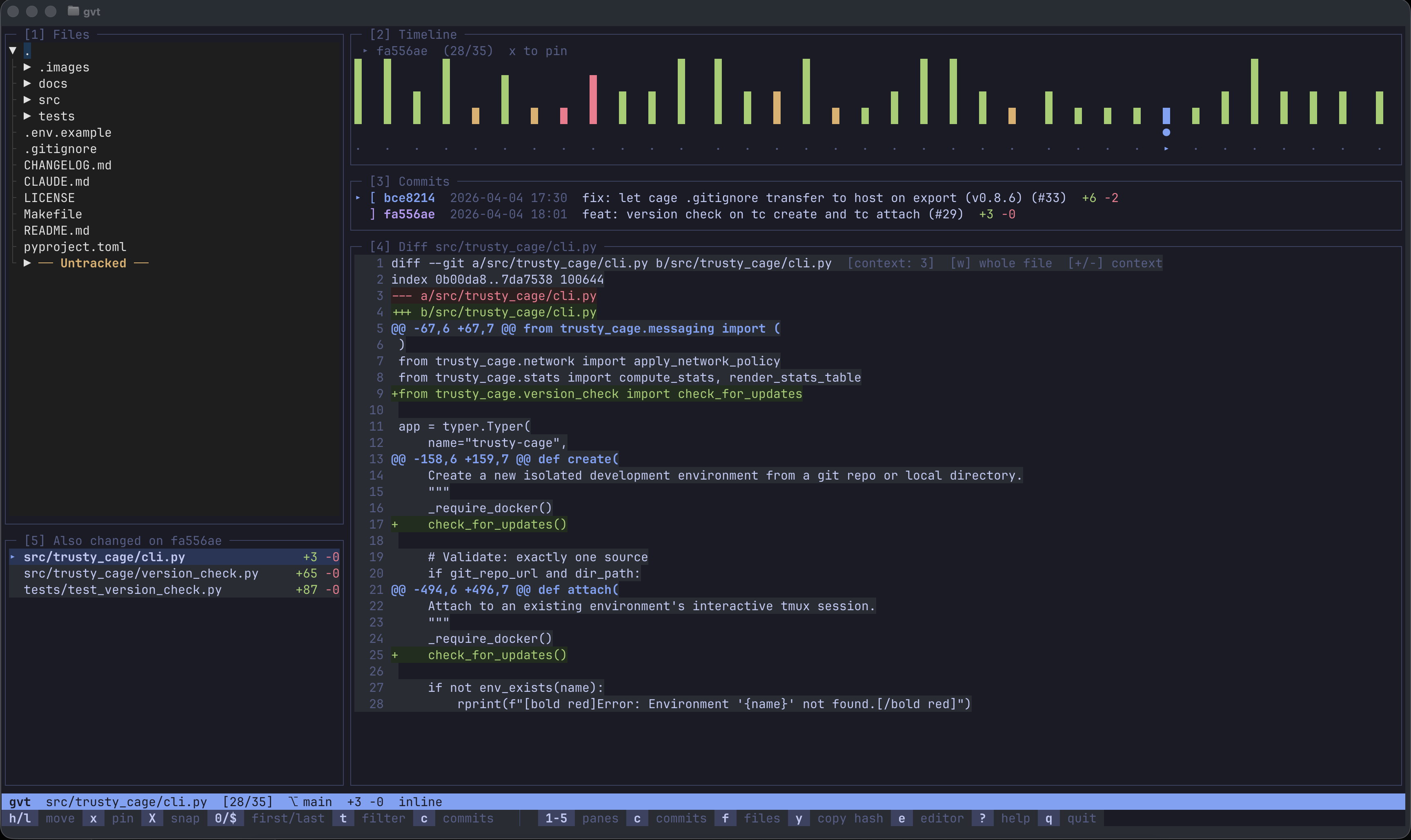
A keyboard-driven TUI for exploring the commit history of any file in a git repo. Think lazygit meets a video timeline scrubber, focused on per-file history.
|
|
41
41
|
|
|
42
|
+
|
|
43
|
+
|
|
44
|
+
**gvt is a read-only history explorer, not a git UI.** It doesn't stage, commit, push, or manage branches — lazygit is great for that. gvt does one thing: lets you scrub through a file's commit timeline, see what changed and when, and understand how code evolved over time. It's the tool you reach for when you're staring at a file and asking "how did this get here?"
|
|
45
|
+
|
|
42
46
|
## Install
|
|
43
47
|
|
|
44
48
|
```bash
|
|
45
|
-
|
|
49
|
+
pipx install git-visual-timeline
|
|
46
50
|
```
|
|
47
51
|
|
|
52
|
+
[pipx](https://pipx.pypa.io/) installs `gvt` in an isolated environment and puts it on your PATH — the recommended way to install Python CLI tools. Install pipx itself with `brew install pipx` (macOS) or `apt install pipx` (Debian/Ubuntu).
|
|
53
|
+
|
|
48
54
|
## Usage
|
|
49
55
|
|
|
50
56
|
```bash
|
|
@@ -55,30 +61,64 @@ gvt
|
|
|
55
61
|
gvt path/to/file.py
|
|
56
62
|
```
|
|
57
63
|
|
|
64
|
+
## Layout
|
|
65
|
+
|
|
66
|
+
gvt uses a 5-pane layout, each accessible by number key:
|
|
67
|
+
|
|
68
|
+
| Pane | Name | What it shows |
|
|
69
|
+
|------|------|---------------|
|
|
70
|
+
| 1 | Files | File tree with lazy-loading directories |
|
|
71
|
+
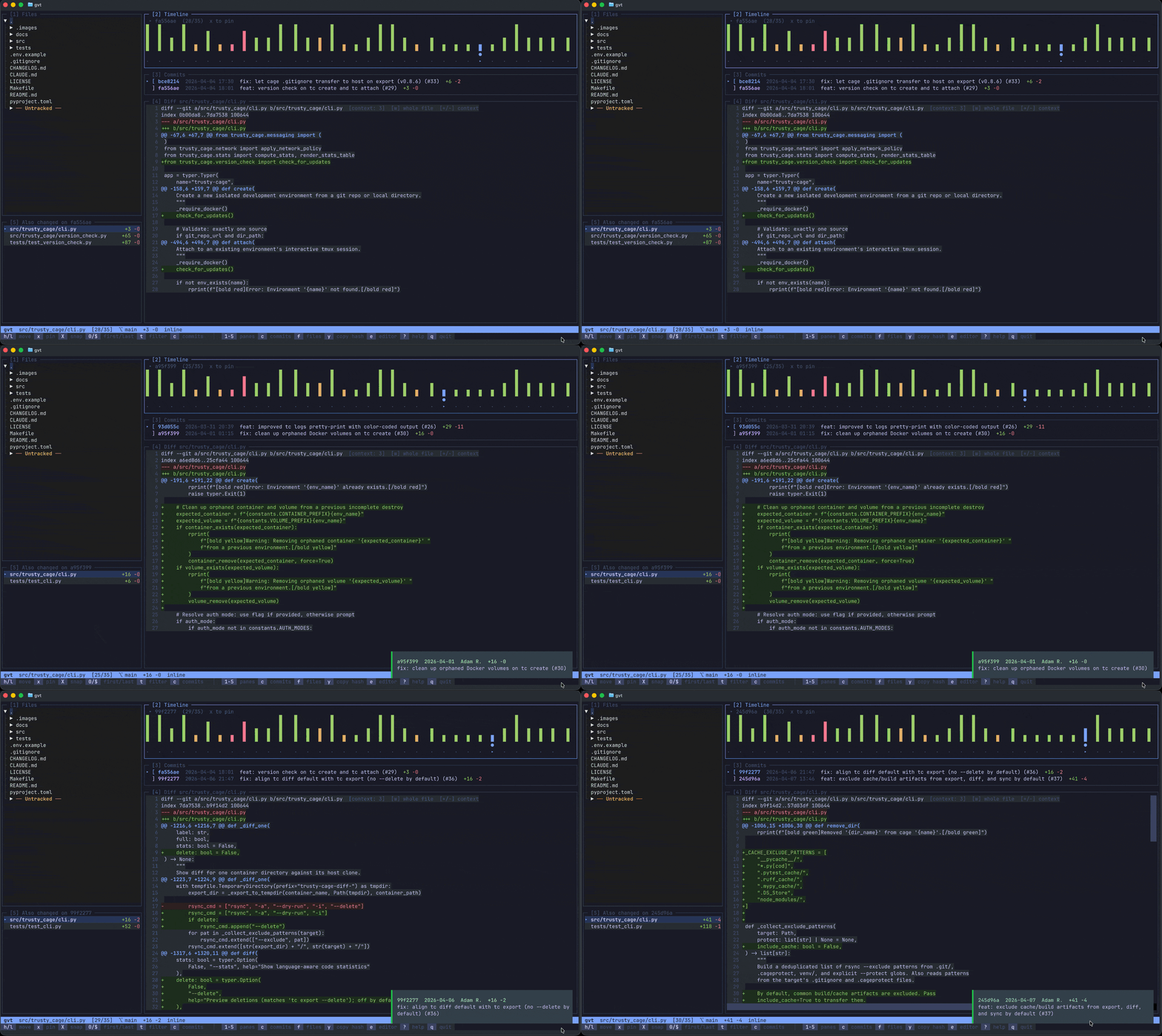
| 2 | Timeline | Heatmap of commits (green=adds, red=deletes, amber=mixed) |
|
|
72
|
+
| 3 | Commits | Message, hash, date, and stats for visible commits |
|
|
73
|
+
| 4 | Diff | Syntax-highlighted diff with blame, search, and context controls |
|
|
74
|
+
| 5 | Changed Files | All files touched by the current commit |
|
|
75
|
+
|
|
58
76
|
## Features
|
|
59
77
|
|
|
60
|
-
|
|
61
|
-
|
|
62
|
-
|
|
63
|
-
|
|
78
|
+
### Timeline Navigation
|
|
79
|
+
|
|
80
|
+
Scrub through a file's commit history one tick at a time. Each tick is colored by change type — green for additions, red for deletions, amber for mixed.
|
|
81
|
+
|
|
82
|
+
|
|
83
|
+
|
|
84
|
+
### Pin Mode
|
|
85
|
+
|
|
86
|
+
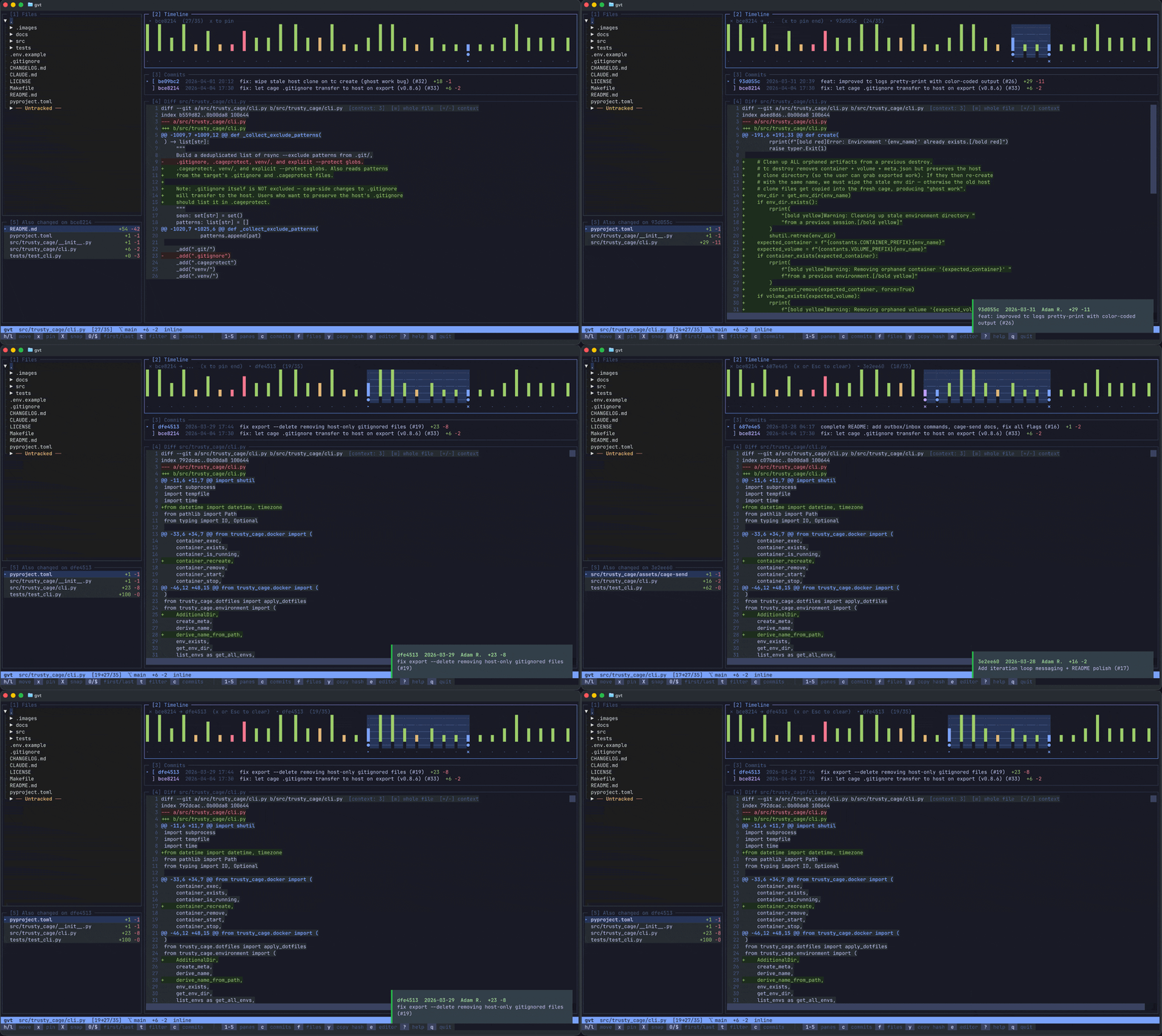
Press `x` to pin a commit, then move to another and press `x` again to diff any two commits. Press `x` a third time to clear. Use `X` to snap the nearest pin to your cursor.
|
|
87
|
+
|
|
88
|
+
|
|
89
|
+
|
|
90
|
+
### Inline Blame
|
|
91
|
+
|
|
92
|
+
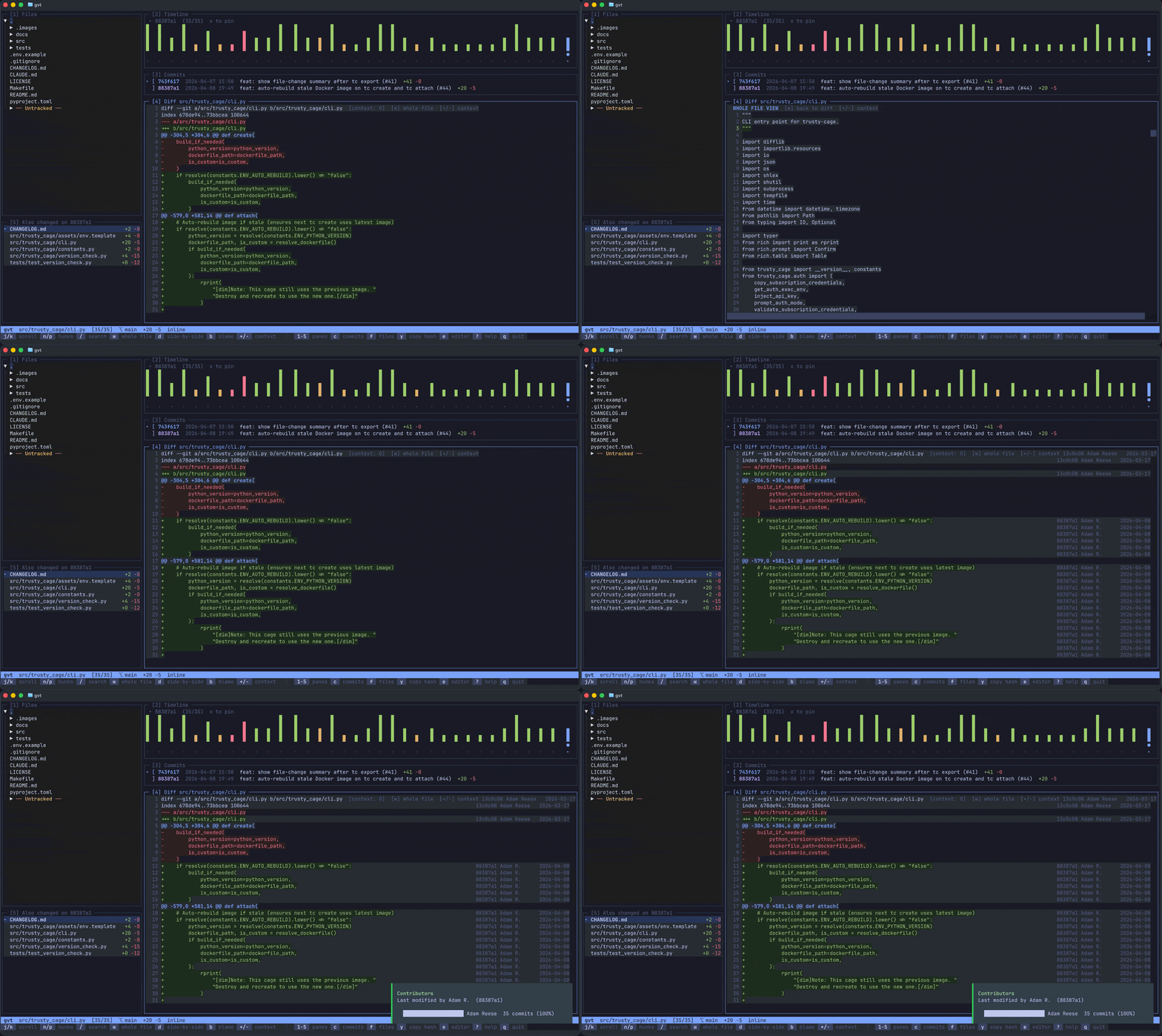
Toggle blame annotations with `b` to see who last modified each line, right-aligned alongside the diff.
|
|
93
|
+
|
|
94
|
+
|
|
95
|
+
|
|
96
|
+
### File Search
|
|
97
|
+
|
|
98
|
+
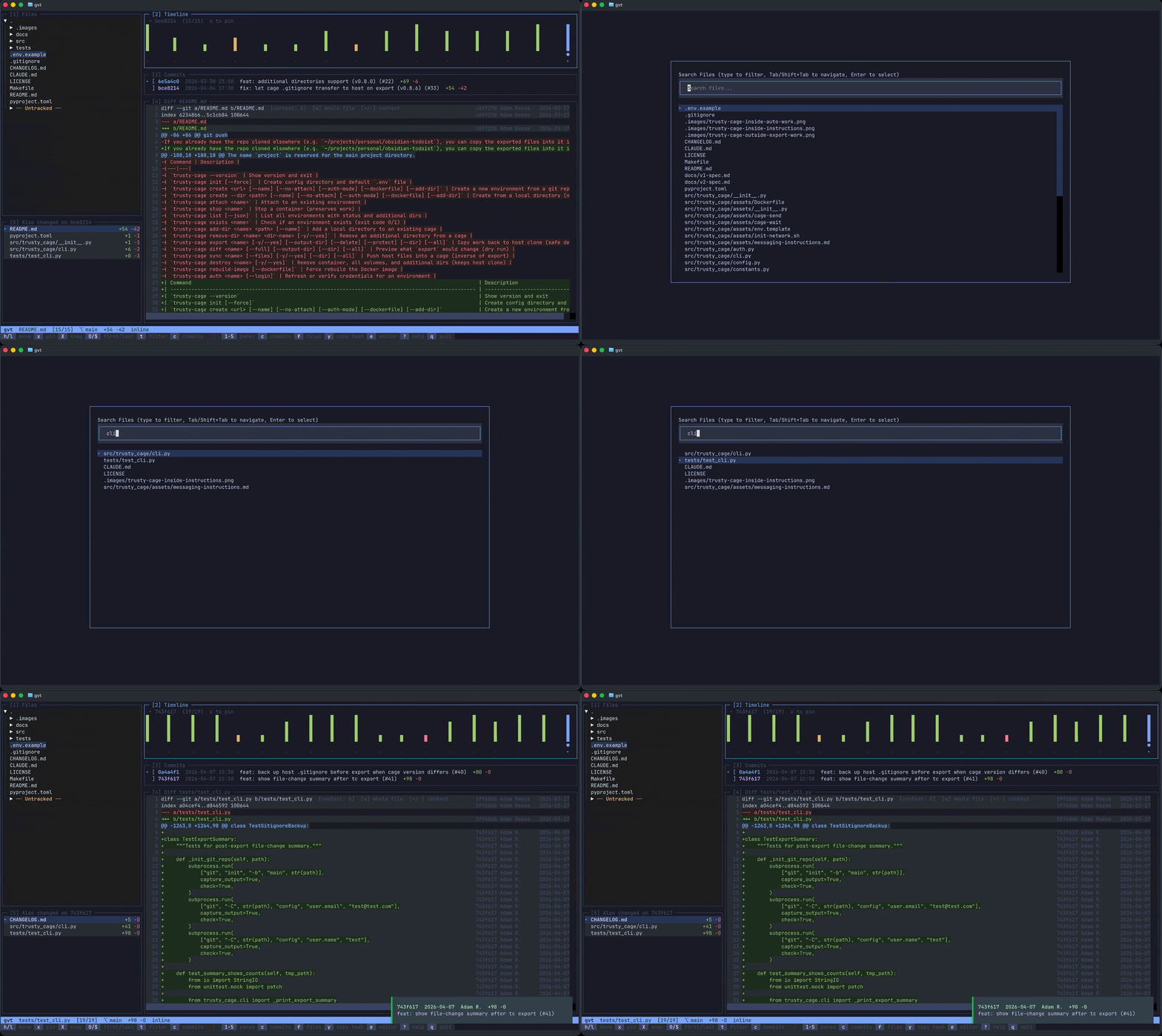
Press `f` for an fzf-style fuzzy file picker that filters as you type.
|
|
99
|
+
|
|
100
|
+
|
|
101
|
+
|
|
102
|
+
### Commit Search
|
|
103
|
+
|
|
104
|
+
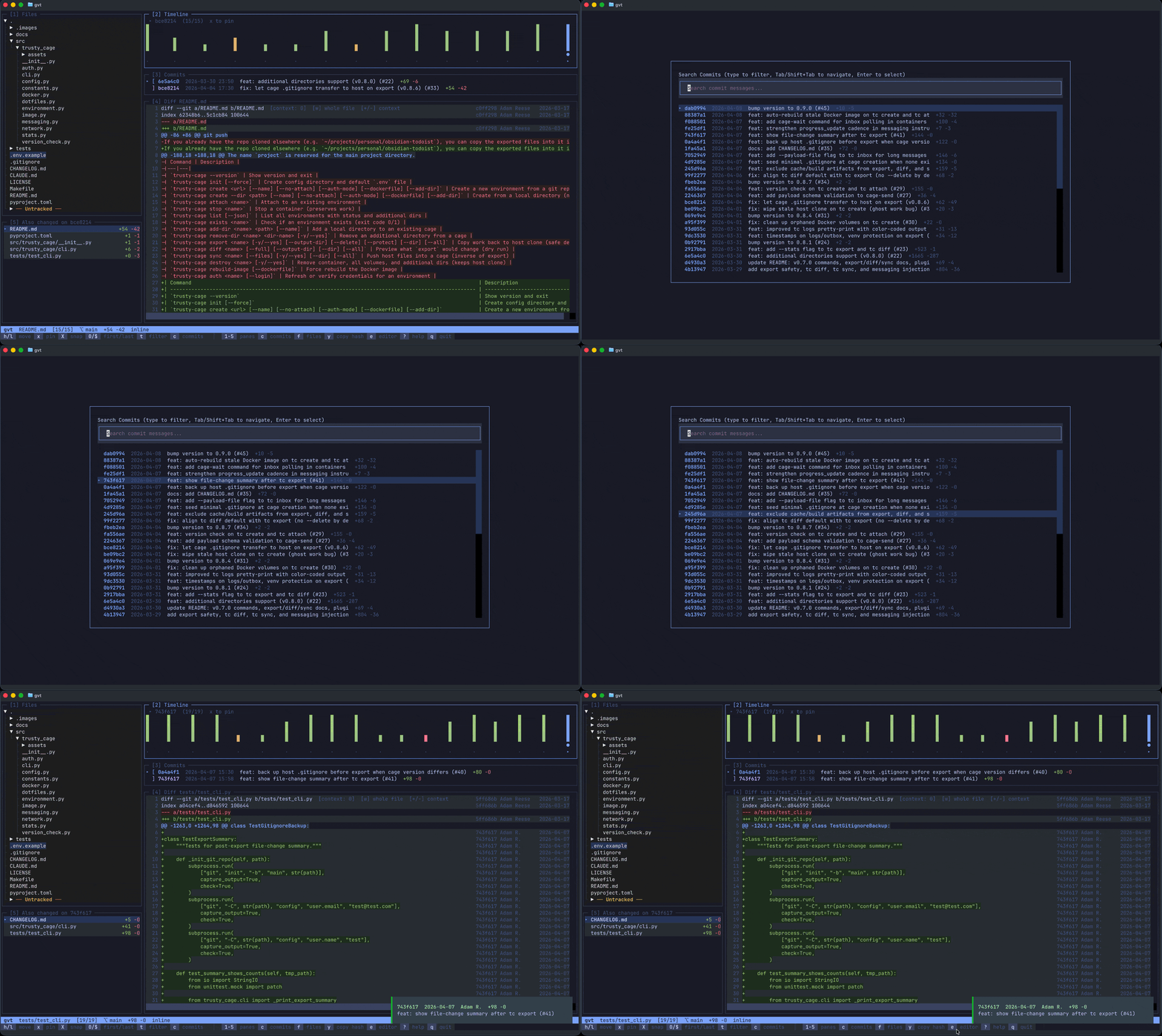
Press `c` to fuzzy search all repo commits by message, branch, or author.
|
|
105
|
+
|
|
106
|
+
|
|
107
|
+
|
|
108
|
+
### All Features
|
|
109
|
+
|
|
110
|
+
- **Syntax-highlighted diffs** with inline, whole-file (`w`), and side-by-side (`d`) views
|
|
64
111
|
- **Diff search** (`/`) — regex search within the diff with `n`/`p` to navigate matches
|
|
65
|
-
- **Commit search** (`c`) — fuzzy search all repo commits by message, branch
|
|
66
|
-
- **File search** (`f`) — fzf-style file picker
|
|
112
|
+
- **Commit search** (`c`) — fuzzy search all repo commits by message, branch, or author
|
|
67
113
|
- **Time filter** (`t`) — filter timeline by date range (1w, 1m, 3m, 6m, 1y, custom date)
|
|
68
|
-
- **
|
|
69
|
-
- **
|
|
70
|
-
- **
|
|
71
|
-
- **Changed files pane** — see all files touched by the current commit, select to navigate
|
|
72
|
-
- **Side-by-side diff** (`d`) — toggle between inline and side-by-side diff views
|
|
73
|
-
- **Copy to clipboard** (`y`/`Y`) — copy short or full commit hash
|
|
114
|
+
- **Contributor breakdown** (`B`) — who changed the file and how much
|
|
115
|
+
- **WIP indicator** — hollow tick showing uncommitted changes
|
|
116
|
+
- **Copy to clipboard** (`y`/`Y`) — short or full commit hash
|
|
74
117
|
- **Open in editor** (`e`) — open current file in `$VISUAL`/`$EDITOR`/vim
|
|
75
118
|
- **Remember last file** — reopens to the last file you were viewing per repo
|
|
76
|
-
- **
|
|
77
|
-
- **tmux integration** — seamless pane switching at edges (add `gvt` to your `is_vim` regex)
|
|
78
|
-
- **Lazy file tree** — loads directories on demand for large repos
|
|
119
|
+
- **tmux integration** — seamless pane switching at edges
|
|
79
120
|
- **Preloaded diffs** — adjacent commits pre-cached for instant navigation
|
|
80
121
|
- **Context-sensitive status bar** showing relevant shortcuts per pane
|
|
81
|
-
- **Untracked files** — shown in a separate section, viewable as read-only preview
|
|
82
122
|
|
|
83
123
|
## Keybindings
|
|
84
124
|
|
|
@@ -116,10 +156,10 @@ gvt path/to/file.py
|
|
|
116
156
|
|
|
117
157
|
| Key | Action |
|
|
118
158
|
|-----|--------|
|
|
119
|
-
| `j`/`k` | Scroll |
|
|
159
|
+
| `j`/`k` | Scroll vertically |
|
|
160
|
+
| `h`/`l` | Scroll horizontally |
|
|
120
161
|
| `g`/`G` | Top/bottom |
|
|
121
|
-
| `+`/`-`
|
|
122
|
-
| `Shift+Left/Right` | Horizontal scroll |
|
|
162
|
+
| `+`/`-` | More/less context lines |
|
|
123
163
|
|
|
124
164
|
### Search Modals
|
|
125
165
|
|
|
@@ -0,0 +1,143 @@
|
|
|
1
|
+
# gvt — Git Visual Timeline
|
|
2
|
+
|
|
3
|
+
A keyboard-driven TUI for exploring the commit history of any file in a git repo. Think lazygit meets a video timeline scrubber, focused on per-file history.
|
|
4
|
+
|
|
5
|
+

|
|
6
|
+
|
|
7
|
+
**gvt is a read-only history explorer, not a git UI.** It doesn't stage, commit, push, or manage branches — lazygit is great for that. gvt does one thing: lets you scrub through a file's commit timeline, see what changed and when, and understand how code evolved over time. It's the tool you reach for when you're staring at a file and asking "how did this get here?"
|
|
8
|
+
|
|
9
|
+
## Install
|
|
10
|
+
|
|
11
|
+
```bash
|
|
12
|
+
pipx install git-visual-timeline
|
|
13
|
+
```
|
|
14
|
+
|
|
15
|
+
[pipx](https://pipx.pypa.io/) installs `gvt` in an isolated environment and puts it on your PATH — the recommended way to install Python CLI tools. Install pipx itself with `brew install pipx` (macOS) or `apt install pipx` (Debian/Ubuntu).
|
|
16
|
+
|
|
17
|
+
## Usage
|
|
18
|
+
|
|
19
|
+
```bash
|
|
20
|
+
# Open in any git repo
|
|
21
|
+
gvt
|
|
22
|
+
|
|
23
|
+
# Jump directly to a file
|
|
24
|
+
gvt path/to/file.py
|
|
25
|
+
```
|
|
26
|
+
|
|
27
|
+
## Layout
|
|
28
|
+
|
|
29
|
+
gvt uses a 5-pane layout, each accessible by number key:
|
|
30
|
+
|
|
31
|
+
| Pane | Name | What it shows |
|
|
32
|
+
|------|------|---------------|
|
|
33
|
+
| 1 | Files | File tree with lazy-loading directories |
|
|
34
|
+
| 2 | Timeline | Heatmap of commits (green=adds, red=deletes, amber=mixed) |
|
|
35
|
+
| 3 | Commits | Message, hash, date, and stats for visible commits |
|
|
36
|
+
| 4 | Diff | Syntax-highlighted diff with blame, search, and context controls |
|
|
37
|
+
| 5 | Changed Files | All files touched by the current commit |
|
|
38
|
+
|
|
39
|
+
## Features
|
|
40
|
+
|
|
41
|
+
### Timeline Navigation
|
|
42
|
+
|
|
43
|
+
Scrub through a file's commit history one tick at a time. Each tick is colored by change type — green for additions, red for deletions, amber for mixed.
|
|
44
|
+
|
|
45
|
+

|
|
46
|
+
|
|
47
|
+
### Pin Mode
|
|
48
|
+
|
|
49
|
+
Press `x` to pin a commit, then move to another and press `x` again to diff any two commits. Press `x` a third time to clear. Use `X` to snap the nearest pin to your cursor.
|
|
50
|
+
|
|
51
|
+

|
|
52
|
+
|
|
53
|
+
### Inline Blame
|
|
54
|
+
|
|
55
|
+
Toggle blame annotations with `b` to see who last modified each line, right-aligned alongside the diff.
|
|
56
|
+
|
|
57
|
+

|
|
58
|
+
|
|
59
|
+
### File Search
|
|
60
|
+
|
|
61
|
+
Press `f` for an fzf-style fuzzy file picker that filters as you type.
|
|
62
|
+
|
|
63
|
+

|
|
64
|
+
|
|
65
|
+
### Commit Search
|
|
66
|
+
|
|
67
|
+
Press `c` to fuzzy search all repo commits by message, branch, or author.
|
|
68
|
+
|
|
69
|
+

|
|
70
|
+
|
|
71
|
+
### All Features
|
|
72
|
+
|
|
73
|
+
- **Syntax-highlighted diffs** with inline, whole-file (`w`), and side-by-side (`d`) views
|
|
74
|
+
- **Diff search** (`/`) — regex search within the diff with `n`/`p` to navigate matches
|
|
75
|
+
- **Commit search** (`c`) — fuzzy search all repo commits by message, branch, or author
|
|
76
|
+
- **Time filter** (`t`) — filter timeline by date range (1w, 1m, 3m, 6m, 1y, custom date)
|
|
77
|
+
- **Contributor breakdown** (`B`) — who changed the file and how much
|
|
78
|
+
- **WIP indicator** — hollow tick showing uncommitted changes
|
|
79
|
+
- **Copy to clipboard** (`y`/`Y`) — short or full commit hash
|
|
80
|
+
- **Open in editor** (`e`) — open current file in `$VISUAL`/`$EDITOR`/vim
|
|
81
|
+
- **Remember last file** — reopens to the last file you were viewing per repo
|
|
82
|
+
- **tmux integration** — seamless pane switching at edges
|
|
83
|
+
- **Preloaded diffs** — adjacent commits pre-cached for instant navigation
|
|
84
|
+
- **Context-sensitive status bar** showing relevant shortcuts per pane
|
|
85
|
+
|
|
86
|
+
## Keybindings
|
|
87
|
+
|
|
88
|
+
### Global
|
|
89
|
+
|
|
90
|
+
| Key | Action |
|
|
91
|
+
|-----|--------|
|
|
92
|
+
| `1`-`5` | Jump to pane |
|
|
93
|
+
| `Ctrl+h/j/k/l` | Navigate panes directionally |
|
|
94
|
+
| `c` | Search commits (all repo) |
|
|
95
|
+
| `f` / `Ctrl+P` | Search files |
|
|
96
|
+
| `t` | Time filter |
|
|
97
|
+
| `w` | Toggle whole-file view |
|
|
98
|
+
| `d` | Toggle side-by-side diff |
|
|
99
|
+
| `b` | Toggle inline blame |
|
|
100
|
+
| `B` | Contributor breakdown |
|
|
101
|
+
| `/` | Search in diff |
|
|
102
|
+
| `n`/`p` | Next/prev diff hunk |
|
|
103
|
+
| `y` / `Y` | Copy short/full commit hash |
|
|
104
|
+
| `e` | Open file in editor |
|
|
105
|
+
| `?` | Help |
|
|
106
|
+
| `q` | Quit (with confirmation) |
|
|
107
|
+
| `qq` | Quit immediately |
|
|
108
|
+
|
|
109
|
+
### Timeline (Pane 2)
|
|
110
|
+
|
|
111
|
+
| Key | Action |
|
|
112
|
+
|-----|--------|
|
|
113
|
+
| `h`/`l` | Move cursor |
|
|
114
|
+
| `0`/`$` | Jump to first/last commit |
|
|
115
|
+
| `x` | Pin commit (1st=start, 2nd=end, 3rd=clear) |
|
|
116
|
+
| `X` | Snap nearest pin to cursor |
|
|
117
|
+
|
|
118
|
+
### Diff (Pane 4)
|
|
119
|
+
|
|
120
|
+
| Key | Action |
|
|
121
|
+
|-----|--------|
|
|
122
|
+
| `j`/`k` | Scroll vertically |
|
|
123
|
+
| `h`/`l` | Scroll horizontally |
|
|
124
|
+
| `g`/`G` | Top/bottom |
|
|
125
|
+
| `+`/`-` | More/less context lines |
|
|
126
|
+
|
|
127
|
+
### Search Modals
|
|
128
|
+
|
|
129
|
+
| Key | Action |
|
|
130
|
+
|-----|--------|
|
|
131
|
+
| `Tab` / `Shift+Tab` | Navigate results |
|
|
132
|
+
| `Ctrl+n` / `Ctrl+p` | Navigate results (alternative) |
|
|
133
|
+
| `Enter` | Select |
|
|
134
|
+
| `Esc` | Close |
|
|
135
|
+
|
|
136
|
+
## Requirements
|
|
137
|
+
|
|
138
|
+
- Python 3.10+
|
|
139
|
+
- A git repository
|
|
140
|
+
|
|
141
|
+
## License
|
|
142
|
+
|
|
143
|
+
MIT
|
|
@@ -4,7 +4,7 @@ build-backend = "setuptools.build_meta"
|
|
|
4
4
|
|
|
5
5
|
[project]
|
|
6
6
|
name = "git-visual-timeline"
|
|
7
|
-
version = "0.2.
|
|
7
|
+
version = "0.2.3"
|
|
8
8
|
description = "Git Visual Timeline — a keyboard-driven TUI for exploring file commit history"
|
|
9
9
|
readme = "README.md"
|
|
10
10
|
license = {text = "MIT"}
|
{git_visual_timeline-0.2.1 → git_visual_timeline-0.2.3/src/git_visual_timeline.egg-info}/PKG-INFO
RENAMED
|
@@ -1,6 +1,6 @@
|
|
|
1
1
|
Metadata-Version: 2.4
|
|
2
2
|
Name: git-visual-timeline
|
|
3
|
-
Version: 0.2.
|
|
3
|
+
Version: 0.2.3
|
|
4
4
|
Summary: Git Visual Timeline — a keyboard-driven TUI for exploring file commit history
|
|
5
5
|
Author-email: Adam Reese <areese801@gmail.com>
|
|
6
6
|
License: MIT
|
|
@@ -39,12 +39,18 @@ Dynamic: license-file
|
|
|
39
39
|
|
|
40
40
|
A keyboard-driven TUI for exploring the commit history of any file in a git repo. Think lazygit meets a video timeline scrubber, focused on per-file history.
|
|
41
41
|
|
|
42
|
+

|
|
43
|
+
|
|
44
|
+
**gvt is a read-only history explorer, not a git UI.** It doesn't stage, commit, push, or manage branches — lazygit is great for that. gvt does one thing: lets you scrub through a file's commit timeline, see what changed and when, and understand how code evolved over time. It's the tool you reach for when you're staring at a file and asking "how did this get here?"
|
|
45
|
+
|
|
42
46
|
## Install
|
|
43
47
|
|
|
44
48
|
```bash
|
|
45
|
-
|
|
49
|
+
pipx install git-visual-timeline
|
|
46
50
|
```
|
|
47
51
|
|
|
52
|
+
[pipx](https://pipx.pypa.io/) installs `gvt` in an isolated environment and puts it on your PATH — the recommended way to install Python CLI tools. Install pipx itself with `brew install pipx` (macOS) or `apt install pipx` (Debian/Ubuntu).
|
|
53
|
+
|
|
48
54
|
## Usage
|
|
49
55
|
|
|
50
56
|
```bash
|
|
@@ -55,30 +61,64 @@ gvt
|
|
|
55
61
|
gvt path/to/file.py
|
|
56
62
|
```
|
|
57
63
|
|
|
64
|
+
## Layout
|
|
65
|
+
|
|
66
|
+
gvt uses a 5-pane layout, each accessible by number key:
|
|
67
|
+
|
|
68
|
+
| Pane | Name | What it shows |
|
|
69
|
+
|------|------|---------------|
|
|
70
|
+
| 1 | Files | File tree with lazy-loading directories |
|
|
71
|
+
| 2 | Timeline | Heatmap of commits (green=adds, red=deletes, amber=mixed) |
|
|
72
|
+
| 3 | Commits | Message, hash, date, and stats for visible commits |
|
|
73
|
+
| 4 | Diff | Syntax-highlighted diff with blame, search, and context controls |
|
|
74
|
+
| 5 | Changed Files | All files touched by the current commit |
|
|
75
|
+
|
|
58
76
|
## Features
|
|
59
77
|
|
|
60
|
-
|
|
61
|
-
|
|
62
|
-
|
|
63
|
-
|
|
78
|
+
### Timeline Navigation
|
|
79
|
+
|
|
80
|
+
Scrub through a file's commit history one tick at a time. Each tick is colored by change type — green for additions, red for deletions, amber for mixed.
|
|
81
|
+
|
|
82
|
+

|
|
83
|
+
|
|
84
|
+
### Pin Mode
|
|
85
|
+
|
|
86
|
+
Press `x` to pin a commit, then move to another and press `x` again to diff any two commits. Press `x` a third time to clear. Use `X` to snap the nearest pin to your cursor.
|
|
87
|
+
|
|
88
|
+

|
|
89
|
+
|
|
90
|
+
### Inline Blame
|
|
91
|
+
|
|
92
|
+
Toggle blame annotations with `b` to see who last modified each line, right-aligned alongside the diff.
|
|
93
|
+
|
|
94
|
+

|
|
95
|
+
|
|
96
|
+
### File Search
|
|
97
|
+
|
|
98
|
+
Press `f` for an fzf-style fuzzy file picker that filters as you type.
|
|
99
|
+
|
|
100
|
+

|
|
101
|
+
|
|
102
|
+
### Commit Search
|
|
103
|
+
|
|
104
|
+
Press `c` to fuzzy search all repo commits by message, branch, or author.
|
|
105
|
+
|
|
106
|
+

|
|
107
|
+
|
|
108
|
+
### All Features
|
|
109
|
+
|
|
110
|
+
- **Syntax-highlighted diffs** with inline, whole-file (`w`), and side-by-side (`d`) views
|
|
64
111
|
- **Diff search** (`/`) — regex search within the diff with `n`/`p` to navigate matches
|
|
65
|
-
- **Commit search** (`c`) — fuzzy search all repo commits by message, branch
|
|
66
|
-
- **File search** (`f`) — fzf-style file picker
|
|
112
|
+
- **Commit search** (`c`) — fuzzy search all repo commits by message, branch, or author
|
|
67
113
|
- **Time filter** (`t`) — filter timeline by date range (1w, 1m, 3m, 6m, 1y, custom date)
|
|
68
|
-
- **
|
|
69
|
-
- **
|
|
70
|
-
- **
|
|
71
|
-
- **Changed files pane** — see all files touched by the current commit, select to navigate
|
|
72
|
-
- **Side-by-side diff** (`d`) — toggle between inline and side-by-side diff views
|
|
73
|
-
- **Copy to clipboard** (`y`/`Y`) — copy short or full commit hash
|
|
114
|
+
- **Contributor breakdown** (`B`) — who changed the file and how much
|
|
115
|
+
- **WIP indicator** — hollow tick showing uncommitted changes
|
|
116
|
+
- **Copy to clipboard** (`y`/`Y`) — short or full commit hash
|
|
74
117
|
- **Open in editor** (`e`) — open current file in `$VISUAL`/`$EDITOR`/vim
|
|
75
118
|
- **Remember last file** — reopens to the last file you were viewing per repo
|
|
76
|
-
- **
|
|
77
|
-
- **tmux integration** — seamless pane switching at edges (add `gvt` to your `is_vim` regex)
|
|
78
|
-
- **Lazy file tree** — loads directories on demand for large repos
|
|
119
|
+
- **tmux integration** — seamless pane switching at edges
|
|
79
120
|
- **Preloaded diffs** — adjacent commits pre-cached for instant navigation
|
|
80
121
|
- **Context-sensitive status bar** showing relevant shortcuts per pane
|
|
81
|
-
- **Untracked files** — shown in a separate section, viewable as read-only preview
|
|
82
122
|
|
|
83
123
|
## Keybindings
|
|
84
124
|
|
|
@@ -116,10 +156,10 @@ gvt path/to/file.py
|
|
|
116
156
|
|
|
117
157
|
| Key | Action |
|
|
118
158
|
|-----|--------|
|
|
119
|
-
| `j`/`k` | Scroll |
|
|
159
|
+
| `j`/`k` | Scroll vertically |
|
|
160
|
+
| `h`/`l` | Scroll horizontally |
|
|
120
161
|
| `g`/`G` | Top/bottom |
|
|
121
|
-
| `+`/`-`
|
|
122
|
-
| `Shift+Left/Right` | Horizontal scroll |
|
|
162
|
+
| `+`/`-` | More/less context lines |
|
|
123
163
|
|
|
124
164
|
### Search Modals
|
|
125
165
|
|
{git_visual_timeline-0.2.1 → git_visual_timeline-0.2.3}/src/git_visual_timeline.egg-info/SOURCES.txt
RENAMED
|
@@ -10,6 +10,7 @@ src/git_visual_timeline.egg-info/top_level.txt
|
|
|
10
10
|
src/gvt/__init__.py
|
|
11
11
|
src/gvt/app.py
|
|
12
12
|
src/gvt/cli.py
|
|
13
|
+
src/gvt/logging_setup.py
|
|
13
14
|
src/gvt/git/__init__.py
|
|
14
15
|
src/gvt/git/cache.py
|
|
15
16
|
src/gvt/git/repo.py
|
|
@@ -23,11 +24,14 @@ src/gvt/widgets/file_tree.py
|
|
|
23
24
|
src/gvt/widgets/modals.py
|
|
24
25
|
src/gvt/widgets/status_bar.py
|
|
25
26
|
src/gvt/widgets/timeline.py
|
|
27
|
+
tests/test_app_actions.py
|
|
26
28
|
tests/test_app_integration.py
|
|
27
29
|
tests/test_cache.py
|
|
28
30
|
tests/test_changed_files.py
|
|
29
31
|
tests/test_diff_view_logic.py
|
|
30
32
|
tests/test_git_repo.py
|
|
31
33
|
tests/test_git_repo_extended.py
|
|
34
|
+
tests/test_logging_setup.py
|
|
35
|
+
tests/test_repo_resilience.py
|
|
32
36
|
tests/test_timeline_logic.py
|
|
33
37
|
tests/test_widgets.py
|
|
@@ -0,0 +1 @@
|
|
|
1
|
+
__version__ = "0.2.3"
|
|
@@ -9,15 +9,20 @@ import subprocess
|
|
|
9
9
|
from datetime import datetime, timezone
|
|
10
10
|
from pathlib import Path
|
|
11
11
|
|
|
12
|
+
from git.exc import GitCommandError
|
|
12
13
|
from rich.text import Text
|
|
13
14
|
from textual import on, work
|
|
14
15
|
from textual.app import App, ComposeResult
|
|
15
16
|
from textual.binding import Binding
|
|
16
17
|
from textual.containers import Container, Horizontal, Vertical
|
|
18
|
+
from textual.css.query import NoMatches
|
|
17
19
|
from textual.widget import Widget
|
|
18
20
|
|
|
19
21
|
from gvt.git.cache import DiffCache
|
|
20
22
|
from gvt.git.repo import CommitInfo, GitRepo
|
|
23
|
+
from gvt.logging_setup import get_logger
|
|
24
|
+
|
|
25
|
+
log = get_logger(__name__)
|
|
21
26
|
from gvt.widgets.changed_files import ChangedFilesWidget, ChangedFileSelected, ChangedFileHighlighted
|
|
22
27
|
from gvt.widgets.commit_bar import CommitMessageBar, ShowCommitDetail
|
|
23
28
|
from gvt.widgets.diff_view import DiffContextChanged, DiffViewWidget
|
|
@@ -259,8 +264,8 @@ class GVTApp(App):
|
|
|
259
264
|
is_wip=True,
|
|
260
265
|
)
|
|
261
266
|
commits.append(wip_commit)
|
|
262
|
-
except
|
|
263
|
-
|
|
267
|
+
except GitCommandError as e:
|
|
268
|
+
log.warning("WIP probe for %s failed: %s", file_path, e)
|
|
264
269
|
|
|
265
270
|
self.call_from_thread(self._apply_loaded_file, file_path, commits)
|
|
266
271
|
|
|
@@ -489,8 +494,8 @@ class GVTApp(App):
|
|
|
489
494
|
try:
|
|
490
495
|
widget = self.query_one(f"#{widget_id}")
|
|
491
496
|
widget.focus()
|
|
492
|
-
except
|
|
493
|
-
|
|
497
|
+
except NoMatches:
|
|
498
|
+
log.debug("focus_pane: widget #%s not present", widget_id)
|
|
494
499
|
|
|
495
500
|
def action_focus_next_pane(self) -> None:
|
|
496
501
|
self._current_pane_idx = (self._current_pane_idx + 1) % len(self._pane_order)
|
|
@@ -732,7 +737,8 @@ class GVTApp(App):
|
|
|
732
737
|
self.notify("No clipboard tool found", timeout=2)
|
|
733
738
|
return
|
|
734
739
|
self.notify(f"Copied {text}", timeout=2)
|
|
735
|
-
except
|
|
740
|
+
except (subprocess.CalledProcessError, OSError) as e:
|
|
741
|
+
log.warning("clipboard copy failed: %s", e)
|
|
736
742
|
self.notify("Failed to copy to clipboard", timeout=2)
|
|
737
743
|
|
|
738
744
|
def action_open_in_editor(self) -> None:
|
|
@@ -740,11 +746,17 @@ class GVTApp(App):
|
|
|
740
746
|
return
|
|
741
747
|
editor = os.environ.get("VISUAL") or os.environ.get("EDITOR") or "vim"
|
|
742
748
|
file_path = os.path.join(self.repo_path, self.current_file)
|
|
743
|
-
|
|
744
|
-
|
|
745
|
-
|
|
746
|
-
|
|
747
|
-
|
|
749
|
+
result = None
|
|
750
|
+
with self.suspend():
|
|
751
|
+
try:
|
|
752
|
+
result = subprocess.run([editor, file_path])
|
|
753
|
+
except (OSError, FileNotFoundError) as e:
|
|
754
|
+
log.warning("editor %s failed to launch: %s", editor, e)
|
|
755
|
+
if result is None:
|
|
756
|
+
self.notify(f"Could not launch editor: {editor}", timeout=3)
|
|
757
|
+
elif result.returncode != 0:
|
|
758
|
+
log.warning("editor %s exited with code %d", editor, result.returncode)
|
|
759
|
+
self.notify(f"Editor exited with code {result.returncode}", timeout=2)
|
|
748
760
|
|
|
749
761
|
@work(thread=True)
|
|
750
762
|
def _load_blame(self, file_path: str, commit_sha: str) -> None:
|
|
@@ -26,31 +26,41 @@ def main():
|
|
|
26
26
|
|
|
27
27
|
args = parser.parse_args()
|
|
28
28
|
|
|
29
|
-
# Validate we're in a git repo
|
|
30
29
|
from git import InvalidGitRepositoryError, Repo
|
|
31
30
|
|
|
32
|
-
|
|
33
|
-
|
|
34
|
-
|
|
35
|
-
|
|
36
|
-
|
|
31
|
+
initial_file = None
|
|
32
|
+
abs_target = os.path.abspath(args.file) if args.file else None
|
|
33
|
+
|
|
34
|
+
if abs_target:
|
|
35
|
+
# Determine which repo the target lives in.
|
|
36
|
+
# If the target is a directory, treat it as a repo root (or search up);
|
|
37
|
+
# if it's a file, search from its parent directory.
|
|
38
|
+
search_dir = abs_target if os.path.isdir(abs_target) else os.path.dirname(abs_target)
|
|
39
|
+
try:
|
|
40
|
+
repo = Repo(search_dir, search_parent_directories=True)
|
|
41
|
+
except InvalidGitRepositoryError:
|
|
42
|
+
print(f"Error: {args.file} is not inside a git repository", file=sys.stderr)
|
|
43
|
+
sys.exit(1)
|
|
37
44
|
|
|
38
|
-
# Validate file argument if provided
|
|
39
|
-
if args.file:
|
|
40
45
|
repo_root = repo.working_tree_dir
|
|
41
|
-
|
|
42
|
-
|
|
43
|
-
|
|
44
|
-
|
|
46
|
+
if os.path.isdir(abs_target):
|
|
47
|
+
# Target is a directory (repo root) — open without initial file
|
|
48
|
+
initial_file = None
|
|
49
|
+
else:
|
|
50
|
+
if not os.path.exists(abs_target):
|
|
51
|
+
print(f"Error: file not found: {args.file}", file=sys.stderr)
|
|
52
|
+
sys.exit(1)
|
|
53
|
+
initial_file = os.path.relpath(abs_target, repo_root)
|
|
54
|
+
else:
|
|
55
|
+
# No argument — use cwd's repo
|
|
56
|
+
try:
|
|
57
|
+
repo = Repo(os.getcwd(), search_parent_directories=True)
|
|
58
|
+
except InvalidGitRepositoryError:
|
|
59
|
+
print("Error: not a git repository (or any parent)", file=sys.stderr)
|
|
45
60
|
sys.exit(1)
|
|
46
61
|
|
|
47
62
|
from gvt.app import GVTApp
|
|
48
63
|
|
|
49
|
-
initial_file = None
|
|
50
|
-
if args.file:
|
|
51
|
-
repo_root = repo.working_tree_dir
|
|
52
|
-
initial_file = os.path.relpath(os.path.abspath(args.file), repo_root)
|
|
53
|
-
|
|
54
64
|
import signal
|
|
55
65
|
import subprocess
|
|
56
66
|
|
|
@@ -65,8 +75,10 @@ def main():
|
|
|
65
75
|
sys.stdout.write("\033[0m") # reset colors
|
|
66
76
|
sys.stdout.write("\033c") # full terminal reset
|
|
67
77
|
sys.stdout.flush()
|
|
68
|
-
except Exception:
|
|
69
|
-
|
|
78
|
+
except Exception as e:
|
|
79
|
+
# Signal handler — must never raise. Log best-effort then exit.
|
|
80
|
+
from gvt.logging_setup import get_logger
|
|
81
|
+
get_logger(__name__).warning("terminal cleanup failed: %s", e)
|
|
70
82
|
os._exit(128 + signum)
|
|
71
83
|
|
|
72
84
|
signal.signal(signal.SIGTERM, _cleanup_terminal)
|