git-sim 0.3.5__tar.gz → 0.4.0__tar.gz
This diff represents the content of publicly available package versions that have been released to one of the supported registries. The information contained in this diff is provided for informational purposes only and reflects changes between package versions as they appear in their respective public registries.
- git_sim-0.4.0/PKG-INFO +1043 -0
- git_sim-0.4.0/README.md +1003 -0
- git_sim-0.4.0/pyproject.toml +74 -0
- git_sim-0.4.0/src/git_sim/__init__.py +1 -0
- {git_sim-0.3.5 → git_sim-0.4.0}/src/git_sim/__main__.py +109 -30
- git_sim-0.4.0/src/git_sim/add.py +97 -0
- git_sim-0.4.0/src/git_sim/animations.py +218 -0
- git_sim-0.4.0/src/git_sim/backend.py +36 -0
- git_sim-0.4.0/src/git_sim/bisect.py +378 -0
- git_sim-0.4.0/src/git_sim/blame.py +131 -0
- git_sim-0.4.0/src/git_sim/branch.py +469 -0
- git_sim-0.4.0/src/git_sim/cards.py +226 -0
- git_sim-0.4.0/src/git_sim/check_ignore.py +315 -0
- {git_sim-0.3.5 → git_sim-0.4.0}/src/git_sim/checkout.py +62 -8
- git_sim-0.4.0/src/git_sim/cherrypick.py +126 -0
- git_sim-0.4.0/src/git_sim/claude_hook.py +781 -0
- git_sim-0.4.0/src/git_sim/clean.py +111 -0
- git_sim-0.4.0/src/git_sim/clone.py +206 -0
- git_sim-0.4.0/src/git_sim/commands.py +1094 -0
- git_sim-0.4.0/src/git_sim/commit.py +183 -0
- git_sim-0.4.0/src/git_sim/config.py +621 -0
- git_sim-0.4.0/src/git_sim/describe.py +148 -0
- git_sim-0.4.0/src/git_sim/diff.py +283 -0
- git_sim-0.4.0/src/git_sim/diffstat.py +95 -0
- git_sim-0.4.0/src/git_sim/enums.py +84 -0
- git_sim-0.4.0/src/git_sim/fetch.py +342 -0
- git_sim-0.4.0/src/git_sim/git_sim_base_command.py +2768 -0
- git_sim-0.4.0/src/git_sim/grep.py +179 -0
- git_sim-0.4.0/src/git_sim/init.py +325 -0
- git_sim-0.4.0/src/git_sim/install.py +879 -0
- git_sim-0.4.0/src/git_sim/jupyter.py +299 -0
- git_sim-0.4.0/src/git_sim/live.py +1452 -0
- git_sim-0.4.0/src/git_sim/live_scene.py +35 -0
- git_sim-0.4.0/src/git_sim/log.py +341 -0
- git_sim-0.4.0/src/git_sim/lsremote.py +465 -0
- git_sim-0.4.0/src/git_sim/mcp_server.py +100 -0
- git_sim-0.4.0/src/git_sim/merge.py +370 -0
- {git_sim-0.3.5 → git_sim-0.4.0}/src/git_sim/mv.py +12 -11
- git_sim-0.4.0/src/git_sim/panels.py +773 -0
- git_sim-0.4.0/src/git_sim/paths.py +56 -0
- git_sim-0.4.0/src/git_sim/preflight.py +1353 -0
- git_sim-0.4.0/src/git_sim/preflight_cli.py +154 -0
- git_sim-0.4.0/src/git_sim/pull.py +219 -0
- git_sim-0.4.0/src/git_sim/push.py +539 -0
- git_sim-0.4.0/src/git_sim/rebase.py +541 -0
- git_sim-0.4.0/src/git_sim/reflog.py +76 -0
- git_sim-0.4.0/src/git_sim/remote.py +696 -0
- git_sim-0.4.0/src/git_sim/render/__init__.py +104 -0
- git_sim-0.4.0/src/git_sim/render/animation.py +133 -0
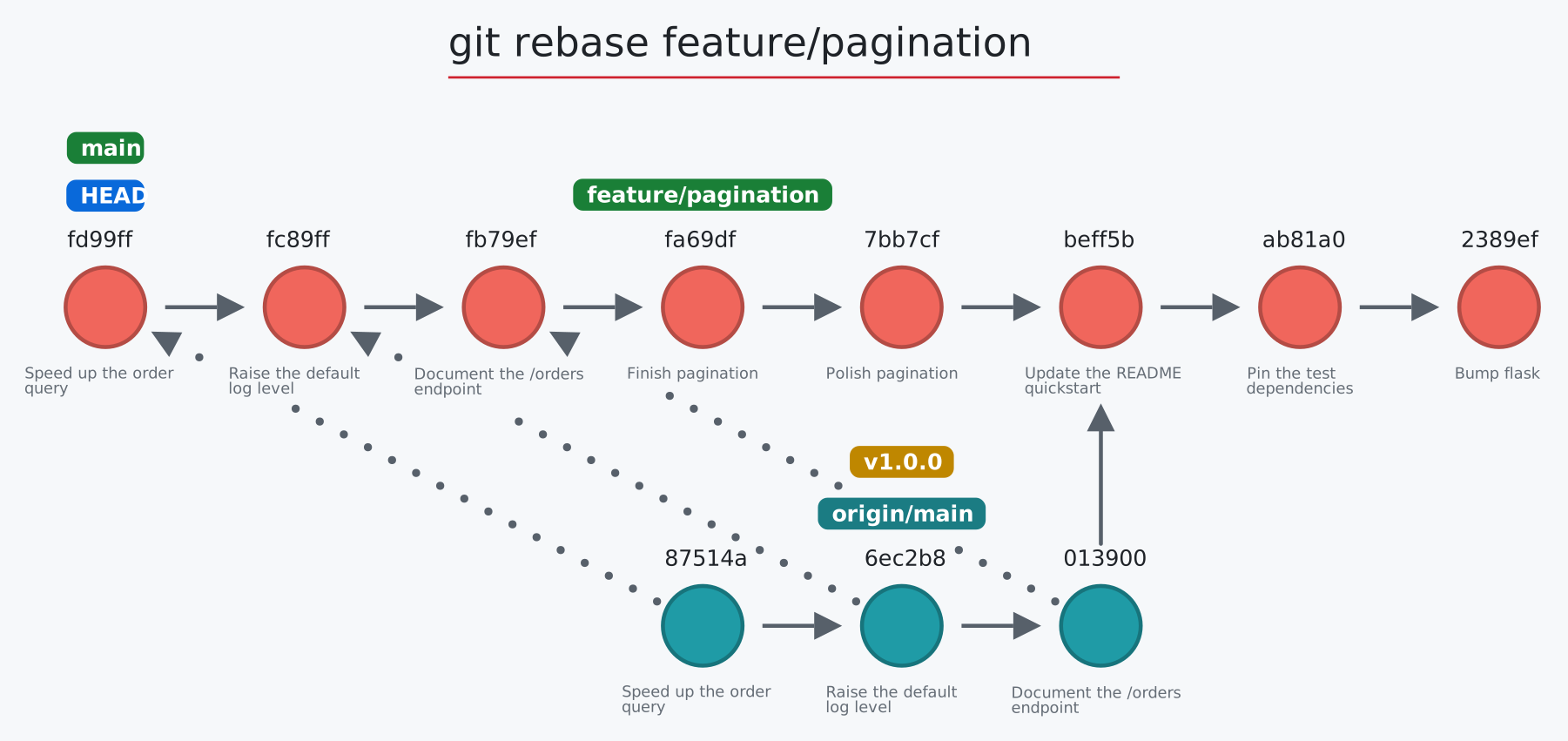
- git_sim-0.4.0/src/git_sim/render/constants.py +122 -0
- git_sim-0.4.0/src/git_sim/render/embed.py +191 -0
- git_sim-0.4.0/src/git_sim/render/html.py +1593 -0
- git_sim-0.4.0/src/git_sim/render/live_html.py +947 -0
- git_sim-0.4.0/src/git_sim/render/merge.py +401 -0
- git_sim-0.4.0/src/git_sim/render/mobject.py +440 -0
- git_sim-0.4.0/src/git_sim/render/scene.py +502 -0

- git_sim-0.4.0/src/git_sim/render/shapes.py +647 -0
- git_sim-0.4.0/src/git_sim/render/skia_lib.py +36 -0
- git_sim-0.4.0/src/git_sim/render/svg.py +311 -0
- git_sim-0.4.0/src/git_sim/render/text.py +360 -0
- git_sim-0.4.0/src/git_sim/reset.py +280 -0
- git_sim-0.4.0/src/git_sim/restore.py +236 -0
- git_sim-0.4.0/src/git_sim/resume.py +459 -0
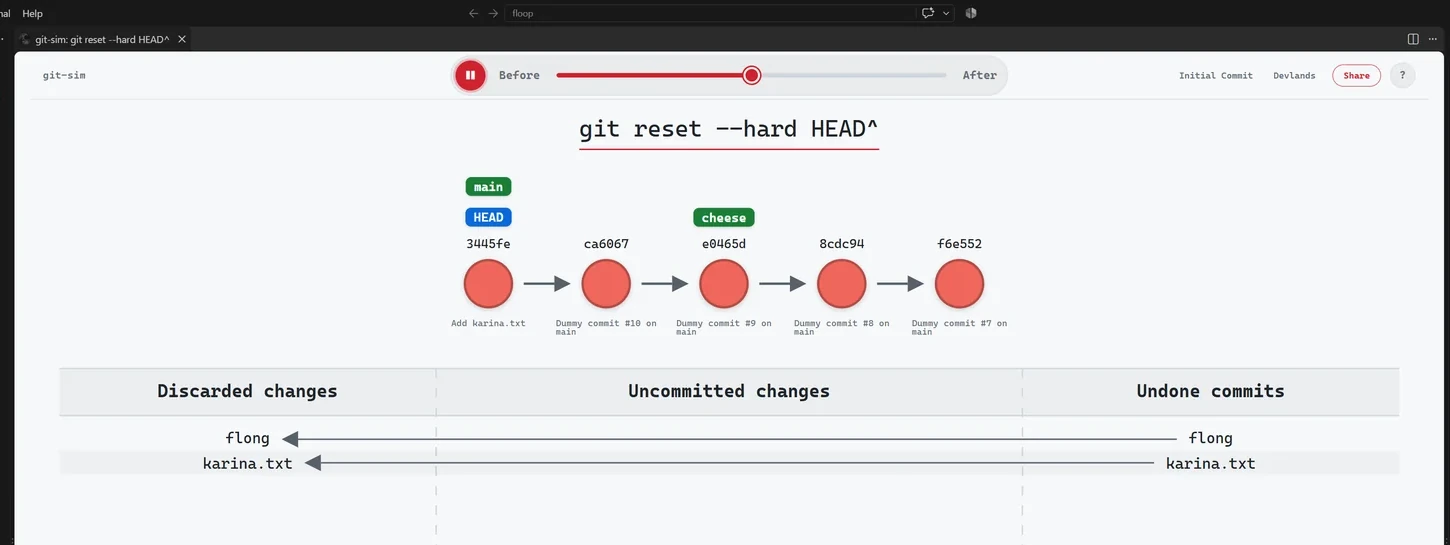
- git_sim-0.4.0/src/git_sim/revert.py +287 -0
- git_sim-0.4.0/src/git_sim/rm.py +108 -0
- git_sim-0.4.0/src/git_sim/settings.py +75 -0
- git_sim-0.4.0/src/git_sim/shortlog.py +115 -0
- git_sim-0.4.0/src/git_sim/show.py +203 -0
- git_sim-0.4.0/src/git_sim/simulate.py +231 -0
- git_sim-0.4.0/src/git_sim/stash.py +549 -0
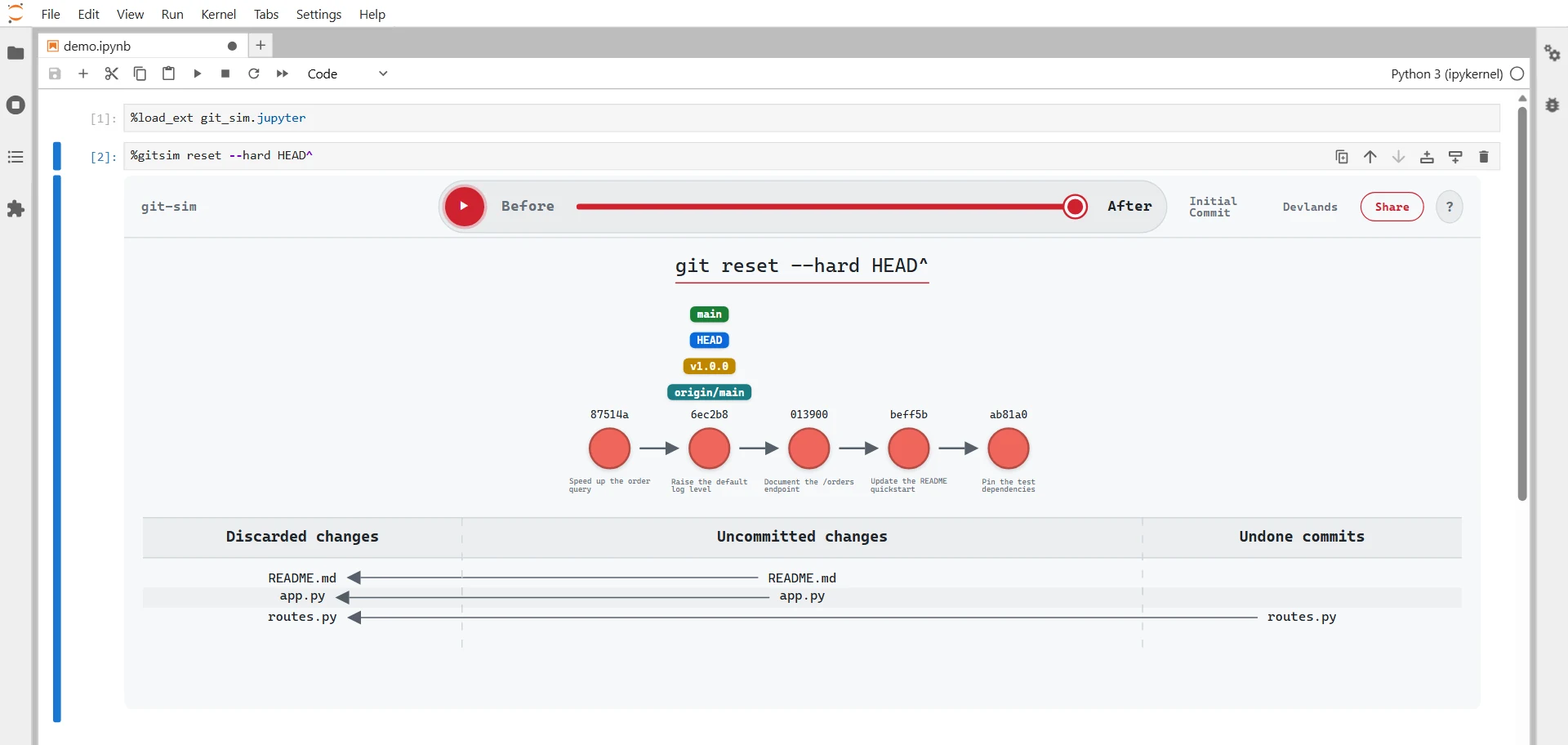
- {git_sim-0.3.5 → git_sim-0.4.0}/src/git_sim/status.py +3 -4
- git_sim-0.4.0/src/git_sim/submodule.py +218 -0
- git_sim-0.4.0/src/git_sim/switch.py +279 -0
- git_sim-0.4.0/src/git_sim/tag.py +241 -0
- git_sim-0.4.0/src/git_sim/textgraph.py +200 -0
- git_sim-0.4.0/src/git_sim/theme.py +178 -0
- git_sim-0.4.0/src/git_sim/worktree.py +237 -0
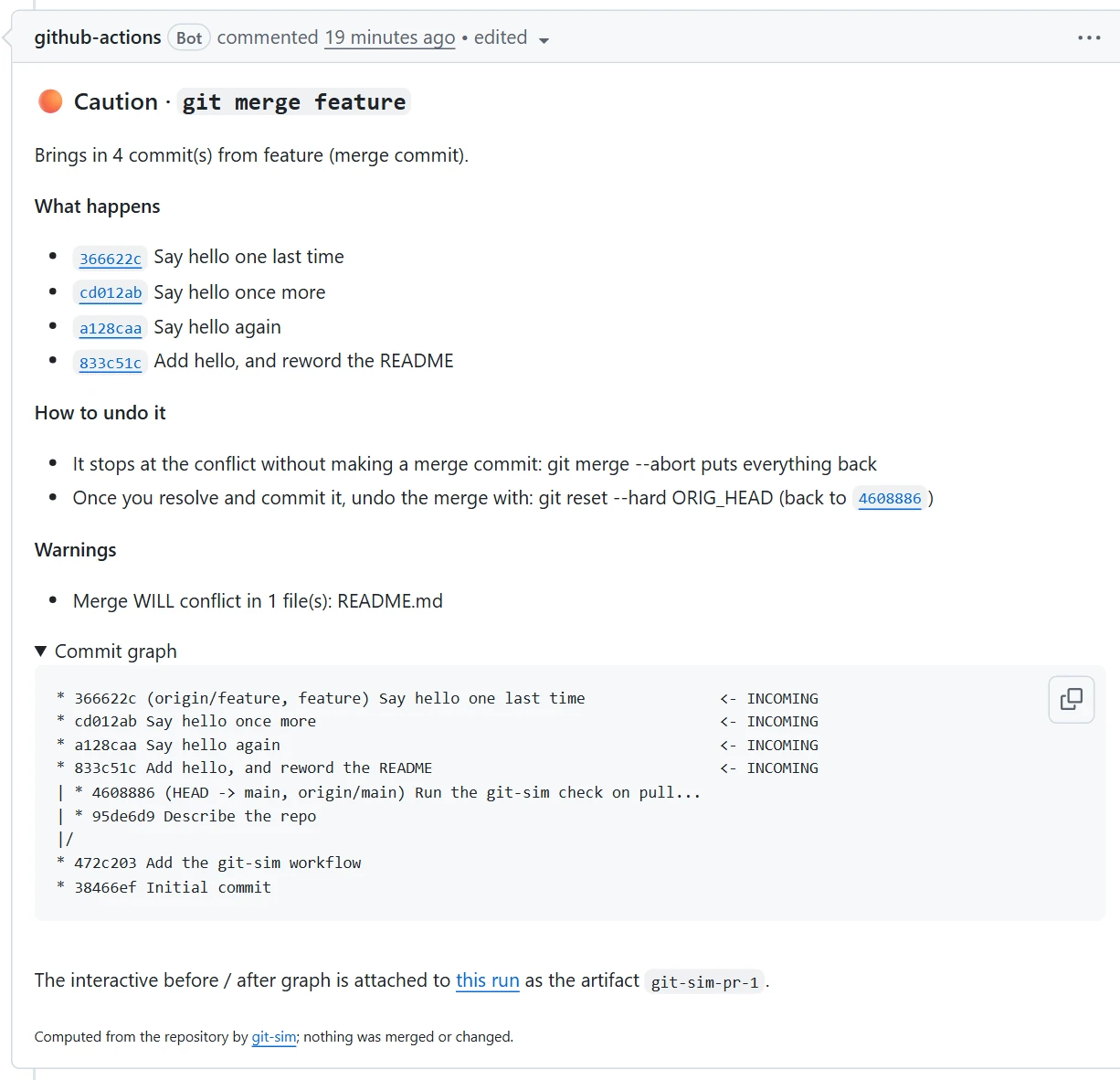
- git_sim-0.4.0/src/git_sim.egg-info/PKG-INFO +1043 -0
- git_sim-0.4.0/src/git_sim.egg-info/SOURCES.txt +85 -0
- git_sim-0.4.0/src/git_sim.egg-info/entry_points.txt +4 -0
- {git_sim-0.3.5 → git_sim-0.4.0}/src/git_sim.egg-info/requires.txt +10 -4
- git_sim-0.3.5/PKG-INFO +0 -610
- git_sim-0.3.5/README.md +0 -582
- git_sim-0.3.5/pyproject.toml +0 -55
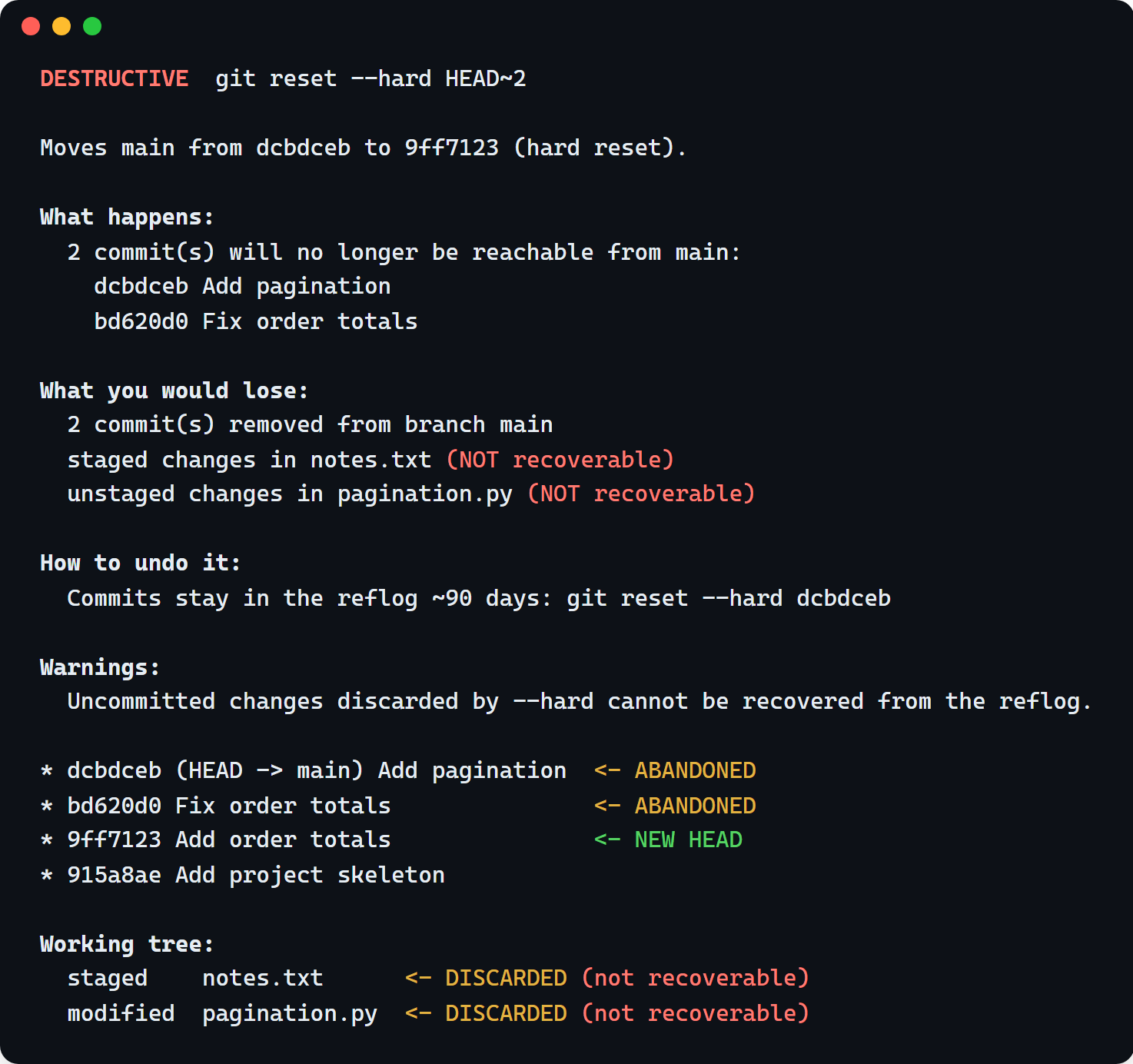
- git_sim-0.3.5/src/git_sim/__init__.py +0 -1
- git_sim-0.3.5/src/git_sim/add.py +0 -83
- git_sim-0.3.5/src/git_sim/animations.py +0 -90
- git_sim-0.3.5/src/git_sim/branch.py +0 -54
- git_sim-0.3.5/src/git_sim/cherrypick.py +0 -72
- git_sim-0.3.5/src/git_sim/clean.py +0 -125
- git_sim-0.3.5/src/git_sim/clone.py +0 -106
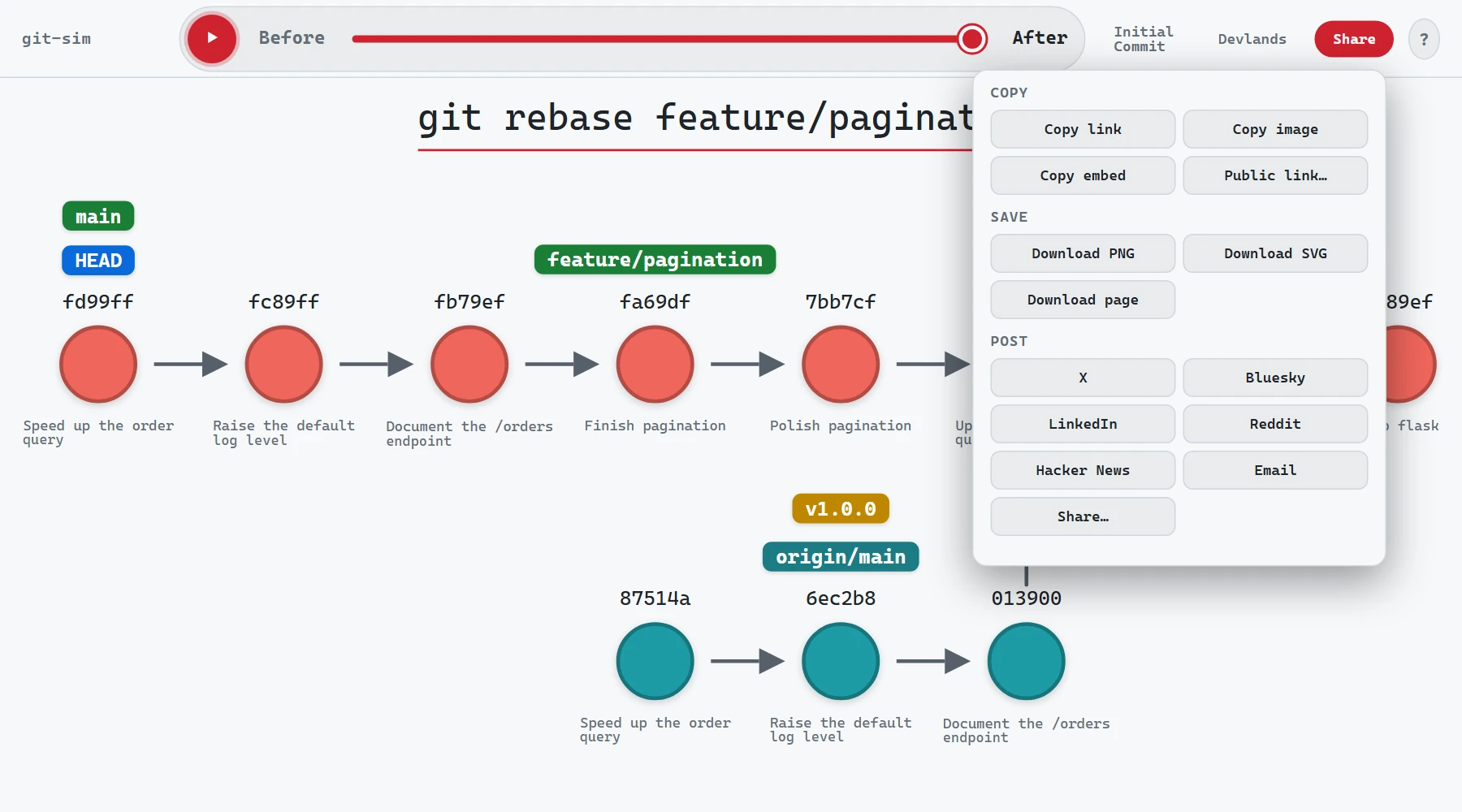
- git_sim-0.3.5/src/git_sim/commands.py +0 -437
- git_sim-0.3.5/src/git_sim/commit.py +0 -114
- git_sim-0.3.5/src/git_sim/config.py +0 -271
- git_sim-0.3.5/src/git_sim/enums.py +0 -44
- git_sim-0.3.5/src/git_sim/fetch.py +0 -86
- git_sim-0.3.5/src/git_sim/git_sim_base_command.py +0 -1401
- git_sim-0.3.5/src/git_sim/init.py +0 -321
- git_sim-0.3.5/src/git_sim/log.py +0 -48
- git_sim-0.3.5/src/git_sim/merge.py +0 -202
- git_sim-0.3.5/src/git_sim/pull.py +0 -111
- git_sim-0.3.5/src/git_sim/push.py +0 -205
- git_sim-0.3.5/src/git_sim/rebase.py +0 -192
- git_sim-0.3.5/src/git_sim/remote.py +0 -384
- git_sim-0.3.5/src/git_sim/reset.py +0 -138
- git_sim-0.3.5/src/git_sim/restore.py +0 -79
- git_sim-0.3.5/src/git_sim/revert.py +0 -168
- git_sim-0.3.5/src/git_sim/rm.py +0 -141
- git_sim-0.3.5/src/git_sim/settings.py +0 -51
- git_sim-0.3.5/src/git_sim/stash.py +0 -202
- git_sim-0.3.5/src/git_sim/switch.py +0 -142
- git_sim-0.3.5/src/git_sim/tag.py +0 -106
- git_sim-0.3.5/src/git_sim.egg-info/PKG-INFO +0 -610
- git_sim-0.3.5/src/git_sim.egg-info/SOURCES.txt +0 -43
- git_sim-0.3.5/src/git_sim.egg-info/entry_points.txt +0 -2
- {git_sim-0.3.5 → git_sim-0.4.0}/LICENSE +0 -0
- {git_sim-0.3.5 → git_sim-0.4.0}/MANIFEST.in +0 -0
- {git_sim-0.3.5 → git_sim-0.4.0}/setup.cfg +0 -0
- {git_sim-0.3.5 → git_sim-0.4.0}/src/git_sim/logo.png +0 -0
- {git_sim-0.3.5 → git_sim-0.4.0}/src/git_sim.egg-info/dependency_links.txt +0 -0
- {git_sim-0.3.5 → git_sim-0.4.0}/src/git_sim.egg-info/top_level.txt +0 -0
git_sim-0.4.0/PKG-INFO
ADDED
|
@@ -0,0 +1,1043 @@
|
|
|
1
|
+
Metadata-Version: 2.4
|
|
2
|
+
Name: git-sim
|
|
3
|
+
Version: 0.4.0
|
|
4
|
+
Summary: Simulate Git commands on your own repos by generating an image (default) or video visualization depicting the command's behavior.
|
|
5
|
+
Author-email: Jacob Stopak <jacob@initialcommit.io>
|
|
6
|
+
License: GPL-2.0
|
|
7
|
+
Project-URL: Homepage, https://initialcommit.com/tools/git-sim
|
|
8
|
+
Project-URL: Git command reference, https://initialcommit.com/learn/git/visual-command-reference
|
|
9
|
+
Project-URL: Learn Git, https://initialcommit.com/learn/git
|
|
10
|
+
Project-URL: Source, https://github.com/initialcommit-com/git-sim
|
|
11
|
+
Keywords: git,sim,simulation,simulate,git-simulate,git-simulation,git-sim,manim,animation,gitanimation,image,video,dryrun,dry-run
|
|
12
|
+
Classifier: Programming Language :: Python :: 3
|
|
13
|
+
Classifier: Programming Language :: Python :: 3.10
|
|
14
|
+
Classifier: Programming Language :: Python :: 3.11
|
|
15
|
+
Classifier: Programming Language :: Python :: 3.12
|
|
16
|
+
Classifier: Programming Language :: Python :: 3.13
|
|
17
|
+
Classifier: Programming Language :: Python :: 3.14
|
|
18
|
+
Classifier: License :: OSI Approved :: GNU General Public License v2 (GPLv2)
|
|
19
|
+
Classifier: Operating System :: OS Independent
|
|
20
|
+
Requires-Python: >=3.10
|
|
21
|
+
Description-Content-Type: text/markdown
|
|
22
|
+
License-File: LICENSE
|
|
23
|
+
Requires-Dist: git-dummy>=0.2.0
|
|
24
|
+
Requires-Dist: gitpython
|
|
25
|
+
Requires-Dist: mcp>=2.0
|
|
26
|
+
Requires-Dist: numpy
|
|
27
|
+
Requires-Dist: pydantic_settings
|
|
28
|
+
Requires-Dist: skia-python
|
|
29
|
+
Requires-Dist: typer
|
|
30
|
+
Requires-Dist: fonttools
|
|
31
|
+
Provides-Extra: extras
|
|
32
|
+
Requires-Dist: manim; extra == "extras"
|
|
33
|
+
Requires-Dist: opencv-python-headless; extra == "extras"
|
|
34
|
+
Provides-Extra: dev
|
|
35
|
+
Requires-Dist: black; extra == "dev"
|
|
36
|
+
Requires-Dist: pillow; extra == "dev"
|
|
37
|
+
Requires-Dist: pytest; extra == "dev"
|
|
38
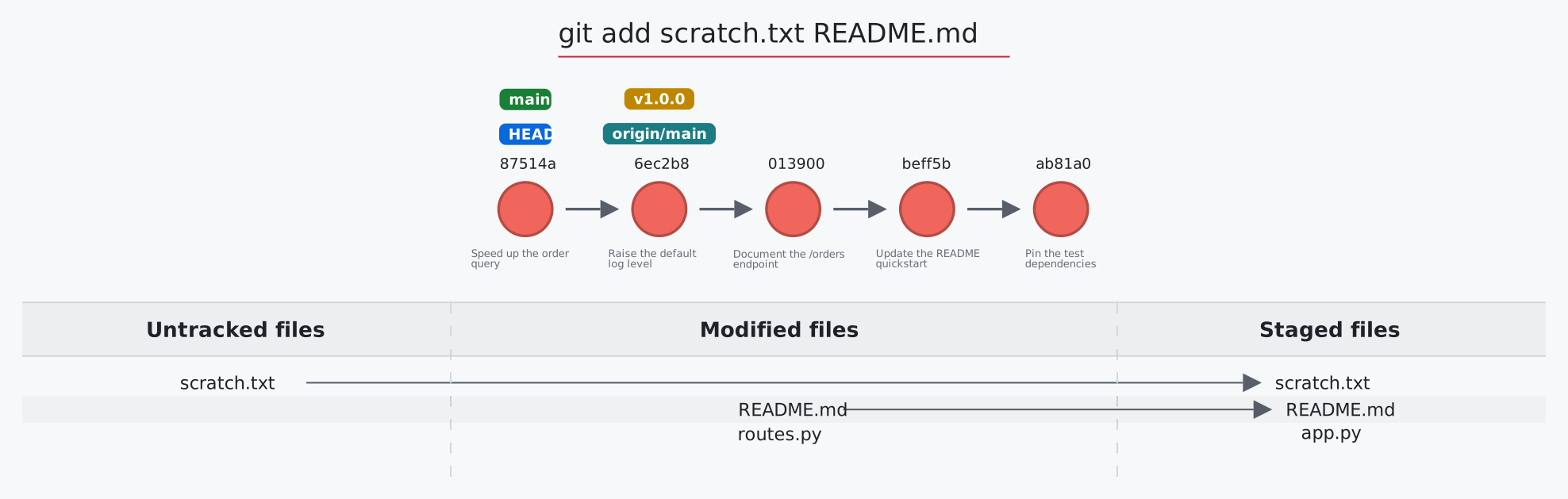
|
+
Provides-Extra: mcp
|
|
39
|
+
Dynamic: license-file
|
|
40
|
+
|
|
41
|
+
# git-sim
|
|
42
|
+

|
|
43
|
+
|
|
44
|
+
<a href="https://initialcommit.com/tools/git-sim"><img src="https://initialcommit.com/img/initialcommit/logo.png" alt="Initial Commit" height="20"></a> [](https://github.com/initialcommit-com/git-sim/blob/main/LICENSE) [](https://img.shields.io/github/v/release/initialcommit-com/git-sim) [](https://pepy.tech/project/git-sim) [](https://github.com/initialcommit-com/git-sim/graphs/contributors) [](https://github.com/sponsors/initialcommit-com)
|
|
45
|
+
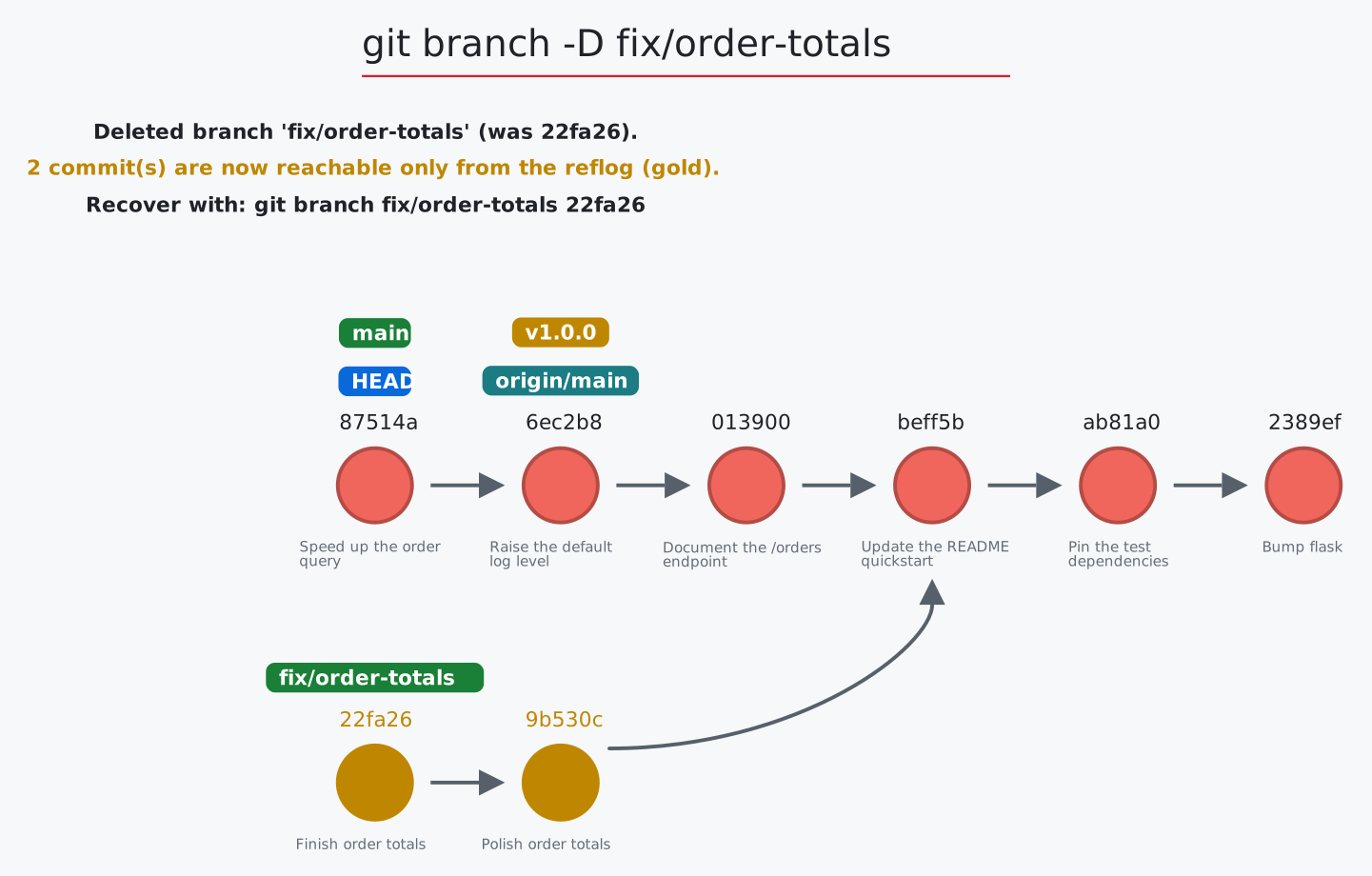
|
|
46
|
+
**The visual layer for Git in your own repos:** simulate, record, replay, audit, and share individual Git commands or entire Git workflows, wherever you or your agents run them.
|
|
47
|
+
|
|
48
|
+
<table>
|
|
49
|
+
<tbody><tr><td>
|
|
50
|
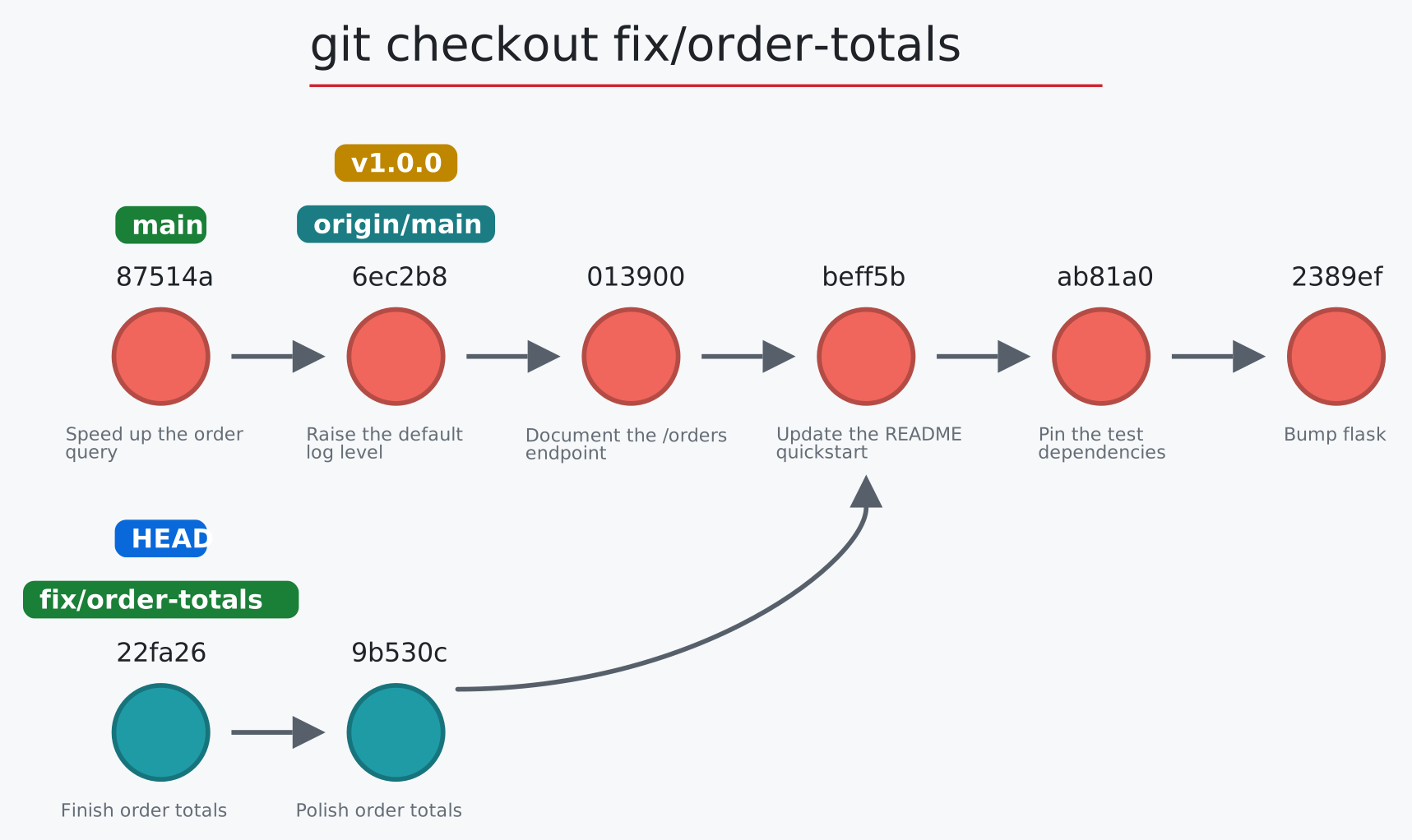
+
|
|
51
|
+
**Simulate any Git command before you run it**, as a web-first, embeddable, interactive graph designed for you to share.
|
|
52
|
+
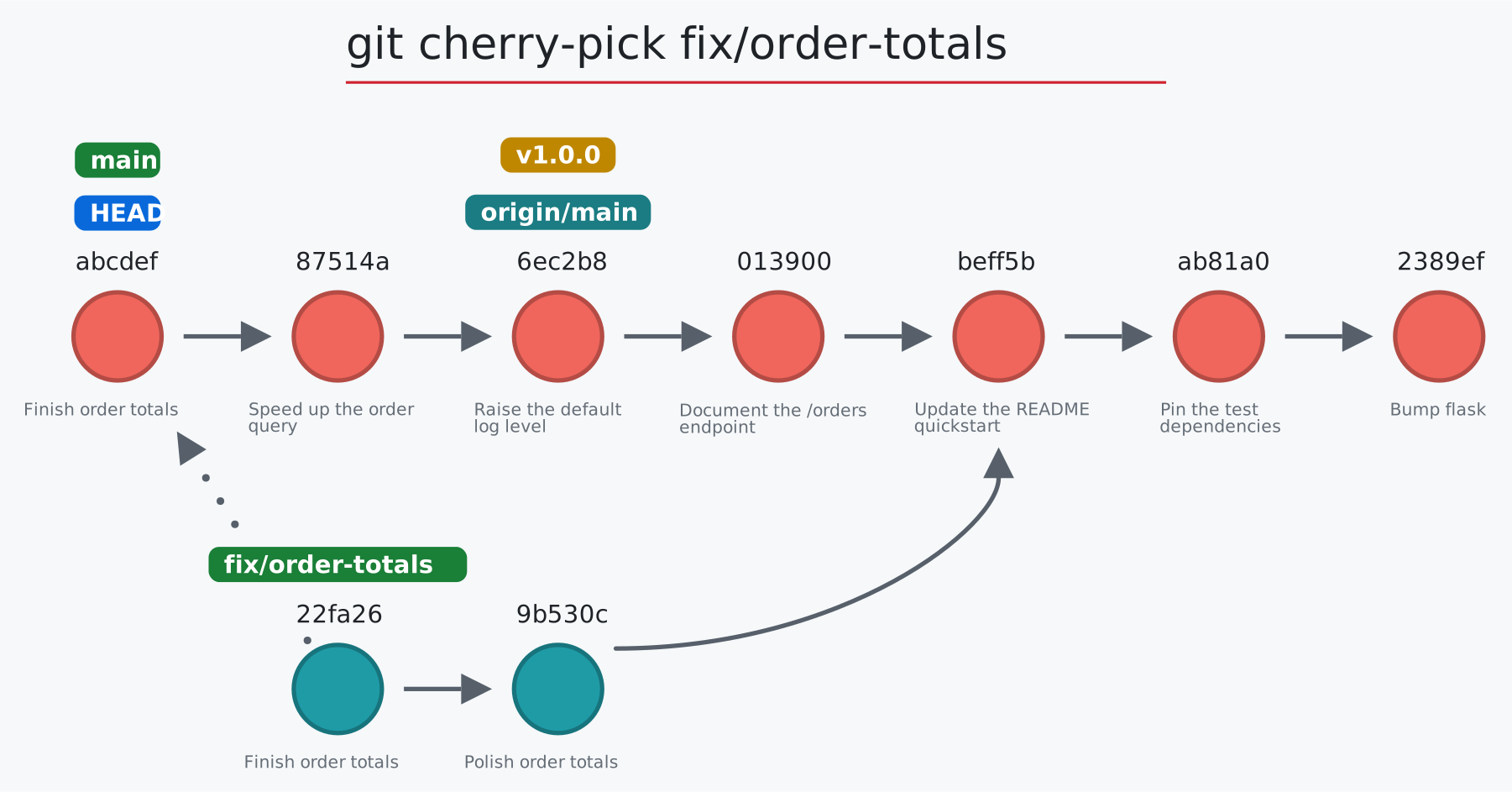
|
|
53
|
+
[](https://initialcommit.com/tools/git-sim/viewer?demo=rebase)
|
|
54
|
+
|
|
55
|
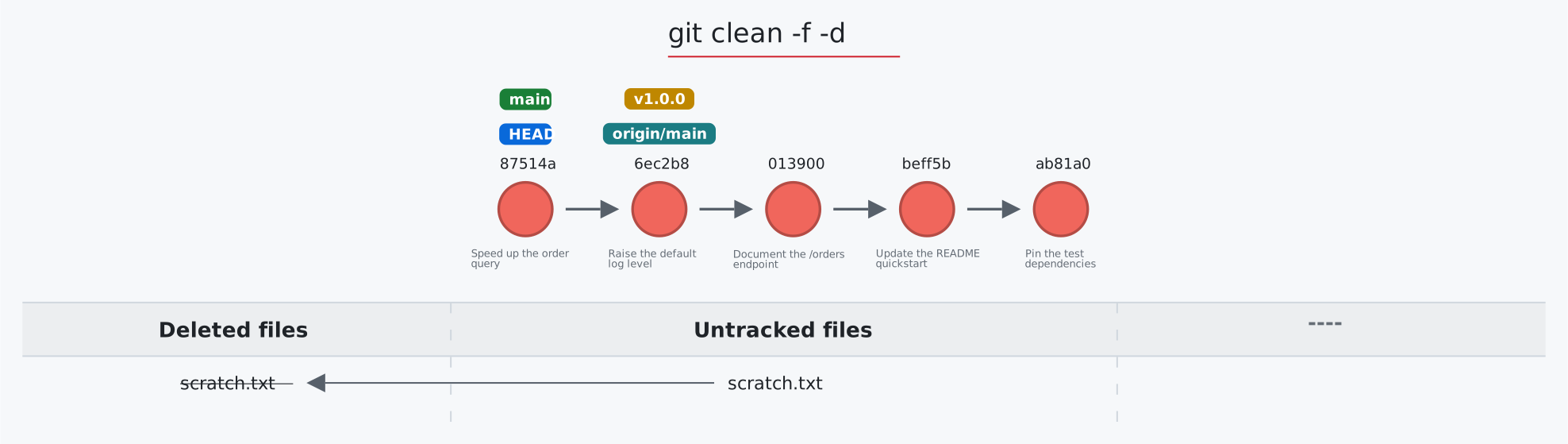
+
</td></tr></tbody>
|
|
56
|
+
<tbody><tr><td>
|
|
57
|
+
|
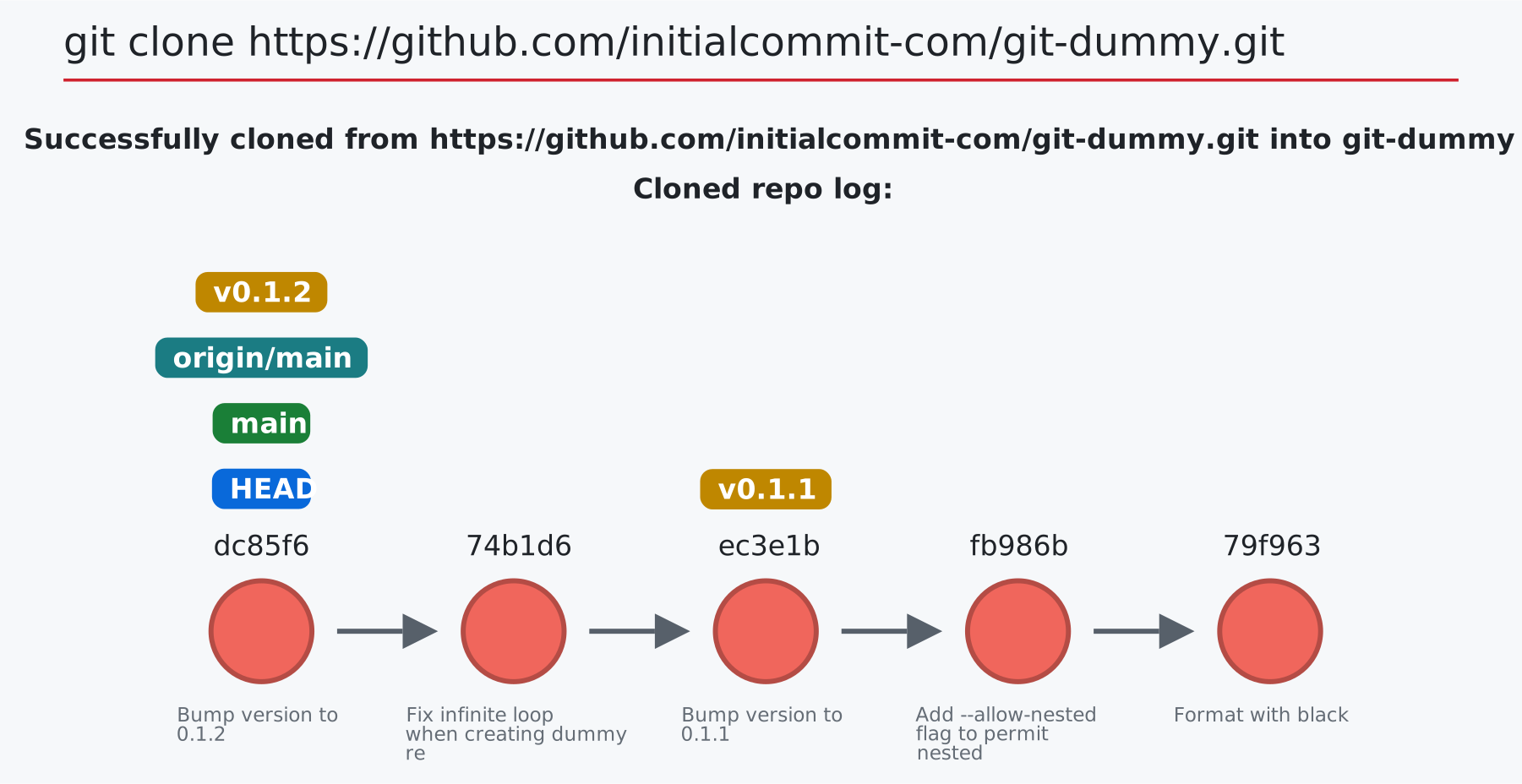
|
58
|
+
**Watch and record your repo animating in real-time**, every Git operation, human or agentic, as a visual command sequence you can save, replay, and share.
|
|
59
|
+
|
|
60
|
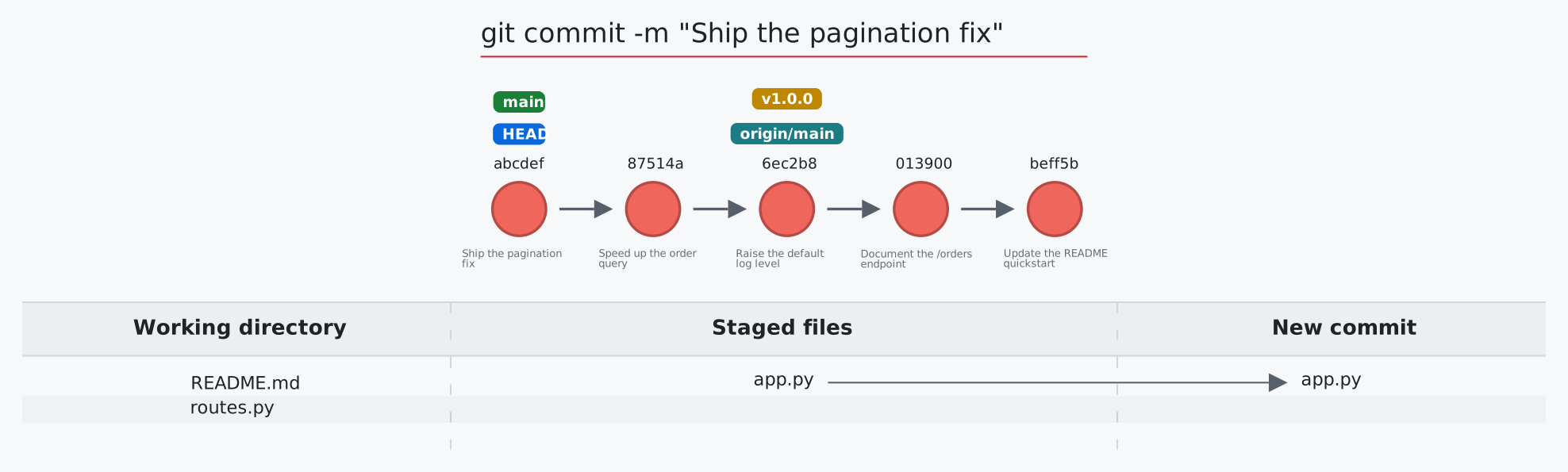
+
[](https://initialcommit.com/tools/git-sim#live)
|
|
61
|
+
|
|
62
|
+
</td></tr></tbody>
|
|
63
|
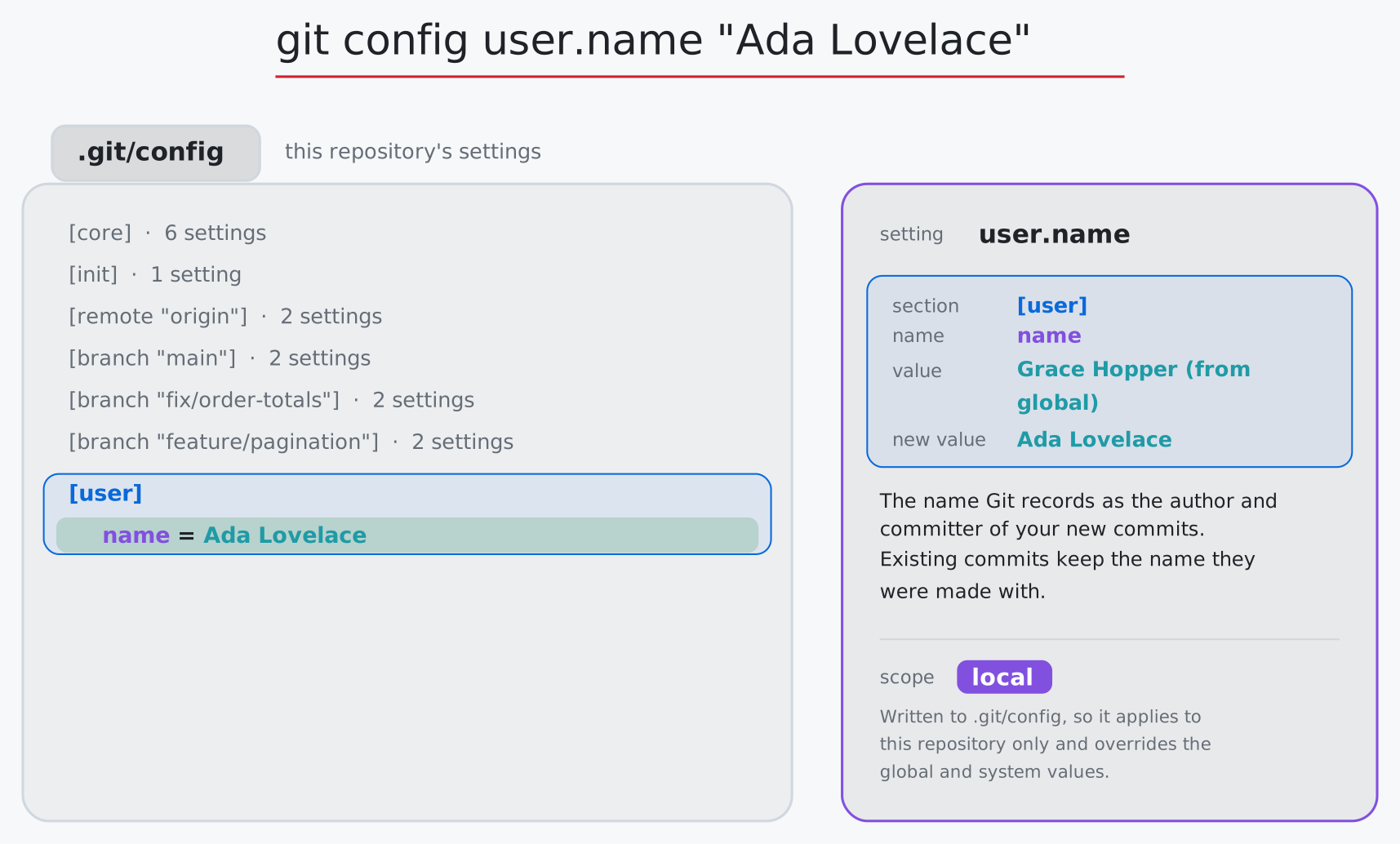
+
<tbody><tr><td>
|
|
64
|
+
|
|
65
|
+
**Use git-sim without ever leaving your editor**: Leverage git-sim right in your IDE with the VS Code extension (also works in Cursor, Windsurf, and VSCodium).
|
|
66
|
+
|
|
67
|
+
[](https://github.com/initialcommit-com/git-sim/tree/main/vscode)
|
|
68
|
+
|
|
69
|
+
</td></tr></tbody>
|
|
70
|
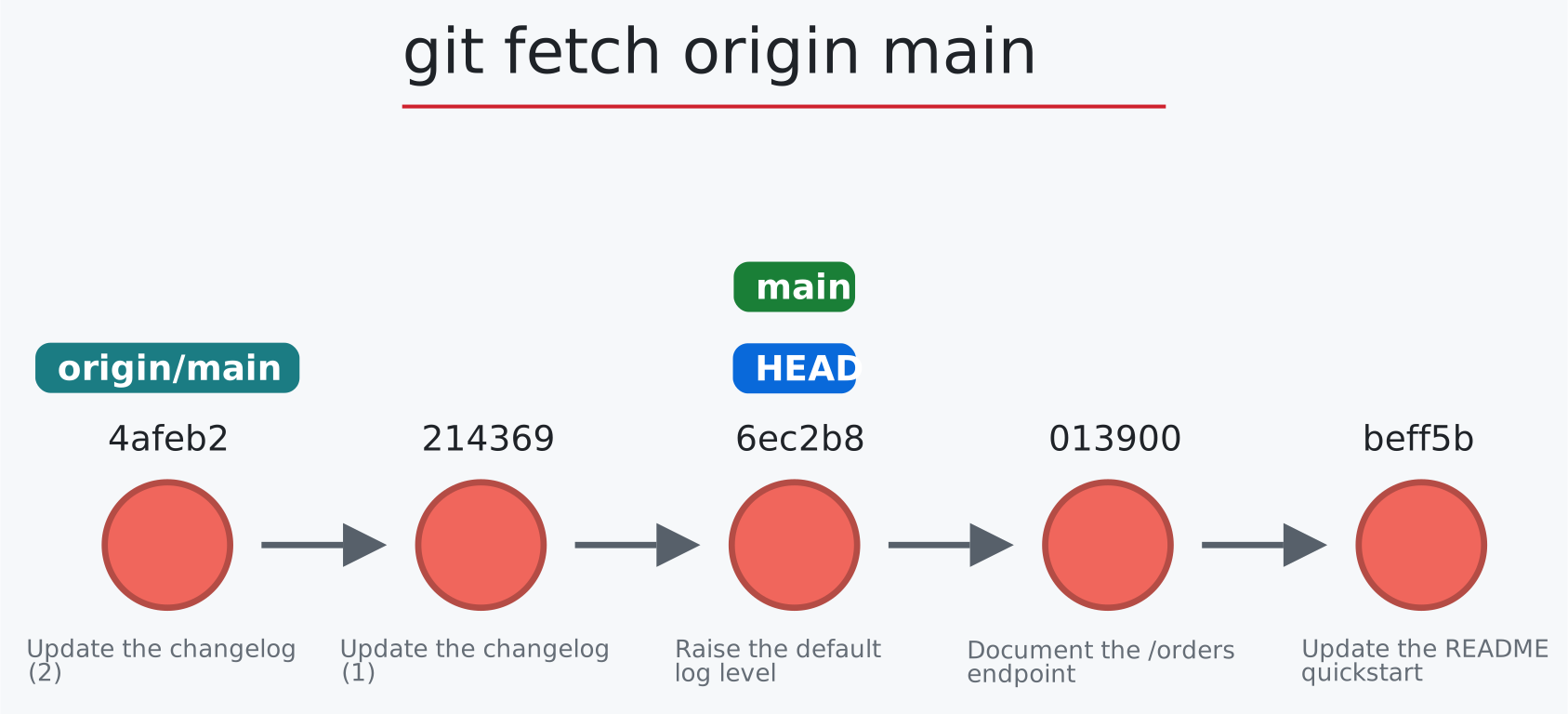
+
<tbody><tr><td>
|
|
71
|
+
|
|
72
|
+
**Integrate with Jupyter**: Invoke git-sim within Jupyter to render Git simulations inline in your notebooks.
|
|
73
|
+
|
|
74
|
+
[](https://github.com/initialcommit-com/git-sim#jupyter)
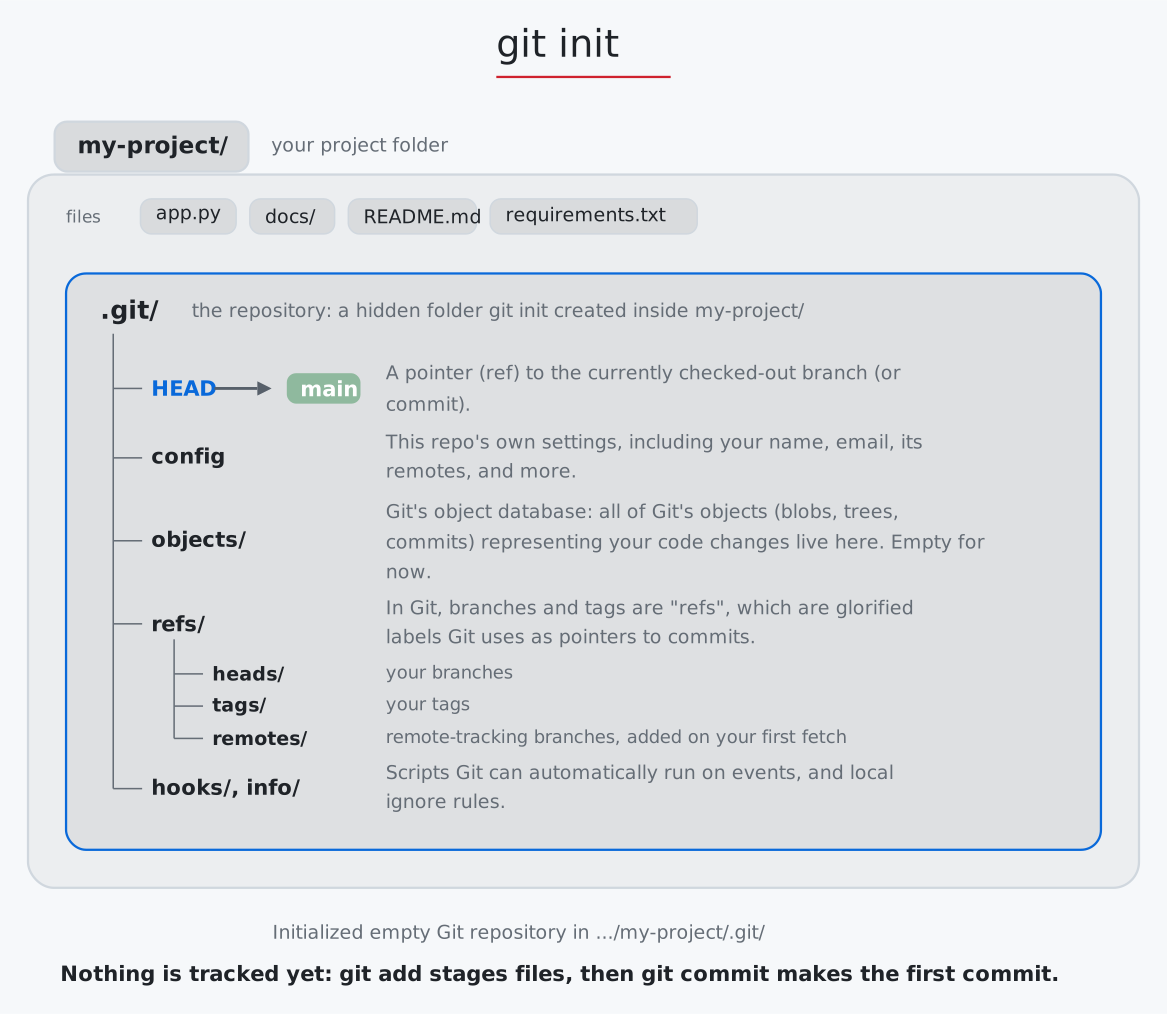
|
|
75
|
+
|
|
76
|
+
</td></tr></tbody>
|
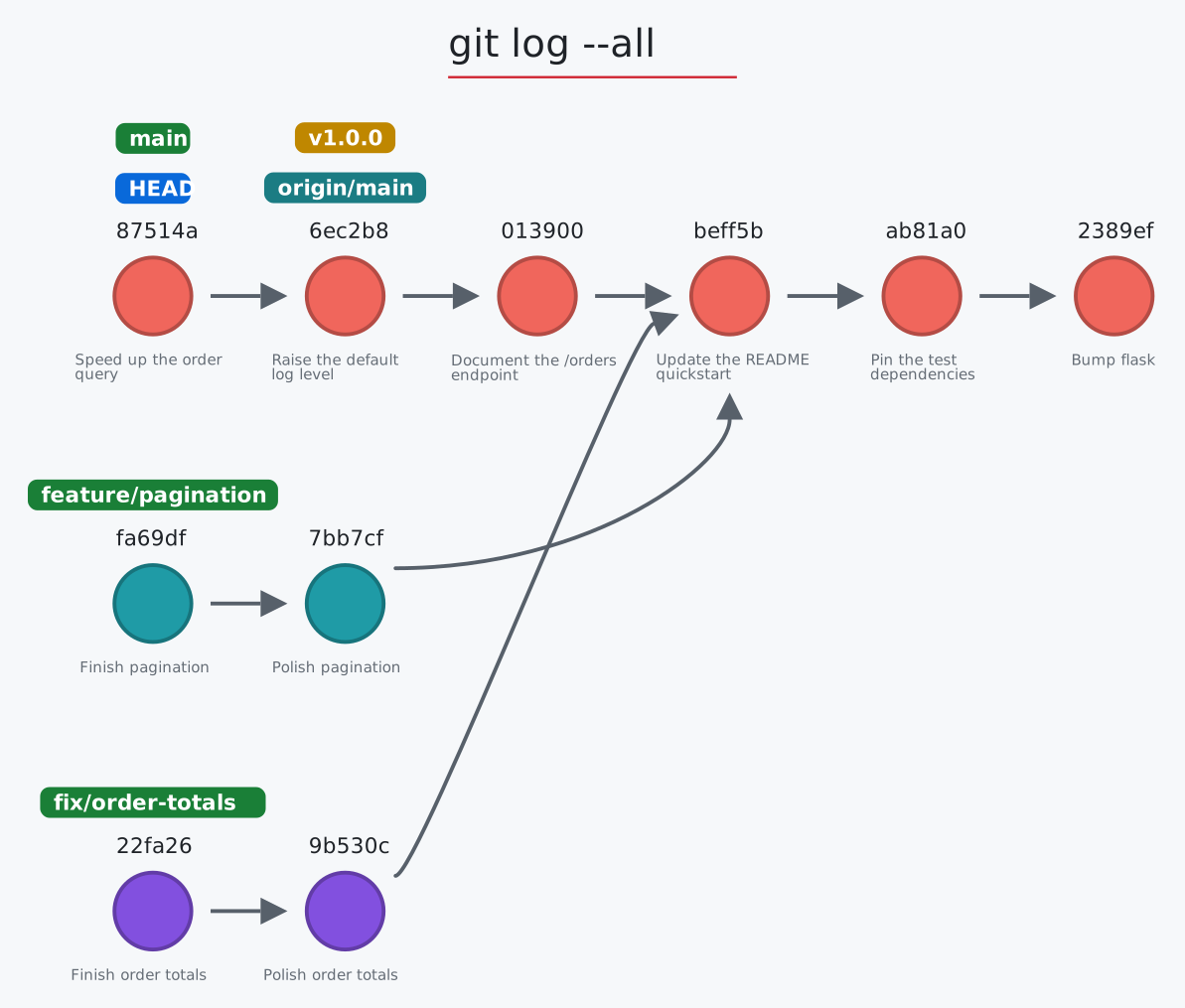
|
77
|
+
<tbody><tr><td>
|
|
78
|
+
|
|
79
|
+
**Automatically run git-sim on GitHub PR's**: The git-sim GitHub Action generates both textual and visual descriptions of the resulting PR merge, whether it is safe, and how to undo it.
|
|
80
|
+
|
|
81
|
+
[](https://github.com/initialcommit-com/git-sim#github)
|
|
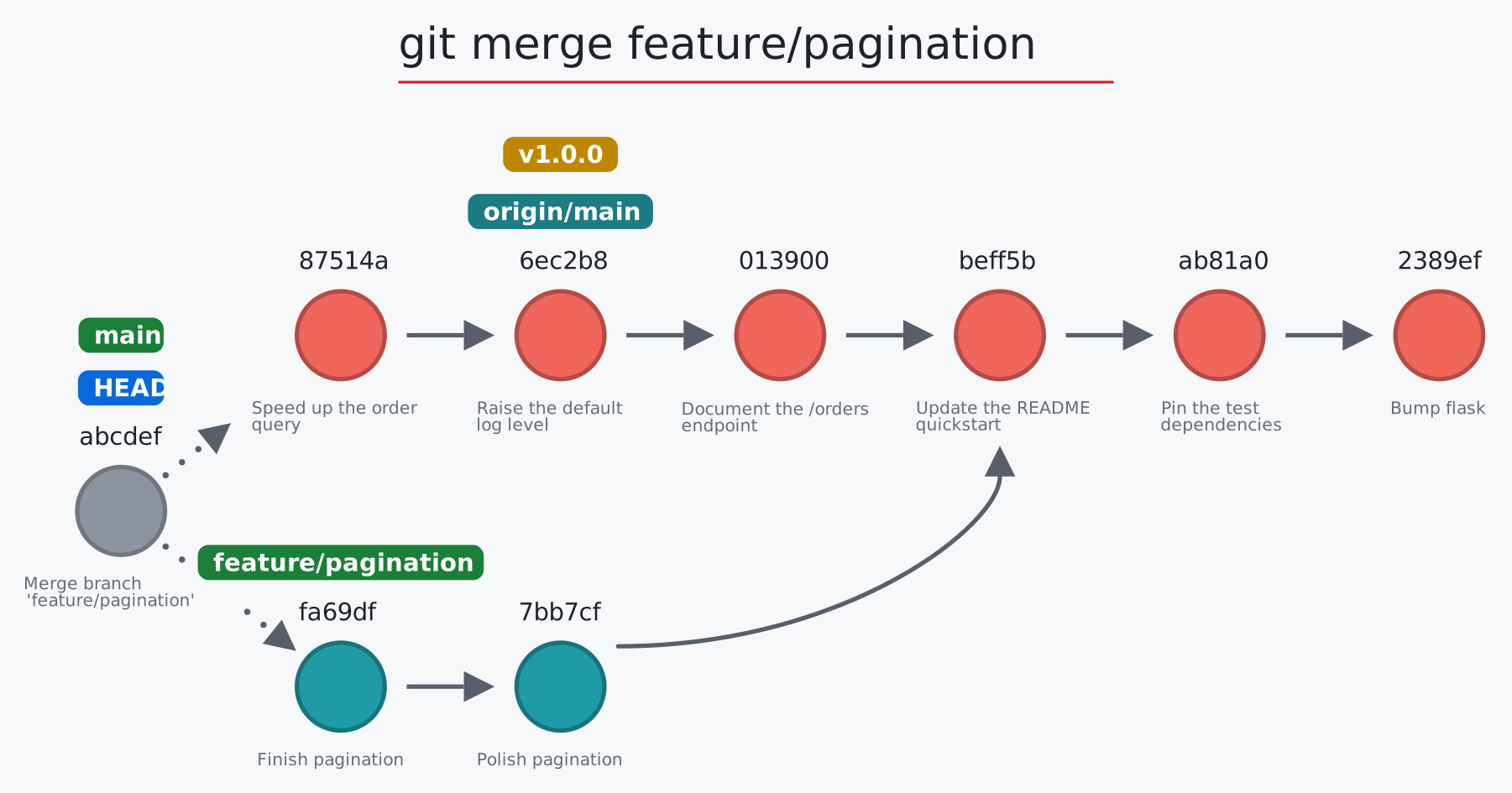
82
|
+
|
|
83
|
+
</td></tr></tbody>
|
|
84
|
+
<tbody><tr><td>
|
|
85
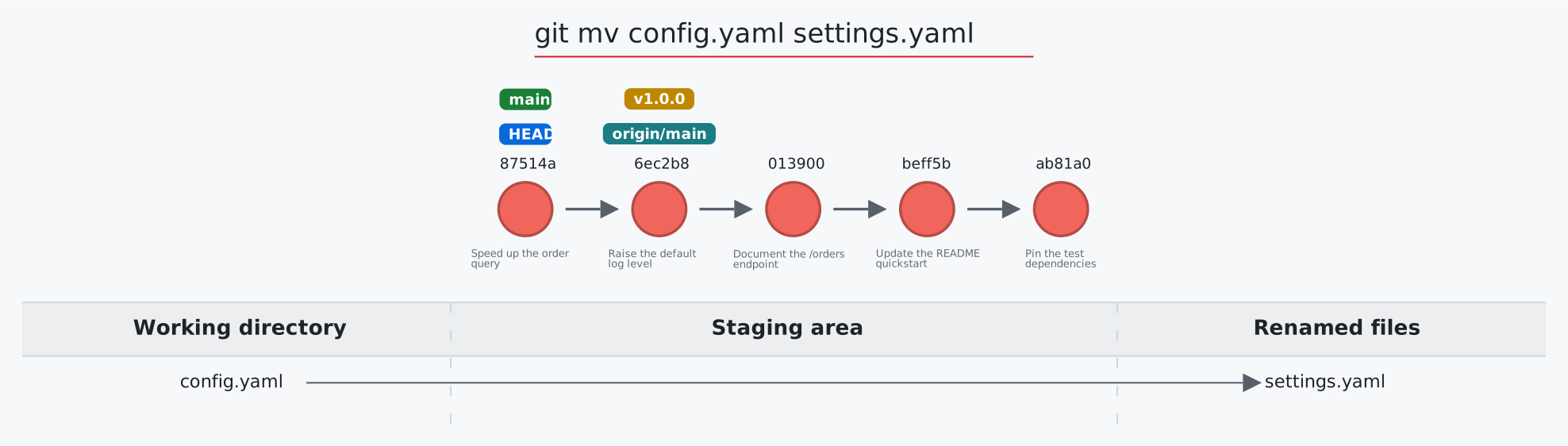
|
+
|
|
86
|
+
**Catch and review risky Git commands from AI agents** in real time, before they harm your work. Wires into Claude Code, GitHub Copilot, Cursor, Codex, Gemini CLI, and any MCP agent.
|
|
87
|
+
|
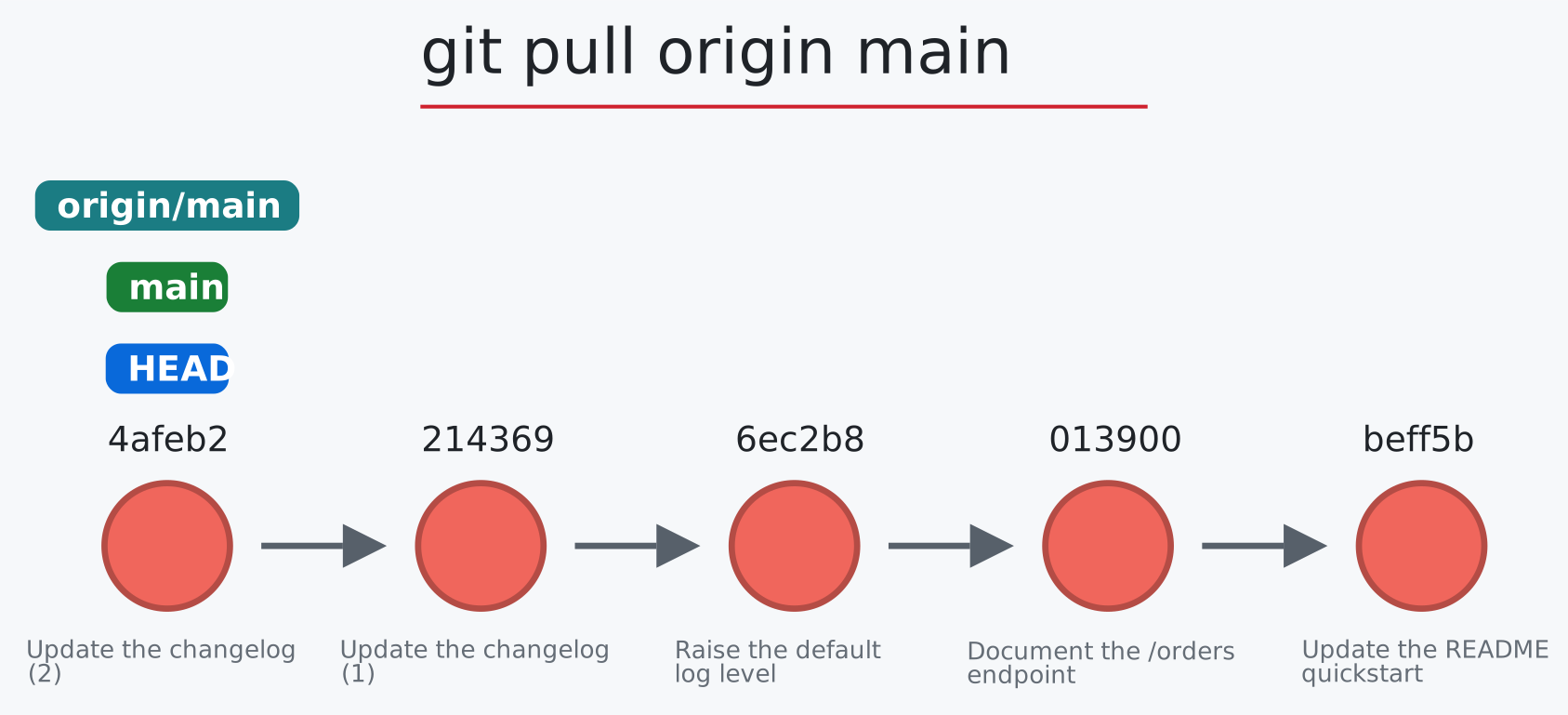
|
88
|
+
[](https://github.com/initialcommit-com/git-sim#ai-agents)
|
|
89
|
+
|
|
90
|
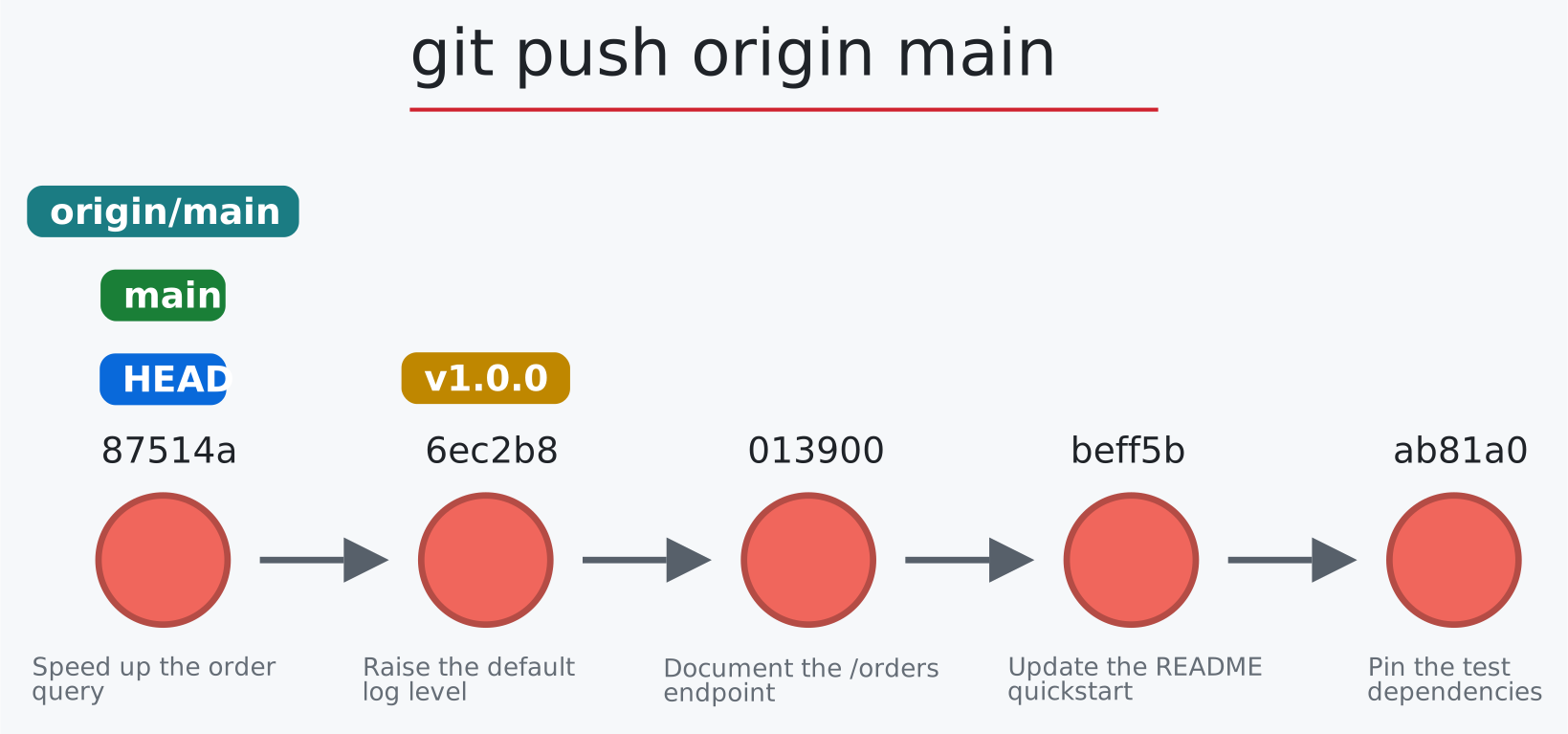
+
</td></tr></tbody>
|
|
91
|
+
<tbody><tr><td>
|
|
92
|
+
|
|
93
|
+
**Share any git-sim visualization** as a link, an embed, an HTML page, a PNG or SVG image, an MP4 video, or a social post.
|
|
94
|
+
|
|
95
|
+
[](https://initialcommit.com/tools/git-sim/viewer?demo=rebase)
|
|
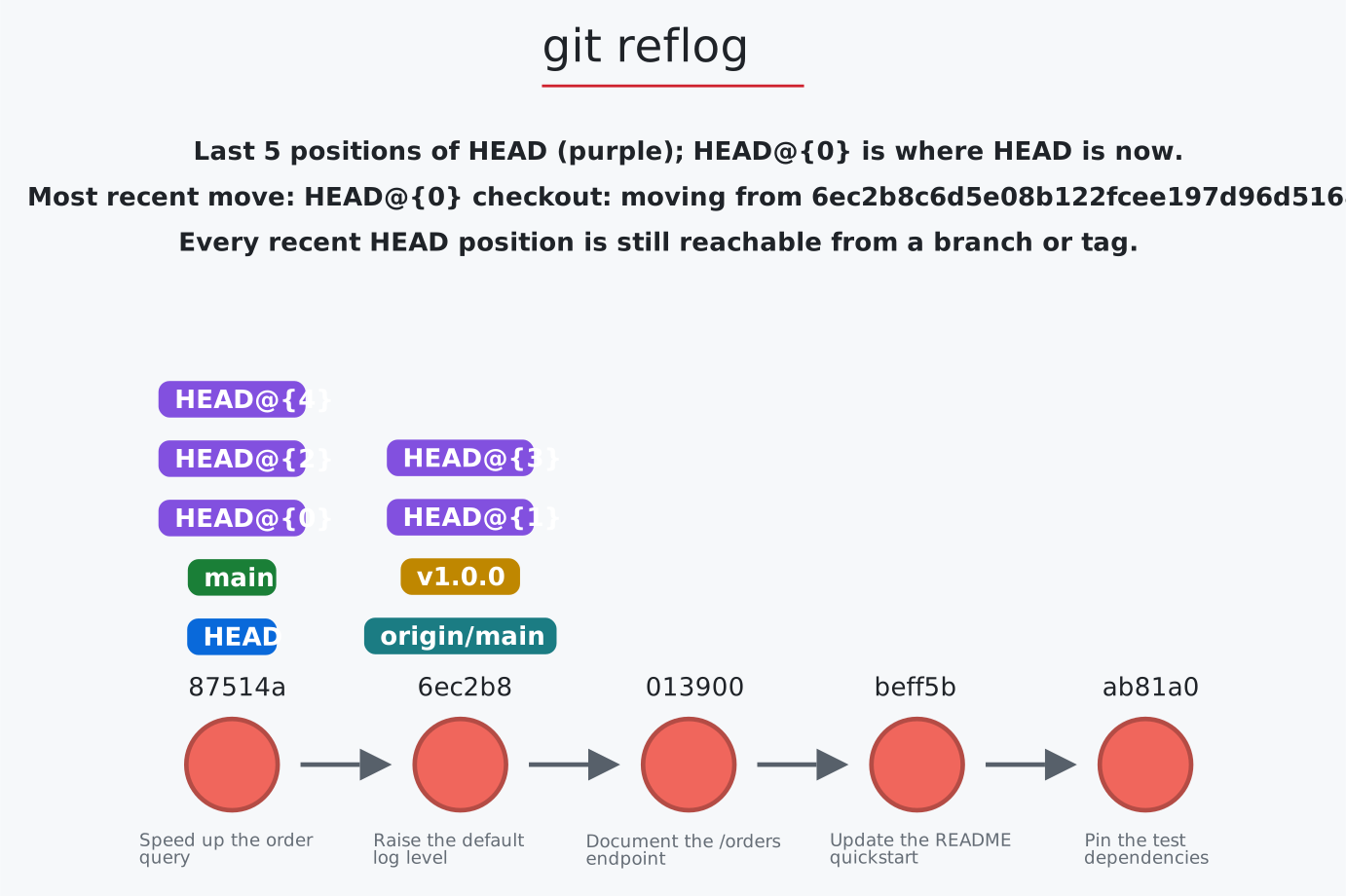
96
|
+
|
|
97
|
+
</td></tr></tbody>
|
|
98
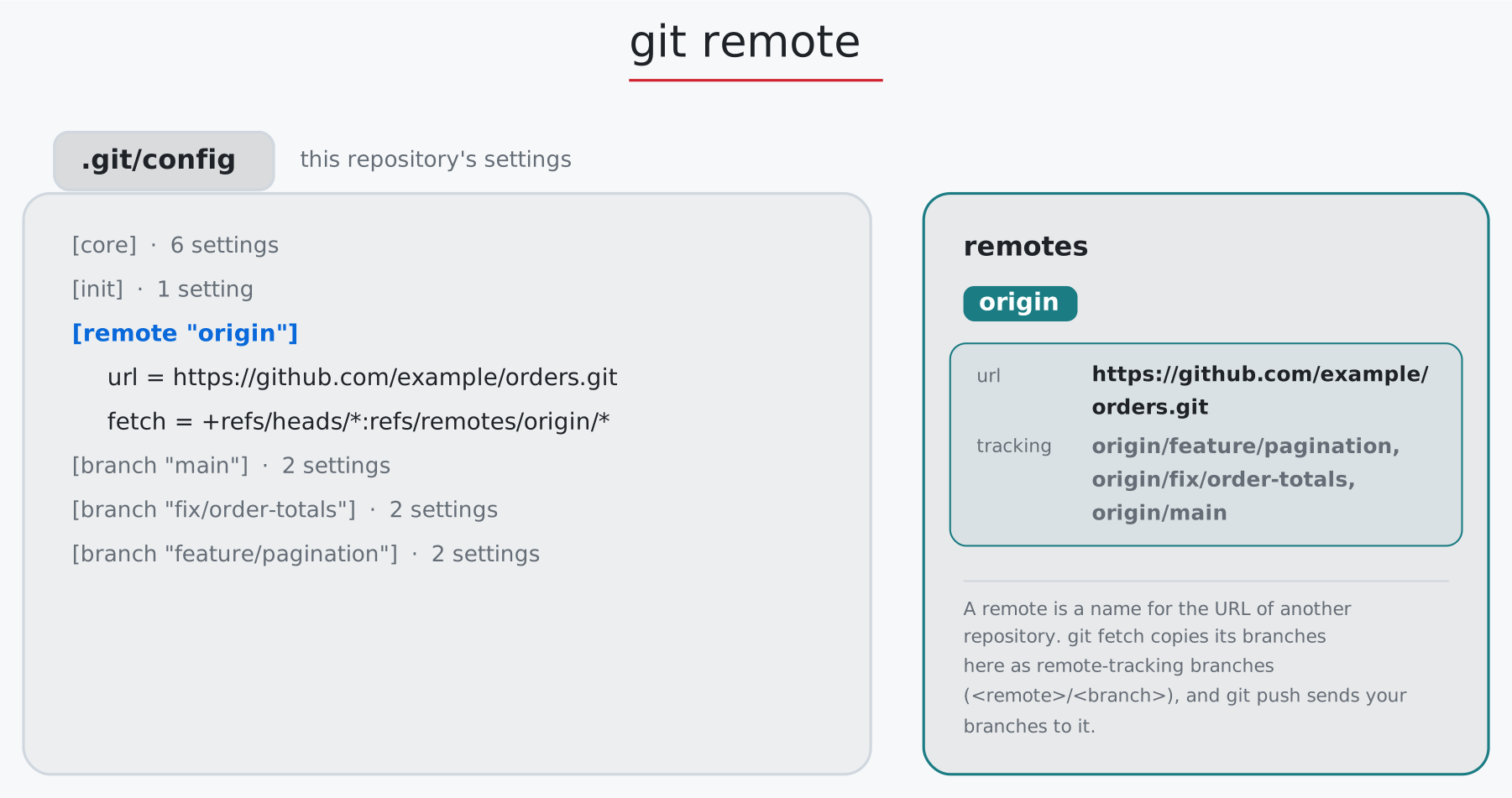
|
+
</table>
|
|
99
|
+
|
|
100
|
+
If git-sim helps you, ⭐ [star the repo](#top) or [sponsor it on GitHub](https://github.com/sponsors/initialcommit-com).
|
|
101
|
+
|
|
102
|
+
## Requirements
|
|
103
|
+
|
|
104
|
+
- Windows, macOS, or Linux
|
|
105
|
+
- Python 3.10 to 3.14, and Git
|
|
106
|
+
- Animated video (`--animate`) needs Manim: see [Installation](https://github.com/initialcommit-com/git-sim#installation)
|
|
107
|
+
|
|
108
|
+
Minimal Linux distros such as those on servers, Docker images, CI runners, and WSL often lack the following required dependencies: `libEGL`, `libGL`, and `fontconfig`. If git-sim errors and prompts for them, use the command below that applies to your Linux flavor:
|
|
109
|
+
|
|
110
|
+
```console
|
|
111
|
+
$ sudo apt install libegl1 libgl1 libfontconfig1 # Debian, Ubuntu, WSL
|
|
112
|
+
$ sudo dnf install mesa-libEGL mesa-libGL fontconfig # Fedora, RHEL
|
|
113
|
+
```
|
|
114
|
+
|
|
115
|
+
## Get started
|
|
116
|
+
|
|
117
|
+
**1. Install git-sim**
|
|
118
|
+
|
|
119
|
+
```console
|
|
120
|
+
$ pip install git-sim
|
|
121
|
+
```
|
|
122
|
+
|
|
123
|
+
Or `pipx install git-sim`, or `uv tool install git-sim`.
|
|
124
|
+
|
|
125
|
+
**2. Simulate any Git command:** in your local repo, prefix any Git command with `git-sim` instead of `git`
|
|
126
|
+
|
|
127
|
+
```console
|
|
128
|
+
$ git-sim merge dev
|
|
129
|
+
$ git-sim reset --hard HEAD^
|
|
130
|
+
$ git-sim rebase main
|
|
131
|
+
```
|
|
132
|
+
|
|
133
|
+
By default, git-sim creates a web-first, shareable visualization that opens in your browser. It generates an interactive simulation of exactly how any Git command will impact your repo, without actually running the real Git command so nothing changes in your repo.
|
|
134
|
+
|
|
135
|
+
Run `git-sim -h` to list all commands.
|
|
136
|
+
|
|
137
|
+
**3. Watch your repo update in real time:** a live graph that animates each Git operation in sequence, recording it so you can save, replay, and share it
|
|
138
|
+
|
|
139
|
+
```console
|
|
140
|
+
$ git-sim live
|
|
141
|
+
```
|
|
142
|
+
|
|
143
|
+
**4. Install the git-sim VS Code extension:** Use all git-sim functionality directly in VS Code via the integrated command palette tools.
|
|
144
|
+
|
|
145
|
+
```console
|
|
146
|
+
$ code --install-extension initialcommit.git-sim
|
|
147
|
+
```
|
|
148
|
+
|
|
149
|
+
Or search for **git-sim** in the Extensions view (the Marketplace in VS Code, Open VSX in Cursor, Windsurf, and VSCodium).
|
|
150
|
+
|
|
151
|
+
**5. Jupyter Notebook integration:** use git-sim inside Jupyter after installing it in the notebook's Python environment:
|
|
152
|
+
|
|
153
|
+
```
|
|
154
|
+
%load_ext git_sim.jupyter # once per notebook: adds the %gitsim magic
|
|
155
|
+
%gitsim rebase main # the interactive graph, right under the cell
|
|
156
|
+
%gitsim live # a live graph that follows the repo as it changes
|
|
157
|
+
%gitsim live stop # stops live mode (so does restarting the kernel)
|
|
158
|
+
```
|
|
159
|
+
|
|
160
|
+
From Jupyter, git-sim simulates Git commands against the repo in the notebook's working directory, or path specified after the `-C` flag.
|
|
161
|
+
|
|
162
|
+
The graph's frame grows to fit it unless you set `--height` in pixels.
|
|
163
|
+
|
|
164
|
+
`%gitsim live` runs live mode in the background until you stop it or restart the kernel, and needs Jupyter running on your own machine (not Colab, JupyterHub, or Binder).
|
|
165
|
+
|
|
166
|
+
**6. GitHub PR integration:** See [Installation](https://github.com/initialcommit-com/git-sim#github).
|
|
167
|
+
|
|
168
|
+
**7. Check a risky command before it runs:** how risky it is, and what you could lose
|
|
169
|
+
|
|
170
|
+
```console
|
|
171
|
+
$ git-sim preflight reset --hard HEAD~1
|
|
172
|
+
```
|
|
173
|
+
|
|
174
|
+
**8. Connect your AI agents:** add the pre-flight hook and MCP server to the agents on your machine
|
|
175
|
+
|
|
176
|
+
```console
|
|
177
|
+
$ git-sim wire-agents
|
|
178
|
+
```
|
|
179
|
+
|
|
180
|
+
No Git repo handy to visualize? The bundled [git-dummy](https://github.com/initialcommit-com/git-dummy) creates Git repos in whatever structure you want to play with:
|
|
181
|
+
|
|
182
|
+
`git-dummy --scenario orders` builds the sample repo the graphs in this README are drawn on (`--scenario orders-behind` for fetch and pull), so you can run the same commands in it.
|
|
183
|
+
|
|
184
|
+
## Your Git repo data stays on your machine
|
|
185
|
+
|
|
186
|
+
By default, when you run git-sim it generates an interactive Git graph which opens in the [git-sim viewer at initialcommit.com](https://initialcommit.com/tools/git-sim/viewer), but the graph's data is compressed and placed in the link's `#fragment`, which browsers never send to the server, so nothing about your code leaves your local machine.
|
|
187
|
+
|
|
188
|
+
For example, `git-sim branch feature` opens a link like the one below, shortened here (the full link is about 2,000 characters):
|
|
189
|
+
|
|
190
|
+
```text
|
|
191
|
+
https://initialcommit.com/tools/git-sim/viewer#d=eNrNWdtu2zgQ_RVBxaK7QEzzTqmIDbjJusWifdkC-06LlK1GlgxJiZP9-h3q4lvcpqqdrf1gmJSGnDOXw-H4unyYe4kZ-...&t=git+branch+feature&m=light&p=git-sim-branch_10-04-26_19-02-11.html
|
|
192
|
+
```
|
|
193
|
+
|
|
194
|
+
Everything after the `#` stays in your local browser: `d` is the compressed graph, `t` is the command, `m` is the color theme, and `p` is the name of the graph file saved on your machine. All the site receives is `https://initialcommit.com/tools/git-sim/viewer`.
|
|
195
|
+
|
|
196
|
+
The page is also saved locally, and `--open-in local` (or `git_sim_open_in=local`) opens that file offline instead, without invoking the git-sim viewer on initialcommit.com at all.
|
|
197
|
+
|
|
198
|
+
The one exception is a public link, which you may decide to create with the **Share** → **Public link** option. Generating the public link stores the git-sim graph data on initialcommit.com servers. The link is shortened for convenience and shows the graph itself when posted, and you'll also be provided a link to delete the stored graph data at any time.
|
|
199
|
+
|
|
200
|
+
## Live mode
|
|
201
|
+
|
|
202
|
+
To enter git-sim's live mode, browse into any local Git repo and run:
|
|
203
|
+
|
|
204
|
+
```console
|
|
205
|
+
$ git-sim live
|
|
206
|
+
```
|
|
207
|
+
|
|
208
|
+
[](https://initialcommit.com/tools/git-sim#live)
|
|
209
|
+
|
|
210
|
+
Run git-sim live to record every Git operation executed by you or your AI agents in real-time as a visual, interactive session you can replay and share.
|
|
211
|
+
|
|
212
|
+
It names, animates, and tracks every change to your Git repo, so you can step back through any of them, replay the whole session, save it as a single HTML page, or download it as a video.
|
|
213
|
+
|
|
214
|
+
By default, the page opens in the git-sim viewer on initialcommit.com which connects to a lightweight web server `git-sim live` runs on your machine, reachable only from `127.0.0.1` and with a session key. All Git data is compressed and stored in the URL #fragment, so nothing about your repo leaves your machine, and `--open-in local` serves the page from git-sim itself instead if you prefer not to invoke initialcommit.com's git-sim viewer and run purely local.
|
|
215
|
+
|
|
216
|
+
**Runs inside VS Code:** the VS Code extension shows the same live graph in its **Live graph** tab and sidebar view (see the [extension's page](https://github.com/initialcommit-com/git-sim/tree/main/vscode)).
|
|
217
|
+
|
|
218
|
+
**How it watches your repo:** live mode reads what Git reports between checks, rather than watching `.git`, and waits for the repo to settle, so a rebase or a pull shows as one change. It names each change from the reflog when it can (`git commit`, `git reset <commit>`, `git switch -c <branch>`), and otherwise from what changed (a branch created, a file staged, a stash popped). Chrome and Edge ask once for permission to reach the local server. If a browser refuses, the page offers the local version.
|
|
219
|
+
|
|
220
|
+
**Useful options:**
|
|
221
|
+
|
|
222
|
+
`-C <path>`: follow another repo
|
|
223
|
+
`--no-zones`: the commit graph alone, without the working directory table
|
|
224
|
+
`--interval <seconds>`: how often to check (default 1)
|
|
225
|
+
`--sessions`, `--replay`: list this repo's recorded sessions, or reopen the latest (`--session <folder>` for another)
|
|
226
|
+
`--once`: draw the current state and exit
|
|
227
|
+
`--json`: print one JSON line per change instead of opening a page, for editors
|
|
228
|
+
`--port <number>`: the local server's port
|
|
229
|
+
`-d`: open nothing, and just print the addresses
|
|
230
|
+
|
|
231
|
+
Set `GIT_SIM_LIVE_DEBUG=1` to log each detected change.
|
|
232
|
+
|
|
233
|
+
## Embed a git-sim graph in your web page
|
|
234
|
+
|
|
235
|
+
Embed a git-sim graph in any web page, blog post, tutorial, or docs. Includes the full interactive viewer. Click **Copy embed** in any git-sim graph's **Share** menu, and paste the HTML into your page:
|
|
236
|
+
|
|
237
|
+
```html
|
|
238
|
+
<div class="git-sim" data-graph="eJzVXWtvo0gW_SuI0a52..." data-title="git rebase main">
|
|
239
|
+
<a href="https://initialcommit.com/learn/git/go?cmd=rebase&from=embed">git rebase</a> main, created with <a href="https://initialcommit.com/tools/git-sim">git-sim</a>
|
|
240
|
+
</div>
|
|
241
|
+
<script src="https://initialcommit.com/js/tools/git-sim-embed.js" defer></script>
|
|
242
|
+
```
|
|
243
|
+
|
|
244
|
+
The compressed graph data travels inside the `data-graph` attribute, so there's no file to host.
|
|
245
|
+
|
|
246
|
+
To host it as a file instead, save the SVG with `git-sim --img-format svg rebase main` (or **Download SVG** in the **Share** menu), and use `data-src="/path/to/graph.svg"` in place of `data-graph`.
|
|
247
|
+
|
|
248
|
+
## Pre-flight
|
|
249
|
+
|
|
250
|
+
```console
|
|
251
|
+
$ git-sim preflight reset --hard HEAD~2
|
|
252
|
+
```
|
|
253
|
+
|
|
254
|
+
[](https://github.com/initialcommit-com/git-sim#ai-agents)
|
|
255
|
+
|
|
256
|
+
git-sim's pre-flight mode shows a deterministic evaluation of whether any Git command is safe or potentially destructive to your repo, including how risky it is, which commits might become unreachable, which changes would be lost for good, and the command that undoes it, all without impacting your repo.
|
|
257
|
+
|
|
258
|
+
This can be wired into AI agents to bring yourself (the human) into the loop to approve/deny Git commands that could be destructive. Run `git-sim wire-agents` to set up the automatic git-sim pre-flight for AI agents.
|
|
259
|
+
|
|
260
|
+
Git's flags and options pass straight through, and quoting the whole command works: `git-sim preflight "git stash drop"`).
|
|
261
|
+
|
|
262
|
+
Format the report with `--json` or `--markdown` as needed.
|
|
263
|
+
|
|
264
|
+
## git-sim for agentic AI
|
|
265
|
+
|
|
266
|
+
AI coding agents run Git commands for you. git-sim helps you and your agents do the right thing in two ways:
|
|
267
|
+
|
|
268
|
+
- **A git-sim pre-flight hook** stops the agent before it runs a risky Git command, presents you with the details of what the command will do and how to undo it, and asks you to approve or deny it.
|
|
269
|
+
- **The git-sim MCP server** gives the agent two tools it can call as needed: `git_preflight(command, repo_path)` to check if a command is safe to run, and `git_simulate(command, repo_path)` to visually simulate the command (`interactive=true` for the interactive page).
|
|
270
|
+
|
|
271
|
+
To set up both in every agent on your machine, run:
|
|
272
|
+
|
|
273
|
+
```console
|
|
274
|
+
$ git-sim wire-agents
|
|
275
|
+
$ git-sim unwire-agents
|
|
276
|
+
```
|
|
277
|
+
|
|
278
|
+
Then restart any agents that are running. Wire-agents sets up both the hook and MCP server in Claude Code, Codex CLI, Cursor, GitHub Copilot CLI, Gemini CLI, and VS Code (Copilot), and the MCP server only in Windsurf, Cline, Roo Code, Amazon Q Developer CLI, and Claude Desktop, which have no hooks.
|
|
279
|
+
|
|
280
|
+
-Designate specific agents with: `--agent claude --agent cursor`
|
|
281
|
+
-Skip hook or mcp as desired: `--no-hook` or `--no-mcp`
|
|
282
|
+
-Dry run with: `--dry-run`
|
|
283
|
+
-Remove hook and mcp configuration with: `git-sim unwire-agents`
|
|
284
|
+
|
|
285
|
+
Here's an example of what Claude Code prompt looks like if it tries to run a hard Git reset:
|
|
286
|
+
|
|
287
|
+
```
|
|
288
|
+
git-sim preflight: DESTRUCTIVE git reset -q --hard HEAD~2
|
|
289
|
+
Moves main from e35b0b7 to cb54632 (hard reset).
|
|
290
|
+
Loses: 2 commits removed from branch main; unstaged changes in README.md (NOT recoverable)
|
|
291
|
+
Undo: Commits stay in the reflog ~90 days: git reset --hard e35b0b7
|
|
292
|
+
```
|
|
293
|
+
|
|
294
|
+
<details>
|
|
295
|
+
<summary>Hook settings</summary>
|
|
296
|
+
|
|
297
|
+
Set these as environment variables:
|
|
298
|
+
|
|
299
|
+
| Variable | Default | What it does |
|
|
300
|
+
|---|---|---|
|
|
301
|
+
| `GIT_SIM_HOOK_ASK_ON` | `caution` | The lowest risk that stops the agent: `caution` or `destructive` |
|
|
302
|
+
| `GIT_SIM_HOOK_MODE` | `ask` | `ask` prompts you, `deny` denies risky commands outright (for unattended runs), `warn` lets them run with the facts attached |
|
|
303
|
+
| `GIT_SIM_HOOK_RENDER` | `1` | `0` skips drawing the simulation, for just the facts |
|
|
304
|
+
| `GIT_SIM_HOOK_OPEN` | `always` | `always` opens the simulation, `never` doesn't, `ask` asks first in a small system dialog |
|
|
305
|
+
| `GIT_SIM_HOOK_OPEN_IN` | `hosted` | `local` opens the saved `.html` file instead of the git-sim viewer |
|
|
306
|
+
| `GIT_SIM_HOOK_TEXT` | `0` | `1` adds the text commit graph to the prompt |
|
|
307
|
+
| `GIT_SIM_HOOK_REPORT_SAFE` | `1` in VS Code, `0` elsewhere | `1` adds a one-line SAFE or CAUTION note to Git commands that don't stop the agent |
|
|
308
|
+
| `GIT_SIM_HOOK_AGENT` | detected | Which agent's hook format to answer in (`claude`, `codex`, `cursor`, `copilot`, `gemini`) |
|
|
309
|
+
| `GIT_SIM_APPROVE` | | Set on a single command to let it through after you've approved it (Codex and Gemini) |
|
|
310
|
+
|
|
311
|
+
</details>
|
|
312
|
+
|
|
313
|
+
<details>
|
|
314
|
+
<summary>Manual setup example</summary>
|
|
315
|
+
|
|
316
|
+
The hook in Claude Code, in `.claude/settings.json` or `~/.claude/settings.json`:
|
|
317
|
+
|
|
318
|
+
```json
|
|
319
|
+
{
|
|
320
|
+
"hooks": {
|
|
321
|
+
"PreToolUse": [
|
|
322
|
+
{
|
|
323
|
+
"matcher": "Bash|PowerShell",
|
|
324
|
+
"hooks": [{ "type": "command", "command": "git-sim-hook", "timeout": 120 }]
|
|
325
|
+
}
|
|
326
|
+
]
|
|
327
|
+
}
|
|
328
|
+
}
|
|
329
|
+
```
|
|
330
|
+
|
|
331
|
+
The MCP server in Claude Code:
|
|
332
|
+
|
|
333
|
+
```console
|
|
334
|
+
$ claude mcp add git-sim -- git-sim-mcp
|
|
335
|
+
```
|
|
336
|
+
|
|
337
|
+
Or in any client that supports stdio servers:
|
|
338
|
+
|
|
339
|
+
```json
|
|
340
|
+
{ "mcpServers": { "git-sim": { "command": "git-sim-mcp" } } }
|
|
341
|
+
```
|
|
342
|
+
|
|
343
|
+
</details>
|
|
344
|
+
|
|
345
|
+
## Supported Git commands
|
|
346
|
+
|
|
347
|
+
Command syntax follows Git's own. Click a command for its usage and options, and a graph to open it in the viewer and drag its slider:
|
|
348
|
+
|
|
349
|
+
<details>
|
|
350
|
+
<summary><b><code>git add</code></b>: stage files, folders, or everything</summary>
|
|
351
|
+
<br>
|
|
352
|
+
|
|
353
|
+
Usage: `git-sim add <pathspec>...` | `git-sim add -A`
|
|
354
|
+
|
|
355
|
+
- Specify one or more files or folders, relative to where you run it, as git reads them: a folder stages every change inside it, and `git-sim add .` stages everything under the current folder
|
|
356
|
+
- `-A`/`--all` stages every change in the repository (modified, deleted and untracked files), wherever it's run from
|
|
357
|
+
- Simulated output will show files being moved to the staging area
|
|
358
|
+
- Note that simulated output will also show the most recent 5 commits on the active branch
|
|
359
|
+
|
|
360
|
+
[](https://initialcommit.com/tools/git-sim/viewer?demo=add)
|
|
361
|
+
|
|
362
|
+
</details>
|
|
363
|
+
<details>
|
|
364
|
+
<summary><b><code>git bisect</code></b>: find the commit that introduced a bug</summary>
|
|
365
|
+
<br>
|
|
366
|
+
|
|
367
|
+
Usage: `git-sim bisect start [<bad> [<good>...]]` | `git-sim bisect good|bad|old|new|skip [<commit>]` | `git-sim bisect reset [<commit>]`
|
|
368
|
+
|
|
369
|
+
- `start <bad> <good>` draws the `bad` and `good-<sha>` marks, turns the commits still suspected purple, and moves `HEAD` to the commit git checks out to test next
|
|
370
|
+
- The next commit comes from git itself (`git rev-list --bisect`, and git's own rule when commits were skipped), so the drawing matches what `git bisect` does
|
|
371
|
+
- `good`, `bad` and `skip` continue the session in progress (read from `refs/bisect/*`), marking `HEAD` or the given commit; once one suspect is left it is drawn in gold as the first bad commit
|
|
372
|
+
- `reset` removes the marks and returns `HEAD` to where the session started
|
|
373
|
+
|
|
374
|
+
</details>
|
|
375
|
+
<details>
|
|
376
|
+
<summary><b><code>git blame</code></b>: who last changed each line, and in which commit</summary>
|
|
377
|
+
<br>
|
|
378
|
+
|
|
379
|
+
Usage: `git-sim blame <file> [-L <start>,<end>]`
|
|
380
|
+
|
|
381
|
+
- A code view of the file: each line has a colored gutter for the commit that last changed it, with that commit's short hash at the start of each run of lines
|
|
382
|
+
- Each of those commits is painted the same color in the graph; lines edited but not committed yet are grey
|
|
383
|
+
- `-L` limits it to a range of lines, as in git (`10,20` or `10,+5`)
|
|
384
|
+
|
|
385
|
+
</details>
|
|
386
|
+
<details>
|
|
387
|
+
<summary><b><code>git branch</code></b>: create, delete, rename, list, and track branches</summary>
|
|
388
|
+
<br>
|
|
389
|
+
|
|
390
|
+
Usage: `git-sim branch <new branch name> [<start-point>]` | `git-sim branch -d|-D <branch>` | `git-sim branch -m <branch> <new name>` | `git-sim branch [-a] [-v|-vv] [--merged|--no-merged [<commit>]]` | `git-sim branch -u <upstream> [<branch>]`
|
|
391
|
+
|
|
392
|
+
- Specify `<new branch name>` as the name of the new branch to simulate creation of
|
|
393
|
+
- Simulated output will show the newly created branch ref along with the most recent 5 commits on the active branch
|
|
394
|
+
- `-d` deletes a branch that is merged into the active branch; git-sim refuses (like git) if it is not
|
|
395
|
+
- `-D` force-deletes: commits that only the deleted branch reached are drawn in gold, with the `git branch <name> <sha>` command that brings them back
|
|
396
|
+
- `-m` renames a branch, moving its label in place
|
|
397
|
+
- Without a name, lists the branches: the graph with every branch drawn, and a card listing them with the current one marked. `-a`/`--all` adds the remote-tracking branches, `-v` each branch's last commit, `-vv` also its upstream and how far ahead or behind it is
|
|
398
|
+
- `--merged [<commit>]` and `--no-merged [<commit>]` (default `HEAD`) highlight the branches git would list: those whose tips are, or aren't, in the commit's history
|
|
399
|
+
- `-u <upstream>`/`--set-upstream-to=<upstream>` shows the `[branch "x"]` lines it writes to `.git/config`, and the branch's new `[upstream: ahead n, behind m]` on its label
|
|
400
|
+
|
|
401
|
+
[](https://initialcommit.com/tools/git-sim/viewer?demo=branch-d)
|
|
402
|
+
|
|
403
|
+
</details>
|
|
404
|
+
<details>
|
|
405
|
+
<summary><b><code>git check-ignore</code></b>: which ignore rule decides a path</summary>
|
|
406
|
+
<br>
|
|
407
|
+
|
|
408
|
+
Usage: `git-sim check-ignore [-v] <path>...`
|
|
409
|
+
|
|
410
|
+
- Shows the ignore file with numbered lines and highlights the rule that decides each path; a rule from .git/info/exclude, a nested .gitignore or your core.excludesFile gets a card of its own
|
|
411
|
+
- Beside it, each path's verdict: ignored by which line, un-ignored by a `!` line, matched by nothing, or tracked, which no ignore rule can undo
|
|
412
|
+
- `-v` (`--verbose`) shows what `git check-ignore -v` prints: the source, line and pattern for each match
|
|
413
|
+
|
|
414
|
+
</details>
|
|
415
|
+
<details>
|
|
416
|
+
<summary><b><code>git checkout</code></b>: switch branches, or create one</summary>
|
|
417
|
+
<br>
|
|
418
|
+
|
|
419
|
+
Usage: `git-sim checkout [-b] <branch>`
|
|
420
|
+
|
|
421
|
+
- Checks out `<branch>` into the working directory, i.e. moves `HEAD` to the specified `<branch>`
|
|
422
|
+
- The `-b` flag creates a new branch with the specified name `<branch>` and checks it out, assuming it doesn't already exist
|
|
423
|
+
|
|
424
|
+
[](https://initialcommit.com/tools/git-sim/viewer?demo=checkout)
|
|
425
|
+
|
|
426
|
+
</details>
|
|
427
|
+
<details>
|
|
428
|
+
<summary><b><code>git cherry-pick</code></b>: copy commits onto the active branch</summary>
|
|
429
|
+
<br>
|
|
430
|
+
|
|
431
|
+
Usage: `git-sim cherry-pick <commit>|<A..B> [-n]` | `git-sim cherry-pick --continue|--abort|--skip`
|
|
432
|
+
|
|
433
|
+
- Specify `<commit>` as a ref (branch name/tag) or commit ID to cherry-pick onto the active branch
|
|
434
|
+
- A range `A..B` picks every commit reachable from `B` but not `A`, oldest first, as a chain of new commits
|
|
435
|
+
- `-n`/`--no-commit` applies the changes to the index and working tree without creating a commit
|
|
436
|
+
- Supports editing the cherry-picked commit message with: `$ git-sim cherry-pick <commit> -e "Edited commit message"`
|
|
437
|
+
- `--continue`, `--abort` and `--skip` act on a cherry-pick stopped on a conflict: git-sim runs the real command in a copy of the repository (yours is never touched) and draws what it would do: new commits fade in, HEAD and the branch move, commits left behind turn gold, and a new conflict is listed
|
|
438
|
+
|
|
439
|
+
[](https://initialcommit.com/tools/git-sim/viewer?demo=cherry-pick)
|
|
440
|
+
|
|
441
|
+
</details>
|
|
442
|
+
<details>
|
|
443
|
+
<summary><b><code>git clean</code></b>: delete untracked files</summary>
|
|
444
|
+
<br>
|
|
445
|
+
|
|
446
|
+
Usage: `git-sim clean [-f] [-n] [-d] [-x]`
|
|
447
|
+
|
|
448
|
+
- Simulated output will show untracked files being deleted, taken from git's own dry run (`git clean -n` with the same flags)
|
|
449
|
+
- `-d` includes untracked directories, `-x` includes ignored files (build output, virtualenvs)
|
|
450
|
+
- Without `-f` or `-n` the simulation notes that real git would refuse to run
|
|
451
|
+
- Note that simulated output will also show the most recent 5 commits on the active branch
|
|
452
|
+
|
|
453
|
+
[](https://initialcommit.com/tools/git-sim/viewer?demo=clean)
|
|
454
|
+
|
|
455
|
+
</details>
|
|
456
|
+
<details>
|
|
457
|
+
<summary><b><code>git clone</code></b>: copy a repository</summary>
|
|
458
|
+
<br>
|
|
459
|
+
|
|
460
|
+
Usage: `git-sim clone [--depth <n>] [-b <branch>] <url> [<path>]`
|
|
461
|
+
|
|
462
|
+
- Clone the remote repo from `<url>` (web URL or filesystem path) to a new folder in the current directory
|
|
463
|
+
- Output will report if clone operation is successful and show log of local clone
|
|
464
|
+
- `--depth <n>` makes a shallow clone: only the last `<n>` commits are drawn, and the oldest is marked `grafted`, cut off from parents that stay on the server
|
|
465
|
+
- `-b`/`--branch <branch>` checks out that branch (or tag) instead of the one the remote's HEAD points at
|
|
466
|
+
|
|
467
|
+
[](https://initialcommit.com/tools/git-sim/viewer?demo=clone)
|
|
468
|
+
|
|
469
|
+
</details>
|
|
470
|
+
<details>
|
|
471
|
+
<summary><b><code>git commit</code></b>: record staged changes as a new commit</summary>
|
|
472
|
+
<br>
|
|
473
|
+
|
|
474
|
+
Usage: `git-sim commit -m "Commit message"`
|
|
475
|
+
|
|
476
|
+
- Simulated output will show the new commit added to the tip of the active branch
|
|
477
|
+
- Specify a commit message with the `-m` option
|
|
478
|
+
- HEAD and the active branch will be moved to the new commit
|
|
479
|
+
- Simulated output will show files in the staging area being included in the new commit
|
|
480
|
+
- Supports amending the last commit with: `$ git-sim commit --amend -m "Amended commit message"`
|
|
481
|
+
- `--amend --no-edit` keeps the current commit message
|
|
482
|
+
- `-a` stages every modified tracked file first (untracked files are not included)
|
|
483
|
+
|
|
484
|
+
[](https://initialcommit.com/tools/git-sim/viewer?demo=commit)
|
|
485
|
+
|
|
486
|
+
</details>
|
|
487
|
+
<details>
|
|
488
|
+
<summary><b><code>git config</code></b>: read and write settings, at any scope</summary>
|
|
489
|
+
<br>
|
|
490
|
+
|
|
491
|
+
Usage: `git-sim config [--global|--system] <section.option> [<value>]` | `git-sim config --list [--global|--system]`
|
|
492
|
+
|
|
493
|
+
- Draws the settings file beside a card that spells out the setting: its section, name, and value (or old and new value), colored to match the lines in the file, what the setting does, and which scope it lands in
|
|
494
|
+
- Reading a setting answers from the scope Git would use (system, global or local) and says which one
|
|
495
|
+
- Use `--list` or `-l` to show the system, global and local files side by side, in the order they override each other
|
|
496
|
+
- Use `--global` to read or write your own settings file, ~/.gitconfig, which applies to all your repositories unless one sets its own value
|
|
497
|
+
- Use `--system` to read or write the system file, which applies to every user and repository on the machine (writing it needs admin rights); git-sim asks Git where that file is
|
|
498
|
+
|
|
499
|
+
[](https://initialcommit.com/tools/git-sim/viewer?demo=config)
|
|
500
|
+
|
|
501
|
+
</details>
|
|
502
|
+
<details>
|
|
503
|
+
<summary><b><code>git describe</code></b>: name a commit after its nearest tag</summary>
|
|
504
|
+
<br>
|
|
505
|
+
|
|
506
|
+
Usage: `git-sim describe [--tags] [<commit>]`
|
|
507
|
+
|
|
508
|
+
- Names a commit (default `HEAD`) after the nearest tag in its history, as `git describe` does: `v1.0-2-g8c02d5a` is 2 commits past `v1.0`, then `g` and the commit's own short id; a tagged commit is named by its tag alone
|
|
509
|
+
- The graph runs back to the tag: the commits since it are highlighted, the tagged commit takes the tag's color, and the name is labeled on the described commit and taken apart in a card
|
|
510
|
+
- Only annotated tags count unless `--tags` is given, as in git; with no tag to count from, git-sim says why (no tags at all, only lightweight ones, or none in that commit's history)
|
|
511
|
+
|
|
512
|
+
</details>
|
|
513
|
+
<details>
|
|
514
|
+
<summary><b><code>git diff</code></b>: what changed between two points</summary>
|
|
515
|
+
<br>
|
|
516
|
+
|
|
517
|
+
Usage: `git-sim diff [--staged] [--stat] [<commit> [<commit>]] [<path>...]` | `git-sim diff <A>..<B>` | `git-sim diff <A>...<B>`
|
|
518
|
+
|
|
519
|
+
- Shows what the diff goes from and to: HEAD to the working directory ("Unstaged changes"; with something staged it starts from the staging area, which is what `git diff` really compares with), HEAD to the staging area (`--staged`, alias `--cached`: "Staged changes"), a commit to the working directory, or one commit to another
|
|
520
|
+
- Commits are labeled `from` / `to` in the graph; `A...B` goes from their merge base, as git does
|
|
521
|
+
- Plays in order: the "from" side alone (purple, as a chip under the graph and on its commit), then an arrow to the "to" side (teal), then the card
|
|
522
|
+
- The card lists each changed file like `git diff --stat`: its status (M, A, D, R), path, lines added and removed, and a five-block bar; arguments that aren't revisions are paths to limit it to
|
|
523
|
+
- `--stat` sums the card up in git's own words: "3 files changed, 10 insertions(+), 2 deletions(-)"
|
|
524
|
+
|
|
525
|
+
</details>
|
|
526
|
+
<details>
|
|
527
|
+
<summary><b><code>git fetch</code></b>: download new commits from a remote</summary>
|
|
528
|
+
<br>
|
|
529
|
+
|
|
530
|
+
Usage: `git-sim fetch [--prune] <remote> <branch>` | `git-sim fetch --all [--prune]`
|
|
531
|
+
|
|
532
|
+
- Fetches the specified `<branch>` from the specified `<remote>` to the local repo
|
|
533
|
+
- `--prune`/`-p` also removes remote-tracking branches whose branch is gone from the remote: their labels fade out; without it, a note names the ones that linger
|
|
534
|
+
- `--all` fetches every remote: the remote-tracking labels each one moves or creates are drawn, with a line per remote saying what it brought (or that it had nothing new)
|
|
535
|
+
|
|
536
|
+
[](https://initialcommit.com/tools/git-sim/viewer?demo=fetch)
|
|
537
|
+
|
|
538
|
+
</details>
|
|
539
|
+
<details>
|
|
540
|
+
<summary><b><code>git grep</code></b>: search tracked files</summary>
|
|
541
|
+
<br>
|
|
542
|
+
|
|
543
|
+
Usage: `git-sim grep [-n] [-i] <pattern> [<revision>] [-- <path>...]`
|
|
544
|
+
|
|
545
|
+
- Searches the tracked files (or the files of a commit, branch or tag) for a pattern, as `git grep` does; git itself finds the matches, so its regular expressions apply
|
|
546
|
+
- A card groups the matching lines by file with each match highlighted; `-n`/`--line-number` adds line numbers and `-i`/`--ignore-case` ignores case
|
|
547
|
+
- A searched revision is highlighted in the graph; drawn with `--compact` and no revision, the card stands alone
|
|
548
|
+
|
|
549
|
+
</details>
|
|
550
|
+
<details>
|
|
551
|
+
<summary><b><code>git init</code></b>: create a repository</summary>
|
|
552
|
+
<br>
|
|
553
|
+
|
|
554
|
+
Usage: `git-sim init`
|
|
555
|
+
|
|
556
|
+
- Before: your project folder and its files; after: the files move up to make room for the new `.git/` folder, drawn as a tree of what's inside it (`HEAD`, `config`, `objects/`, `refs/` and its `heads/`, `tags/` and `remotes/`, `hooks/`, `info/`), each with what it's for
|
|
557
|
+
- Running it in an existing repository shows that nothing changes, as git reinitializes it
|
|
558
|
+
|
|
559
|
+
[](https://initialcommit.com/tools/git-sim/viewer?demo=init)
|
|
560
|
+
|
|
561
|
+
</details>
|
|
562
|
+
<details>
|
|
563
|
+
<summary><b><code>git log</code></b>: browse and filter the history</summary>
|
|
564
|
+
<br>
|
|
565
|
+
|
|
566
|
+
Usage: `git-sim log [-n <number>] [--all] [--oneline] [--graph] [-p] [--follow] [-S <text>] [--author <name>] [--since|--after <date>] [--until|--before <date>] [[--] <path>...]`
|
|
567
|
+
|
|
568
|
+
- Simulated output will show the most recent 5 commits on the active branch by default
|
|
569
|
+
- Use `-n <number>` to set number of commits to display from each branch head
|
|
570
|
+
- Set `--all` to display all local branches in the log output
|
|
571
|
+
- `--oneline` and `--graph` change how git prints the list; the drawing is already a graph, so they show in the title
|
|
572
|
+
- Filters keep the graph and highlight the commits git would list: paths (`git-sim log -- app.py`), `-S <text>` (commits that added or removed the text), `--author`, `--since`/`--after` and `--until`/`--before`. A card says what matched ("3 commits changed app.py") and lists them newest first; with a filter, `-n` is how many commits git lists
|
|
573
|
+
- `--follow <file>` carries a file's history back past its renames ("following its rename from main.py"); `-p` adds the newest listed commit's patch as a card
|
|
574
|
+
|
|
575
|
+
[](https://initialcommit.com/tools/git-sim/viewer?demo=log)
|
|
576
|
+
|
|
577
|
+
</details>
|
|
578
|
+
<details>
|
|
579
|
+
<summary><b><code>git ls-remote</code></b>: list a remote's refs</summary>
|
|
580
|
+
<br>
|
|
581
|
+
|
|
582
|
+
Usage: `git-sim ls-remote [<remote>] [--heads] [--tags]`
|
|
583
|
+
|
|
584
|
+
- Lists the refs on `<remote>` (default: the current branch's remote, else `origin`): its HEAD, branches and tags with their commits, beside your remote-tracking copies from the last fetch
|
|
585
|
+
- Each ref that differs is marked: moved on since your last fetch, not fetched yet, deleted on the remote, or ahead here with commits a push would send; tags only you have are marked too
|
|
586
|
+
- `--heads` (alias `--branches`) lists only branches, `--tags`/`-t` only tags
|
|
587
|
+
- `<remote>` can also be a URL or path; there is then nothing here to compare with
|
|
588
|
+
- Nothing is downloaded and nothing changes
|
|
589
|
+
|
|
590
|
+
</details>
|
|
591
|
+
<details>
|
|
592
|
+
<summary><b><code>git merge</code></b>: combine a branch into the active branch</summary>
|
|
593
|
+
<br>
|
|
594
|
+
|
|
595
|
+
Usage: `git-sim merge <branch> [-m "Commit message"] [--no-ff|--squash]` | `git-sim merge --continue|--abort`
|
|
596
|
+
|
|
597
|
+
- Specify `<branch>` as the branch name to merge into the active branch
|
|
598
|
+
- If desired, specify a commit message with the `-m` option
|
|
599
|
+
- Simulated output will depict a fast-forward merge if possible
|
|
600
|
+
- Otherwise, a three-way merge will be depicted
|
|
601
|
+
- To force a merge commit when a fast-forward is possible, use `--no-ff`
|
|
602
|
+
- If merge fails due to merge conflicts, the conflicting files are displayed
|
|
603
|
+
- `--squash` stages the branch's changes as one set and commits nothing: HEAD doesn't move, and the branch is not recorded as merged
|
|
604
|
+
- `--continue`, `--abort` act on a merge stopped on a conflict: git-sim runs the real command in a copy of the repository (yours is never touched) and draws what it would do: new commits fade in, HEAD and the branch move, commits left behind turn gold, and a new conflict is listed
|
|
605
|
+
|
|
606
|
+
[](https://initialcommit.com/tools/git-sim/viewer?demo=merge)
|
|
607
|
+
|
|
608
|
+
</details>
|
|
609
|
+
<details>
|
|
610
|
+
<summary><b><code>git mv</code></b>: move or rename a tracked file</summary>
|
|
611
|
+
<br>
|
|
612
|
+
|
|
613
|
+
Usage: `git-sim mv <file> <new file>`
|
|
614
|
+
|
|
615
|
+
- Specify `<file>` as file to update name/path
|
|
616
|
+
- Specify `<new file>` as new name/path of file
|
|
617
|
+
- Simulated output will show the name/path of the file being updated
|
|
618
|
+
- Note that simulated output will also show the most recent 5 commits on the active branch
|
|
619
|
+
|
|
620
|
+
[](https://initialcommit.com/tools/git-sim/viewer?demo=mv)
|
|
621
|
+
|
|
622
|
+
</details>
|
|
623
|
+
<details>
|
|
624
|
+
<summary><b><code>git pull</code></b>: fetch and integrate a remote branch</summary>
|
|
625
|
+
<br>
|
|
626
|
+
|
|
627
|
+
Usage: `git-sim pull [--rebase] [<remote> <branch>]`
|
|
628
|
+
|
|
629
|
+
- Pulls the specified `<branch>` from the specified `<remote>` to the local repo
|
|
630
|
+
- If `<remote>` and `<branch>` are not specified, the active branch is pulled from the default remote
|
|
631
|
+
- If merge conflicts occur, they are displayed in a table
|
|
632
|
+
- `--rebase`/`-r` replays your local commits on top of what was fetched instead of merging: the copies fade in, and the originals are drawn below in gold
|
|
633
|
+
|
|
634
|
+
[](https://initialcommit.com/tools/git-sim/viewer?demo=pull)
|
|
635
|
+
|
|
636
|
+
</details>
|
|
637
|
+
<details>
|
|
638
|
+
<summary><b><code>git push</code></b>: send commits, tags, or deletions to a remote</summary>
|
|
639
|
+
<br>
|
|
640
|
+
|
|
641
|
+
Usage: `git-sim push [<remote> <branch>] [--force|--force-with-lease]` | `git-sim push <remote> --delete <branch|tag>` | `git-sim push <remote> <tag>` | `git-sim push --tags`
|
|
642
|
+
|
|
643
|
+
- Pushes the specified `<branch>` to the specified `<remote>` and displays the local result
|
|
644
|
+
- `--force` overwrites the remote branch: commits that only the remote had are drawn in gold, since nobody can reach them from the remote afterwards
|
|
645
|
+
- `--force-with-lease` does the same only if the remote still matches your last fetch; otherwise the simulation shows the rejection
|
|
646
|
+
- If `<remote>` and `<branch>` are not specified, the active branch is pushed to the default remote
|
|
647
|
+
- `--delete`/`-d` deletes the branch on the remote: its remote-tracking label fades out, and commits no other remote branch reaches turn gold
|
|
648
|
+
- `--tags` pushes every tag the remote doesn't have (and no branches): each gets an `on origin` label
|
|
649
|
+
- `git-sim push <remote> <tag>` pushes one tag the same way (and says how many commits go with it); `--delete <tag>` deletes a tag on the remote, its `on origin` label turning into `deleted on origin`, while your own tag stays
|
|
650
|
+
- If the push fails due to remote changes that don't exist in the local repo, a message is included telling the user to pull first, along with color coding which commits need to be pulled
|
|
651
|
+
|
|
652
|
+
[](https://initialcommit.com/tools/git-sim/viewer?demo=push)
|
|
653
|
+
|
|
654
|
+
</details>
|
|
655
|
+
<details>
|
|
656
|
+
<summary><b><code>git rebase</code></b>: replay commits on a new base</summary>
|
|
657
|
+
<br>
|
|
658
|
+
|
|
659
|
+
Usage: `git-sim rebase <new-base> [--onto <commit>] [-i [--todo <file>]]` | `git-sim rebase --continue|--abort|--skip`
|
|
660
|
+
|
|
661
|
+
- Specify `<new-base>` as the branch name to rebase the active branch onto
|
|
662
|
+
- `--onto <commit>` replays the commits after `<new-base>` on top of `<commit>` instead
|
|
663
|
+
- `-i` replays each commit individually; `--todo <file>` takes a rebase todo list (`pick`, `reword`, `edit`, `squash`, `fixup`, `drop` + sha) so squashes fold into the previous copy and drops are shown in gold
|
|
664
|
+
- `--continue`, `--abort` and `--skip` act on a rebase stopped on a conflict: git-sim runs the real command in a copy of the repository (yours is never touched) and draws what it would do: new commits fade in, HEAD and the branch move, commits left behind turn gold, and a new conflict is listed
|
|
665
|
+
|
|
666
|
+
[](https://initialcommit.com/tools/git-sim/viewer?demo=rebase)
|
|
667
|
+
|
|
668
|
+
</details>
|
|
669
|
+
<details>
|
|
670
|
+
<summary><b><code>git reflog</code></b>: where HEAD has been, and what you can recover</summary>
|
|
671
|
+
<br>
|
|
672
|
+
|
|
673
|
+
Usage: `git-sim reflog [-n <number>]`
|
|
674
|
+
|
|
675
|
+
- Draws the last `<number>` positions of HEAD (default 5) as purple `HEAD@{k}` labels
|
|
676
|
+
- Commits that no branch or tag reaches any more are drawn in gold, with the `git reset --hard HEAD@{k}` command that brings them back
|
|
677
|
+
|
|
678
|
+
[](https://initialcommit.com/tools/git-sim/viewer?demo=reflog)
|
|
679
|
+
|
|
680
|
+
</details>
|
|
681
|
+
<details>
|
|
682
|
+
<summary><b><code>git remote</code></b>: add, rename, remove, and inspect remotes</summary>
|
|
683
|
+
<br>
|
|
684
|
+
|
|
685
|
+
Usage: `git-sim remote [-v] [add|rename|remove|get-url|set-url|show] [<remote>] [<url>]`
|
|
686
|
+
|
|
687
|
+
- Simulated output shows `.git/config` with the remote's section, beside a card naming the remote, its URL, and what the command does: a remote added, renamed, removed or pointed at a new URL
|
|
688
|
+
- Running `git-sim remote` with no options will list all existing remotes and their details
|
|
689
|
+
- `-v`/`--verbose` lists each remote's fetch and push URLs, as `git remote -v` prints them
|
|
690
|
+
- `show <remote>` asks the remote for its branches and reports like `git remote show`: its URLs and HEAD branch, each branch as tracked, new (not fetched yet) or stale (deleted there, still here), and the local branches configured for `git pull` and `git push`, whose settings light up in `.git/config`. Nothing changes
|
|
691
|
+
|
|
692
|
+
[](https://initialcommit.com/tools/git-sim/viewer?demo=remote)
|
|
693
|
+
|
|
694
|
+
</details>
|
|
695
|
+
<details>
|
|
696
|
+
<summary><b><code>git reset</code></b>: move the branch, and maybe discard changes</summary>
|
|
697
|
+
<br>
|
|
698
|
+
|
|
699
|
+
Usage: `git-sim reset <reset-to> [--mixed|--soft|--hard]` | `git-sim reset [<commit>] <path>...`
|
|
700
|
+
|
|
701
|
+
- Specify `<reset-to>` as any commit id, branch name, tag, or other ref to simulate reset to from the current HEAD (default: `HEAD`)
|
|
702
|
+
- With paths, HEAD stays put and the named files are unstaged (their index entries return to the commit's version)
|
|
703
|
+
- As with a normal git reset command, default reset mode is `--mixed`, but can be specified using `--soft`, `--hard`, or `--mixed`
|
|
704
|
+
- Simulated output will show branch/HEAD resets and resulting state of the working directory, staging area, and whether any file changes would be deleted by running the actual command
|
|
705
|
+
|
|
706
|
+
[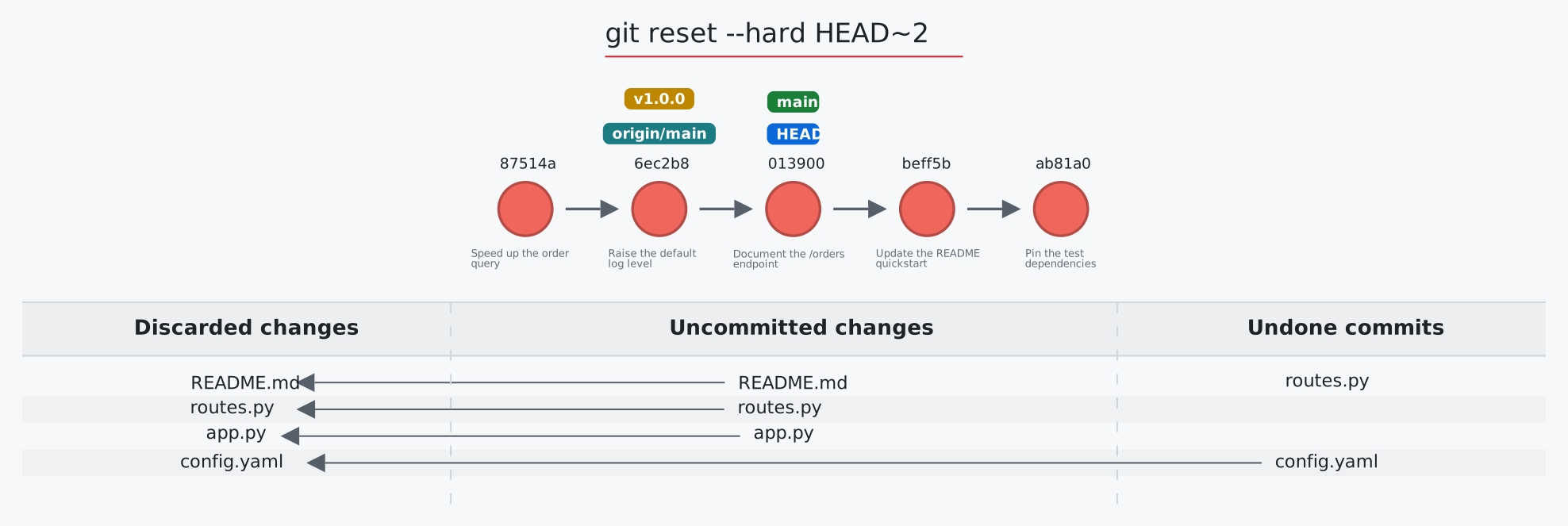](https://initialcommit.com/tools/git-sim/viewer?demo=reset-hard)
|
|
707
|
+
|
|
708
|
+
</details>
|
|
709
|
+
<details>
|
|
710
|
+
<summary><b><code>git restore</code></b>: unstage files or discard their changes</summary>
|
|
711
|
+
<br>
|
|
712
|
+
|
|
713
|
+
Usage: `git-sim restore [--staged] <file 1> <file 2> ... <file n>`
|
|
714
|
+
|
|
715
|
+
- Specify one or more `<file>` as a *modified* working directory file, or staged file
|
|
716
|
+
- Simulated output will show files being moved back to the working directory or discarded changes
|
|
717
|
+
- Note that simulated output will also show the most recent 5 commits on the active branch
|
|
718
|
+
|
|
719
|
+
[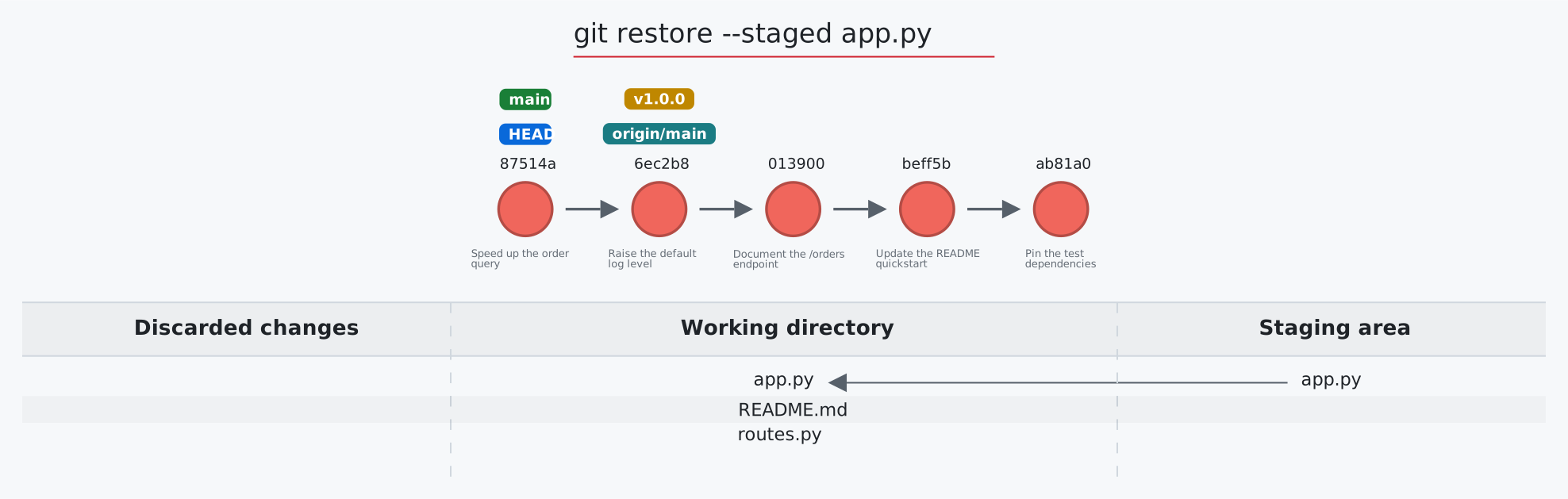](https://initialcommit.com/tools/git-sim/viewer?demo=restore-staged)
|
|
720
|
+
|
|
721
|
+
</details>
|
|
722
|
+
<details>
|
|
723
|
+
<summary><b><code>git revert</code></b>: undo a commit with a new commit</summary>
|
|
724
|
+
<br>
|
|
725
|
+
|
|
726
|
+
Usage: `git-sim revert <to-revert> [-m <parent-number>] [-n]`
|
|
727
|
+
|
|
728
|
+
- Specify `<to-revert>` as any commit id, branch name, tag, or other ref to simulate revert for
|
|
729
|
+
- Reverting a merge commit needs `-m <parent-number>` (as in git); the reverted files are those the merge brought in relative to that parent
|
|
730
|
+
- `-n`/`--no-commit` stages the reverse changes without creating a commit
|
|
731
|
+
- Simulated output will show the new commit which reverts the changes from `<to-revert>`
|
|
732
|
+
- Simulated output will include the next 4 most recent commits on the active branch
|
|
733
|
+
|
|
734
|
+
[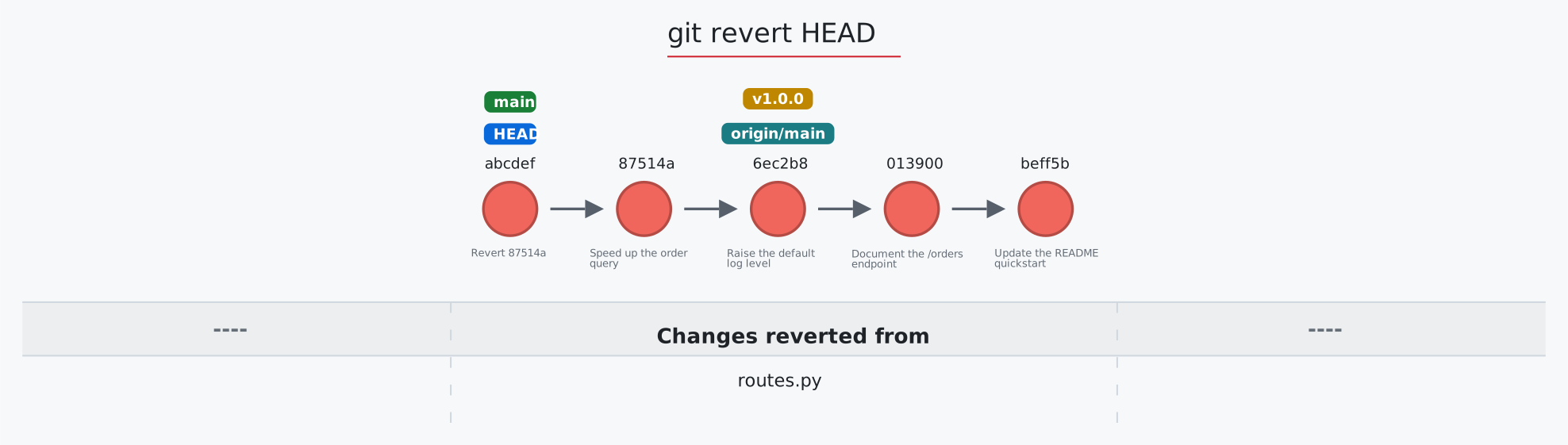](https://initialcommit.com/tools/git-sim/viewer?demo=revert)
|
|
735
|
+
|
|
736
|
+
</details>
|
|
737
|
+
<details>
|
|
738
|
+
<summary><b><code>git rm</code></b>: delete tracked files</summary>
|
|
739
|
+
<br>
|
|
740
|
+
|
|
741
|
+
Usage: `git-sim rm [--cached] <file 1> <file 2> ... <file n>`
|
|
742
|
+
|
|
743
|
+
- Specify one or more `<file>` as a *tracked* file
|
|
744
|
+
- Simulated output will show files being removed from Git tracking
|
|
745
|
+
- `--cached` stops tracking the files but keeps them on disk: each turns untracked while its deletion is staged
|
|
746
|
+
- Note that simulated output will also show the most recent 5 commits on the active branch
|
|
747
|
+
|
|
748
|
+
[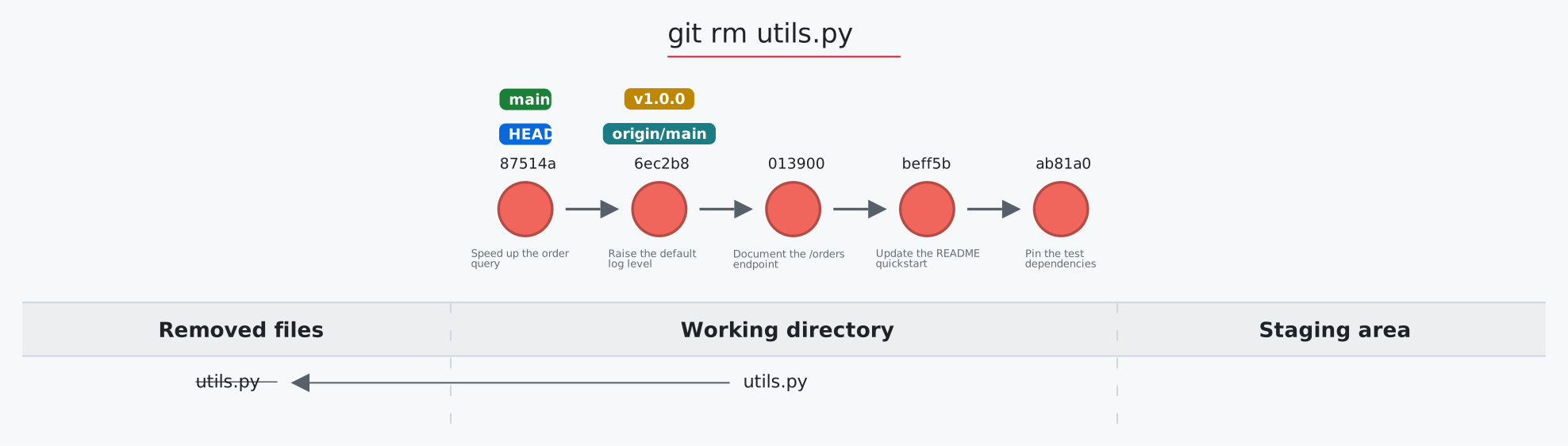](https://initialcommit.com/tools/git-sim/viewer?demo=rm)
|
|
749
|
+
|
|
750
|
+
</details>
|
|
751
|
+
<details>
|
|
752
|
+
<summary><b><code>git shortlog</code></b>: commits per author</summary>
|
|
753
|
+
<br>
|
|
754
|
+
|
|
755
|
+
Usage: `git-sim shortlog [-s] [-n] [-e] [<revision>|<A>..<B>]` (short flags combine: `-sn`, `-sne`)
|
|
756
|
+
|
|
757
|
+
- Counts the commits of a revision (default `HEAD`) or range per author, as `git shortlog` does: a card ranks the authors with their count and a bar each, by name or, with `-n`/`--numbered`, most commits first
|
|
758
|
+
- Without `-s`/`--summary` each author's first commit subjects are listed under their name; `-e`/`--email` adds their addresses
|
|
759
|
+
- The drawn commits take their author's color in the graph
|
|
760
|
+
|
|
761
|
+
</details>
|
|
762
|
+
<details>
|
|
763
|
+
<summary><b><code>git show</code></b>: a commit and the files it changed</summary>
|
|
764
|
+
<br>
|
|
765
|
+
|
|
766
|
+
Usage: `git-sim show [<commit>|<tag>|<commit>:<path>]`
|
|
767
|
+
|
|
768
|
+
- Highlights the commit shown (default `HEAD`) and, in a card under the graph, lists the files it changed like `git show --stat`; an annotated tag's tagger and message are noted
|
|
769
|
+
- For a merge commit the files are compared with its first parent (git prints a combined diff)
|
|
770
|
+
- `<commit>:<path>` shows the start of one file (or a directory listing) as it was in that commit
|
|
771
|
+
|
|
772
|
+
</details>
|
|
773
|
+
<details>
|
|
774
|
+
<summary><b><code>git stash</code></b>: set changes aside, and bring them back</summary>
|
|
775
|
+
<br>
|
|
776
|
+
|
|
777
|
+
Usage: `git-sim stash [push] [-u] [-m <message>] <file>` | `git-sim stash pop|apply` | `git-sim stash list|show|drop|clear [<stash-index>]`
|
|
778
|
+
|
|
779
|
+
- Specify one or more `<file>` as a *modified* working directory file, or staged file
|
|
780
|
+
- If no `<file>` is specified, all available files will be included
|
|
781
|
+
- `-u`/`--include-untracked` stashes untracked files too (without it, a note counts the ones left behind); `-m` names the entry, and a note shows it as `git stash list` will
|
|
782
|
+
- `list`, `show`, `drop` and `clear` draw the stash as a stack of entries, newest (`stash@{0}`) on top: each card has the entry's message, its file and line counts, and the commit it was made on (short sha and message, not the history around it); `drop` fades the dropped entry out and slides the ones below it up a number, `clear` fades them all out, and `show` highlights the entry and lists its files like `git stash show --stat`
|
|
783
|
+
- Simulated output will show files being moved in/out of the Git stash
|
|
784
|
+
- Note that simulated output will also show the most recent 5 commits on the active branch
|
|
785
|
+
|
|
786
|
+
[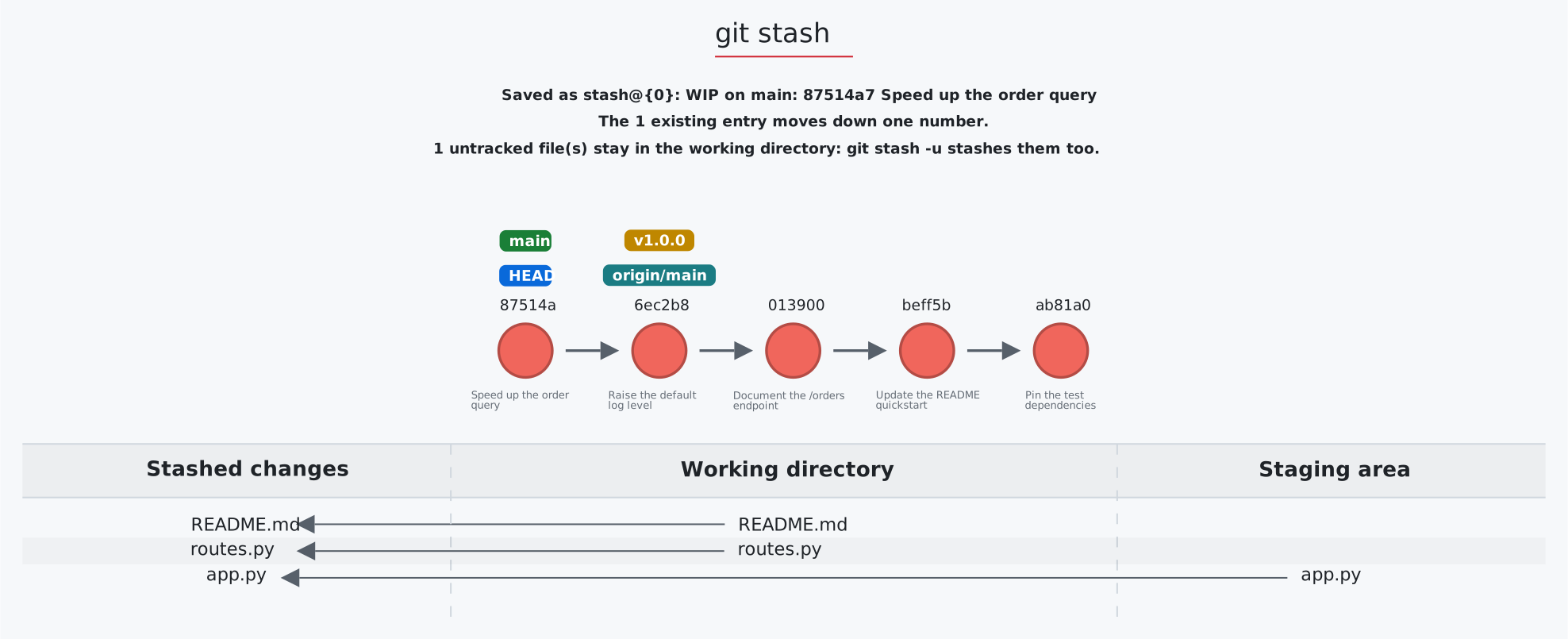](https://initialcommit.com/tools/git-sim/viewer?demo=stash)
|
|
787
|
+
|
|
788
|
+
</details>
|
|
789
|
+
<details>
|
|
790
|
+
<summary><b><code>git status</code></b>: the working directory and the staging area</summary>
|
|
791
|
+
<br>
|
|
792
|
+
|
|
793
|
+
Usage: `git-sim status`
|
|
794
|
+
|
|
795
|
+
- Simulated output will show the state of the working directory, staging area, and untracked files
|
|
796
|
+
- Note that simulated output will also show the most recent 5 commits on the active branch
|
|
797
|
+
|
|
798
|
+
[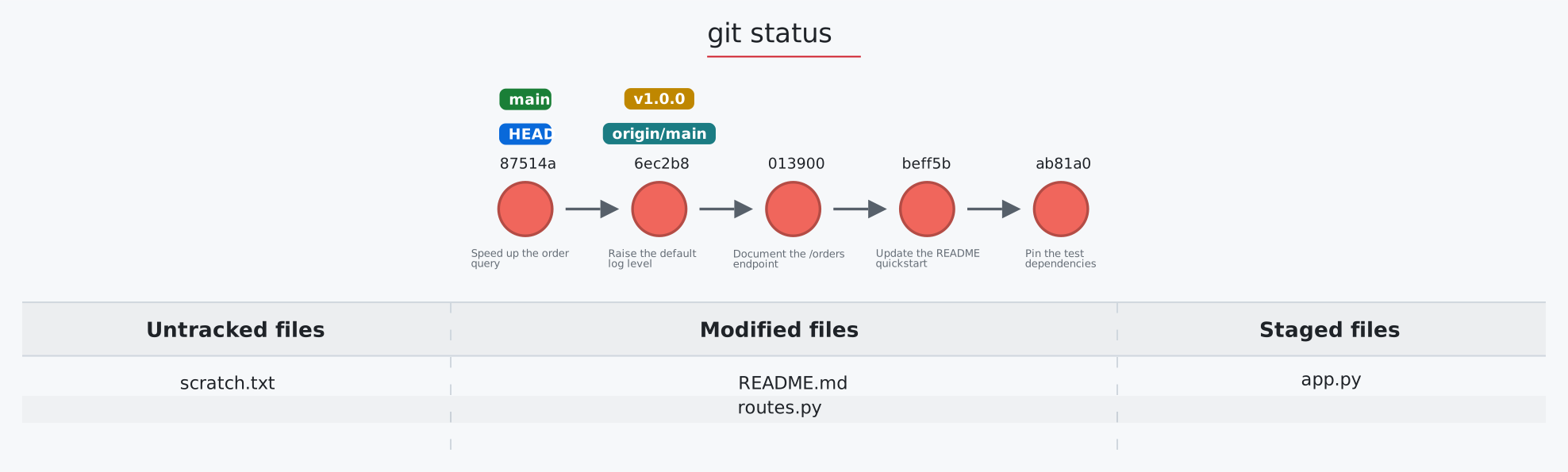](https://initialcommit.com/tools/git-sim/viewer?demo=status)
|
|
799
|
+
|
|
800
|
+
</details>
|
|
801
|
+
<details>
|
|
802
|
+
<summary><b><code>git submodule</code></b>: repositories inside a repository</summary>
|
|
803
|
+
<br>
|
|
804
|
+
|
|
805
|
+
Usage: `git-sim submodule [status|add <url> [<path>]|init|update [--init]|deinit [--force] <path>]`
|
|
806
|
+
|
|
807
|
+
- Draws the superproject's history plus a table with one row per submodule: its path, the pinned commit, and its state
|
|
808
|
+
- `add` records a new pinned submodule; `update --init` initializes and checks out; `deinit` empties the submodule's working tree (refused without `--force` when it has local changes)
|
|
809
|
+
|
|
810
|
+
</details>
|
|
811
|
+
<details>
|
|
812
|
+
<summary><b><code>git switch</code></b>: switch branches, or create one</summary>
|
|
813
|
+
<br>
|
|
814
|
+
|
|
815
|
+
Usage: `git-sim switch [-c] <branch> [<start-point>]` | `git-sim switch -`
|
|
816
|
+
|
|
817
|
+
- Switches the checked-out branch to `<branch>`, i.e. moves `HEAD` to the specified `<branch>`
|
|
818
|
+
- The `-c` flag creates a new branch with the specified name `<branch>` and switches to it, assuming it doesn't already exist; with a `<start-point>` the branch starts there, and a remote-tracking start point (`origin/x`) becomes its upstream
|
|
819
|
+
- `git-sim switch -` goes back to the previous branch (`@{-1}` in the reflog), labeled under its commit
|
|
820
|
+
- A `<branch>` only a remote has (just `origin/<branch>` exists) is made locally at the same commit, tracking it, as git does
|
|
821
|
+
|
|
822
|
+
[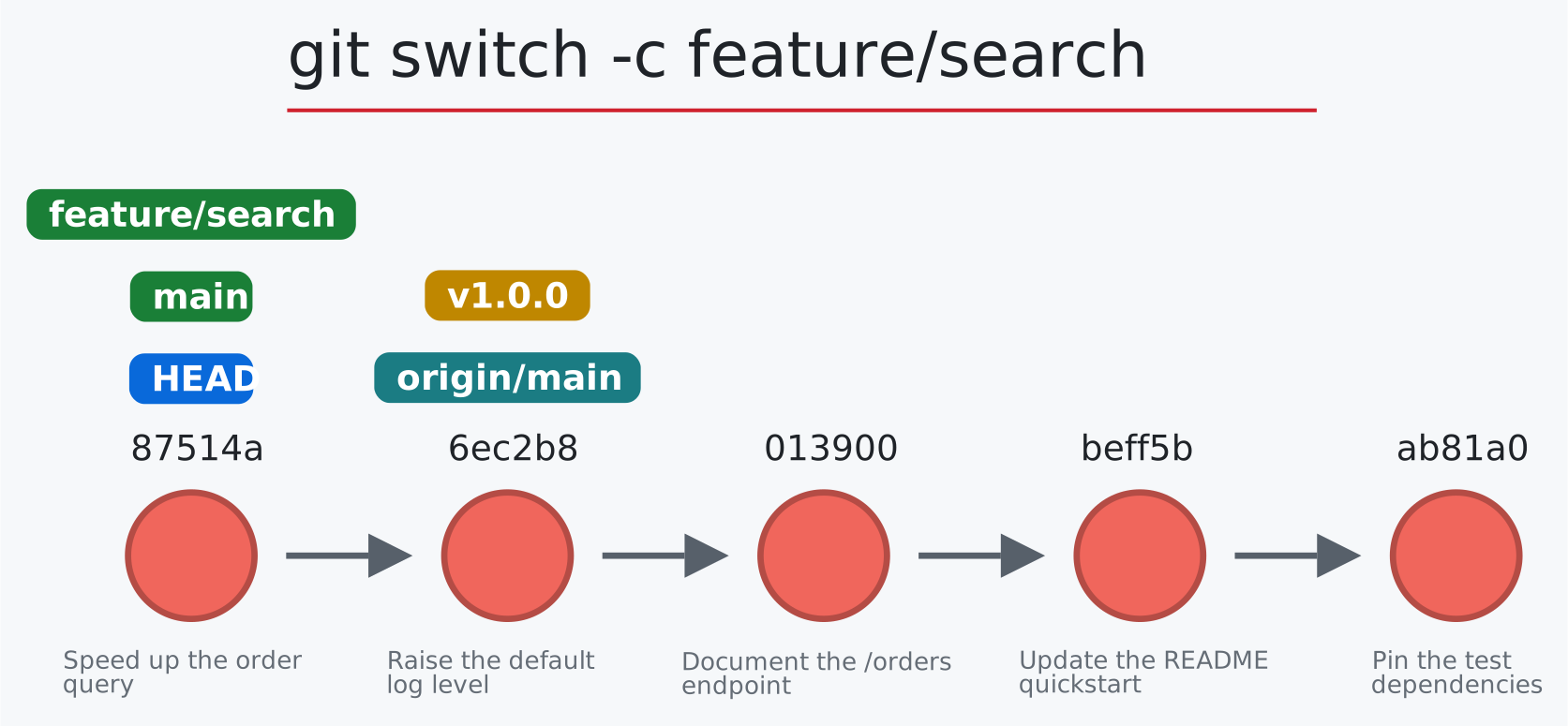](https://initialcommit.com/tools/git-sim/viewer?demo=switch-c)
|
|
823
|
+
|
|
824
|
+
</details>
|
|
825
|
+
<details>
|
|
826
|
+
<summary><b><code>git tag</code></b>: label a commit</summary>
|
|
827
|
+
<br>
|
|
828
|
+
|
|
829
|
+
Usage: `git-sim tag <new tag name> [<commit>]` | `git-sim tag -a <name> -m "<message>" [<commit>]` | `git-sim tag -d <name>` | `git-sim tag -l ["<pattern>"]`
|
|
830
|
+
|
|
831
|
+
- Specify `<new tag name>` as the name of the new tag to simulate creation of
|
|
832
|
+
- Simulated output will show the newly created tag ref along with the most recent 5 commits on the active branch
|
|
833
|
+
- `-a` with `-m` (or `-m` alone) makes an annotated tag: a card under the graph shows the tag object it writes, with the commit it points at, the tagger, the date and the message
|
|
834
|
+
- `-l`/`--list` lists the tags in a card, highlighting the ones matching the pattern (a glob, such as `"v1.*"`)
|
|
835
|
+
|
|
836
|
+
[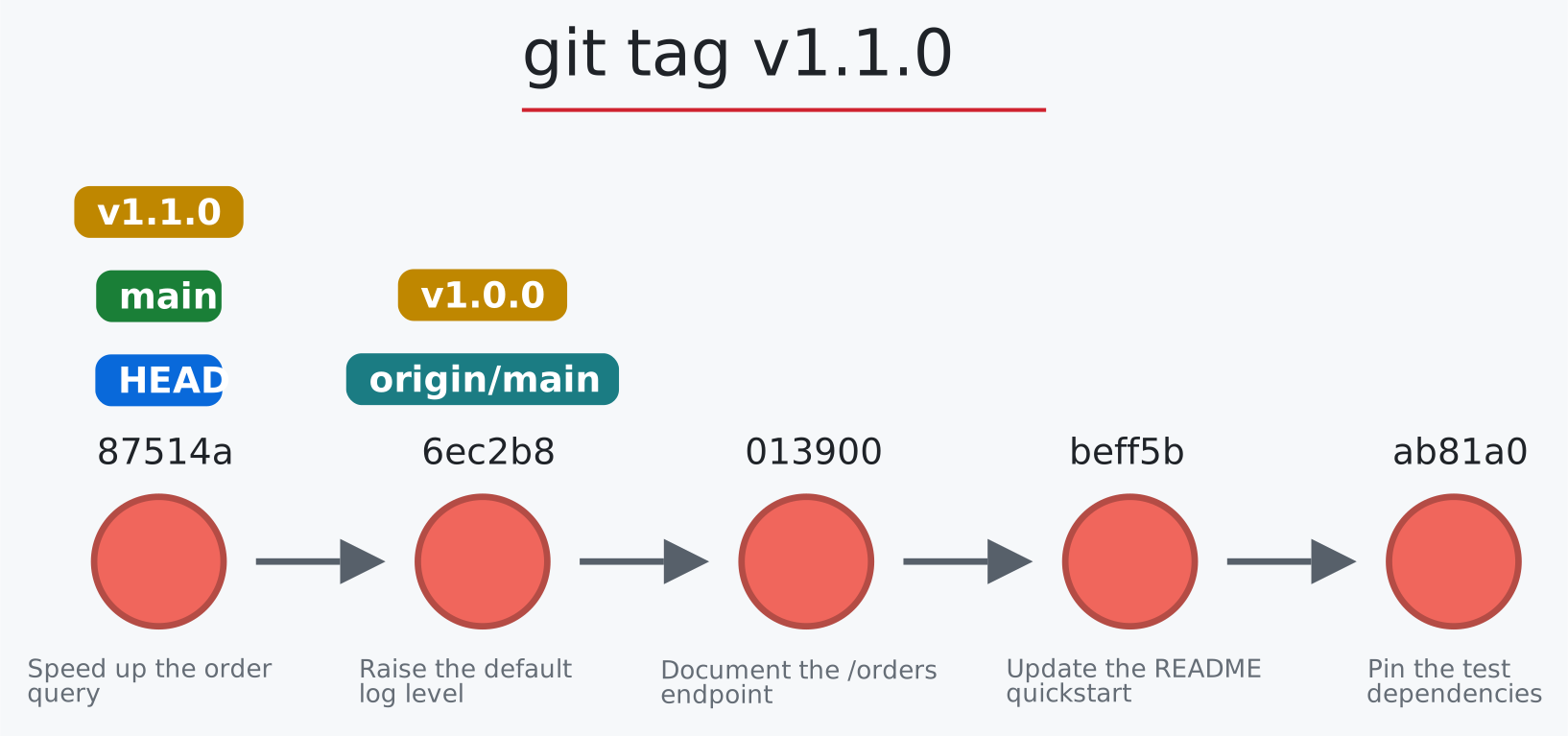](https://initialcommit.com/tools/git-sim/viewer?demo=tag)
|
|
837
|
+
|
|
838
|
+
</details>
|
|
839
|
+
<details>
|
|
840
|
+
<summary><b><code>git worktree</code></b>: more than one working directory</summary>
|
|
841
|
+
<br>
|
|
842
|
+
|
|
843
|
+
Usage: `git-sim worktree [list|add [-b <new-branch>] <path> [<branch>]|remove [--force] <path>|prune]`
|
|
844
|
+
|
|
845
|
+
- Draws the commit graph plus a table with one row per worktree: its directory, branch and state (clean, N uncommitted changes, directory missing)
|
|
846
|
+
- `remove` is refused (as in git) when the worktree has uncommitted changes unless `--force` is given, in which case the row is struck through and the deleted change count shown
|
|
847
|
+
- `prune` strikes through worktree records whose directory no longer exists
|
|
848
|
+
|
|
849
|
+
[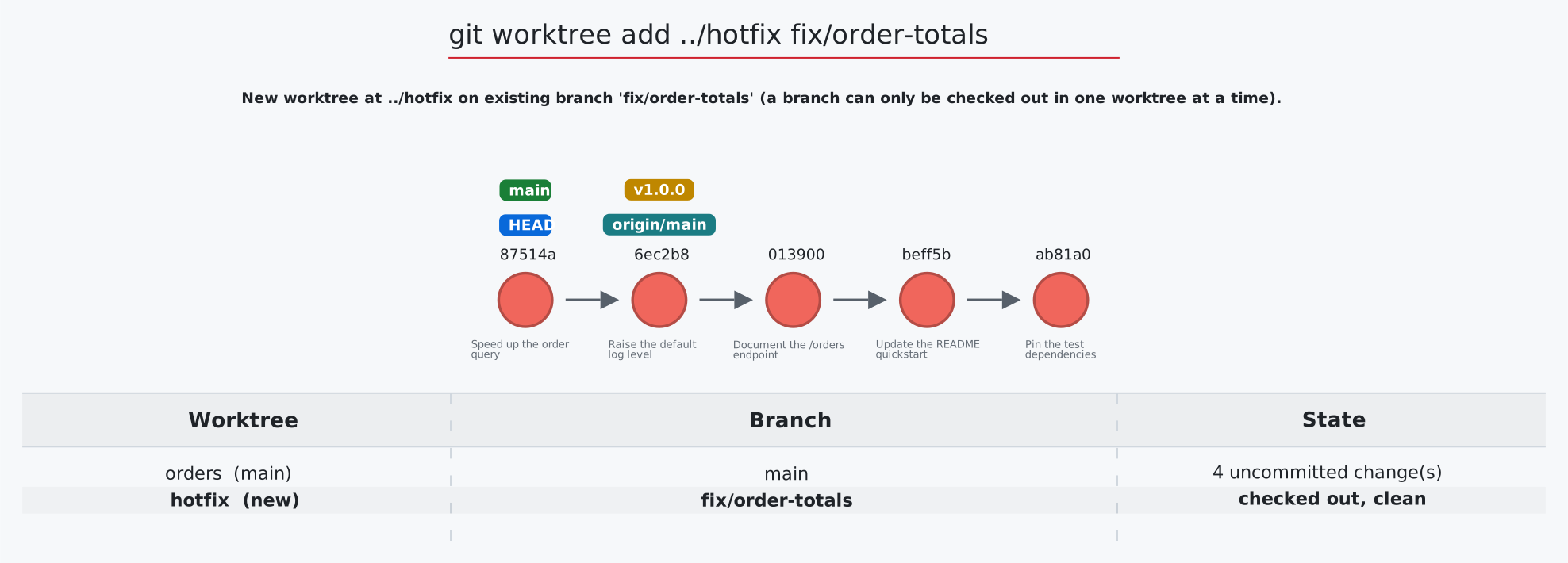](https://initialcommit.com/tools/git-sim/viewer?demo=worktree)
|
|
850
|
+
|
|
851
|
+
</details>
|
|
852
|
+
|
|
853
|
+
## Options
|
|
854
|
+
|
|
855
|
+
```console
|
|
856
|
+
$ git-sim [global options] <subcommand> [subcommand options]
|
|
857
|
+
```
|
|
858
|
+
|
|
859
|
+
The ones you'll reach for most:
|
|
860
|
+
|
|
861
|
+
`--img-format png` (or `jpg`, `svg`): a static image instead of the interactive page
|
|
862
|
+
`--animate`: an `.mp4` video instead (needs the `extras` install below)
|
|
863
|
+
`--dark-mode`: the dark color scheme
|
|
864
|
+
`--all`, `-n <number>`: every branch, and how many commits per branch
|
|
865
|
+
`--open-in local`: open the saved page instead of the hosted viewer
|
|
866
|
+
`--media-dir <path>`: where output is saved (`git-sim media-dir` prints the default)
|
|
867
|
+
|
|
868
|
+
Every option can also be set with an environment variable named `git_sim_` plus the option, such as `git_sim_dark_mode=true` or `git_sim_img_format=png`. An option on the command line wins over the variable.
|
|
869
|
+
|
|
870
|
+
<details>
|
|
871
|
+
<summary>All global options</summary>
|
|
872
|
+
|
|
873
|
+
The `[global options]` apply to the overarching `git-sim` simulation itself, including:
|
|
874
|
+
|
|
875
|
+
`--img-format`: Output format, i.e. `html` (default: the interactive page), `jpg`, `png`, or `svg` (the graph alone, for [embedding in a page](https://github.com/initialcommit-com/git-sim#embed-a-graph-in-a-web-page)). Set `git_sim_img_format=jpg` in your environment to make an image the default.
|
|
876
|
+
`--open-in`: Where the interactive page opens: `hosted` (default) shows it in the git-sim viewer at initialcommit.com, `local` opens the saved `.html` file. The page is saved locally either way, and the hosted page says where. Set `git_sim_open_in=local` to make local the default.
|
|
877
|
+
`--reverse, -r` / `--no-reverse`: By default the newest commit is on the left and arrows point right toward parents, so history reads left to right. `--no-reverse` puts the newest commit on the right with arrows pointing left, the original layout.
|
|
878
|
+
`-n <number>`: Number of commits to display from each branch head.
|
|
879
|
+
`--all`: Display all local branches in the log output.
|
|
880
|
+
`--animate`: Instead of outputting a static image, animate the Git command behavior in a .mp4 video.
|
|
881
|
+
`--color-by author`: Color commits by parameter, such as author.
|
|
882
|
+
`--invert-branches`: Invert positioning of branches by reversing order of multiple parents where applicable.
|
|
883
|
+
`--hide-merged-branches`: Hide commits from merged branches, i.e. only display mainline commits.
|
|
884
|
+
`--media-dir`: The path at which to store the simulated output media files.
|
|
885
|
+
`-d`: Disable the automatic opening of the image/video file after generation. Useful to avoid errors in console mode with no GUI.
|
|
886
|
+
`--dark-mode`: Use the dark color scheme instead of the default light one (`--light-mode` is still accepted and does nothing).
|
|
887
|
+
`--stdout`: Write raw image data to stdout while suppressing all other program output. Writes a `png` unless `--img-format jpg` is given.
|
|
888
|
+
`--output-only-path`: Only output the path to the generated media file to stdout. Useful for other programs to ingest.
|
|
889
|
+
`--quiet, -q`: Suppress all output except errors.
|
|
890
|
+
`--highlight-commit-messages`: Make commit message text bigger and bold, and hide commit ids.
|
|
891
|
+
`--style`: Graphical style of the output image or animated video, i.e. `clean` (default) or `thick`.
|
|
892
|
+
`--compact`: Draw for a small space, such as a card or a thumbnail: no title, no commit messages under the commits (hovering one still shows it), a file table only as big as its rows, and just the files for a command that doesn't touch commits (`add`, `restore`, `rm`, `mv`, `clean`, `status`).
|
|
893
|
+
|
|
894
|
+
Animation-only global options (to be used in conjunction with `--animate`):
|
|
895
|
+
|
|
896
|
+
`--video-format`: Output format for the video file, i.e. `mp4` or `webm`. Default output format is `mp4`.
|
|
897
|
+
`--speed=n`: Set the multiple of animation speed of the output simulation, `n` can be an integer or float, default is 1.5.
|
|
898
|
+
`--low-quality`: Render the animation in low quality to speed up creation time, recommended for non-presentation use.
|
|
899
|
+
`--show-intro`: Add an intro sequence with custom logo and title.
|
|
900
|
+
`--show-outro`: Add an outro sequence with custom logo and text.
|
|
901
|
+
`--title=title`: Custom title to display at the beginning of the animation.
|
|
902
|
+
`--logo=logo.png`: The path to a custom logo to use in the animation intro/outro.
|
|
903
|
+
`--outro-top-text`: Custom text to display above the logo during the outro.
|
|
904
|
+
`--outro-bottom-text`: Custom text to display below the logo during the outro.
|
|
905
|
+
`--font`: Font family used to display rendered text.
|
|
906
|
+
|
|
907
|
+
</details>
|
|
908
|
+
|
|
909
|
+
## Installation
|
|
910
|
+
|
|
911
|
+
For convenience, git-sim ships in 3 tiers. **Core** is the default and the right choice for the vast majority of users:
|
|
912
|
+
|
|
913
|
+
| Tier | Install | Includes |
|
|
914
|
+
|---|---|---|
|
|
915
|
+
| **core** (default) | `pip install git-sim` | git command simulation, pre-flight engine, MCP server (`git-sim-mcp`), Claude Code hook (`git-sim-hook`) |
|
|
916
|
+
| **extras** | `pip install "git-sim[extras]"` | everything in core, plus animated video output (`--animate`) via Manim (install Manim's own system dependencies first, see below) |
|
|
917
|
+
| **min** | see below | pre-flight engine, text commit graph and MCP server only, with no image rendering, for headless machines |
|
|
918
|
+
|
|
919
|
+
For **extras** tier:
|
|
920
|
+
|
|
921
|
+
Animated video (`--animate`) uses Manim, which needs FFmpeg and other system packages: install them first with the Manim guide for [Windows](https://docs.manim.community/en/stable/installation/windows.html), [macOS](https://docs.manim.community/en/stable/installation/macos.html), [Linux](https://docs.manim.community/en/stable/installation/linux.html), or [Conda](https://docs.manim.community/en/stable/installation/conda.html). On macOS, it is recommended to use a Homebrew Python or a virtual environment rather than the system Python.
|
|
922
|
+
|
|
923
|
+
For **min** tier:
|
|
924
|
+
|
|
925
|
+
pip extras can only add packages, so the `min` tier is the core package installed without its rendering dependencies (`skia-python`, `numpy`):
|
|
926
|
+
|
|
927
|
+
```console
|
|
928
|
+
$ pip install --no-deps git-sim
|
|
929
|
+
$ pip install gitpython "mcp>=2.0" typer pydantic-settings fonttools git-dummy
|
|
930
|
+
```
|
|
931
|
+
|
|
932
|
+
### Docker
|
|
933
|
+
|
|
934
|
+
<details>
|
|
935
|
+
<summary>Run git-sim in a Docker container</summary>
|
|
936
|
+
|
|
937
|
+
1) Clone down the git-sim repository:
|
|
938
|
+
|
|
939
|
+
```console
|
|
940
|
+
$ git clone https://github.com/initialcommit-com/git-sim.git
|
|
941
|
+
```
|
|
942
|
+
|
|
943
|
+
2) Browse into the `git-sim` folder and build the Docker image:
|
|
944
|
+
|
|
945
|
+
```console
|
|
946
|
+
$ docker build -t git-sim .
|
|
947
|
+
```
|
|
948
|
+
|
|
949
|
+
3) Run git-sim commands as follows:
|
|
950
|
+
- Windows: `docker run --rm -v %cd%:/usr/src/git-sim git-sim [global options] <subcommand> [subcommand options]`
|
|
951
|
+
- MacOS / Linux: `docker run --rm -v $(pwd):/usr/src/git-sim git-sim [global options] <subcommand> [subcommand options]`
|
|
952
|
+
|
|
953
|
+
Optional: On MacOS / Linux / or GitBash in Windows, create an alias for the long docker command so you can run it as a normal `git-sim` command. To do so add the following line to your `.bashrc` or equivalent, then restart your terminal:
|
|
954
|
+
|
|
955
|
+
```bash
|
|
956
|
+
git-sim() { docker run --rm -v $(pwd):/usr/src/git-sim git-sim "$@"; }
|
|
957
|
+
```
|
|
958
|
+
|
|
959
|
+
This will enable you to run [all the git-sim subcommands described above](https://github.com/initialcommit-com/git-sim#supported-git-commands).
|
|
960
|
+
|
|
961
|
+
</details>
|
|
962
|
+
|
|
963
|
+
### GitHub
|
|
964
|
+
|
|
965
|
+
<details>
|
|
966
|
+
<summary>GitHub Actions: use git-sim to automatically evaluate PR's</summary>
|
|
967
|
+
|
|
968
|
+
Add this to your repo as `.github/workflows/git-sim.yml`:
|
|
969
|
+
|
|
970
|
+
```yaml
|
|
971
|
+
name: git-sim
|
|
972
|
+
on:
|
|
973
|
+
pull_request_target:
|
|
974
|
+
types: [opened, synchronize, reopened]
|
|
975
|
+
permissions:
|
|
976
|
+
contents: read
|
|
977
|
+
pull-requests: write
|
|
978
|
+
jobs:
|
|
979
|
+
check:
|
|
980
|
+
runs-on: ubuntu-latest
|
|
981
|
+
steps:
|
|
982
|
+
- uses: actions/checkout@v4
|
|
983
|
+
with:
|
|
984
|
+
fetch-depth: 0
|
|
985
|
+
- uses: initialcommit-com/git-sim/integrations/github-action@v0.4.0
|
|
986
|
+
```
|
|
987
|
+
|
|
988
|
+
When a new PR comes in, the git-sim GitHub Action automatically evaluates it, adding a comment with the risk level, the included commits, how to undo it, and a text commit graph. The visual, interactive graph is attached to the run as the artifact `git-sim-pr-<number>`.
|
|
989
|
+
|
|
990
|
+
To change how it runs, add a `with:` block under the `uses:` line:
|
|
991
|
+
|
|
992
|
+
```yaml
|
|
993
|
+
- uses: initialcommit-com/git-sim/integrations/github-action@v0.4.0
|
|
994
|
+
with:
|
|
995
|
+
mode: rebase
|
|
996
|
+
comment: "false"
|
|
997
|
+
```
|
|
998
|
+
|
|
999
|
+
| Setting | Default | What it does |
|
|
1000
|
+
|---|---|---|
|
|
1001
|
+
| `mode` | `merge` | `merge` checks merging the pull request into its base branch, `rebase` checks rebasing its commits onto the base |
|
|
1002
|
+
| `comment` | `"true"` | Post the report as a comment on the pull request |
|
|
1003
|
+
| `artifact` | `"true"` | Attach the interactive graph to the workflow run as a download |
|
|
1004
|
+
| `python-version` | `3.12` | The Python that git-sim is installed with |
|
|
1005
|
+
| `package` | `git-sim` | What gets installed: the latest git-sim from PyPI, a pinned version like `git-sim==0.4.0`, or a Git URL |
|
|
1006
|
+
| `token` | the workflow's own token | The token used to post the comment, to post as another account or bot |
|
|
1007
|
+
|
|
1008
|
+
The workflow runs on `pull_request_target` because GitHub skips `pull_request` workflows for pull requests with merge conflicts, which are the ones you most want checked. It also lets the Action comment on pull requests from forks. That's safe here because the Action never runs the pull request's code: it only reads its commits.
|
|
1009
|
+
|
|
1010
|
+
</details>
|
|
1011
|
+
|
|
1012
|
+
<details>
|
|
1013
|
+
<summary>GitHub CLI: gh gitsim</summary>
|
|
1014
|
+
|
|
1015
|
+
With the [GitHub CLI](https://github.com/cli/cli#installation) installed and logged in (`gh auth login`), install the extension from a clone of this repo:
|
|
1016
|
+
|
|
1017
|
+
```console
|
|
1018
|
+
$ git clone https://github.com/initialcommit-com/git-sim.git ~/git-sim
|
|
1019
|
+
$ cd ~/git-sim/integrations/gh-gitsim
|
|
1020
|
+
$ gh extension install .
|
|
1021
|
+
```
|
|
1022
|
+
|
|
1023
|
+
Then, inside a clone of the pull request's repo:
|
|
1024
|
+
|
|
1025
|
+
```console
|
|
1026
|
+
$ gh gitsim pr 42 # what merging pull request #42 into its base would do
|
|
1027
|
+
$ gh gitsim pr 42 rebase # what rebasing it onto its base would do
|
|
1028
|
+
```
|
|
1029
|
+
|
|
1030
|
+
`gh gitsim pr` simulates in a temporary worktree, so your checkout and branches are never touched. Any other `gh gitsim` command is the same as running git-sim. On Windows, `gh` runs the extension with the bash from Git for Windows.
|
|
1031
|
+
|
|
1032
|
+
</details>
|
|
1033
|
+
|
|
1034
|
+
## Support git-sim
|
|
1035
|
+
|
|
1036
|
+
Git-Sim is Free and Open-Source Software (FOSS). Your support will help me work on it (and other Git projects) full time!
|
|
1037
|
+
- ⭐ [Star the repo](#top)
|
|
1038
|
+
- [Sponsor Git-Sim on GitHub](https://github.com/sponsors/initialcommit-com)
|
|
1039
|
+
- [Support Git-Sim via Patreon](https://patreon.com/user?u=92322459)
|
|
1040
|
+
|
|
1041
|
+
## Authors
|
|
1042
|
+
|
|
1043
|
+
**Jacob Stopak** - on behalf of [Initial Commit](https://initialcommit.com)
|