git-sim 0.3.3__tar.gz → 0.3.4__tar.gz
This diff represents the content of publicly available package versions that have been released to one of the supported registries. The information contained in this diff is provided for informational purposes only and reflects changes between package versions as they appear in their respective public registries.
- {git-sim-0.3.3 → git_sim-0.3.4}/PKG-INFO +157 -114
- git-sim-0.3.3/git_sim.egg-info/PKG-INFO → git_sim-0.3.4/README.md +140 -125
- git_sim-0.3.4/pyproject.toml +55 -0
- git_sim-0.3.4/src/git_sim/__init__.py +1 -0
- {git-sim-0.3.3 → git_sim-0.3.4/src}/git_sim/__main__.py +32 -1
- {git-sim-0.3.3 → git_sim-0.3.4/src}/git_sim/add.py +4 -3
- {git-sim-0.3.3 → git_sim-0.3.4/src}/git_sim/branch.py +4 -2
- {git-sim-0.3.3 → git_sim-0.3.4/src}/git_sim/checkout.py +6 -3
- {git-sim-0.3.3 → git_sim-0.3.4/src}/git_sim/cherrypick.py +6 -4
- {git-sim-0.3.3 → git_sim-0.3.4/src}/git_sim/clean.py +7 -4
- {git-sim-0.3.3 → git_sim-0.3.4/src}/git_sim/clone.py +14 -5
- {git-sim-0.3.3 → git_sim-0.3.4/src}/git_sim/commands.py +89 -11
- {git-sim-0.3.3 → git_sim-0.3.4/src}/git_sim/commit.py +26 -14
- git_sim-0.3.4/src/git_sim/config.py +271 -0
- {git-sim-0.3.3 → git_sim-0.3.4/src}/git_sim/enums.py +14 -6
- {git-sim-0.3.3 → git_sim-0.3.4/src}/git_sim/fetch.py +4 -3
- {git-sim-0.3.3 → git_sim-0.3.4/src}/git_sim/git_sim_base_command.py +140 -63
- git_sim-0.3.4/src/git_sim/init.py +321 -0
- {git-sim-0.3.3 → git_sim-0.3.4/src}/git_sim/log.py +4 -3
- {git-sim-0.3.3 → git_sim-0.3.4/src}/git_sim/merge.py +4 -3
- {git-sim-0.3.3 → git_sim-0.3.4/src}/git_sim/mv.py +5 -4
- {git-sim-0.3.3 → git_sim-0.3.4/src}/git_sim/pull.py +4 -3
- {git-sim-0.3.3 → git_sim-0.3.4/src}/git_sim/push.py +16 -12
- {git-sim-0.3.3 → git_sim-0.3.4/src}/git_sim/rebase.py +6 -5
- git_sim-0.3.4/src/git_sim/remote.py +384 -0
- {git-sim-0.3.3 → git_sim-0.3.4/src}/git_sim/reset.py +8 -9
- {git-sim-0.3.3 → git_sim-0.3.4/src}/git_sim/restore.py +18 -10
- {git-sim-0.3.3 → git_sim-0.3.4/src}/git_sim/revert.py +10 -11
- {git-sim-0.3.3 → git_sim-0.3.4/src}/git_sim/rm.py +7 -6
- {git-sim-0.3.3 → git_sim-0.3.4/src}/git_sim/settings.py +4 -1
- {git-sim-0.3.3 → git_sim-0.3.4/src}/git_sim/stash.py +41 -19
- {git-sim-0.3.3 → git_sim-0.3.4/src}/git_sim/status.py +3 -1
- {git-sim-0.3.3 → git_sim-0.3.4/src}/git_sim/switch.py +32 -11
- git_sim-0.3.4/src/git_sim/tag.py +106 -0
- git-sim-0.3.3/README.md → git_sim-0.3.4/src/git_sim.egg-info/PKG-INFO +168 -108
- git_sim-0.3.4/src/git_sim.egg-info/SOURCES.txt +42 -0
- {git-sim-0.3.3 → git_sim-0.3.4/src}/git_sim.egg-info/entry_points.txt +0 -1
- {git-sim-0.3.3 → git_sim-0.3.4/src}/git_sim.egg-info/requires.txt +9 -2
- git-sim-0.3.3/git_sim/__init__.py +0 -1
- git-sim-0.3.3/git_sim/logo.png +0 -0
- git-sim-0.3.3/git_sim/tag.py +0 -52
- git-sim-0.3.3/git_sim.egg-info/SOURCES.txt +0 -40
- git-sim-0.3.3/setup.py +0 -44
- {git-sim-0.3.3 → git_sim-0.3.4}/LICENSE +0 -0
- {git-sim-0.3.3 → git_sim-0.3.4}/MANIFEST.in +0 -0
- {git-sim-0.3.3 → git_sim-0.3.4}/setup.cfg +0 -0
- {git-sim-0.3.3 → git_sim-0.3.4/src}/git_sim/animations.py +0 -0
- {git-sim-0.3.3 → git_sim-0.3.4/src}/git_sim.egg-info/dependency_links.txt +0 -0
- {git-sim-0.3.3 → git_sim-0.3.4/src}/git_sim.egg-info/top_level.txt +0 -0
|
@@ -1,19 +1,30 @@
|
|
|
1
1
|
Metadata-Version: 2.1
|
|
2
2
|
Name: git-sim
|
|
3
|
-
Version: 0.3.
|
|
3
|
+
Version: 0.3.4
|
|
4
4
|
Summary: Simulate Git commands on your own repos by generating an image (default) or video visualization depicting the command's behavior.
|
|
5
|
-
|
|
6
|
-
|
|
7
|
-
Author-email: jacob@initialcommit.io
|
|
5
|
+
Author-email: Jacob Stopak <jacob@initialcommit.io>
|
|
6
|
+
License: GPL-2.0
|
|
8
7
|
Project-URL: Homepage, https://initialcommit.com/tools/git-sim
|
|
9
8
|
Project-URL: Source, https://github.com/initialcommit-com/git-sim
|
|
10
|
-
Keywords: git
|
|
9
|
+
Keywords: git,sim,simulation,simulate,git-simulate,git-simulation,git-sim,manim,animation,gitanimation,image,video,dryrun,dry-run
|
|
11
10
|
Classifier: Programming Language :: Python :: 3
|
|
12
|
-
Classifier: License :: OSI Approved ::
|
|
11
|
+
Classifier: License :: OSI Approved :: GNU General Public License v2 (GPLv2)
|
|
13
12
|
Classifier: Operating System :: OS Independent
|
|
14
13
|
Requires-Python: >=3.7
|
|
15
14
|
Description-Content-Type: text/markdown
|
|
16
15
|
License-File: LICENSE
|
|
16
|
+
Requires-Dist: git-dummy
|
|
17
|
+
Requires-Dist: gitpython
|
|
18
|
+
Requires-Dist: manim
|
|
19
|
+
Requires-Dist: opencv-python-headless
|
|
20
|
+
Requires-Dist: pydantic_settings
|
|
21
|
+
Requires-Dist: typer
|
|
22
|
+
Requires-Dist: fonttools
|
|
23
|
+
Provides-Extra: dev
|
|
24
|
+
Requires-Dist: black; extra == "dev"
|
|
25
|
+
Requires-Dist: numpy; extra == "dev"
|
|
26
|
+
Requires-Dist: pillow; extra == "dev"
|
|
27
|
+
Requires-Dist: pytest; extra == "dev"
|
|
17
28
|
|
|
18
29
|
# git-sim
|
|
19
30
|

|
|
@@ -34,6 +45,13 @@ Example: `$ git-sim merge <branch>`
|
|
|
34
45
|
<br/><br/>
|
|
35
46
|
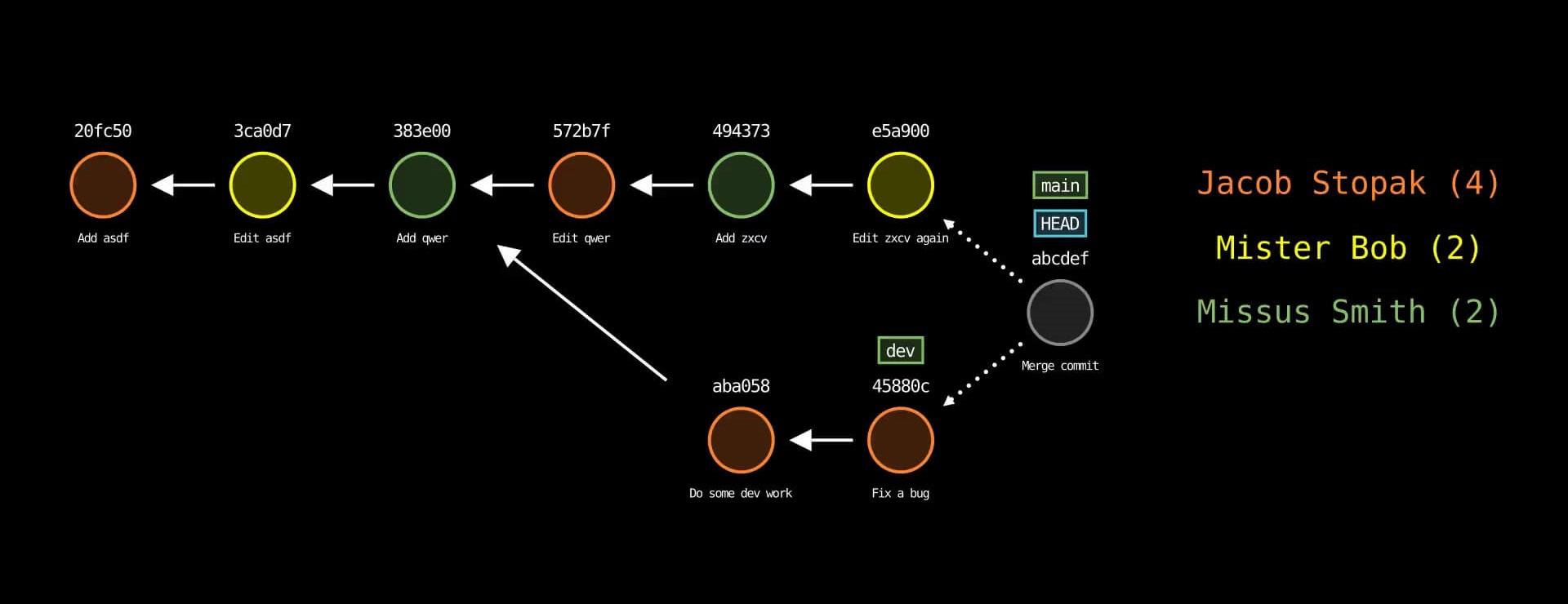
|
|
36
47
|
|
|
48
|
+
Check out the [git-sim release blog post](https://initialcommit.com/blog/git-sim) for the full scoop!
|
|
49
|
+
|
|
50
|
+
## Support git-sim
|
|
51
|
+
Git-Sim is Free and Open-Source Software (FOSS). Your support will help me work on it (and other Git projects) full time!
|
|
52
|
+
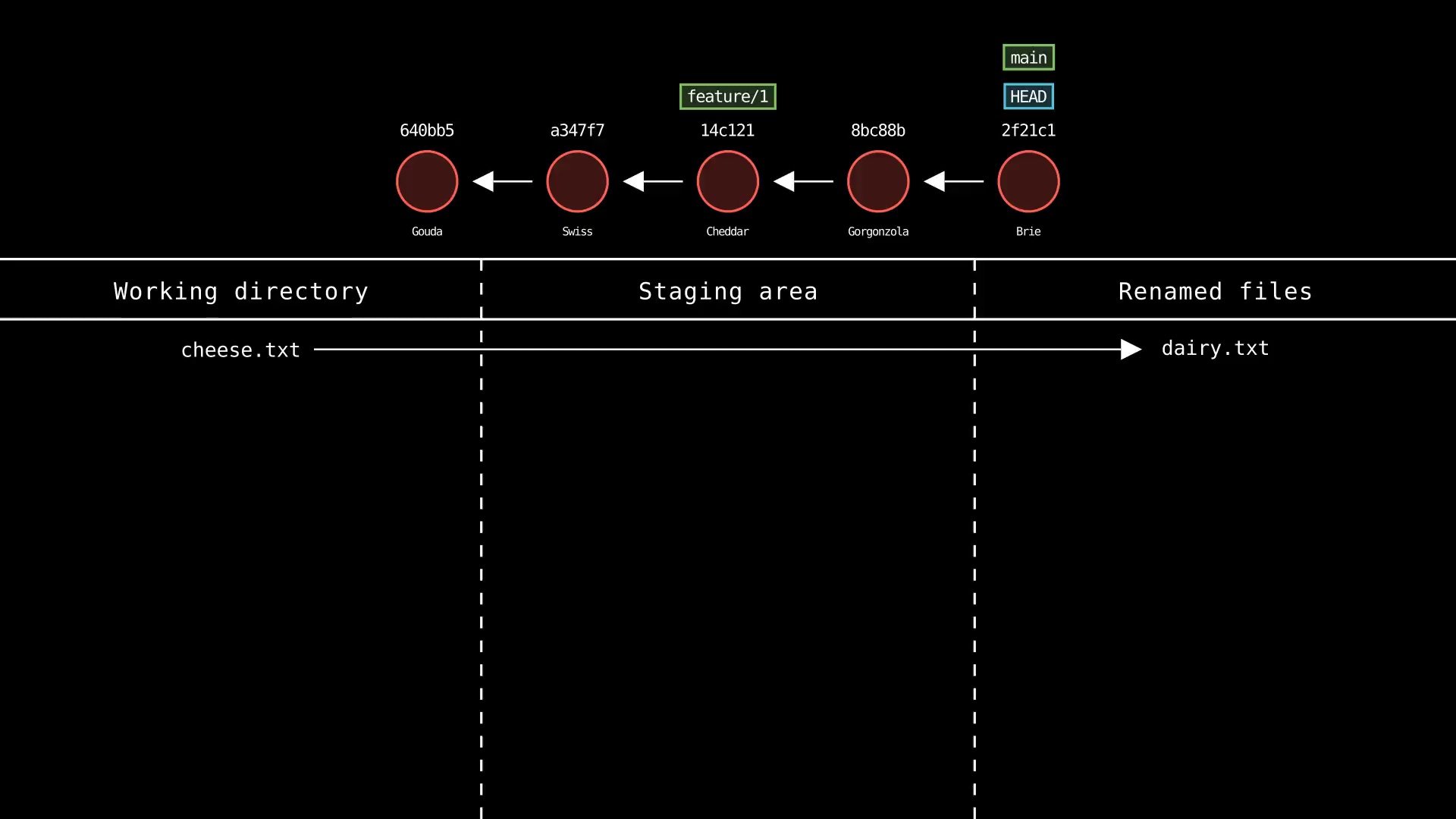
- [Sponsor Git-Sim on GitHub](https://github.com/sponsors/initialcommit-com)
|
|
53
|
+
- [Support Git-Sim via Patreon](https://patreon.com/user?u=92322459)
|
|
54
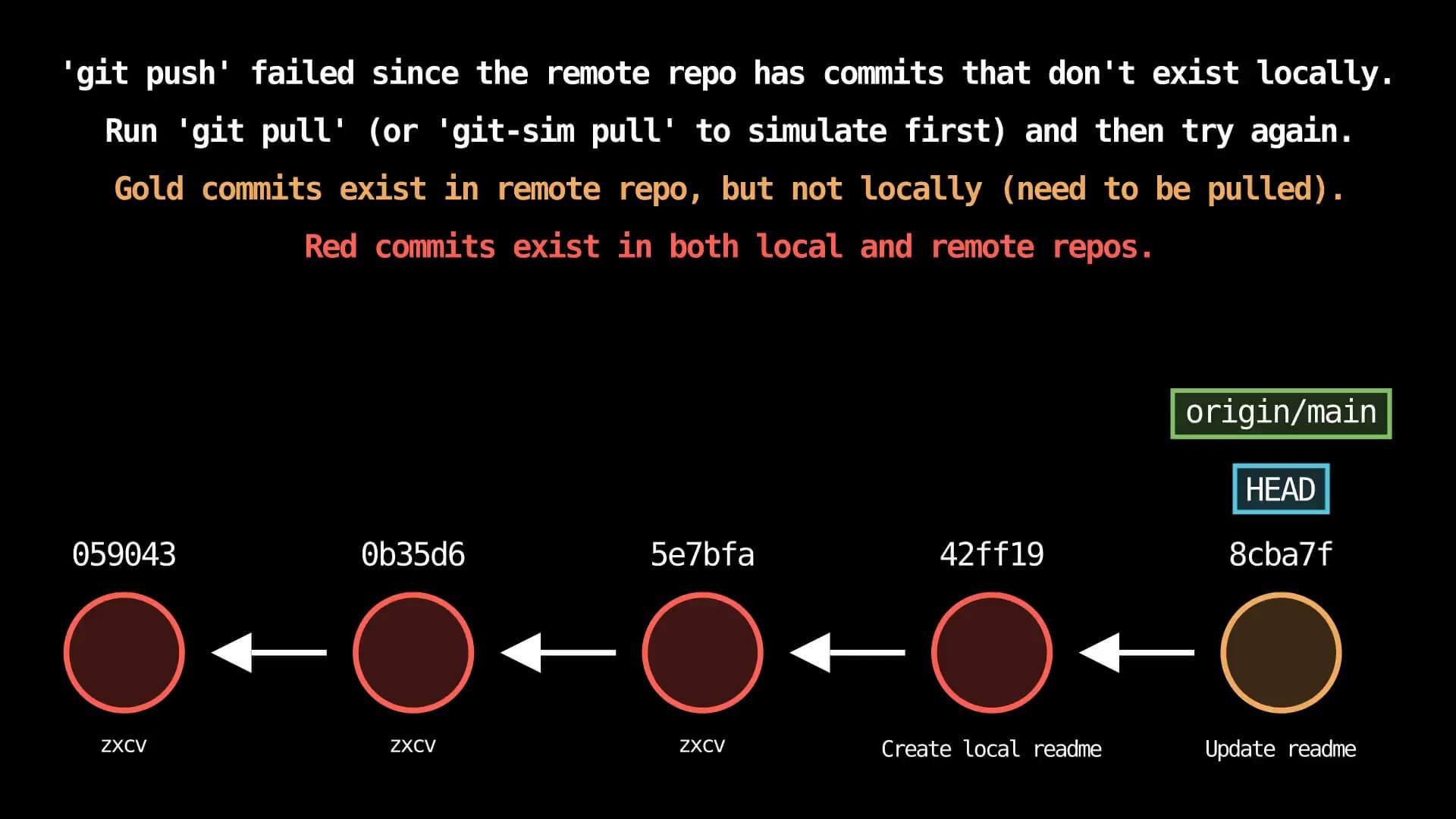
|
+
|
|
37
55
|
## Use cases
|
|
38
56
|
- Visualize Git commands to understand their effects on your repo before actually running them
|
|
39
57
|
- Prevent unexpected working directory and repository states by simulating before running
|
|
@@ -45,7 +63,7 @@ Example: `$ git-sim merge <branch>`
|
|
|
45
63
|
|
|
46
64
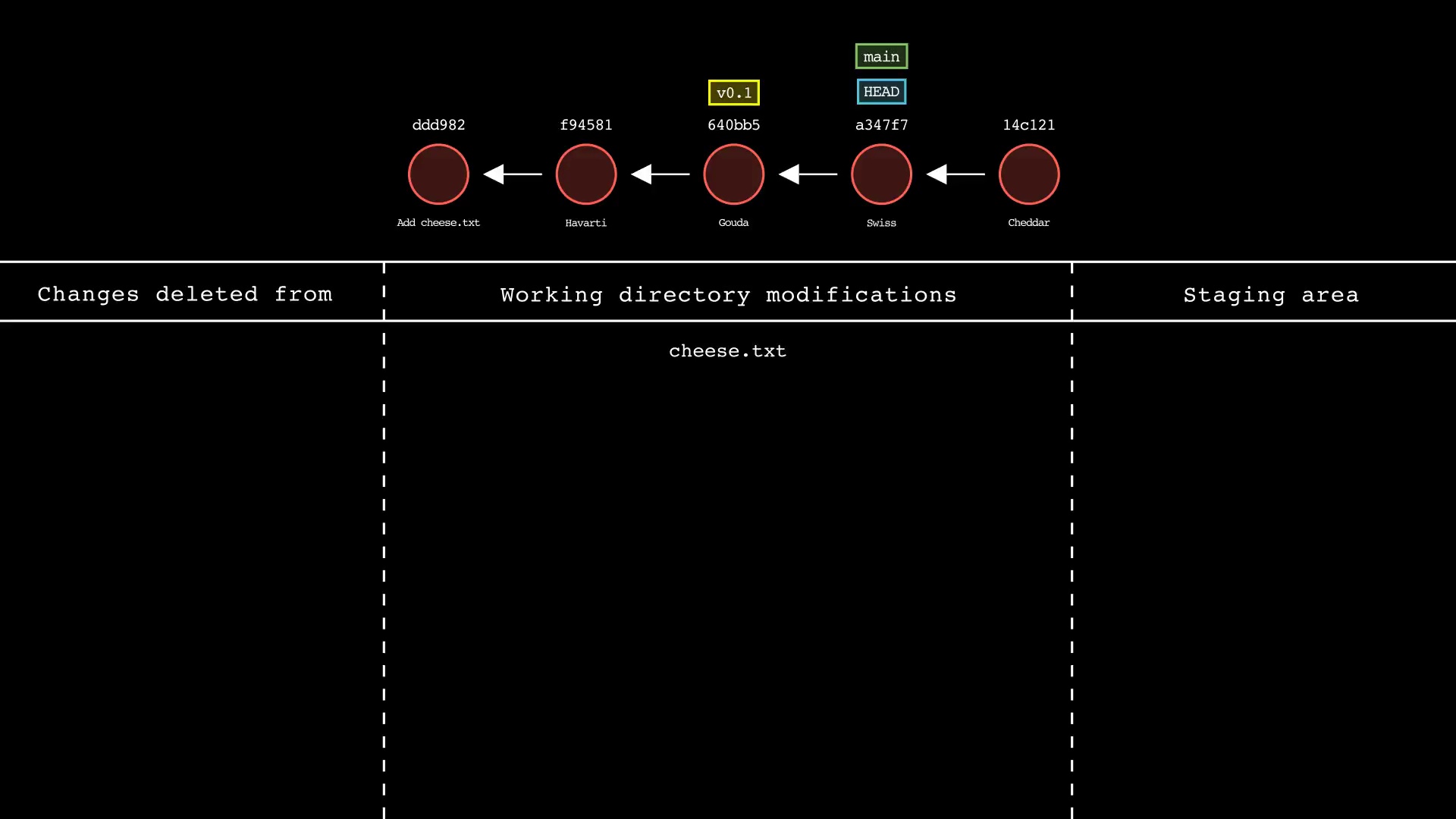
|
## Features
|
|
47
65
|
- Run a one-liner git-sim command in the terminal to generate a custom Git command visualization (.jpg) from your repo
|
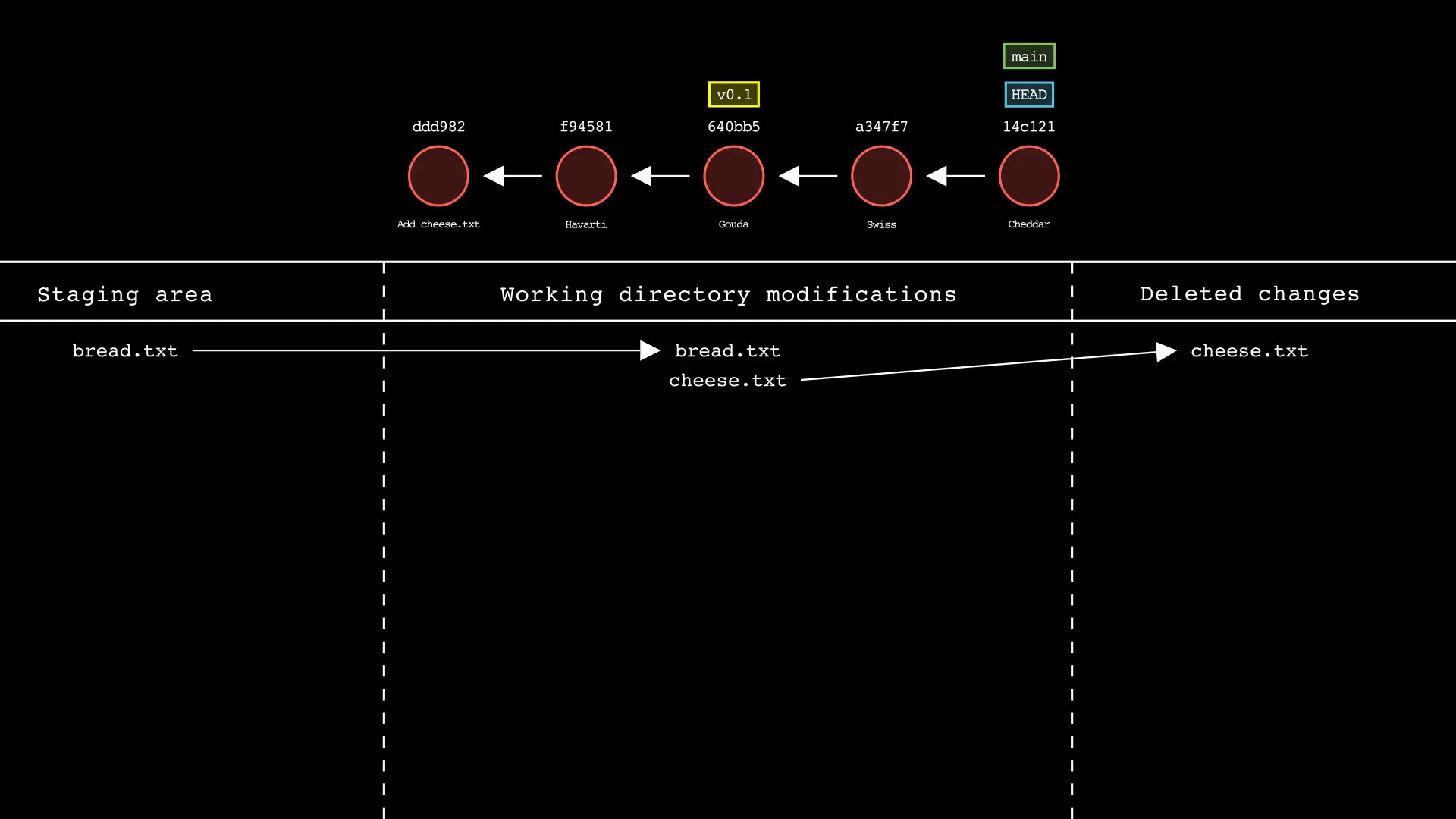
|
48
|
-
- Supported commands: `
|
|
66
|
+
- Supported commands: `add`, `branch`, `checkout`, `cherry-pick`, `clean`, `clone`, `commit`, `config`, `fetch`, `init`, `log`, `merge`, `mv`, `pull`, `push`, `rebase`, `remote`, `reset`, `restore`, `revert`, `rm`, `stash`, `status`, `switch`, `tag`
|
|
49
67
|
- Generate an animated video (.mp4) instead of a static image using the `--animate` flag (note: significant performance slowdown, it is recommended to use `--low-quality` to speed up testing and remove when ready to generate presentation-quality video)
|
|
50
68
|
- Color commits by parameter, such as author with the `--color-by=author` option
|
|
51
69
|
- Choose between dark mode (default) and light mode
|
|
@@ -145,7 +163,8 @@ $ git-sim <subcommand> -h
|
|
|
145
163
|
* [Manim (Community version)](https://www.manim.community/)
|
|
146
164
|
|
|
147
165
|
## Commands
|
|
148
|
-
Basic usage is similar to Git itself - `git-sim` takes a familiar set of subcommands including "
|
|
166
|
+
Basic usage is similar to Git itself - `git-sim` takes a familiar set of subcommands including "add", "branch", "checkout", "cherry-pick", "clean", "clone", "commit", "config", "fetch", "init", "log", "merge", "mv", "pull", "push", "rebase", "remote", "reset", "restore", "revert", "rm", "stash", "status", "switch", "tag" along with corresponding options.
|
|
167
|
+
|
|
149
168
|
|
|
150
169
|
```console
|
|
151
170
|
$ git-sim [global options] <subcommand> [subcommand options]
|
|
@@ -180,29 +199,13 @@ Animation-only global options (to be used in conjunction with `--animate`):
|
|
|
180
199
|
`--title=title`: Custom title to display at the beginning of the animation.
|
|
181
200
|
`--logo=logo.png`: The path to a custom logo to use in the animation intro/outro.
|
|
182
201
|
`--outro-top-text`: Custom text to display above the logo during the outro.
|
|
183
|
-
`--outro-bottom-text`: Custom text to display below the logo during the outro.
|
|
202
|
+
`--outro-bottom-text`: Custom text to display below the logo during the outro.
|
|
203
|
+
`--font`: Font family used to display rendered text.
|
|
184
204
|
|
|
185
205
|
The `[subcommand options]` are like regular Git options specific to the specified subcommand (see below for a full list).
|
|
186
206
|
|
|
187
207
|
The following is a list of Git commands that can be simulated and their corresponding options/flags.
|
|
188
208
|
|
|
189
|
-
### git log
|
|
190
|
-
Usage: `git-sim log [-n <number>] [--all]`
|
|
191
|
-
|
|
192
|
-
- Simulated output will show the most recent 5 commits on the active branch by default
|
|
193
|
-
- Use `-n <number>` to set number of commits to display from each branch head
|
|
194
|
-
- Set `--all` to display all local branches in the log output
|
|
195
|
-
|
|
196
|
-
|
|
197
|
-
|
|
198
|
-
### git status
|
|
199
|
-
Usage: `git-sim status`
|
|
200
|
-
|
|
201
|
-
- Simulated output will show the state of the working directory, staging area, and untracked files
|
|
202
|
-
- Note that simulated output will also show the most recent 5 commits on the active branch
|
|
203
|
-
|
|
204
|
-
|
|
205
|
-
|
|
206
209
|
### git add
|
|
207
210
|
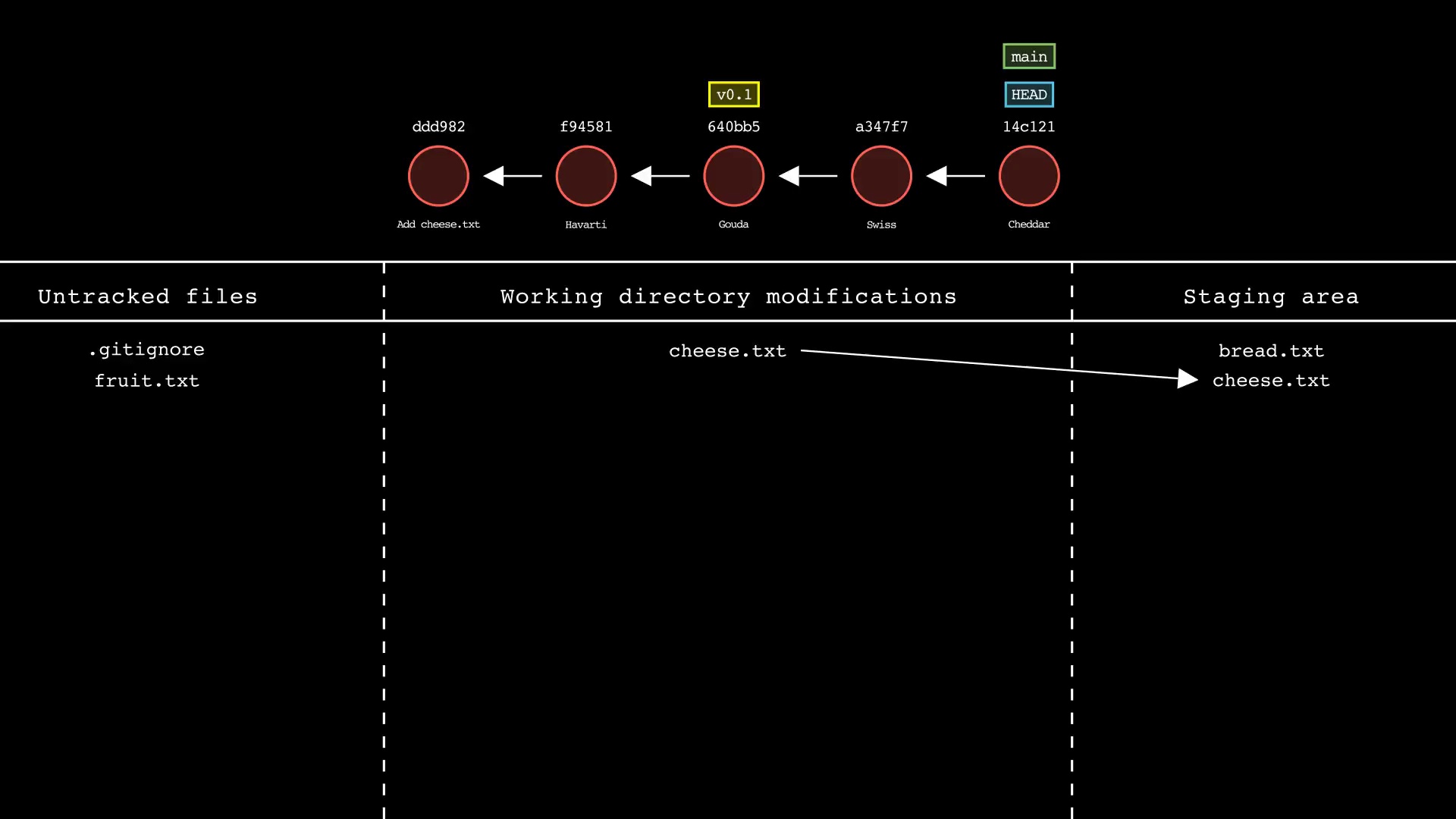
Usage: `git-sim add <file 1> <file 2> ... <file n>`
|
|
208
211
|
|
|
@@ -212,14 +215,46 @@ Usage: `git-sim add <file 1> <file 2> ... <file n>`
|
|
|
212
215
|
|
|
213
216
|
|
|
214
217
|
|
|
215
|
-
### git
|
|
216
|
-
Usage: `git-sim
|
|
218
|
+
### git branch
|
|
219
|
+
Usage: `git-sim branch <new branch name>`
|
|
217
220
|
|
|
218
|
-
- Specify
|
|
219
|
-
- Simulated output will show
|
|
221
|
+
- Specify `<new branch name>` as the name of the new branch to simulate creation of
|
|
222
|
+
- Simulated output will show the newly create branch ref along with most recent 5 commits on the active branch
|
|
223
|
+
|
|
224
|
+
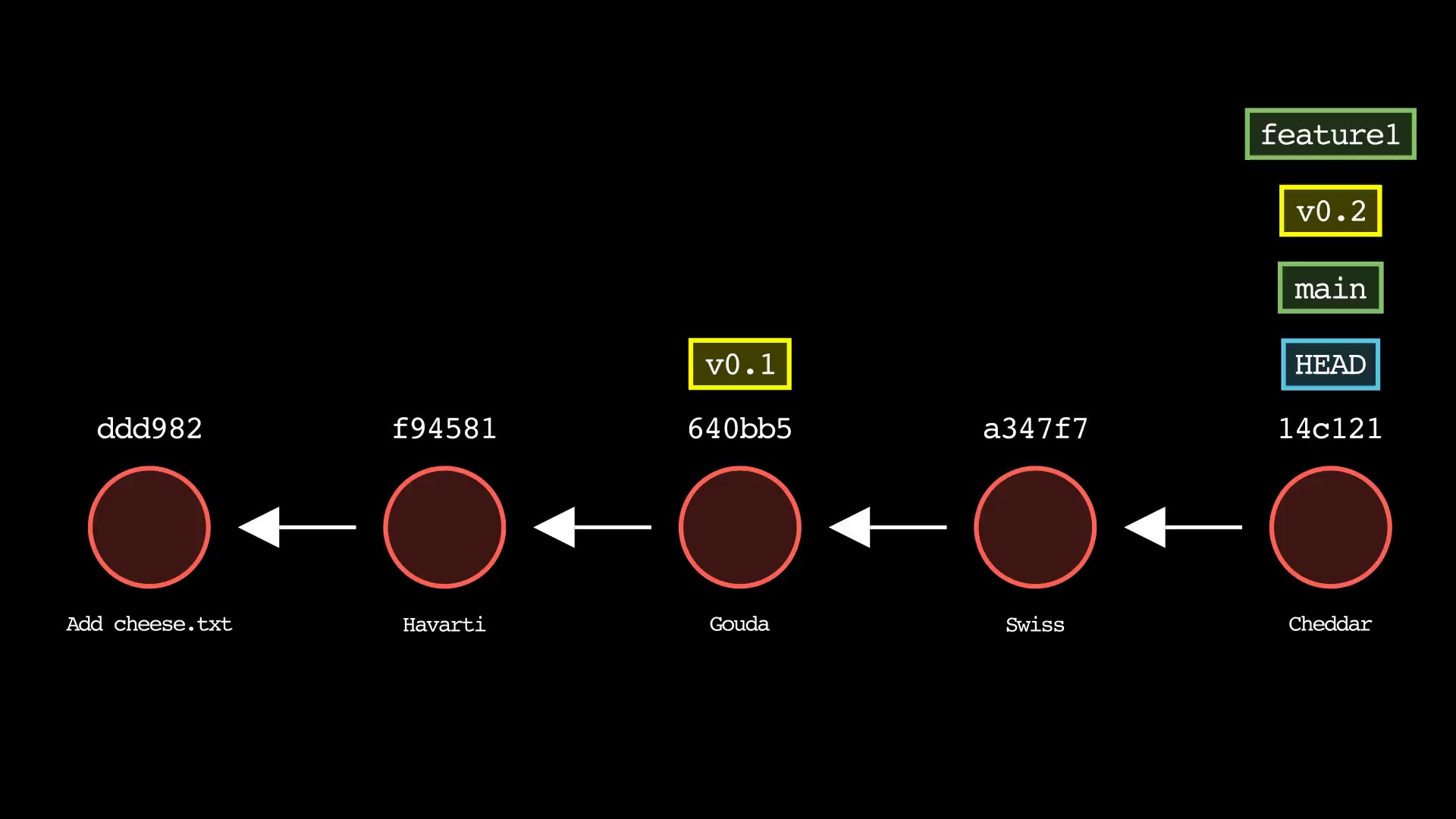
|
|
225
|
+
|
|
226
|
+
### git checkout
|
|
227
|
+
Usage: `git-sim checkout [-b] <branch>`
|
|
228
|
+
|
|
229
|
+
- Checks out `<branch>` into the working directory, i.e. moves `HEAD` to the specified `<branch>`
|
|
230
|
+
- The `-b` flag creates a new branch with the specified name `<branch>` and checks it out, assuming it doesn't already exist
|
|
231
|
+
|
|
232
|
+
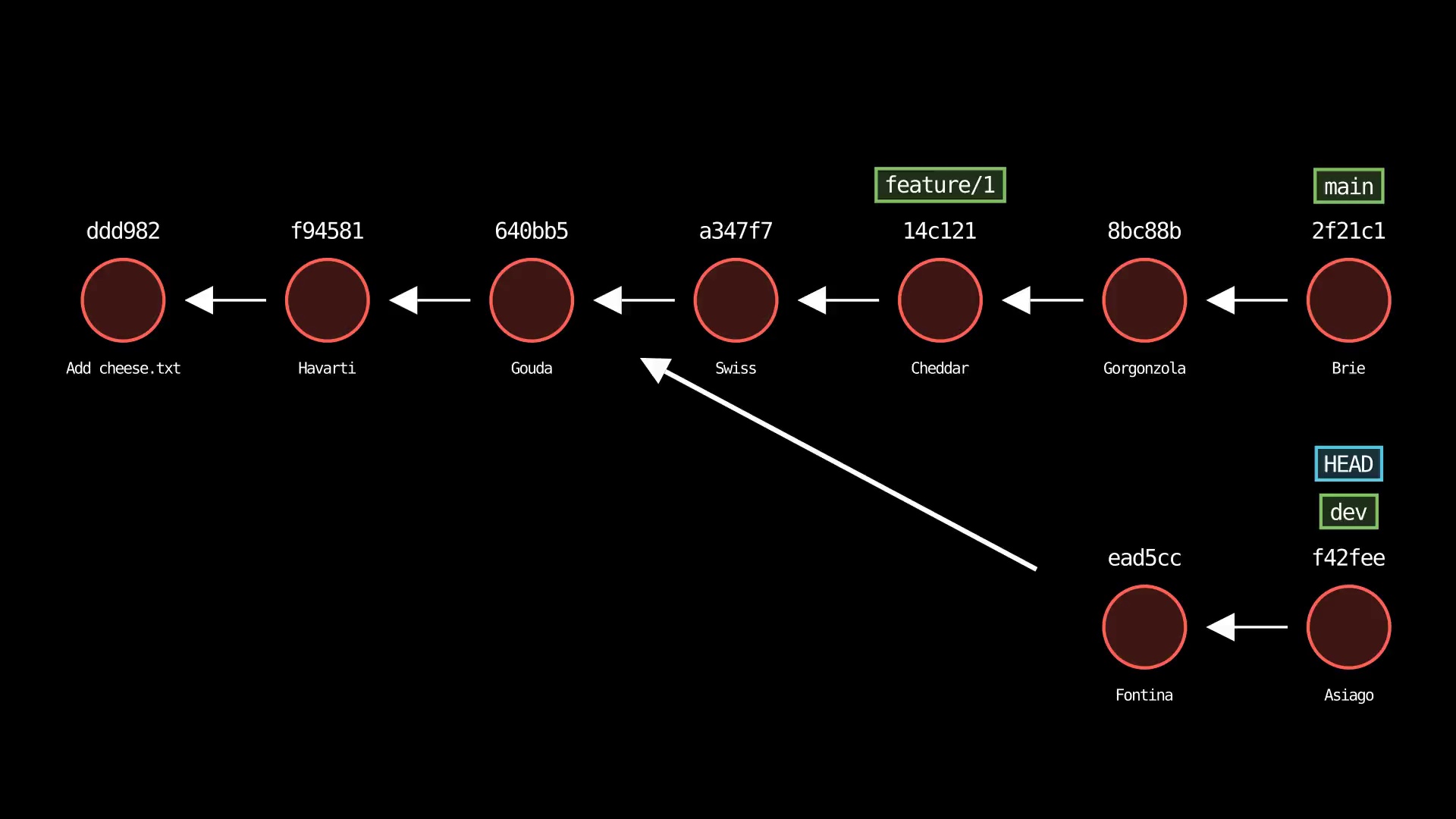
|
|
233
|
+
|
|
234
|
+
### git cherry-pick
|
|
235
|
+
Usage: `git-sim cherry-pick <commit>`
|
|
236
|
+
|
|
237
|
+
- Specify `<commit>` as a ref (branch name/tag) or commit ID to cherry-pick onto the active branch
|
|
238
|
+
- Supports editing the cherry-picked commit message with: `$ git-sim cherry-pick <commit> -e "Edited commit message"`
|
|
239
|
+
|
|
240
|
+
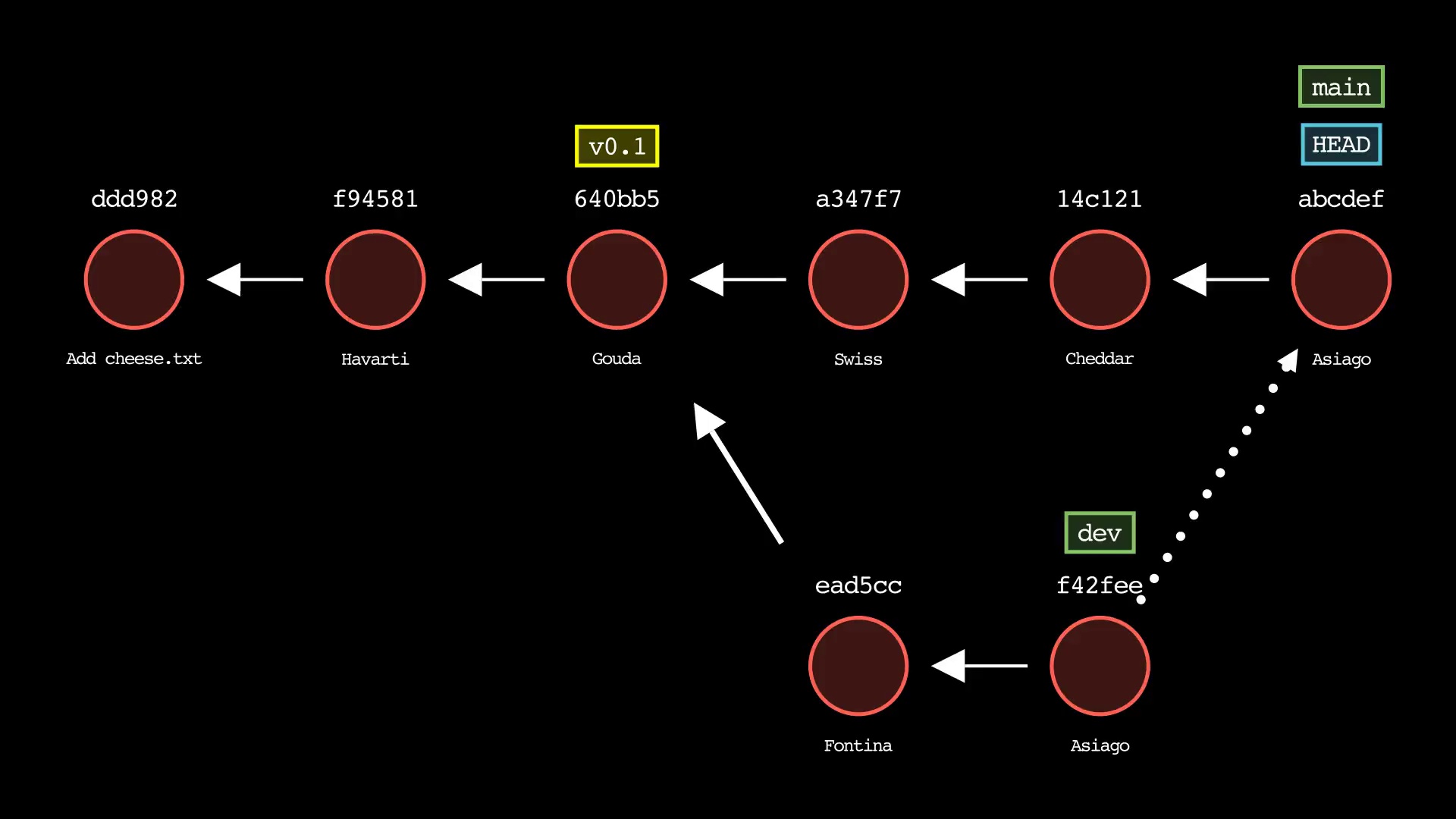
|
|
241
|
+
|
|
242
|
+
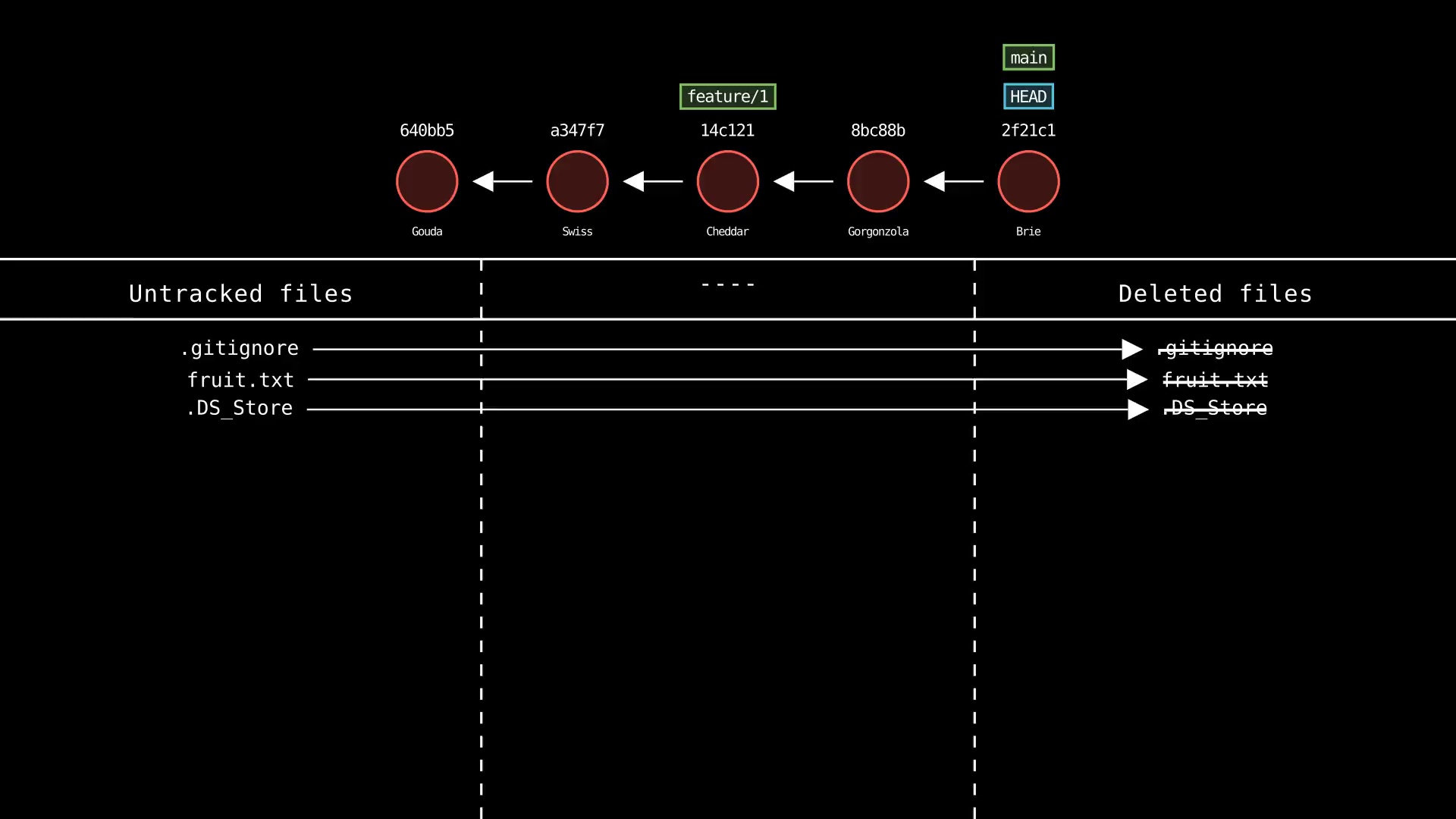
### git clean
|
|
243
|
+
Usage: `git-sim clean`
|
|
244
|
+
|
|
245
|
+
- Simulated output will show untracked files being deleted
|
|
246
|
+
- Since this is just a simulation, no need to specify `-i`, `-n`, `-f` as in regular Git
|
|
220
247
|
- Note that simulated output will also show the most recent 5 commits on the active branch
|
|
221
248
|
|
|
222
|
-
|
|
250
|
+
|
|
251
|
+
### git clone
|
|
252
|
+
Usage: `git-sim clone <url>`
|
|
253
|
+
|
|
254
|
+
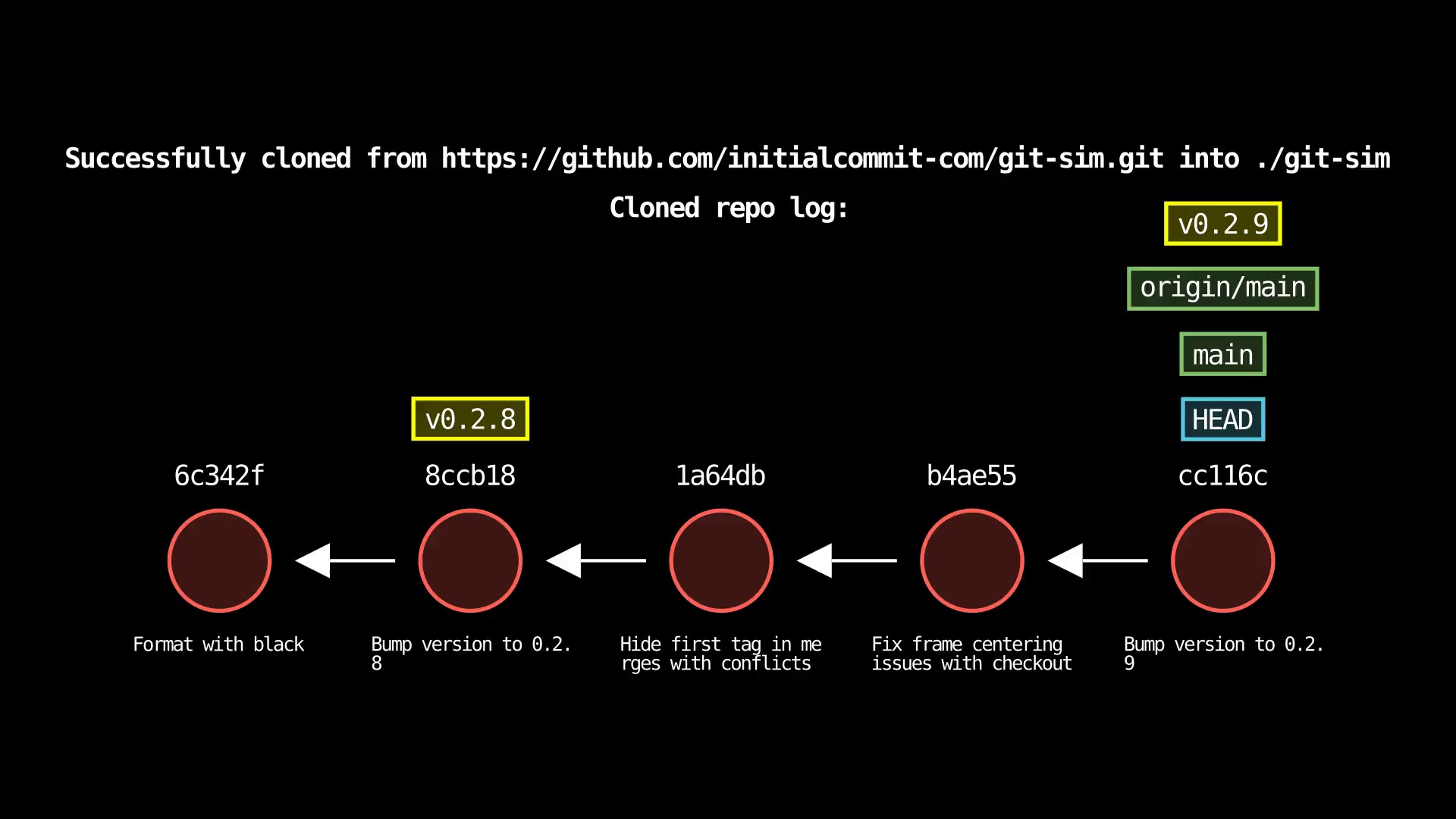
- Clone the remote repo from `<url>` (web URL or filesystem path) to a new folder in the current directory
|
|
255
|
+
- Output will report if clone operation is successful and show log of local clone
|
|
256
|
+
|
|
257
|
+
|
|
223
258
|
|
|
224
259
|
### git commit
|
|
225
260
|
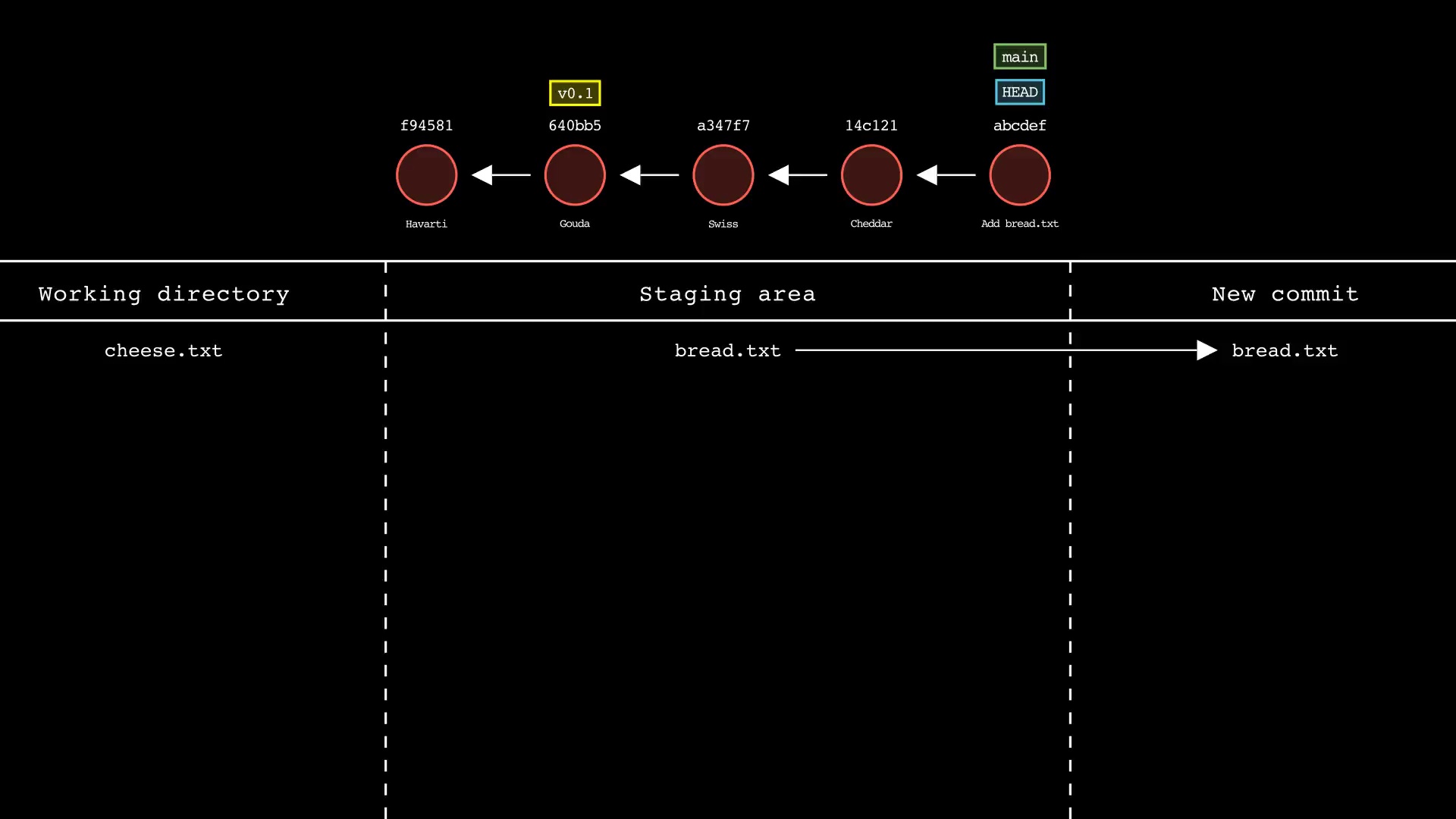
Usage: `git-sim commit -m "Commit message"`
|
|
@@ -232,49 +267,36 @@ Usage: `git-sim commit -m "Commit message"`
|
|
|
232
267
|
|
|
233
268
|
|
|
234
269
|
|
|
235
|
-
### git
|
|
236
|
-
Usage: `git-sim
|
|
237
|
-
|
|
238
|
-
- Specify one or more `<file>` as a *modified* working directory file, or staged file
|
|
239
|
-
- If no `<file>` is specified, all available files will be included
|
|
240
|
-
- Simulated output will show files being moved in/out of the Git stash
|
|
241
|
-
- Note that simulated output will also show the most recent 5 commits on the active branch
|
|
242
|
-
|
|
243
|
-
|
|
270
|
+
### git config
|
|
271
|
+
Usage: `git-sim config [--list] <section.option> <value>`
|
|
244
272
|
|
|
245
|
-
|
|
246
|
-
|
|
273
|
+
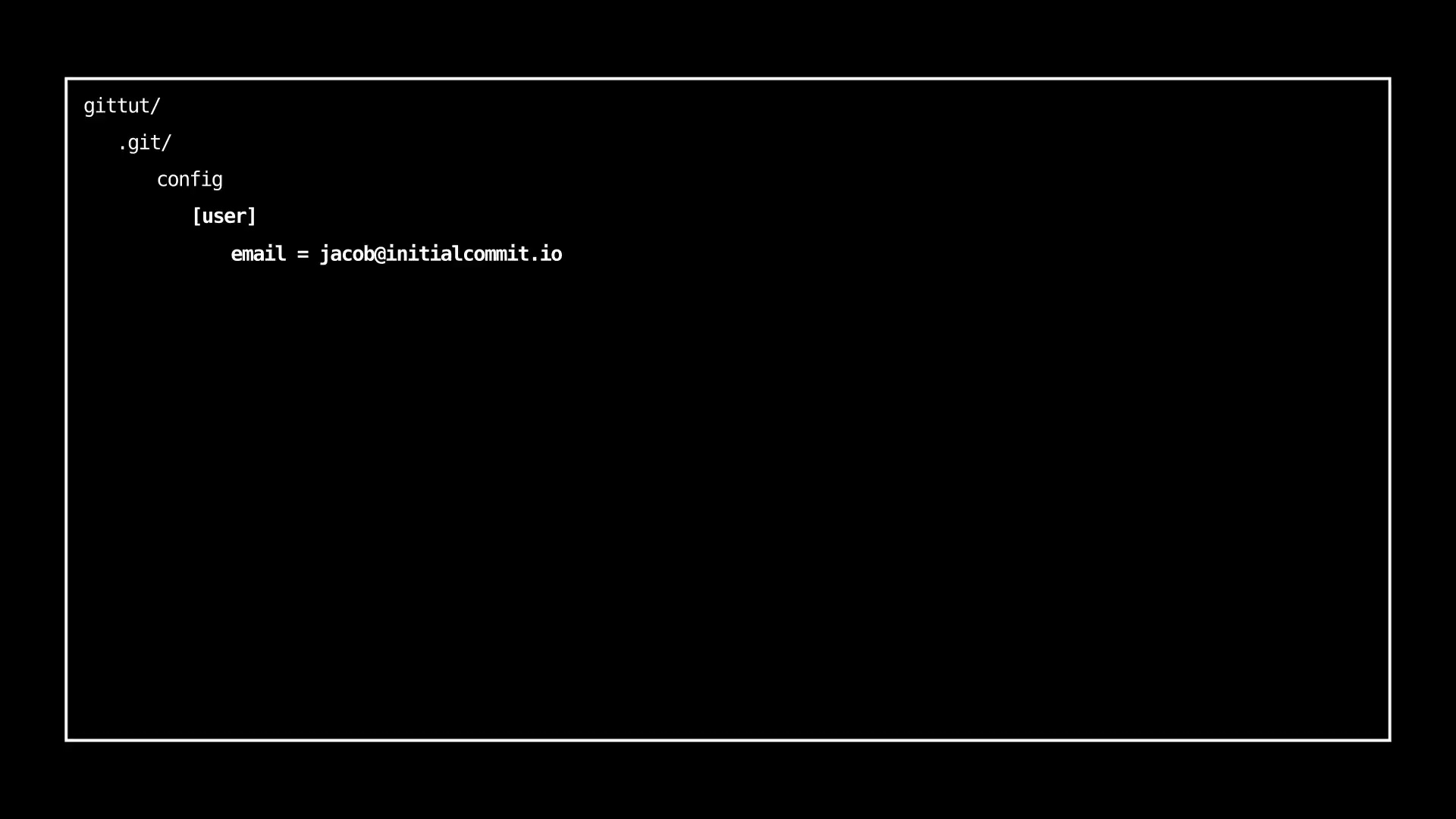
- Simulated output describes the specified configuration change
|
|
274
|
+
- Use `--list` or `-l` to display all configuration
|
|
247
275
|
|
|
248
|
-
-
|
|
249
|
-
- Simulated output will show the newly create branch ref along with most recent 5 commits on the active branch
|
|
250
|
-
|
|
251
|
-

|
|
276
|
+
|
|
252
277
|
|
|
253
|
-
### git
|
|
254
|
-
Usage: `git-sim
|
|
278
|
+
### git fetch
|
|
279
|
+
Usage: `git-sim fetch <remote> <branch>`
|
|
255
280
|
|
|
256
|
-
-
|
|
257
|
-
- Simulated output will show the newly create tag ref along with most recent 5 commits on the active branch
|
|
281
|
+
- Fetches the specified `<branch>` from the specified `<remote>` to the local repo
|
|
258
282
|
|
|
259
|
-
|
|
260
284
|
|
|
261
|
-
### git
|
|
262
|
-
Usage: `git-sim
|
|
285
|
+
### git init
|
|
286
|
+
Usage: `git-sim init`
|
|
263
287
|
|
|
264
|
-
-
|
|
265
|
-
- As with a normal git reset command, default reset mode is `--mixed`, but can be specified using `--soft`, `--hard`, or `--mixed`
|
|
266
|
-
- Simulated output will show branch/HEAD resets and resulting state of the working directory, staging area, and whether any file changes would be deleted by running the actual command
|
|
288
|
+
- Simulated output describes the initialized `.git/` directory and it's contents
|
|
267
289
|
|
|
268
|
-

|
|
269
291
|
|
|
270
|
-
### git
|
|
271
|
-
Usage: `git-sim
|
|
292
|
+
### git log
|
|
293
|
+
Usage: `git-sim log [-n <number>] [--all]`
|
|
272
294
|
|
|
273
|
-
-
|
|
274
|
-
-
|
|
275
|
-
-
|
|
295
|
+
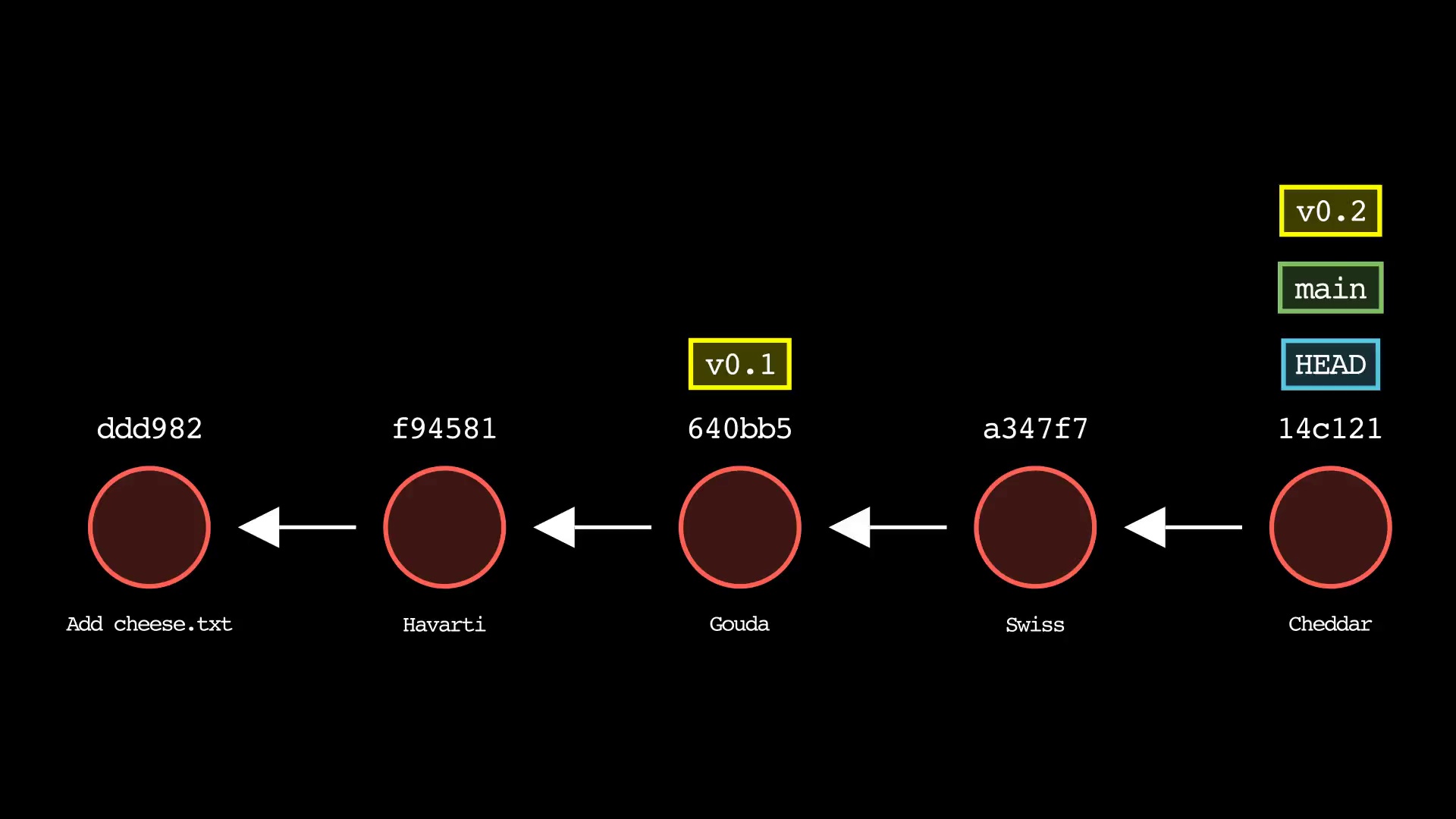
- Simulated output will show the most recent 5 commits on the active branch by default
|
|
296
|
+
- Use `-n <number>` to set number of commits to display from each branch head
|
|
297
|
+
- Set `--all` to display all local branches in the log output
|
|
276
298
|
|
|
277
|
-

|
|
278
300
|
|
|
279
301
|
### git merge
|
|
280
302
|
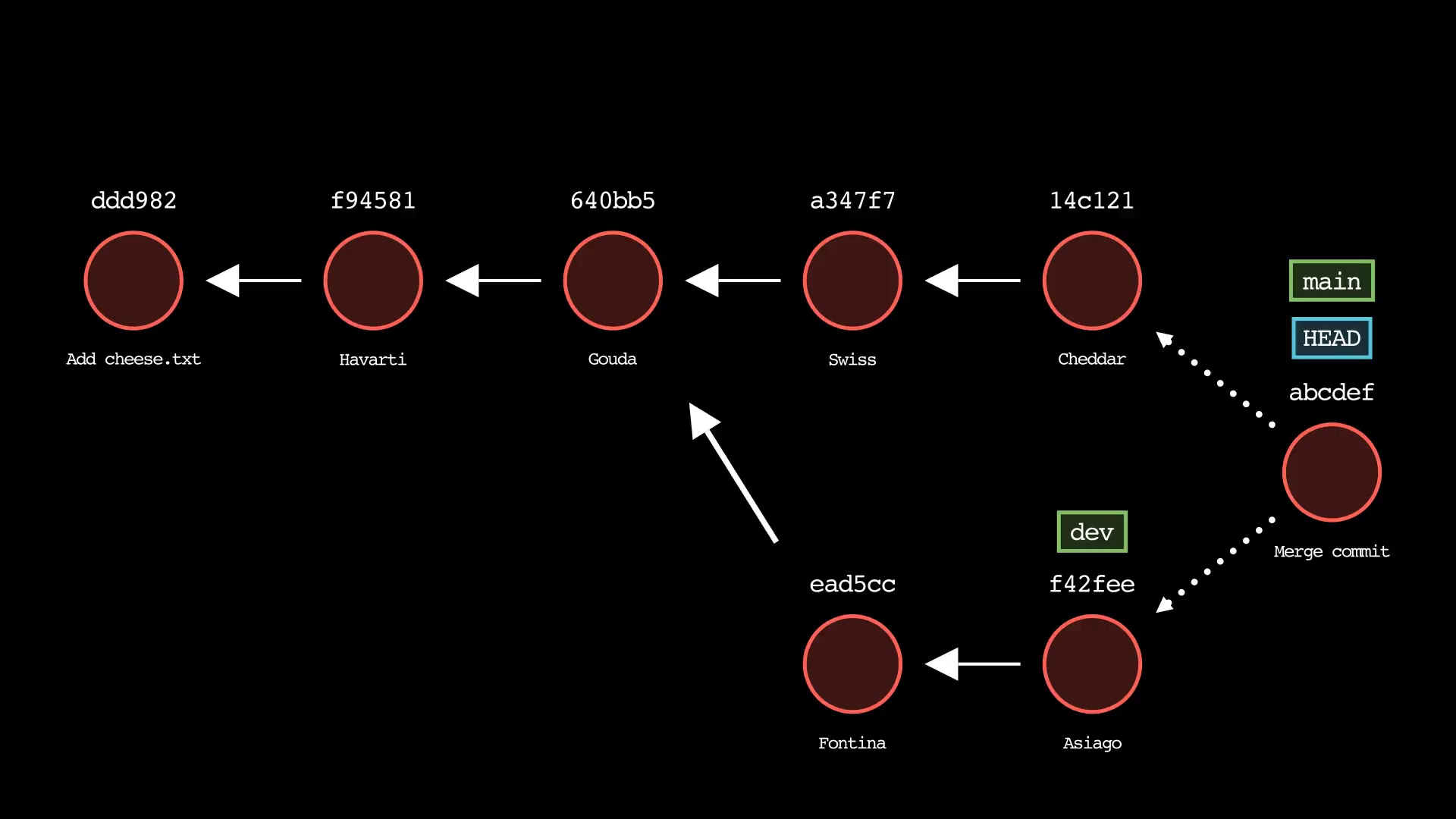
Usage: `git-sim merge <branch> [-m "Commit message"] [--no-ff]`
|
|
@@ -288,43 +310,15 @@ Usage: `git-sim merge <branch> [-m "Commit message"] [--no-ff]`
|
|
|
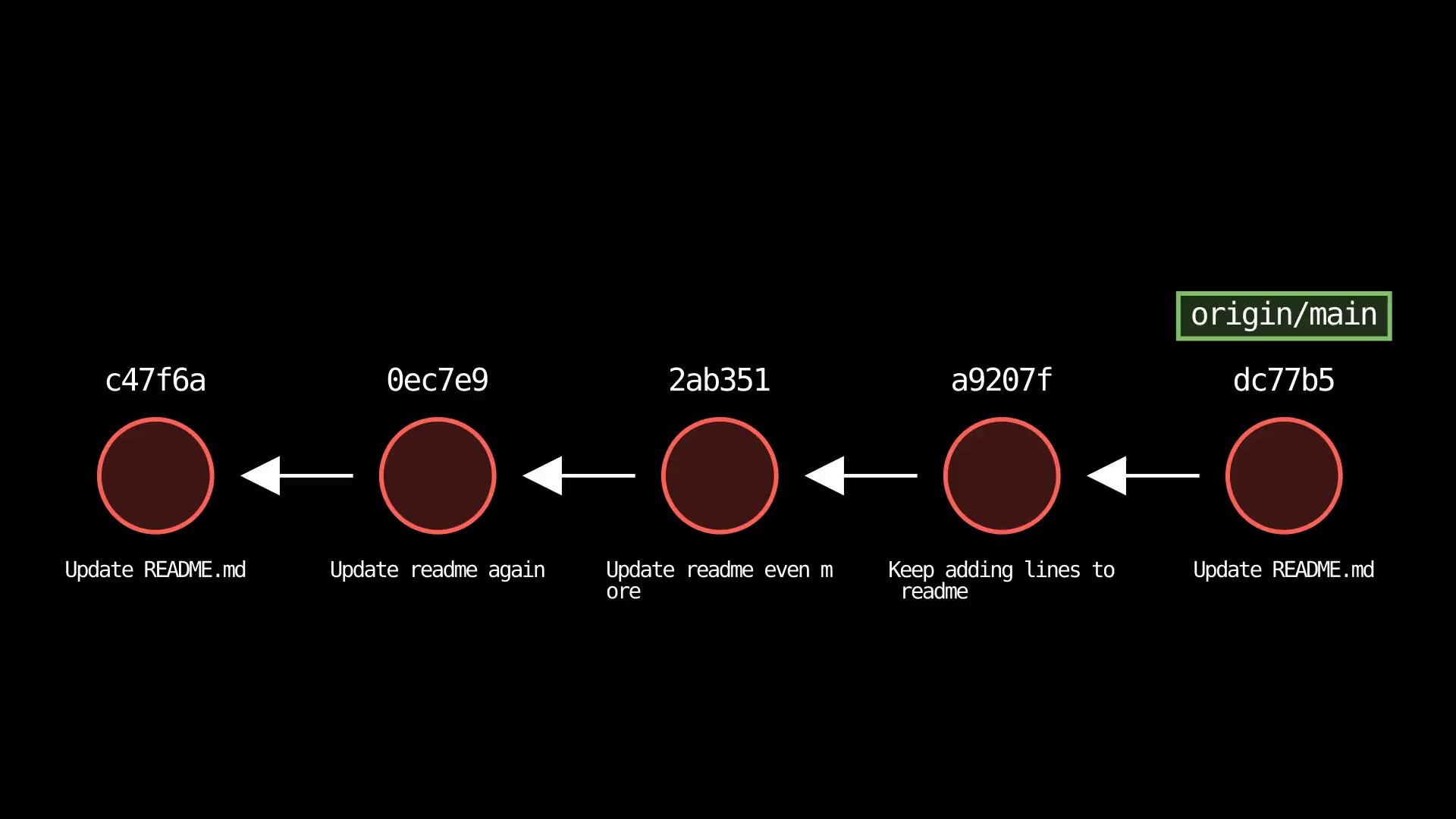
288
310
|
|
|
289
311
|
|
|
290
312
|
|
|
291
|
-
### git
|
|
292
|
-
Usage: `git-sim
|
|
293
|
-
|
|
294
|
-
- Specify `<new-base>` as the branch name to rebase the active branch onto
|
|
295
|
-
|
|
296
|
-
|
|
297
|
-
|
|
298
|
-
### git cherry-pick
|
|
299
|
-
Usage: `git-sim cherry-pick <commit>`
|
|
300
|
-
|
|
301
|
-
- Specify `<commit>` as a ref (branch name/tag) or commit ID to cherry-pick onto the active branch
|
|
302
|
-
- Supports editing the cherry-picked commit message with: `$ git-sim cherry-pick <commit> -e "Edited commit message"`
|
|
303
|
-
|
|
304
|
-

|
|
305
|
-
|
|
306
|
-
### git switch
|
|
307
|
-
Usage: `git-sim switch [-c] <branch>`
|
|
308
|
-
|
|
309
|
-
- Switches the checked-out branch to `<branch>`, i.e. moves `HEAD` to the specified `<branch>`
|
|
310
|
-
- The `-c` flag creates a new branch with the specified name `<branch>` and switches to it, assuming it doesn't already exist
|
|
311
|
-
|
|
312
|
-
|
|
313
|
-
|
|
314
|
-
### git checkout
|
|
315
|
-
Usage: `git-sim checkout [-b] <branch>`
|
|
316
|
-
|
|
317
|
-
- Checks out `<branch>` into the working directory, i.e. moves `HEAD` to the specified `<branch>`
|
|
318
|
-
- The `-b` flag creates a new branch with the specified name `<branch>` and checks it out, assuming it doesn't already exist
|
|
319
|
-
|
|
320
|
-

|
|
321
|
-
|
|
322
|
-
### git fetch
|
|
323
|
-
Usage: `git-sim fetch <remote> <branch>`
|
|
313
|
+
### git mv
|
|
314
|
+
Usage: `git-sim mv <file> <new file>`
|
|
324
315
|
|
|
325
|
-
-
|
|
316
|
+
- Specify `<file>` as file to update name/path
|
|
317
|
+
- Specify `<new file>` as new name/path of file
|
|
318
|
+
- Simulated output will show the name/path of the file being updated
|
|
319
|
+
- Note that simulated output will also show the most recent 5 commits on the active branch
|
|
326
320
|
|
|
327
|
-
|
|
328
322
|
|
|
329
323
|
### git pull
|
|
330
324
|
Usage: `git-sim pull [<remote> <branch>]`
|
|
@@ -344,13 +338,47 @@ Usage: `git-sim push [<remote> <branch>]`
|
|
|
344
338
|
|
|
345
339
|
|
|
346
340
|
|
|
347
|
-
### git
|
|
348
|
-
Usage: `git-sim
|
|
341
|
+
### git rebase
|
|
342
|
+
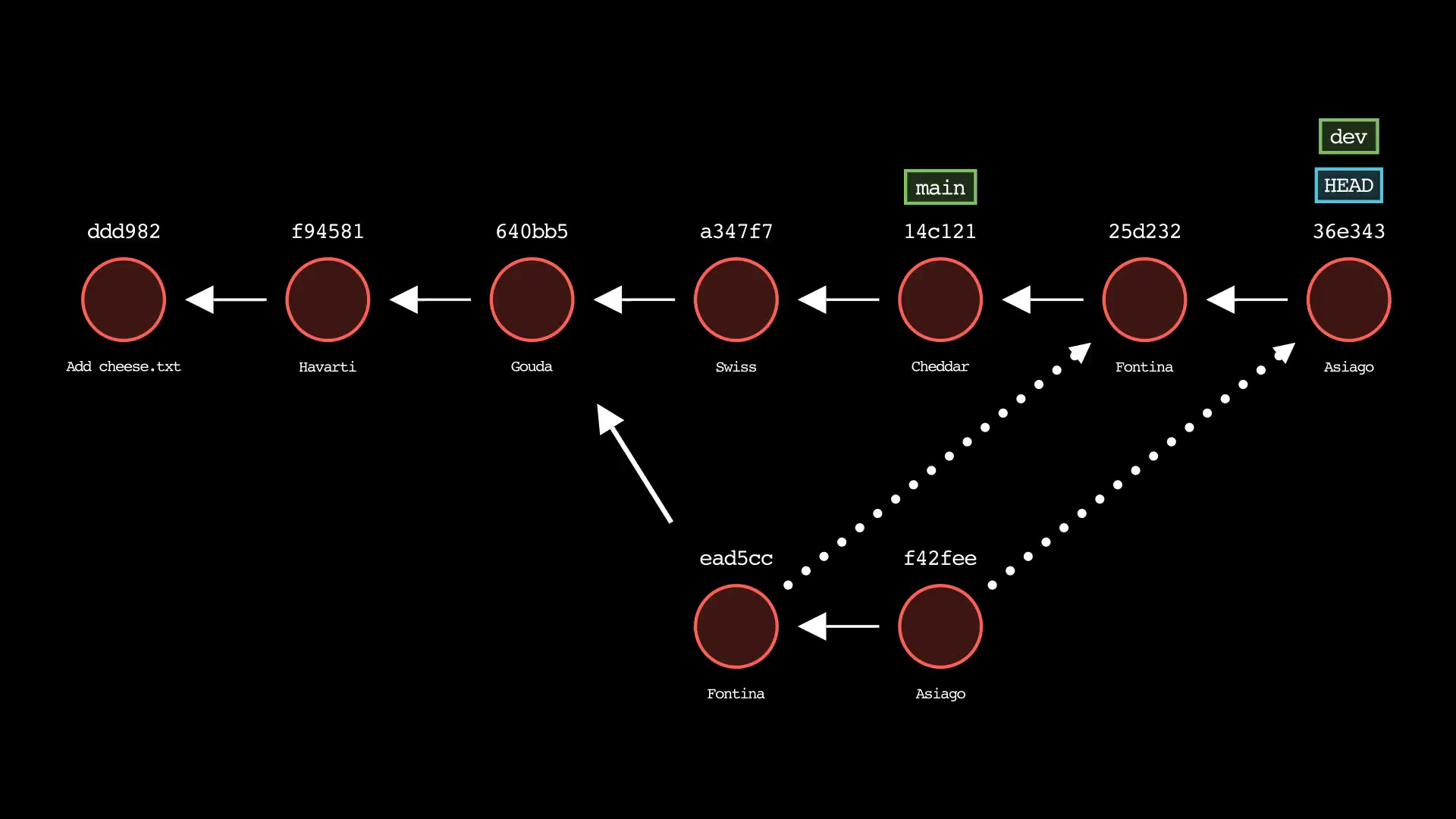
Usage: `git-sim rebase <new-base>`
|
|
349
343
|
|
|
350
|
-
-
|
|
351
|
-
- Output will report if clone operation is successful and show log of local clone
|
|
344
|
+
- Specify `<new-base>` as the branch name to rebase the active branch onto
|
|
352
345
|
|
|
353
|
-

|
|
347
|
+
|
|
348
|
+
### git remote
|
|
349
|
+
Usage: `git-sim remote [add|rename|remove|get-url|set-url] [<remote>] [<url>]`
|
|
350
|
+
|
|
351
|
+
- Simulated output will show remotes being added, renamed, removed, modified as indicated
|
|
352
|
+
- Running `git-sim remote` with no options will list all existing remotes and their details
|
|
353
|
+
|
|
354
|
+

|
|
355
|
+
|
|
356
|
+
### git reset
|
|
357
|
+
Usage: `git-sim reset <reset-to> [--mixed|--soft|--hard]`
|
|
358
|
+
|
|
359
|
+
- Specify `<reset-to>` as any commit id, branch name, tag, or other ref to simulate reset to from the current HEAD (default: `HEAD`)
|
|
360
|
+
- As with a normal git reset command, default reset mode is `--mixed`, but can be specified using `--soft`, `--hard`, or `--mixed`
|
|
361
|
+
- Simulated output will show branch/HEAD resets and resulting state of the working directory, staging area, and whether any file changes would be deleted by running the actual command
|
|
362
|
+
|
|
363
|
+
|
|
364
|
+
|
|
365
|
+
### git restore
|
|
366
|
+
Usage: `git-sim restore <file 1> <file 2> ... <file n>`
|
|
367
|
+
|
|
368
|
+
- Specify one or more `<file>` as a *modified* working directory file, or staged file
|
|
369
|
+
- Simulated output will show files being moved back to the working directory or discarded changes
|
|
370
|
+
- Note that simulated output will also show the most recent 5 commits on the active branch
|
|
371
|
+
|
|
372
|
+
|
|
373
|
+
|
|
374
|
+
### git revert
|
|
375
|
+
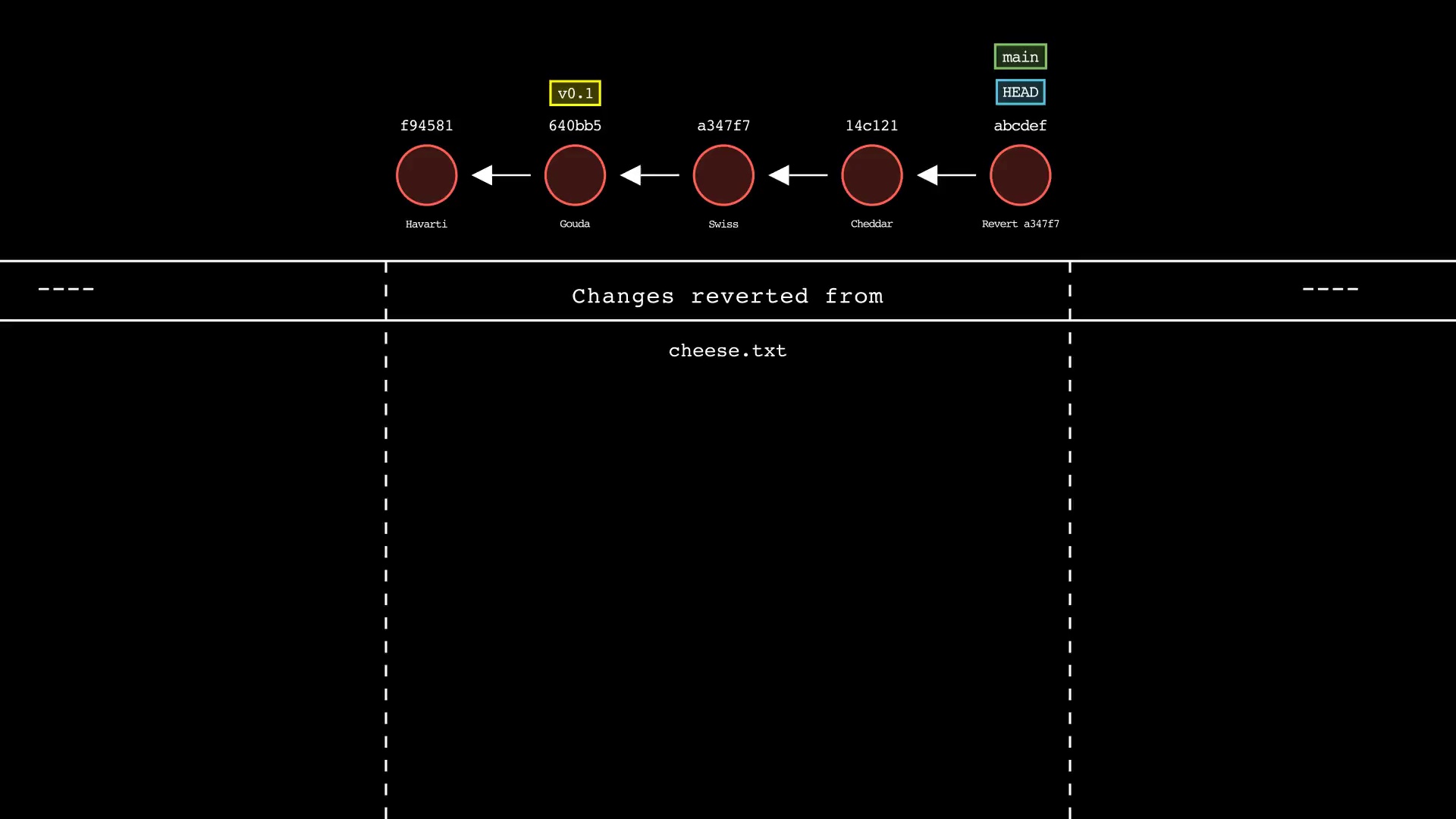
Usage: `git-sim revert <to-revert>`
|
|
376
|
+
|
|
377
|
+
- Specify `<to-revert>` as any commit id, branch name, tag, or other ref to simulate revert for
|
|
378
|
+
- Simulated output will show the new commit which reverts the changes from `<to-revert>`
|
|
379
|
+
- Simulated output will include the next 4 most recent commits on the active branch
|
|
380
|
+
|
|
381
|
+
|
|
354
382
|
|
|
355
383
|
### git rm
|
|
356
384
|
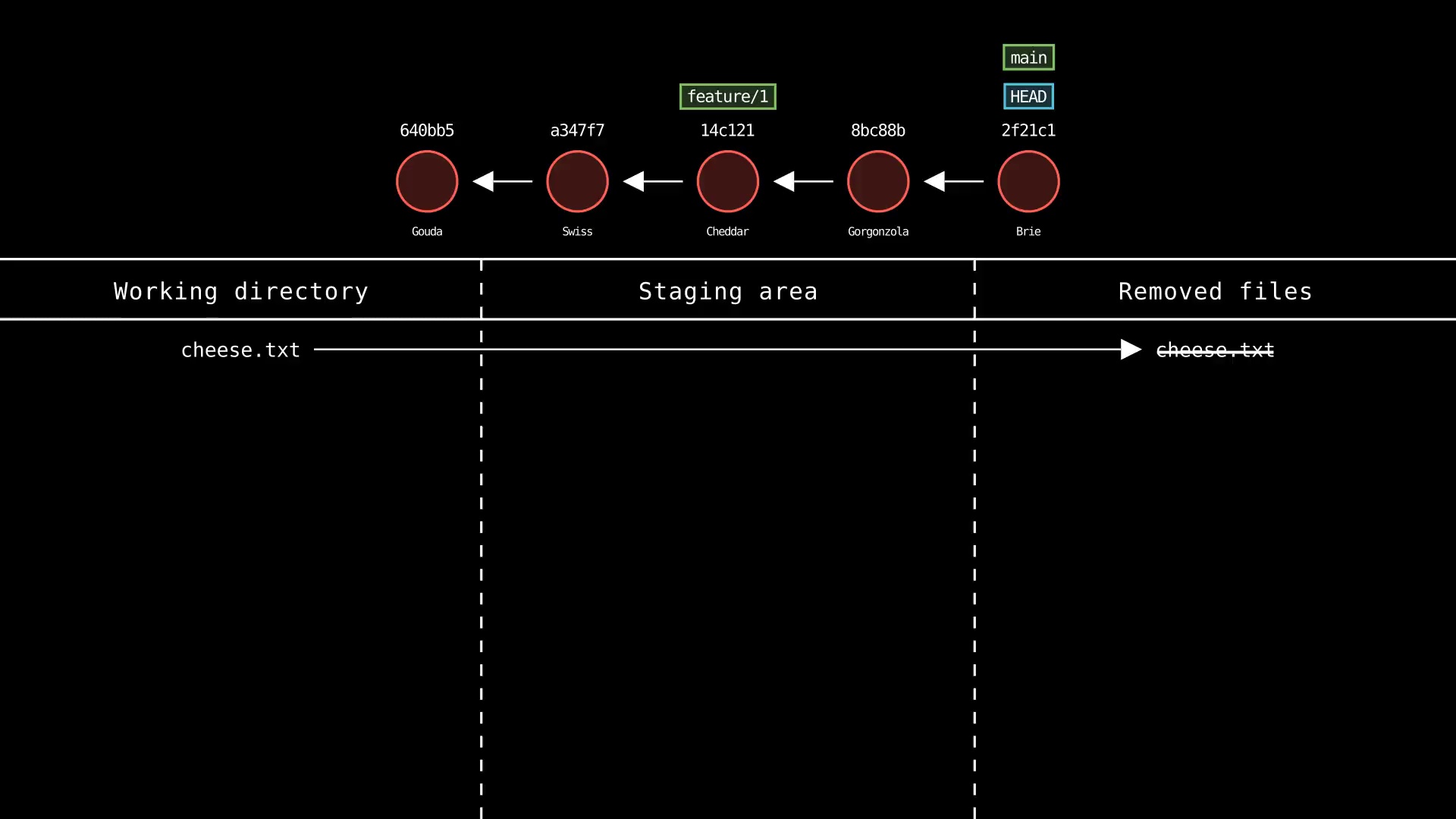
Usage: `git-sim rm <file 1> <file 2> ... <file n>`
|
|
@@ -361,24 +389,39 @@ Usage: `git-sim rm <file 1> <file 2> ... <file n>`
|
|
|
361
389
|
|
|
362
390
|
|
|
363
391
|
|
|
364
|
-
### git
|
|
365
|
-
Usage: `git-sim
|
|
392
|
+
### git stash
|
|
393
|
+
Usage: `git-sim stash [push|pop|apply] <file>`
|
|
366
394
|
|
|
367
|
-
- Specify `<file>` as file
|
|
368
|
-
-
|
|
369
|
-
- Simulated output will show
|
|
395
|
+
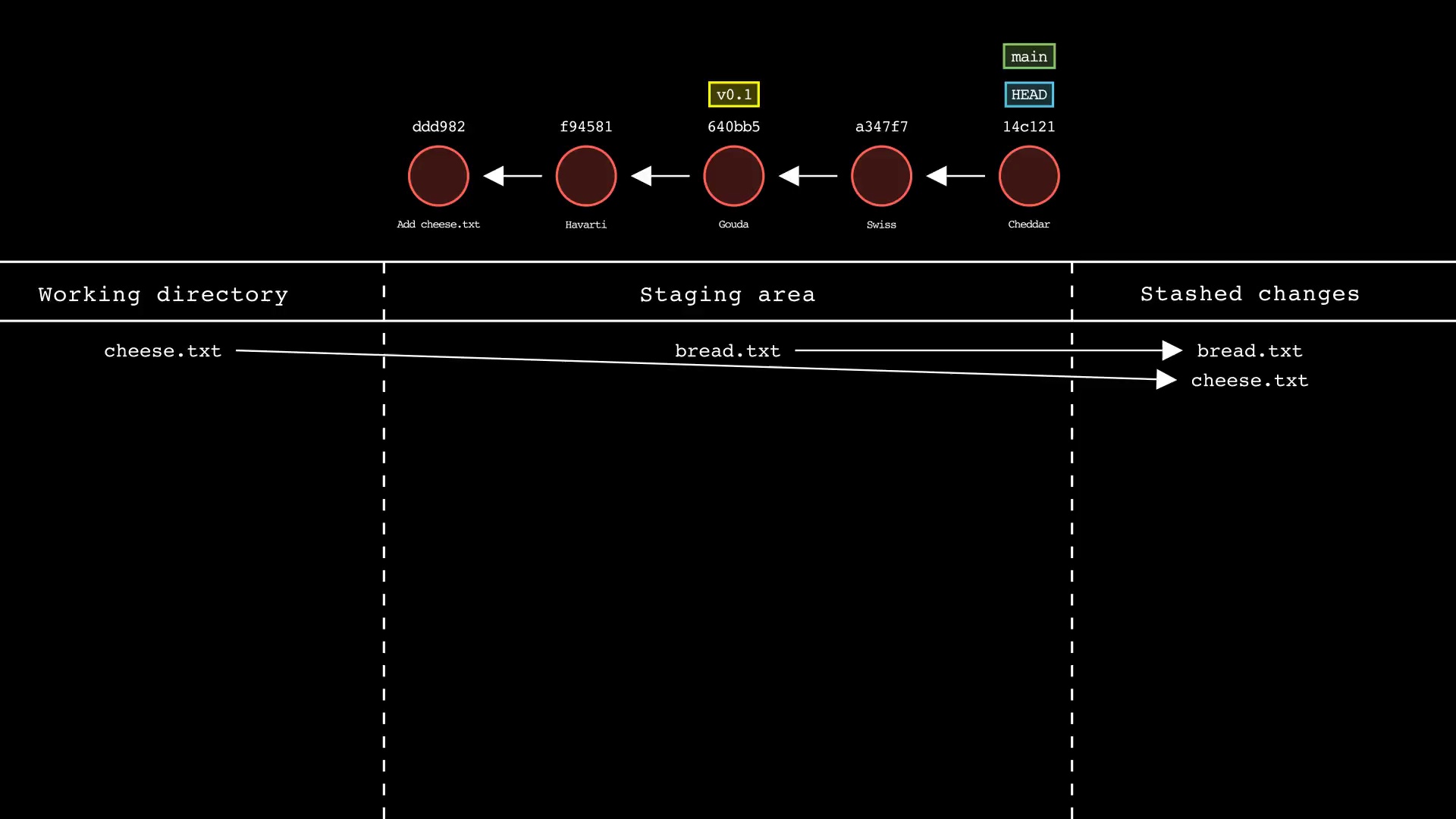
- Specify one or more `<file>` as a *modified* working directory file, or staged file
|
|
396
|
+
- If no `<file>` is specified, all available files will be included
|
|
397
|
+
- Simulated output will show files being moved in/out of the Git stash
|
|
370
398
|
- Note that simulated output will also show the most recent 5 commits on the active branch
|
|
371
399
|
|
|
372
|
-

|
|
373
401
|
|
|
374
|
-
### git
|
|
375
|
-
Usage: `git-sim
|
|
402
|
+
### git status
|
|
403
|
+
Usage: `git-sim status`
|
|
376
404
|
|
|
377
|
-
- Simulated output will show untracked files
|
|
378
|
-
- Since this is just a simulation, no need to specify `-i`, `-n`, `-f` as in regular Git
|
|
405
|
+
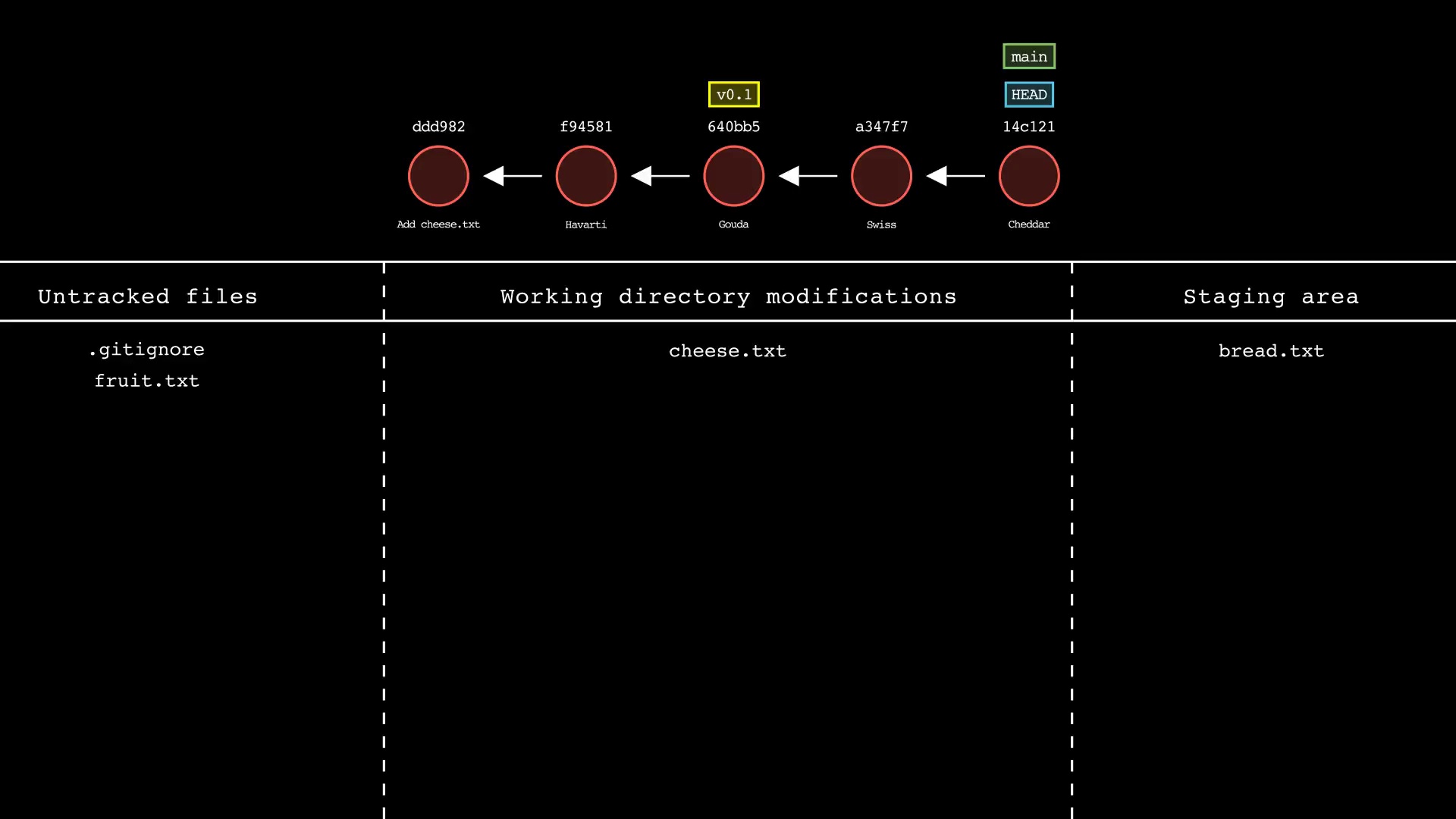
- Simulated output will show the state of the working directory, staging area, and untracked files
|
|
379
406
|
- Note that simulated output will also show the most recent 5 commits on the active branch
|
|
380
407
|
|
|
381
|
-

|
|
409
|
+
|
|
410
|
+
### git switch
|
|
411
|
+
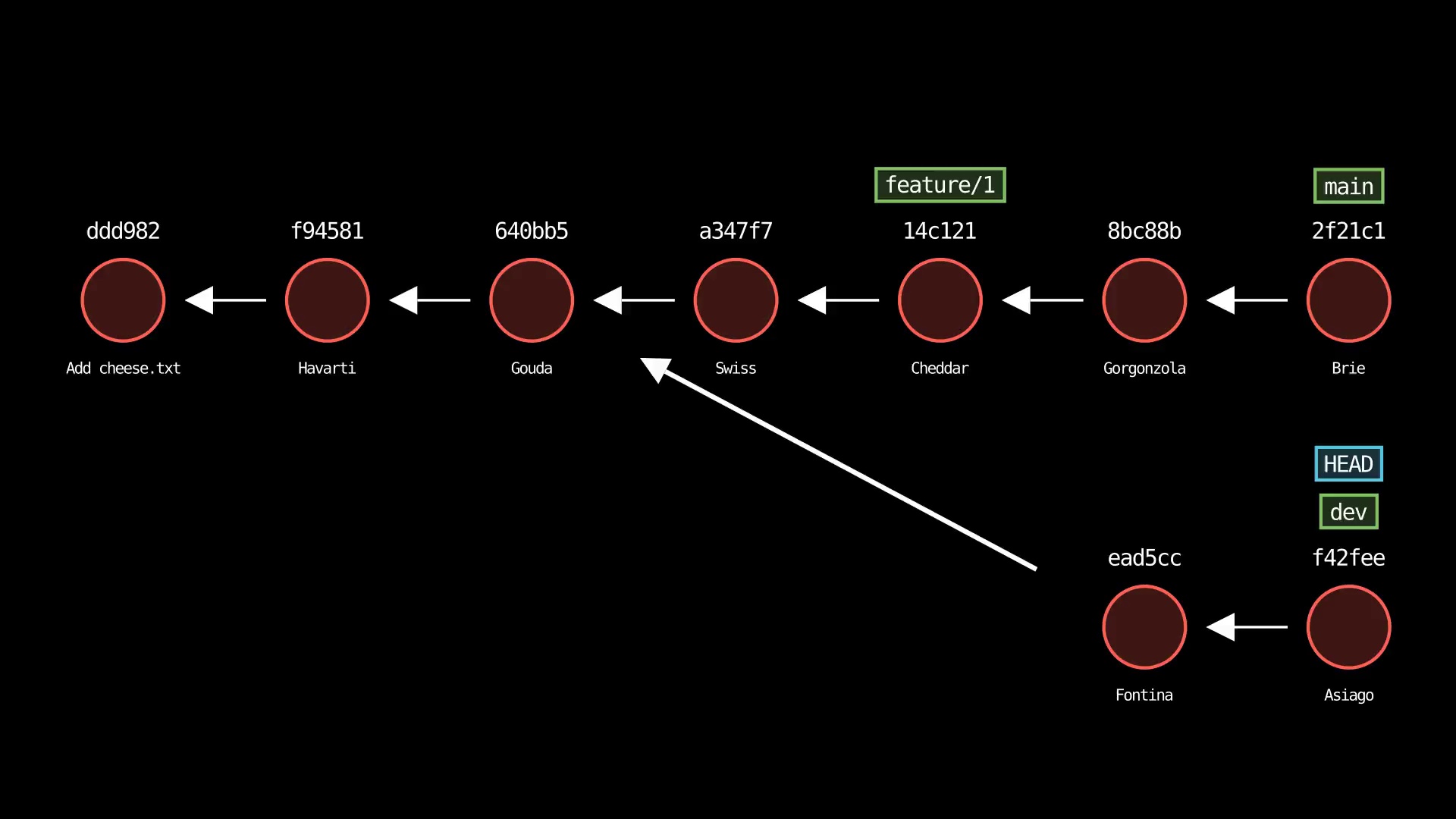
Usage: `git-sim switch [-c] <branch>`
|
|
412
|
+
|
|
413
|
+
- Switches the checked-out branch to `<branch>`, i.e. moves `HEAD` to the specified `<branch>`
|
|
414
|
+
- The `-c` flag creates a new branch with the specified name `<branch>` and switches to it, assuming it doesn't already exist
|
|
415
|
+
|
|
416
|
+

|
|
417
|
+
|
|
418
|
+
### git tag
|
|
419
|
+
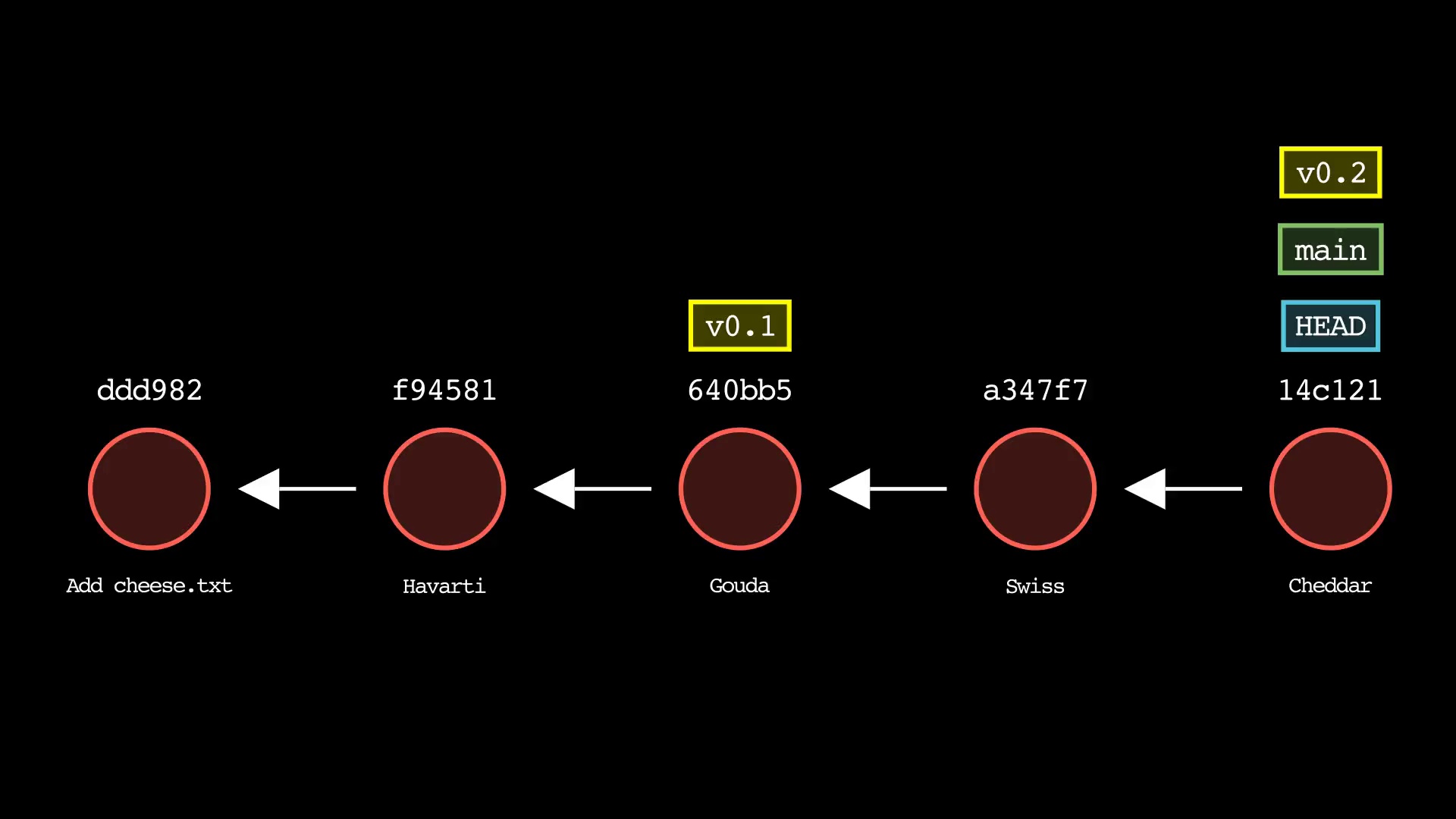
Usage: `git-sim tag <new tag name>`
|
|
420
|
+
|
|
421
|
+
- Specify `<new tag name>` as the name of the new tag to simulate creation of
|
|
422
|
+
- Simulated output will show the newly create tag ref along with most recent 5 commits on the active branch
|
|
423
|
+
|
|
424
|
+
|
|
382
425
|
|
|
383
426
|
## Video animation examples
|
|
384
427
|
```console
|