gingertea 0.1.0__tar.gz
This diff represents the content of publicly available package versions that have been released to one of the supported registries. The information contained in this diff is provided for informational purposes only and reflects changes between package versions as they appear in their respective public registries.
- gingertea-0.1.0/LICENSE +22 -0
- gingertea-0.1.0/PKG-INFO +214 -0
- gingertea-0.1.0/README.md +187 -0
- gingertea-0.1.0/pyproject.toml +74 -0
- gingertea-0.1.0/pyproject.toml.orig +59 -0
- gingertea-0.1.0/src/gingertea/__init__.py +15 -0
- gingertea-0.1.0/src/gingertea/__main__.py +5 -0
- gingertea-0.1.0/src/gingertea/app.py +45 -0
- gingertea-0.1.0/src/gingertea/assets/cup.png +0 -0
- gingertea-0.1.0/src/gingertea/cli.py +100 -0
- gingertea-0.1.0/src/gingertea/config.py +67 -0
- gingertea-0.1.0/src/gingertea/engine/__init__.py +0 -0
- gingertea-0.1.0/src/gingertea/engine/deps.py +213 -0
- gingertea-0.1.0/src/gingertea/engine/errors.py +130 -0
- gingertea-0.1.0/src/gingertea/engine/local.py +1033 -0
- gingertea-0.1.0/src/gingertea/engine/options.py +204 -0
- gingertea-0.1.0/src/gingertea/engine/probe.py +118 -0
- gingertea-0.1.0/src/gingertea/engine/runner.py +174 -0
- gingertea-0.1.0/src/gingertea/engine/update.py +144 -0
- gingertea-0.1.0/src/gingertea/logo.py +59 -0
- gingertea-0.1.0/src/gingertea/py.typed +0 -0
- gingertea-0.1.0/src/gingertea/screens/__init__.py +0 -0
- gingertea-0.1.0/src/gingertea/screens/convert.py +240 -0
- gingertea-0.1.0/src/gingertea/screens/files.py +420 -0
- gingertea-0.1.0/src/gingertea/screens/main.py +635 -0
- gingertea-0.1.0/src/gingertea/screens/settings.py +143 -0
- gingertea-0.1.0/src/gingertea/screens/sites.py +100 -0
- gingertea-0.1.0/src/gingertea/styles.tcss +585 -0
- gingertea-0.1.0/src/gingertea/theme.py +104 -0
- gingertea-0.1.0/src/gingertea/widgets/__init__.py +0 -0
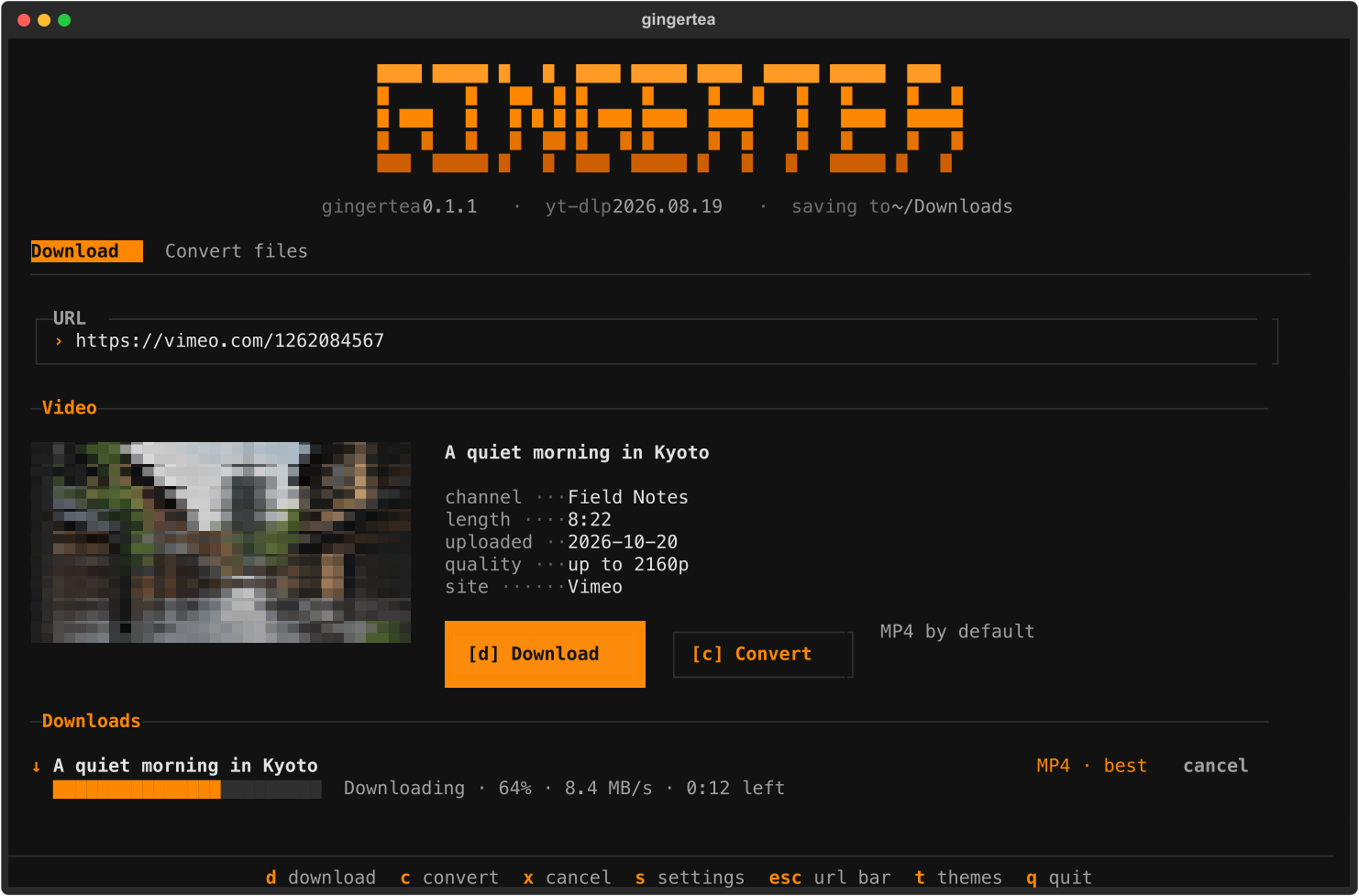
- gingertea-0.1.0/src/gingertea/widgets/queue.py +254 -0
- gingertea-0.1.0/src/gingertea/widgets/thumbnail.py +58 -0
- gingertea-0.1.0/src/gingertea/widgets/video_card.py +120 -0
gingertea-0.1.0/LICENSE
ADDED
|
@@ -0,0 +1,22 @@
|
|
|
1
|
+
MIT License
|
|
2
|
+
|
|
3
|
+
Copyright (c) 2026 Yore Des
|
|
4
|
+
Copyright (c) 2026 OrbitCord
|
|
5
|
+
|
|
6
|
+
Permission is hereby granted, free of charge, to any person obtaining a copy
|
|
7
|
+
of this software and associated documentation files (the "Software"), to deal
|
|
8
|
+
in the Software without restriction, including without limitation the rights
|
|
9
|
+
to use, copy, modify, merge, publish, distribute, sublicense, and/or sell
|
|
10
|
+
copies of the Software, and to permit persons to whom the Software is
|
|
11
|
+
furnished to do so, subject to the following conditions:
|
|
12
|
+
|
|
13
|
+
The above copyright notice and this permission notice shall be included in all
|
|
14
|
+
copies or substantial portions of the Software.
|
|
15
|
+
|
|
16
|
+
THE SOFTWARE IS PROVIDED "AS IS", WITHOUT WARRANTY OF ANY KIND, EXPRESS OR
|
|
17
|
+
IMPLIED, INCLUDING BUT NOT LIMITED TO THE WARRANTIES OF MERCHANTABILITY,
|
|
18
|
+
FITNESS FOR A PARTICULAR PURPOSE AND NONINFRINGEMENT. IN NO EVENT SHALL THE
|
|
19
|
+
AUTHORS OR COPYRIGHT HOLDERS BE LIABLE FOR ANY CLAIM, DAMAGES OR OTHER
|
|
20
|
+
LIABILITY, WHETHER IN AN ACTION OF CONTRACT, TORT OR OTHERWISE, ARISING FROM,
|
|
21
|
+
OUT OF OR IN CONNECTION WITH THE SOFTWARE OR THE USE OR OTHER DEALINGS IN THE
|
|
22
|
+
SOFTWARE.
|
gingertea-0.1.0/PKG-INFO
ADDED
|
@@ -0,0 +1,214 @@
|
|
|
1
|
+
Metadata-Version: 2.4
|
|
2
|
+
Name: gingertea
|
|
3
|
+
Version: 0.1.0
|
|
4
|
+
Summary: Download and convert videos from YouTube and 1,300+ other sites in your terminal. Runs on yt-dlp.
|
|
5
|
+
Keywords: youtube,yt-dlp,downloader,tui,terminal,converter,mp3
|
|
6
|
+
Author: OrbitCord
|
|
7
|
+
Author-email: OrbitCord <orbitcord@gmail.com>
|
|
8
|
+
License-Expression: MIT
|
|
9
|
+
License-File: LICENSE
|
|
10
|
+
Classifier: Environment :: Console
|
|
11
|
+
Classifier: Operating System :: OS Independent
|
|
12
|
+
Classifier: Programming Language :: Python :: 3
|
|
13
|
+
Classifier: Topic :: Multimedia :: Video
|
|
14
|
+
Requires-Dist: yt-dlp[default]>=2026.8.19
|
|
15
|
+
Requires-Dist: textual>=8.2
|
|
16
|
+
Requires-Dist: pillow>=10
|
|
17
|
+
Requires-Dist: platformdirs>=4
|
|
18
|
+
Requires-Dist: tomli-w>=1.0
|
|
19
|
+
Requires-Dist: tomli>=2.0 ; python_full_version < '3.11'
|
|
20
|
+
Requires-Dist: deno>=2.0
|
|
21
|
+
Requires-Dist: pillow-heif>=0.18
|
|
22
|
+
Requires-Dist: pillow-jxl-plugin>=1.3
|
|
23
|
+
Requires-Python: >=3.10
|
|
24
|
+
Project-URL: Homepage, https://github.com/orbitcord/gingertea
|
|
25
|
+
Project-URL: Issues, https://github.com/orbitcord/gingertea/issues
|
|
26
|
+
Description-Content-Type: text/markdown
|
|
27
|
+
|
|
28
|
+
# gingertea
|
|
29
|
+
|
|
30
|
+
Download videos and audio in your terminal. Convert local media files in batches.
|
|
31
|
+
|
|
32
|
+
Paste a link, press `d` to save an MP4, or press `c` to choose a format and quality.
|
|
33
|
+
gingertea uses [yt-dlp](https://github.com/yt-dlp/yt-dlp),
|
|
34
|
+
[ffmpeg](https://ffmpeg.org), and [Textual](https://textual.textualize.io/).
|
|
35
|
+
|
|
36
|
+
|
|
37
|
+
|
|
38
|
+
## Install
|
|
39
|
+
|
|
40
|
+
On macOS or Linux:
|
|
41
|
+
|
|
42
|
+
```sh
|
|
43
|
+
curl -LsSf https://raw.githubusercontent.com/orbitcord/gingertea/main/install.sh | sh
|
|
44
|
+
```
|
|
45
|
+
|
|
46
|
+
On Windows, run this in PowerShell:
|
|
47
|
+
|
|
48
|
+
```powershell
|
|
49
|
+
powershell -ExecutionPolicy ByPass -c "irm https://raw.githubusercontent.com/orbitcord/gingertea/main/install.ps1 | iex"
|
|
50
|
+
```
|
|
51
|
+
|
|
52
|
+
The installer sets up uv, Python, gingertea, and ffmpeg. Set
|
|
53
|
+
`GINGERTEA_NO_FFMPEG=1` to skip the ffmpeg download. The app can fetch it later.
|
|
54
|
+
|
|
55
|
+
If you already use uv or pipx:
|
|
56
|
+
|
|
57
|
+
```sh
|
|
58
|
+
uv tool install gingertea
|
|
59
|
+
# Or, with Python 3.10 or newer:
|
|
60
|
+
pipx install gingertea
|
|
61
|
+
```
|
|
62
|
+
|
|
63
|
+
To install the current GitHub version:
|
|
64
|
+
|
|
65
|
+
```sh
|
|
66
|
+
uv tool install git+https://github.com/orbitcord/gingertea
|
|
67
|
+
```
|
|
68
|
+
|
|
69
|
+
## Use
|
|
70
|
+
|
|
71
|
+
```sh
|
|
72
|
+
gingertea # Open the app
|
|
73
|
+
gingertea <url> # Load a video link
|
|
74
|
+
gingertea <file> # Add a local file to Convert files
|
|
75
|
+
gingertea setup # Download ffmpeg and check available formats
|
|
76
|
+
gingertea update # Update yt-dlp
|
|
77
|
+
gingertea --version
|
|
78
|
+
```
|
|
79
|
+
|
|
80
|
+
Download and Convert files have separate queues. Each queue runs one job at a time.
|
|
81
|
+
You can add another link while a download runs.
|
|
82
|
+
|
|
83
|
+
### Keyboard controls
|
|
84
|
+
|
|
85
|
+
Press `Tab` to leave the input field before using letter or number shortcuts.
|
|
86
|
+
The footer also has clickable shortcuts.
|
|
87
|
+
|
|
88
|
+
| Key | Action |
|
|
89
|
+
| --- | --- |
|
|
90
|
+
| `1` | Open Download |
|
|
91
|
+
| `2` | Open Convert files |
|
|
92
|
+
| `3` or `s` | Open Settings |
|
|
93
|
+
| `4` or `l` | Search supported sites |
|
|
94
|
+
| `ctrl+t` | Switch between Download and Convert files |
|
|
95
|
+
| `d` | Download the loaded video as MP4 |
|
|
96
|
+
| `c` | Choose a format and quality |
|
|
97
|
+
| `f` | Browse local files |
|
|
98
|
+
| `r` | Remove the selected local file |
|
|
99
|
+
| `x` | Cancel the current job |
|
|
100
|
+
| `o` | Reveal the last saved file |
|
|
101
|
+
| `u` | Update yt-dlp |
|
|
102
|
+
| `t` | Choose a theme |
|
|
103
|
+
| `esc` | Focus the current input field |
|
|
104
|
+
| `q` | Quit |
|
|
105
|
+
|
|
106
|
+
The sidebar collapses in narrow terminals. The input, media actions, queue, and
|
|
107
|
+
keyboard controls remain available.
|
|
108
|
+
|
|
109
|
+
### Download formats
|
|
110
|
+
|
|
111
|
+
| Media | Formats |
|
|
112
|
+
| --- | --- |
|
|
113
|
+
| Video | MP4, MKV, WebM, MOV, GIF |
|
|
114
|
+
| Audio | MP3, M4A, Opus, FLAC, WAV, OGG |
|
|
115
|
+
|
|
116
|
+
The quality picker lists the resolutions available for the loaded video.
|
|
117
|
+
The default MP4 choice selects H.264 for compatibility. YouTube usually limits H.264
|
|
118
|
+
to 1080p. Higher MP4 resolutions may contain VP9 or AV1 and need a compatible player.
|
|
119
|
+
|
|
120
|
+
Downloads go to your Downloads folder. Change the folder in Settings.
|
|
121
|
+
Existing files keep their names. A new download gets a numbered suffix if needed.
|
|
122
|
+
|
|
123
|
+
### Convert local files
|
|
124
|
+
|
|
125
|
+
Open Convert files. Drop files into the terminal, paste their paths, or press `f`
|
|
126
|
+
to browse. Press `c` to select an output format. You can mix video, audio, and images
|
|
127
|
+
in one batch. The dialog shows which files the selection applies to.
|
|
128
|
+
|
|
129
|
+
| Media | Formats |
|
|
130
|
+
| --- | --- |
|
|
131
|
+
| Video | MP4, MKV, WebM, MOV, M4V, AVI, TS, FLV, WMV, MPG, 3GP, OGV, GIF, animated PNG, animated WebP |
|
|
132
|
+
| Audio | MP3, M4A, AAC, Opus, OGG, FLAC, ALAC, WAV, AIFF, WMA, AC3, E-AC3, MP2, WavPack, TTA, CAF, AU, MKA |
|
|
133
|
+
| Image | JPG, PNG, WebP, AVIF, JPEG XL, HEIC, JPEG 2000, TIFF, BMP, GIF, TGA, QOI, EXR, HDR, PPM, PCX, SGI, DPX |
|
|
134
|
+
|
|
135
|
+
The Frames tab exports video frames to a folder of images. Converted files go next
|
|
136
|
+
to each original. gingertea leaves the original file unchanged. When the streams
|
|
137
|
+
fit the output format, it copies them without re-encoding. The dialog explains
|
|
138
|
+
whether the selected conversion will copy or re-encode.
|
|
139
|
+
|
|
140
|
+
Some formats need codecs that your ffmpeg build may lack. Unavailable formats stay
|
|
141
|
+
visible with a note about the missing codec. Pillow plugins handle HEIC and JPEG XL.
|
|
142
|
+
|
|
143
|
+
### Themes
|
|
144
|
+
|
|
145
|
+
Tea House is the default light theme. Press `t` or click Change theme to choose
|
|
146
|
+
Matcha, Earl Grey, Masala Chai, Hibiscus, the original gingertea dark and light
|
|
147
|
+
palettes, or a built-in Textual theme. gingertea saves your choice.
|
|
148
|
+
|
|
149
|
+
The cup uses the selected icon asset, rendered with Unicode quadrant cells. It does
|
|
150
|
+
not need Sixel or Kitty graphics support. Its colors follow the theme.
|
|
151
|
+
|
|
152
|
+
### Videos that require a login
|
|
153
|
+
|
|
154
|
+
For age-restricted or members-only videos, choose a browser in Settings where
|
|
155
|
+
you are signed in to the site. gingertea reads its cookies through yt-dlp.
|
|
156
|
+
Cookies remain off until you choose a browser. macOS may show a Keychain prompt.
|
|
157
|
+
|
|
158
|
+
If a site blocks a download, update yt-dlp with `u` and try again. Browser cookies
|
|
159
|
+
may help with authentication errors. The Sites screen can check whether yt-dlp
|
|
160
|
+
has a dedicated extractor for a link.
|
|
161
|
+
|
|
162
|
+
### Settings and updates
|
|
163
|
+
|
|
164
|
+
Settings live in these locations:
|
|
165
|
+
|
|
166
|
+
| Platform | File |
|
|
167
|
+
| --- | --- |
|
|
168
|
+
| macOS | `~/Library/Application Support/gingertea/config.toml` |
|
|
169
|
+
| Linux | `~/.config/gingertea/config.toml` |
|
|
170
|
+
| Windows | `%LOCALAPPDATA%\gingertea\config.toml` |
|
|
171
|
+
|
|
172
|
+
gingertea checks for newer yt-dlp and gingertea releases at startup. With a uv tool
|
|
173
|
+
or pipx install, it can update itself after you quit. Set
|
|
174
|
+
`GINGERTEA_NO_AUTO_UPDATE=1` to disable that behavior.
|
|
175
|
+
|
|
176
|
+
## Development
|
|
177
|
+
|
|
178
|
+
```sh
|
|
179
|
+
git clone https://github.com/orbitcord/gingertea
|
|
180
|
+
cd gingertea
|
|
181
|
+
uv sync --locked
|
|
182
|
+
uv run gingertea
|
|
183
|
+
uv run pytest -q
|
|
184
|
+
uv run ruff check src tests
|
|
185
|
+
uv run ruff format --check src tests
|
|
186
|
+
uv build --no-sources
|
|
187
|
+
```
|
|
188
|
+
|
|
189
|
+
The default tests replace network downloads with fakes. Set `GINGERTEA_LIVE=1` to
|
|
190
|
+
include tests that download real videos.
|
|
191
|
+
|
|
192
|
+
For a release, update the version in `pyproject.toml`, run `uv lock`, and push a
|
|
193
|
+
matching `vX.Y.Z` tag. Configure PyPI Trusted Publishing for owner `orbitcord`,
|
|
194
|
+
repository `gingertea`, workflow `release.yml`, and environment `pypi` first.
|
|
195
|
+
The release workflow runs checks, builds the package, publishes it, and creates a
|
|
196
|
+
GitHub release.
|
|
197
|
+
|
|
198
|
+
## Uninstall
|
|
199
|
+
|
|
200
|
+
```sh
|
|
201
|
+
uv tool uninstall gingertea
|
|
202
|
+
# Or:
|
|
203
|
+
pipx uninstall gingertea
|
|
204
|
+
```
|
|
205
|
+
|
|
206
|
+
The cached ffmpeg binary stays outside the Python environment. To remove it,
|
|
207
|
+
delete the gingertea data directory. On macOS it is
|
|
208
|
+
`~/Library/Application Support/gingertea/ffmpeg`. On Linux it is
|
|
209
|
+
`~/.local/share/gingertea/ffmpeg`. On Windows it is
|
|
210
|
+
`%LOCALAPPDATA%\gingertea\ffmpeg`.
|
|
211
|
+
|
|
212
|
+
## License
|
|
213
|
+
|
|
214
|
+
MIT. The source copyright notices remain in [LICENSE](LICENSE).
|
|
@@ -0,0 +1,187 @@
|
|
|
1
|
+
# gingertea
|
|
2
|
+
|
|
3
|
+
Download videos and audio in your terminal. Convert local media files in batches.
|
|
4
|
+
|
|
5
|
+
Paste a link, press `d` to save an MP4, or press `c` to choose a format and quality.
|
|
6
|
+
gingertea uses [yt-dlp](https://github.com/yt-dlp/yt-dlp),
|
|
7
|
+
[ffmpeg](https://ffmpeg.org), and [Textual](https://textual.textualize.io/).
|
|
8
|
+
|
|
9
|
+

|
|
10
|
+
|
|
11
|
+
## Install
|
|
12
|
+
|
|
13
|
+
On macOS or Linux:
|
|
14
|
+
|
|
15
|
+
```sh
|
|
16
|
+
curl -LsSf https://raw.githubusercontent.com/orbitcord/gingertea/main/install.sh | sh
|
|
17
|
+
```
|
|
18
|
+
|
|
19
|
+
On Windows, run this in PowerShell:
|
|
20
|
+
|
|
21
|
+
```powershell
|
|
22
|
+
powershell -ExecutionPolicy ByPass -c "irm https://raw.githubusercontent.com/orbitcord/gingertea/main/install.ps1 | iex"
|
|
23
|
+
```
|
|
24
|
+
|
|
25
|
+
The installer sets up uv, Python, gingertea, and ffmpeg. Set
|
|
26
|
+
`GINGERTEA_NO_FFMPEG=1` to skip the ffmpeg download. The app can fetch it later.
|
|
27
|
+
|
|
28
|
+
If you already use uv or pipx:
|
|
29
|
+
|
|
30
|
+
```sh
|
|
31
|
+
uv tool install gingertea
|
|
32
|
+
# Or, with Python 3.10 or newer:
|
|
33
|
+
pipx install gingertea
|
|
34
|
+
```
|
|
35
|
+
|
|
36
|
+
To install the current GitHub version:
|
|
37
|
+
|
|
38
|
+
```sh
|
|
39
|
+
uv tool install git+https://github.com/orbitcord/gingertea
|
|
40
|
+
```
|
|
41
|
+
|
|
42
|
+
## Use
|
|
43
|
+
|
|
44
|
+
```sh
|
|
45
|
+
gingertea # Open the app
|
|
46
|
+
gingertea <url> # Load a video link
|
|
47
|
+
gingertea <file> # Add a local file to Convert files
|
|
48
|
+
gingertea setup # Download ffmpeg and check available formats
|
|
49
|
+
gingertea update # Update yt-dlp
|
|
50
|
+
gingertea --version
|
|
51
|
+
```
|
|
52
|
+
|
|
53
|
+
Download and Convert files have separate queues. Each queue runs one job at a time.
|
|
54
|
+
You can add another link while a download runs.
|
|
55
|
+
|
|
56
|
+
### Keyboard controls
|
|
57
|
+
|
|
58
|
+
Press `Tab` to leave the input field before using letter or number shortcuts.
|
|
59
|
+
The footer also has clickable shortcuts.
|
|
60
|
+
|
|
61
|
+
| Key | Action |
|
|
62
|
+
| --- | --- |
|
|
63
|
+
| `1` | Open Download |
|
|
64
|
+
| `2` | Open Convert files |
|
|
65
|
+
| `3` or `s` | Open Settings |
|
|
66
|
+
| `4` or `l` | Search supported sites |
|
|
67
|
+
| `ctrl+t` | Switch between Download and Convert files |
|
|
68
|
+
| `d` | Download the loaded video as MP4 |
|
|
69
|
+
| `c` | Choose a format and quality |
|
|
70
|
+
| `f` | Browse local files |
|
|
71
|
+
| `r` | Remove the selected local file |
|
|
72
|
+
| `x` | Cancel the current job |
|
|
73
|
+
| `o` | Reveal the last saved file |
|
|
74
|
+
| `u` | Update yt-dlp |
|
|
75
|
+
| `t` | Choose a theme |
|
|
76
|
+
| `esc` | Focus the current input field |
|
|
77
|
+
| `q` | Quit |
|
|
78
|
+
|
|
79
|
+
The sidebar collapses in narrow terminals. The input, media actions, queue, and
|
|
80
|
+
keyboard controls remain available.
|
|
81
|
+
|
|
82
|
+
### Download formats
|
|
83
|
+
|
|
84
|
+
| Media | Formats |
|
|
85
|
+
| --- | --- |
|
|
86
|
+
| Video | MP4, MKV, WebM, MOV, GIF |
|
|
87
|
+
| Audio | MP3, M4A, Opus, FLAC, WAV, OGG |
|
|
88
|
+
|
|
89
|
+
The quality picker lists the resolutions available for the loaded video.
|
|
90
|
+
The default MP4 choice selects H.264 for compatibility. YouTube usually limits H.264
|
|
91
|
+
to 1080p. Higher MP4 resolutions may contain VP9 or AV1 and need a compatible player.
|
|
92
|
+
|
|
93
|
+
Downloads go to your Downloads folder. Change the folder in Settings.
|
|
94
|
+
Existing files keep their names. A new download gets a numbered suffix if needed.
|
|
95
|
+
|
|
96
|
+
### Convert local files
|
|
97
|
+
|
|
98
|
+
Open Convert files. Drop files into the terminal, paste their paths, or press `f`
|
|
99
|
+
to browse. Press `c` to select an output format. You can mix video, audio, and images
|
|
100
|
+
in one batch. The dialog shows which files the selection applies to.
|
|
101
|
+
|
|
102
|
+
| Media | Formats |
|
|
103
|
+
| --- | --- |
|
|
104
|
+
| Video | MP4, MKV, WebM, MOV, M4V, AVI, TS, FLV, WMV, MPG, 3GP, OGV, GIF, animated PNG, animated WebP |
|
|
105
|
+
| Audio | MP3, M4A, AAC, Opus, OGG, FLAC, ALAC, WAV, AIFF, WMA, AC3, E-AC3, MP2, WavPack, TTA, CAF, AU, MKA |
|
|
106
|
+
| Image | JPG, PNG, WebP, AVIF, JPEG XL, HEIC, JPEG 2000, TIFF, BMP, GIF, TGA, QOI, EXR, HDR, PPM, PCX, SGI, DPX |
|
|
107
|
+
|
|
108
|
+
The Frames tab exports video frames to a folder of images. Converted files go next
|
|
109
|
+
to each original. gingertea leaves the original file unchanged. When the streams
|
|
110
|
+
fit the output format, it copies them without re-encoding. The dialog explains
|
|
111
|
+
whether the selected conversion will copy or re-encode.
|
|
112
|
+
|
|
113
|
+
Some formats need codecs that your ffmpeg build may lack. Unavailable formats stay
|
|
114
|
+
visible with a note about the missing codec. Pillow plugins handle HEIC and JPEG XL.
|
|
115
|
+
|
|
116
|
+
### Themes
|
|
117
|
+
|
|
118
|
+
Tea House is the default light theme. Press `t` or click Change theme to choose
|
|
119
|
+
Matcha, Earl Grey, Masala Chai, Hibiscus, the original gingertea dark and light
|
|
120
|
+
palettes, or a built-in Textual theme. gingertea saves your choice.
|
|
121
|
+
|
|
122
|
+
The cup uses the selected icon asset, rendered with Unicode quadrant cells. It does
|
|
123
|
+
not need Sixel or Kitty graphics support. Its colors follow the theme.
|
|
124
|
+
|
|
125
|
+
### Videos that require a login
|
|
126
|
+
|
|
127
|
+
For age-restricted or members-only videos, choose a browser in Settings where
|
|
128
|
+
you are signed in to the site. gingertea reads its cookies through yt-dlp.
|
|
129
|
+
Cookies remain off until you choose a browser. macOS may show a Keychain prompt.
|
|
130
|
+
|
|
131
|
+
If a site blocks a download, update yt-dlp with `u` and try again. Browser cookies
|
|
132
|
+
may help with authentication errors. The Sites screen can check whether yt-dlp
|
|
133
|
+
has a dedicated extractor for a link.
|
|
134
|
+
|
|
135
|
+
### Settings and updates
|
|
136
|
+
|
|
137
|
+
Settings live in these locations:
|
|
138
|
+
|
|
139
|
+
| Platform | File |
|
|
140
|
+
| --- | --- |
|
|
141
|
+
| macOS | `~/Library/Application Support/gingertea/config.toml` |
|
|
142
|
+
| Linux | `~/.config/gingertea/config.toml` |
|
|
143
|
+
| Windows | `%LOCALAPPDATA%\gingertea\config.toml` |
|
|
144
|
+
|
|
145
|
+
gingertea checks for newer yt-dlp and gingertea releases at startup. With a uv tool
|
|
146
|
+
or pipx install, it can update itself after you quit. Set
|
|
147
|
+
`GINGERTEA_NO_AUTO_UPDATE=1` to disable that behavior.
|
|
148
|
+
|
|
149
|
+
## Development
|
|
150
|
+
|
|
151
|
+
```sh
|
|
152
|
+
git clone https://github.com/orbitcord/gingertea
|
|
153
|
+
cd gingertea
|
|
154
|
+
uv sync --locked
|
|
155
|
+
uv run gingertea
|
|
156
|
+
uv run pytest -q
|
|
157
|
+
uv run ruff check src tests
|
|
158
|
+
uv run ruff format --check src tests
|
|
159
|
+
uv build --no-sources
|
|
160
|
+
```
|
|
161
|
+
|
|
162
|
+
The default tests replace network downloads with fakes. Set `GINGERTEA_LIVE=1` to
|
|
163
|
+
include tests that download real videos.
|
|
164
|
+
|
|
165
|
+
For a release, update the version in `pyproject.toml`, run `uv lock`, and push a
|
|
166
|
+
matching `vX.Y.Z` tag. Configure PyPI Trusted Publishing for owner `orbitcord`,
|
|
167
|
+
repository `gingertea`, workflow `release.yml`, and environment `pypi` first.
|
|
168
|
+
The release workflow runs checks, builds the package, publishes it, and creates a
|
|
169
|
+
GitHub release.
|
|
170
|
+
|
|
171
|
+
## Uninstall
|
|
172
|
+
|
|
173
|
+
```sh
|
|
174
|
+
uv tool uninstall gingertea
|
|
175
|
+
# Or:
|
|
176
|
+
pipx uninstall gingertea
|
|
177
|
+
```
|
|
178
|
+
|
|
179
|
+
The cached ffmpeg binary stays outside the Python environment. To remove it,
|
|
180
|
+
delete the gingertea data directory. On macOS it is
|
|
181
|
+
`~/Library/Application Support/gingertea/ffmpeg`. On Linux it is
|
|
182
|
+
`~/.local/share/gingertea/ffmpeg`. On Windows it is
|
|
183
|
+
`%LOCALAPPDATA%\gingertea\ffmpeg`.
|
|
184
|
+
|
|
185
|
+
## License
|
|
186
|
+
|
|
187
|
+
MIT. The source copyright notices remain in [LICENSE](LICENSE).
|
|
@@ -0,0 +1,74 @@
|
|
|
1
|
+
[project]
|
|
2
|
+
name = "gingertea"
|
|
3
|
+
version = "0.1.0"
|
|
4
|
+
description = "Download and convert videos from YouTube and 1,300+ other sites in your terminal. Runs on yt-dlp."
|
|
5
|
+
readme = "README.md"
|
|
6
|
+
license = "MIT"
|
|
7
|
+
license-files = ["LICENSE"]
|
|
8
|
+
requires-python = ">=3.10"
|
|
9
|
+
keywords = [
|
|
10
|
+
"youtube",
|
|
11
|
+
"yt-dlp",
|
|
12
|
+
"downloader",
|
|
13
|
+
"tui",
|
|
14
|
+
"terminal",
|
|
15
|
+
"converter",
|
|
16
|
+
"mp3",
|
|
17
|
+
]
|
|
18
|
+
classifiers = [
|
|
19
|
+
"Environment :: Console",
|
|
20
|
+
"Operating System :: OS Independent",
|
|
21
|
+
"Programming Language :: Python :: 3",
|
|
22
|
+
"Topic :: Multimedia :: Video",
|
|
23
|
+
]
|
|
24
|
+
dependencies = [
|
|
25
|
+
"yt-dlp[default]>=2026.8.19",
|
|
26
|
+
"textual>=8.2",
|
|
27
|
+
"pillow>=10",
|
|
28
|
+
"platformdirs>=4",
|
|
29
|
+
"tomli-w>=1.0",
|
|
30
|
+
"tomli>=2.0; python_version < '3.11'",
|
|
31
|
+
"deno>=2.0",
|
|
32
|
+
"pillow-heif>=0.18",
|
|
33
|
+
"pillow-jxl-plugin>=1.3",
|
|
34
|
+
]
|
|
35
|
+
|
|
36
|
+
[[project.authors]]
|
|
37
|
+
name = "OrbitCord"
|
|
38
|
+
email = "orbitcord@gmail.com"
|
|
39
|
+
|
|
40
|
+
[project.urls]
|
|
41
|
+
Homepage = "https://github.com/orbitcord/gingertea"
|
|
42
|
+
Issues = "https://github.com/orbitcord/gingertea/issues"
|
|
43
|
+
|
|
44
|
+
[project.scripts]
|
|
45
|
+
gingertea = "gingertea.cli:main"
|
|
46
|
+
|
|
47
|
+
[dependency-groups]
|
|
48
|
+
dev = [
|
|
49
|
+
"pytest>=8",
|
|
50
|
+
"pytest-asyncio>=0.24",
|
|
51
|
+
"ruff>=0.6",
|
|
52
|
+
]
|
|
53
|
+
|
|
54
|
+
[build-system]
|
|
55
|
+
requires = ["uv_build>=0.11.23,<0.12.0"]
|
|
56
|
+
build-backend = "uv_build"
|
|
57
|
+
|
|
58
|
+
[tool.ruff]
|
|
59
|
+
line-length = 100
|
|
60
|
+
target-version = "py310"
|
|
61
|
+
|
|
62
|
+
[tool.ruff.lint]
|
|
63
|
+
select = [
|
|
64
|
+
"E",
|
|
65
|
+
"F",
|
|
66
|
+
"I",
|
|
67
|
+
"B",
|
|
68
|
+
"UP",
|
|
69
|
+
]
|
|
70
|
+
ignore = ["E501"]
|
|
71
|
+
|
|
72
|
+
[tool.pytest.ini_options]
|
|
73
|
+
asyncio_mode = "auto"
|
|
74
|
+
testpaths = ["tests"]
|
|
@@ -0,0 +1,59 @@
|
|
|
1
|
+
[project]
|
|
2
|
+
name = "gingertea"
|
|
3
|
+
version = "0.1.0"
|
|
4
|
+
description = "Download and convert videos from YouTube and 1,300+ other sites in your terminal. Runs on yt-dlp."
|
|
5
|
+
readme = "README.md"
|
|
6
|
+
license = "MIT"
|
|
7
|
+
license-files = ["LICENSE"]
|
|
8
|
+
authors = [
|
|
9
|
+
{ name = "OrbitCord", email = "orbitcord@gmail.com" }
|
|
10
|
+
]
|
|
11
|
+
requires-python = ">=3.10"
|
|
12
|
+
keywords = ["youtube", "yt-dlp", "downloader", "tui", "terminal", "converter", "mp3"]
|
|
13
|
+
classifiers = [
|
|
14
|
+
"Environment :: Console",
|
|
15
|
+
"Operating System :: OS Independent",
|
|
16
|
+
"Programming Language :: Python :: 3",
|
|
17
|
+
"Topic :: Multimedia :: Video",
|
|
18
|
+
]
|
|
19
|
+
dependencies = [
|
|
20
|
+
"yt-dlp[default]>=2026.8.19",
|
|
21
|
+
"textual>=8.2",
|
|
22
|
+
"pillow>=10",
|
|
23
|
+
"platformdirs>=4",
|
|
24
|
+
"tomli-w>=1.0",
|
|
25
|
+
"tomli>=2.0; python_version < '3.11'",
|
|
26
|
+
"deno>=2.0",
|
|
27
|
+
"pillow-heif>=0.18",
|
|
28
|
+
"pillow-jxl-plugin>=1.3",
|
|
29
|
+
]
|
|
30
|
+
|
|
31
|
+
[project.urls]
|
|
32
|
+
Homepage = "https://github.com/orbitcord/gingertea"
|
|
33
|
+
Issues = "https://github.com/orbitcord/gingertea/issues"
|
|
34
|
+
|
|
35
|
+
[project.scripts]
|
|
36
|
+
gingertea = "gingertea.cli:main"
|
|
37
|
+
|
|
38
|
+
[dependency-groups]
|
|
39
|
+
dev = [
|
|
40
|
+
"pytest>=8",
|
|
41
|
+
"pytest-asyncio>=0.24",
|
|
42
|
+
"ruff>=0.6",
|
|
43
|
+
]
|
|
44
|
+
|
|
45
|
+
[build-system]
|
|
46
|
+
requires = ["uv_build>=0.11.23,<0.12.0"]
|
|
47
|
+
build-backend = "uv_build"
|
|
48
|
+
|
|
49
|
+
[tool.ruff]
|
|
50
|
+
line-length = 100
|
|
51
|
+
target-version = "py310"
|
|
52
|
+
|
|
53
|
+
[tool.ruff.lint]
|
|
54
|
+
select = ["E", "F", "I", "B", "UP"]
|
|
55
|
+
ignore = ["E501"]
|
|
56
|
+
|
|
57
|
+
[tool.pytest.ini_options]
|
|
58
|
+
asyncio_mode = "auto"
|
|
59
|
+
testpaths = ["tests"]
|
|
@@ -0,0 +1,15 @@
|
|
|
1
|
+
"""gingertea: a terminal video downloader and converter built on yt-dlp."""
|
|
2
|
+
|
|
3
|
+
|
|
4
|
+
def __getattr__(name: str):
|
|
5
|
+
# Looked up on first use: importlib.metadata adds ~15 ms to every launch otherwise.
|
|
6
|
+
if name == "__version__":
|
|
7
|
+
from importlib.metadata import PackageNotFoundError, version
|
|
8
|
+
|
|
9
|
+
try:
|
|
10
|
+
value = version("gingertea")
|
|
11
|
+
except PackageNotFoundError: # pragma: no cover - running from a source tree
|
|
12
|
+
value = "0.0.0"
|
|
13
|
+
globals()["__version__"] = value
|
|
14
|
+
return value
|
|
15
|
+
raise AttributeError(f"module {__name__!r} has no attribute {name!r}")
|
|
@@ -0,0 +1,45 @@
|
|
|
1
|
+
"""The Textual application."""
|
|
2
|
+
|
|
3
|
+
from __future__ import annotations
|
|
4
|
+
|
|
5
|
+
from dataclasses import replace
|
|
6
|
+
|
|
7
|
+
from textual.app import App
|
|
8
|
+
|
|
9
|
+
from . import config
|
|
10
|
+
from .screens.main import MainScreen
|
|
11
|
+
from .theme import THEMES
|
|
12
|
+
|
|
13
|
+
|
|
14
|
+
class GingerTeaApp(App):
|
|
15
|
+
CSS_PATH = "styles.tcss"
|
|
16
|
+
TITLE = "gingertea"
|
|
17
|
+
ENABLE_COMMAND_PALETTE = True
|
|
18
|
+
|
|
19
|
+
def __init__(self, initial_url: str = "") -> None:
|
|
20
|
+
super().__init__()
|
|
21
|
+
self.initial_url = initial_url
|
|
22
|
+
# Set when PyPI has a newer gingertea; the CLI starts the upgrade after the app exits.
|
|
23
|
+
self.pending_app_update: str | None = None
|
|
24
|
+
self.settings = config.load()
|
|
25
|
+
|
|
26
|
+
def on_mount(self) -> None:
|
|
27
|
+
for theme in THEMES:
|
|
28
|
+
self.register_theme(theme)
|
|
29
|
+
saved = self.settings.theme
|
|
30
|
+
self.theme = saved if saved in self.available_themes else "tea-house"
|
|
31
|
+
self.theme_changed_signal.subscribe(self, self._remember_theme)
|
|
32
|
+
|
|
33
|
+
def _remember_theme(self, theme) -> None:
|
|
34
|
+
if theme.name != self.settings.theme:
|
|
35
|
+
self.save_settings(replace(self.settings, theme=theme.name))
|
|
36
|
+
|
|
37
|
+
def get_default_screen(self) -> MainScreen:
|
|
38
|
+
return MainScreen(self.initial_url)
|
|
39
|
+
|
|
40
|
+
def save_settings(self, settings: config.Settings) -> None:
|
|
41
|
+
self.settings = settings
|
|
42
|
+
try:
|
|
43
|
+
config.save(settings)
|
|
44
|
+
except OSError as exc:
|
|
45
|
+
self.notify(f"Couldn't save settings: {exc}", severity="error")
|
|
Binary file
|