gazeMapper 1.4.2__tar.gz → 1.4.4__tar.gz
This diff represents the content of publicly available package versions that have been released to one of the supported registries. The information contained in this diff is provided for informational purposes only and reflects changes between package versions as they appear in their respective public registries.
- {gazemapper-1.4.2/src/gazeMapper.egg-info → gazemapper-1.4.4}/PKG-INFO +67 -15
- {gazemapper-1.4.2 → gazemapper-1.4.4}/README.md +63 -11
- {gazemapper-1.4.2 → gazemapper-1.4.4}/requirements.txt +2 -3
- {gazemapper-1.4.2 → gazemapper-1.4.4}/src/gazeMapper/GUI/_impl/callbacks.py +27 -12
- {gazemapper-1.4.2 → gazemapper-1.4.4}/src/gazeMapper/GUI/_impl/gui.py +23 -22
- {gazemapper-1.4.2 → gazemapper-1.4.4}/src/gazeMapper/GUI/_impl/session_lister.py +3 -32
- {gazemapper-1.4.2 → gazemapper-1.4.4}/src/gazeMapper/GUI/_impl/settings_editor.py +6 -7
- {gazemapper-1.4.2 → gazemapper-1.4.4}/src/gazeMapper/config.py +24 -22
- {gazemapper-1.4.2 → gazemapper-1.4.4}/src/gazeMapper/episode.py +3 -3
- {gazemapper-1.4.2 → gazemapper-1.4.4}/src/gazeMapper/marker.py +5 -2
- {gazemapper-1.4.2 → gazemapper-1.4.4}/src/gazeMapper/process/__init__.py +14 -25
- {gazemapper-1.4.2 → gazemapper-1.4.4}/src/gazeMapper/process/auto_code_sync_points.py +2 -2
- {gazemapper-1.4.2 → gazemapper-1.4.4}/src/gazeMapper/process/auto_code_trials.py +2 -2
- {gazemapper-1.4.2 → gazemapper-1.4.4}/src/gazeMapper/process/code_episodes.py +3 -2
- {gazemapper-1.4.2 → gazemapper-1.4.4}/src/gazeMapper/process/detect_markers.py +2 -3
- {gazemapper-1.4.2 → gazemapper-1.4.4}/src/gazeMapper/process/export_trials.py +12 -4
- {gazemapper-1.4.2 → gazemapper-1.4.4}/src/gazeMapper/process/gaze_to_plane.py +2 -3
- {gazemapper-1.4.2 → gazemapper-1.4.4}/src/gazeMapper/process/make_gaze_overlay_video.py +3 -4
- {gazemapper-1.4.2 → gazemapper-1.4.4}/src/gazeMapper/process/make_mapped_gaze_video.py +8 -8
- {gazemapper-1.4.2 → gazemapper-1.4.4}/src/gazeMapper/process/run_validation.py +2 -3
- {gazemapper-1.4.2 → gazemapper-1.4.4}/src/gazeMapper/process/sync_et_to_cam.py +5 -7
- {gazemapper-1.4.2 → gazemapper-1.4.4}/src/gazeMapper/process/sync_to_ref.py +2 -2
- {gazemapper-1.4.2 → gazemapper-1.4.4}/src/gazeMapper/session.py +15 -15
- {gazemapper-1.4.2 → gazemapper-1.4.4}/src/gazeMapper/synchronization.py +3 -3
- {gazemapper-1.4.2 → gazemapper-1.4.4}/src/gazeMapper/version.py +1 -1
- {gazemapper-1.4.2 → gazemapper-1.4.4/src/gazeMapper.egg-info}/PKG-INFO +67 -15
- {gazemapper-1.4.2 → gazemapper-1.4.4}/src/gazeMapper.egg-info/SOURCES.txt +0 -2
- {gazemapper-1.4.2 → gazemapper-1.4.4}/src/gazeMapper.egg-info/requires.txt +1 -2
- gazemapper-1.4.2/src/gazeMapper/GUI/_impl/colors.py +0 -11
- gazemapper-1.4.2/src/gazeMapper/GUI/_impl/process_pool.py +0 -281
- {gazemapper-1.4.2 → gazemapper-1.4.4}/LICENSE +0 -0
- {gazemapper-1.4.2 → gazemapper-1.4.4}/MANIFEST.in +0 -0
- {gazemapper-1.4.2 → gazemapper-1.4.4}/pyproject.toml +0 -0
- {gazemapper-1.4.2 → gazemapper-1.4.4}/setup.cfg +0 -0
- {gazemapper-1.4.2 → gazemapper-1.4.4}/setup.py +0 -0
- {gazemapper-1.4.2 → gazemapper-1.4.4}/src/gazeMapper/GUI/__init__.py +0 -0
- {gazemapper-1.4.2 → gazemapper-1.4.4}/src/gazeMapper/GUI/_impl/__init__.py +0 -0
- {gazemapper-1.4.2 → gazemapper-1.4.4}/src/gazeMapper/GUI/_impl/image_helper.py +0 -0
- {gazemapper-1.4.2 → gazemapper-1.4.4}/src/gazeMapper/GUI/_impl/utils.py +0 -0
- {gazemapper-1.4.2 → gazemapper-1.4.4}/src/gazeMapper/__init__.py +0 -0
- {gazemapper-1.4.2 → gazemapper-1.4.4}/src/gazeMapper/naming.py +0 -0
- {gazemapper-1.4.2 → gazemapper-1.4.4}/src/gazeMapper/plane.py +0 -0
- {gazemapper-1.4.2 → gazemapper-1.4.4}/src/gazeMapper/process/_utils.py +0 -0
- {gazemapper-1.4.2 → gazemapper-1.4.4}/src/gazeMapper/project_watcher.py +0 -0
- {gazemapper-1.4.2 → gazemapper-1.4.4}/src/gazeMapper/type_utils.py +0 -0
- {gazemapper-1.4.2 → gazemapper-1.4.4}/src/gazeMapper/typed_dict_defaults.py +0 -0
- {gazemapper-1.4.2 → gazemapper-1.4.4}/src/gazeMapper/utils/__init__.py +0 -0
- {gazemapper-1.4.2 → gazemapper-1.4.4}/src/gazeMapper/utils/color_blob_localizer.py +0 -0
- {gazemapper-1.4.2 → gazemapper-1.4.4}/src/gazeMapper.egg-info/dependency_links.txt +0 -0
- {gazemapper-1.4.2 → gazemapper-1.4.4}/src/gazeMapper.egg-info/entry_points.txt +0 -0
- {gazemapper-1.4.2 → gazemapper-1.4.4}/src/gazeMapper.egg-info/top_level.txt +0 -0
|
@@ -1,6 +1,6 @@
|
|
|
1
|
-
Metadata-Version: 2.
|
|
1
|
+
Metadata-Version: 2.4
|
|
2
2
|
Name: gazeMapper
|
|
3
|
-
Version: 1.4.
|
|
3
|
+
Version: 1.4.4
|
|
4
4
|
Summary: Automated world-based analysis of wearable eye tracker data.
|
|
5
5
|
Home-page: https://github.com/dcnieho/gazeMapper
|
|
6
6
|
Author: Diederick Niehorster
|
|
@@ -34,11 +34,10 @@ Classifier: Operating System :: OS Independent
|
|
|
34
34
|
Requires-Python: >=3.11
|
|
35
35
|
Description-Content-Type: text/markdown
|
|
36
36
|
License-File: LICENSE
|
|
37
|
-
Requires-Dist: glassesTools[GUI]>=1.
|
|
37
|
+
Requires-Dist: glassesTools[GUI]>=1.17.1
|
|
38
38
|
Requires-Dist: typeguard
|
|
39
39
|
Requires-Dist: uvloop; sys_platform != "win32"
|
|
40
40
|
Requires-Dist: watchfiles
|
|
41
|
-
Requires-Dist: pebble
|
|
42
41
|
Dynamic: author
|
|
43
42
|
Dynamic: author-email
|
|
44
43
|
Dynamic: classifier
|
|
@@ -46,6 +45,7 @@ Dynamic: description
|
|
|
46
45
|
Dynamic: description-content-type
|
|
47
46
|
Dynamic: home-page
|
|
48
47
|
Dynamic: license
|
|
48
|
+
Dynamic: license-file
|
|
49
49
|
Dynamic: project-url
|
|
50
50
|
Dynamic: requires-dist
|
|
51
51
|
Dynamic: requires-python
|
|
@@ -55,7 +55,7 @@ Dynamic: summary
|
|
|
55
55
|
[](https://pypi.org/project/gazeMapper/)
|
|
56
56
|
[](https://pypi.org/project/gazeMapper/)
|
|
57
57
|
|
|
58
|
-
# gazeMapper v1.4.
|
|
58
|
+
# gazeMapper v1.4.4
|
|
59
59
|
Tool for automated world-based analysis of wearable eye tracker data.
|
|
60
60
|
gazeMapper is an open-source tool for automated mapping and processing of eye-tracking data to enable automated world-based analysis.
|
|
61
61
|
gazeMapper can:
|
|
@@ -64,15 +64,67 @@ gazeMapper can:
|
|
|
64
64
|
3) Determine data quality measures, e.g., accuracy and precision using [glassesValidator](https://github.com/dcnieho/glassesValidator) ([Niehorster et al., 2023](https://doi.org/10.3758/s13428-023-02105-5)).
|
|
65
65
|
|
|
66
66
|
If you use this tool or any of the code in this repository, please cite:<br>
|
|
67
|
-
Niehorster, D.C., Hessels, R.S., Nyström, M., Benjamins, J.S. and Hooge, I.T.C. (submitted). gazeMapper: A tool for automated world-based analysis of gaze data from one or multiple wearable eye trackers. Manuscript submitted for publication,
|
|
67
|
+
Niehorster, D.C., Hessels, R.S., Nyström, M., Benjamins, J.S. and Hooge, I.T.C. (submitted). gazeMapper: A tool for automated world-based analysis of gaze data from one or multiple wearable eye trackers. Manuscript submitted for publication, 2025 ([BibTeX](#bibtex))<br>
|
|
68
68
|
If you use the functionality for automatic determining the data quality (accuracy and precision) of wearable eye tracker recordings, please additionally cite:<br>
|
|
69
69
|
[Niehorster, D.C., Hessels, R.S., Benjamins, J.S., Nyström, M. and Hooge, I.T.C. (2023). GlassesValidator:
|
|
70
70
|
A data quality tool for eye tracking glasses. Behavior Research Methods. doi: 10.3758/s13428-023-02105-5](https://doi.org/10.3758/s13428-023-02105-5) ([BibTeX](#bibtex))
|
|
71
71
|
|
|
72
72
|
## Example
|
|
73
73
|
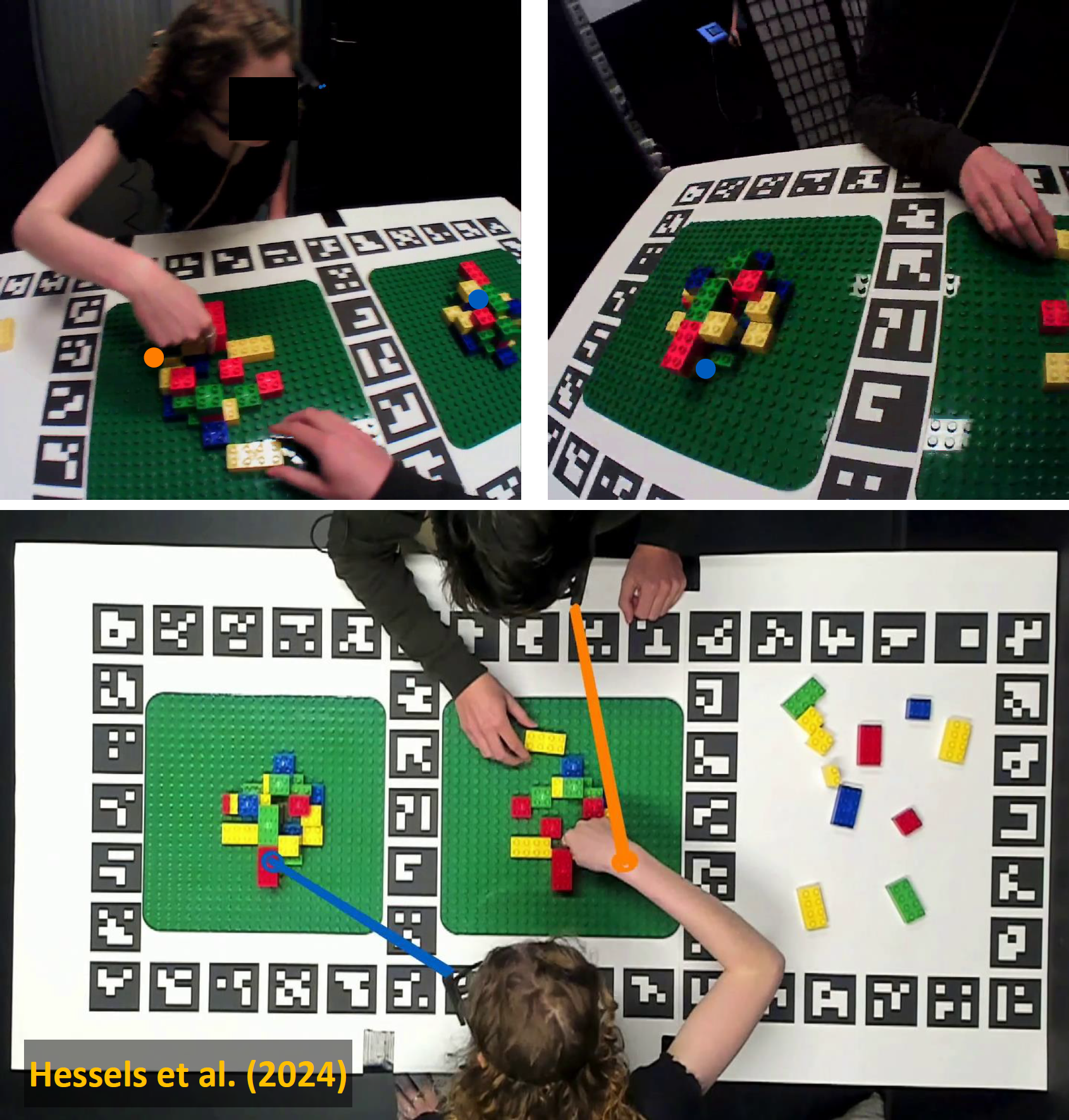
|
|
74
|
-
Example where gazeMapper has been used to map head-centered
|
|
75
|
-
|
|
74
|
+
Example where gazeMapper has been used to map head-centered eye tracking data from two head-worn eye tracker recordings (top panels, camera positions are indicated using stars, and gaze positions using colored circles. Blue indicates eye tracker 1 [ET1] and orange eye tracker 2) to synchronized world-centered gaze data of the pair, drawn on an overview video frame (bottom panel) recorded with an additional external camera. The shown frames are produced by gazeMapper's advanced gaze video functionality (though larger stars and circles to indicate the camera and gaze points were manually overlaid for clarity). From [Hessels, R.S.,Teunisse, M., Niehorster, D.C., Nyström, M., Benjamins, J.S., Senju, A. & Hooge, I.T.S. (2023). Task related gaze behaviour in face to face dyadic collaboration: Toward an interactive theory. _Visual Cognition 31_(4), pp. 291-313. doi: 10.1080/13506285.2023.2250507](https://doi.org/10.1080/13506285.2023.2250507).
|
|
75
|
+
|
|
76
|
+
# Table of contents
|
|
77
|
+
- [How to acquire](#how-to-acquire)
|
|
78
|
+
- [Complete instructions for MacOS](#complete-instructions-for-macos)
|
|
79
|
+
- [Complete instructions for Linux](#complete-instructions-for-linux)
|
|
80
|
+
- [Usage](#usage)
|
|
81
|
+
- [Workflow and example data](#workflow-and-example-data)
|
|
82
|
+
- [Example 1: Single participant and single plane](#example-1-single-participant-and-single-plane)
|
|
83
|
+
- [Example 2: Two participants and two planes](#example-2-two-participants-and-two-planes)
|
|
84
|
+
- [Example 3: One participant, multiple planes and an overview camera](#example-3-one-participant-multiple-planes-and-an-overview-camera)
|
|
85
|
+
- [gazeMapper projects](#gazemapper-projects)
|
|
86
|
+
- [Output](#output)
|
|
87
|
+
- [Coordinate system of data](#coordinate-system-of-data)
|
|
88
|
+
- [Eye trackers](#eye-trackers)
|
|
89
|
+
- [Required preprocessing outside gazeMapper](#required-preprocessing-outside-gazemapper)
|
|
90
|
+
- [gazeMapper sessions](#gazemapper-sessions)
|
|
91
|
+
- [gazeMapper planes](#gazemapper-planes)
|
|
92
|
+
- [Validation (glassesValidator planes)](#validation-glassesvalidator-planes)
|
|
93
|
+
- [Individual Markers](#individual-markers)
|
|
94
|
+
- [Actions](#actions)
|
|
95
|
+
- [Coding analysis, synchronization and validation episodes](#coding-analysis-synchronization-and-validation-episodes)
|
|
96
|
+
- [Automatic coding of analysis and synchronization episodes](#automatic-coding-of-analysis-and-synchronization-episodes)
|
|
97
|
+
- [Automatic coding of synchronization timepoints](#automatic-coding-of-synchronization-timepoints)
|
|
98
|
+
- [Automatic coding of analysis episodes](#automatic-coding-of-analysis-episodes)
|
|
99
|
+
- [Synchronization](#synchronization)
|
|
100
|
+
- [Synchronizing eye tracker data and scene camera](#synchronizing-eye-tracker-data-and-scene-camera)
|
|
101
|
+
- [Synchronizing multiple eye tracker or external camera recordings](#synchronizing-multiple-eye-tracker-or-external-camera-recordings)
|
|
102
|
+
- [Configuration](#configuration)
|
|
103
|
+
- [`gazeMapper.config.AutoCodeSyncPoints`](#gazemapperconfigautocodesyncpoints)
|
|
104
|
+
- [`gazeMapper.config.AutoCodeTrialEpisodes`](#gazemapperconfigautocodetrialepisodes)
|
|
105
|
+
- [`gazeMapper.config.CamMovementForEtSyncFunction`](#gazemapperconfigcammovementforetsyncfunction)
|
|
106
|
+
- [`gazeMapper.config.I2MCSettings`](#gazemapperconfigi2mcsettings)
|
|
107
|
+
- [`gazeMapper.config.RgbColor`](#gazemapperconfigrgbcolor)
|
|
108
|
+
- [Overriding a project's settings for a specific session or recording](#overriding-a-projects-settings-for-a-specific-session-or-recording)
|
|
109
|
+
- [API](#api)
|
|
110
|
+
- [`gazeMapper.config`](#gazemapperconfig)
|
|
111
|
+
- [`gazeMapper.config.Study`](#gazemapperconfigstudy)
|
|
112
|
+
- [`gazeMapper.config.OverrideLevel`](#gazemapperconfigoverridelevel)
|
|
113
|
+
- [`gazeMapper.config.StudyOverride`](#gazemapperconfigstudyoverride)
|
|
114
|
+
- [`gazeMapper.episode`](#gazemapperepisode)
|
|
115
|
+
- [`gazeMapper.marker`](#gazemappermarker)
|
|
116
|
+
- [`gazeMapper.plane`](#gazemapperplane)
|
|
117
|
+
- [`gazeMapper.plane.Type`](#gazemapperplanetype)
|
|
118
|
+
- [`gazeMapper.plane.Definition` and subclasses](#gazemapperplanedefinition-and-subclasses)
|
|
119
|
+
- [`gazeMapper.process`](#gazemapperprocess)
|
|
120
|
+
- [`gazeMapper.session`](#gazemappersession)
|
|
121
|
+
- [`gazeMapper.session.RecordingType`](#gazemappersessionrecordingtype)
|
|
122
|
+
- [`gazeMapper.session.RecordingDefinition`](#gazemappersessionrecordingdefinition)
|
|
123
|
+
- [`gazeMapper.session.Recording`](#gazemappersessionrecording)
|
|
124
|
+
- [`gazeMapper.session.SessionDefinition`](#gazemappersessionsessiondefinition)
|
|
125
|
+
- [`gazeMapper.session.Session`](#gazemappersessionsession)
|
|
126
|
+
- [Free functions](#free-functions)
|
|
127
|
+
- [Citation](#citation)
|
|
76
128
|
|
|
77
129
|
# How to acquire
|
|
78
130
|
GazeMapper is available from `https://github.com/dcnieho/gazeMapper`, and supports Python 3.11 on Windows, MacOS and Linux (newer versions of Python should work fine but are not tested).
|
|
@@ -222,7 +274,7 @@ Example 1 is a minimum example, showing a short recording where a participant lo
|
|
|
222
274
|
|
|
223
275
|
|
|
224
276
|
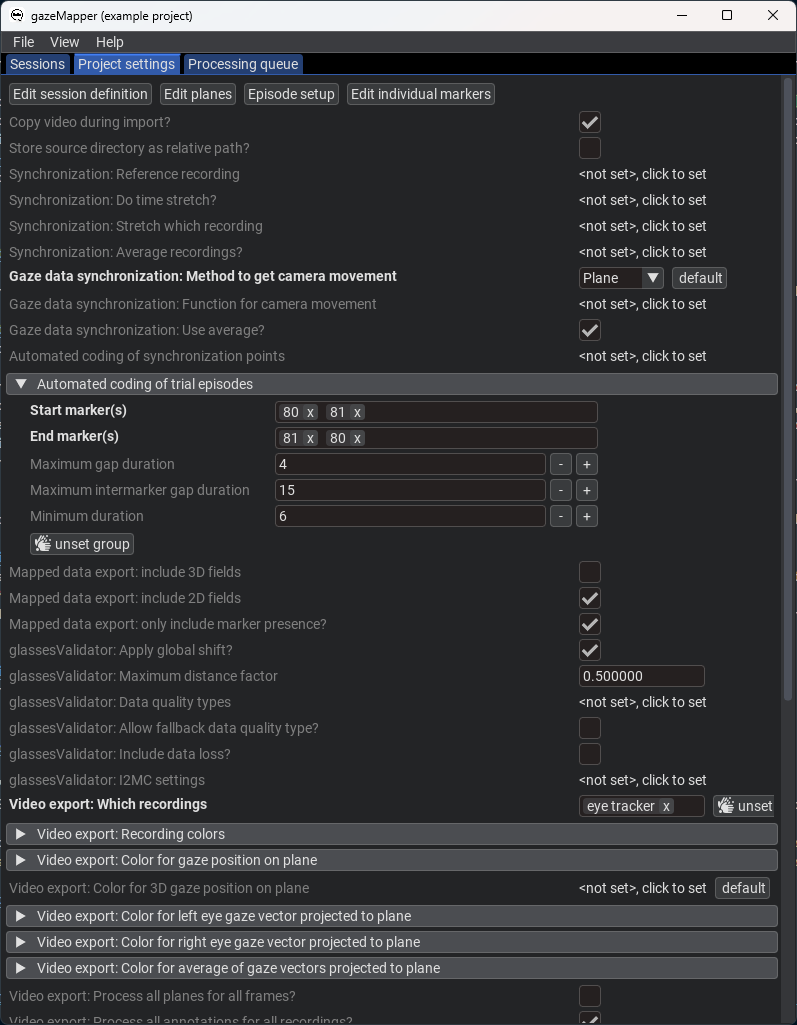
4. Now that the project is set up, we are ready to import and process recordings.
|
|
225
|
-
1. On the `Session` pane, click `import eye tracker recordings`. There, select the [folder containing the example data](https://github.com/dcnieho/gazeMapper/tree/master/example_data/1_simple/data) and indicate its an `SMI ETG` recording. Note that you could also trigger import by drag-dropping a data folder onto gazeMapper. Note also that an SMI ETG recording has to be [prepared](#required-preprocessing-outside-gazemapper) before it can be imported by gazeMapper. This preparation has already been performed for the included example data.
|
|
277
|
+
1. On the `Session` pane, click `import eye tracker recordings`. There, select the [folder containing the example data](https://github.com/dcnieho/gazeMapper/tree/master/example_data/1_simple/data) (`1_simple/data`) and indicate its an `SMI ETG` recording. Note that you could also trigger import by drag-dropping a data folder onto gazeMapper. Note also that an SMI ETG recording has to be [prepared](#required-preprocessing-outside-gazemapper) before it can be imported by gazeMapper. This preparation has already been performed for the included example data.
|
|
226
278
|
1. On the window that pops up, click `+ new session`, and name the session `1` (or any name you like). Expand session `1`. You should now see the following:
|
|
227
279
|
|
|
228
280
|

|
|
@@ -317,12 +369,12 @@ Nonetheless, below we provide a full description of how recording preparation, d
|
|
|
317
369
|
|
|
318
370
|
|
|
319
371
|
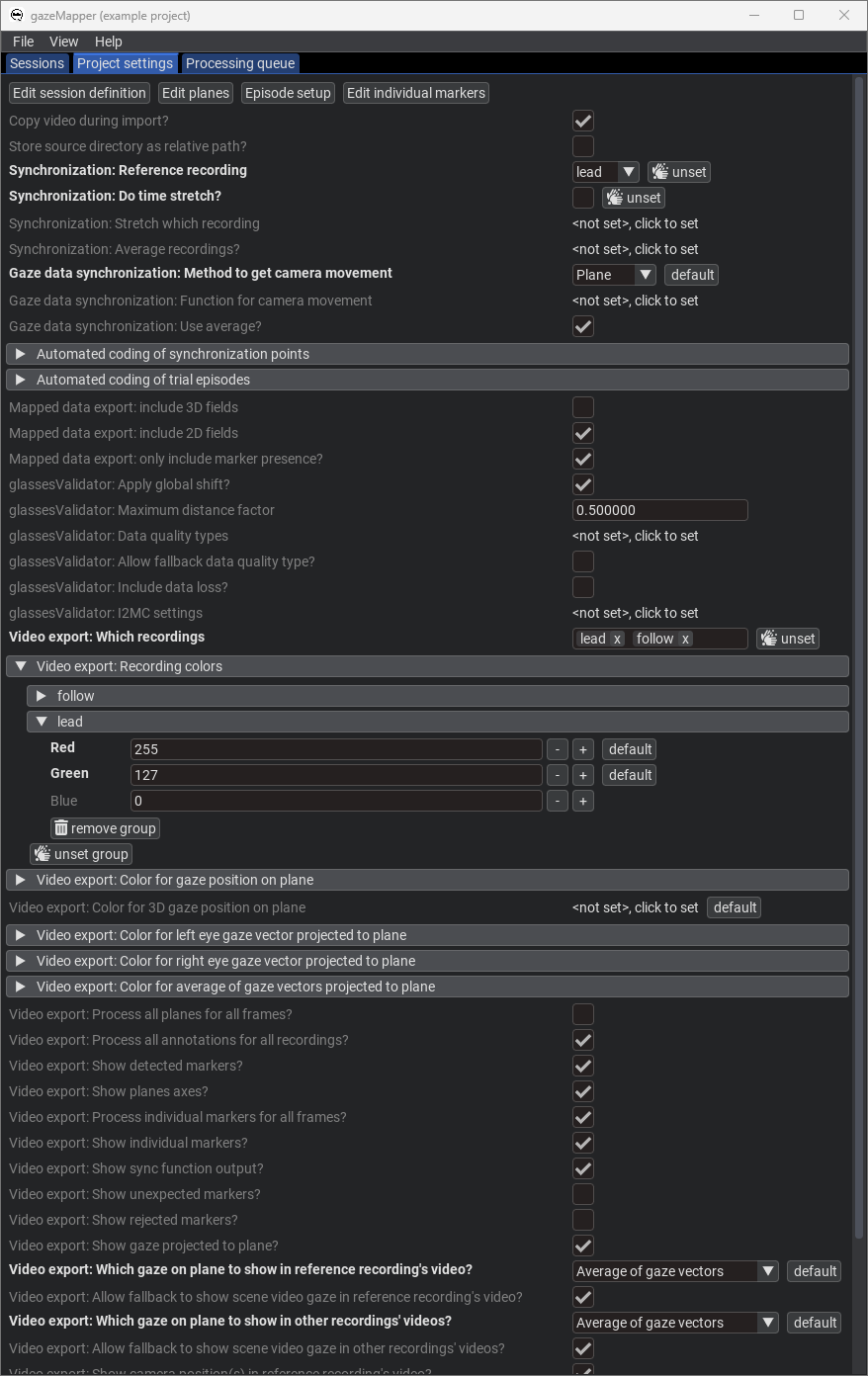
4. Now that the project is set up, we are ready to import and process recordings.
|
|
320
|
-
1. On the `Session` pane, click `import eye tracker recordings`. There, select the [folder containing the example data](https://github.com/dcnieho/gazeMapper/tree/master/example_data/2_two_participants_two_planes/data) and indicate you're looking for `Tobii Glasses 2` recordings. Note that you could also trigger import by drag-dropping a data folder onto gazeMapper.
|
|
372
|
+
1. On the `Session` pane, click `import eye tracker recordings`. There, select the [folder containing the example data](https://github.com/dcnieho/gazeMapper/tree/master/example_data/2_two_participants_two_planes/data) (`2_two_participants_two_planes/data`) and indicate you're looking for `Tobii Glasses 2` recordings. Note that you could also trigger import by drag-dropping a data folder onto gazeMapper.
|
|
321
373
|
1. On the window that pops up, click `+ new session`, and name the session `1` (or any name you like). Expand session `1`. You should now see the following:
|
|
322
374
|
|
|
323
375
|

|
|
324
376
|
1. Assign the recording to the session by dragging it from the right, and dropping it on the left for the `lead` recording where it says `drop recording here`. Click `Continue`. The recording will now be imported.
|
|
325
|
-
1. Again click `import eye tracker recordings`, select the [folder containing the example data](https://github.com/dcnieho/gazeMapper/tree/master/example_data/2_two_participants_two_planes/data) and this time indicate you're looking for `Pupil Invisible` recordings. Assign the found Pupil Invisible recording to the `follow` recording.
|
|
377
|
+
1. Again click `import eye tracker recordings`, select the [folder containing the example data](https://github.com/dcnieho/gazeMapper/tree/master/example_data/2_two_participants_two_planes/data) (`2_two_participants_two_planes/data`) and this time indicate you're looking for `Pupil Invisible` recordings. Assign the found Pupil Invisible recording to the `follow` recording.
|
|
326
378
|
|
|
327
379
|

|
|
328
380
|
|
|
@@ -416,12 +468,12 @@ Example 3 is a more advanced example, showing a recording of a participant looki
|
|
|
416
468
|
|
|
417
469
|
|
|
418
470
|
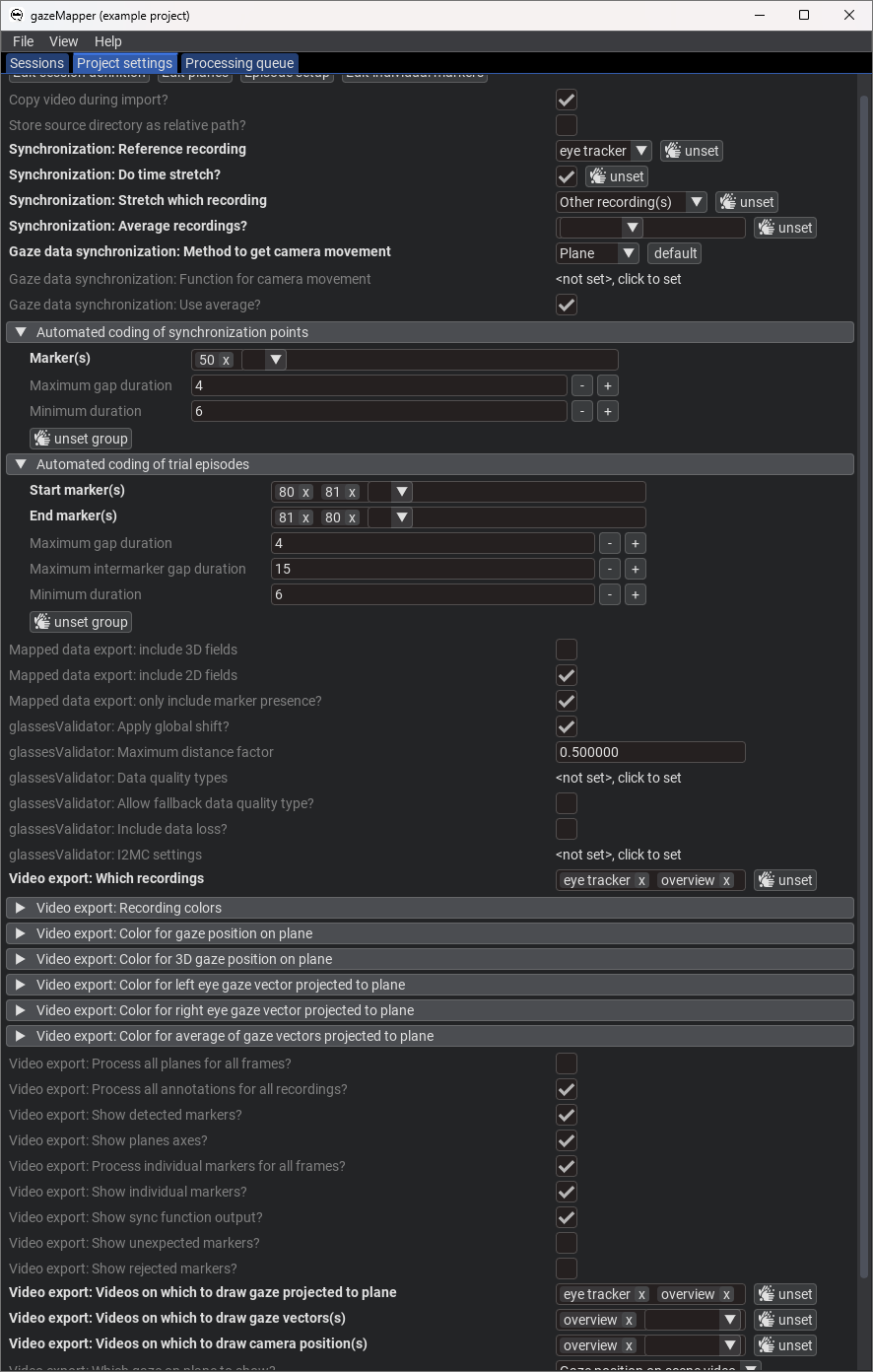
4. Now that the project is set up, we are ready to import and process recordings.
|
|
419
|
-
1. On the `Session` pane, click `import eye tracker recordings`. There, select the [folder containing the example data](https://github.com/dcnieho/gazeMapper/tree/master/example_data/3_external_camera_moving_plane/data) and indicate you're looking for `Pupil Invisible` recordings. Note that you could also trigger import by drag-dropping a data folder onto gazeMapper.
|
|
471
|
+
1. On the `Session` pane, click `import eye tracker recordings`. There, select the [folder containing the example data](https://github.com/dcnieho/gazeMapper/tree/master/example_data/3_external_camera_moving_plane/data) (`3_external_camera_moving_plane/data`) and indicate you're looking for `Pupil Invisible` recordings. Note that you could also trigger import by drag-dropping a data folder onto gazeMapper.
|
|
420
472
|
1. On the window that pops up, click `+ new session`, and name the session `1` (or any name you like). Expand session `1`. You should now see the following:
|
|
421
473
|
|
|
422
474
|

|
|
423
475
|
1. Assign the recording to the session by dragging it from the right, and dropping it on the left for the `eye tracker` recording where it says `drop recording here`. Click `Continue`. The recording will now be imported.
|
|
424
|
-
1. Click `import camera recordings`, select the [folder containing the example data](https://github.com/dcnieho/gazeMapper/tree/master/example_data/3_external_camera_moving_plane/data) and click continue. Assign the found camera recording (`cam1_R003_reencode.mp4`) to the `overview` recording.
|
|
476
|
+
1. Click `import camera recordings`, select the [folder containing the example data](https://github.com/dcnieho/gazeMapper/tree/master/example_data/3_external_camera_moving_plane/data) (`3_external_camera_moving_plane/data`) and click continue. Assign the found camera recording (`cam1_R003_reencode.mp4`) to the `overview` recording.
|
|
425
477
|
|
|
426
478
|

|
|
427
479
|
|
|
@@ -603,7 +655,7 @@ A generic 2D fiducial marker plane is defined by a file with four columns that d
|
|
|
603
655
|
| `y` |The vertical location of the marker's center on the plane (mm).|
|
|
604
656
|
| `rotation_angle` |The rotation of the marker, if any (degree).|
|
|
605
657
|
|
|
606
|
-
A file with this information should be stored under any name (e.g., `markerPositions.csv`) in the plane's configuration folder inside the project's configuration folder. See the example data for an example of such a file
|
|
658
|
+
A file with this information should be stored under any name (e.g., `markerPositions.csv`) in the plane's configuration folder inside the project's configuration folder. See the [example data](https://github.com/dcnieho/gazeMapper/blob/master/example_data/1_simple/configuration/screen/markerPositions_screen.csv) for an example of such a file.
|
|
607
659
|
|
|
608
660
|
To be able turn the information of the above file into a plane, further settings are needed:
|
|
609
661
|
| Setting | Description |
|
|
@@ -622,7 +674,7 @@ These settings are typically stored in a file `plane_def.json` in the plane's co
|
|
|
622
674
|
### Validation (glassesValidator planes)
|
|
623
675
|
gazeMapper has built-in support for computing data quality from the gaze data of a participant looking at a validation poster using glassesValidator. To use this functionality, a plane of type GlassesValidator (`gazeMapper.plane.Type.GlassesValidator`) needs to be defined in the project's setup. By default, the default glassesValidator plane is used for a GlassesValidator plane. When the default checkbox is unchecked in the GUI (the `is_default` setting in `plane_def.json` is False), a custom configuration can be used. When unchecking this checkbox in the GUI, files containing the plane setup are deployed to the plane configuration folder, so that the user can edit or replace them. API users are requested to call `glassesValidator.config.deploy_validation_config()` to deploy the glassesValidator configuration files to the plane's configuration folder. The customization options for a glassesValidator plane are [documented here](https://github.com/dcnieho/glassesValidator/blob/master/README.md#customizing-the-poster).
|
|
624
676
|
|
|
625
|
-
|
|
677
|
+
## Individual Markers
|
|
626
678
|
Besides planes, gazeMapper can also be configured to detect and report on the appearance of individual markers. This is configured in the `Individual markers editor` pane in the GUI or by means of `gazeMapper.marker.Marker` objects.
|
|
627
679
|
|
|
628
680
|
## Actions
|
|
@@ -2,7 +2,7 @@
|
|
|
2
2
|
[](https://pypi.org/project/gazeMapper/)
|
|
3
3
|
[](https://pypi.org/project/gazeMapper/)
|
|
4
4
|
|
|
5
|
-
# gazeMapper v1.4.
|
|
5
|
+
# gazeMapper v1.4.4
|
|
6
6
|
Tool for automated world-based analysis of wearable eye tracker data.
|
|
7
7
|
gazeMapper is an open-source tool for automated mapping and processing of eye-tracking data to enable automated world-based analysis.
|
|
8
8
|
gazeMapper can:
|
|
@@ -11,15 +11,67 @@ gazeMapper can:
|
|
|
11
11
|
3) Determine data quality measures, e.g., accuracy and precision using [glassesValidator](https://github.com/dcnieho/glassesValidator) ([Niehorster et al., 2023](https://doi.org/10.3758/s13428-023-02105-5)).
|
|
12
12
|
|
|
13
13
|
If you use this tool or any of the code in this repository, please cite:<br>
|
|
14
|
-
Niehorster, D.C., Hessels, R.S., Nyström, M., Benjamins, J.S. and Hooge, I.T.C. (submitted). gazeMapper: A tool for automated world-based analysis of gaze data from one or multiple wearable eye trackers. Manuscript submitted for publication,
|
|
14
|
+
Niehorster, D.C., Hessels, R.S., Nyström, M., Benjamins, J.S. and Hooge, I.T.C. (submitted). gazeMapper: A tool for automated world-based analysis of gaze data from one or multiple wearable eye trackers. Manuscript submitted for publication, 2025 ([BibTeX](#bibtex))<br>
|
|
15
15
|
If you use the functionality for automatic determining the data quality (accuracy and precision) of wearable eye tracker recordings, please additionally cite:<br>
|
|
16
16
|
[Niehorster, D.C., Hessels, R.S., Benjamins, J.S., Nyström, M. and Hooge, I.T.C. (2023). GlassesValidator:
|
|
17
17
|
A data quality tool for eye tracking glasses. Behavior Research Methods. doi: 10.3758/s13428-023-02105-5](https://doi.org/10.3758/s13428-023-02105-5) ([BibTeX](#bibtex))
|
|
18
18
|
|
|
19
19
|
## Example
|
|
20
20
|

|
|
21
|
-
Example where gazeMapper has been used to map head-centered
|
|
22
|
-
|
|
21
|
+
Example where gazeMapper has been used to map head-centered eye tracking data from two head-worn eye tracker recordings (top panels, camera positions are indicated using stars, and gaze positions using colored circles. Blue indicates eye tracker 1 [ET1] and orange eye tracker 2) to synchronized world-centered gaze data of the pair, drawn on an overview video frame (bottom panel) recorded with an additional external camera. The shown frames are produced by gazeMapper's advanced gaze video functionality (though larger stars and circles to indicate the camera and gaze points were manually overlaid for clarity). From [Hessels, R.S.,Teunisse, M., Niehorster, D.C., Nyström, M., Benjamins, J.S., Senju, A. & Hooge, I.T.S. (2023). Task related gaze behaviour in face to face dyadic collaboration: Toward an interactive theory. _Visual Cognition 31_(4), pp. 291-313. doi: 10.1080/13506285.2023.2250507](https://doi.org/10.1080/13506285.2023.2250507).
|
|
22
|
+
|
|
23
|
+
# Table of contents
|
|
24
|
+
- [How to acquire](#how-to-acquire)
|
|
25
|
+
- [Complete instructions for MacOS](#complete-instructions-for-macos)
|
|
26
|
+
- [Complete instructions for Linux](#complete-instructions-for-linux)
|
|
27
|
+
- [Usage](#usage)
|
|
28
|
+
- [Workflow and example data](#workflow-and-example-data)
|
|
29
|
+
- [Example 1: Single participant and single plane](#example-1-single-participant-and-single-plane)
|
|
30
|
+
- [Example 2: Two participants and two planes](#example-2-two-participants-and-two-planes)
|
|
31
|
+
- [Example 3: One participant, multiple planes and an overview camera](#example-3-one-participant-multiple-planes-and-an-overview-camera)
|
|
32
|
+
- [gazeMapper projects](#gazemapper-projects)
|
|
33
|
+
- [Output](#output)
|
|
34
|
+
- [Coordinate system of data](#coordinate-system-of-data)
|
|
35
|
+
- [Eye trackers](#eye-trackers)
|
|
36
|
+
- [Required preprocessing outside gazeMapper](#required-preprocessing-outside-gazemapper)
|
|
37
|
+
- [gazeMapper sessions](#gazemapper-sessions)
|
|
38
|
+
- [gazeMapper planes](#gazemapper-planes)
|
|
39
|
+
- [Validation (glassesValidator planes)](#validation-glassesvalidator-planes)
|
|
40
|
+
- [Individual Markers](#individual-markers)
|
|
41
|
+
- [Actions](#actions)
|
|
42
|
+
- [Coding analysis, synchronization and validation episodes](#coding-analysis-synchronization-and-validation-episodes)
|
|
43
|
+
- [Automatic coding of analysis and synchronization episodes](#automatic-coding-of-analysis-and-synchronization-episodes)
|
|
44
|
+
- [Automatic coding of synchronization timepoints](#automatic-coding-of-synchronization-timepoints)
|
|
45
|
+
- [Automatic coding of analysis episodes](#automatic-coding-of-analysis-episodes)
|
|
46
|
+
- [Synchronization](#synchronization)
|
|
47
|
+
- [Synchronizing eye tracker data and scene camera](#synchronizing-eye-tracker-data-and-scene-camera)
|
|
48
|
+
- [Synchronizing multiple eye tracker or external camera recordings](#synchronizing-multiple-eye-tracker-or-external-camera-recordings)
|
|
49
|
+
- [Configuration](#configuration)
|
|
50
|
+
- [`gazeMapper.config.AutoCodeSyncPoints`](#gazemapperconfigautocodesyncpoints)
|
|
51
|
+
- [`gazeMapper.config.AutoCodeTrialEpisodes`](#gazemapperconfigautocodetrialepisodes)
|
|
52
|
+
- [`gazeMapper.config.CamMovementForEtSyncFunction`](#gazemapperconfigcammovementforetsyncfunction)
|
|
53
|
+
- [`gazeMapper.config.I2MCSettings`](#gazemapperconfigi2mcsettings)
|
|
54
|
+
- [`gazeMapper.config.RgbColor`](#gazemapperconfigrgbcolor)
|
|
55
|
+
- [Overriding a project's settings for a specific session or recording](#overriding-a-projects-settings-for-a-specific-session-or-recording)
|
|
56
|
+
- [API](#api)
|
|
57
|
+
- [`gazeMapper.config`](#gazemapperconfig)
|
|
58
|
+
- [`gazeMapper.config.Study`](#gazemapperconfigstudy)
|
|
59
|
+
- [`gazeMapper.config.OverrideLevel`](#gazemapperconfigoverridelevel)
|
|
60
|
+
- [`gazeMapper.config.StudyOverride`](#gazemapperconfigstudyoverride)
|
|
61
|
+
- [`gazeMapper.episode`](#gazemapperepisode)
|
|
62
|
+
- [`gazeMapper.marker`](#gazemappermarker)
|
|
63
|
+
- [`gazeMapper.plane`](#gazemapperplane)
|
|
64
|
+
- [`gazeMapper.plane.Type`](#gazemapperplanetype)
|
|
65
|
+
- [`gazeMapper.plane.Definition` and subclasses](#gazemapperplanedefinition-and-subclasses)
|
|
66
|
+
- [`gazeMapper.process`](#gazemapperprocess)
|
|
67
|
+
- [`gazeMapper.session`](#gazemappersession)
|
|
68
|
+
- [`gazeMapper.session.RecordingType`](#gazemappersessionrecordingtype)
|
|
69
|
+
- [`gazeMapper.session.RecordingDefinition`](#gazemappersessionrecordingdefinition)
|
|
70
|
+
- [`gazeMapper.session.Recording`](#gazemappersessionrecording)
|
|
71
|
+
- [`gazeMapper.session.SessionDefinition`](#gazemappersessionsessiondefinition)
|
|
72
|
+
- [`gazeMapper.session.Session`](#gazemappersessionsession)
|
|
73
|
+
- [Free functions](#free-functions)
|
|
74
|
+
- [Citation](#citation)
|
|
23
75
|
|
|
24
76
|
# How to acquire
|
|
25
77
|
GazeMapper is available from `https://github.com/dcnieho/gazeMapper`, and supports Python 3.11 on Windows, MacOS and Linux (newer versions of Python should work fine but are not tested).
|
|
@@ -169,7 +221,7 @@ Example 1 is a minimum example, showing a short recording where a participant lo
|
|
|
169
221
|
|
|
170
222
|

|
|
171
223
|
4. Now that the project is set up, we are ready to import and process recordings.
|
|
172
|
-
1. On the `Session` pane, click `import eye tracker recordings`. There, select the [folder containing the example data](https://github.com/dcnieho/gazeMapper/tree/master/example_data/1_simple/data) and indicate its an `SMI ETG` recording. Note that you could also trigger import by drag-dropping a data folder onto gazeMapper. Note also that an SMI ETG recording has to be [prepared](#required-preprocessing-outside-gazemapper) before it can be imported by gazeMapper. This preparation has already been performed for the included example data.
|
|
224
|
+
1. On the `Session` pane, click `import eye tracker recordings`. There, select the [folder containing the example data](https://github.com/dcnieho/gazeMapper/tree/master/example_data/1_simple/data) (`1_simple/data`) and indicate its an `SMI ETG` recording. Note that you could also trigger import by drag-dropping a data folder onto gazeMapper. Note also that an SMI ETG recording has to be [prepared](#required-preprocessing-outside-gazemapper) before it can be imported by gazeMapper. This preparation has already been performed for the included example data.
|
|
173
225
|
1. On the window that pops up, click `+ new session`, and name the session `1` (or any name you like). Expand session `1`. You should now see the following:
|
|
174
226
|
|
|
175
227
|

|
|
@@ -264,12 +316,12 @@ Nonetheless, below we provide a full description of how recording preparation, d
|
|
|
264
316
|
|
|
265
317
|

|
|
266
318
|
4. Now that the project is set up, we are ready to import and process recordings.
|
|
267
|
-
1. On the `Session` pane, click `import eye tracker recordings`. There, select the [folder containing the example data](https://github.com/dcnieho/gazeMapper/tree/master/example_data/2_two_participants_two_planes/data) and indicate you're looking for `Tobii Glasses 2` recordings. Note that you could also trigger import by drag-dropping a data folder onto gazeMapper.
|
|
319
|
+
1. On the `Session` pane, click `import eye tracker recordings`. There, select the [folder containing the example data](https://github.com/dcnieho/gazeMapper/tree/master/example_data/2_two_participants_two_planes/data) (`2_two_participants_two_planes/data`) and indicate you're looking for `Tobii Glasses 2` recordings. Note that you could also trigger import by drag-dropping a data folder onto gazeMapper.
|
|
268
320
|
1. On the window that pops up, click `+ new session`, and name the session `1` (or any name you like). Expand session `1`. You should now see the following:
|
|
269
321
|
|
|
270
322
|

|
|
271
323
|
1. Assign the recording to the session by dragging it from the right, and dropping it on the left for the `lead` recording where it says `drop recording here`. Click `Continue`. The recording will now be imported.
|
|
272
|
-
1. Again click `import eye tracker recordings`, select the [folder containing the example data](https://github.com/dcnieho/gazeMapper/tree/master/example_data/2_two_participants_two_planes/data) and this time indicate you're looking for `Pupil Invisible` recordings. Assign the found Pupil Invisible recording to the `follow` recording.
|
|
324
|
+
1. Again click `import eye tracker recordings`, select the [folder containing the example data](https://github.com/dcnieho/gazeMapper/tree/master/example_data/2_two_participants_two_planes/data) (`2_two_participants_two_planes/data`) and this time indicate you're looking for `Pupil Invisible` recordings. Assign the found Pupil Invisible recording to the `follow` recording.
|
|
273
325
|
|
|
274
326
|

|
|
275
327
|
|
|
@@ -363,12 +415,12 @@ Example 3 is a more advanced example, showing a recording of a participant looki
|
|
|
363
415
|
|
|
364
416
|

|
|
365
417
|
4. Now that the project is set up, we are ready to import and process recordings.
|
|
366
|
-
1. On the `Session` pane, click `import eye tracker recordings`. There, select the [folder containing the example data](https://github.com/dcnieho/gazeMapper/tree/master/example_data/3_external_camera_moving_plane/data) and indicate you're looking for `Pupil Invisible` recordings. Note that you could also trigger import by drag-dropping a data folder onto gazeMapper.
|
|
418
|
+
1. On the `Session` pane, click `import eye tracker recordings`. There, select the [folder containing the example data](https://github.com/dcnieho/gazeMapper/tree/master/example_data/3_external_camera_moving_plane/data) (`3_external_camera_moving_plane/data`) and indicate you're looking for `Pupil Invisible` recordings. Note that you could also trigger import by drag-dropping a data folder onto gazeMapper.
|
|
367
419
|
1. On the window that pops up, click `+ new session`, and name the session `1` (or any name you like). Expand session `1`. You should now see the following:
|
|
368
420
|
|
|
369
421
|

|
|
370
422
|
1. Assign the recording to the session by dragging it from the right, and dropping it on the left for the `eye tracker` recording where it says `drop recording here`. Click `Continue`. The recording will now be imported.
|
|
371
|
-
1. Click `import camera recordings`, select the [folder containing the example data](https://github.com/dcnieho/gazeMapper/tree/master/example_data/3_external_camera_moving_plane/data) and click continue. Assign the found camera recording (`cam1_R003_reencode.mp4`) to the `overview` recording.
|
|
423
|
+
1. Click `import camera recordings`, select the [folder containing the example data](https://github.com/dcnieho/gazeMapper/tree/master/example_data/3_external_camera_moving_plane/data) (`3_external_camera_moving_plane/data`) and click continue. Assign the found camera recording (`cam1_R003_reencode.mp4`) to the `overview` recording.
|
|
372
424
|
|
|
373
425
|

|
|
374
426
|
|
|
@@ -550,7 +602,7 @@ A generic 2D fiducial marker plane is defined by a file with four columns that d
|
|
|
550
602
|
| `y` |The vertical location of the marker's center on the plane (mm).|
|
|
551
603
|
| `rotation_angle` |The rotation of the marker, if any (degree).|
|
|
552
604
|
|
|
553
|
-
A file with this information should be stored under any name (e.g., `markerPositions.csv`) in the plane's configuration folder inside the project's configuration folder. See the example data for an example of such a file
|
|
605
|
+
A file with this information should be stored under any name (e.g., `markerPositions.csv`) in the plane's configuration folder inside the project's configuration folder. See the [example data](https://github.com/dcnieho/gazeMapper/blob/master/example_data/1_simple/configuration/screen/markerPositions_screen.csv) for an example of such a file.
|
|
554
606
|
|
|
555
607
|
To be able turn the information of the above file into a plane, further settings are needed:
|
|
556
608
|
| Setting | Description |
|
|
@@ -569,7 +621,7 @@ These settings are typically stored in a file `plane_def.json` in the plane's co
|
|
|
569
621
|
### Validation (glassesValidator planes)
|
|
570
622
|
gazeMapper has built-in support for computing data quality from the gaze data of a participant looking at a validation poster using glassesValidator. To use this functionality, a plane of type GlassesValidator (`gazeMapper.plane.Type.GlassesValidator`) needs to be defined in the project's setup. By default, the default glassesValidator plane is used for a GlassesValidator plane. When the default checkbox is unchecked in the GUI (the `is_default` setting in `plane_def.json` is False), a custom configuration can be used. When unchecking this checkbox in the GUI, files containing the plane setup are deployed to the plane configuration folder, so that the user can edit or replace them. API users are requested to call `glassesValidator.config.deploy_validation_config()` to deploy the glassesValidator configuration files to the plane's configuration folder. The customization options for a glassesValidator plane are [documented here](https://github.com/dcnieho/glassesValidator/blob/master/README.md#customizing-the-poster).
|
|
571
623
|
|
|
572
|
-
|
|
624
|
+
## Individual Markers
|
|
573
625
|
Besides planes, gazeMapper can also be configured to detect and report on the appearance of individual markers. This is configured in the `Individual markers editor` pane in the GUI or by means of `gazeMapper.marker.Marker` objects.
|
|
574
626
|
|
|
575
627
|
## Actions
|
|
@@ -1,5 +1,4 @@
|
|
|
1
|
-
glassesTools[GUI]>=1.
|
|
1
|
+
glassesTools[GUI]>=1.17.1 # pulls in various other dependencies such as imgui_bundle, matplotlib, numpy, opencv, pandas, polars
|
|
2
2
|
typeguard
|
|
3
3
|
uvloop ; sys_platform != "win32"
|
|
4
|
-
watchfiles
|
|
5
|
-
pebble
|
|
4
|
+
watchfiles
|
|
@@ -8,16 +8,23 @@ import pathvalidate
|
|
|
8
8
|
import threading
|
|
9
9
|
from imgui_bundle import imgui, imspinner, hello_imgui, icons_fontawesome_6 as ifa6
|
|
10
10
|
|
|
11
|
-
from glassesTools import annotation, aruco, async_thread, camera_recording, eyetracker, gui as gt_gui, naming as gt_naming, platform, recording, video_utils
|
|
11
|
+
from glassesTools import annotation, aruco, async_thread, camera_recording, eyetracker, gui as gt_gui, naming as gt_naming, platform, process_pool, recording, video_utils
|
|
12
12
|
from glassesTools.validation import config as val_config, DataQualityType, export, get_DataQualityType_explanation
|
|
13
|
+
from glassesTools.gui import colors
|
|
13
14
|
|
|
14
|
-
from . import
|
|
15
|
+
from . import utils
|
|
15
16
|
from ... import config, marker, naming, plane, process, session
|
|
16
17
|
|
|
18
|
+
_picker_last_folder = None
|
|
17
19
|
def get_folder_picker(g, reason: str, *args, **kwargs):
|
|
18
20
|
from . import gui
|
|
19
21
|
g = typing.cast(gui.GUI,g) # indicate type to typechecker
|
|
20
22
|
def select_callback(selected: list[pathlib.Path]):
|
|
23
|
+
global _picker_last_folder
|
|
24
|
+
if len(selected)==1 and selected[0].is_dir():
|
|
25
|
+
_picker_last_folder = selected[0]
|
|
26
|
+
else:
|
|
27
|
+
_picker_last_folder = selected[0].parent
|
|
21
28
|
match reason:
|
|
22
29
|
case 'loading' | 'creating':
|
|
23
30
|
try_load_project(g, selected, action=reason)
|
|
@@ -69,7 +76,7 @@ def get_folder_picker(g, reason: str, *args, **kwargs):
|
|
|
69
76
|
picker_type = gt_gui.file_picker.DirPicker
|
|
70
77
|
case _:
|
|
71
78
|
raise ValueError(f'reason "{reason}" not understood')
|
|
72
|
-
picker = picker_type(title=header, allow_multiple=allow_multiple, callback=select_callback)
|
|
79
|
+
picker = picker_type(title=header, allow_multiple=allow_multiple, callback=select_callback, start_dir=_picker_last_folder)
|
|
73
80
|
picker.set_show_only_dirs(False)
|
|
74
81
|
return picker
|
|
75
82
|
|
|
@@ -335,27 +342,31 @@ def show_export_config(g, path: str|pathlib.Path, sessions: list[str]):
|
|
|
335
342
|
|
|
336
343
|
# for the sessions, see what we have to export
|
|
337
344
|
to_export: dict[str,bool] = {}
|
|
338
|
-
|
|
345
|
+
rec_dirs_val: list[pathlib.Path] = []
|
|
346
|
+
rec_dirs_et_sync: list[pathlib.Path] = []
|
|
339
347
|
for s_name in sessions:
|
|
340
348
|
s = g.sessions.get(s_name,None)
|
|
341
349
|
if s is None:
|
|
342
350
|
continue
|
|
343
351
|
if 'plane gaze' not in to_export:
|
|
344
|
-
if annotation.Event.Trial in g.study_config.planes_per_episode and any((s.recordings[r].state[process.Action.GAZE_TO_PLANE]==
|
|
352
|
+
if annotation.Event.Trial in g.study_config.planes_per_episode and any((s.recordings[r].state[process.Action.GAZE_TO_PLANE]==process_pool.State.Completed for r in s.recordings)):
|
|
345
353
|
to_export['plane gaze'] = True
|
|
346
|
-
if recs:=[s.recordings[r].info.working_directory for r in s.recordings if s.recordings[r].state[process.Action.VALIDATE]==
|
|
354
|
+
if recs:=[s.recordings[r].info.working_directory for r in s.recordings if s.recordings[r].state[process.Action.VALIDATE]==process_pool.State.Completed]:
|
|
347
355
|
to_export['validation'] = True
|
|
348
|
-
|
|
356
|
+
rec_dirs_val.extend(recs)
|
|
357
|
+
if recs:=[s.recordings[r].info.working_directory for r in s.recordings if s.recordings[r].state[process.Action.SYNC_ET_TO_CAM]==process_pool.State.Completed]:
|
|
358
|
+
to_export['eye tracker synchronization'] = True
|
|
359
|
+
rec_dirs_et_sync.extend(recs)
|
|
349
360
|
if 'gaze overlay video' not in to_export:
|
|
350
|
-
if any((s.recordings[r].state[process.Action.MAKE_GAZE_OVERLAY_VIDEO]==
|
|
361
|
+
if any((s.recordings[r].state[process.Action.MAKE_GAZE_OVERLAY_VIDEO]==process_pool.State.Completed for r in s.recordings)):
|
|
351
362
|
to_export['gaze overlay video'] = True
|
|
352
363
|
if 'mapped gaze video' not in to_export:
|
|
353
|
-
if s.state[process.Action.MAKE_MAPPED_GAZE_VIDEO]==
|
|
364
|
+
if s.state[process.Action.MAKE_MAPPED_GAZE_VIDEO]==process_pool.State.Completed:
|
|
354
365
|
to_export['mapped gaze video'] = True
|
|
355
366
|
|
|
356
367
|
dq_df, dq_set = None, None
|
|
357
|
-
if
|
|
358
|
-
dq_df, default_dq_type, dq_targets = export.collect_data_quality(
|
|
368
|
+
if rec_dirs_val:
|
|
369
|
+
dq_df, default_dq_type, dq_targets = export.collect_data_quality(rec_dirs_val, {p:f'{naming.validation_prefix}{p}_data_quality.tsv' for p in g.study_config.planes_per_episode[annotation.Event.Validate]}, col_for_parent='session')
|
|
359
370
|
if dq_df is None:
|
|
360
371
|
to_export.pop('validation', None)
|
|
361
372
|
else:
|
|
@@ -465,7 +476,7 @@ def show_export_config(g, path: str|pathlib.Path, sessions: list[str]):
|
|
|
465
476
|
def launch_export():
|
|
466
477
|
exp = []
|
|
467
478
|
if 'plane gaze' in to_export and to_export['plane gaze']:
|
|
468
|
-
exp.append('
|
|
479
|
+
exp.append('plane_gaze')
|
|
469
480
|
if 'gaze overlay video' in to_export and to_export['gaze overlay video']:
|
|
470
481
|
exp.append('gaze_overlay_video')
|
|
471
482
|
if 'mapped gaze video' in to_export and to_export['mapped gaze video']:
|
|
@@ -479,6 +490,10 @@ def show_export_config(g, path: str|pathlib.Path, sessions: list[str]):
|
|
|
479
490
|
targets = [t for t in dq_set['targets'] if dq_set['targets'][t]]
|
|
480
491
|
export.summarize_and_store_data_quality(dq_df, path/'data_quality.tsv', dq_types, targets, dq_set['targets_avg'], dq_set['include_data_loss'])
|
|
481
492
|
|
|
493
|
+
# export et sync for all recordings in all sessions
|
|
494
|
+
if 'eye tracker synchronization' in to_export and to_export['eye tracker synchronization']:
|
|
495
|
+
export.export_et_sync(rec_dirs_et_sync, naming.VOR_sync_file, path/'et_sync.tsv')
|
|
496
|
+
|
|
482
497
|
buttons = {
|
|
483
498
|
ifa6.ICON_FA_CHECK+f" Continue": (launch_export, lambda: not any((to_export[e] for e in to_export))),
|
|
484
499
|
ifa6.ICON_FA_CIRCLE_XMARK+f" Cancel": None
|
|
@@ -19,11 +19,12 @@ import OpenGL
|
|
|
19
19
|
import OpenGL.GL as gl
|
|
20
20
|
|
|
21
21
|
import glassesTools
|
|
22
|
-
from glassesTools import annotation, gui as gt_gui, naming as gt_naming, plane as gt_plane, platform as gt_platform
|
|
22
|
+
from glassesTools import annotation, gui as gt_gui, naming as gt_naming, plane as gt_plane, platform as gt_platform, process_pool
|
|
23
|
+
from glassesTools.gui import colors
|
|
23
24
|
|
|
24
25
|
from ... import config, marker, plane, process, project_watcher, session, type_utils, version
|
|
25
26
|
from .. import async_thread
|
|
26
|
-
from . import callbacks,
|
|
27
|
+
from . import callbacks, image_helper, session_lister, settings_editor, utils
|
|
27
28
|
|
|
28
29
|
|
|
29
30
|
class GUI:
|
|
@@ -418,7 +419,7 @@ class GUI:
|
|
|
418
419
|
# set pending and running states since these are not stored in the states file
|
|
419
420
|
for job_id in self.job_scheduler.jobs:
|
|
420
421
|
job_state = self.job_scheduler.jobs[job_id].get_state()
|
|
421
|
-
if job_state in [
|
|
422
|
+
if job_state in [process_pool.State.Pending, process_pool.State.Running]:
|
|
422
423
|
self._update_job_states_impl(self.job_scheduler.jobs[job_id].user_data, job_state)
|
|
423
424
|
|
|
424
425
|
# if there are no jobs left, clean up process pool
|
|
@@ -432,7 +433,7 @@ class GUI:
|
|
|
432
433
|
return False
|
|
433
434
|
return True
|
|
434
435
|
|
|
435
|
-
def _update_job_states_impl(self, job: utils.JobInfo, job_state:
|
|
436
|
+
def _update_job_states_impl(self, job: utils.JobInfo, job_state: process_pool.State):
|
|
436
437
|
sess = self.sessions.get(job.session,None)
|
|
437
438
|
if sess is None:
|
|
438
439
|
return
|
|
@@ -446,10 +447,10 @@ class GUI:
|
|
|
446
447
|
else:
|
|
447
448
|
sess.state[job.action] = job_state
|
|
448
449
|
|
|
449
|
-
def _action_done_callback(self, future: process_pool.ProcessFuture, job_id: int, job: utils.JobInfo, state:
|
|
450
|
+
def _action_done_callback(self, future: process_pool.ProcessFuture, job_id: int, job: utils.JobInfo, state: process_pool.State):
|
|
450
451
|
# if process failed, notify error
|
|
451
452
|
session_level = job.recording is None
|
|
452
|
-
if state==
|
|
453
|
+
if state==process_pool.State.Failed:
|
|
453
454
|
exc = future.exception() # should not throw exception since CancelledError is already encoded in state and future is done
|
|
454
455
|
tb = gt_gui.utils.get_traceback(type(exc), exc, exc.__traceback__)
|
|
455
456
|
lbl = f'session "{job.session}"'
|
|
@@ -460,7 +461,7 @@ class GUI:
|
|
|
460
461
|
self.job_scheduler.jobs[job_id].error = tb
|
|
461
462
|
|
|
462
463
|
# clean up, if needed, when a task failed or was canceled
|
|
463
|
-
if job.action==process.Action.IMPORT and state in [
|
|
464
|
+
if job.action==process.Action.IMPORT and state in [process_pool.State.Canceled, process_pool.State.Failed]:
|
|
464
465
|
# remove working directory if this was an import task
|
|
465
466
|
async_thread.run(callbacks.remove_recording_working_dir(self.project_dir, job.session, job.recording))
|
|
466
467
|
# also update GUI state, might be needed if there was no working directory yet for instance
|
|
@@ -580,7 +581,7 @@ class GUI:
|
|
|
580
581
|
actions = process.get_actions_for_config(cfg, exclude_session_level=True)
|
|
581
582
|
def _draw_status(action: process.Action, item: session.Recording):
|
|
582
583
|
if process.is_action_possible_for_recording(item.definition.name, item.definition.type, action, cfg):
|
|
583
|
-
|
|
584
|
+
gt_gui.utils.draw_process_state(item.state[action])
|
|
584
585
|
else:
|
|
585
586
|
imgui.text('-')
|
|
586
587
|
if action==process.Action.AUTO_CODE_TRIALS and cfg.sync_ref_recording and item.definition.name!=cfg.sync_ref_recording:
|
|
@@ -815,7 +816,7 @@ class GUI:
|
|
|
815
816
|
jobs = self.job_scheduler.jobs.copy()
|
|
816
817
|
job_ids = sorted(jobs.keys())
|
|
817
818
|
job_states = {job_id:jobs[job_id].get_state() for job_id in job_ids}
|
|
818
|
-
if any((job_states[i] in [
|
|
819
|
+
if any((job_states[i] in [process_pool.State.Pending, process_pool.State.Running] for i in job_states)):
|
|
819
820
|
if imgui.button(ifa6.ICON_FA_HAND+' Cancel all'):
|
|
820
821
|
self.job_scheduler.cancel_all_jobs()
|
|
821
822
|
|
|
@@ -873,14 +874,14 @@ class GUI:
|
|
|
873
874
|
imgui.text(f'{job_id}')
|
|
874
875
|
case 1:
|
|
875
876
|
# Status
|
|
876
|
-
|
|
877
|
+
gt_gui.utils.draw_process_state((job_state:=jobs[job_id].get_state()))
|
|
877
878
|
if jobs[job_id].error:
|
|
878
879
|
gt_gui.utils.draw_hover_text(jobs[job_id].error, text='')
|
|
879
880
|
imgui.same_line()
|
|
880
881
|
if imgui.small_button(ifa6.ICON_FA_COPY+f'##{job_id}_copy_error'):
|
|
881
882
|
imgui.set_clipboard_text(jobs[job_id].error)
|
|
882
883
|
gt_gui.utils.draw_hover_text('Copy error to clipboard', text='')
|
|
883
|
-
if job_state in [
|
|
884
|
+
if job_state in [process_pool.State.Pending, process_pool.State.Running]:
|
|
884
885
|
imgui.same_line()
|
|
885
886
|
if imgui.small_button(ifa6.ICON_FA_HAND+f' Cancel##{job_id}'):
|
|
886
887
|
self.job_scheduler.cancel_job(job_id)
|
|
@@ -1207,7 +1208,7 @@ class GUI:
|
|
|
1207
1208
|
def _get_pending_running_job_list(self) -> dict[utils.JobInfo, int]:
|
|
1208
1209
|
active_jobs: dict[utils.JobInfo, int] = {}
|
|
1209
1210
|
for job_id in self.job_scheduler.jobs:
|
|
1210
|
-
if self.job_scheduler.jobs[job_id].get_state() in [
|
|
1211
|
+
if self.job_scheduler.jobs[job_id].get_state() in [process_pool.State.Pending, process_pool.State.Running]:
|
|
1211
1212
|
active_jobs[self.job_scheduler.jobs[job_id].user_data] = job_id
|
|
1212
1213
|
return active_jobs
|
|
1213
1214
|
|
|
@@ -1216,14 +1217,14 @@ class GUI:
|
|
|
1216
1217
|
imgui.text_colored(colors.error, '-')
|
|
1217
1218
|
else:
|
|
1218
1219
|
if process.is_session_level_action(action):
|
|
1219
|
-
|
|
1220
|
+
gt_gui.utils.draw_process_state(item.state[action])
|
|
1220
1221
|
else:
|
|
1221
1222
|
cfg = self.session_config_overrides[item.name].apply(self.study_config, strict_check=False) if item.name in self.session_config_overrides else self.study_config
|
|
1222
1223
|
states = {r:item.recordings[r].state[action] for r in item.recordings if process.is_action_possible_for_recording(r, item.definition.get_recording_def(r).type, action, cfg)}
|
|
1223
|
-
not_completed = [r for r in states if states[r]!=
|
|
1224
|
-
if any(st:=[s for r in states if (s:=states[r]) in [
|
|
1224
|
+
not_completed = [r for r in states if states[r]!=process_pool.State.Completed]
|
|
1225
|
+
if any(st:=[s for r in states if (s:=states[r]) in [process_pool.State.Pending, process_pool.State.Running]]):
|
|
1225
1226
|
# progress marker
|
|
1226
|
-
|
|
1227
|
+
gt_gui.utils.draw_process_state(process_pool.State.Running if process_pool.State.Running in st else process_pool.State.Pending, have_hover_popup=False)
|
|
1227
1228
|
else:
|
|
1228
1229
|
n_rec = len(states)
|
|
1229
1230
|
clr = colors.error if not_completed else colors.ok
|
|
@@ -1276,10 +1277,10 @@ class GUI:
|
|
|
1276
1277
|
else:
|
|
1277
1278
|
hover_text = process.get_impossible_reason_text(a, actions)
|
|
1278
1279
|
status = [self.sessions[s].recordings[r].state[a] for s in actions if a in actions[s] for r in actions[s][a][0]]
|
|
1279
|
-
status = max(status) if status else
|
|
1280
|
+
status = max(status) if status else process_pool.State.Not_Run
|
|
1280
1281
|
if a.has_options and possible:
|
|
1281
1282
|
hover_text += '\nShift-click to bring up a popup with configuration options for this run.'
|
|
1282
|
-
icon = ifa6.ICON_FA_PLAY if status<
|
|
1283
|
+
icon = ifa6.ICON_FA_PLAY if status<process_pool.State.Completed else ifa6.ICON_FA_ARROW_ROTATE_RIGHT
|
|
1283
1284
|
if not possible:
|
|
1284
1285
|
imgui.begin_disabled()
|
|
1285
1286
|
if imgui.selectable(icon+f" {a.displayable_name}", False)[0]:
|
|
@@ -1343,10 +1344,10 @@ class GUI:
|
|
|
1343
1344
|
else:
|
|
1344
1345
|
hover_text = process.get_impossible_reason_text(a, actions, for_recording=True)
|
|
1345
1346
|
status = [sess.recordings[r].state[a] for r in to_run]
|
|
1346
|
-
status = max(status) if status else
|
|
1347
|
+
status = max(status) if status else process_pool.State.Not_Run
|
|
1347
1348
|
if a.has_options and possible:
|
|
1348
1349
|
hover_text += '\nShift-click to bring up a popup with configuration options for this run.'
|
|
1349
|
-
icon = ifa6.ICON_FA_PLAY if status<
|
|
1350
|
+
icon = ifa6.ICON_FA_PLAY if status<process_pool.State.Completed else ifa6.ICON_FA_ARROW_ROTATE_RIGHT
|
|
1350
1351
|
if not possible:
|
|
1351
1352
|
imgui.begin_disabled()
|
|
1352
1353
|
if imgui.selectable(icon+f" {a.displayable_name}##{session_name}", False)[0]:
|
|
@@ -1490,7 +1491,7 @@ class GUI:
|
|
|
1490
1491
|
if session_level_actions and imgui.begin_table(f'##{sess.name}_session_level', 2, imgui.TableFlags_.sizing_fixed_fit):
|
|
1491
1492
|
for a in session_level_actions:
|
|
1492
1493
|
imgui.table_next_column()
|
|
1493
|
-
|
|
1494
|
+
gt_gui.utils.draw_process_state(sess.state[a])
|
|
1494
1495
|
imgui.table_next_column()
|
|
1495
1496
|
imgui.selectable(a.displayable_name, False, imgui.SelectableFlags_.span_all_columns|imgui.SelectableFlags_.allow_overlap)
|
|
1496
1497
|
if (a in menu_actions or a in menu_actions_running) and imgui.begin_popup_context_item(f"##{sess.name}_{a}_context"):
|
|
@@ -1506,7 +1507,7 @@ class GUI:
|
|
|
1506
1507
|
if a.has_options and possible:
|
|
1507
1508
|
hover_text += '\nShift-click to bring up a popup with configuration options for this run.'
|
|
1508
1509
|
status = self.sessions[sess.name].state[a]
|
|
1509
|
-
icon = ifa6.ICON_FA_PLAY if status<
|
|
1510
|
+
icon = ifa6.ICON_FA_PLAY if status<process_pool.State.Completed else ifa6.ICON_FA_ARROW_ROTATE_RIGHT
|
|
1510
1511
|
if not possible:
|
|
1511
1512
|
imgui.begin_disabled()
|
|
1512
1513
|
if imgui.selectable(icon+f" {a.displayable_name}##{sess.name}", False)[0]:
|