gazeMapper 1.4.2__tar.gz → 1.4.3__tar.gz
This diff represents the content of publicly available package versions that have been released to one of the supported registries. The information contained in this diff is provided for informational purposes only and reflects changes between package versions as they appear in their respective public registries.
- {gazemapper-1.4.2/src/gazeMapper.egg-info → gazemapper-1.4.3}/PKG-INFO +11 -10
- {gazemapper-1.4.2 → gazemapper-1.4.3}/README.md +7 -7
- {gazemapper-1.4.2 → gazemapper-1.4.3}/requirements.txt +1 -1
- {gazemapper-1.4.2 → gazemapper-1.4.3}/src/gazeMapper/GUI/_impl/settings_editor.py +1 -1
- {gazemapper-1.4.2 → gazemapper-1.4.3}/src/gazeMapper/config.py +12 -10
- {gazemapper-1.4.2 → gazemapper-1.4.3}/src/gazeMapper/version.py +1 -1
- {gazemapper-1.4.2 → gazemapper-1.4.3/src/gazeMapper.egg-info}/PKG-INFO +11 -10
- {gazemapper-1.4.2 → gazemapper-1.4.3}/src/gazeMapper.egg-info/requires.txt +1 -1
- {gazemapper-1.4.2 → gazemapper-1.4.3}/LICENSE +0 -0
- {gazemapper-1.4.2 → gazemapper-1.4.3}/MANIFEST.in +0 -0
- {gazemapper-1.4.2 → gazemapper-1.4.3}/pyproject.toml +0 -0
- {gazemapper-1.4.2 → gazemapper-1.4.3}/setup.cfg +0 -0
- {gazemapper-1.4.2 → gazemapper-1.4.3}/setup.py +0 -0
- {gazemapper-1.4.2 → gazemapper-1.4.3}/src/gazeMapper/GUI/__init__.py +0 -0
- {gazemapper-1.4.2 → gazemapper-1.4.3}/src/gazeMapper/GUI/_impl/__init__.py +0 -0
- {gazemapper-1.4.2 → gazemapper-1.4.3}/src/gazeMapper/GUI/_impl/callbacks.py +0 -0
- {gazemapper-1.4.2 → gazemapper-1.4.3}/src/gazeMapper/GUI/_impl/colors.py +0 -0
- {gazemapper-1.4.2 → gazemapper-1.4.3}/src/gazeMapper/GUI/_impl/gui.py +0 -0
- {gazemapper-1.4.2 → gazemapper-1.4.3}/src/gazeMapper/GUI/_impl/image_helper.py +0 -0
- {gazemapper-1.4.2 → gazemapper-1.4.3}/src/gazeMapper/GUI/_impl/process_pool.py +0 -0
- {gazemapper-1.4.2 → gazemapper-1.4.3}/src/gazeMapper/GUI/_impl/session_lister.py +0 -0
- {gazemapper-1.4.2 → gazemapper-1.4.3}/src/gazeMapper/GUI/_impl/utils.py +0 -0
- {gazemapper-1.4.2 → gazemapper-1.4.3}/src/gazeMapper/__init__.py +0 -0
- {gazemapper-1.4.2 → gazemapper-1.4.3}/src/gazeMapper/episode.py +0 -0
- {gazemapper-1.4.2 → gazemapper-1.4.3}/src/gazeMapper/marker.py +0 -0
- {gazemapper-1.4.2 → gazemapper-1.4.3}/src/gazeMapper/naming.py +0 -0
- {gazemapper-1.4.2 → gazemapper-1.4.3}/src/gazeMapper/plane.py +0 -0
- {gazemapper-1.4.2 → gazemapper-1.4.3}/src/gazeMapper/process/__init__.py +0 -0
- {gazemapper-1.4.2 → gazemapper-1.4.3}/src/gazeMapper/process/_utils.py +0 -0
- {gazemapper-1.4.2 → gazemapper-1.4.3}/src/gazeMapper/process/auto_code_sync_points.py +0 -0
- {gazemapper-1.4.2 → gazemapper-1.4.3}/src/gazeMapper/process/auto_code_trials.py +0 -0
- {gazemapper-1.4.2 → gazemapper-1.4.3}/src/gazeMapper/process/code_episodes.py +0 -0
- {gazemapper-1.4.2 → gazemapper-1.4.3}/src/gazeMapper/process/detect_markers.py +0 -0
- {gazemapper-1.4.2 → gazemapper-1.4.3}/src/gazeMapper/process/export_trials.py +0 -0
- {gazemapper-1.4.2 → gazemapper-1.4.3}/src/gazeMapper/process/gaze_to_plane.py +0 -0
- {gazemapper-1.4.2 → gazemapper-1.4.3}/src/gazeMapper/process/make_gaze_overlay_video.py +0 -0
- {gazemapper-1.4.2 → gazemapper-1.4.3}/src/gazeMapper/process/make_mapped_gaze_video.py +0 -0
- {gazemapper-1.4.2 → gazemapper-1.4.3}/src/gazeMapper/process/run_validation.py +0 -0
- {gazemapper-1.4.2 → gazemapper-1.4.3}/src/gazeMapper/process/sync_et_to_cam.py +0 -0
- {gazemapper-1.4.2 → gazemapper-1.4.3}/src/gazeMapper/process/sync_to_ref.py +0 -0
- {gazemapper-1.4.2 → gazemapper-1.4.3}/src/gazeMapper/project_watcher.py +0 -0
- {gazemapper-1.4.2 → gazemapper-1.4.3}/src/gazeMapper/session.py +0 -0
- {gazemapper-1.4.2 → gazemapper-1.4.3}/src/gazeMapper/synchronization.py +0 -0
- {gazemapper-1.4.2 → gazemapper-1.4.3}/src/gazeMapper/type_utils.py +0 -0
- {gazemapper-1.4.2 → gazemapper-1.4.3}/src/gazeMapper/typed_dict_defaults.py +0 -0
- {gazemapper-1.4.2 → gazemapper-1.4.3}/src/gazeMapper/utils/__init__.py +0 -0
- {gazemapper-1.4.2 → gazemapper-1.4.3}/src/gazeMapper/utils/color_blob_localizer.py +0 -0
- {gazemapper-1.4.2 → gazemapper-1.4.3}/src/gazeMapper.egg-info/SOURCES.txt +0 -0
- {gazemapper-1.4.2 → gazemapper-1.4.3}/src/gazeMapper.egg-info/dependency_links.txt +0 -0
- {gazemapper-1.4.2 → gazemapper-1.4.3}/src/gazeMapper.egg-info/entry_points.txt +0 -0
- {gazemapper-1.4.2 → gazemapper-1.4.3}/src/gazeMapper.egg-info/top_level.txt +0 -0
|
@@ -1,6 +1,6 @@
|
|
|
1
|
-
Metadata-Version: 2.
|
|
1
|
+
Metadata-Version: 2.4
|
|
2
2
|
Name: gazeMapper
|
|
3
|
-
Version: 1.4.
|
|
3
|
+
Version: 1.4.3
|
|
4
4
|
Summary: Automated world-based analysis of wearable eye tracker data.
|
|
5
5
|
Home-page: https://github.com/dcnieho/gazeMapper
|
|
6
6
|
Author: Diederick Niehorster
|
|
@@ -34,7 +34,7 @@ Classifier: Operating System :: OS Independent
|
|
|
34
34
|
Requires-Python: >=3.11
|
|
35
35
|
Description-Content-Type: text/markdown
|
|
36
36
|
License-File: LICENSE
|
|
37
|
-
Requires-Dist: glassesTools[GUI]>=1.16.
|
|
37
|
+
Requires-Dist: glassesTools[GUI]>=1.16.1
|
|
38
38
|
Requires-Dist: typeguard
|
|
39
39
|
Requires-Dist: uvloop; sys_platform != "win32"
|
|
40
40
|
Requires-Dist: watchfiles
|
|
@@ -46,6 +46,7 @@ Dynamic: description
|
|
|
46
46
|
Dynamic: description-content-type
|
|
47
47
|
Dynamic: home-page
|
|
48
48
|
Dynamic: license
|
|
49
|
+
Dynamic: license-file
|
|
49
50
|
Dynamic: project-url
|
|
50
51
|
Dynamic: requires-dist
|
|
51
52
|
Dynamic: requires-python
|
|
@@ -55,7 +56,7 @@ Dynamic: summary
|
|
|
55
56
|
[](https://pypi.org/project/gazeMapper/)
|
|
56
57
|
[](https://pypi.org/project/gazeMapper/)
|
|
57
58
|
|
|
58
|
-
# gazeMapper v1.4.
|
|
59
|
+
# gazeMapper v1.4.3
|
|
59
60
|
Tool for automated world-based analysis of wearable eye tracker data.
|
|
60
61
|
gazeMapper is an open-source tool for automated mapping and processing of eye-tracking data to enable automated world-based analysis.
|
|
61
62
|
gazeMapper can:
|
|
@@ -222,7 +223,7 @@ Example 1 is a minimum example, showing a short recording where a participant lo
|
|
|
222
223
|
|
|
223
224
|
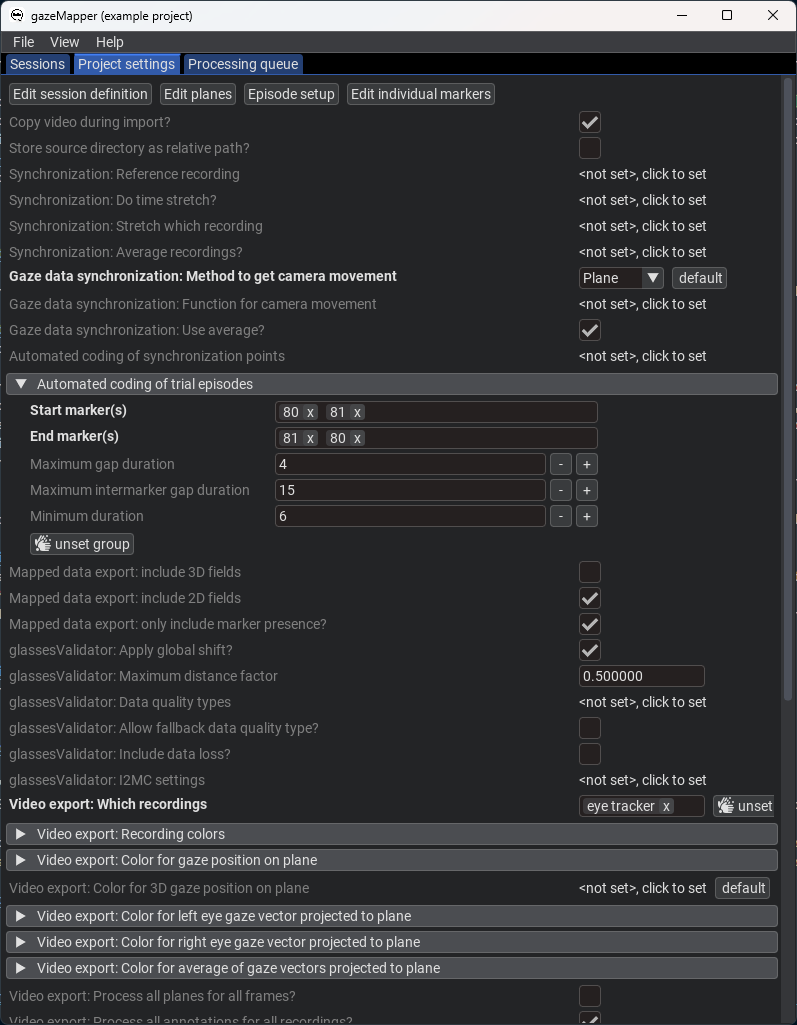
|
|
224
225
|
4. Now that the project is set up, we are ready to import and process recordings.
|
|
225
|
-
1. On the `Session` pane, click `import eye tracker recordings`. There, select the [folder containing the example data](https://github.com/dcnieho/gazeMapper/tree/master/example_data/1_simple/data) and indicate its an `SMI ETG` recording. Note that you could also trigger import by drag-dropping a data folder onto gazeMapper. Note also that an SMI ETG recording has to be [prepared](#required-preprocessing-outside-gazemapper) before it can be imported by gazeMapper. This preparation has already been performed for the included example data.
|
|
226
|
+
1. On the `Session` pane, click `import eye tracker recordings`. There, select the [folder containing the example data](https://github.com/dcnieho/gazeMapper/tree/master/example_data/1_simple/data) (`1_simple/data`) and indicate its an `SMI ETG` recording. Note that you could also trigger import by drag-dropping a data folder onto gazeMapper. Note also that an SMI ETG recording has to be [prepared](#required-preprocessing-outside-gazemapper) before it can be imported by gazeMapper. This preparation has already been performed for the included example data.
|
|
226
227
|
1. On the window that pops up, click `+ new session`, and name the session `1` (or any name you like). Expand session `1`. You should now see the following:
|
|
227
228
|
|
|
228
229
|

|
|
@@ -317,12 +318,12 @@ Nonetheless, below we provide a full description of how recording preparation, d
|
|
|
317
318
|
|
|
318
319
|
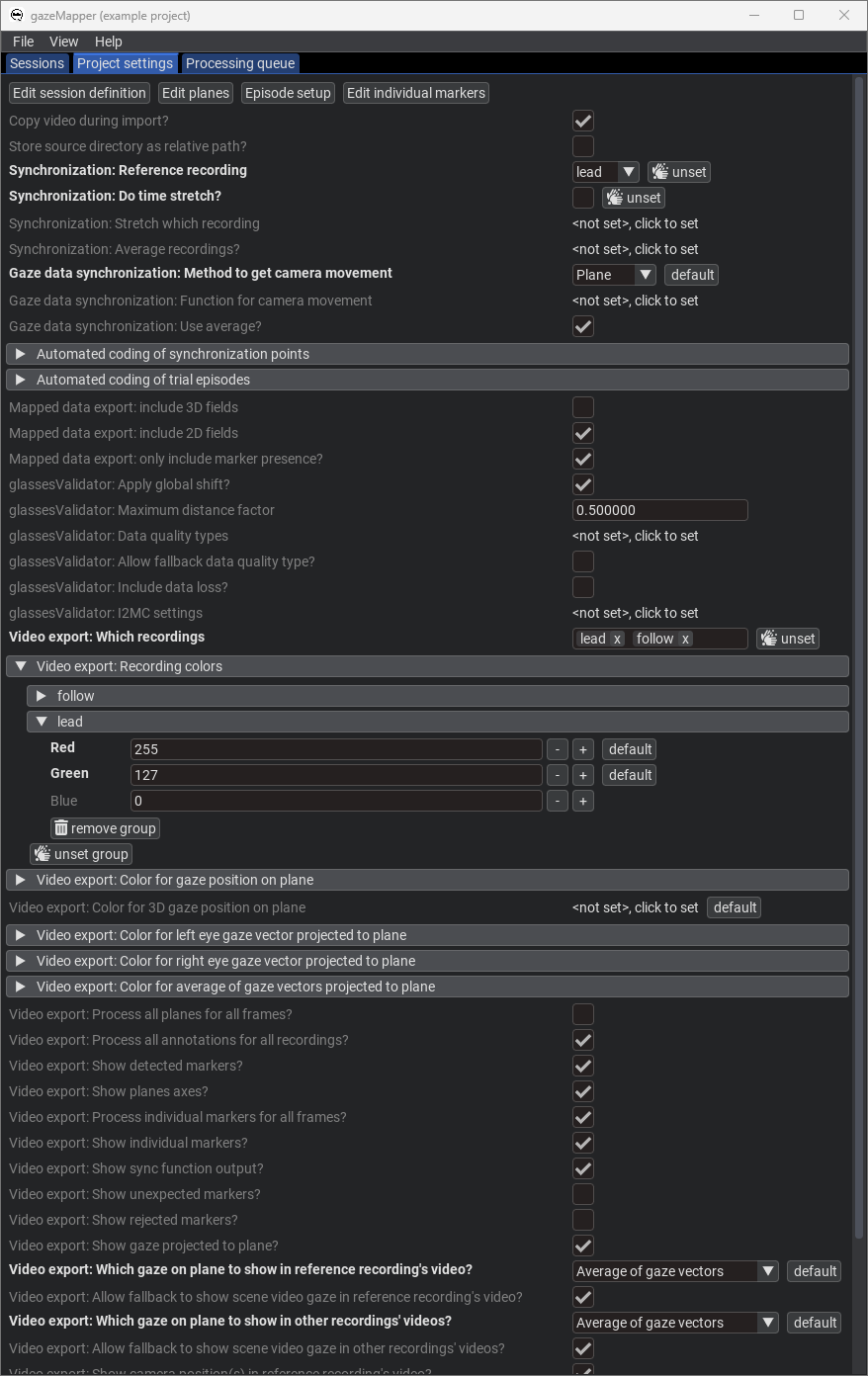
|
|
319
320
|
4. Now that the project is set up, we are ready to import and process recordings.
|
|
320
|
-
1. On the `Session` pane, click `import eye tracker recordings`. There, select the [folder containing the example data](https://github.com/dcnieho/gazeMapper/tree/master/example_data/2_two_participants_two_planes/data) and indicate you're looking for `Tobii Glasses 2` recordings. Note that you could also trigger import by drag-dropping a data folder onto gazeMapper.
|
|
321
|
+
1. On the `Session` pane, click `import eye tracker recordings`. There, select the [folder containing the example data](https://github.com/dcnieho/gazeMapper/tree/master/example_data/2_two_participants_two_planes/data) (`2_two_participants_two_planes/data`) and indicate you're looking for `Tobii Glasses 2` recordings. Note that you could also trigger import by drag-dropping a data folder onto gazeMapper.
|
|
321
322
|
1. On the window that pops up, click `+ new session`, and name the session `1` (or any name you like). Expand session `1`. You should now see the following:
|
|
322
323
|
|
|
323
324
|

|
|
324
325
|
1. Assign the recording to the session by dragging it from the right, and dropping it on the left for the `lead` recording where it says `drop recording here`. Click `Continue`. The recording will now be imported.
|
|
325
|
-
1. Again click `import eye tracker recordings`, select the [folder containing the example data](https://github.com/dcnieho/gazeMapper/tree/master/example_data/2_two_participants_two_planes/data) and this time indicate you're looking for `Pupil Invisible` recordings. Assign the found Pupil Invisible recording to the `follow` recording.
|
|
326
|
+
1. Again click `import eye tracker recordings`, select the [folder containing the example data](https://github.com/dcnieho/gazeMapper/tree/master/example_data/2_two_participants_two_planes/data) (`2_two_participants_two_planes/data`) and this time indicate you're looking for `Pupil Invisible` recordings. Assign the found Pupil Invisible recording to the `follow` recording.
|
|
326
327
|
|
|
327
328
|

|
|
328
329
|
|
|
@@ -416,12 +417,12 @@ Example 3 is a more advanced example, showing a recording of a participant looki
|
|
|
416
417
|
|
|
417
418
|
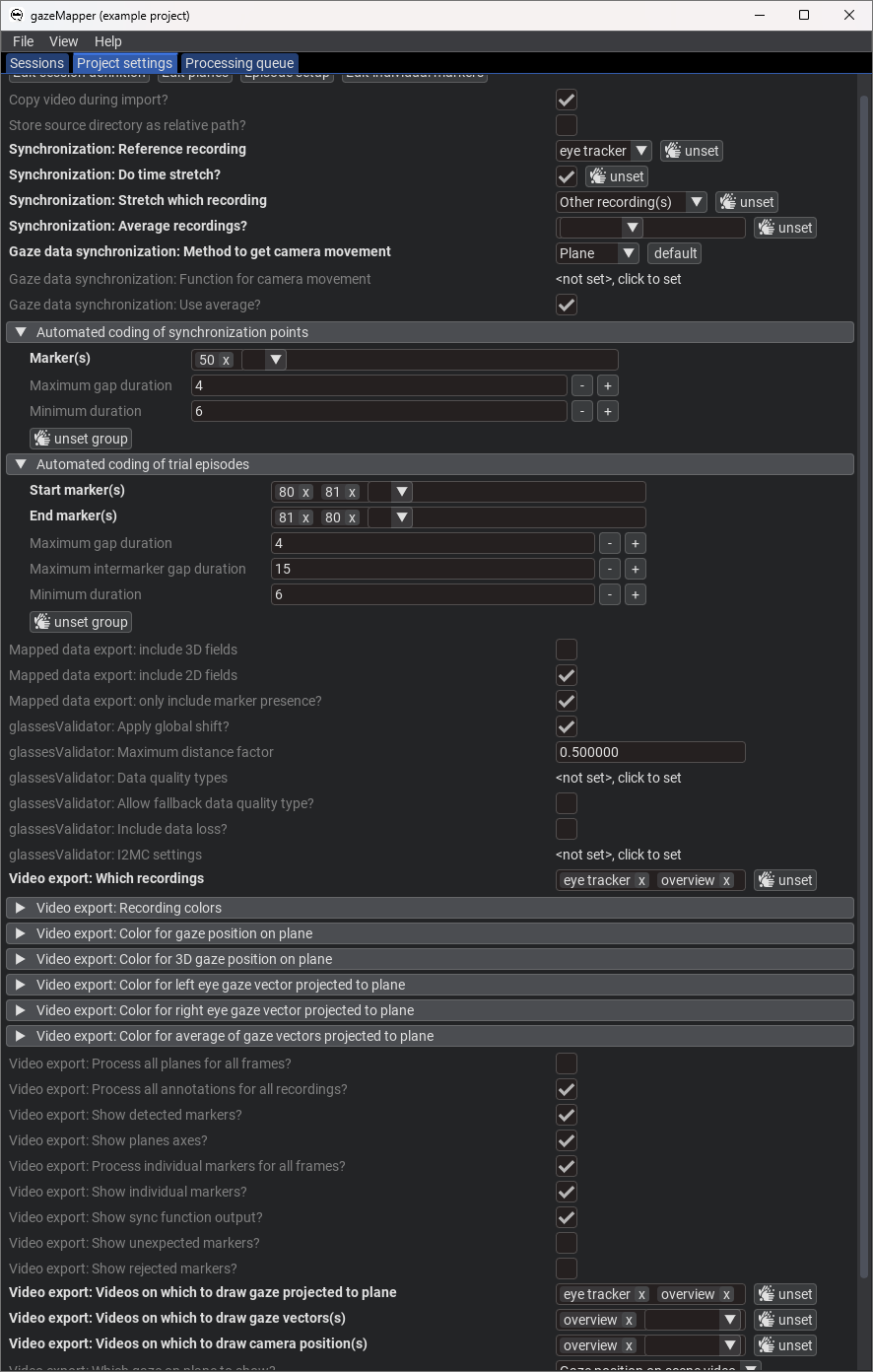
|
|
418
419
|
4. Now that the project is set up, we are ready to import and process recordings.
|
|
419
|
-
1. On the `Session` pane, click `import eye tracker recordings`. There, select the [folder containing the example data](https://github.com/dcnieho/gazeMapper/tree/master/example_data/3_external_camera_moving_plane/data) and indicate you're looking for `Pupil Invisible` recordings. Note that you could also trigger import by drag-dropping a data folder onto gazeMapper.
|
|
420
|
+
1. On the `Session` pane, click `import eye tracker recordings`. There, select the [folder containing the example data](https://github.com/dcnieho/gazeMapper/tree/master/example_data/3_external_camera_moving_plane/data) (`3_external_camera_moving_plane/data`) and indicate you're looking for `Pupil Invisible` recordings. Note that you could also trigger import by drag-dropping a data folder onto gazeMapper.
|
|
420
421
|
1. On the window that pops up, click `+ new session`, and name the session `1` (or any name you like). Expand session `1`. You should now see the following:
|
|
421
422
|
|
|
422
423
|

|
|
423
424
|
1. Assign the recording to the session by dragging it from the right, and dropping it on the left for the `eye tracker` recording where it says `drop recording here`. Click `Continue`. The recording will now be imported.
|
|
424
|
-
1. Click `import camera recordings`, select the [folder containing the example data](https://github.com/dcnieho/gazeMapper/tree/master/example_data/3_external_camera_moving_plane/data) and click continue. Assign the found camera recording (`cam1_R003_reencode.mp4`) to the `overview` recording.
|
|
425
|
+
1. Click `import camera recordings`, select the [folder containing the example data](https://github.com/dcnieho/gazeMapper/tree/master/example_data/3_external_camera_moving_plane/data) (`3_external_camera_moving_plane/data`) and click continue. Assign the found camera recording (`cam1_R003_reencode.mp4`) to the `overview` recording.
|
|
425
426
|
|
|
426
427
|

|
|
427
428
|
|
|
@@ -603,7 +604,7 @@ A generic 2D fiducial marker plane is defined by a file with four columns that d
|
|
|
603
604
|
| `y` |The vertical location of the marker's center on the plane (mm).|
|
|
604
605
|
| `rotation_angle` |The rotation of the marker, if any (degree).|
|
|
605
606
|
|
|
606
|
-
A file with this information should be stored under any name (e.g., `markerPositions.csv`) in the plane's configuration folder inside the project's configuration folder. See the example data for an example of such a file
|
|
607
|
+
A file with this information should be stored under any name (e.g., `markerPositions.csv`) in the plane's configuration folder inside the project's configuration folder. See the [example data](https://github.com/dcnieho/gazeMapper/blob/master/example_data/1_simple/configuration/screen/markerPositions_screen.csv) for an example of such a file.
|
|
607
608
|
|
|
608
609
|
To be able turn the information of the above file into a plane, further settings are needed:
|
|
609
610
|
| Setting | Description |
|
|
@@ -2,7 +2,7 @@
|
|
|
2
2
|
[](https://pypi.org/project/gazeMapper/)
|
|
3
3
|
[](https://pypi.org/project/gazeMapper/)
|
|
4
4
|
|
|
5
|
-
# gazeMapper v1.4.
|
|
5
|
+
# gazeMapper v1.4.3
|
|
6
6
|
Tool for automated world-based analysis of wearable eye tracker data.
|
|
7
7
|
gazeMapper is an open-source tool for automated mapping and processing of eye-tracking data to enable automated world-based analysis.
|
|
8
8
|
gazeMapper can:
|
|
@@ -169,7 +169,7 @@ Example 1 is a minimum example, showing a short recording where a participant lo
|
|
|
169
169
|
|
|
170
170
|

|
|
171
171
|
4. Now that the project is set up, we are ready to import and process recordings.
|
|
172
|
-
1. On the `Session` pane, click `import eye tracker recordings`. There, select the [folder containing the example data](https://github.com/dcnieho/gazeMapper/tree/master/example_data/1_simple/data) and indicate its an `SMI ETG` recording. Note that you could also trigger import by drag-dropping a data folder onto gazeMapper. Note also that an SMI ETG recording has to be [prepared](#required-preprocessing-outside-gazemapper) before it can be imported by gazeMapper. This preparation has already been performed for the included example data.
|
|
172
|
+
1. On the `Session` pane, click `import eye tracker recordings`. There, select the [folder containing the example data](https://github.com/dcnieho/gazeMapper/tree/master/example_data/1_simple/data) (`1_simple/data`) and indicate its an `SMI ETG` recording. Note that you could also trigger import by drag-dropping a data folder onto gazeMapper. Note also that an SMI ETG recording has to be [prepared](#required-preprocessing-outside-gazemapper) before it can be imported by gazeMapper. This preparation has already been performed for the included example data.
|
|
173
173
|
1. On the window that pops up, click `+ new session`, and name the session `1` (or any name you like). Expand session `1`. You should now see the following:
|
|
174
174
|
|
|
175
175
|

|
|
@@ -264,12 +264,12 @@ Nonetheless, below we provide a full description of how recording preparation, d
|
|
|
264
264
|
|
|
265
265
|

|
|
266
266
|
4. Now that the project is set up, we are ready to import and process recordings.
|
|
267
|
-
1. On the `Session` pane, click `import eye tracker recordings`. There, select the [folder containing the example data](https://github.com/dcnieho/gazeMapper/tree/master/example_data/2_two_participants_two_planes/data) and indicate you're looking for `Tobii Glasses 2` recordings. Note that you could also trigger import by drag-dropping a data folder onto gazeMapper.
|
|
267
|
+
1. On the `Session` pane, click `import eye tracker recordings`. There, select the [folder containing the example data](https://github.com/dcnieho/gazeMapper/tree/master/example_data/2_two_participants_two_planes/data) (`2_two_participants_two_planes/data`) and indicate you're looking for `Tobii Glasses 2` recordings. Note that you could also trigger import by drag-dropping a data folder onto gazeMapper.
|
|
268
268
|
1. On the window that pops up, click `+ new session`, and name the session `1` (or any name you like). Expand session `1`. You should now see the following:
|
|
269
269
|
|
|
270
270
|

|
|
271
271
|
1. Assign the recording to the session by dragging it from the right, and dropping it on the left for the `lead` recording where it says `drop recording here`. Click `Continue`. The recording will now be imported.
|
|
272
|
-
1. Again click `import eye tracker recordings`, select the [folder containing the example data](https://github.com/dcnieho/gazeMapper/tree/master/example_data/2_two_participants_two_planes/data) and this time indicate you're looking for `Pupil Invisible` recordings. Assign the found Pupil Invisible recording to the `follow` recording.
|
|
272
|
+
1. Again click `import eye tracker recordings`, select the [folder containing the example data](https://github.com/dcnieho/gazeMapper/tree/master/example_data/2_two_participants_two_planes/data) (`2_two_participants_two_planes/data`) and this time indicate you're looking for `Pupil Invisible` recordings. Assign the found Pupil Invisible recording to the `follow` recording.
|
|
273
273
|
|
|
274
274
|

|
|
275
275
|
|
|
@@ -363,12 +363,12 @@ Example 3 is a more advanced example, showing a recording of a participant looki
|
|
|
363
363
|
|
|
364
364
|

|
|
365
365
|
4. Now that the project is set up, we are ready to import and process recordings.
|
|
366
|
-
1. On the `Session` pane, click `import eye tracker recordings`. There, select the [folder containing the example data](https://github.com/dcnieho/gazeMapper/tree/master/example_data/3_external_camera_moving_plane/data) and indicate you're looking for `Pupil Invisible` recordings. Note that you could also trigger import by drag-dropping a data folder onto gazeMapper.
|
|
366
|
+
1. On the `Session` pane, click `import eye tracker recordings`. There, select the [folder containing the example data](https://github.com/dcnieho/gazeMapper/tree/master/example_data/3_external_camera_moving_plane/data) (`3_external_camera_moving_plane/data`) and indicate you're looking for `Pupil Invisible` recordings. Note that you could also trigger import by drag-dropping a data folder onto gazeMapper.
|
|
367
367
|
1. On the window that pops up, click `+ new session`, and name the session `1` (or any name you like). Expand session `1`. You should now see the following:
|
|
368
368
|
|
|
369
369
|

|
|
370
370
|
1. Assign the recording to the session by dragging it from the right, and dropping it on the left for the `eye tracker` recording where it says `drop recording here`. Click `Continue`. The recording will now be imported.
|
|
371
|
-
1. Click `import camera recordings`, select the [folder containing the example data](https://github.com/dcnieho/gazeMapper/tree/master/example_data/3_external_camera_moving_plane/data) and click continue. Assign the found camera recording (`cam1_R003_reencode.mp4`) to the `overview` recording.
|
|
371
|
+
1. Click `import camera recordings`, select the [folder containing the example data](https://github.com/dcnieho/gazeMapper/tree/master/example_data/3_external_camera_moving_plane/data) (`3_external_camera_moving_plane/data`) and click continue. Assign the found camera recording (`cam1_R003_reencode.mp4`) to the `overview` recording.
|
|
372
372
|
|
|
373
373
|

|
|
374
374
|
|
|
@@ -550,7 +550,7 @@ A generic 2D fiducial marker plane is defined by a file with four columns that d
|
|
|
550
550
|
| `y` |The vertical location of the marker's center on the plane (mm).|
|
|
551
551
|
| `rotation_angle` |The rotation of the marker, if any (degree).|
|
|
552
552
|
|
|
553
|
-
A file with this information should be stored under any name (e.g., `markerPositions.csv`) in the plane's configuration folder inside the project's configuration folder. See the example data for an example of such a file
|
|
553
|
+
A file with this information should be stored under any name (e.g., `markerPositions.csv`) in the plane's configuration folder inside the project's configuration folder. See the [example data](https://github.com/dcnieho/gazeMapper/blob/master/example_data/1_simple/configuration/screen/markerPositions_screen.csv) for an example of such a file.
|
|
554
554
|
|
|
555
555
|
To be able turn the information of the above file into a plane, further settings are needed:
|
|
556
556
|
| Setting | Description |
|
|
@@ -1,4 +1,4 @@
|
|
|
1
|
-
glassesTools[GUI]>=1.16.
|
|
1
|
+
glassesTools[GUI]>=1.16.1 # pulls in various other dependencies such as imgui_bundle, matplotlib, numpy, opencv, pandas, polars
|
|
2
2
|
typeguard
|
|
3
3
|
uvloop ; sys_platform != "win32"
|
|
4
4
|
watchfiles
|
|
@@ -131,7 +131,7 @@ def _draw_impl(obj: _C, fields: list[str], types: dict[str, typing.Type], defaul
|
|
|
131
131
|
ret_new_obj = False
|
|
132
132
|
removed_field = None
|
|
133
133
|
for f in fields:
|
|
134
|
-
if actual_types and f in actual_types and not isinstance(actual_types[f],dict):
|
|
134
|
+
if isinstance(actual_types,dict) and f in actual_types and not isinstance(actual_types[f],dict):
|
|
135
135
|
tp = actual_types[f]
|
|
136
136
|
else:
|
|
137
137
|
tp = types[f] if f in types else list(types.values())[0] # backup only needed when we have an invalid config (e.g. trying to show planes_per_episode entry for an episode that is no longer set to be coded)
|
|
@@ -268,19 +268,21 @@ class Study:
|
|
|
268
268
|
case annotation.Event.Trial:
|
|
269
269
|
allow_one_plane = allow_more_than_one = True
|
|
270
270
|
if not allow_one_plane:
|
|
271
|
-
msg = f'No planes should be defined for a {e
|
|
271
|
+
msg = f'No planes should be defined for a {annotation.tooltip_map[e]}. Remove entry, even if its empty.'
|
|
272
|
+
if e==annotation.Event.Sync_ET_Data:
|
|
273
|
+
msg += ' Alternatively, you may want to set the get_cam_movement_for_et_sync_method on the main options panel to "Plane".'
|
|
272
274
|
if strict_check:
|
|
273
275
|
raise ValueError(msg)
|
|
274
276
|
else:
|
|
275
277
|
type_utils.merge_problem_dicts(problems, {'planes_per_episode': {e: msg}})
|
|
276
278
|
elif not self.planes_per_episode[e]:
|
|
277
|
-
msg = ('At least one' if allow_more_than_one else 'One')+f' plane should be defined for a {e
|
|
279
|
+
msg = ('At least one' if allow_more_than_one else 'One')+f' plane should be defined for a {annotation.tooltip_map[e]}'
|
|
278
280
|
if strict_check:
|
|
279
281
|
raise ValueError(msg)
|
|
280
282
|
else:
|
|
281
283
|
type_utils.merge_problem_dicts(problems, {'planes_per_episode': {e: msg}})
|
|
282
284
|
if not allow_more_than_one and len(self.planes_per_episode[e])>1:
|
|
283
|
-
msg = f'Only one plane should be defined for a {e
|
|
285
|
+
msg = f'Only one plane should be defined for a {annotation.tooltip_map[e]}'
|
|
284
286
|
if strict_check:
|
|
285
287
|
raise ValueError(msg)
|
|
286
288
|
else:
|
|
@@ -288,7 +290,7 @@ class Study:
|
|
|
288
290
|
|
|
289
291
|
for e in self.episodes_to_code:
|
|
290
292
|
if e not in self.planes_per_episode and e!=annotation.Event.Sync_Camera and (e==annotation.Event.Sync_ET_Data and self.get_cam_movement_for_et_sync_method=='plane'):
|
|
291
|
-
msg = f'{e
|
|
293
|
+
msg = f'{annotation.tooltip_map[e]}s are set up to be coded and require an associated plane, but no plane(s) are defined in planes_per_episode for {annotation.tooltip_map[e]}s'
|
|
292
294
|
if strict_check:
|
|
293
295
|
raise ValueError(msg)
|
|
294
296
|
else:
|
|
@@ -300,15 +302,15 @@ class Study:
|
|
|
300
302
|
if not self.episodes_to_code:
|
|
301
303
|
type_utils.merge_problem_dicts(problems, {'episodes_to_code': 'At minimum one episode should be selected to be coded'})
|
|
302
304
|
if annotation.Event.Sync_ET_Data in self.episodes_to_code and self.get_cam_movement_for_et_sync_method=='':
|
|
303
|
-
type_utils.merge_problem_dicts(problems, {'episodes_to_code': f'{annotation.Event.Sync_ET_Data
|
|
305
|
+
type_utils.merge_problem_dicts(problems, {'episodes_to_code': f'{annotation.tooltip_map[annotation.Event.Sync_ET_Data]} should not be listed in the episodes to be coded if there is no method for plane synchronization (get_cam_movement_for_et_sync_method) specified.'})
|
|
304
306
|
|
|
305
307
|
for e in self.planes_per_episode:
|
|
306
308
|
if e not in self.episodes_to_code:
|
|
307
309
|
if strict_check:
|
|
308
|
-
raise ValueError(f'Plane(s) are defined in planes_per_episode for {e
|
|
310
|
+
raise ValueError(f'Plane(s) are defined in planes_per_episode for {annotation.tooltip_map[e]}s, but {annotation.tooltip_map[e]}s are not set up to be coded in episodes_to_code. Fix episodes_to_code.')
|
|
309
311
|
else:
|
|
310
|
-
type_utils.merge_problem_dicts(problems, {'episodes_to_code': f'Plane(s) are defined in planes_per_episode for {e
|
|
311
|
-
type_utils.merge_problem_dicts(problems, {'planes_per_episode': {e: f'{e
|
|
312
|
+
type_utils.merge_problem_dicts(problems, {'episodes_to_code': f'Plane(s) are defined in planes_per_episode for {annotation.tooltip_map[e]}s, but {annotation.tooltip_map[e]}s are not set up to be coded'})
|
|
313
|
+
type_utils.merge_problem_dicts(problems, {'planes_per_episode': {e: f'{annotation.tooltip_map[e]}s are not set up to be coded in episodes_to_code, so no plane(s) should be set up for {annotation.tooltip_map[e]}s.'}})
|
|
312
314
|
return problems
|
|
313
315
|
|
|
314
316
|
def _check_auto_coding_setup(self, strict_check) -> type_utils.ProblemDict:
|
|
@@ -402,8 +404,8 @@ class Study:
|
|
|
402
404
|
if strict_check:
|
|
403
405
|
raise ValueError('when sync_ref_recording is set, coding of camera sync points should be set up in episodes_to_code')
|
|
404
406
|
else:
|
|
405
|
-
problems['episodes_to_code'] = f'if sync_ref_recording is set, {annotation.Event.Sync_Camera
|
|
406
|
-
type_utils.merge_problem_dicts(problems, {'sync_ref_recording': f'sync_ref_recording is set, but {annotation.Event.Sync_Camera
|
|
407
|
+
problems['episodes_to_code'] = f'if sync_ref_recording is set, {annotation.tooltip_map[annotation.Event.Sync_Camera]}s should be set up to be coded'
|
|
408
|
+
type_utils.merge_problem_dicts(problems, {'sync_ref_recording': f'sync_ref_recording is set, but {annotation.tooltip_map[annotation.Event.Sync_Camera]}s are not set up to be coded in episodes_to_code'})
|
|
407
409
|
return problems
|
|
408
410
|
|
|
409
411
|
def _check_et_sync_method(self, strict_check) -> type_utils.ProblemDict:
|
|
@@ -1,6 +1,6 @@
|
|
|
1
|
-
Metadata-Version: 2.
|
|
1
|
+
Metadata-Version: 2.4
|
|
2
2
|
Name: gazeMapper
|
|
3
|
-
Version: 1.4.
|
|
3
|
+
Version: 1.4.3
|
|
4
4
|
Summary: Automated world-based analysis of wearable eye tracker data.
|
|
5
5
|
Home-page: https://github.com/dcnieho/gazeMapper
|
|
6
6
|
Author: Diederick Niehorster
|
|
@@ -34,7 +34,7 @@ Classifier: Operating System :: OS Independent
|
|
|
34
34
|
Requires-Python: >=3.11
|
|
35
35
|
Description-Content-Type: text/markdown
|
|
36
36
|
License-File: LICENSE
|
|
37
|
-
Requires-Dist: glassesTools[GUI]>=1.16.
|
|
37
|
+
Requires-Dist: glassesTools[GUI]>=1.16.1
|
|
38
38
|
Requires-Dist: typeguard
|
|
39
39
|
Requires-Dist: uvloop; sys_platform != "win32"
|
|
40
40
|
Requires-Dist: watchfiles
|
|
@@ -46,6 +46,7 @@ Dynamic: description
|
|
|
46
46
|
Dynamic: description-content-type
|
|
47
47
|
Dynamic: home-page
|
|
48
48
|
Dynamic: license
|
|
49
|
+
Dynamic: license-file
|
|
49
50
|
Dynamic: project-url
|
|
50
51
|
Dynamic: requires-dist
|
|
51
52
|
Dynamic: requires-python
|
|
@@ -55,7 +56,7 @@ Dynamic: summary
|
|
|
55
56
|
[](https://pypi.org/project/gazeMapper/)
|
|
56
57
|
[](https://pypi.org/project/gazeMapper/)
|
|
57
58
|
|
|
58
|
-
# gazeMapper v1.4.
|
|
59
|
+
# gazeMapper v1.4.3
|
|
59
60
|
Tool for automated world-based analysis of wearable eye tracker data.
|
|
60
61
|
gazeMapper is an open-source tool for automated mapping and processing of eye-tracking data to enable automated world-based analysis.
|
|
61
62
|
gazeMapper can:
|
|
@@ -222,7 +223,7 @@ Example 1 is a minimum example, showing a short recording where a participant lo
|
|
|
222
223
|
|
|
223
224
|

|
|
224
225
|
4. Now that the project is set up, we are ready to import and process recordings.
|
|
225
|
-
1. On the `Session` pane, click `import eye tracker recordings`. There, select the [folder containing the example data](https://github.com/dcnieho/gazeMapper/tree/master/example_data/1_simple/data) and indicate its an `SMI ETG` recording. Note that you could also trigger import by drag-dropping a data folder onto gazeMapper. Note also that an SMI ETG recording has to be [prepared](#required-preprocessing-outside-gazemapper) before it can be imported by gazeMapper. This preparation has already been performed for the included example data.
|
|
226
|
+
1. On the `Session` pane, click `import eye tracker recordings`. There, select the [folder containing the example data](https://github.com/dcnieho/gazeMapper/tree/master/example_data/1_simple/data) (`1_simple/data`) and indicate its an `SMI ETG` recording. Note that you could also trigger import by drag-dropping a data folder onto gazeMapper. Note also that an SMI ETG recording has to be [prepared](#required-preprocessing-outside-gazemapper) before it can be imported by gazeMapper. This preparation has already been performed for the included example data.
|
|
226
227
|
1. On the window that pops up, click `+ new session`, and name the session `1` (or any name you like). Expand session `1`. You should now see the following:
|
|
227
228
|
|
|
228
229
|

|
|
@@ -317,12 +318,12 @@ Nonetheless, below we provide a full description of how recording preparation, d
|
|
|
317
318
|
|
|
318
319
|

|
|
319
320
|
4. Now that the project is set up, we are ready to import and process recordings.
|
|
320
|
-
1. On the `Session` pane, click `import eye tracker recordings`. There, select the [folder containing the example data](https://github.com/dcnieho/gazeMapper/tree/master/example_data/2_two_participants_two_planes/data) and indicate you're looking for `Tobii Glasses 2` recordings. Note that you could also trigger import by drag-dropping a data folder onto gazeMapper.
|
|
321
|
+
1. On the `Session` pane, click `import eye tracker recordings`. There, select the [folder containing the example data](https://github.com/dcnieho/gazeMapper/tree/master/example_data/2_two_participants_two_planes/data) (`2_two_participants_two_planes/data`) and indicate you're looking for `Tobii Glasses 2` recordings. Note that you could also trigger import by drag-dropping a data folder onto gazeMapper.
|
|
321
322
|
1. On the window that pops up, click `+ new session`, and name the session `1` (or any name you like). Expand session `1`. You should now see the following:
|
|
322
323
|
|
|
323
324
|

|
|
324
325
|
1. Assign the recording to the session by dragging it from the right, and dropping it on the left for the `lead` recording where it says `drop recording here`. Click `Continue`. The recording will now be imported.
|
|
325
|
-
1. Again click `import eye tracker recordings`, select the [folder containing the example data](https://github.com/dcnieho/gazeMapper/tree/master/example_data/2_two_participants_two_planes/data) and this time indicate you're looking for `Pupil Invisible` recordings. Assign the found Pupil Invisible recording to the `follow` recording.
|
|
326
|
+
1. Again click `import eye tracker recordings`, select the [folder containing the example data](https://github.com/dcnieho/gazeMapper/tree/master/example_data/2_two_participants_two_planes/data) (`2_two_participants_two_planes/data`) and this time indicate you're looking for `Pupil Invisible` recordings. Assign the found Pupil Invisible recording to the `follow` recording.
|
|
326
327
|
|
|
327
328
|

|
|
328
329
|
|
|
@@ -416,12 +417,12 @@ Example 3 is a more advanced example, showing a recording of a participant looki
|
|
|
416
417
|
|
|
417
418
|

|
|
418
419
|
4. Now that the project is set up, we are ready to import and process recordings.
|
|
419
|
-
1. On the `Session` pane, click `import eye tracker recordings`. There, select the [folder containing the example data](https://github.com/dcnieho/gazeMapper/tree/master/example_data/3_external_camera_moving_plane/data) and indicate you're looking for `Pupil Invisible` recordings. Note that you could also trigger import by drag-dropping a data folder onto gazeMapper.
|
|
420
|
+
1. On the `Session` pane, click `import eye tracker recordings`. There, select the [folder containing the example data](https://github.com/dcnieho/gazeMapper/tree/master/example_data/3_external_camera_moving_plane/data) (`3_external_camera_moving_plane/data`) and indicate you're looking for `Pupil Invisible` recordings. Note that you could also trigger import by drag-dropping a data folder onto gazeMapper.
|
|
420
421
|
1. On the window that pops up, click `+ new session`, and name the session `1` (or any name you like). Expand session `1`. You should now see the following:
|
|
421
422
|
|
|
422
423
|

|
|
423
424
|
1. Assign the recording to the session by dragging it from the right, and dropping it on the left for the `eye tracker` recording where it says `drop recording here`. Click `Continue`. The recording will now be imported.
|
|
424
|
-
1. Click `import camera recordings`, select the [folder containing the example data](https://github.com/dcnieho/gazeMapper/tree/master/example_data/3_external_camera_moving_plane/data) and click continue. Assign the found camera recording (`cam1_R003_reencode.mp4`) to the `overview` recording.
|
|
425
|
+
1. Click `import camera recordings`, select the [folder containing the example data](https://github.com/dcnieho/gazeMapper/tree/master/example_data/3_external_camera_moving_plane/data) (`3_external_camera_moving_plane/data`) and click continue. Assign the found camera recording (`cam1_R003_reencode.mp4`) to the `overview` recording.
|
|
425
426
|
|
|
426
427
|

|
|
427
428
|
|
|
@@ -603,7 +604,7 @@ A generic 2D fiducial marker plane is defined by a file with four columns that d
|
|
|
603
604
|
| `y` |The vertical location of the marker's center on the plane (mm).|
|
|
604
605
|
| `rotation_angle` |The rotation of the marker, if any (degree).|
|
|
605
606
|
|
|
606
|
-
A file with this information should be stored under any name (e.g., `markerPositions.csv`) in the plane's configuration folder inside the project's configuration folder. See the example data for an example of such a file
|
|
607
|
+
A file with this information should be stored under any name (e.g., `markerPositions.csv`) in the plane's configuration folder inside the project's configuration folder. See the [example data](https://github.com/dcnieho/gazeMapper/blob/master/example_data/1_simple/configuration/screen/markerPositions_screen.csv) for an example of such a file.
|
|
607
608
|
|
|
608
609
|
To be able turn the information of the above file into a plane, further settings are needed:
|
|
609
610
|
| Setting | Description |
|
|
File without changes
|
|
File without changes
|
|
File without changes
|
|
File without changes
|
|
File without changes
|
|
File without changes
|
|
File without changes
|
|
File without changes
|
|
File without changes
|
|
File without changes
|
|
File without changes
|
|
File without changes
|
|
File without changes
|
|
File without changes
|
|
File without changes
|
|
File without changes
|
|
File without changes
|
|
File without changes
|
|
File without changes
|
|
File without changes
|
|
File without changes
|
|
File without changes
|
|
File without changes
|
|
File without changes
|
|
File without changes
|
|
File without changes
|
|
File without changes
|
|
File without changes
|
|
File without changes
|
|
File without changes
|
|
File without changes
|
|
File without changes
|
|
File without changes
|
|
File without changes
|
|
File without changes
|
|
File without changes
|
|
File without changes
|
|
File without changes
|
|
File without changes
|
|
File without changes
|
|
File without changes
|
|
File without changes
|
|
File without changes
|